


Shopify automates who is allowed to return what, but not who answers the ticket. Set return rules, turn on self-serve returns, and add Flow alerts for return events, then add a returns app like Loop only if you need labels, exchanges or fraud checks. The tickets that remain ("can I return this?", "where is my refund?") need an AI agent that reads the order. eesel does that from $299 a month, starts returns, and hands damaged items and out-of-window requests to a person.
With the eesel CLI, an AI coding agent can upload your return policy and saved replies, then ask test questions like "can I return an opened item?" and check the answers before anything goes live. Connecting the Shopify store itself still needs the store owner to approve access in the browser.
Why do Shopify return tickets pile up even with self-serve returns on?
I help build eesel's AI agents, and when I read Shopify's return docs end to end for this guide, one thing stood out. Shopify automates the rules, not the decisions. A customer's request is checked against your return window and final sale items automatically, but after that every request waits for you: you approve or decline it, you add exchange items, you send the label, you inspect the parcel, and you issue the refund. I did not find an auto-approve setting in those pages.
That is a good default for a store that wants control. It is a bad one if your inbox fills with "I requested a return three days ago, now what?" messages. Those tickets are not return requests. They are status questions, a big slice of the WISMO automation problem, and Shopify's tools were never built to answer them.
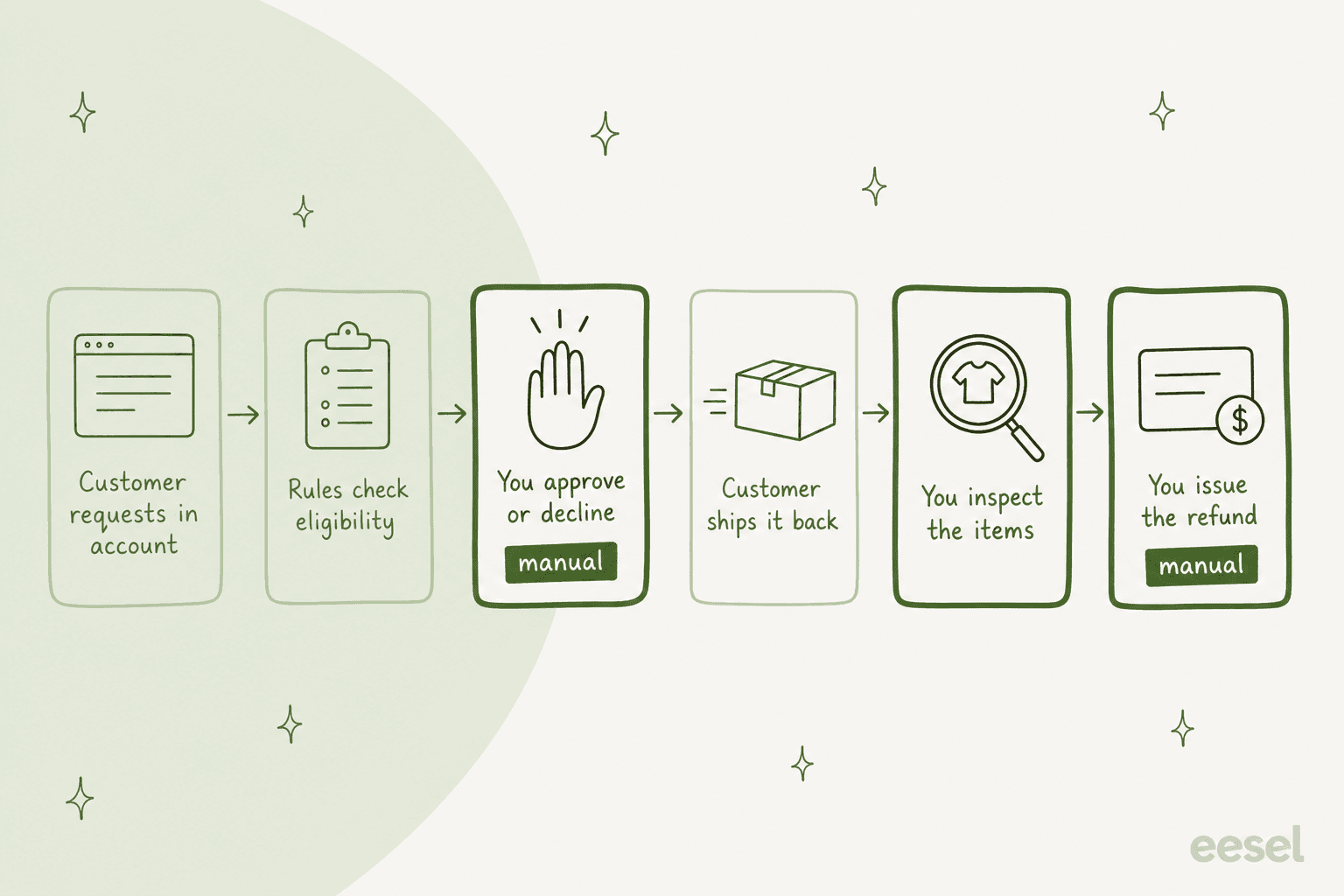
So the plan in this guide has two halves. First, use what Shopify gives you free to cut the number of return requests that need typing. Second, put an AI agent in front of the tickets that are left. If you want the general version of this playbook, my guide on how to automate returns covers it for any platform, and the WooCommerce version covers the other big store builder.
What do you need before you start?
- A Shopify store with access to Settings > Policies and the Orders page. To review requests you need to be the store owner or have the Orders permission.
- Customers who can sign in to the new version of customer accounts. Legacy accounts do not show return options.
- A written return policy, even a rough one. Every later step reads from it.
- A helpdesk such as Gorgias, Zendesk or Freshdesk, or the website chat, for step 5. If you are choosing one, best AI helpdesk for Shopify compares them.
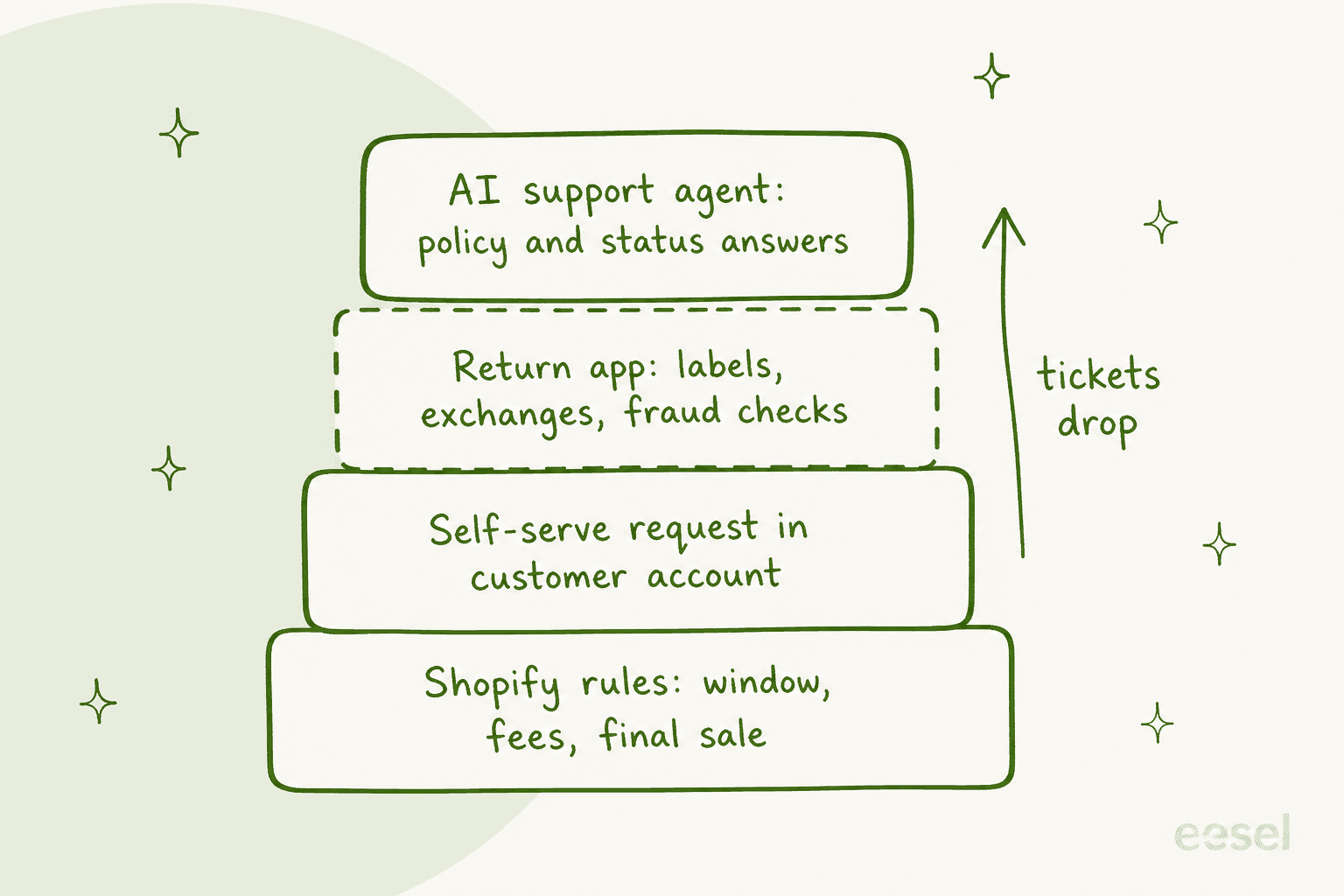
Step 1: How do you set Shopify return rules?
Return rules are the cheapest automation on this list, because they answer the "am I allowed to return this?" question before a customer ever writes in. Go to Settings > Policies, open Return and cancellation rules, and set these four things, all described in Shopify's rules guide:
- Return window. Pick no returns, 14, 30 or 90 days, unlimited, or a custom number. Choose whether the clock starts at each item's delivery or at the last item in the order.
- Return shipping. Free, a flat rate charged once per return, or the customer buys their own label.
- Restocking fee. An optional percentage of the return.
- Final sale items. Products or collections that cannot be returned at all, such as perishable or custom items.
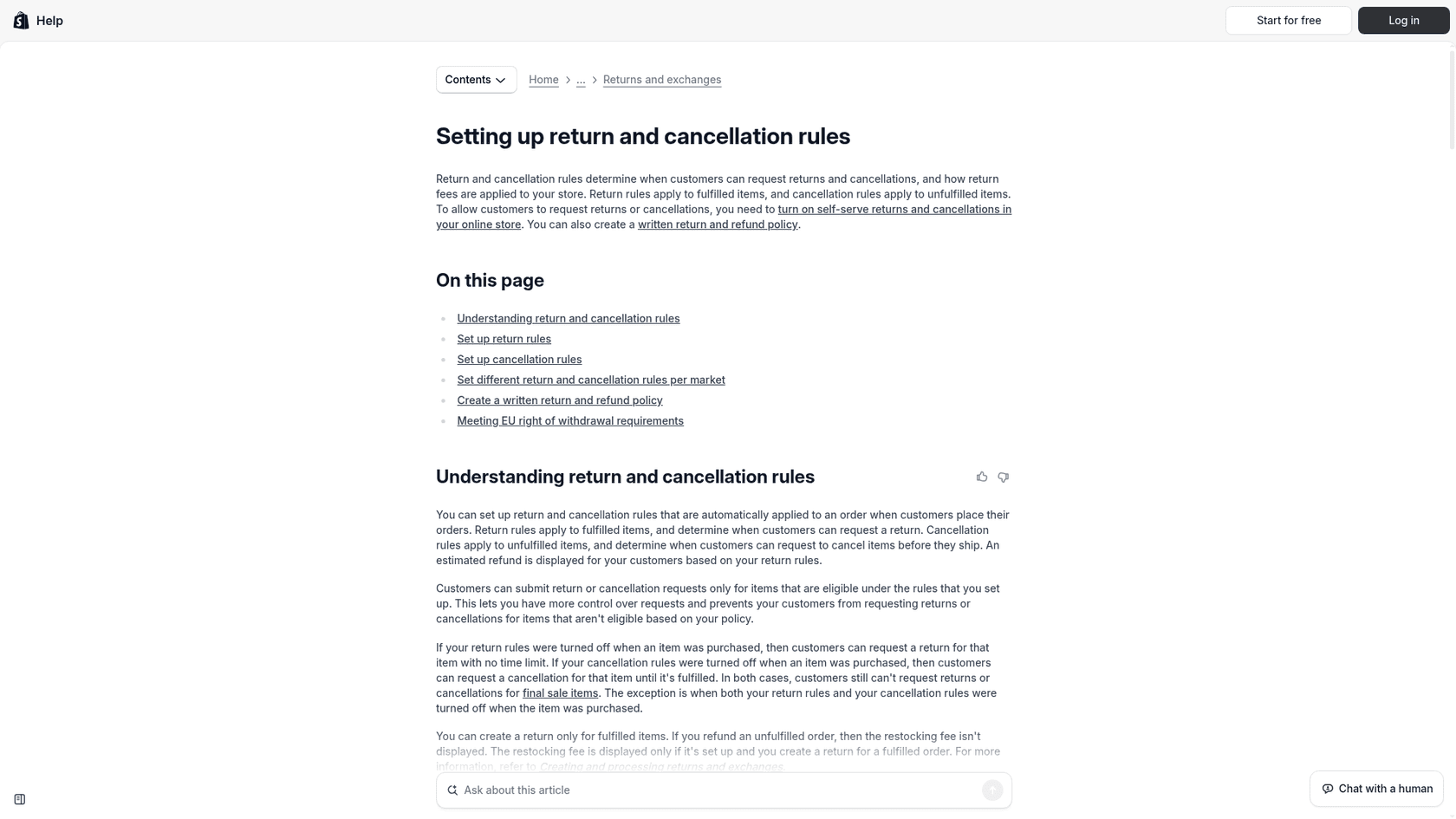
Rules settings, as taken from the Shopify Help Center.
Three details trip people up. Rule changes only apply to future orders, so an old order keeps the window it was bought under. If you turn return rules off, customers can request a return with no time limit, so choose No returns instead of switching the rules off. And return fees are not deducted from refunds automatically: when you refund, you deduct them yourself.
Use return window overrides for the awkward cases. Shopify's own example is a 30-day default, a 14-day override for a clearance collection and a 90-day override for furniture. If a product sits in two overrides, the shortest window wins. Write those exceptions down, because they are exactly what your AI agent needs in step 5, and saved replies like these refund and exchange macros are a good place to keep them.
Step 2: How do you turn on self-serve returns?
Self-serve returns let customers request a return from their order status page without writing to you. Shopify describes the setup as activating the feature in the checkout and accounts editor, or in your Customer accounts settings if there is no Order actions section. Then make sure customers can reach the new customer accounts, by sign-in or by adding the accounts URL to your footer or refund policy page.
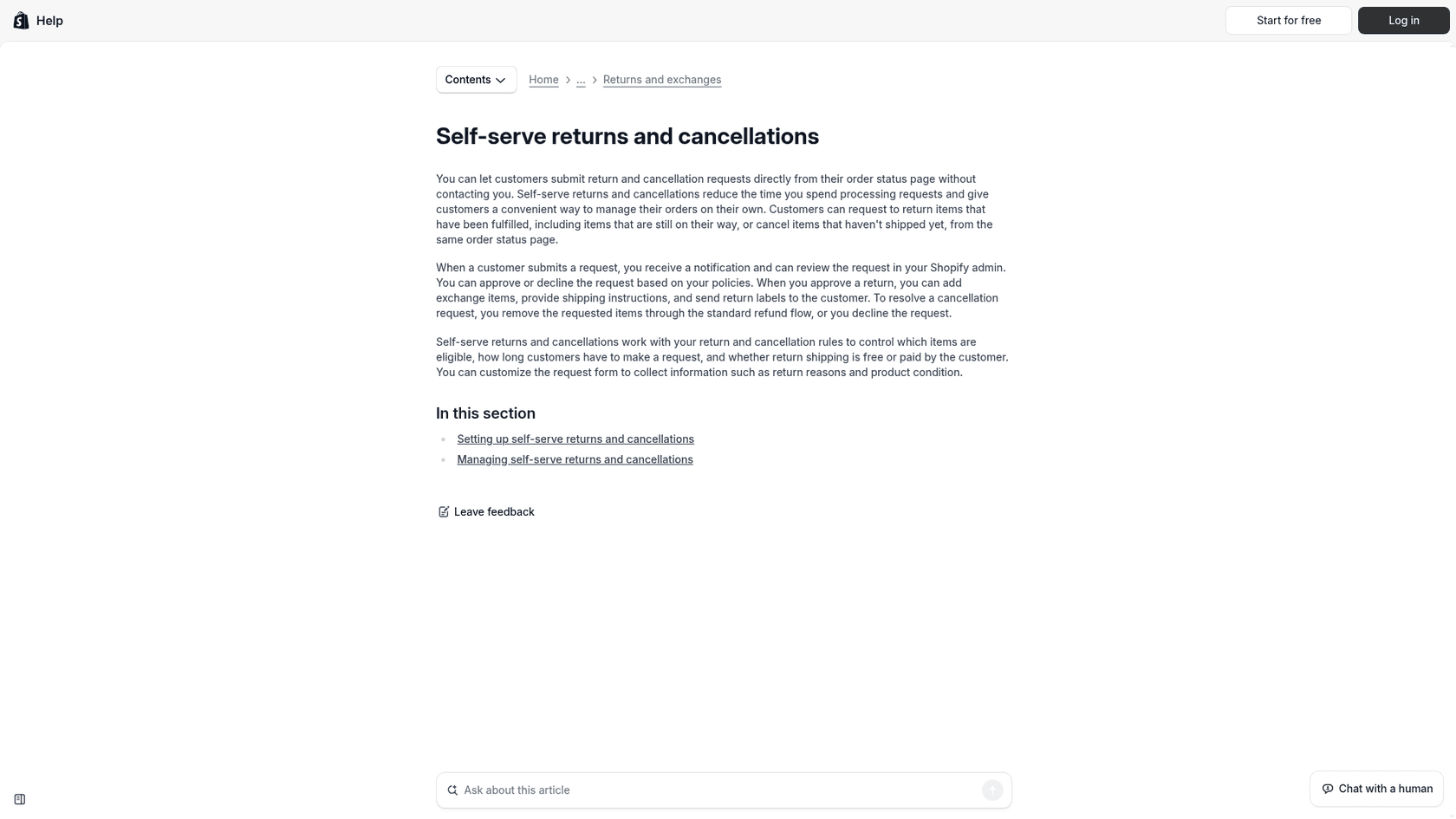
Self-serve returns overview, as taken from the Shopify Help Center.
Know the limits before you promise customers anything:
- No exchanges in the request form. Exchanges cannot be requested through self-serve returns, so "can I swap this for a medium?" still becomes a ticket.
- A person decides every request. You get an email, then approve or decline in the admin, using the Customer request filter on the Orders page.
- Labels are US and Canada only. Shopify can create return labels in the admin when the customer's address is in the United States or Canada and you have a location in the same country.
- Cancellations do not cancel subscriptions. A subscription contract needs its own cancellation.
If you want the agent to gather the reason first, Gorgias pattern for return reasons shows the idea. Customise the request form to collect a return reason and product condition. Those two fields are what let you (or an AI agent) triage later without asking the customer anything twice.
Step 3: How do you use Shopify Flow for return events?
Shopify Flow is where "approve or decline" can start to move without you. It runs on store events, and Shopify lists these return triggers: Return requested, approved, declined, processed, closed, cancelled and reopened. The Return requested trigger fires when a customer uses self-serve returns, and it hands the workflow the return and its order, so you can add order and customer tags or loop through line items.
Shopify ships a template, "Get notified on Slack when a customer requests a return", that is a quick win if your team lives in Slack. Beyond that, I would build two small workflows:
- Tag high-value returns. On Return requested, check the order total and add a tag such as
return-review, so a person looks at it before it is approved. - Tag repeat returners. Add a customer tag when someone has several returns, so the helpdesk can route their tickets differently.
The honest limit: Flow never reads a customer's message. The actions list I read includes Cancel return, Close return and Reopen return, and I did not see an approve action there, so Flow tags and alerts but does not make the decision. My longer guide on Shopify Flow for customer support covers the tag-then-AI pattern, and the general Shopify automation post covers the rest of the store.
Step 4: Do you need a returns app on top of Shopify?
Only if you want something Shopify's native flow does not do: prepaid labels outside the US and Canada, instant exchanges, store credit incentives, fraud scoring or an auto-approve rule. The three names I see most are Loop, AfterShip Returns and Redo. All prices below are from the vendors' own pages and I checked them on 25 November 2026.
| Loop | AfterShip Returns | Redo | |
|---|---|---|---|
| Entry price | Returns from $340 a month | Essentials $245 a month, $205 billed annually | Returns portal free |
| Volume on that price | Up to 1,000 returns a year | Up to 500 returns a month | Not capped on the page |
| Free tier | Checkout+ is free if you qualify on order and return volume | Free trial | Free portal, Redo says it covers return labels |
| Contract | Annual on Returns, month-to-month on Checkout+ | Monthly or annual | Not stated on the page |
| AI feature named | Fraud prevention | AI agent for setup and Q&A, RMA review on Premium | Return-specific AI agents |
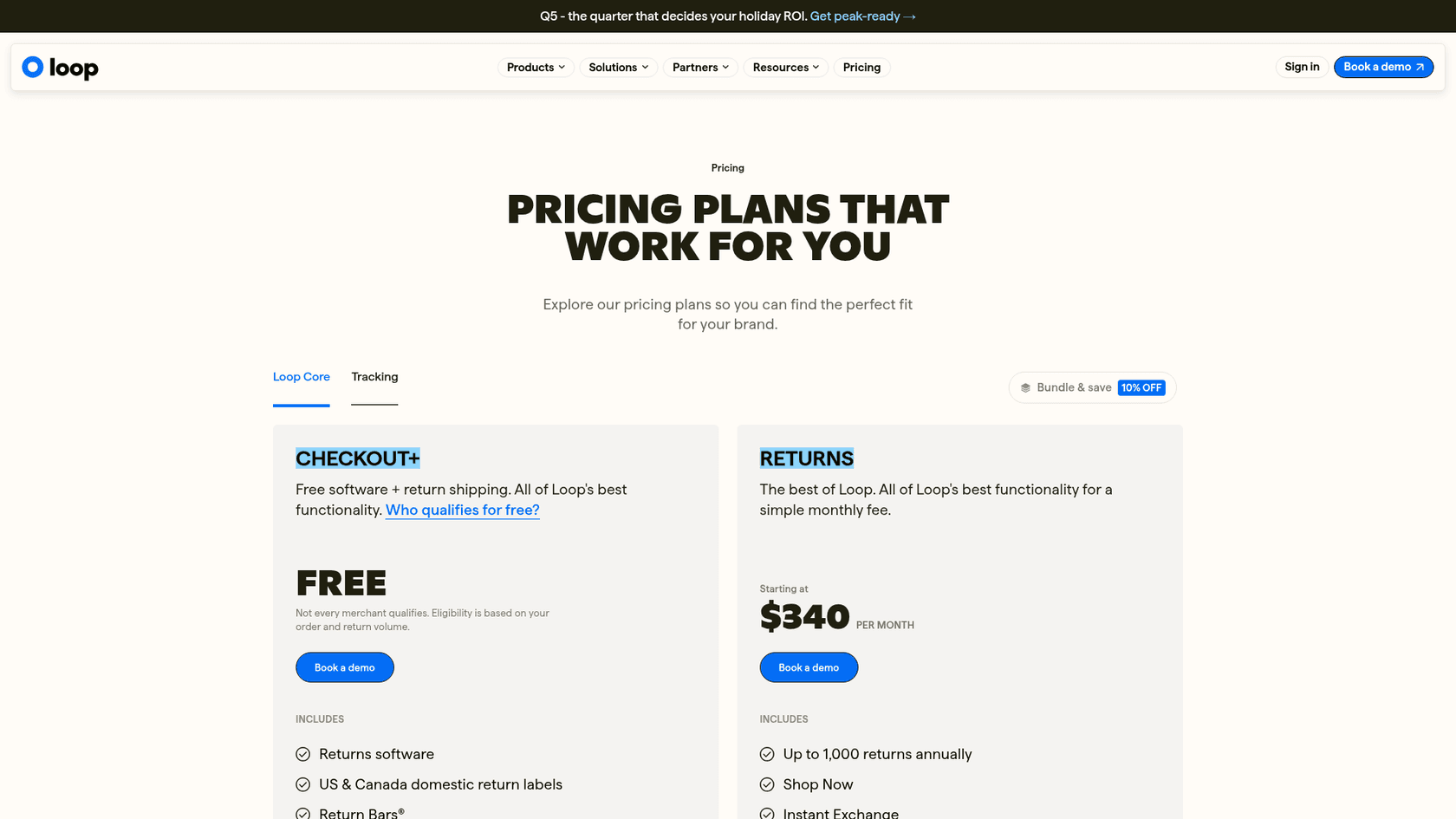
Loop's plans, as taken from the Loop pricing page.

Redo's returns card, as taken from the Redo pricing page.
Notice what these apps automate. They handle the return itself: the portal, the label, the exchange, the fraud check. AfterShip's pricing page lists "auto-approve return requests" as a feature, which is the step Shopify's native flow leaves manual. None of them is a support inbox. If you only use macros today, guiding returns without a portal is a workable bridge. When a customer writes "my return was approved, where is the money?", the app has the data but someone still has to reply, and AfterShip lists Gorgias and Zendesk among its pre-built integrations so return data can reach the helpdesk.
My rule of thumb: if you get fewer than a few hundred returns a month and sell mostly in the US and Canada, native Shopify plus Flow is enough. Reach for an app when exchanges, labels abroad or abuse make the manual steps hurt. Either way, the support layer in the next step is the same.
Step 5: How do you automate the return tickets that are left?
This is the half Shopify and the returns apps leave open, and it is where most of the inbox time goes. Most return tickets fall into four types: policy questions ("can I return a worn item?"), status questions ("where is my refund?"), start-a-return requests and edge cases. An AI agent connected to your helpdesk and your store can take the first three, as I explain in AI handling refunds and returns. My AI for returns management post and the best AI for returns roundup compare the options; here is how it works with eesel and Shopify.
- Connect Shopify with a full connection. eesel's Shopify docs say a full connection reads orders, customers, tracking and refunds live. The store owner approves it in a browser, and it reads your refund policy and pages as knowledge.
- Let it read the return state. An order lookup can include refunds and where each return stands, so "where is my refund?" gets a real answer instead of "let me check".
- Give it write actions, with approval. The agent can start a return, refund a whole order, some items or an amount, and cancel an unshipped order. Whether it acts directly or waits for a person to approve depends on your approval settings.
- Connect it to your helpdesk. On Zendesk and Freshdesk the agent looks the customer up by the email on the ticket, and on Gorgias it can use Gorgias's own order summary. It can also run in the site chat. My guides to Gorgias and Shopify and the Zendesk Shopify integration cover the helpdesk side.
Two limits from the same docs are worth knowing. Create Return covers every fulfilled item on the order, with no per-item choice, and a return is not a refund. So a customer who wants to send back one of three shirts needs a person, or a returns app, or a clear instruction in your policy. Order search also reaches only the last 60 days unless the store approves full order history. For the data side, see how to connect Shopify order data to an AI agent.
Who does this look like in practice?
ClutchLoop, a phone-accessory brand, runs its eesel agent on Gorgias, Shopify and the website chat. The agent sends US customers who ask for a return, refund or replacement to the brand's returns portal, answers product questions from live Shopify prices and stock, and stays out of any thread where a teammate is already replying. Over a month it handled about 230 Gorgias tickets and sent about 180 replies directly, roughly seven in ten conversations, and those numbers cover returns and product questions together. The design choice I like: the agent owns the routing and the questions, and the portal owns the return.
Koffer.ch, a Swiss luggage shop, takes the careful route. eesel drafts replies on Freshdesk from the shop's own macros and policy pages, in German, French, English or Italian, and a person sends every one. Damage claims get a draft that asks for photos and order details, and the team decides. It is a small setup, about 60 tickets in a month, and the team is still adding rules, which is how a good rollout looks in its first weeks.
Step 6: What should a person always handle?
An agent that answers everything is a risk. Draw the line before you go live, and write it into the agent's instructions like a policy.

- AI answers alone: return policy questions, return status, refund status, how to start a return. Low risk, high volume, and the answer lives in your policy or the order.
- AI acts, you approve: starting a return, issuing a refund. Use approval-gated actions and set a refund cap, as in my refund guardrails guide.
- Hand to a person: damaged or wrong items, requests outside the window, final sale disputes, chargeback threats and anyone who is plainly upset. Good handoff rules pass along the order, the reason and what the AI already told the customer, so the customer never repeats the story.
If a policy exception needs judgment, such as a customer two days outside a 30-day window, let the agent draft a suggestion for a person rather than decide. That keeps the human in the loop on exactly the cases where a refusal costs you a customer.
Step 7: How do you test it before it answers real customers?
Run it in draft mode first, on your own past return tickets. Take 30 to 50 old tickets, include the ugly ones (outside the window, partial returns, a refund that went missing), and compare the agent's answer with what your team actually sent. My posts on simulation testing and reducing hallucinations cover the method. Check these three things on every run:
- It quotes the right window for the right product, including overrides.
- It does not promise a refund timeline your payment provider cannot meet.
- It hands off rather than guessing when the policy is silent.
Then go live on one channel, usually the website chat or one inbox, and watch containment and escalation quality for a week before widening it. Pair it with the customer service metrics you already report. Track ticket deflection on return topics specifically, not overall, so you can see whether this one job is working.
What are the common mistakes when automating Shopify returns?
- Turning off return rules to "allow all returns". That gives customers an unlimited window, not a generous one. Use a long window or Unlimited instead.
- Forgetting that rule changes only affect future orders. Your agent should quote the window each order was bought under, which means reading the order, not just the policy page.
- Letting the agent refund without a cap. Start with approvals and loosen once you trust the answers, using the steps in how to automate refund requests.
- Assuming a return is a refund. In Shopify, a return and a refund are separate steps, and fees are not deducted for you.
- Skipping the knowledge base. The agent is only as good as the knowledge base behind it. If your policy page contradicts your return rules, fix the page first.
- Automating the unusual cases first. Start with status and policy questions, which are most of the volume, and leave edge cases to people. The support ticket automation guide covers the wider pattern.
Try eesel for Shopify returns
If your return tickets are mostly "can I return this?" and "where is my refund?", an AI agent reading your Shopify orders will clear most of them, and a person keeps the damaged items and exceptions. eesel connects to Shopify and your helpdesk in a few minutes, answers from your return policy and live order data, and starts returns or refunds behind the approval rules you set. It is fixed-price credit plans: $299 a month for 500 credits, where a ticket or chat is 1 credit, with a free 7-day trial of 100 credits. See eesel for Shopify, or start from my Shopify AI agent setup guide.
Frequently Asked Questions
How do I automate returns on Shopify?
Set return rules in Settings > Policies, turn on self-serve returns, add Flow workflows for return events, and put an AI agent on your helpdesk for the tickets that remain. The full walkthrough is in this guide to automating returns, and eesel for Shopify handles the support side.
Does Shopify have built-in self-serve returns?
Yes. Customers can request a return from their order status page in the new customer accounts, and you approve or decline each request in the admin. It does not support exchange requests, and it has no auto-approve setting that I found, so you still review every request. See the Shopify Flow guide for alerts on new requests.
How much does it cost to automate Shopify returns?
Shopify's self-serve returns and Flow are part of the platform, while return apps charge their own prices: Loop Returns starts at $340 a month, AfterShip Returns Essentials is $245 a month ($205 billed annually) for 500 returns a month, and Redo's returns portal is free. For the ticket side, eesel is $299 a month for 500 credits, where a ticket or chat is 1 credit.
Can an AI agent issue Shopify refunds automatically?
Yes, with a full Shopify connection it can refund a whole order, chosen items or an amount, and the action can wait for a person to approve it. I recommend approvals and a refund cap first, as covered in the refund guardrails guide and the ecommerce refund automation post.
Can Shopify Flow approve or decline a return?
Not on its own. Flow has triggers for return requested, approved, declined and processed, and actions such as Cancel return and Close return, but it never reads a customer's message and I did not find an approve action. Use it to tag and alert, then let people or an AI agent handle the reply.
What should an AI agent hand to a person on Shopify returns?
Damaged or wrong items, requests outside the return window, final sale disputes and upset customers. The agent should pass the order and what it already told the customer, as described in these human handoff practices.
Do I still need a returns app like Loop or AfterShip if I use AI?
It depends on the job. A returns app handles labels, exchanges and fraud checks, and an AI agent answers the policy and status tickets, so they cover different work. If you have few returns and mostly ship in the US and Canada, native Shopify plus an AI agent for Shopify support may be enough.
How do I answer "where is my refund" tickets on Shopify?
The agent looks up the order, reads where the return and refund stand, and replies with the real status, which is the same pattern as in the order status and returns chatbot guide. If the refund was never issued, it hands the ticket to a person instead of guessing.