AI email support for Shopify: setups by inbox, from drafts to auto-send

Rama Adi

Katelin Teen
Last edited November 25, 2026
The right way to put AI on Shopify support email depends on where the email lands, not on which AI you pick. Draft first, auto-send later: let the AI write replies from the live Shopify order for a few weeks, then turn on sending for order status and policy questions only. In plain Gmail that means a drafting agent; in Gorgias or Zendesk it means their built-in AI or an add-on working inside the ticket. eesel does both from $299 a month and keeps refunds and damaged items with a person.
Why does the inbox matter more than the AI model?
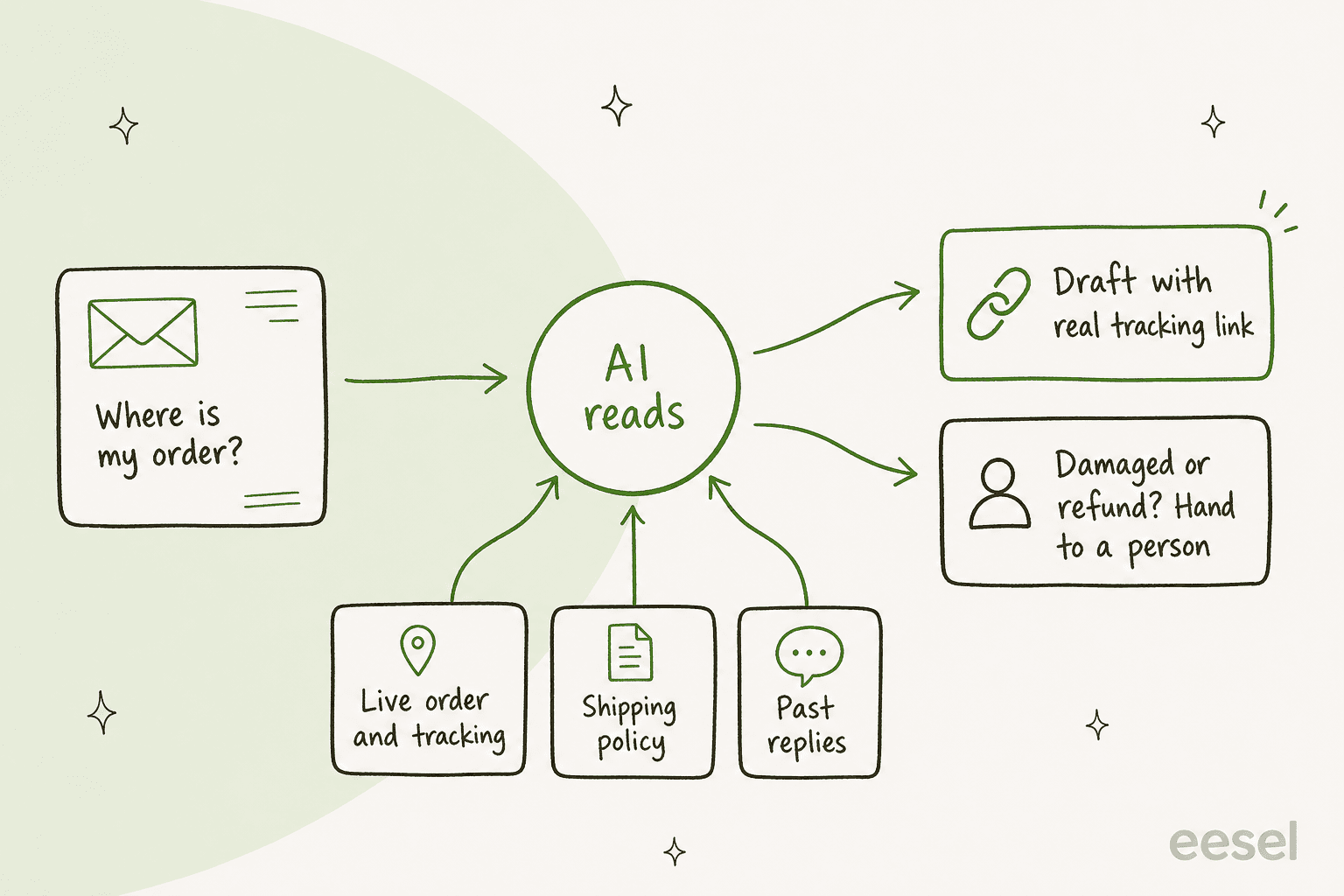
I work on eesel's integrations, and store owners most often shop for "the best AI for email" before asking the question that decides the setup: where does the email arrive, and what can the AI see from there? An AI that only sees the message text can write a polite reply to "where is my order?" and still get it wrong, because the answer lives in Shopify, not in the email. So the setup is two connections: the place the mail lands, and the store.
A real trial shows why this matters. On an e-commerce inbox of about 1,000 tickets a month, running Zendesk and Shopify, eesel's drafts were directionally right 88% of the time, but agents sent only 12% of them as written. They glanced, then rewrote eight-to-fifteen sentence drafts into one to three sentences. About 65% of those rewrites were length and tone, which training on the team's own sent replies fixes, and only about 5% were eesel being factually wrong. That is the whole argument for drafts first: the facts come from the order, and the voice comes from your past replies.
With the eesel CLI, an AI coding agent such as Claude Code can upload your approved shipping and return policies and saved replies, then ask test questions like "where is order 1042?" and check the answers before anything goes live. Connecting the Gmail account or the Shopify store still needs a person to approve access in the browser.
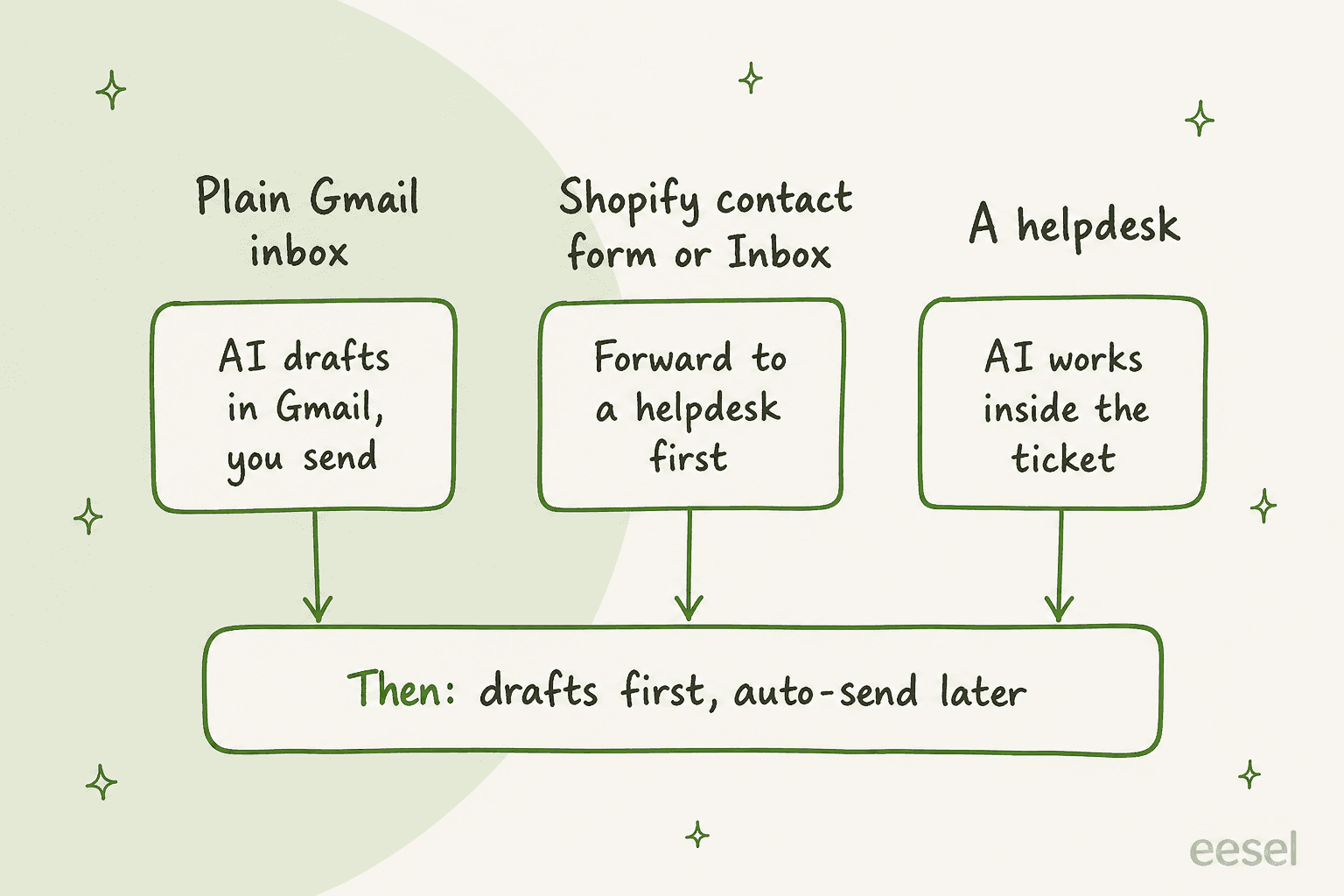
Which setup fits where your email lands?
The widget below picks a setup from where your mail lands today.
What if your email is in Gmail or Outlook?
Gmail is the simplest case to start from. eesel's Gmail integration covers one Google mailbox: it can reply in the thread or save a draft for review, and it can search, read and label mail. Triggers include every new email, emails matching a Gmail search such as label:support -from:me, and emails you label yourself. The docs say to turn on the draft action and turn off the send action if you want a person in the loop, and that most teams connect a shared support address instead of a personal one. Three limits matter: it checks for new mail at an interval, so replies arrive after a short delay; it does not read attachments; and it sees only the newest email in a thread unless it fetches the thread.
For Outlook I did not find a mailbox connection in eesel's docs, so I will not claim one. If you are on Outlook, put a helpdesk in front of it. My guides to an AI email agent for Gmail and an AI email agent for Outlook cover the generic options, and best shared inbox software helps if you have outgrown a single mailbox.
What about Shopify's contact form and Shopify Inbox?
Shopify Inbox is a chat tool. Its App Store listing describes an AI-powered sales associate on your storefront that answers buyer questions from your catalog. That is useful, but it is not a shared queue for email. In my Shopify Inbox alternatives guide the most common reason stores leave is exactly that: email replies and handing a chat to a person. If your mail arrives through the contact form, forward it to a support address and treat it as the Gmail or helpdesk case. Shopify's own Magic suggested replies are a lighter option for a single owner.
What should AI answer alone and what should stay human?
Most Shopify email falls into a handful of types. This is the split I recommend, Auto-answer the factual ones, review the rest.
| Email type | Example | AI can answer alone? | Why |
|---|---|---|---|
| Order status (WISMO) | "Where is order 1042?" | Yes, after week 3 | The answer is in the order and tracking, see WISMO automation |
| Shipping and return policy | "Do you ship to Canada?" | Yes, after week 3 | The answer is in your policy page |
| Product questions | "Is this in stock in M?" | Yes, from live product data | Stock and variants are a live read |
| Address change | "Wrong street on my order" | Draft, person approves | Only works before the order ships |
| Cancellation | "Cancel my order" | Draft, person approves | Only works on unfulfilled orders |
| Start a return | "I want to send this back" | Draft, person approves | A return is not a refund |
| Refund request | "Please refund me" | Person decides | Money moves |
| Damaged or wrong item | "It arrived broken" | Person decides | Needs photos and judgment |
| Angry or legal | "I am calling my bank" | Person only | Tone and risk |
The two facts that shape this table come from eesel's Shopify docs: changing an address, editing items or cancelling only works before an order is fulfilled, and Create Return covers every fulfilled item on the order, so a one-of-three-shirts return needs a person. It can also refund a whole order, chosen items or an amount, with approval if you set it.
How do Gorgias, Zendesk, DIY and eesel compare for email?
Here are the four routes with prices from each vendor's own page, checked on 25 November 2026. I priced one buyer: a store with about 600 support emails a month, where the AI resolves 300 and two people handle the rest.
| Gorgias AI Agent | Zendesk AI agents | DIY (Make + LLM) | eesel | |
|---|---|---|---|---|
| Where it works | Inside Gorgias, email channel among others | Inside Zendesk, AI agents for email | Your Gmail or Outlook, via a scenario you build | Inside your helpdesk or a Gmail mailbox |
| Shopify access | Shopify store connected to Gorgias | Zendesk and Shopify integration | Make's Shopify module | Live order, tracking, refunds, returns |
| Drafts first | Test conversations, then go live | Not stated on pricing page | You build it | Internal notes or Gmail drafts |
| Pricing basis | Per automated interaction | Per automated resolution | Platform plan plus LLM fees | Fixed credit plan, 1 credit per ticket |
| My estimate, 600 emails | About $453 a month | About $545 a month | Make from $12 plus LLM cost | About $379 a month |
How does Gorgias AI Agent handle Shopify email?
Gorgias is the obvious first stop if your mail already lives there, and it says it powers customer conversations for 40% of Shopify brands. Its docs list Email first among the channels you can enable, next to chat, SMS, social DMs and WhatsApp, and require an active AI Agent subscription and a Shopify store connected to Gorgias. Test conversations are not billed and send nothing to real shoppers.
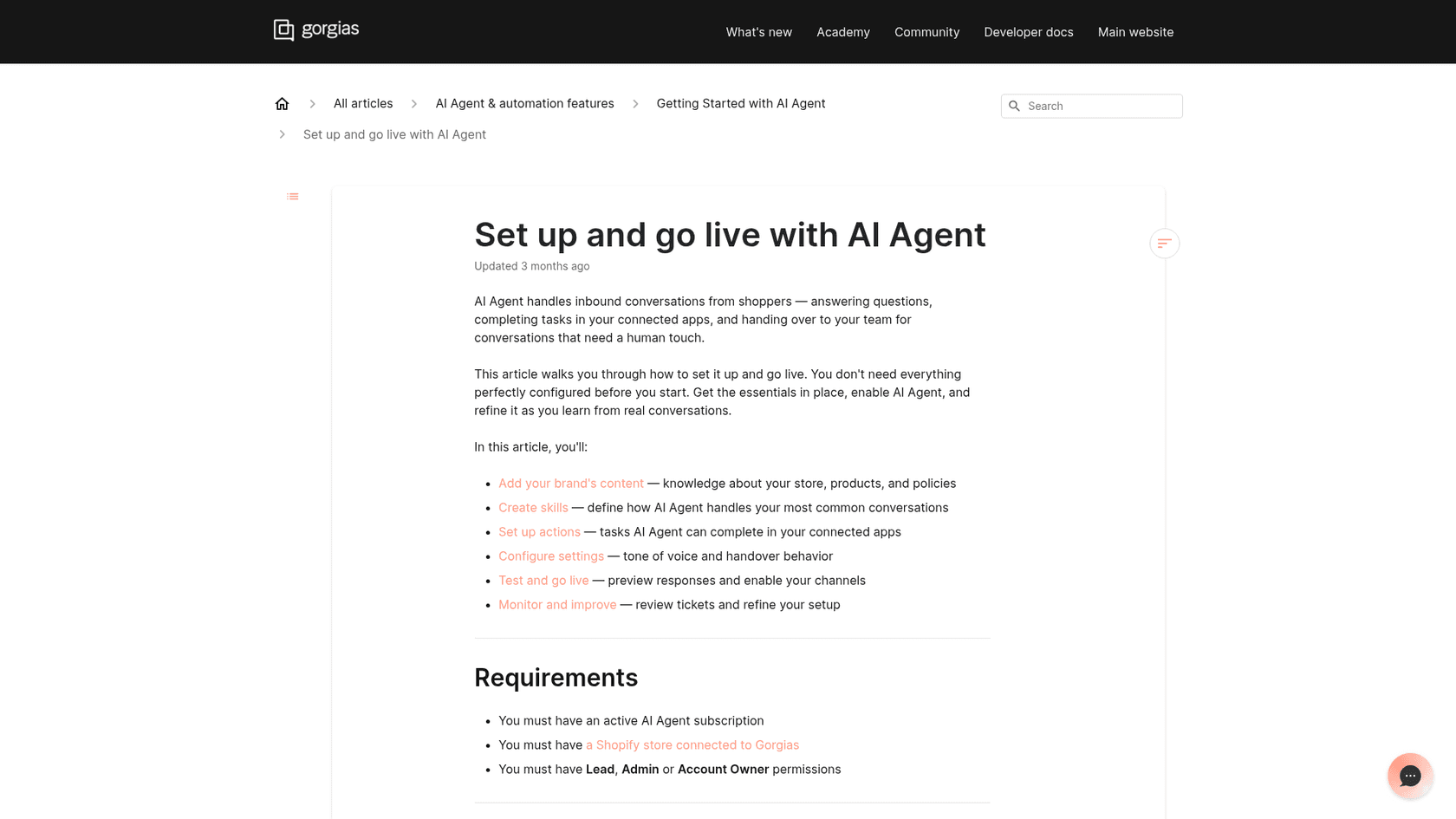
Gorgias's setup guide, as taken from the Gorgias help center.
Pricing is where the math needs care. The Gorgias pricing page shows Basic at $90 a month with 300 tickets and 30 automated interactions, with AI Agent at $0.90 per automated interaction and overage at $40 per 100 tickets. For my 600-email store that works out to about $90 plus $120 of ticket overage plus $243 for 270 extra automated interactions, roughly $453. That is my arithmetic from the table, so check it against your own plan. My Gorgias AI Agent pricing guide goes deeper, and Gorgias and Shopify covers the integration.
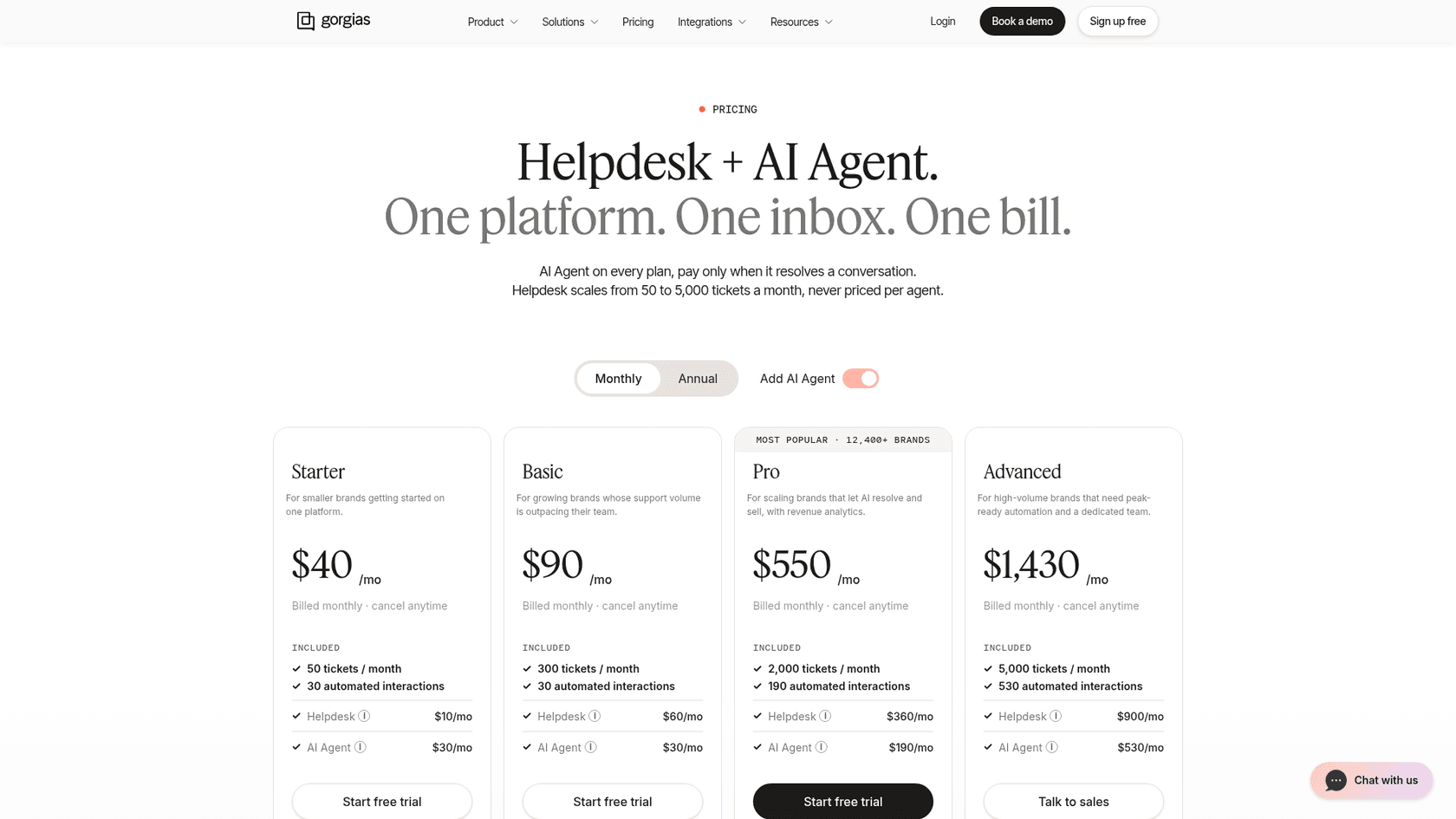
Gorgias plans, as taken from the Gorgias pricing page.
How does Zendesk AI handle Shopify email?
Zendesk lists AI agents for email among its plan features, described as classifying, routing and resolving email queries. Suite Team is $55 per agent per month billed yearly, and Support Team at $19 does not list AI Agents. Automated resolutions are billed at $1.50 committed or $2.00 pay-as-you-go, and Suite Team includes 5 per agent per month. For two agents and 300 resolutions I get $110 plus 290 at $1.50, about $545. Zendesk is the stronger pick when email is one of many channels and you need heavy routing and reporting. For a small Shopify store it can be more helpdesk than you need; my Zendesk and Shopify guide and Zendesk AI pricing explain the trade.
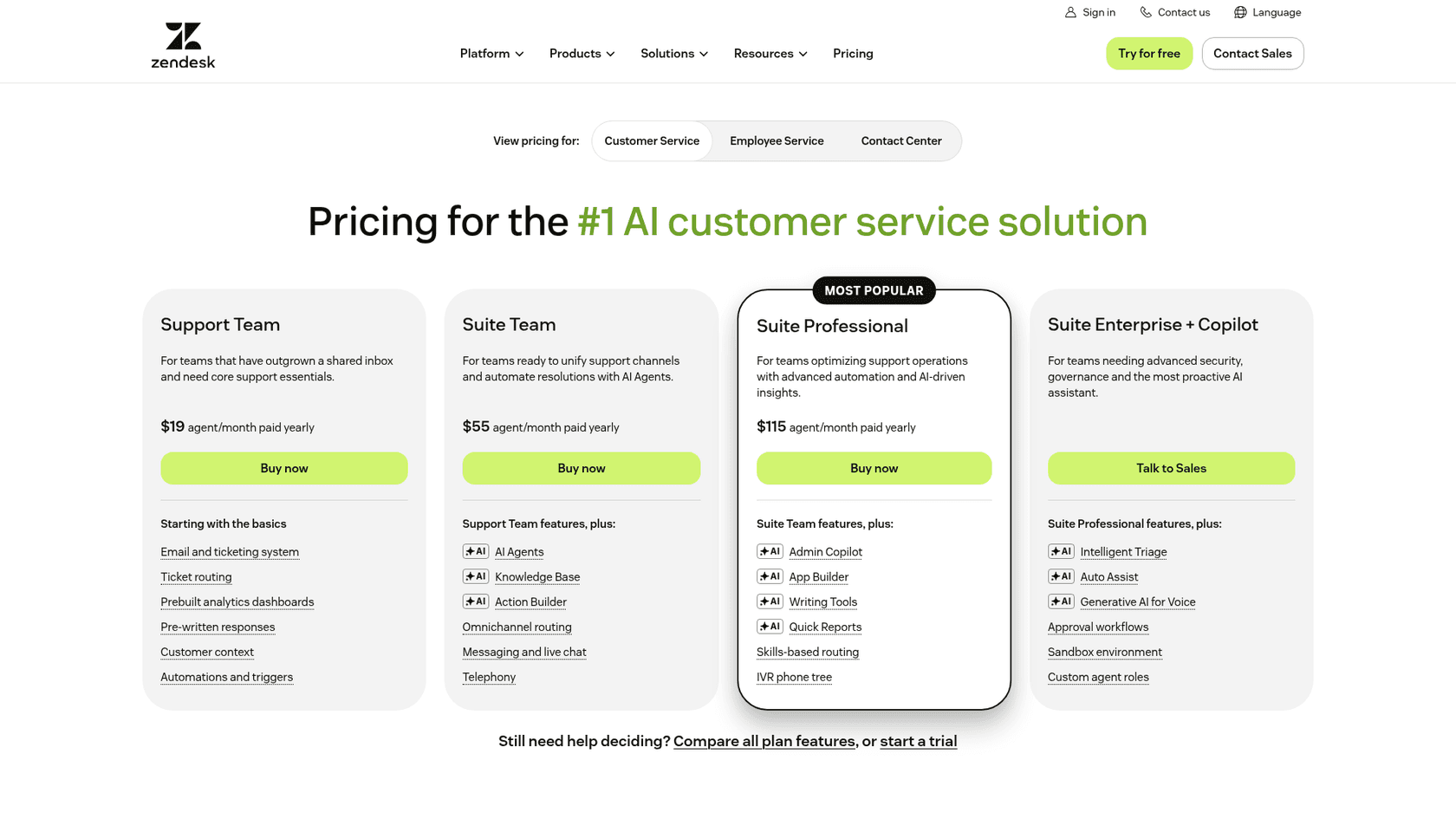
Zendesk plans, as taken from the Zendesk pricing page.
Can you build it yourself with Make or Zapier?
You can. The shape is: a trigger on a new Gmail or Outlook email, a Shopify module that finds the order, an LLM step that writes the reply from that order and your policy, and a draft or send step. Make's free plan includes 1,000 credits a month and Core starts at $12 a month, and Make has a Shopify app. The cost is rarely the platform. It is that you own the edge cases: threads with several messages, an order number the customer got wrong, an email with two questions, and what happens when the LLM is confident and wrong. I would build this only if you enjoy it. If you are weighing the tools, Make vs Zapier is a fair start.
How does eesel handle Shopify email?
eesel is an AI teammate platform, and the one that matters here is the helpdesk teammate. It works in the inbox you already use rather than asking you to move. The helpdesk docs say it drafts replies as internal notes for review or sends them straight to the customer, and it learns from your help center, macros and past tickets. It connects to Gorgias, Zendesk, Freshdesk, Help Scout, Front, Re:amaze and others, and to Gmail as a mailbox. One thing to know: the separate "Email" channel in the docs gives each agent its own address that your team emails, which is for staff questions, not for customer mail.
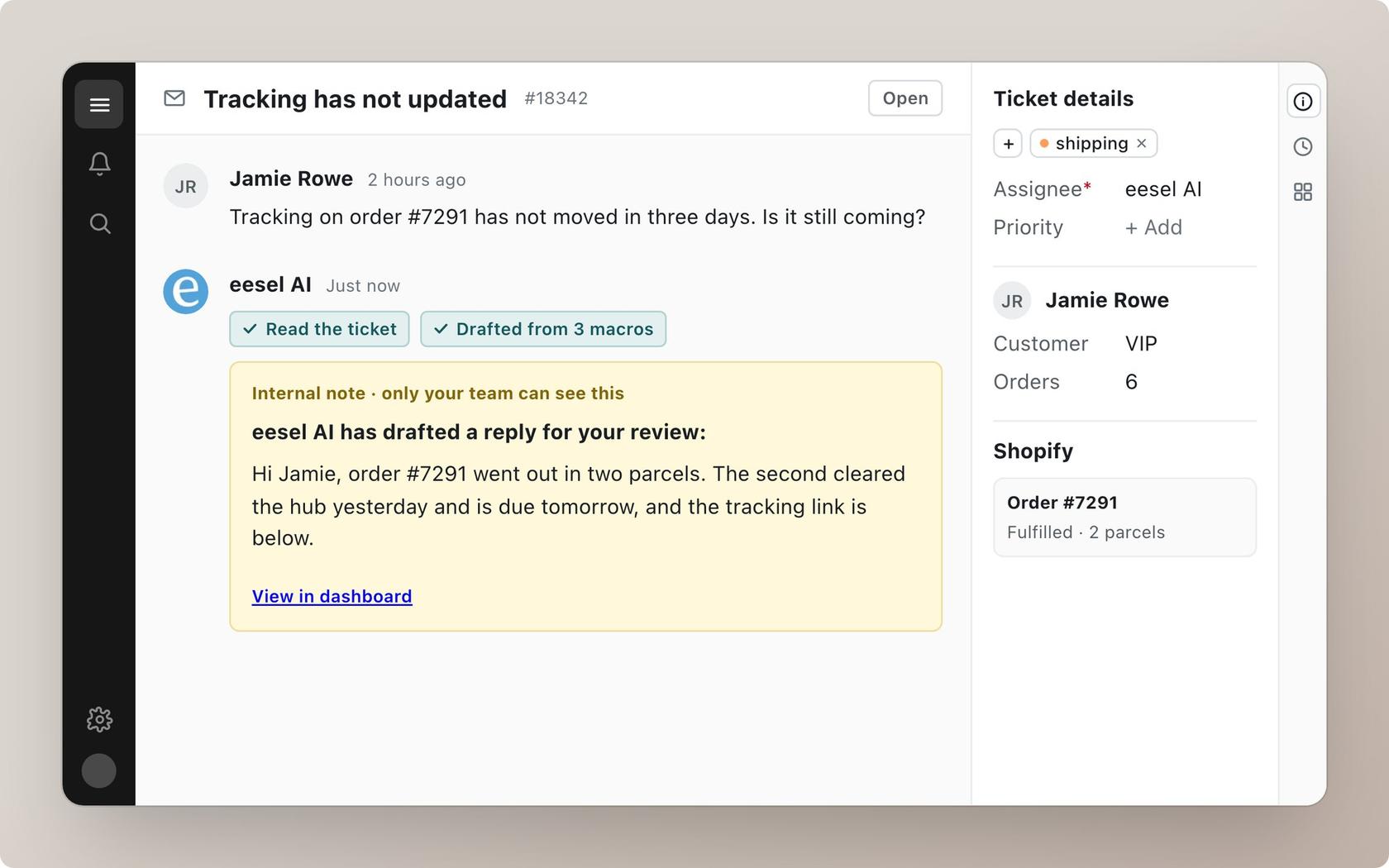
An eesel draft left as an internal note, as shown in the eesel Gorgias docs.
With a full Shopify connection, the agent reads orders, tracking, customers and refunds live, and can refund, cancel an unfulfilled order, start a return, edit items before shipping and update a shipping address. Two limits from the docs: order search reaches back 60 days unless the store approves full order history, and when it answers a shopper directly it only reads out an order when the email given matches the one on the order. Pricing is fixed credit plans: $299 a month for 500 credits, where a ticket or chat is 1 credit however long, with extra credits at $0.80 each. For my 600-email store that is $299 plus 100 extra credits, about $379, and the free trial is 100 credits for 7 days. My eesel vs Gorgias AI and eesel vs Zendesk AI pages are the longer versions.
Who is already running this?
Rúngne, a Norwegian climbing apparel brand, runs three eesel agents on Gorgias and Shopify. One acknowledges and tags every ticket, one leaves a ready-to-send draft as an internal note, and one answers only topics the team chose, such as shipping policy, tracking and stock. In a month eesel handled about 2,100 tickets, prepared about 580 drafts and sent about 440 public replies. The dial is a topic list, so moving a topic from drafts to direct answers is an edit, not a project.
Koffer.ch, a Swiss luggage shop, took the careful route: eesel drafts on Freshdesk from the shop's own macros and policy pages in four languages and a person sends every reply. Question Beauty went further on Gorgias, with eesel sending about 960 replies in a month and handing refunds and complaints to people, though most of its volume is chat and social rather than email.
How do you roll it out in four weeks?
This is the draft-first plan I use, and it is the one I see work in eesel trials.
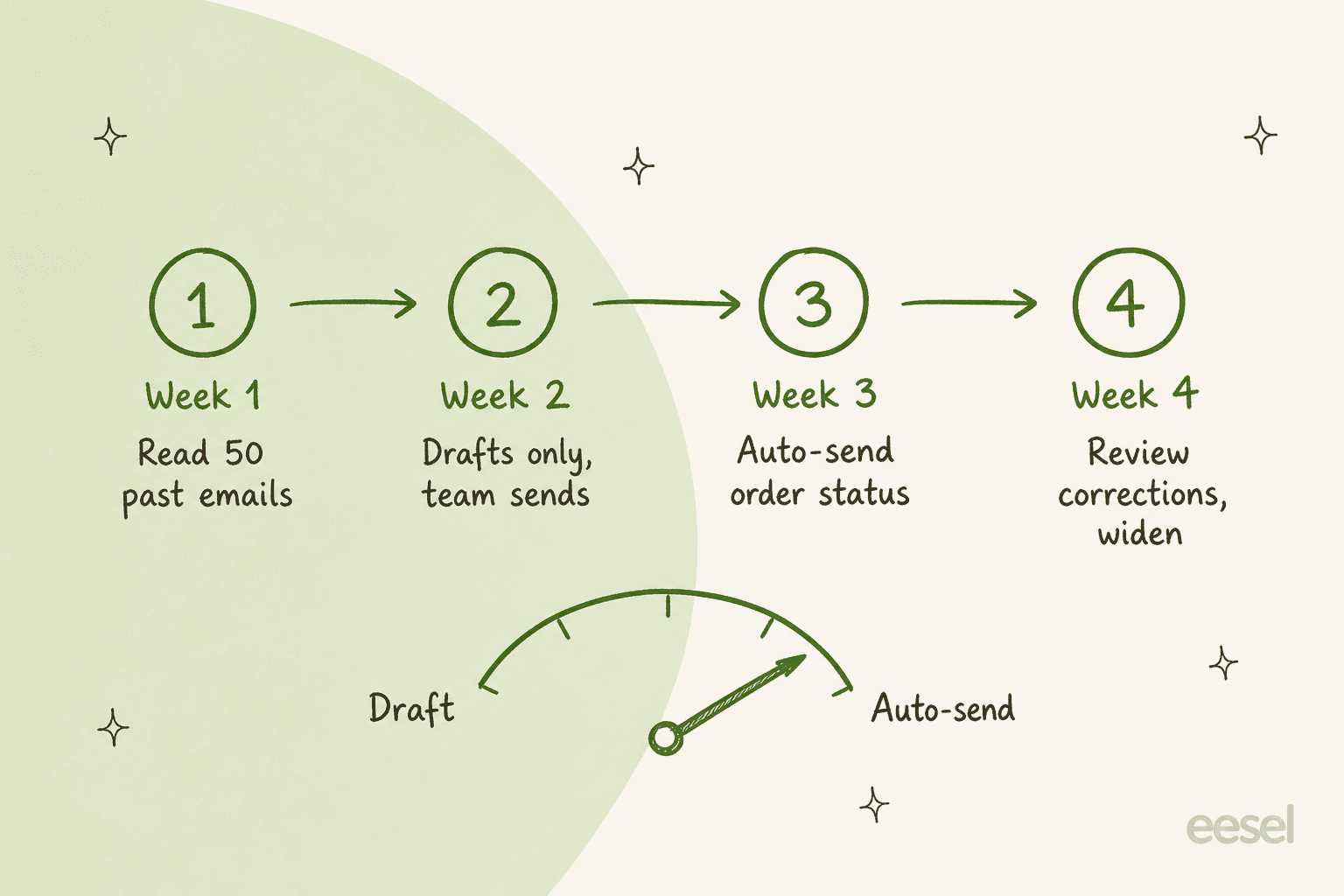
- Week 1: read your own past emails. Pull 50 to 100 resolved emails, mark which types dominate, and fix any policy page that contradicts how your team really answers. Connect the inbox and the store.
- Week 2: drafts only. Set the agent to save drafts or leave internal notes, and have the team send each one. Edit freely: the corrections are the training. Past replies matter more than the policy page for tone.
- Week 3: auto-send two topics. Pick order status and shipping policy, the two with the cleanest answers. Keep everything else on drafts. Watch every automated reply for a few days.
- Week 4: review and widen. Count how many drafts went out unedited and how many AI replies a person corrected. Add one topic at a time. Keep refunds, damage claims and angry customers human.
Before week 3, run the agent on 30 to 50 past emails, including the ugly ones: wrong order numbers, two questions in one message, a customer outside the return window. My notes on simulation testing cover the method, and the refund guardrails cover caps and approvals. Track containment and escalation quality rather than a raw reply count, plus first response time on the topics you automated.
What mistakes should you avoid?
- Letting the AI answer from email text alone. For order questions it must read the Shopify order. Otherwise it guesses.
- Skipping the handoff rule. Decide what goes to a person before launch, and pass the order and what the AI already said, as in these handoff practices.
- Auto-sending on day one. A week of drafts costs you little and shows exactly where the agent is wrong.
- Ignoring attachments. The Gmail agent does not read them, so a damage photo needs a person.
- Automating the odd cases first. Start with the volume: status and policy questions, as in support ticket automation.
Try eesel for Shopify email
If most of your Shopify support is email, eesel connects to your inbox or helpdesk and to your store, drafts replies from the real order, and sends only the topics you switch on. It works in Gorgias, Zendesk, Freshdesk, Gmail and more, with refunds held for your approval, from $299 a month with a free 7-day trial. See eesel for Shopify or start with a Gorgias and Shopify setup.
Frequently Asked Questions
How can I use AI to answer Shopify support emails?
Connect an AI agent to the place your email lands (Gmail, Gorgias, Zendesk or similar) and to your Shopify store, so it can read the order behind each message. Start with drafts that your team sends, then switch on auto-send for order status and policy questions. My guide to automating email support covers the general version.
Can AI reply to customer emails automatically?
Yes. Gorgias, Zendesk and eesel can all send replies without a person, and the DIY route with Make and an LLM can too. Whether you should is a separate question, and I would hold refunds, damaged items and upset customers back; see can AI respond to customer emails automatically.
What is the best AI for Shopify customer support email?
If you already run Gorgias, its AI Agent is the shortest path. If you run Zendesk, use Zendesk's AI agents for email or add eesel on top. If your mail sits in plain Gmail, a drafting agent such as eesel for Gmail is the closest fit. The wider comparison is in best AI for Shopify customer support.
How much does AI email support cost for a Shopify store?
For about 600 emails a month, with the AI resolving 300, my arithmetic from vendor pages is roughly $379 on eesel, about $453 on Gorgias Basic and about $545 on Zendesk Suite Team for two agents. See eesel pricing and my Gorgias AI Agent pricing breakdown.
Does Shopify Inbox answer support emails with AI?
Shopify Inbox is a storefront chat tool with an AI agent for product, shipping and policy questions. It is not a shared email queue, so for email you still need a helpdesk or a mailbox with an agent attached. See Shopify Inbox alternatives for where stores go next.
Which Shopify emails should AI never answer alone?
Refund decisions, damaged or wrong items, lost parcels, chargebacks, legal threats and anyone who asks for a person. Give the agent a clear handoff rule and a refund cap, as in these refund guardrails.
How do I stop AI from giving wrong tracking or refund answers?
Make the agent read the live Shopify order instead of guessing, test it on past emails before it sends anything, and keep approvals on money actions. My notes on simulation testing and preventing hallucinations go through the method.
Does eesel work with Outlook email?
I did not find an Outlook mailbox connection in eesel's docs. The documented email routes are a Gmail mailbox and helpdesks such as Gorgias, Zendesk, Freshdesk, Help Scout, Front and Re:amaze. If your mail is on Outlook, run it through one of those helpdesks, or read my guide to an AI email agent for Outlook.