How to automate email support

Stevia Putri
Written by

Stevia Putri

Katelin Teen
Reviewed by

Katelin Teen

Last edited May 15, 2026

Expert Verified
Email support automation workflow showing inbox, AI processing layer, and draft replies

If you support customers by email, you already know the feeling: 40 new tickets this morning, and 25 of them are asking the same three questions. Someone wants to know where their order is. Someone else needs a refund. A third person is having the same login issue that's been making the rounds for a week.

The industry average first response time sits at 8 to 12 hours, while customers expect a reply within 4. Employees spend roughly 28% of their workweek just dealing with email, much of it on volume that repeats. The gap between what teams can handle and what customers expect is not a personnel problem. It's a process problem.

This guide walks through how to actually automate email support - not with autoresponders that fire off "we'll get back to you in 2 business days" replies, but with AI that reads context, drafts personalized responses grounded in your knowledge base, and routes complex tickets to the right person. If you're evaluating a tool like eesel AI for this, you'll find a full walkthrough of how to configure it toward the end.

What email support automation means

Email support automation is not a single feature. It's a stack of capabilities that can work independently or together, depending on your volume, team size, and risk tolerance.

The underlying technology is a mix of natural language processing to understand what customers are asking, machine learning to improve routing and response quality over time, sentiment analysis to flag frustrated customers before a human sees the ticket, and direct integrations with helpdesks like Zendesk or Freshdesk to take action inside tools your team already uses.

What separates AI-powered automation from the autoresponders of ten years ago is context. An autoresponder looks for a keyword and fires a canned reply. An AI system reads the full conversation thread, pulls from your knowledge base, checks past resolved tickets, and writes a reply that addresses the actual question - including multi-part emails where the customer asked three different things at once.

As Fin.ai notes, a customer who writes "I need to update my shipping address and also check the status of my return" expects both issues addressed in one response. Most keyword-based systems miss one of them.

The 6 types of email support automation

Six types of email support automation arranged in a grid: auto-triage, canned responses, AI drafting, auto-resolve, escalation rules, and sentiment detection

Before looking at setup, it's worth being clear on what you're actually automating. There are six distinct capabilities, and knowing which ones you need shapes every decision from tool selection to rollout plan.

Auto-triage and routing

The moment an email arrives, AI reads the content, identifies intent and urgency, categorizes it (billing, bug, refund, shipping, account access), and routes it to the right team queue or agent - before a human sees it. Unlike rigid keyword rules, AI triage handles natural language variation. Customers phrasing the same issue ten different ways still land in the right inbox.

eesel AI's AI triage learns from your entire ticket history to "automatically route, tag, and even merge tickets without you needing to build a huge, complicated list of rules."

Canned response suggestion

AI surfaces relevant pre-written responses based on the detected intent of the incoming email. The agent reviews and sends with minimal editing. This is distinct from full draft generation - it matches incoming requests against a library of tested, approved responses, which is lower risk and easier to quality-control.

AI draft generation

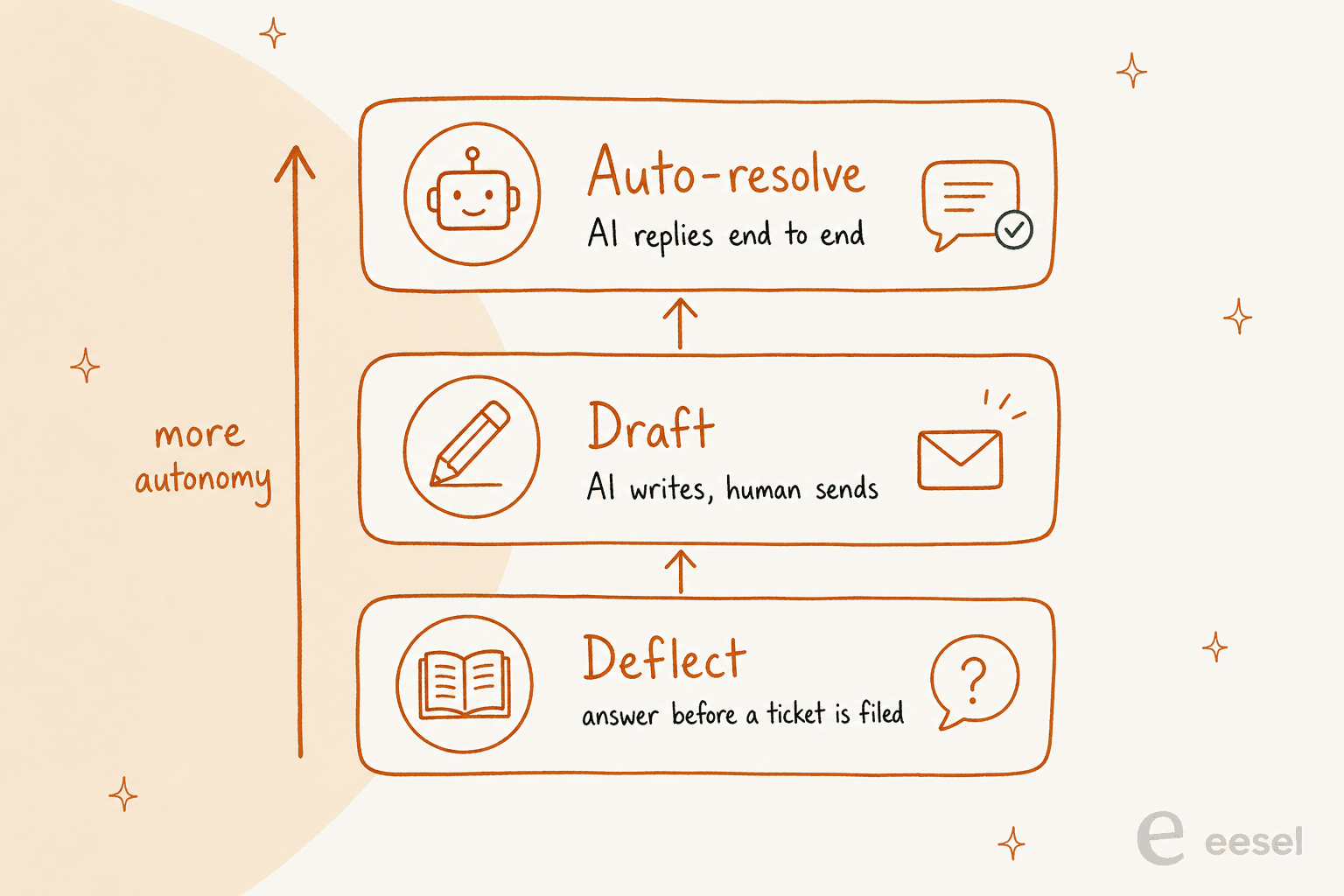
AI writes a complete reply - greeting, body, sign-off - based on the full conversation thread, the customer's intent, and your knowledge base. The standard pattern is "AI drafts, human approves": the agent reviews before anything goes out. This is the approach most teams land on because it removes the blank-page problem while keeping agents in control of quality.

Auto-resolve

For clearly scoped, routine queries - order status, password resets, FAQs - AI sends a complete, accurate response and closes the ticket without any agent involvement. Real results: myphotobook auto-resolves 83% of all customer emails using OMQ Reply, saving €408,000 per year. MAGIX reduced support costs by 79.2% by automating standard inquiry handling. This level of automation requires high confidence thresholds and solid knowledge foundations first - more on that in the setup steps below.

Escalation rules

AI identifies when a ticket needs a human and passes it over with full conversation context. Escalation triggers include frustrated or angry language, billing disputes, VIP customers, and technical issues with no clear resolution. The handoff happens with the whole thread attached - no cold handoffs where the next agent has to start over.

Sentiment detection

AI reads the emotional tone of incoming emails and flags urgency. A customer threatening to cancel or expressing acute frustration gets flagged for immediate human attention, bypassing the normal queue. This is less about automating the response and more about making sure the right tickets don't sit at the bottom of a stack for three hours.

How to automate email support: 6 steps

Step-by-step process showing 6 numbered steps to automate email support: audit workflow, build knowledge base, connect and configure, simulate first, start supervised, expand autonomy

Here's the order that actually works, based on how teams that get this right tend to run their rollouts.

Step 1: Audit what's coming in

Spend one to two weeks tagging incoming emails by category: billing, bugs, refunds, shipping, account access, and so on. Find your top five email types by volume. Measure your current first response time by category. This baseline data has two uses: it tells the AI what to expect, and it gives you something concrete to measure improvement against later.

Skip this step and you'll face a common failure mode - the AI can't classify your emails accurately because it's being asked to sort chaos without a map. As Crisp describes it: "If you can't name your top five email categories, the AI might fail to categorise your emails as well."

Step 2: Build the knowledge foundation

This is the step that matters most and gets the least attention. AI output quality scales directly with the quality of what you feed it. Teams that skip this and go straight to tool setup are almost always the ones posting on Reddit that their AI is hallucinating or giving customers outdated information.

Four layers to prepare, in priority order:

  1. Knowledge base articles - structured, searchable, approved answers to common questions
  2. Internal guides and answer snippets - edge cases, pricing nuances, escalation rules not in public docs
  3. Historical resolved tickets - your most underused and most powerful source; shows the AI how customers phrase questions and what resolutions worked
  4. Website and public content - lower signal density but easy to connect

"Keeping a human in the loop before anything sends is the right call, especially early on. But honestly most teams spend 90% of their energy picking the tool and 10% on what they feed it, when it should be the opposite. Bad or incomplete documentation means even a great AI will confidently give customers the wrong answer, so treat your knowledge base like the actual product."

-- u/advithfrompylon, r/CustomerSuccess

A tool like eesel AI connects to all knowledge sources simultaneously - Zendesk, Freshdesk, Confluence, Notion, Google Docs, past tickets - without requiring data migration. But none of that helps if the underlying docs are wrong or six months out of date.

Step 3: Connect and configure the AI tool

Connect the AI to your helpdesk, ingest your knowledge sources, and define routing categories. Set escalation triggers. Configure tone and response format.

What to look for in a good configuration model:

  • Escalation rules you can write in plain English ("escalate all billing disputes to a senior agent") rather than decision trees
  • Control over which ticket types or queues the AI handles vs. which go straight to humans
  • Per-category settings on whether the AI drafts for review or sends directly

eesel AI's configuration model is conversational: you tell it how to behave in natural language, and it follows. "If the refund request is over 30 days, politely decline and offer store credit" is a valid instruction. No workflow builder, no rigid rule engine.

Step 4: Simulate on past tickets before going live

The best tools let you run the AI against real historical tickets before any customer sees it. This is not optional. It's how you identify knowledge gaps, see which categories the AI handles well, and build team confidence before the first live interaction.

eesel AI's simulation mode runs against thousands of real past tickets and produces a per-theme breakdown: where the AI is strong, where the gaps are, and what it would have said to each ticket type. You fill the gaps, re-run, and only roll out when the numbers look right.

This addresses one of the most consistent frustrations in the space. As one sysadmin who'd deployed AI across Zendesk and Freshdesk put it:

"When something breaks, it is almost impossible to tell whether the issue is with my own data or with how the AI is interpreting it. What I really wish existed is some kind of simulation or sandbox where you can run queries, see exactly what the model is missing, and get insights into gaps in your documentation or training data. As far as I can tell, Zendesk and Freshdesk don't have anything like that yet."

-- u/Nitin-panwar, r/sysadmin

Step 5: Start with one queue in supervised draft mode

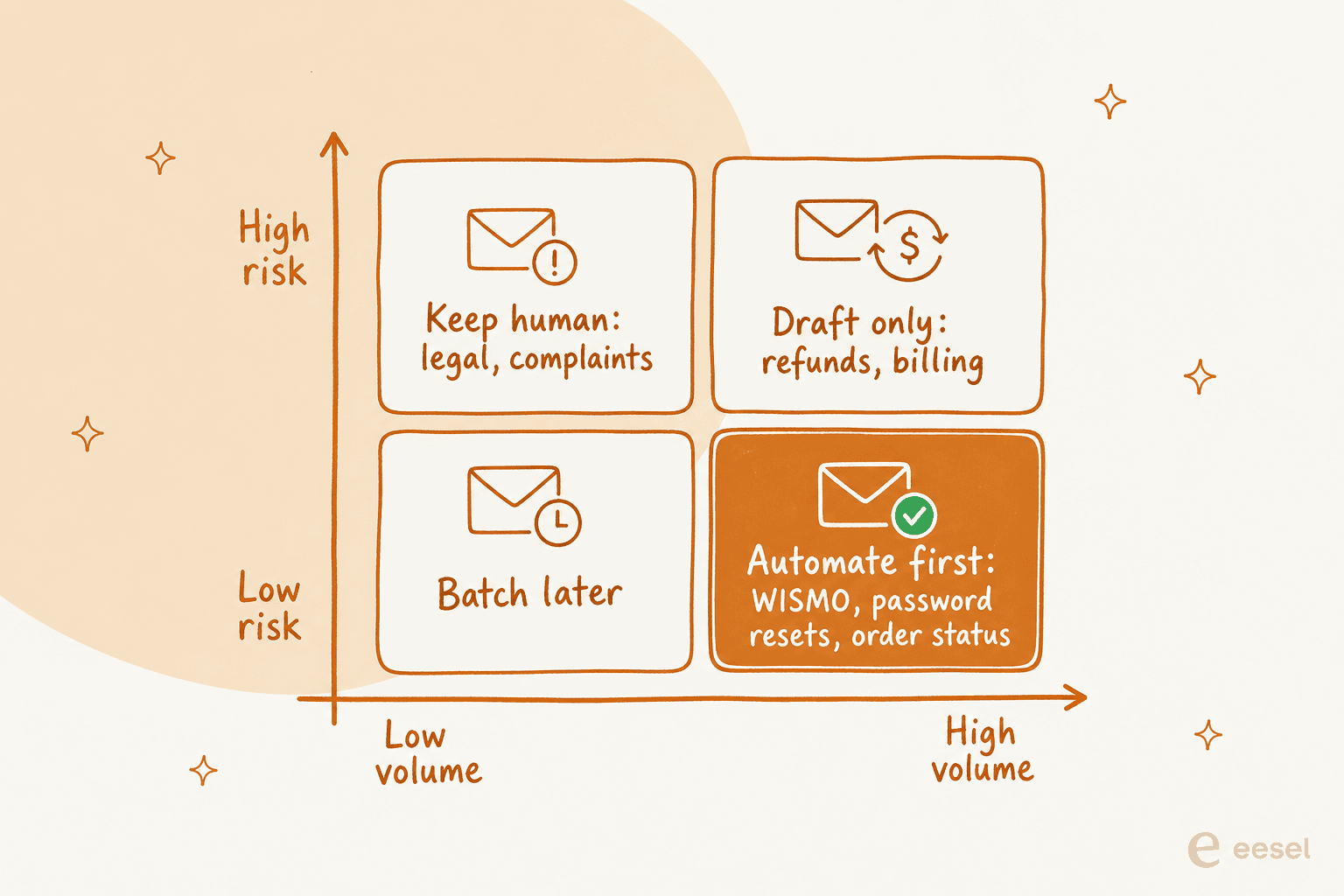
Deploy to your highest-volume, lowest-complexity email category first. Typically that's FAQs, order status, or password resets. Run in draft mode only: the AI generates, an agent reviews, and the agent sends. Nothing goes out without a human reading it.

This is the right first week. It builds trust in the AI's output, shows agents what good looks like, and lets you catch any gaps before they reach live customers at scale. Most teams that report success expanded scope gradually from here - adding categories as confidence built, eventually enabling autonomous send on the ones where accuracy was reliably high.

Step 6: Measure, iterate, and expand autonomy

Track three numbers: auto-resolve rate (what percentage of emails are resolved without human touch), true resolution rate (do customers reply again after an AI response, indicating the issue wasn't actually resolved?), and first response time.

One important note on the first metric - deflection rates can be misleading. As one commenter in the sysadmin thread put it:

"Be super sceptical of deflections in general. There are good deflections (the customer left happy) and bad deflections (the customer got so pissed off they never came back). If the AI is not measuring CSAT or asking if the problem has been resolved then deflections are meaningless."

-- u/RegularOk18, r/sysadmin

Track CSAT alongside deflection. Where both go up, that's real progress. Where deflection climbs and CSAT stays flat, the AI is frustrating customers rather than helping them. Use your tool's knowledge gap analysis to find what the AI couldn't answer confidently, fill those gaps, and gradually grant more autonomy to categories with solid track records.

The pattern that actually works

Side-by-side comparison: Full automation on the left sending emails directly, versus AI drafts plus human review on the right before sending

Across Reddit threads covering real-world deployments, one pattern comes up repeatedly as the approach that doesn't fail: AI drafts, human approves. Not full automation, and not just triage. Draft generation where an agent reviews before anything goes out.

A user who works across multiple enterprise support platforms described it clearly:

"AI that drafts responses for agents. Not sending stuff automatically, just giving the agent a starting point so replies take 30 percent less time. Quality is decent if your help center articles are clean. AI that suggests the right macros or help center links. This is low risk and genuinely useful. AI that summarizes long ticket threads so a human can get context faster. This is probably the most universally loved feature."

-- u/Hairy-Marzipan6740, r/sysadmin

And from a customer success practitioner:

"No one has fully solved support with AI, but parts of it are very solvable. The biggest win I've seen is AI drafting replies that agents review before sending. It removes the repetitive typing without giving up control. It works great for FAQs and policy questions. Edge cases still need humans. The draft and approve model feels like the safest long-term approach."

-- u/Bart_At_Tidio, r/CustomerSuccess

This isn't a conservative interim position. It's simply the approach that consistently works without the failures that come from moving too fast to full autonomy. Once you have several weeks of data showing accurate drafts in a specific category, that's when extending to autonomous send makes sense - and only for that category, where you have the track record.

Common mistakes that burn teams

Skipping the audit. The AI needs to know what categories of email it's handling before it can do it accurately. Teams that go straight to setup without an audit end up with poorly calibrated triage and spend weeks correcting it.

Treating the knowledge base as a one-time setup. If your return policy changed last month and the knowledge base still reflects the old policy, the AI will confidently give customers outdated information. This needs active maintenance.

Disabling human review too early. Going straight to autonomous send before you have real data on accuracy is how wrong answers reach live customers at scale. Supervised draft mode first, always.

Measuring deflection instead of resolution. Deflection often means the customer gave up rather than got an answer. Track whether issues actually resolved alongside whether tickets closed.

Using a bolt-on AI layer on legacy helpdesk software. Several teams noted that built-in AI modules in Zendesk and Freshdesk feel like additions to a legacy system rather than native capabilities. One team discovered their Freshdesk AI had been routing tickets to the wrong department for weeks without anyone realizing. A specialized AI layer configured explicitly for your workflows often outperforms waiting for helpdesk-native AI to mature.

Ignoring multi-part emails. Customers routinely ask two or three questions in a single email. AI that treats an email as one query will miss questions. Verify your tool handles multi-part messages before deploying at scale.

Picking per-resolution pricing without knowing your volume. Some AI platforms charge per resolved ticket, which creates budget surprises during product launches or Black Friday peaks. Understand the billing model before committing.

Try eesel AI

eesel AI is an AI support agent that handles email as a native channel. It reads the full thread before generating any reply, pulls context from your connected knowledge sources - Zendesk, Freshdesk, Confluence, Notion, Google Docs, Shopify, past tickets - and either drafts for review or sends directly, depending on how you've configured it.

eesel AI email integration page showing automated email handling features

The setup starts in supervised mode by design. eesel drafts replies, your team reviews them, and corrections feed back into the system. You expand its scope as trust builds - first to FAQs, then to account queries, then to more complex categories - following your actual data rather than a preset schedule.

Pricing is usage-based at $0.40 per ticket with no platform fee, or flat-rate plans from $299/month. A $50 free trial credit is available without a credit card. It connects to the helpdesks most teams already use - Zendesk, Freshdesk, Gorgias, HubSpot, Help Scout - and works within those systems rather than replacing them.

Results from customers using eesel for email support: Smava processes thousands of German-language support tickets monthly through the email integration; Gridwise resolved 73% of tier-1 requests in their first month; Design.com handles 50,000+ tickets per month via Freshdesk.

For more on specific helpdesk configurations, the Freshdesk email AI guide and the Gorgias email guide walk through setup in detail. If you're still evaluating options, the AI email assistants guide and the support automation tools comparison cover the broader landscape.

Frequently Asked Questions

Email support automation uses AI to handle tasks in your email support workflow that don't require human judgment - routing incoming emails, generating draft replies for agents to review, auto-resolving common queries like order status or password resets, and escalating complex tickets to human agents with full context. The goal is to remove the mechanical overhead before real judgment is applied, not to replace human support entirely. eesel AI covers all of these as part of one connected system.
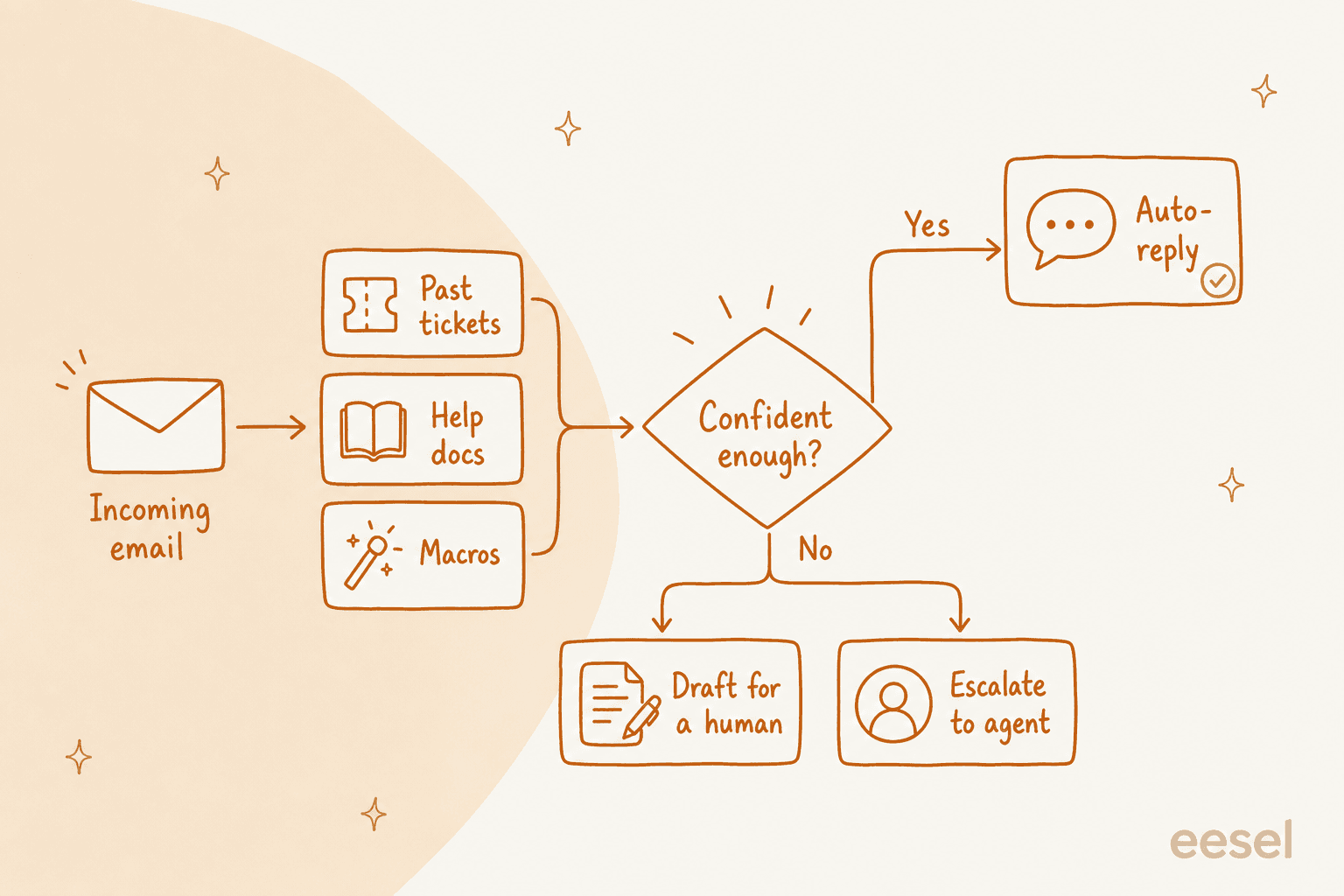
It depends on the category and whether you've validated accuracy first. Straightforward queries like FAQs, order status, and password resets are generally safe to auto-resolve once you've run the AI in supervised draft mode and confirmed the quality. Complex tickets, billing disputes, and high-value customer conversations should stay in draft mode with human review. eesel AI handles this with confidence-based routing: high-confidence answers can auto-send, low-confidence ones get queued as drafts automatically.
The technical connection - linking an AI tool to your helpdesk and knowledge sources - typically takes under an hour. What takes longer is preparation: auditing your email categories, cleaning up your knowledge base, and running simulations against past tickets. Most teams spend one to two weeks on this, then run in supervised draft mode for a few more weeks before expanding scope. Done properly, you're looking at four to six weeks from start to meaningful automation in production, with incremental improvements from there.
It varies by tool and approach. eesel AI charges $0.40 per ticket on usage-based pricing, with flat-rate plans from $299/month. DIY setups using n8n and an LLM API can cost under $100/month in API calls if you have technical capacity to build and maintain them. Watch for per-resolution pricing models - they can become expensive during product launches or peak periods when ticket volume spikes unexpectedly.
A well-built system flags low-confidence answers and queues the ticket for human review rather than guessing. This is one of the key differences between modern AI-native tools and older keyword-based automation. eesel AI uses confidence-based routing for this specifically: uncertain responses become drafts for agent review, not live replies. Most tools also surface knowledge gap reports showing which topics the AI couldn't answer, so you can fill those gaps in your knowledge base.

Share this article

Stevia Putri

Article by

Stevia Putri

Stevia Putri is a marketing generalist at eesel AI, where she helps turn powerful AI tools into stories that resonate. She’s driven by curiosity, clarity, and the human side of technology.

Ready to hire your AI teammate?

Set up in minutes. No credit card required.

Get started free