


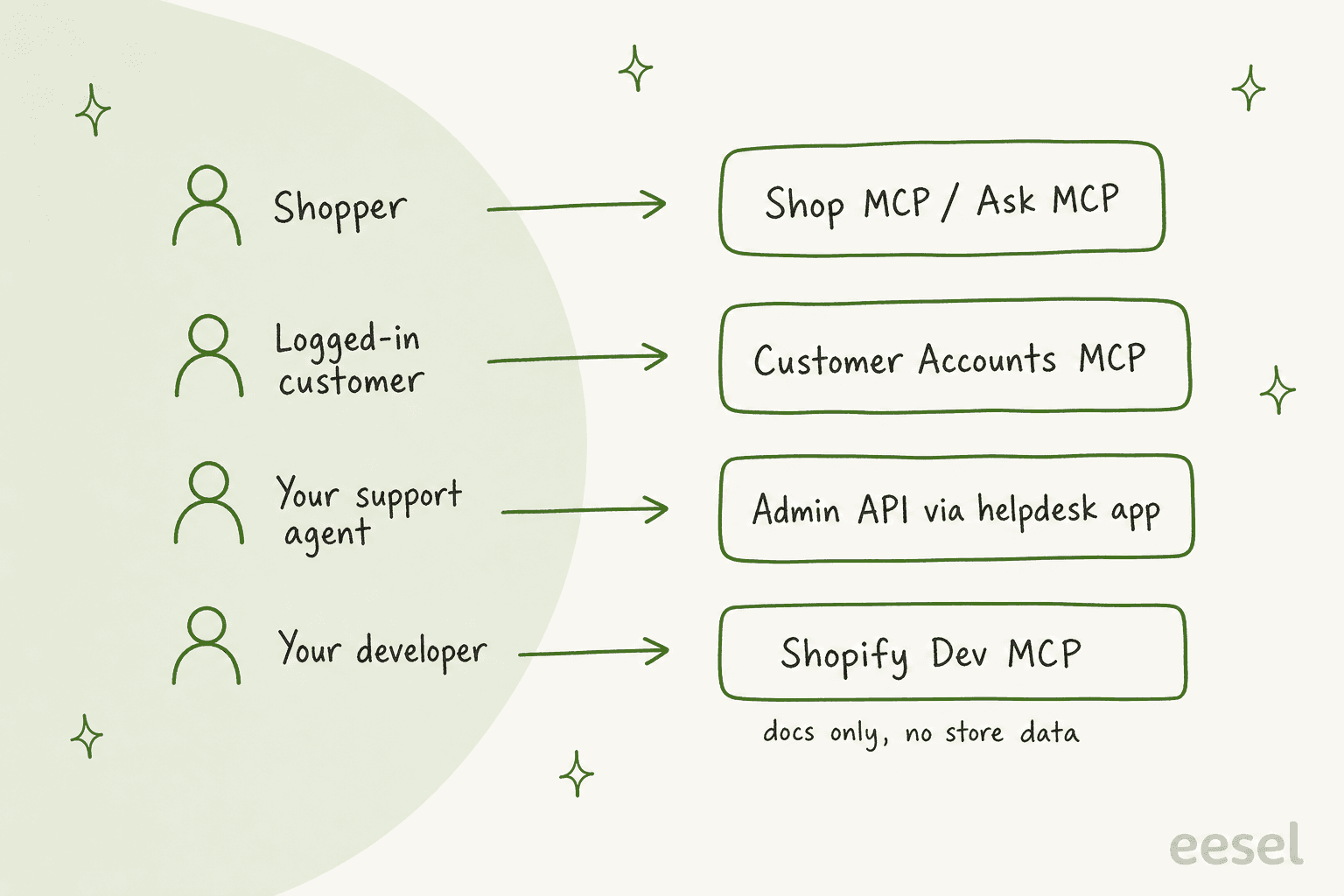
"Shopify MCP server" is not one server, and the right one depends on who is asking. Shoppers' agents use Shop MCP, signed-in customers use Customer Accounts MCP, and developers use the Dev MCP, which holds docs and no store data. None of them is built for your own support team. Your agent reads and changes orders through the Admin API, so approvals have to live in the agent. eesel does that inside your helpdesk, and its eesel CLI lets Claude Code connect, upload approved knowledge and test answers before anything goes live.
What is the Shopify MCP server, really?
I help build eesel's integrations, and when someone asks me about a "Shopify MCP server" I ask one thing back: who is asking? A shopper, a logged-in customer, your support agent or your developer. Shopify ships a different server for each of the first, second and last, and it ships none for the third.
That matters because support is where the money moves. A multi-brand ecommerce operator I heard from on a sales call handles 500+ tickets a day, and refund requests, unsubscribes and order tracking dominate the volume. A DTC supplements brand on Gorgias and Shopify sees about 7,000 tickets and 30,000 orders a month. Those teams do not need a shopping assistant. They need an agent that reads an order, and sometimes changes one.
The landscape also moved this autumn. Shopify's docs now list the old Storefront MCP catalog and cart tools as removed, and point to Shop MCP and the Universal Commerce Protocol instead. Most articles you will find, including older ones on agentic commerce, still describe the 2025 setup. Everything below comes from shopify.dev as it reads on 25 November 2026.
Which Shopify MCP servers exist, and what can each do?
Eight Shopify servers cover the field. The table is the one I wish I had when I started mapping them. Read the last column first if you run a support queue.
| Server | Endpoint | Who it is for | Auth | Reads or writes | Support use |
|---|---|---|---|---|---|
| Shop MCP | https://mcp.shop.com/ | Shopping agents and apps | None for search; Shop sign-in for orders and Shop Pay | Search, carts, checkouts, search_orders, complete_checkout | Shopper-side order history only |
| Storefront Catalog MCP | https://{shop}/api/ucp/mcp | One merchant's storefront | Agent profile on every request | Read: search_catalog, lookup_catalog, get_product | Product and stock answers |
| Ask MCP | Same /api/ucp/mcp | Buyer questions | Agent profile | Read: ask_business | Policy and shipping questions |
| Cart MCP | Same | Agents building carts | Agent profile | Write: create_cart, update_cart, cancel_cart | None |
| Checkout MCP | Same | Agents completing a purchase | Token or signed request | Write: create_checkout to complete_checkout | None |
| Order MCP | Same | Agents tracking their own orders | Token with read_global_api_orders | Read: get_order | Only orders placed through your agent |
| Customer Accounts MCP | https://{shop}/customer/api/mcp | Signed-in customers | OAuth 2.0 with PKCE | Customer's own account and orders | "Where is my order" for a verified customer |
| Shopify Dev MCP | Runs locally via npx | Developers | None | Docs, schemas, validation | None, no store data |
Two details save a lot of confusion. Cart, Checkout, Order, Ask and Storefront Catalog all share one per-store endpoint, /api/ucp/mcp, and the tools you see depend on what your agent profile declares. And Ask is read-only: its docs say it "doesn't change carts, place orders, or start returns."
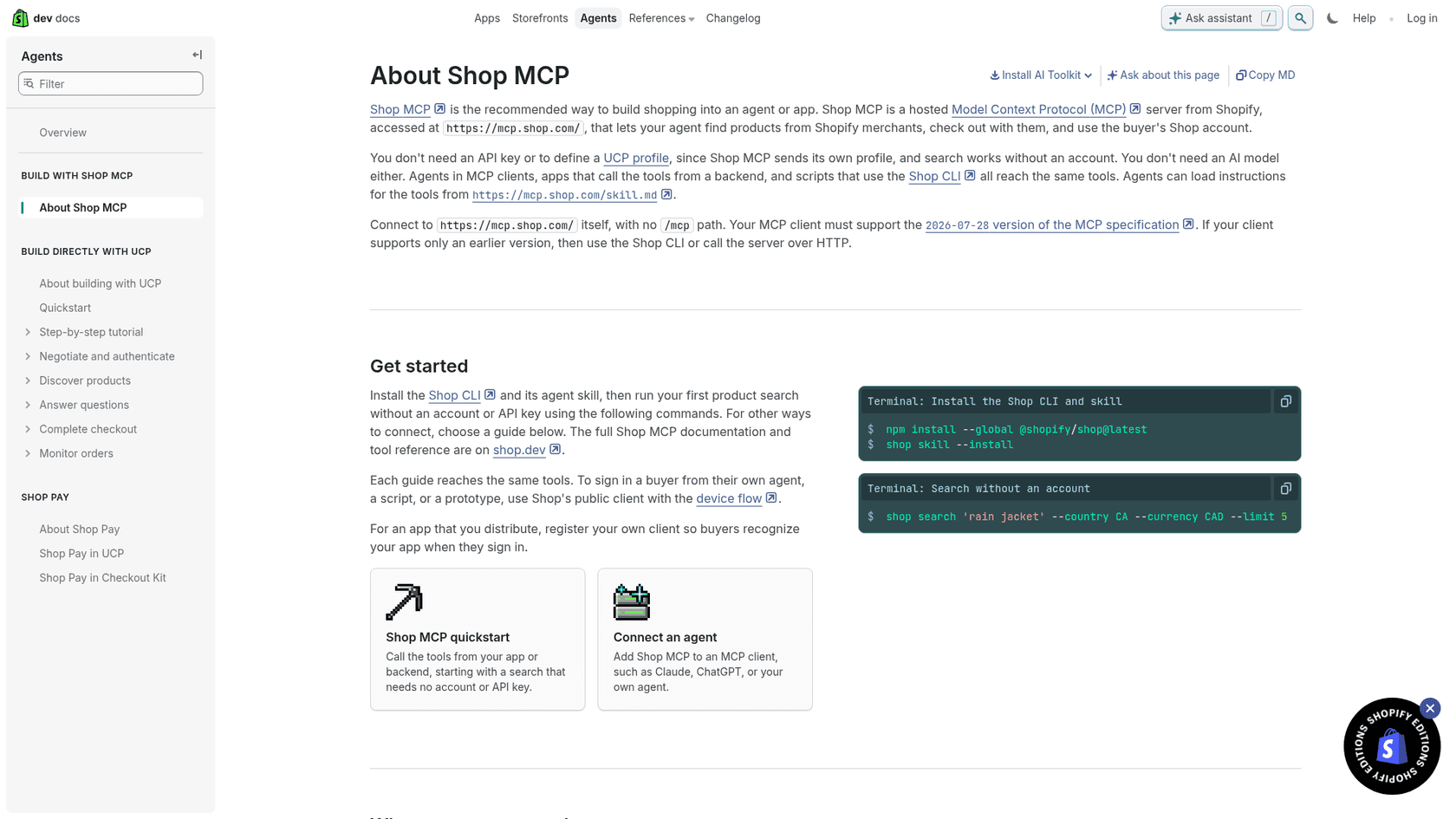
What happened to the old Shopify Storefront MCP server?
It lost its tools. Shopify's Storefront MCP page now opens with "Removed" and says the catalog and cart tools on https://{shop}/api/mcp are gone. The deprecation notice promised support until 31 August 2026, and that date has passed.
The replacement map is short. search_catalog and get_product_details became Storefront Catalog MCP. get_cart and update_cart became Cart MCP. Policy and FAQ questions became ask_business. If you built on the old tools, three changes bite:
- Every request to
/api/ucp/mcpneeds an agent profile inmeta. update_cartnow replaces the whole cart, so you send every line item each time.- Checkout MCP needs a token or a signed request.
A Shopify Community thread from October 2025 shows how rough the old rollout was: a merchant kept getting a 404 on /api/mcp and asked whether it needed enabling per store, in a Shopify Community thread. That endpoint is not the one to build on now. If you want zero code, Shopify points merchants to the Inbox agent, which works inside your storefront chat widget and needs new customer accounts.
Can a customer's agent look up their order through a Shopify MCP server?
Yes, in three different ways, and each has a catch.
Shop MCP has search_orders, but only after the buyer signs in with Shop, and it searches their Shop-tracked orders. Order MCP has get_order, but it is a Token-tier tool and, per Order MCP's docs, returns only orders placed through your agent. It is no use for an order a customer placed last month on your site. Customer Accounts MCP is the one that fits "where is my order" for a verified customer. It is unchanged by the migration. For a no-MCP version of the same lookup, see order data for a chatbot.
Customer Accounts MCP asks for real setup. Your store needs a custom domain, your app must meet protected customer data requirements, and you request scopes such as customer_read_orders. You discover the endpoint from /.well-known/customer-account-api, then run an OAuth 2.0 authorization code flow with PKCE. Shopify's docs do not list the tools by name. They tell you to call tools/list.
The trust tier decides everything else. Shopify sorts agents into Token, Signed and Anonymous, and only Token reaches order tools.
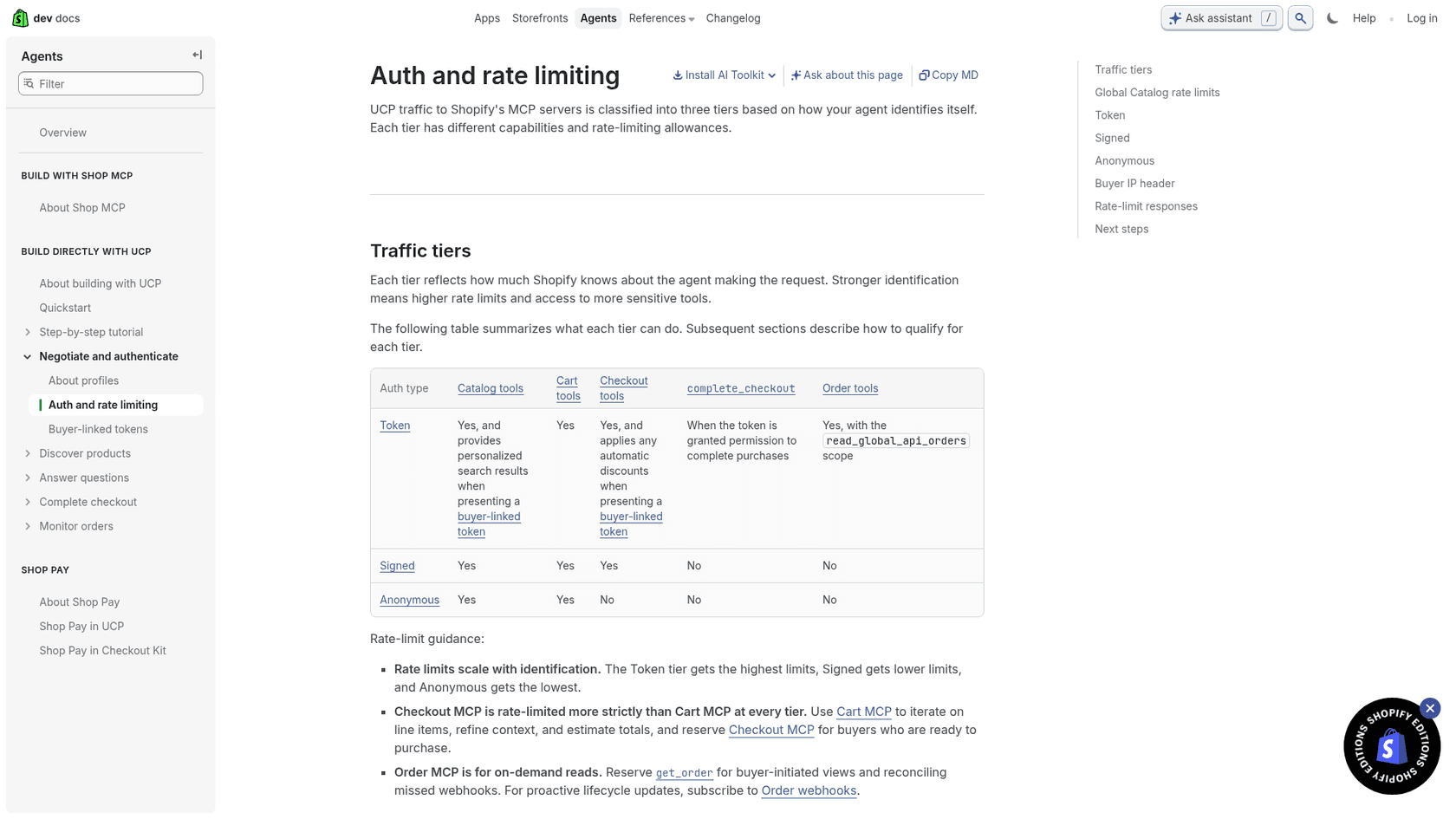
Token-tier calls also need a Shopify-Buyer-IP header, and the docs say a scheduled job with no buyer present will fail. That is worth knowing before you plan an overnight ticket agent on these servers. One practitioner in the Shopify Community made the same point about testing:
"A successful UCP response is an observable fact; a successful purchase path is a different result."

Which Shopify MCP server do I need?
Pick by asker. This helper uses nothing but CSS, so it works in any browser. Tap who is asking.
Who is asking your agent for help?
Pick one above to see the server, the auth and the catch.
Use Shop MCP, or Storefront Catalog plus Ask MCP. No API key for search, the store endpoint is /api/ucp/mcp.
Catch: it answers shopping questions and hands checkout to Shopify. It will not look up someone else's order.
Use Customer Accounts MCP. OAuth 2.0 with PKCE, so the customer sees only their own orders and account.
Catch: needs a custom domain and protected customer data approval. Shop MCP search_orders works too after Shop sign-in.
None of the shopper servers. Use the Admin API through an app with read_orders, plus read_all_orders for orders older than 60 days.
Catch: write_orders also means cancel, edit and refund, so put approvals inside the agent. eesel does this inside your helpdesk.
Use the Shopify Dev MCP (npx -y @shopify/dev-mcp@latest) or the AI Toolkit plugin.
Catch: it carries docs, schemas and validation, no live store data.
What does the Shopify Dev MCP actually do?
It makes your coding agent better at Shopify, and nothing else. The Dev MCP runs locally, needs no authentication, and gives Claude Code, Cursor or Codex access to current developer docs and API schemas. Install it in Claude Code with claude mcp add --transport stdio shopify-dev-mcp -- npx -y @shopify/dev-mcp@latest. You need Node.js 18 or higher.
Shopify now recommends its AI Toolkit plugin over the bare server. The toolkit bundles docs, code validation for GraphQL, Liquid and extensions, and store management through Shopify CLI's authenticated store context, with you choosing when to run each task. Note what that last part is: a CLI path, not a hosted MCP server pointed at your live orders. If you came here hoping the Dev MCP could answer "where is order 4821", it cannot.
Shopify also publishes a reference repo with a storefront agent over UCP and a merchant agent over the Admin API, built on Anthropic's commerce-agents blueprint. Its storefront example never calls complete_checkout. Checkout stays a handoff to Shopify's own page, which is the safe default.
Is a community Shopify Admin MCP server safe for support?
Only if you treat it as a power tool. Community servers wrap the Admin API, and a support agent is exactly the person tempted to point one at a live store. GeLi2001/shopify-mcp, a popular one with 239 stars, lists 31 tools in its README, including order cancel, mark as paid, fulfillment and refunds, and asks you to grant read_orders and write_orders.
That scope is the issue. In Shopify's access scope reference, read_orders is read access and write_orders is read and write access to orders, and the scopes cover only the last 60 days unless you add read_all_orders. There is no separate "refund only" permission. Whoever holds write_orders can read, edit, cancel and refund, so the limit has to live in the agent, not in Shopify.
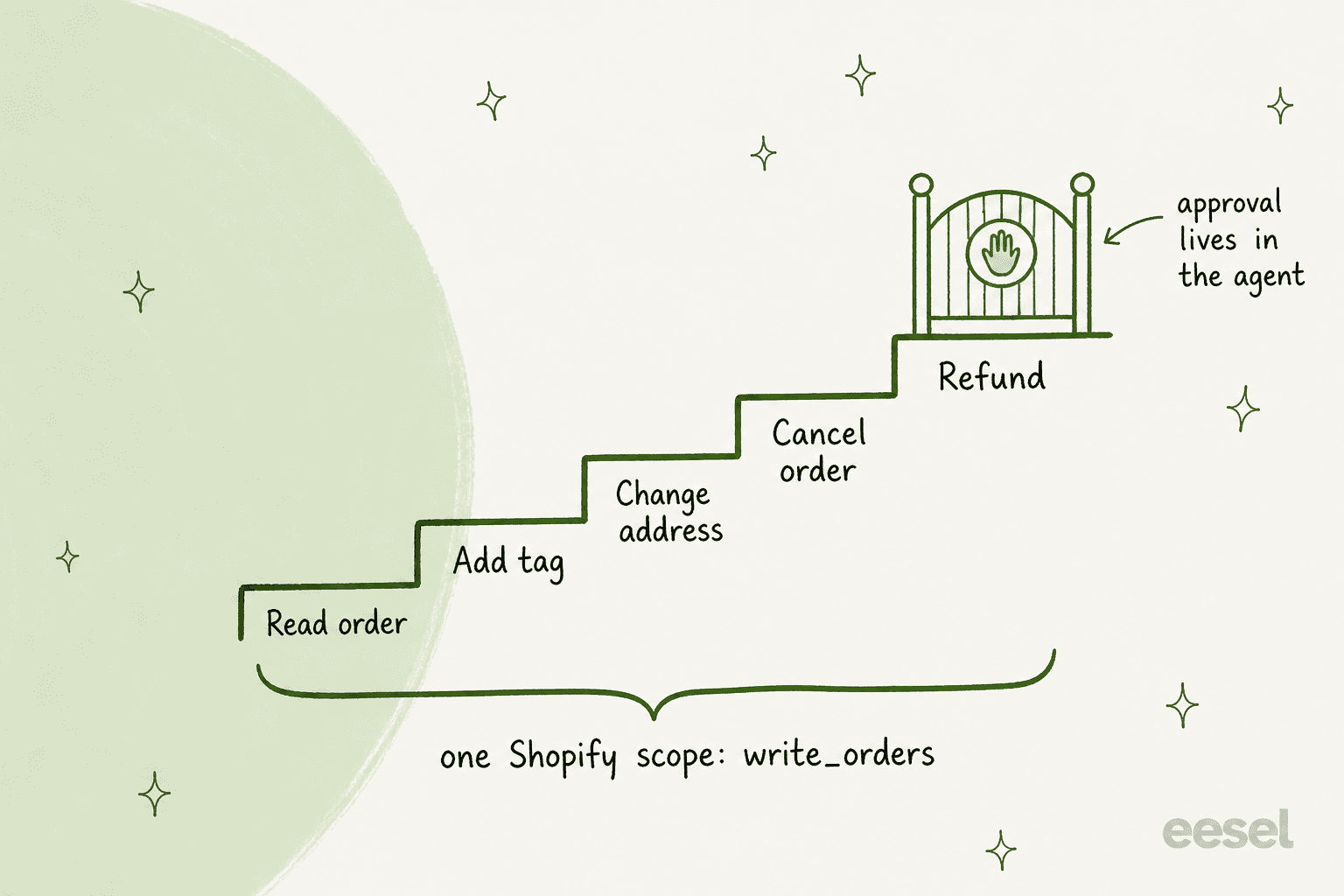
I wrote the refund guardrails post because of this gap. Short version: cap the amount in code, never in the prompt, and hold every money action for a person. One Hacker News commenter argued that MCP suits a platform like Shopify because it is a standard HTTP endpoint instead of arbitrary code:
"Shopify can create an MCP for every shop and allow the shop owner to customize it. Creating a CLI per shop makes no sense."

That is a fair case for the shopper-facing servers. It does not make an Admin wrapper safer for a support queue without a human in the loop and real AI guardrails.
How does eesel use Shopify without you running an MCP server?
You never touch an MCP server for this. eesel's Shopify integration is a Shopify app that a store owner approves, and the agent reads your store live while it works a ticket in Zendesk, Gorgias, Slack or your chat bubble. The integration docs list the actions: order lookup, order history, tracking by parcel, stock by location, and, behind approvals, refund, cancel, create return, edit items and update a shipping address.
Several limits are worth stating plainly, because they are the same ones you would hit building your own:
- Order lookups reach back 60 days unless the store approves the read-all-orders permission. Without it the agent says it cannot see older orders, rather than calling them missing.
- When the agent answers a shopper, it reads out an order only when the email matches the one on the order, because order numbers run in sequence.
- Shopify withholds customer names, phone numbers and street addresses from the app, so the agent can change an address but cannot read it back.
- Shipped orders are fixed: cancel and item edits work only before fulfillment.
- Checkout stays in Shopify. The agent can build a cart or a draft order, but the shopper pays in your checkout.
That list is why I trust the approach: the agent says what it cannot see. In a real-traffic trial on a German jewelry brand's Zendesk and Shopify inbox (about 1,000 tickets a month, eight languages), eesel's triage was 93% accurate and drafts had a 7% factual error rate. Agents mostly rewrote the drafts rather than sending them as they came, and most rewrites were about tone and length, not facts.
Four named customers show the guardrail shape. All figures cover 8 August to 8 September 2026, and none of the four lets the agent refund on its own.
- Rúngne, a Norwegian climbing brand, runs three agents on Gorgias and Shopify. Cancellations, damaged items and customs disputes go to its team. eesel handled about 2,100 tickets and looked up about 150 orders in the month.
- STIL Classics uses eesel to draft. It looked up about 230 Shopify orders and left about 430 internal notes, a person checks each draft, and eesel never changes an order.
- Question Beauty checked about 290 orders in Shopify before answering, with refunds and complaints handed to a person.
- ClutchLoop sends US returns to its returns portal and checks live prices and stock in Shopify.
For the ladder in practice, see AI for refund requests and AI refund automation.
One buyer on an eesel sales call put the control point better than I can:
"I need an AI who is only handling the tickets that it's confident to handle and all the other ones, leave them alone."
a CX lead at a DTC supplements brand on Gorgias and Shopify (about 7K tickets a month)
How do I use the eesel CLI and MCP with Shopify?
This is the part that is easy to misread, so I will be exact. The eesel CLI operates the same teammate and workspace as the dashboard, so a person can use it from a terminal, a script can run it, and coding agents such as Claude Code, Codex and Cursor can drive it. It is not a second copy of the agent. Every command prints JSON, and every error carries a hint saying what to run instead, which is what lets an AI agent run setup without a person reading the docs.
With Node.js 18.17 or newer, nothing needs installing. These are the commands I would point a coding agent at for a Shopify store:
npx @eesel/cli login
npx @eesel/cli integrations connect shopify
npx @eesel/cli files upload ./returns-policy.pdf
npx @eesel/cli chat "what is our return window?"
npx @eesel/cli approvals
integrations connect shopify shows the connection options and the store details it needs. A store owner still approves the install in a browser, and refunds and other changes still follow your approval settings. files upload adds approved knowledge, chat tests an answer before you go live, and approvals lists held actions with approve and deny subcommands. Add --dry-run to see the exact call a write would make, and --agent to pin the agent.
The other half is MCP. Every eesel workspace is also an MCP server. npx @eesel/cli mcp token prints the MCP URL, a token that lasts 30 days for a signed-in login, the headers and a ready line:
claude mcp add --transport http eesel "https://<api_url>/mcp" \
  --header "Authorization: Bearer <token>" \
  --header "X-Eesel-Agent-Id: <agent id>"
Restart Claude Code, run claude mcp get eesel, and the tools appear as mcp__eesel__*. They are small and named like CLI commands: chat, status, integrations, automations, files, activity and approvals. Your role still applies. Anyone can read, editors can write, and a tool set to ask for approval still asks. Treat the token like a password.
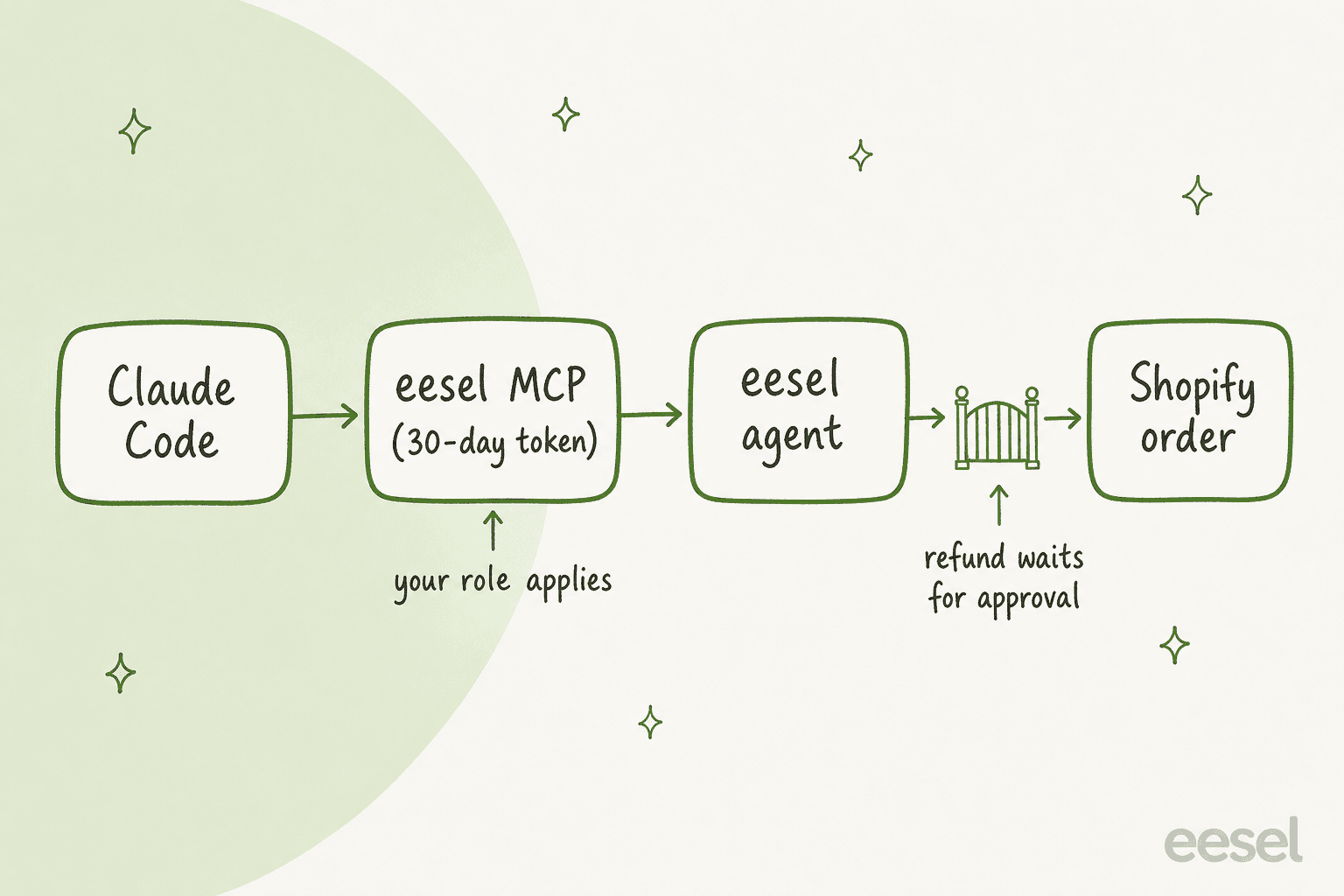
Two honest limits. The CLI does not replace the helpdesk or Shopify connection, because someone with admin access still approves each one. And uploading knowledge is not the same as ready, so run test questions through chat and check the answers before the agent touches live tickets. I would also keep the agent's instructions in the dashboard chat: the CLI refuses to edit them directly and asks you to say it in chat.
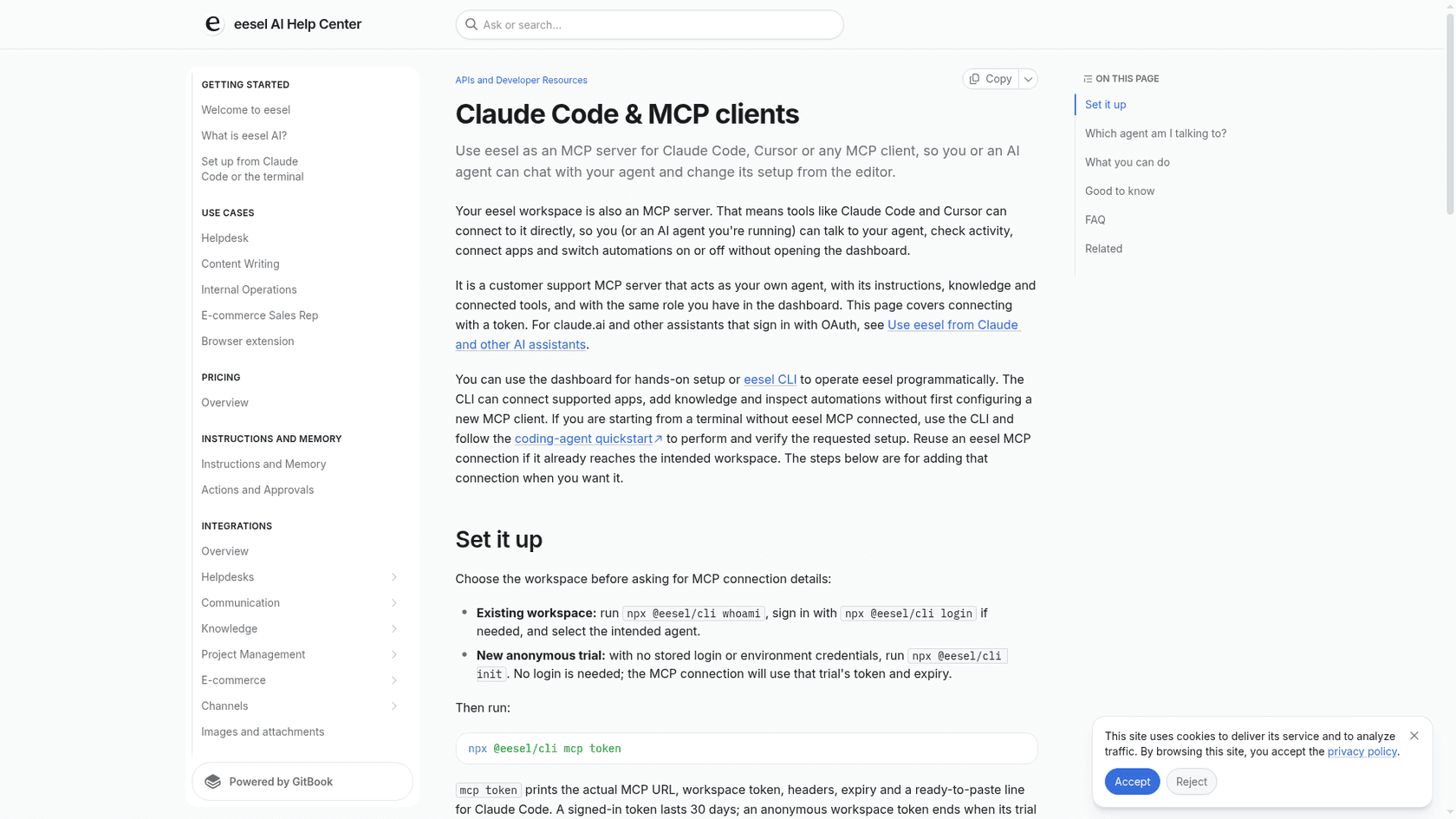
If your question is broader than Shopify, my guides to MCP for customer support, helpdesk MCP servers and Claude Code MCP tools cover the pattern.
The sibling servers are mapped in Gorgias MCP, Zendesk MCP and WooCommerce MCP.
What does it cost to put an agent behind these servers?
The Shopify side is cheap to try. Shop MCP needs no API key and search needs no account, and the Dev MCP runs locally with no authentication. The cost is the agent you put in front.
eesel is priced in fixed monthly credit plans. The pricing page shows a free 7-day trial with 100 credits and no card, then the Teammate plan from $299 a month for 500 credits, up to $1,749 for 5,000. A ticket or a chat is 1 credit however long it runs, and extra credits are $0.80 each up to a cap you set. A shop doing 1,000 AI-handled tickets and chats a month would pick the $499 plan for 1,000 credits. For the market picture, see Shopify AI pricing.
What would I do this week?
I would pick by job, not by buzzword. Here is the order I use.
- Support lead: do not stand up an MCP server. Connect an agent to the helpdesk you already run, with Shopify read access first and money actions on approval. Start from AI helpdesks for Shopify.
- Developer building a shopping agent: install Shop MCP or the Shop CLI, search without an account, then add Cart MCP. Add Checkout only when the buyer is ready, since it is rate limited harder than Cart.
- Developer building order tracking for customers: build on Customer Accounts MCP, and budget for the OAuth and protected-data review. See the order tracking guide.
- Anyone coding against Shopify: add the AI Toolkit plugin and keep it away from production credentials.
If you are weighing the wider field, my Shopify AI agent breakdown and the ChatGPT checkout notes show where shopper-side agents end and support begins.
Try eesel for Shopify support
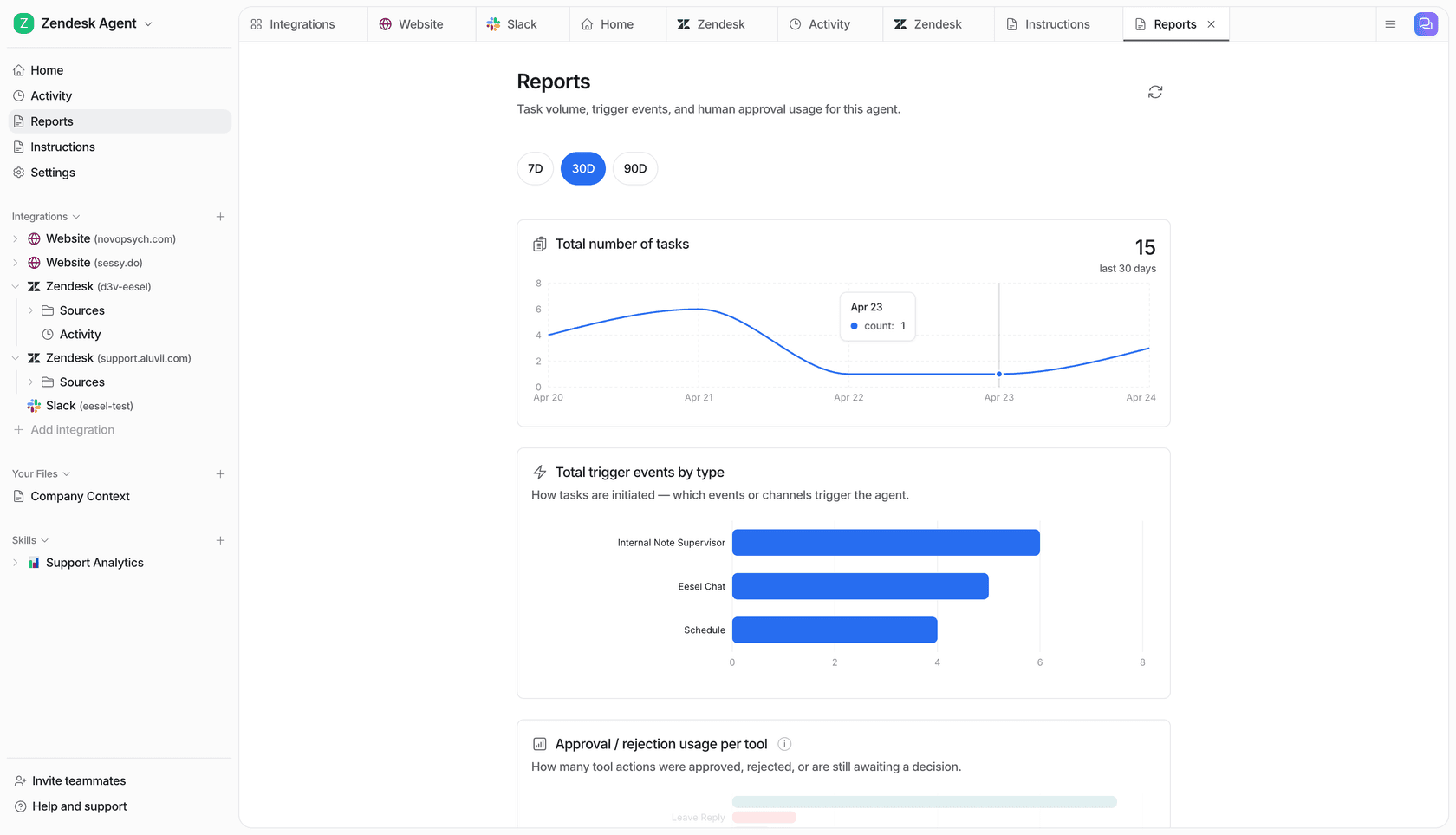
If your Shopify questions come in through a helpdesk, Try eesel. It joins Gorgias, Zendesk or your chat bubble like a new hire, reads Shopify orders, tracking and stock live, and holds refunds and cancels until you approve them. Read the Shopify integration page for the full action list, or see the helpdesk teammate. The report below shows approvals and rejections counted per tool, so you can see what the agent actually did.
Frequently Asked Questions
What is the Shopify MCP server?
There is no single one. Shopify runs several: Shop MCP for shopping agents, Customer Accounts MCP for signed-in customers, an Ask MCP for store questions, and the Dev MCP for coding agents. Which you need depends on who is asking. My MCP for customer support guide covers the support side.
Is there a Shopify MCP server for customer support?
Not one built for your staff. The Shopify-run servers serve shoppers and signed-in customers, so a support agent reads and changes orders through the Admin API instead, usually via a helpdesk app for Shopify such as eesel's Shopify integration.
What happened to the Shopify Storefront MCP server?
Shopify's docs now mark the catalog and cart tools on https://{shop}/api/mcp as removed. Product search moved to Storefront Catalog MCP, carts to Cart MCP, and policy questions to Ask MCP's ask_business. The Shopify Inbox agent is the no-code route.
Does the Shopify MCP server need an API key?
Shop MCP does not, and search works without an account. Order access is stricter: Order MCP needs a Dev Dashboard token with the read_global_api_orders scope, and Customer Accounts MCP needs OAuth 2.0 with PKCE. The Dev MCP runs locally with no authentication. See AI helpdesk API for the support-side picture.
Can a Shopify MCP server refund an order?
The Shopify-run servers cannot. Refunds come from the Admin API, where write_orders also covers cancels and edits, and community Admin servers expose refund tools. Keep a human approval in front of money, as my refund guardrails post explains, and read can AI handle refunds first.
Can Claude Code connect to my Shopify store?
For building, yes: add the Dev MCP or the AI Toolkit plugin. For support work, connect Claude Code to your helpdesk teammate with npx @eesel/cli mcp token, which prints a ready claude mcp add line. My Claude for Shopify post goes deeper.
How much does a Shopify MCP server cost?
Shop MCP needs no API key, and the docs I read list no separate charge. The cost sits in whatever agent calls it. eesel is a 7-day free trial, then from $299 a month for 500 credits, where a ticket or a chat is 1 credit. See Shopify AI pricing for the wider market.
Which Shopify MCP server should a developer use?
Use the Dev MCP (@shopify/dev-mcp) for docs, schemas and code validation, and the Shop CLI or UCP CLI to test shopping flows. None of them reads live store data. If your goal is an AI agent for your Shopify store, start from the support job instead.