


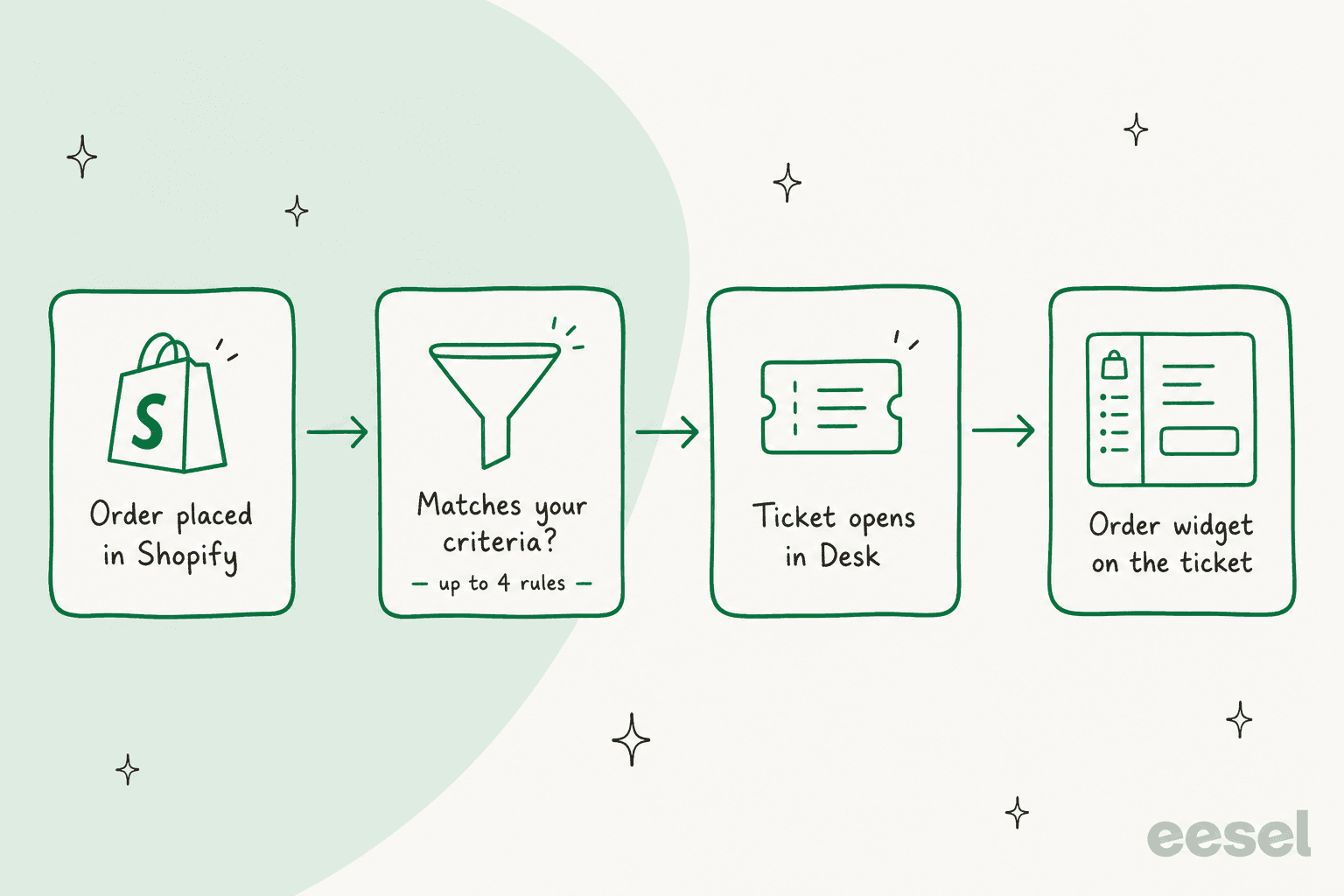
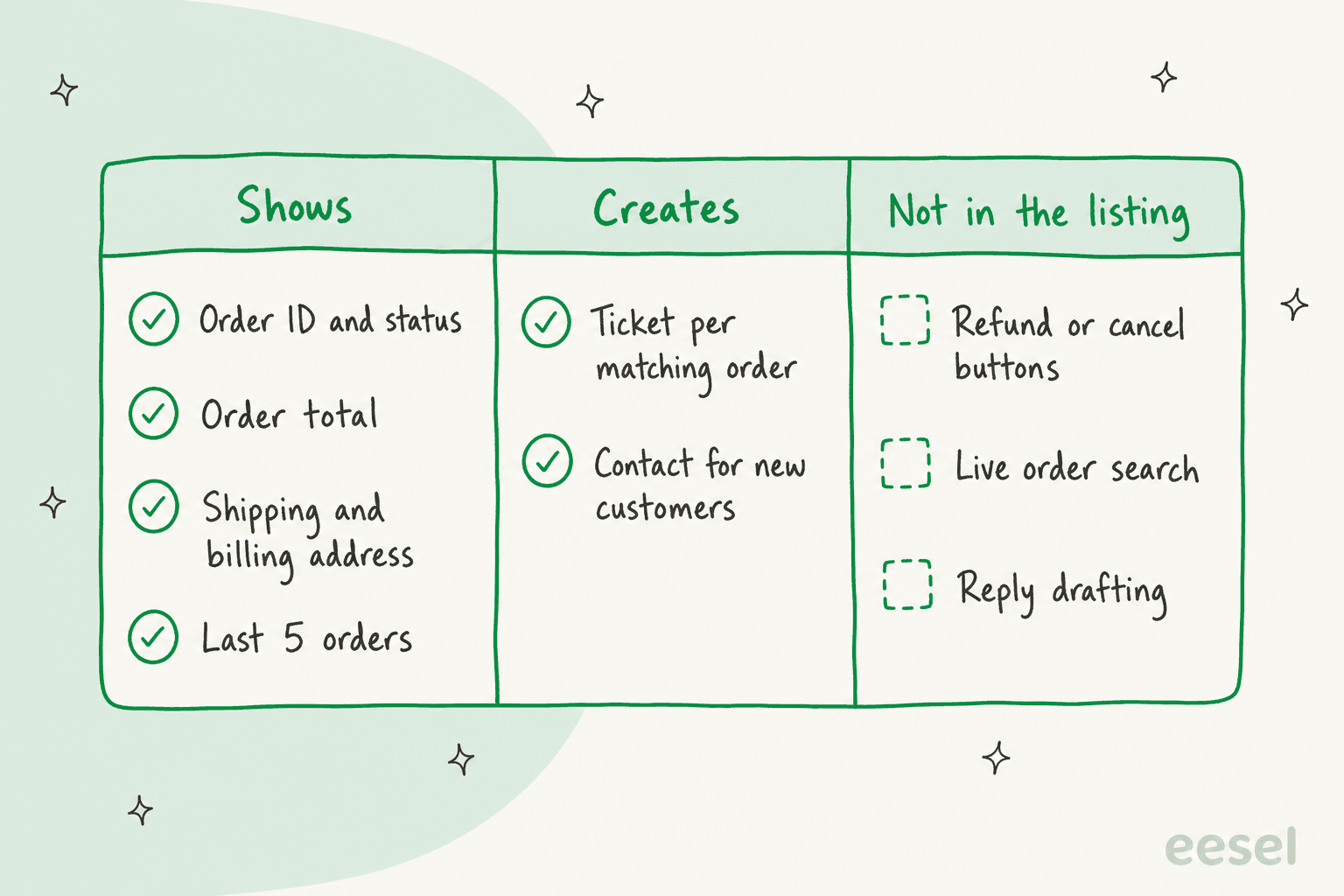
Zoho Desk connects to Shopify through a free extension, Shopify for Zoho Desk, that opens a ticket for each Shopify order matching your rules and shows the order, status, total and addresses in a ticket sidebar. It is listed for the Professional and Enterprise editions, and its feature list covers viewing orders, not refunding or cancelling them. If you want replies drafted from live Shopify data, eesel reads both systems and leaves a private comment for your agent to send. With the eesel CLI, a coding agent can upload your return policy and saved replies, then ask test questions and check the answers before anything goes live. Connecting Zoho Desk and Shopify themselves still needs an admin to approve.
How does Zoho Desk connect to Shopify?
Zoho Desk has no built-in Shopify switch. The connection is an extension from the Zoho Marketplace, and four listings carry "Shopify" in the name. The one Zoho builds itself is Shopify for Zoho Desk: free, 2.3K+ installs, version 2.1, last released Sep 14, 2026. The listing promises four things: tickets for Shopify orders that match criteria you define, new Shopify customers added as contacts, the five most recent orders for existing contacts, and tickets closed when the order is completed or closed.
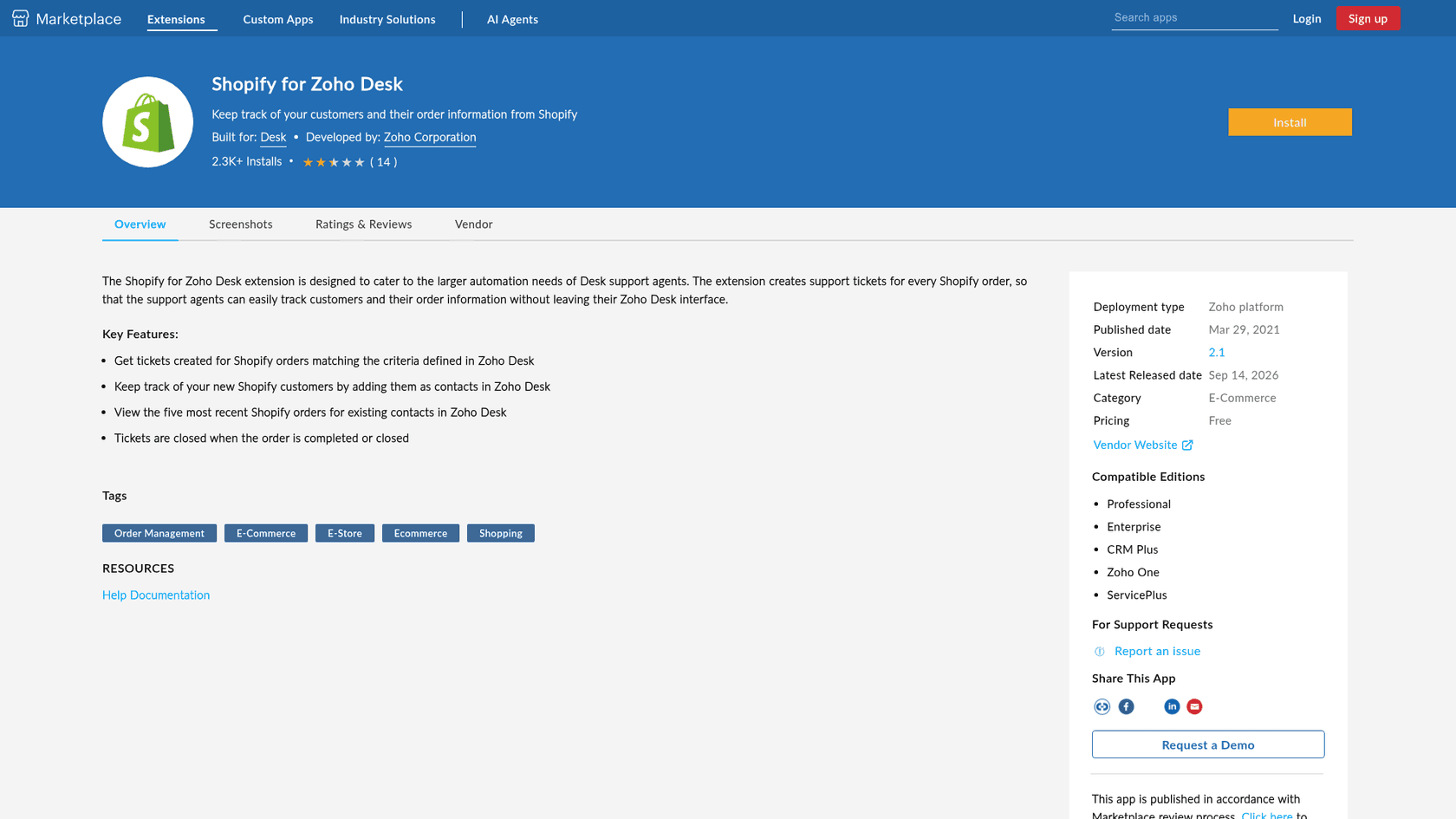
I build integrations at eesel, so I read this one the way I would read an API: what does it pull, when does it run, and what can it write? The answer that matters is the trigger. The extension listens for orders, not for customers writing in. A ticket opens because someone bought something, which is a different job from "show me this customer's order when they email". Both can be useful, and Zoho's help article covers the first one in detail. If you are still choosing a helpdesk, the Zoho Desk pricing breakdown and the Zoho Desk reviews roundup are good companions. Weighing it against others? See Freshdesk vs Zoho Desk.
What does the order widget show on a ticket?
Open any ticket, click the Extensions icon on the right and pick Shopify, and the widget lists the order per Zoho's help article:
- Customer information
- Order ID, which links through to the order in Shopify
- Store name
- Order status
- Order total value
- Shipping address and billing address
- Order note (only one note is allowed)
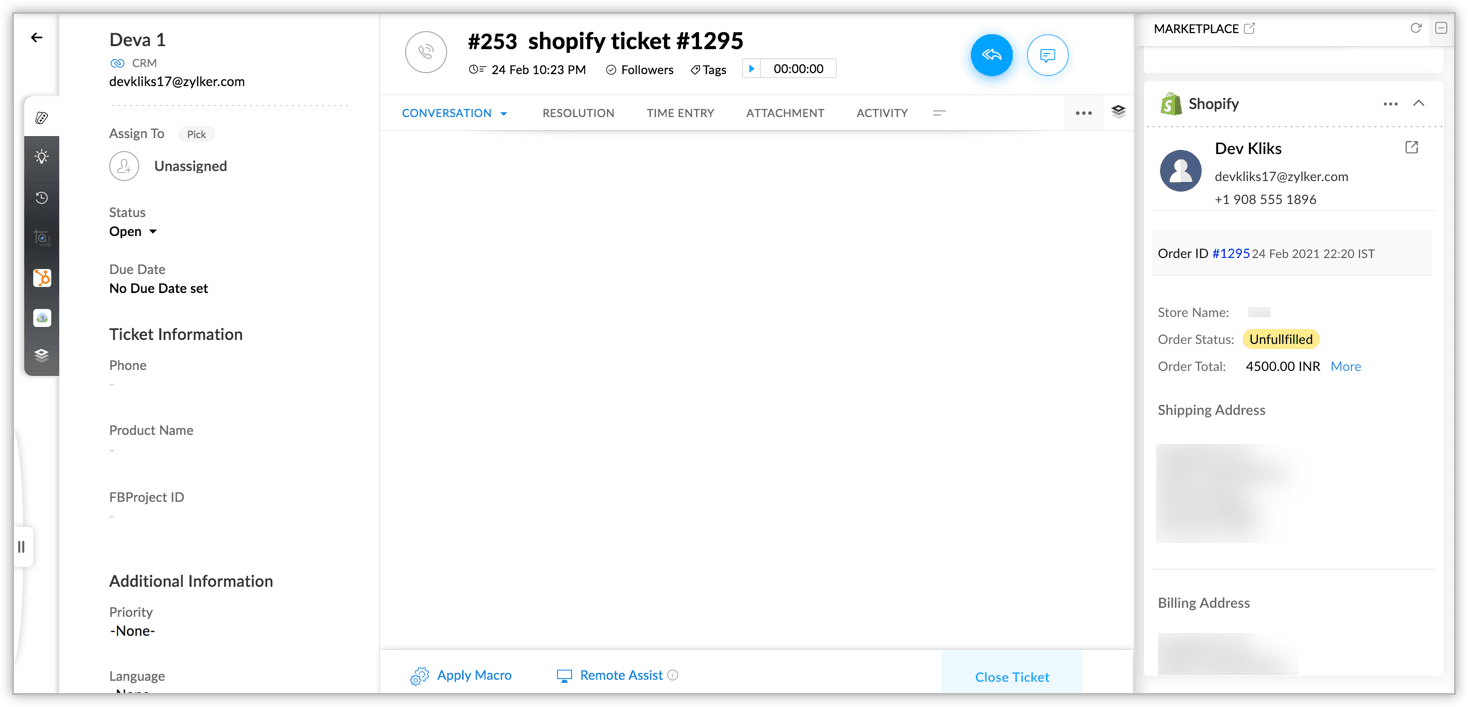
For a customer who ordered before you installed the extension, the widget lists only the latest five orders, whatever your criteria say. On a ticket for a repeat buyer, you get a short list you can expand:
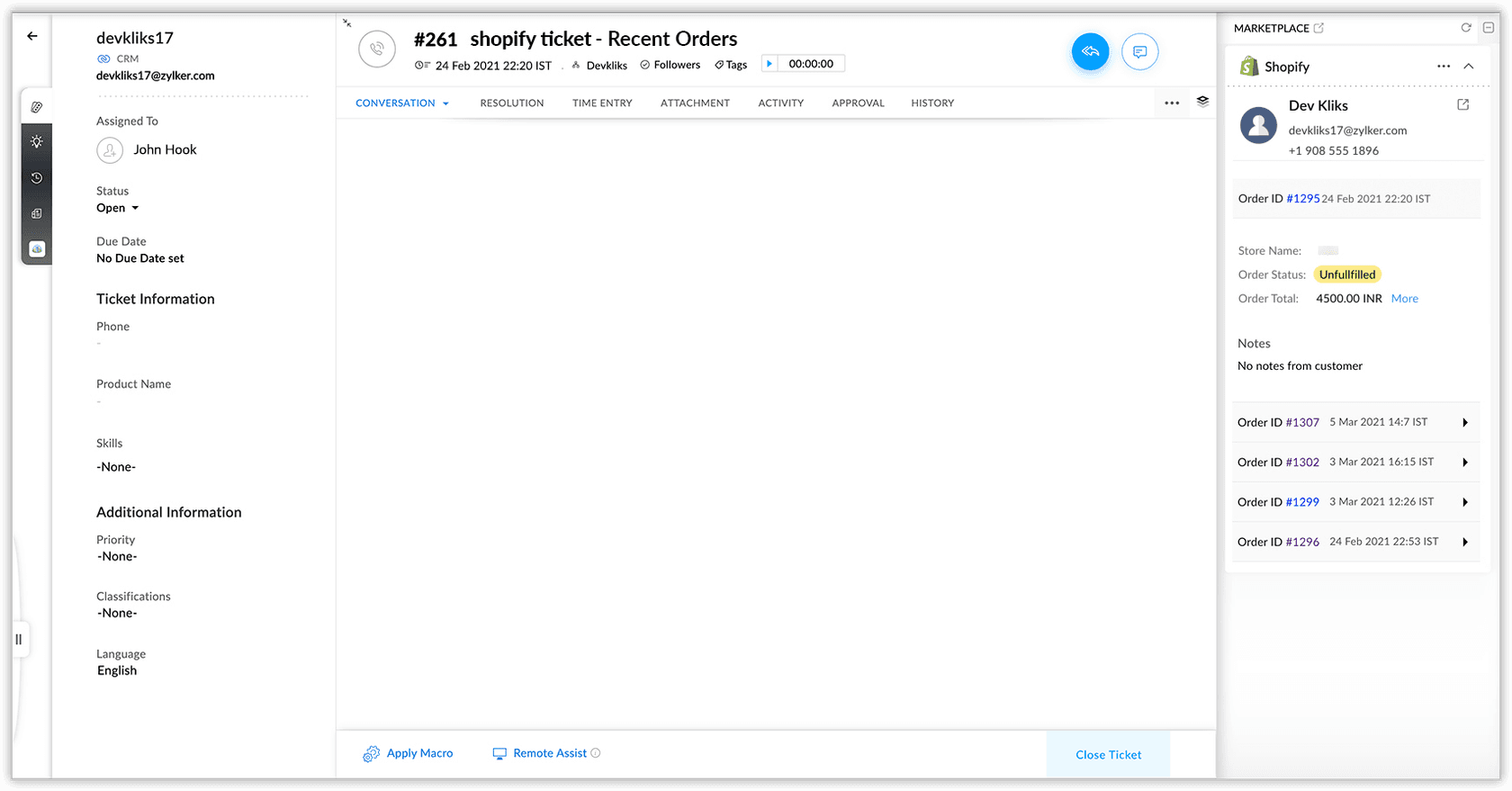
That is the "where is my order" lookup, minus the tab switch. The widget shows status and totals; Zoho's article does not describe tracking numbers or line items in it, so a delivery question may still send the agent to Shopify. This is the core of ecommerce order management. If that is your most common ticket, the order tracking guide goes deeper.
How do you set it up?
Zoho's article gives an admin-only path of about sixteen steps. The short version, with the parts that trip people up:
- In Zoho Desk, go to Setup, then Integration, then Marketplace, search "Shopify" and install the extension. Choose the department and profiles that get access.
- Authorize the two connections the pop-up asks for, then click Add Shop.
- Enter the Shop Name and the Domain URL in the form
https://{store_name}.myshopify.com/, then click Generate to get a redirect URL. - New users create an app in the Shopify Dev Dashboard, set that redirect URL, choose scopes, set Custom Distribution, install it on the store and copy the Client ID and Secret back into Zoho. Existing users can keep their API access token.
- Under Configuration, enter the store name. Under Preferences, define up to four criteria (AND or OR) for which orders become tickets, and pick the department.
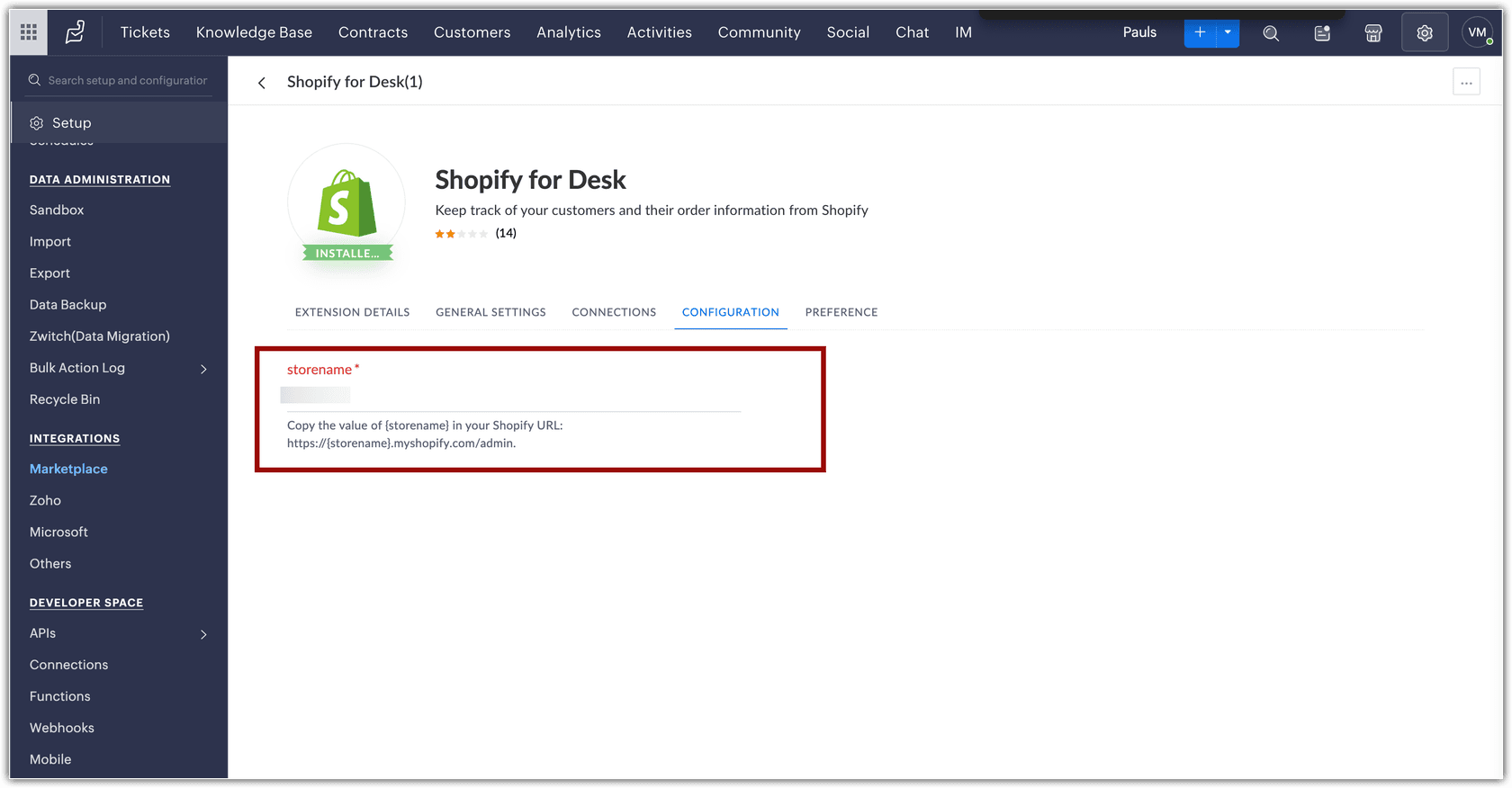
Three details from the docs deserve a second look. First, the scope list Zoho gives includes both read and write permissions for orders, customers, products, inventory and draft orders, so decide whether you are comfortable granting that. Second, on Shopify's Basic plan only sales orders sync and personally identifiable information is restricted, so you need at least the Shopify plan for customer details. Third, Zoho's support told one reviewer that the integration uses user-based authentication, so each agent authorizes it for themselves.
Which Zoho Desk plan do you need?
The extension is free, but the Zoho Desk edition it runs on is not. The listing's compatible editions are Professional, Enterprise, CRM Plus, Zoho One and ServicePlus. Prices below come from Zoho's pricing page.
| Edition | Price per user per month, billed annually | Zoho's Shopify extension listed? |
|---|---|---|
| Free | $0, 3 users | No |
| Express | $7 | No |
| Standard | $14 | No |
| Professional | $23 | Yes |
| Enterprise | $40 | Yes |
For a team of five agents, Professional is $115 a month and Enterprise is $200 a month at annual billing. A Standard team of five pays $70, which is $45 less than Professional, and that gap is the real cost of Zoho's own extension. One third-party listing, covered below, lists Standard as compatible. For the rest of the edition story, see the Zoho Desk AI overview and the Zoho Desk alternatives list.
What can the extension not do?
Zoho's help article and listing describe viewing orders, creating tickets and creating contacts. Neither mentions refund, cancel or edit actions, so I would plan as if the agent still opens Shopify to change anything. Other limits worth knowing:
- Older orders: only the latest five show for a customer who ordered before installation.
- One order note: the widget shows a single note.
- Order-first tickets: without tight criteria, every matching order becomes a ticket.
- Plan gates: Basic Shopify stores lose customer details.
What do Zoho Marketplace reviewers say?
The listing shows a 2.5 out of 5 rating, with seven of its ratings at one star. Reading the text, the complaints cluster around two things: the 2026 change in how Shopify issues API access, and the ticket-per-order model. In May 2026 a reviewer wrote:
"the app is not working there is no way to get anymore the admin api from Shopify"
Zoho replied on Aug 7, 2026 that changes to support Shopify's updated authentication flow had shipped, with a new help article for authorizing the extension. That is the setup path described above, so older tutorials may not match. On the ticket-per-order design, another reviewer put it bluntly:
"Doesn't make sense. Why would you want a support ticket for every order. That's a nightmare"
Zoho's answer was that Preferences let you define criteria, so only orders that match get a ticket. A third reviewer wanted the opposite behavior:
"I was really hoping that it would allow me to connect a ticket with a customer's existing order."
That reviewer later wrote that Zoho Desk support resolved it, through a mix of settings and the Shopify plan, which had limited custom API features. My read: the extension works when you want order-triggered tickets with a sidebar. If you want to answer inbound emails with the right order attached, you will lean on the widget and on how well the customer's email matches Shopify. For stores on Shopify Plus, the Plus helpdesk guide covers the larger-volume picture.
Which other Shopify extensions exist for Zoho Desk?
Three more listings turn up in the Marketplace. Their pages are the source for everything below.
| Extension | Developer | Price | Installs | What it adds |
|---|---|---|---|---|
| Shopify for Zoho Desk | Zoho | Free | 2.3K+ | Ticket per matching order, contacts, five recent orders |
| Shopify Orders for Zoho Desk | LogosCorp | Free | 600+ | Order list on tickets, items and notes, notes sync to Shopify, no Shopify-side install; lists Standard and up |
| Shopify Extension for Zoho Desk | Yaali Bizappln Solutions | Paid | 100+ | Link a ticket to an order, partial or full refunds from Desk, order timeline; Professional and up |
| Shopify for Zoho Desk powered by Zoho Flow | Zoho | Free | n/a | Marked deprecated and unavailable |
The Yaali listing is the one that adds refunds, and its reviewer noted it does not auto-refresh order data when you move to the next ticket. The vendor said it was now a priority. Check the live listing before you buy, since both extensions were updated in the past year.
How does an AI teammate change order lookups?
An extension shows an agent the order. An AI teammate can read it, write the reply and, with your approval, act on it. eesel is the second kind: it has a Zoho Desk integration and a Shopify integration, and the two meet in one ticket.
On the Zoho side, eesel reads the ticket, the contact's email and your custom fields (such as cf_order_number), and learns from your help center and past tickets, by default up to your 5,000 most recent closed ones. It can run when a customer opens a ticket, when they reply, or when a teammate mentions @eesel in a private comment. On the Shopify side, it looks up the order live: status, payment and fulfillment state, items, totals, shipping address, and one row per parcel with carrier, tracking link and scan events. Customer lookups go by email, and order history defaults to the five most recent orders. Everything is a live read, so nothing is copied or stale.
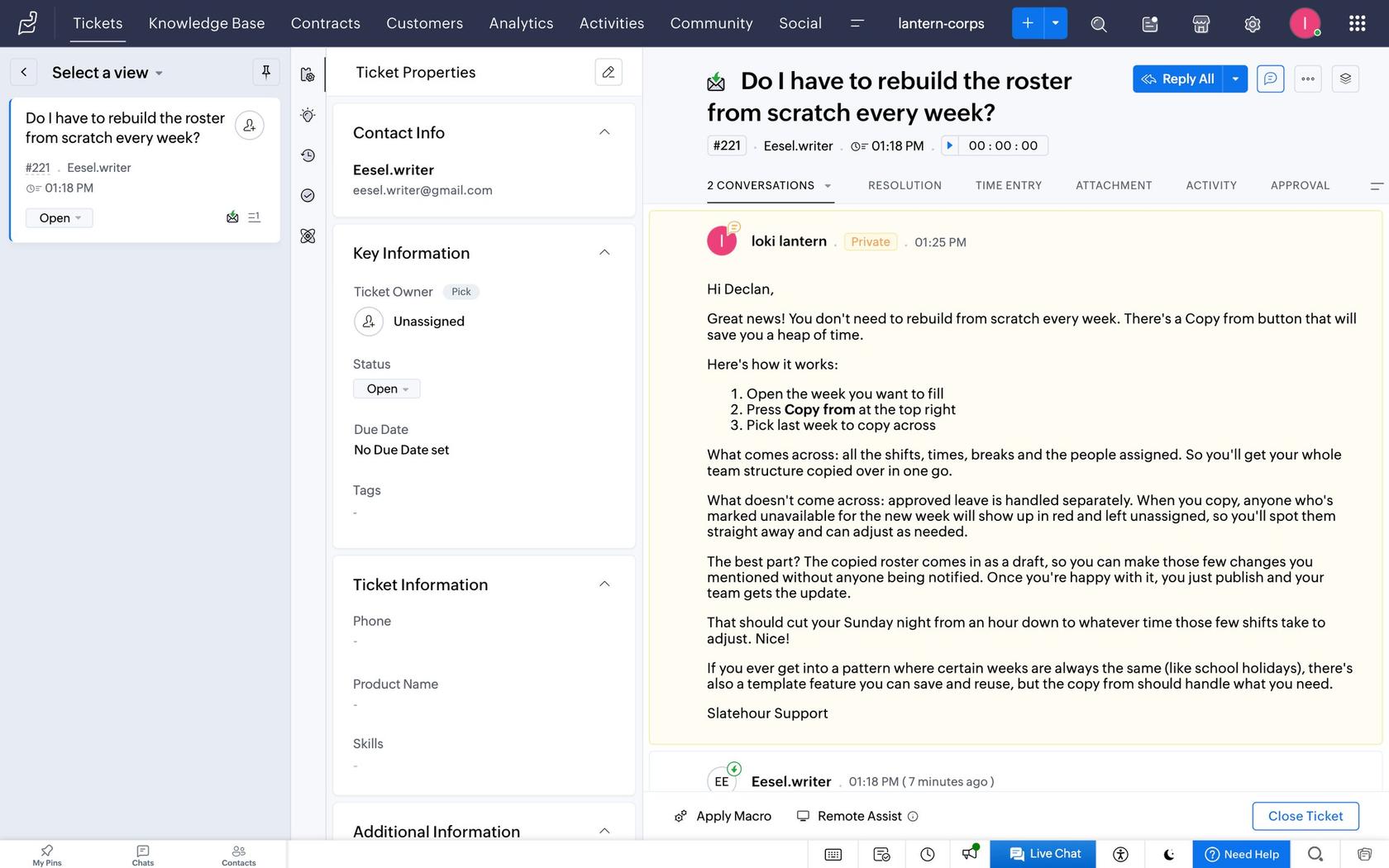
This screenshot is a general Zoho Desk example from the docs, not a Shopify ticket. The pattern is the point: the draft waits as a private comment, and an agent reads it before sending. That is how STIL Classics runs eesel on Gorgias and Shopify, not Zoho Desk, but the shape carries over. In one month (8 Aug to 8 Sep 2026) it prepared 320 tickets, left 430 draft replies as internal notes and looked up 230 Shopify orders before drafting. Nothing reaches a customer without a person checking it. In eesel's own 2026 product notes, "where is my order #1234" came up as the most common ecommerce question, which is exactly the lookup the Zoho widget makes slightly faster and an agent can fully draft.
Whether AI can handle refunds and returns safely comes down to approvals. Refunds and cancels are possible but gated. eesel's Shopify actions include refunding an order, cancelling an unfulfilled order, creating a return, editing items and updating a shipping address, and each follows your approval settings (see AI refund guardrails).
Two honest limits. Shopify has no triggers in eesel, so it will not create a ticket per order the way Zoho's extension does. And the Zoho connection needs a person to approve it in Zoho, while Shopify needs the store owner to approve a full connection.
For the wider options, see AI for Zoho Desk, setting up Zoho AI and the Zoho Desk chatbot guide.
If you would rather keep your helpdesk and add AI, see AI for an existing helpdesk. On cost, eesel's pricing is fixed credit plans. A ticket or chat is one credit, the Teammate plan starts at $299 a month for 500 credits, and a 7-day free trial gives 100 credits with no card. If you used all 500 credits, that works out to about 60 cents a ticket. For an ecommerce team already paying for Zoho seats, the question is whether drafting time saved beats $299.
Which route should you pick?
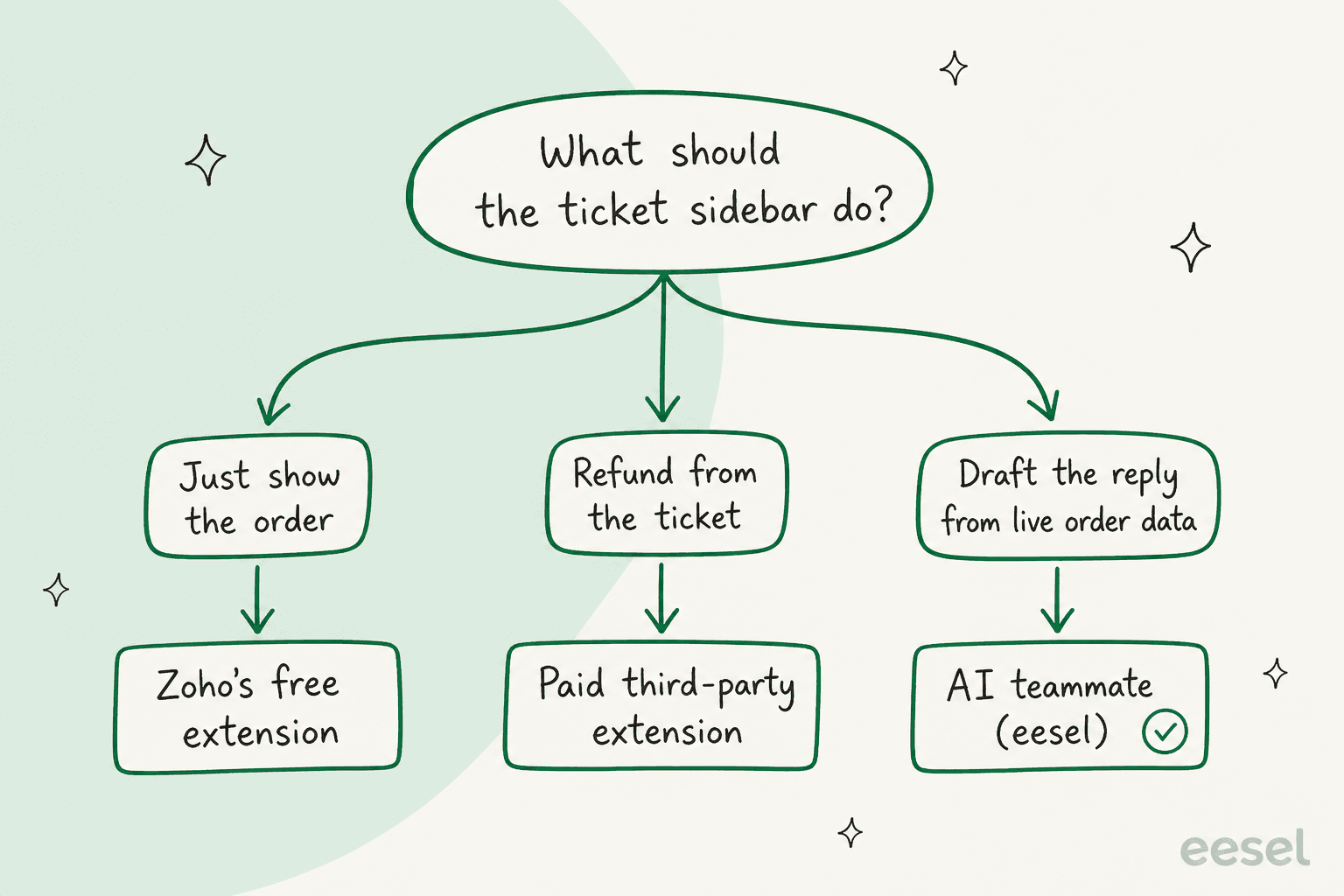
- You only want the order next to the ticket. Use Zoho's free extension on Professional or Enterprise. Tighten the Preferences criteria first, or you will inherit a ticket per order.
- You are on Standard and want an order list. Read the LogosCorp listing, which names Standard as compatible, and weigh that against the
$9per agent upgrade. - Agents must refund from the ticket. The Yaali extension lists partial and full refunds. Test the refresh behavior in a trial.
- You want the reply drafted, not just the data shown. That is a teammate job, and a Shopify AI agent can sit on top of the helpdesk you already pay for. The Shopify helpdesk guide covers the landscape.
If you are comparing helpdesks for a Shopify store at all, the ecommerce helpdesk comparison and Freshdesk's Shopify integration are the closest reads. For stores on Gorgias, see the Gorgias Shopify integration.
Try eesel for Zoho Desk and Shopify
If your Zoho Desk queue is full of "where is my order" and "can I change my address" tickets, Try eesel. It connects to Zoho Desk with one browser approval, looks up the Shopify order by the contact's email, and leaves a drafted reply as a private comment so your agents stay in control. Start on the free 7-day trial and check the drafts against real tickets before you let it send anything.
Frequently Asked Questions
Does Zoho Desk integrate with Shopify?
Yes, through Marketplace extensions rather than a built-in switch. Zoho's own Shopify for Zoho Desk is free and creates tickets for matching orders. See Zoho Desk reviews for the wider product picture.
How much does the Zoho Desk Shopify integration cost?
Zoho's extension is free, but it runs on Professional ($23 per user per month, billed annually) or Enterprise ($40) editions. That makes the Zoho Desk Shopify integration cost mostly the seat price; see Zoho Desk pricing and Zoho Desk AI pricing.
Which Zoho Desk plan do I need for the Shopify extension?
Zoho's listing names Professional, Enterprise, CRM Plus, Zoho One and ServicePlus. One third-party listing, Shopify Orders for Zoho Desk, also names Standard. Compare editions in Zoho Desk alternatives.
Can agents refund or cancel Shopify orders from Zoho Desk?
Zoho's own extension describes viewing orders, not refunds. A paid third-party extension from Yaali lists partial and full refunds, and an AI teammate can refund with approval, as covered in AI refund guardrails and refund automation.
Why is my Shopify order not showing in Zoho Desk?
Check four things: the order matches your Preferences criteria, you opened the widget after installing, the contact's email matches Shopify, and your Shopify plan is not Basic, which restricts customer details. Each agent may also need to authorize the extension. Related: order tracking.
How do I stop Zoho Desk creating a ticket for every Shopify order?
Open the extension's Preferences tab and define up to four criteria, combined with AND or OR, so only matching orders create tickets. If you want orders answered when customers write in instead, see AI for Zoho Desk.
Can AI answer where-is-my-order tickets in Zoho Desk using Shopify data?
Yes. eesel reads the ticket in Zoho Desk, looks up the Shopify order live and leaves a drafted reply as a private comment. Start with the Zoho Desk chatbot guide or Shopify helpdesk options.