What "AI in Zoho Desk" actually means
Zoho Desk's AI is branded Zia, an assistant that spans self-service, agent help, and admin automation. There's no single "AI" toggle. Zia is really a bundle of features that you enable and configure separately, and Zoho positions a ChatGPT integration as an optional second generative backend on top.
The cleanest way to think about a Zia setup is three layers, because you configure each one in a different place for a different audience.
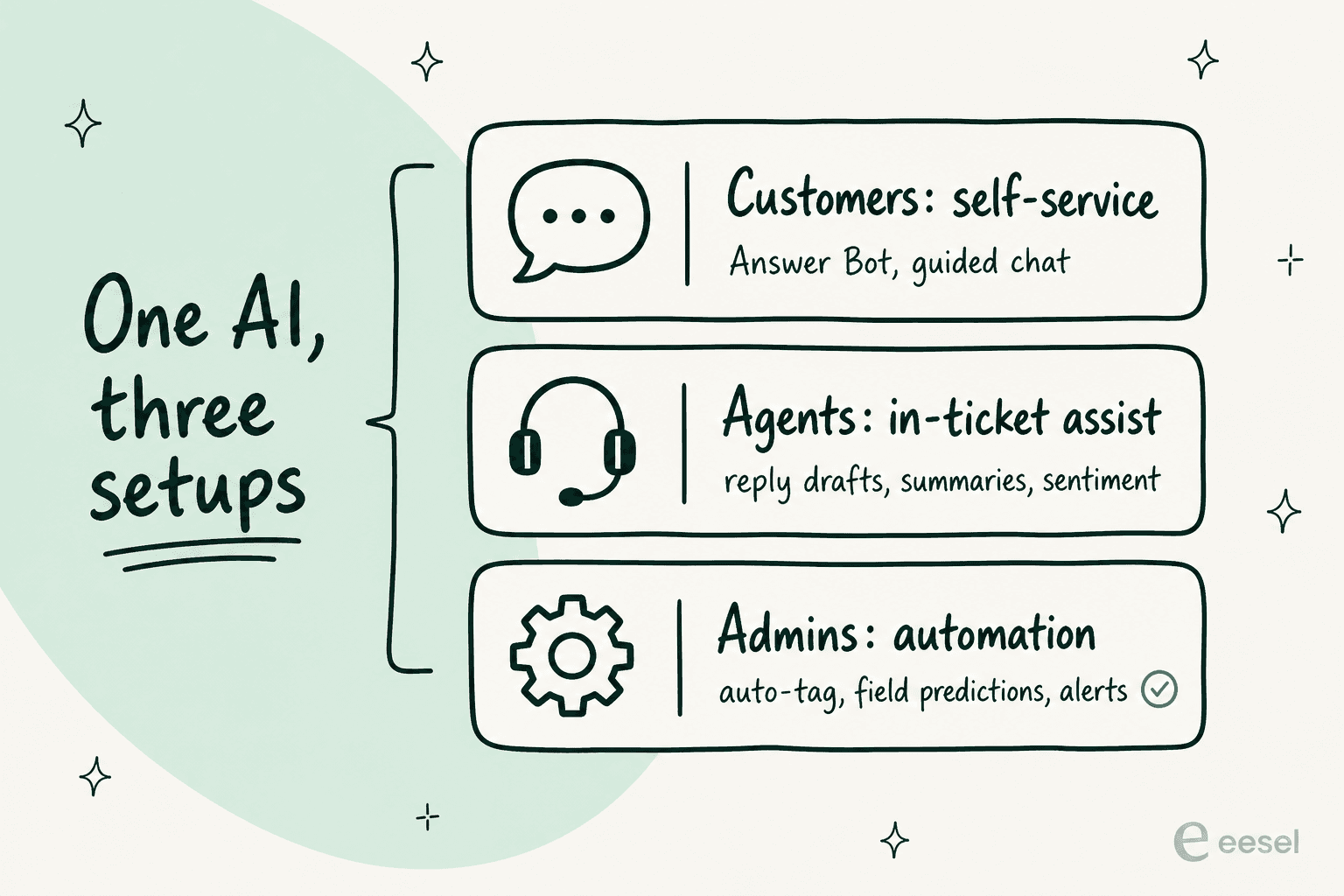
Here's the actual Zia hub on Zoho's site, which is the map of everything you can switch on:
The generative pieces (ticket summaries, reply assistance, writing feedback) are built in at no extra cost on supported plans. The autonomous pieces (the customer-facing Answer Bot, sentiment analysis, auto-tagging) are where the plan limits kick in, which is the next thing to sort out before you touch a single setting.
Before you start: what your plan actually unlocks
This is the step people skip and regret. Zoho Desk's pricing is genuinely cheap, which is its biggest pull as a Zendesk alternative, but the AI you most likely came for is Enterprise-only. Here's the plan ladder (annual, per agent per month), per the Zoho Desk pricing page:
| Plan | Price (annual) | User limit | AI you get |
|---|---|---|---|
| Free Forever | $0 | 3 users | None to speak of |
| Express | $7/agent/mo | 5 users | Basic ticketing |
| Standard | $14/agent/mo | Unlimited | Generative assist, ChatGPT integration |
| Professional | $23/agent/mo | Unlimited | Above + Blueprint automation |
| Enterprise | $40/agent/mo | Unlimited | Answer Bot, sentiment, auto-tagging, field predictions, anomaly detection |
So the practical rule: if you want Zia to resolve customer questions on its own through a chatbot, you need Enterprise. If you only want it to help your agents write and summarise faster, a paid plan from Standard up will do. Sort this out first, because half the "Zia doesn't have the feature I read about" confusion is really a plan-tier problem. As one reviewer put it bluntly on Software Advice, "some advanced features require higher-tier plans."
How to set up AI in Zoho Desk, step by step
Once your plan is sorted, the rest is configuration. Here's the order I'd do it in, starting with the foundation that everything else depends on (your knowledge base) and ending with the optional extras.
Step 1: Turn on Zia and pick your generative backend
In Setup → Zia, enable Zia for your department. You'll choose your generative AI backend here: Zoho's built-in LLM (no extra cost, available across most data centres) or the ChatGPT integration if you'd rather use OpenAI's model and bring your own API key. For most teams the built-in option is the right starting point because there's nothing extra to wire up. You can scope where Zia is allowed to act (extract details, predict fields, generate content, auto-reply) from the AI controls, so it's worth setting those guardrails now rather than later.
Step 2: Train Zia on your knowledge base
Zia answers from your published help articles, so this step decides how good every later step is. Make sure your knowledge base is current and that the articles you want Zia to use are published, not in draft. Zoho's own Zia training flow leans heavily on KB quality, and a handy touch is that Zia can turn resolved tickets into draft articles to fill gaps over time. If the answer isn't written down somewhere Zia can read, Zia can't give it, which is the single biggest reason native bots disappoint.
Step 3: Set up Answer Bot for self-service
This is the Enterprise-tier piece that puts AI in front of customers. Answer Bot surfaces KB answers across your help center, website widget, and messaging channels, and supports 29 languages. You deploy it through the Answer Bot setup, point it at your KB (and optionally open-domain data via the generative layer), and choose which channels it appears on.
If you want deterministic flows with AI sprinkled in, Zoho's Guided Conversations builder lets you keep rule-based logic and add Zia "AI blocks" for context and sentiment. Good for structured journeys like order tracking; less good when customers ask something off-script.
Step 4: Switch on agent assist inside tickets
This is the layer that earns its keep on day one, and it's available without Enterprise. Inside the ticket view, enable reply suggestions (Zia drafts a response from your KB), ticket summaries (the "catch me up on this thread" button), and the reply editor's grammar and quality feedback. Agents can ask Zia to write, pull from KB, or rewrite a draft in a different tone. This is squarely agent-assist territory, and it's where most teams get real value from Zia without touching the autonomous features.
Step 5: Automate triage with auto-tagging and field predictions
On Enterprise, Zia can auto-tag incoming tickets and run field predictions, auto-updating the category, owner, and issue type, which then trigger your workflow automations. This is how you turn Zia into a ticket triage engine rather than just a writing aid. Pair it with Zoho Desk's assignment rules (skills, workload, round-robin) so a tagged ticket lands with the right agent automatically. Worth knowing: Zia's auto-tagging needs volume to be reliable, and false tags are a real thing, so it's worth a pass to reduce false positives once it's running.
Step 6: (Optional) Connect ChatGPT for a stronger generative layer
If the built-in Zia LLM feels thin (a common complaint, more on that below), Zoho officially supports a ChatGPT integration as the alternate generative backend from Standard up. You bring your own OpenAI API key and it enhances Answer Bot replies, reply suggestions, and ticket prediction. It's a legitimate upgrade path, though it is one more thing to manage and pay for separately.
How an AI support bot should decide what to answer
Here's the part the setup screens won't teach you, and it's the difference between an AI that helps and one that quietly creates new tickets. The mistake is letting the bot try to answer everything. A safe setup only lets AI act on what it's confident about, and routes everything else to a human untouched.
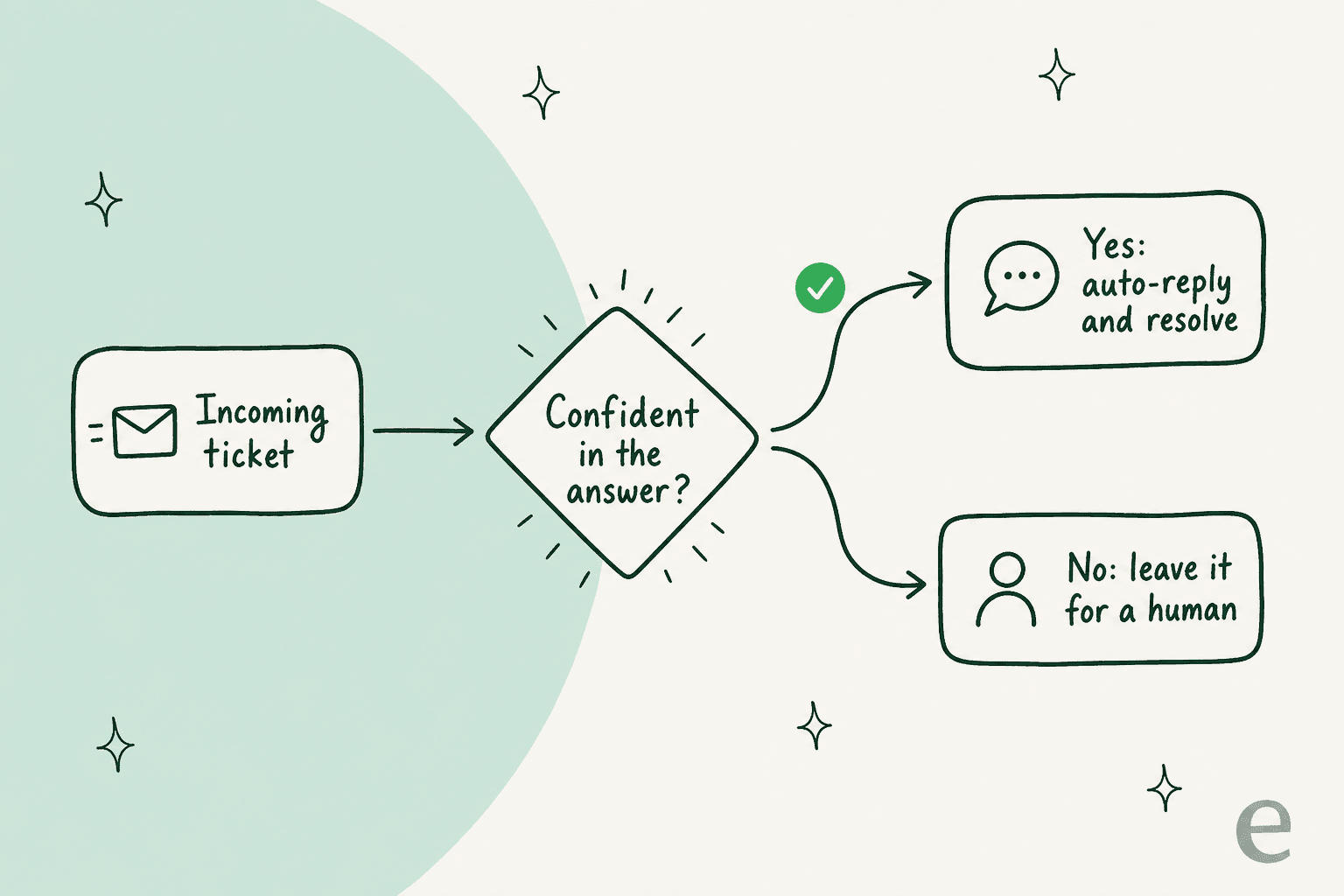
I think about this constantly because of a line a CX lead at a high-volume DTC brand once gave me: the AI will never answer 100% of questions, but if it answers everything badly, you can't go back and check thousands of tickets to catch the bad replies, so the whole point is gone. They wanted an AI that only handled tickets it was confident about and left the rest alone. Zoho's Answer Bot has guardrails and hands off to humans, but tuning when it stays quiet is on you, and it matters more than any other setting. This is the same discipline behind preventing AI hallucinations in support: confidence first, coverage second.
Common mistakes when setting up Zia
A few traps come up over and over, pulled from what real Zoho Desk users say across G2, Gartner Peer Insights, and r/Zoho.
Assuming the cheap plan has the AI. It doesn't. The features that get demoed are Enterprise. Budget for $40 per agent per month if you want the autonomous bot, not the $14 Standard price.
Underestimating the learning curve. Zoho Desk is famously feature-dense. There are 112 tagged "learning curve" mentions on G2 alone. One reviewer summed it up:
"If I am being honest, what I dislike so far is the sheer number of settings and options. I have a feeling that this would take weeks to master."
G2 verified Zoho Desk reviewer, G2

Expecting Zia to be brilliant out of the box. This is the big one. User sentiment on Zia specifically is rough, and it's worth hearing before you bank on it:
"Zoho may need to rebrand any forthcoming intelligence features. Zia is so poor that I'm hesitant to use any 'ai' that is branded as Zia."
Reddit user in r/Zoho, surfaced via checkthat.ai
"Some features, specially the AI only works with a lot of data. Some features are also confusing to know if it is the right one vs other features in Zoho apps with similar purposes."
María Fernanda C., Software Advice, March 2026
Forgetting Zia can't reach outside Zoho. Zia answers from your Zoho KB and tickets. It can't pull from Google Docs, Confluence, or Slack, which is why teams end up bolting external tools on. As one r/Zoho user put it, "if you want to use AI with Zoho, you really need to be using an MCP."
When native AI isn't enough: adding a dedicated AI layer
If you set up Zia, tune it honestly, and still find it's a decent assistant but a weak resolver, you're not doing it wrong. That's the ceiling of a bot trained on help-center articles and run inside a tool that wasn't built AI-first. The reason a dedicated AI helpdesk agent tends to resolve more is simpler than it sounds: where the AI learns from changes everything.
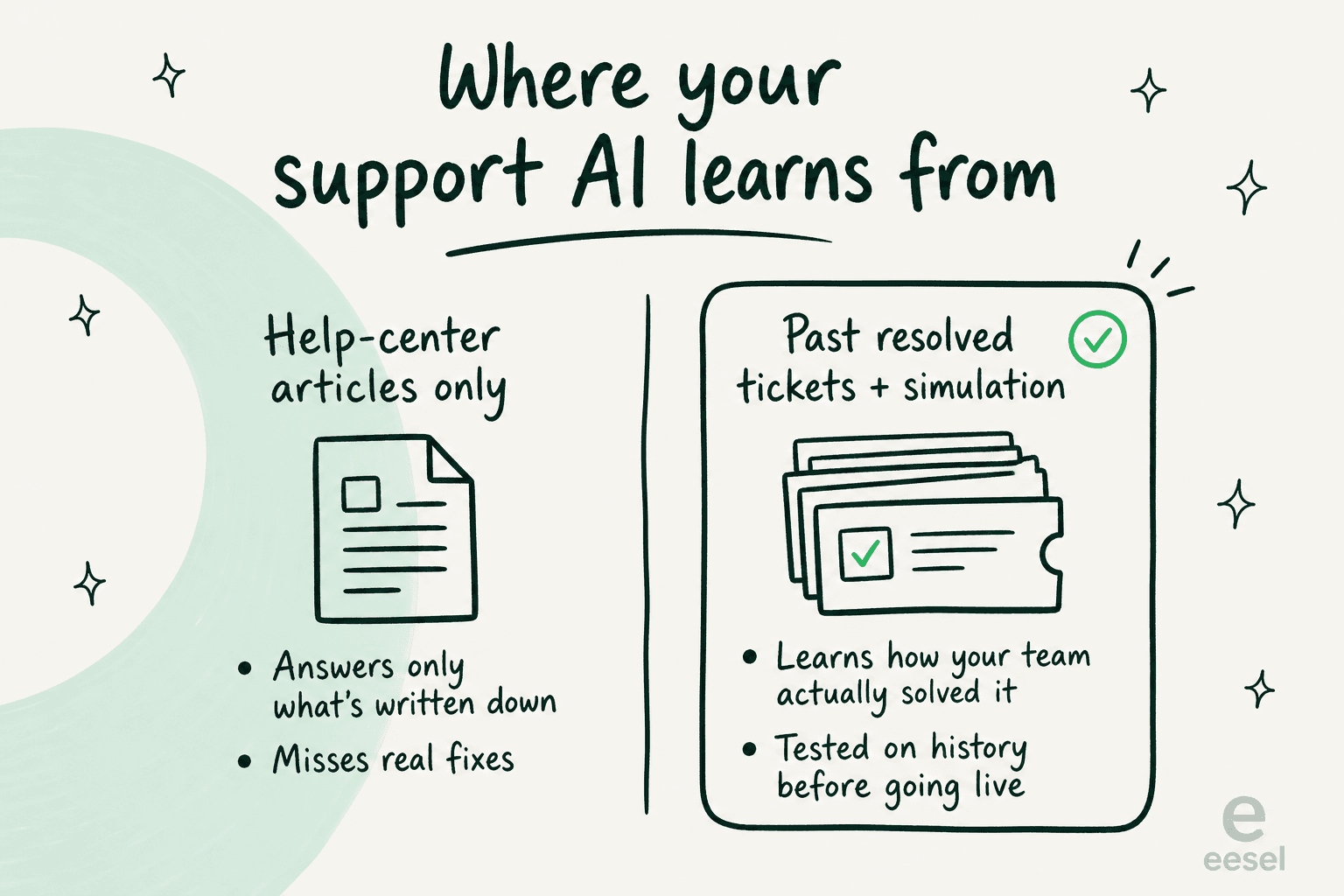
A bot trained only on published articles can answer what's documented. A bot trained on your past resolved tickets learns how your team actually solves things, including the fixes that never made it into an article. And the part that makes this safe to turn on, rather than a leap of faith, is running it against your ticket history before go-live, so you can see exactly what it would have answered and where it would have stayed quiet. That's the tier-1 deflection playbook that gets numbers like 73% in month one instead of "it's fine for summaries."
eesel doesn't plug into Zoho Desk directly, so this isn't a Zoho add-on. But if you're on (or moving to) a supported helpdesk like Zendesk, Freshdesk, Gorgias, or Front, it's the AI layer I'd reach for, and it's worth knowing the option exists before you commit to the Enterprise upgrade just for Answer Bot.
Try eesel
If your real goal is to reduce support tickets with AI rather than just help agents type faster, eesel is an AI teammate that plugs into your existing helpdesk, learns from your past tickets and help docs on day one, and only auto-replies on what it's confident about. The differentiator that matters most for nervous teams: you can simulate the whole rollout against your historical tickets first, see the coverage and the answers before a single customer is involved, then grant autonomy gradually.

It's free to try, no credit card, and you can have a simulation running against your own tickets in a few minutes. If you're weighing native Zia against a dedicated layer, that simulation is the fastest way to see the difference for your own support queue rather than taking my word for it.
Frequently Asked Questions
How do I set up AI in Zoho Desk?
Is Zia AI free in Zoho Desk?
What plan do I need for Zoho Desk Answer Bot and sentiment analysis?
Why does Zia give inaccurate answers, and how do I fix it?
Can I add a different AI to Zoho Desk instead of Zia?


Article by
Kurnia Kharisma Agung Samiadjie
Kurnia is a software engineer and writer at eesel AI with two years of SEO experience, writing about AI tools, helpdesk software, and customer support. He pairs a developer's understanding of how these products are built with search-driven research into what actually ranks and resonates with the people searching for them.