


Shopify Flow is worth turning on for customer support, but it works on store events, not on customer messages. It can tag VIPs, hold risky orders, open a Gorgias ticket on every refund and ping Slack about returns, free on every Shopify plan. It can't read or answer a ticket, and only Gorgias has a native Flow action. So use Flow to prepare context, and put an AI agent like eesel in the helpdesk to read those tags, look up the order and reply. With the eesel CLI, a coding agent can set up and test the webhook a Flow workflow posts to.
What is Shopify Flow, and can it do customer support?
Shopify Flow is Shopify's free workflow automation app. It watches your store for events, checks conditions, and runs actions: a trigger, then "if this", then "do that". Shopify lists it on the Basic, Grow, Advanced and Shopify Plus plans, in every country, though the app itself is English only.
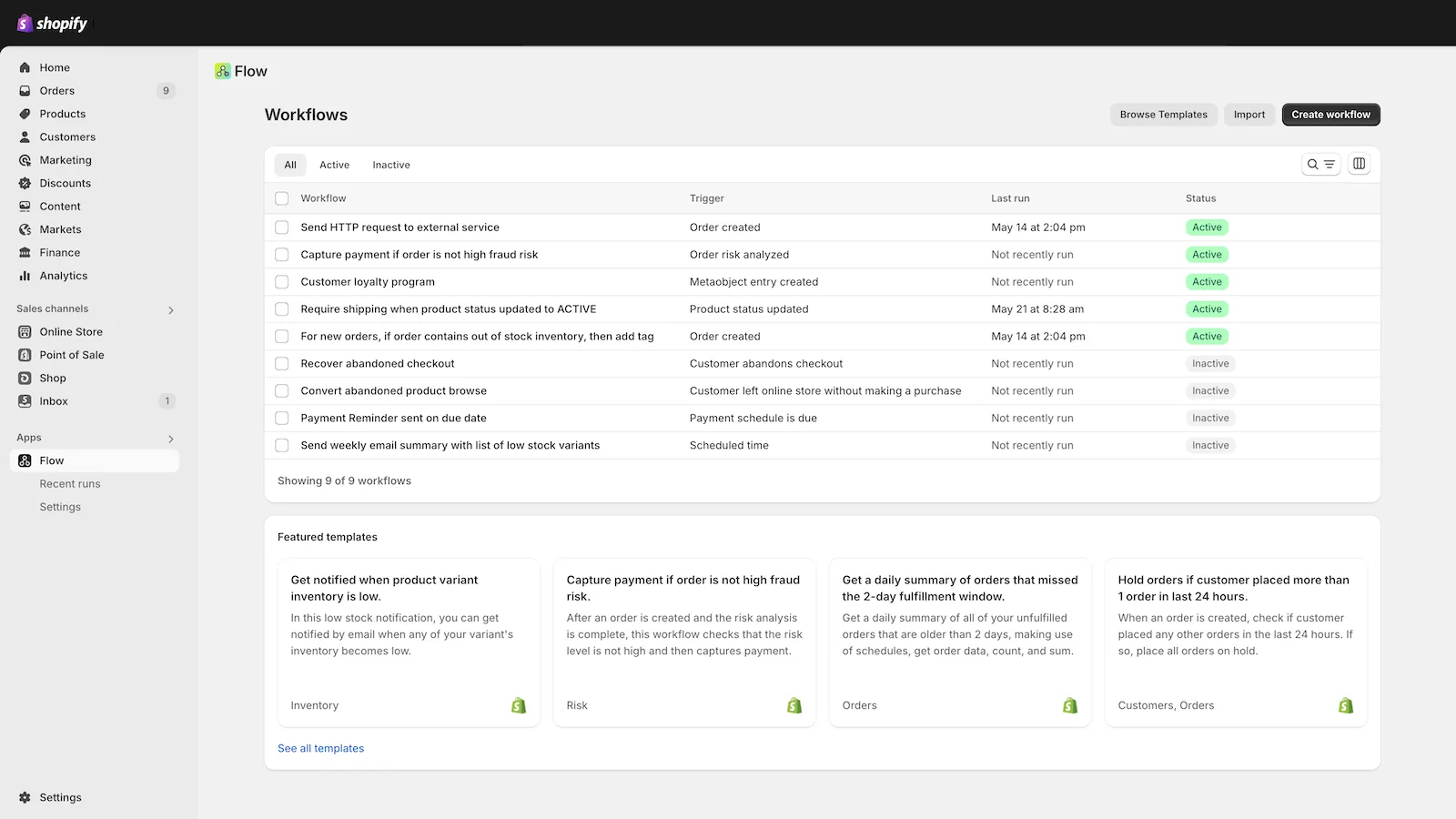
I build integrations at eesel, and the question I hear from Shopify support leads is usually some version of "can Flow do our support automation so we don't need another tool?" The honest answer is half yes. Flow is very good at the store side of support: the order that needs a hold, the customer who needs a VIP tag, the refund that should open a ticket. Flow never sees the "where is my order?" email itself. That lives in your helpdesk, and Flow has no trigger for it. If you're still picking that piece, my ecommerce helpdesk guide and list of Shopify customer service apps are the place to start.
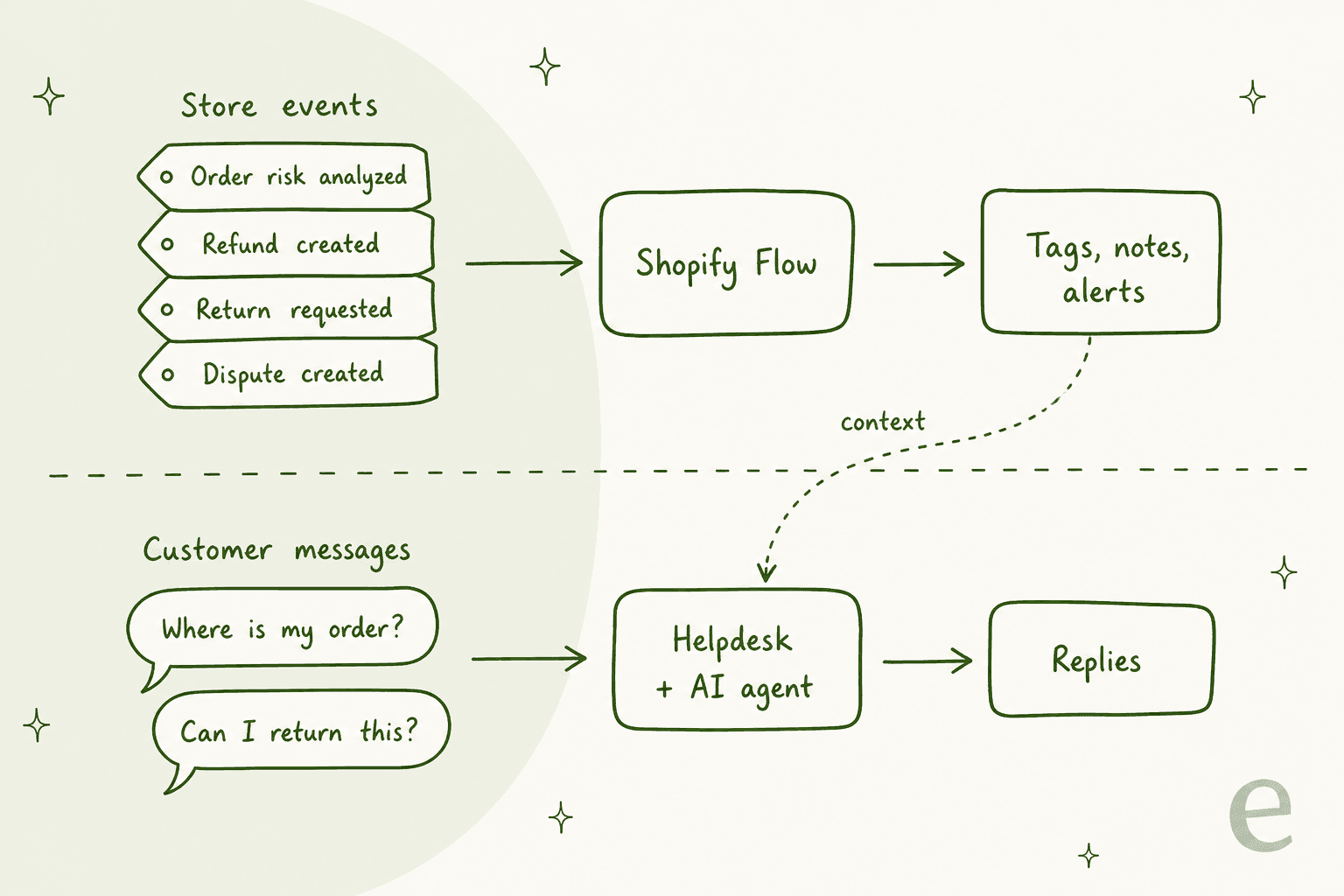
That split shapes everything below. Think of Flow as the teammate who gets the order file ready before anyone picks up the phone, and your helpdesk (plus whoever or whatever answers tickets in it) as the one who talks to the customer.
What makes Flow useful for a support team
A few things set it apart from the rules inside your helpdesk:
- It sees store events your helpdesk can't. Order risk analyzed, Refund created, Return requested, Dispute created and fulfillment events all start a workflow the moment they happen, per Shopify's triggers reference.
- It can change the order itself. Add tags, update the order note, hold fulfillment, cancel an order or close a return, which a helpdesk rule can't do without an app.
- It costs nothing extra. The app is free, and Shopify says it ran 562M workflows over Black Friday Cyber Monday, so volume isn't the worry.
- It's proactive. A scheduled workflow can find orders that haven't shipped and flag them before the customer asks. That's the cheapest ticket there is: the one never sent.
What can Flow do for support, and what can't it?
Here is where the line falls, based on Shopify's own triggers list and actions reference.
| Support job | Can Flow do it? | How |
|---|---|---|
| Tag VIP or repeat customers | Yes | Order created + spend condition + Add customer tags |
| Hold or flag risky orders | Yes | Order risk analyzed + Hold fulfillment + tags |
| Open a ticket when something happens | Gorgias only, natively | Gorgias "Create a ticket" action; others via Send HTTP request |
| Alert the team in Slack or email | Yes | Send Slack message, Send internal email (fixed staff addresses) |
| Catch late shipments before the customer asks | Yes | Scheduled time + Get order data + condition |
| Read a customer's email or chat | No | No trigger for helpdesk messages |
| Reply to a customer | No | Internal email is staff-only; replies happen in the helpdesk |
| Look up an order mid-conversation | No | That's an AI agent or a helpdesk sidebar job |
The bottom three rows are the reason Flow alone won't shrink your queue. Shopify's own staff say as much: Flow is designed for internal emails and opted-in marketing, not for messages to buyers.
"Flow's currently designed to support internal emails to static email addresses or marketing emails where the buyer has opted in. It's not set up to support the sort of transactional emails you're looking for at the moment."

7 Shopify Flow workflows for customer support
Each of these is built from a Shopify template or a short trigger, condition, action chain. I've ordered them by how much support pain they head off, with the cheapest wins first. Before you build any of them, read through Shopify's guide to creating workflows: a workflow takes one trigger but as many conditions and actions as you need.
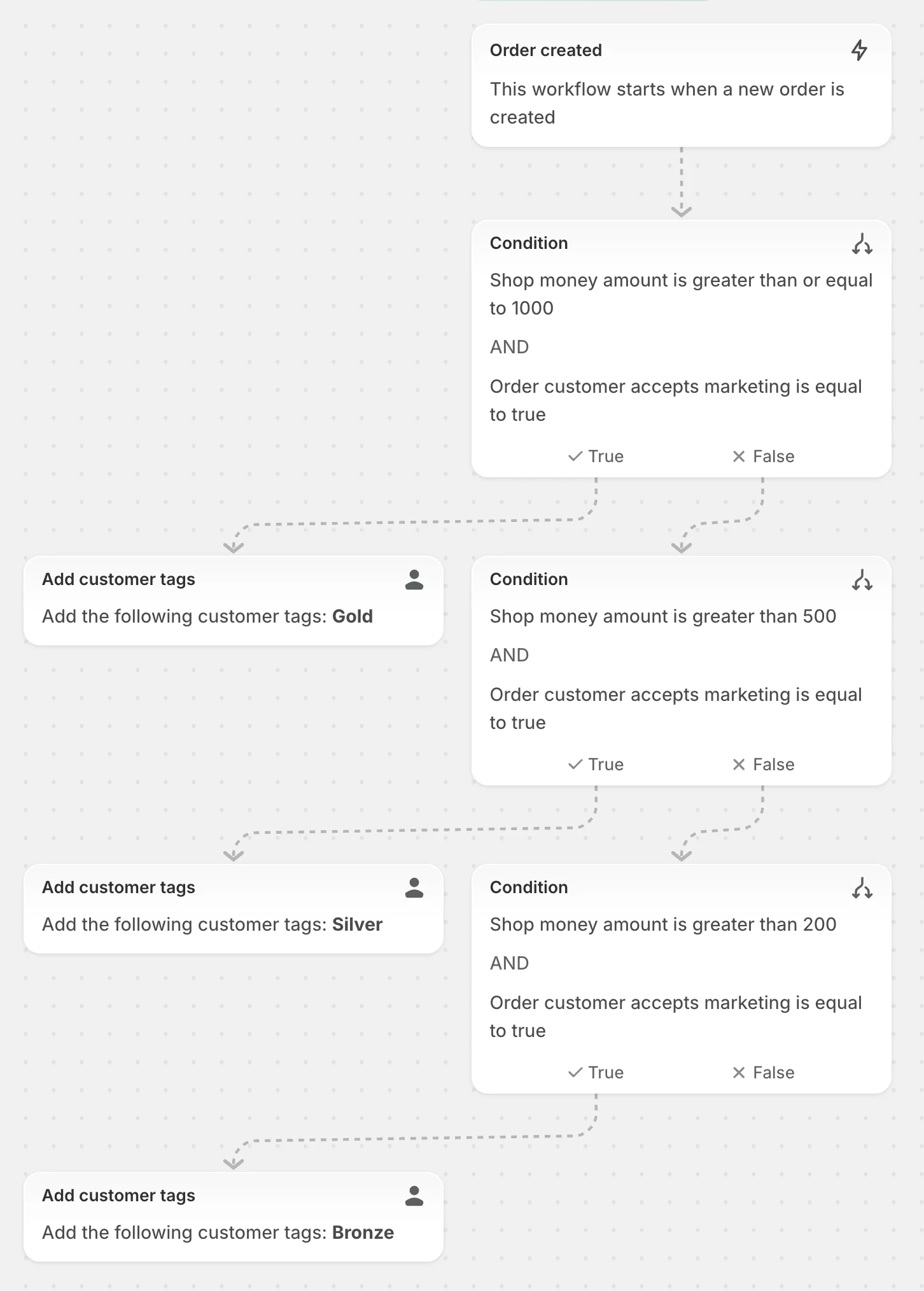
1. Tag VIP customers so agents see them first
Trigger: Order created. Condition: the customer's total spend is over your threshold. Action: Add customer tags (VIP, or tiers like Gold, Silver, Bronze).
This is Shopify's own starter example, and the cheapest auto-triage win you'll find, and the template "Organize customers by lifetime spend tiers" builds it for you. It matters for support because almost every helpdesk can read Shopify customer tags. In Gorgias or the Zendesk Shopify app, a VIP tag can drive ticket routing and priority without anyone checking order history by hand. That's auto-triage with zero AI involved.
2. Hold high-risk orders before they become chargeback tickets
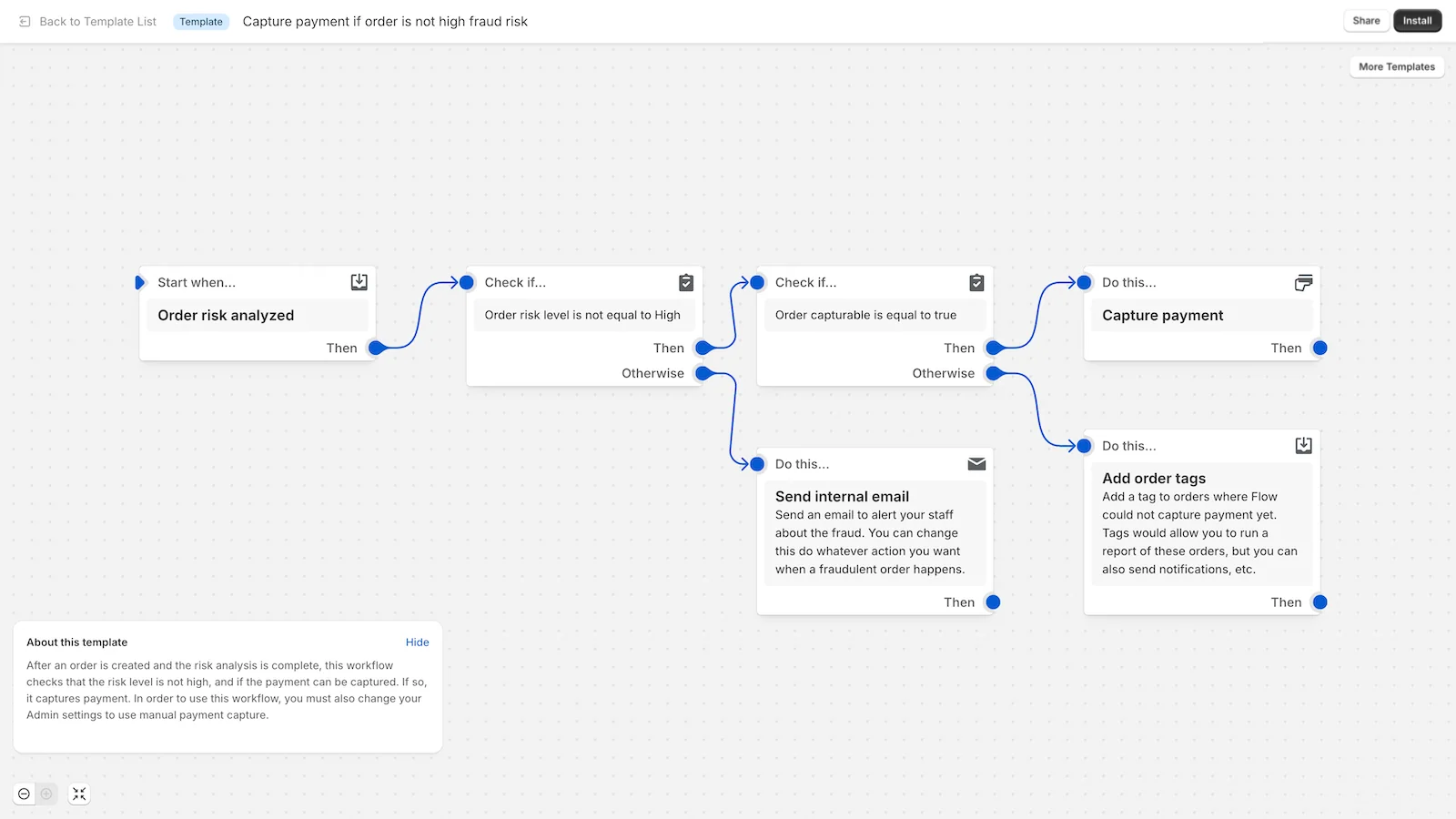
Trigger: Order risk analyzed. Condition: risk level is high (or medium). Action: Hold fulfillment, add an order tag, send a Slack message or internal email.
A fraudulent order that ships turns into a chargeback, a confused real cardholder and two angry tickets. Shopify's templates include "Cancel high-risk orders" (cancels, refunds, restocks, tags and emails, with Shopify recommending you check orders manually afterwards) and "Get notified about high risk orders before capturing payment". One catch from the docs: Order risk analyzed only fires for Shopify's own risk assessments, not third-party fraud apps.
3. Open a ticket every time a refund is created
Trigger: Refund created. Action: Add order tags, then Gorgias "Create a ticket".
Shopify ships a template called "Tag and create a support ticket after a refund" for exactly this. The Gorgias action, per Shopify's connector list, "creates a ticket containing a single internal note in Gorgias", so your team gets a record of every refund even when it was issued by someone in ops. If you live in Gorgias, pair this with its own order data automations so the follow-up reply carries the refund details.
4. Warn support when a chargeback lands
Trigger: Dispute created (added in October 2025 for Shopify Payments disputes), or the template "Notify your customer service team if a chargeback has been submitted within 7 days". Action: Send internal email or Slack message, add a customer tag.
The template waits 7 days after an order and checks for a chargeback. Shopify notes the gap honestly: if the chargeback comes after day 7, that version won't catch it. The newer Dispute created trigger fires on the dispute itself, which is the one I'd build on today. Tag the customer so that when they write in, the agent knows a dispute is open before replying, and can treat it as an escalation instead of a routine question.
5. Ping Slack when a customer requests a return
Trigger: Return requested (self-serve returns). Action: Send Slack message to a returns channel.
The template "Get notified on Slack when a customer requests a return" covers it, and "Prompt customer reachout for high value returns" adds a tag plus a nudge for staff to contact the customer. A second template, "Cancel inactive returns", closes returns that were never refunded or restocked after a set time, which keeps your returns list clean. If your team already works out of Slack, this is a cheap way to see returns without opening another tab.
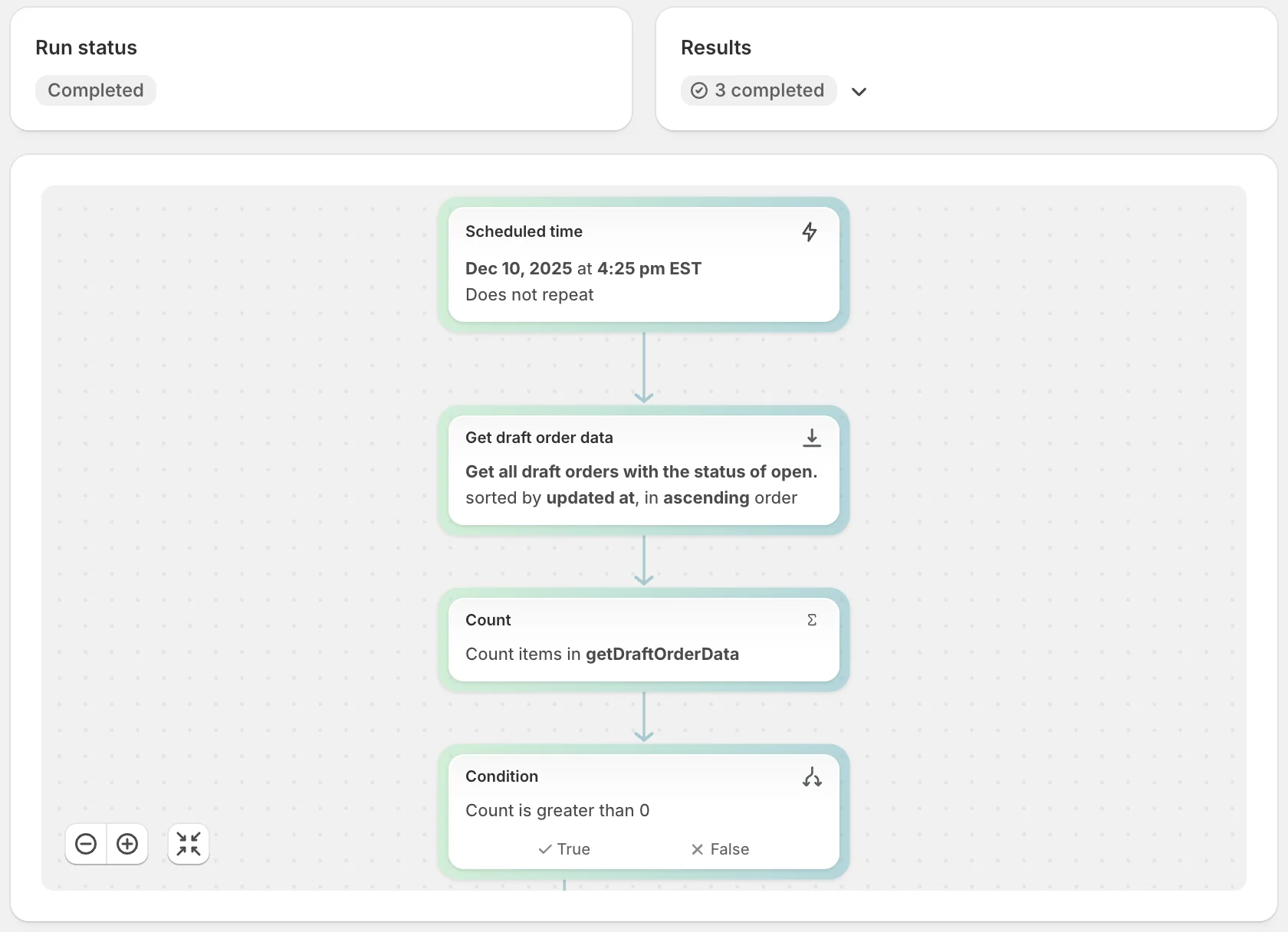
6. Catch orders that haven't shipped in 2 days
Trigger: Scheduled time (as often as every 10 minutes) or Order created plus a Wait step. Action: Get order data, check fulfillment status, then tag the order and post to Slack.
"Where is my order?" is the biggest ticket type for most stores, and it's covered in depth in my WISMO automation guide. Shopify's template "Track and send a message if an order isn't shipped within 2 days" logs the order to Google Sheets and posts to Slack. A merchant in the Shopify Community described how the tags then feed the helpdesk:
"Flow can tag orders with no tracking after X days, delayed fulfillment, or refund created, then the helpdesk can use those tags to prioritize the ticket instead of the support team checking each order manually."
Two limits to plan around: Get data returns 0 to 100 records per run, and a Scheduled time trigger carries no store data until you add that Get data step.
7. Route negative reviews to support
Trigger: a review app's trigger (REVIEWS.io, Okendo, Loox, Stamped, Yotpo) or a negative Shop review. Action: Send internal email, Slack message or Gorgias ticket.
Shopify's own Flow page uses this as an example: "Automatically create a customer support ticket and send a slack message when a negative review is posted." Templates include "Send an internal email when a Shop review with less than a 3 star rating is received" and an Okendo template that notifies, tracks and creates a support ticket in one go. A one-star review answered within a day reads very differently to the next shopper than one left hanging.
How do you get Flow events into Zendesk, Freshdesk or another helpdesk?
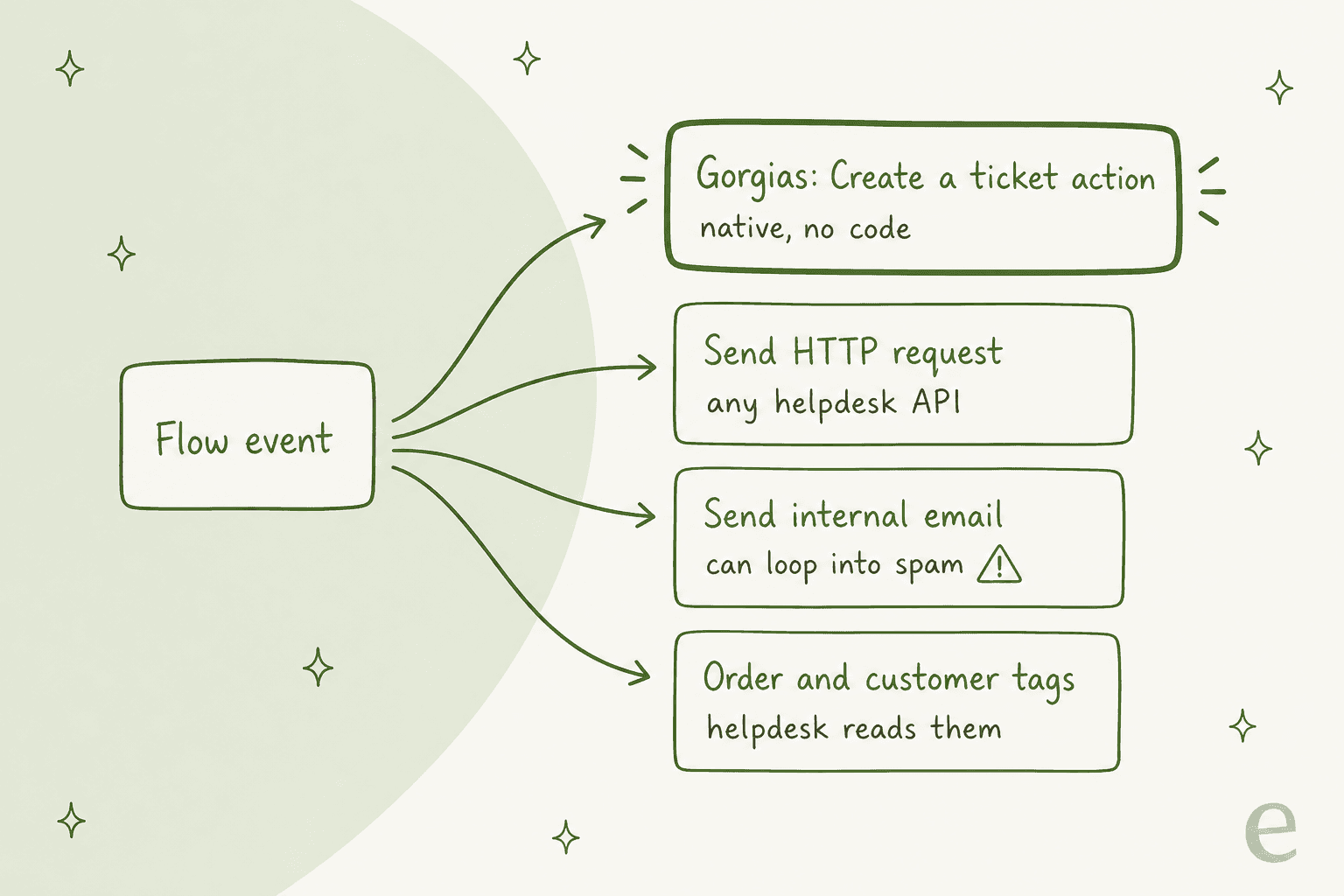
Gorgias is the only helpdesk on Shopify's official list of apps that work with Flow, and its one action is "Create a ticket". I checked Zendesk, Freshdesk, Gladly, Richpanel, Re:amaze, Help Scout, Kustomer and eDesk too: none of their Shopify help pages mention a Flow connector. That leaves three routes for everyone else.
Route 1: tags only. Let Flow write tags onto orders and customers, and let your helpdesk's Shopify app read them. This needs no API work and is the right starting point for the Freshdesk Shopify app or Zendesk. It informs tickets; it doesn't create them.
Route 2: Send HTTP request. Flow's Send HTTP request action can POST to any helpdesk's ticket API. You set the method, URL, headers and body, and store API keys as secrets in Flow settings, where they're "redacted from the workflow run logs". It waits up to 30 seconds for a response, and for 4XX or 5XX errors you can retry for up to 24 hours, fail the run, or ignore it.
Route 3: Send internal email to your support address. This is the one people reach for first, and it can backfire. A Shopify Plus merchant described it:
"We use Shopify Flows to alert our staff regarding potential issues with orders - this is done by sending internal emails from Shopify Flows to our support email address, which is accessed via Zendesk."
In the same thread, the emails started landing in spam inside Zendesk because of a mail loop. The fix suggested there was Route 2: call the Zendesk API directly and skip email. I'd go straight to Route 2 for any ticket you actually need to see.
| Your helpdesk | Native Flow action? | Best route |
|---|---|---|
| Gorgias | Yes, "Create a ticket" | Native action |
| Zendesk | No | Send HTTP request to the tickets API |
| Freshdesk | No | Send HTTP request, or tags read by the Shopify app |
| Gladly, Richpanel, Re:amaze, Help Scout, Kustomer, eDesk | No Flow mention in their docs | Send HTTP request, or tags |
| Slack (not a helpdesk) | Yes, Send Slack message | Native action |
What limits should you know before you build?
Flow is generous, but a few hard numbers from Shopify's troubleshooting and action docs decide what's realistic for support.
| Limit | Number | Why it matters for support |
|---|---|---|
| Workflows per store | 1,000 (active and inactive) | Plenty, but name them well |
| Active workflows on one trigger | Warning above 10 | Too many on Order created slows things |
| Get data results | Up to 100 per run | Big backlogs need several runs |
| Wait steps | 40 per workflow, 90 days total | Fine for follow-ups, not long cases |
| Retry window | 36 hours per workflow section | Failed steps stop retrying after that |
| Run code | JavaScript, no fetch, 5-second cap | Can't call a helpdesk API itself |
| Send HTTP request | 30-second response timeout | Use a fast endpoint |
| Run log search | Last 14 days | Investigate misfires quickly |
The one that trips up support workflows most is a trigger firing more often than you expect. A reply from paul_n explained a double Slack message on a high-risk order flow:
"Order ready to fulfill fires for each fulfillment order, so there might be 1 or more per order. You need to use another trigger if you want to guarantee it only fires once, something like Order Risk Analyzed."
The other classic: a workflow on Customer tags added that also adds customer tags can loop forever and hit GraphQL throttling errors. Add a condition that checks the tag isn't already there.
Can Sidekick or a coding agent build the workflows for you?
Yes, with a review step. Shopify Sidekick can build a Flow workflow from a plain-language request like "Tag customers as VIP when they place an order over $200". Per Shopify's docs, workflows it creates are Inactive by default, tagged sidekick, desktop only, and may leave out business-specific logic, so test before you switch them on. My guide on Sidekick task automation walks through how it plans changes.
Since October 2026, Flow workflows can also be created, updated and activated through the Admin API from Shopify's AI Toolkit or CLI, with the write_automations scope and only on your own store. That means a coding agent can draft your support workflows in code and you review them like any other change.
Where does AI take over after Flow?
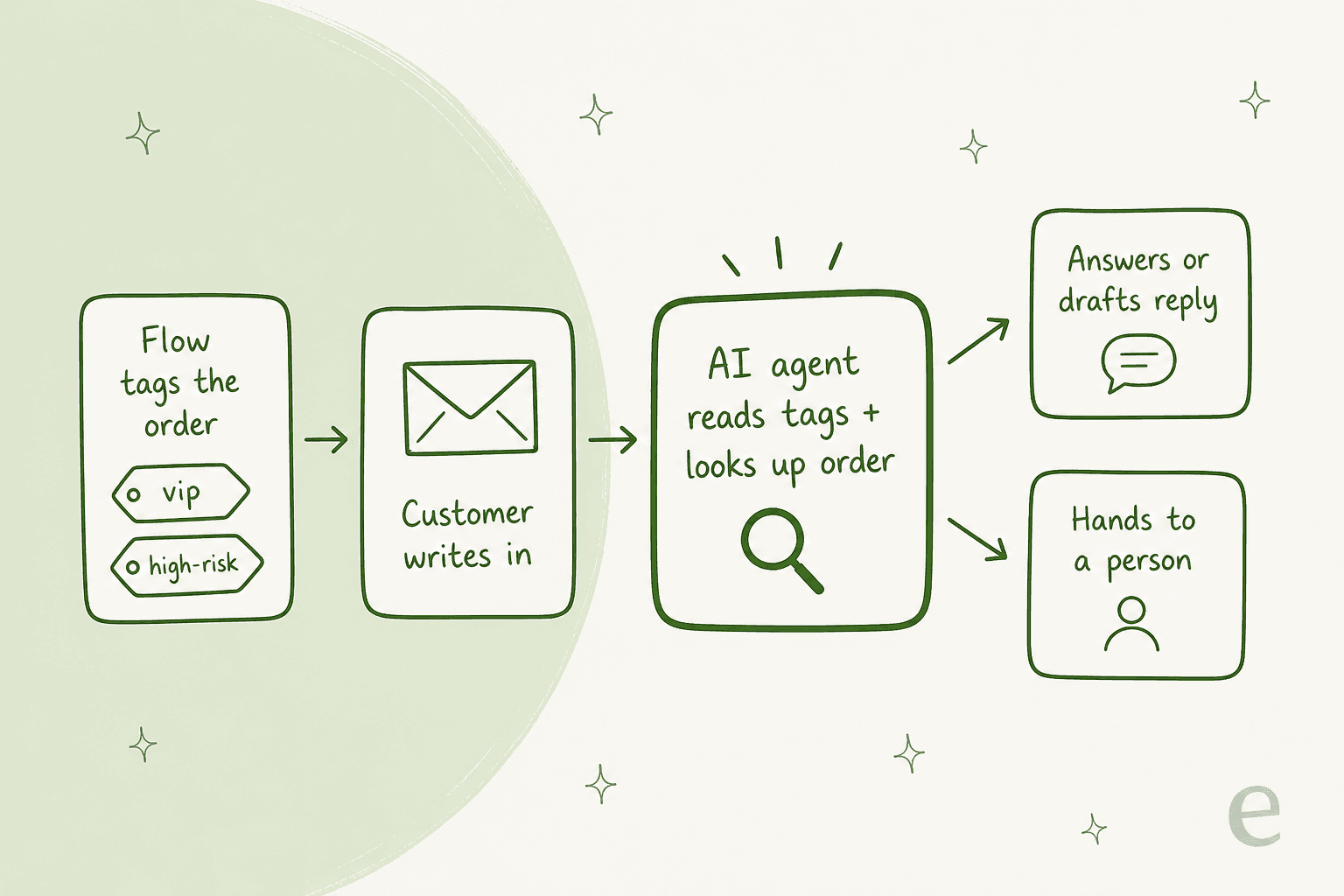
Flow gets the order ready. Something still has to read "my parcel says delivered but it isn't here", look at that order, and decide what to say. That's the job of an AI agent in the helpdesk, and it's where Flow's tags pay off twice: the agent reads them as context.
I've spent a lot of time on the integration side of this at eesel, and the most common worry I hear from ecommerce leads isn't "will the AI answer enough?" It's the opposite. A CX lead at a DTC supplements brand on Gorgias, running about 7,000 tickets a month, put it this way on a sales call with eesel:
"I need an AI who is only handling the tickets that it's confident to handle and all the other ones, leave them alone."
That's how Rúngne, a Norwegian climbing apparel brand on Shopify and Gorgias, runs it. One eesel agent acknowledges and tags every ticket from a fixed list (including vip for customers who spent 300 or more or ordered twice), a second drafts replies as internal notes (classic agent assist), and a third answers only plain questions on chosen topics. In a month it handled 2,100 Gorgias tickets, tagged 880, left 580 drafts for the team and ran about 150 Shopify order lookups. Question Beauty goes further on delivery questions: the agent finds the customer in Shopify, checks order, fulfilment and tracking, and in a month sent 960 replies and closed 280 tickets without a person.
A few things to know about how eesel fits with Flow specifically:
- eesel doesn't start on Shopify events. The Shopify integration docs are plain about it: the trigger comes from a helpdesk ticket, a Slack mention or the chat bubble. Flow covers the store-event side; eesel covers the message side, which is why it shows up in my roundup of the best AI helpdesk for Shopify picks.
- It reads what Flow writes. With full access, the agent reads orders, fulfilment and tracking, customers and products, and with actions switched on it can create returns, change addresses, refund or cancel unfulfilled orders, each one gated by your approval settings.
- Flow can wake it. A webhook automation gives you a private URL that accepts a JSON POST, so a Flow Send HTTP request on, say, Refund created can wake the agent with the order details. You can set the
X-Eesel-Event-Idheader in Flow to avoid processing the same event twice.
For a step-by-step on the lookup side, see my guide to Shopify order data for AI. The walkthrough on Shopify AI agent setup covers the rest.
Common mistakes with Shopify Flow for support
- Using internal email as a ticket pipe. It works until your helpdesk's spam filter decides otherwise. Use Gorgias's action or Send HTTP request.
- Building on a trigger that fires more than once. Order ready to fulfill fires per fulfillment order. Use Order created or Order risk analyzed when you need one run per order.
- Expecting Order risk analyzed to see your fraud app. It only fires for Shopify's own assessments.
- Switching on Sidekick workflows untested. They arrive Inactive for a reason; run a test order first.
- Treating Flow as the answer to the queue. Flow prepares tickets. Without someone or something answering them, the queue is still the queue, just better labelled. The AI ticket tagging for ecommerce guide covers what tagging can and can't do on its own.
Try eesel with Shopify Flow
If Flow is already tagging your VIPs and flagging risky orders, eesel is the part that reads the ticket. It joins your Gorgias, Zendesk or Freshdesk queue, looks up the Shopify order before writing a word, and either drafts the reply for your team or answers on its own on the topics you pick, the way STIL Classics runs drafts-only with 230 order lookups in a month.
Plans start at $299 for 500 credits, one credit per ticket, and you can try eesel on 100 tickets free.
Frequently Asked Questions
Is Shopify Flow free, and which plans include it?
Shopify Flow is a free app. Shopify lists it on the Basic, Grow, Advanced and Shopify Plus plans, in all countries, in English only. Apps you connect to it, like Gorgias or Slack, keep their own pricing, so check the Gorgias pricing breakdown if that's your helpdesk.
Can Shopify Flow create a ticket in Zendesk or Freshdesk?
Not with a built-in action. Gorgias is the only helpdesk on Shopify's list of Flow connectors, with one "Create a ticket" action. For Zendesk or Freshdesk, use Flow's Send HTTP request action to call the helpdesk's ticket API, as covered in this Zendesk Shopify guide.
What are the best Shopify Flow workflows for customer support?
Start with VIP customer tags, high-risk order holds, a ticket on every refund, a chargeback alert, Slack pings on return requests, a not-shipped-in-2-days check and negative review routing. Each one either gives agents context through ticket tagging or catches a problem before the customer writes in.
Can Shopify Flow answer customer emails automatically?
No. Flow's Send internal email action only sends to fixed staff addresses, and Shopify staff have said it isn't built for transactional emails to buyers. Automatic replies need an AI agent inside your helpdesk, such as eesel for Shopify, which looks up the order before answering.
How do I use Shopify Flow with an AI support agent?
Let Flow write tags like vip or high-risk onto orders and customers, then have the AI agent read those tags when it looks up the order on a ticket. You can also point Flow's Send HTTP request at a webhook so an event wakes the agent. The guide to Shopify order data for AI covers the lookup side.
What are the limits of Shopify Flow for support teams?
A store can have 1,000 workflows, Get data returns up to 100 records, Run code can't call outside APIs and stops at 5 seconds, and Send HTTP request waits 30 seconds for a reply. Order risk analyzed only fires for Shopify's own risk checks. For broader Shopify automation beyond these limits, pair Flow with your helpdesk's rules.