


Gladly AI now answers chat outside business hours, per Gladly's October 2026 release notes, and chats it can't resolve either convert to an email follow-up or close on their own. Email, SMS and phone still run on separate clocks: Business Hours Rules for email and SMS, a Schedule node in the phone menu for calls. The first thing I would switch on is the Block After-hours Handoff template, so the AI never promises a person who is asleep. eesel has no Gladly connector, but its AI helpdesk teammate covers nights inside Zendesk, Freshdesk and Gorgias.
I build eesel's integrations and APIs, so I read Gladly's docs for what each setting does at 2am, not what the overview page promises. With the eesel CLI, an AI coding agent can upload your approved after-hours policy as knowledge, then ask test questions at "midnight" and check the answers before anything goes live. A helpdesk connection still needs an admin to approve it.
Does Gladly AI answer customers after hours?
On chat, yes, and that is new. On the other channels it depends on a clock you set yourself. Gladly's help center treats each channel differently, which is the thing I would explain to anyone planning coverage.
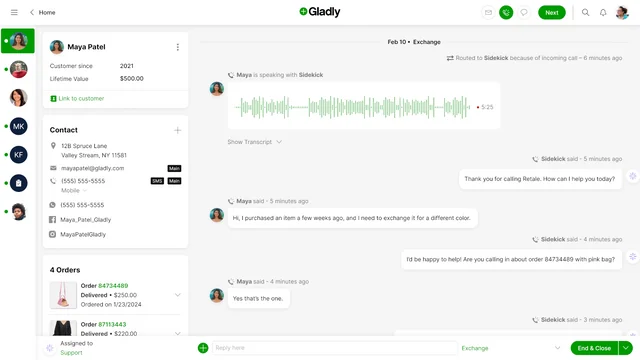
Gladly AI supports Chat, Email, Facebook, Instagram and SMS, with phone handled by a separate Voice AI add-on. What changes after hours is who controls the clock.
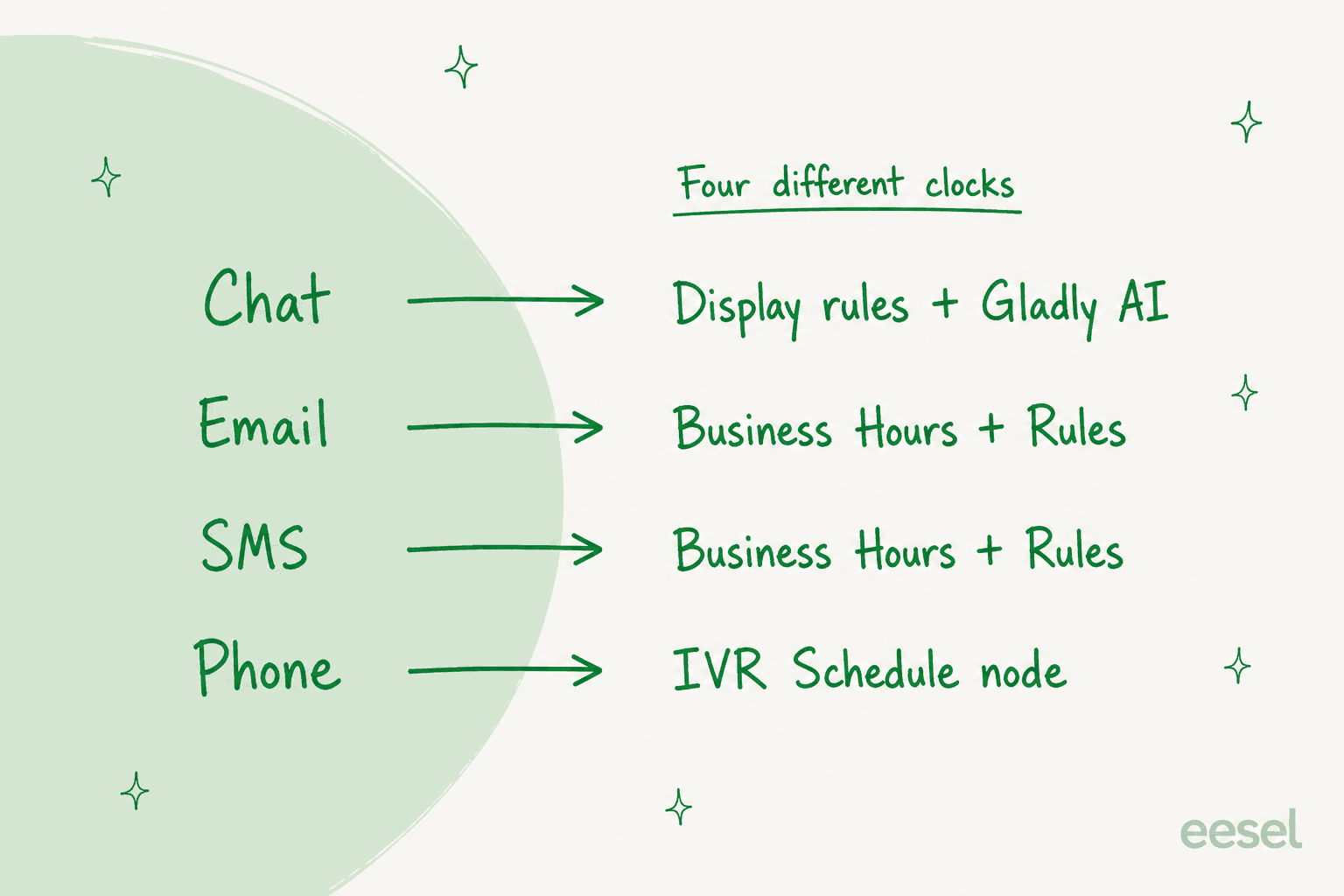
| Channel | What sets "after hours" | What happens after hours |
|---|---|---|
| Chat | Chat display rules, Chat Hours, and Gladly AI | Gladly AI answers; unresolved chats convert to email or auto-close |
| A Business Hours schedule used by Rules | Auto-reply, reroute to another Inbox, create a Task, or close | |
| SMS | The same Business Hours schedule | Same Rule actions as email |
| Phone | The Schedule node in the IVR | Callers follow a different path, such as a message or voicemail |
My own Gladly AI review covers the product around these settings, and AI after-hours support is the general version of this question for any helpdesk.
How does Gladly cover chat overnight?
With Gladly AI answering first and a follow-up email for anything it can't finish. Gladly's October 2026 release notes describe a new Chat experience with four changes that matter here. Quick Action buttons are retired in favor of personalized AI answers, Gladly AI now covers chat outside business hours, chat onboarding moves to Workflow Triggers, and Business Hours gets its own settings area with holiday scheduling. The notes tell you to contact your account team to plan the move, so this is not a toggle you flip on a Friday afternoon.
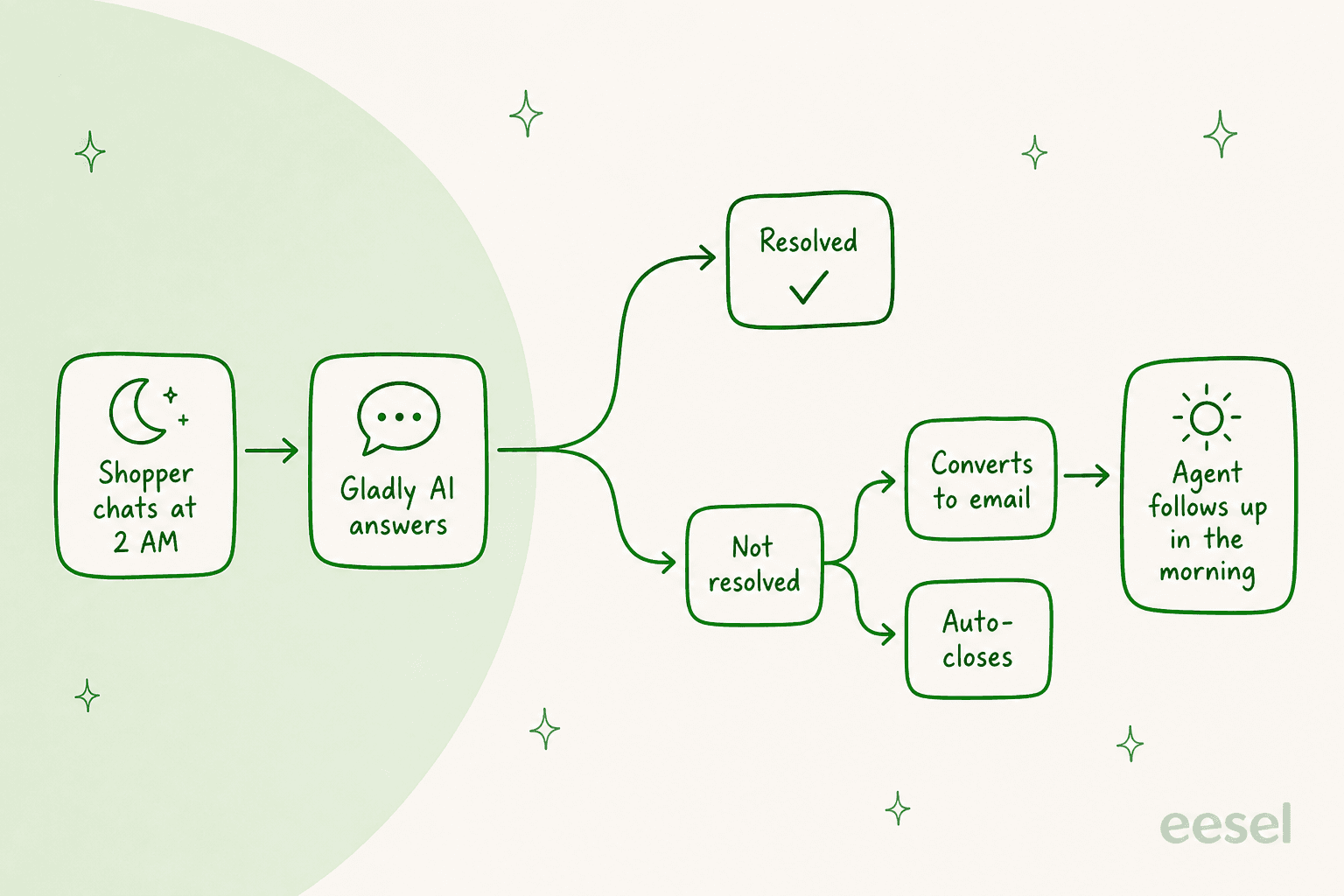
The older route still exists and is worth knowing, because many teams run it. Gladly's 24/7 chat guide says to set Chat Hours from 12:00 AM to 11:59 PM, then pick what customers get when nobody is online:
- Point them elsewhere. A Rule fires on a new chat outside Business Hours, closes the conversation and sends a Messaging Answer with your email address or support hours.
- Take a message. Three Rules turn the first message into a Task for an agent, acknowledge it once, and close any extra messages so the customer isn't thanked five times.
Two notes from that page save real grief. Closing the conversation protects your SLA, because an open chat that outlives its SLA counts as a miss. And if Chat Throttling is on, customers see the Office Hours and Throttle message whenever agents are unavailable, even with display hours set to 24/7, so Gladly tells you to turn Auto-Throttle off. For a 24/7 Gladly AI chat, the same page says to contact Gladly Support to set it up.
When the contact center is closed and you use the search-and-quick-action option, chat availability shows a minimized icon, and a customer who clicks through sees your "out of office" message. Without that option the icon disappears. Either way the customer isn't left typing into a window nobody reads.
What happens to a handoff when nobody is online?
Without a guard, a handoff outside hours lands in an Inbox nobody may be watching, which is why Gladly ships a template to stop it. The Block after-hours handoff workflow calls a Get Business Hours Status action. If hours are closed, a Say step tells the customer the team is offline and a Stop closes the session. If hours are open, the handoff goes through as normal.
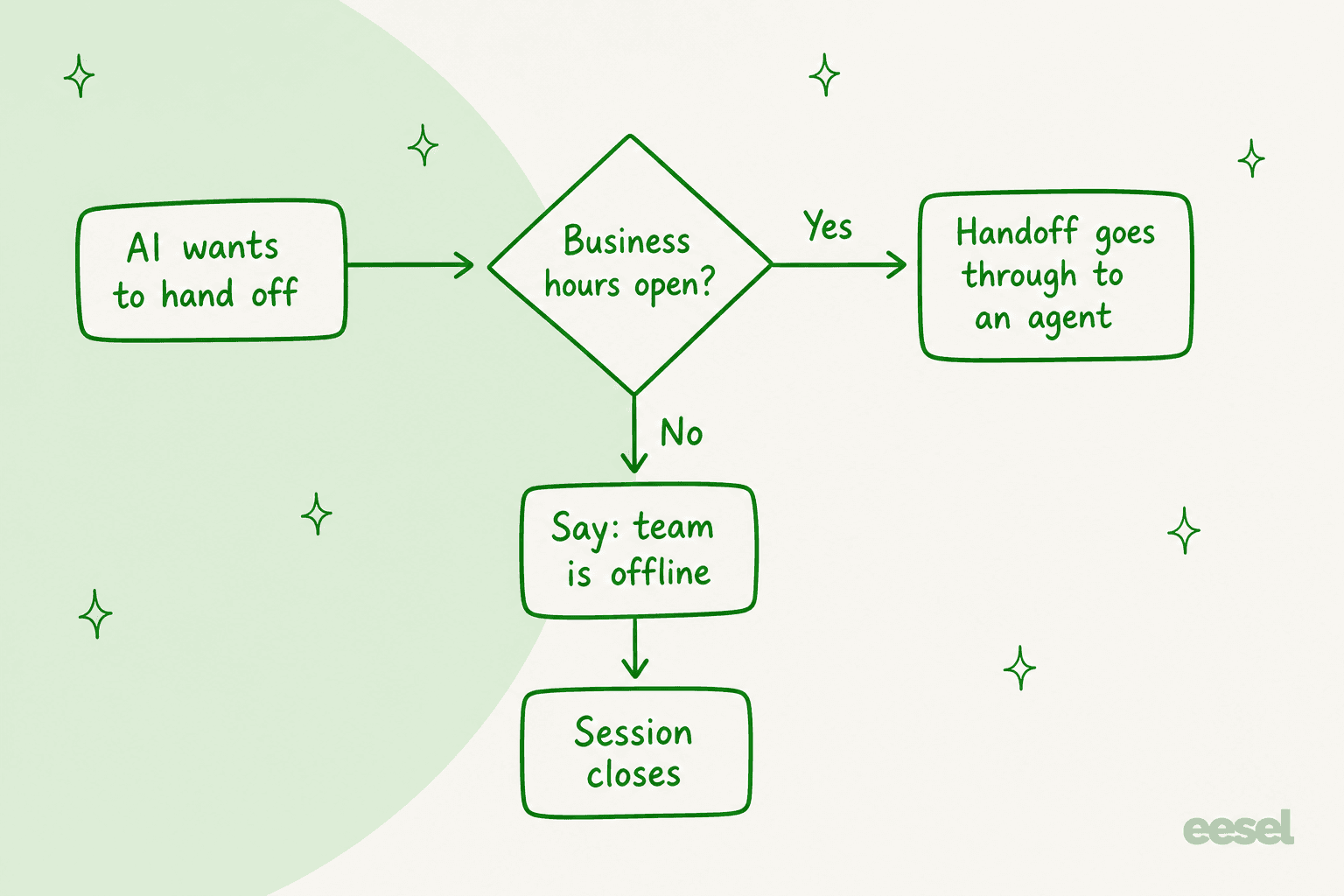
Gladly's holiday checklist tells teams to turn it on so the AI stops handing customers to agents while the team is out. I agree with the intent and would add one question the docs don't answer: if the session closes, where does the customer's request go? The template as described doesn't create a Task or an email, so I would build that step in myself, or the request ends at a polite dead end.
Gladly also fixed a related gap this month. The October 2026 release notes say two edge cases, an idle follow-up that failed and a Channel with no active Guides, used to transfer straight to a person. They now run the "Before Handoff" workflow first, so after-hours messages, close Rules and Inbox routing apply. If you built your after-hours logic before October, test those two cases again. My Gladly AI escalation post explains the handoff mechanics, and conversation routing shows what runs once a person is involved.
How do email, SMS and phone behave after hours?
Email and SMS are the simplest, and phone is the most manual. For email and SMS, Gladly's Business Hours page says you create a schedule in Settings, add Exceptions for holidays, then use it as a Rule condition ("Is outside business hours"). The actions I would use are Send Auto-Reply, Assign to Inbox and Close Conversation. The preparation guide gives the scenarios: a holiday text gets a delivery answer, a night-shift Inbox takes after-day messages, and an "urgent" email outside hours becomes a Task in an escalation Inbox.
Phone is separate. IVR messaging is built with a Schedule node, which branches by date or weekday, in a timezone, with a default next node. To close the phones for a day, Gladly's guide says to find the Temporary Split node in the IVR and set a timezone and a closure duration, and to test it before the holiday. Voice AI is a paid add-on, and Gladly's usage-cost page lists a $0.06216 per-minute fee on top of normal telephony when it engages a call. I did not find a page saying Voice AI answers calls on its own outside the Schedule node's hours, so I would treat that as a phone-menu design choice, not a default. If voice is your overnight gap, my notes on AI voice agents and AI phone support for ecommerce compare the options.
One more quirk: the Business Hours pages say Business Hours can't be used with IVR or chat, yet the 24/7 chat guide builds its Rules on a Business Hours condition for the Chat channel. The October notes then move Business Hours into its own settings area. I read the older pages as lagging the product, but check it in your own workspace before you rely on it.
Do SLA clocks and priority keep running overnight?
SLA reporting can ignore your closed hours, but routing doesn't. Gladly's SLA Business Hours setting is for reports only. Its example: an email arrives Friday at 4:50 pm and gets a reply Monday at 9:50 am. Without SLA Business Hours that is a 65 hour wait, and with them it reads as a one hour reply. The same page says the setting does not affect Rules and Routing, and that not setting it tells Gladly you run 24/7.
Priority has a related weekend trap. Gladly's time-based boosts page says Due Date and Wait Time conditions don't consider business hours, and suggests deactivating the boosts if you want to help other customers first thing Monday. Otherwise, a weekend backlog can shoot to the top of Monday's queue. I covered the ordering in Gladly AI conversation prioritization, and SLA best practices has the general rules for setting targets that match your hours.
What does after-hours Gladly AI cost?
Gladly doesn't publish an after-hours rate, so here is what I can back up. The only public rate card I found is the Shopify listing: $1.50 per AI resolution and $0.25 per AI assist, with a $250 monthly spend cap and $120 per team member a month. Voice AI adds the per-minute fee above. I could not find a statement of how an unresolved chat that converts to email is counted, so ask your Gladly rep that question in writing before you launch overnight chat. My Gladly pricing post has the full tables.
What do Gladly users say about the AI?
I found no review describing overnight coverage on Gladly, so I can't quote one. The closest signal is how reviewers describe the AI during the day, which is a fair guide to what it will do at night.
"While the AI optimization has been a bit slower compared to other help desks, our customers tend to prefer human interaction, so it hasn't negatively impacted the overall experience."

"the Sidekick chatbot has been a huge asset. It helps customers with returns, order tracking, and other self-service needs, freeing up our agents to focus on higher-level, more personalized conversations that truly impact the customer experience."
A Reddit practitioner states the policy that works after hours too:
"it makes more sense to let it handle the easy 30-40% of tickets and route everything else to a human."

Returns and order tracking are exactly the questions that are safe to answer at 2am. Anything that needs judgment waits, and the design question is what the customer is told while it waits. See when to hand off and handoff best practices.
Where do Gladly's docs leave gaps?
| Gap | What I found | What I would do |
|---|---|---|
| Business Hours and chat | Older pages say it can't be used with chat, the 24/7 chat guide uses it anyway | Test a chat Rule in your workspace |
| Setting up 24/7 Gladly AI chat | Chat guide says contact Gladly Support, release notes say talk to your account team | Ask for the exact steps and a test date |
| Where a blocked handoff goes | The template says the team is offline and closes the session | Add a Task or an email step |
| Billing for unresolved overnight chats | Not stated | Get it in writing |
| Voice AI outside menu hours | Schedule node decides the path, no page says the AI answers alone | Design the menu path yourself |
| Gladly Support hours | Docs list Monday to Friday, 6 AM to 6 PM Pacific, with requests accepted anytime | Don't plan an overnight fix |
The last row matters more than it looks. If your overnight setup breaks, the docs say Gladly Support's primary hours are weekday daytime Pacific, and most requests go in as a P4. That is not a complaint, just a reason to test before the weekend, not during it.
How would I set up Gladly for nights, in order?
- Decide what the AI may finish alone. Returns status, order tracking, policy questions. See AI support agent permissions and refund guardrails.
- Create Business Hours with holiday Exceptions, then use them in Rules for email and SMS.
- Turn on the Block after-hours handoff template, and add a Task so the request isn't lost.
- Write the "team is offline" message with a real time. Promise only what a person can deliver.
- Turn off Auto-Throttle if you want chat visible all night.
- Close the phones with a Schedule node or Temporary Split, and test it.
- Review overnight sessions each Monday. My routine for reviewing AI conversations and measuring containment works for this.
If you design the wording of that offline message, the examples in handoff flow design and chatbot escalation are a good start, and follow-the-sun support covers the staffed alternative.
Where does eesel fit if you run Gladly?
Not inside it. eesel has no Gladly integration, so I won't pretend otherwise. If you are weighing a move, see best AI for Gladly, Gladly alternatives and Kustomer vs Gladly.
Where eesel does run, the after-hours rules are ones you write in plain language. SE Ranking runs one eesel agent per product on Zendesk. In the month from 8 August to 8 September 2026 eesel handled about 4,650 conversations, answered about 2,100 live chats first, and created about 400 tickets for Tier 2 and weekend cases. On weekends it creates a ticket instead of handing a chat to a person, and it never tells a customer someone is joining now. That is the offline message I would copy into any Gladly setup. ClutchLoop is smaller and shows the other pattern: its agent on Gorgias works through the day and night, replies directly only to return requests and product questions, and drafts or leaves a note for the team on everything else.
Related posts on other platforms: Help Scout after-hours support, Zoho Desk after-hours support, Zendesk after-hours automations, Zendesk AI handoff and Front AI escalation. For market context, see AI customer service statistics, AI chatbots for ecommerce and the best AI support chatbots. The glossary entries on escalation rate and human in the loop define the terms.
Try eesel for after-hours support
If your queue lives in Zendesk, Freshdesk, Gorgias, Front or HubSpot, eesel joins it as a teammate that answers what your knowledge covers at 3am, leaves a note for the morning, and tells customers only what your team can deliver. Start in draft mode, test on past tickets, and widen scope later. See pricing and Try eesel.