Help Scout AI after-hours support: what Scout covers and what waits

Riellvriany Indriawan

Katelin Teen
Last edited November 22, 2026

Help Scout can answer customers after hours with its AI agent, Scout, which replies in Beacon and email at any hour for $0.75 per resolution. Its live chat can't stay open after hours, though: Beacon offers chat only while a teammate is set to Available, and that can't be put on a schedule. So after hours your options are an office-hours auto reply, Scout answering what your Docs cover, and an email form for everything else, which then waits for the morning shift. I'd set all three up together, give Scout an exclusion for "I want a person" with a message that says when the team is back, and let routing hand out the overnight pile oldest first. For the email Scout passes on, an AI teammate like eesel can also answer or draft a reply inside Help Scout before anyone signs on. A coding agent such as Claude Code can set that up through the eesel CLI, though a Help Scout admin still approves the connection.
What happens to a 2am message in Help Scout?
It depends on the channel, and on what you've switched on. I work on eesel's support team, so I see the 2am queue from the side of the person who opens it at 9am, and the gap between what a customer was told overnight and what they expected is where most of the next day's work comes from.
Here is what Help Scout does with each kind of message when nobody on your team is signed in (the general case is in my guide to AI after-hours support):
| Message arrives at 2am | With nothing set up | With office hours and an auto reply | With Scout on |
|---|---|---|---|
| Email to your inbox | Sits in Unassigned until someone signs in | The customer gets your auto reply, then it waits | Scout replies if your sources cover it; if not, it waits |
| Beacon, chat enabled | Beacon shows Send a Message instead of chat | Same: chat ignores office hours | Scout answers in Beacon; a handoff offers Email |
| Reply on an open conversation | Waits | Waits (the auto reply only answers a first email) | Waits: Help Scout says Scout replies to new conversations |
The last row is the one teams miss. The auto reply only goes out on the first email in a conversation, and Help Scout's docs describe Scout's email replies as going to new conversations. A customer replying at midnight to yesterday's thread hears nothing until morning.
Why can't Help Scout live chat run after hours?
Because live chat in Help Scout is tied to people, not to a schedule. Help Scout's chat availability docs say live chat "is only presented as an option to your customers when a User is available to accept that chat", and when nobody is, "Beacon will show the Send a Message screen instead."
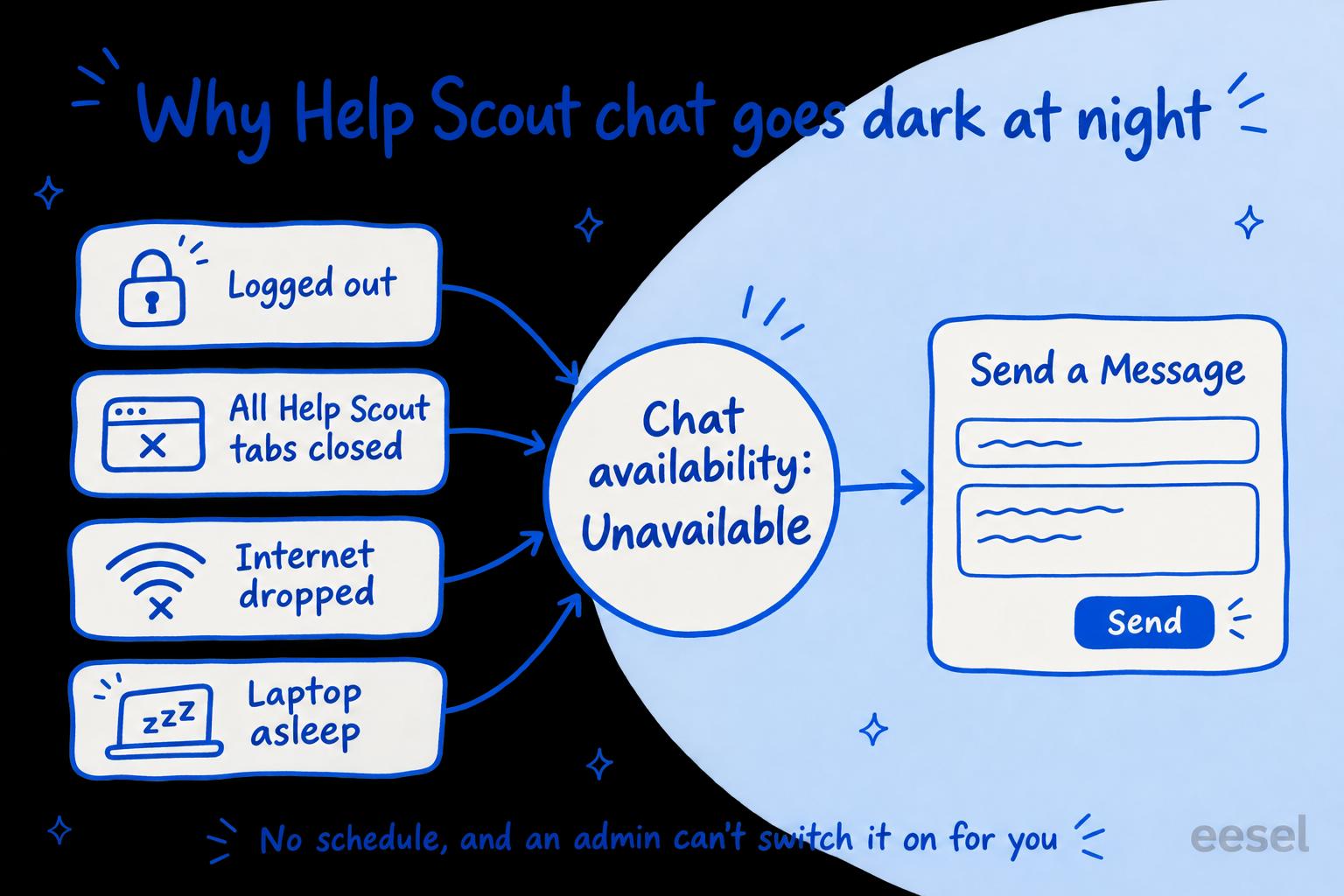
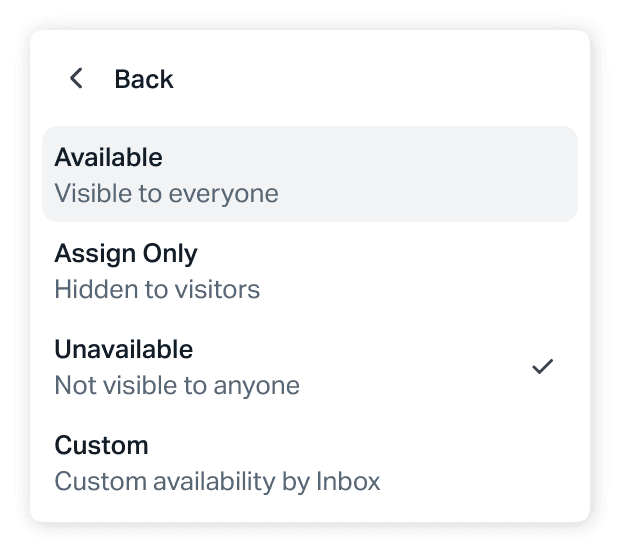
Each person sets their own chat availability to Available, Assign Only, Unavailable or Custom (per inbox). Help Scout also flips someone to Unavailable when it detects they've gone: they log out, close every Help Scout tab, lose their connection, or put the computer to sleep.
Two answers in that same article settle the after-hours question. Can chat follow a schedule or your Office Hours? Can an admin change someone else's availability? "No to both of these." So there's no "open chat 9 to 5" switch, and no way for a manager to turn chat on for a night shift from their own login.
The other trap is the missed chat. If someone leaves themselves Available and walks away, Help Scout's chat timeout rules kick in: after 5 minutes with nobody accepting, Help Bot apologises, closes the chat and saves its transcript as an active conversation in Unassigned, and everyone who was Available gets switched to Assign Only. The customer still waits until morning, after being offered a live chat. That's worse than an honest email form (Zendesk has its own version of this, covered in Zendesk Messaging offline), which is why I'd never leave "Available" on as an after-hours hack.
What do office hours and the auto reply do?
They set expectations and fix your reports, and that's all; they don't answer anyone. Under Settings, Company Hours gives every inbox a default schedule. On Plus and Pro an inbox can have its own Custom hours and timezone, while on Standard an inbox inherits Company Hours or stays open 24/7. Only Account Owners and Administrators can change them. My post on Help Scout inbox office hours covers per-inbox schedules in detail.
The schedule is used in two places:
- The auto reply. Turn on Only send outside of office hours in the inbox's Auto Reply settings and it goes out only when that inbox is closed.
- Reports. The Email and User reports have an Office Hours checkbox that calculates response and resolution times against each inbox's schedule, so a 2am email doesn't wreck your first response time.
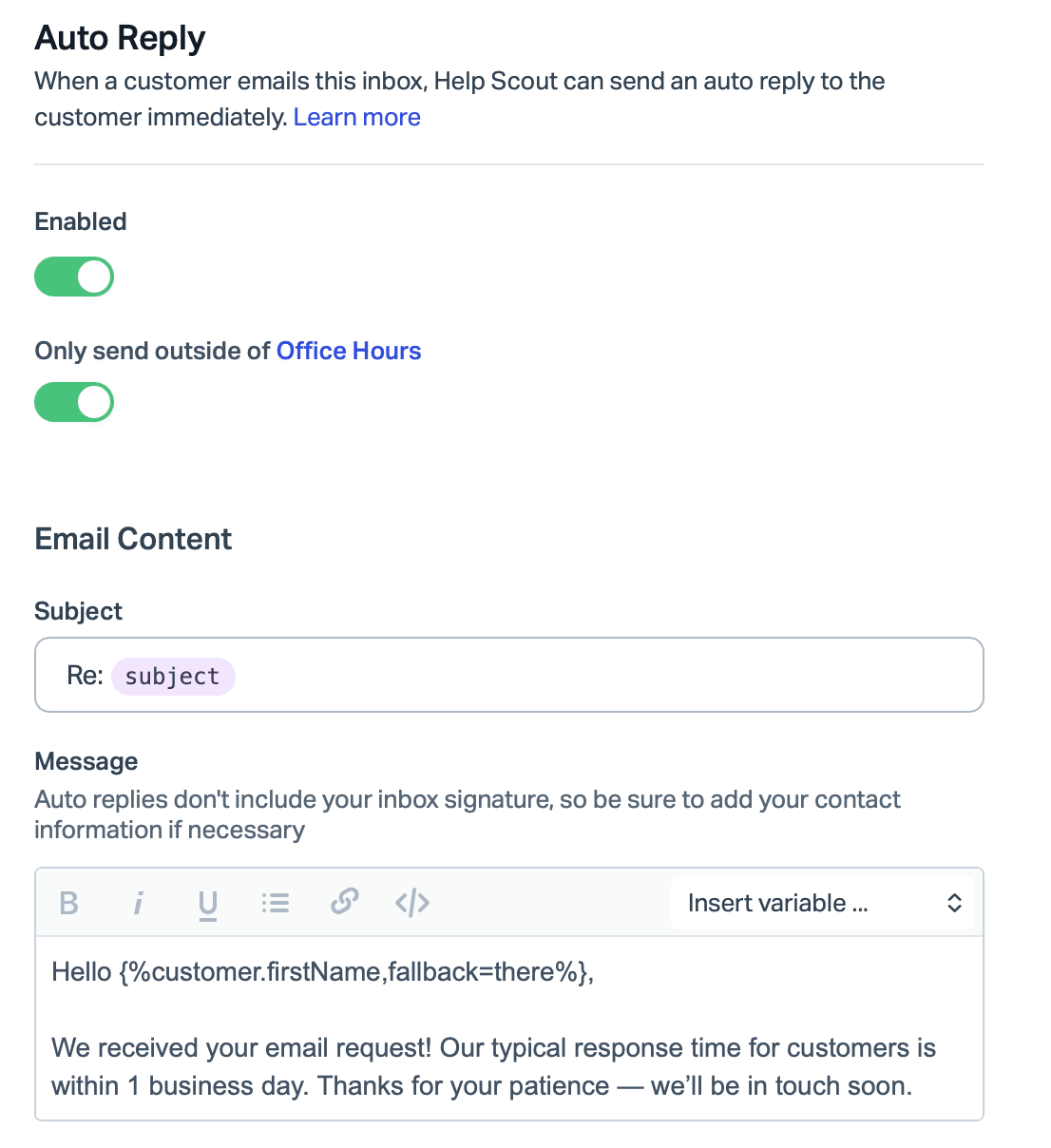
The auto reply has limits worth knowing before you lean on it. It's available on every plan, but it goes only to the first email in a conversation and, by default, once per email address in 24 hours, unless you ask Help Scout support to change that for the whole account. It skips emails that look like auto replies, and it won't go out at all if your mail server adds headers such as Precedence: bulk to forwarded mail. It also doesn't show in the conversation history, so your morning shift can't see what the customer was promised. Write the promise you can keep ("within 1 business day") and nothing sooner. My Help Scout AI auto-reply guide covers what an AI can add on top.
Can Help Scout's AI answer customers after hours?
Yes. Scout, the AI agent that grew out of AI Answers, works in Beacon and email, and nothing in its setup ties it to your office hours. Help Scout introduces Scout as an agent built to "autonomously resolve conversations across both email and Beacon when confident answers exist." Envoy is the name you'll see on your bill. My Help Scout AI agent review goes through what Scout handles day to day.
You set it up under Scout > Manage, as Help Scout's setup guide lays out: add sources (your Docs site and others, which the best practices guide lists as public websites, PDFs, Word documents, spreadsheets and short Text sources), add exclusions for topics it should hand off at once, give it a role for tone, then test it under Scout > Test before turning it on in a Beacon and in each inbox you want it to email from.
For email you choose who it replies to: all customers, all except those matching conditions, or only those matching conditions.
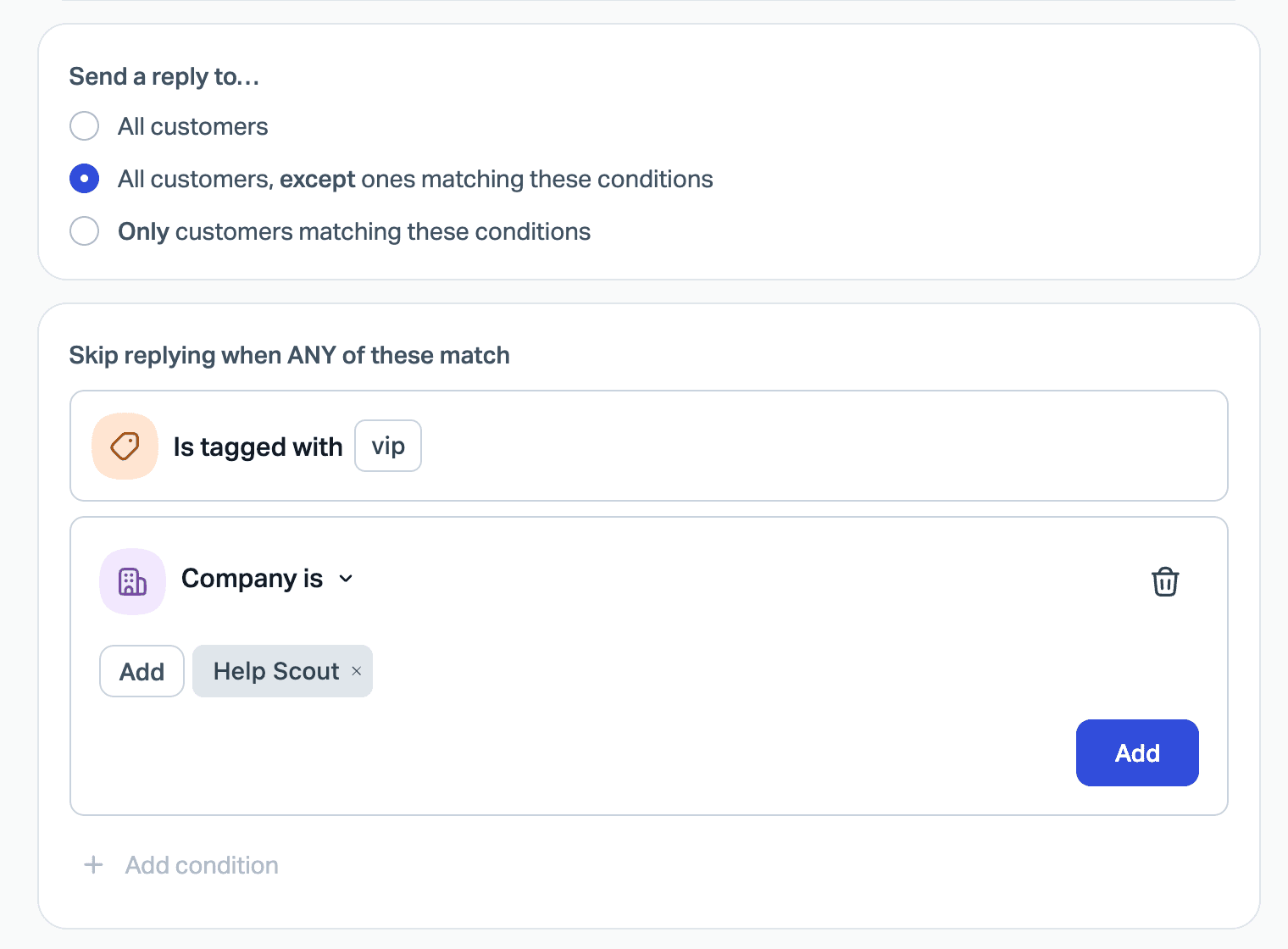
The conditions in Help Scout's docs are about the customer (a tag, a company), and they describe no time-of-day condition. So Scout behaves the same at 2pm and 2am. That's what you want for coverage, and it means anything you'd rather a person handled has to be an exclusion, not "only after hours".
What happens when Scout can't help at night?
It hands off, and after hours a handoff in Beacon means email. That escalation path is the part to design on purpose. When a chat hits an exclusion, the customer sees your exclusion message "along with buttons to reach out via Email or Chat (if available)". At night chat isn't available, so they get the Email button. An email that hits an exclusion gets no reply from Scout and lands in your inbox.
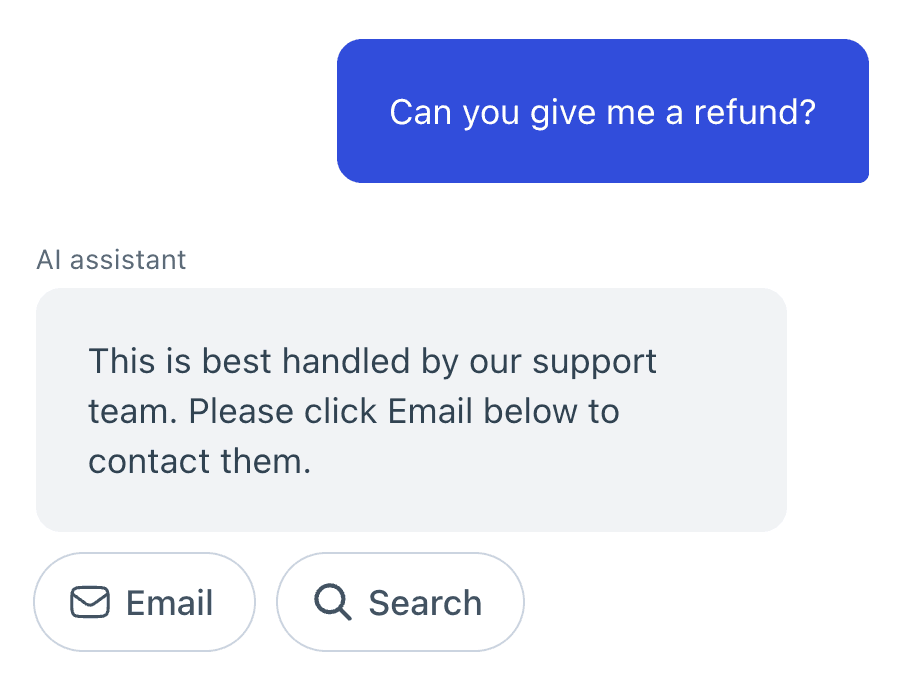
So the after-hours setting that matters most is that message. You can edit it per Beacon under Tools > Beacons > [your Beacon] > Scout > Customize messages, including how Scout replies when someone asks for a person. Make it say what happens next and when: "Our team is back at 9am Eastern and will reply to your email first thing." Help Scout's own list of example exclusions includes "Request for a person", which I'd add on day one. More on wording a good handoff in human handoff best practices.
What does Scout cost for after-hours coverage?
Help Scout's resolutions pricing charges $0.75 for each resolution, billed monthly in arrears. A resolution is counted when Scout answers and the customer doesn't ask for more help after its last reply, once per session however many questions it answers. A greeting, a follow-up question or a handoff isn't charged. New Help Scout accounts get 3 months of free resolutions; existing customers who turn Scout on don't get a trial.
You can set a monthly spending limit. Watch what happens when you hit it, though: Scout is switched off in your Beacon until the next cycle, and Beacon falls back to whichever Beacon mode you've set. At night, with chat off too, that leaves customers with Docs search and the email form, the setup my Help Scout ticket deflection post starts from. Set the cap high enough that it doesn't run out mid-cycle.
Scout isn't on the Free plan, which includes no AI tools. On paid plans, Help Scout's pricing is $25 per user a month for Standard, $45 for Plus and $75 for Pro, billed annually, with Envoy on top. A five-person team on Standard pays $125 a month in seats, plus $150 for 200 Scout resolutions. More in my Help Scout pricing breakdown.
What happens when your team signs back on?
The overnight pile is still there, and Help Scout's routing will deal it out, oldest first. Routing (round robin on Plus; round robin or balanced on Pro) works through every active conversation in Unassigned, longest-waiting first, and only assigns to teammates whose status is Active and who are under their assignment limit. Overnight, with everyone Away, nothing gets assigned. The catch is the first person in: routing can hand them the whole pile, up to their assignment limit (as high as 100), so set that limit ahead of time. The auto-assignment guide covers the workflow route.
What you can't do is write a time-of-day rule. The workflow conditions include Date Created, Waiting Since and Last Customer Reply, all measured in "X days or hours", but none for "outside office hours" or a clock time. So "tag everything that arrived overnight" isn't a condition you can build, and a workflow runs only once on any conversation. If your SLA clock matters, read my notes on Help Scout SLA policies alongside your office hours.
Pick your setup and see what a customer gets at 2am
Pick what you've switched on to see what an email and a Beacon visit get overnight, and what it costs on top of your seats.
How I'd set up after-hours coverage in Help Scout
In this order, each step closing a gap the last one leaves:
- Set Company Hours in Settings, with your real timezone. On Plus or Pro, give inboxes that keep different hours (a European inbox, a billing inbox) their own.
- Turn on the auto reply, outside office hours only, in each inbox. Promise a time you'll beat, and check your forwarding doesn't add
Precedence: bulkheaders, or nothing goes out. - Fix your Docs first. Help Scout's Scout best practices call filling gaps in your Docs "the highest-leverage thing you can do." Your overnight knowledge base is the only teammate Scout has. Sources other than Help Scout Docs need a manual re-sync when they change.
- Add exclusions for refunds, billing disputes, account security and "Request for a person", and rewrite each handoff message to say when the team is back.
- Turn Scout on in Beacon and in each inbox, with conditions to keep it off VIPs if you'd rather a person answered them.
- Set a spending limit with room to spare, so Scout doesn't switch off mid-cycle.
- Turn on routing (Plus or Pro) so the morning pile goes out longest-waiting first, to whoever is Active.
- Review the overnight sessions weekly in Reports > Scout. A resolved session only means the customer didn't ask for more, so read a few of those too, not just the escalations. Containment and escalation covers that trap.
Leave out one thing: "Available" on overnight. The first chat waits 5 minutes for an apology, and then chat switches itself off for everyone.
Covering after-hours email with eesel
Scout covers the questions your Docs answer. What's left overnight is email it didn't take: exclusions, gaps in your Docs, and customers replying on open conversations. That's the work I'd hand to an AI teammate inside Help Scout, and it's what eesel's Help Scout integration does.
eesel connects as a Help Scout user (give it its own) and learns from your Docs site and past closed conversations. You give it an automation on A customer opens a new conversation or A customer sends a message (which fires when a customer replies on an existing conversation) and write in plain words what it should handle. It can send a reply or leave one as a draft in the reply box, add a note, add tags, assign, and close, so the same agent can tag and route the overnight pile for the morning. If Scout also answers email, tell eesel to skip conversations Scout has already replied to. It can also check User statuses, so an instruction like "if nobody on the team is available, send the reply; otherwise leave a draft" is something it can follow.
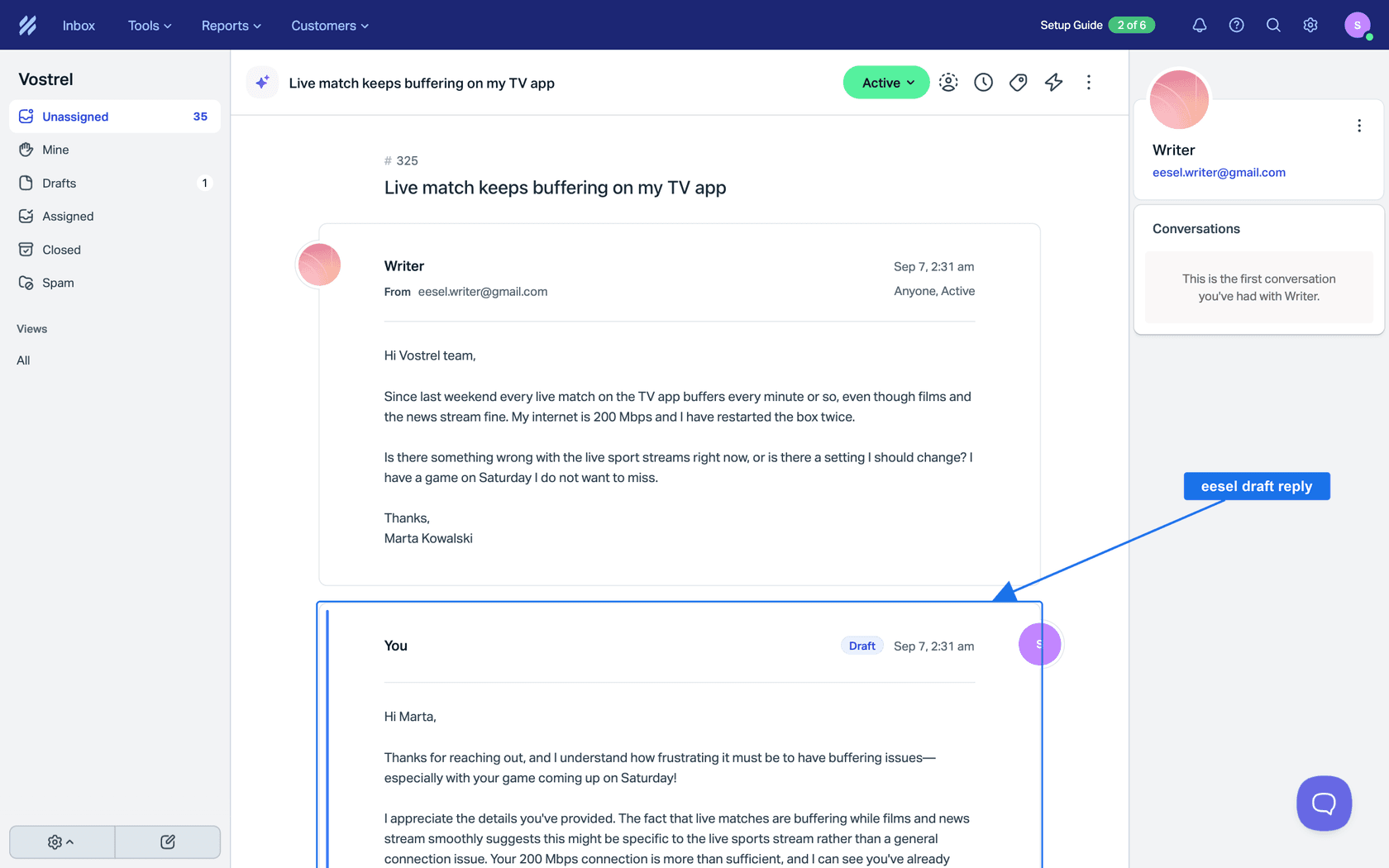
Every action can run on its own, ask first or stay off, set per action in actions and approvals. That keeps a human in the loop for as long as you want one. So you can start with drafts and notes overnight, read them each morning, and let it send once you trust what it writes. One limit to know: eesel's Beacon live chat is bound by the same Help Scout rule as everyone else's. Beacon only offers chat while a teammate is Available, so after hours eesel answers the emails Beacon sends instead.
The closest published example is SE Ranking, which runs eesel on Zendesk chats and tickets across three products. When a customer asks for a person, eesel tells them to expect a reply in one or two business days, never that someone is joining now, and on weekends it creates a ticket instead. That honest handoff is the bit I'd copy into any after-hours setup, whichever tool writes it. For weekends specifically, see my notes on AI weekend support coverage.
Try eesel on your Help Scout night shift
If Scout already covers your Docs questions, the gap left overnight is the email it won't take and the replies on yesterday's threads. eesel works inside Help Scout as its own user, reads past conversations to learn how your team answers, and drafts or sends replies by the rules you set, so the morning shift starts with drafts to check instead of a cold queue. What it may do on its own and what waits for a yes is your call, action by action.
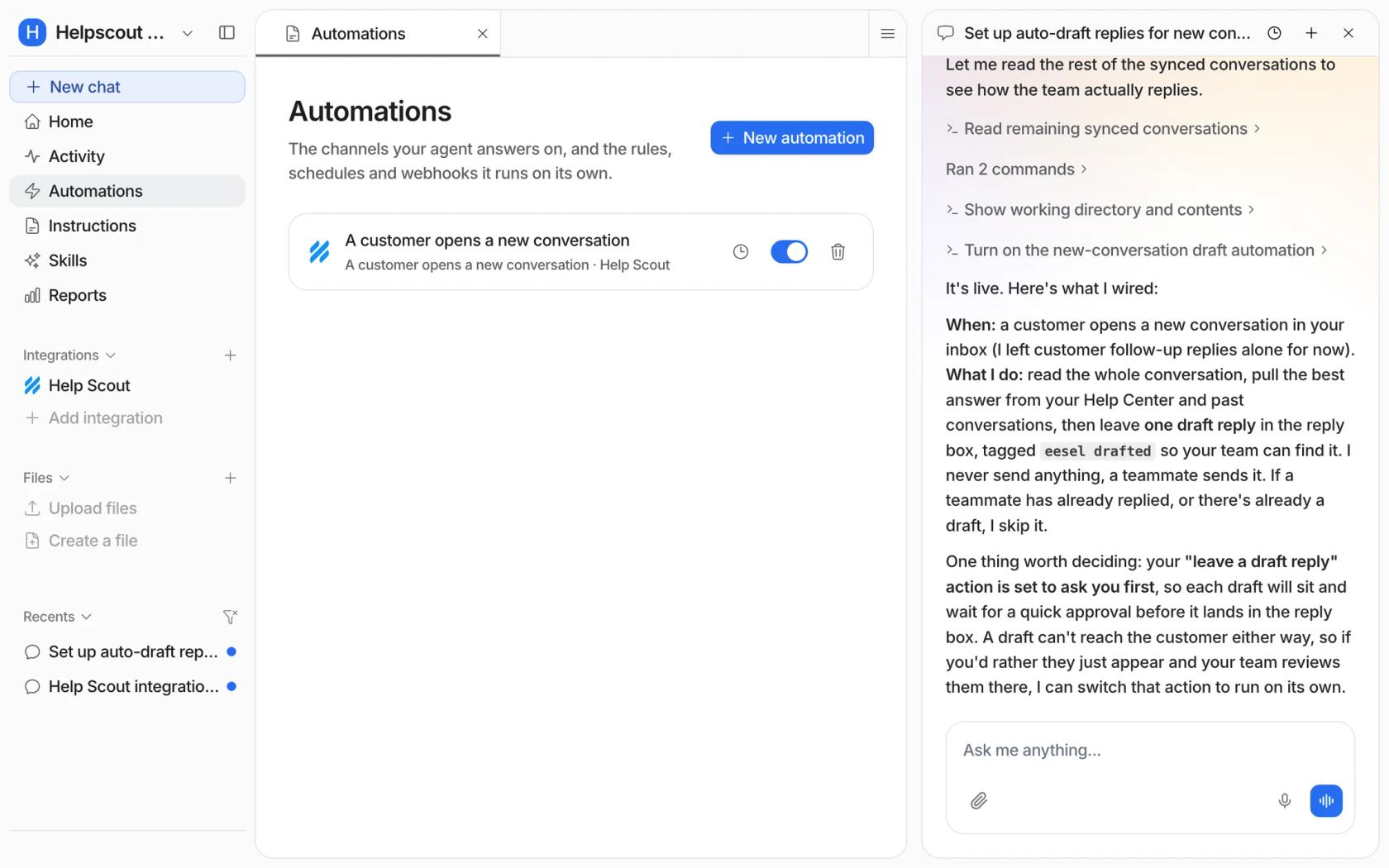
Try eesel with drafts only for a week, and read what it would have sent before you let it send.