


Moose WhatsApp Chat Button is a free Shopify app that does more than a button, and I give it 3.5 out of 5. It adds a WhatsApp button, connects your number to an in-app inbox through the WhatsApp Business API, sends abandoned cart reminders and tracks clicks in Google Analytics and Meta Pixel. The listing shows 5.0 stars from 212 reviews and no paid plans at all.
The catch is what the stars measure. I pulled every review: 104 of 211 were written within an hour of installing, and most thank a support rep by name. There are no help docs, the cart reminder limit isn't published, auto-replies are still "coming", and two of the four reviews under five stars say the app stayed on the storefront after uninstalling.
So Moose gets every WhatsApp chat into one place, and a person still types every reply. That second half is where eesel's AI helpdesk teammate fits: for Question Beauty on Shopify, it sent about 960 replies in one month and checked about 290 orders before answering.
What is Moose WhatsApp?
Moose WhatsApp Chat Button is a Shopify app listed on the Shopify App Store by Vegahub Technology Inc., based in Oakville, Ontario. It launched on May 7, 2025, carries the Built for Shopify badge, and its listing tagline is "Recover abandoned cart with WhatsApp widget, chat & automation". The vendor site, moosewa.io, calls it "WhatsApp 2.0 for Shopify merchants".
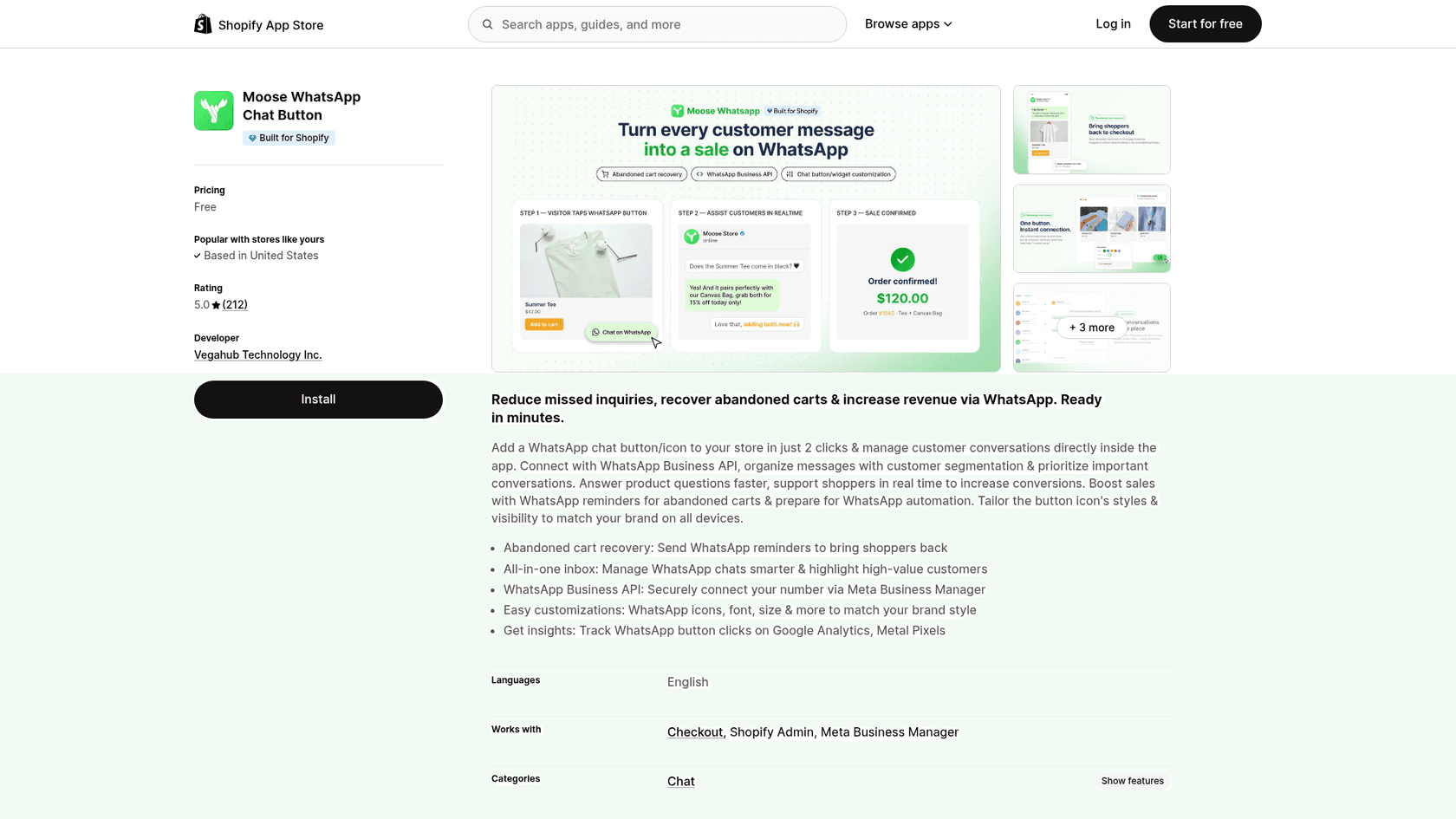
It's the sister app of MooseDesk, the same team's helpdesk with an AI chatbot. The two are separate installs with separate inboxes, which matters more than it sounds (more on that below). The listing is English-only and says the app works with Checkout, Shopify Admin and Meta Business Manager.
I build integrations at eesel, so when I read a listing like this I look past the feature bullets for what's actually wired up: which API the messages travel through, what the app can read from the store, and what happens when a customer writes back at 2am. That's the lens for the rest of this review.
How does Moose WhatsApp work?
Setup is three steps, per the vendor homepage: install from the App Store, set your WhatsApp number and button style, then "engage visitors via WhatsApp, manage chats, and recover abandoned carts". The homepage promises it's "Live in under 2 minutes", and the reviews broadly agree.
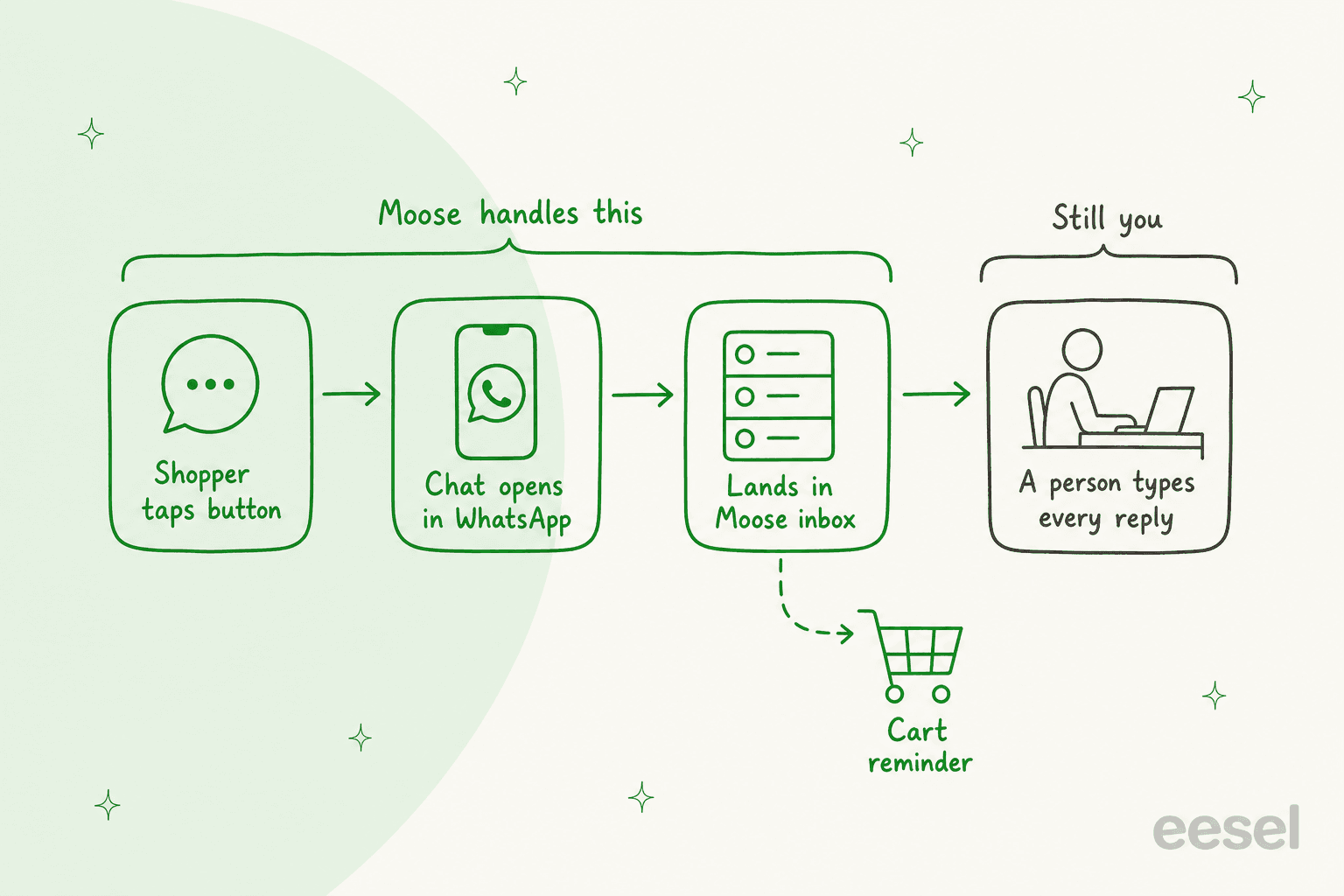
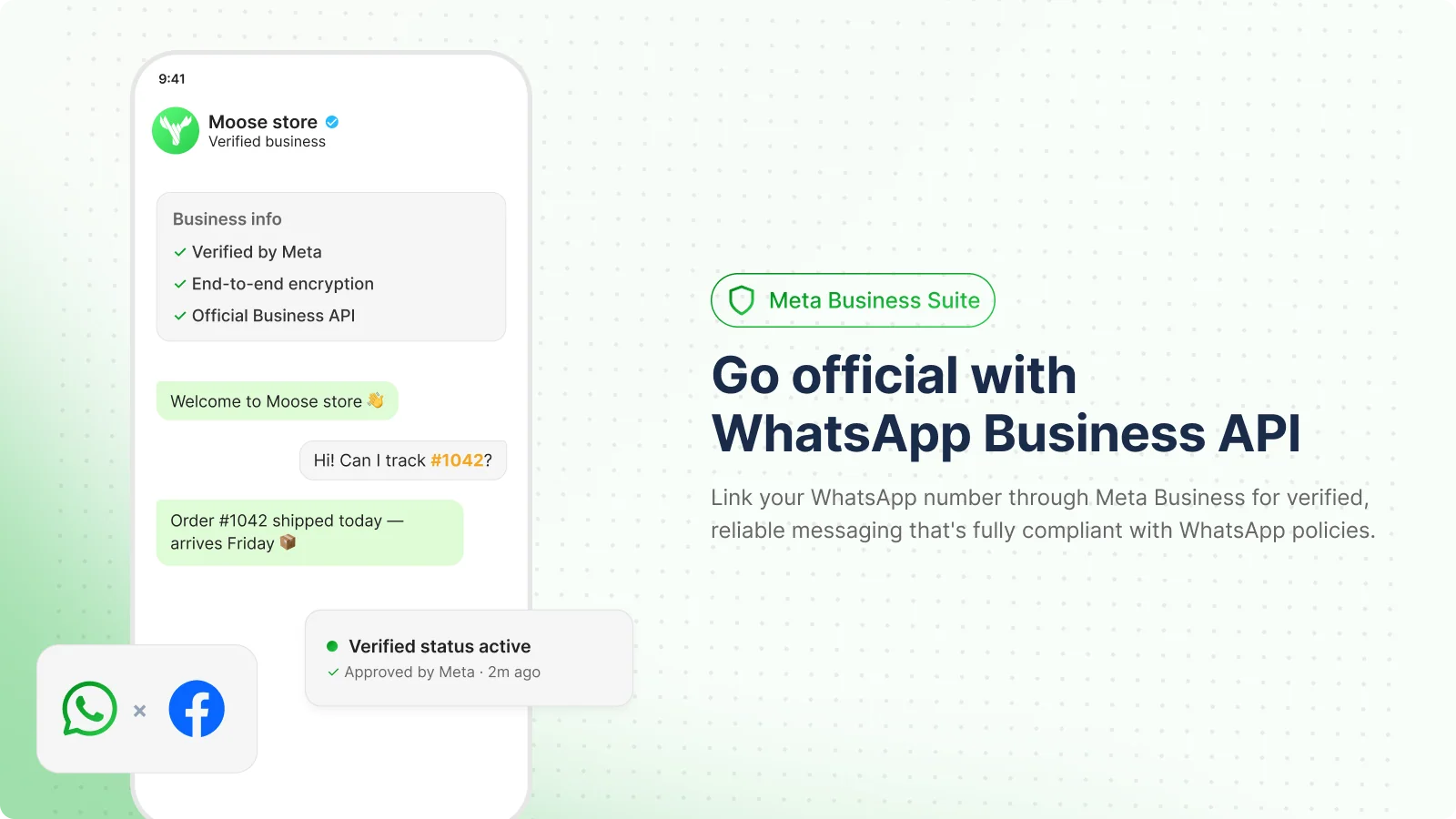
What sets it apart from the plain WhatsApp buttons I've reviewed, like Vowels on Wix, is the middle step. Moose lets you "securely connect your number via Meta Business Manager", which puts the conversation into a shared inbox inside Shopify instead of on one person's phone. That's the WhatsApp Business API route, and it's the right foundation for a team.
The last step is still you. Nothing in the app replies on its own today. The listing describes the app as a way to "prepare for WhatsApp automation", and two reviewers in June and July 2026 said they were waiting for it.
What features does Moose WhatsApp have?
The listing names five headline features. Here's what each one does, based on the listing, its seven gallery images and the reviews.
The WhatsApp button and chat widget
You pick an icon, colour, corner style, font, size and position, and you can show or hide the button per device. The widget can also open as a panel that introduces team members, like a "Returns Specialist" and a "Product Specialist", with a "We typically respond within a few minutes" line and a FAQ section.
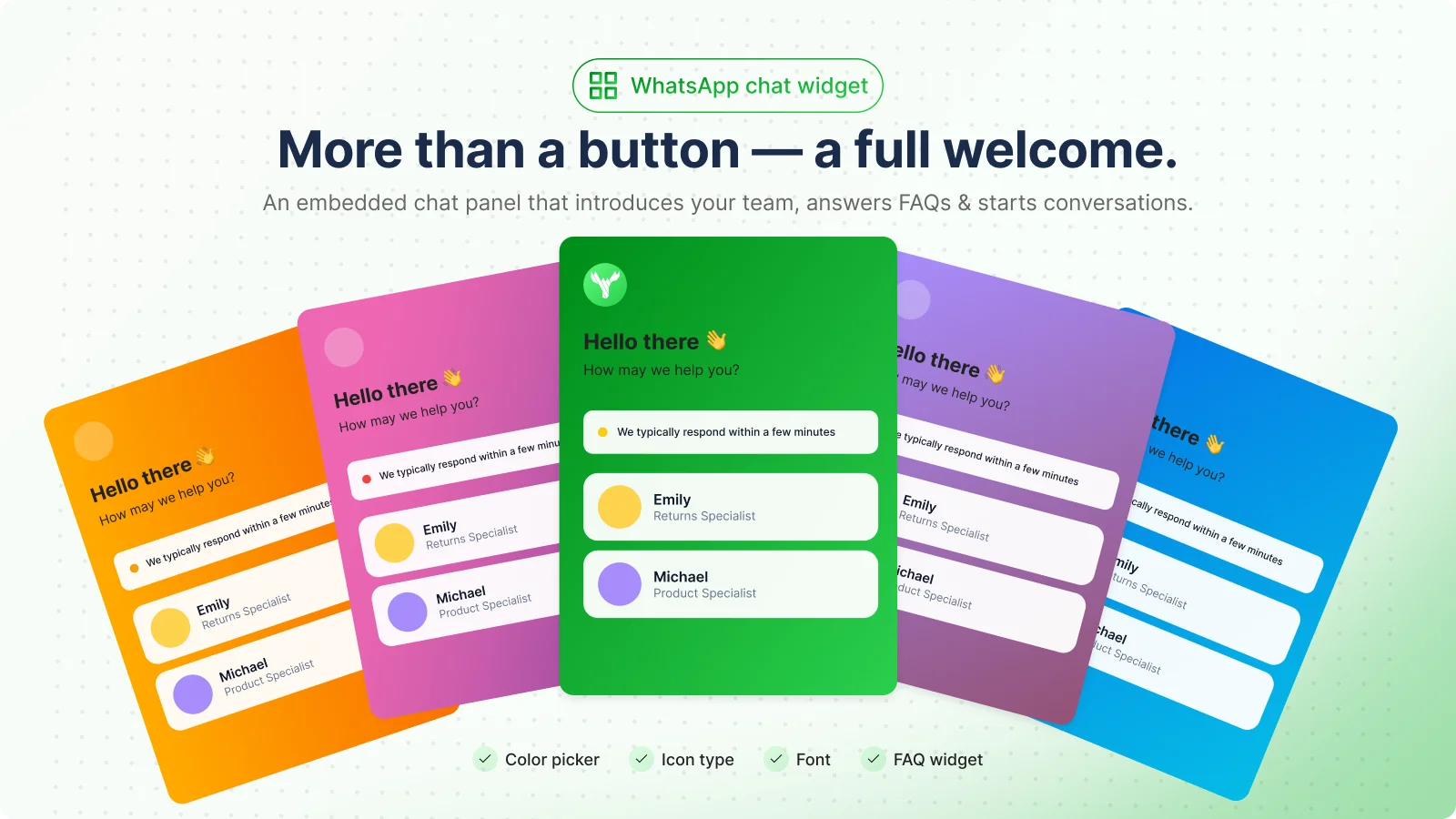
Picking a team member before messaging is simple ticket routing done by the shopper. One reviewer from Peru, four months in, needed help moving the button on mobile because it overlapped the store's sticky buy bar, and support fixed it without changing the desktop position. Test the button on your phone after setup.
The all-in-one inbox
This is the feature I'd install Moose for. The listing says you can "manage WhatsApp chats smarter & highlight high-value customers", and the gallery shows an inbox where a chat carries an order number and an assigned agent, described as "Shopify-native", where you can "assign teammates, tag orders".
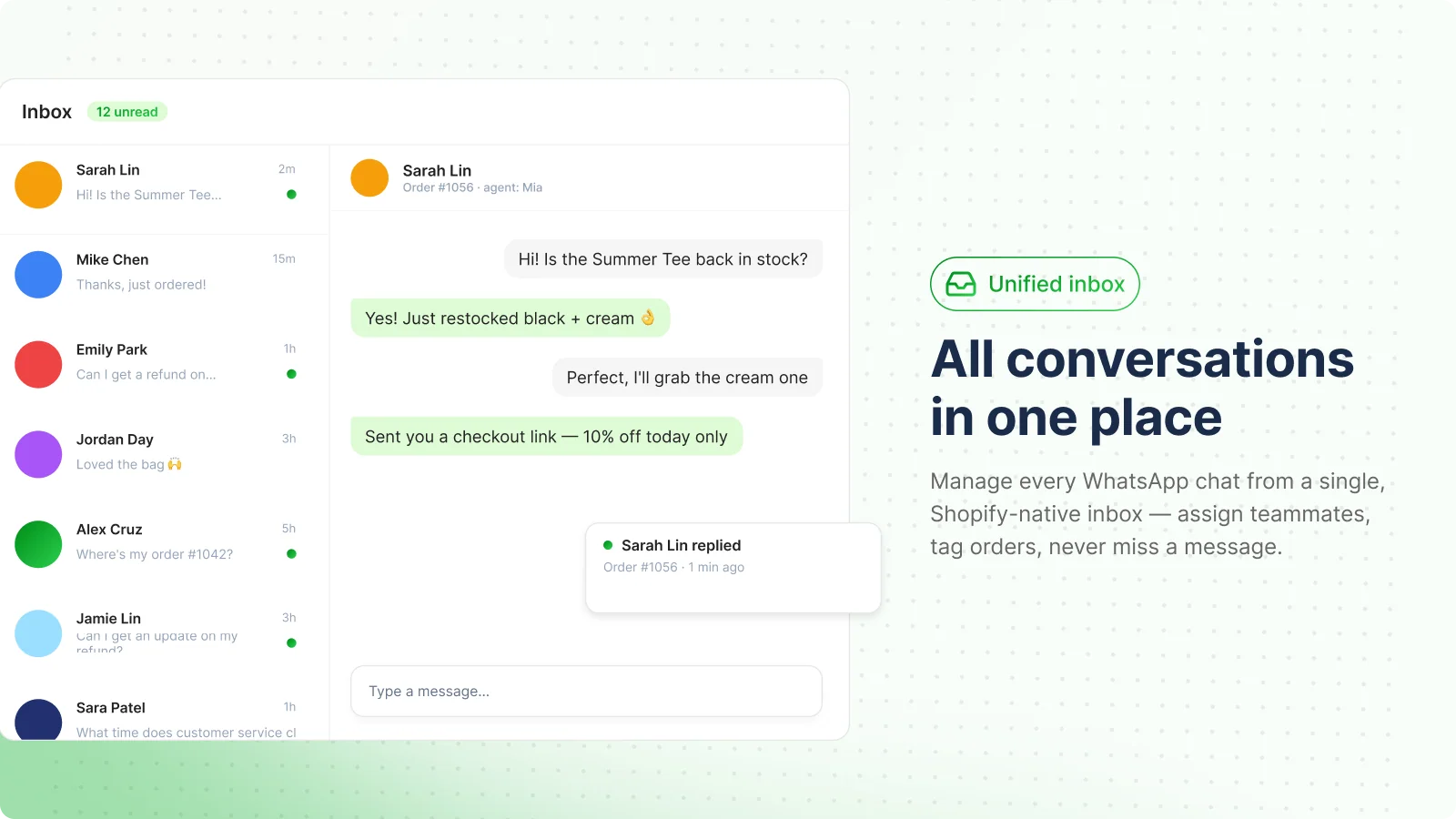
Look at the messages in that mockup, though: "Is the Summer Tee back in stock?", "Where's my order #1042?", "Can I get a refund on...". Those are the questions every Shopify store gets on repeat, and in Moose each one waits for a person to read the order and type an answer. It's still a big step up from a team sharing one phone.
Abandoned cart recovery
The listing promises WhatsApp reminders "to bring shoppers back", and the gallery shows a reminder with the product, the price and a "Complete order" button. One reviewer from Pakistan wrote that support "helped me increase abandon cart limit", so there is a limit, but the listing doesn't say what it is or how to raise it.
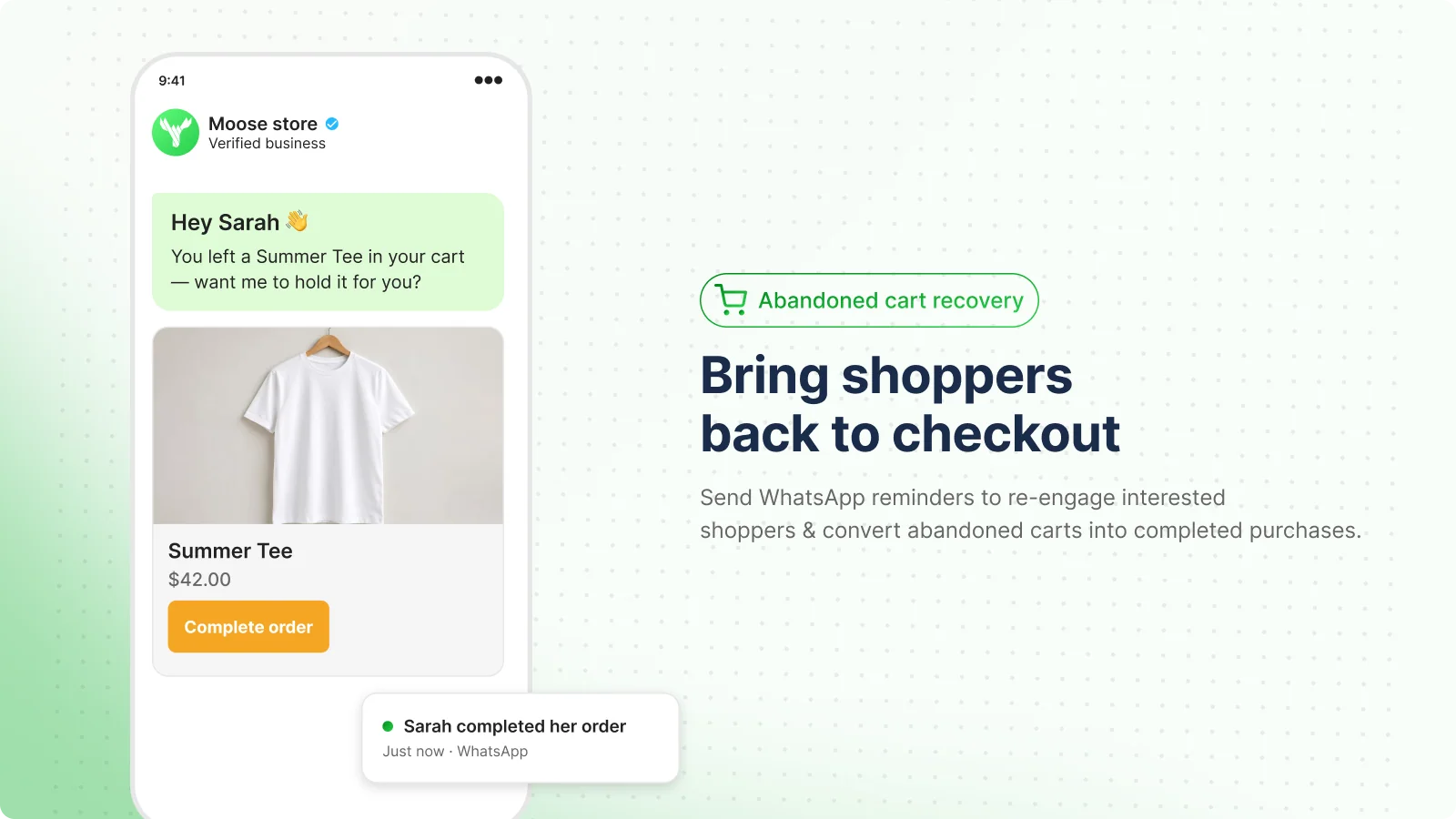
There's a cost question here too. A cart reminder is a message the business starts, and under Meta's pricing rules a business-started message on the API goes out as a paid template. A US marketing template is $0.025 on the October 1, 2026 rate card. The listing doesn't say which category Moose uses, so check your Meta billing after the first week.
WhatsApp Business API connection
Connecting through Meta Business Manager is what makes the inbox possible, and it brings Meta's rules with it. Since October 1, 2026, Meta bills service replies again after 1,000 free ones per number each month, so a busy inbox has a small Meta bill even though the app is free. My API pricing changes post walks through it, and my list of API providers shows how other apps pass those fees on.
Click tracking and analytics
The listing says you can "track WhatsApp button clicks on Google Analytics, Metal Pixels" (the typo is theirs; it means Meta Pixel). The gallery dashboard also shows revenue recovered, carts recovered, unread conversations, click rate, top intents and response time.
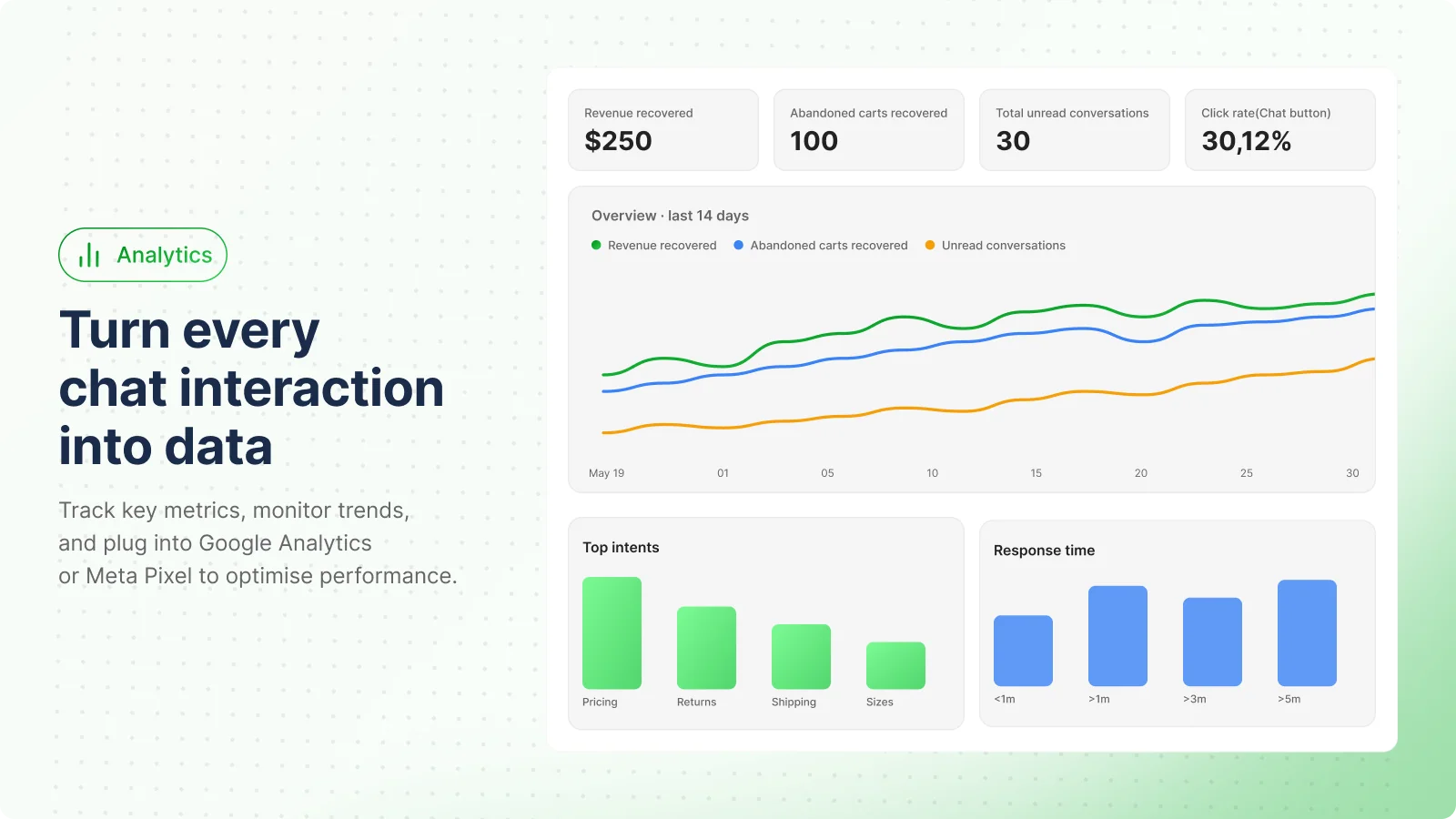
Those numbers are sample data in a marketing image, not results. Response time is the metric I'd watch: it's your first response time on WhatsApp, and with every reply typed by hand it's the one that slips first.
How much does Moose WhatsApp cost?
Moose WhatsApp is free. The Shopify listing shows a single price, "Free", and the homepage says "Free plan · 2-click setup · No coding required". There are no paid tiers on the listing as of October 28, 2026.
| What you pay for | Cost | Where it comes from |
|---|---|---|
| Moose WhatsApp app | $0 | Shopify App Store listing |
| WhatsApp service replies on the API | First 1,000 a month free per number, then from $0.0034 each in the US | Meta pricing |
| Business-started messages (templates) | From $0.025 each for a US marketing template | Meta pricing |
| Your team's time | Every reply, every order lookup | You |
Two small notes. The terms of service say the app "may offer additional services for purchase, such as customizations and recurring subscriptions (monthly/annually)", so paid extras could appear later. And the free sister app is a different story: MooseDesk runs from a free plan to $249 a month.
For comparison, Shopify Inbox is also free and shows 4.6 stars from 5,803 reviews on its listing, and the Wati pricing post shows what a paid WhatsApp inbox with automation costs.
What does a free WhatsApp inbox cost you in time?
The app is $0, so the real cost is the hours your team spends answering. Put in your own numbers to see the typing time and a rough Meta bill for replies.
Type your monthly WhatsApp chats and how long each takes, then pick where most customers are.
At 400 chats a month, three replies each and four minutes a chat, Moose costs $0 and Meta's reply fee in the US is about $0.68. The team spends about 27 hours a month typing, 16 of them on questions with a fixed answer. That's the number to plan around.
What do Moose WhatsApp users say?
I pulled every review on October 28, 2026: 212 reviews, 208 five-star, 2 four-star and 2 one-star (Shopify reviews). All but two were posted in 2026, with June the busiest month at 44.
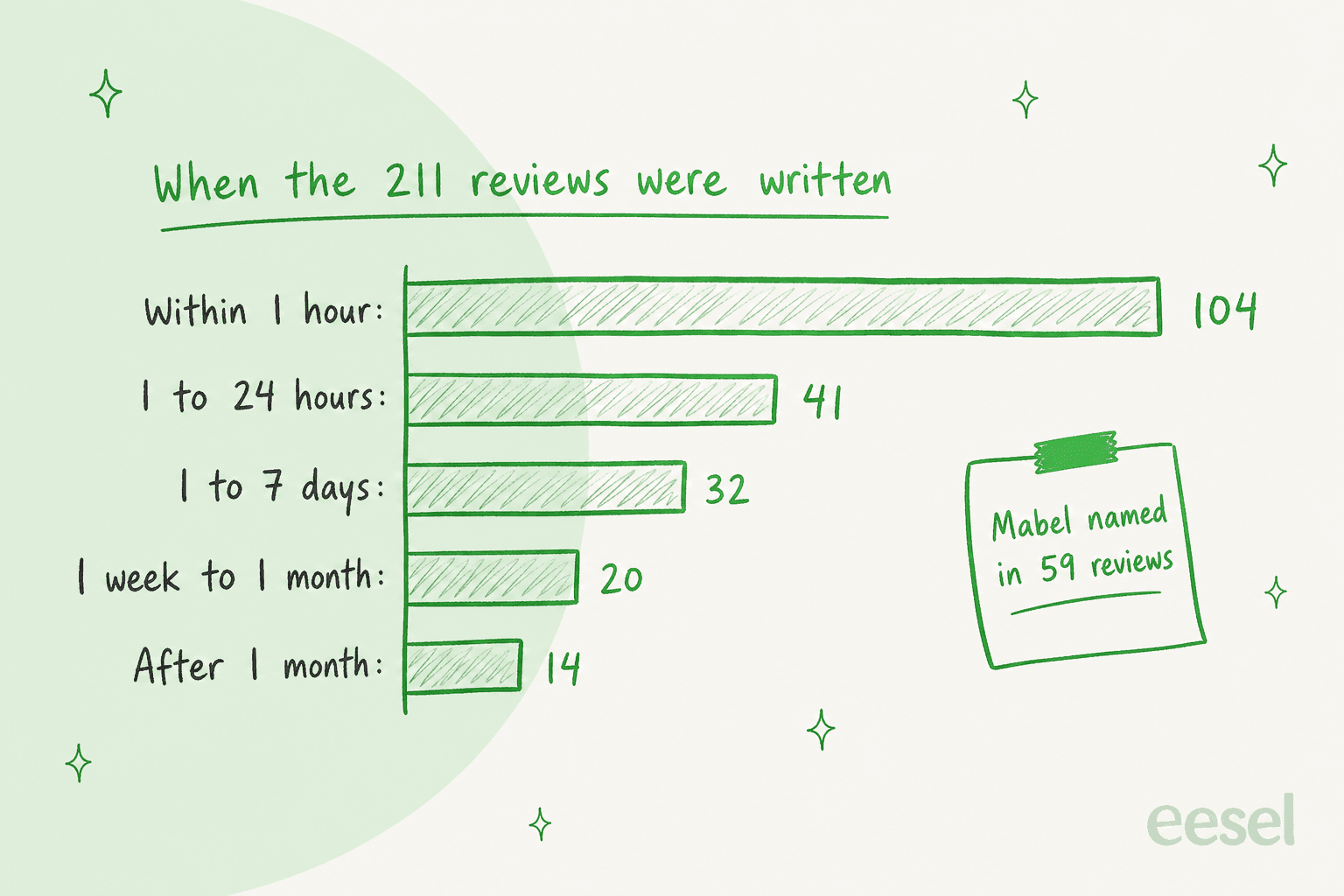
Shopify shows how long each reviewer had the app installed, and that's the most useful number on the page:
- Most reviews come right after setup. 104 of the 211 with a usage time were written within an hour of installing, 145 within a day, and only 14 after a month or more.
- They're mostly about support people. Mabel is named in at least 59 reviews, Thomas in 18, and Kelly, Paige, Mia and Ame in a few each.
- Cart recovery barely comes up. I found three reviews that mention it, and two of those, from two Indian stores in August 2026 after 9 and 11 minutes of use, are word for word identical.
So the 5.0 is a fair rating of a fast, friendly setup team. It says little about how the inbox or the cart reminders hold up after six months. The support praise is specific, though:
"After I gave them staff access, their team investigated the issue and resolved it in about 40 minutes. It turned out the problem was a coding conflict within my theme, not the app itself."

The few critical reviews share a theme. Two of the four reviews under five stars are about removal: a four-star review from August 2026 asks why the app still runs "on my website even after I uninstalled it", and a one-star review from Brazil in October 2026 says uninstalling left a broken image icon on the store.
"Why does this app still appear and run on my website even after I uninstalled it? And I can't reach customer service at all."
The developer replied to that one with an apology from its customer service lead. And the most telling five-star review is about something the app doesn't do yet:
"I look forward to the release of automated response feature on the app."
Outside Shopify, I found no Reddit, G2, Capterra or Trustpilot pages for the app. The homepage carousel shows quotes from stores like "Northwind Co." and "Aurora Goods" with "Read customer story" links, but I couldn't find any of those stories, so I've left them out.
Moose WhatsApp or MooseDesk: which one do you need?
They solve different problems, and the names make it easy to install the wrong one. Moose WhatsApp is for stores whose customers live on WhatsApp. MooseDesk is a helpdesk with an AI chatbot for site chat, email, Messenger and Instagram.
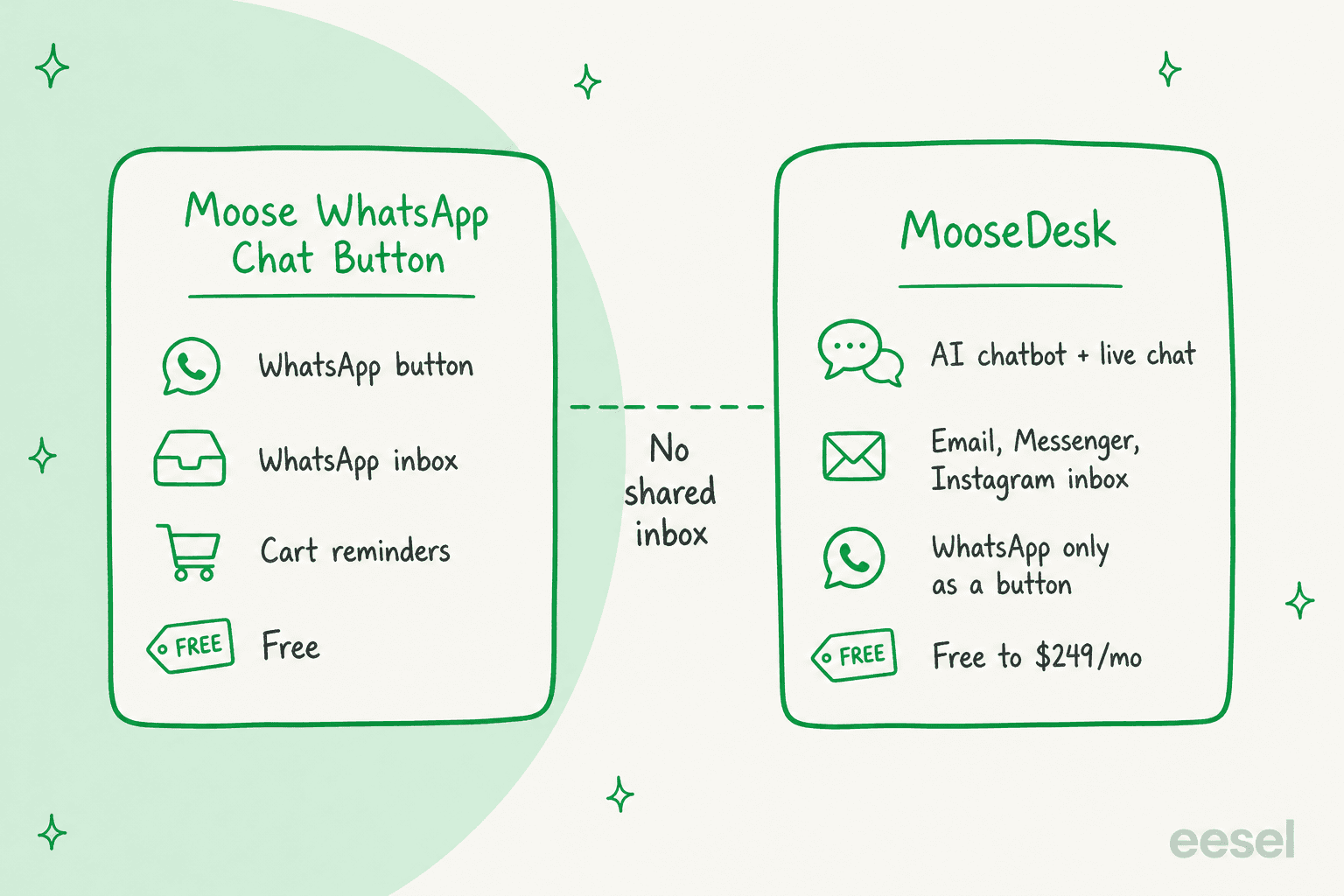
The gap is in the middle. MooseDesk's own help docs describe its WhatsApp option as a button skin that opens WhatsApp, not an inbox channel. Neither listing says the two inboxes connect. So the AI in MooseDesk doesn't answer WhatsApp, and the WhatsApp inbox in Moose has no AI. If you want both, my MooseDesk alternatives post covers tools that put WhatsApp and AI in one place.
Where does Moose WhatsApp fall short?
Some of these are about being young (the app launched in May 2025); others are choices the listing makes.
- No help docs. The vendor site has a homepage, terms and a privacy policy, and that's it. Setup questions go to the support chat.
- No auto-replies yet. The listing says "prepare for WhatsApp automation". Until it ships, there's no WhatsApp auto-reply, no away message and no canned response library documented.
- An unpublished cart limit. A reviewer needed support to raise it. You won't know yours until you hit it.
- Uninstall leftovers. Half of the reviews under five stars describe the app or a broken image staying on the storefront.
- Broad data access. The listing asks to view customer names, emails, phone numbers and addresses, browsing behaviour, the last 60 days of orders, discounts, and to edit web pixels. That's normal for cart reminders, but read it before you install.
- Every reply is manual. "Where's my order?" needs a person to open Shopify, find the order and type the status, where WISMO automation could answer it in seconds.
To be fair, for $0 it covers a lot: a styled button, a real Business API inbox, cart reminders and click tracking. Most WhatsApp buttons on Shopify and Wix stop at the first of those.
Who should use Moose WhatsApp?
The deciding question is whether a person on your team can answer every WhatsApp message, because that's the part Moose leaves to you.
| You are... | Verdict |
|---|---|
| A new Shopify store that wants a WhatsApp button | Good fit, free and quick to set up |
| A store where 2-3 people share WhatsApp duty from one phone | Good fit, the inbox is the reason to install |
| A store that wants WhatsApp cart reminders for free | Fair fit, check the limit and your Meta bill |
| A store that needs written docs before installing anything | Skip for now, there are none |
| A store with hundreds of repeat WhatsApp questions a week | Pair it with an AI agent, or pick a tool that answers |
| A team already on Gorgias or Zendesk | Skip, connect WhatsApp to your helpdesk instead |
What are the alternatives to Moose WhatsApp?
Split them by what you need after the chat starts.
- Just a button. Smartarget works on Shopify, and Chaty adds more channels to one button.
- Chat that stays on your site. Shopify Inbox is free, and my Shopify live chat apps list compares the rest.
- A WhatsApp inbox with automation. Wati and the tools in my WhatsApp customer service platform guide add flows and templates.
- WhatsApp inside your helpdesk. Gorgias WhatsApp and Zendesk WhatsApp keep every channel in one queue.
- AI that answers on WhatsApp. See my WhatsApp AI chatbot guide and the Shopify WhatsApp integration walkthrough.
Moose WhatsApp review verdict: is it worth installing?
3.5 out of 5. For a free app, Moose WhatsApp does a lot. The Business API inbox is the real feature: it gets WhatsApp off one person's phone and into Shopify, with order context and assignments. The button is easy to style, the cart reminders and click tracking are included, and the support team fixes theme conflicts fast.
What holds it back is everything you can't see yet. There are no docs, the cart limit isn't published, automation is still a promise, and the 5.0 mostly reflects the first hour of use. Install it, test the button on mobile, note where to remove it, and watch your Meta billing for the first month.
And plan for the inbox to fill up, because every message in it waits for a person.
Where does eesel fit next to Moose WhatsApp?
Moose gets the chat into one place. eesel answers it. eesel is an AI teammate platform, and for this job the relevant teammate is the AI helpdesk teammate, which joins your support setup and takes the repeat questions.
It connects to your WhatsApp Business number and to Shopify, so "where's my order?" gets a real answer from the real order. It learns from your site, your knowledge base and past tickets, and hands a chat to a person by topic or when it isn't sure. You write those rules in plain words, like "always pass refund requests to me". Meta allows this kind of support bot under its 2026 rules; my Meta policy changes post explains the line.

Question Beauty is the closest match to a busy Moose inbox. Its Messenger, email and website chat land in Gorgias, and many messages are just a product name and "price?". eesel reads those as buying intent and replies with the product link, in the customer's language. Between 8 August and 8 September 2026 it handled about 990 tickets, sent about 960 replies and looked up about 290 Shopify orders; refunds and complaints went to a person with a note.
ClutchLoop, a phone accessory brand on Shopify, runs eesel on Gorgias and its website chat. In the same month it handled about 230 tickets and 27 website chats, sent about 180 replies directly, and checked 76 products live in Shopify so prices and stock were never stale.
Merchants ask for WhatsApp on sales calls too: one German multi-shop Shopify and Zendesk store put WhatsApp on its must-have list next to German chat localization. If some customers prefer your site, the chat bubble is one script tag, and the Instagram and Messenger integrations cover the other channels.
My guides on automating WhatsApp support and AI WhatsApp support for ecommerce cover the setup, and after-hours support is where it pays off first.
Try eesel
If your Moose inbox is already full of "is this in stock?" and "where's my order?", eesel's AI helpdesk teammate can answer those on WhatsApp from your Shopify orders and help pages, and hand refunds and complaints to you with the context attached. It starts free with 100 credits, and paid plans begin at $299 a month for 500 credits, where one chat is one credit (eesel pricing).
Frequently Asked Questions
What is Moose WhatsApp?
Moose WhatsApp Chat Button is a free Shopify app from Vegahub Technology Inc., the team behind MooseDesk. It adds a WhatsApp button to your store, connects your number through Meta Business Manager into an in-app inbox, and sends WhatsApp reminders for abandoned carts. It does not reply to customers on its own.
Is Moose WhatsApp free?
Yes. The Shopify App Store listing shows a single price, Free, with no paid plans listed as of October 28, 2026. What can still cost money is WhatsApp itself: if your number runs on the WhatsApp Business API, Meta bills messages by category and country.
Is Moose WhatsApp legit, given its 5.0 rating?
The app is real and the support team is clearly active, but read the 5.0 carefully. In this Moose WhatsApp review I found that 104 of 211 reviews were written within an hour of installing, and 14 after a month or more, so the stars mostly rate setup help, not months of use.
Does Moose WhatsApp have a chatbot or auto-replies?
Not today. The listing says the app helps you "prepare for WhatsApp automation", and reviewers in June and July 2026 said they were still waiting for automated responses. For AI replies on WhatsApp you need an AI agent connected to the number, such as eesel for WhatsApp.
What is the difference between Moose WhatsApp and MooseDesk?
Moose WhatsApp is the WhatsApp app: button, WhatsApp inbox and cart reminders. MooseDesk is the helpdesk app, with an AI chatbot, live chat and an inbox for email, Messenger and Instagram, priced from free to $249 a month. In MooseDesk, WhatsApp is only a button style. My MooseDesk pricing post has the plan details.
How do I remove Moose WhatsApp from my Shopify theme?
Uninstall it from Shopify admin under Apps, then check your theme. Two of the four reviews under five stars say the button or a broken image stayed on the storefront after uninstalling. If that happens, check the theme's app embeds and contact the developer at the support email in the app's privacy policy.
What is a good Moose WhatsApp alternative if I want AI to answer?
Keep a WhatsApp button for the click and add something that answers. eesel's AI helpdesk teammate connects to WhatsApp and Shopify, answers order and product questions, and hands the rest to you. It starts free with 100 credits and paid plans begin at $299 a month (eesel pricing). My WhatsApp chatbot list covers more options.