


Smartarget WhatsApp is a cheap, well-made click-to-chat button, and I give it 3.5 out of 5. It puts a WhatsApp launcher on your site, lets shoppers pick a teammate by name and role, and opens the chat in your own WhatsApp app. It is rated 4.9 from 4,006 reviews on the Wix App Market, and Pro costs between $6.25 and $9 a month depending on where you buy it.
The catch is the word "free". After a 14-day trial, the free plan shows the button on your homepage only, with a "Powered by Smartarget" badge, and that one change is behind most of its 1 and 2 star reviews. Budget for Pro if you want the button on product pages.
The bigger point: the widget opens the door, it does not answer anyone. Every chat lands on someone's phone. If WhatsApp is turning into a real support channel, the cost to watch is the person typing replies, which is where eesel's AI helpdesk teammate fits. Shopify brands like Question Beauty use it to answer short "price?" messages in the customer's own language.
What is Smartarget WhatsApp?
Smartarget WhatsApp is a website widget that adds a WhatsApp chat button to your pages. It is made by Smartarget, a small company that sells 30+ no-code widgets (popups, a lucky wheel, FAQ, review boxes, buttons for other messengers) and says its apps run on 48,776+ connected websites.
I spend most of my week looking at what store owners search for before they buy, and "WhatsApp button for Wix" is a classic small-business query. Smartarget wins it on the marketplace: the Wix listing is "Verified by Wix" and carries more reviews than most apps in the chat category.
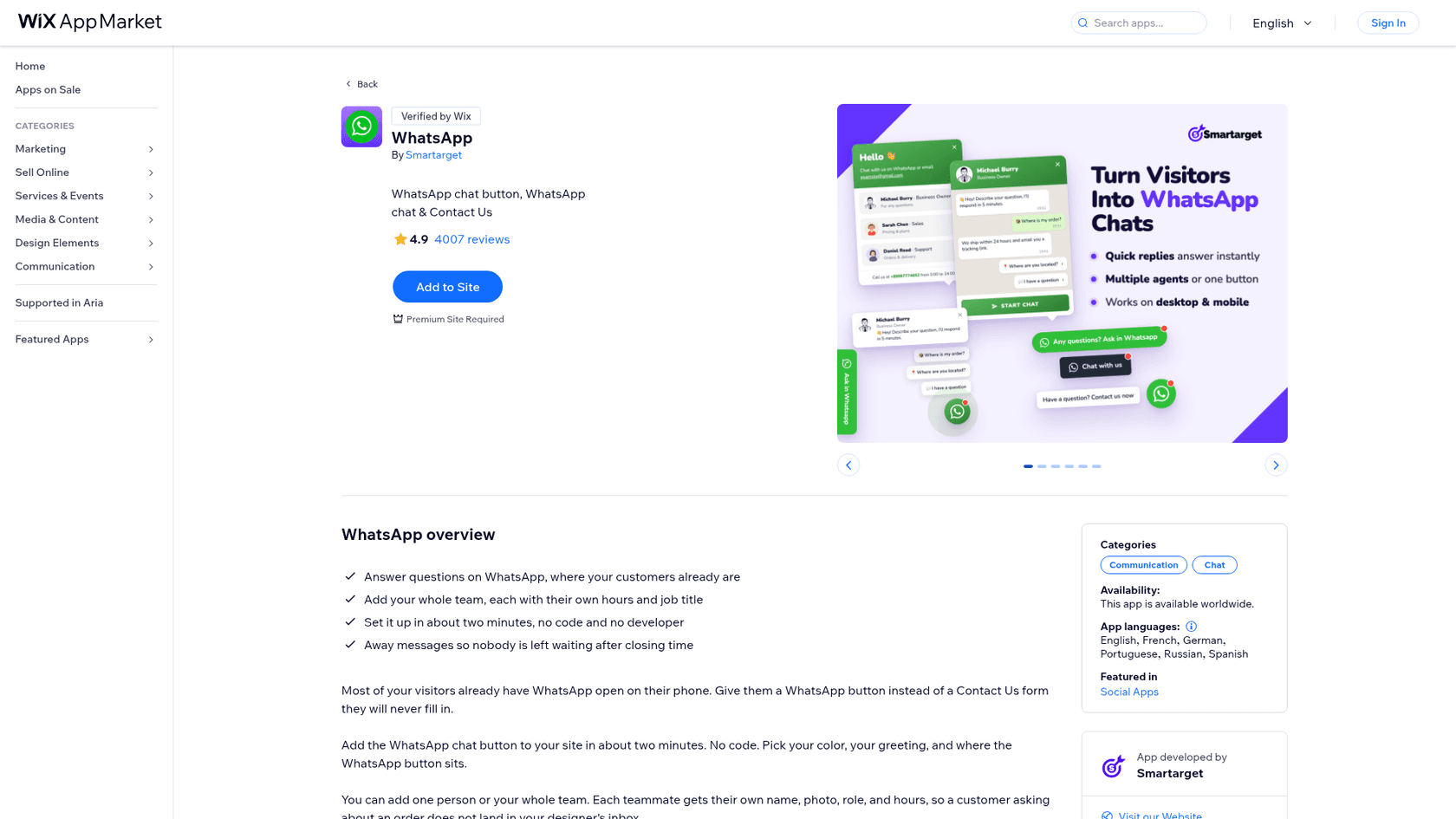
The same app is sold in three places:
- Wix App Market as "WhatsApp", 4.9 stars from 4,006 reviews, Premium Wix site required.
- Shopify App Store as Smartarget Whatsapp Chat, 5.0 stars from 2 reviews.
- WordPress.org inside the all-in-one Smartarget plugin, 4.6 stars from 10 reviews.
Any other site can paste Smartarget's JavaScript snippet. Its how-to pages cover Webnode, Blogger, Odoo, Ecwid and more.
How does the Smartarget WhatsApp button work?
It is a link to WhatsApp, wrapped in a nicer design. Per the WordPress plugin page, a tap on mobile "the official WhatsApp app will open right away", and on desktop the visitor lands in WhatsApp Web or the desktop app. From there the conversation lives in your WhatsApp, and Smartarget says it has no access to those chats.
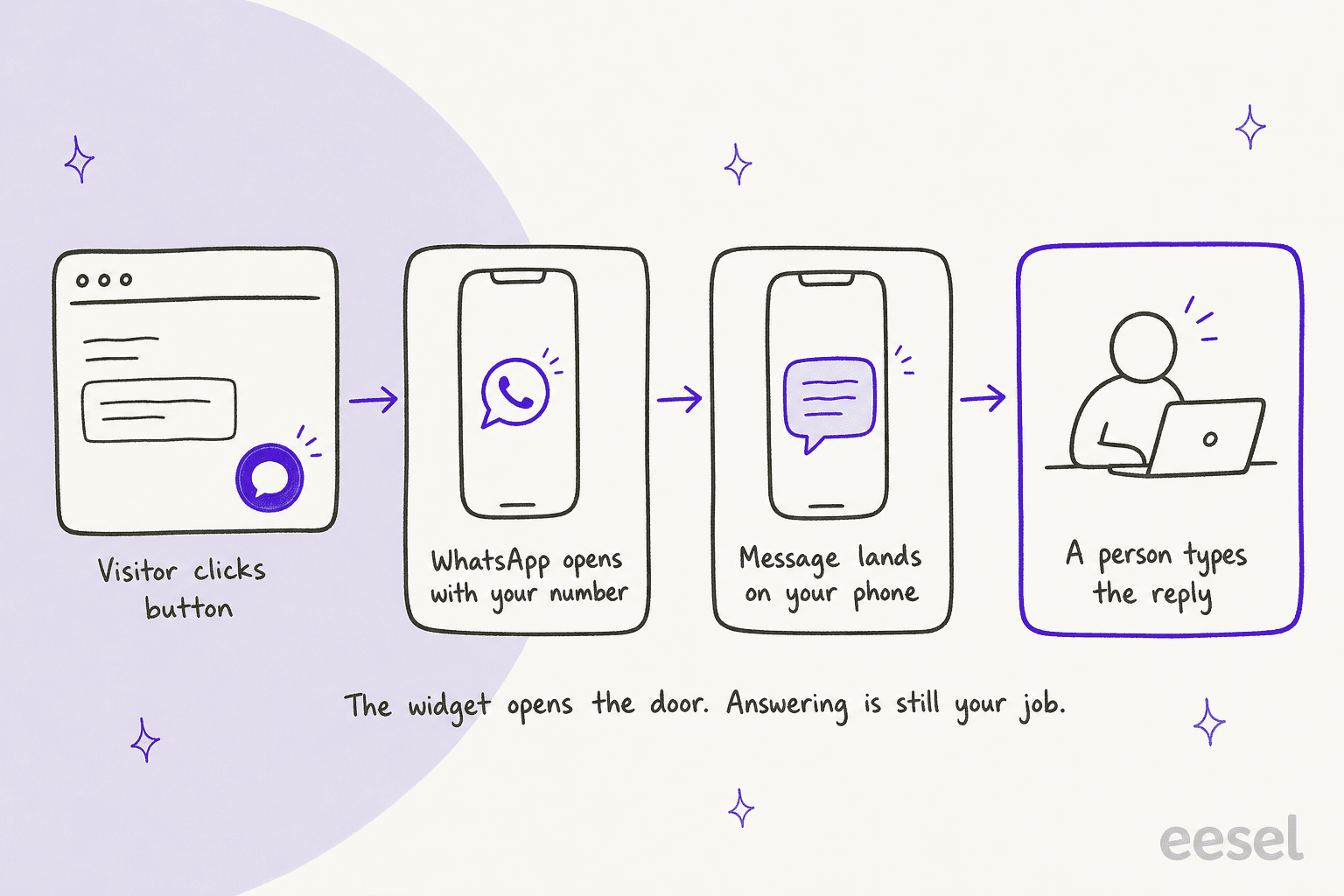
That design has two upsides. There is no WhatsApp Business API account, no message templates and no provider to sign up with, which is the heavy route covered in my WhatsApp Business API guide. And customers get your reply on their phone even after they leave your site, which beats a live chat window that dies when the tab closes.
The downside is the same fact read the other way: nothing happens until a person picks up the phone. There is no queue, no assignment, no history your team can share, and no automation past an away message.
What features does Smartarget WhatsApp have?
For a button, the settings are deeper than I expected. Everything below comes from the vendor's own listings.
Launcher styles and design
You get four launcher styles: a rounded text button, a square text button, a round bubble with its own message, and a side tab pinned to the edge of the page. Colours, title, subtitle, greeting and footer are all editable, and you can set a different position for desktop and mobile, or hide the button on one of them.
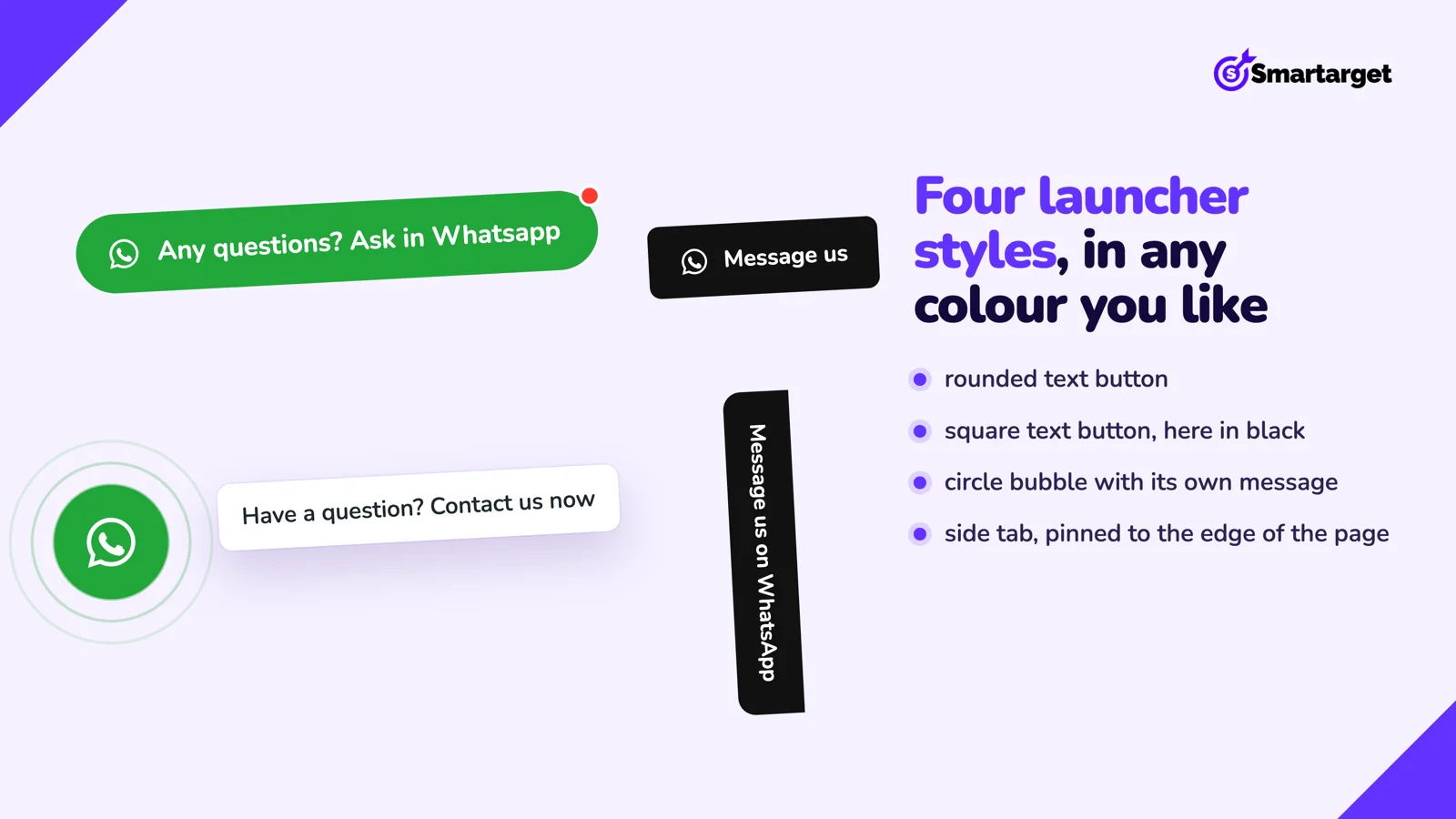
Wave and shake animations are optional. One Wix reviewer asked for the moving icon to be limited "to a brief duration, such as 5 seconds", which is fair: on a product page, a wobbling button competes with the add to cart button.
One number, one manager, or a team picker
This is the feature that makes it more than a wa.me link. You choose one of three modes in the app admin:
- Direct link: one tap opens WhatsApp, nothing in between.
- One manager chat: a small window with a name, role, avatar and opening message.
- Multi manager chat: the shopper picks who to talk to, for example Sales, Support or Orders.
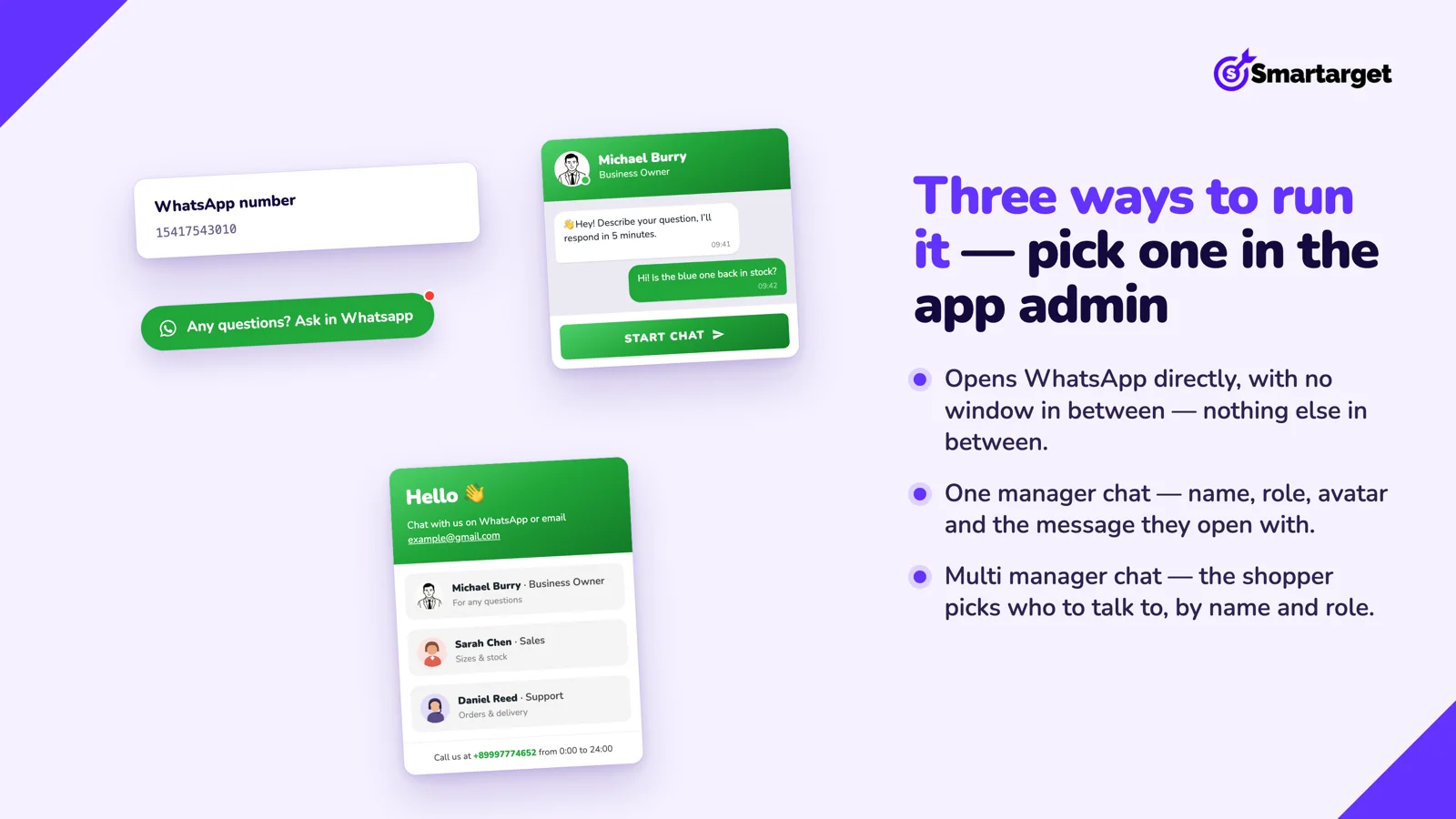
The plugin page says a widget can hold up to 5 different WhatsApp numbers. The Wix listing adds per-teammate hours and job titles, "so a customer asking about an order does not land in your designer's inbox". That is basic ticket routing, done by the customer instead of by software.
Working hours, away messages and click reports
You can set working hours and an away message so people writing after closing know when to expect an answer. That is the only automated reply in the product. For anything smarter, see my guide to WhatsApp auto replies.
The reports count clicks, not conversations: clicks per day, clicks per device, average time to click and the pages that drive the most taps. Smartarget says the data is anonymous.
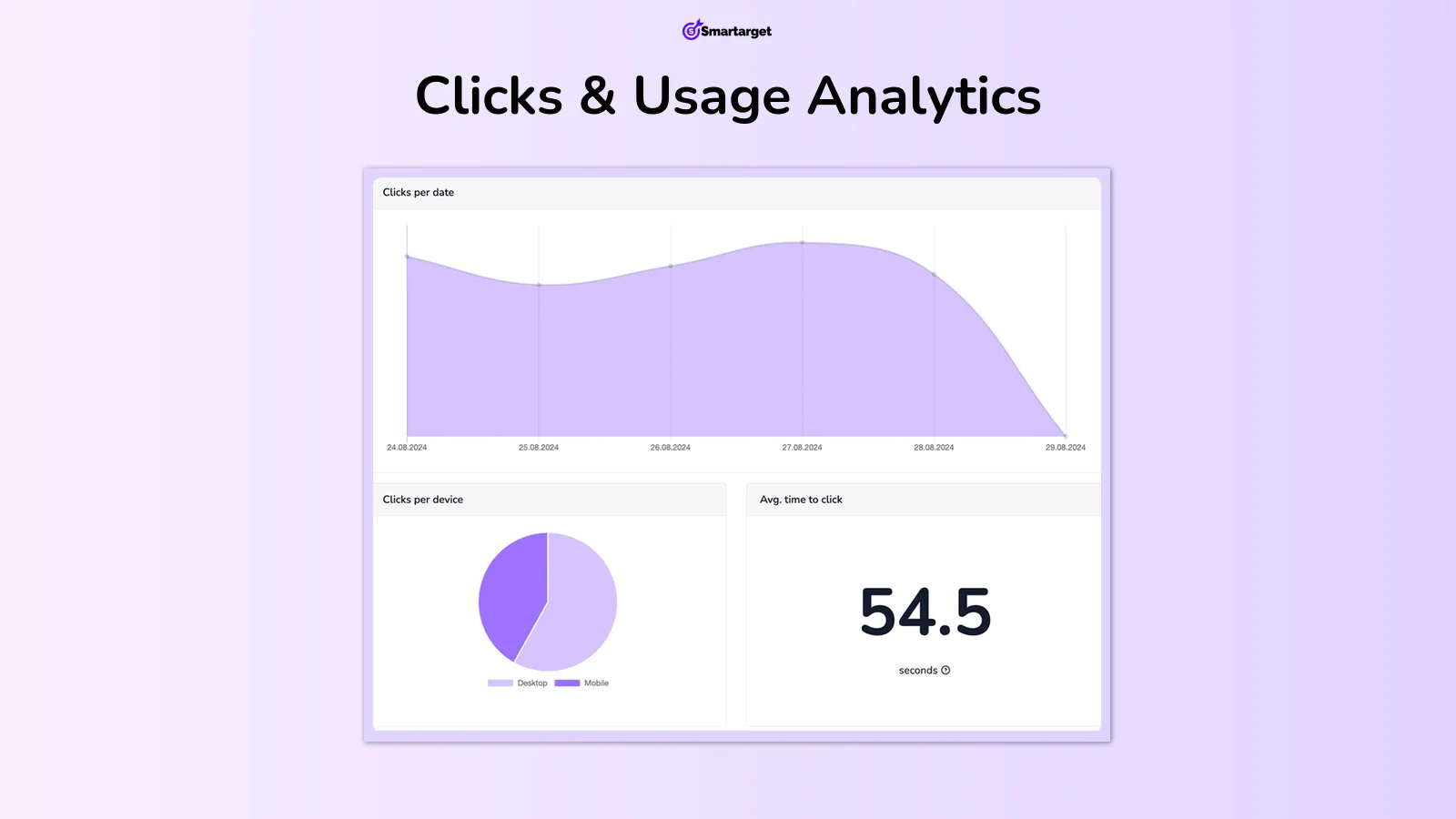
It tells you which pages make people reach out. It cannot tell you what they asked, how fast you replied, or whether they bought, so your first response time stays invisible.
One dashboard for all Smartarget apps
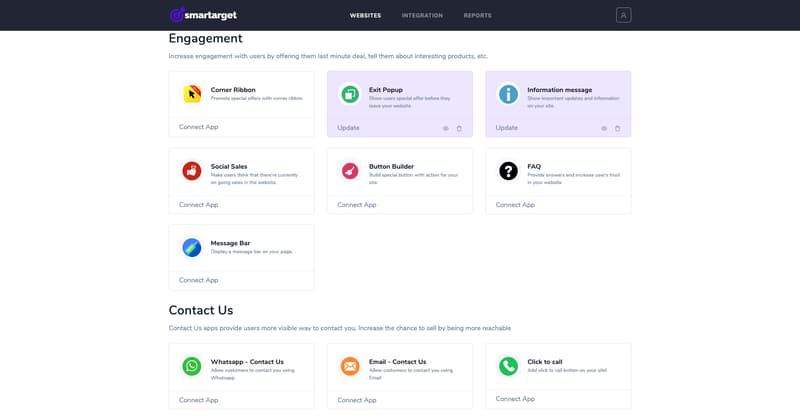
The WhatsApp button lives in the same Smartarget dashboard as the other widgets, and one Pro subscription on smartarget.online covers the whole suite. If you also want an exit popup or an email button, that bundle is good value.
How much does Smartarget WhatsApp cost?
There is a free plan and one paid plan, Pro. The price of Pro depends on which store you buy it from, which I have not seen spelled out anywhere else.
| Where you buy | Free plan | Pro, monthly | Pro, yearly |
|---|---|---|---|
| Wix App Market | Homepage only, "Powered by Smartarget", no card | $7.50/month | $6.25/month |
| Shopify App Store | Unlimited traffic, homepage only, "Powered by Smartarget" | $9/month | $90/year |
| smartarget.online | Unlimited clicks and apps, up to 2 websites | $7.08/month (billing period not stated) | Not stated |
Pro on Wix adds the button on all pages, removes the badge, and unlocks unlimited traffic and designs. The Shopify listing also names "Real time reports". Smartarget bills in USD, and its terms give Pro buyers a refund within 14 days of the first payment only.
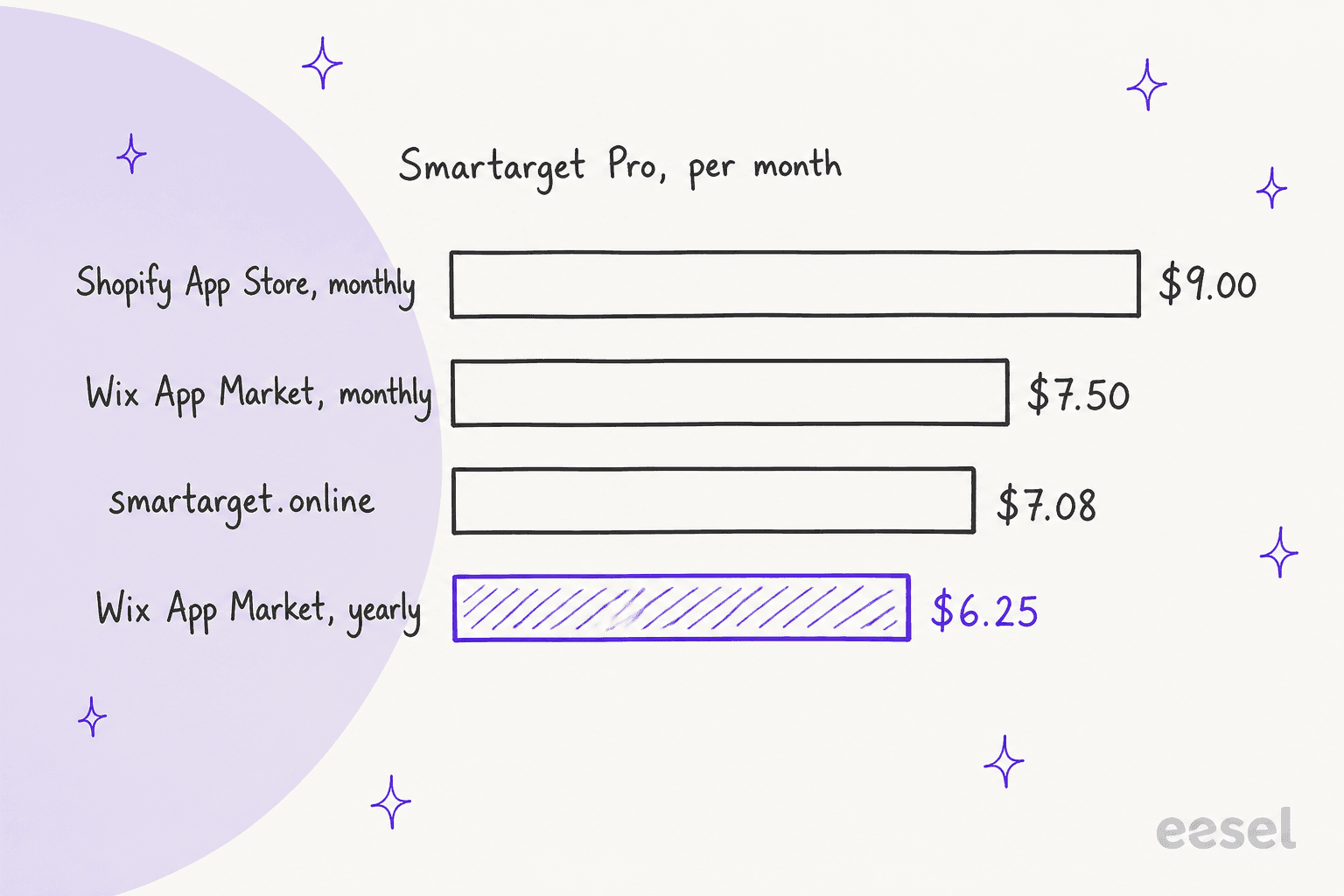
Even at the top price, $108 a year is small money. The cheapest route is Wix yearly at $75 a year, and Shopify yearly works out to $7.50 a month.
What happens when the free trial ends?
This is the part buyers miss. Every new account starts with the Pro features for 14 days. After that, the button stays on your homepage only and a "Powered by Smartarget" message appears. Smartarget's own FAQ says it plainly: "The apps will be visible on the homepage + «Powered by Smartarget»."
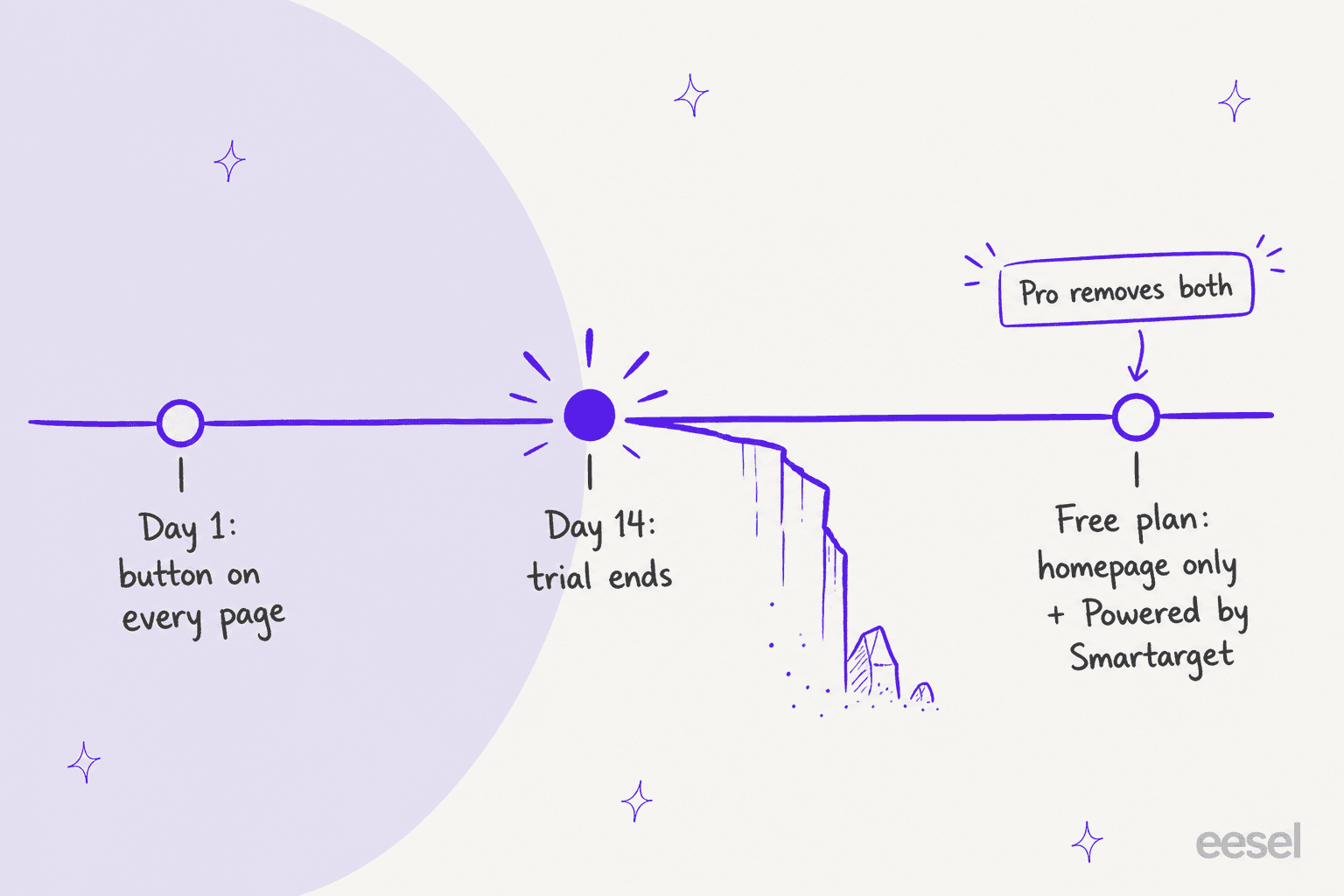
For a one-page site, that free plan works. For a store, where questions come from product and checkout pages, it does not, and the free plan is really a 14-day trial.
What do Smartarget users say?
I pulled all 4,010 reviews from the Wix listing's own review feed on October 28, 2026. The rating holds up on the surface: 3,906 are five stars and 38 are one star.
Two things are worth knowing before you lean on that number. First, 2,948 of the 4,010 reviews (74%) have fewer than 25 characters of text, things like "Brilliant" or "Muito bom". Second, several reviewers say the app asks for a rating repeatedly inside the editor. Neither makes the app bad. They do make 4.9 a weaker signal than it looks.
The detailed positive reviews are mostly about easy setup and fast, human support:
"I had an issue with double-billing. Not only did they respond and resolve WITHIN 5 minutes, they refunded without question or hesitation."
"It's easy to install, and customization is straightforward... The customization options for the app are somewhat limited, but overall, it's easy-to-use and useful for any website owner"
One review gets at why owners like WhatsApp over a web chat at all:
"as it's via Whatsapp, I'm not chained to my desk worried that I might miss a chat message that could have come through my computer."
The 59 reviews at 3 stars or below mostly tell one story: the free plan changing after 14 days. The second theme is billing after uninstalling:
"Easy to install, but you have to enter their website to uninstall the app. They don't explain this anywhere. If you don't do this, they will still charge you monthly for an app that you are not using. Be careful!"
I found no Reddit, G2, Capterra or Trustpilot pages for this app, so the marketplace reviews are the whole public record.
Where does Smartarget WhatsApp fall short?
Some of these limits are by design, so I'll say what is missing rather than call it a flaw.
- No inbox for a team. Chats go to whichever phones hold the numbers you list. There is no shared inbox, no assignment and no shared history. A second agent cannot see what the first one promised.
- No AI or automated answers. The greeting and away message are the only automatic text. "Where is my order?" still needs a person.
- No helpdesk link. Nothing in the listings connects chats to Zendesk, Gorgias or Freshdesk, so WhatsApp sits outside your ticketing system and your reporting.
- Reports stop at the click. You learn which page drove a tap, not what happened in the conversation.
- The free plan is narrow. Homepage only plus a badge after 14 days, as above.
- Pricing differs by store. The same Pro plan is $9 on Shopify and $6.25 on Wix yearly.
One reviewer also wished for a setting to stop a flashing "(1) New Message" in the browser tab. Small, but it shows how visible the widget is to your visitors.
Who should use Smartarget WhatsApp?
Use the deciding question: who answers, and how many chats a day?
| You are... | Verdict |
|---|---|
| A one-page site or portfolio | Free plan is enough |
| A small Wix or Shopify store, owner answers from their phone | Pro is worth $6.25 to $9 a month |
| A store with 2-5 people splitting questions by topic | Works, using the manager picker and hours |
| A support team already running a helpdesk | Skip; you need WhatsApp inside the helpdesk |
| A brand getting dozens of repeat questions a day | Skip; the bottleneck is answering, not the button |
If you are on Wix and also weighing the built-in chat, my Wix Smart Chat review covers it.
What are the alternatives to Smartarget WhatsApp?
The useful split is by what happens after the click.
- Another button. A plain
wa.melink costs nothing, and one Wix reviewer pointed out you can add one yourself. Chat widgets like Elfsight also offer WhatsApp buttons. - A web chat with WhatsApp as one channel. Tools like Tidio and Smartsupp add an inbox and bots. See my live chat for ecommerce roundup.
- A WhatsApp API inbox. Providers like Wati put WhatsApp into a shared team inbox on the Business API; read Wati pricing or the API provider list first.
- WhatsApp inside your helpdesk, with AI answering. Gorgias and Zendesk both have WhatsApp channels (Gorgias WhatsApp, Zendesk WhatsApp), and an AI teammate can answer there.
For the full field, see my best WhatsApp chatbot list.
Is Smartarget WhatsApp worth it? My verdict
3.5 out of 5. For a small site whose owner answers WhatsApp personally, it is one of the easiest and cheapest ways to get a good-looking button, with a manager picker most free snippets lack and a support team that reviewers say replies in minutes.
I take points off for the free plan that turns into homepage-only after 14 days, the uninstall and billing confusion, and a 4.9 rating built mostly on one-word reviews. And for support teams, it solves the smallest part of the problem. Getting customers to message you is easy; answering them all is the hard part.
Where does eesel fit next to a WhatsApp button?
I'll be straight about the difference: Smartarget gets the customer into WhatsApp, and eesel is about who answers once they are there. eesel is an AI teammate platform, and for this job the relevant teammate is the AI helpdesk teammate.
eesel's WhatsApp integration page describes connecting eesel to a WhatsApp Business number, answering from your help center, docs and past tickets, and escalating to your team by topic or confidence through email, Zendesk, Freshdesk or another connected helpdesk. If your WhatsApp chats already land in Zendesk as tickets, eesel's Zendesk integration can be scoped to that channel. Rules are set in plain words, like "always escalate if someone mentions a refund".

The pattern I would copy comes from messaging-heavy Shopify stores. Question Beauty gets short Messenger and chat messages, often just a product name and "price?", and eesel answers with a product link in the customer's language and checks Shopify before any order reply. In one month it handled about 990 tickets, sent about 960 replies and closed about 280 without a person, while refunds and complaints went to the team with a note attached. ClutchLoop runs the same idea on Gorgias and its website chat, with about 180 direct replies in a month and live price and stock lookups from Shopify.
One German multi-shop Shopify and Zendesk store eesel works with listed WhatsApp right next to chat localization on its wishlist. That is the usual order: the button comes first, then the volume, then the question of who answers. For the wider picture, see how to automate WhatsApp support and my AI agent handoff rules.
Try eesel
If a WhatsApp button is already bringing in more questions than you can answer from your phone, eesel's AI helpdesk teammate can take the repeat ones: order status from Shopify, product questions from your help center, and a clean handoff for refunds. It starts free with 100 credits, and paid plans begin at $299 a month for 500 credits, where one chat is one credit (eesel pricing).
Frequently Asked Questions
What is Smartarget WhatsApp?
Smartarget WhatsApp is a click-to-chat button for websites. When a visitor taps it, WhatsApp opens with your number and the chat continues in your own WhatsApp app. It is sold on the Wix App Market, the Shopify App Store and as a WordPress plugin. It is not a shared inbox or a chatbot.
How much does Smartarget WhatsApp cost?
Smartarget WhatsApp has a free plan and one Pro plan. Pro is $7.50 a month or $6.25 a month billed yearly on Wix, $9 a month or $90 a year on Shopify, and listed as $7.08 a month on smartarget.online. For context on the paid API route, see the WhatsApp Business API guide.
Is the Smartarget WhatsApp app free?
Partly. Every new account gets a 14-day trial with the button on every page. After that, the free plan shows the button on your homepage only, with a "Powered by Smartarget" message. That change drives most of the low ratings in this Smartarget WhatsApp review, so plan for Pro if you want the button sitewide.
Does Smartarget WhatsApp have AI or automated replies?
No. Smartarget offers a greeting, working hours and an away message, but every real reply is typed by a person in WhatsApp. If you want questions answered automatically, look at a WhatsApp AI chatbot or eesel for WhatsApp.
Does Smartarget WhatsApp work with Shopify and Wix?
Yes. It is "Verified by Wix" with 4.9 stars from 4,006 reviews, needs a Premium Wix site, and has a Shopify app rated 5.0 from 2 reviews. Shopify stores weighing a fuller setup can compare options in my Shopify WhatsApp integration guide.
How do I uninstall Smartarget WhatsApp and stop billing?
Remove the app from your site builder and also cancel Pro in your Smartarget account, since Smartarget bills the subscription itself. Reviewers who only removed the app reported being charged. Smartarget's terms allow a refund within 14 days of the first payment only.
What is a good Smartarget WhatsApp alternative for support teams?
If you only need a button, Smartarget is fine. If WhatsApp is a real support channel, you need a WhatsApp API provider or a helpdesk channel, plus something that answers. eesel's pricing starts at $299 a month for 500 credits, where one chat is one credit.