


Elfsight AI Chatbot is a no-code AI chat widget that builds itself from your website, then answers visitors, collects leads, books calls and hands off to a person. It comes from Elfsight, the company behind 90+ website widgets, and paid plans cost $5, $10 or $20 a month billed yearly. There's no seat fee and no per-conversation fee.
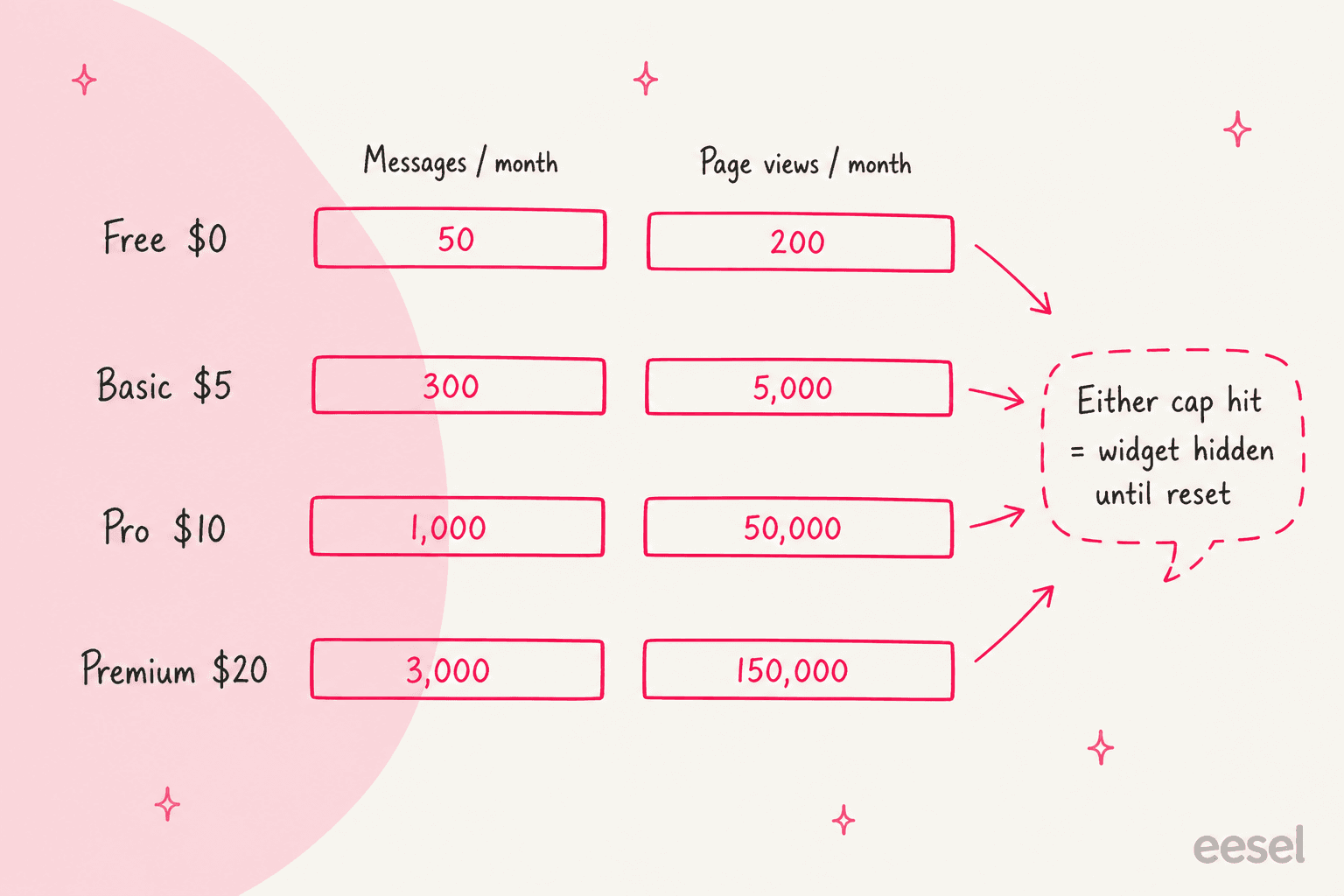
The catch is two monthly meters. Every plan caps visitor messages (50 to 3,000) and page views (200 to 150,000), and if either runs out, the widget disappears from your site until the reset. Elfsight also added a Freshdesk app this month that turns unanswered chats into tickets. My verdict: an easy 4 out of 5 for an owner-run website that wants a cheap, decent AI on its pages. It's a weaker fit if your support already lives in a helpdesk.
If you're in that second group, the AI you want works inside the ticket queue, not in front of it. That's where eesel's AI helpdesk teammate sits: SamCart runs one eesel agent on Freshdesk tickets and another on its website chat, both answering from about 280 help center articles.
What is Elfsight AI Chatbot?
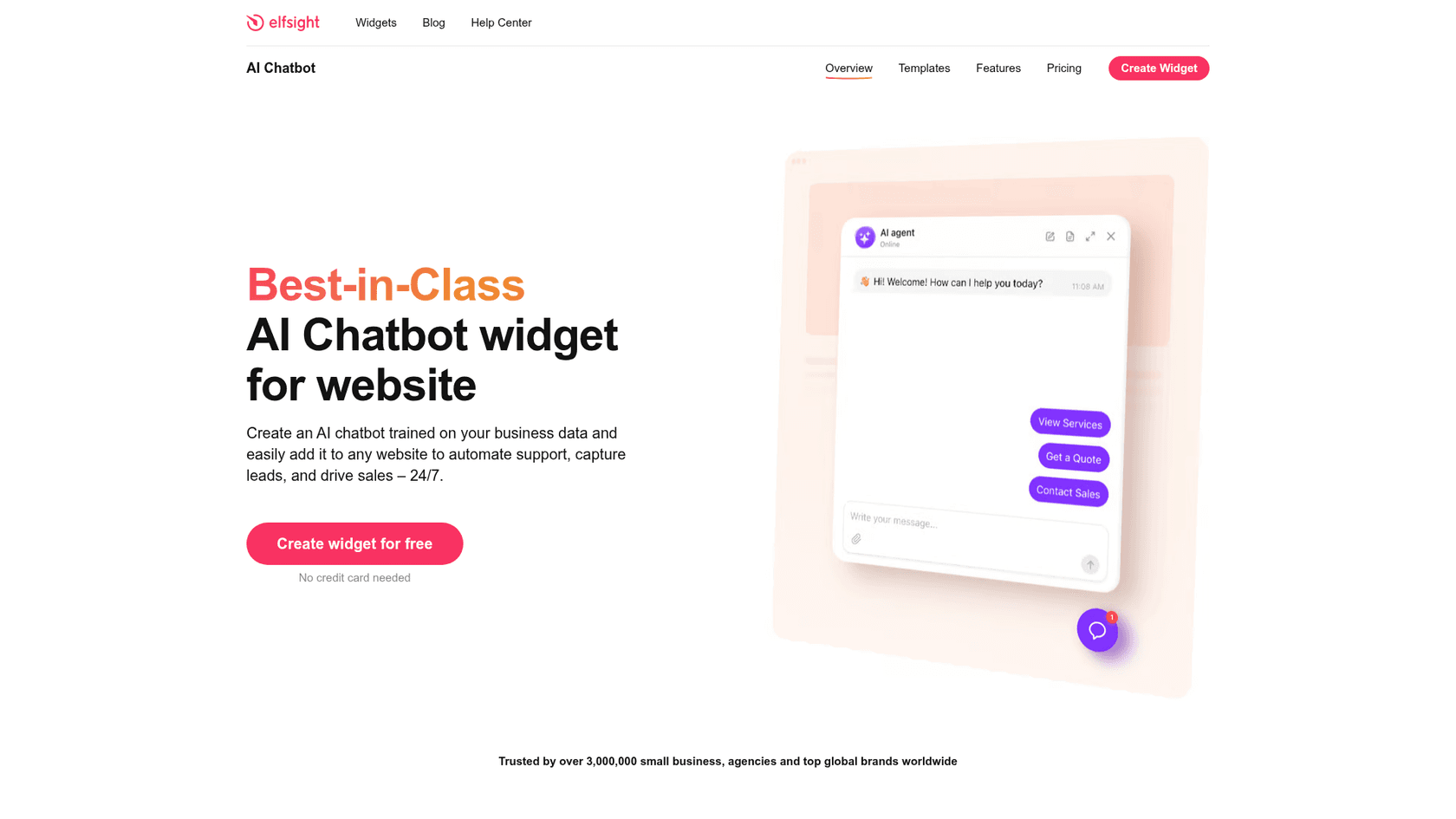
Elfsight AI Chatbot is a chat bubble (or embedded chat window) that you add to any website with one code snippet. You give it your website address, it reads your pages, and it drafts a name, tone, greeting, quick replies and knowledge base for you. Elfsight launched it in January 2025 and it now has its own site, elfchatbot.com, which describes the target buyer plainly: businesses where "the owner is the support team".
I build integrations for a living at eesel, so I read Elfsight's help center, pricing page, integration docs and marketplace listings the way I'd read a spec. Then I looked at what the people using it say. I didn't run it on a live site with real visitors, so where I describe behavior, it's what Elfsight documents or shows in its own screenshots.
One thing worth clearing up first, because the search results are confusing: where does this app actually live?
| Marketplace | Is there an Elfsight AI Chatbot listing? | What I found (Oct 23, 2026) |
|---|---|---|
| Freshworks Marketplace | Yes | Free Freshdesk sidebar app, 5.0 from 1 rating, 1 install, published about a week ago |
| WordPress.org | Yes | Plugin added July 15, 2026, 20 active installs, no ratings yet |
| Shopify App Store | No | Paste the embed code into your theme; Elfsight lists a Shopify app as "coming soon" |
| Wix App Market | No | Paste the code via Embed HTML or Custom Code (needs Wix Premium) |
The WordPress plugin is a thin wrapper: it stores your widget ID and loads the chatbot from Elfsight's servers. On Shopify and Wix, Elfsight's own install guides for Shopify and Wix walk you through pasting code. So whichever site builder you use, you're running the same cloud widget and paying Elfsight directly.
How does the Elfsight AI Chatbot learn your business?
Setup starts with an Analyze button. You enter your URL and the bot scans your site, fills in a Business Information card, and adds your pages to its knowledge base. If you don't have a website, you can type the details in by hand. From there you shape it in three tabs: Agent, Knowledge and Skills.
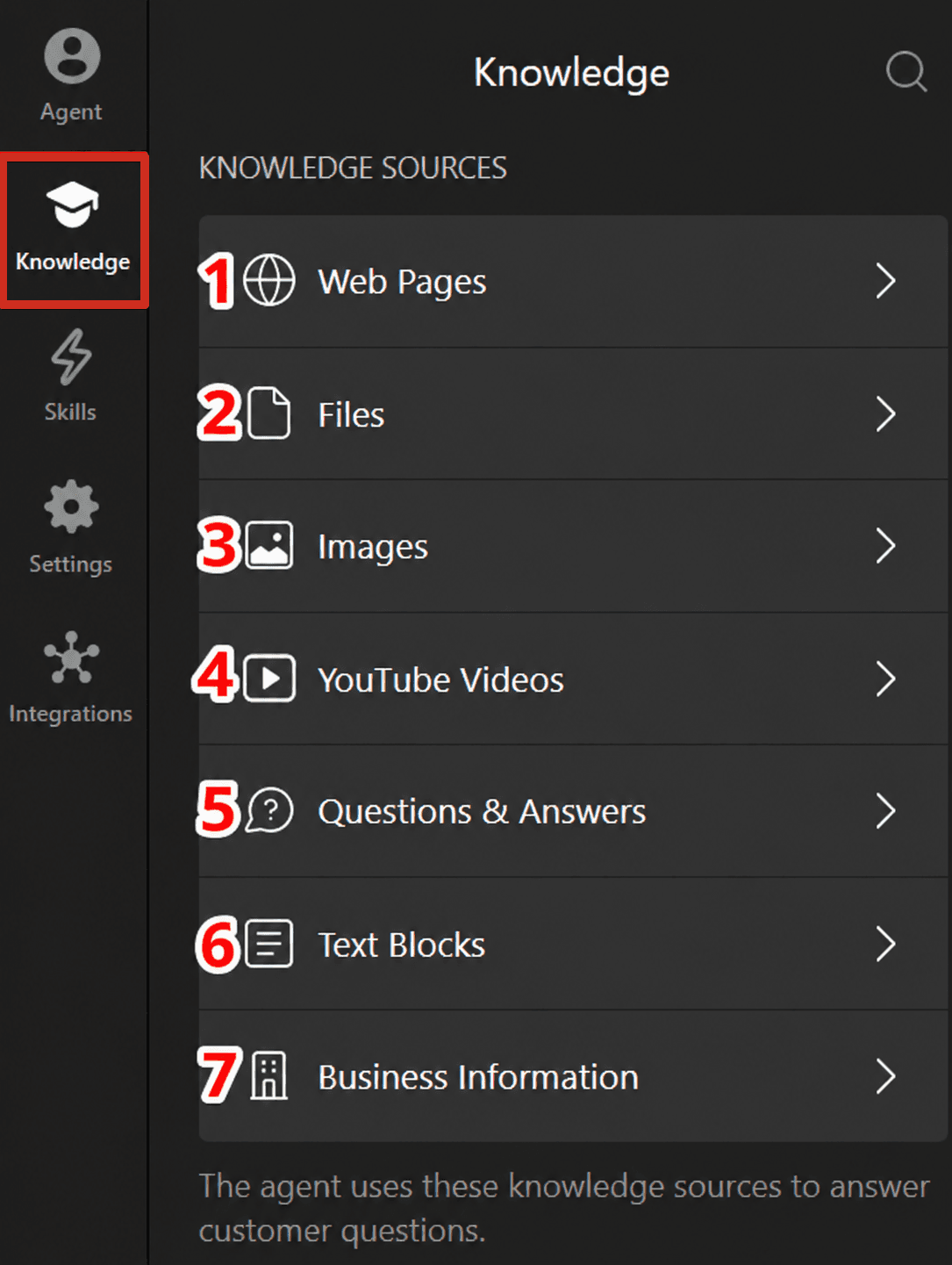
The knowledge base guide lists seven source types. The details are where you'll spend your time:
- Web pages: up to 200 pages. Subpages aren't crawled automatically, so you add each one. Pages don't refresh on their own either; you click Retrain after you edit your site.
- Files: PDF, DOCX, PPTX, TXT, JSON, HTML and MD. Elfsight recommends JSON for best results.
- Images and YouTube videos: images get an AI-written description; YouTube needs the Pro plan or higher.
- Q&A, text blocks and business information: your own written answers. Elfsight warns that replies may not match a Q&A entry word for word, because the model blends all sources.
The bot can't crawl password-protected pages, SharePoint or intranets, so internal docs have to be pasted in. And notice what's missing from the list: your past support conversations. A lot of buyers want exactly that. One eesel customer's first stated goal after signing up was to "train the bots with zendesk tickets history". Elfsight's bot learns from what you've published, not from how your team has actually answered people, which is fine for a brochure site and thinner for a busy support queue. It's the same split I see between FAQ automation and a real support agent. My guide to AI chatbots for websites goes deeper on why that difference matters.
On the Agent tab you set tone of voice, answer length and conversation rules, which are plain sentences like "don't promise delivery dates". This is the main lever for control, and it's a good one: rules are easier to maintain than a flowchart.
What it does when it doesn't know
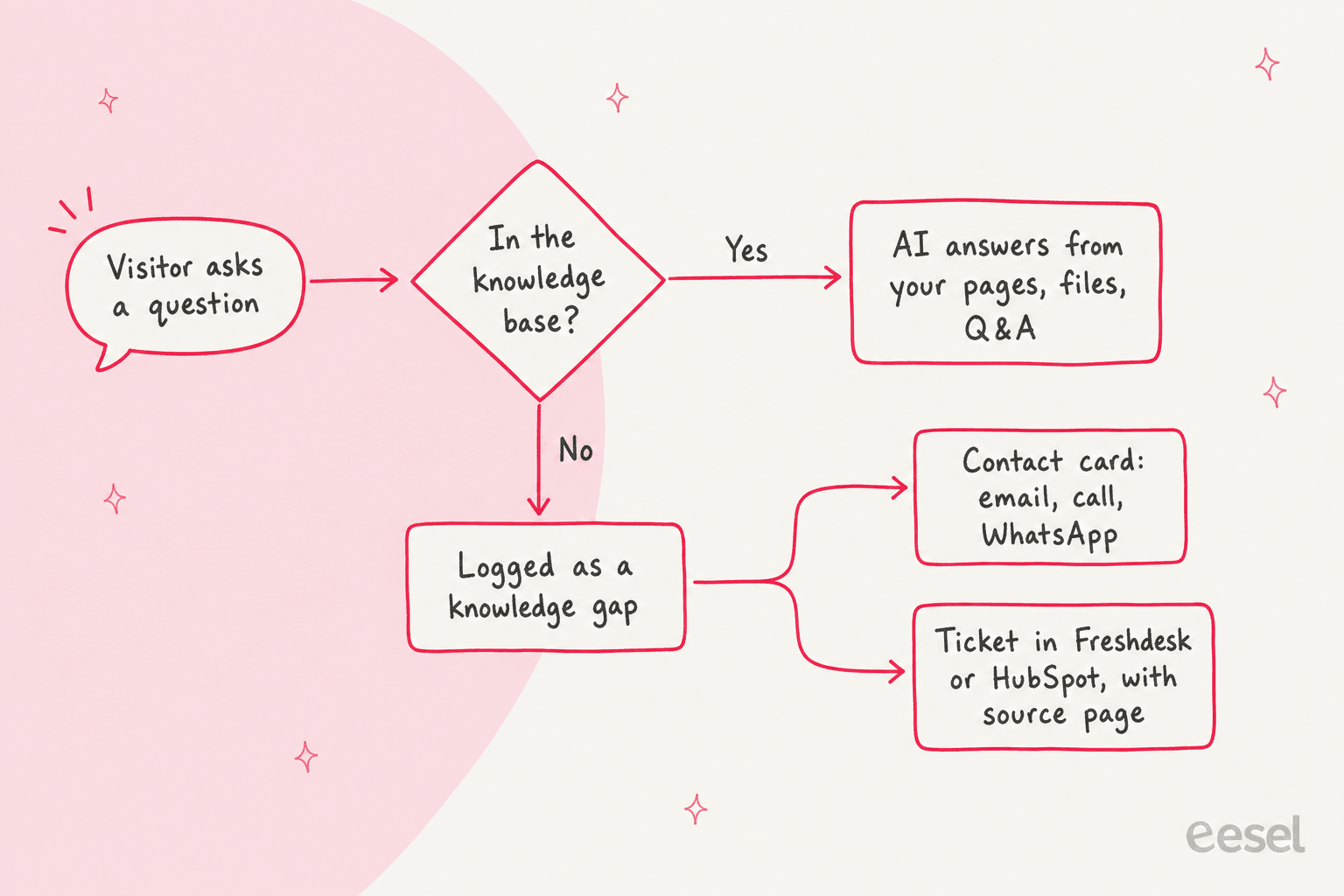
This is the part I'd test first, because Elfsight's two websites describe it differently. Elfsight's product page FAQ says that if a question isn't in your content, "the AI answers using general model knowledge or states it lacks information". Elfchatbot.com says it "answers from your content only" and logs the gap "rather than guessing". Those can't both be the default, so ask a few off-topic questions in the editor before you go live and see which one you get. My guide on AI hallucinations in support explains why this one setting matters more than the model.
When it does miss, the question lands in a Knowledge Gaps list with an AI summary of what the visitor wanted, and you choose to add knowledge, mark it resolved or ignore it.
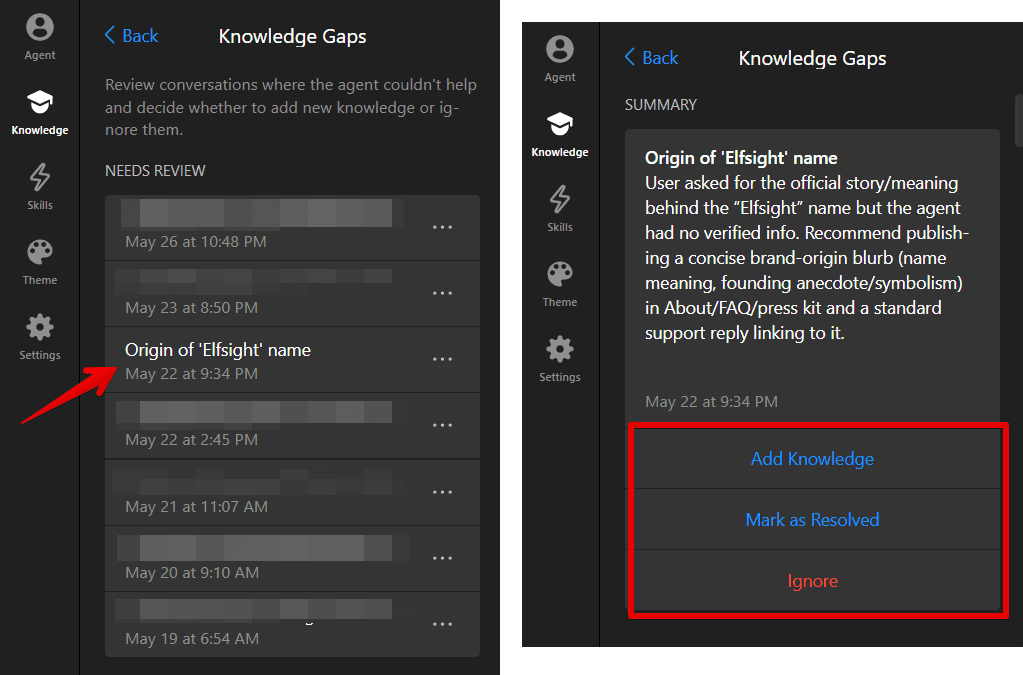
That's a useful loop. Week by week the gaps list tells you what to write next, which is the closest thing a small site gets to chatbot analytics without a support team.
Elfsight AI Chatbot features worth knowing
Beyond answering, the bot has four skills you switch on from the Skills tab, plus booking and a results dashboard. Here's what each does in practice.
Contact a Human: the handoff
The handoff is a contact card, not a live chat transfer. You add a person's photo, name and role, then contact buttons (email, WhatsApp, call), and you pick when the bot offers them: the visitor asks for a person, the agent can't answer, certain keywords, a thumbs-down on a reply, inactivity, or your own scenarios.
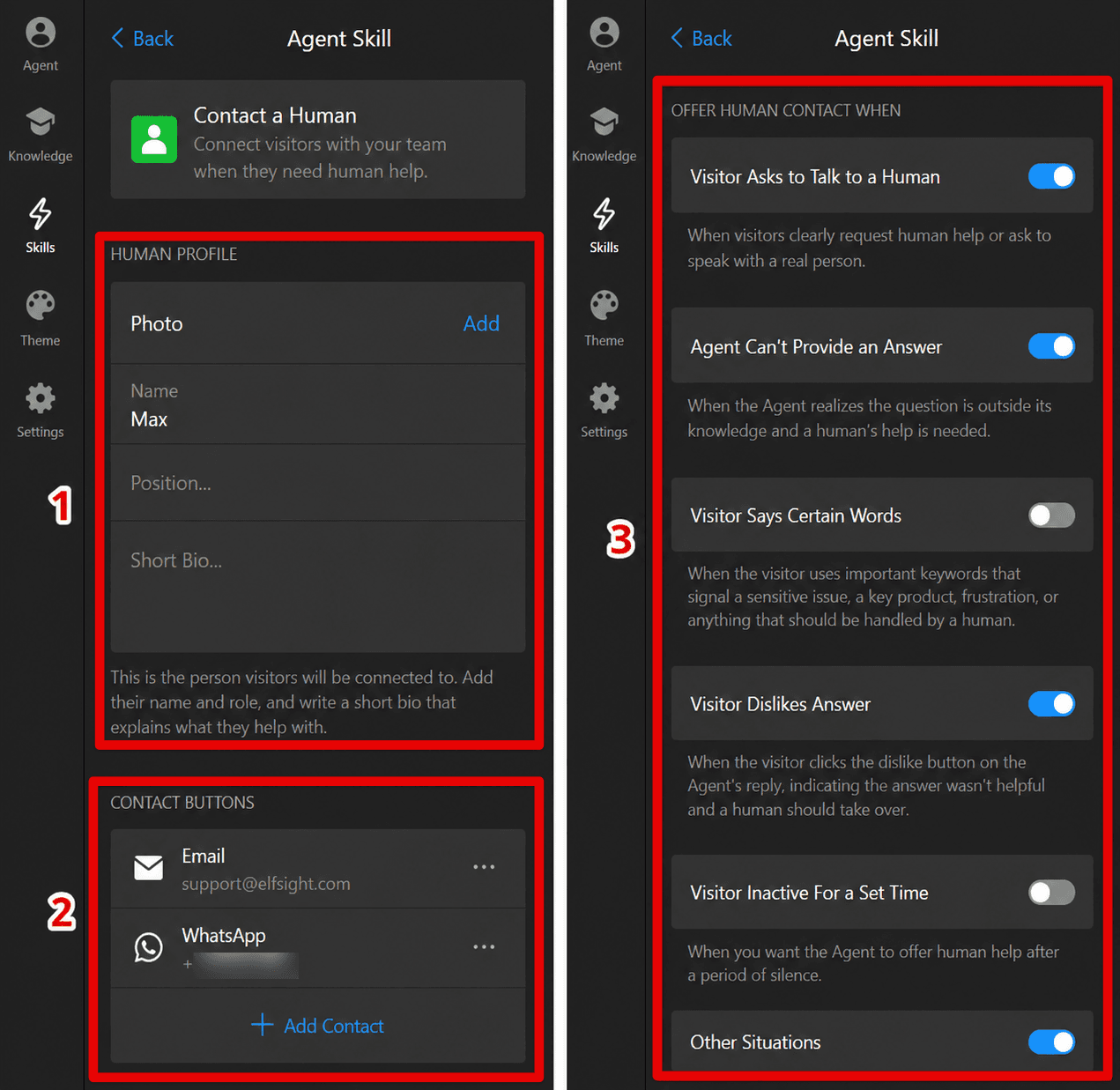
For a one-person business that's the right design: the visitor reaches you on the channel you already check. What it isn't is a shared inbox where your team picks up the chat mid-conversation. If that's what you need, my comparison of AI chatbots vs live chat and the guide to AI agent handoffs are the next reads.
The new Freshdesk app
This is the listing that got my attention. Elfsight published a free Freshdesk app on the Freshworks Marketplace in mid-October 2026. Set up starts in the widget: per Elfsight's Freshdesk integration page, you open Integrations, add the Freshdesk skill, enter your Freshdesk domain and API key, and choose when to offer a ticket. When the bot can't answer, it creates a Freshdesk ticket tagged elfsight-ai-chatbot.
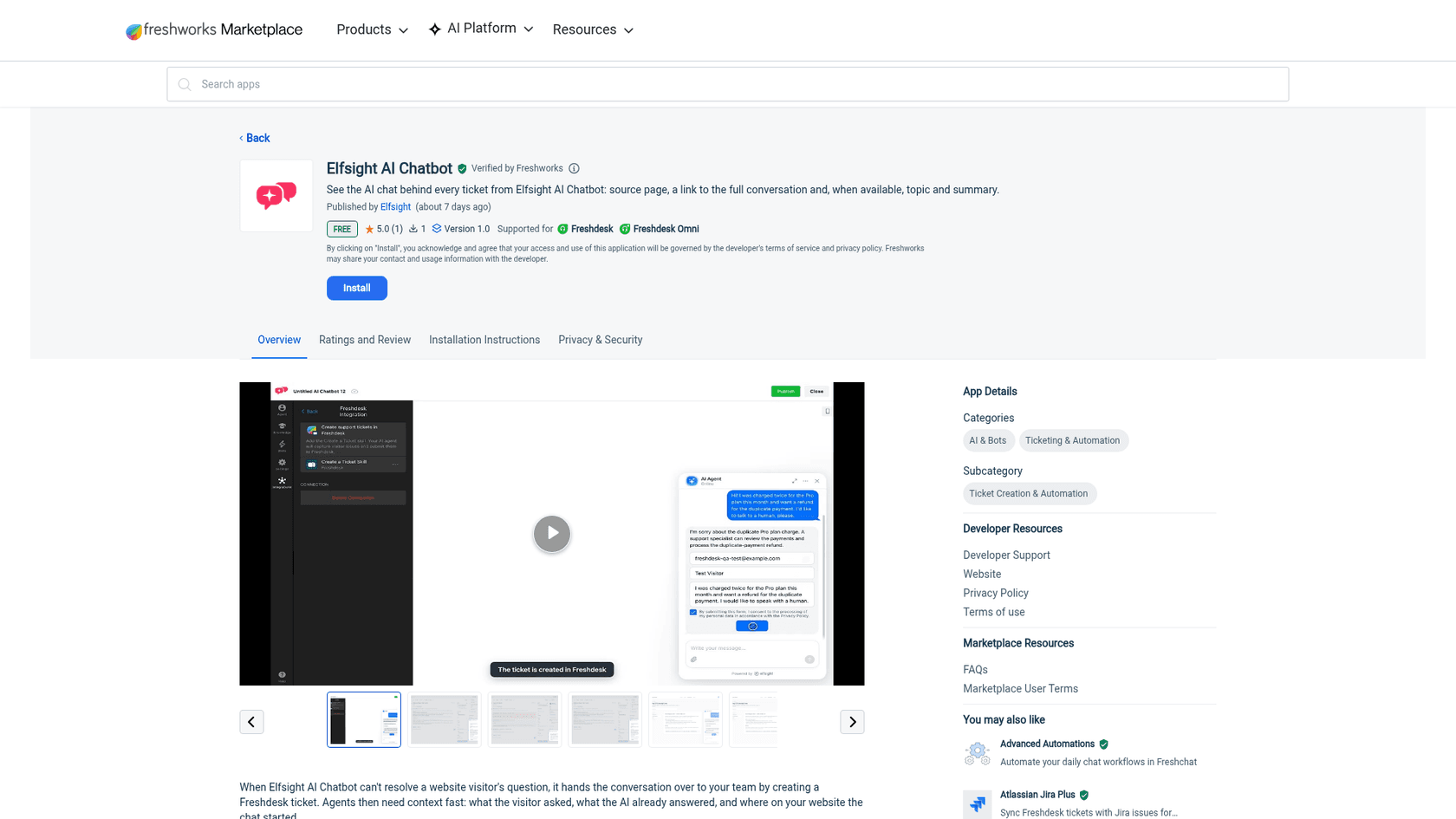
As someone who writes this kind of code, I like how small the Freshdesk side is. The listing says the sidebar app is read-only: it reads the current ticket's tags and description in the agent's browser, "makes no API calls, stores no data", and shows the chat topic, an AI summary, the page the visitor started on, and a link to the full conversation in Elfsight's dashboard. That's a clean, low-risk design that a security reviewer will like.
It also tells you where the AI stops. Once the ticket exists, the Elfsight bot is done: it doesn't draft the reply, read the customer's history or answer follow-up emails on that ticket. Your agents work it in Freshdesk like any other ticket, with or without Freshdesk's own Freddy AI helping them. HubSpot gets a similar contact-and-ticket connection, Zendesk is listed as coming soon, and Zapier, webhooks, Google Sheets, n8n, Slack and a handful of CRMs are live on the integrations list.
Lead forms, booking and follow-ups
The Collect Contacts skill shows a name, email, phone and consent form before the chat, before an answer, or after a reply. Booking connects Calendly or Cal.com so visitors pick a slot inside the chat. Follow-up Message pings a quiet visitor after 5 minutes by default. For a service business, this is the real value, and it's why AI for small businesses usually starts on the website: the bot turns "how much for a wedding bouquet?" at 11pm into a lead with an email address. My list of the best chatbots for lead generation compares how other tools handle this.
Results, analytics and the new extras
The Results dashboard has three tabs: Chats (with Lead, Knowledge gap and Feedback badges), Leads and Analytics, plus a monthly email report.
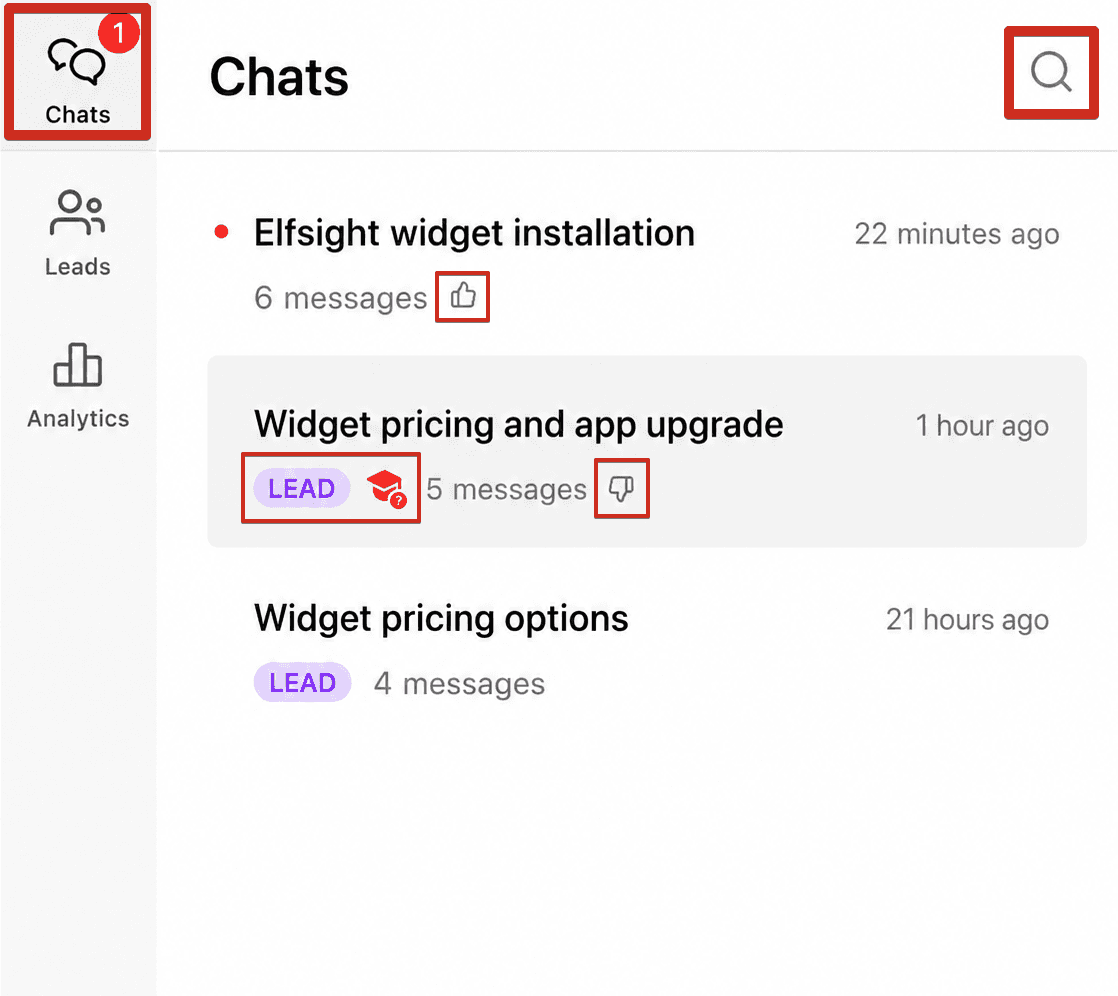
Two details from the results guide: you can't delete chat history or individual conversations yet, and transcripts only email to you after a chat has been quiet for 10 minutes.
October also brought two additions: a Facebook Messenger channel (one Page per widget) and an MCP server that lets you query your chats, leads and gaps from an AI assistant. If MCP is new to you, my explainer on the AI agent MCP server covers it.
How much does Elfsight AI Chatbot cost?
Elfsight prices the AI Chatbot as a single app, with three meters per plan: visitor messages, page views and knowledge storage. All figures below come from the AI Chatbot pricing page and Elfsight's pricing help article.
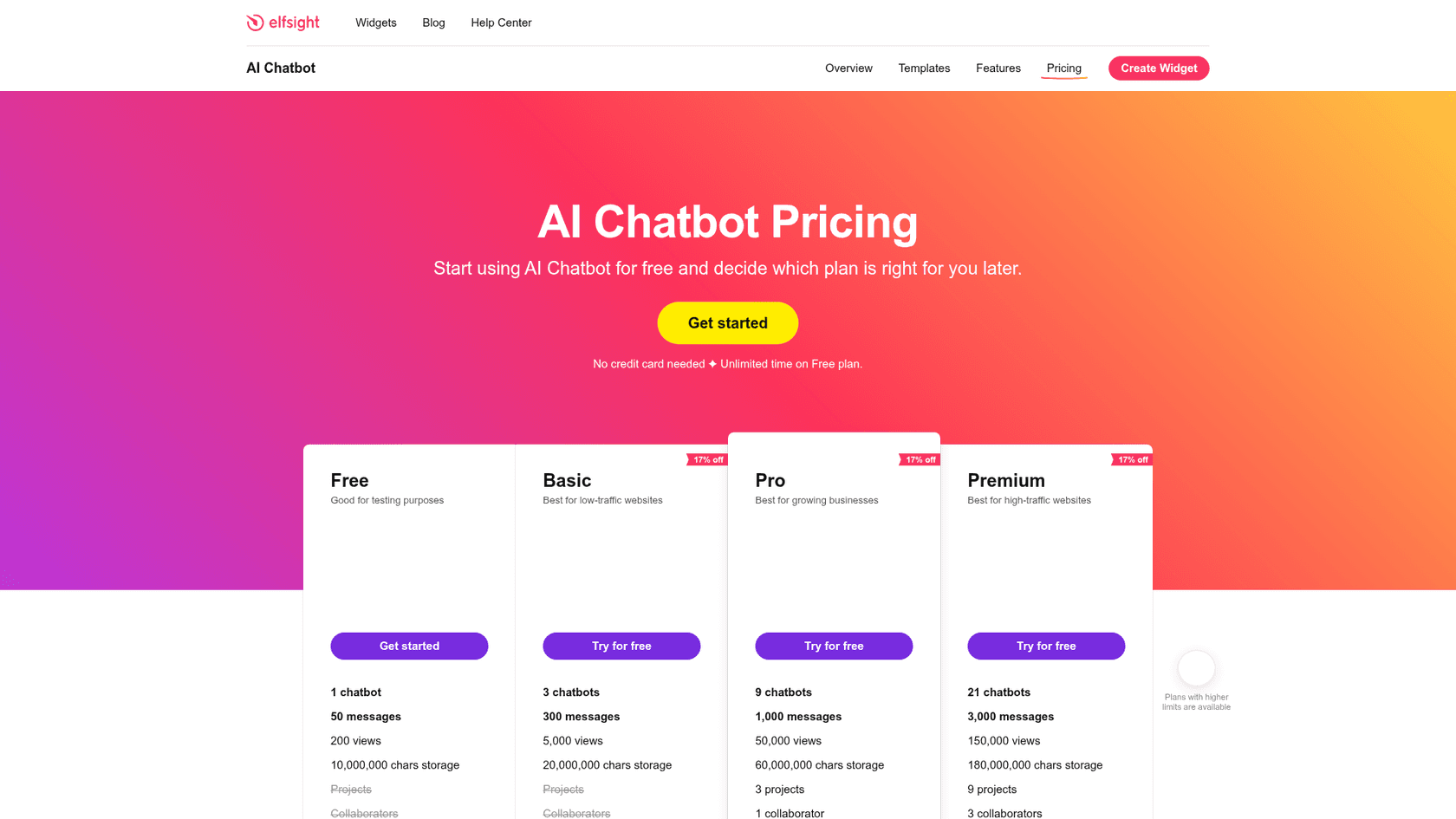
| Plan | Billed yearly | Billed monthly | Chatbots | Messages / month | Page views / month | Knowledge storage | Extras |
|---|---|---|---|---|---|---|---|
| Free | $0 | $0 | 1 | 50 | 200 | 10M characters | Bug-fix support only |
| Basic | $5/mo ($60/yr) | $6/mo | 3 | 300 | 5,000 | 20M | Basic support |
| Pro | $10/mo ($120/yr) | $12/mo | 9 | 1,000 | 50,000 | 60M | 3 projects, 1 collaborator, YouTube sources |
| Premium | $20/mo ($240/yr) | $24/mo | 21 | 3,000 | 150,000 | 180M | 9 projects, 3 collaborators, live chat support |
| Enterprise T1 | $30/mo ($360/yr) | $42/mo | 50 | 6,000 | 300,000 | 300M | Account manager, white label |
| Enterprise T2 | $40/mo ($480/yr) | $56/mo | 100 | 10,000 | 600,000 | 450M | Same as T1 |
| Enterprise T3 | $60/mo ($720/yr) | $84/mo | 200 | 15,000 | 1,200,000 | 675M | Same as T1 |
| Enterprise T4 | $80/mo ($960/yr) | $112/mo | 400 | 20,000 | Unlimited | About 1 billion | Same as T1 |
Every plan includes unlimited chats and users, custom CSS and JS, and free installation help. White label (removing Elfsight branding) is Enterprise only. Refunds are full within 14 days, and new accounts can get a 33% coupon on a first yearly plan if they buy within 24 hours of signing up. The full plan-by-plan math will get its own pricing breakdown; this is the part a reviewer has to flag.
The two meters that switch it off
Here's the gotcha. Per Elfsight's limits article, when you hit the message cap "the chatbot will be deactivated and won't be visible to visitors, as if it was never installed". The view limit works the same way, and a view is counted every time a page with the widget loads, whether or not anyone opens the chat. Both meters are shared across every chatbot and every site on your account.
So on a busy site, page views often decide your plan, not chats. A floating bubble that loads on all 40,000 of your monthly page views needs Pro even if only 200 people ever type into it. You can cut views by showing the bot only on key pages, which the Visibility settings support. Pick the line closest to your site:
If you're also weighing Tidio or Chatbase, check which unit each one bills on before comparing sticker prices. Elfsight's unit is simple: a flat plan with two caps, so Premium is $20 a month for up to 3,000 messages however well the bot performs.
What do people say about Elfsight AI Chatbot?
Elfsight as a company is well liked: 4.8 out of 5 from 919 reviews on G2 and 4.8 from 200 reviews on Trustpilot. But those cover all 90+ widgets, and most reviews are about review feeds and forms. The chatbot-specific voices are fewer, and they agree on two things: setup is easy, and the caps need watching.
"The only real friction point lies in the usage limits on the lower-tier plans. The monthly view and message caps mean that if your website experiences an unexpected traffic spike, the widget can pause until the next billing cycle unless you upgrade."

The same reviewer gave it 5 out of 5 and praised the copy-paste install and training on custom Q&As. On Elfsight's own forum, early users were split in a way that still sounds familiar:
"I am absolutely in love with this AI Chatbot. It works like a charm. Its responses are better than if I wrote them myself."
"It still needs a lot of work. You have to ask questions in a certain way for it to respond the way you want it."
Both posts are from early 2025, and Elfsight has shipped rules, knowledge gaps and a new editor since. Still, the forum has recent threads titled "Widget's responses are inaccurate" and one about the bot not respecting preset quick reply answers, so accuracy depends heavily on how well you write the knowledge base. Elfsight's support team gets consistent praise across review sites, and that matters on a tool you tune by trial and error. For a sense of how this compares to other small-business widgets, I've reviewed Chatra, Smartsupp and Chatway the same way.
Where Elfsight AI Chatbot stops
None of these are defects; they're the shape of a website widget built for small teams. Here's what it doesn't do, per Elfsight's own docs:
- No order or account lookups. On elfchatbot.com, Elfsight's own demo shows the bot saying "I can't see the status of individual orders". For a store, "where's my order?" goes to the contact card, which is the most common question in ecommerce chat.
- No learning from past conversations. Knowledge is your pages, files and written answers. Your team's past replies aren't a source.
- No live inbox. Handoff is a contact card or a ticket in another tool. Nobody joins the chat window.
- The widget can switch off. Message and view caps deactivate it, account-wide, until the reset date.
- AI work ends at the ticket. The Freshdesk and HubSpot connections create tickets; they don't answer them.
If one of those is a dealbreaker, my roundups of customer service chatbots and AI helpdesks for small business cover tools built for the other side.
Who should use Elfsight AI Chatbot?
My rating: 4 out of 5. For a small business website it's very good value: fast to set up, cheap, flat priced, with sensible lead capture, booking and a knowledge-gap loop that tells you what to fix. It loses a point for meters that can hide the widget without warning a visitor, and for mixed messages about whether it falls back to general model knowledge.
I'd pick it if you're a salon, studio, agency, local service or small shop where one person handles enquiries, your answers already live on your website, and you mostly want leads and bookings out of the chat. It's also a sensible first AI for a WordPress, Squarespace or Wix site, since it installs everywhere the same way. On Wix it's a stronger AI than Wix Smart Chat, and on WordPress it's far less setup than a bring-your-own-key plugin like AI Engine.
I'd skip it if your support already runs in a helpdesk with a queue of email tickets, if most questions need order data, or if you want the AI to answer in the same place your agents work. Those are the jobs a website AI chatbot alone doesn't cover, and the difference between AI agents and chatbots starts to matter.
eesel for Freshdesk teams that want AI past the website
Elfsight's Freshdesk app is a tidy bridge: the bot passes the conversation over and steps away. When most of your volume is in Freshdesk, though, the bigger win is an AI that keeps going inside the ticket. I've built enough helpdesk integrations at eesel to know where the time goes: not in creating tickets, but in answering them.
That's what eesel's AI helpdesk teammate does. It plugs into Freshdesk, HubSpot and your website chat, learns from your help center and the replies your team has already sent, and answers or drafts on the ticket itself. SamCart runs two agents this way: one sends first replies on Freshdesk tickets in the groups it covers and steps back the moment a teammate picks a ticket up, the other runs the website chat bubble with its own greeting, and both answer from about 280 help center articles.
On the ecommerce side, Beautek runs eesel as its website chat in German: it looks orders up from Beautek's own system after an identity check, answered 77 website chats in a month, and turned 20 of them into Zendesk tickets for the sales team.
eesel isn't the cheaper option. If you're a two-person studio, Elfsight at $5 a month is the right call, and I'd tell you so; my take on whether AI customer service is worth it for small teams goes through the math. eesel starts with 100 free credits, a ticket or a chat is 1 credit, and paid plans start at $299 a month for 500 credits on the pricing page. Before anything goes live, you can simulate it on your past Freshdesk tickets and see what it would have said. If your queue is past the point where a contact card is enough, Try eesel on your own tickets.
Frequently Asked Questions
Is Elfsight AI Chatbot free?
Yes, there is a Free plan with no time limit and no card: 1 chatbot, 50 visitor messages and 200 page views a month, per Elfsight's AI Chatbot pricing page. 200 views is about seven page loads a day, so it works for testing more than for a live site. My free AI chatbot guide covers what free plans usually trade away.
How much does Elfsight AI Chatbot cost?
Paid plans run $5, $10 and $20 a month billed yearly (Basic, Pro, Premium), or $6, $12 and $24 billed monthly. Enterprise tiers go from $30 to $80 a month billed yearly. Each plan caps messages, page views and knowledge storage, and there's no per-seat charge. For how this compares with other tools, see my breakdown of chatbot costs.
What happens when the Elfsight AI Chatbot hits its message or view limit?
The widget is deactivated and disappears from your site until the monthly reset or an upgrade, according to Elfsight's limits article. Views count every page load where the widget code runs, not chats opened. If you'd rather your bot never vanishes, plan for a fallback contact path before a traffic spike.
Does Elfsight AI Chatbot work with Freshdesk?
Yes. In the widget you add a Freshdesk skill with your domain and API key, and the bot creates a Freshdesk ticket when it can't answer. A free Freshworks Marketplace app then shows the chat topic, summary and source page in the ticket sidebar. The AI doesn't work the ticket itself; for that, look at an AI agent for Freshdesk.
Is there an Elfsight AI Chatbot app for Shopify or Wix?
Not in either app store as of October 2026. On both you paste Elfsight's embed code into your theme or site settings, and Wix needs a Premium plan for custom code. Elfsight's own integrations page lists Shopify and Wix apps as coming soon. My roundup of Shopify AI chatbots covers apps that read order data.
Can Elfsight AI Chatbot check order status?
No. Elfsight's own demo on elfchatbot.com has the bot say it can't see the status of individual orders, and it hands the shopper a contact card instead. It answers from your pages, files and Q&A. If order questions are most of your inbox, look at an AI chatbot for orders that connects to your store.
Is the Elfsight AI Chatbot review score on G2 about the chatbot?
Mostly not. Elfsight's 4.8 on G2 from 919 reviews covers its whole catalog of 90+ widgets, and most reviews are about review feeds, forms and galleries. The chatbot-specific signal is thinner: one 5-star Freshworks rating and no WordPress.org ratings yet. See my AI chatbot problems guide for what to test yourself.