Help Scout Happiness report dates: which date a rating counts on

Kira

Katelin Teen
Last edited November 6, 2026

The Help Scout Happiness report files each rating under the date of the reply that was rated, not the date the customer clicked, so a rating given in April can land in a March report. Customers have 10 days to rate or change a rating, which is why a score can still move after you share it. Wait out the 10 days before you report a period. eesel does not touch ratings, but it can draft the replies customers rate, and with the eesel CLI a coding agent can upload approved Docs content and test answers before they go live.
Which date does the Happiness report use?
The reply date. Help Scout's docs say ratings "are indexed by date of the thread/reply, not by date of the rating" (Help Scout Docs). The stated reason is that the report shows figures like "97 ratings from 10% of customers", and an honest percentage of customers needs the denominator, the replies sent in that period, to match the numerator.
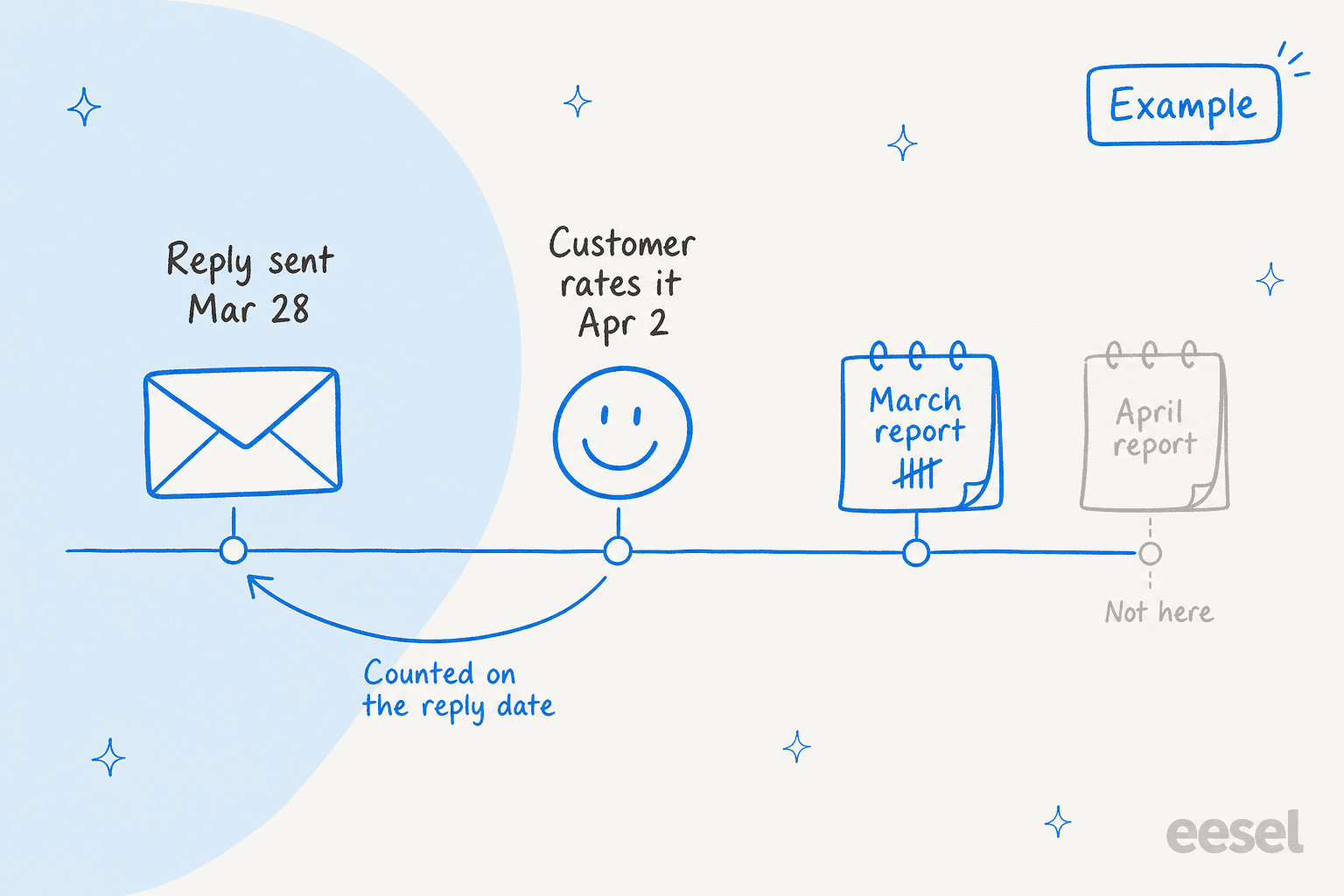
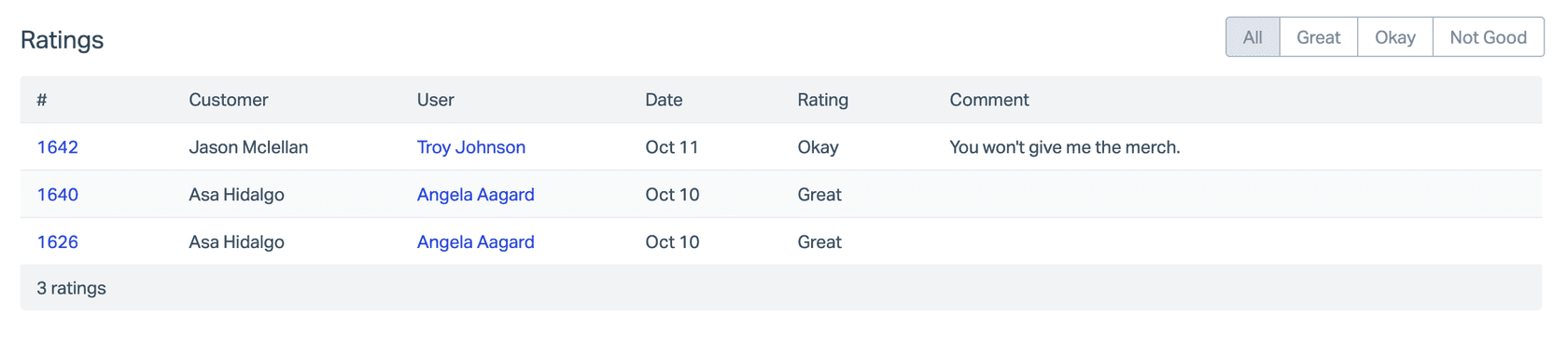
I build eesel's AI agents, and reading helpdesk reports closely is part of the job. This rule is the one that surprises people most. A reply sent on March 28 and rated on April 2 counts in March. Look at the Date column of the ratings table and you are looking at the reply date, which is why it can seem to disagree with the day you remember a customer complaining.
The CSAT glossary entry covers the general idea, and customer satisfaction is the wider concept the report sits inside.
Why do my numbers change after the period ends?
Because a rating can arrive or change after you looked. From Help Scout's satisfaction ratings docs (Help Scout Docs):
- Customers can rate any reply within 10 days, and change that rating within the same 10 days.
- After day 10 they cannot submit new ratings or change existing ones.
- Ratings cannot be deleted or removed from a conversation.
- Each reply gets one rating, but a customer can rate every reply in a conversation separately.
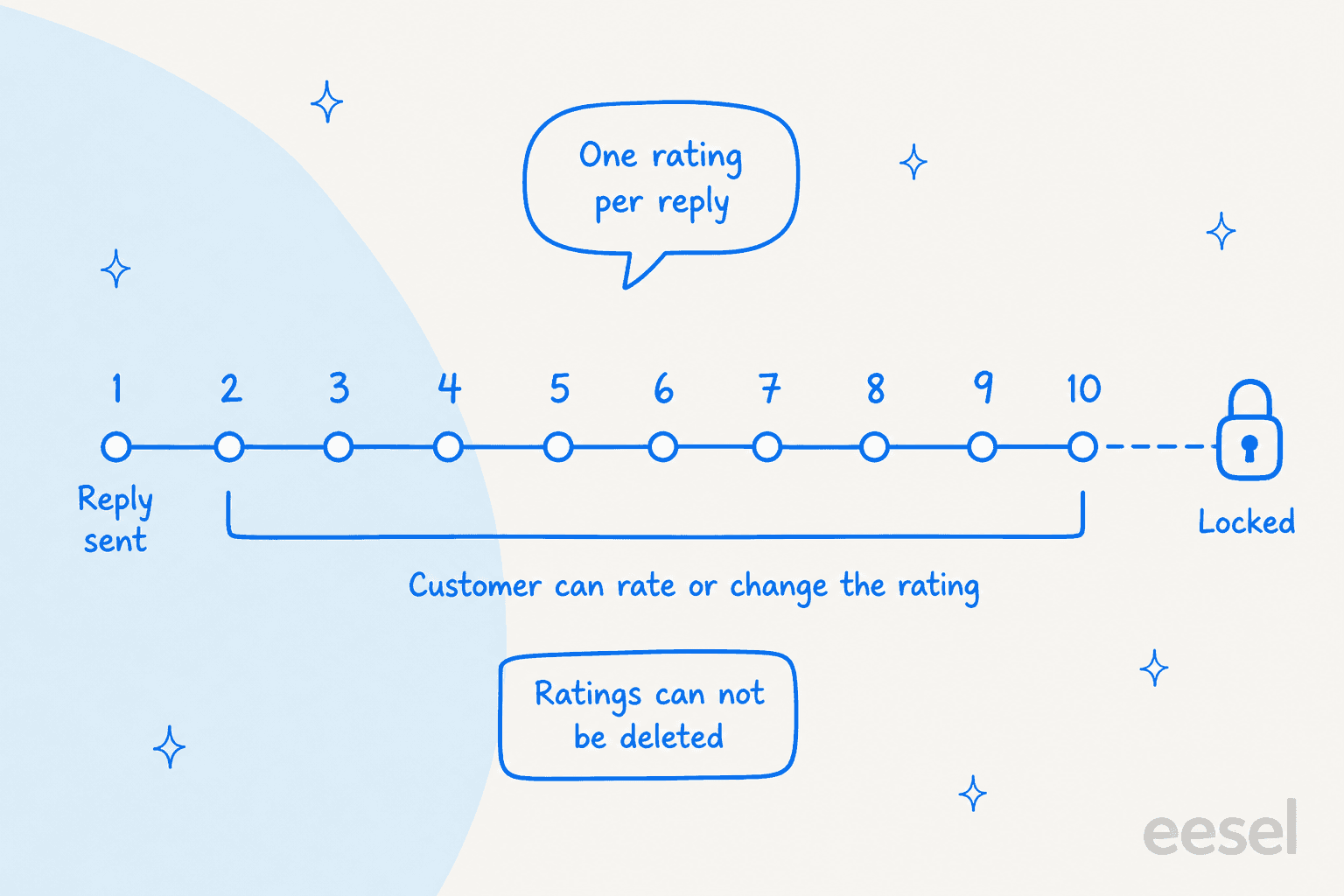
Put the two rules together and you get my inference, which the docs do not state outright: a month's Happiness figures can keep moving for up to 10 days after the month ends, because late ratings are filed under the earlier reply dates. So report on a period only after the 10-day window has closed, and when you compare month over month, compare finished months. My measuring customer satisfaction and customer feedback survey questions posts go deeper on reading survey data patiently.
How is the Happiness Score calculated?
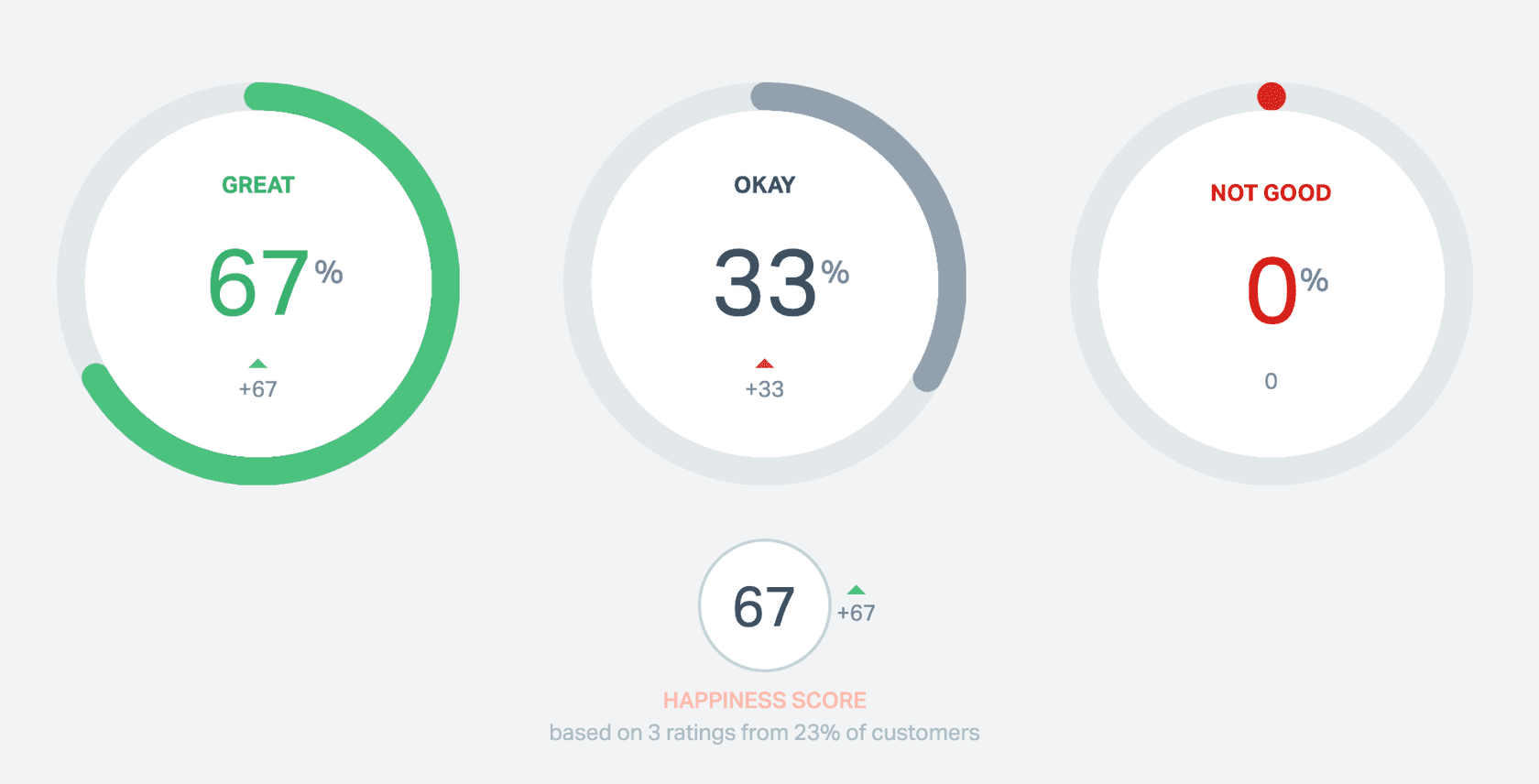
It subtracts the bad from the good. The docs say the score is calculated "much like NPS": the percentage of Great ratings minus the percentage of Not Good ratings. Okay ratings appear in the report but do not enter the formula.
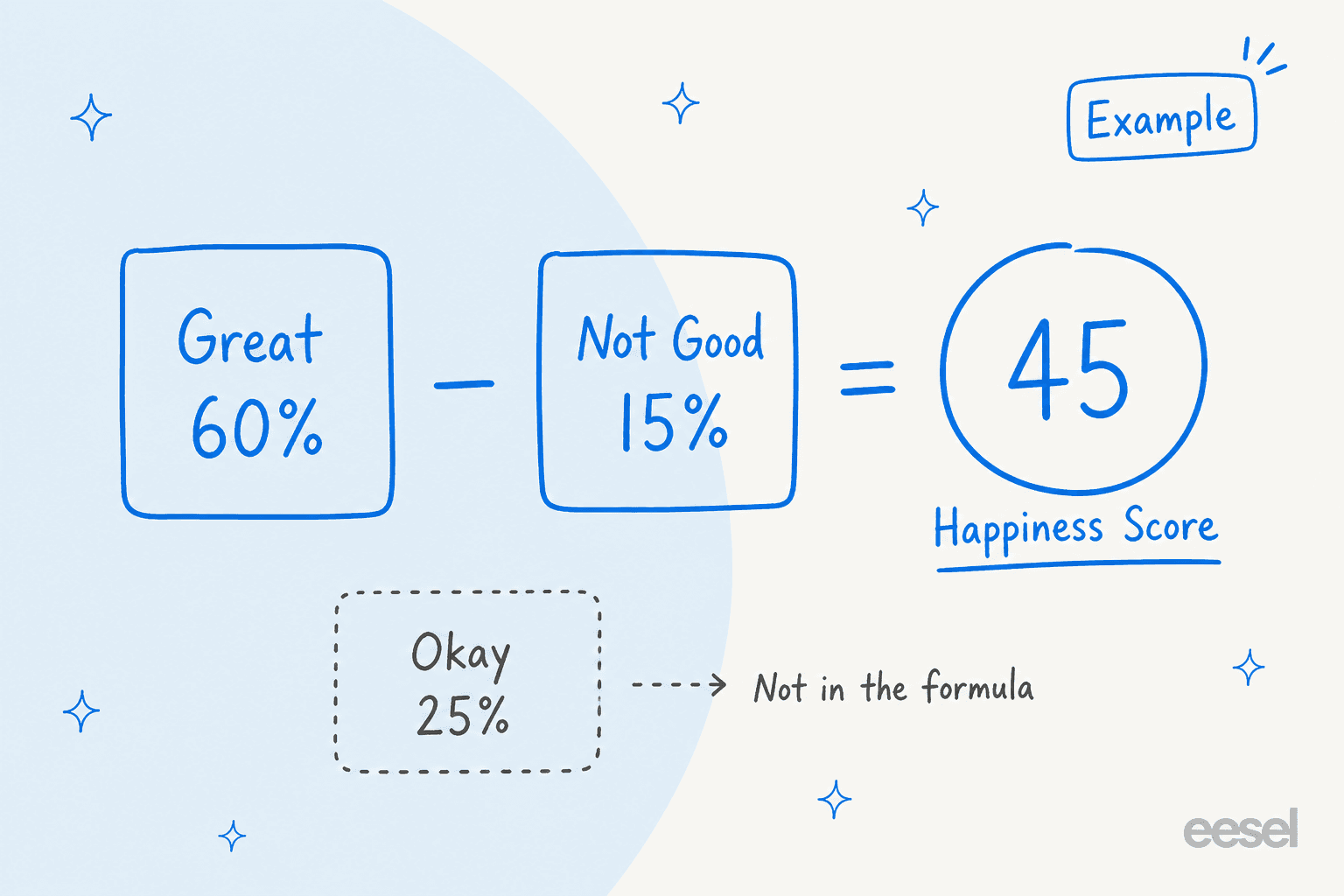
That has a side effect worth knowing. A small team with a handful of ratings will see wild swings, since one extra Not Good among 10 ratings moves the score by 10 points. The report states the sample for you, in lines like "based on 3 ratings from 23% of customers".
If you want the broader frame, see NPS and the CSAT survey glossary entries, plus my customer satisfaction survey questions list.
Why does the Happiness report disagree with other reports?
They use different date logic. Help Scout's reports overview says that for the Email report, response metrics are calculated only on replies sent during the period and resolution metrics only on conversations resolved during the period (Help Scout Docs). Its example: a conversation created Jan 1 and resolved Jan 30 is left out of a Jan 7 to Jan 21 report entirely.
| Report or export | What the docs say it counts |
|---|---|
| Happiness report | Ratings indexed by the date of the rated thread or reply |
| Email report | Replies in the period for response metrics, conversations resolved in the period for resolution metrics |
| All Channels export | Conversations with any activity in the period |
| Email export | Email conversations resolved in the period |
| Happiness export | Conversations that received a rating during the selected time frame |
Read the last row carefully, because it is the one I would not trust blindly. The Happiness export row says "received a rating during the selected time frame", while the report page says ratings are indexed by reply date. Those could describe the same thing or two different rules, and the export docs do not reconcile them. Until you test it, treat an export's row count as possibly different from the on-screen total. A quick check: export one short period that has a rating you know was given in the next period, and see whether the conversation appears.
For how the same logic plays out in other KPIs, see my customer service KPIs guide, and the glossary pages on first response time and resolution time.
How do filters and date ranges work?
Views narrow the data, and the date picker sets the window. Help Scout says Views filter by inbox, tag, folder, custom fields and conversation type, and you build them with the + button at the top of a report (Help Scout Docs). A second condition added with AND must also match, while several values inside one condition use OR. Views are available on Standard, Plus and Pro, and creating them needs the Manage Views permission, which in turn needs View reports.
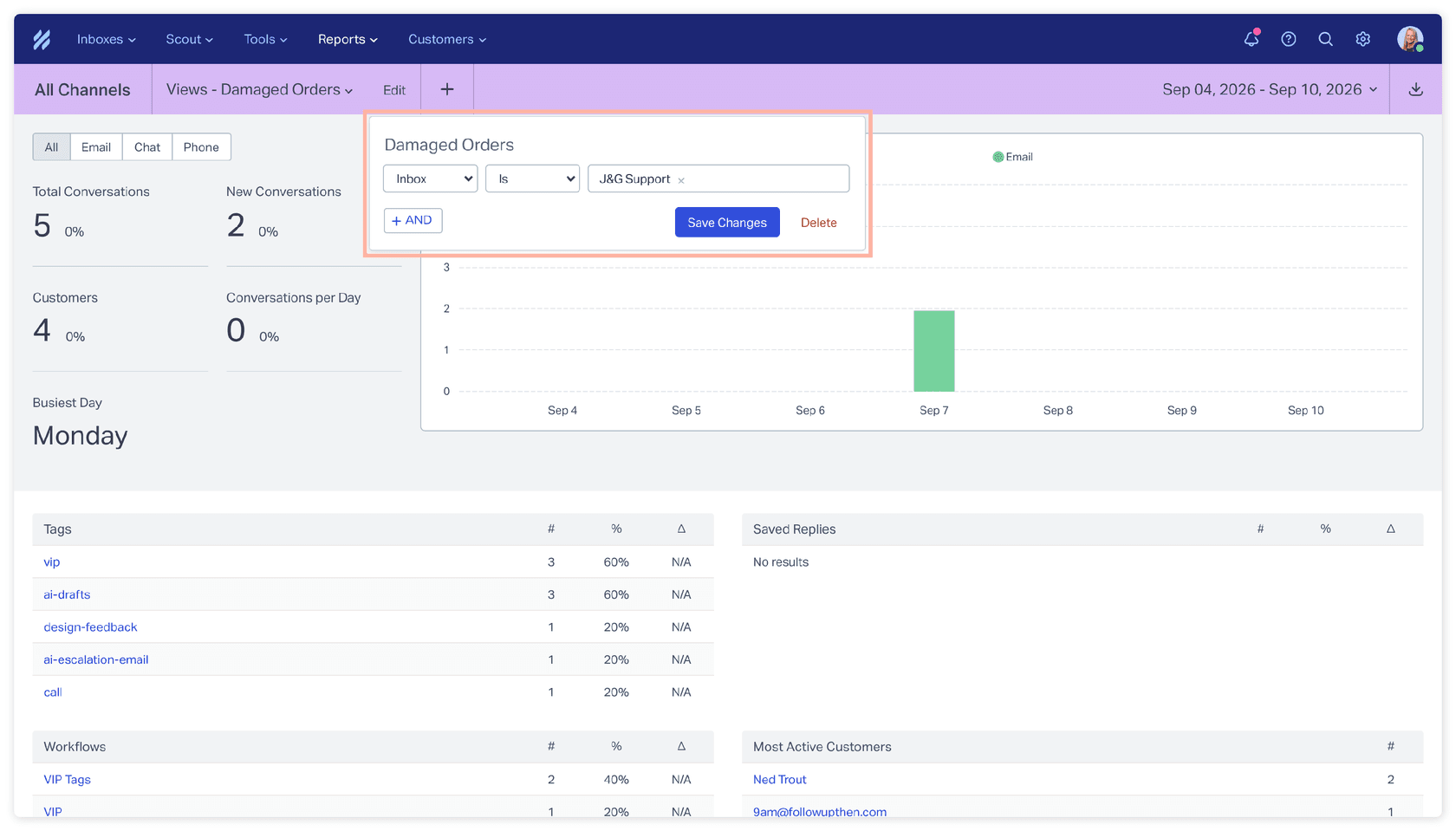
A few practical points follow from the docs:
- Reports run on near-live data, with a 10 to 15 minute catch-up, so a rating given a minute ago may not show yet.
- Share a report by copying the URL after you set the criteria. The colleague needs the View reports permission.
- You cannot change how metrics are calculated or build custom reports in the app. For that, Help Scout points to its Inbox API reporting endpoints, which Standard plans do not have.
If you do pull data through the API, my Help Scout API guide is the next read, and Help Scout workflow auto assignment and Help Scout SLA policy order cover the other settings that shape what your reports can slice.
Which plan do I need, and how far back can I look?
Standard can report on the last 2 years, and Plus and Pro on the full life of the account (Help Scout Docs). Access needs the Reports: View reports permission, and then only for inboxes the user can access. The pricing page lists the monthly rates as $25 Standard, $45 Plus and $75 Pro per user per month. Ratings for email and chat both feed the same report, split into tabs.
| Plan | Per user per month | Happiness data history |
|---|---|---|
| Standard | $25 | Last 2 years |
| Plus | $45 | Lifetime of the account |
| Pro | $75 | Lifetime of the account |
For the plan-by-plan picture, see Help Scout pricing, the Help Scout features overview and my comparisons with Zendesk, Front and Gorgias.
What counts as an email rating versus a chat rating?
The tab follows how the rating was gathered. The Happiness report has Email and Chat tabs. Chat covers only the rating collected at the end of a chat session in Beacon, and ratings given to email follow-ups count as Email (Help Scout Docs). Customers choose from three faces, Great, Okay or Not Good, and the click is saved even if they skip the comment (Help Scout Docs).
Individual user results sit in the Company report: drill into a User report and open its Happiness tab. If your chat and email teams differ, split them there before drawing conclusions. My notes on Beacon modes and snoozed conversations show how conversations move between those states.
What do the Help Scout docs not say?
Several things that matter for date questions. The Happiness report page was last updated on May 22, 2024, while the neighbouring reports pages were updated in November 2026, so the page may lag the product. I could not verify the following from Help Scout's documentation:
- Which time zone draws the day boundaries on the on-screen report. The docs only say exports use UTC (XLSX) or the admin-set company time zone (CSV).
- Whether the Happiness export uses the reply date or the rating date, given the two wordings above.
- Whether a rating that changes after you ran a report is flagged anywhere, or simply shows in the new total.
- How a View with tag or custom field filters changes the "% of customers" figure.
I would not assume answers to these. Test each on a quiet inbox, or ask Help Scout support, before you put a number in a board deck. Quality assurance and sentiment analysis are useful cross-checks when the rating counts are too thin to trust, and survey analysis and AI for NPS analysis cover that side.
Where does AI fit next to the Happiness report?
On the replies that get rated, not on the report itself. eesel works inside the Help Scout mailbox, and its documentation lists actions such as replying, adding notes, tagging, and changing status, assignee, mailbox or subject. None of them writes a rating or edits a report, so the Happiness numbers stay Help Scout's. What eesel can change is what the customer reads: a draft that cites the right Docs article, checked by a person before it goes out.
The proof I can point to is on other helpdesks, so I will say so. SamCart runs eesel on Freshdesk tickets and a separate agent on its website chat, both answering from the same help center of about 280 articles, with a person taking over when asked. That split is the one I would copy with Beacon chat and email, because the Happiness report already separates the two tabs, so you can see each channel's score on its own. SamCart is not on Help Scout, and Help Scout has no published eesel customer story yet.
With the eesel CLI, an AI coding agent can upload approved knowledge such as exported Docs articles and saved replies, then ask test questions and check the answers before anything goes live. A Help Scout admin still has to approve the connection to the mailbox. I could not verify whether rating links appear on replies that a connected app sends, so confirm that on one inbox before relying on it for scores.
My Help Scout AI agent guide, ticket triage for Help Scout and AI resolution rate go further, and AI escalation, first contact resolution and reducing first response time cover the metrics that tend to drive the ratings.
Try eesel for Help Scout
If your Not Good ratings trace back to slow or off-target first replies, eesel is built for that gap. It reads your Docs site and past Help Scout conversations first, then drafts or sends replies in the same mailbox, with each action set to run on its own, ask first or stay off. See best AI for Help Scout, Help Scout AI alternatives and the Help Scout review if you are still choosing.