


AI for NPS analysis means tagging every comment with themes from a list you write, labelling the sentiment of each theme, and splitting the results by promoters (9-10), passives (7-8) and detractors (0-6). For a few hundred comments a month, a spreadsheet, an AI model and 30 minutes of checking by hand does the job. Dedicated tools like Qualtrics Text iQ or Thematic (from $25,000 a year) only pay off at thousands of comments.
The step most teams skip: your NPS comment is one line, and the support ticket about the same problem is twelve. Detractor themes like "refunds take forever" usually sit in your helpdesk already, with order numbers attached. Join the two on one theme list and you get both the "how many" and the "why".
That support side is where I'd point eesel. It doesn't run your survey; it tags every ticket from your own topic list, answers the repeat questions that make detractors, and reports what customers keep asking about. smava has it categorise 14,600 Zendesk tickets a month.
Why do NPS comments go unread?
Because the score is easy and the comments aren't. A dashboard turns 2,000 answers into one number in a second. The comments under it take a person a full day, every month, and that person is usually also running the queue.
I work the eesel support queue every day, and the pattern I see with teams I talk to is the same: the NPS number goes into the monthly deck next to the other support KPIs, the comments go into a CSV that nobody opens, and the one detractor who wrote three paragraphs about a broken refund never hears back. Bain, which created NPS, says plainly that "averages hide the detail that is most instructive" in its piece on the inner loop.
A product manager on Reddit described the manual version better than I could:
"Every week, I spend a couple of hours scanning user responses to open ended questions... I manually make notes of opportunities, big pain points and anything else that stands out, but I don't really have a great quantitative view to show for these."

The survey tools know it too. SurveyMonkey is retiring its word cloud and pointing people to Thematic Analysis instead, because a word cloud tells you "support" came up a lot without telling you whether people loved it or hated it.
AI fixes the reading problem. It doesn't fix the deciding problem, and it creates a new one: a polished summary that sounds right and isn't. The rest of this guide is about getting the first without the third.
What can AI actually do with NPS comments?
Five jobs, in roughly the order they pay off:
- Tag themes. Every comment gets one or more labels like "billing", "onboarding" or "support speed", even when customers use different words for the same thing. This is text classification, the same job as tagging tickets.
- Score sentiment per theme, not per comment. "Great support, terrible app" is one positive and one negative. Tools that only give one label per comment average that into "mixed" and you lose both signals.
- Split by score group. What detractors complain about is a different list from what passives complain about, and passives are the cheapest to move.
- Spot change over time. "Onboarding complaints went from 8% to 21% this month" is the sentence that gets a meeting booked.
- Flag the urgent ones. A comment that mentions cancelling (a churn risk signal), a legal threat, or a safety issue should reach a person today, not in next month's report.
What AI is bad at: deciding what matters to your business, knowing that "the new plan" means the price change from March, and admitting a theme is too thin to report. Those stay with you.
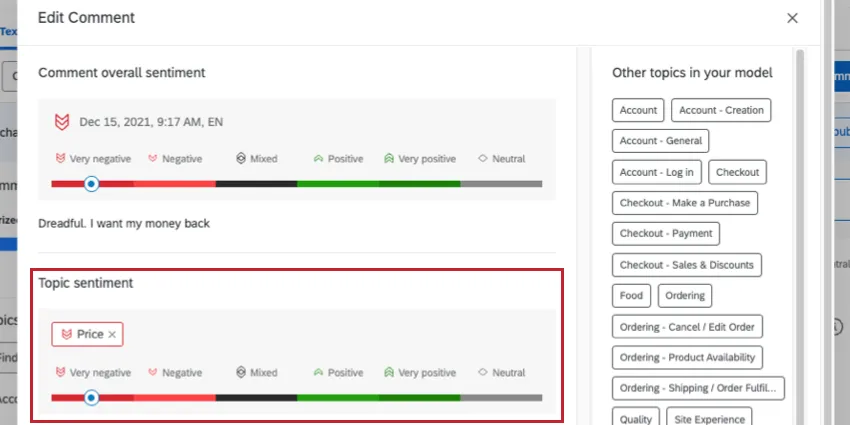
Qualtrics shows the per-theme idea well. In its Text iQ sentiment docs, the example "The service and the food were excellent, but everything was very overpriced" gets a positive score for Service and a negative one for Price. One comment, two opposite signals.
Why don't the score and the comment always agree?
Because the score answers "would you recommend us" and the comment answers whatever the customer felt like telling you. Those overlap less than you'd expect, and the most useful comments sit where they disagree.
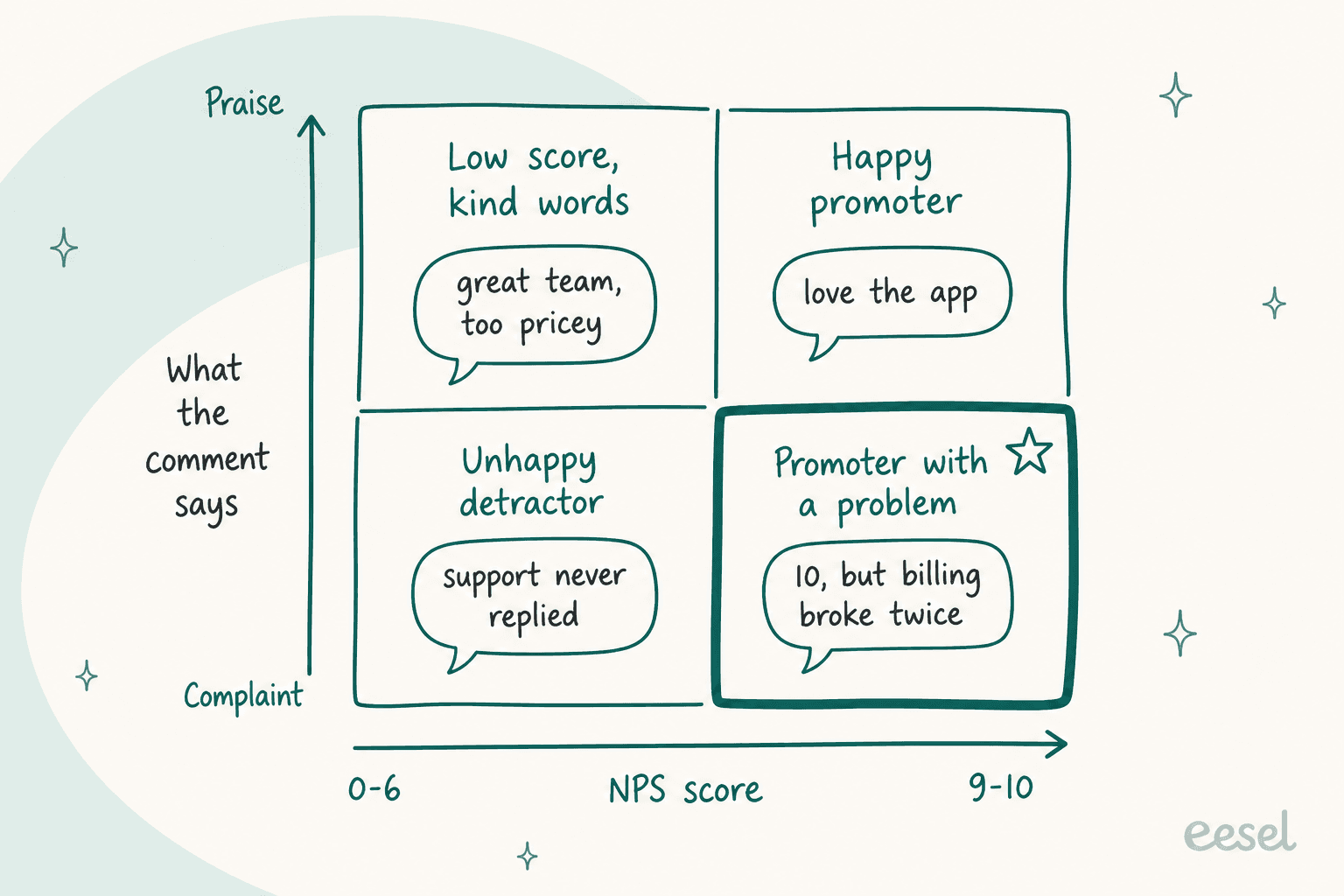
Two quadrants deserve a look every month:
- Promoters with a problem. A 10 who says "billing broke twice" still likes you, for now. These are early warnings on customers you'd hate to lose, and they never show up if you only read detractors.
- Low scores with kind words. "Great team, too pricey" is a pricing or packaging problem, not a service one. Sending it to the support lead wastes everyone's week.
And sometimes the score means nothing at all. A customer success manager on Reddit asked a customer about a middling score:
"I've had customers give a 5 and then when asked about it, responded 'Oh... I love the software, I just wasn't taking this seriously when it popped up because I don't think anyone really does anything with these things, so when I saw it, I just put 5 because it's my favorite number.'"
One trap to know about: some tools label "sentiment" from the score, not the text. HubSpot's built-in Sentiment property on survey responses, for example, is derived from the 0-10 answer (0-6 is Detractor), so it can't catch either quadrant above. Keep a separate column for what the comment actually says.
How do you analyze NPS comments with AI, step by step?
Here's the workflow I'd run for a team with a few hundred to a couple of thousand comments a month. It needs a spreadsheet, an AI model your company has approved, and about an hour the first time.
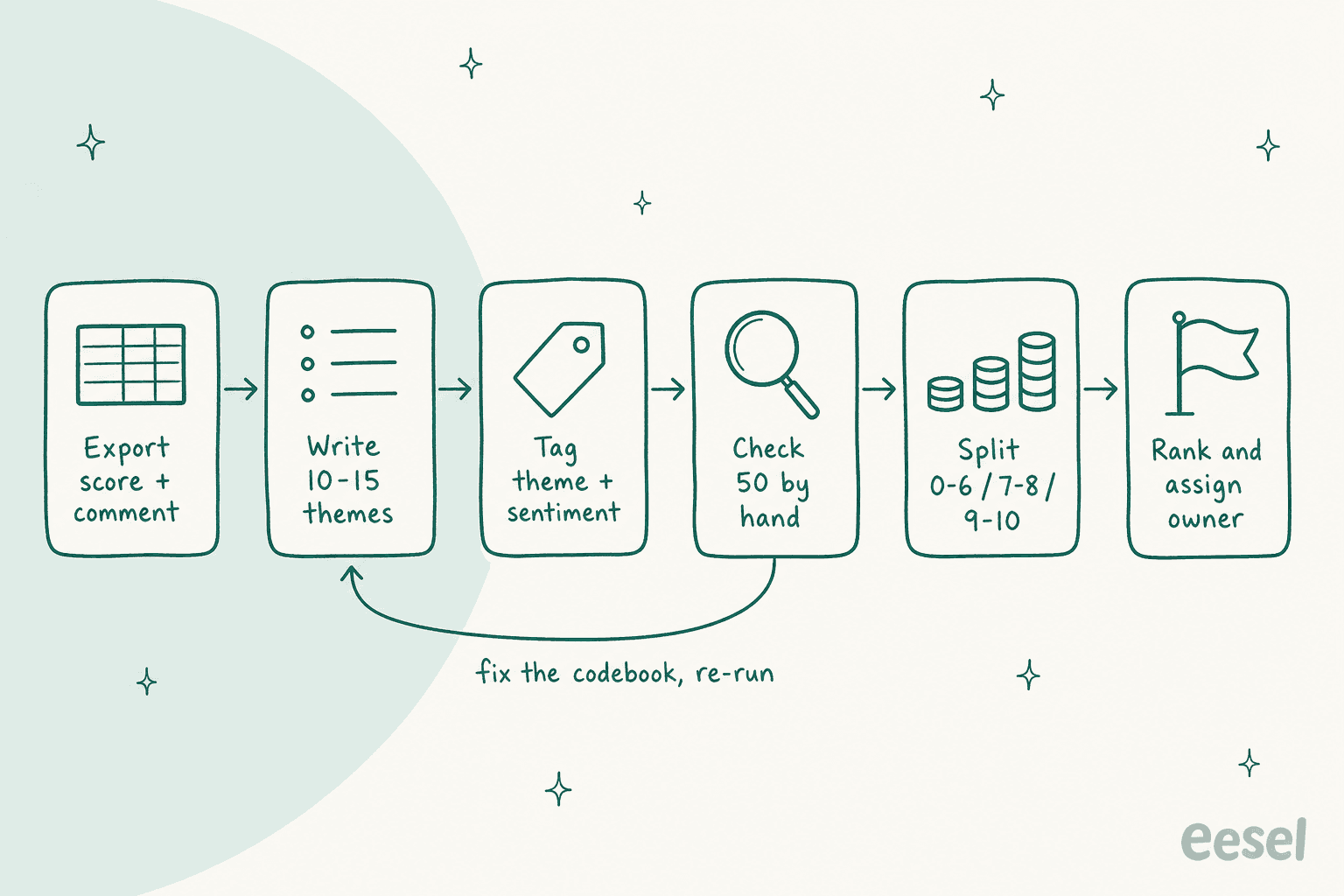
- Export score and comment. One row per response: an ID, the score, the comment, the date, and one or two segments (plan, region, channel). Strip names and emails before anything leaves your survey tool.
- Write the theme list first. 10 to 15 themes, each with a one-line definition and an "other" bucket. Read 50 comments yourself to build it. Letting the AI invent themes every month means "Billing issues" in September and "Payment problems" in October, and your trend line breaks.
- Tag every comment. Ask the model for one row per comment: themes (several allowed), sentiment per theme, and a short reason. A prompt that holds up:
You are tagging NPS survey comments. Use ONLY the themes below; if none fit, use "other".
A comment can have several themes. For each theme, give sentiment: positive, negative or mixed.
Return one row per comment: response_id | themes | sentiment per theme | one-line reason | urgent (yes/no).
Mark urgent only for cancellation, legal, safety or data-loss mentions.
Do not use the NPS score to decide sentiment. Read the text only. Never invent counts.

Themes:
- billing: charges, invoices, refunds, plan prices
- onboarding: setup, first week, getting started
- reliability: crashes, outages, bugs
- support speed: wait times, slow replies
- support quality: wrong answers, rudeness, great help
...
Send the comments in batches of 50 to 100, not the whole file at once. One developer on Hacker News hit exactly this problem:
"If I dump the whole spreadsheet into ChatGPT, I found that because of the context window, it can get 'lazy'; while with a local LLM, I could just literally prompt it one row at a time to accomplish my goal..."

- Check 50 rows by hand. Pick them across detractors, passives, promoters and anything marked "other". If more than a few are wrong, fix the theme definitions and re-run. This is the step that stops a confident wrong report.
- Split and count. A pivot table of theme by score group gives you the real picture: share of detractors mentioning each theme, and how that moved since last month.
- Rank and assign an owner. Frequency alone misleads; a rare data-loss complaint beats a common font request. Each top theme gets an owner and a date, or it's just a nicer-looking CSV.
The same method works on support tickets, which matters later. If you want to go deeper on the theme list, my guide to AI customer feedback analysis covers codebooks in more detail.
Which setup fits your NPS volume?
The right tool depends mostly on how many comments you get and where they already live. Pick your monthly volume:
How many NPS comments do you get a month?
Count comments, not responses. Only some respondents write anything.
What do survey and feedback tools offer for NPS analysis?
Most survey tools now ship some AI on open text. The real dividing line is whether sentiment is scored per theme or once per comment, and whether you can see a price before a sales call.
| Tool | AI feature | Themes | Sentiment | Sentiment per theme | Price (vendor page) |
|---|---|---|---|---|---|
| Qualtrics | Text iQ, Qualtrics Assist | Yes, recommended topics | Yes, 6 labels | Yes, Topic Sentiment | Quote only; sentiment needs Advanced Text |
| SurveyMonkey | Thematic Analysis, Analyze with AI | Yes, English, up to 10,000 responses | Yes, per response | No | Analyze with AI: 20 / 50 / unlimited prompts per survey on Advantage / Premier / Enterprise |
| Typeform | Smart Insights | Yes, last 1,000 responses | Yes, 4 labels | Topics grouped by sentiment | Growth Flow $379/mo, or $266/mo yearly |
| Medallia | Text Analytics, Athena | Yes | Yes, plus emotion and effort | Not stated | Quote only |
| Thematic | Theming Agent, Scoring Agent | Yes, built from comments | Yes | Yes | Foundation $25,000/year for 25,000 comments |
| Chattermill | Lyra AI, Lyra Agent | Yes | Yes | Yes, aspect-based | Quote only |
| Gainsight | Surveys text analytics | Yes, aspects | Positive, negative, suggestion | Yes, per sentence | Quote only |
A few details behind the table:
- Delighted is gone. Many small teams ran NPS on Delighted. Its page now says it is no longer available and points to Qualtrics, so if you're on an export from it, plan the move.
- Typeform runs Smart Insights on a private copy of Anthropic's Claude model and groups topics under Positive, Negative, Neutral and Mixed tabs, with up to three quotes per topic. It needs at least 10 responses and an English account, per its help article.
- SurveyMonkey labels each response Positive, Neutral, Negative or Undetected, and its sentiment analysis is one label per response. Good for a quick read, weaker for "great support, bad app" comments.
- Thematic says it works best with at least
2,000rows, and counts a review, a survey answer or a support ticket as one comment, which makes it a fit for teams that want NPS and tickets in one place. - Gainsight needs 20+ comments, scores sentiment only on comments of 6 to 25 words, and runs once a day, per its text analytics docs.
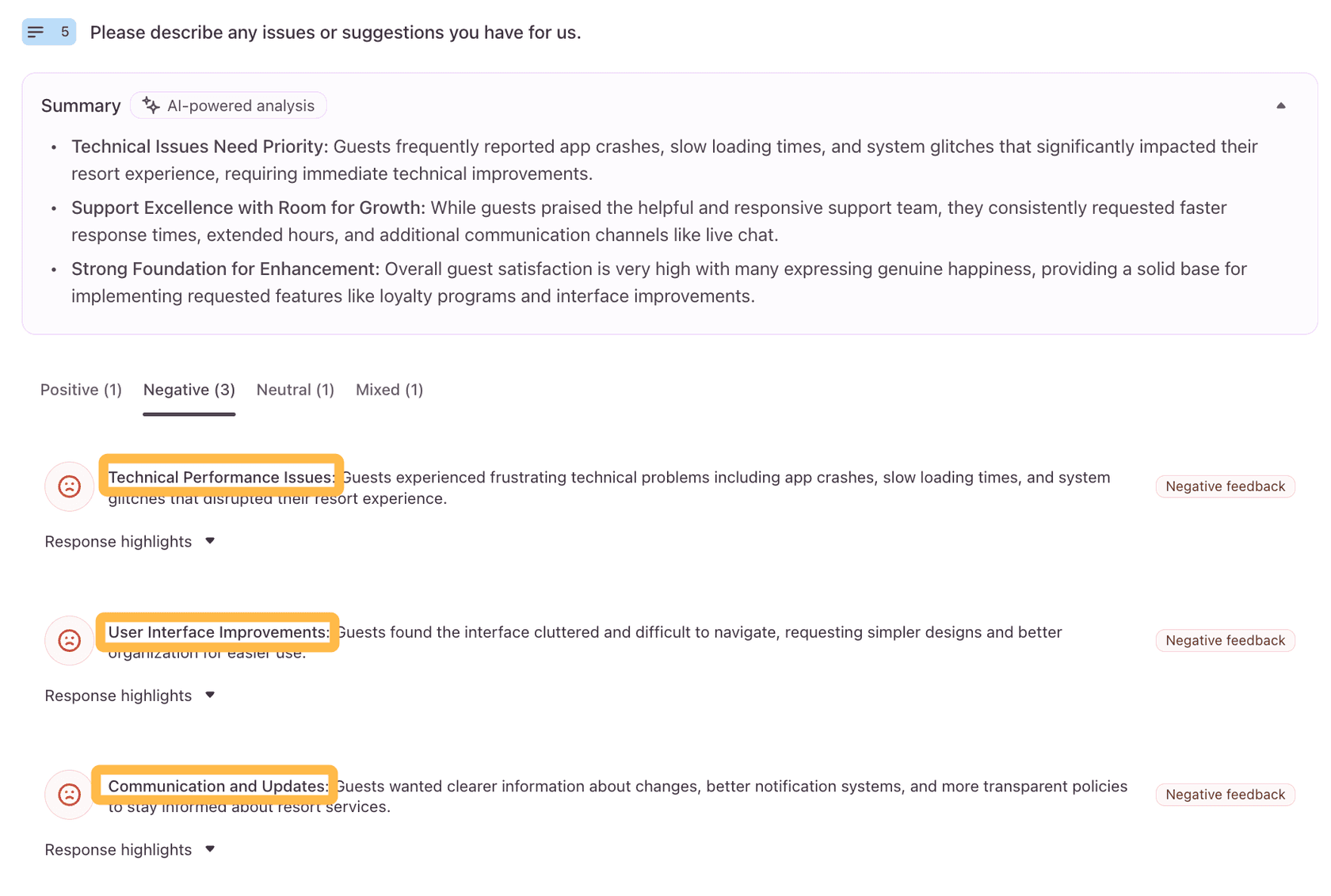
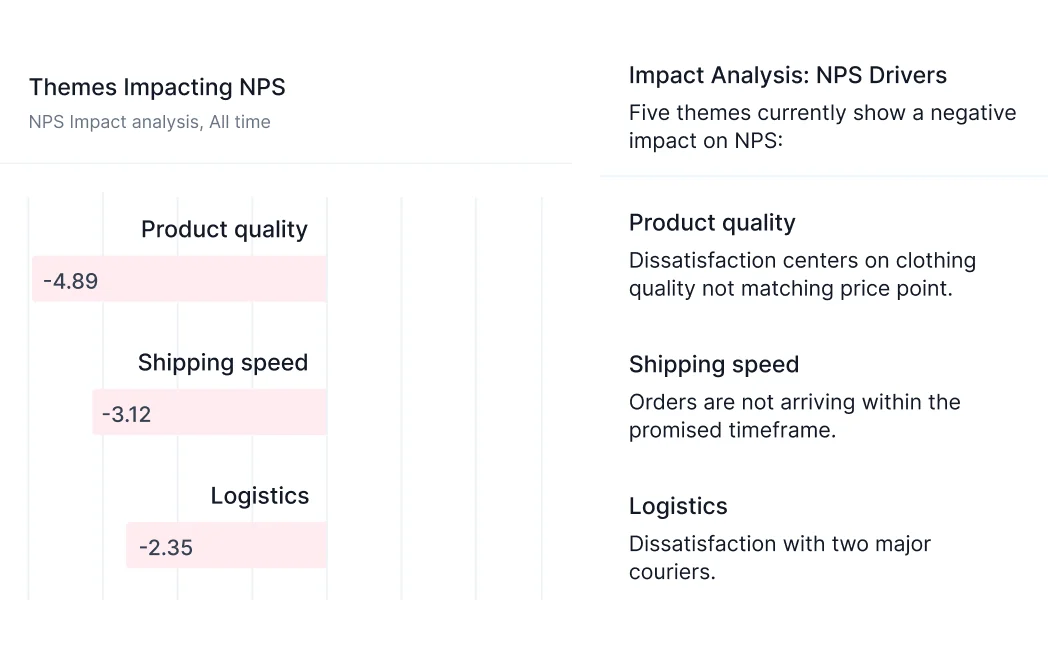
The enterprise tools add one thing worth paying for at scale: tying themes to the score. Chattermill's impact view shows how many NPS points each theme costs you, which is a sharper way to rank fixes than raw mention counts.
If you're shopping, my roundup of AI customer feedback tools goes wider. For the method behind it, see my guide to survey analysis.
What does your helpdesk already do with feedback?
Less on NPS than you'd hope, more on tickets. Of the six helpdesks I checked, only HubSpot and Salesforce document AI that summarizes survey comments. Zendesk, Freshdesk and Gorgias run AI sentiment on ticket messages instead.
| Helpdesk | Native NPS survey | CSAT survey | AI sentiment on tickets | AI on survey comments | Price facts (vendor pages) |
|---|---|---|---|---|---|
| Zendesk | No, removed April 2023 | Yes, comment asked after a bad rating | Yes, intelligent triage | Not documented | Using sentiment in triggers needs Copilot, $50/agent/month |
| HubSpot | Yes, plus CSAT and CES | Yes | No native classifier found | Yes, Breeze survey summaries | Service Hub Professional from $90/seat/month |
| Freshdesk | Not documented | Yes | Yes, score 0-100 | Not documented | Freddy AI Copilot $29/agent/month, Pro and Enterprise |
| Gorgias | No | Yes | Yes, 24 intents plus sentiment, all plans | Comment highlights; Claude or ChatGPT via its MCP beta | Plans from $40/month |
| Help Scout | Yes, via Messages | Yes, ratings | No classifier found | Not documented | $25 / $45 / $75 per user |
| Salesforce | Yes | Yes | Yes | Yes, AI survey summaries | Add-on, no list price |
The details that change decisions:
- Zendesk listed "Net Promoter Score (NPS)" as removed on April 30, 2023. Its intelligent triage labels each ticket Very Positive to Very Negative and is "calibrated for customer service contexts", so a ticket isn't negative just because the customer has a problem. More in my guide to Zendesk AI ticket triage.
- HubSpot runs NPS, CSAT and CES surveys on Service Hub Professional and Enterprise, and Breeze can summarize responses once there are at least three. It's the most complete NPS-plus-helpdesk setup in this list.
- Gorgias detects intent and sentiment on every incoming message on all plans. Its own suggested fix for "why did CSAT drop" is to connect Claude or ChatGPT through Gorgias MCP and ask it to group low-rated tickets by theme. Even the vendor does this analysis outside the helpdesk.
- Freshdesk scores the sentiment of the latest message from 0 to 100 and can route on it, as part of the Freddy AI Copilot add-on.
The pattern: helpdesks analyze tickets, survey tools analyze comments, and almost nobody joins the two. That's the gap I'd close first.
Why should you analyze support tickets alongside NPS?
Because the NPS comment tells you how many customers are annoyed about refunds, and the ticket tells you which refunds, how long, and what the customer already tried. One is a headline, the other is the story.
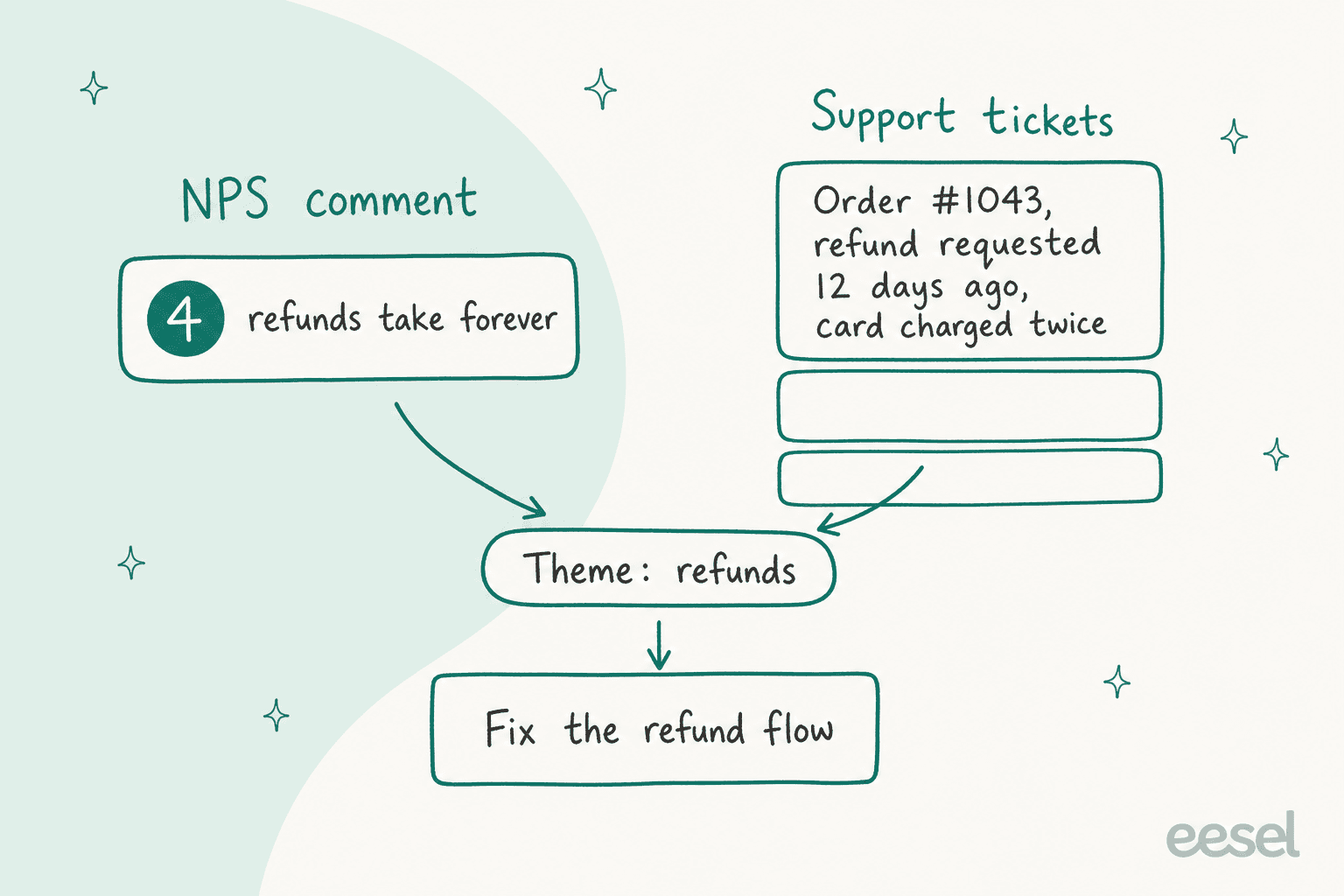
From where I sit in the queue, this is the part most NPS guides miss. A detractor who writes "support is slow" in a survey has usually opened two or three tickets first. Those tickets have timestamps, order numbers, the help article they read, and the exact moment it went wrong. The survey comment is the summary they wrote after giving up.
Teams at volume feel this directly. One operator reading every comment by hand asked Reddit for help:
"We receive about 10,000 to 15,000 comments to read each month... We read every comment on our surveys, code them (with our coding) and then look for trends, things that bubble up, etc."
In the same post they said whatever they picked had to work with their Zendesk ticket system. That's the right instinct.
So the move is simple: use one theme list for both. If "refunds" means the same thing in your NPS tags and your ticket tags, you can put them side by side:
- NPS says refunds are the top detractor theme, up 6 points this quarter.
- Tickets say 300 refund tickets a month, most about payouts after a return, and the help article on it is two years old, the kind of thing a knowledge gap analysis catches.
- Now you know what to fix, and support can measure whether it worked before the next survey goes out.
This is also where the volume is. A sales-call moment I keep coming back to: a CX lead running a DTC supplements brand on Gorgias, around 7,000 tickets a month, pushed back on monthly-report analytics in a call with eesel's team. Their point, roughly: the customer doesn't want to wait for a monthly report. NPS is the monthly report. Tickets are the live feed. My guide to AI for support reporting covers the ticket side in more depth. To get it into inboxes weekly, see voice of customer alerts.
How does eesel fit into NPS analysis?
Let me be clear about the boundary first: eesel doesn't send NPS surveys or calculate your score. Keep your survey tool. What eesel does is the support half of the picture, which is where most detractor themes get created and where many get fixed.
eesel is an AI helpdesk teammate that works inside Zendesk, Freshdesk, Gorgias and other helpdesks. Three parts of it map onto NPS work:
- Tagging from your own list. The Zendesk agent can read your ticket fields and their allowed values before it tags, so it uses your theme list, not one it made up. smava runs this on a shared Zendesk for two brands:
27,000tickets a month,14,600of them categorised into Zendesk fields, in German. Rúngne does it on Gorgias, with880tickets tagged by topic "from a fixed list, nothing invented". - Reports on what customers keep asking. The Analyze ticket trends skill pulls "recurring topics, sentiment, volume and resolution patterns" from your conversations, and a weekly support report can land in your inbox every Monday.
- Answering the repeat questions. The cheapest detractor to fix is the one whose question never needed a person. eesel answers those from your help center and past tickets, and hands the rest over. More on that in my guide to FAQ deflection.
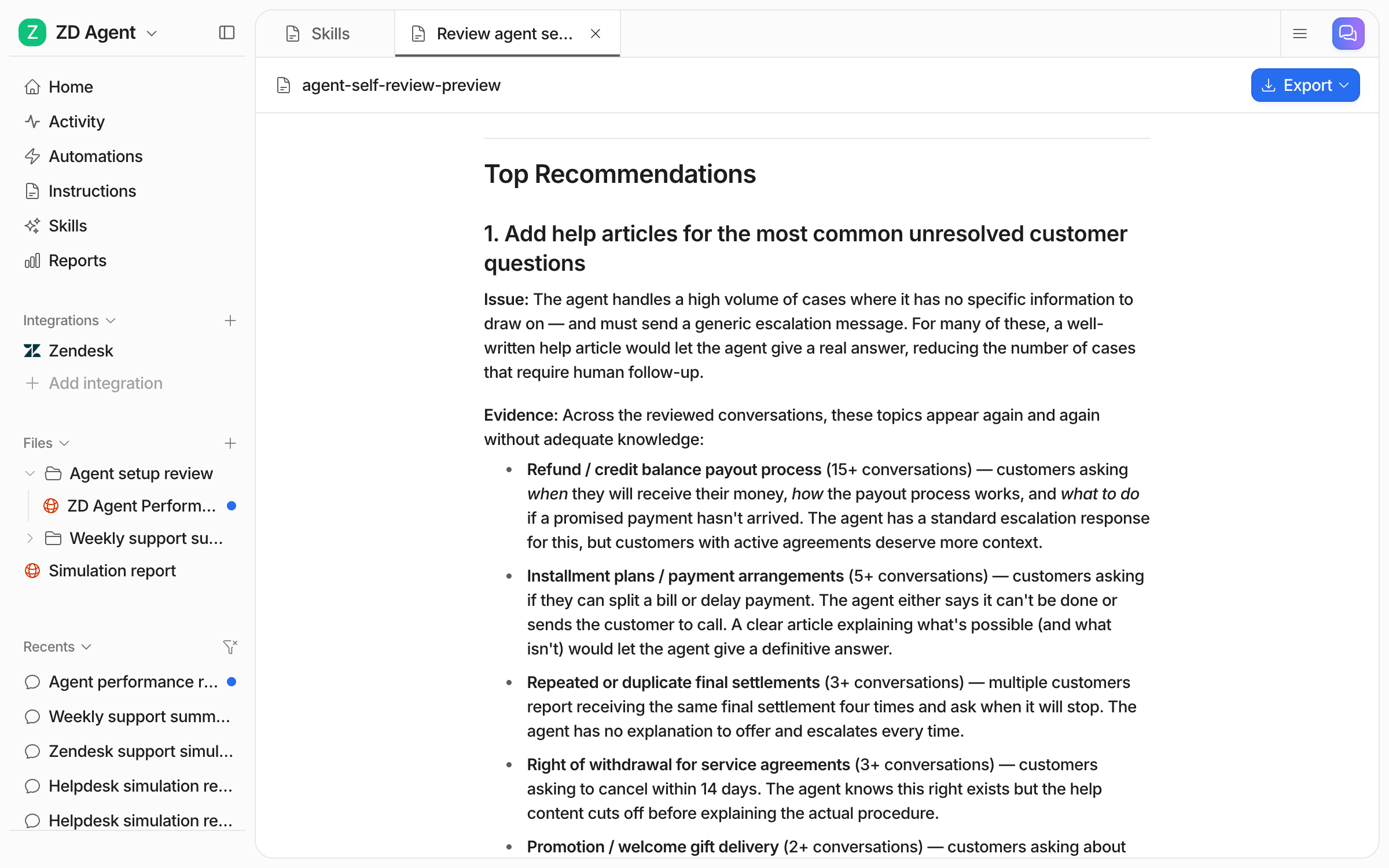
That report is the ticket-side twin of an NPS theme summary: topics, counts, the evidence, and what to fix first. Put it next to your detractor themes and the overlap is usually obvious.
If you'd rather run this from a terminal or let a coding agent drive it, the eesel CLI talks to the same agent as the dashboard and prints JSON. eesel chat "analyze our ticket trends for last month" runs the trends skill, eesel automations puts a report on a schedule, and eesel files ls lists the reports it saved. And if you want survey comments in the same place, a webhook automation accepts data from Zapier, Make or your own backend, so you can send detractor comments in and have the agent tag them or open a ticket. That's a setup you wire yourself, not a built-in NPS integration.
One honest limit: eesel's own "AI CSAT" is an AI's rating of the agent's answers, and its reports docs say it is "not a substitute for asking your customers". That's why I'd keep the survey.
How do you close the loop with NPS detractors?
Bain splits this into two loops, and AI helps with both in different ways.
The inner loop is a person getting back to the customer, fast. Bain's view in its inner loop piece is that the callback "can't be delegated to a third party or some central corporate group". AI's job here is triage: flag the urgent comments (cancelling, legal, data loss) and route them to the right person today. The reply itself is a human job, and a CS lead on Reddit put the bar higher than most teams set it:
"First, never reach out via email to someone dropping a zero (or anything below your target # for NPS). Call and keep calling or in a normal circumstance show up in person."
Qualtrics now drafts AI replies to survey feedback and opens tickets in Zendesk, ServiceNow or Salesforce, as shown on its close-loop workflows.
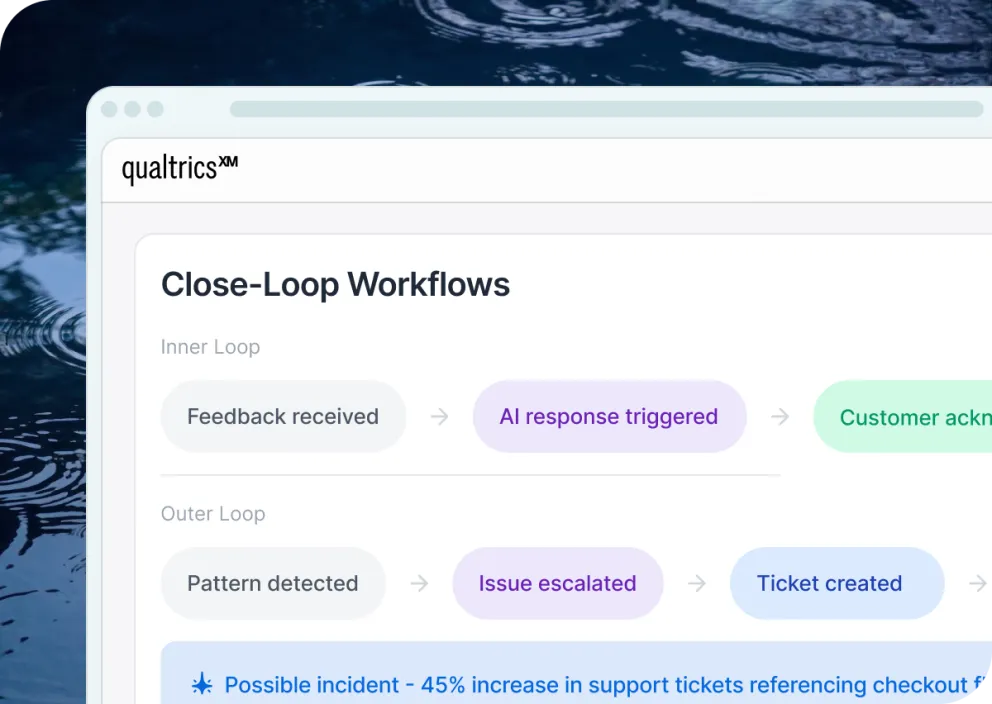
The outer loop is fixing the cause. Bain's outer loop starts with "all inner loop feedback" and looks for "patterns, trends and changes in frequency", which is exactly the theme-tagging job above. The output is a short list of fixes, each with an owner.
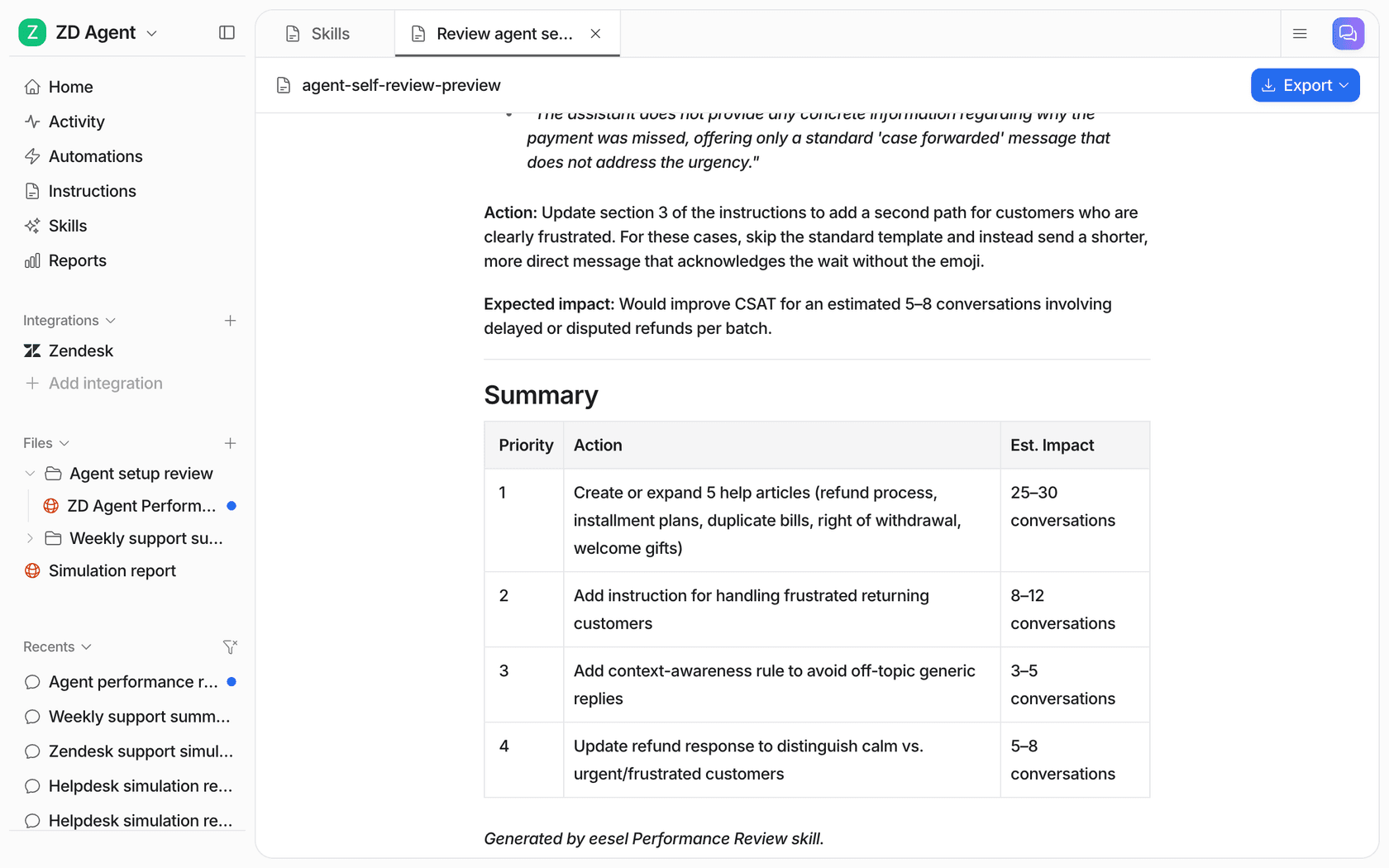
The cleanest example of a loop like this I can point to is one of eesel's customers, an industrial automation company. A rating sits under every answer its documentation chat gives, and a regular digest goes to the documentation team with what was asked, which answers were rated badly, and where the knowledge had gaps. The gaps go straight into the documentation backlog. Swap "documentation chat" for "NPS survey" and that's the outer loop running every week instead of every quarter.
For the ticket side of closing the loop, start with my guide on AI churn prevention. If the theme is complaints, see AI for customer complaints.
What mistakes should you avoid?
The ones I see most, roughly in order of how much damage they do:
- Letting the AI pick new themes every month. Your trend line resets each time. Write the list once, add to it on purpose.
- Reporting percentages without checking a sample. A model that mislabels 15% of comments still produces a tidy chart. Check 50 rows before anything goes in a deck.
- Treating sentiment as the score. A 9 can describe a serious bug. Read the mismatch quadrants.
- Ranking by frequency alone. Five comments about lost data beat fifty about button colours.
- Uploading raw comments with names and emails. Strip personal data first and check your AI provider's data terms. SurveyMonkey, for example, says its Thematic Analysis runs on Anthropic and OpenAI models that don't train on your data; your own setup should be just as clear.
- Analyzing NPS in a room that never talks to support. The fixes for many detractor themes live in the queue, behind your ticket triage. See my notes on building a voice of customer program that includes both.
Try eesel for the support side of NPS
If your detractor themes keep pointing at refunds, slow replies or "couldn't find how to do X", those are ticket problems first. eesel joins your helpdesk like a new teammate: it tags every ticket from your own topic list, answers the repeat questions from your help center and past tickets, and sends a weekly report of what customers keep asking, so the fix ships before the next survey goes out. smava has it categorising 14,600 Zendesk tickets a month.
Plans start at $299/month for 500 credits, with reports included on every plan, per the pricing page, and you can run it free against your own past tickets first. Try eesel.