

Freshchat does not write a full draft reply for you. What it has is Freddy AI Copilot, a $29 per agent per month add-on on Pro and Enterprise, which rewrites, expands, re-tones or finishes text an agent starts, and answers questions from your articles in a side panel. Every one of those begins with something the agent types or asks, and the agent sends the result. The helpers that suggest a reply from the ticket, such as Agent Assist and the canned-response suggester, are listed as Freshdesk features, not Freshchat ones. If you want an AI to answer the chat itself, eesel can do that through your Freshdesk connection, though it replies live instead of drafting.
Does Freshchat write draft replies with AI?
Not in the way the question usually means. The question usually comes from someone who has used a "suggested reply" button in a ticketing tool and wants the same in live chat: the customer types, the AI offers a full answer, the agent clicks send. Freshchat does not have that button, and it is a different product from Freshdesk (see Freshchat vs Freshdesk Messaging).
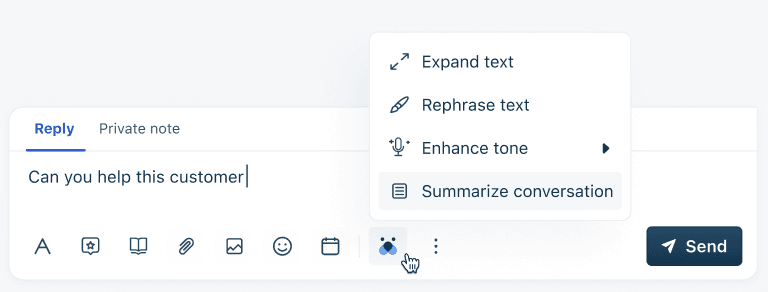
What it has is a set of writing aids inside Freddy AI Copilot, Freshworks' agent-side assistant. An admin switches each one on, and the agent triggers it from the reply editor. Freshworks' feature table for Freddy marks six drafting features as available in Freshchat, and three suggestion features as not available there.
That is also why this post is separate from my notes on Freshchat AI summaries and Freshchat AI routing. Those cover what happens around a chat. This one is about the words in the reply itself.
Which Freshchat AI features help write a reply?
Six, and the useful way to sort them is by what the agent has to give Freddy first.
| Feature | What the agent gives it | What it produces | Where Freshworks documents it |
|---|---|---|---|
| Rephrase | Text already typed | A clearer, more formal version | Rephrase |
| Expand | Short notes or bullets | A full reply, accepted or rejected | Message Expansion |
| Enhance tone | Text already typed | The same text, more or less formal | Tone Enhancer |
| Generate email | A few prompts | A detailed email body to edit | Email Draft Generator |
| Auto-complete | The start of a sentence | An inline finish, Gmail-style | Auto-complete |
| Conversational Knowledge Base | A question typed in the Freddy slider | An answer built from articles the agent can access | Conversational Knowledge Base |
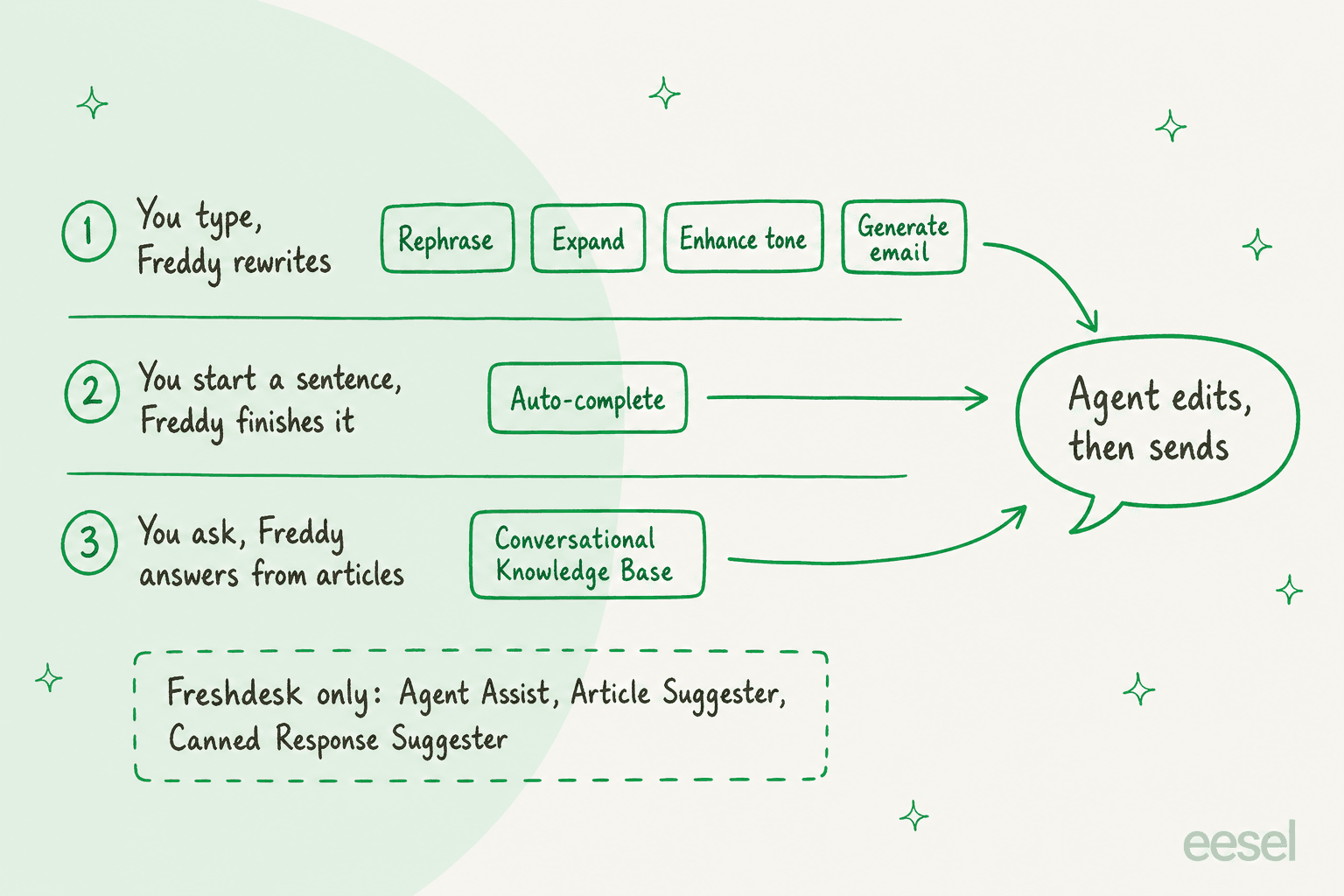
The pattern is the point. In all six, the agent supplies the seed, and Freddy grows it. That is closer to a good autocomplete than to a drafted answer, which is a fair product for agent assist (see agent assist tools), but a different one from what the search phrase "AI draft replies" suggests.
What does each Freshchat drafting aid actually do?
Here is how each one behaves, from Freshworks' own help articles.
- Rephrase. Select text, click Write with AI, then Rephrase text. Freshworks says it replaces informal words with more formal ones and takes care of grammar and punctuation, which helps agents who are not fluent in English.
- Expand. Type bullets, select them and click Expand. You get Accept or Reject: Accept replaces your notes with the full message, Reject restores them. That safety valve is the nicest detail in the set.
- Enhance tone. The setup toggle is called Enhance Tone, and the article's steps offer More formal and Less formal. The article's intro mentions three tones (casual, friendly, professional), so check which options your editor shows.
- Generate email. Enter prompts, open the Freddy menu and choose Generate email. The agent reviews and edits before sending. It is aimed at email conversations, not chat bubbles, much like AI response suggestions in a ticket queue.
- Auto-complete. It suggests the rest of a sentence as the agent types, using your conversation history with all customers. It is on by default.
- Conversational Knowledge Base. This is the closest thing to a drafted answer. The agent opens the Freddy slider, types the customer's question and gets an answer generated from the solution articles that agent can access, which they can share whole, in part, or as article links.
On a busy live-chat shift I would reach for the Knowledge Base slider first and Auto-complete second, because they remove the lookup that AI hallucination makes risky in a free-form bot. Rephrase and Enhance tone are polish. If your live chat scripts and tone of voice are already settled (the customer service tone guide helps), they add little.
What do Freshdesk agents get that Freshchat agents do not?
The same Freshworks table shows the gap. Agent Assist, Auto Triage, Article Suggester and Canned Response Suggester are marked available for Freshdesk and Freshdesk Omni, and marked not available for Freshchat. Those are the features that read a ticket and put a suggested reply or article in front of the agent, which is why the Freshdesk AI draft replies post can talk about drafts and this one cannot.
Two practical consequences. If your team runs Freshdesk Omni, you may have both sets, so check what your plan shows before assuming either. If you are Freshchat-only, a canned response library is still your fastest reply, and Freddy edits what you type rather than pulling from it.
Reviewers on Capterra are blunt about the broader AI. One wrote:
"The AI capabilities feel basic and outdated."

One review is one review, and the reviewer was not talking about Copilot specifically. I include it because it matches the table: the drafting aids are real, and they are small.
How much do Freshchat AI draft replies cost?
Freshchat's pricing page lists seats at $0 (Free), $19 (Growth), $49 (Pro) and $79 (Enterprise) per agent per month, billed annually. Freddy AI Copilot is a separate add-on at $29 per agent per month, offered on Pro and Enterprise only, with no day passes. Freshworks' Copilot article lists $35 per agent on monthly billing. Freshworks' licensing article confirms Copilot is available on Pro and Enterprise for Freshchat.
One thing to know: the individual feature pages carry a banner listing every Freshchat plan, including Free, which reads as if the aids work everywhere. The licensing article and the pricing page say Pro and Enterprise. I would trust those two and test in your own admin.
| Team of 10 agents | Seats | Copilot add-on | Per month |
|---|---|---|---|
| Copilot for everyone | 10 x $49 = $490 | 10 x $29 = $290 | $780 |
| Copilot for 4 agents | 10 x $49 = $490 | 4 x $29 = $116 | $606 |
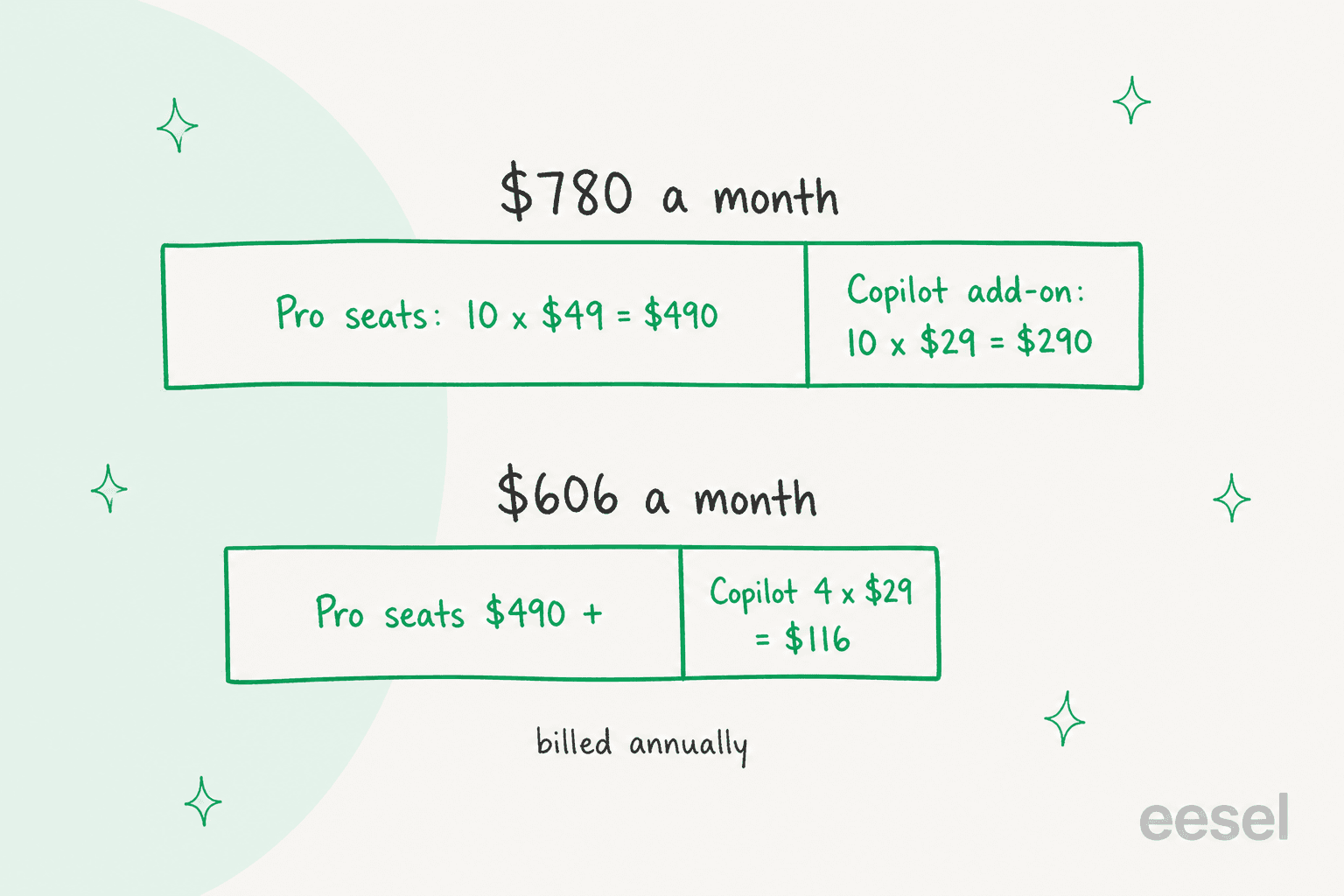
Freshworks allows buying the add-on for a subset of agents, so the cheaper row is a real option. For the broader numbers see Freshchat pricing and Freddy AI pricing.
How do you turn on Freshchat AI drafting aids?
The steps below are from Freshworks' articles, and they assume you already hold licenses.
- Buy licenses: Admin Settings, Plans and Billing, Manage/Buy add-on, then Freddy AI Copilot and the number of licenses.
- Give agents access: Admin Settings, Team Management, Roles, Manage Licenses next to a custom role, then Enable Freddy AI Copilot add-on for this role. Default roles can be enabled but you cannot trim individual permissions on them.
- Switch the features on: Admin settings, Freddy AI, then the toggles under Freddy AI Copilot (Rephrase text, Expand text, Enhance Tone, Summarize conversation and the rest).
- For Generate email, enable Generate Email Body on the same page.
- Test in a real chat with a spare agent seat. Select typed text, open the Freddy menu, and try Expand with Accept and Reject.
- For Auto-complete, note it is on by default and Freshworks says turning it off means raising a support request.
Treat the Knowledge Base slider as a content test as much as a feature, and Freddy's version is worth a read. It answers only from articles the agent can open, so a thin knowledge base gives thin answers, and gaps show up fast.
When should the AI send the reply instead of drafting it?
Drafting aids save seconds per reply. They do not take chats off the queue. If the question is a repeat (order status, plan limits, how to reset a password) and the answer lives in your help center, the larger saving is letting an AI answer the chat and letting people take the rest. That is a different decision with different risks, so I would separate it from the drafting question.
Done well it lifts ticket deflection and live chat deflection. Freshworks sells that as Freddy AI Agent: $49 per 100 sessions after 500 free ones, where a chat session covers 24 hours. My AI for Freshchat and adding AI to Freshchat guides compare the routes in full, and best AI for Freshchat, Freshchat AI alternatives and ChatGPT for Freshchat cover the rest.
The other route is an AI agent, an AI teammate that works inside your helpdesk, a different bet from Freddy against eesel. eesel connects to Freshchat as a channel on its Freshdesk integration, so Freshdesk is connected first. Its Freshchat docs describe what it can do: it answers chats in your existing widget under one of your Freshchat agents' names, reads up to 50 messages of the chat so far, answers from your help center, canned responses and past tickets, and can assign a chat to a group or agent.
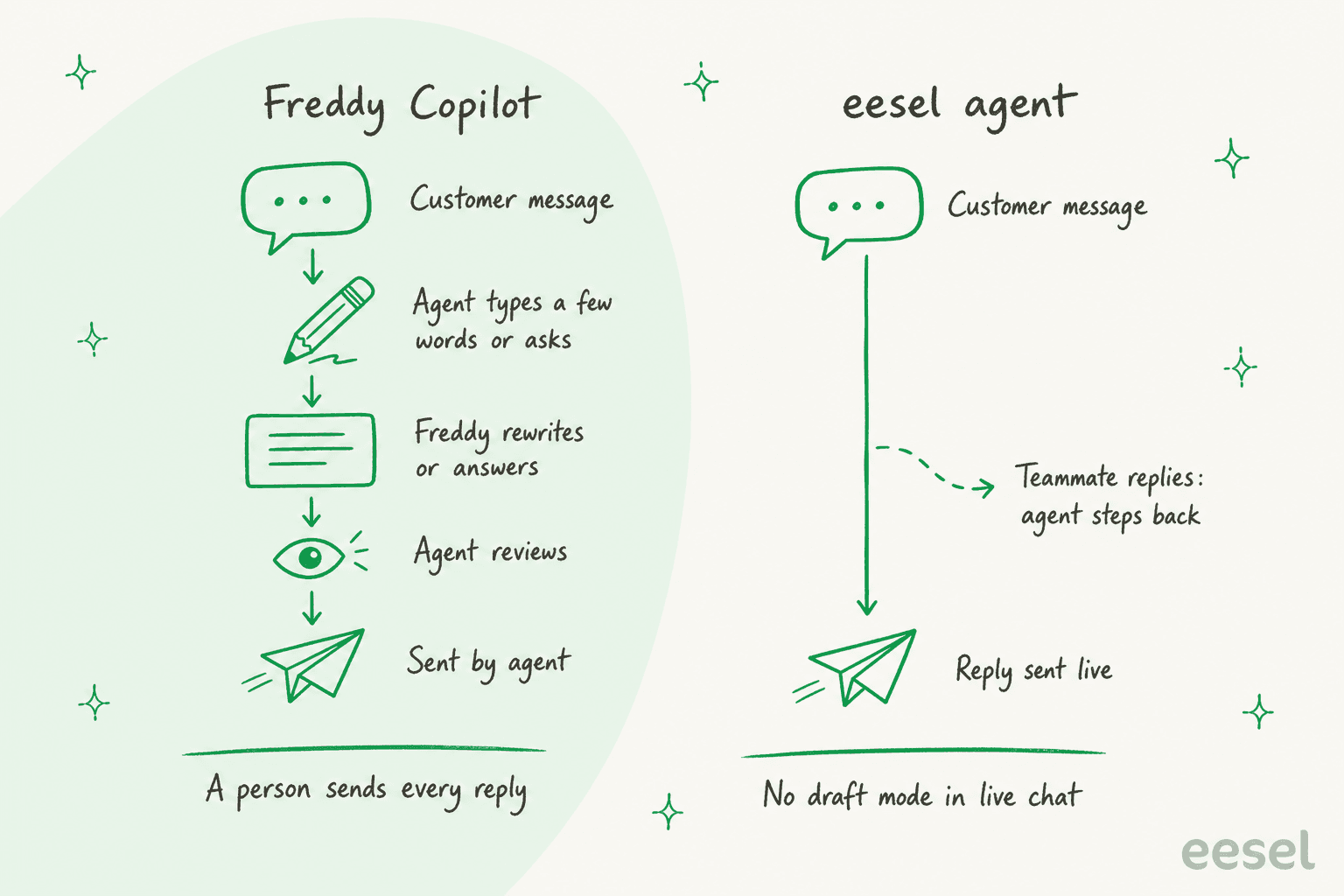
Be clear on the trade. The docs say plainly that Chat reply sends straight to the customer, there is no draft mode in live chat, and the agent cannot leave a private note. Those are real limits. The controls are on the other side: you scope the automation by topic in its Instructions, tell it to stop once a teammate replies, and watch the first chats in the Freshchat inbox. If Freshchat's own AI is on for the same topic, both reply, so switch one off per topic.
SamCart shows the pattern on the neighbouring product. It runs eesel on Freshdesk tickets and on its website chat, with separate agents for each channel, answering from about 280 help center articles. On tickets the agent replies only while no person is assigned, and steps back once a teammate picks the ticket up. I would copy that "agent first, person takes over" rule for chat, whatever tool does the answering. SamCart's chat runs on its own chat bubble, not Freshchat, so read it as the shape of the rollout.
Setup does need a Freshchat admin: the API token, the webhook saved in Freshchat and its authentication key. With the eesel CLI, a coding agent such as Claude Code or Cursor can connect Freshdesk, check the automation and ask eesel to write the live-chat instructions, but it does not replace that Freshchat form.
How do I roll out AI replies in Freshchat without surprises?
My own rule on the support queue is to change one thing at a time and keep a person within reach.
- Start Copilot on two or three agents, not the whole team. The add-on can be assigned to any number of agents.
- Pick topics, not channels. For an AI that replies live, start with one Freshchat topic whose answers sit in your help center.
- Write the stop rule first: the agent steps back once a person replies. Follow the habits in AI agent handoff and human handoff in chat.
- Keep a person in the loop on anything involving money or accounts, with approval workflows and tight agent permissions.
- Add AI guardrails and test before launch. The pre-launch test checklist applies to any AI that talks to customers.
- Watch first response time and your escalation rate for two weeks, then widen.
Try eesel next to Freshchat
If the drafting aids are enough, buy Copilot for your busiest agents and stop there. If the repeat questions are what fill your queue, test an AI helpdesk agent on one Freshchat topic. Connect Freshdesk, add Freshchat, and watch the first live chats. The free trial gives you 100 credits over 7 days with no card, and plans start at $299 a month for 500 credits, where a chat is 1 credit however long. There is no per-agent fee, and extra credits are $0.80 each if you opt into overage. Try eesel on your own chats.