

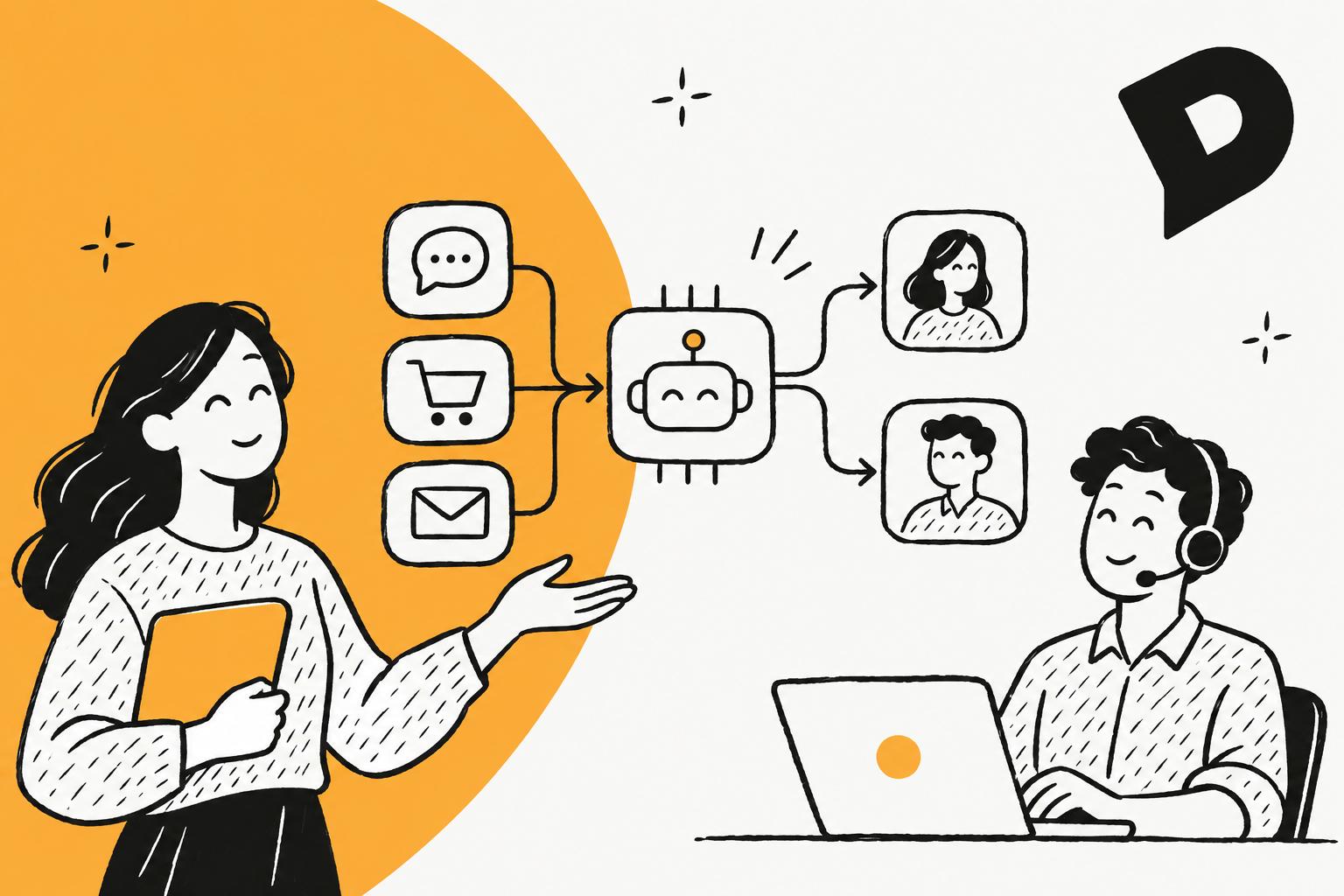
Dixa's AI conversation routing is Intent Detection, a node in email flows that matches each email to up to 10 intents per node that you describe and sends it down the best match's path, on the Professional plan at €139 per agent per month; its "Intelligent Routing" on every plan (from €49) is rules, by Dixa's own glossary. In chat, the AI routing is Mim, Dixa's AI agent, deciding to hand a conversation to a queue, at €0.40 per conversation. Everything after that (which queue goes first, which agent gets the offer) is settings you choose, not AI.
If you're still choosing a helpdesk, an AI teammate like eesel reads every ticket in Zendesk, Freshdesk, Gorgias, Help Scout and others and routes from one set of plain-language instructions. With the eesel CLI, an AI coding agent can load your routing rules and ask test questions before anything goes live, though an admin still approves the helpdesk connection.
Pick what you route on to see the Dixa feature, the plan it needs and the trap to avoid.
What does Dixa mean by AI conversation routing?
Dixa means two different things, and its own pages keep them apart. I build eesel's AI agents, and the first thing I do with any helpdesk is find where the AI actually makes a decision, because that is the only part that will surprise you in production. In Dixa, that part is small.
Dixa's Intelligent Routing glossary entry puts it plainly: "Intelligent Routing itself is rule-based, not AI-based. Dixa's AI-based routing, which uses intent and sentiment detection, is a separate product called AI Intent Detection." The same entry credits routing alone with "roughly a 20% efficiency gain" for teams moving off a shared inbox, before any AI. That is Dixa's number, not one I can check, but the point holds: most of the work is good rules.
Dixa doesn't use tickets in the usual sense. It pushes conversations to agents as offers, across phone, email, chat and messaging, so nobody cherry-picks from a list (my colleagues' Dixa review covers the rest of the product). Every conversation passes through three layers:
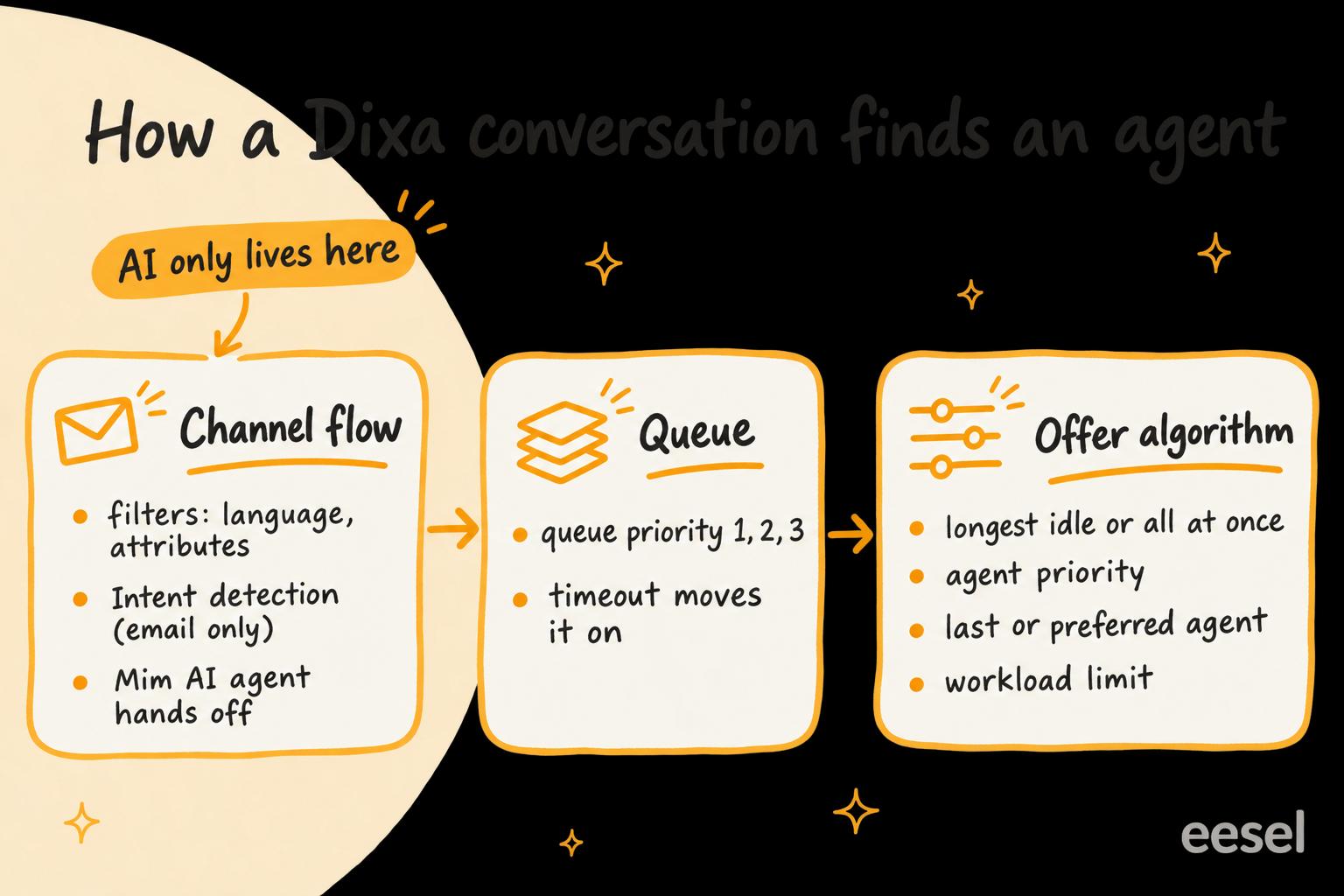
- The channel flow decides which queue a conversation lands in. This is where filters, the Intent Detection node, external data lookups and Mim sit, built in Dixa's visual flow builder.
- The queue decides what goes first. Queues have priorities and timeouts.
- The offer algorithm decides which agent gets the conversation, using one of six methods plus workload limits and "last agent" rules.
Only the first layer has any AI in it.
Which Dixa plan do you need for AI routing?
You need Professional for any AI in your routing. Dixa's pricing page lists these routing features by plan (checked 21 November 2026):
| Team | Professional | Enterprise | |
|---|---|---|---|
| Price | €49 per agent/month, billed annually | €139 per agent/month, billed annually | Custom |
| Intelligent Routing (rules) | Yes | Yes | Yes |
| Skills-based routing | No | Yes | Yes |
| Routing with external data | No | Yes | Yes |
| Intent Detection | No | Standard | Advanced |
| Queue restrictions | No | No | Yes |
| Mim AI agent | €0.40 per conversation | €0.40 per conversation | €0.40 per conversation |
The jump matters. A 15-agent team pays €735 a month on Team and €2,085 a month on Professional, both billed annually, before Mim's per-conversation charge. That €1,350 difference buys skills-based routing and external data as well as Intent Detection, so price the whole tier, not only the AI. Dixa pricing breaks the plans down further.
One more difference between the tiers: each intent's description can run to 300 characters on Professional and 1,000 on Enterprise, per Dixa's spam filter guide, which notes Professional and Enterprise were once called Ultimate and Prime.
How do you set up Intent Detection in Dixa?
You write each intent as a short description, then drop an Intent Detection node into an email flow. It is intent detection from descriptions you write: Dixa tests each email against the intents in the node and picks the best match. Here is the setup from Dixa's help article:
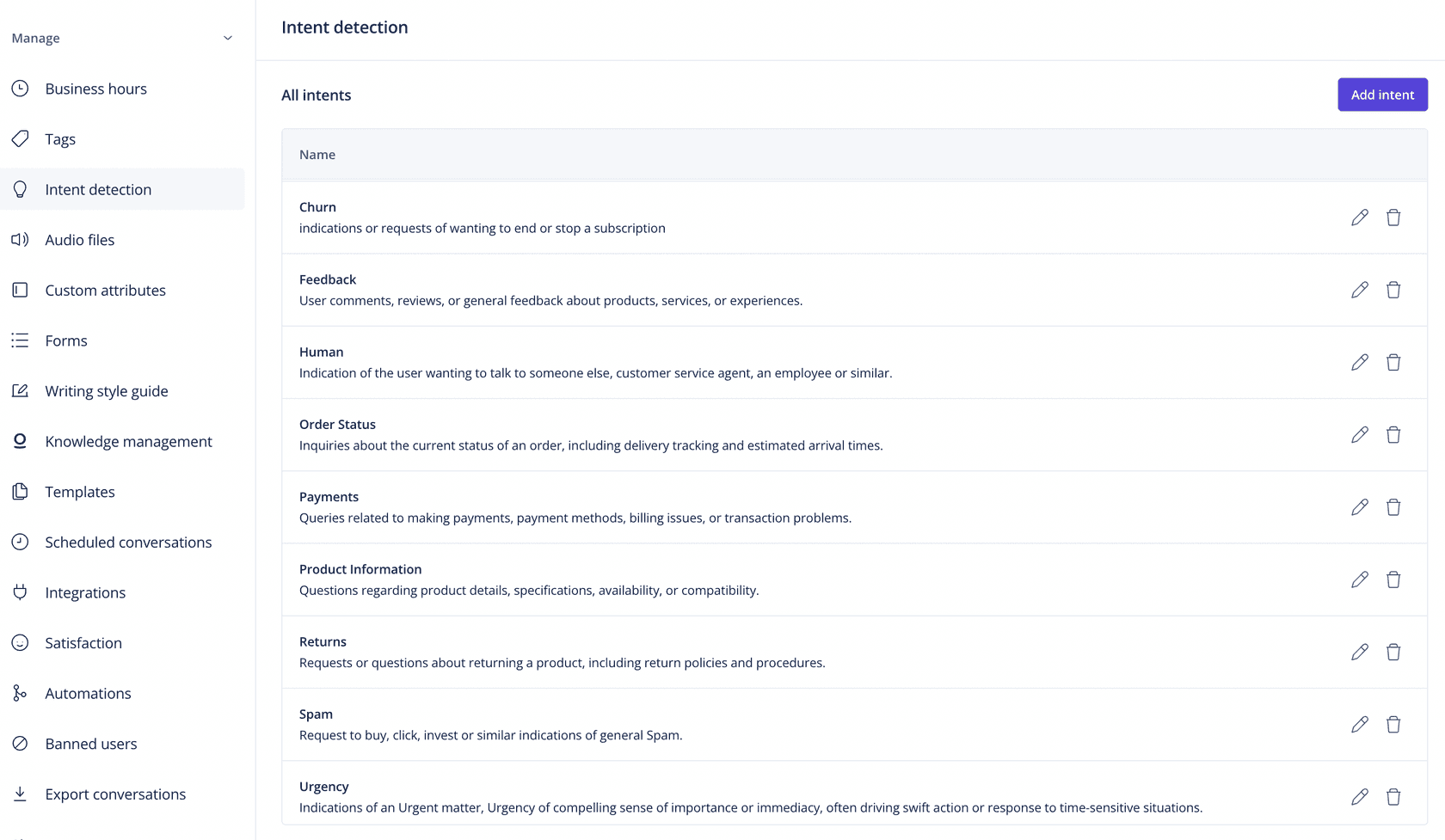
- Define your intents. Go to Settings > Intent detection and add an intent with a name (what you'll see in the flow builder) and a goal (a plain description of what to detect). Dixa's own example for order status is: "Customers asking about the current status of their order, including shipping and delivery times." Descriptions top out at 300 characters on Professional and 1,000 on Enterprise.
- Add the node to an email flow. Open Settings > Email > Edit flow, add an Intent Detection node and select up to 10 intents. Each one gets its own exit path, and a conversation that matches none takes Default.
- Route each exit. After each exit, send the conversation to a queue, tag it, or close it (for spam).
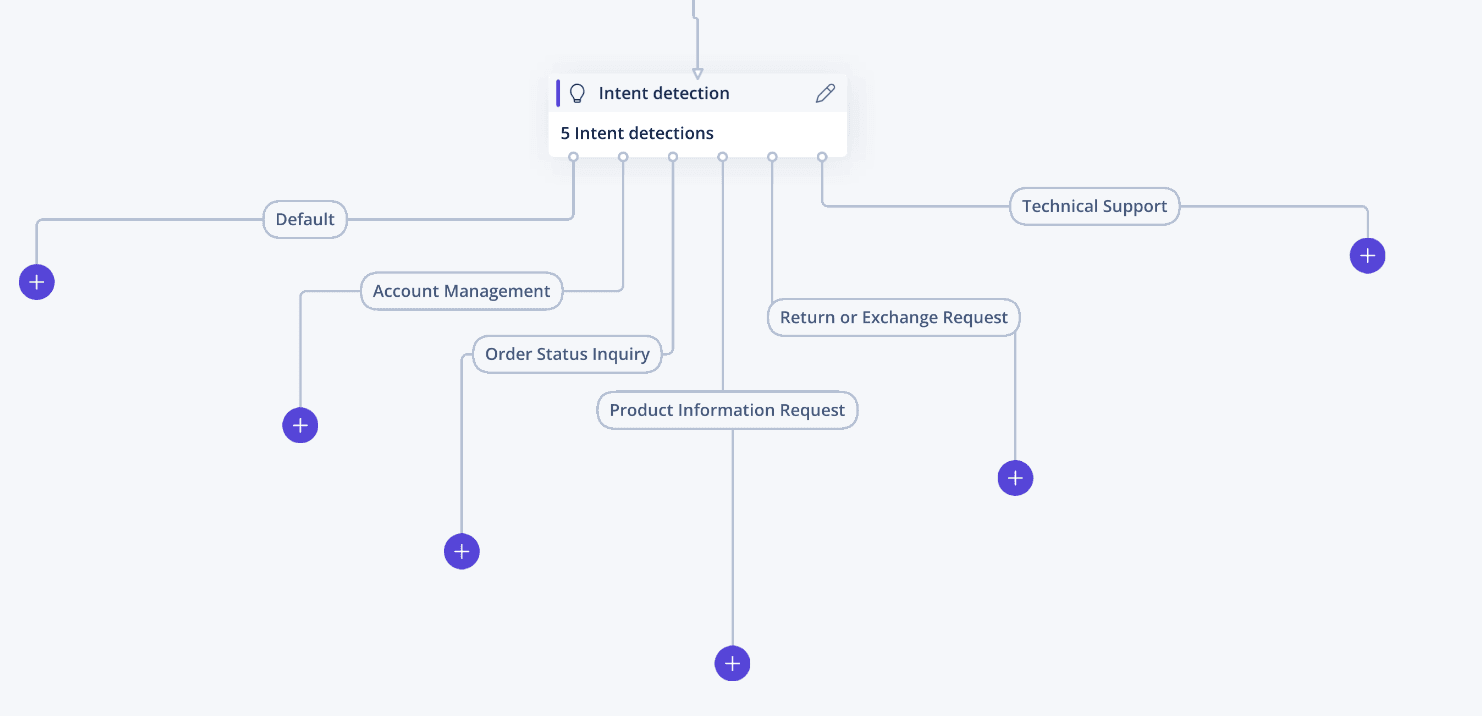
- Chain nodes for finer topics. Dixa suggests sorting into a broad category first, then a second node for the detail. Its reasoning: "When it involves AI, comparing things in relation to each other should yield better results than going one by one." Chaining is also how you get past 10 intents.
- Check the activity log. Each conversation's activity log records which intent matched, so you can see why something landed where it did.
Three limits that shape your design
Dixa's help article lists these, and each one changes how you build:
- Email only. "Currently you can only use intent detection inside email flows." Dixa's routing page says Intent Detection "reads incoming messages", but for now that means email.
- It reads the whole thread. "The intent is scanning the entire email, including previous messages." An auto-reply or "thank you" intent can match correctly once and then match again every time the customer replies to that thread. Route their matches to a low-priority queue rather than closing them.
- Subject, body and sender only. The node doesn't see the receiving address, CC, BCC or reply-to. If you route by which inbox an email arrived at, Intent Detection can't see that.
These are the same trade-offs I'd look for in any intent-based routing setup. Dixa's advice for Mim handoffs applies here too: make descriptions as different from each other as possible. The false positives guide covers how to tighten them.
How do you route chats with AI in Dixa?
You route chats with Mim handoffs, because Intent Detection doesn't run in chat flows. Mim is Dixa's AI agent, and a handoff is a tool you give it: a name and a description of when to use it. Every Mim agent starts with one, "Escalate to a human", and you add your own under the agent's Tools > Create tool > Handoff, per Dixa's handoff guide.
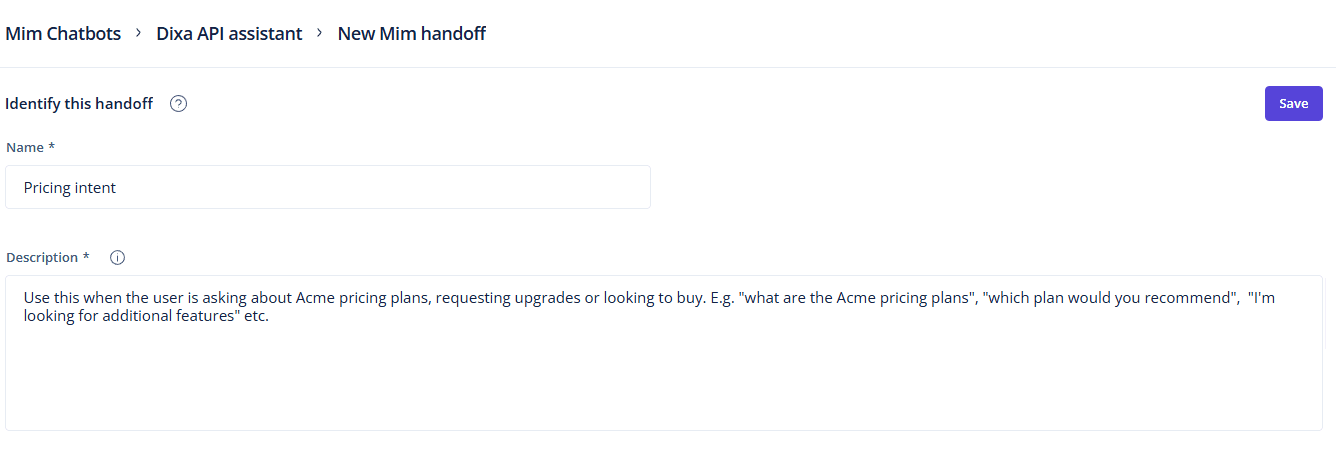
Then you choose where the conversation goes:
- Handoff to flow (the default) sends it back to the flow, which carries on from the node after Mim. Use it when the flow should decide, for example by business hours or by channel.
- Handoff to queue sends it straight to one queue, skipping the rest of the flow. Use it when one Mim agent sits in several flows and you want sales handoffs to land in the same place every time.
The trap is in handoff to flow. Dixa's guide warns: "If the path after the AI agent node doesn't lead to a queue, the conversation can end without ever reaching an agent. Mim has handed off, but nobody receives the conversation." Check every flow Mim sits in, because one agent can live in a Messenger flow and two email flows, and each needs its own route.
Each conversation Mim handles costs €0.40, whether it resolves it or hands it off, per Dixa's pricing FAQ. So AI routing in chat costs you per conversation, not per agent. Dixa AI deflection covers Mim's answering side, and the handoff best practices guide covers what a good handover carries.
How do you route by language in Dixa?
You add a Filters node on Language to an email or Messenger flow, with no AI needed. Dixa's language routing guide says language detection is automatic on email and Dixa Messenger, while contact forms and API conversations need the language set by hand. Codes follow ISO 639-1 (de, fr, da, sv), and you chain one Filters node per language. Dixa's tip: filter the low-volume languages first and leave your main language as the last one. For more on staffing several languages, see the multilingual support agent guide.
How do you route on order value or customer data?
You use the Integration block, which calls another system's API from inside the flow and branches on the answer. Dixa's external data guide gives ecommerce examples such as routing by total order size or customer lifetime value, and it works in call, email and Messenger flows. It is a Professional feature.
The block is a full HTTP client. You set the method and endpoint (Dixa's example is HubSpot's contact API looked up by the sender's email), test the request, and map fields from the response into flow variables. One rule from the guide will save you an afternoon: variable names can only use letters and numbers, and "if you use dots, hyphens or other characters, it may be that the variable is never populated, therefore breaking the flow."
For a simple VIP list, you don't need the API at all. A contact attribute set to VIP and a Filter node on it works on every channel, the same idea as VIP routing in Zendesk.
How does Dixa pick the agent?
Once a conversation is in a queue, the queue's offer algorithm picks the agent. Dixa's offers algorithm guide lists six options under Settings > Queues > Edit:
- All at once: every available agent sees it, and the first to accept gets it.
- One at a time: offered to one available agent after another, in random order.
- Longest idle: offered to the agent who has waited longest since their last conversation.
- The same three, according to agent priority: priority 1 agents (or teams) first, then priority 2.
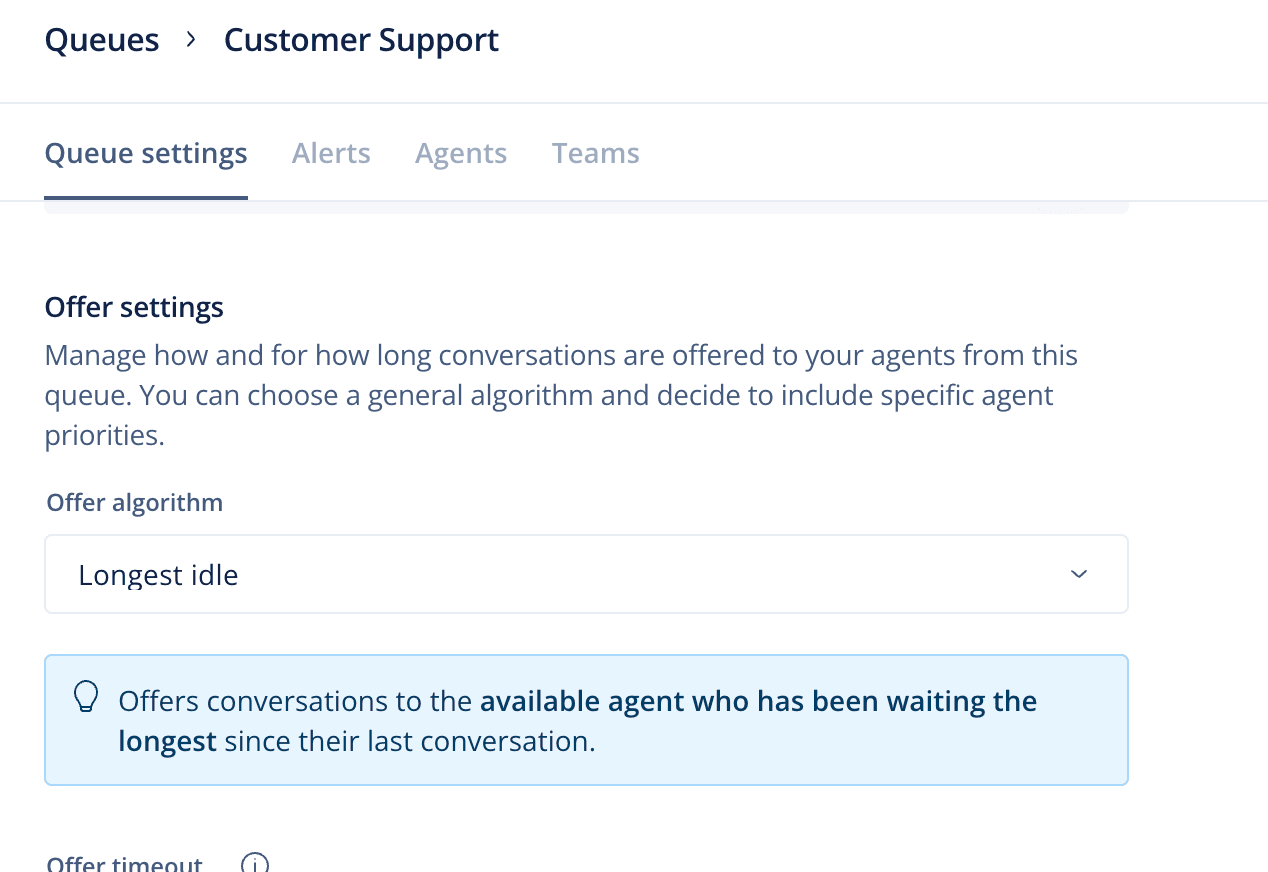
Four settings sit on top of that, per Dixa's guide to how offers are prioritized:
- Queue priority is strict. An agent in two queues always gets the priority 1 queue's conversations first, "regardless of how long the conversations have been waiting in the lower priority queues", per the queue priorities article. Queues with no priority come after all the ones that have one.
- Workload limits cap how many open conversations of each channel an agent is offered at once, such as five chats.
- Last agent and preferred agent. Last agent offers new email replies and expired follow-ups to whoever handled them. Preferred agent offers new conversations to the agent who has spent the most time with the customer, weighted toward recent conversations and counting only the customer's last 100. Each holds the conversation for a timer you set before the whole queue can take it.
- Live beats non-live. A call or chat where the customer is still connected goes before an abandoned or reopened one.
None of this is AI, and that's fine: it's predictable, and agents see the reason for a personal offer ("Last reply by you"). It is also how skills work on any plan, since Dixa offers conversations by "expertise categorized by queue structure": put agents in the queues they know. Professional's skills-based routing goes further. A G2 reviewer summed up why teams like it:
"The skill‑based routing and queue management help ensure customers are connected to the right agent quickly."

The same reviewer notes that "Language support is still restricted, which can be a challenge for multilingual teams," which is worth testing in a demo if you route across many languages.
Common mistakes with Dixa AI routing
- Expecting Intent Detection on chat. It runs in email flows only. Plan chat routing around Mim handoffs and Filter nodes.
- Closing on an auto-reply intent. Because the node reads the whole thread, a later customer reply can match the same intent and close again. Route those matches to a low-priority queue first and watch them.
- A handoff that leads nowhere. With handoff to flow, the path after Mim must reach a queue.
- Assuming the oldest conversation goes first. Queue priority wins over wait time, and a conversation transferred back to the same queue gets a fresh enqueued time.
- Simultaneous ring on. Agents with simultaneous ring get offered calls while offline, even when online agents with lower priority or a shorter idle time are available. Dixa's own advice is to turn it off.
- No default queue plan. The default queue catches conversations that don't know where to go, such as a follow-up that expires after a flow closed it. Make it a queue with agents in it.
If you're comparing how other helpdesks split the same job:
- Chat-first tools: Gladly routing, Kustomer routing, Freshchat routing
- Ticket-first tools: Gorgias tagging and routing, Re:amaze tagging and routing, Zoho Desk tagging and routing
Store teams can start from AI ticket routing for ecommerce, and the Dixa vs Re:amaze comparison sets the two side by side.
Try eesel next to Dixa's routing
If your team is on Dixa and happy with it, Intent Detection plus Mim handoffs will cover most routing, and best AI for Dixa lists what else plugs into it. eesel doesn't connect to Dixa as a helpdesk. If you're weighing Dixa alternatives, or you already run Zendesk, Freshdesk, Gorgias, Help Scout, Front, Zoho Desk or Re:amaze, eesel does the routing a different way.
eesel is an AI teammate that joins your helpdesk. You describe your routing in plain words ("refund requests over €100 go to Sam on billing, anything in German goes to Lena, chargebacks get tagged and go to Priya"), and eesel reads each new ticket and follows those instructions with an internal note saying what it saw. It learns from your past tickets and help center, and you test it against old tickets before it touches a live one.

You also decide what it may do alone. Each action can run on its own, ask a person first, or stay off, and that's set separately for your team and for customers, so it can reassign a ticket by itself and still wait for a yes before a refund (actions and approvals). The AI agent permissions guide explains why that split matters. A conversation is 1 credit, and plans start at $299 a month on eesel's pricing page.