What "AI for Dixa" actually means
Before ranking anything, it is worth being clear about what you are actually shopping for, because "AI for Dixa" hides two very different decisions.
I have spent the last few years putting AI agents on live support queues, including one customer running over 100,000 German-language tickets a month fully automated, so the first thing I do with any helpdesk is figure out how its AI is wired in. With Dixa, there are two doors.
Door one is Dixa's own AI. Mim is the customer-facing agent and Co-Pilot is the agent-assist layer, and both are built right into the Dixa workspace so customer history, routing, and order context carry over whether a bot or a human is replying. Door two is everyone else: Dixa runs an open integrations directory and exposes a REST API plus a dedicated "third-party AI agents" admin setting, so outside agents can layer on top. That openness is a genuine point in Dixa's favour, and not something every helpdesk offers.
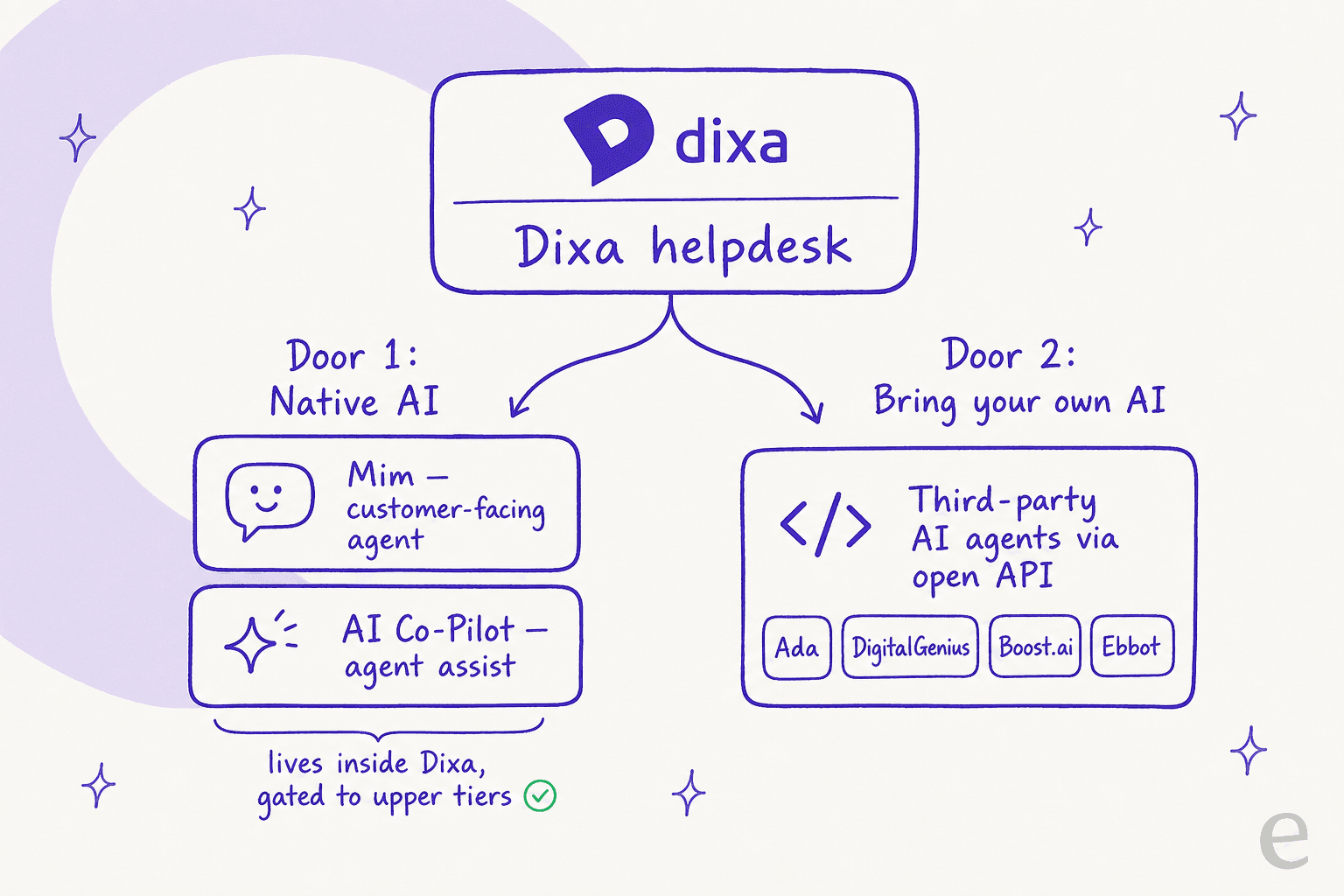
The reason this matters: the door you pick decides your lock-in. Native AI is the smoothest experience but it only works if your whole stack lives on Dixa. A partner agent keeps your options a little more open. And the broader question, which I will come back to, is whether you want your AI tied to any single helpdesk in the first place.
How I picked
This is not a spec-sheet recital. I went through each tool's own product pages, docs, and pricing, captured the live UI, and read what Dixa's own integration listings say each partner does. Where a vendor only publishes self-reported numbers, I have flagged them as vendor-reported rather than dressing them up as independent tests. And since eesel is on this list, I have been explicit about its limitation with Dixa rather than burying it.
The best AI for Dixa at a glance
| Tool | Best for | How it connects to Dixa | Public pricing? | Setup |
|---|---|---|---|---|
| eesel AI | Keeping AI portable across helpdesks | Not natively (no Dixa connector yet) | Yes, usage-based from $0.40/ticket | Minutes, self-serve |
| Dixa Mim | All-in Dixa ecommerce brands | Native, built in | No, add-on quoted on a demo | Days to 2 weeks |
| Dixa AI Co-Pilot | Keeping humans in the loop | Native, built in | No, packaged with the platform | Included, near-instant |
| Ada | Large enterprises, high volume | Partner integration | No, enterprise-gated | Sales-led |
| DigitalGenius | Ecommerce resolution at scale | Partner, no-code | No, demo-gated | A couple of weeks |
| Boost.ai | Regulated industries needing control | Partner integration | No, ~$50k/yr quoted | Sales-led |
| Ebbot | EU-compliance-conscious chat teams | Partner integration | No, demo-gated | Sales-led |
| My AskAI | Cheap, fast, SMB self-serve | Via API token / Zapier | Yes, from $199/mo | Under an hour |
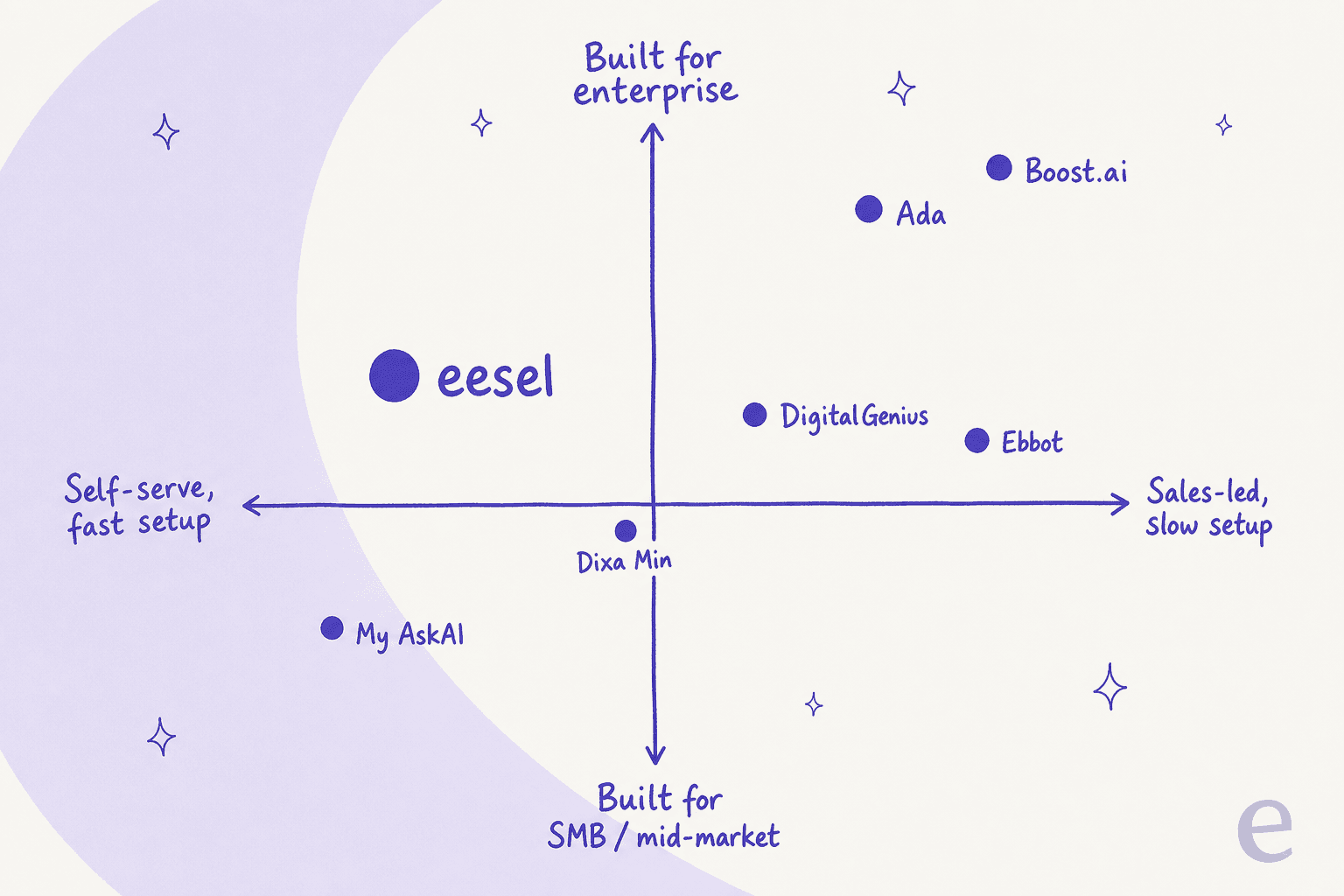
A quick map of where these land, because "enterprise and slow" versus "self-serve and fast" is the split that decides most shortlists:
1. eesel AI
Best for: teams that want one AI agent they can test before trusting, with pricing they can forecast, and who would rather not weld their AI to a single helpdesk.
Let me get the ceiling and the caveat out of the way first, because that is the honest way to rank our own tool here. eesel does not have a native Dixa connector today. We integrate with Zendesk, Freshdesk, Gorgias, Front, Help Scout, HubSpot, Salesforce and 100+ other tools, and Dixa is not one of them yet. So if you are firmly committed to running everything inside Dixa, skip to Mim below; it will serve you better.
So why include it at all? Because the most useful question a lot of Dixa shoppers can ask is the one nobody on a vendor demo will ask for them: should my AI live inside one helpdesk, or sit above the stack so I can move? eesel is built for the second answer. You point it at your knowledge (docs, past tickets, wikis, websites), brief it in plain language, and it works the helpdesk you already run rather than asking you to migrate everything onto it.
The reason I would steer a careful buyer here is the trust ramp. We learned the hard way that a confident-sounding bot is worse than no bot. As one DTC supplements CX lead put it to us:
"The AI will never be able to answer 100% of the questions... I need an AI who is only handling the tickets that it's confident to handle and all the other ones, leave them alone."
Anonymized customer, eesel customer research
That is exactly what confidence-based routing does, and why eesel lets you simulate the agent on thousands of your past tickets before a single live reply goes out. On the proof side, Gridwise saw eesel resolve 73% of their tier-1 requests in the first month, with results showing up during a 7-day trial.

Pros: transparent usage-based pricing with no per-seat fee, a genuine simulation mode, confidence-based routing, and 100+ integrations so the same agent can cover more than one tool.
Cons: no native Dixa integration today, which is the dealbreaker if you are staying inside Dixa. Pricing at very high volume is the cost most teams end up watching.
Pricing: free to start, then $0.40 per regular task (a resolved ticket or chat), $4 per heavy task like a blog draft, with an Enterprise tier at $1,000/month plus usage. No per-agent fee.
Our take: pick eesel if you are questioning whether to commit your whole operation to Dixa's native-only AI, or if Dixa is one of several helpdesks you run. If you are all-in on Dixa, it is not your tool, and I would rather tell you that now than after a sales call.
2. Dixa Mim
Best for: ecommerce brands that have already chosen Dixa and want a customer-facing agent that resolves rather than deflects.
If you are committed to Dixa, Mim is the obvious starting point, and it is a genuinely good answer for the right team. Dixa is careful to call it an "AI agent" rather than a chatbot, and the distinction is the whole pitch: where an old bot matches keywords and points you at an FAQ, Mim is built to "read the message, check your knowledge base and policies, pull relevant order or account data, decide what should happen, and do it."
For ecommerce that "resolve, not deflect" framing is the right one. Mim connects to Shopify and Magento to pull live order data, so it can check an actual order, start a return against your policy, update a shipping address, or cancel an order, which Dixa notes is the bulk of ecommerce contact volume. It works across chat, email, WhatsApp, Messenger, and SMS from one setup, reads PDFs a customer sends mid-chat, and runs a promise-detection system that checks whether Mim actually did what it said it would and flags the gaps.
Dixa cites strong vendor-reported outcomes: Oliver Bonas at 90% CSAT and 2x productivity per hour, and Stayforlong cutting email backlog by 50%. Treat those as vendor numbers, but the resolve-first design behind them is sound.
Pros: native to the workspace with no integration seam, real end-to-end ecommerce actions, omnichannel from one config, and promise-detection as a reliability check.
Cons: it only lives inside Dixa, so getting it means committing your whole stack. The one control I want and do not see spelled out is true confidence-based routing, where the agent only takes the tickets it is sure about. And the pricing is opaque (more on that below).
Pricing: sold as a flat-rate add-on on top of Dixa seats, scoped on a demo call rather than published. Dixa's pitch is that flat-rate AI does not balloon with ticket volume the way per-resolution pricing does, which is a fair point.
Our take: the strongest choice if you are already on Dixa and sell physical products. Just go in knowing the AI is a sales-gated add-on, and push hard on what happens to low-confidence tickets before you flip it live.
3. Dixa AI Co-Pilot
Best for: teams that want AI speeding up human agents rather than replacing them.
Not every team is ready to put a bot in front of customers, and that is the gap Co-Pilot fills. It is Dixa's agent-assist layer: "AI that works alongside your team, not instead of them." The customer is still talking to a person, and Co-Pilot helps that person move faster.
In practice that means Smart Drafts that write a full reply from your knowledge base, suggested responses as agents type, auto-tagging, instant summaries of long threads, and two-way translation so an agent can answer in any language. The human stays in control throughout: Co-Pilot suggests, the agent picks, edits, or ignores, and nothing reaches the customer unreviewed. Dixa says new agents get the same knowledge as veterans from their first conversation, and points to Celebrate Company cutting onboarding from eight weeks to two.
The standout detail: Dixa says Co-Pilot is included as part of the platform, not gated behind a higher tier, and works across multiple knowledge bases, which it frames as a dig at rivals that lock agent-assist behind upgrades.
Pros: keeps humans firmly in the loop, included rather than a paid add-on, strong onboarding and translation story, multi-knowledge-base support for multi-brand teams.
Cons: suggestion quality lives and dies by your knowledge base, so a thin KB means thin drafts. And it speeds up humans rather than removing volume, so it is not a deflection play on its own.
Pricing: described as included in the Dixa platform, so it rides on your seat pricing rather than a separate line item.
Our take: the safe, sensible first step into AI on Dixa, especially for teams nervous about auto-replies. Pair it with a clean knowledge base and it earns its keep on day one.
4. Ada
Best for: large enterprises with very high conversation volume that want a standalone AI layer, not a helpdesk feature.
Ada is one of the better-funded names in this category, and it is upfront that it plays at the top end. It brands its category as "Agentic Customer Experience" and sells a standalone AI agent layer that sits on top of helpdesks rather than being one. The reason it is a real Dixa option is the deep partnership Dixa highlights: this is a co-sell relationship with an implementation playbook, not a bolt-on connector.
The platform is built around a Reasoning Engine for multi-LLM orchestration, an omnichannel Conversation Hub, and a Performance Center for measuring and coaching the agent. It is serious, capable software. The honest gate is volume: Ada's own pricing page states it is "a great fit for companies with at least 300,000 annual customer service conversations." If you are below that, Ada is not aiming at you.
Pros: mature, well-funded platform with strong orchestration and analytics, a real co-sell partnership with Dixa, and a track record with big consumer brands.
Cons: explicitly enterprise-gated by volume, fully sales-led with no public pricing, and overkill (and over-budget) for a mid-market team.
Pricing: not public, quoted on enterprise terms after a qualification call.
Our take: a strong pick if you are a high-volume enterprise already on Dixa and want a dedicated AI layer with services wrapped around it. For everyone smaller, it is the wrong weight class.
5. DigitalGenius
Best for: ecommerce and retail teams that want pre-built workflows for returns, WISMO, and order edits.
DigitalGenius has been doing ecommerce support AI for over a decade, and that focus shows. It pitches itself as "the code-free CX platform for ecommerce powered by AI" and, like Dixa, leans hard on resolution over deflection: actually processing the return or order change, not just answering about it.
The interesting bit is Genius Flows: pre-built, best-practice ecommerce workflows you connect your stack to, so you are not building common journeys from scratch. On Dixa, it sits in the "Chatbots & AI Automation" directory as a no-code resolution layer with 50+ pre-built use cases and multi-channel, multi-language launch. Vendor-reported results are punchy: On cut customer wait times by 93%, and air up reports over 600% ROI. Treat those as customer testimonials rather than independent benchmarks.
Pros: deep, ecommerce-specific use cases out of the box, no-code setup, and free custom integrations into your existing stack.
Cons: narrow by design (if you are not retail or ecommerce, the pre-built flows are wasted), and pricing is fully sales-gated.
Pricing: not public. The pricing page redirects to "book a demo," with no plans or per-unit rates shown.
Our take: a genuinely good fit for a Dixa ecommerce brand that wants ready-made return and WISMO automation and does not want to build flows by hand. Just budget for a sales process to find the price.
6. Boost.ai
Best for: banks, insurers, and other regulated teams that need governance and control over what the AI can say.
Boost.ai is the pick when "can I prove the AI stays in bounds" matters more than "can I launch by Friday." It is a no-code conversational and agentic platform aimed squarely at regulated industries, and it has the credentials to back the positioning: a Leader in the 2025 Gartner Magic Quadrant for Conversational AI Platforms, its third year running.
Its hybrid architecture pairs rule-based intent flows with generative responses, which Boost frames as "autonomy where it's safe, control where it's critical." You get input and output guardrails, persona-based testing to probe for jailbreaks, and ISO 27001 and 27701 certification. On Dixa, virtual agents are built inside the workspace using Boost's self-learning AI, with smart routing that qualifies and sends customers to the right specialist, and background smart-reply suggestions for human agents.
Pros: enterprise-grade guardrails and testing, strong analyst recognition, chat and voice in one platform, and a real Dixa integration with smart routing.
Cons: built for large, often regulated buyers, so it is heavy and expensive for a typical mid-market team. Pricing is sales-gated, with third-party listings putting it around $50,000/year.
Pricing: not public; quote-based. Both /pricing URLs 404, consistent with its enterprise sales motion.
Our take: the right answer for a regulated enterprise on Dixa that has to be able to audit and constrain its AI. For a small ecommerce team, the governance you are paying for is governance you do not need.
7. Ebbot
Best for: European teams that want chat automation with EU AI Act compliance front and centre.
Ebbot is the Nordic option, and it has leaned into that identity hard. It is a Sweden-based platform that rebranded in 2025 "from a chatbot provider into a full-scale AI partner for agentic service automation," and its marketing makes EU AI Act compliance and data security a central selling point rather than fine print.
The product spans a Chat agent, Email agent, and AI Insights, all built on its own model marketed as EbbotGPT, with 100+ languages, RAG-grounded answers, and tool calling via MCP. On Dixa it sits in the "Chatbots & AI Automation" directory as a generative-AI layer that resolves FAQs and routine chats autonomously, then hands off to Dixa for human handling. As one Bredband2 service lead put it about choosing Ebbot:
"We evaluated seven to eight different AI vendors, but only Ebbot had the technical flexibility and ease of use we were looking for."
Anders Ohlin, Head of Service, Bredband2, via Ebbot
Pros: strong EU-compliance and data-residency story, its own model, native human handover, and a customer base of recognisable European brands.
Cons: chat-first rather than a full omnichannel resolution suite, no public pricing, and a smaller global footprint if you are outside Europe.
Pricing: not public; every path leads to a demo.
Our take: a smart shortlist entry for a European Dixa team where data governance is a board-level concern. If EU compliance is not your top filter, the field is wider.
8. My AskAI
Best for: SMB and mid-market teams that want cheap, fast AI deflection and can live with a developer-ish setup.
My AskAI is the budget-friendly, get-going-today option, and it does not hide the ball on price. The homepage pitch is blunt: "Looking for more affordable AI customer service? Zendesk, Intercom or Freshdesk overcharging you?" It imports your help centre, SOPs, and past tickets, then drafts and sends replies inside your existing helpdesk, with a four-phase rollout from internal-note drafts to full auto-replies.
Here is the caveat that matters for this list: My AskAI has no native, listed Dixa connector either. Its Dixa landing page is a templated marketing page, and Dixa is not in its native helpdesk list (Zendesk, Intercom, Freshchat, Freshdesk, Gorgias, HubSpot). A Dixa team connects through the developer route: My AskAI's Chat API authenticated with an API key, or via Zapier. API access is a $49/mo add-on on the Pro plan and included on higher tiers. Vendor-reported deflection is high, with Freecash citing 82% of conversations resolved, but again, that is a customer testimonial.
Pros: genuinely cheap, fast self-serve setup, public pricing, a 30-day free trial, and multiple test modes before you trust it live.
Cons: no turnkey Dixa app, so you need a developer or Zapier to wire it up. Lighter on deep ecommerce actions than the specialists, and resolution stats are vendor-published.
Pricing: public and low. Pro is $199/mo (1,000 tickets, $0.12 per extra), Scale is $499/mo (2,000 tickets, $0.10 per extra, adds SOC-2 Type II), and Enterprise starts at $999/mo, with 33% off annual.
Our take: the value pick for a smaller Dixa team that wants to start cheap and is comfortable with an API-token setup. If you want a one-click Dixa app, this is not it.
The thing nobody on a demo will tell you: who hides the price
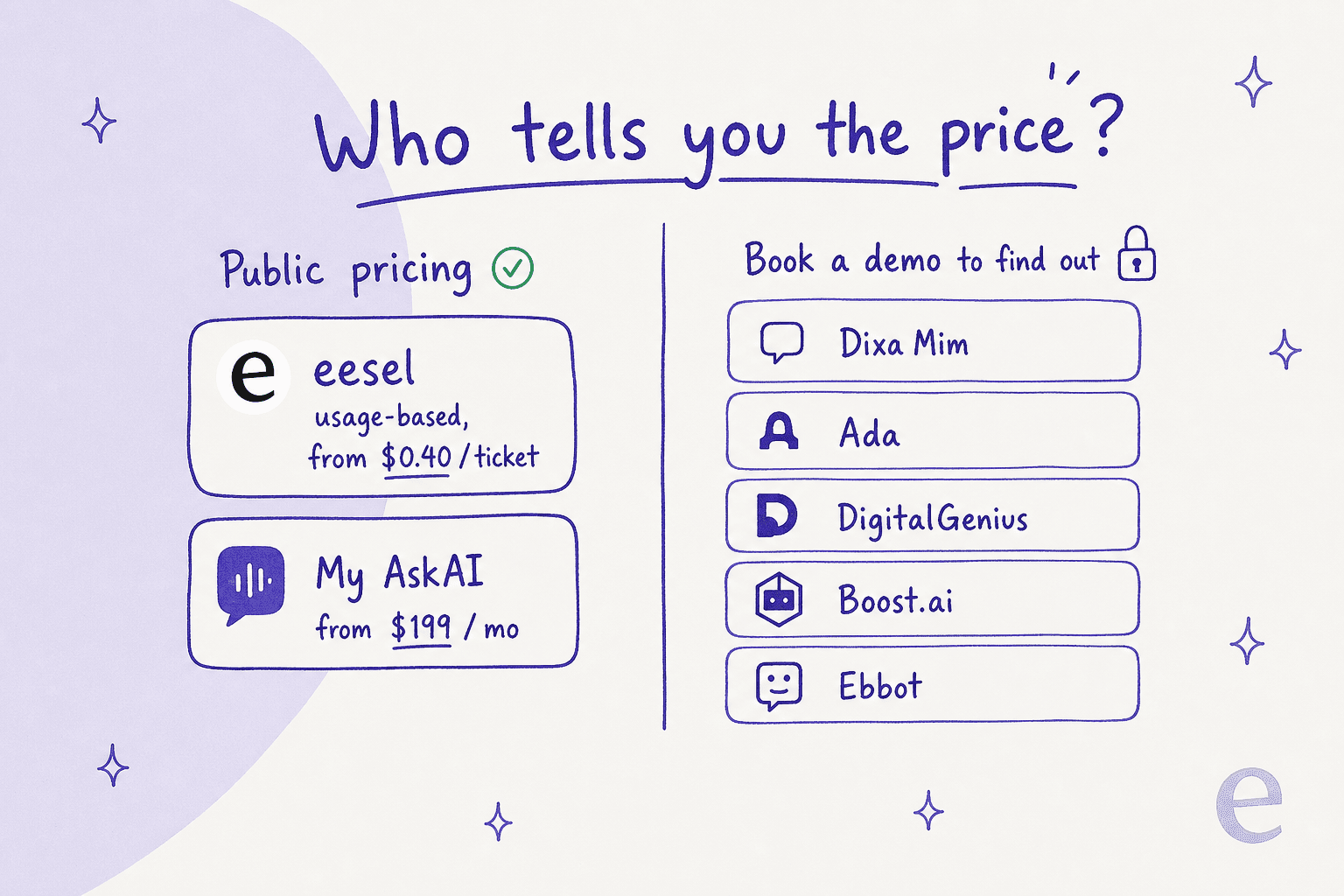
Walk back through the list and a pattern jumps out. Five of the eight options will not tell you what they cost until you have sat through a sales call. That is not automatically a red flag, but it does make budgeting AI for Dixa harder than it should be, and it is worth seeing plainly:
This matters more with Dixa than with most platforms, because Dixa's commercial reputation is its weakest spot. Its product scores fine (4.2/5 across 391 G2 reviews), but the harsh reviews cluster on contracts and billing, not the software. One printing-company manager described a routine test triggering a forced upgrade:
"I feel I have been tricked into an upgrade, and a new 2-year binding period, despite our previous commitment... we have now found another solution and closed our connection to Dixa, even though we still have to pay a long time for software that we can not use."
Rune F., 2/5 review, via Capterra

A separate 2026 pricing review notes Dixa "gates its most powerful AI and automation features behind its Ultimate and Prime tiers" and offers no free trial to de-risk the commitment. None of that makes Dixa a bad platform, lots of brands are happy on it, but it does mean you should pin down the full AI cost, the contract length, and the renewal terms before you sign, whichever agent you choose. If predictable numbers up front matter to you, the two with public pricing have an obvious edge.
How to actually choose
Strip away the logos and the decision comes down to three questions.
First, how committed are you to Dixa? If your whole operation is on it and you sell physical products, Mim is the smoothest path and Co-Pilot is the safe on-ramp. There is no integration seam to fight.
Second, how big and how regulated are you? Very high volume points to Ada; regulated and audit-heavy points to Boost.ai; ecommerce-specific automation points to DigitalGenius; EU data governance points to Ebbot; and a tight budget points to My AskAI.
Third, and this is the one most buyers skip: do you actually want your AI locked inside one helpdesk? Native AI is wonderful right up until you want to switch helpdesks, run a second one, or take your trained agent with you. If that portability matters, a helpdesk-agnostic agent like eesel is the answer, with the standing caveat that it does not connect to Dixa today. Whatever you pick, simulate it on your real past tickets first and insist on confidence-based control so the agent leaves the tickets it is unsure about alone. That single habit is the difference between an agent you trust on autopilot and one you babysit.
Try eesel
eesel is the AI agent for teams that would rather not tie their automation to a single helpdesk. You brief it in plain language, point it at your knowledge and past tickets, and it works inside the tools you already run, from Zendesk and Freshdesk to Slack and email. The differentiator I would point a careful buyer to is the simulation mode: you can run the agent against thousands of your historical tickets and see its real resolution rate and answers before it ever replies to a customer, then ramp it up with confidence-based routing so it only handles what it is sure about.
One last honest note, because it is the whole theme of this post: eesel does not integrate with Dixa yet. If you are staying on Dixa, Mim is your tool. But if you are weighing whether to commit, or you run more than one helpdesk, start a free eesel trial and simulate it on your own tickets before you decide. Try eesel.
Frequently Asked Questions
What is the best AI for Dixa in 2026?
Does Dixa have its own AI agent?
How much does AI for Dixa cost?
Can I add a third-party AI agent to Dixa?
Does eesel integrate with Dixa?
Will Dixa's AI hallucinate or give wrong answers?


Article by
Riellvriany Indriawan
Riell is a designer and writer at eesel AI with about two years of experience researching CX platforms, AI chatbots, and helpdesk software. She combines her design background with a sharp eye for how these tools actually look and feel in practice — making her comparisons unusually visual and user-focused.