

First, a note on where I'm coming from
I build integrations and AI features for a living, so my instinct with any "add AI to X" project is to ignore the demo and ask what the thing actually does once real tickets hit it. I have watched confident-sounding AI give confidently wrong answers on live support queues, which is the whole reason our team now simulates every rollout against historical tickets before it touches a customer. I mention this because it is the exact failure mode ServiceNow admins keep hitting with Now Assist, and it shapes every recommendation below.
ServiceNow is an excellent platform of record. It runs IT, HR, and customer workflows for a huge chunk of the Fortune 500, and its workflow engine is deservedly a Gartner Magic Quadrant Leader. None of what follows is a knock on that. It is about what happens specifically when you bolt AI onto it.
What "adding AI to ServiceNow" actually means in 2026
There isn't one AI toggle in ServiceNow. There's a stack, and it helps to see the layers before you touch anything.
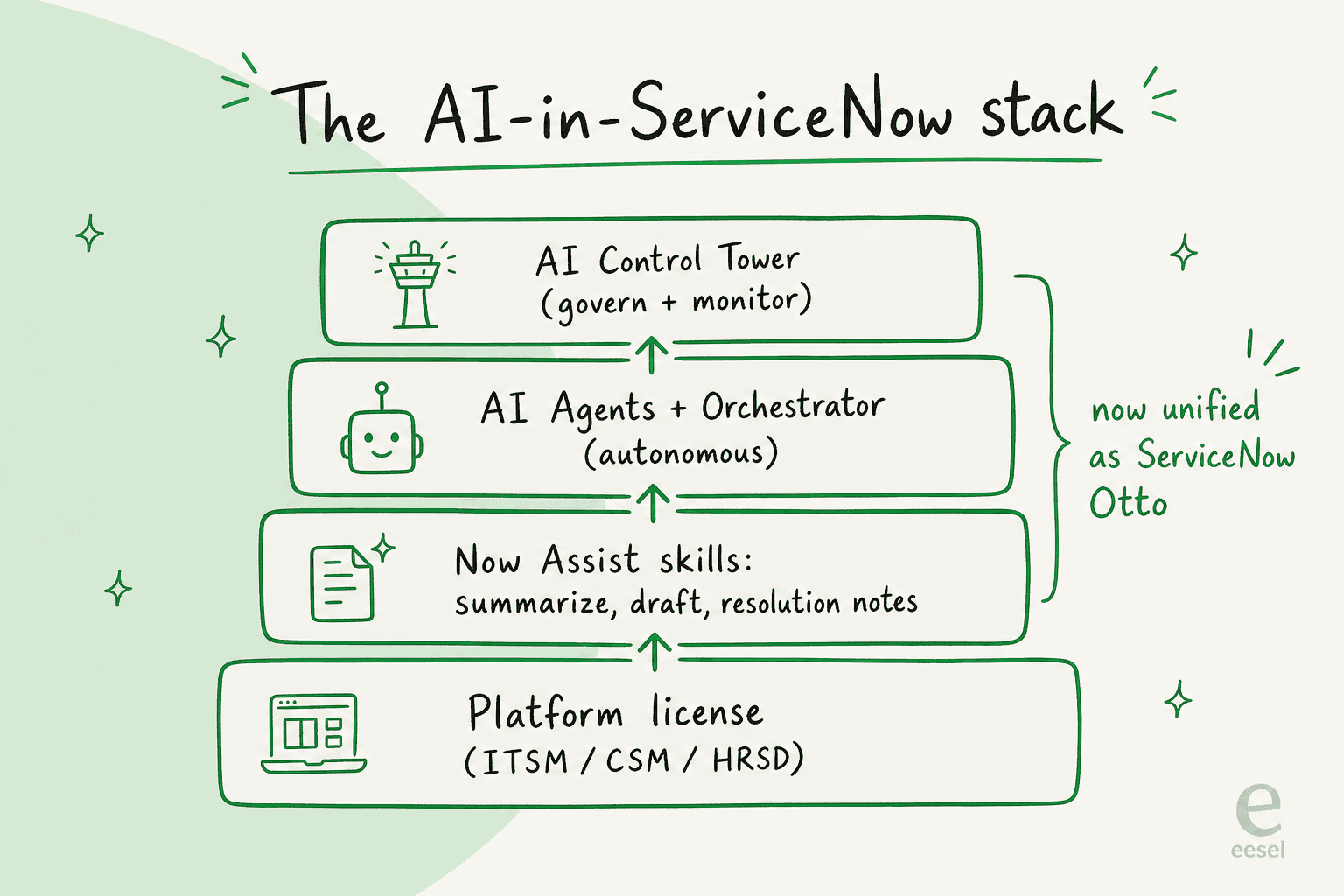
At the base is your platform license, the ITSM, CSM, or HRSD product you already pay for. Sitting inside those workflows is Now Assist, the set of generative skills: incident and case summarization, resolution-note drafting, reply suggestions, and knowledge generation. Above that is the newer AI Agents layer, autonomous agents that act rather than assist, coordinated by an AI Agent Orchestrator. Governing the whole thing is AI Control Tower, a central hub to monitor and govern every AI running on the platform.
The big 2026 change: ServiceNow is reimagining Now Assist, the acquired Moveworks conversational AI, and its "AI Experience" into one unified experience called ServiceNow Otto. ServiceNow is explicit that this is more than a rename, describing it as "a fundamental shift in the experience" rather than Now Assist with a new label. You will see both names in the wild right now: "Now Assist" still appears across the current ITSM packaging and pricing, while "Otto" is the direction of travel. For the purposes of adding AI today, treat them as the same thing.
Before you start: the three prerequisites nobody mentions
1. You need the right license tier
Now Assist has never been a standalone product. A ServiceNow Community answer on the licensing question is blunt: "Yes Now Assist License is separate," and it requires an underlying ITSM, CSM, HRSD, or Creator subscription first.
Which tier you need depends on when you signed. In the legacy model, Now Assist was unlocked by upgrading to a "Plus" SKU: the Now Assist FAQs tell admins to "ensure that the instance is entitled to a Pro Plus/Enterprise Plus SKU." In April 2026, ServiceNow "completely retired the legacy Standard, Professional, and Enterprise structures" in favour of three AI-native tiers, with Now Assist bundled into each:
| Tier (2026) | Positioning | What the AI allocation covers |
|---|---|---|
| Foundation | Entry | Baseline Now Assist allocation bundled in |
| Advanced | Mid | Larger Now Assist allocation; adds AI Voice Agents |
| Prime | Top | Roughly doubles the Advanced consumption allocation; adds custom AI skills and autonomous AI Agents, governed by AI Control Tower |
The practical takeaway: the fully autonomous agents everyone actually wants sit at the Prime tier. The assistive skills (summaries, drafts) come lower down.
2. Your data has to be clean
This is the one that sinks rollouts. Now Assist grounds its answers in your knowledge base and CMDB, and if those are messy, the AI inherits the mess. It is the single most repeated theme among ServiceNow admins, and I will let them say it in the honesty section below. For now: budget real time for knowledge-base cleanup before you expect good output.
3. Someone has to own the "assists" budget
Now Assist is metered. You are not just buying seats, you are buying consumption, and someone needs to watch it. More on the mechanics under cost.
How to add AI to ServiceNow, step by step
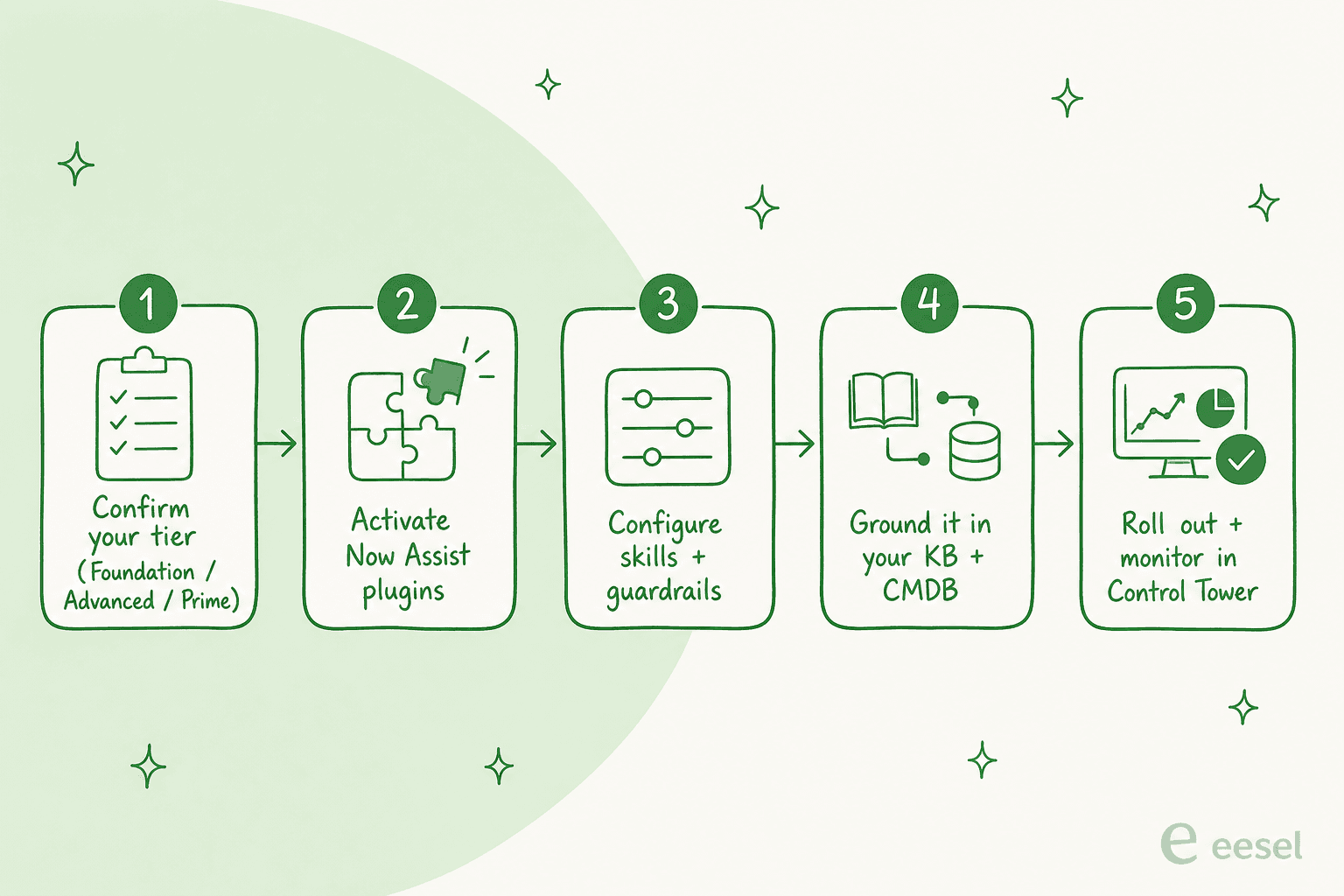
Step 1: Confirm your entitlement
Before anything, check that your instance is entitled to Now Assist. If you are on a pre-2026 contract, that means a Pro Plus or Enterprise Plus SKU; on the current model, a tier (Foundation, Advanced, or Prime) that includes the AI capability you want. If it isn't there, this is a procurement conversation with your account manager, not a config task, because ServiceNow keeps licensing details off the public site.
Step 2: Activate the Now Assist plugins
Once entitled, an admin activates the Now Assist plugins for the relevant workflow (Now Assist for ITSM, for CSM, and so on) and connects the platform's generative-AI backend. ServiceNow is model-flexible here, letting you ground large language models from providers like OpenAI and Anthropic, or bring your own, rather than being locked to a single model.
Step 3: Configure the skills and guardrails
Now Assist ships as a set of skills, and you enable and scope the ones you need per workflow. For ITSM, the core agent-facing skills are incident summarization, solution suggestions, and response drafting. You also decide which roles see which skills, and, on the Prime tier, set guardrails for the autonomous agents through AI Agent Studio. This is where most of the real project time goes.
Step 4: Ground it in your knowledge and CMDB
Point Now Assist at your knowledge articles and connect AI Search so the generative skills retrieve from the right sources. For IT workflows, the CMDB matters as much as the help center, because routing and resolution logic lean on accurate configuration data. This step is where the "clean data" prerequisite gets real: skip it and the summaries and suggestions come back generic or wrong.
Step 5: Roll out Virtual Agent or AI Agents, then monitor
With skills grounded, you expose the front door. That might be Virtual Agent as a self-service chatbot across portal, Teams, and Slack, or, on Prime, the autonomous L1 Service Desk AI Specialist that aims to resolve routine incidents end to end. Then you watch it in AI Control Tower, which is also where you keep an eye on assist consumption and agent behaviour. Do not treat go-live as done; treat it as the start of tuning, because your resolution rate on day one is rarely your rate on day 90.
ITSM vs CSM: same engine, different front door
Most of this guide applies whether you are adding AI to internal IT (ITSM) or external customer service (CSM), because both run on the same Now Assist engine and the same Foundation/Advanced/Prime packaging.
The difference is the audience and the stakes. On the ITSM side, the AI is answering employees, and a wrong answer costs an annoyed colleague and a re-opened IT help desk ticket. On the CSM side, it is answering your customers, and a wrong answer costs trust or a refund. That raises the bar for grounding and testing before you let anything customer-facing run autonomously, which loops back to the same lesson: validate against real tickets first. If you are weighing ServiceNow's ITSM AI against other tools, we go deeper in our AI for ITSM tools comparison, and there's a parallel look at Jira Service Management's AI.
What it actually costs
Here is the part that surprises people. ServiceNow publishes no list prices for Now Assist, none. The dedicated Now Assist pricing page now returns a "Page not found", and the product page blocks automated pricing lookups. Every number is custom-quoted by an account team, usually under NDA.
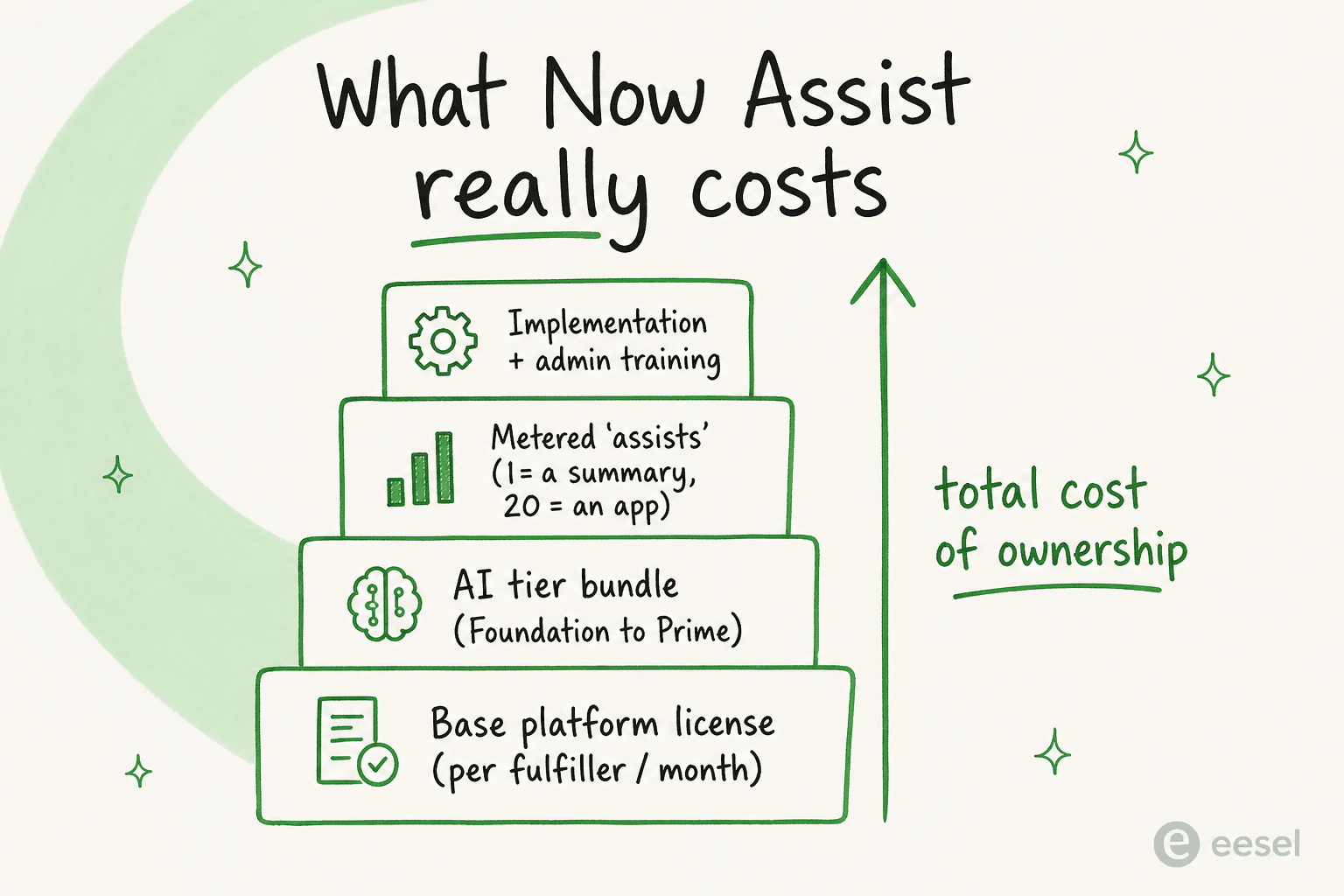
What we can say, from ServiceNow's own community documentation and from users, is how the cost is structured:
- A base platform license, per fulfiller, per month. ServiceNow prices by user type, charging the headline rate for "fulfillers" who work the ticketing system. A user on the r/servicenow "Costs" thread cites ITSM Standard list at "$100 per fulfiller user per month," with a reported minimum spend "around 30k USD" to start.
- An AI tier bundle on top. Whichever of Foundation, Advanced, or Prime you land on carries its own price, with Prime roughly doubling the consumption allocation of Advanced.
- Metered "assists" on top of that. This is the one to internalise. Now Assist consumption is measured in assists, and different actions cost different amounts: per the cost-estimation thread, "incident summarization uses 1 assist whereas app creation uses 20 assist," and assists are consumed across all environments, including non-production. The entry "AI Starter Pack" bundles 25 Pro Plus users with 6,000 assists each (150,000 total). Once a pool is exhausted, you buy more.
- Implementation and admin training. ServiceNow is not a turn-it-on product; the deployment work is a line item of its own.
Stack those and the total cost of ownership runs well beyond the sticker on any single component, and, crucially, spend scales with usage, not just headcount. That is a very different budgeting model from a flat per-seat tool.
The honest part: what real admins say
I'd be doing you a disservice if I stopped at the marketing. ServiceNow AI has real fans for summarization and resolution notes, and it holds a solid 4.4 out of 5 across 6,000+ reviews on G2. But the r/servicenow community is refreshingly candid about where it falls short, and the patterns are worth knowing before you commit budget.
The most common complaint is that tier-1 deflection underdelivers relative to the pitch:
"We run ServiceNow for everything, ticketing, CMDB, change management, SLAs. That part is solid and I have no plans to rip it out. But we bought Now Assist expecting it to actually handle the tier 1 stuff that eats our team alive... What we got instead is a slightly smarter virtual agent that still kicks most things to a human. The knowledge base answers are either too generic or flat out wrong."

There's an important counter-narrative, though, and it is the one I most agree with: a lot of the disappointment is a data problem, not a model problem.
"It's not a now assist problem, 90% of the time it's bad data. You can't expect an LLM to work with bad data... it's mostly years of accumulating bad data that the LLM can't make heads or tails out of."
And the licensing complexity is a real adoption barrier, not just a grumble:
"None of my customers want to use it because licensing model it's too complicated to understand or too expensive and looking to do some way around it even if that means having 2 platforms for the same thing."
The through-line is the one I opened with: the platform is strong, but the AI only pays off if your data is clean and you have tested it against reality. Which is exactly why I would never let an AI go live on a support queue without simulating it on real historical tickets first.
Common mistakes to avoid
- Turning it on before the data is ready. The number-one regret. Do a knowledge and CMDB audit first; the AI cannot out-think a bad help center.
- Expecting autonomous resolution from an assistive tier. Summaries and drafts are not the same as end-to-end resolution. If you want agents that act, you need the Prime tier and real guardrails.
- Ignoring the assist meter until the bill lands. Assists burn across non-production too. Assign an owner and monitor from day one.
- Skipping simulation. Do not let a customer be the first real test of your AI's answers. Test on historical tickets and measure before you expose it.
A lighter alternative when your support isn't internal IT
If you have read this far and realised your real goal is automating customer-facing support, not internal IT workflows, it is worth being honest that ServiceNow is a heavy way to get there, and that there are lighter options.
To be upfront: eesel AI is not a ServiceNow add-on, and I am not going to pretend it plugs into your ServiceNow instance. What it does do is act as an AI support agent for teams whose customer support runs on a helpdesk it connects to natively, Zendesk, Freshdesk, Gorgias, and others. Where ServiceNow's Now Assist route is a tier upgrade, an implementation partner, and a consumption meter, eesel takes a different shape:
- It plugs in and learns in minutes, training on your past tickets, macros, and help center automatically, so you are not hand-wiring skills for weeks.
- It simulates on your historical tickets before going live, which is the exact "test against reality" step that the ServiceNow horror stories above are missing.
- It bills per ticket, not per seat or per assist, so the budget is predictable instead of scaling with every interaction.

If your support really lives in ServiceNow ITSM, stick with the Now Assist route in this guide and invest in your data. If it lives in a helpdesk and you want to prove out AI this week rather than next quarter, book a demo or try eesel free and run a simulation on your own tickets. Either way, the lesson is the same: the model is the easy part, the data and the testing are what decide whether the AI is worth the money.