What is ServiceNow AI Agent RAG? A 2025 guide

Kenneth Pangan
Written by

Kenneth Pangan

Reviewed by

Stanley Nicholas

Last edited November 19, 2025

Expert Verified

What is ServiceNow AI Agent RAG? A 2025 guide

It feels like everyone is talking about AI agents, especially how they’re poised to shake up IT service management (ITSM) and customer support. Platforms like ServiceNow are at the heart of this, painting a picture of a future where AI handles tasks on its own.

But let’s be real for a second. An AI agent is only as smart as the information you give it. How do you make sure it provides accurate, current answers based on your company’s knowledge, instead of just pulling from generic internet data?

This is where Retrieval-Augmented Generation (RAG) steps in. It's the tech that connects AI agents to your internal knowledge, turning them from a cool demo into a tool you can actually rely on. This guide will walk you through how ServiceNow uses RAG for its AI Agents, covering the setup, common uses, its limits, and a much simpler, more flexible alternative.

A view of the Indexed Source settings in the ServiceNow AI Search Catalog, highlighting the manual process to enable searching on specific fields.

Understanding ServiceNow AI Agent RAG

To get what ServiceNow is doing, you first need to understand what RAG is and then see how it’s tangled up in the Now Platform. It’s not as simple as flipping a switch.

What is retrieval-augmented generation (RAG)?

The easiest way to think about RAG is like an open-book exam for an AI. Instead of trying to answer from memory (what it learned during its initial training), it can look up the correct answer from approved sources, like your company’s knowledge base, past tickets, and internal guides, before it says anything.

This process is a huge deal because it drastically cuts down on AI "hallucinations" (which is the technical term for when an AI just makes stuff up). It helps ensure the answers it gives are accurate, up-to-date, and actually relevant to your company.

How ServiceNow implements RAG

First thing to know: "ServiceNow RAG" isn't a separate product or a feature you just toggle on. It's a capability baked deep into the platform's AI Search infrastructure. This means if you want RAG to work, you have to roll up your sleeves and mess with the underlying search configuration.

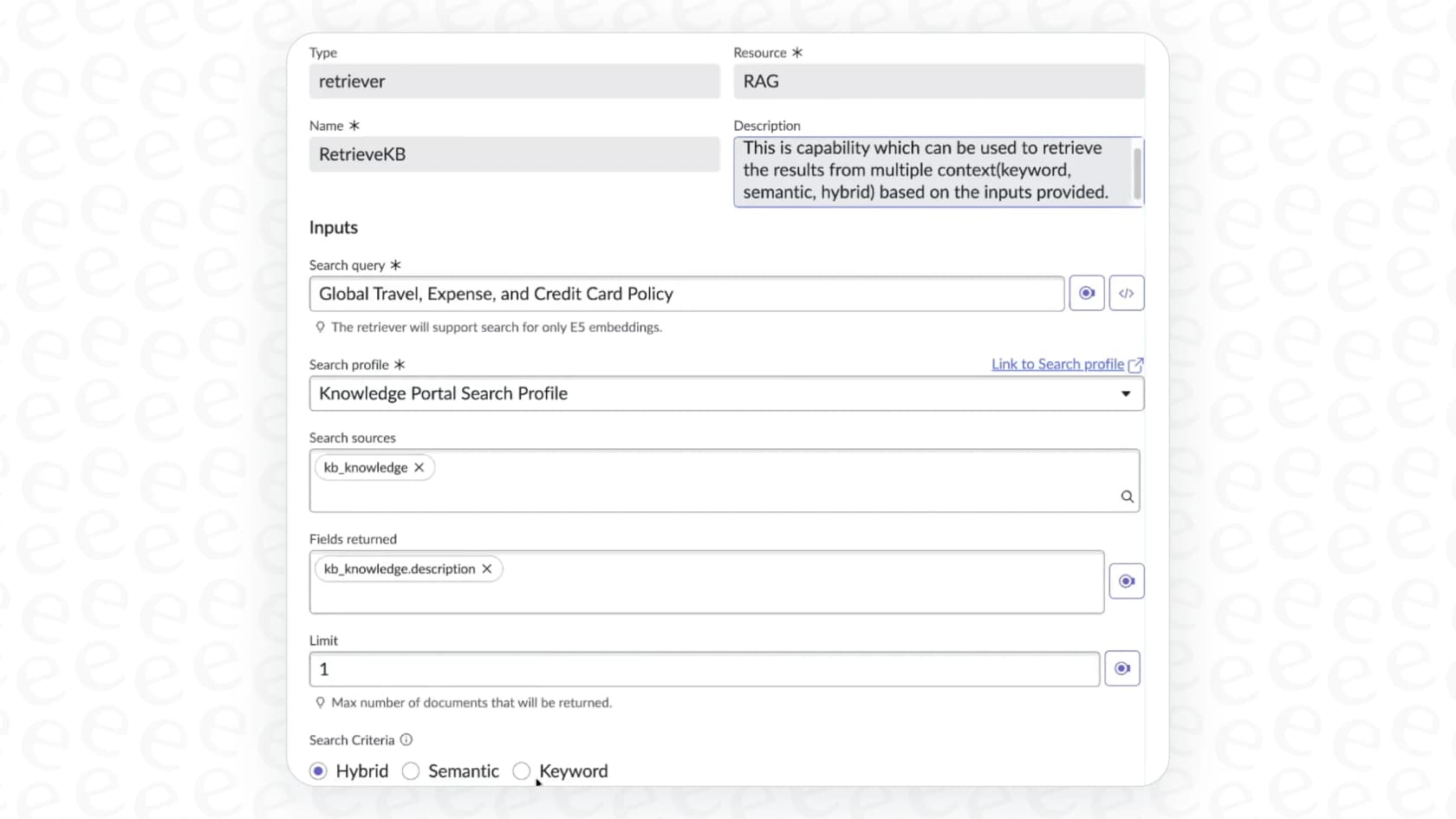
Here’s the gist of how it works. A ServiceNow AI Agent uses a tool called "Search retrieval" to find information. This tool is pointed at a "Search profile," which you have to configure to pull data from one or more "Indexed sources." These sources are just the specific ServiceNow tables you want the agent to search, like your knowledge base articles or incident records.

If you’re not a full-time ServiceNow administrator, this is probably where your eyebrows start to raise. To get your AI agent to answer even a simple question, you first have to set up the platform's entire semantic search framework.

The ServiceNow AI Agent Studio, where administrators configure tools like Search retrieval as part of the ServiceNow AI Agent RAG setup.

Setting up the ServiceNow AI Agent RAG: The official way

While ServiceNow’s built-in RAG is powerful, the setup process feels like it was designed for developers with deep platform knowledge. It's a long way from the simple, self-serve experience most teams are hoping for.

The multi-step configuration process

Getting RAG up and running in ServiceNow involves a few different stages, and each one comes with its own set of configurations and technical jargon.

  1. Define and index your sources: You have to manually tell AI Search which tables (like "kb_knowledge" for articles) and which specific fields in those tables to make searchable. This process, known as "semantic indexing," is what lets the AI understand the meaning behind the words.

  2. Create a search profile: After your sources are indexed, you need to build a search profile. This profile is basically a rulebook that tells the agent which indexed sources to use, how to rank the search results, and other details.

  3. Add the "Search retrieval" tool to your agent: Finally, inside the AI Agent Studio, you connect the "Search retrieval" tool to your agent and link it to the search profile you just created.

Each of these steps means clicking through multiple admin menus, getting comfortable with ServiceNow-specific terms, and waiting for content to be indexed, which isn't always instant. It’s not something a support manager can knock out in an afternoon.

A simpler alternative: Plug-and-play integration

If that all sounds like a bit of a headache, well, it can be. This is where a solution like eesel AI takes a completely different approach. Instead of being built inside the complex world of a single platform, eesel AI is designed to plug into all the tools you already use, including ServiceNow.

The benefits of this approach are pretty obvious right away:

  • Go live in minutes, not months: With eesel AI, you connect your helpdesk (like ServiceNow, Zendesk, or Intercom) and your knowledge sources with a few simple clicks. There are no search profiles or indexing configurations to worry about.

  • Truly self-serve: You can set up, configure, and launch your AI agent all on your own. Unlike a lot of enterprise tools that make you sit through sales calls and demos just to see the product, eesel AI lets you jump right in.

A screenshot of the eesel AI platform showing how a lead generation agent connects to multiple business applications to build its knowledge base.

This gives your team the power to build and use AI assistance without having to wait around for developers or a long implementation project.

ServiceNow AI Agent RAG: Key use cases and native limitations

So, what is ServiceNow’s built-in RAG actually good for, and where does it start to hit a wall? Figuring this out is key to deciding if it's the right tool for you or if you need something more flexible.

What ServiceNow AI Agent RAG is good for

For companies that live and breathe ServiceNow, the native RAG feature is great for internal ITSM tasks. A couple of common examples include:

  • Automating internal IT support: Answering common employee questions like "How do I connect to the VPN?" or "How do I reset my password?" by pulling from the "kb_knowledge" table.

  • Basic ticket deflection: Helping users who are submitting a ticket through the Service Portal by suggesting relevant articles or existing incident records before they hit "submit."

These are useful, for sure, but they’re stuck within the walls of ServiceNow.

Where the native ServiceNow AI Agent RAG approach falls short

The biggest issue with ServiceNow's RAG is that most company knowledge doesn't live neatly in ServiceNow tables. What happens when the answer to a question is in Confluence, a Google Doc, a Notion page, or a Slack thread?

A universe of knowledge outside ServiceNow While you can technically integrate external sources into ServiceNow AI Search, it usually means buying and configuring extra connectors. This just adds more complexity and another thing to maintain. Your AI agent is only as good as the data it can see, and locking it into one platform creates a massive blind spot. eesel AI was built from day one to unify your knowledge instantly. It connects to over 100 sources, including all the ones mentioned above, giving your AI agent a full picture of your company’s knowledge without you having to manage a bunch of painful integration projects.

Rigid automation and control Customizing an agent's behavior in ServiceNow often requires editing scripts or digging into complicated workflow rules. For instance, if you want to tell an agent not to answer questions about pricing or to always escalate issues from VIP customers, it’s not just a simple toggle. With eesel AI, you get total control through a simple workflow engine. You can use a natural language prompt editor to define the AI's persona, tone, and specific rules for escalation. You can also easily "scope" its knowledge to certain documents or topics to make sure it only answers what it's supposed to.

The "go-live" anxiety With the native ServiceNow tools, there isn't a great way to test how your AI Agent will actually perform on real questions before you unleash it on your users. You basically build it, turn it on, and cross your fingers. eesel AI includes a powerful simulation mode that lets you test your entire setup on thousands of your past tickets in a safe environment. You get accurate predictions on resolution rates and can see exactly how the AI would have responded, giving you total confidence before you go live.

The eesel AI simulation dashboard showing how AI uses past product knowledge to predict future support automation rates.

The challenge of ServiceNow AI Agent RAG pricing

One of the biggest hurdles for teams looking at ServiceNow's AI features is the price tag.

Or rather, the lack of one. ServiceNow doesn't publish flat-rate pricing for its AI tools. Features like AI Agents are usually bundled into their Pro or Enterprise licenses. To get a price, you have to talk to a sales team, and the final cost is often custom-fit to your company and contract.

This quote-based model makes it hard to budget, predict costs, or figure out if you're getting a good return on your investment. It often involves a big upfront commitment and locks you into a long-term contract before you’ve even had a chance to see if it works for you.

An infographic illustrating the hidden implementation and maintenance costs associated with a ServiceNow AI Agent RAG, which go beyond the initial license fee.

In contrast, eesel AI's pricing model is clear, predictable, and flexible.

PlanMonthly (bill monthly)Key Features
Team$299Up to 1,000 AI interactions/mo, train on docs, Slack integration.
Business$799Up to 3,000 AI interactions/mo, train on past tickets, AI Actions, simulation.
CustomContact SalesUnlimited interactions, advanced security, multi-agent orchestration.

Most importantly, eesel AI has no per-resolution fees, so your bill won't suddenly jump during a busy month. You can start with a flexible monthly plan and cancel anytime, giving you the freedom to test and scale at your own pace without being stuck in a long-term contract.

Choose the right ServiceNow AI Agent RAG for the job

For huge organizations that are deeply invested in the ServiceNow ecosystem, have dedicated developers, and a budget for big enterprise contracts, the native ServiceNow AI Agent RAG functionality can be a solid choice. It's built right in, and if all your knowledge lives there, it can get the job done.

But for most teams, that power comes with some serious trade-offs: complexity, long setup times, limited knowledge sources, and a complete lack of transparent pricing.

If you need to move quickly, bring together knowledge from all your different platforms, and keep full control in a user-friendly environment, a plug-and-play solution is probably the smarter move. eesel AI works seamlessly with ServiceNow and all your other tools, letting you launch a more capable AI agent in minutes, not months. Why not see for yourself?

Start Your Free Trial or Book a Demo

Frequently asked questions

A ServiceNow AI Agent RAG allows the AI to retrieve information from approved internal sources, like your company's knowledge base, before generating a response. This process is crucial because it significantly reduces "hallucinations" and ensures the AI provides accurate, up-to-date, and relevant answers.

Setting up a ServiceNow AI Agent RAG involves a multi-step configuration process that includes defining and indexing data sources, creating a search profile, and connecting a "Search retrieval" tool to your agent. It typically requires deep platform knowledge and is not a simple, self-serve task.

A ServiceNow AI Agent RAG is particularly effective for internal ITSM tasks, such as automating common employee IT support questions by pulling from internal knowledge articles. It can also assist with basic ticket deflection by suggesting relevant information to users within the Service Portal.

While it's technically possible to integrate external sources with a ServiceNow AI Agent RAG, it often requires buying and configuring additional connectors, which adds complexity and maintenance overhead. The native approach primarily focuses on data living within ServiceNow tables.

Customizing an agent's behavior with a native ServiceNow AI Agent RAG often involves editing scripts or navigating complex workflow rules, making it less flexible for simple rule adjustments. Defining specific personas, tones, or escalation rules can be challenging without developer involvement.

ServiceNow does not publish a flat-rate pricing for its AI features, including the ServiceNow AI Agent RAG. These capabilities are usually bundled into higher-tier licenses (Pro or Enterprise), and the final cost is typically custom-quoted after discussions with their sales team.

Share this post

Kenneth undefined

Article by

Kenneth Pangan

Writer and marketer for over ten years, Kenneth Pangan splits his time between history, politics, and art with plenty of interruptions from his dogs demanding attention.