


Vowels Messenger is a free, simple Messenger button for Wix sites, and I give it 3 out of 5. The app, listed as "Facebook Messenger & More" by Vowels Labs, puts a round Messenger icon on your pages. On the vendor's own demo site, a click opens an m.me link in a new tab, so the chat happens in Messenger, not on your website. The listing shows 3.9 stars from 302 reviews, and the review feed matches that exactly.
The catch is setup. 24 reviewers say the app asked for a rating before they could use it, the vendor hasn't replied to a single review, and the listing has no help docs beyond a support email.
And as someone who ships integrations at eesel: a button gets the message to your Page, then it waits. eesel's AI helpdesk teammate answers those Messenger conversations from your help center. Question Beauty runs it on Messenger, email and chat tickets and sent about 960 replies in one month.
What is Vowels Messenger?
Vowels Messenger is the Wix App Market app called Facebook Messenger & More, with the teaser "Add Facebook messenger etc to your website". It's "Verified by Wix", listed as Free, available worldwide, and the app's own language is English.
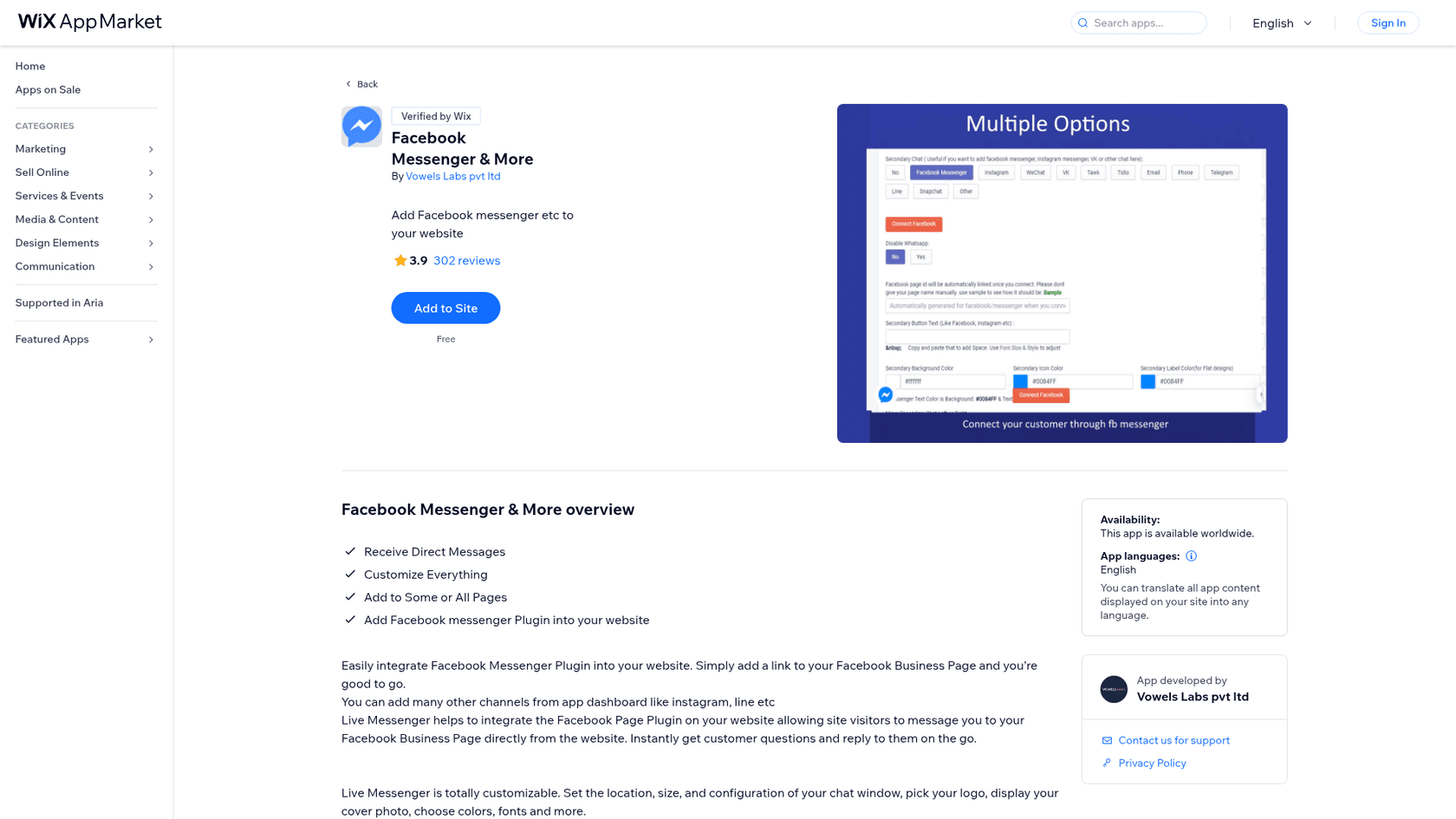
The developer is Vowels Labs pvt ltd, which also makes the Wix app "Whatsapp Chat by Vowels" (4.6 stars from 413 reviews on its own listing). Support runs through a contact email, and the privacy policy link on the listing points to a page on way2enjoy.com.
I build integrations at eesel, so I don't stop at the listing copy. I opened the vendor's demo site, checked which script loads the button and clicked it to see where a visitor actually ends up. That turned out to matter, because the listing and the demo don't describe quite the same product.
How does Vowels Messenger work?
The listing says you add a link to your Facebook Business Page and the app integrates "the Facebook Page Plugin on your website". On the vendor demo site, what you actually get is a small round Messenger button in the bottom-left corner.
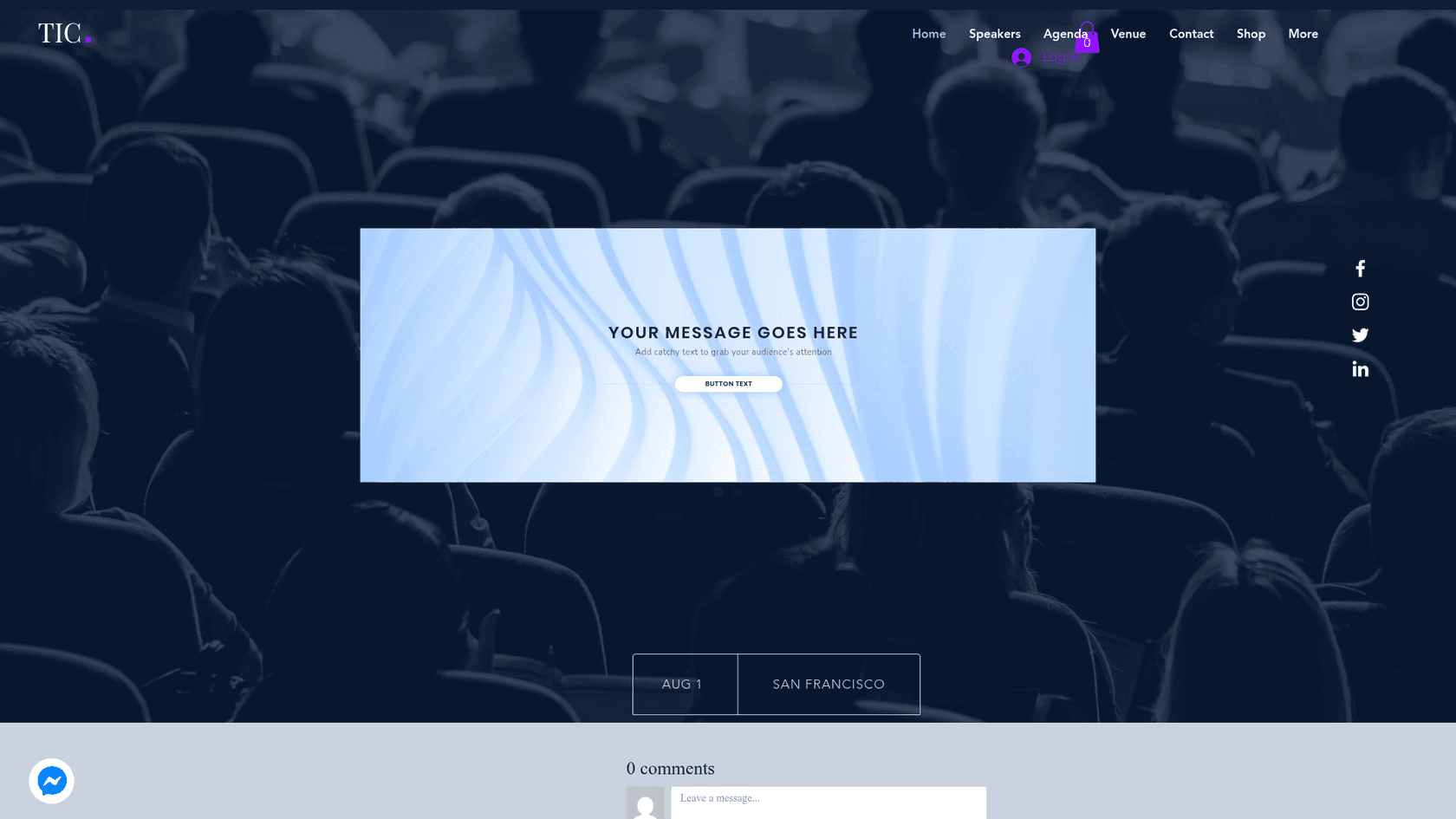
When I clicked that button, the page tried to open an m.me link in a new tab, which is Meta's short link that opens a conversation with a Page in Messenger. The button script loads from way2enjoy.com, the same domain as the privacy policy. So the flow is:
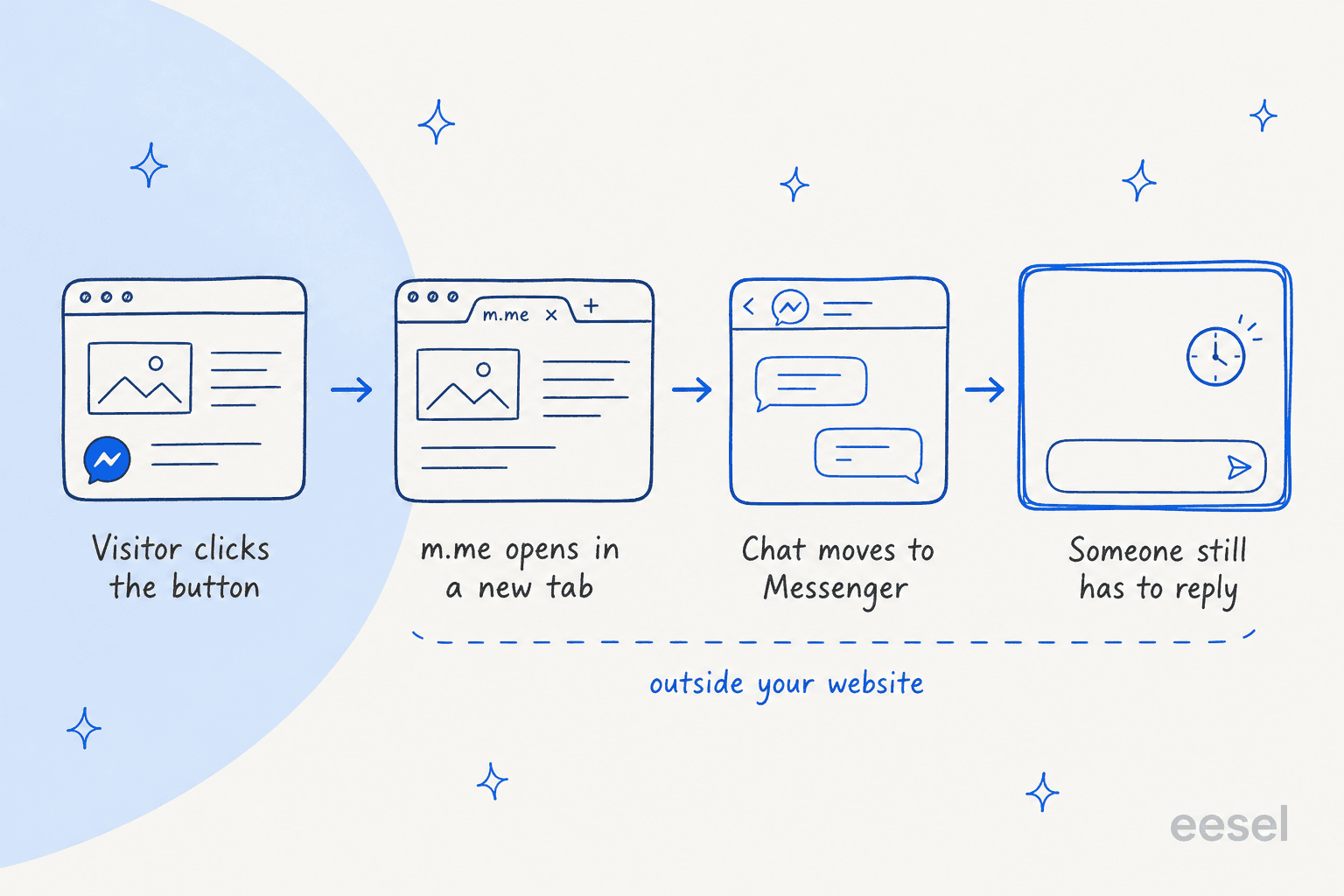
- The visitor clicks the button on any page where you've placed it.
- Messenger opens in a new tab through an m.me link to your Page.
- The chat continues in Messenger, using the visitor's own Messenger account.
- You reply from your Page inbox, in Messenger or Meta Business Suite.
That's a clean, low-friction setup for a visitor who already uses Messenger. It also means nothing about the conversation stays on your website. There's no chat window, no transcript in Wix and no record your other tools can see. If you've read my Utorix Live Messenger review, that app embeds Meta's message box on your page instead; Vowels just hands the visitor off.
One small oddity: the listing description calls the app "Live Messenger" twice, which is the name of the Utorix app. It reads like copy that was reused, and it's worth knowing so you don't mix the two up when you search for help.
What features does Vowels Messenger have?
The listing promises four things: receive direct messages, customize everything, add it to some or all pages, and add the Facebook Messenger plugin. The only gallery image shows what "& More" means.
Multiple channels behind one button
The settings panel lists a "Secondary Chat" with 13 options: No, Facebook Messenger, Instagram, WeChat, VK, Tawk, Tidio, Email, Phone, Telegram, Line, Snapchat and Other. There's also a "Disable Whatsapp" toggle, which suggests the dashboard is shared with the Vowels WhatsApp app. The listing says the same: "You can add many other channels from app dashboard like instagram, line etc".
That makes it closer to a multi-channel contact button like Chaty or the QuadLayers Social Chat plugin than to a single-purpose Messenger widget. Each channel still opens its own app, though, so this is multichannel, not omnichannel: the conversations don't come back together anywhere.
Facebook connection and styling
You click "Connect Facebook" and the app fills in your Page ID; the panel warns not to type the Page name by hand. You can then set the button text, background colour, icon colour and label colour, and move the button left or right. The listing also mentions picking a logo, showing your cover photo and choosing fonts, though the one gallery image doesn't show those screens.
What's missing
There's no inbox, no chatbot, no auto-reply, no office-hours schedule and no reporting described on the listing. Compare that with the sibling WhatsApp app, whose listing mentions Google Analytics and Facebook Pixel tracking and online or offline operator times. If you need those, the WhatsApp app is the better-documented Vowels product.
How much does Vowels Messenger cost?
This is the easy part. The Wix listing shows one price:
| Plan | Price | What the listing shows |
|---|---|---|
| Free | $0 | Messenger button, secondary channels, colour and position settings |
Pricing from the Wix App Market listing on October 28, 2026. No paid plan or trial is listed.
That's the biggest difference from its neighbours. Utorix Live Messenger charges $2.99 a month, the PurpleBear WhatsApp app charges by site views, and Smartarget has a paid Pro plan. Even Wix's own Smart Chat pricing only keeps manual chat free.
The sibling WhatsApp app's listing says "Free plan available" rather than just "Free", so Vowels does sell paid tiers on at least one app. On this one, I couldn't find any.
What do Vowels Messenger users say?
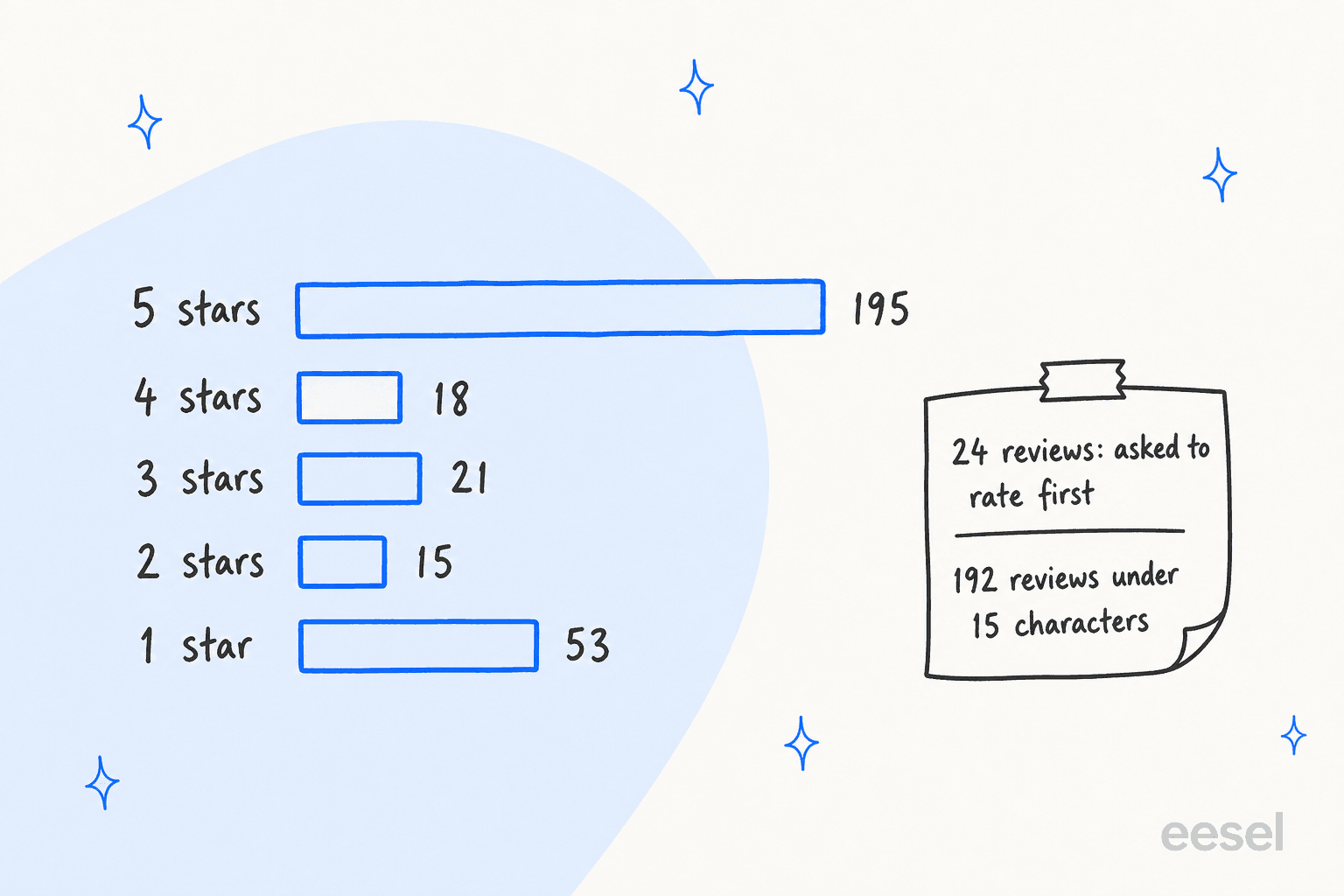
I pulled the full review feed for the app on October 28, 2026. It returned 302 reviews averaging 3.95, which matches the listing header of 3.9 from 302 exactly. The split is 195 five-star, 18 four-star, 21 three-star, 15 two-star and 53 one-star.
The average hides two things that matter more than the star count.
- Most reviews are very short. 192 of the 302 are under 15 characters, things like "good", "ok" or "excellent". They tell you people installed it, not how it held up.
- 24 reviews mention being asked to rate first. People say a review screen came up before they could open the settings, and some say that's all they saw.
- The vendor doesn't reply. None of the 302 reviews has a developer reply, so the 53 one-star reviews are unanswered.
The happier reviews are short and practical:
"this app is very useful for message business"
"Still learning but finding the learn curve easy to navigate"
One five-star reviewer in February 2026 credits the vendor's help directly:
"Very helpful, walked me through the whole sit-up and continuous support with my website."
The rating step is the most repeated complaint, and it shows up in English, French, Spanish and Italian reviews:
"cant even open the app settings before forcing me to review it"
A smaller group couldn't get the button to show up at all. A July 2026 review says "Nothing shows on website. Says installed and does nothing", and a September 2025 reviewer wrote that clicking the Messenger button "just redirects me to leave a review". Another simply says "there are no instructions".
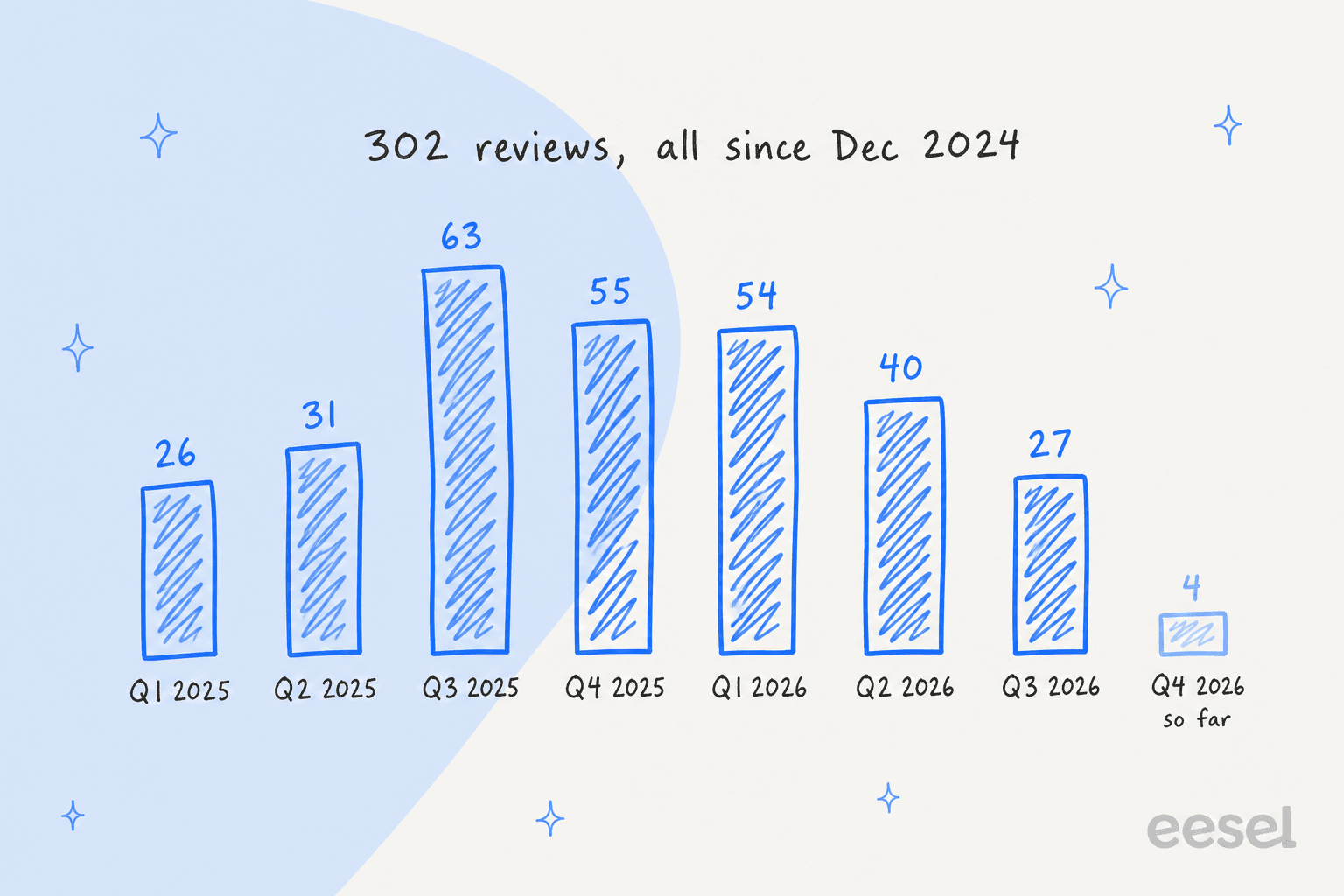
The timing is different from the older Wix chat apps, too. Every review is from December 2024 or later, with a peak of 63 in the third quarter of 2025. That makes it a young app that's still being installed, unlike the Utorix app, where most reviews date from 2017 and 2018.
Outside Wix, I couldn't find Vowels Messenger reviews on G2, Capterra, Trustpilot or Reddit.
Where does Vowels Messenger fall short?
Most of the limits come from the design: it's a link to Messenger, not a support tool.
- Not live chat. The visitor leaves for Messenger in a new tab. It's a shortcut, not live chat on your site.
- Visitors need Messenger. Anyone who doesn't use Messenger has no way in through this button.
- Rating before setup. 24 reviewers say they had to rate the app before using it, which is a rough first impression.
- Thin documentation. No help center, setup guide or FAQ on the listing, and no developer replies to reviews.
- No automation. No auto-reply, greeting, schedule or answers.
- Outside your helpdesk. Messages land in your Page inbox, not your ticketing system, so your first response time there goes unmeasured unless you connect it.
To be fair, it's free, the button is light, and the channel list is long. For a small Wix site that just wants a "message us" shortcut, none of these limits are deal-breakers.
Who should use Vowels Messenger?
The deciding question is whether you already answer your Facebook Page inbox every day, because that's where every conversation ends up.
| You are... | Verdict |
|---|---|
| A Wix site with an active Facebook Page and someone checking it daily | Good fit, and it's free |
| A business that wants Messenger plus Instagram, Line or Telegram buttons | Fair fit, the secondary channels cover it |
| A team that wants chat to happen on the website | Skip, the chat moves to Messenger |
| A team that answers Messenger together | Skip, there's no shared inbox |
| Someone who needs a documented, supported setup | Skip, docs and replies are thin |
| A store getting the same questions every evening | Skip, the work is answering, not collecting |
If you're comparing Wix options, my Wix Smart Chat review and the Smart Chat alternatives list are the next stops.
What are the alternatives to Vowels Messenger?
Split it by the job you need done.
- Chat on the page itself. Wix's own chat, or tools like Tidio or the Elfsight AI chatbot. My guide on adding live chat covers setup, and live chat features covers what to look for.
- A paid Messenger box on desktop. Utorix Live Messenger embeds Meta's message box with schedule controls for $2.99 a month.
- A WhatsApp-first button. The Wix-only Rabbit SEO app and Smartarget both list their prices on the listing.
- Messenger inside your helpdesk. If Facebook is a real support channel, connect it: see Zendesk and Facebook, the Zendesk Messenger channel or Gorgias Facebook comments. My list of social customer service software goes wider.
- Answers, not just a button. An AI agent on your Page, covered in my roundup of AI for social media support.
Is Vowels Messenger worth it? My verdict
3 out of 5. For $0 you get a tidy Messenger button, a long list of secondary channels and a setup that, once it opens, is a Connect Facebook click and some colours. It's a reasonable free pick for a small Wix site.
What holds it back is everything around the button. The rating screen before setup frustrates people, there are no docs and no developer replies, and the conversation leaves your site the moment someone clicks. Install it, check the button actually shows on your live site in a logged-out browser, and send yourself a test message before you rely on it.
And once those messages start arriving in your Page inbox, the next problem shows up: someone still has to answer them.
Where does eesel fit next to a Messenger button?
Vowels gets a visitor into your Facebook Page inbox. eesel is about what happens next. eesel is an AI teammate platform, and for this job the relevant teammate is the AI helpdesk teammate, which joins your support setup and answers the repeat questions.
The eesel Messenger integration connects to your Facebook Page and answers incoming Messenger conversations from your help center, docs or helpdesk content. You can test it on real questions before it goes live, and set when it hands over to a person by telling it in plain words, like "always pass refund requests to me". If your Page inbox already feeds a helpdesk, it works inside Gorgias or Zendesk too.

Question Beauty is the closest match to a Messenger-heavy small business. Its Facebook Messenger, email and website chat all land in Gorgias, and many messages are just a product name and "price?". Between 8 August and 8 September 2026, eesel handled about 990 of its tickets, sent about 960 replies and looked up about 290 Shopify orders before answering. About 280 tickets closed without a person; refunds and complaints went to the team with a note.
If you'd rather keep the conversation on your own site, IC Intracom runs one eesel agent per brand on its website chat, answering from about 2,100 Shopify product records. It's early days there, with 34 website chats between 8 August and 8 September 2026, and 41 product lookups inside them.
In one trial earlier this year, a Spanish insurance brokerage put more than 560 real conversations, Messenger chats among them, through a custom Spanish-language agent in 48 hours on a free trial. That's the part a button can't do: the after-hours answers are the ongoing work. For the rules I'd set first, see my notes on AI agent handoff.
If you use the Vowels secondary channels, eesel also answers on WhatsApp and Instagram, and its chat bubble keeps the conversation on your website. That gets you closer to real omnichannel support than a row of buttons.
Try eesel
If a free Messenger button is already filling your Page inbox with the same questions, eesel's AI helpdesk teammate can answer the repeat ones from your help center and hand refunds and edge cases to you with a note attached. It starts free with 100 credits, and paid plans begin at $299 a month for 500 credits (eesel pricing). For what you can automate inside Messenger itself, my Facebook chatbot guide is a good start.
Frequently Asked Questions
What is Vowels Messenger?
It is the Wix App Market app "Facebook Messenger & More" by Vowels Labs pvt ltd. It adds a round Messenger button to your Wix site, and on the vendor's demo site a click opens an m.me link to your Facebook Page in a new tab. You can add other channels, like Instagram or Line, from the same dashboard. It is a button, not a live chat window.
Is Vowels Messenger free?
Yes. The Wix listing shows the app as Free, with no paid plan listed on October 28, 2026. For comparison, my Utorix Live Messenger review covers a similar Wix app that costs $2.99 a month after a trial.
How do I set up Vowels Messenger on Wix?
Add the app from the Wix App Market, open its settings, click Connect Facebook so the app links your Page ID, then pick colours, button text and any secondary channels. Several Vowels Messenger reviews say the app asked for a star rating before the settings opened, so expect that screen first.
Why does Vowels Messenger ask me to rate it before I use it?
The vendor doesn't explain it on the listing, and it hasn't replied to any of the 302 reviews. 24 reviewers mention being asked to rate before setup, and some say the review screen was all they saw. If you hit it, rate honestly and check that the settings open afterwards.
Does Vowels Messenger answer messages automatically?
No. It sends the visitor to Messenger and the conversation lands in your Facebook Page inbox. Someone still has to answer. An AI agent connected to the Page, like eesel for Messenger, can reply from your knowledge base and hand tricky ones to you.
Is Vowels Messenger good for a small business?
It is a fair pick if you want a free Messenger button and already answer your Page inbox every day. It is a weak pick if you want chat on the site itself, a shared inbox for a team, or replies outside office hours.
What are the best Vowels Messenger alternatives?
For chat on the page itself, start with Wix Smart Chat. For one button that links several apps, look at Chaty. If your problem is answering Messenger rather than collecting it, eesel's AI helpdesk teammate replies inside Messenger for you.