


Most people searching for social customer service software already own a helpdesk. What they actually need is the missing half: a queue that catches public comments and DMs before those turn into a screenshot on X. The tools split cleanly into two camps, and the mistake is buying from the wrong one.
Social suites (Sprout Social, Sprinklr, Hootsuite, Agorapulse) own listening, publishing, moderation and brand mentions. Helpdesks (Zendesk, Freshdesk, Gorgias, Trengo) own ticket history, order data, refund actions and the SLA clock. Ask a social suite "where is my order" and it can route the question beautifully. It cannot answer it.
The other thing worth knowing before you spend: almost every social suite's AI stops at "suggest". Sprout's own copy says Enhance Reply "recommends alternative replies". Hootsuite's chatbot speaks three languages and is Enterprise-only. Agorapulse gates AI reply suggestions behind a quote. If you want AI that resolves rather than drafts, that capability lives on the helpdesk side, which is where eesel sits: it reads your help center and past tickets, replies on Instagram, Facebook Messenger and WhatsApp alongside your existing desk, and charges one fixed monthly price (from $299 for 500 credits, 1 credit per ticket) instead of $399 a seat.
What actually counts as social customer service software
I have spent two years watching how people search their way into this category, and the query is almost never "I want to manage social media." It is "a customer just DMed us on Instagram and it went unanswered for nine hours." That is a support problem wearing a marketing tool's clothes.
So the working definition I use: software that turns a public or private social message into something with an owner, a status and a clock on it. Publishing calendars, hashtag research and influencer discovery are all lovely and none of them belong in this evaluation.
That definition immediately splits the market. On one side you have social media management suites that grew a care module. On the other you have helpdesks that grew social channels. Both can be right. They fail differently, which is the part vendors never put on the comparison page.
It also explains why this category confuses people. The word "social" makes it sound adjacent to marketing, when the buying question is the same one behind customer service software generally: who owns this message and when does it get answered. If you want the general-purpose version of this list rather than the social-specific one, our management software roundup covers it.

The seam in the middle is where support teams lose time. A social suite sees the comment but not the order. A helpdesk sees the order but never knew about the comment. Every tool below is really a bet on which side of that seam you want to live on.
How I picked and what I checked
No vendor paid to be here and nobody sponsored a slot. For each tool I pulled the live pricing page on 30 July 2026, read the product and docs pages rather than the marketing hero, and wrote down the channels the vendor is actually willing to name in its own copy. That last part matters more than it sounds: "25+ channels" is a claim, and the named list is evidence.
Three things I graded on:
- Named channel coverage. Not "and more". Which platforms appear in writing.
- Where the AI stops. Collect, classify, suggest, route, or resolve. Vendors blur these deliberately.
- The billable unit. A seat price and a per-conversation price behave completely differently when a product goes viral for the wrong reason.
I left out anything I could not verify from a primary source. Where a vendor publishes no price at all, the table says so rather than repeating a number someone found in a 2023 blog post.
Two things I deliberately did not grade on: sentiment dashboards, because sentiment analysis is table stakes now and nobody chooses a tool for it, and raw channel counts, because a channel you can read but not reply on is not coverage.
The 9 tools at a glance
| Tool | Best for | Entry price | Care-tier price | Billable unit | Named social channels | AI ceiling | Native helpdesk link | Free tier |
|---|---|---|---|---|---|---|---|---|
| eesel | AI that answers, not drafts | Fixed monthly credits | From $299/mo (500 credits) | Ticket | Instagram, Messenger, WhatsApp, SMS, chat | Resolves, confidence-gated | Zendesk, Freshdesk, Gorgias, Front | Free plan (100 credits) |
| Sprout Social | Care reporting and CSAT | $79/seat/mo | $399/seat/mo | Seat | FB, IG, X, TikTok, LinkedIn, YouTube, Reddit, Pinterest, GMB | Suggest and classify | Salesforce, API at Advanced | No |
| Sprinklr Service | Enterprise social care at scale | Quote only | Quote only | Quote only | X, IG, FB, WhatsApp, LinkedIn, YouTube, WeChat, Line | Routes and deflects | Zendesk, Freshdesk, Salesforce, Jira | No |
| Hootsuite | Cheapest real shared social inbox | $99/seat/mo | $399/seat/mo | Seat | FB, IG, X, LinkedIn, TikTok | Smart replies at Pro | Zendesk, Salesforce | No |
| Agorapulse | Small teams and ad comments | $79/seat/mo | $149/seat/mo | Seat + profiles | FB, IG, X, LinkedIn, TikTok, YouTube, GMB | Suggest, Custom plan only | None published | Yes, 3 profiles |
| Gorgias | Shopify and DTC brands | $40/mo | $550/mo | Ticket + interaction | Facebook, Instagram, TikTok Shop, WhatsApp | Resolves, per interaction | Native helpdesk | Trial only |
| Zendesk | Social inside real ticketing | $19/agent/mo | $115/agent/mo | Agent seat | WhatsApp, Messenger, IG DM, X DM, LINE, WeChat | AI Agents from Suite Team | Native helpdesk | Trial only |
| Freshdesk | Cheapest omnichannel entry | $19/agent/mo | $89/agent/mo | Agent seat + session | WhatsApp, Messenger, Instagram, LINE, Apple Messages | 500 sessions, then $0.49 | Native helpdesk | No |
| Trengo | WhatsApp-heavy EU teams | EUR 299/mo | EUR 499/mo | Conversation | WhatsApp, Instagram, Facebook, SMS, voice | AI Journeys, in beta | Native inbox | No |
A note on that table before anyone screenshots it: the "care-tier price" column is not comparable across camps. Sprout's $399 buys one person a seat. Gorgias's $550 buys 2,000 tickets and 190 automated interactions for the whole team. Comparing them straight is how teams end up with a bill they did not model.
1. eesel AI
Best for: teams who already have a helpdesk and want the social queue answered rather than organised.

I work on eesel, so read this section with the appropriate squint. What I will do is be specific about the limits, because the honest version of this pitch is narrower than the marketing one.
eesel is not a social media management suite. It does not publish posts, it does not do influencer discovery, and it has no listening product that surfaces a mention nobody sent to your handle. If those are the jobs you are hiring for, buy Sprout or Sprinklr and stop reading here.
What it does is the part the suites hand back to you. It connects to Instagram, Facebook Messenger and WhatsApp alongside whatever desk you already run, reads your help center and past tickets, and drafts or sends the reply itself.
What it does well
The thing three years of putting AI on live support queues taught us is that nobody wants a bot that answers everything. A CX lead at a DTC supplements brand put it better than any of our own copy:
"The AI will never be able to answer 100% of the questions... I need an AI who is only handling the tickets that it's confident to handle and all the other ones, leave them alone."
So eesel is built around a confidence gate and a simulation step. Before anything goes live, you replay the agent against historical tickets and see what it would have said. That exists because we have watched a confident-sounding bot quietly give wrong answers, which is a much worse outcome in public than in an email thread.
The numbers we can point at: a gig-economy driver-analytics app on Zendesk resolved 73% of tier-1 requests in its first month after a seven-day trial. On a 434-chat sample, 86% of AI chats answered correctly with citations. On a cross-validated trial against real Zendesk traffic, triage accuracy hit 93% with zero false positives on spam.

Where it falls short
No listening. No publishing. No crisis-alert product that watches sentiment spikes across a brand's whole mention graph the way Sprinklr's does. If a customer complains about you on a subreddit you have never posted in, eesel will not find it. That is a real gap and it is the reason plenty of teams run both.
Pricing
One fixed monthly price by volume: from $299 a month for 500 credits, with 1 credit per ticket or chat and no seat fees. There is a free plan with 100 credits, no card. The practical difference: adding a fifth agent costs nothing, and the price is predictable because everything is included. Check the pricing page for current numbers before you budget.
My take
Pick eesel when the bottleneck is answering, not organising, and when you want the social channels handled by the same brain that handles email. Skip it if you need one tool to do publishing and care together.
2. Sprout Social
Best for: care teams who need CSAT and response-time reporting the exec team will read.

Sprout is the most support-shaped of the social suites. Its care product is branded Social Customer Care, and it has the vocabulary right: cases, assignment, classification, agent activity reports, an automated CSAT survey. If you have ever run a helpdesk, the mental model transfers immediately.
What it does well
Case automation is the standout. Sprout will create a case automatically off topic, profile type, message type, follower count, VIP status, language, sentiment or keyword, then classify which team it belongs to. That is real triage, and it means a high-follower complaint does not sit behind forty compliments.

Channel coverage is also the broadest of the self-serve suites. Sprout's own integrations grid names Facebook, Instagram, X, Pinterest, TikTok, LinkedIn, YouTube, Tumblr, Reddit, Facebook Shops and Google My Business, plus review sources like the Apple App Store and Yelp.
Where it falls short
Two things. First, every care feature that a manager would actually measure sits in the $399 tier. Sentiment in the inbox, message spike alerts, team productivity reports, the API and helpdesk integrations, all Advanced-only. The $199 Standard plan gets you an inbox and not much telemetry.
Second, the AI ceiling. Enhance Reply "recommends alternative replies", sentiment scores messages, summaries flag what needs a response. Nothing in Sprout's own copy claims an agent that closes a conversation. And the Bot Builder, the one piece that could, is limited to Facebook and Twitter, which is thin next to a purpose-built Instagram chatbot.
Users are blunt about the price:
"Sprout is a great tool, no doubt. However, being too pricey hurts the growing teams. Especially the features they are providing."

Pricing
| Plan | Annual per seat | Monthly per seat | What it unlocks for care |
|---|---|---|---|
| Essentials | $79 | $99 | Publishing only, no shared inbox |
| Standard | $199 | Not published | Smart Inbox, review management, keyword monitoring |
| Professional | $299 | Not published | Unlimited profiles, message tagging |
| Advanced | $399 | Not published | Sentiment, spike alerts, care reports, API and helpdesk integrations |
| Enterprise | Custom | Custom | Demo only |
Listening, Premium Analytics and Employee Advocacy are all quote-gated add-ons with no published figure.
My take
The best social-native care product in the self-serve tier, and priced like it. Five agents on Advanced is $23,940 a year before a single add-on. Worth it if reporting to leadership is the actual job. Overkill if you just need DMs answered.
3. Sprinklr Service
Best for: enterprises running social support in more than a dozen markets.

Sprinklr is the one the very large brands actually run. It shows: the Care Console puts a channel rail down the left, a customer-360 panel on the right, and reply suggestions in the middle, which is a layout you only design after watching a lot of agents work.
What it does well
The channel claim, read carefully, is genuinely strong. Sprinklr publishes two different numbers and they mean different things: 25+ social and messaging channels on the social care page, inside a 30+ channel contact center that also carries voice and email. For a social post the honest figure is 25+.
The escalation controls are the part a shared inbox structurally cannot copy. Crisis Alerts detect spikes in volume and negative sentiment and auto-notify a team. Predictive CSAT flags a thread going sideways mid-conversation. Brand-Aligned Responses check every outbound reply, human or AI, against compliance rules before it sends. Those exist because social is public and a bad reply is permanent, and they are a level above what most escalation management setups do.
Proof points are real too. Gulf Bank cut average first response from 58 minutes to under six. Telefónica unified 11,000 agents on one platform.
Where it falls short
There is no published price for Sprinklr Service. None. The pricing page 404s, and the sitemap has no plans, tiers or minimums anywhere. Every path ends at a demo form. The old $199-per-user self-serve figure that still floats around is dead, and it was a Sprinklr Social price, never a Service one.
Then there is the suite trap. The social care page sells Social Listening as core to the experience, but listening belongs to Sprinklr Insights, a separate suite. Publishing belongs to Sprinklr Social. Voice is a VoiceConnect add-on. What looks like one product on the page is three line items in the quote.
Only 8 of the claimed 25+ channels are named on the page: X, Instagram, Facebook, WhatsApp, LinkedIn, YouTube, WeChat and Line. TikTok, Reddit and review sites are not named.
Reliability comes up in the community:
"Glitch = Thousands of cases that have absolutely nothing to do with your company appearing in the queue. It's been a crazy morning…"
Pricing
Quote only, confirmed against the live site on 30 July 2026. No editions, no seat rate, no free tier, no trial. Our Sprinklr pricing breakdown covers what buyers have reported paying.
My take
If you have 500 agents and 14 markets, this is the shortlist of one. If you have 5 agents, the sales cycle alone will cost more than a year of anything else on this page.
4. Hootsuite
Best for: teams who want a shared social inbox without a care-suite contract.

Hootsuite spent 2026 rebuilding itself as "Social OS", four modules with names: Wisdom for AI, Perch for publishing, Nest for messaging and care, Lumen for listening. If your notes say "Hootsuite Inbox", that is now Nest.
What it does well
The genuinely good news, and a real change from a year ago: the base unified inbox is now included on every paid plan. The old framing where the inbox was a paid add-on is gone. Saved replies moved down to Standard, and AI smart replies moved down to Professional from Enterprise.
That makes the $99 Standard plan the cheapest way to give a small team one queue for Facebook, Instagram, X, LinkedIn and TikTok messages. For a two-person team that is $2,376 a year, which is less than one Sprout Advanced seat.

Where it falls short
Everything measurable is behind Advanced Inbox, which is Enterprise-only with no published price. Real-time reporting, agent reply time, average CSAT, SLA notifications, sentiment, audit trails and the Zendesk connector all live there. Routing and CSAT do not appear at all until the $399 Advanced tier.
The chatbot is the sharpest disappointment. It is Enterprise-only, it is FAQ-fed rather than indexed off a help center, and it speaks English, French and Spanish only, which sits oddly beside Advanced Inbox's 60+ language detection. The Heyday brand it grew out of is fully retired.
Also worth knowing: YouTube comments are not in the inbox at all, they live in Streams.
"Hootsuite is a good social media management tool, but unfortunately, it's quite heavy on the pocket. There are literally tools out there that offer the same..."
Pricing
| Plan | Per user per month, annual | Social accounts |
|---|---|---|
| Standard | $99 | 10 |
| Professional | $199 | Unlimited |
| Advanced | $399 | Unlimited |
| Enterprise | Custom | Unlimited |
Month-to-month rates exist but are only visible inside checkout. Advanced went from $249 to $399 this year, so any comparison older than a few months is wrong.
My take
Best value at the bottom of the range, worst value at the top. Take Standard or Professional and pipe the hard questions into your helpdesk. Do not buy Advanced expecting a care platform.
5. Agorapulse
Best for: small teams, and anyone drowning in comments on paid social.

Agorapulse is the least pretentious tool here and the one I would hand to a three-person team without a training session. The inbox-zero workflow is the whole product philosophy: every item gets reviewed, assigned or cleared.
What it does well
The ad-comment story is the differentiator. Agorapulse claims to be the only tool that collects 100% of ad comments including native Facebook dynamic ads. That is a vendor self-claim, but it addresses a real blind spot: for most DTC brands the angriest comments sit under a paid post, not an organic one, and plenty of tools never see them.
Price is the other draw. Advanced is $149 per user per month annually. Five agents is $745 a month, against $1,995 for the same headcount on Sprout or Hootsuite.
There is also a genuine free tier: three profiles, one user, ten scheduled posts. The 30-day trial takes no card and drops to that free plan rather than charging you.
Where it falls short
The automation is deliberately shallow. Moderation rules are capped at one rule per profile with one trigger condition on every plan below Custom. Unlimited rules with AND/OR logic are quote-gated. So the "automated moderation" on the feature page is, in practice, one rule.
Saved replies do not appear until Advanced at $149. AI reply suggestions, sentiment filtering and business-hours-aware response-time reporting are Custom-only with no published price.
And there is no CSAT anywhere in the product. Agorapulse measures how fast you replied, never whether the customer was happy. For a care tool that is a real hole, and it means you cannot run CSAT as a quality signal without a second system.
Pricing
| Plan | Annual per user | Monthly per user | Profiles |
|---|---|---|---|
| Free | $0 | $0 | 3, one user |
| Standard | $79 | $99 | 10 |
| Professional | $119 | $149 | 10 |
| Advanced | $149 | $199 | 10 |
| Custom | Quote | Quote | Unlimited |
Extra profiles are $10 a month annually, $15 monthly. Extra users are full seats, there is no cheaper add-on.
My take
The best price-to-usefulness ratio on this list for teams under about eight people. Buy Advanced, not Professional, because saved replies are the feature that saves real time. Do not expect it to replace a helpdesk.
6. Gorgias
Best for: Shopify and DTC brands where the social comment is about an order.
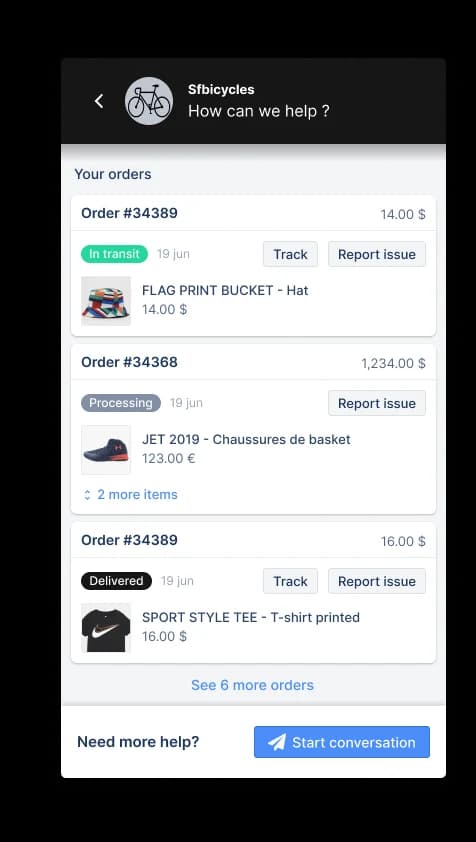
Gorgias is a helpdesk that treats social as a first-class channel, and for ecommerce it is the cleanest answer to the seam problem. Facebook, Instagram, TikTok Shop and WhatsApp are available on every plan, not gated to a top tier.
What it does well
The agent sees the order next to the comment. That sounds small and it is the entire ballgame: a reply to an Instagram comment can quote the tracking number without an agent tabbing into Shopify. Facebook comment handling works the same way, and WhatsApp is a full ticket channel.
The AI Agent genuinely resolves rather than drafts, which puts Gorgias in a small group here alongside eesel and Zendesk. If you are shopping the wider category, our ecommerce chatbot guide and notes on ticket routing for ecommerce cover the neighbouring options.
Where it falls short
Two meters, two overage rates. A Gorgias bill can overrun on tickets at $0.36 to $0.40 each and on automated interactions in the same month, at $0.85 to $1.00 each by plan. A spike month therefore adds both meters at once. Our Gorgias pricing calculator exists mostly because of this.
There is also an AI floor: even at zero automation you pay the AI Agent component, $30 to $477 a month depending on plan, because it is baked into the plan price.
And it is ecommerce-shaped. If you are not selling physical products, most of what makes Gorgias good does not apply.
Pricing
| Plan | Monthly | Annual effective | Tickets included | Automated interactions | Ticket overage |
|---|---|---|---|---|---|
| Starter | $40 | Monthly only | 50 | 30 | $0.40 |
| Basic | $90 | $77 | 300 | 30 | $0.40 |
| Pro | $550 | $471 | 2,000 | 190 | $0.36 |
| Advanced | $1,430 | $1,227 | 5,000 | 530 | $0.36 |
Each automated interaction is $1.00 on Starter, $0.90 on Basic and Pro, and $0.85 on Advanced. Voice starts at $25 a month and SMS at $17.
My take
If you run Shopify, this is the strongest social answer on the list, because it is the only one that closes the loop between comment and order. Model both meters before you sign. If the pricing shape bothers you, our Gorgias alternatives roundup covers the escape routes.
7. Zendesk
Best for: teams who want social inside a real ticketing system with a real SLA clock.

Zendesk treats social as messaging channels feeding the same workspace as email and chat. WhatsApp, Messenger, Instagram DMs, X DMs, LINE and WeChat all land as tickets with a status, an assignee and an SLA.
What it does well
Everything downstream of the message. Routing, macros, SLA policies, escalation rules and reporting are all mature in a way no social suite matches, because Zendesk has been doing tickets for fifteen years. Connecting Facebook or WhatsApp takes minutes.
AI Agents appear from Suite Team at $55, which is the cheapest entry to autonomous replies among the helpdesks here.
Where it falls short
Public comments are the gap. Zendesk handles DMs and messaging beautifully and is much weaker on the "someone commented under your ad" case, which is exactly where social listening tools earn their place.
Cost stacks fast. Suite Professional is $115 an agent, and Copilot is a further $50 an agent on top, so a fully-equipped seat is $165 a month. Our Zendesk pricing guide walks through where the add-ons bite.
Pricing
| Plan | Per agent per month, annual | Social relevance |
|---|---|---|
| Support Team | $19 | Email and ticketing only, no messaging |
| Suite Team | $55 | Messaging, live chat, AI Agents, knowledge base |
| Suite Professional | $115 | Skills-based routing, IVR, quick reports |
| Copilot add-on | +$50 | Agent assistance across the team |
My take
The right pick when the SLA clock matters more than the mention graph. Pair it with a listening tool if public comments are a real part of your volume, or layer AI on top of Zendesk rather than buying a second suite.
8. Freshdesk
Best for: the cheapest credible omnichannel entry point.

Freshdesk sells social through its omnichannel suite, covering WhatsApp, Messenger, Instagram, LINE and Apple Messages for Business, and it starts at $19 an agent.
What it does well
The price floor is the story. $19 an agent for a real ticketing system with automations, a knowledge base and reporting is hard to beat, and Freddy AI Agent now includes the first 500 sessions on every plan including Growth, which was not true a year ago.
Live chat and social sit in the same inbox, and Freshchat pricing is worth reading if messaging is the bulk of your volume.
Where it falls short
The AI meter is per session, not per resolution. Past 500, it is $49 per 100 sessions, which is $0.49 a session, and a session is an attempt rather than a guaranteed answer. You pay whether or not the bot helped.
Freddy AI Copilot, the agent-assist layer, is not available on Growth at all. It is $29 an agent on Pro and Enterprise only. And the free plan that used to exist for small teams is gone.
Pricing
| Plan | Per agent per month, annual | AI included |
|---|---|---|
| Growth | $19 | Freddy AI Agent, first 500 sessions |
| Pro | $55 | Adds intelligent routing, multilingual, custom dashboards |
| Enterprise | $89 | Adds Freddy AI Insights, skill-based routing, audit logs |
Additional AI sessions are $49 per 100 on every plan. Copilot is $29 an agent on Pro and above.
My take
The value pick if budget is the binding constraint and you can live with a per-session meter. Read the omnichannel pricing detail before assuming $19 is what you will pay.
9. Trengo
Best for: European teams whose social volume is really WhatsApp volume.

Trengo is a shared inbox built around messaging first, and it is the only tool here that switched from seats to conversations as the billable unit, back in 2024.
What it does well
WhatsApp is genuinely first class, not bolted on, and all WhatsApp service conversations are free in Trengo's own billing, which matters a lot if that is where your customers actually are. Instagram, Facebook, SMS and voice all sit in the same inbox. If WhatsApp is the bulk of your queue, compare it against the WhatsApp-first tools before committing.
Conversation-based pricing also means a fifth agent does not cost you anything, which is the opposite shape to every social suite on this list.
Where it falls short
The entry price is high and assumes a team. Boost is EUR 299 a month annually for 10 users, and there is no cheap starter tier and no free plan. If you are two people, this is the wrong shape.
The conversation meter has teeth: extra conversations are EUR 15 to 18 per 100, and any conversation the AI touches carries a EUR 0.25 to 0.30 surcharge on top. AI Journeys, the multi-step automation piece, is still flagged as beta with pricing that may change.
Pricing
| Plan | Annual per month | Monthly | Users | Conversations |
|---|---|---|---|---|
| Boost | EUR 299 | EUR 349 | 10 | 6,000/year annual, 500/month monthly |
| Pro | EUR 499 | EUR 599 | 20 | 18,000/year annual, 1,500/month monthly |
| Enterprise | Custom | Custom | Custom | Custom |
Extra users are EUR 25 to 50 depending on plan. Full detail in our Trengo pricing breakdown, and the alternatives roundup if the conversation meter is a problem.
My take
A good fit for EU mid-market teams with heavy WhatsApp traffic and a stable headcount. Everyone else will find the 10-user floor awkward.
Where the AI actually stops
This is the part I would want to know before spending anything, and it is the hardest thing to get from a vendor page, because every tool describes itself with the same three words.

Read the vendor copy literally and the picture is consistent. Sprout's Enhance Reply "recommends alternative replies". Agorapulse's AI suggestions are Custom-only. Hootsuite's smart replies are drafting aids and its actual chatbot is FAQ-fed, Enterprise-only and trilingual. Khoros, now Iris, is explicit that "the agent always has final say before anything is sent".
Four of the five social suites stop at step four. They collect, they classify, they suggest, they route. A person still writes the answer.
That is not a scandal. It is a reasonable product decision when the reply is public and permanent. But it does change the maths, because a tool that routes perfectly still needs the same number of agents as a tool that routes badly. The headcount saving lives entirely on the other side of that dashed line, which is why AI resolution rate is the metric worth arguing about and reply time is not.
If you want to cross it, the practical route is to keep the social suite for listening and moderation and put an AI layer on the answering side, trained on your knowledge base and gated on confidence so it only takes what it is sure about. Our notes on handing off to a human cover where to draw that line.
Which one fits you
Two honest questions get most teams to an answer faster than a feature matrix does.
One more thing worth knowing if you are working off an older shortlist: Khoros Care no longer exists. Khoros relaunched in 2026 on a new domain, and its own FAQ says Iris AI "replaces what were previously two separate Khoros products (Care and Marketing) with a single, modern system". Communities became Aurora AI. Pricing is fully quote-gated, several product pages are still 404ing mid-relaunch, and the AI agents in Aurora are labelled Beta by Khoros itself. Any 2026 roundup still calling it "Khoros Care" is repeating a 2025 page.
What this actually costs
Sticker price is not the interesting number. The shape of the meter is.

Every social suite here bills per seat. That means your bill tracks headcount, not volume, which has an awkward consequence: the tool gets more expensive exactly when you hire to cope with volume, and it never gets cheaper when automation works. Five agents on Sprout Advanced or Hootsuite Advanced is $1,995 a month, $23,940 a year, whether they handle 200 conversations or 20,000.
The helpdesks bill differently and each meter has its own failure mode. Gorgias runs two meters at once, tickets and automated interactions. Freshdesk charges $0.49 per AI session whether or not the session helped. Trengo charges per conversation with a surcharge on anything the AI touches. eesel charges one fixed monthly price for a batch of credits (1 credit per ticket, from $299 for 500), so a fifth agent is free and the bill is predictable. The same meter-shape question runs through every AI helpdesk purchase, not just social ones.
The question to ask a vendor is not "what does it cost". It is "what has to happen for this bill to double". On a seat model the answer is hiring. On a usage model the answer is growth. Pick the one whose bad month you can live with.
Try eesel for your social queue
If the pattern in your inbox is the fourth option in that picker, the same question arriving over and over on Instagram, Messenger and WhatsApp, that is the one problem on this page that does not need another seat.
eesel plugs into your social channels and the helpdesk you already run, reads your help center and past tickets, and answers the questions it is confident about while leaving the rest alone. You simulate it against your own ticket history before it ever replies in public, so you see exactly what it would have said. One customer resolved 73% of tier-1 requests in the first month, off a seven-day trial.
It is not a replacement for listening or publishing, and if that is your gap, buy Sprout. But if the gap is "we are answering the same thing all day", try eesel free and point it at your busiest channel first.