


PurpleBear's WhatsApp Chat is a well-built Wix chat button, and I give it 3 out of 5, mainly because of how it bills. On the Wix App Market it is listed as "Whatsapp", rated 5.0 from 668 reviews, and the widget itself is good: a contact picker for several people or departments, a style editor and real targeting rules.
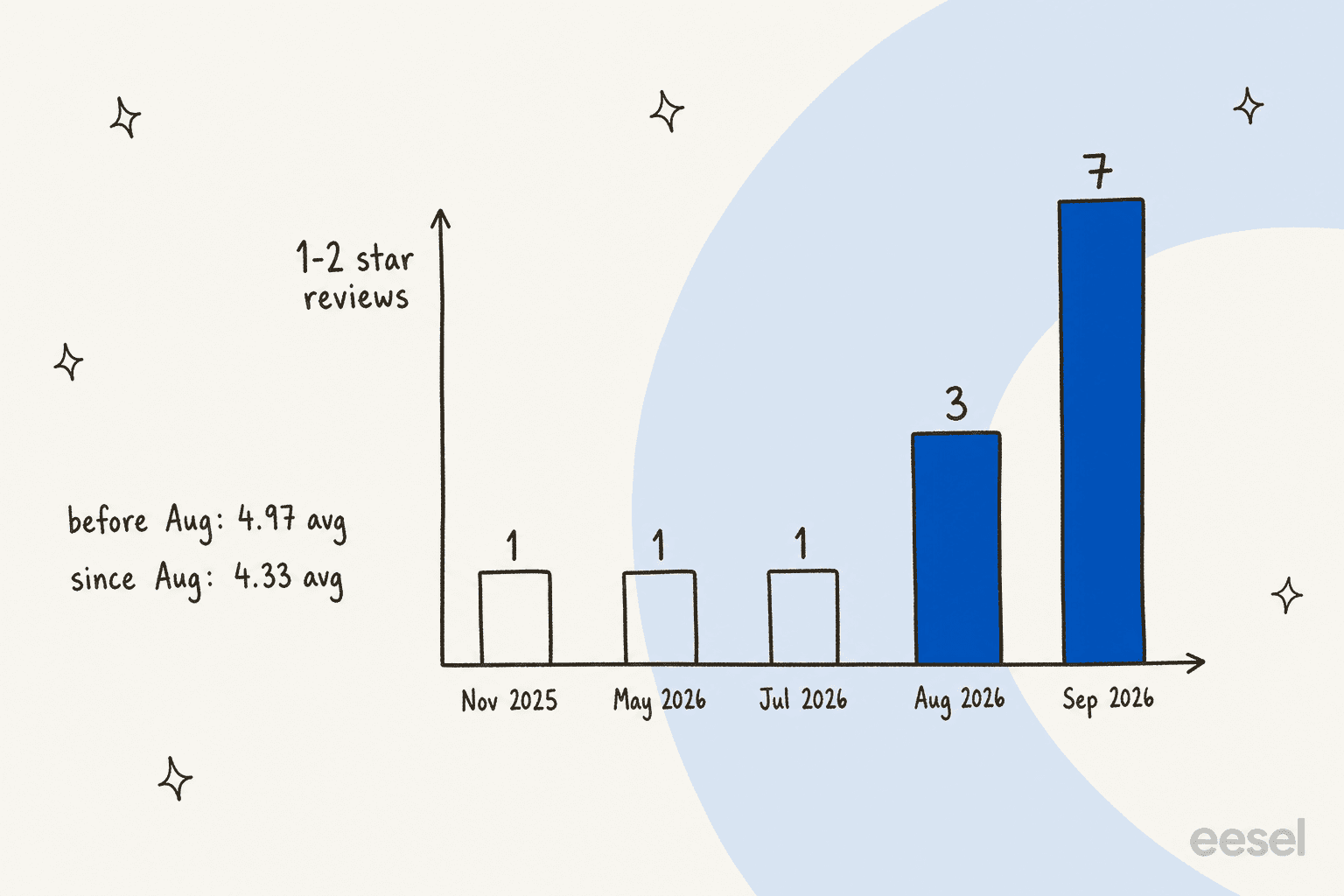
The catch is the price model. The listing says "Free to install", but PurpleBear's own plan page shows a 3-day trial, then $7.50 to $24 a month based on views, not on chats. The app was labelled "Free" in August 2025, and since August 2026, 10 of its 64 newest reviews are one or two stars, most about charges people didn't expect.
And as someone who builds AI agents for a living: a WhatsApp button routes a message, it does not answer it. When those chats start landing at 9pm, that is where eesel's AI helpdesk teammate fits. Question Beauty uses eesel to send about 960 replies a month to short "price?" style messages, with refunds and decisions left for a person.
What is PurpleBear WhatsApp Chat?
PurpleBear WhatsApp Chat is the app called "Whatsapp" on the Wix App Market, with the teaser "Whatsapp chat & Whatsapp button for live chat". It is "Verified by Wix", available worldwide, and its interface comes in English, French, German, Italian, Polish and Portuguese.
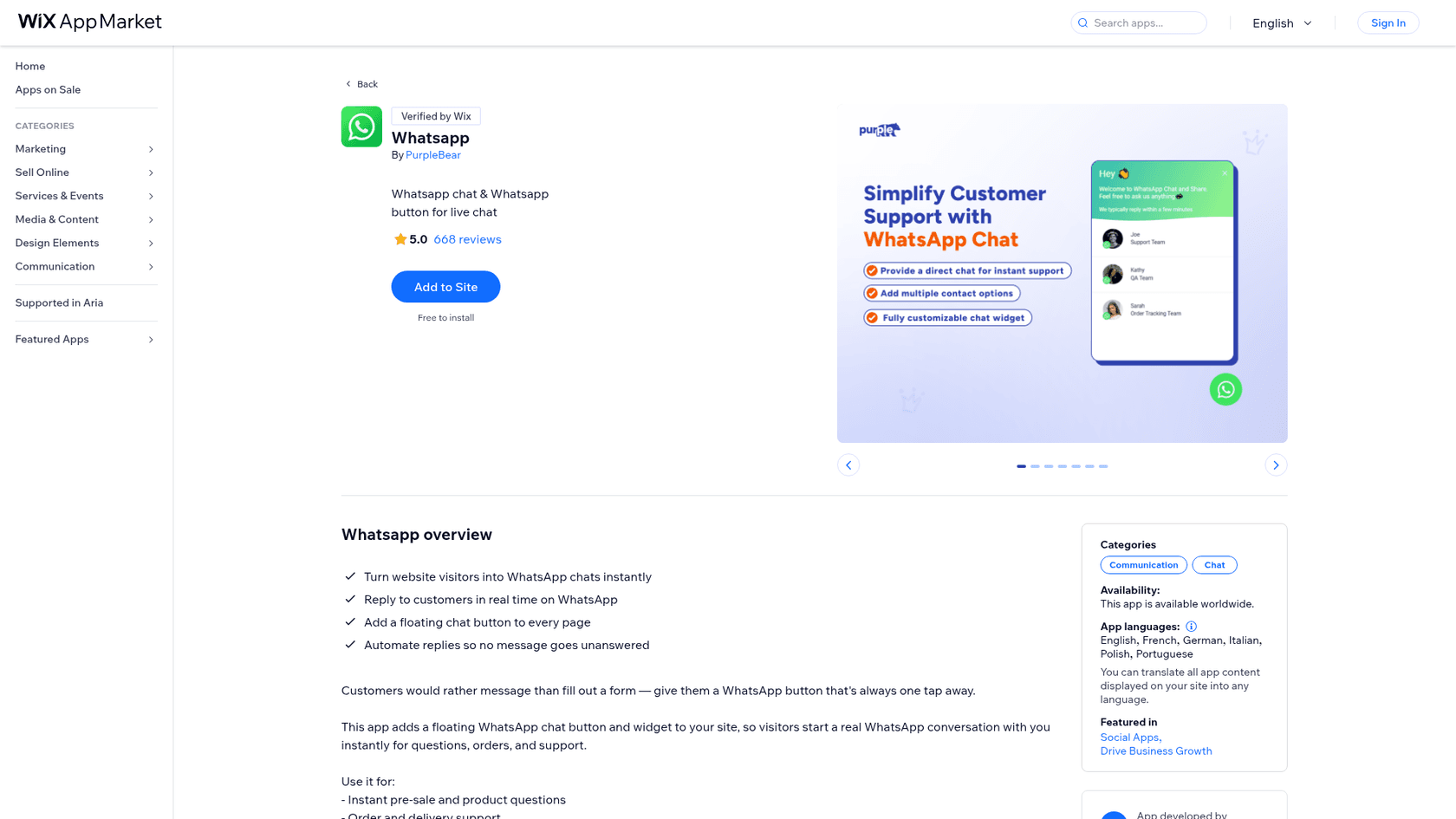
The developer, PurpleBear, builds Wix apps for store owners: bundles, countdown timers, age gates, cookie banners and more. Its developer page shows a 4.8 average across 121 apps, and Wix lists the company as active since April 23, 2024.
There is a second, smaller PurpleBear app called "Whatsapp Chat" (listing, 4.8 from 51 reviews) that focuses on multiple buttons and click tracking. This review covers the big one, the 668-review "Whatsapp" app, which is what most people find when they search for PurpleBear WhatsApp.
I build features and AI agents at eesel, so I read this listing the way I'd read a spec: what does the widget actually do when a visitor taps it, what am I billed for, and what happens to the message after that?
How does the PurpleBear WhatsApp widget work?
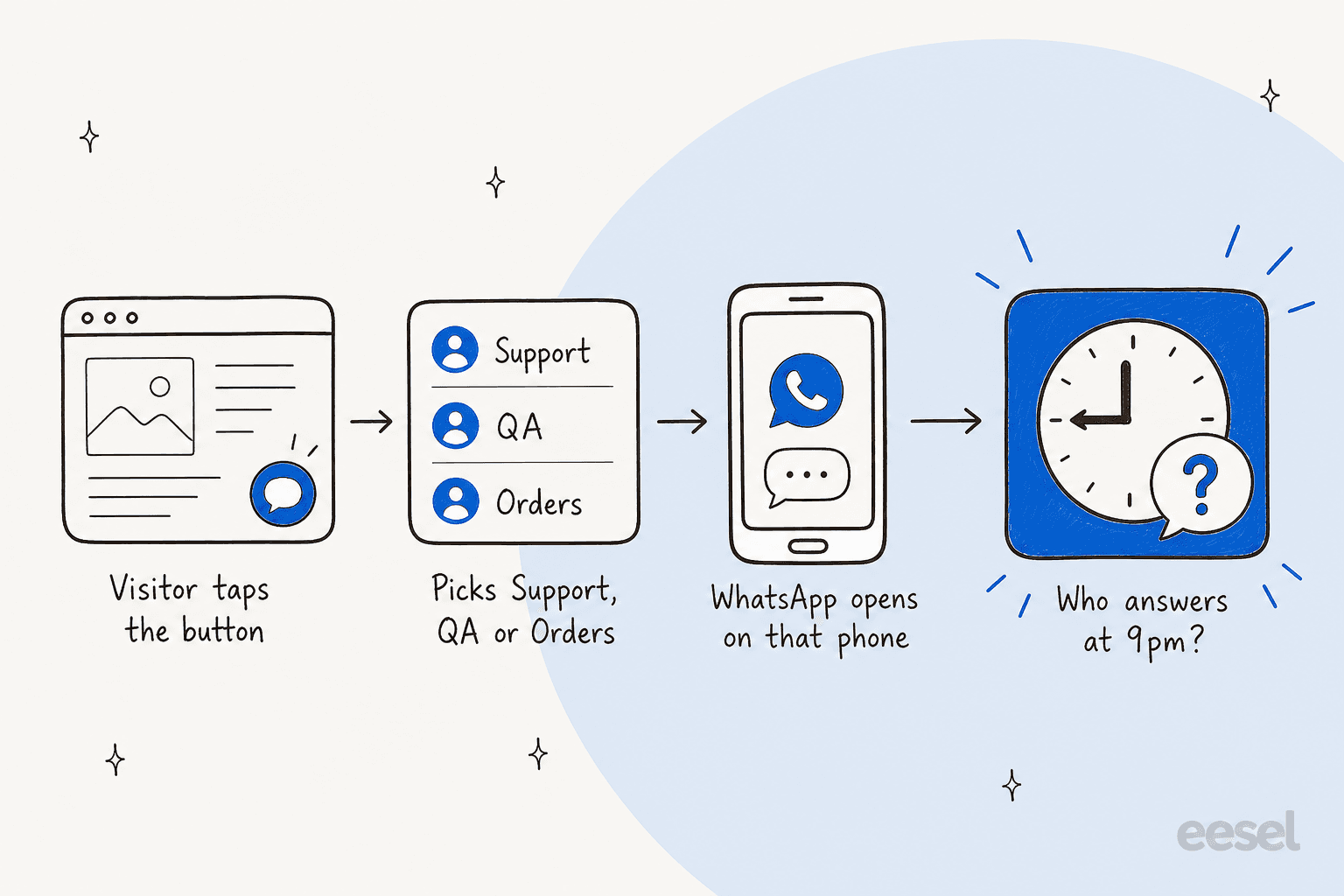
It is a click-to-chat widget. A floating button sits on every page. When a visitor taps it, a small panel opens with a greeting and a list of contacts, and picking one opens WhatsApp with that person's number, on the phone app or WhatsApp Web.
The listing's gallery shows the setup as a four-step wizard: Layout & Design, Rules & Triggers, Integrations and Final Setup. The sample widget lists "Joe, Support Team", "Kathy, QA Team" and "Sarah, Order Tracking Team", and one reviewer used the same idea for "Atendimento, suporte, financeiro" (service, support, finance).
The upside of this design is that nothing sits between you and the customer. There is no WhatsApp Business API account, no message templates and no per-message fees, and the conversation stays on the customer's phone after they leave your site.
The other side is just as plain: every message waits for whoever owns that phone. The widget can say "We typically reply within a few minutes", but it can't make that true at 9pm on a Sunday.
What features does PurpleBear WhatsApp Chat have?
Here is what the listing, its gallery and the reviews show. I've grouped it by what you would actually use.
Contact picker and chat templates
The headline feature is "multiple contact options": one button, several people or departments behind it. The gallery calls the layouts "pre-made chat templates", with a greeting card, an online dot on each contact and a "Start chat" button.
A Brazilian agency reviewer liked exactly this part, writing that the option to create several agents is "fantástico" and that the WhatsApp click is "100% rastreável no tag manager" (fully trackable in Tag Manager). One four-star reviewer had the opposite wish: "It works but I don't like that it has two clicks to get to chat."
Style editor
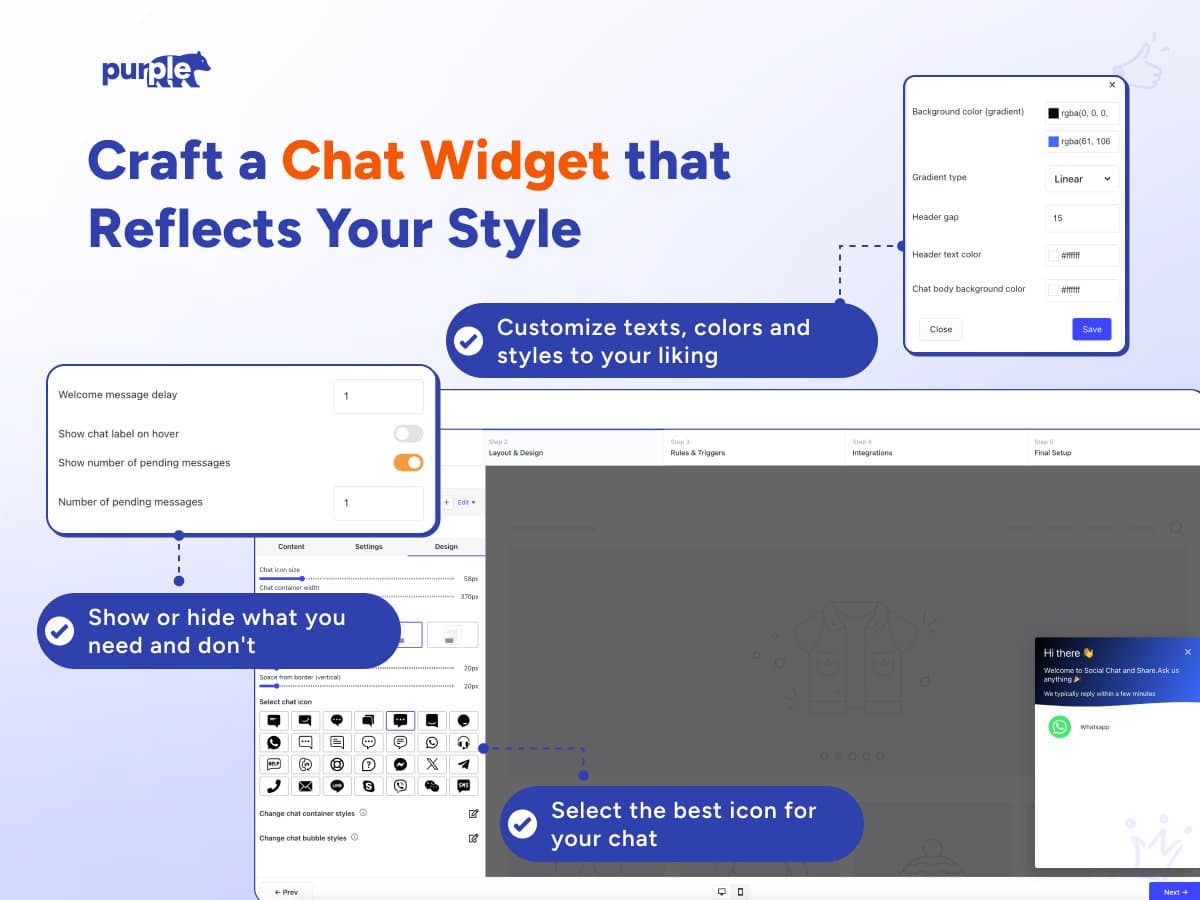
The editor covers colours (including gradients), a welcome message delay, a chat label on hover, a fake "pending messages" badge and a grid of about 40 icons. Reviewers say setup is easy: 91 of the reviews I pulled mention "easy" or its Spanish, Portuguese or French equivalent. The one layout gap that came up was mobile, where a reviewer couldn't "tweak its size and position on mobile".
Rules and triggers
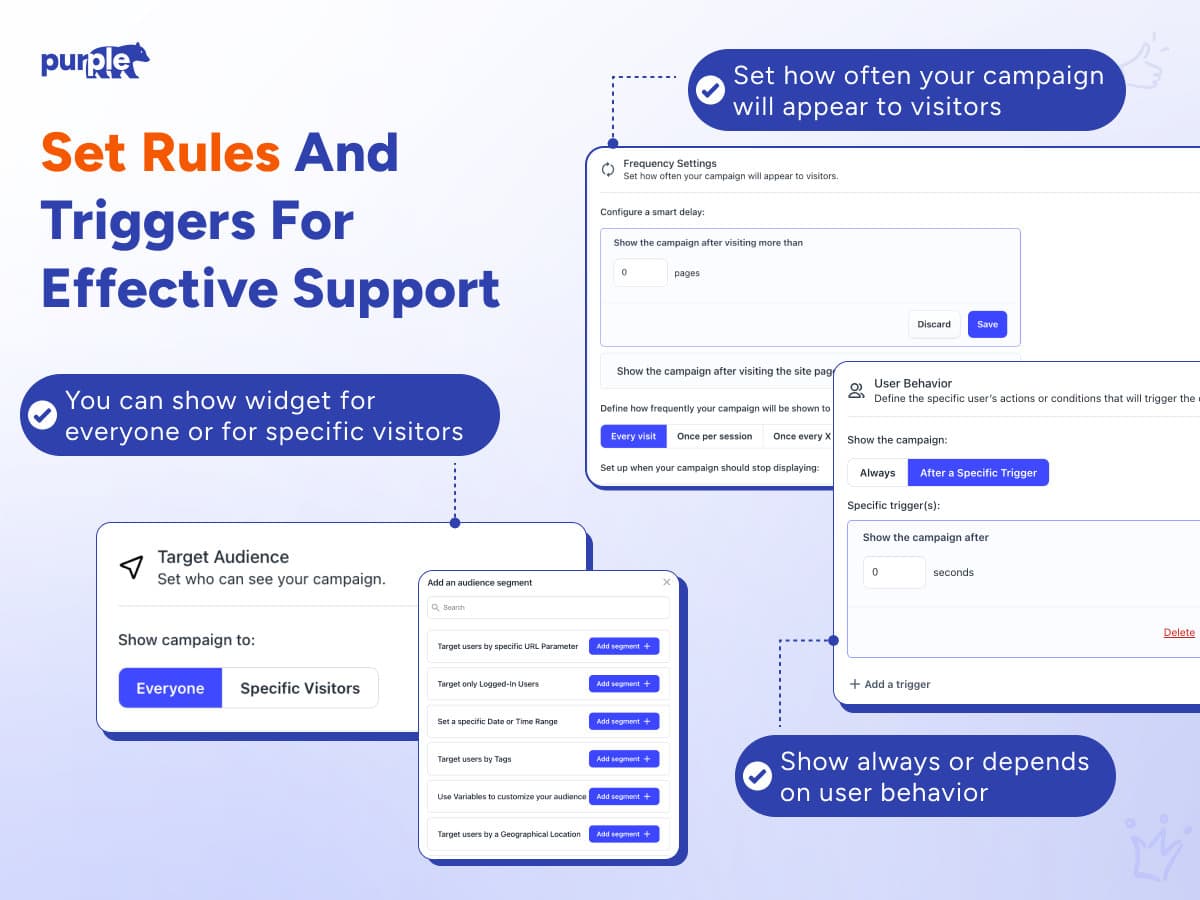
This is the part most free buttons skip. You can show the widget to everyone or to segments: a URL parameter, logged-in members, a date or time range, tags or a location. You can also delay it by pages or seconds and cap it to once per session. If you've read my notes on live chat triggers, this is the same idea applied to a WhatsApp button.
"Automated replies"
The listing promises "Automate replies so no message goes unanswered". I couldn't find any page that explains what that means, and PurpleBear's site has no documentation for this app. What the gallery shows is a welcome message inside the widget. Nothing describes AI, a chatbot or automatic answers inside WhatsApp itself, so I'd treat "automated replies" as the greeting, not as someone answering for you.
Analytics
One gallery image shows a dashboard with page views, conversion, conversion rate and revenue, labelled "Monitor Chat Performance". The numbers in it are sample data, and none of the reviews describe the report, so I can't tell you how deep it goes.
How much does PurpleBear WhatsApp Chat cost?
The Wix listing says "Free to install", "Usage based pricing plan" and "Low-cost pricing starting at $7.5/mo", with a 3-day free trial. The real numbers are on PurpleBear's plan page, behind a slider:
| Step | Price | What the slider shows |
|---|---|---|
| Trial | Free | Free for 3 days |
| Growth | $7.50/month | Up to 200 views |
| Growth 2 | $15/month | Up to 500 views |
| Growth 3 | $24/month | Unlimited views |
Prices in USD, from PurpleBear's plan page on October 28, 2026. The Wix listing adds that taxes may apply.

Three things matter more than the table.
You pay for views, not chats. The meter is traffic. A busy site with no WhatsApp conversations pays the same as one where every visitor taps the button. One reviewer says the team told them the widget had been "viewed multiple times" on a site nobody was using yet.
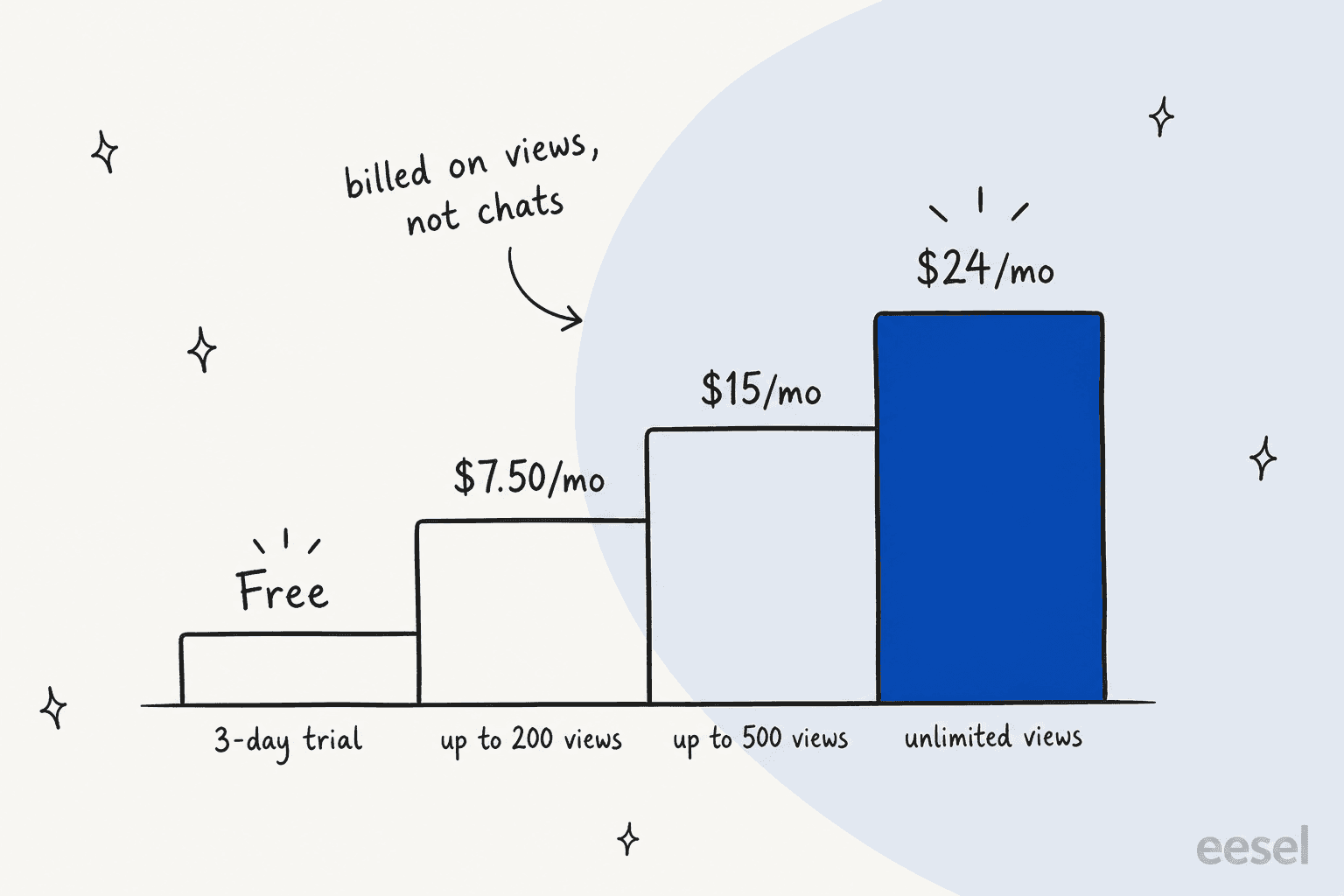
200 views is a small allowance. Most live business sites will land on $15 or $24 a month, not $7.50. The plan page doesn't say whether a "view" is a page view or a widget load, and the plan data behind the slider describes the first two tiers as "Up to 5,000 site views" and "Up to 50,000 site views". I'd ask PurpleBear which numbers apply before the trial ends.
It used to be free. A Wayback snapshot from August 2025 shows the same listing labelled "Free" with 87 reviews. By May 2026 it showed the usage-based plan. That's PurpleBear's call to make, but it explains why more than a dozen reviews still praise it as free.
For comparison, Smartarget's WhatsApp app lists Pro on Wix at $7.50 a month, flat, and Wix's own Smart Chat keeps manual chat free.
What do PurpleBear WhatsApp Chat users say?
I pulled the listing's full review feed on October 28, 2026. It returned 677 reviews (the listing header shows 668): 657 five-star, 5 four-star, 2 three-star, 2 two-star and 11 one-star. The first one is from March 2025, and PurpleBear replied to 673 of them.
Three patterns stand out:
- Most reviews are very short. 471 of 677 (70%) have fewer than 25 characters, like "Excelente", "good" or "I Love It!!".
- Support gets named a lot. 32 reviews mention support, often by a first name, and most of them are thank-yous for a fast fix.
- The tone changed in August 2026. Before August, 613 reviews averaged 4.97. Since August 1, 64 reviews average 4.33, and 10 of them are one or two stars.
The positive reviews are about easy setup and helpful people:
"Die Einrichtung ist super einfach und man bekommt genau das, was man braucht. Besonders positiv: Der Support hat meine Probleme extrem schnell und genau so gelöst, wie ich es mir gewünscht habe."
That German reviewer says setup is "super easy", you get exactly what you need, and support solved their problems "extremely fast". They also asked for a full German interface.
The recent negative reviews are mostly about billing:
"It was charging me $33 CAD per month with minimal website traffic and little understanding on how was I going to be charged."
A web designer gave one star after being charged for a test site:
"I installed it on an unfinished site under development using a temporary link without a domain strictly for testing."
Others wrote "very expensive for such a simple feature" and, in Spanish, "NO ES GRATUITA" (it isn't free). Three mention slow support, one saying no answer "for over a week". PurpleBear replied to each, pointing to the 3-day trial and the pricing page and offering help.
Outside Wix, I couldn't find this app on G2, Capterra, Trustpilot or Reddit. PurpleBear's homepage shows G2 and Trustpilot scores for the company, but I found no public reviews of the WhatsApp app on those sites.
Where does PurpleBear WhatsApp Chat fall short?
Most of it comes down to pricing clarity and the limits every click-to-chat button shares.
- "Free to install" isn't free to run. After 3 days you pay by views, and recent reviews show people missing that.
- The view allowance is unclear. The slider says 200 and 500 views, the plan data says 5,000 and 50,000 site views.
- No documentation. PurpleBear's site has no help page for this app, so the gallery is the manual.
- No answers, only routing. Nothing describes AI replies or automatic answers inside WhatsApp.
- No team inbox. Each chat lands on one person's WhatsApp. There's no shared inbox, assignment or shared history.
- Outside your helpdesk. Chats never reach your ticketing system, so your first response time on WhatsApp is invisible.
- Wix only. I found no Shopify or WordPress version.
None of these make it a bad widget. The widget is the strong part.
Who should use PurpleBear WhatsApp Chat?
The deciding factor is how much traffic you have versus how many chats you get, because you pay for the first one.
| You are... | Verdict |
|---|---|
| A Wix business that wants a polished button with several contacts | Good fit, budget $15 to $24 a month |
| A Wix site that needs targeting rules for the button | Good fit, few buttons do this |
| A high-traffic site with only a few WhatsApp chats | Expensive per chat, look at a flat-price widget |
| An agency testing apps on client staging sites | Uninstall before the trial ends |
| A team answering WhatsApp together | Skip, there's no shared queue |
| A store getting the same questions every evening | Skip, the work is answering, not routing |
If you're comparing Wix chat options, my Wix Smart Chat review and the Wix Smart Chat alternatives list are the next stops.
What are the alternatives to PurpleBear WhatsApp Chat?
Split it by the job you're hiring for.
- Just a WhatsApp button. Smartarget lists a flat Pro price instead of a views meter, and Chaty puts several channels behind one button. The Wix-only Rabbit SEO app bundles a button with backlinks.
- Web chat with an inbox. Tools like Tidio add a real inbox and bots. My guide on adding live chat walks through setup.
- WhatsApp for a team. Look at WhatsApp API providers or helpdesk channels like Zendesk WhatsApp and Gorgias WhatsApp.
- Answers, not just routing. An AI agent on WhatsApp, covered in my best WhatsApp chatbot roundup.
Is PurpleBear WhatsApp Chat worth it? My verdict
3 out of 5. As a widget, it's one of the more complete WhatsApp buttons on Wix: a contact picker, a proper style editor, real targeting rules and a support team that reviewers keep thanking by name.
What holds it back is billing. A "Free to install" label, a 3-day trial and a views meter with unclear limits is a combination that has produced 10 one and two star reviews in three months. If you install it, set a reminder for day 3 and confirm which tier your traffic lands on.
And once the button works, the next problem arrives: every message still needs someone to answer it.
Where does eesel fit next to a WhatsApp button?
PurpleBear's app gets a visitor into WhatsApp. eesel is about what happens next. eesel is an AI teammate platform, and for this job the relevant teammate is the AI helpdesk teammate, which joins your support setup and answers the repeat questions.
The eesel WhatsApp integration connects to a WhatsApp Business number, answers from your help center, website and past tickets, and hands conversations to a person by topic or confidence. If WhatsApp already lands in a helpdesk, it works inside Zendesk or Gorgias too. You write the rules in plain words, like "always hand refund requests to a person".

Two real setups show the pattern. Question Beauty gets the kind of short message a WhatsApp button produces, often just a product name and "price?". Between 8 August and 8 September 2026, eesel handled about 990 Gorgias tickets for it, sent about 960 replies, looked up about 290 Shopify orders before answering order questions, and closed about 280 tickets without a person.
IC Intracom runs one agent per brand on two web stores, answering from about 2,100 product records and passing sales and technical questions to the right team with the transcript. It's a small setup, 34 chats that month, and the point is the one PurpleBear's widget can't cover: a question asked at 9pm gets an answer without waiting for the office to open.
That's the gap I'd plan for. A button is a few minutes of setup; the after-hours answers are the ongoing work. For the wider playbook, see how to automate WhatsApp support and my AI agent handoff rules.
If you'd rather keep a chat window on your site instead of WhatsApp, eesel also has a chat bubble.
Try eesel
If PurpleBear's button is already filling your WhatsApp with the same questions, eesel's AI helpdesk teammate can answer the repeat ones from your help center and hand refunds and edge cases to you with a note attached. It starts free with 100 credits, and paid plans begin at $299 a month for 500 credits (eesel pricing).
Frequently Asked Questions
What is PurpleBear WhatsApp Chat?
It is a Wix App Market app, listed simply as "Whatsapp" by the developer PurpleBear, that adds a floating WhatsApp button and a small chat widget to a Wix site. Visitors pick a contact and continue the conversation in WhatsApp. It is a live chat entry point, not a shared inbox or a chatbot.
How much does PurpleBear WhatsApp Chat cost?
PurpleBear's plan page shows a 3-day free trial, then $7.50 a month up to 200 views, $15 up to 500 views and $24 for unlimited views, with taxes extra. The Wix listing says "Free to install" and "starting at $7.5/mo". For the full PurpleBear WhatsApp Chat pricing picture, compare it with my Wix Smart Chat pricing breakdown.
Is PurpleBear WhatsApp Chat free?
Not anymore. In August 2025 the listing labelled it "Free", and many older reviews praise it for that. Today it is free to install with a 3-day trial, then billed by views. If you only need a free link, a plain WhatsApp link or a WhatsApp auto reply on the Business app costs nothing.
Does PurpleBear WhatsApp Chat have AI replies?
The listing promises "automated replies so no message is missed", but nothing on the listing or the vendor site describes AI answers inside WhatsApp. What the gallery shows is a welcome message and a "we typically reply within a few minutes" line in the widget. For real automated answers, look at a WhatsApp AI chatbot or eesel for WhatsApp.
Why do some PurpleBear WhatsApp Chat reviews complain about charges?
The app moved from free to usage-based billing, while the listing still says "Free to install". Since August 2026, 10 of 64 reviews are one or two stars, and most mention unexpected charges, including one for an unpublished test site. Check the plan page before your trial ends, and see my Live Chat Alternative review for another Wix pricing story.
Is PurpleBear WhatsApp Chat good for a support team?
It is good at routing: the widget lists several people or departments and opens WhatsApp with the one the visitor picks. It does not give the team a shared queue, ticket routing or reporting on replies. Teams that answer WhatsApp together usually move to a WhatsApp customer service platform.
What is a good PurpleBear WhatsApp Chat alternative?
For just a button, Smartarget lists a flat Pro price on Wix. For a chat inbox, start with Wix Smart Chat. If the problem is answering, eesel's AI helpdesk teammate replies on WhatsApp from your knowledge base and hands the rest to a person.