


Utorix Live Messenger is a cheap, single-job Wix app, and I give it 2.5 out of 5. It puts Meta's Facebook Page Plugin on your site as a tab, so desktop visitors can send a message to your Facebook Page. It costs $2.99 a month, or $2.39 a month billed yearly, after a 14-day trial, and the listing shows 3.6 stars from 514 reviews.
The catch is who can use it. The listing says plainly that it doesn't work on mobile phones, and Meta's own docs say visitors need to be logged into Facebook to send a message. Replies happen in Messenger, not on your site. Only 4 reviews have been posted since the start of 2025.
And as someone who builds AI agents at eesel: the tab gets a message into your Page inbox, then it waits for you. eesel's AI helpdesk teammate answers those Messenger conversations from your help center. Question Beauty runs it on Messenger, email and chat tickets and sent about 960 replies in one month.
What is Utorix Live Messenger?
Utorix Live Messenger is the app called "Live Messenger" on the Wix App Market, with the teaser "Add Facebook Page Plugin to your website". It is "Verified by Wix", sits in the Communication and Chat categories, and is available worldwide.
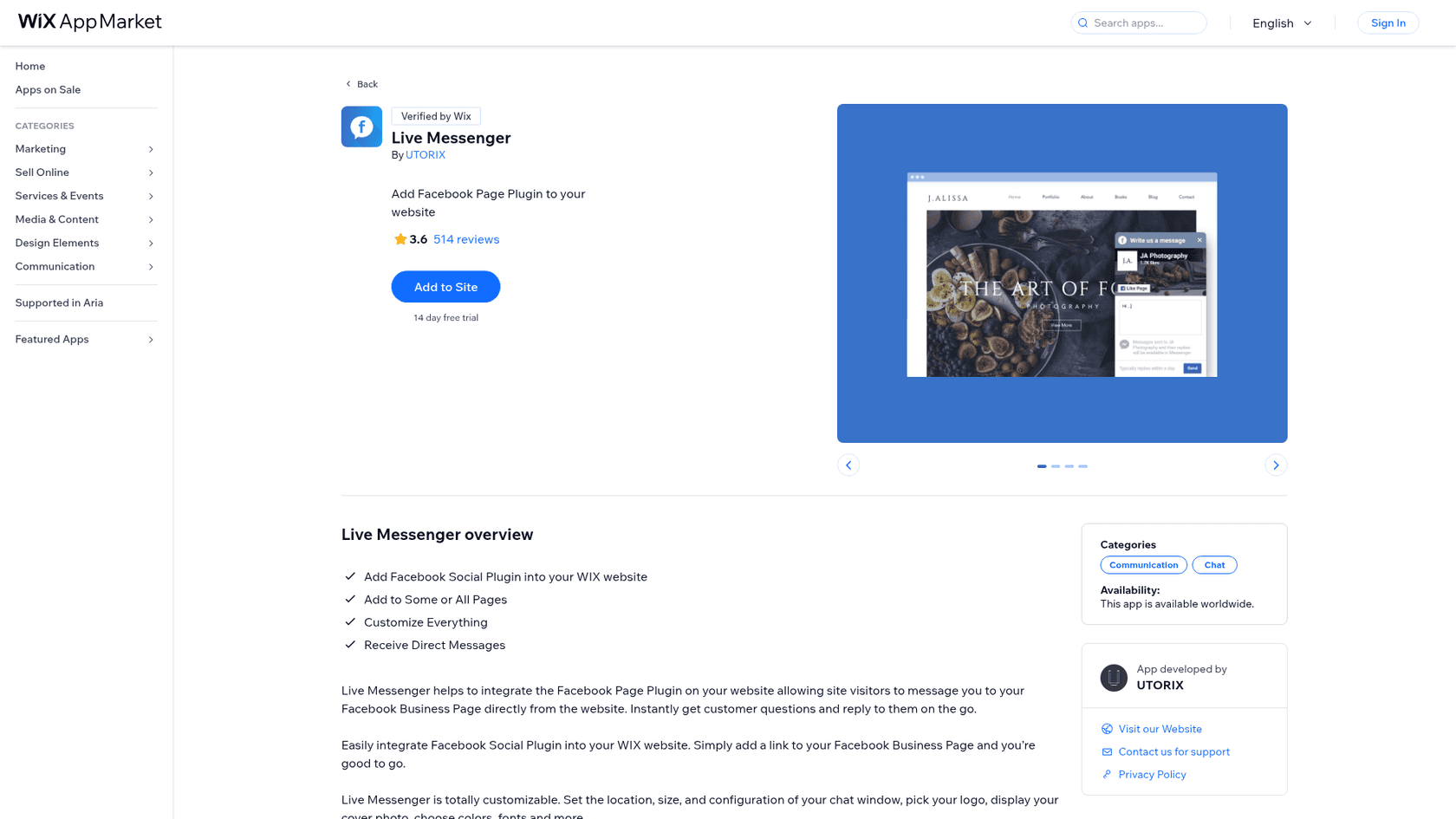
The developer, UTORIX, has exactly one app on its Wix developer page. The vendor website is a single FAQ page, and support runs over email. The earliest reviews, from 2016 and 2017, name Lumifish Labs as the maker, so the app has been around for about a decade under different names.
I build features and AI agents at eesel, so I read listings like this one the way I'd read a spec: what does the visitor actually see, who sees it, what am I paying for, and where does the message go after that?
How does Utorix Live Messenger work?
It is a wrapper around Meta's Page Plugin. You paste your Facebook Page address into the app settings, publish, and a tab like "Write us a message" appears on your pages. A visitor clicks it, a box opens with your Page name and cover photo, and they type a message that lands in your Page's Messenger inbox.
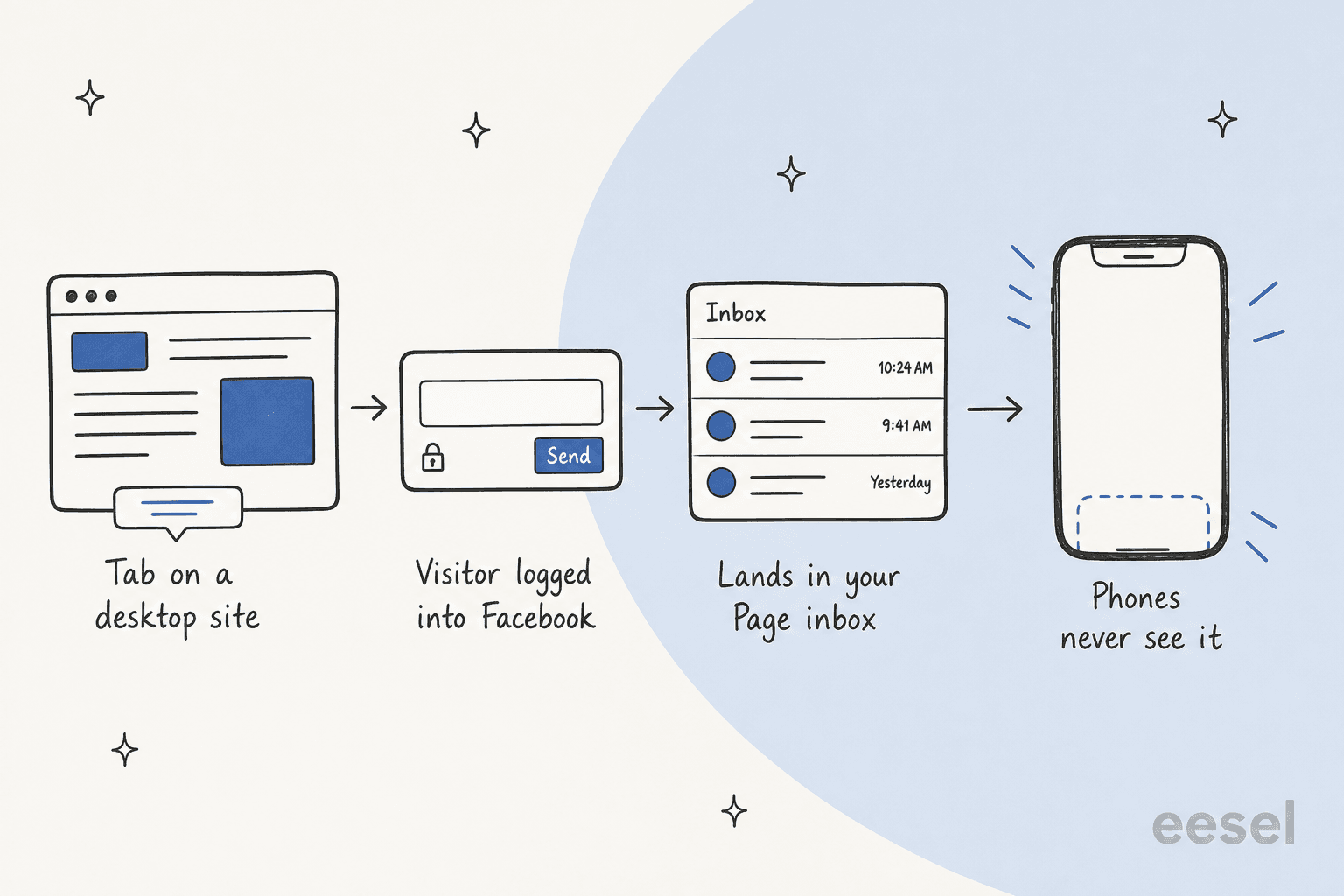
Three rules shape who can actually reach you:
- It is desktop and tablet only. The listing says "Live Messenger App doesn't work on mobile phones. It works on tablet screen size and larger."
- Visitors need a Facebook login. Meta's docs say the Messages tab lets people message your Page from your website, and "People need to be logged in to use this feature."
- Your Page needs open settings. The vendor FAQ says the app only works with Facebook Pages, not personal profiles, and the Page can't have age or country restrictions.
The conversation then lives in Messenger. The sample widget in the gallery even says it: messages sent to the Page "and their replies will be available in Messenger". That is useful if your team already answers your Page inbox every day. It also means nothing about the conversation stays on your website.
What features does Utorix Live Messenger have?
The listing promises four things: add the Facebook plugin, show it on some or all pages, "customize everything", and receive direct messages. Here is what the settings panel in the listing gallery shows.
Tab and window settings
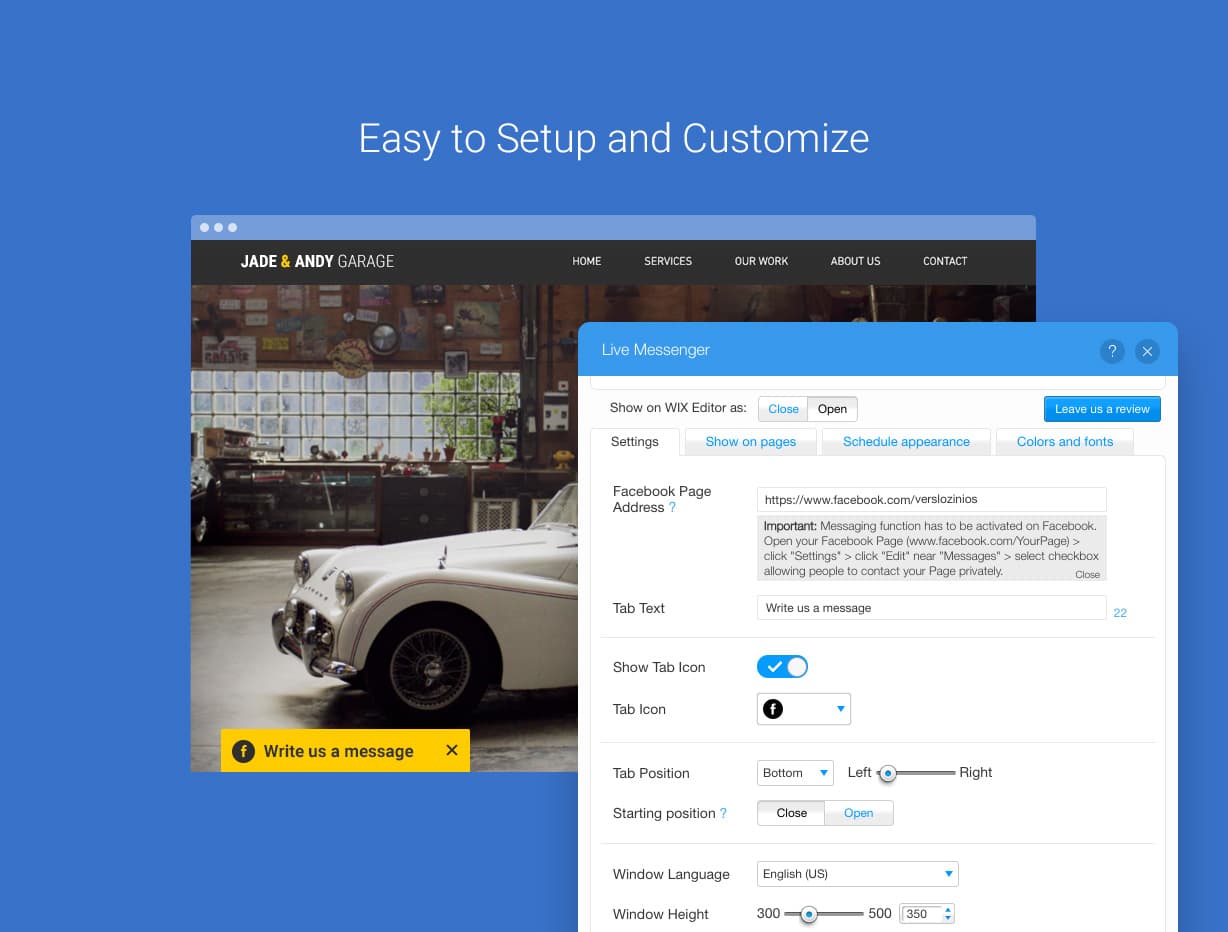
The settings tab covers the Page address, the tab text, a tab icon, the tab position along the bottom edge, whether the window starts open or closed, the window language and a window height between 300 and 500 pixels. That lines up with Meta's own limits for the plugin, which is 180 to 500 pixels wide.
What you can't change is the greeting. The vendor FAQ says it's "impossible" to edit the standard welcome text in the chat box, because Facebook doesn't allow it.
Pages, schedule and design
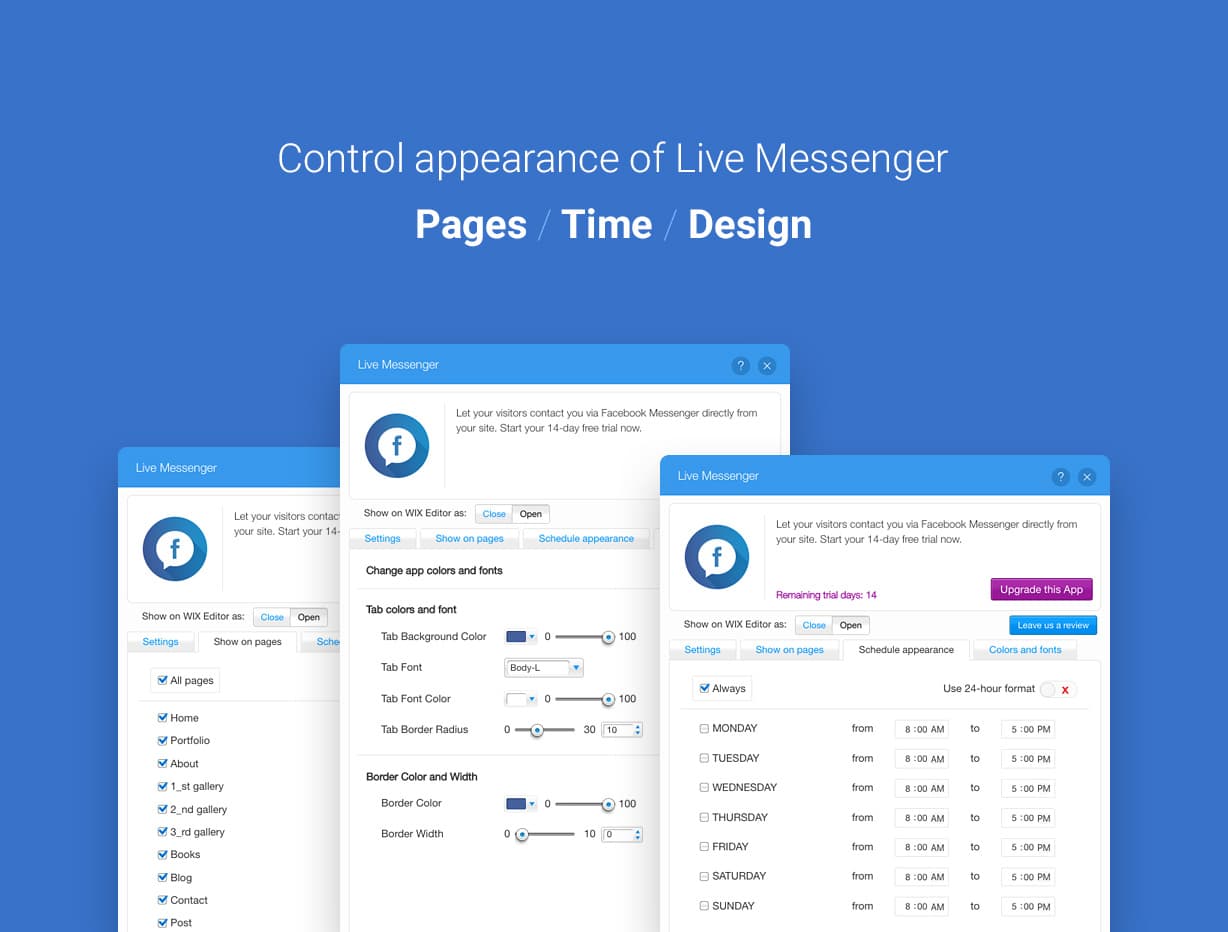
This is the strongest part of the app. You can tick which pages show the tab, set a weekly schedule with from and to times for each day, and style the tab colours, font, border radius and border. A schedule is a nice touch for a small business: show the tab during office hours, hide it when nobody's watching the Page. It's the same idea as live chat triggers, just simpler.
Not every reviewer got page targeting to behave, though. One wrote in 2020 that the tab "is present on every page in the editor anyways" even when set to one page.
Receiving messages
The message box is Meta's, not Utorix's. In the gallery's farm example it shows the Page name, a "Like Page" button, a text field and a "Typically replies within a day" line.

There's no inbox, no chatbot, no auto-reply and no reporting inside the app. Asked why it doesn't work on phones, the vendor FAQ answers that the app "can't send automated messages to the customer".
How much does Utorix Live Messenger cost?
The pricing is the simplest part of this review. The Wix listing shows one plan and a trial:
| Plan | Billed monthly | Billed yearly | What you get |
|---|---|---|---|
| Free trial | $0 for 14 days | $0 for 14 days | The full app |
| Premium | $2.99/month | $2.39/month | Facebook Page Plugin tab on your Wix site |
Prices in USD, from the Wix App Market listing on October 28, 2026. There is no free plan after the trial.
Yearly billing works out to about $28.68 a year. The same $2.99 price shows up in an April 2021 snapshot of the listing, so it hasn't moved in years.
Two details matter more than the number. First, upgrades are per site, so the vendor FAQ says you can't move a paid plan to another site; you cancel and upgrade again. Second, the FAQ points to Wix's rule that third-party app purchases are not refundable. That matters here, because several 1-star reviews come from people who paid and then found out about the phone limit.
For comparison, Wix's own Smart Chat keeps manual chat free and works on phones, and the PurpleBear WhatsApp app charges $7.50 to $24 a month by views.
What do Utorix Live Messenger users say?
I pulled the listing's full review feed on October 28, 2026. It returned 528 reviews (the header shows 514), averaging 3.00, from July 2016 to April 2026. The listing's own breakdown is 172 five-star and 167 one-star, with 52 four-star, 75 three-star and 48 two-star in between.
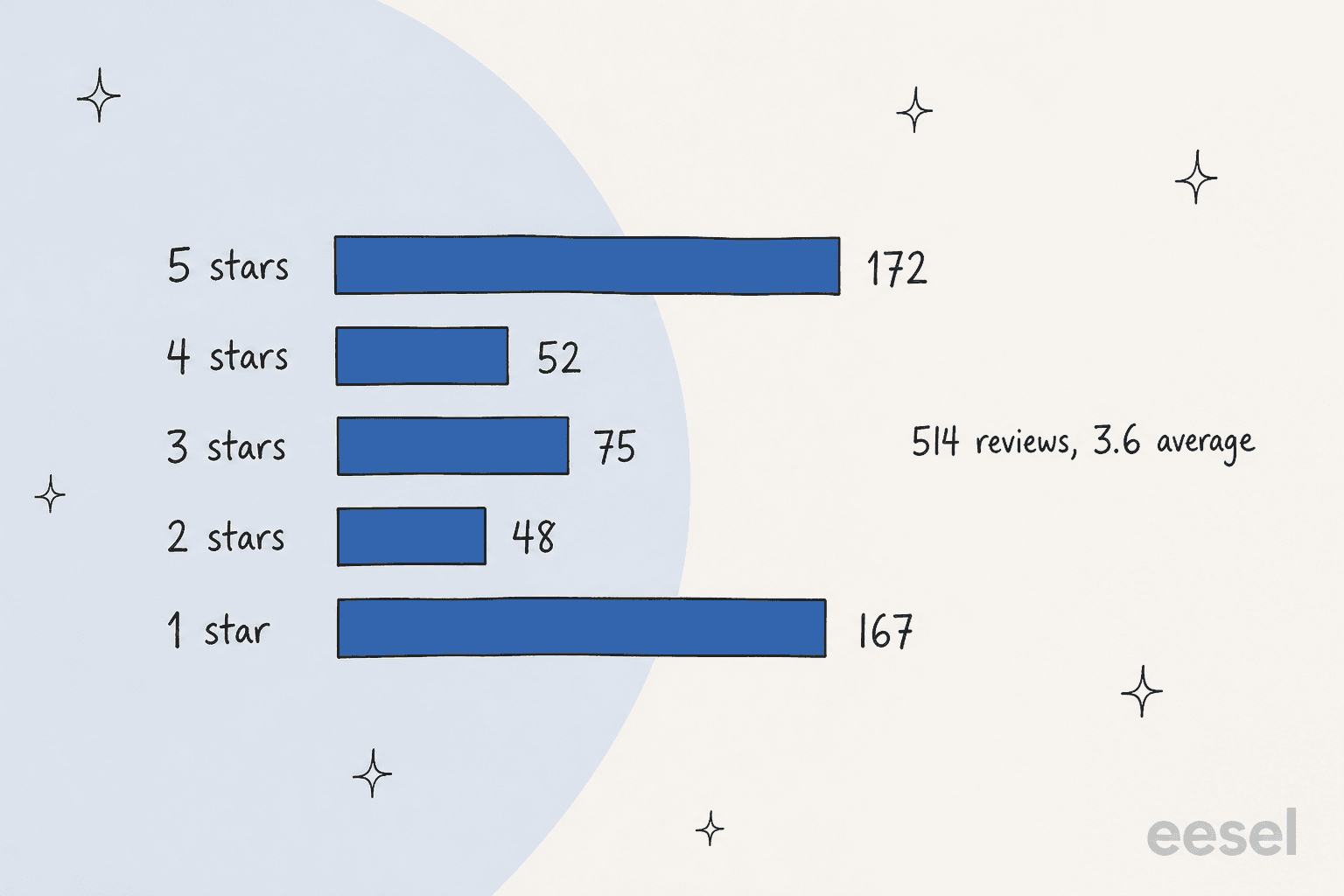
That's a split, not an average. Worked out by hand, those five numbers average about 3.0, below the 3.6 shown in the header, which matches the 3.00 I got from the feed. Three patterns explain the split.
- Mobile comes up constantly. 98 reviews mention mobile or phones.
- "Doesn't work" is the other big theme. 86 reviews say some version of "not working", often tied to the "Invalid Facebook Page address" error.
- Activity has nearly stopped. 256 reviews landed in 2017 and 2018. Only 4 have come in since January 2025.
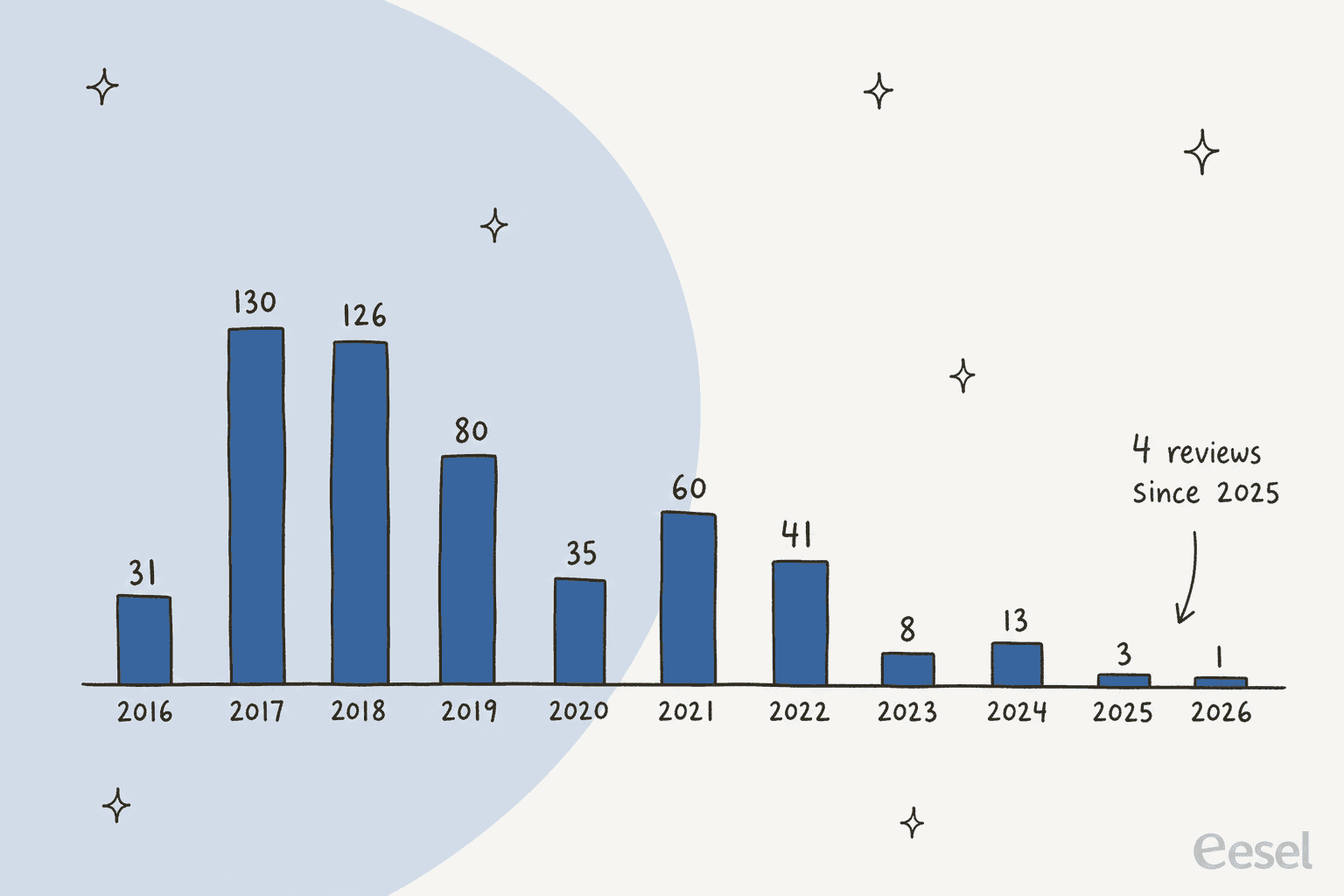
The happy reviews like the look and the idea:
"I love this, I really wanted FB messenger on my site, has nice layout options, colours, and places your FB public page photo at the top with total likes, you can also like the page within the app, and has a good welcome message."
The mobile point has been there since the start. One early reviewer gave four stars and explained the math:
"75% of my traffic is from mobile sources, with the other 25% being desktop and tablet. This app is brilliant at starting a conversation with potential clients but only 25% of my audience can use it."
The other recurring complaint is about the name. People expected a chat window and got a message form:
"Customer sends a message and can not receive reply here, they must go to their FB... That is NOT Live Messaging, that is a contact form...."
The developer's reply to that review is honest about it: "Live Messenger app is not a stand alone chat box." UTORIX has replied to 222 of the 528 reviews, mostly asking people to email support.
The recent ones are short and mixed. A 2024 review says it "does not function correctly and it is impossible to remove", and another from May 2024 says it "doesn't show the chat icon on mobile version". On the other side, a few reviews from 2024 to 2026 just say "Love it", "Great app" and "good".
Outside Wix, I couldn't find this app on G2, Capterra, Trustpilot or Reddit.
Where does Utorix Live Messenger fall short?
Most of it comes from the plugin underneath and the fact that the app hasn't changed much in years.
- No phones. The listing says so in capital letters. For most small business sites, that's the majority of visitors.
- Facebook login required. A visitor without a Facebook account, or not logged in, can't send you anything.
- Not live chat. The reply goes to the visitor's Messenger, not your site. It's closer to a contact form than live chat.
- No automation. No greeting you can edit, no auto-reply, no answers.
- Setup errors. Age or country limits on your Page trigger "Invalid Facebook Page address".
- No refunds. Wix doesn't refund third-party apps, so test it during the 14 days.
- Outside your helpdesk. Messages sit in your Page inbox, not your ticketing system, unless something connects them. Your first response time there is invisible.
None of this is hidden. UTORIX puts the phone limit right on the listing, and that honesty deserves credit.
Who should use Utorix Live Messenger?
The deciding question is whether your visitors are on desktop and logged into Facebook, because those are the only people it reaches.
| You are... | Verdict |
|---|---|
| A Wix site with mostly desktop visitors and an active Facebook Page | Fair fit for $2.99 a month |
| A business that wants the tab only during office hours | Good fit, the weekly schedule handles it |
| A site where most traffic is on phones | Skip, most visitors won't see it |
| A team that needs real chat on the website | Skip, replies happen in Messenger |
| A team that answers Messenger together | Skip, there's no shared inbox |
| A store getting the same questions every evening | Skip, the work is answering, not collecting |
If you're comparing Wix options, my Wix Smart Chat review and the Wix Smart Chat alternatives list are the next stops.
What are the alternatives to Utorix Live Messenger?
Split it by the job you need done.
- A chat window that works on phones. Wix's own chat, or tools like Tidio. My guide on adding live chat walks through setup, and live chat features covers what to look for.
- One button for several channels. Chaty puts Messenger, WhatsApp and more behind one button, and Smartarget lists a flat Pro price on Wix. The Wix-only Rabbit SEO app is another option.
- Messenger inside your helpdesk. If Facebook is a real support channel, connect it to your helpdesk: see Zendesk and Facebook, the Zendesk Messenger channel or Gorgias Facebook comments.
- Answers, not just collection. An AI agent on your Page, covered in my roundup of AI for social media support.
Is Utorix Live Messenger worth it? My verdict
2.5 out of 5. For $2.99 a month you get a tidy Facebook Page tab with useful page and schedule controls, a vendor that's upfront about its limits, and a price that hasn't changed in years.
What holds it back is reach. Phone visitors never see it, logged-out visitors can't use it, and the conversation leaves your site for Messenger. With only 4 reviews since 2025, I'd also treat it as a stable app rather than one that's getting new features. If your audience fits, use the 14-day trial to test it on a real desktop and a logged-out browser before you pay.
And once messages start arriving in your Page inbox, the next problem shows up: someone still has to answer them.
Where does eesel fit next to a Messenger tab?
Live Messenger gets a visitor into your Facebook Page inbox. eesel is about what happens next. eesel is an AI teammate platform, and for this job the relevant teammate is the AI helpdesk teammate, which joins your support setup and answers the repeat questions.
The eesel Messenger integration connects to your Facebook Page and answers incoming Messenger conversations from your help center, docs or helpdesk content. You can test it on real questions before it goes live, and set when it hands over to a person by telling it in plain words, like "always pass refund requests to me". If your Page inbox already feeds a helpdesk, it works inside Gorgias or Zendesk too.

Two real setups show the pattern. Question Beauty gets Facebook Messenger, email and website chat in Gorgias, and many messages are just a product name and "price?". Between 8 August and 8 September 2026, eesel handled about 990 of its tickets, sent about 960 replies, looked up about 290 Shopify orders first, and closed about 280 tickets without a person. Refunds and complaints went to the team with a note.
Rúngne, a Norwegian climbing apparel brand, has Instagram and Facebook comments landing in the same Gorgias queue as email and chat. eesel acknowledged and tagged those tickets and sent about 440 public replies in a month, while cancellations and lost parcels went to people.
That's the gap I'd plan for. A Messenger tab is five minutes of setup; the after-hours answers are the ongoing work. For the rules I'd set first, see my notes on AI agent handoff.
If you'd rather keep a chat window on your site that works on phones, eesel also has a chat bubble, and it answers on Instagram as well.
Try eesel
If a Messenger tab is already filling your Page inbox with the same questions, eesel's AI helpdesk teammate can answer the repeat ones from your help center and hand refunds and edge cases to you with a note attached. It starts free with 100 credits, and paid plans begin at $299 a month for 500 credits (eesel pricing).
Frequently Asked Questions
What is Utorix Live Messenger?
It is a Wix App Market app by UTORIX that embeds Meta's Facebook Page Plugin on a Wix site, so visitors can send a message to your Facebook Business Page from a tab on your pages. Replies happen in Facebook Messenger, not on your site, so it works as a contact form for Messenger rather than a live chat window.
How much does Utorix Live Messenger cost?
The Wix listing shows one Premium plan at $2.99 a month billed monthly, or $2.39 a month billed yearly, after a 14-day free trial. Upgrades are per site and Wix does not refund third-party apps. For a wider view of Wix chat costs, see my Wix Smart Chat pricing breakdown.
Does Utorix Live Messenger work on mobile?
No. The listing and the vendor FAQ both say the app does not work on mobile phones, only on tablet-sized screens and larger. If most of your traffic is on phones, a Chaty style button or Wix's own chat is a better starting point.
Is Utorix Live Messenger free?
Not after the trial. You get 14 days free, then the Premium plan at $2.99 a month or $2.39 a month on yearly billing. If you only need a free way to reach your Page, a plain m.me link costs nothing, and the Facebook chatbot guide covers what you can automate inside Messenger itself.
Why does Utorix Live Messenger say my Facebook Page address is invalid?
The vendor FAQ says this happens when your Page has age or country restrictions, or when messaging is turned off. Remove the restrictions under the Page settings and allow people to message the Page privately. It also only works with Facebook Pages, not personal profiles. This error is one of the most common complaints in Utorix Live Messenger reviews.
Can Utorix Live Messenger answer messages automatically?
No. It only gets the message into your Page inbox, and the vendor says the welcome text in the box can't be changed. Answering is up to you, or to an AI agent connected to your Page, like eesel for Messenger, which answers from your knowledge base.
What is a good Utorix Live Messenger alternative?
For a chat window that works on phones, start with Wix Smart Chat. For a button that links several channels, look at Smartarget. If your problem is answering Messenger, not collecting it, eesel's AI helpdesk teammate replies inside Messenger and hands edge cases to a person.