

Jira Service Management has a native status page, but Atlassian ships it on the Enterprise plan only, for both public and private pages. On Premium or below, you run the separate Statuspage product and connect it to JSM through an app or an alert integration. The part worth knowing before you buy: the native page takes its components from your service registry and its updates from the incident, so there is no second tool to keep in sync. An AI teammate such as eesel covers what the page can't, answering the "is it down?" tickets in your queue from the update you posted.
I build eesel's agents, so I read this feature by asking where each piece of data comes from and who can change it. I went through Atlassian's status page docs and pricing pages for this guide, and the docs disagree with each other in a few places, which I flag below. With the eesel CLI, an AI coding agent can upload approved outage macros and incident policy, then ask it test questions and check the answers before anything goes live. Connecting the Jira site itself still needs a Jira admin to approve it.
What are Jira Service Management status pages?
They are branded pages that tell customers or staff which of your services are up, and what you are doing when one is not. Atlassian describes them as built into JSM so that they use "your service registry and incidents" instead of a second app that you set up again. You create one under Operations then Status pages, and agents post updates from the incident view.
There are really three ways Jira Service Management and a status page connect, and Atlassian's docs cover all three. Mixing them up is the most common source of confusion I see.
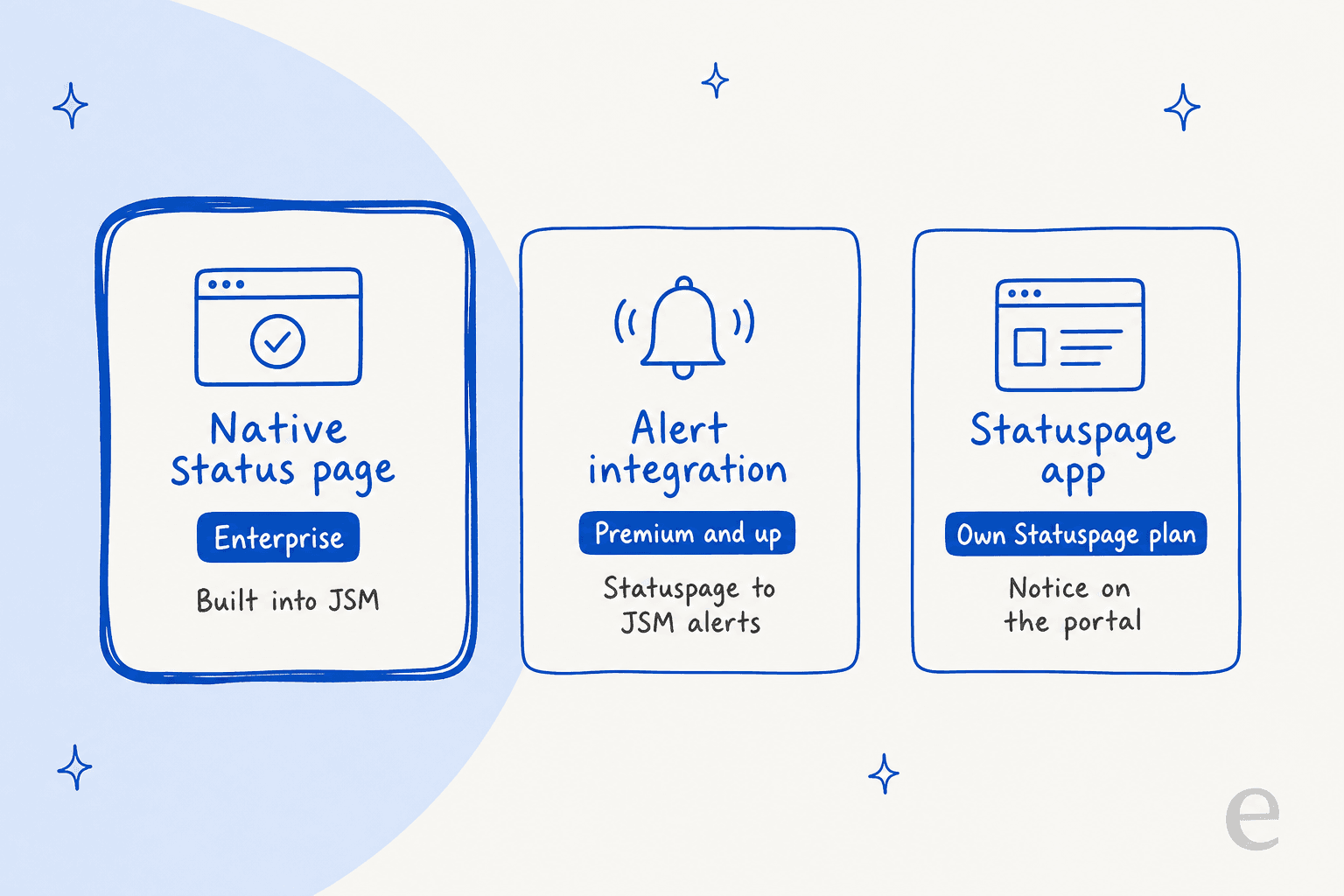
The native page is the new one. Atlassian's community announcement from 17 February 2026, posted by an Atlassian team member, said the rollout started on 16 February 2026. The other two routes tie JSM to the older Statuspage product, and they predate it.
Which plan includes Jira Service Management status pages?
Enterprise, for the native feature. Atlassian's pricing page lists "Status pages" with a tick under Enterprise only, and the view the status page doc repeats that the capability is "exclusive to Enterprise plans." Here is how the pieces split by plan, from the same pages:
| Capability | Free | Standard | Premium | Enterprise |
|---|---|---|---|---|
| Native status pages (public and private) | No | No | No | Yes |
| Statuspage alert integration (two-way) | No | No | Yes | Yes |
| Incident stakeholder communication | No | No | Yes | Yes |
| Major incident escalation | No | No | Yes | Yes |
| Alert data retention | 1 month | 1 year | 3 years | 5 years |
On cost, Premium showed $55.28 per agent per month on the pricing page when I checked on 12 November 2026. Enterprise has no public price, is billed annually and goes through sales. Atlassian says monthly pricing is progressive, so that figure is a blend for a preset team size, not a list rate. My pricing breakdown walks through the bands.
If you are below Enterprise, the standalone product has public prices of its own:
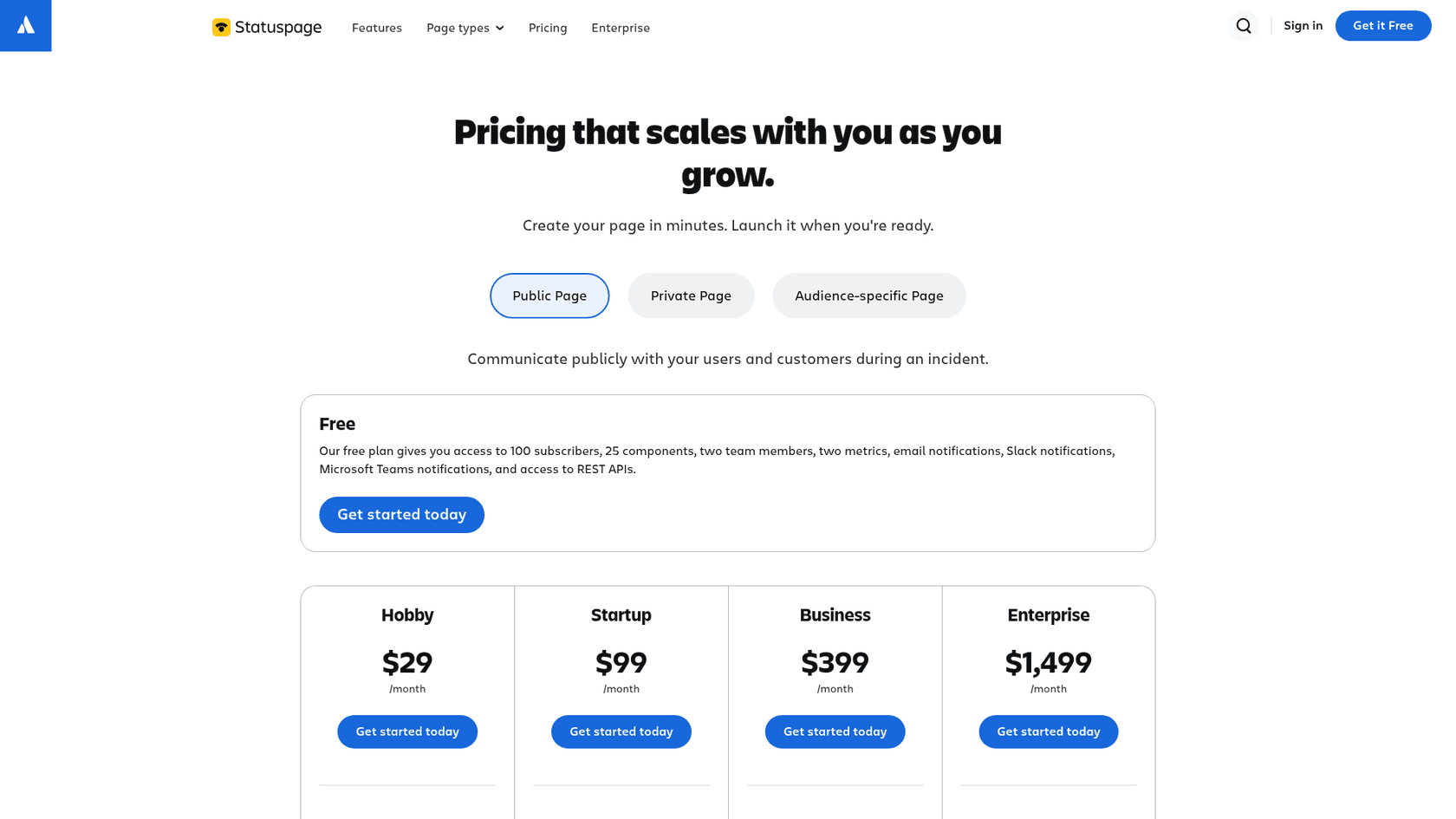
| Statuspage public plan | Price per month | Subscribers | Team members | Component subscriptions |
|---|---|---|---|---|
| Free | $0 | 100 | 2 | No |
| Hobby | $29 | 250 | 5 | No |
| Startup | $99 | 1,000 | 10 | No |
| Business | $399 | 5,000 | 25 | Yes |
| Enterprise | $1,499 | 25,000 | 50 | Yes |
Private pages start at $79 per month on the same pricing page. The standalone route costs more in separate bills but works on a lower JSM plan.
How do you set up a status page in Jira Service Management?
You need to be a product admin, and the first decision cannot be undone. Atlassian's create and customize page says you choose Public or Private at creation and "can't change it afterwards." To switch, you create a new page.
- Go to Operations then Status pages and pick the page type.
- Under Details, set the page name, internal description, URL and time zone. The default address is
<name>.status.atlassian.com. - Under Components, add services from your service registry and group them.
- Under Appearance, add colours, a cover image and a favicon. CSS and HTML are allowed for deeper styling.
- Under Advanced settings, add incident templates and a custom domain.
- Preview the desktop and mobile view, then select Publish page, per the publish doc.
The component limits are generous but real: up to 1,000 components in total, 50 per group and 20 groups per page. The custom domain takes two CNAME records, and SSL is issued automatically, as the custom domain page explains.
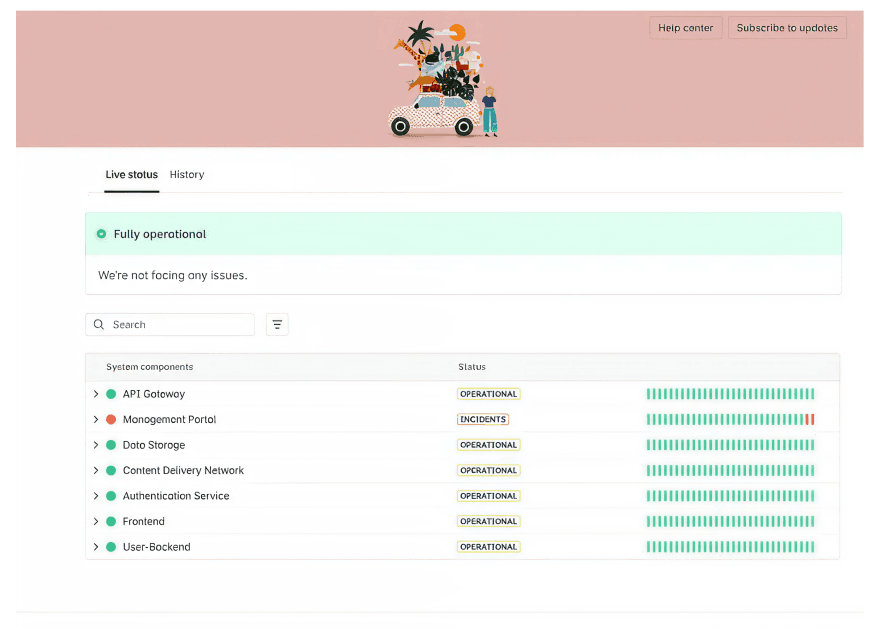
What visitors see is a banner, a component list with a search box, and Live status and History tabs. If your admins are new to the service registry that feeds the component list, my ITSM ticketing system guide covers the basics.
How do incident updates reach the status page?
From the incident itself. Atlassian's stakeholder updates doc has agents link a published page in the incident's Status pages section, then select Send update. You can link only one status page per incident.
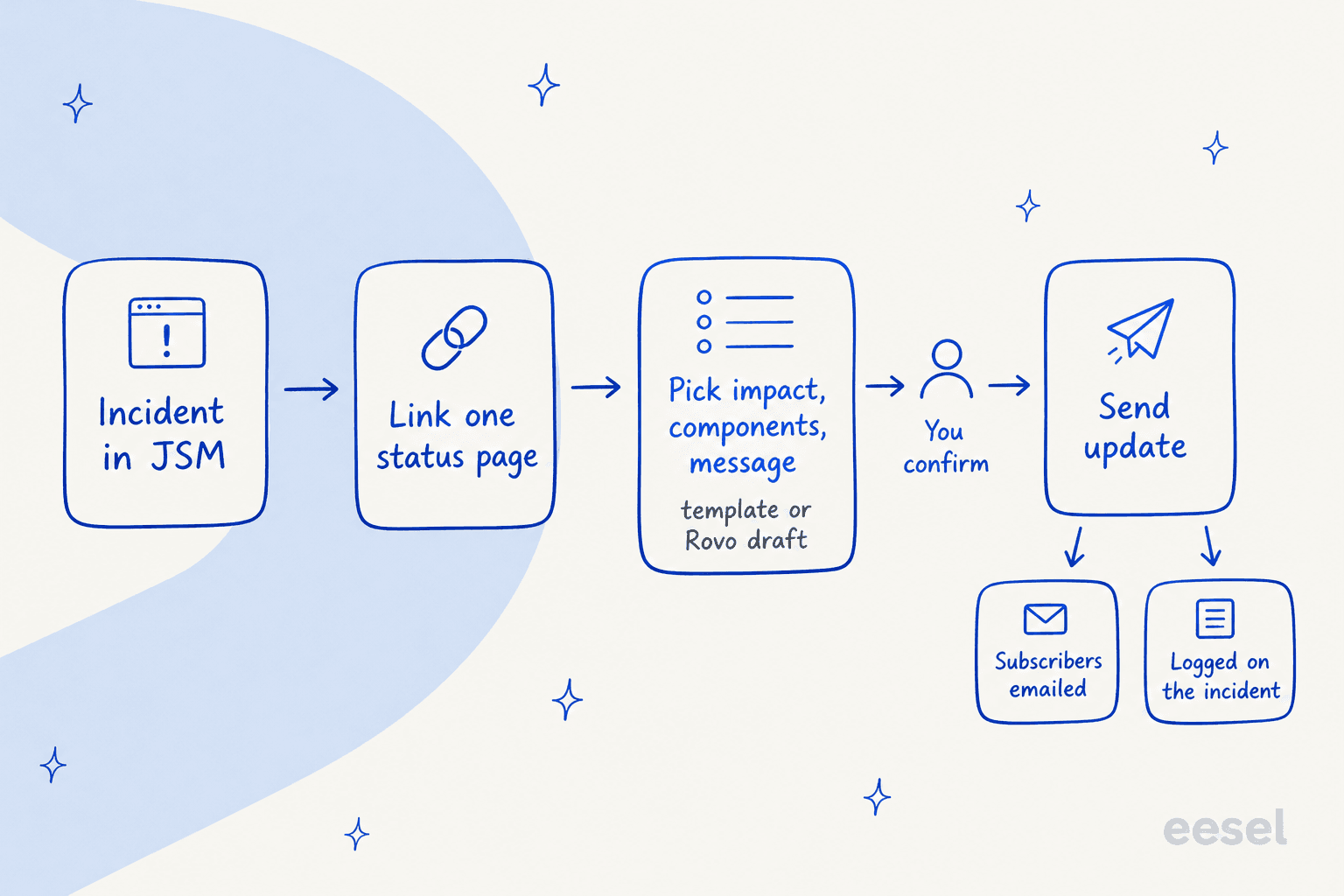
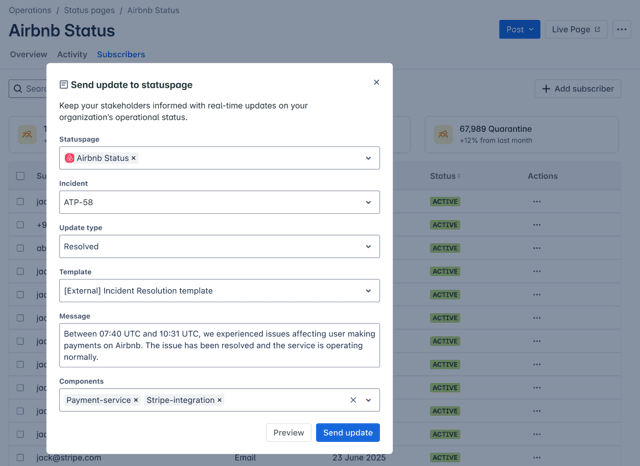
The update dialog asks for the incident impact, status, title and message. You can write it by hand, start from a default incident template, or review a Rovo-suggested title and message on eligible incidents. Atlassian is explicit that suggestions "are applied only after you confirm them." Updates are also recorded on the incident, so the timeline shows what was told to customers. Stakeholder groups work alongside this: Rovo suggests people based on past similar incidents, but stakeholders are added only on confirmation.
The Rovo drafting piece is its own topic. My notes on Atlassian Intelligence incidents from alerts and post-incident reviews cover the neighbouring AI features, and Rovo agents explains the wider agent model.
How does a component get its status?
By the most severe open incident, which surprised me. Atlassian's view the status page doc says that when several incidents hit one component, the page shows the worst status, and it only changes when an update is sent from JSM.
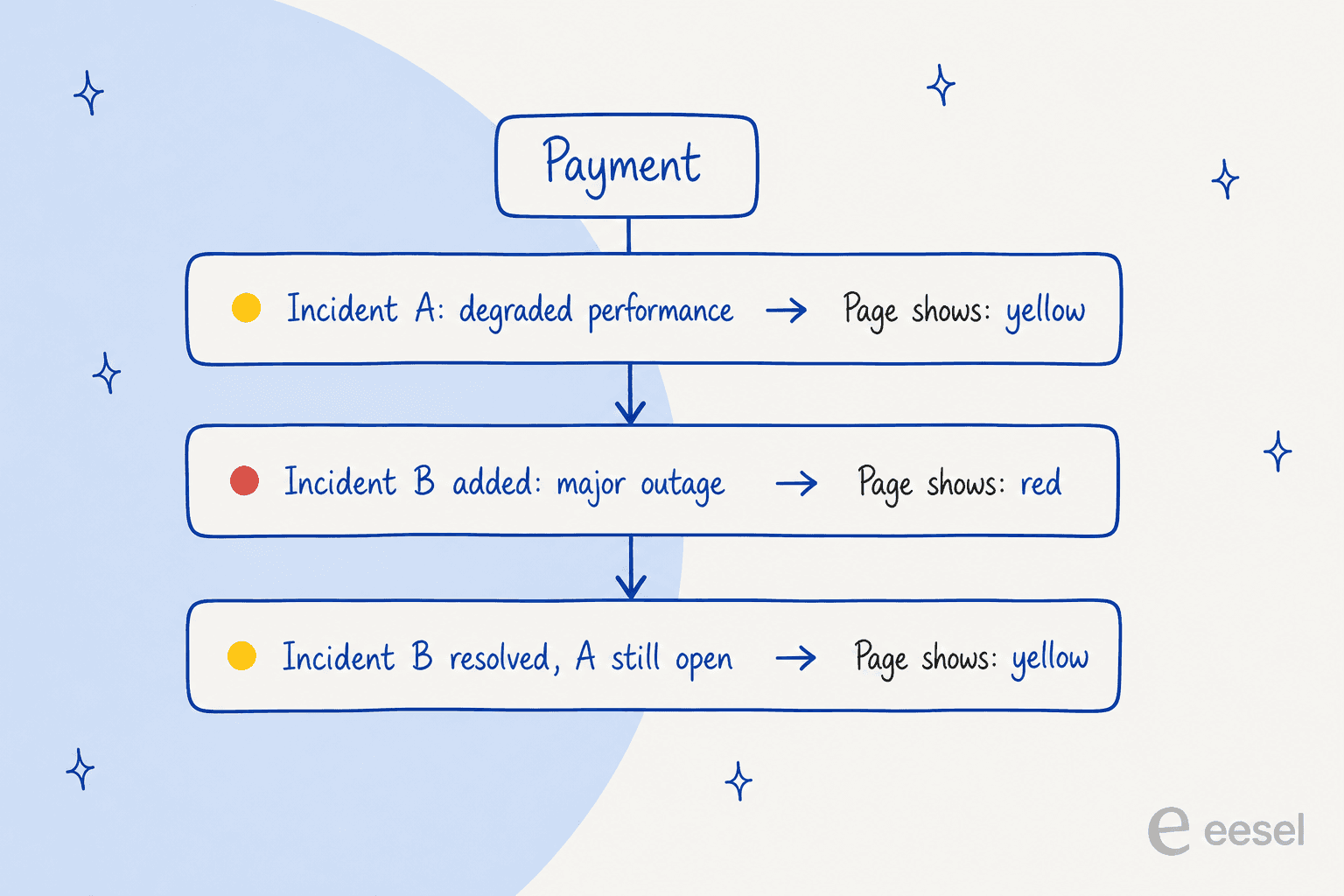
Two consequences follow. First, the page is only as current as your last Send update, so a quiet incident channel means a stale page. Second, downgrading a component inside a single incident does not lower it, because the docs say the uptime status "will still reflect the most significant impact." Uptime is (Total Time - Downtime) / Total Time, so Atlassian's example of 90 minutes down in a 30-day window gives 99.791%.
Who can subscribe, and what are the limits?
Anyone, on a public page, and the limits are per site rather than per page. Here are the numbers in Atlassian's subscriber docs and edit docs:
| Limit | Value |
|---|---|
| Subscribers per site (all pages together) | 10,000, counting active, pending and inactive |
| Components per page | 1,000 |
| Components per group | 50 |
| Groups per page | 20 |
| Manual subscriber adds at once | 10 email addresses, no distribution lists |
| Subscriber channels | Email, and webhooks |
Only Active subscribers receive updates, and someone who has not verified their email shows as Pending. On private pages, removing a person from the linked Atlassian group removes their access but does not cancel their email subscription, so you have to delete it yourself.
Should you use the native page or Statuspage?
It depends mostly on your plan, then on how much you want in one place. Atlassian itself says the standalone app "works as a separate product, so its scope for integration and customization is limited." Try the picker below, which follows the docs.
Which status page route fits?
Pick your JSM plan and who the page is for.
If you already run Statuspage, Atlassian says you can carry on there, following the Statuspage setup page. That page also adds the portal notice shown below, so customers see the incident before they file a ticket.

Status pages sit next to change management, which has its own plan gate, and the broader JSM AI features are worth a look too. If you are weighing other tools first, my Freshservice comparison, Zendesk comparison and list of alternatives cover the wider decision.
How does this tie into Opsgenie-successor alerting?
Through the incident. Opsgenie is being retired: Atlassian stopped new sales on 4 June 2025 and ends support on 5 April 2027, and its alerting and on-call features are built into Jira Service Management and Compass. In JSM, alerts route by on-call schedule and can open an incident, and the incident is where you post the status update.
The Statuspage integration also runs the other way. The integrate with Statuspage doc says a new Statuspage incident creates an alert in JSM, and every update is added as a note on that alert. JSM can then create, update and resolve incidents in Statuspage through mapped alert actions. Atlassian lists bidirectional integrations as a Premium and Enterprise capability.
For the alert side of the story, read my notes on alert grouping, AI monitoring and alerting and ITIL with AI. For AI add-ons, see the best AI for JSM and AI for ITSM roundups. If you are mapping the whole process, help desk versus service desk is a useful primer.
Where do Atlassian's docs disagree?
Five places, and I would check each on your own site before you plan a rollout:
- Private pages. The February 2026 community post said private pages were "coming soon" and opened an early access programme. The current docs describe a full setup with Atlassian groups, and the pricing page says "public & private." I'd treat private pages as available but confirm in your tenant.
- Sending updates. The send updates page says the Post feature "will be released soon," while the incident docs and its own screenshot describe it as working.
- Stakeholders on Standard. The pricing table lists incident stakeholder communication as not included on Standard. The stakeholder doc says agent-licensed users on Standard can be added as stakeholders.
- Webhook subscribers. The launch post lists email and webhooks, and the view doc mentions email only. Webhooks have their own doc.
- AI drafting. The launch post calls auto-drafting an open beta for Enterprise, while the docs say Rovo suggestions appear on "eligible incidents" without naming a plan.
What should your support queue do during an incident?
Answer from the posted update, and send nothing that is not on it. A status page tells people what is wrong, but most of them still write in. My guides on status page updates, major incident communication and support during SaaS outages cover that loop in detail, and customer communication software covers the tooling.
I'd keep one hard line. An AI can quote the update, but a person decides what counts as an outage. Qontro, an ERP vendor running eesel on Freshdesk, set it up this way: outages, data loss and billing go straight to a person, and eesel does not try to troubleshoot those. It drafted replies on 190 tickets in the month from 8 August to 8 September 2026, and the team sends or rewrites each one.
The virtual agent and a good knowledge base do part of this job natively. Deflection is the number to watch. Ticket deflection, tier-1 deflection and deflection rate explain how to measure it, and SLA management covers the clocks that keep running. For routing the rest, see AI escalation management.
Try eesel for Jira Service Management
If your status page is fine but your queue floods every time it turns red, eesel plugs into your Jira Service Management desk like a new hire. It reads each "is it down?" request, answers from the update you posted and your knowledge base, and leaves an internal note for a person on anything that looks like a new outage. Free to try. For the wider picture, see my AI for Jira Service Management and adding AI to JSM guides, plus the JSM AI evaluation.