

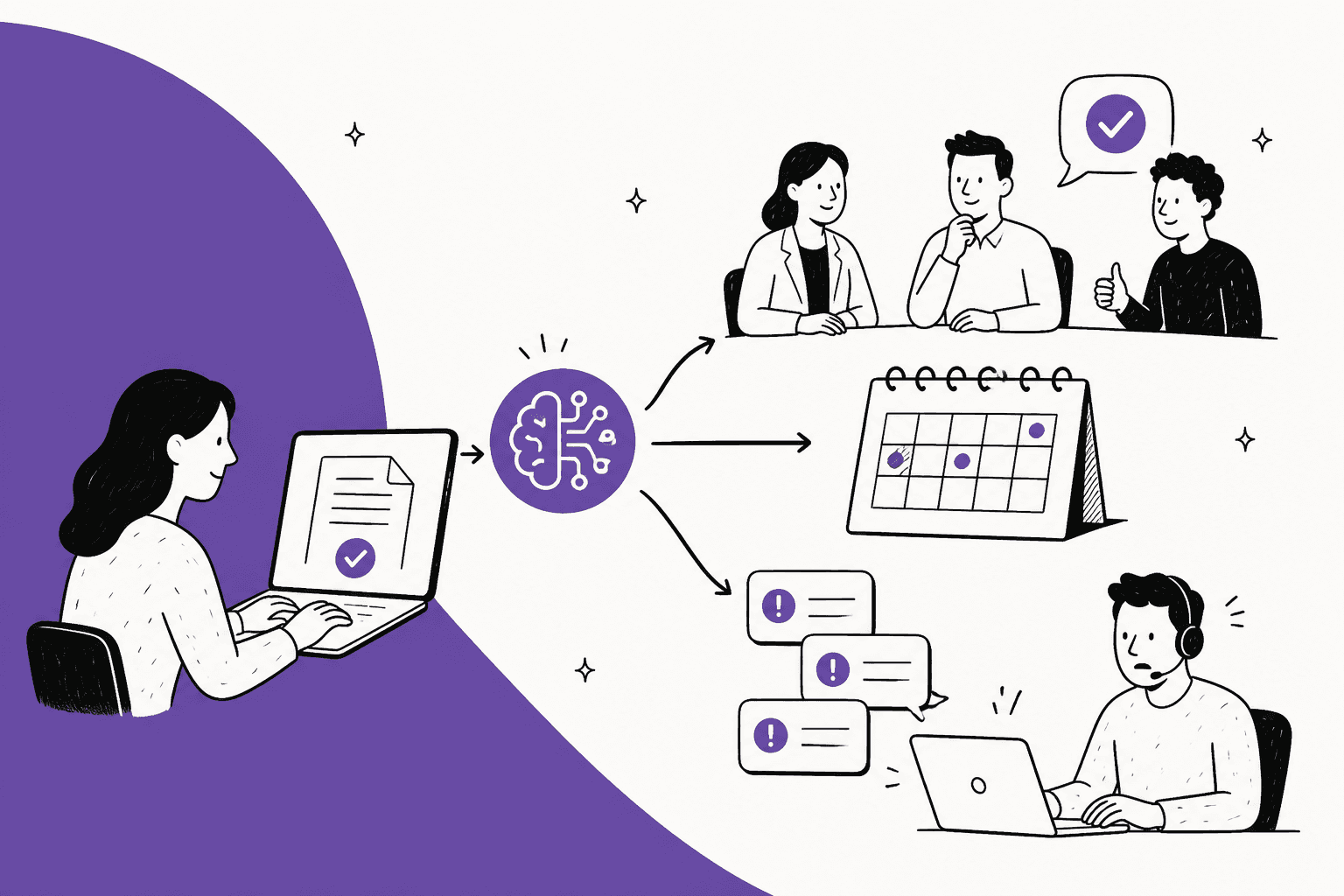
AI for change management in ITSM earns its keep on the paperwork, not the approval. Let it check every change request for a missing backout plan or test evidence before anyone meets, explain the risk score in plain words, and, most usefully, tie the wave of service desk tickets after a bad change back to the change that caused it. A named person still approves and runs every normal or emergency change. That is also what ServiceNow, Jira Service Management and Freshservice build today: their AI drafts and suggests, and none of them auto-approves a change.
The reason to aim AI at the paperwork is the research. Google's SRE team says roughly 70% of outages come from changes to a live system, and DORA found teams with heavyweight board approval were 2.6 times more likely to be low performers, with no drop in failure rates to show for it. A smarter gatekeeper doesn't fix that. Better requests going in, and a faster link when one goes wrong, does.
If your service desk runs on Jira Service Management or Zendesk, eesel can be the teammate on the ticket side: it reads new requests, searches recent changes, leaves an internal note naming the likely change, and holds anything risky for a person. InDebted's head of IT uses it as first responder on an internal JSM desk.
Can AI help with change management in ITSM?
Yes, as long as you point it at the right half of the job. Change management, which ITIL 4 calls change enablement, has two halves: deciding whether a change should happen, and dealing with what happens after it does. AI is good at the reading, matching and summarising that surrounds both. It is not the thing you want deciding.
I build eesel's helpdesk integrations, including the Jira Service Management one, so I spend a lot of time inside other people's ITSM queues. The pattern I see on internal IT desks is consistent. The change process itself usually works on paper. What eats the week is the back-and-forth on half-filled change requests, and the Monday morning when 30 tickets say "VPN is down" and nobody on the service desk knows a firewall rule changed on Saturday.
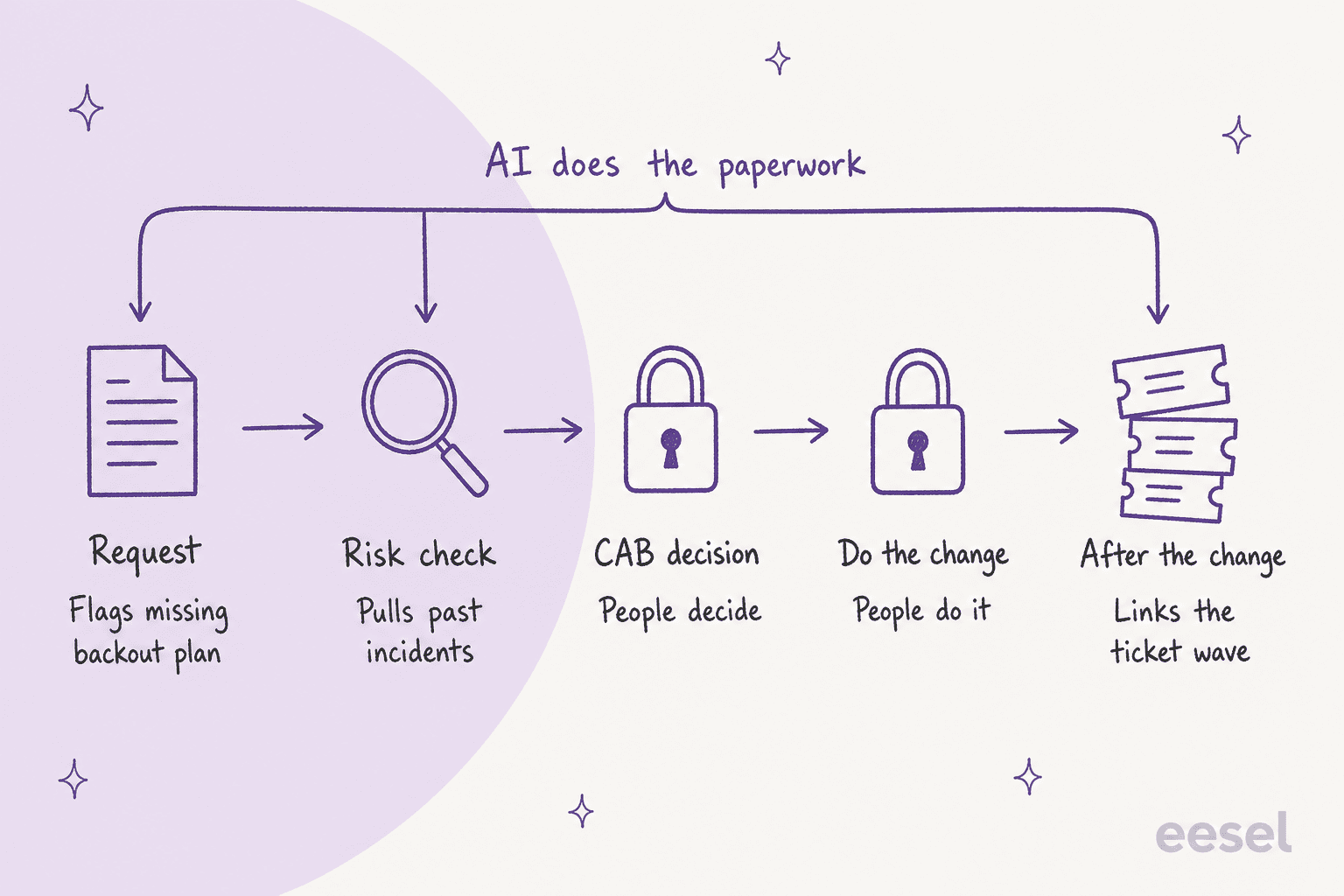
That picture is the whole argument. The three stages where AI helps are the ones heavy on documents and matching. The two in the middle are judgement and hands on keyboards, and they stay with people.
The numbers back up why the edges matter more than the middle:
| Finding | Number | Source |
|---|---|---|
| Outages caused by changes to a live system | ~70% | Google SRE book |
| Change failure rate, elite vs low performers | 5% vs 40% | DORA 2024 report |
| Low performers when approval goes to a board or senior manager | 2.6x more likely | DORA 2019 report |
| Major outages from human error caused by procedures not followed or flawed | 85% | Uptime Institute 2025 |
The DORA line is the one that should change how you think about this. DORA looked for evidence that formal approval lowers change failure rates and "found no evidence to support this hypothesis." So bolting an AI risk score onto the same board meeting gets you a faster version of a step that wasn't making changes safer. The better bet is AI on the inputs (is this request complete?) and the outputs (which tickets did this change cause?).
Where does AI fit in each stage of a change?
AI fits at intake, risk explanation, CAB prep and the post-change ticket wave. Approval and implementation stay human. Here is the split I'd use, with what the major ITSM tools ship for each stage:
| Stage | What AI does | What a person does | Shipping today |
|---|---|---|---|
| Request | Checks for missing backout plan, test evidence, affected services | Fills the gaps | ServiceNow change quality assessor |
| Risk check | Pulls similar past changes and their incidents, explains the score | Answers or confirms the risk questions | ServiceNow risk explanation, JSM AI risk assessment, Freshservice similar changes |
| CAB decision | Summarises each change, flags conflicts | Approves or rejects | ServiceNow change summary and conflict assessor, JSM Prevention Center (early access) |
| Do the change | Suggests a schedule slot | Runs the change | ServiceNow schedule agent |
| After the change | Links new incidents to the likely change, drafts the status reply | Confirms cause, decides on rollback | Freshservice initiating change suggester (early access), helpdesk AI like eesel |
Two things stand out in that table. First, every vendor stops at the same line: AI suggests, a person submits. Second, the "after the change" row is the thinnest. It's where the service desk lives, and it's where most of the pain in the community threads I read comes from.
Can AI check a change request before the CAB sees it?
Yes, and this is where I'd start, because it's low risk and saves the most back-and-forth. A completeness check reads the request and flags what's missing before a human spends time on it.
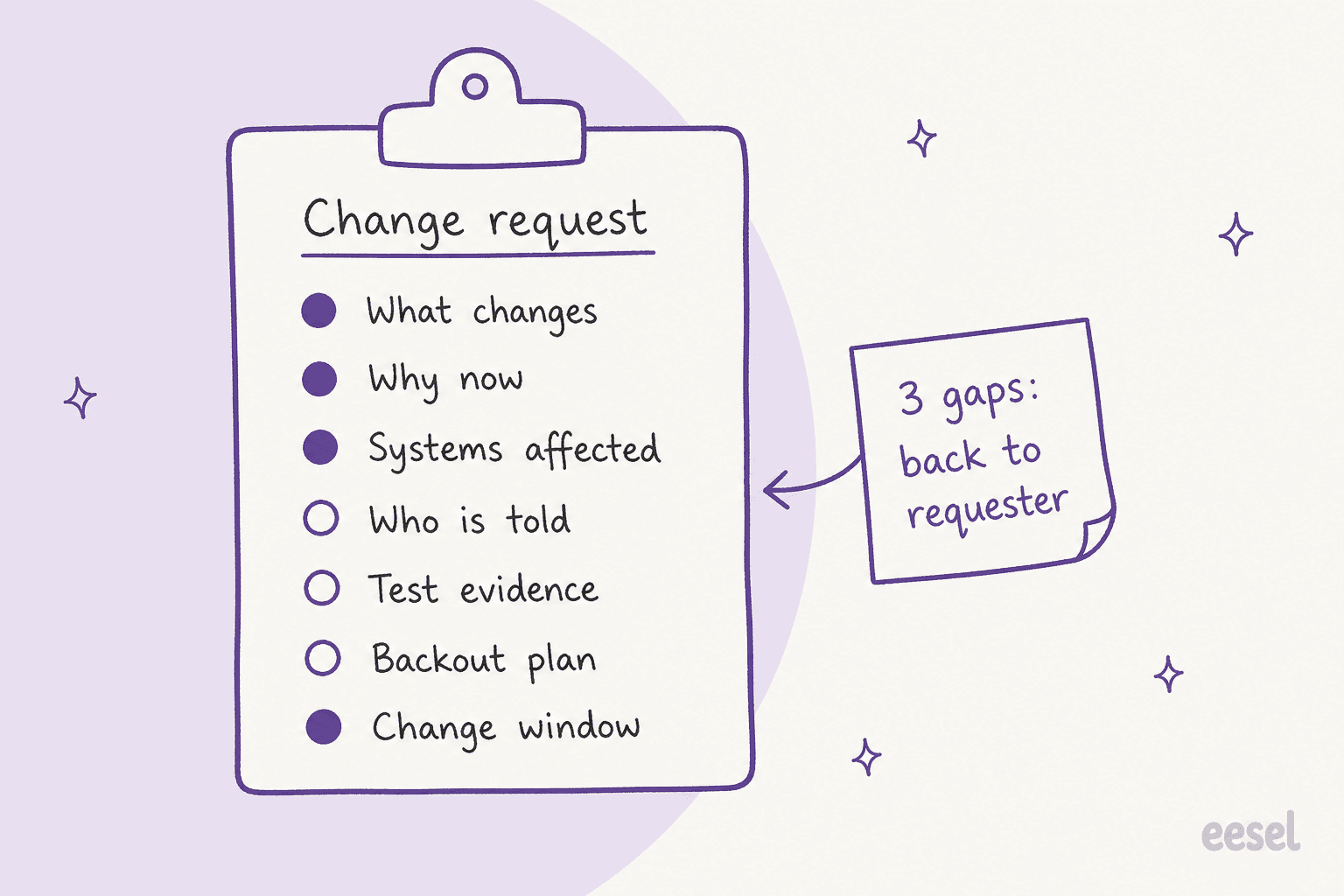
ServiceNow ships the most complete version of this. Its change quality assessor grades five parts of a change (implementation plan, backout plan, test plan, risk and impact analysis, justification) on a scale from "Excellent" to "Incomplete". It checks your own change policy document first and only falls back to similar closed changes if you don't have one. That ordering matters: write the policy down, and the AI grades against your standard instead of against whatever your past changes happened to look like.
Why bother? Because the rollback question is the one CAB meetings spend their time on, and people know it:
"Like, they don't do any real work. It's just a person who is paid to sit in on an hour long meeting and ask, "Oh, is there a rollback plan?" at the end of it."

If the AI asks that question the moment the request is submitted, the meeting doesn't have to. Smaller teams without ServiceNow get a version of this for free: one sysadmin in a small shop suggested having AI produce the change document itself ("What you're doing, roll back plan, risk etc."), per a r/sysadmin thread. A checklist the AI fills in is still a checklist someone reads.
One practical note: on a desk with a helpdesk AI in front of it, the same check can happen in the conversation. When someone asks in Slack "how do I raise a change for the DNS cutover?", the agent can answer from your change policy in Confluence and ask for the backout plan up front, so the request arrives complete. That's the self-serve half of an AI IT help desk, applied to changes.
Can AI score the risk of a change?
Partly. The useful version explains a risk score and pulls the history behind it. The version to be careful with is the one that hands you a number and expects you to trust it.
Look closely at what each tool does:
- ServiceNow: the risk score itself comes from a survey with rule-based thresholds (0 to 25 Low, 26 to 50 Moderate, 51 and above High). The AI layer sits on top: it explains the score using similar change requests and the incidents they caused, and it can pre-fill the risk answers for a person to review before submitting.
- Jira Service Management: AI risk assessment writes a narrative summary with a confidence score and a Low, Medium or High rating. It checks open incidents on the affected service, failed deployments, changes rejected on the same service in the last 90 days, and whether test and rollback plans exist.
- Freshservice: change risk policies are rule-based, scoring each factor 0 to 10 with optional weights. Freddy's AI part is finding similar past changes, not producing the score.
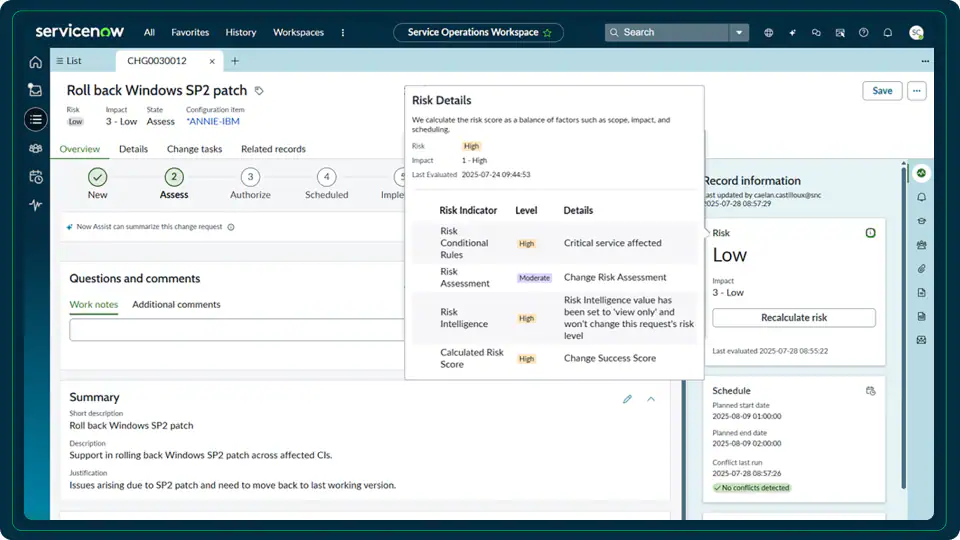
My take: treat the AI's risk output as a briefing, not a verdict. Jira's docs are unusually direct about this. The feature does not "Automatically approve or reject changes" and does not "Provide guaranteed or deterministic predictions." There's also a quirk worth knowing before your CAB leans on it: the assessment is generated per user, based on what each person has permission to see, so two approvers can get different summaries for the same change.
And go in with realistic expectations on accuracy. ServiceNow's AI only knows your history if your history is in ServiceNow, linked properly. One practitioner explained why demos look better than production:
"The demo instances used by sales are hard to get right. There’s no true “historical” data on them so nothing to teach the machine learning model where something should be assigned."
The reverse is also true. If your changes aren't linked to services and configuration items, the "similar changes and their incidents" part has nothing to match against. Jira says outright that conflict detection only works "when related changes are properly linked to services or assets and include planned start and end dates."
Should AI replace the change advisory board?
No, but it should shrink what the CAB looks at. The honest problem with most CABs isn't that people decide badly. It's that they decide on everything, so they skim everything:
"This is how it worked in theory at the big orgs I did contract work for. However, in practice, it was a room filled with other technical people waiting for their name to be called followed by a rubber stamp. I don't think I ever saw any change challenged by peers."
There's a second-order cost, too. Batching changes around a weekly meeting means they all land at once:
"My favorite thing about CABing things that shouldn't be CABd is that it then bunches up changes that all happen at the same time... after the CAB meeting. Now if something breaks, it could be any of the dozens of things that just got pushed in the 15 minutes after the meeting."

DORA's current guidance on streamlining change approval points the same way: stop "Treating all changes equally," and do "ongoing analysis to detect and flag high risk changes early on so that they can be subjected to additional scrutiny." That's a sorting job, and sorting is what AI does well. A useful CAB pack looks like this:
- Standard changes pre-approved by template, listed for awareness only. Jira Service Management already auto-approves standard changes with an automation rule, and ServiceNow treats them as pre-authorized.
- Incomplete requests bounced back before the meeting, with the gaps named.
- Conflicts flagged: two changes on the same service in the same window, or a change inside a freeze.
- The few risky ones, each with a one-paragraph summary and the similar past changes that went wrong.
ServiceNow's change summary reads 17 fields of a change (including the implementation, test and backout plans) into a short brief, and its conflict assessor checks affected CIs against blackout and maintenance windows. Atlassian's Prevention Center bundles a change summary, dependency map and calendar clash check, but it is still in an open early access program, so check your plan before you plan around it.
The board then spends its hour on item 4. That's the version of a CAB that DORA calls "process architect and information beacon" rather than gatekeeper.
What happens on the service desk after a change goes wrong?
The tickets arrive before anyone has connected them to the change. This is the stage I'd argue matters most for an IT team, and the one the ITSM vendors cover least.
The scale can be enormous. When CrowdStrike pushed a faulty content update on July 19, 2024, it was live for about 78 minutes before being reverted, per its own review, and Microsoft estimated it hit 8.5 million Windows devices. Most internal changes are far smaller, but the shape on the service desk is the same: one cause, dozens of tickets that each describe a different symptom.
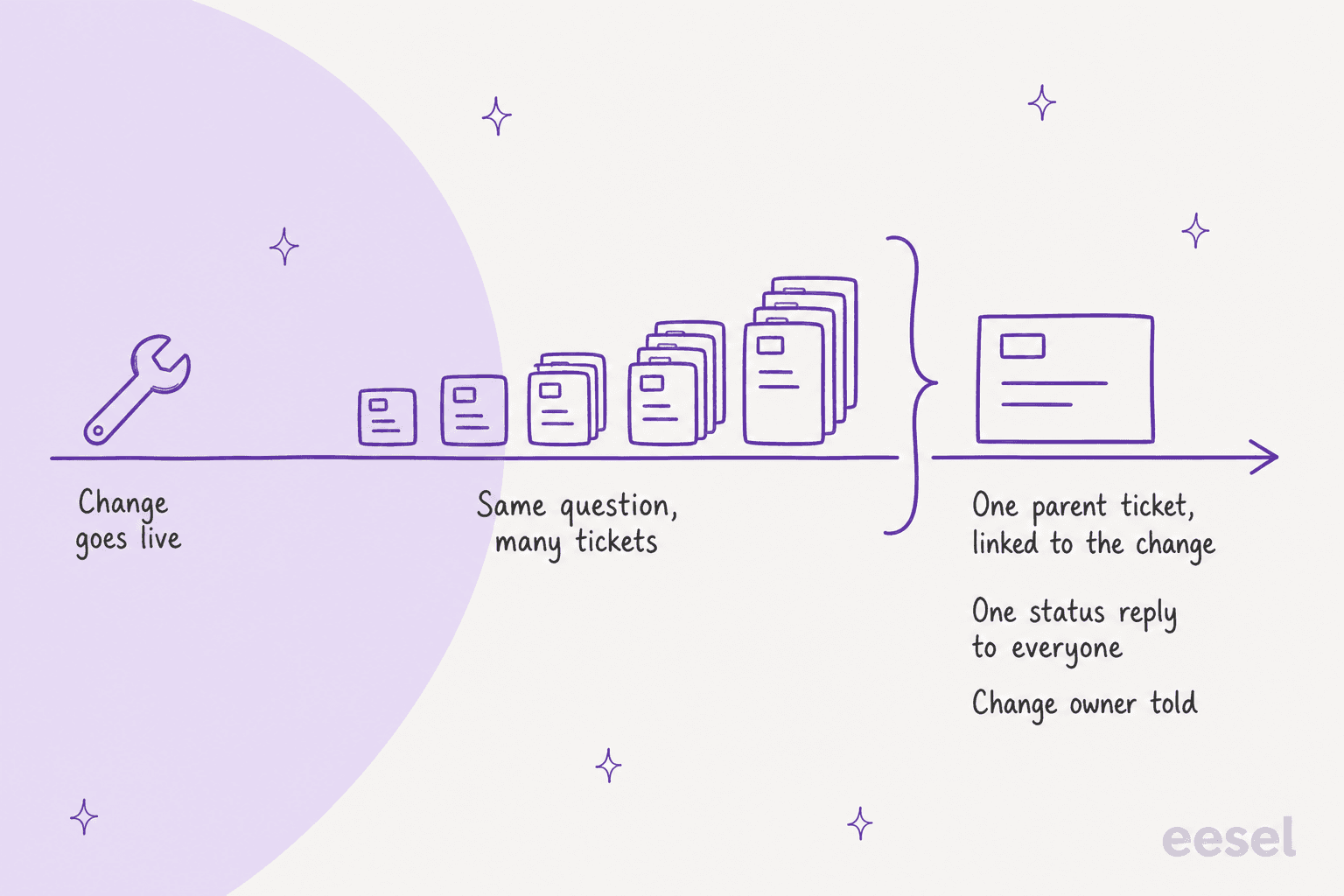
The people who staff that desk describe it the same way:
"Not sure if this will help you because I'm in the Service Desk, but it feels the same here. Every time we release or update something, despite spending time testing etc. we have to start putting out fires almost immediately after. It's so damn tiring."
And the worst version is the change nobody mentioned at all. In one r/sysadmin thread, an approved change went ahead on a Saturday the plant was meant to be closed; the production manager hadn't been told it was a double production day, and the user put the cost at $1.5mil for a 3 hour outage.
Here's what AI can do in that first hour:
- Spot the pattern. Several new tickets about the same service in a short window is a signal, the same idea as ticket deduplication.
- Look up recent changes on that service. In Jira Service Management, changes are issues, so a JQL search for changes on the affected service in the last few days answers "did something change?" in seconds.
- Leave an internal note on each ticket naming the likely change key, so the agent picking it up starts from the cause instead of from scratch.
- Send one status reply to everyone affected, drafted once and approved once. That's the same job as status page updates and major incident communication, just triggered by a change.
- Tell the change owner with the ticket count, so the rollback decision happens with evidence.
Freshservice has the closest native feature. Its initiating change suggester ranks changes closed in the last 14 days that may have caused an incident, and an agent links the right one by hand. It's in early access and needs the Copilot add-on.
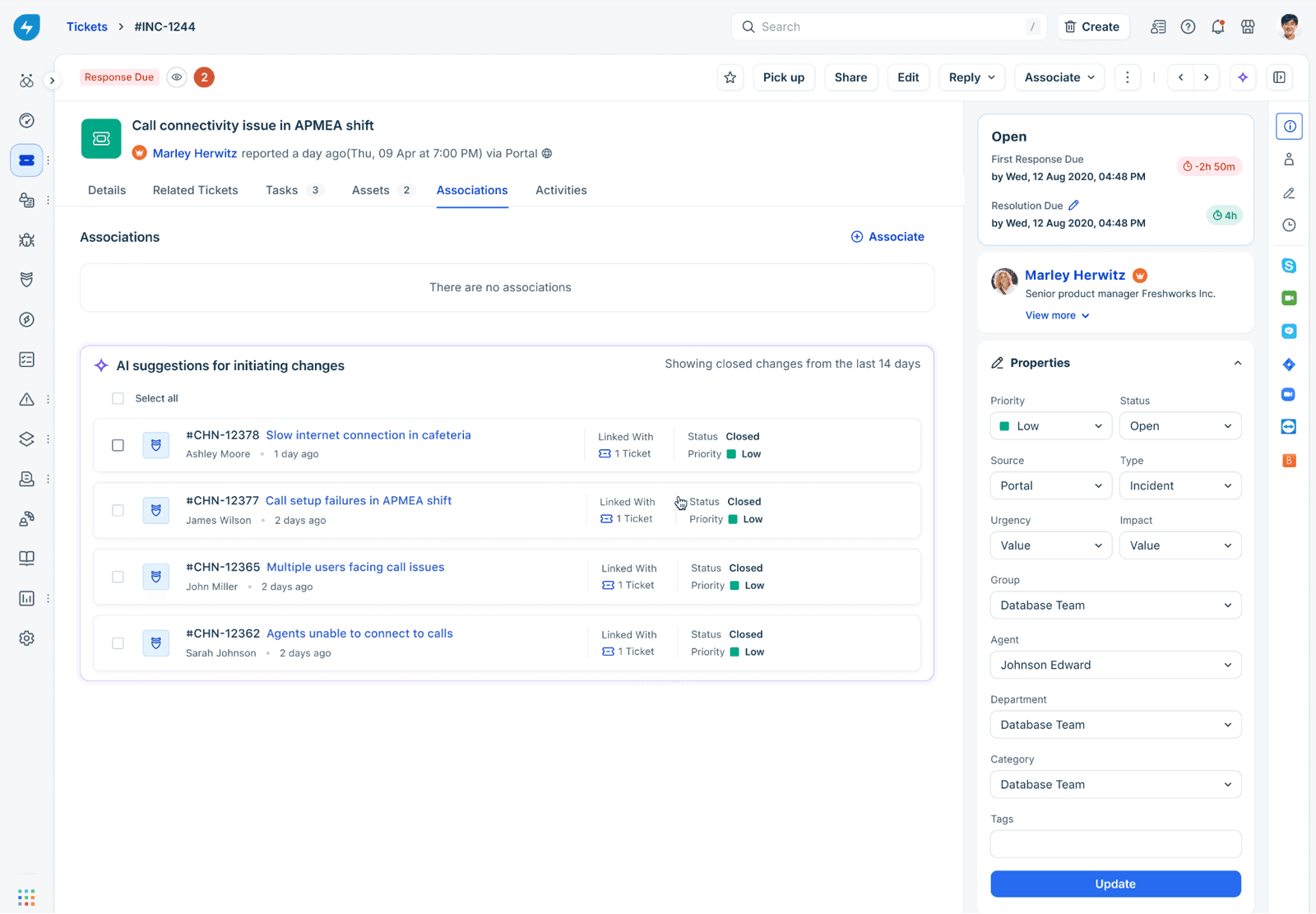
The 14-day window is a sensible guardrail. A change from last month is rarely the cause of this morning's tickets, and an AI that suggests it anyway just adds noise.
Which ITSM tools have AI for change management?
ServiceNow has the deepest set, Jira Service Management has the best-documented risk assessment, and Freshservice has the strongest link from incident back to change. A helpdesk-side AI like eesel covers the ticket wave and the requester conversations, whichever ITSM holds the change record. Here's how they compare on the details a buyer actually checks:
| ServiceNow | Jira Service Management | Freshservice | eesel (helpdesk layer) | |
|---|---|---|---|---|
| Change management on plan | ITSM Advanced and up | Premium and Enterprise | Pro and Enterprise | Works alongside your ITSM |
| Listed price | Quote only | Premium $55.28/agent/mo | Pro $99/agent/mo (annual) | From $299/mo for 500 credits |
| AI cost | AI Agents for ITSM listed in Prime | Rovo credits included per user | Copilot add-on $29/agent/mo | Included, 1 credit per ticket |
| Request quality check | Yes, 5-area grader | Partial (checks test and rollback plans) | No | In conversation, from your policy doc |
| Risk scoring | Rule-based score, AI explains it | AI rating Low/Medium/High | Rule-based policy | No |
| Conflict and schedule help | Conflict assessor, schedule agent | Calendar conflicts (early access) | Change calendar (not AI) | No |
| Incident to change link | Risk explanation cites past incidents | Checks open incidents on service | Initiating change suggester (early access) | JQL search and internal note on new tickets |
| Approves changes | No, CAB manager decides | No, approvers decide | No, CAB voting | No, write actions can require approval |
| Status reply to affected users | Not covered here | Not covered here | Not covered here | Drafts and sends, or holds for approval |
Sources: ServiceNow ITSM packages, Atlassian pricing and Freshservice pricing. Atlassian's page has a team-size and billing toggle, so check the live figure for your seat count.
ServiceNow Otto (Now Assist) for ITSM
ServiceNow's docs now call its generative AI app "ServiceNow Otto for IT Service Management", while the pricing page still says Now Assist. It lists eight agentic change workflows, including conflict assessment, quality assessment, scheduling, CI suggestions and conversational change creation.
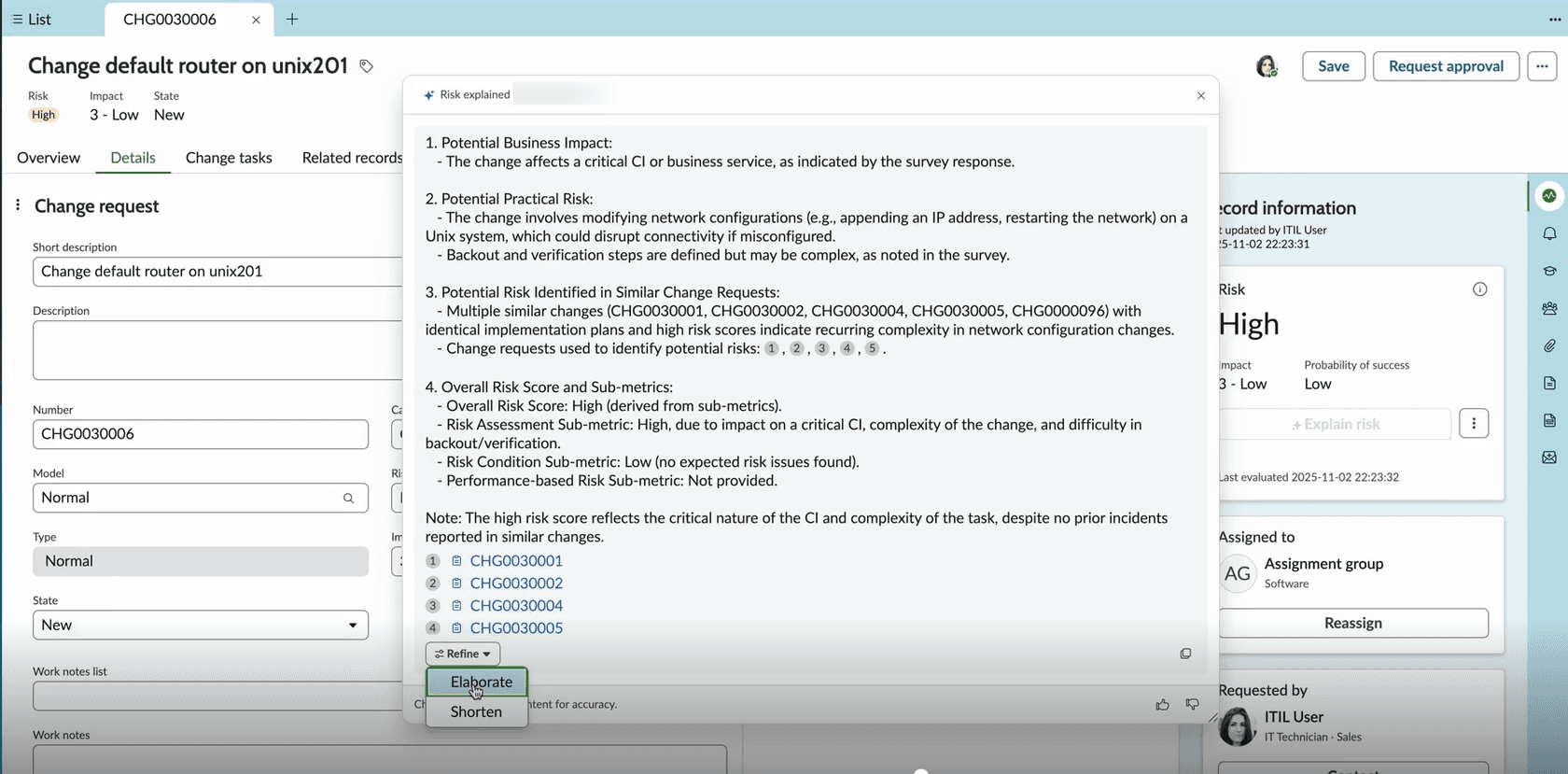
What I like: the guardrails are explicit. By default, all agent workflow records are read-only, and running one on its own means duplicating it, activating it and giving it a trigger. The conflict, quality and scheduling agents are invoked by hand. What to plan for: Change Management isn't in the Foundation package, and the "AI Agents for ITSM" line item appears only in Prime, so budget for a quote conversation. Practitioner sentiment is mixed, with one r/servicenow reply calling the AI "more sales pitches than reality" and another expecting it to be decent within a year. Cost details are in our ServiceNow pricing breakdown.
Our take: pick it if you're already on ServiceNow ITSM Advanced or Prime and your CMDB is in decent shape. The quality assessor alone is worth turning on.
Jira Service Management with Rovo
Atlassian's AI risk assessment, powered by Rovo (the agent behind it is now called Ops Expert), reads linked knowledge base articles, URLs in the change description and connected deployment pipelines. It splits risk into technical and operational dimensions and suggests mitigations; accepting one creates a follow-up task linked to the change.
What I like: it can run basic static code analysis on linked pull requests, which is a real advantage for teams where changes are deployments. Deployment gating can pause a Bitbucket or Jenkins pipeline until the change is approved. What to plan for: every change feature sits on Premium or Enterprise since October 16, 2024, it isn't HIPAA compliant, and output varies per user by permissions. See Jira Service Management's AI and Rovo for the bigger picture.
Our take: the best fit for teams where most changes come from CI/CD. If you're on Standard, the AI risk assessment is a reason to price Premium, not a reason to switch tools.
Freshservice with Freddy AI
Freshservice's change AI is about history rather than prediction. The similar change suggester shows matching changes from up to 6 months back, with each one's risk level and how many incidents it was linked to.
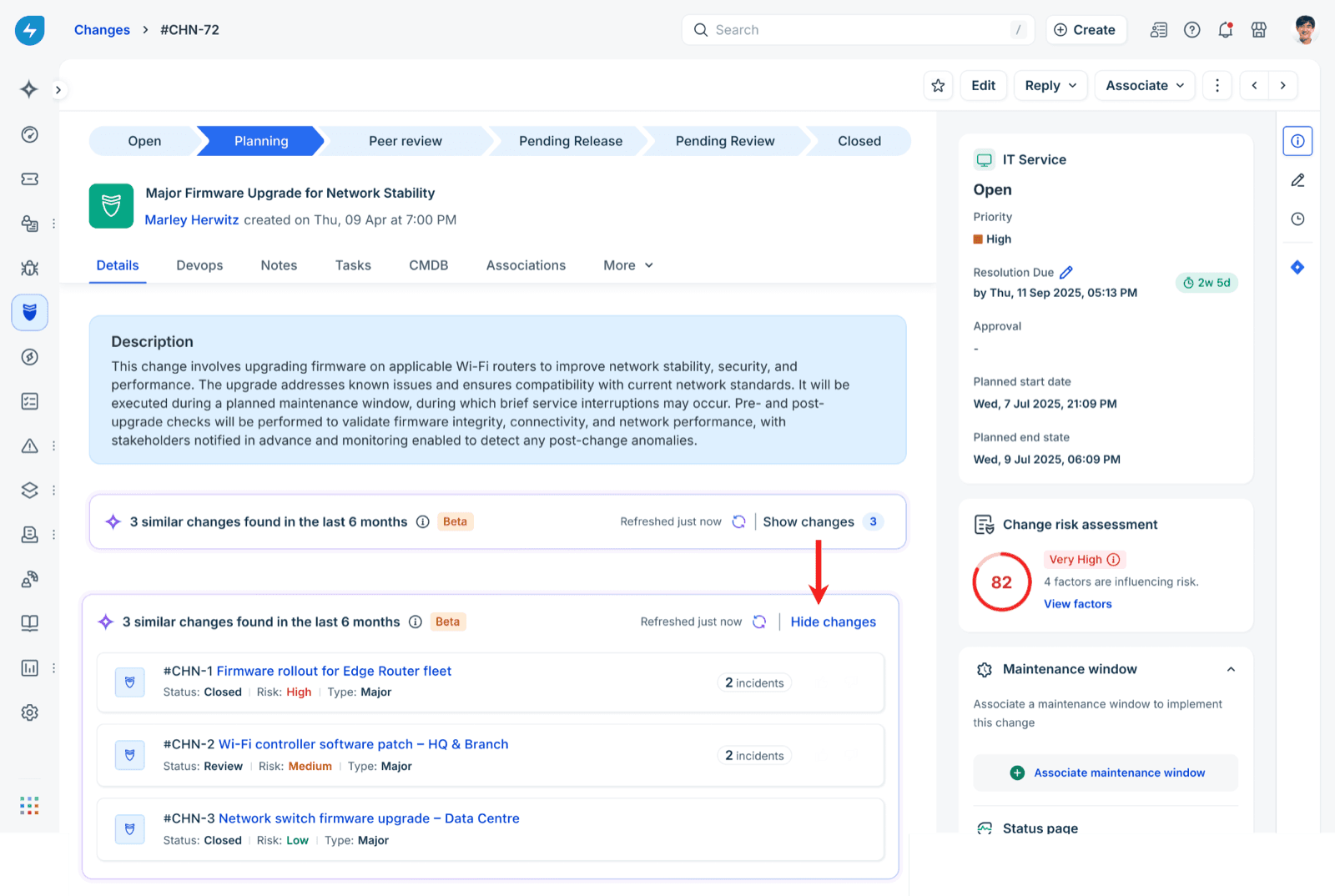
What I like: "this exact change caused 2 incidents last time" is the most persuasive thing you can put in front of an approver, and it's right on the change record. What to plan for: risk scoring is rule-based, an AI risk-survey builder is listed for a future release rather than live, and both change AI features need the Copilot add-on. Comparing platforms? See Freshservice vs ServiceNow and Freshservice vs Jira Service Management.
Our take: strong for mid-size IT teams who already pay for Pro. Turn on the initiating change suggester the moment your CSM can enable it.
eesel on the service desk side
eesel isn't an ITSM and doesn't hold your change record. It's an AI teammate that joins your helpdesk queue, so its job in change management is the ticket side: answering people asking how to raise a change, working the wave of tickets after one, and keeping the change owner in the loop. It connects natively to Jira Service Management and Zendesk. In JSM it picks up new requests and comments, replies or leaves an internal note, and can search issues with JQL, label them, assign them and move them along the workflow. It reads issues live rather than learning from your Jira history, and its knowledge comes from sources like Confluence.
For ServiceNow or Freshservice, there's no built-in connector. The route is the tool's API through Network Access, or an MCP server if you run one, so be ready to set that up yourself. More on that in AI for ITSM tools.
Our take: add it when the pain is on the service desk, not in the CAB. It's priced per ticket handled rather than per agent seat.
How do I set up AI for change management?
Start with the cheapest, safest step and move outward. This is the order I'd follow on a typical internal IT team, and it maps to the order your trust in the AI should grow:
- Write your change policy down. One document: what each change type needs, what a good backout plan looks like, who approves what, when the freeze windows are. ServiceNow's quality assessor reads a policy document first, and every other AI does better with one too. Put it where your AI can read it, such as Confluence or Google Drive.
- Turn on the completeness check, in suggest mode. Let the AI flag gaps on new requests for a few weeks without blocking anything. Count how often a person agrees with it.
- Link changes to services and dates. Conflict detection, similar-change matching and the post-change ticket link all depend on it. This is the unglamorous step that makes the rest work.
- Wire the service desk to the change record. Whether it's Freshservice's suggester, a JQL search in JSM, or a helpdesk agent, the goal is the same: a new incident gets checked against recent changes on that service. Test it on old tickets first; I'd run a simulation against past tickets from your last bad change before trusting it live.
- Keep write actions behind approval. Anything that sends a message to everyone, transitions a ticket or touches the change record should ask a person first until you've seen it be right for a while. In eesel each action runs on its own, asks first or stays off, and approvals can land as a card in Slack.
- Treat the AI's instructions as a change too. If the agent's rules change how tickets get handled, version them and roll them out like any other change. Swiftreg keeps its eesel instructions as numbered releases rolled out through its own procedure rather than edited live, which is exactly the habit you want from an IT team.
- Measure three numbers. Incomplete requests sent back, change failure rate (DORA's definition: deployments that need a hotfix or rollback), and tickets per failed change. If the third number drops and nobody is chasing rollback plans in the CAB, it's working. A support reporting setup makes the third one easy to pull.

What should AI never do in change management?
Keep this list short and enforce it in the tool's permissions, not just in a prompt:
- Approve or reject a normal or emergency change. None of the three big ITSMs let it, and you shouldn't build a workaround.
- Run the change. Scheduling suggestions are fine; touching production is not.
- Declare the cause of an incident. It can name the likely change. A person confirms.
- Close tickets as resolved because a rollback happened. Check with the requester; a rollback can fix the service and leave a user's broken state behind.
- Edit the change record's plans on its own. ServiceNow's autonomous quality agent is a good model here: it saves its score and notes "without setting values on change request fields."
The common thread is accountability. If something goes wrong, the post-incident review needs a named person who decided, and "the AI approved it" isn't an answer your auditors will accept. For a deeper look at access levels, see the AI security review guide.
Try eesel on your IT service desk
If changes are reaching your service desk as a pile of confused tickets, eesel can sit in that queue as a teammate. On Jira Service Management, it searches recent changes on the affected service, leaves an internal note naming the likely change key on each new ticket, and drafts one status reply for a person to approve. It also answers "how do I raise a change?" in Slack from your own policy. InDebted runs it as first responder on an internal JSM desk and has it resolving 15% of tickets on its own, with 55% as the goal. On Zendesk, Cactus Club Cafe uses it on internal tech support, where it drafted 790 replies in a month by following the team's runbooks step by step.
There's a free plan with 100 credits, and paid plans start at $299 a month for 500 credits, with no per-seat fee. Try eesel on last month's change tickets and see what it would have flagged.