


The two ways to add AI to Jira Service Management
I build integrations at eesel, so I spend a lot of time in other people's service desks. When someone asks how to add AI to Jira Service Management, what they usually mean is "I want tickets to resolve themselves without hiring three more people." Fair. There are exactly two paths to that, and the marketing pages tend to blur them together.
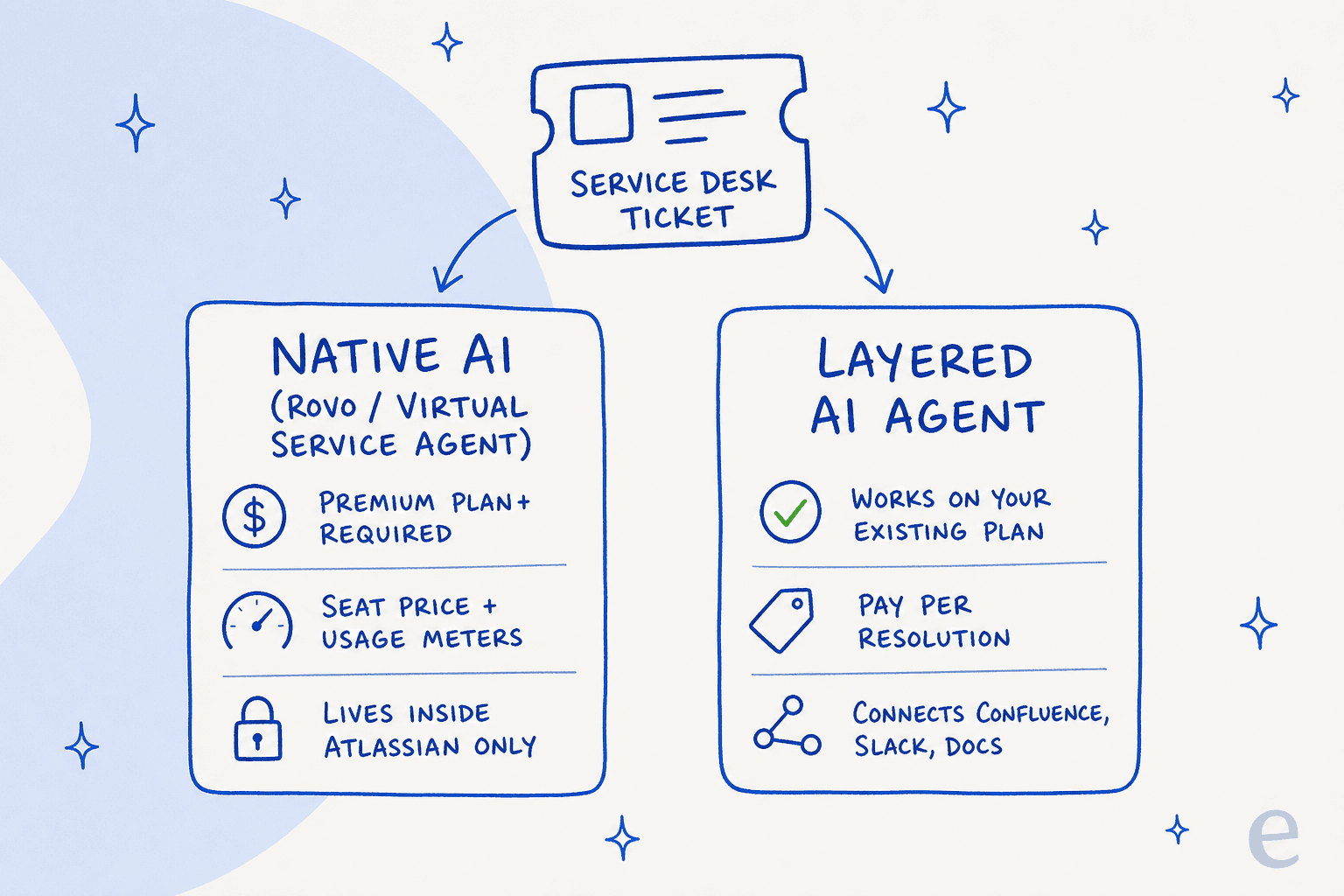
Path one, native AI. Atlassian has folded its service-desk AI into Rovo, its platform-wide AI layer, plus the customer-facing Virtual Service Agent. It lives inside your Atlassian tenant, reads your Confluence and past tickets, and needs no third-party connection. The catch is the plan gating and the extra billing, which I will get into.
Path two, a layered agent. You connect a purpose-built AI support agent to JSM through its API. It joins as a real agent inside your service desk, learns the same sources (and more, like Slack and Notion), and handles requests end to end. It works regardless of which JSM plan you are on, and you pay for what it resolves.
Neither is automatically "better." Native AI is the least friction if you are already deep in Atlassian and on the right tier. A layered agent wins on setup speed, cross-tool knowledge, and cost control. The rest of this guide walks both so you can pick with your eyes open.
What Jira Service Management's own AI actually gives you
Let me be straight about the native option, because the naming is confusing and Atlassian has reshuffled it twice in the last year.
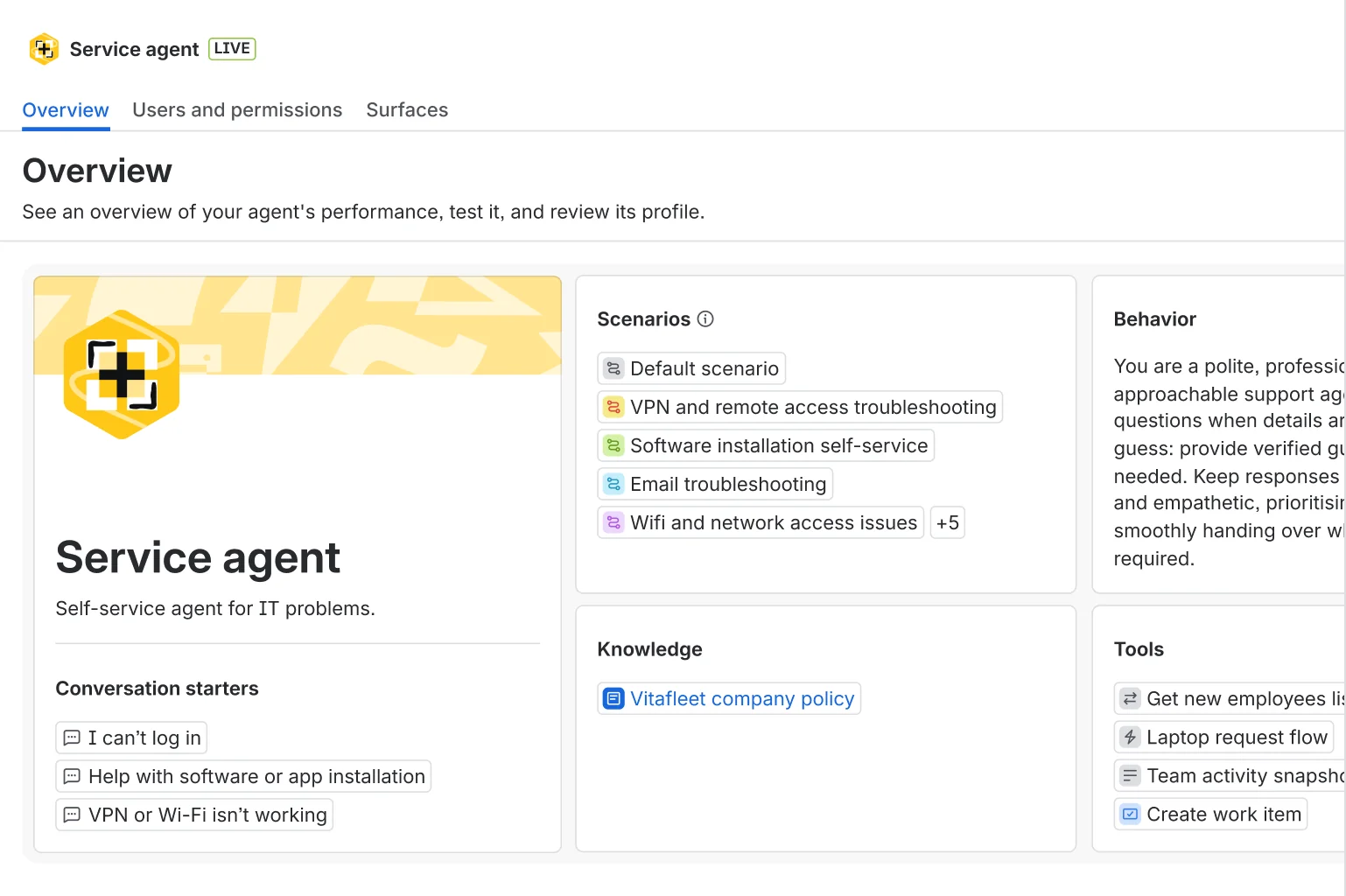
The AI you can turn on is Rovo: Rovo Search, Rovo Chat ("the ultimate AI teammate," in Atlassian's words), and Rovo Agents, all sitting on top of the Atlassian Teamwork Graph that pulls context from Confluence, Jira, Slack, and connected SaaS. For a service desk, the headline agent is the Rovo Service agent, which resolves routine requests, and the older Virtual Service Agent, the conversational chatbot that deflects tickets in the portal and in chat.
Here is the Rovo Service agent set up for an IT desk, with its scenarios, knowledge sources, and tools laid out:
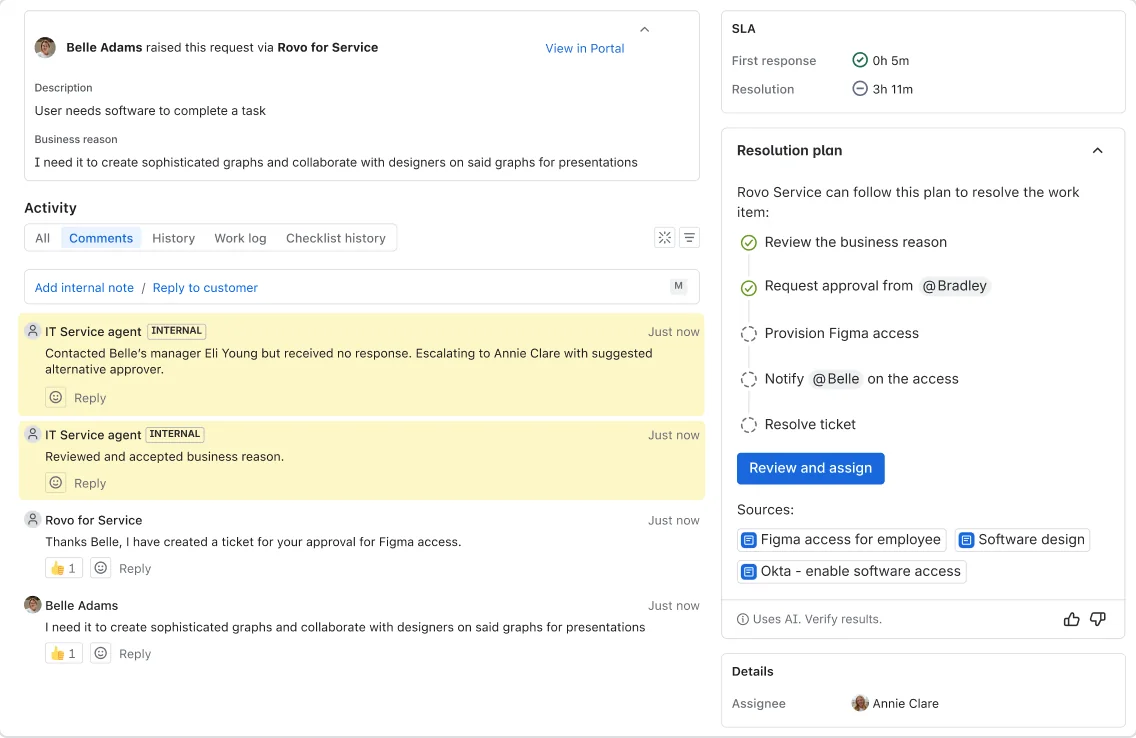
And here it is working an actual request, walking a software-access ticket through a resolution plan with an approval step:
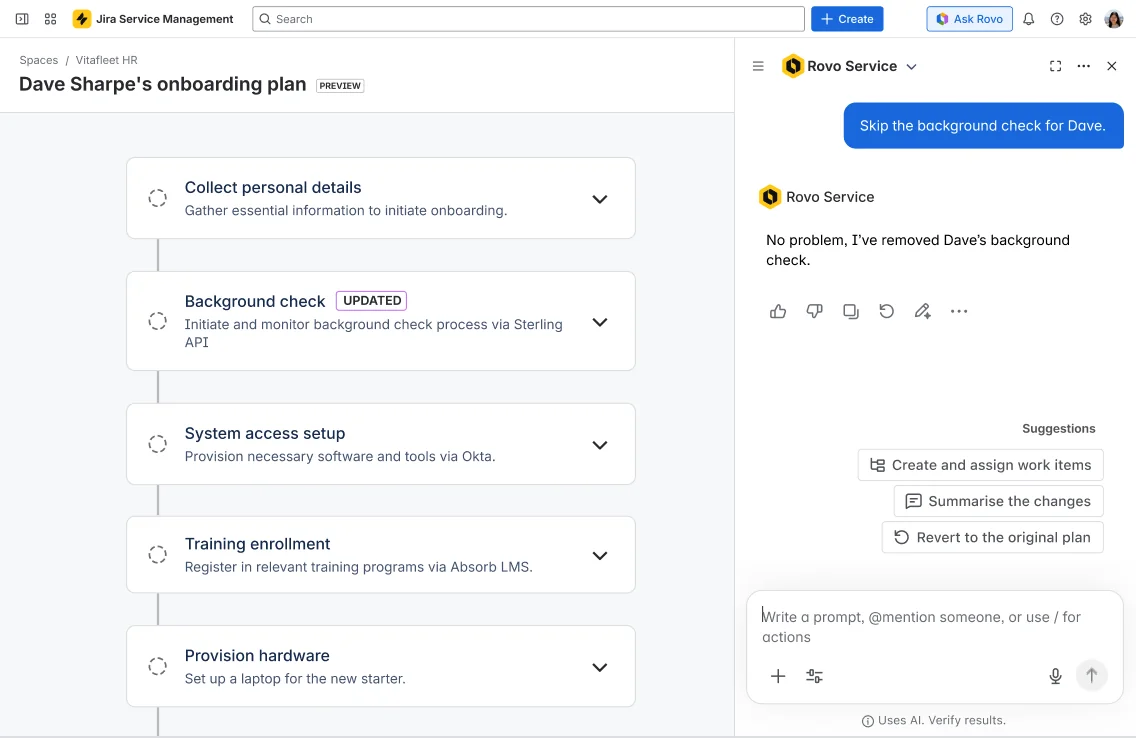
It is capable. Rovo can build and run zero-touch workflows, like generating a new-hire onboarding plan and executing it step by step:
The confusion is real, though. Atlassian's own community forum has admins asking which AI to even use, because the flow-based Virtual Agent and the newer GenAI Rovo agents are optimized for different jobs and do not cleanly replace each other. If you turn this on expecting one clear "AI button," you will spend a while working out which piece does what.
The plan gating and the cost meters
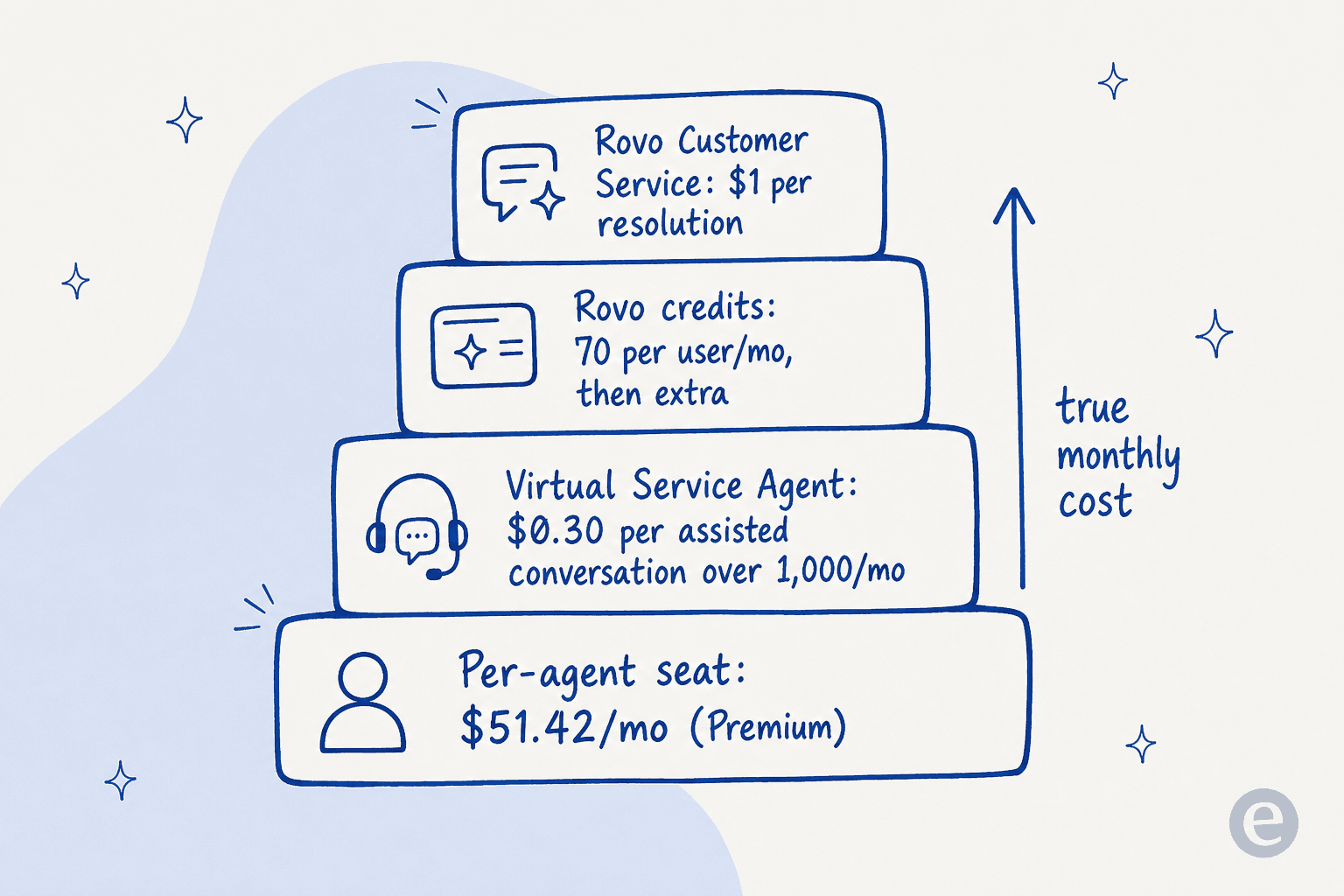
This is where I see teams get caught. The native AI is not one line item on top of your subscription. It is a set of meters layered onto your per-agent seat price.
- Rovo (search, chat, agents) unlocks from the Standard plan up. Not on Free.
- The Virtual Service Agent (the deflection chatbot) is Premium and Enterprise only. On the pricing page, Premium runs about $51.42 per agent per month.
- The VSA includes 1,000 assisted conversations a month, then charges $0.30 per assisted conversation above that.
- Rovo Customer Service (for external tickets) is billed at $1 per resolution.
- Rovo itself is metered in credits: 25 per user/month on Standard, 70 on Premium, 150 on Enterprise, with extra usage available once you opt in.
So the "per agent" sticker understates the real bill the moment the AI starts actually deflecting volume. That squares with what reviewers say. The dominant sentiment on G2 (4.3/5 from 988 reviews) and Capterra (4.5/5 from 770) is not about the AI quality, it is about cost and complexity:
"Compared to the other Atlassian products this is on the much more expensive side as you require more-and-more agents."

"For me, the biggest drawback is the administrative complexity. Jira Service Management is highly flexible, but configuring and maintaining it often takes more effort than expected. Simple changes can require multiple configuration steps, making it less approachable for smaller teams."

If you are already on Premium and staffed to configure it, native AI is a reasonable place to start. If you are on Standard or Free, or you want a cost you can predict, the layered path is worth a serious look. For a deeper verdict on the native option, we wrote up whether Jira Service Management AI is worth it separately.
Before you add AI: the prerequisites
Both paths need the same groundwork, and skipping it is the number one reason an AI rollout underwhelms. We have spent years putting AI agents on live support queues, and I have watched a confident-sounding bot give a wrong answer to a real employee. That is exactly why the prep below is not optional.
- Get your knowledge base into shape. AI answers are only as good as the Confluence articles, past requests, and request types it reads. If your docs only cover full cancellations but people keep asking about pro-rated refunds, the AI will guess. Find the gaps first.
- Pull a sample of past requests. The best training signal is your own resolved tickets, not the help center. Know which request types dominate your queue so you can point the AI at them.
- Decide the scope. Which request types should the AI touch first? Password resets, VPN issues, and access requests are the classic tier-1 IT workload where AI earns its keep. Start narrow.
- Check your plan. For native AI, confirm you are on Standard (Rovo) or Premium (VSA). For a layered agent, this step disappears, since it works on any tier.
How to add AI to Jira Service Management with a layered agent
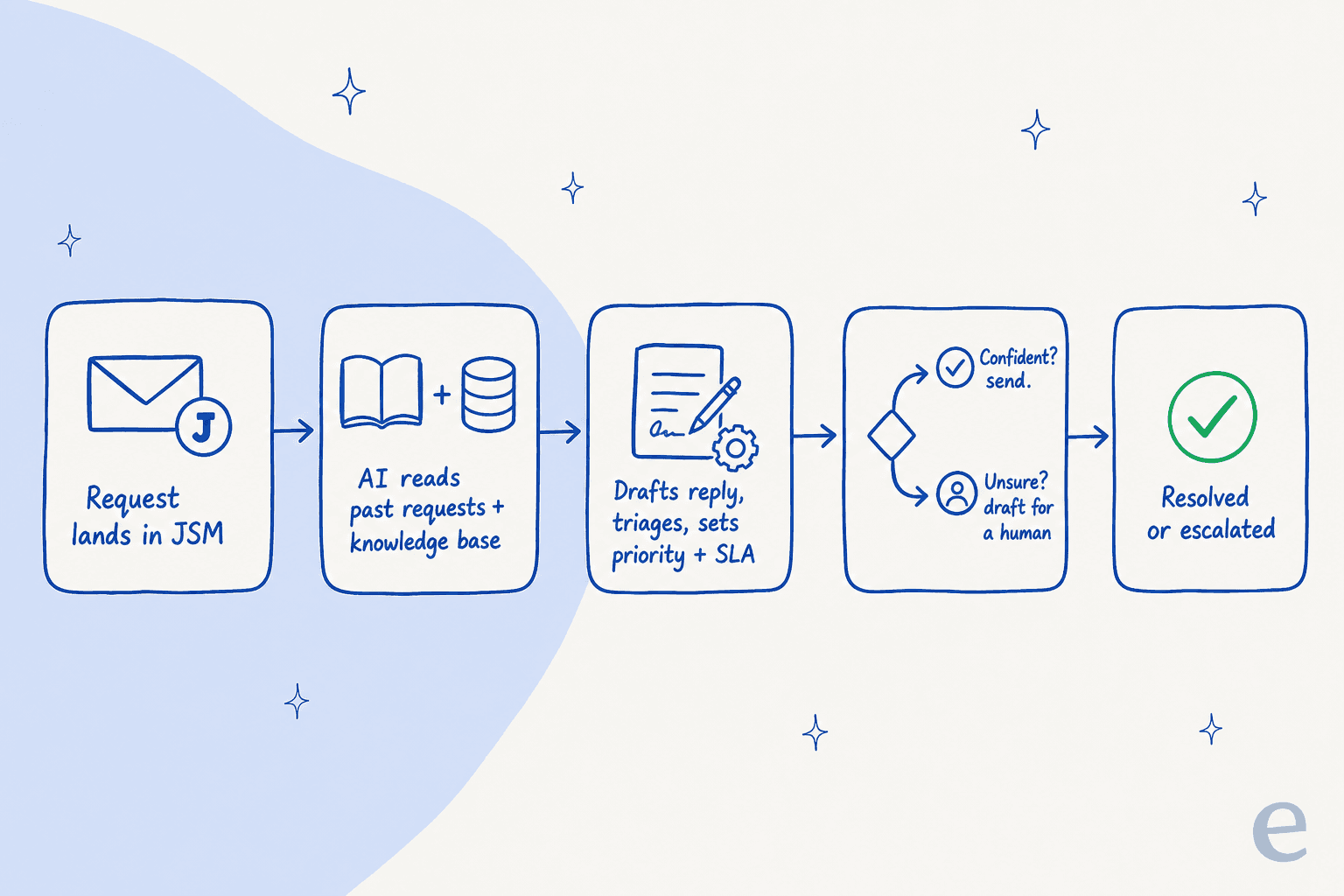
This is the path I know best, so I will walk it in detail. The whole point of a layered agent is that it plugs into the JSM you already run, no migration and no plan upgrade. Here is the shape of what happens once it is connected:
Step 1: Connect your service desk
You authorize the integration and point it at your JSM instance. With eesel, this is an OAuth-and-go connection that takes minutes, not a six-week professional-services engagement. No chatbot widget bolted onto the portal, no separate inbox: the AI joins as a real agent inside your service desk.

Step 2: Let it learn from your history
Once connected, the agent reads your past requests, knowledge base articles, and request types automatically. No data labeling, no long onboarding. This is the part that makes people's eyebrows go up: years of resolved tickets become usable knowledge on day one. And because it is not limited to JSM, you can add Slack threads, Google Docs, and Notion pages as sources too, which is often where the real answers actually live.

Step 3: Simulate before it touches a real ticket
This is the step I would never skip, and it is the one most native rollouts do not offer. Before the agent replies to a single live request, run it against your past JSM tickets to see how it would have handled them. You get coverage by theme (say, SSO login errors at 35%, API questions at 41%), a list of the gaps, and a forecast of resolution rate. You fill the gaps, add sources, and re-run until you are confident. Your employees never see a bad answer, because you caught it in the simulation.
Step 4: Configure it by talking to it
Instead of a rules engine, you brief the agent like a new teammate: when it should jump in, how it should write, which request types it handles, and when to escalate. Change the behavior by describing what you want in plain language.

Step 5: Go live in draft mode, then hand over the easy ones
Do not flip straight to full autopilot. Start with the agent drafting replies for a human to approve or reject, so you build trust on real traffic. When you can see it is handling password resets and access requests cleanly, let it send those on its own and keep the harder categories in draft. Confidence-based routing does the rest: high-confidence answers go out, low-confidence ones get drafted for review rather than guessed at.
That gradual path is how Gridwise got to 73% tier-1 resolution in the first month, and how Design.com now handles 50,000+ requests a month in JSM across a multi-agent setup with over a thousand knowledge articles behind it.
How to turn on the native AI instead
If you decide to go native, the short version:
- Confirm your plan. Rovo needs Standard or higher; the Virtual Service Agent needs Premium or Enterprise. AI is on by default on Premium and Enterprise.
- In your Atlassian admin, make sure Rovo is activated for the org (admins can toggle it; deactivating it disables Rovo Chat and agents).
- Point Rovo at your knowledge: connect the relevant Confluence spaces and any third-party sources via Rovo connectors.
- Set up the Virtual Service Agent to deflect in your portal and chat channels, and build or enable the Rovo Service agent for the request types you want automated.
- Watch your Rovo credit usage and VSA assisted-conversation count, since both meter separately from your seats.
It is more moving parts than the layered path, but if you are committed to staying entirely inside Atlassian, it is the coherent way to do it. Our Jira Service Management AI review goes deeper on how well it performs in practice.
Common mistakes when adding AI to Jira Service Management
- Turning the AI loose without testing. The single biggest one. Never point a fresh agent at your live queue and hope. Simulate against past tickets first, or at minimum run it in draft mode for a couple of weeks.
- Ignoring the cost meters. With native AI, the per-agent price is the start, not the total. Model your likely assisted-conversation and resolution volume before you commit, or the true monthly cost will surprise you.
- Feeding it a thin knowledge base. If your Confluence is out of date, the AI inherits every gap. Fix the docs before you blame the bot.
- Over-scoping on day one. Automating password resets is a quick win. Trying to automate complex, multi-approval change requests in week one is how you lose the team's trust. Expand scope as the numbers earn it.
- Assuming native is the only option because it is built in. Plenty of teams on Standard or Free assume they cannot have AI without a Premium upgrade. A layered agent sidesteps that entirely.
Try eesel for Jira Service Management
If you want AI in your service desk without upgrading tiers or budgeting for four separate meters, this is where eesel fits. It connects to Jira Service Management in under 30 minutes, learns from your past requests and knowledge base with no training project, and hits 85%+ tier-1 resolution out of the box, with a simulation mode so you see exactly how it will perform before it touches a real request. Pricing is one fixed monthly plan from $299/month for 500 credits (1 credit per ticket or chat) with no per-seat fee, so the cost tracks your ticket volume rather than how many agents you have.

You can start free with 100 free credits and no credit card, or learn how the JSM integration works first. Either way, run it against your own historical tickets before you decide. That one test tells you more than any review, including this one.