


Jira Service Management has no translate button on a customer request. Atlassian's AI features page lists summaries, triage, sentiment and drafting, but no translation. You get language support for the portal, a manual Rovo edit menu, or a Rovo automation you build, as Axpo did for German tickets. eesel covers the reply side, drafting in the customer's language. With the eesel CLI, a coding agent can connect Jira and test answers before launch, while an admin still approves the Atlassian connection.
Does Jira Service Management have built-in AI ticket translation?
No single feature does it, and that is the answer most teams are surprised by. I build integrations at eesel, so I went through Atlassian's own pages one by one, asking one question: a customer writes in a language my agent can't read, so what happens? Searching the JSM AI features page for "translat" returns nothing. Translation shows up in four other places, and each one covers a different slice.
| Where translation lives | What it translates | Who does the work | Plan or cost |
|---|---|---|---|
| Language support | Portal, request types, customer notifications, email templates, help center | An admin reviews and enables each language | No AI cost listed on Atlassian's pages |
| Virtual service agent | Its own strings and answers, in the project's default language | Nobody, it follows the project setting | Premium and Enterprise, with 1,000 assisted conversations a month |
| Rovo edit menu | Text an agent selects in a description or comment | The agent, by hand | Not itemised on Atlassian's rate card |
| Rovo automation | A request's summary, description and comments | You build the rule | Automation steps, plus a Use Rovo rate Atlassian doesn't list |
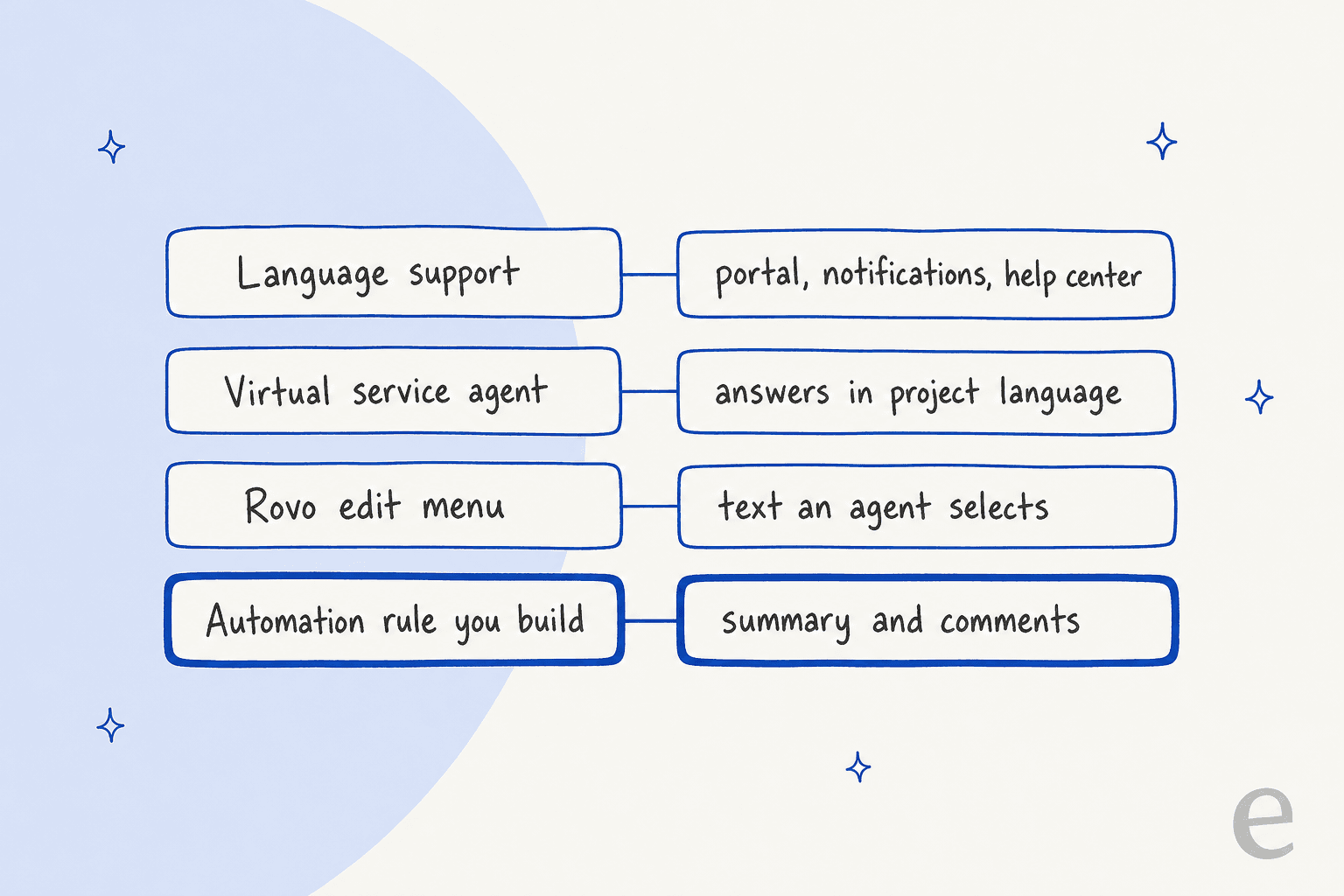
The pattern in that picture is the whole story. Three of the four layers translate the service desk's own content, and only the automation row touches what the customer actually wrote. If you have read my breakdown of JSM AI draft replies or AI ticket triage, this is the same shape: a tool for each slice, no end-to-end flow out of the box.
What does JSM language support translate?
It translates the front door, not the conversation. Atlassian says you can add languages to a service space and translate the portal, request types, customer notifications, email templates and help centers, per its language support page. The setup page adds three details I would plan around:
- Some translations are generated for you, but you must review and confirm them before customers see them on a help center.
- New languages start disabled, so you can quality check them first. You switch each one on under Available to customers.
- Work type, status, resolution and priority show in the default language until someone translates them.
Edit a field in the default language later and a marker tells you the other translations are out of date, per Atlassian's page on keeping translations current. That is real upkeep. Every new request type is one more thing to translate in every language you offer.
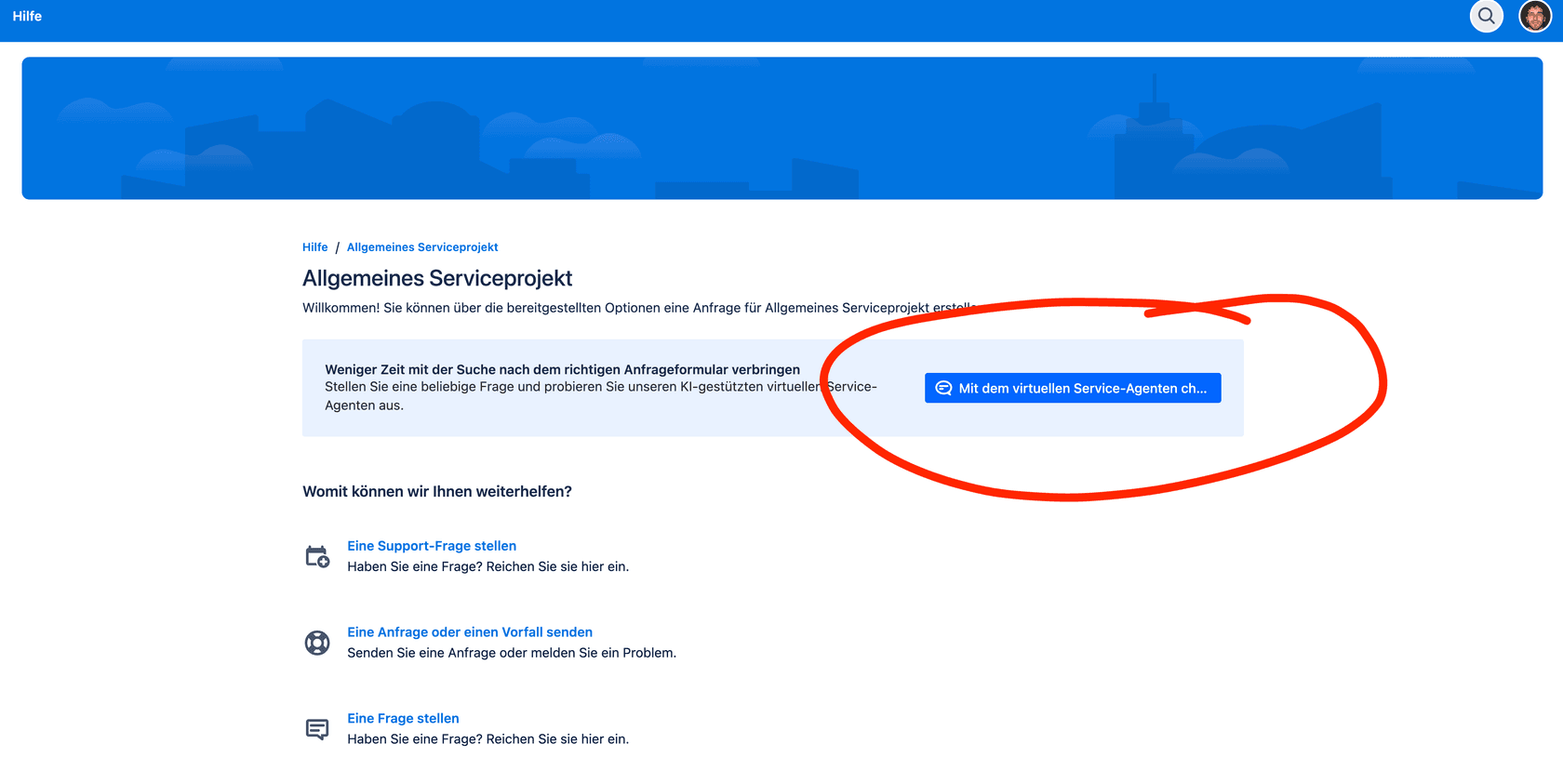
The screenshot above is a German portal from a community thread. It shows what language support does well: a customer lands on a page in their language. It says nothing about what happens after they hit submit and an agent in another country opens the request. For more on the portal side, see my help center guide.
How does the virtual service agent handle other languages?
It follows the project's default language, and that is a setting, not a detection. Atlassian closed request JSDCLOUD-13013 in September 2024 with instructions: set the project's default language to the one most help seekers understand, and the strings they see will appear in it. A separate suggestion, JSDCLOUD-15636, asks to customize those translated texts. It was still unresolved when I read it, and the page says there is no workaround.
The community shows the edge of this. One admin reported that the virtual agent answered in German inside a German project, then answered in English in the help center, with Jira and the customer's own language both set to German. A community champion pointed to the customization request. I'd read that as "one language per project", which means a global desk with one project needs a second tool. If you want the agent side explained, my virtual agent guide and Customer Service Management post cover how it is billed and where it stops.
What can Rovo translate inside a request?
Two things, both manual. The first is the Rovo editing menu. Atlassian's training lesson says that when you highlight text you can ask Rovo to change tone, improve the writing, fix grammar or translate into another language, and that the tools work in Confluence, Jira, Jira Service Management and Trello. An agent who selects a Portuguese comment and asks for English gets a translation. A queue of 200 requests means 200 selections.
The second is the Global Translator agent, one of Atlassian's out-of-the-box agents that translates writing "into most languages". Its use case page says that when you create a Jira issue type called "translation", it reads the description and comments and translates them. The page lists Confluence and Jira as its apps and program management and marketing as its teams, not service desks. I would not treat it as a JSM feature.
Two community signals are worth knowing before you rely on either. Rovo chat only answered in English until Atlassian marked ROVO-27 fixed in April 2025, and a Confluence user reported the translation label failing in November 2025, where a reply called it part of a phased rollout. My read: use these for the odd ticket, not for a desk that gets a hundred a day. For the agent side of Rovo, see Rovo agents.
How do I build ticket translation with Rovo automation?
Use the Use Rovo action in an automation rule. Atlassian announced it on April 30, 2026 as "a simple self-contained AI action" to summarise, translate, transform or extract, available in Studio, Jira, JSM and Confluence, per Atlassian's announcement. It has one prompt box and no access to anything except what you pass in with smart values.
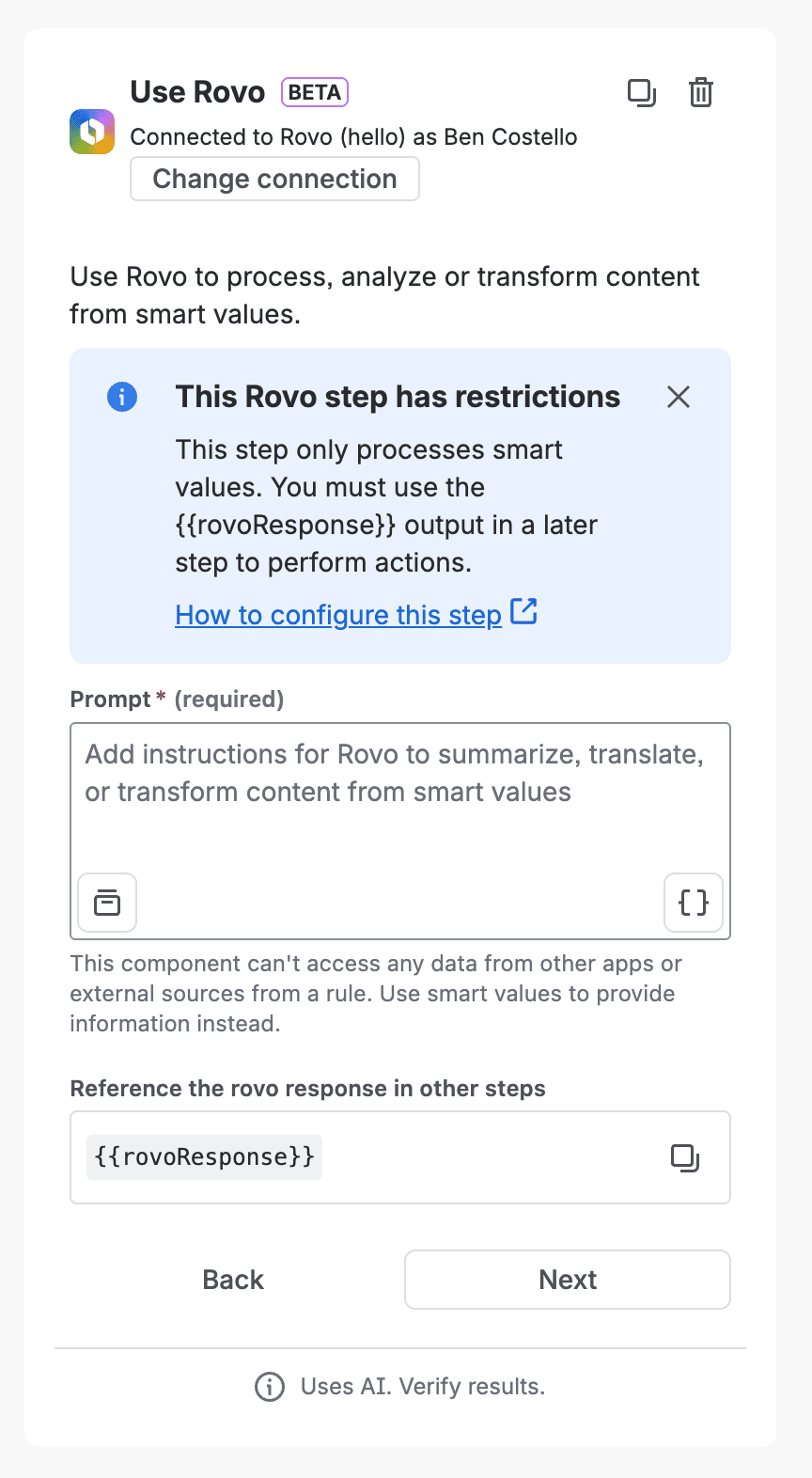
The step in that screenshot comes from Atlassian's announcement, and it labels the action Beta. The rules Atlassian states are plain:
- Pass the text in yourself. Atlassian's examples use
{{issue.description}},{{issue.comments.get().body}}and{{comment.body}}. A prompt that says "translate this ticket" fails, because the step can't open work items. - Read the answer from
{{rovoResponse}}. The step can't perform actions, so a later step must write the output. - Choose where it lands. A comment, the summary, the description or another field.
If the translation needs more than the text in front of it, say a glossary stored on a Confluence page, you need the Use agent action instead. Atlassian's docs say out-of-the-box agents don't take actions, so you add steps after the agent and read {{agentResponse}}, and admins can stop agents acting in automations altogether.
What did Axpo build?
Axpo, a Swiss energy provider, has a second-level support team in Madrid that doesn't speak German. According to Atlassian's June 17, 2026 write-up, a new German ticket makes Rovo detect the language, translate the summary and description into English and store them in a dedicated field. Every German comment is translated and posted as an internal-only English note, with the original author and timestamp kept.
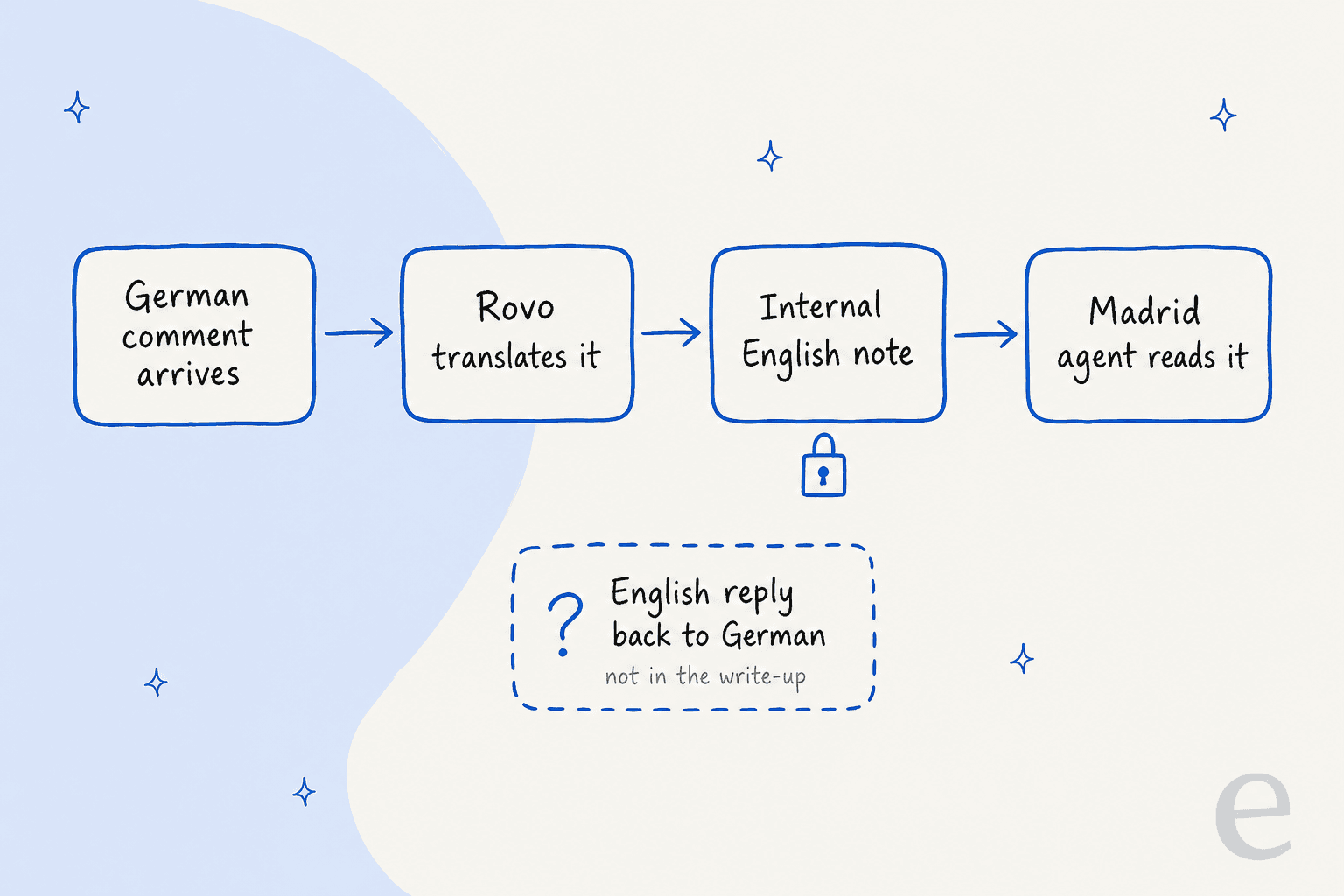
That is a clean pattern for the agent's view. Look at the one thing the write-up doesn't describe: the reply. The flow goes German to English, and I found nothing from Atlassian on translating the agent's English answer back for the customer. If your agents reply in the customer's language, you build a second rule or add an app.
Why does the internal note matter so much?
Because the Axpo pattern depends on it, and Rovo's own comment action has a documented problem. Atlassian's ROVO-297 ticket describes an agent action that adds a comment to a Jira Service Management request and posts it public even when told to make it internal. The ticket is marked Fixed, yet a comment dated September 15, 2026 says the behaviour still happens:
"Rovo not only posts the comment as a public customer reply rather than an Internal note, but can also incorrectly reassure the user that the comment will be added as an internal note before the action is executed."
A July 2026 community post describes the same outcome with a real customer email going out. A community champion's reply says Jira's comment endpoint supports a visibility property but Rovo's action doesn't expose it. These are user reports, so I'd test it yourself, but the workaround in Atlassian's ticket is easy to adopt.
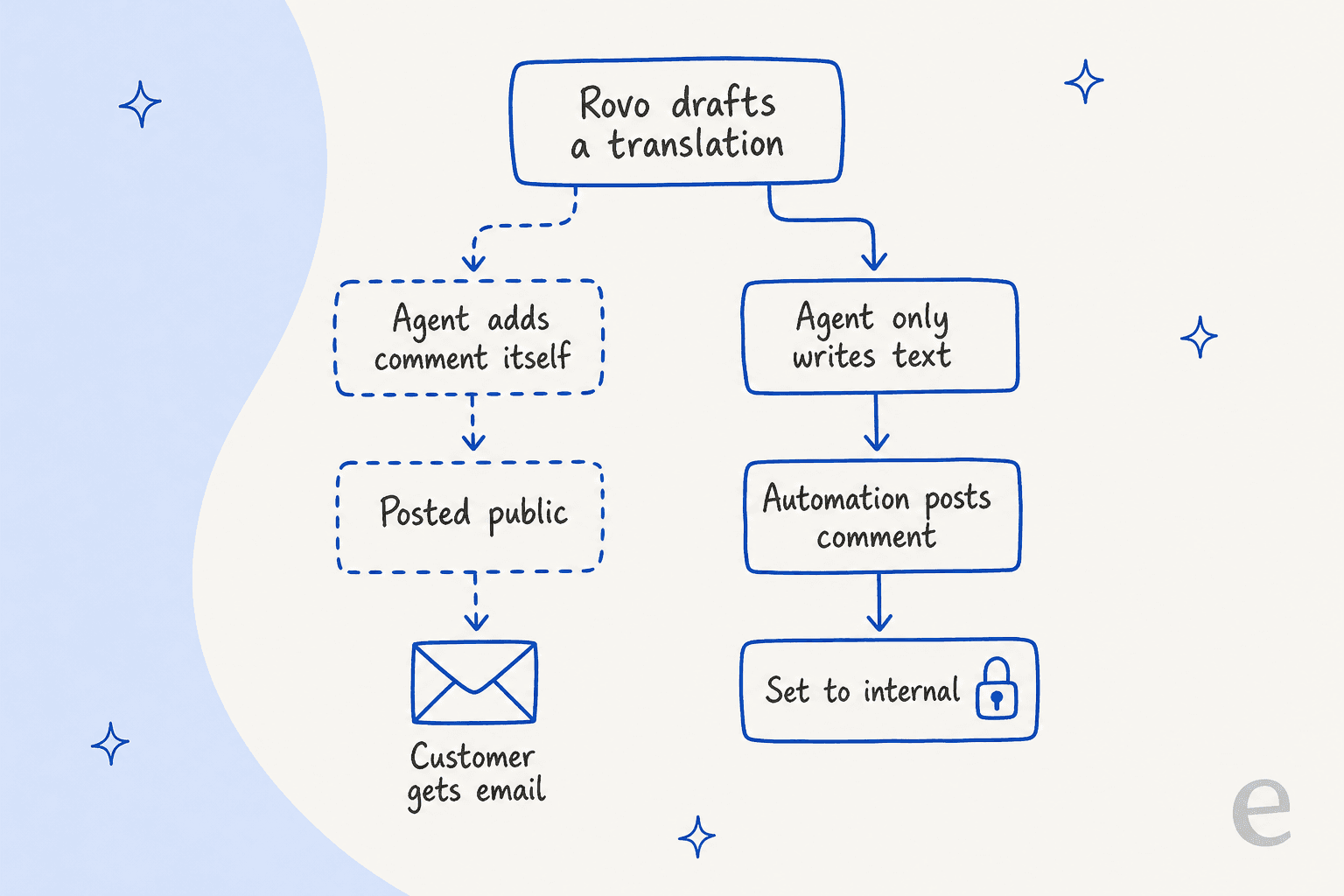
Let the agent or the Use Rovo step write the text, then post it with a Jira Automation comment action set to internal. Test with a private request before you point it at a live queue. A wrong visibility setting isn't a typo: whatever your agents wrote about the customer lands in the customer's inbox.
What do Marketplace translation apps add?
The two closest to the job are listed below, both from the Atlassian Marketplace listings I read on November 21, 2026.
| ITSM Language Translation for JSM | AI Support+ for Jira | |
|---|---|---|
| Vendor | resolution Reichert Network Solutions | Apps+ |
| What it does | Translates requests into the project's default language, including paragraph and short text fields, and agent responses into the customer's language | Posts an AI diagnosis comment on new tickets and translates, assigns and generates replies |
| Language handling | Stores ticket language in a custom field, with an invisible mode or a bilingual mode | Not itemized in the listing |
| Listing numbers | 297 installs, 5/5 from 4 ratings | 124 installs, 5/5 from 2 ratings |
| Cost model | Paid via Atlassian, commercial license | Free app |
| Data terms | Partner's privacy policy applies, not Atlassian's | Partner's privacy policy applies |
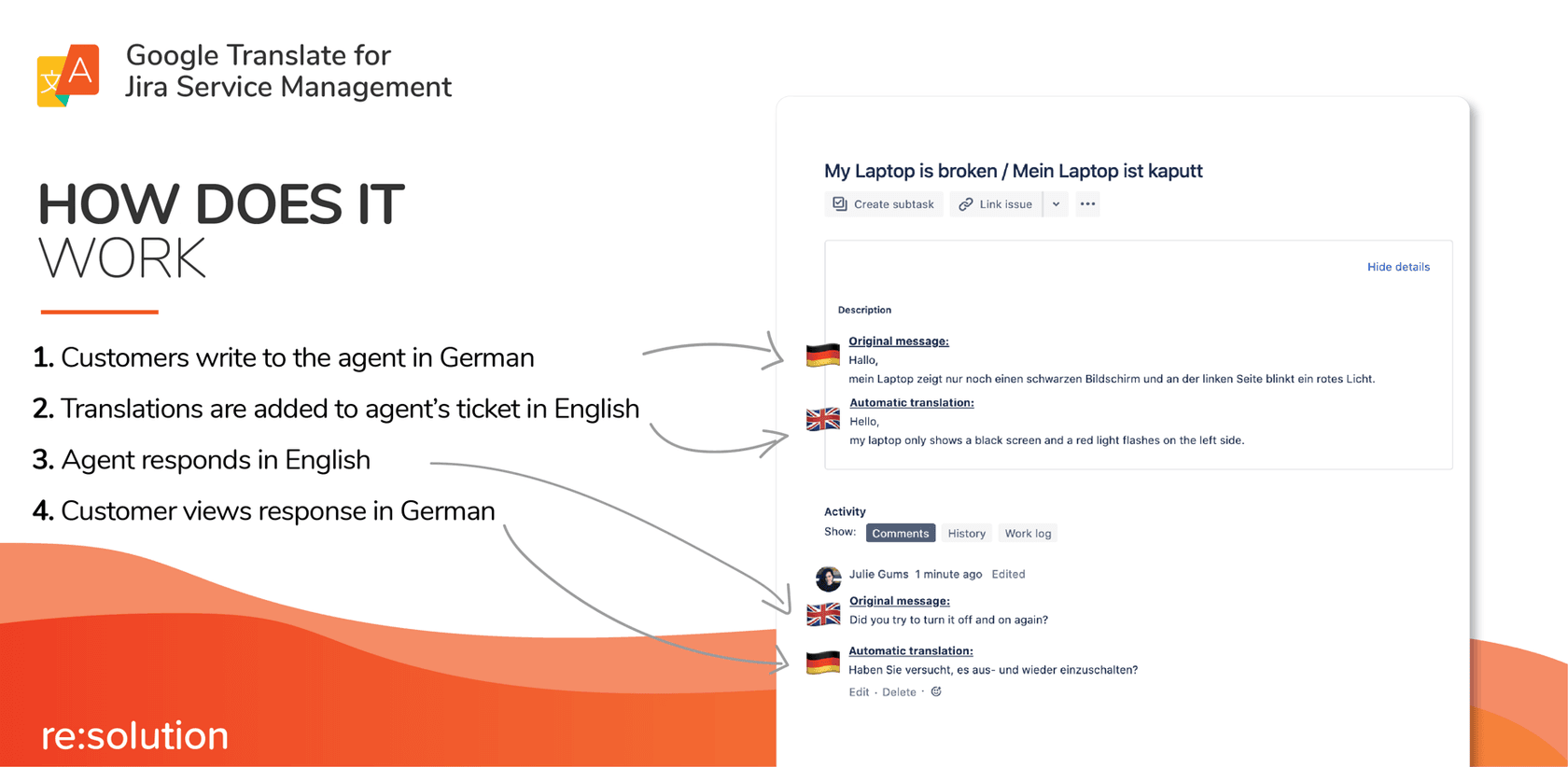
The graphic above is the app vendor's own and it shows what the Rovo route lacks, the second arrow back to the customer. The trade is data. A May 2025 community thread asked for a translation tool for JSM that complies with European GDPR rules, and its author wrote:
"Most of what's available ends up storing end-user data and/or storing them outside of the EU (in the U.S. for example)."
The thread says Atlassian Support recommended AI Support+ for Jira, reluctantly, and a reply pointed to Rovo's Global Translator as a future in-product option. I can't tell you either app's data location from the listings, so ask the vendor before you send ticket text through one. My ITSM AI roundup and AI for ITSM guide cover the wider field.
Which plan do I need and what does it cost?
Rovo is available and switched on for Standard, Premium and Enterprise, per Atlassian's AI features page. Service Collection includes Rovo credits per user each month, and Atlassian's pages give two sets of seat prices, both checked on November 21, 2026:
| Plan | Pricing page per agent | Licensing page 1 to 15 agents | Rovo credits per agent a month | Automation steps per agent a month |
|---|---|---|---|---|
| Standard | $21.50 | $26.90 | 250 | 3,000 |
| Premium | $55.28 | $61.60 | 700 | 6,500 |
| Enterprise | Contact sales | Contact sales | 1,500 | 9,500 |
Credits sit in one organization-wide pool, reset monthly and don't roll over. Atlassian prices a basic agent event at 10 credits, and from December 3, 2026 pay-as-you-go billing is $0.01 per credit, on by default up to a cap an admin sets. The rate card doesn't list the Use Rovo step, and Atlassian says beta features don't count against allowances unless stated, so I could not confirm what a translation step costs. Here is my estimate if each translation is one basic event:
| Desk | Translations a month | Credits at 10 each | Included pool | Overage at $0.01 |
|---|---|---|---|---|
| 5 Standard agents | 1,600 (400 requests, 4 texts each) | 16,000 | 1,250 | $147.50 |
| 10 Premium agents | 1,600 | 16,000 | 7,000 | $90.00 |
Those figures ignore every other use of the pool, such as Rovo Chat and other AI features. The bigger lesson is the unit: you pay per translated text, so long threads cost more. For a wider tour, see Atlassian's AI cost breakdown and the JSM pricing guide.
Where does eesel fit with JSM translation?
On the reply, not the request. I'll keep to what the eesel docs say. An automation runs on a new request or a new comment from anyone except eesel, reads the description and every comment with the reporter marked as the customer, and then either posts an internal note or a public reply. Its FAQ says the agent replies in whatever language the customer writes in, and the helpdesk page says it answers without you translating your help center. Instructions are plain language, so "always reply in the customer's language" is a rule you can write.
Two customer stories show the pattern on other helpdesks. Koffer.ch runs eesel on Freshdesk and gets drafts in German, French, English or Italian, whichever the customer wrote in, with its macros translated into the customer's language where needed. A person reads and sends each one, and the story is candid that it is a small setup: 60 tickets in a month. smava handles about 27,000 Zendesk tickets a month, almost all in German, and its categorisation agent tags the language on each. On JSM itself, InDebted uses eesel as the IT team's first responder in Jira, deflecting 15% of incoming issues, and operates in five markets.
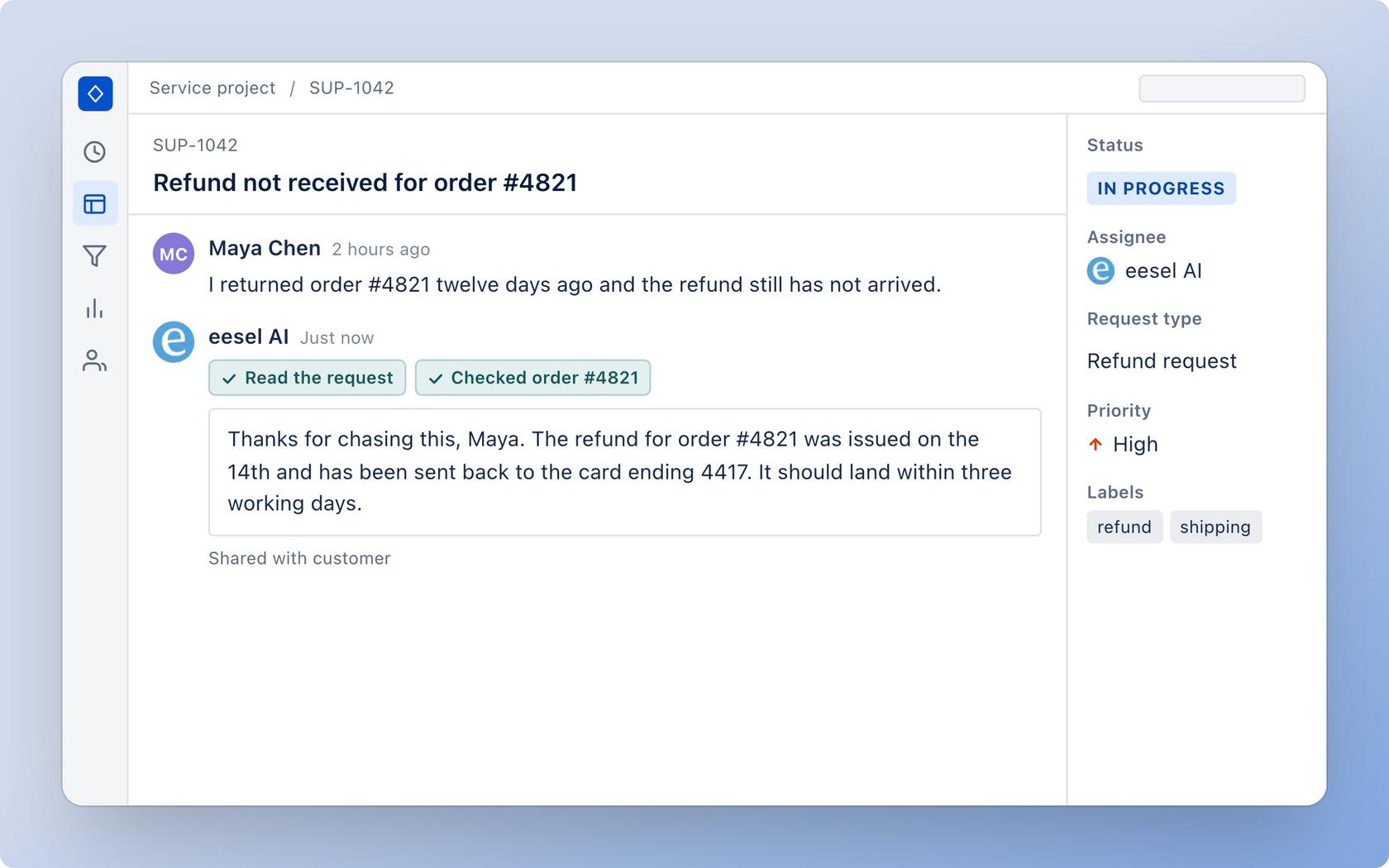
The limits matter as much. The docs list no action that translates the incoming request into your agent's language. The JSM integration page says it replies in 80+ languages, which is marketing copy, so I'd treat the language count as the vendor's claim. eesel posts as the Atlassian account behind your API token, doesn't answer the JSM Messenger widget, and every comment wakes it unless your instructions say otherwise. If your Madrid agents need an English view of a German request, the Axpo pattern or an app still does that job. For pricing, eesel's $299 a month covers 500 credits at one credit per ticket, so Axpo-style 400 requests would fit inside one batch, though that is counting tickets, not translating them.
Which route should I pick?
I'd decide on who reads the ticket first:
- Customers only need a translated portal and emails: use language support, and budget for reviewing every translation.
- Agents need to read foreign-language requests: build the Axpo rule with Use Rovo, post through a Jira Automation internal comment, and test on a private request. If you can't maintain rules, the Marketplace app is the less fiddly path.
- Agents need to reply in the customer's language: an app that translates both ways, or an AI agent like eesel that drafts in the customer's language for a person to approve.
- Data location is a hard requirement: get the answer in writing from whoever processes the ticket text. eesel's pricing page says data is stored in the US, with EU hosting in its Enterprise add-on.
The trade-off I'd flag is trust. A machine translation of a refund dispute that is wrong in a small way is worse than none, because the agent thinks they understood. Keep the original text visible beside the translation and run a test set before launch. My posts on AI support simulation testing and multilingual support QA show how.
If you want to see how other helpdesks handle the same job, I've broken them down one by one:
- Zendesk translation
- Freshdesk translation
- HubSpot translation
- Help Scout translation
- Salesforce translation
- Front AI translate
For the wider view:
- Customer service translation
- Multilingual customer support
- Translation glossary guide
- Non-English AI costs
More on JSM:
Try eesel for Jira Service Management
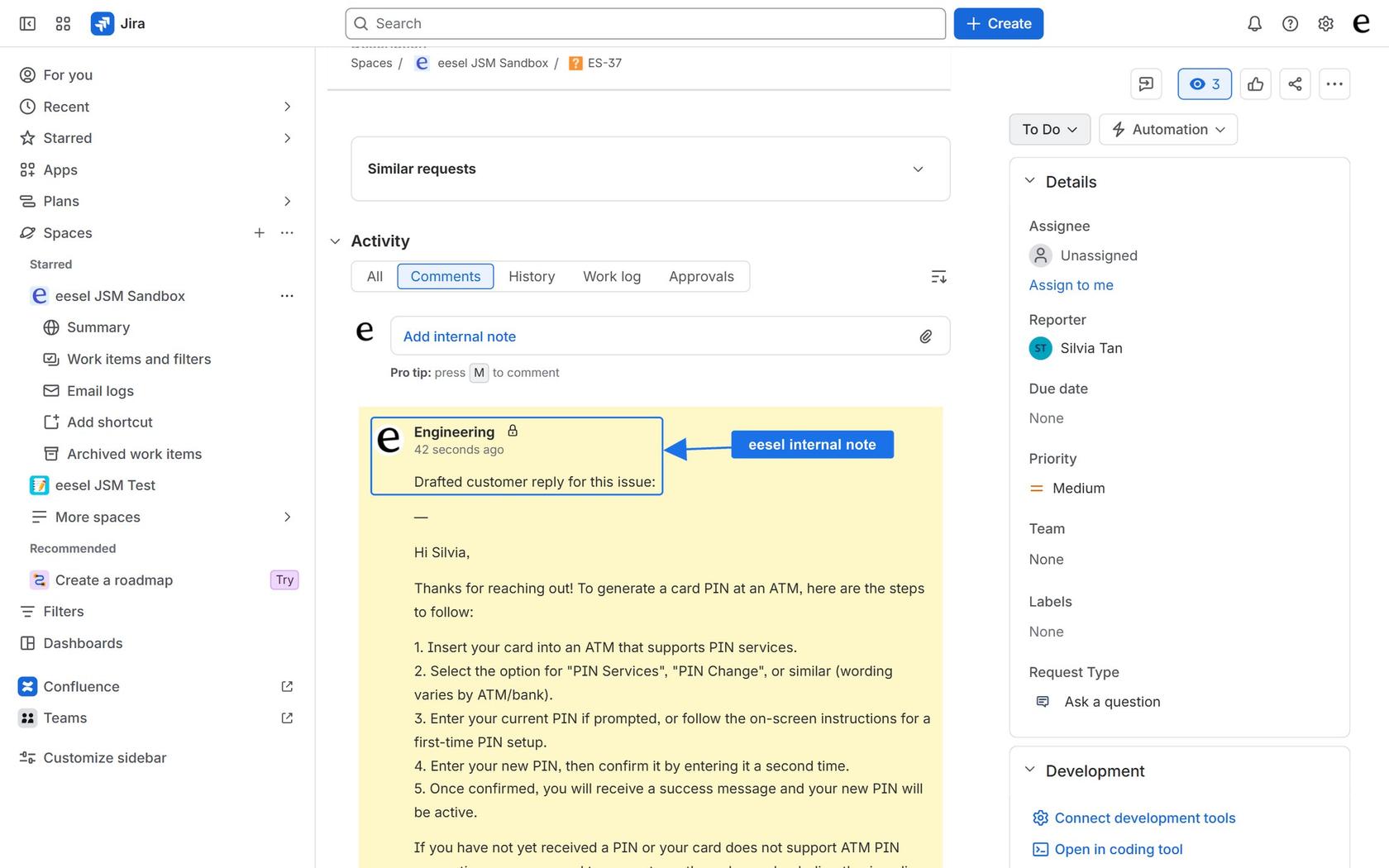
If your Jira Service Management customers write in more than one language, eesel can pick up each new request and leave a drafted reply as an internal note, in the language the customer used, built from your Confluence pages, help center or runbooks. You connect it with an Atlassian API token and nothing is installed from the Marketplace. It costs from $299 a month for 500 credits, with no per-seat fee and a free 7-day trial of 100 credits.
Try eesel for free, or read the integration page first.
Frequently Asked Questions
Does Jira Service Management have built-in AI ticket translation?
How do I translate Jira Service Management tickets with AI?
{{issue.description}} or {{comment.body}} into a translate prompt, then add a step that writes {{rovoResponse}} into a field or an internal comment. More in Jira AI automation and AI automation rules.