

Atlassian Customer Service Management is the external-support app inside Service Collection, so you pay per agent seat, not for the app, and the AI agent is free until 3 December 2026, then $1 per resolved conversation with no included allowance. Standard lists at $26.90 per agent per month for the first 15 seats and Premium at $61.60. It fits teams already on Jira that want customer context and developer escalation in one place; if you want an AI teammate on the helpdesk you already run, eesel joins a Jira Service Management queue and drafts replies for your people to send.
I answer support tickets for eesel every day, so I read this product as a support agent first. With the eesel CLI, an AI coding agent can upload approved knowledge, like exported help articles and refund macros, then ask it test questions and check the answers before anything reaches a customer. Connecting your Jira site still needs someone with admin access to approve it.
What is Atlassian Customer Service Management?
It is Atlassian's purpose-built app for talking to your customers, as opposed to your employees. Atlassian's product page pitches AI agents, shared customer context and connected teams, and labels it part of Service Collection.
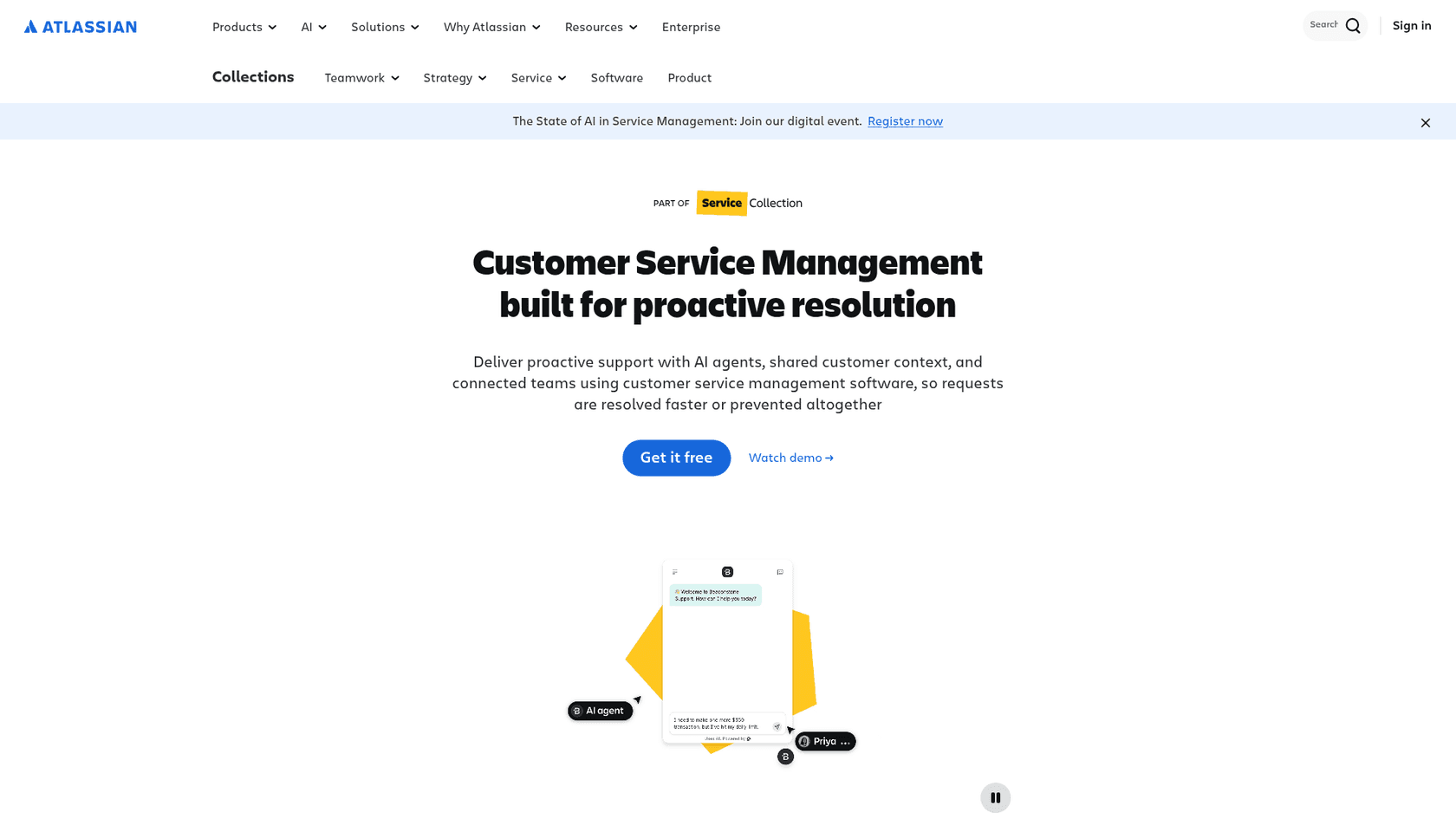
Service Collection is the bundle Atlassian now sells for service work. Its licensing page says it includes Jira Service Management, Customer Service Management, Assets and Rovo, that it is sold as a single offering, and that the apps cannot be bought separately. So there is no "CSM price". You buy seats of the collection and switch the app on. If you want the wider picture first, my customer service management guide and software roundup cover the category.
How is it different from Jira Service Management?
Same collection, different customer. An Atlassian staff member put it plainly on the community forum: Jira Service Management is for IT and enterprise service, with change, incident and asset practices, while Customer Service Management is for external support, with customer context, a multi-channel AI agent and custom branding.
That thread also holds the question I would have asked as an existing Jira customer:
"Now that you are forcing CSM on us JSM customers, once you bundle all on Service Collection and enable it in our environment, can we just disable it from our side? I do not plan paying extra for CSM solutions if we never asked for the tool in the beginning."
Atlassian's reply was that pricing stays per agent, so you do not pay extra for apps you leave unused. The pricing page repeats that CSM does not add to your bill. The same staff reply said the CSM template in Jira Service Management would be turned off once the dedicated app launched, to reduce confusion.
If you already run external support in a Jira Service Management space, Atlassian documents a move to Customer Service Management. You can copy queues, SLAs and rule sets from the old space, but automation rules, work items, Forge apps and role memberships are not copied, so budget for rebuilding them. Forge extensibility is listed there as coming soon. For the IT side of the same collection, see my Jira Service Management review, Assets guide, change management guide and status pages guide.
How does it organise support: experiences, customers and spaces?
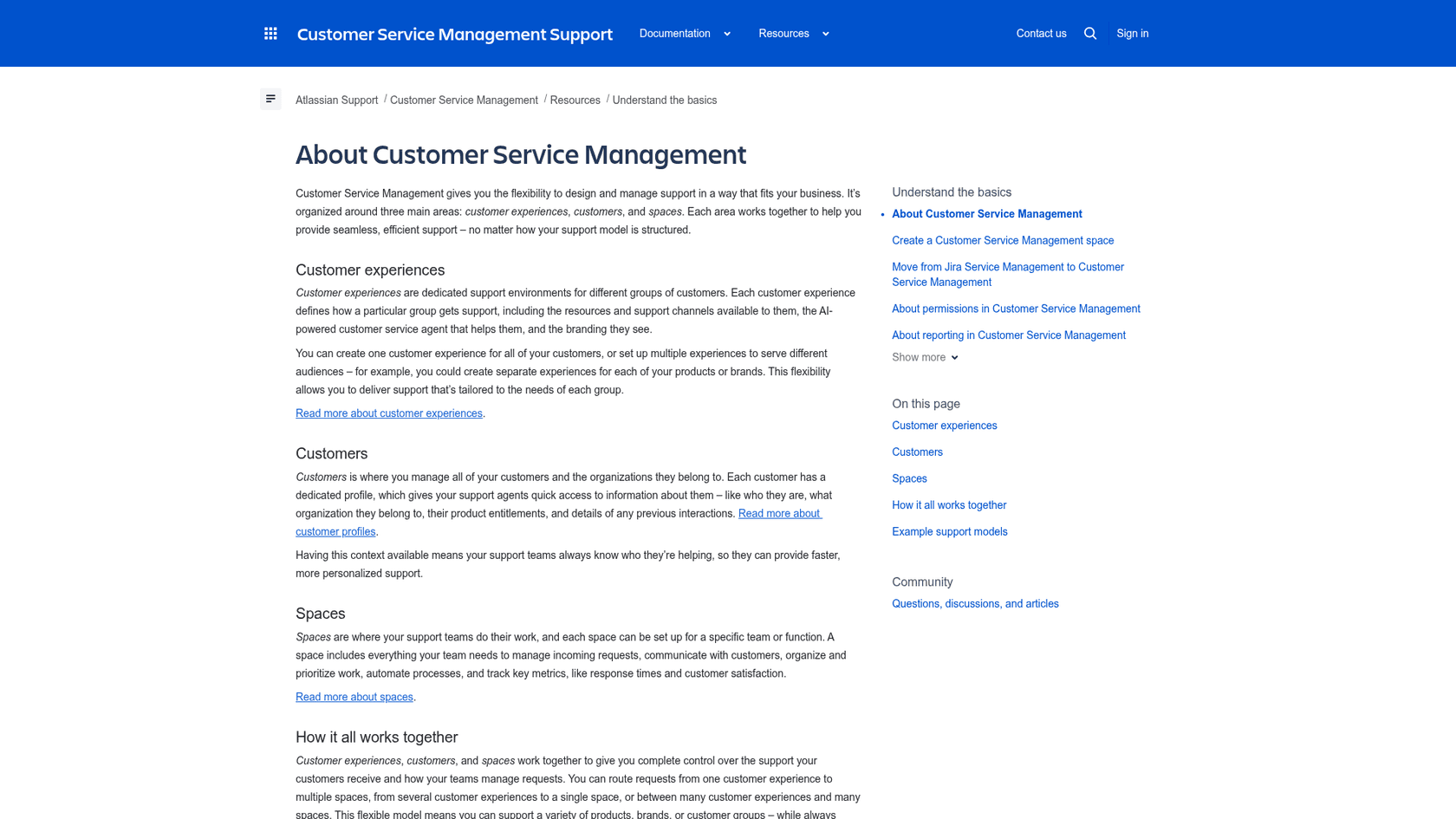
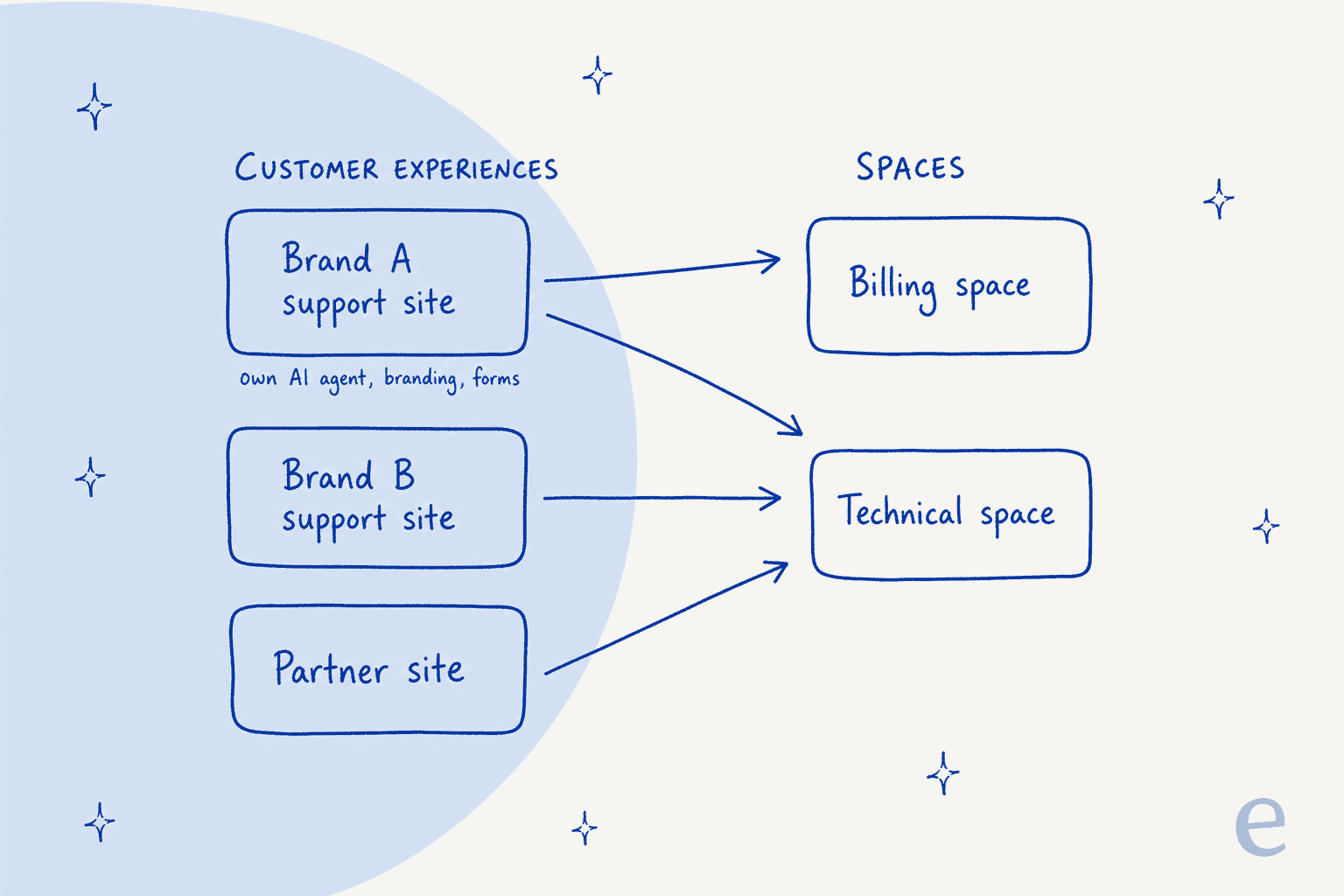
Atlassian's overview splits the app into three things: customer experiences, customers and spaces. A customer experience is a support environment for one group of customers, with its own channels, AI agent and branding. Customers holds profiles for people and organisations. Spaces are where your team works the queue.
The useful part is that the two sides map many-to-many. Atlassian's own examples are two brands with separate teams, one support site feeding billing and technical spaces, and customers plus partners sharing one team. Here is one possible setup, drawn from those rules.
On the agent's screen, the customer context shows up as a Customer details panel on each work item, with contact details, organisation details and entitlements, meaning the products or services that customer has. Only the fields you choose to display appear. I like this because the first thing I do on a ticket is work out who is asking and what they own.
Which channels does it support, and on which plan?
Atlassian's channels page lists a support website, email, an embedded chat widget, voice calls and messaging apps. Plan gating is where the detail sits, and the sources do not fully agree.
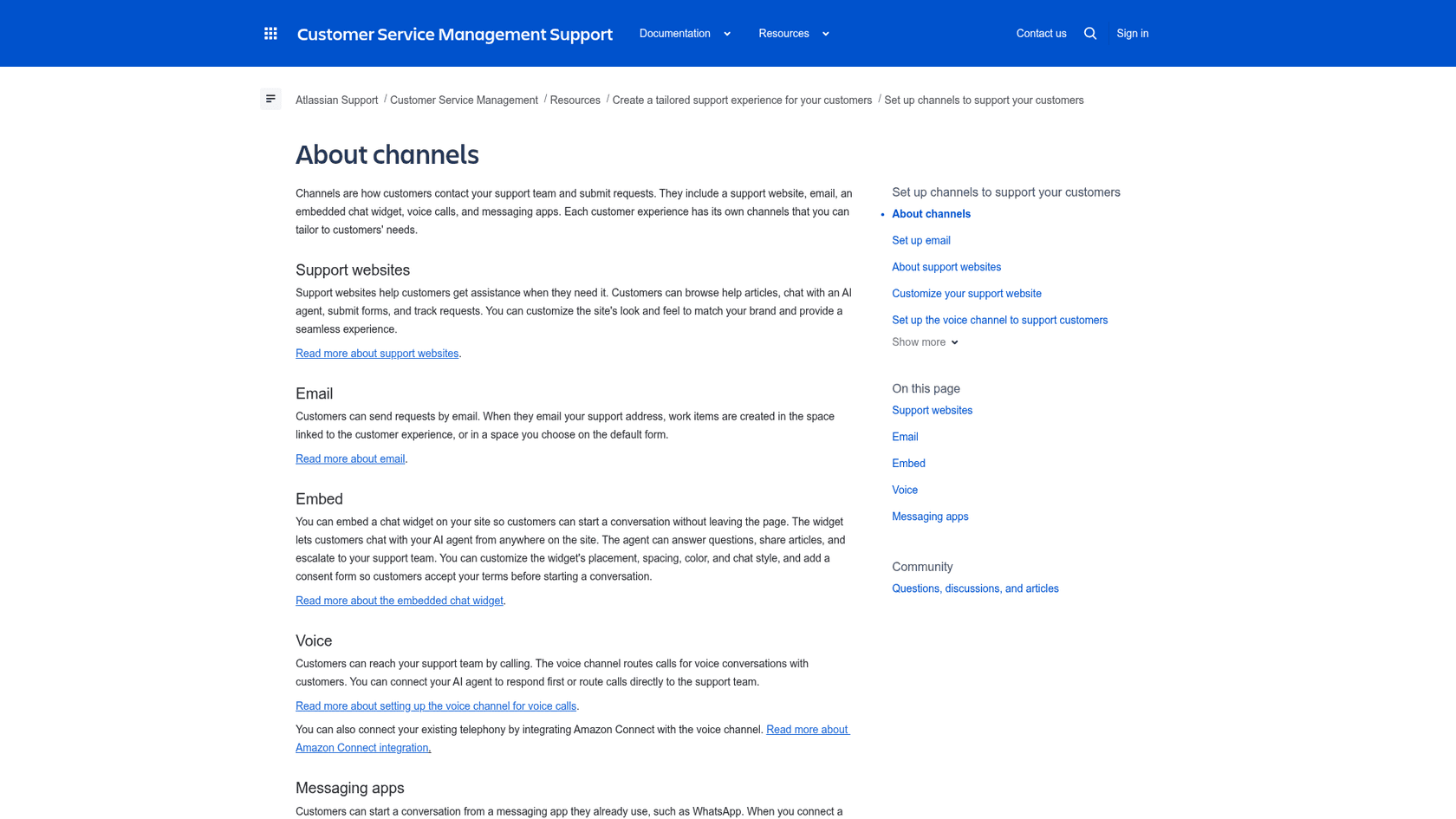
| Capability | Plan gating per Atlassian | Note |
|---|---|---|
| Support site, email, embedded widget | Ticked on Free, Standard, Premium, Enterprise | Pricing page "Omnichannel support" row |
| Customer context, queues, developer escalation | Ticked on all four plans | Same table |
| AI agent | Standard, Premium, Enterprise; not Free | Resolution billing page |
| Live chat with your team | Premium and Enterprise | Pricing page row; a community post announced it in open beta |
| Premium and Enterprise | Messaging apps page | |
| Voice | Premium and Enterprise, open beta | US, UK, Australia and Switzerland; emergency calls not supported |
Two details I would flag for a real rollout. On WhatsApp, a customer message only reaches your team if an agent is available, and if agents are online but nobody accepts within 20 minutes the conversation ends and the customer sees your fallback message. On voice, the voice setup page allows up to 10 phone numbers per site, and you can connect existing telephony through Amazon Connect. If those channels are the point, my guides to AI voice support and AI live chat show what else is out there.
How does the AI agent work?
The agent chats with customers on your support site or widget, answers from the knowledge you connect, and hands off when it cannot resolve the question. Atlassian's agent overview says that when it cannot answer, it collects details and raises a request so customers do not repeat themselves.
What I would check before switching it on:
- Knowledge. Per the knowledge page, support-site articles, Confluence, public websites and third-party apps can all be sources. Confluence spaces only show up if every licensed Confluence user can view them, unless you grant the agent access. Atlassian's third-party page names Google Drive and SharePoint and says indexing can take up to 24 hours. If your answers live in Confluence or SharePoint, plan for that wait.
- Actions. Atlassian's actions page says the agent currently supports read-only actions, such as checking an order status through an API. It cannot yet change anything in another system through that route.
- Handoff. You choose between sending the customer next steps and an automated handoff, where the agent picks a form, collects details and raises the request, per the handoff page. Each form field needs a description before the form appears as an option. My piece on AI agent handoff explains why this setting decides customer experience.
- Testing. Evaluations run a batch of questions through the agent and show which it resolved. Atlassian says they are available on all Customer Service Management plans. I would also read my notes on AI support simulation and an AI knowledge base audit.
Atlassian's product page also describes a human role that coaches the agent, reviews conversations and manages agent versions. That is a real job, and worth planning for: someone has to own the agent after launch.
How are AI agent resolutions billed?
This is the part to read twice. Atlassian's billing page says usage charges start on 3 December 2026, there is no allowance, and each resolution costs $1.00 from the first one. It is charged separately from Rovo credits, automation steps and Assets objects.
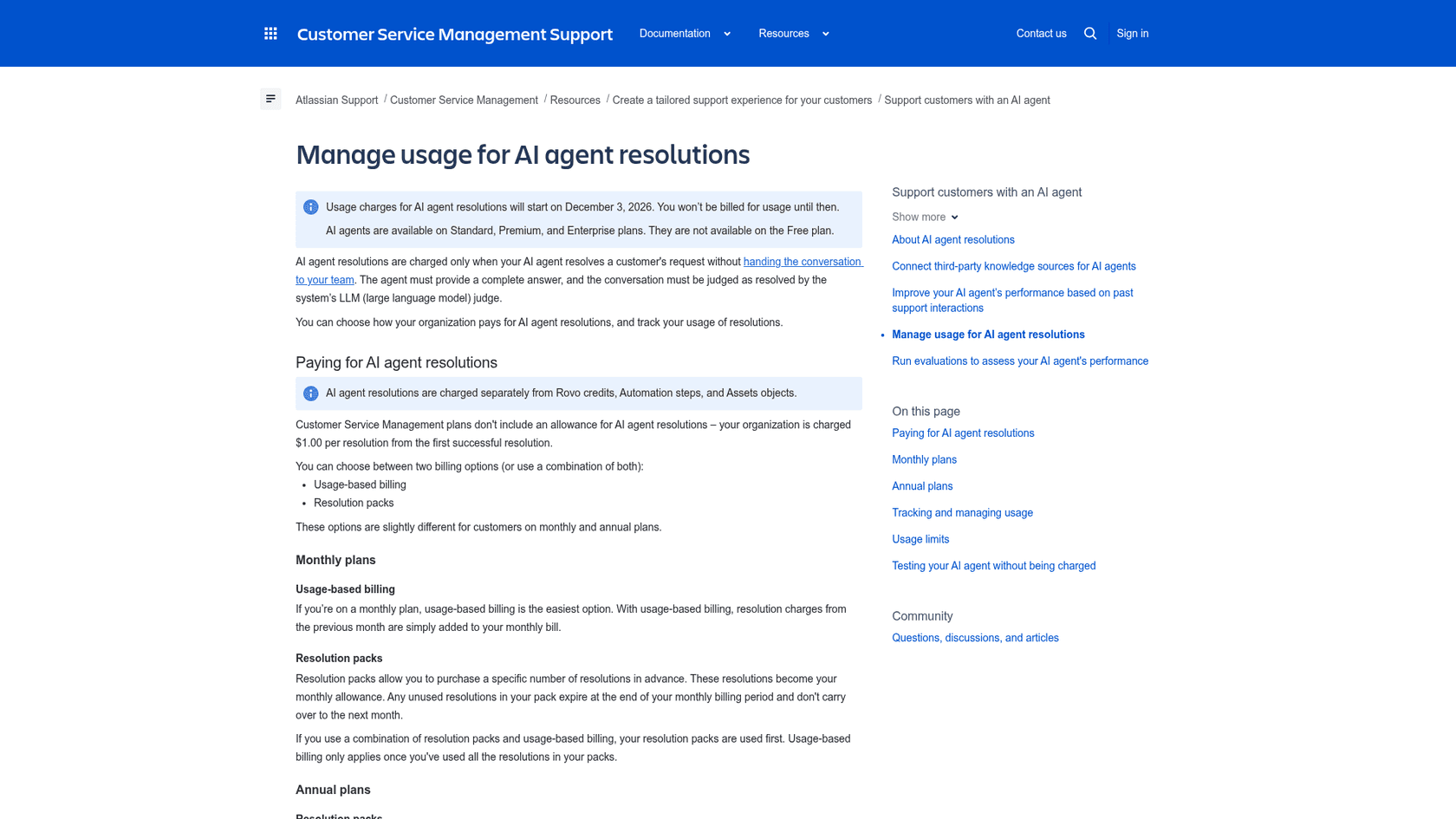
What counts, per the resolutions page: the conversation finishes with a complete answer, with no handoff and no work item created, and an LLM judge rates it resolved. The licensing FAQ adds that the judgement happens after a conversation has been inactive for 24 hours, and a customer cannot reopen a closed conversation.
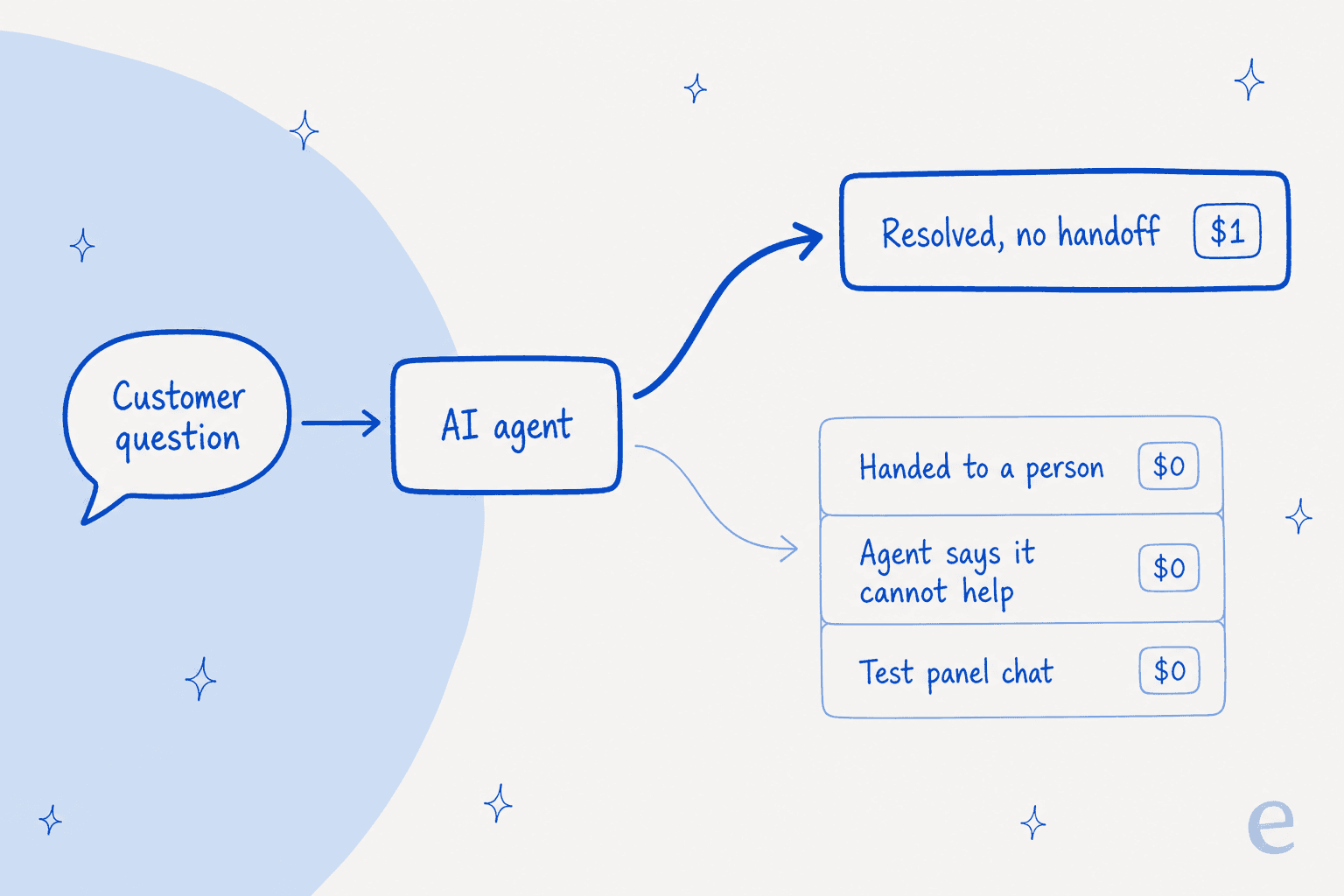
You can pay as you go on the monthly bill or buy resolution packs. On annual plans, packs carry volume discounts:
| Pack size | Discount | Net price per resolution |
|---|---|---|
| Under 12,000 | 0% | $1.00 |
| 12,000 to 49,999 | 5% | $0.95 |
| 50,000 to 199,999 | 10% | $0.90 |
| 200,000 or more | 15% | $0.85 |
Controls worth knowing: the default usage limit is 25,000 resolutions a month, the system limit is 250,000, and when you hit your limit the agent stops resolving and raises a work item on your default form instead. Testing in the agent's test panel or through evaluations is free, but a test in a live channel is charged when it succeeds. For how to think about this unit, see my posts on cost per resolution and AI resolution rate.
How much does Atlassian Customer Service Management cost?
Seats first. Atlassian's pricing page shows Standard at $21.50 and Premium at $55.28 per agent per month, but those are blended figures at the page's default of 75 agents, not what a small team pays.
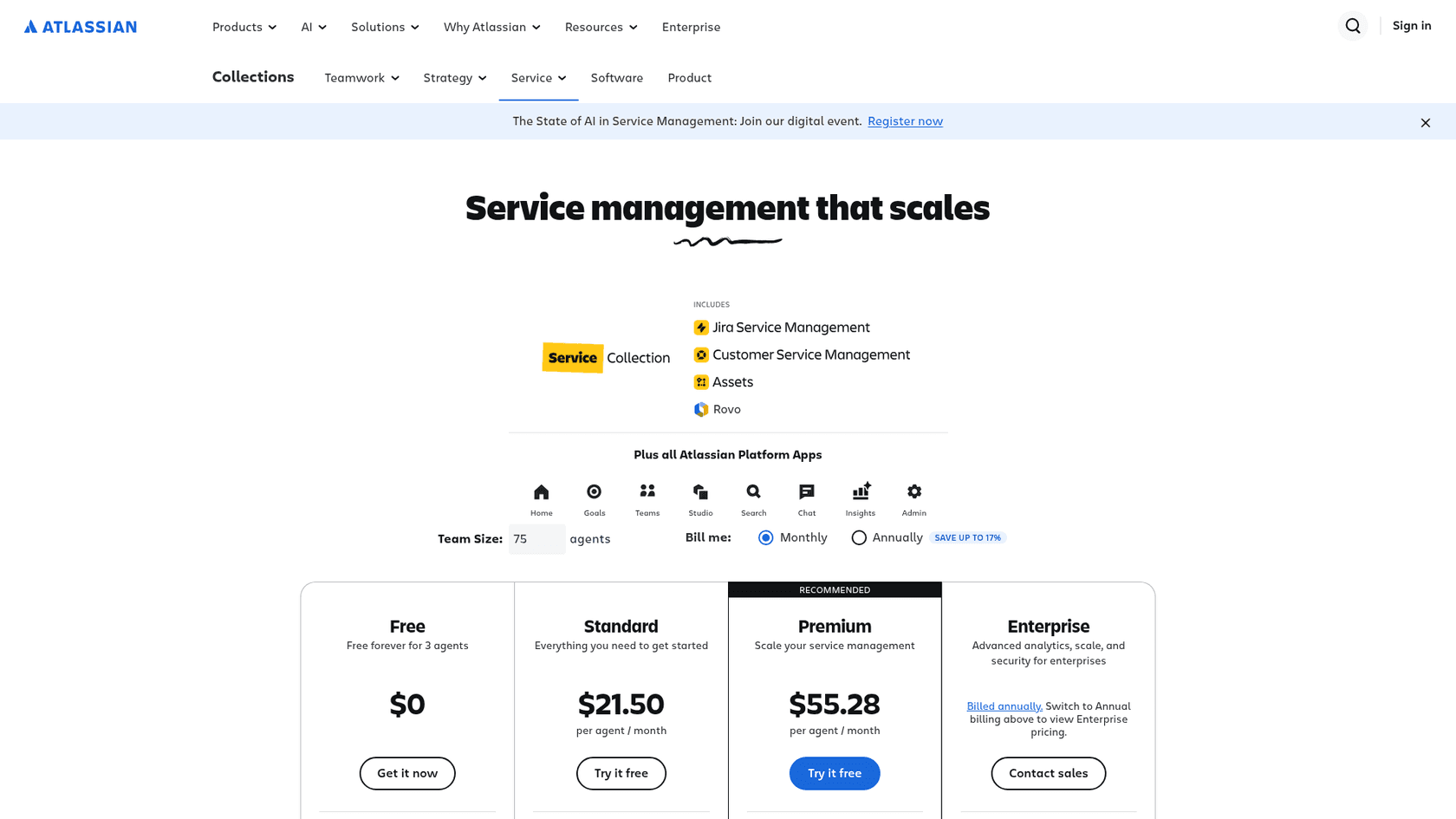
The list rates on the licensing page are progressive, so each seat is billed at the rate of its own band:
| Plan | Monthly, seats 1 to 15 | Monthly, seats 16 to 100 | Annual, 6 to 10 agents | Annual, 51 to 100 agents | AI agent |
|---|---|---|---|---|---|
| Free | $0 for 3 agents | n/a | n/a | n/a | Not available |
| Standard | $26.90 | $20.15 | $2,700 | $21,000 | $1 per resolution |
| Premium | $61.60 | $53.70 | $6,200 | $55,000 | $1 per resolution |
| Enterprise | Contact sales, annual only | $1 per resolution |
A worked example for a 10-agent team on monthly billing, assuming the AI agent resolves 1,000 conversations a month:
- Standard: 10 x $26.90 = $269 in seats, plus $1,000 in resolutions, so $1,269.
- Premium: 10 x $61.60 = $616 in seats, plus $1,000 in resolutions, so $1,616.
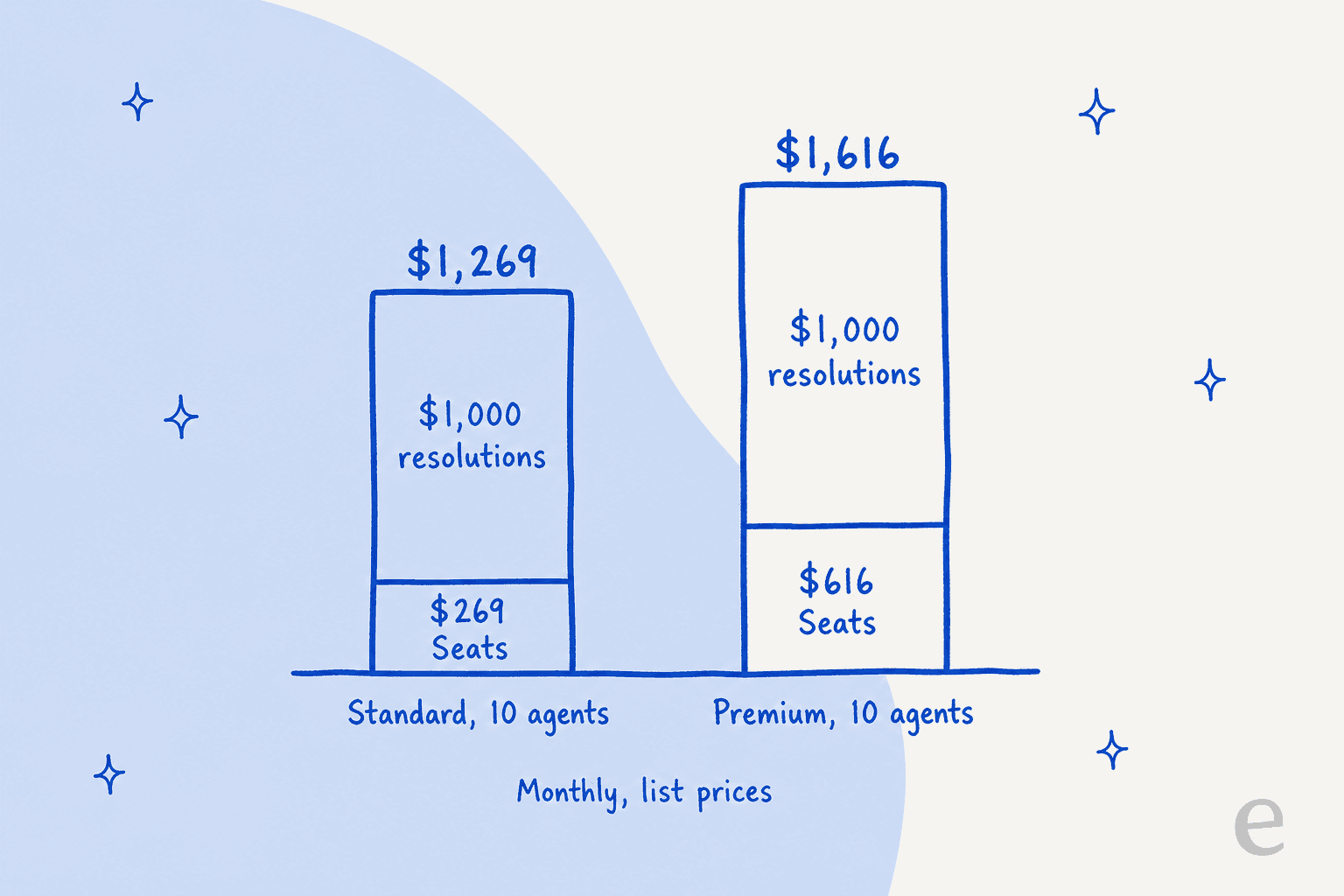
The takeaway I want you to leave with: once the AI agent is busy, the resolution line outweighs the seat line, so size the bill by your expected resolved conversations, not your headcount. Try your own numbers below. It uses the list rates above, up to 100 agents, and does not apply pack discounts.
One caveat on the numbers: Atlassian's pages disagree on plan coverage: the pricing page FAQ says Customer Service Management is included with Standard and Premium, while the plan table ticks it on all four plans. I would ask your Atlassian rep to confirm Enterprise and Free in writing. My Jira Service Management pricing guide tracks the seat bands, and the Rovo pricing explainer covers the credit side.
What results does Atlassian report?
Only vendor claims are on the product page, so read them as that. A customer quote there credits the Customer Service Management AI agent with cutting ticket resolution time from 8 days to 9 minutes and lifting CSAT by 6 points, attributed to Wayne Tombo of Teach for All. A second quote, from OVO's chief information officer, says it supports customers across 21 languages. The page also lists AI guardrails, fine-grained data permissions, spam protection and SOC 2 and ISO 27001 compliance as built-in trust controls.
I would treat "8 days to 9 minutes" as a best case: it does not say which conversations, or what share of volume. The question that matters for you is your own resolution rate, and the free evaluations are the way to find it before billing starts. For measuring satisfaction afterwards, see AI CSAT.
What are the limits to plan around?
From the sources above, these are the ones I would write on a whiteboard before signing:
- No allowance for resolutions. Billing starts at the first resolution on 3 December 2026.
- Read-only agent actions. The agent can look things up, not change them.
- Indexing delays. Third-party knowledge can take up to 24 hours to appear.
- Channel gating. WhatsApp, live chat and voice are Premium and Enterprise, and voice is in beta in four countries.
- Migration gaps. Automation rules, work items and Forge apps do not copy from a Jira Service Management space.
- Agent seats, not customers. Atlassian lists unlimited customers, and you pay per licensed agent.
For help choosing among other tools, my Jira Service Management AI alternatives and best alternatives lists are the next read, and Zendesk versus Jira Service Management and Freshdesk versus Jira Service Management compare the desks.
Where does eesel fit next to it?
They solve different parts of the problem. Customer Service Management is a helpdesk with a built-in agent, so adopting it means moving your external queue into a new Atlassian space. eesel is an AI helpdesk teammate that joins the queue you already run, learns from your past tickets and help content, and drafts replies for your people to review. eesel connects to Jira, and I have not confirmed it reads a Customer Service Management space, so treat that as a question for eesel's team.
Real teams use that pattern on technical queues. An industrial automation company runs eesel over its documentation, and an agent drafts an answer on every ticket, with a confidence level and its sources, before an engineer opens it. Weekly volume roughly doubled in its first months, and well over twice as many questions arrive in chat as reach the support desk. OroSoft uses eesel as a copilot on Freshdesk tickets: agents mention it, and it drafts from about 6,100 past tickets and 20 help files, citing which ticket or article it used. Neither lets the AI write to a customer on its own.
The pricing logic differs too. eesel's pricing page counts a ticket or a chat as 1 credit however long it runs, with 500 credits at $299 a month and 1,000 at $499. That is a fixed monthly bill for tickets worked. Atlassian charges $1 only for conversations the AI fully resolves. The units differ, so compare them against your own mix of easy and hard conversations. If you stay in Atlassian, the guides to Atlassian's AI agent, Jira Service Management AI, its agentic AI, the virtual agent and whether it is worth it go deeper. For routes in, see adding AI to JSM, JSM AI chatbots and the best AI tools for it.
Whichever route you pick, keep a person on sends and approvals, as in my approval workflows guide, and test on past tickets first. Service desk automation, AI for the service desk and SLA best practices round out the setup.
Try eesel on your Jira Service Management desk
If your support already runs through Jira Service Management, eesel is the quickest way to see what an AI teammate does with your own requests. It learns from your past requests and knowledge base, drafts on-brand replies, and updates request fields, and your agents stay in charge of what goes out. Connect Jira, review real drafts first, and decide after that.
Try eesel on a sample of your own tickets, and keep my Jira Service Management pricing guide open for what the desk itself costs.