


Yes, Jira Service Management can draft customer replies for agents. Open a request, choose Reply to customer or Add internal note, then pick Suggest reply, a contextual pill or Enhance reply. Rovo builds the draft from linked knowledge base articles first, then similar resolved requests, and the agent edits it before sending. It spends Rovo credits, and Atlassian names no plan gate. If you want a draft already waiting on every new request, eesel leaves one as an internal note.
Can Jira Service Management draft replies for agents?
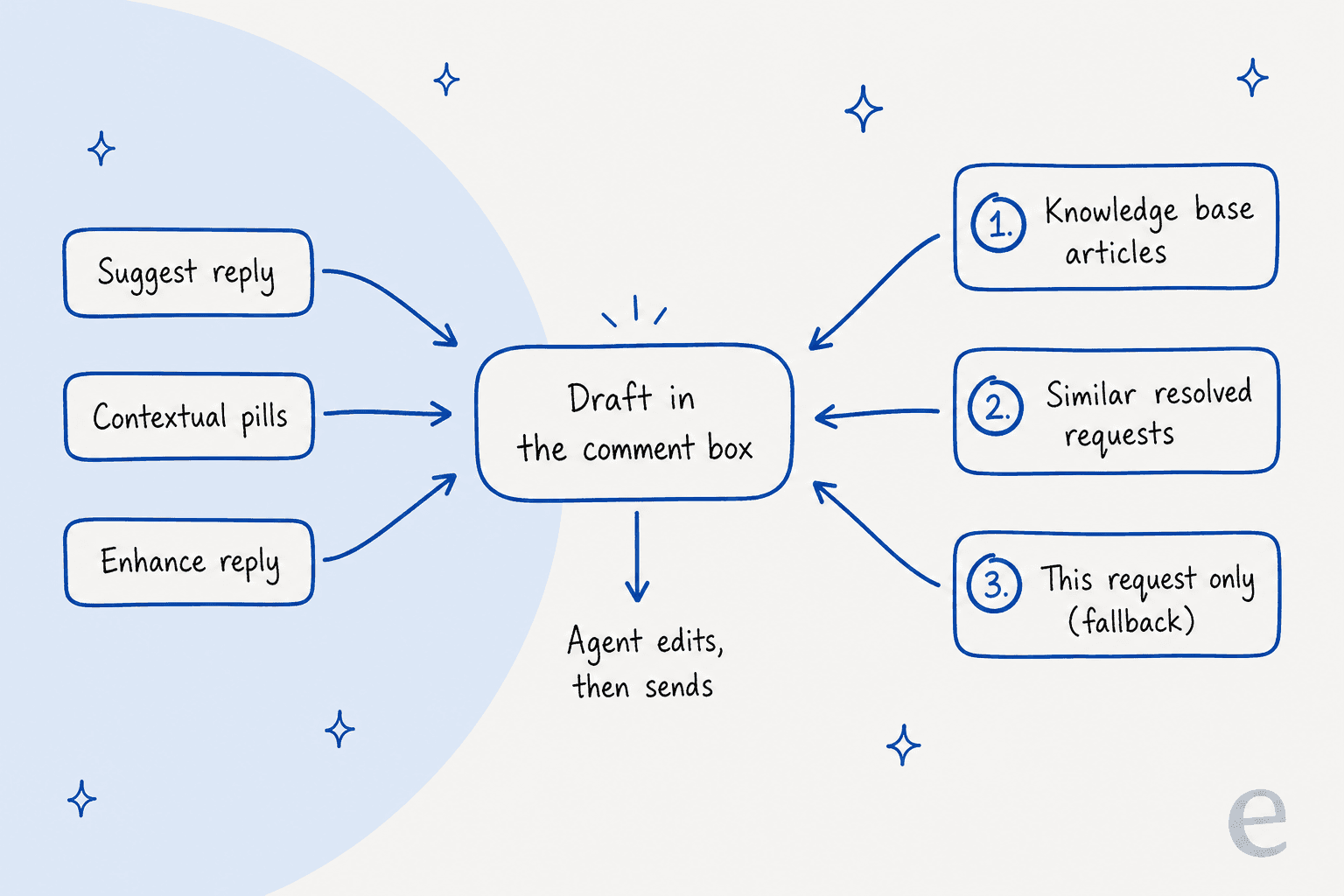
Yes, in three ways, all inside the comment box on a request. Atlassian's suggest replies page lists them, and I walked through each against the docs. Every one fills the editor with text, and your agent can insert, copy or edit it before anything reaches the customer.
| Way to draft | Where you find it | What it does |
|---|---|---|
| Suggest reply | Toolbar, after choosing Reply to customer or Add internal note | Writes a full reply from knowledge base articles and similar resolved requests |
| Contextual pills | Shown in the comment editor, such as "Follow up", "Request more info" or "Propose closure" | Writes a reply for that intent, picked from how long the customer has waited, an approaching SLA or a fresh reassignment |
| Enhance reply | Type a short instruction, then select Enhance reply | Expands "ask for error logs" or "reset password steps" into a complete reply |
An older support article also shows a /draftreply slash command and a /ai menu that offer Draft Reply. The current page doesn't repeat that, so I'd treat the toolbar as the documented path and the slash command as a bonus that may change.
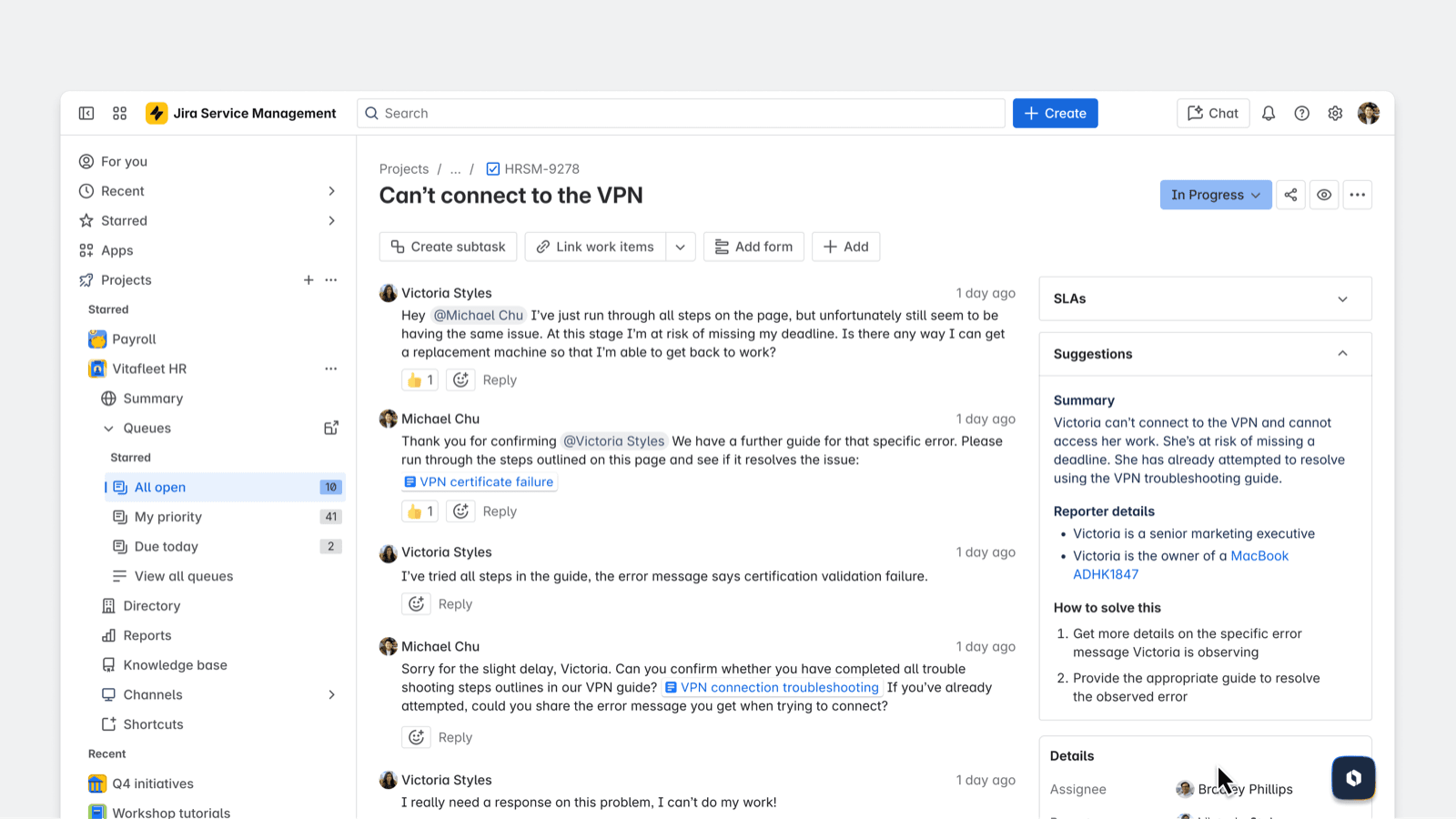
The Suggestions panel above is a neighbour, not the draft button: it summarises the request and lists how to solve it, in the same view as the comment box (Atlassian Community). If you've read my AI ticket triage breakdown, this panel is where triage and drafting meet, next to customer sentiment on the same request.
There are two Rovo agents that also draft. Both documents say the draft can be used as is or edited for content or tone:
- Service Request Helper has a Draft reply tool that drafts from other similar requests in a Jira Service Management space. You start it from Rovo Chat or from Chat with Service Request Helper inside the Suggestions panel.
- Request Router has a Generate reply section that analyses details and comments from past similar work items. Its main job is triage, so drafting is the side feature there.
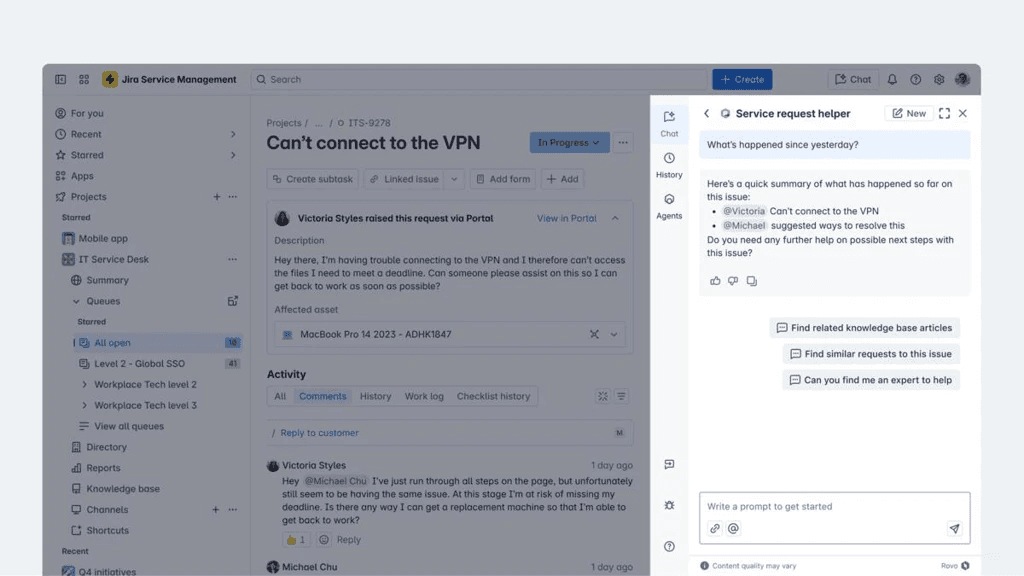
Service Request Helper's conversation starters include "Help me draft a reply to send to the customer", and Atlassian says it performs better when you give the work item key or URL. That is an agent in a side panel, so the draft appears in chat and you paste it across. Suggest reply is the in-editor route.
What does the draft learn from?
Rovo draws on two sources: knowledge base articles linked to your service space (including internal knowledge) and similar past resolved requests with relevant agent responses. It prioritises the knowledge base articles. If neither exists, it falls back on the current request and whatever you typed.
The detail I'd highlight is a one-word filter. In Atlassian's own troubleshooting article, drafts stopped appearing because the similar requests were still open, and only requests marked Resolved are used. The error read "Atlassian Intelligence has no suggestions at this time." The fix was to close those tickets with a resolution.
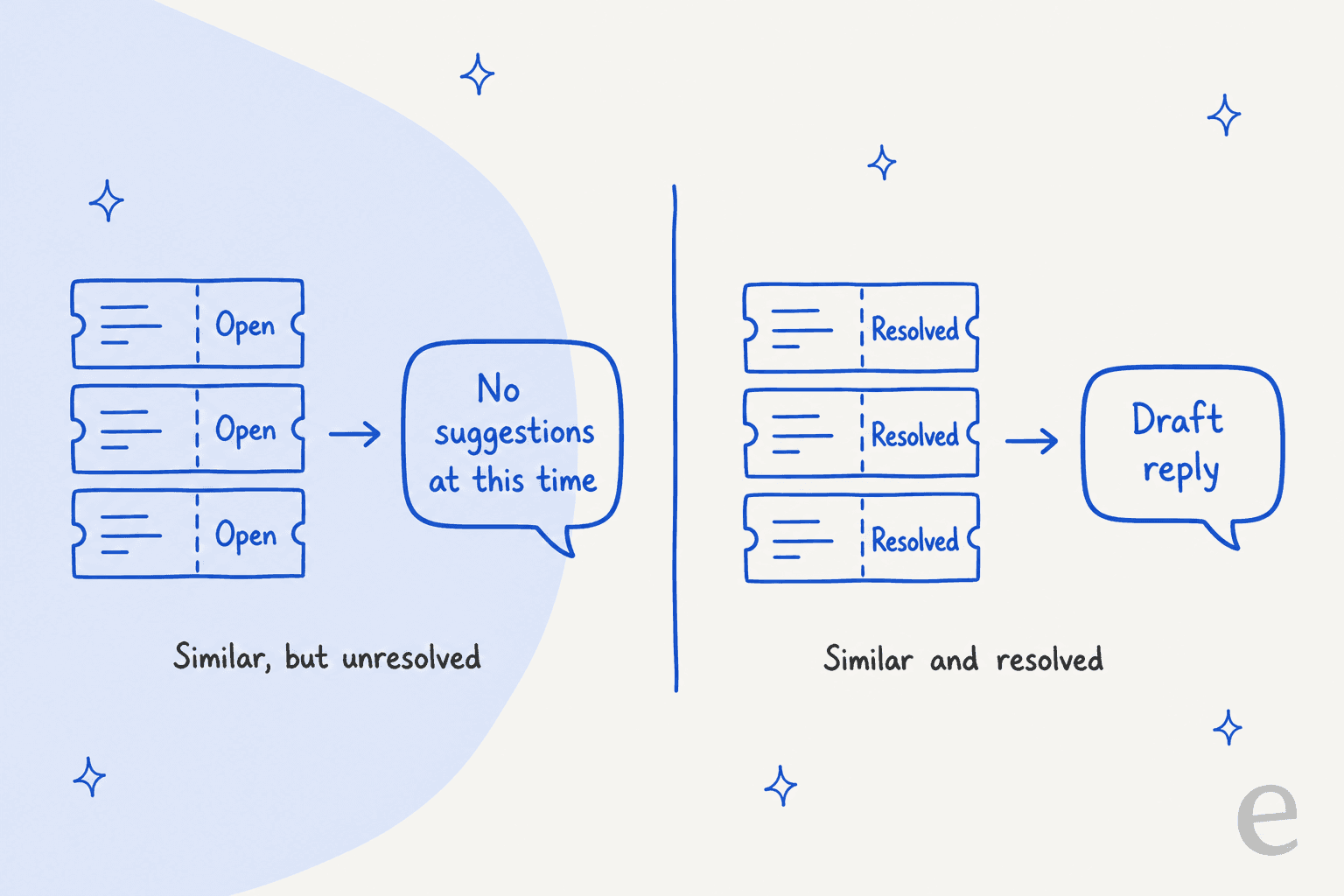
So what you feed it matters more than any setting. A team that closes tickets without a clear agent reply, or leaves its knowledge base unlinked, or skips knowledge base answers,, gets thin drafts or none. Two things I could not find documented on Atlassian's pages:
- Tone and brand voice. There is no setting that fixes a house style. The only tone control Atlassian lists is editing the draft. The AI features overview mentions "change tone, improve writing" for new content in work items, which is a separate action from drafting.
- Confluence as a direct source. The suggest-replies page names linked knowledge base articles, not Confluence pages. Service Request Helper is described as using Atlassian apps and connected third-party apps as knowledge, which is a different agent.
Atlassian also says Rovo may not draft if the request appears to break its Acceptable Use Policy, or if there aren't enough similar items or linked sources in the space. That second condition is the one you'll hit on a new service project.
Which plan includes JSM AI draft replies?
Atlassian doesn't tie Suggest reply to a plan on that page. What it does say, on the AI features page, is that Rovo is available and automatically enabled for all apps on Standard, Premium and Enterprise, and an organization admin can manage preferences under AI and Rovo, then Access. I'd read that as Standard and up, with the caveat that I'm inferring it, not quoting a plan table for this one feature.
Seat prices vary by page, so here are both numbers I found on Atlassian's own pages on November 21, 2026:
| Plan | Pricing page headline | Licensing page, first tier (1 to 15 agents, monthly) | Rovo credits per agent each month |
|---|---|---|---|
| Standard | $21.50 per agent | $26.90 | 250 |
| Premium | $55.28 per agent | $61.60 | 700 |
| Enterprise | Contact sales | Contact sales | 1,500 |
I couldn't reconcile the two sets of figures from the pages themselves, so budget with the licensing tier that matches your agent count. For the wider picture, see the Jira Service Management pricing guide.
How much do Jira Service Management AI draft replies cost?
Each draft spends Rovo credits. Atlassian calls draft reply a basic AI feature, and its credit rules price a basic event at 10 Rovo credits. Atlassian doesn't spell out whether one click on Suggest reply is exactly one event, so the table below is my arithmetic at 10 credits a draft.
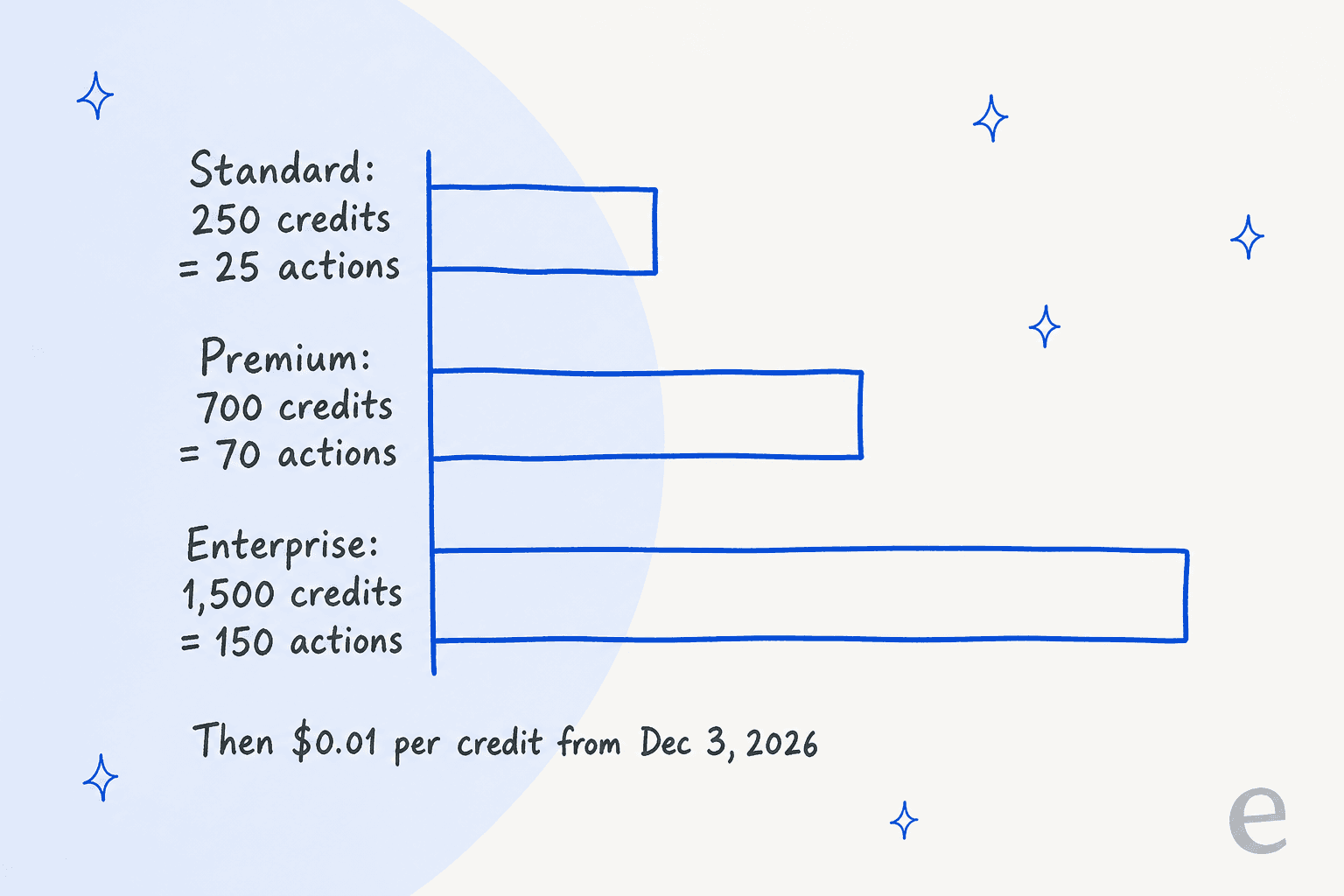
The credits are shared across the organization in one pool, they reset monthly and unused ones don't roll over. Starting December 3, 2026, pay-as-you-go billing takes effect at $0.01 per credit, which Atlassian says is on by default up to a spending cap an admin sets.
| Team | Included pool | Drafts the pool covers | If each agent drafts | Credits over the pool | Extra cost at $0.01 |
|---|---|---|---|---|---|
| 5 agents, Standard | 1,250 | 125 | 60 a month (300 drafts) | 1,750 | $17.50 |
| 10 agents, Premium | 7,000 | 700 | 150 a month (1,500 drafts) | 8,000 | $80.00 |
Both figures assume the pool is used only for drafts. It isn't: Rovo Chat, agents and Request Resolver draw on the same credits, so your real headroom is smaller. I wrote more on this in Atlassian Intelligence and Rovo pricing, and the separate virtual service agent meter (1,000 assisted conversations a month on Premium) is a different bill.
How do I turn on Suggest reply and avoid blank drafts?
There is no installer. If Rovo is enabled for your site, the buttons are already in the comment editor. What decides whether a draft is useful is the data behind it, so I would do these in order:
- Link a knowledge base to the service space, including internal articles, since Rovo reads those first. Your help center articles are the usual start.
- Resolve old requests with a resolution and a real agent reply, not a one-word close.
- Open a request in Queues, choose Reply to customer or Add internal note, then Suggest reply.
- Edit before sending. For Service Request Helper, Atlassian also asks you to review suggestions and use thumbs up or thumbs down to improve its accuracy.
- Watch credits in Atlassian Administration under Rovo credits, ahead of the December 3 switch.
If you build your own Rovo agent to draft into the ticket, mind the target. One Atlassian Community user reported an agent set to draft in the internal note field that posted as a normal comment instead:
"The agent works fine, but instead of the "internal note" field, the agent always uses the normal note field, and as such also replies to the customer."
The thread's accepted answer asked how the agent was posting, either through a Jira automation rule or a Jira action, so the cause isn't settled there. The lesson I'd take is to test with a private test request before enabling any agent that writes comments.
A second community thread, about the AI that auto-replies on customer requests, shows the limit of the one-shot reply:
"it only gives one reply and it's not conversational"
That user is asking about the self-service flow, not the agent draft, but it matters here. A draft is a starting point for a person. If you want two-way back and forth with customers, that is the virtual service agent or a separate AI agent, not Suggest reply.
Can an AI draft the reply before my agent opens the request?
Atlassian's tools wait for a click. An Atlassian Community write-up describes a "Draft First Response" button that runs a Rovo support agent and posts an internal draft comment for an engineer to check (Atlassian Community). That is a user-built pattern, not an Atlassian feature page, and it still starts from a manual trigger. Request Router can be used inside automation rules, but the documented use there is triage and field updates.
This is the gap eesel fills on JSM, and it is the first reply that benefits most. I build integrations at eesel, so I read these docs closely, and I'll keep the claims to what the eesel docs say.
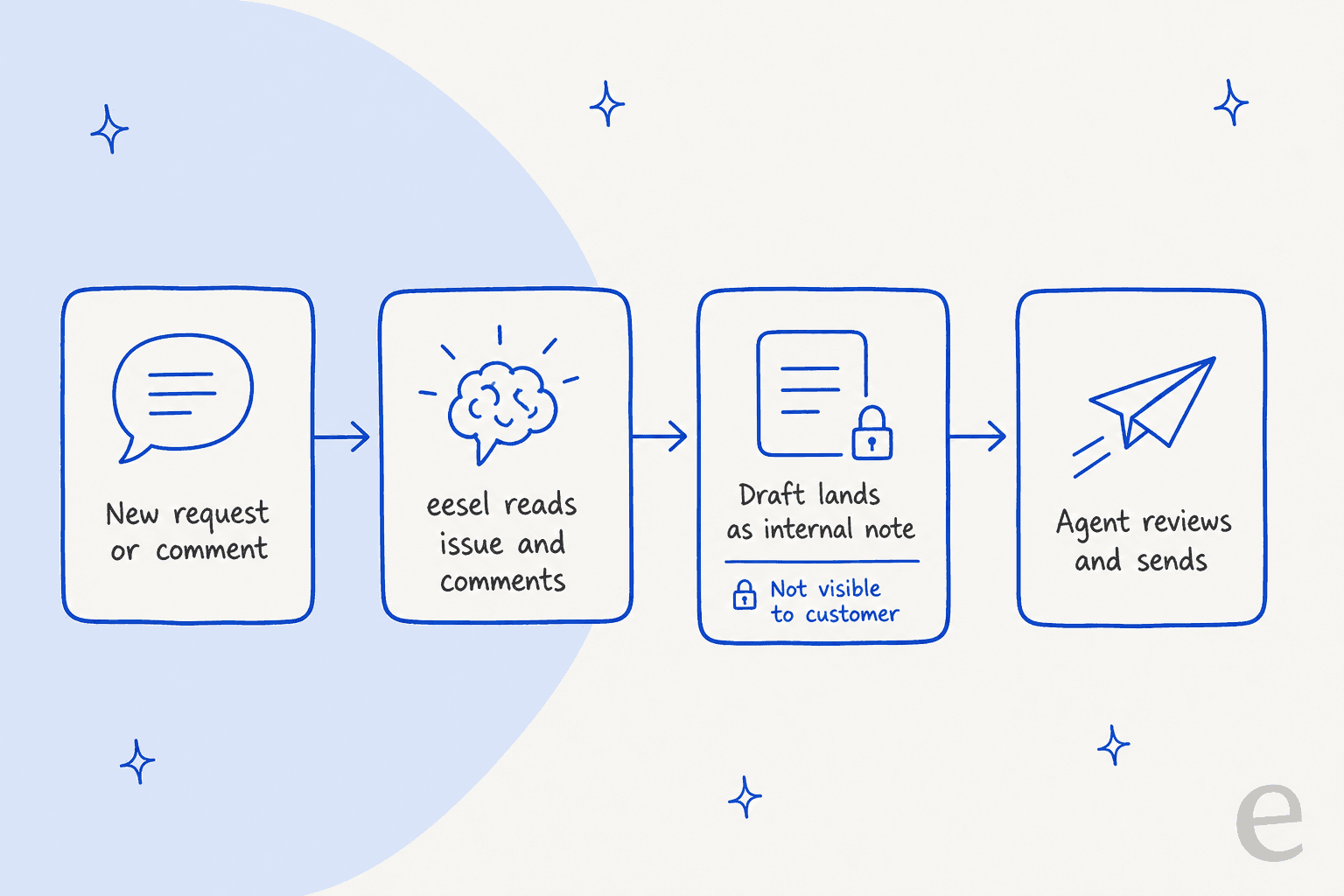
How it works per those docs:
- It starts on two events: a new issue in a Service Management project, and a new comment from anyone except eesel (internal notes included).
- It reads the whole request: every comment marked public or internal, with the reporter flagged as the customer. Attachment names are visible, but not the files.
- It looks things up live: it searches issues with JQL, reads SLA clocks and approvals, and answers from your connected knowledge sources such as Confluence, a help center or uploaded files.
- It writes in two ways: Leave Note on Issue posts an internal-only comment, which the docs say is where most teams start so the agent drafts and a human sends, and Reply to Issue posts a public one.
- You set the guardrails: each action can run on its own, ask for approval or stay off.
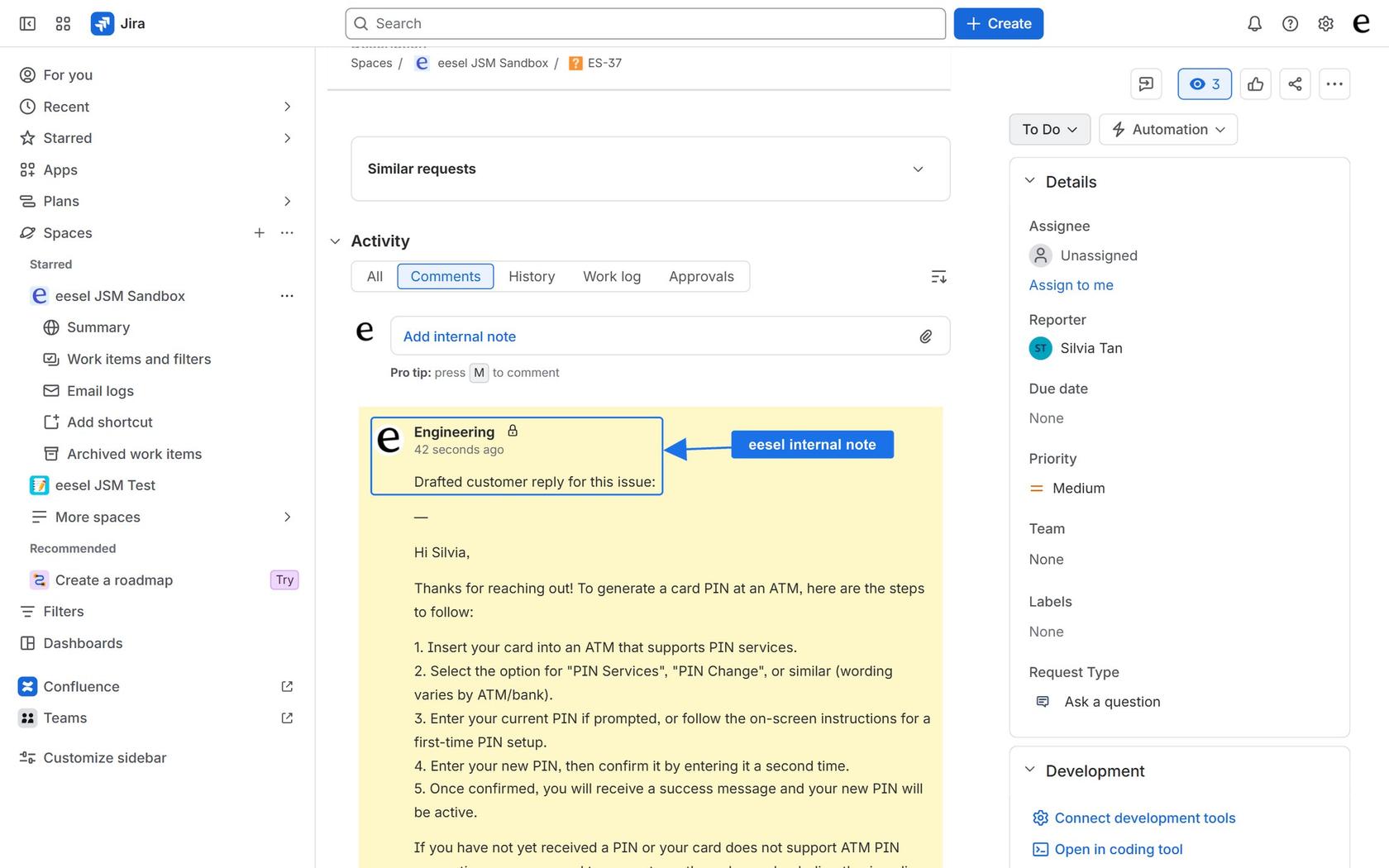
The limits matter as much as the features. Jira issues are not copied into eesel's knowledge, so it doesn't learn from your past tickets the way Rovo's draft does. It posts as the Atlassian account behind your API token. A project added later needs the trigger switched off and on. It doesn't answer the JSM Messenger widget. Setting the request type or an SLA isn't an action it has, so I wouldn't promise that.
Rovo Suggest reply and eesel, side by side
| Rovo Suggest reply | eesel | |
|---|---|---|
| Starts when | An agent clicks | A new request or comment arrives |
| Draft sources | Linked KB articles, similar resolved requests | Your connected sources, plus live JQL search of Jira |
| Learns from past resolved requests | Yes, documented | No, per eesel's docs |
| Where the draft lands | The agent's comment editor | An internal note, or a public reply if you allow it |
| Cost unit | About 10 Rovo credits per draft (basic event) | 1 credit per ticket or chat |
| Price | Credits included per agent, then $0.01 each | From $299 a month for 500 credits, no per-seat fee |
At 300 drafts a month, eesel at $299 costs more than the $17.50 of Rovo overage in my Standard row. You are paying for the draft showing up without a click and for replies written from knowledge outside Jira, not for a cheaper draft.
InDebted runs eesel as the first responder on an internal Jira Service Management desk backed by Confluence and Slack. Its head of IT said, "It essentially acts just like an agent would", and the case study reports 15% of incoming issues deflected. The mechanic is the same one other teams use on other helpdesks. Amagency on Gorgias had about 460 draft replies and about 900 internal notes across roughly 350 tickets in a month, and a person edits and sends each reply. BEAUTEK on Zendesk had about 180 drafts in a month and the team approved every one before it went out.
With the eesel CLI, an AI coding agent can run eesel integrations connect jira, add approved runbooks and ask test questions before launch. Pasting the Atlassian API token and switching an automation on still happen in the dashboard, and someone must approve that connection.
Which should I use for JSM draft replies?
My pick depends on the bottleneck. Here is how I'd decide:
- Agents are slow because writing takes time, and you have a tidy knowledge base and resolved history: start with Suggest reply. It is already in your tool and Atlassian documents what it reads.
- Customers wait because nobody has opened the ticket yet: you want a draft waiting on arrival. That is the eesel pattern, or a Rovo agent you build and test yourself.
- Customers should self-serve without an agent: look at the virtual service agent or Customer Service Management.
- You're on another assistant already: compare Claude for JSM, ChatGPT for JSM and the best AI for JSM.
The trade-off I'd flag: draft replies shift the work from typing to reviewing. A confident wrong draft that gets approved in a hurry is the risk, which is why I'd start with internal notes before any public reply. To test before launch, see AI support simulation testing and training AI on tickets.
If you want to compare how other helpdesks handle the same feature:
- Freshdesk AI draft replies
- Help Scout AI draft replies
- Dixa AI draft replies
- Gladly AI draft replies
For the wider view, read agent assist and AI response suggestions, plus my JSM AI review.
More on JSM itself:
Try eesel for Jira Service Management
If your Jira Service Management agents lose time on first replies, eesel can pick up each new request and leave a drafted reply as an internal note, built from your Confluence pages, help center or runbooks. You connect it with an Atlassian API token, pick a trigger and tell it how to write its notes; nothing is installed from the Atlassian Marketplace. It costs from $299 a month for 500 credits, with no per-seat fee and a free 7-day trial of 100 credits.
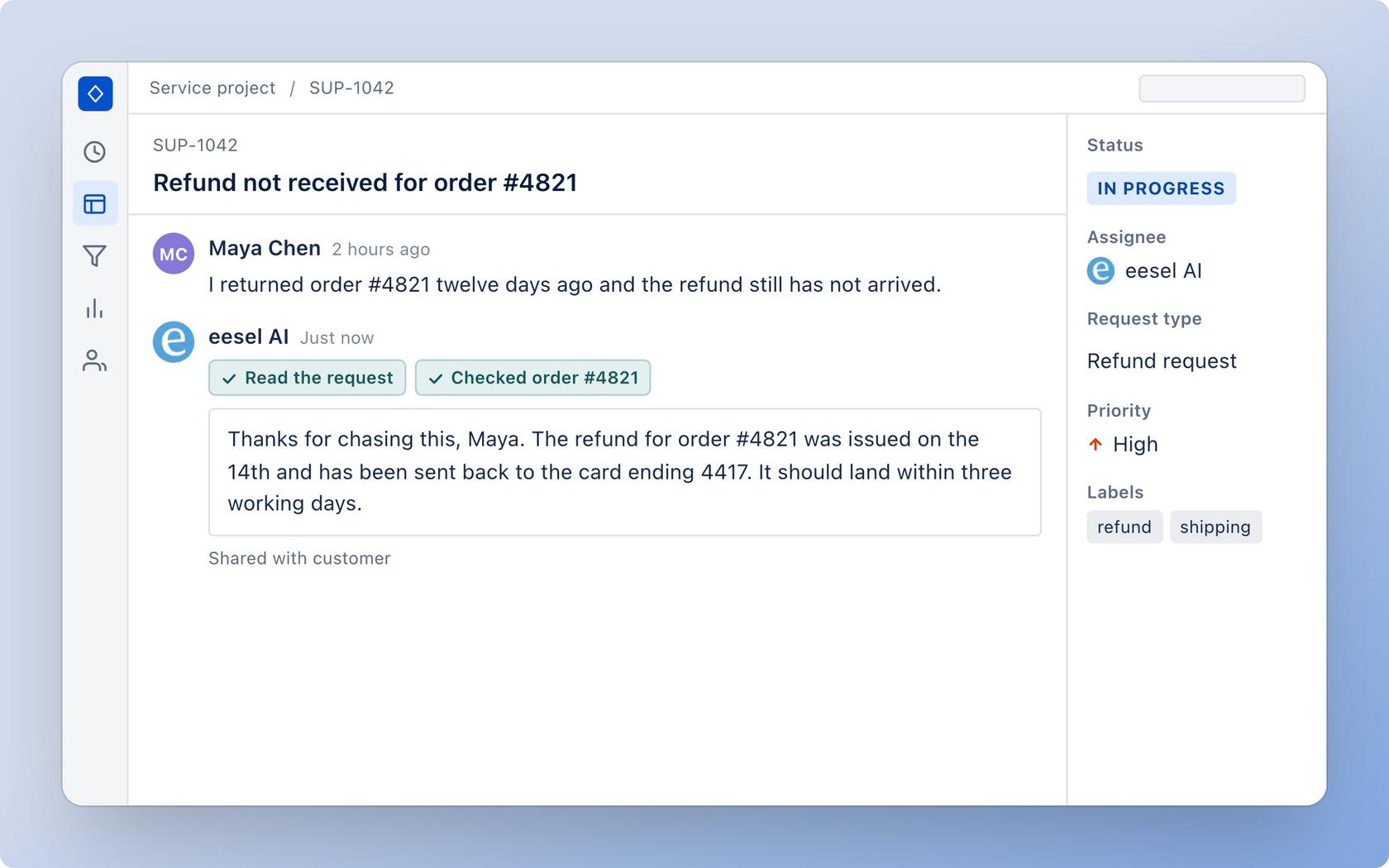
Try eesel for free, or read the integration page first.