
Disclosure: This article is published by eesel AI, a competitor of Atlassian. We encourage you to read Atlassian’s own materials for their perspective.
If you’ve ever started your day staring at a support queue filled with tickets vaguely labeled "Emailed request," you know the feeling. It's a wall of mysteries. You have no idea what's urgent, what's simple, or where to even begin. Cleaning up that mess by manually opening, reading, and recategorizing each ticket is a slow, draining process that eats into the time you could be using to actually solve problems.
Atlassian is taking a shot at fixing this with a feature baked into Jira Service Management called Atlassian Intelligence. It’s their attempt to bring a little order to the chaos.
In this guide, we’ll walk through everything you need to know about the "Atlassian Intelligence Triage Issues" feature. We'll look at what it does, how it works, and where it can genuinely help. But we'll also be honest about its limits and talk about what it takes to get the kind of hands-off automation that can really change how your team works.
What is Atlassian Intelligence Triage Issues?
Before we get into the nitty-gritty of triaging, let's take a quick step back to see the bigger picture.
A quick look at Atlassian Intelligence
Atlassian Intelligence is basically Atlassian's AI engine, which they've integrated across their cloud tools, from Jira to Confluence. It’s a mix of their own machine learning models and technology from OpenAI. The whole point is to help your team get things done faster by understanding the context of your work. Think of it as a built-in helper that can summarize a long comment chain, draft a JQL query from a plain English sentence, or help you generate new content.
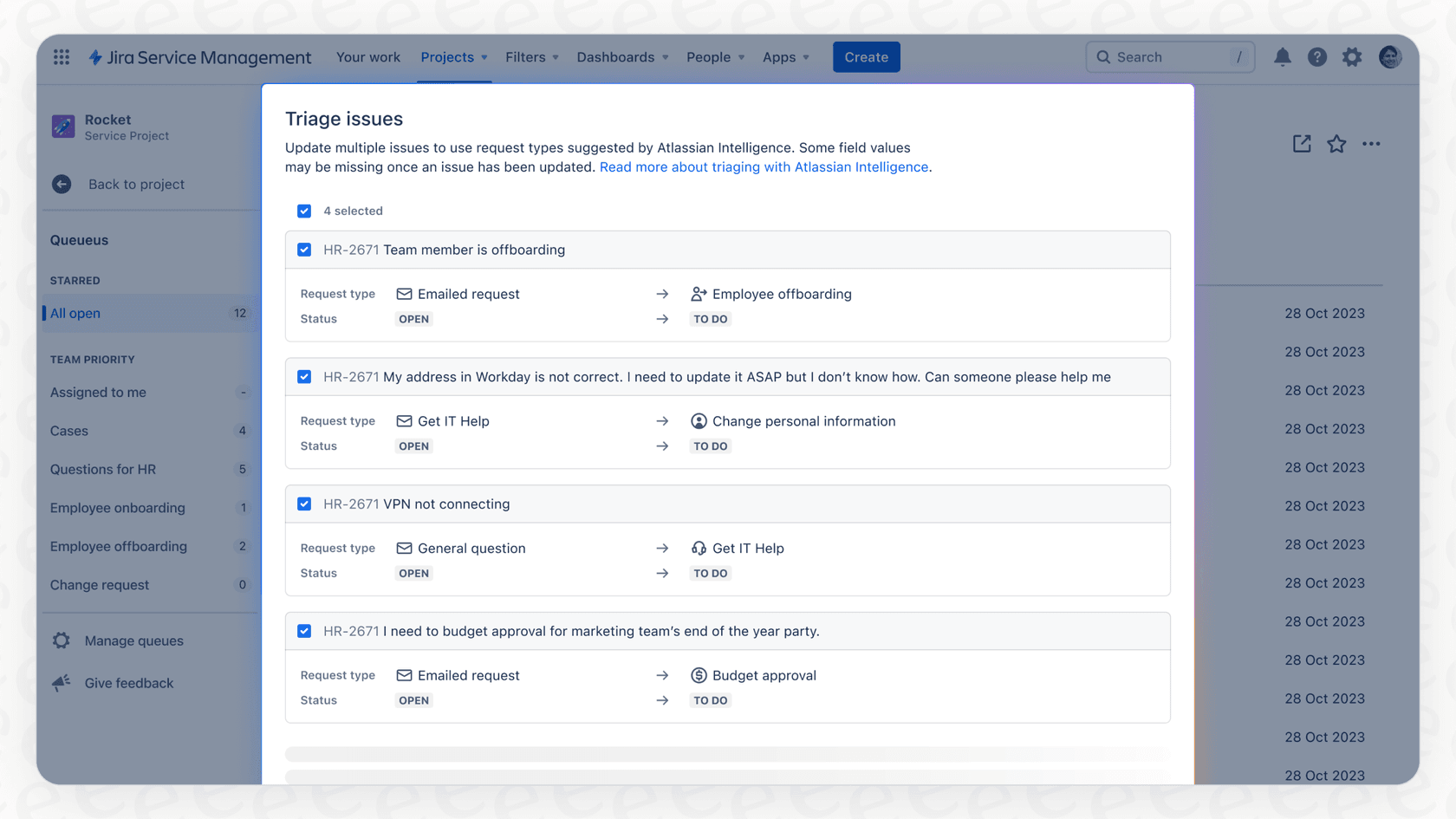
Defining the Atlassian Intelligence Triage Issues feature
The "Triage Issues" feature is a specific tool inside Jira Service Management (JSM) designed to help agents organize incoming tickets. At its heart, it’s a bulk action feature. You select a pile of messy, unclassified tickets, click a button, and the AI suggests a better request type for each one.
Its main purpose, as Atlassian frames it, is to deal with the constant stream of requests that land in your inbox. Instead of every email ticket getting slapped with the generic "Emailed request" label, this feature gives your agents a faster way to sort them in batches. It makes the queue much easier to manage.
Core features and capabilities of Atlassian Intelligence Triage Issues
While the feature is pretty simple on the surface, it has a few key abilities that are good to know. It’s less of a self-driving car and more like cruise control for your agents.
How Atlassian Intelligence Triage Issues suggests better request types in bulk
This is the main draw. An agent can hop into their JSM queue, highlight a bunch of tickets, and Atlassian Intelligence will read the content of each one to suggest a request type. For instance, it might see an email titled "Can't log in" and suggest changing the ticket from "Emailed request" to something more specific like "Account Access Issue." It’s definitely a step up from opening and editing every single ticket by hand.
How Atlassian Intelligence Triage Issues helps fill in fields
When you accept one of the AI’s suggestions, it doesn't just change the request type. It also fills in some fields that go with it. It scans the ticket's summary and description to populate things like "Affected Service" or "Urgency." It won't get it right every time, but it can save you a few clicks.
How Atlassian Intelligence Triage Issues provides hints on customer sentiment
This isn't technically part of the triage action itself, but the wider Atlassian Intelligence platform adds another useful piece of information: customer sentiment. It looks at the language in a ticket to guess if the customer sounds happy, frustrated, or just neutral. This helps agents quickly scan the queue and decide which tickets to tackle first. You’re probably going to triage the ticket with the little angry emoji next to it before the one with a neutral face.
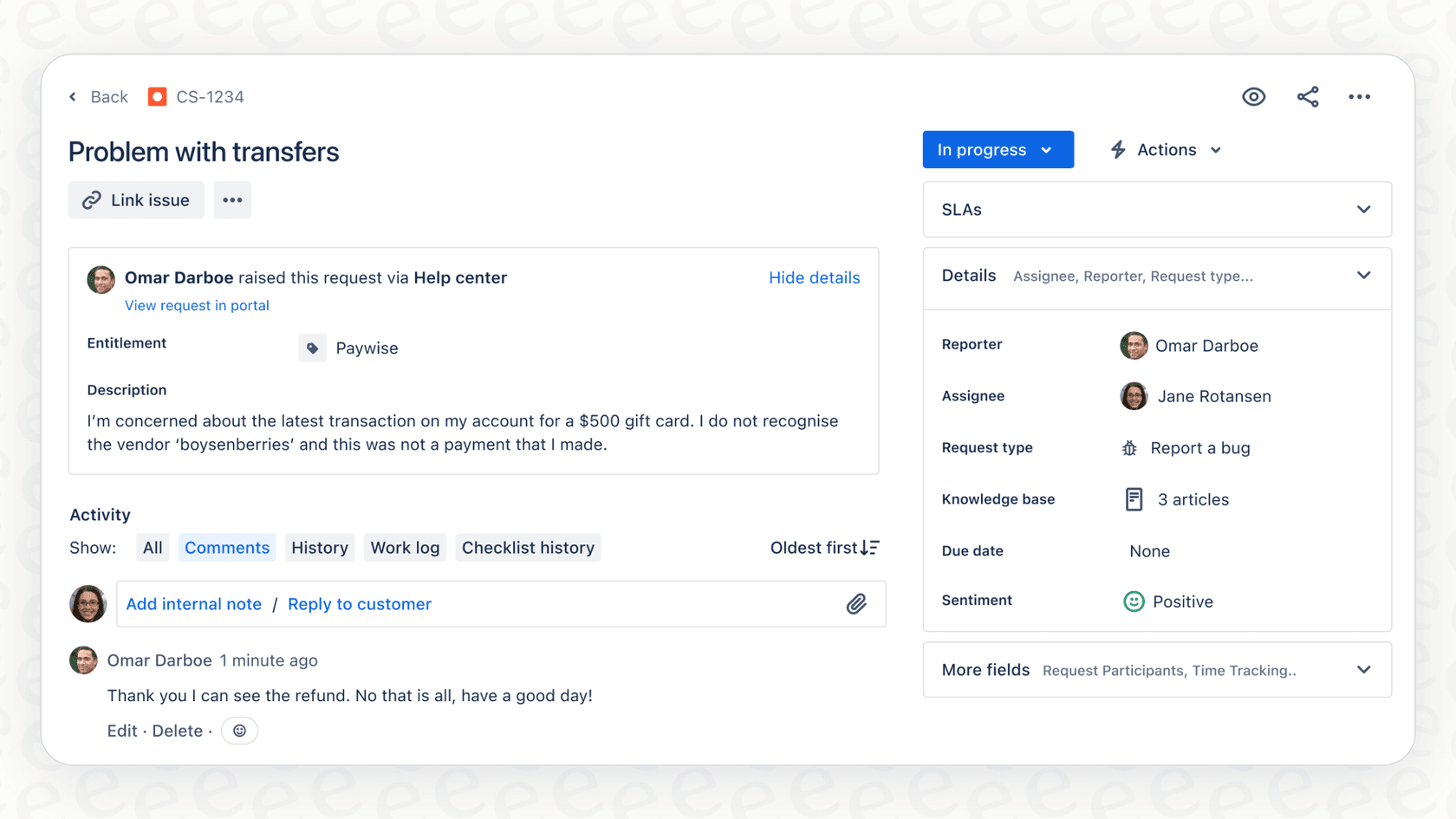
Native integration into the JSM queue
One of its biggest strengths is that you don't have to go anywhere to use it. It's not a plugin or an external app. The button is right there in the queue view where your agents spend most of their time, which makes it easy to add to their daily routine.
How to set up and use the Atlassian Intelligence Triage Issues feature
Getting started with the feature is pretty straightforward, but you'll need to make sure the right permissions are in place first. It’s not something every agent can use out of the box.
Prerequisites and permissions
Before you can start triaging, you need to have a few things lined up. According to Atlassian's own guides, here’s the checklist:
-
Atlassian Intelligence must be activated for your whole Atlassian site by an administrator.
-
The user needs a Jira Service Management product license.
-
The user must have a "Service Desk Team" or "Administrator" role in that specific JSM project.
-
The user needs the Bulk Changes permission ("Make Bulk changes" global permission).
That last one is often the sticking point. A lot of companies are cautious about giving out bulk editing permissions to prevent accidents, so you might need to have a chat with your Jira admin to get this turned on for your support team.
A step-by-step guide to using the feature
Once the permissions are good to go, using the feature is straightforward. Here’s the process:
-
From your JSM project, head over to Queues.
-
Tick the checkboxes next to the issues you want to sort through. This is perfect for grabbing all those "Emailed request" tickets at once.
-
Click the Triage button that shows up at the top of the queue.
-
A new window will appear with the AI's suggestions for each ticket. You can look them over and, if you think the AI is off base, just use the dropdown to pick a better request type yourself.
-
Select the tickets you want to update and hit Apply. The tickets will then be updated with the new request types and any fields the AI managed to fill in.
graph TD A[Step 1: Go to Queues in JSM Project] --> B{Step 2: Select multiple issues}; B --> C[Step 3: Click the 'Triage' button]; C --> D{Step 4: Review AI suggestions in new window}; D --> E[Step 5: Select tickets and click 'Apply']; E --> F[Result: Tickets are updated with new request types];
Limitations of Atlassian Intelligence Triage Issues
Atlassian's tool is a nice improvement over sorting everything by hand, but it's important to be realistic about what it can't do. If your goal is real, hands-off automation, you're going to hit a wall pretty quickly.
A manual process, not autonomous triage
This is the biggest limitation by far. The feature doesn't sit there watching your queue and sorting tickets as they come in. An agent has to be logged in to manually select a batch of tickets and hit the "Triage" button. It’s agent-assisted, not autonomous. If your team gets slammed or tickets pile up overnight, they’ll just sit there uncategorized until someone gets around to running the process.
Limited to changing the request type
The feature really only does one thing: change the request type. It can't set priority because it saw the word "urgent" or "outage." It can't assign the ticket to the right person based on what the customer wrote. And it can't add specific tags you might need for reporting. To do any of that, you're back to building a complicated web of automation rules inside Jira, which can be a real pain to manage.
The alternative: An autonomous AI triage engine
This is where a dedicated AI platform can make a huge difference. Instead of just giving your agents a button to click, these tools act as an intelligent front door to your helpdesk, handling the entire triage process automatically.
A platform like eesel AI connects directly with Jira Service Management to provide the kind of true automation that built-in tools just can't offer. The eesel AI Triage product is designed to solve these exact problems. Here’s what makes it different:
-
It's fully autonomous. eesel AI works on every single ticket the second it arrives, 24/7. No manual work needed. It analyzes, categorizes, and routes tickets before an agent even has to look at them.
-
You can build custom workflows. You can do much more than just change the request type. With eesel AI's simple workflow builder, you can create rules to automatically set the priority, assign tickets to specific agents, add the right tags, and even connect to other tools through API calls, like pulling customer details from your CRM.
-
You can test it without risk. Before you let the AI manage any live tickets, you can run it in a simulation mode on thousands of your past tickets. This shows you exactly how it will perform, how many tickets it will handle correctly, and what your return on investment will look like. It lets you fine-tune your setup and deploy with confidence, which is something you just can't do with the native tools.

Atlassian Intelligence Triage Issues pricing
Atlassian doesn't sell Atlassian Intelligence as a separate product. Instead, its features, including AI triage, are included in the paid plans for Jira Service Management Cloud. To get access, you need to be on a Standard plan or higher.
Here’s a quick look at the plans that include it:
| Plan | Starting Price (per agent/month) | Key AI & Automation Features |
|---|---|---|
| Free | $0 (Up to 3 agents) | No Atlassian Intelligence features. |
| Standard | ~$22.05 | Atlassian Intelligence is included. |
| Premium | ~$49.35 | Everything in Standard. |
| Enterprise | Custom Pricing | Everything in Premium. |
This per-agent pricing is easy to understand, but it also means your costs go up every time you add someone to your team. The more agents you have, the more you pay for the feature.
This is a pretty big difference from platforms like eesel AI, which base their pricing on the volume of AI interactions. That kind of model can be much more predictable and cost-effective, especially if your goal is to use automation to handle a higher volume of tickets without hiring more people. You pay for the work the AI actually does, not for how many people are on your team.
Streamlining triage beyond simple suggestions
So, to wrap things up, the Atlassian Intelligence Triage Issues feature is a solid addition to Jira Service Management. It gives agents a useful tool to help them wrangle their queues and cut down on some of the manual sorting. If your team is just starting to explore what AI can do, it's a perfectly good place to start.
But its limits become pretty obvious as your needs get more complex. At the end of the day, it's a manual tool, not a true automation system, and it doesn't have the power to handle sophisticated, custom triage workflows. It helps your agents move a little faster, but it doesn't fundamentally reduce their workload.
For teams ready to go from manual assistance to full, hands-off automation, the next step is looking at a specialized AI platform. If you want an AI that works for you around the clock to route, tag, and manage your ticket flow, it's worth seeing what a dedicated solution can do.
See how eesel AI Triage can handle your entire ticket workflow automatically, from routing and tagging to custom actions, and you can get started in just a few minutes.
Frequently asked questions
What exactly is Atlassian Intelligence Triage Issues designed to do?
Atlassian Intelligence Triage Issues is a bulk action feature within Jira Service Management that helps agents re-categorize unclassified incoming tickets. It suggests more accurate request types for tickets that might initially be labeled generically, bringing order to support queues.
How does the Atlassian Intelligence Triage Issues feature actually suggest new request types?
The feature leverages Atlassian's AI engine to analyze ticket content, specifically their summary and description. Based on this analysis, it proposes a more fitting request type, streamlining the process of sorting tickets for agents.
What are the main prerequisites needed to enable Atlassian Intelligence Triage Issues for my team?
To use Atlassian Intelligence Triage Issues, your site administrator must activate Atlassian Intelligence, and the user needs a Jira Service Management license, a "Service Desk Team" or "Administrator" role in the project, and the "Make Bulk changes" global permission. The global permission is often a key requirement to secure.
Can Atlassian Intelligence Triage Issues fully automate my entire ticket routing process?
No, Atlassian Intelligence Triage Issues is an agent-assisted tool, not a fully autonomous system. An agent must manually select batches of tickets and initiate the triage process; it does not automatically process incoming tickets 24/7 or allow for complex, custom workflow automation beyond changing request types.
What are the pricing details for using Atlassian Intelligence Triage Issues?
Atlassian Intelligence Triage Issues is not sold as a standalone product. Its features are included in the JSM Cloud plans, starting from the Standard tier and extending to Premium and Enterprise plans. Pricing is typically based on a per-agent, per-month model.