WooCommerce customer order notes: who sees what, and what gets emailed

Riellvriany Indriawan

Katelin Teen
Last edited November 5, 2026

WooCommerce customer order notes are two different things: the note a customer types at checkout, and the "Public note to customer" your team sends from the order screen. Only the second is a message. It emails the customer the moment you click, deleting it doesn't unsend it, and their reply lands in your inbox with no link back to the order. Use private notes for anything internal. eesel reads those notes before it answers and adds private ones for your team with your approval. With the eesel CLI, a coding agent can upload your note rules and test answers before go-live.
What are WooCommerce customer order notes?
They are any note a customer can see on an order, and WooCommerce has two of them that share almost the same name. I work eesel's support queue, and the order notes panel is where most WooCommerce handoffs happen, so for this guide I read WooCommerce's order documentation and the 11.2.2 source code. Everything below was checked on 2026-11-06, when 11.2.2 was the stable release.
Here is how the pieces fit together:
- The checkout note. The customer types it in the Order notes field when they buy. WooCommerce saves it on the order itself, not in the notes panel, and shows it to your team as Customer provided note.
- Private notes. Your team writes these in the Order notes panel. The customer never sees them.
- System notes. WooCommerce and your plugins write these for events like status changes, payment results and stock changes. Also hidden from the customer.
- Public notes to the customer. Your team writes these in the same panel, picks Public note to customer, and WooCommerce emails them.
WooCommerce's docs describe the panel as using three types of order notes: system, private and customer. The checkout note is the fourth thing people mean when they search for "customer order notes", and it behaves differently from all three.
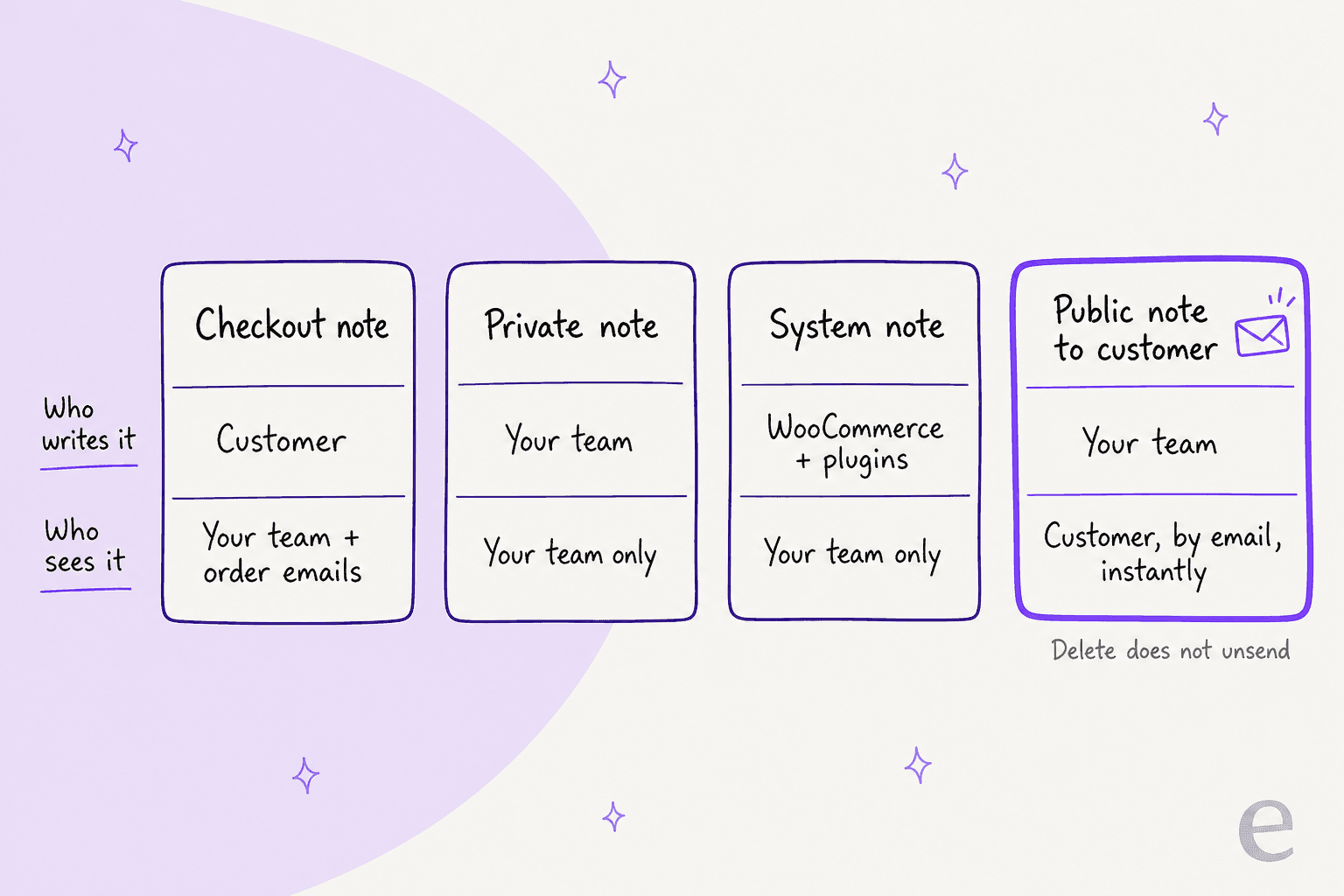
The mix-up matters because the two "customer" notes travel in opposite directions, and most ecommerce support mistakes I see on WooCommerce start here. One is the customer talking to you. The other is you talking to the customer, by email, with no undo. If you only remember one thing from this guide, make it that.
Where does the customer's checkout note show up?
On the edit order screen, under the shipping details, labelled Customer provided note, and in your order emails as a Note row. It does not appear in the Order notes panel on the right, which is the first place most people look.
On the classic checkout, the field is a text box labelled Order notes with the placeholder "Notes about your order, e.g. special notes for delivery." The checkout code only adds it while the order comments option is on, which it is by default, and saves whatever the customer typed with set_customer_note(). The block checkout shows a checkbox, Add a note to your order, that opens the same kind of box. Its placeholder drops the delivery hint when nothing in the cart ships.
Three things about this note catch support teams out:
- It's editable. The order data box has a Customer provided note text area. Anyone with order access can change what the customer said, and nothing logs the edit. If the note becomes a dispute ("I told you to leave it with the neighbour"), screenshot it before anyone touches it.
- It shows in emails, not on packing slips by default. The order details email template prints it, so the customer and your new order email both carry it. WooCommerce core doesn't print packing slips at all, so whether your warehouse sees "please don't ring the bell" depends on the slip plugin you use, or on whatever order management tool pulls the order. Check it once with a test order.
- It can vanish from checkout. If someone turned off order notes, or removed the order note block from the checkout page, customers stop being able to leave one. Delivery instructions then arrive as separate emails, which is how a contact rate creeps up without anyone noticing why.
The packing-slip gap is an old one, and it still costs time on stores that pick by hand:
"In some cases these customer notes are needed for picking the parts. So currently we have to pull up each order and hand write them on the packing list."

Express wallets are a newer wrinkle. Store owners on r/woocommerce report that Apple Pay and Google Pay buttons can skip the extra checkout fields, notes included, so test a wallet order too:
"unfortunately if the user pays by Apple/Google Pay then these fields go unsaved."
When a customer asks "did you get my delivery instructions?", the answer is on the order screen, not in the panel. It's the same rule as order status questions: read the order before you reply. That's also where I'd point any agent, human or AI, that's answering order questions.
What happens when you send a note to the customer?
WooCommerce emails it straight away, adds it to the customer's order page, and logs that the email went out. That's the whole flow, and none of it can be reversed from the order screen.
Here is the sequence, step by step, from WooCommerce's docs and the order code:
- You type in Add note, set Visibility to Public note to customer, and the button changes to Send note to customer →.
- WooCommerce saves the note with an
is_customer_noteflag and fires the customer note action. - The Customer note email goes to the order's billing email. With the newer email designs on, the subject is "A note has been added to your order from {site_title}". The body quotes your note and repeats the order details underneath.
- The note shows on the order with a Sent to customer label, and a system note records that the email was sent.
- The note appears under Order updates on the customer's My Account order page and on the order tracking page a guest can reach with their order number and email (more in my guest order tracking guide).
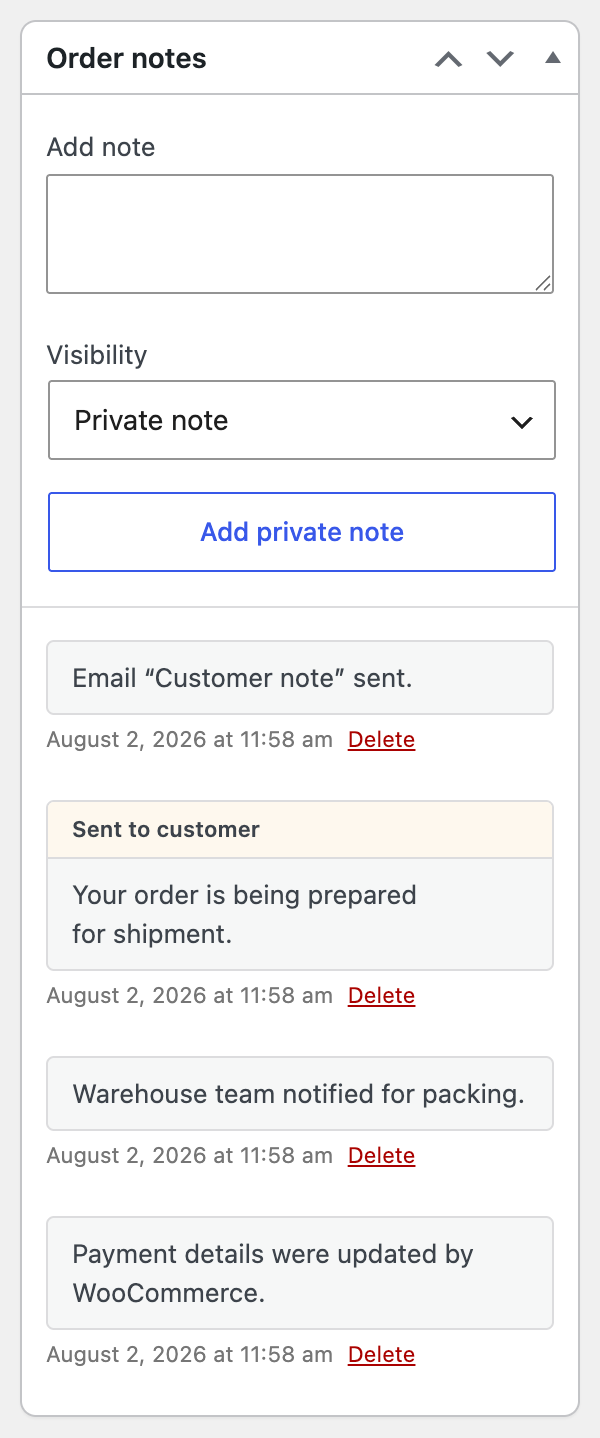
Two parts of that flow are where support goes wrong.
Deleting doesn't unsend. WooCommerce's docs put it plainly: "Deleting a customer note does not recall the email." Delete removes the note from the order and from the customer's order page, but the email is already in their inbox. If a private note went out as public by mistake ("customer is being difficult, refund only if they push"), the fix is an honest follow-up, not a quiet delete.
Replies don't come back to the order. The email class sets the Reply-to header to your custom reply-to address if you set one, or your store's "from" address if not. So when the customer replies "thanks, but can you send it to my work address instead?", that reply lands in your support inbox as a fresh email. WooCommerce doesn't attach it to the order, and there's no conversation thread on the order screen.
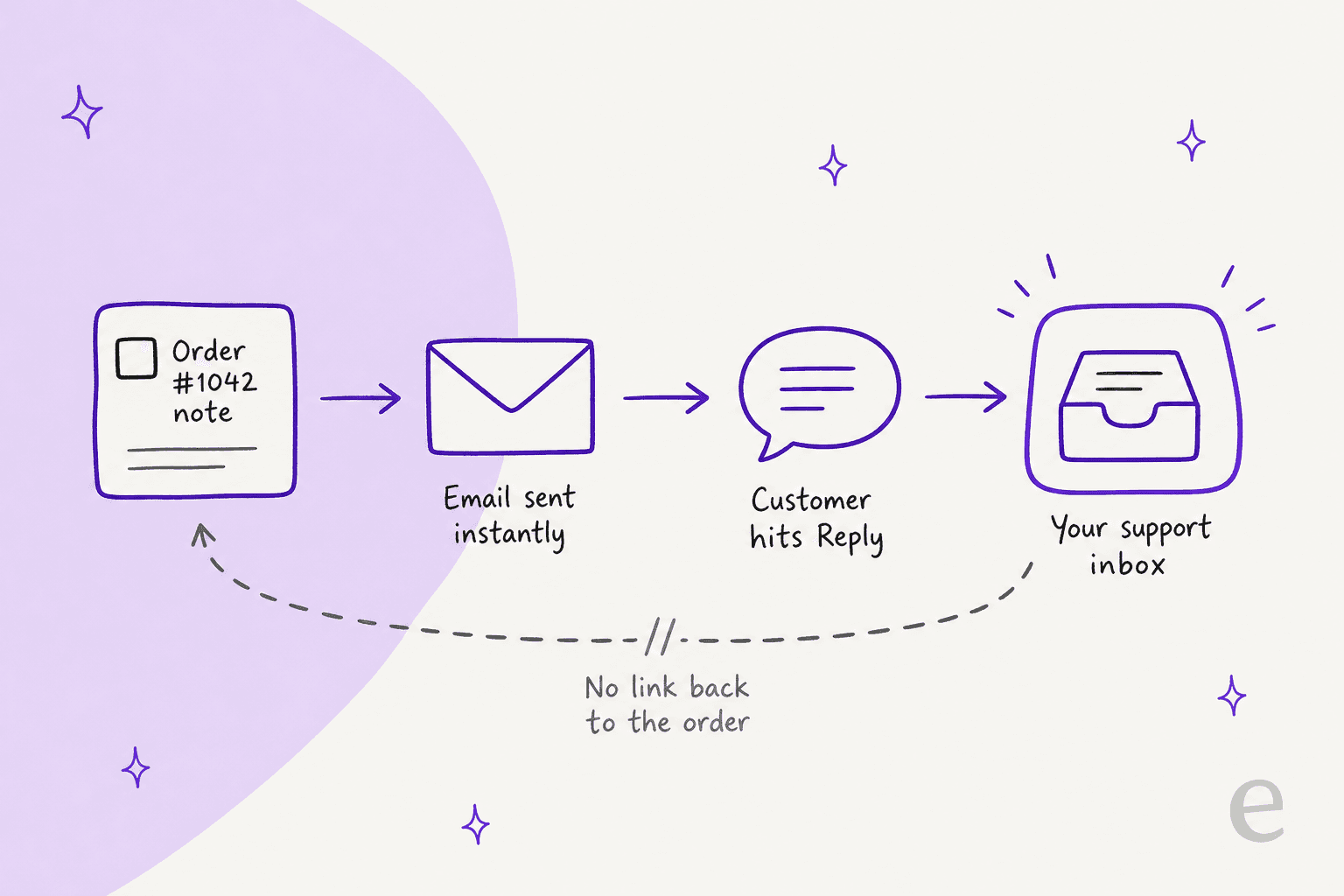
That second point is why a public note works best as a one-way update: a tracking number, a "your replacement shipped today", a confirmation that a change went through. For anything that needs a back-and-forth, start in your helpdesk, and put a private note on the order saying where the conversation lives.
Stores selling personalised products hit this first, because every order needs a conversation:
"we're trying to implement a system where customers can order the main product - and then we follow-up with them directly to finalise the final design - usually with a little back and forth discussion."
One more setting to know. The Customer note email can be switched off under WooCommerce > Settings > Emails. The note still lands on the customer's order page with the email off, but nothing tells them to go and look.
That's the usual answer when a note "does nothing":
"Additionally, in the "Order Notes" section, when I add a note to the customer, it does nothing."
The first reply in that thread asked whether Enable this email notification was ticked on the Customer note email. Check that before you debug anything else.
Private notes vs system notes: what does your team actually read?
Private notes are the ones a person wrote, and system notes are the ones WooCommerce or a plugin wrote. Both stay hidden from the customer, and both sit in the same panel, newest first.
The notes view separates them in a small way: a note from a person ends with "by" and their display name, and a system note has no author. WooCommerce's docs add that system notes get a muted grey background. Behind the scenes, the order code only credits a person when they are logged in, can edit orders, and the note was flagged as added by a user. Everything else is credited to "WooCommerce".
That rule has a side effect for anything that writes notes through the API. The REST API's order notes endpoint takes customer_note and added_by_user, and both default to false. So a note from a script, a plugin or an AI tool shows up looking like a system note unless it says who wrote it. I'd ask every integration that writes notes, from an n8n workflow to an AI agent, to start them with its own name.
Zendesk teams will recognise the pattern from internal notes added by triggers. A few behaviours worth knowing before you build a process on the panel:
-
Notes can't be edited. The panel offers Delete and nothing else. Fix a wrong note by adding a correction, so the history stays readable.
-
Order is newest first. On a busy order, a payment gateway's debug notes and status changes push a person's note down quickly. Short, specific notes survive this better than long ones.
-
Plugins write notes too, sometimes wrongly. One store owner found a licence plugin adding a "no license codes available" note to orders for physical products. If a system note confuses your team, trace which plugin wrote it before you trust it.
-
System notes are your audit trail. "Order status changed from Processing to Completed" tells you who, or what, moved the order and when. That's the first thing I check when a customer says "you marked it delivered but it never came", before I open any order tracking tool.
Which kind of note should you use?
Use a private note for anything about the customer, a public note for anything to the customer, and leave the checkout note alone. Here is the version I'd pin above a new teammate's desk.
| Situation | Use | Why |
|---|---|---|
| Courier said the parcel is held at the depot | Private note | Context for the next person, not the customer's words |
| Replacement shipped, here's the tracking number | Public note to customer | One-way update, emailed and kept on their order page |
| Customer wants to change the delivery address | Helpdesk reply, then a private note | Needs a back-and-forth, which a public note can't hold |
| Refund approved, waiting on the gateway | Private note, then a public note once it's done | Don't promise money before it moves (see manual refunds) |
| Customer's delivery instructions were wrong | Ask them, then a private note | Editing the checkout note rewrites their words with no trace |
| Anything about tone, fraud or a dispute | Private note, written as if it might be read | Anyone with order access, and any tool you connect, can read it |
The last row is the one people learn the hard way. If you wouldn't be happy reading a note aloud to the customer, don't write it on the order, private or not.
What happens to order notes when a customer asks for their data to be erased?
If your store removes personal data from orders on request, WooCommerce deletes every note on the order and leaves one behind: "Personal data removed." That setting, Remove personal data from orders on request, is off by default, so many stores never see this.
When it's on, the privacy eraser anonymises the billing and shipping fields, then deletes all order notes "which can contain PII", private, system and customer notes alike. Your whole support history for that order goes with them, including the system notes you'd use to answer a later chargeback or a return dispute.
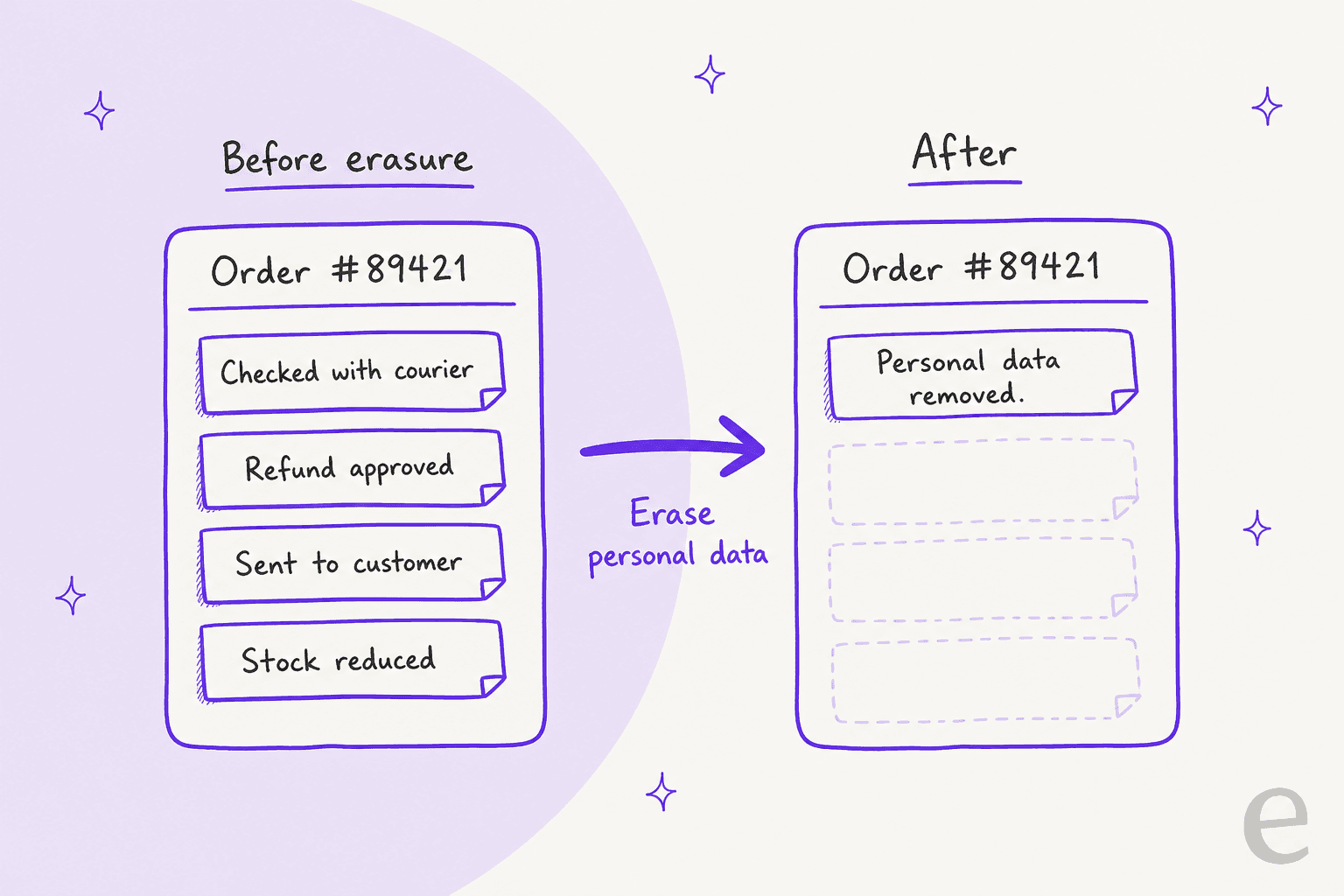
One gap is worth knowing about. The checkout note isn't on the eraser's list of fields to clear in 11.2.2, so whatever the customer typed at checkout stays on an "anonymised" order. If customers put names, phone numbers or door codes in that box, handle it by hand when you process a request. The AI for GDPR requests post covers the wider workflow, and Freshdesk's GDPR tools show how a helpdesk handles the same request.
How can an AI agent use WooCommerce order notes?
It can read them before it replies and write private ones for your team, which makes the notes panel the handoff point between the agent and your people. That's the part I'd automate first, because a note costs nothing to get slightly wrong and a public email does.
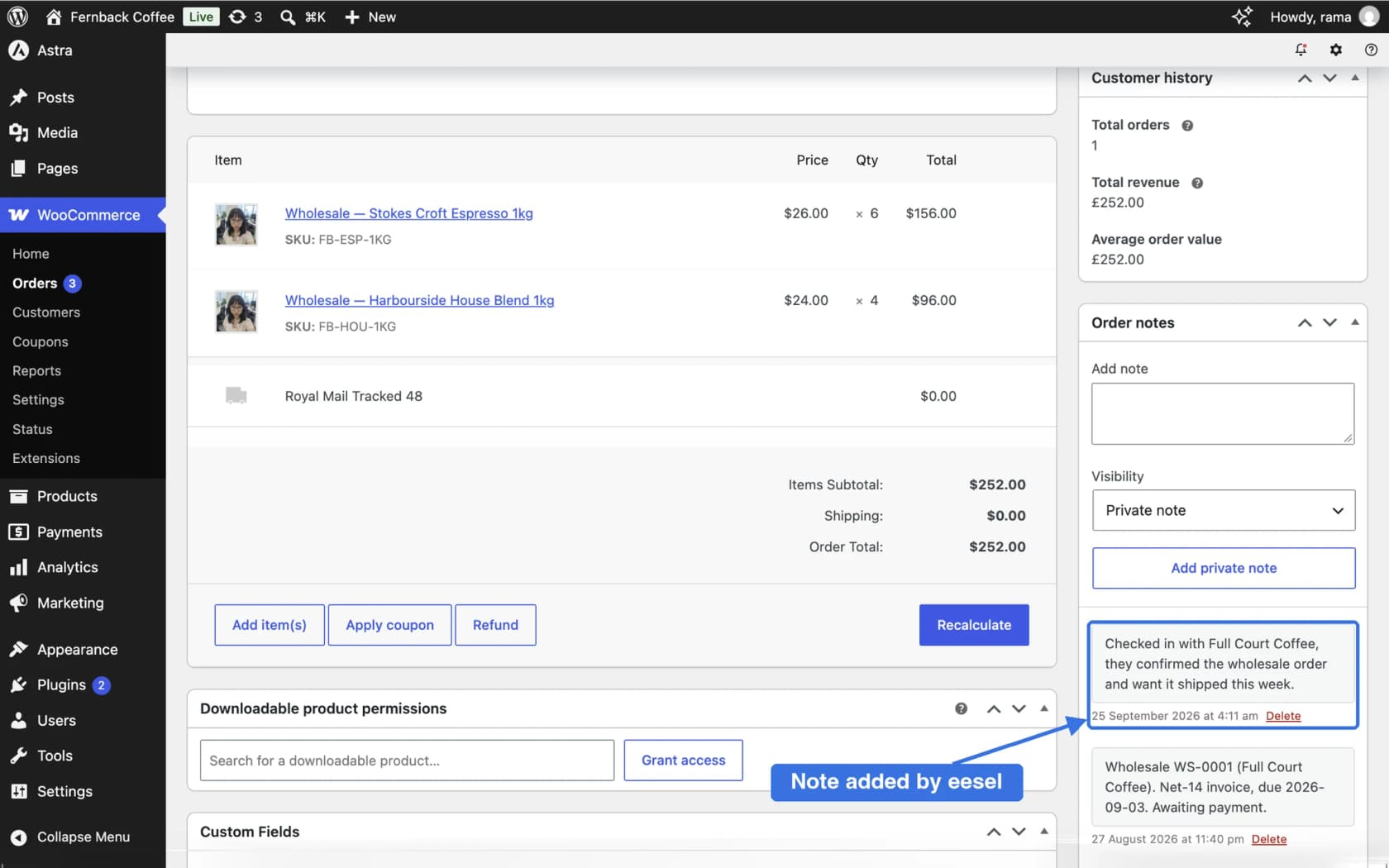
The eesel WooCommerce integration connects through the free eesel AI plugin or a REST API key. Its Look up orders action reads an order "with its items, totals, status and notes", so when a customer asks about a delivery, the agent sees the courier note your colleague left yesterday instead of guessing. Its Add order note action adds "a private or customer-facing note to an order", and like every write action it can wait for a person to approve it.
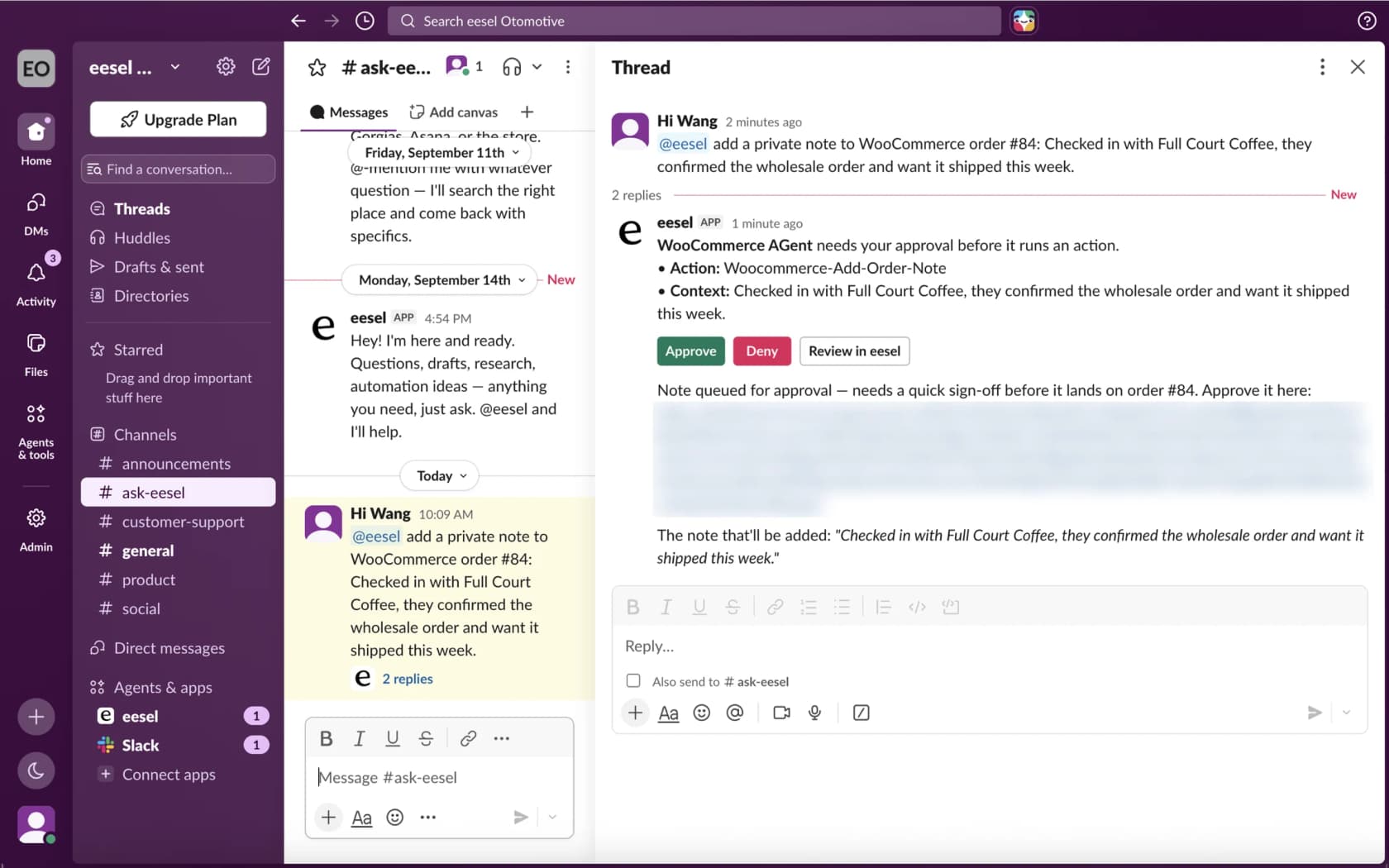
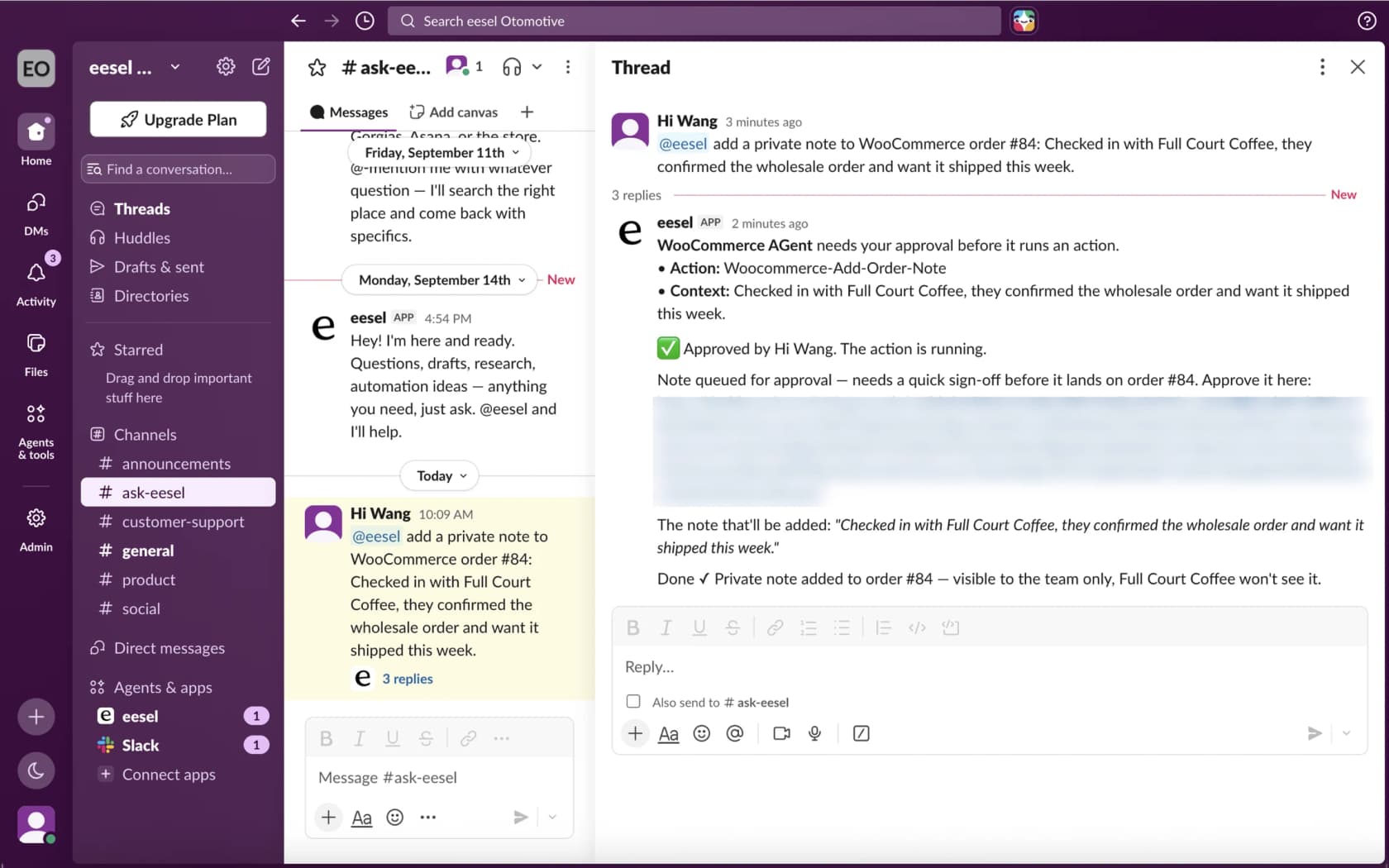
In the docs example, a teammate asks in Slack for a private note on order 84, approves it, and the note lands on the order where the customer can't see it. eesel's own docs flag the same trap this guide does: customer notes "can email the customer", so ask for a private note when it's only for your team.
Notes as the handoff isn't a WooCommerce idea (it's the same pattern as Freshdesk private notes), it's how eesel's customers already run it in their helpdesks. Amagency answers support for four brands from one Gorgias account, and eesel left about 900 internal notes on tickets in a month, each with a draft reply and the order details it found. It never replies to a customer itself; a person sends. Cape Coffee Beans works the other way round: the team writes @eesel in a Zendesk internal note to pull up a product, a past ticket or an order, and eesel answers with a note on the same ticket. Both keep the agent's work where the team already reads.
Before you switch writes on, read my WooCommerce AI overview. If you're comparing options, my best AI for WooCommerce roundup goes wider than notes.
The setup guide covers connecting a store, and the WooCommerce review covers what core includes. If you run Gorgias on top of your store, the same private-note pattern works there. It works in Help Scout too.
Common mistakes with WooCommerce order notes
These are the ones I see most, roughly in order of how much cleanup they cause:
- Sending a private thought as a public note. Read the button label before you click: Add private note or Send note to customer →. The label is the last warning you get.
- Deleting a public note to "unsend" it. The email is gone already. Send a correction instead.
- Waiting for a reply on the order. Replies go to your inbox. Put a private note on the order saying where the conversation is happening.
- Looking for the checkout note in the panel. It's under the shipping details as Customer provided note.
- Leaving API notes unsigned. Notes from scripts and tools look like system notes. Make every integration sign its notes.
- Writing notes you wouldn't want read back. One wrong dropdown turns a private note into an email, and a macro with neutral wording beats a frustrated free-text note.
If your team uses canned responses for the common public notes (tracking, delays, replacements), you avoid most of these in one go. The shipping delay guide has wording you can borrow. So does the one on refund requests.
Try eesel for WooCommerce support
Want an AI for WooCommerce that reads the order before it answers? eesel is an AI helpdesk teammate that connects to your store through a free WordPress plugin, reads each order's status, items and notes, and leaves private notes for your team, with the write actions held for your approval until you trust them. It answers shoppers in your chat bubble, your helpdesk or Slack, and you can try it free on your own orders.