WooCommerce manual refund status: what changes, and what doesn't

Kira

Katelin Teen
Last edited November 5, 2026
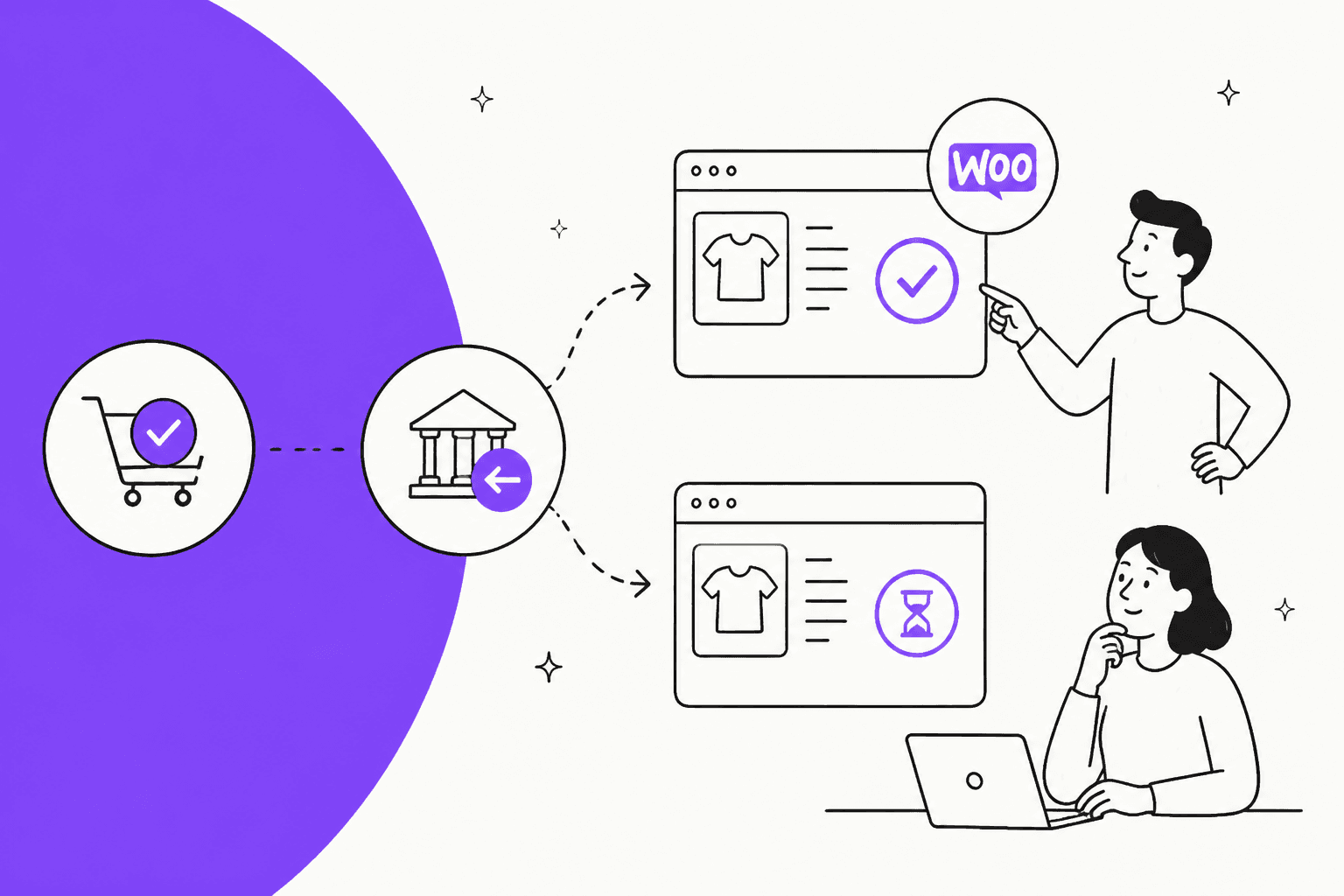
A WooCommerce manual refund changes the order exactly like a gateway refund: refund the full order value and the status flips to Refunded, refund part of it and the status stays on Completed or Processing. The one difference is money. "Refund $X manually" records the refund but sends nothing, yet WooCommerce still emails the customer that their order "has been refunded". The status can't tell you whether money moved; the order notes and your payment dashboard can. eesel's AI agent reads those notes, so it tells customers "recorded" or "sent" accurately, and the eesel CLI lets a coding agent test those answers before go-live.
What does "Refund $X manually" actually do in WooCommerce?
It writes a refund record onto the order and stops there. No money leaves your account. WooCommerce's refund docs say it plainly: manual refunds "do not refund the customer via the payment gateway", and you have to return the funds in your gateway's dashboard or by transfer.
I build AI agents at eesel, and refund tickets are one of the first places I look when an agent's answers go wrong. Across live ecommerce rollouts, one multi-brand operator handling 500+ tickets a day told the eesel team that refund requests, unsubscribes and order tracking made up most of their volume. Refund status is a small question with a big trust cost when the answer is wrong. So for this post I went past the help docs and into the WooCommerce source on GitHub to check what each button really does.
When you open the refund panel on an order, you see up to two buttons:
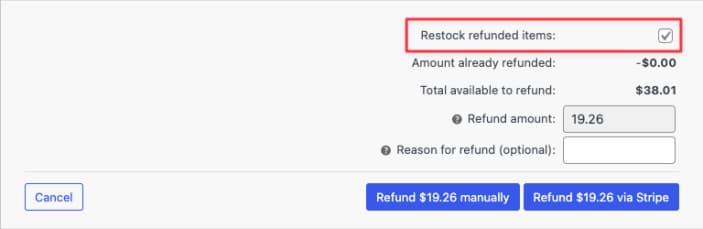
- Refund $X via [gateway] only appears when the order's payment gateway supports refunds. It records the refund and asks the gateway to send the money, in one step.
- Refund $X manually is always there. Its tooltip in the order screen code reads: "You will need to manually issue a refund through your payment gateway after using this."
WooCommerce expects you to use the manual button mostly for gateways that can't refund on their own, like Cash on Delivery or check payments. In practice, teams also reach for it when they already refunded inside Stripe or PayPal and just want the order to match. If you've used Magento, it's the same idea as a Refund Offline credit memo.
Under the hood, both buttons call the same function, wc_create_refund. The only switch is whether it also calls the gateway. Everything else, status, email and stock, follows the same rules either way.
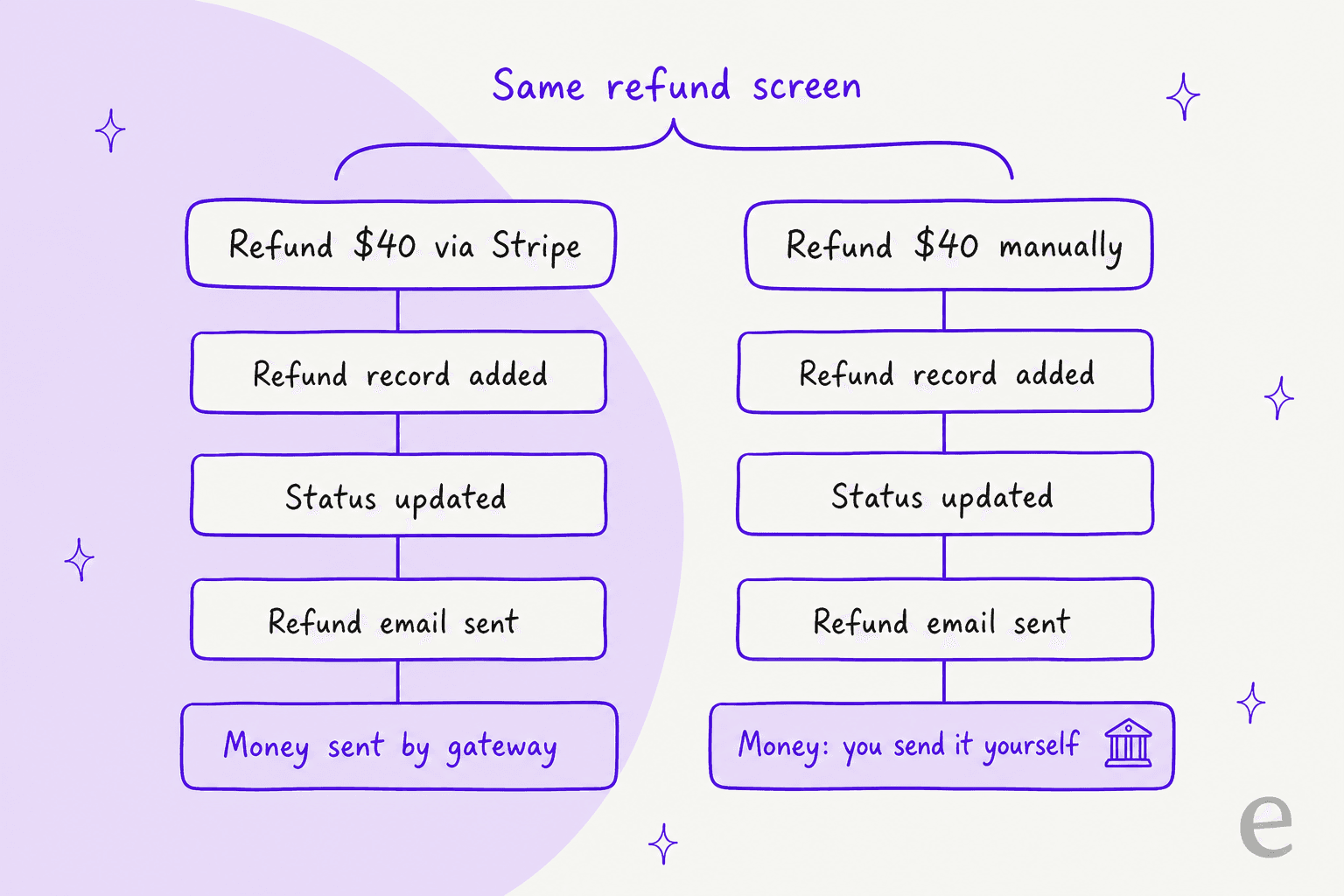
That last row is the whole post. Everything a customer can see, the status and the email, looks identical. The money is the only part that differs, and it is the part they care about.
Does a manual refund change the WooCommerce order status?
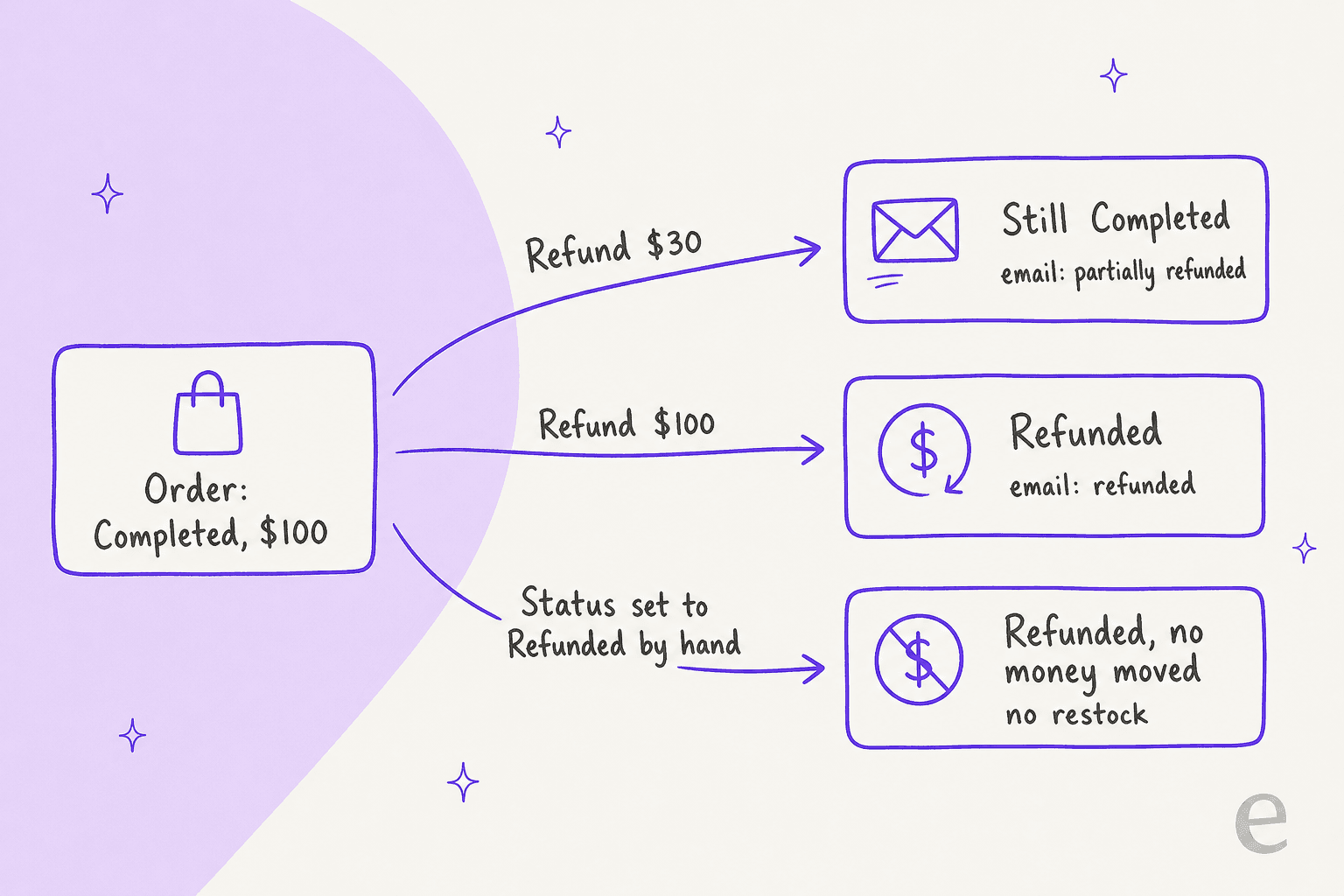
Yes, and by the same rule as a gateway refund. WooCommerce checks how much of the order is left to refund:
- Full order value refunded: the status changes to Refunded. The code does this whether or not the gateway was called.
- Part of the order refunded: the status does not change. A Completed order stays Completed, a Processing order stays Processing. WooCommerce's docs confirm that if the full value isn't refunded, the order "will not have its status changed to Refunded".
This trips people up both ways. A store owner refunds $30 of a $100 order and wonders why nothing happened to the status. Another refunds the full amount manually and assumes "Refunded" means the customer is sorted.
On the order itself, refunded quantities and totals show in red, with a "Refunded" line in the totals and the refund listed with its note and who made it:
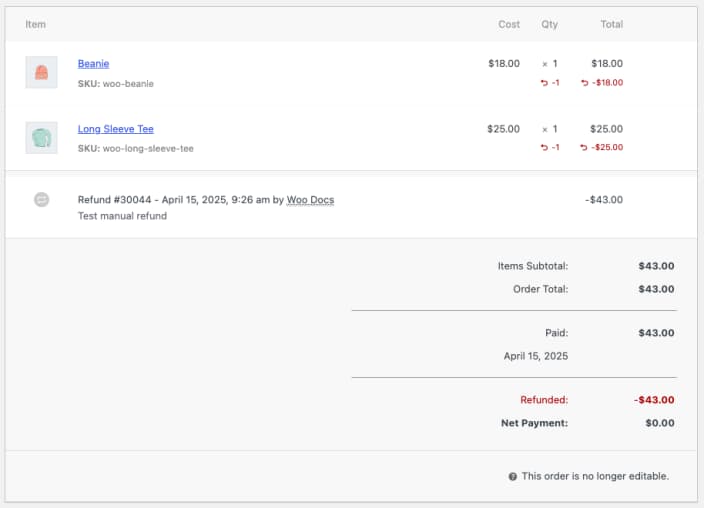
Notice what that screen does not say: whether the $43 ever reached the customer. "Net Payment: $0.00" is WooCommerce's ledger, not your bank's.
The order statuses page admits it directly in the Refunded row: "If you use the Manual Refund option, the order can reach this status without the customer's funds having been returned." I'd tape that sentence above every ecommerce helpdesk that answers WooCommerce tickets.
What if you set the order status to Refunded by hand?
You get a refund record, a note, and still no money. When an order moves to Refunded through the status dropdown, WooCommerce runs wc_order_fully_refunded, which creates a refund for whatever amount is left and adds this order note:
"Order status set to refunded. To return funds to the customer you will need to issue a refund through your payment gateway."
That path never calls the gateway and never restocks items. WooCommerce's refund guide warns: "Directly changing an order's status to Cancelled or Refunded will not automatically refund your customer."
Cancelled is the other trap. Per the statuses page, Cancelled returns stock to inventory when inventory management is on, but "may need to be refunded". It moves no money either. The r/woocommerce threads on this are full of store owners and customers finding that out the hard way:
"In Woo, cancelling an order does NOT automatically refund the payment. A refund only happens if you explicitly click Refund inside the order, enter the amount, and submit it."

And from the other side of the counter, a customer who was still charged ten days after their order was cancelled:
"It had been 10 days. Was definitely processed and on my balance. Canceled isn't the same as refunded seems to be the TL;DR, I guess."
That customer is the person your support team is talking to. If an agent, human or AI, reads "Cancelled" or "Refunded" off the order and says "you've been refunded", the customer checks their bank, sees nothing, and comes back angrier, sometimes with a chargeback already filed.
Does WooCommerce restock items when you refund?
Only when you tell it to, and the default is yes. The refund panel has a Restock refunded items box. Two details from the order screen code that the docs don't spell out:
- The box only appears when Manage stock is turned on in your inventory settings. No stock management, no box.
- It is ticked by default. If you refund a damaged item that's going in the bin, untick it, or your stock count will claim you have a sellable unit you don't. If damaged returns are a regular thing for you, my returns management guide covers the workflow.
The box works the same on both buttons. Restocking only applies to the quantities you enter per line item, so a refund typed straight into the amount field with no quantities won't put anything back on the shelf. And the status-dropdown route from the section above never restocks.
One more quiet side effect: when you refund a downloadable product's line, by quantity or amount, wc_create_refund deletes the customer's download permissions for that product. Worth knowing before a customer emails to say their download link died after a partial refund.
For partial refunds on a single line, WooCommerce's guide has a neat trick: enter the refund as a fraction in the Qty field (for $4 of a $15 item, 4/15 = 0.26666667) and the tax fields calculate themselves.
What email does the customer get?
The Refunded order email, with two versions. WooCommerce's email settings describe one template "for both partial and full refunds", and the default subjects in the email class are:
| Refund | Default subject | Body opens with |
|---|---|---|
| Full | "Your {site_title} order #{order_number} has been refunded" | "Your order on {store} has been refunded." |
| Partial | "Your {site_title} order #{order_number} has been partially refunded" | "Your order on {store} has been partially refunded." |
Here's the part almost nobody mentions. The email fires on the manual button too. Both buttons go through wc_create_refund, which triggers the full or partial refund notification. So the moment someone clicks "Refund $X manually", the customer can get an email saying their order has been refunded, while the money is still sitting in your account.
If your team records manual refunds before paying them out (common with bank transfers and COD), do one of these:
- Send the money first, then record the refund in WooCommerce.
- Edit the Refunded order email text under WooCommerce > Settings > Emails so it says the refund has been approved and when to expect it, rather than implying it's already landed.
- Turn the email off and send your own message once the transfer is done. A few refund macro templates make this quick.
I'd pick option 1 for most stores. It keeps WooCommerce, the email and the bank telling the same story.
How do you know the money actually went back?
Read the order notes, not the status. WooCommerce's guide says that when a gateway refund goes through, "the payment gateway usually adds an order note indicating the funds have been returned", and tells you to look for a "Successfully refunded" message. With WooPayments, the note names the refund and its ID:
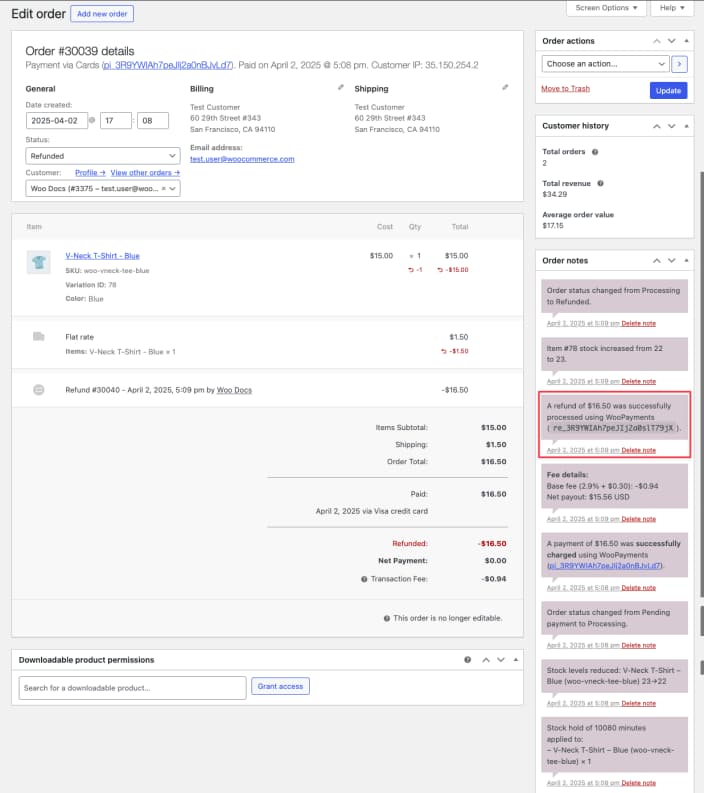
A gateway refund also has a failure path worth knowing. If the gateway rejects the refund, the code deletes the refund record and shows an error. Nothing is recorded, the status doesn't change, and no email goes out. So if a gateway refund looks like it worked in WooCommerce, the money request at least reached the gateway.
The reverse can still drift, though. Gateways like Stripe update WooCommerce through webhooks, and webhooks fail:
"Check the original payment on stripe has been refunded. I had one show refunded on woo and not on the stripe account. It was clearly a failed web-hook or call."
Refunding directly in the processor and skipping WooCommerce causes its own mess. One store owner refunded just the shipping at their card processor and found WooCommerce analytics showing the order "as negative balance". Others refund in Stripe on purpose and let the webhook update the order, which works when the integration is healthy. Either way, the payment dashboard is the source of truth for money, and WooCommerce is the source of truth for what the customer was told. Mixing the two up is how a refund question turns into one of the billing disputes nobody enjoys.
How long does a gateway refund take?
For WooPayments, refunds "are processed immediately", but depending on the customer's bank, it can take 5 to 10 business days for the money to show up. Three details from the same page that make good support answers:
- A refund sent soon after the charge may go through as a reversal: the original charge vanishes from the statement, and no separate credit appears.
- For Visa and Mastercard, you can give the customer the ARN (Acquirer Reference Number) from the transaction timeline, so their bank can trace the refund.
- Transaction fees are not returned to you, even on a reversal.
What about refunds through the REST API?
Apps and AI tools that refund through the WooCommerce REST API use the same function. In the v3 refunds controller, api_refund and api_restock both default to true. An integration that doesn't set them will try to refund through the gateway and restock items. That's a sensible default, and also a good reason to check exactly what any tool you connect sends.
WooCommerce refund paths at a glance
Here is every way an order can end up looking refunded, and what each one really did. Keep it next to your order status macros.
| What you did | Status after | Money sent? | Stock returned? | Customer email |
|---|---|---|---|---|
| Full refund via gateway button | Refunded | Yes, by the gateway | If box ticked | "has been refunded" |
| Partial refund via gateway button | Unchanged | Yes, by the gateway | If box ticked | "has been partially refunded" |
| Full "Refund $X manually" | Refunded | No, you send it | If box ticked | "has been refunded" |
| Partial "Refund $X manually" | Unchanged | No, you send it | If box ticked | "has been partially refunded" |
| Status set to Refunded in the dropdown | Refunded | No | No | "has been refunded" |
| Status set to Cancelled | Cancelled | No | Yes, if inventory is managed | Cancelled order email if enabled, no refund email |
| Refund issued only in Stripe or PayPal | Depends on the gateway's webhook | Yes | Depends on the gateway | Depends on the gateway |
The rows come from WooCommerce's refund guide and the order and email code on GitHub. The Cancelled row is from the order statuses page. The last row varies by gateway plugin, so check your gateway's own docs.
What should support (or an AI agent) tell the customer?
Tell them what happened to the money, never just what the status says. This is the part of AI refund handling that matters most. "Your refund was recorded" and "your money is on its way" are different promises, and only the order notes and your payment dashboard can tell you which one is true.
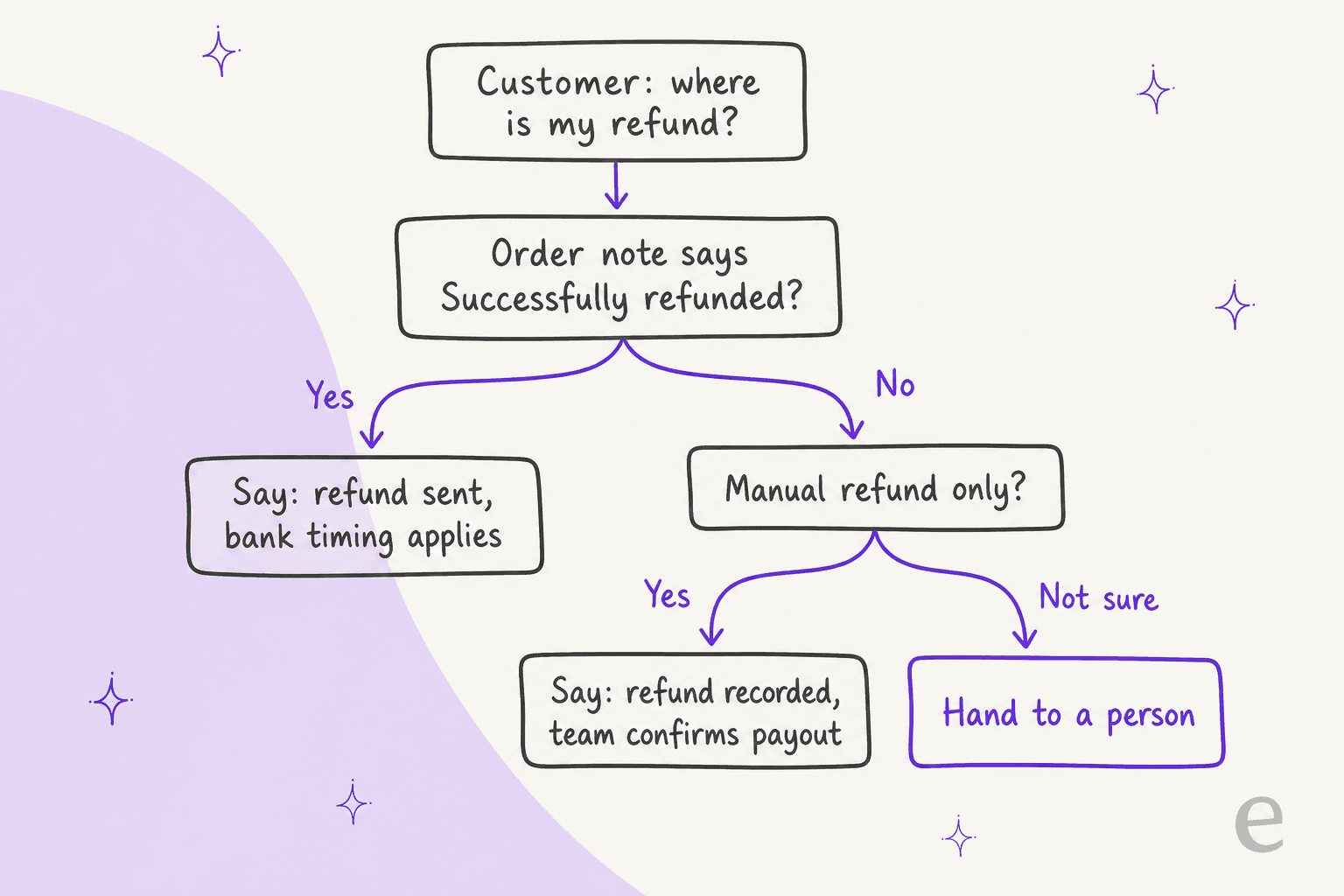
Here's the wording I'd give any agent on a WooCommerce queue:
| What the order shows | Say | Don't say |
|---|---|---|
| Gateway note like "Successfully refunded" | "Your refund of $X was sent on [date]. Banks usually take 5 to 10 business days to show it." | "It should be there already." |
| Refund recorded manually, no gateway note | "Your refund of $X has been recorded. Our team will confirm once the payment has been sent." | "Your money is on its way." |
| Cancelled, or the "Order status set to refunded" note with no gateway note | Hand to a person, with a note on what's missing | "You've been refunded." |
| Partial refund, status still Completed | "We've refunded $X of your order. The rest of your order stands." | "Your order was refunded." |
| Customer says the money never arrived | Share the refund date and ARN if you have one, or hand to a person | "Check with your bank" with nothing else |
This is how I set up eesel's agents for stores, and it's why the refund-status lane works well for AI. In a real-traffic trial on an ecommerce inbox, eesel's drafts for refund status questions were rated useful in 100% of cases, because the answer is a lookup, not a judgement call. The refund decision itself is different. That one goes to a person, through a proper handoff with the context attached.
STIL Classics, a planner and stationery brand on Gorgias and Shopify, is a good model of the split. eesel looks up the order first (about 230 Shopify orders in one month) and leaves a draft reply as an internal note. The draft is written as if the refund or replacement is already done, because the person who sends it processes the refund first. eesel never sends and never changes an order there. The money moves before the words do.
Question Beauty runs the more autonomous version. eesel replied to about 960 customers in a month on its own, but refunds, returns and chargebacks always go to a person, with an internal note on what the customer asked and what eesel found. Both stores run Shopify, but the rule carries straight over to WooCommerce: let the AI read and explain the refund, and keep the money decision with your team. My refund approval matrix shows how to draw that line by amount and risk, and approval workflows covers who signs off.
How eesel handles WooCommerce refund questions
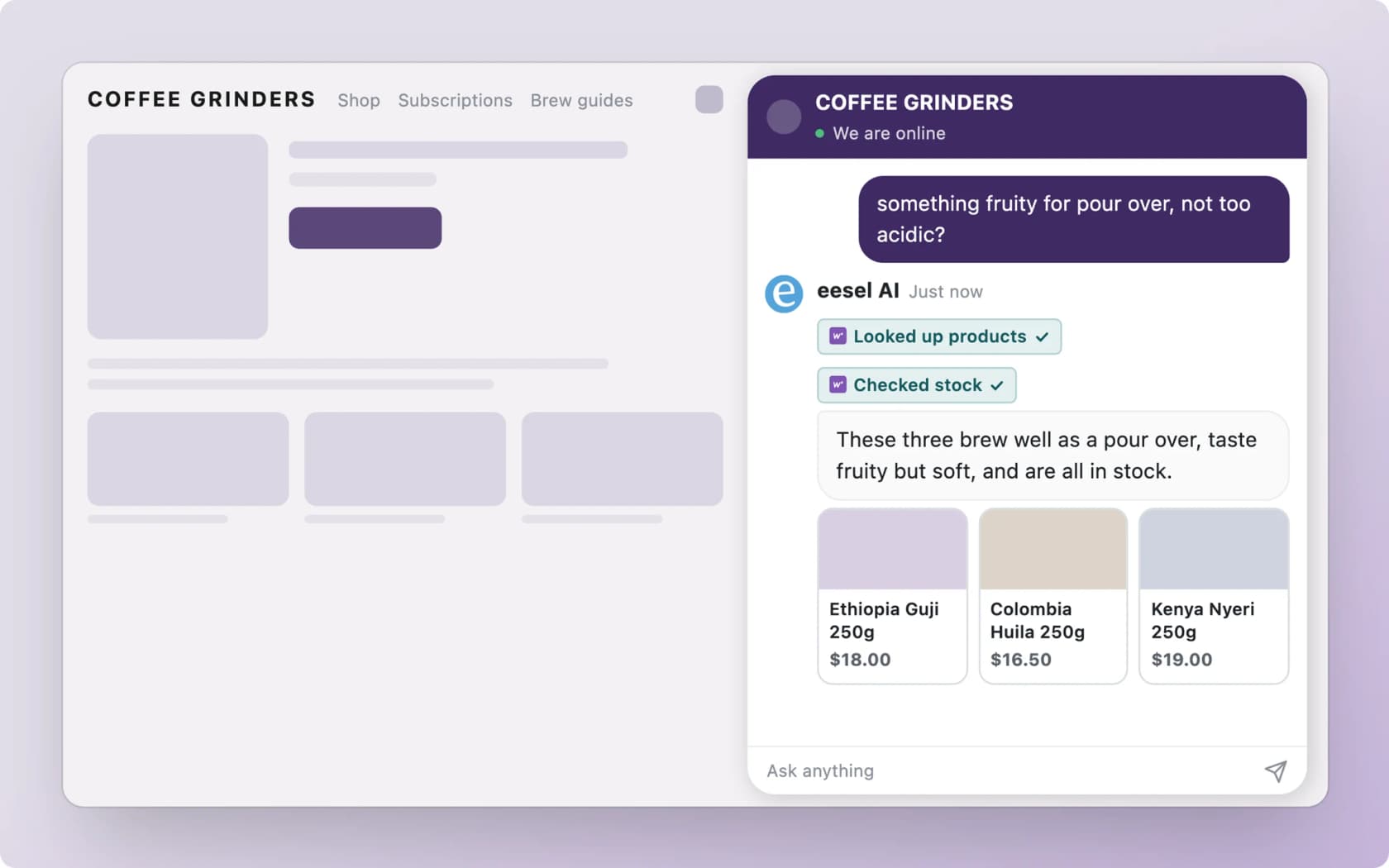
eesel connects to WooCommerce through the free eesel AI plugin or a REST API key, and works inside your chat bubble, your helpdesk and Slack. For refund tickets, three parts of the WooCommerce integration matter:
- Look up orders reads an order "with its items, totals, status and notes". That means the agent can see the "Successfully refunded" note, or its absence, before it answers.
- Create refund "records a refund against an order". It's a write action, so it follows the permissions and approvals you set. Most stores I work with leave it off or behind approval, the same pattern I describe for ecommerce refund automation. For how WooCommerce itself compares as a platform, see my WooCommerce review.
- Add order note can leave a private note for your team, so the next person sees what the customer was told.
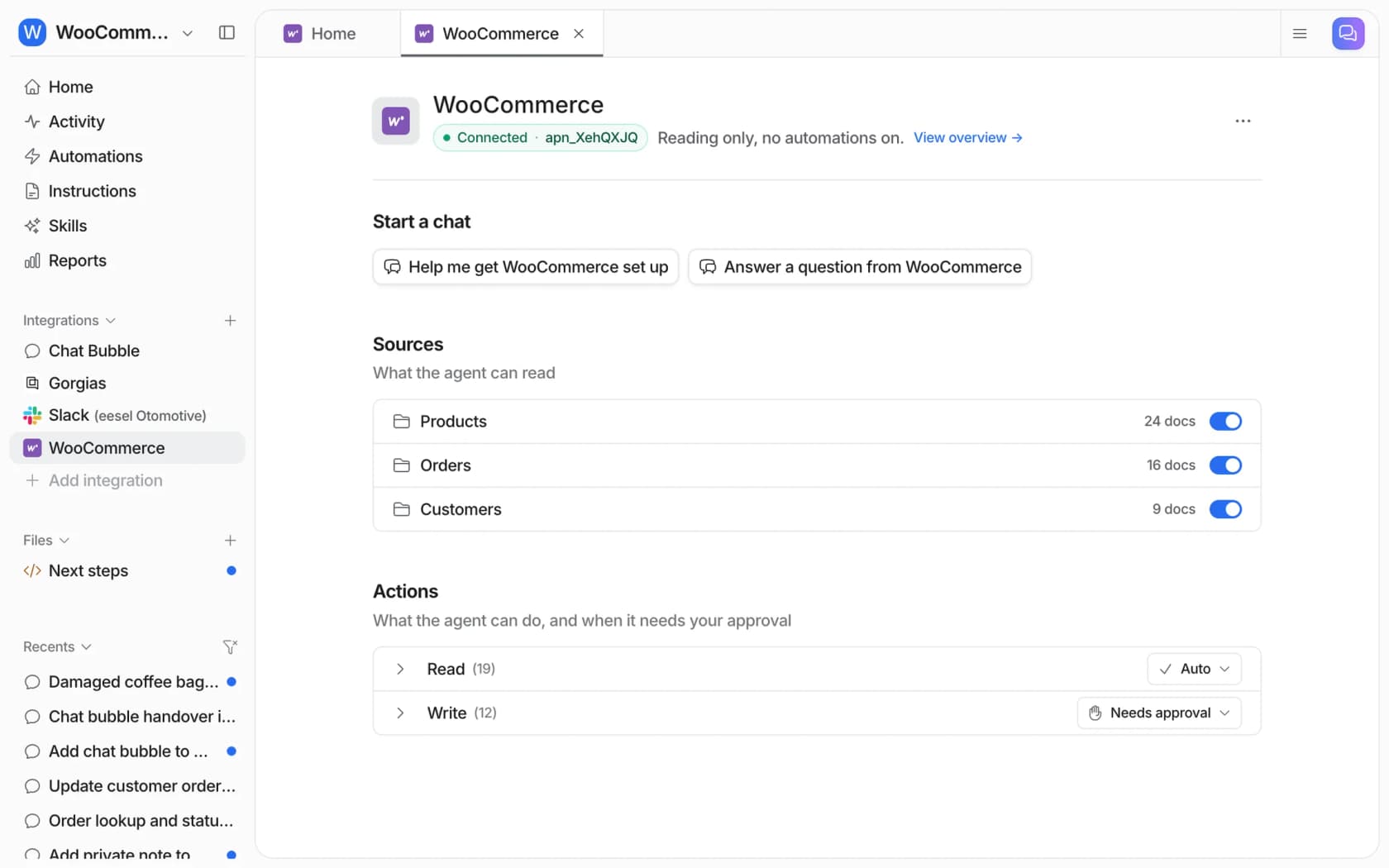
The eesel docs carry the same warning this whole post is about, which I like: "A refund in WooCommerce is not always money returned. It records the refund on the order. Whether the money moves depends on your payment gateway." The agent is told the same thing, so it won't turn a recorded refund into a promise.
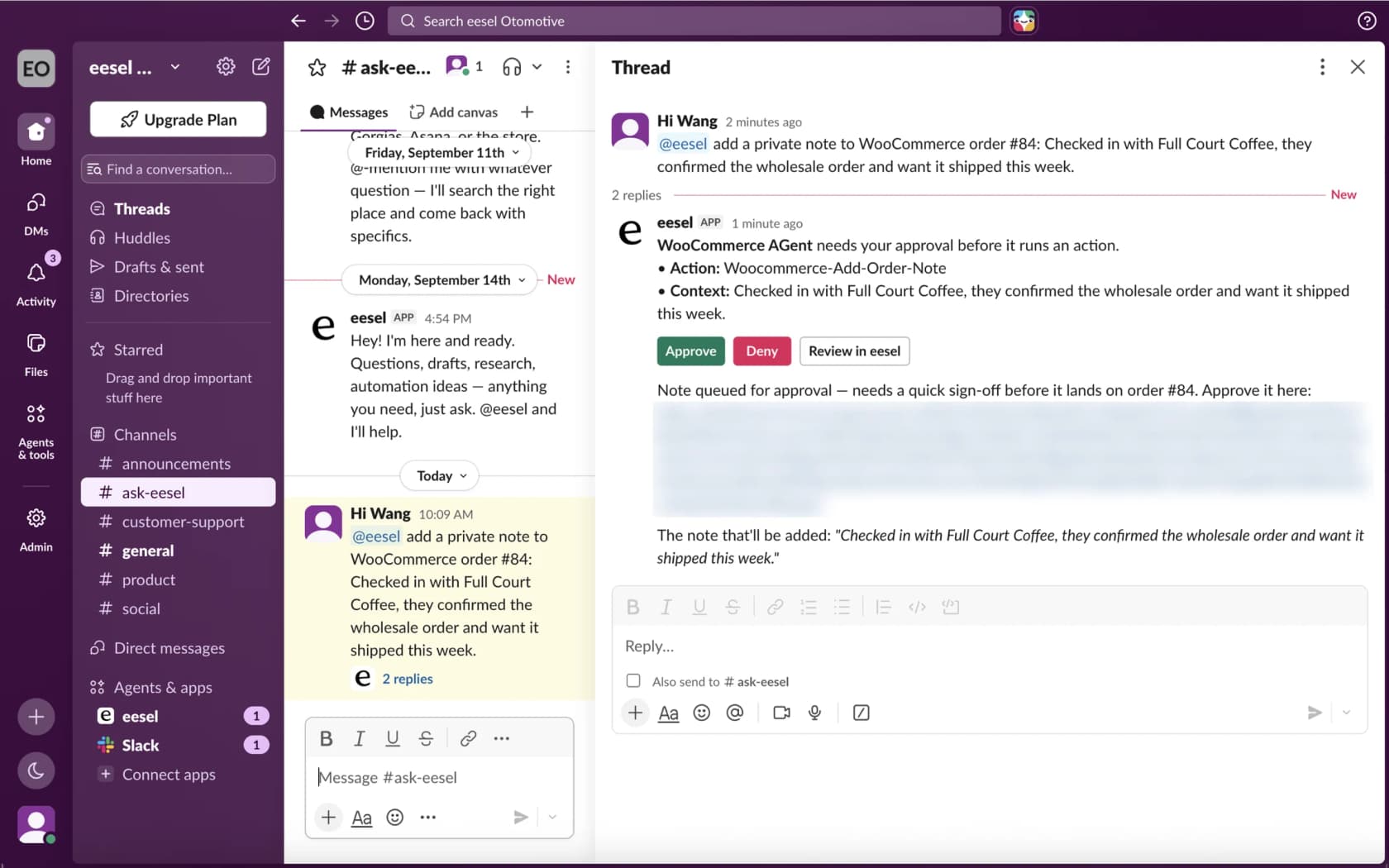
When an action needs your OK, eesel posts an approval card in Slack with Approve, Deny and Review in eesel buttons. A teammate can approve a refund or an order note from the thread without opening WordPress, which is why Slack-based support suits small store teams.
If you'd rather set this up from a terminal, the eesel CLI lets Claude Code or Cursor run eesel integrations connect woocommerce to print the connect link, upload your refund policy, and ask the agent test questions like "where is my refund for order 1042?" before anything goes live. A store admin still has to open that link and approve the connection on WooCommerce's own screen.
Where eesel isn't the right fit: if your refunds mostly happen outside WooCommerce (in Stripe, with no webhook back), the agent can only see what the order shows. Fix the sync first, then add AI. For the wider picture, my guide to adding AI to WooCommerce helps, and the guest order tracking post covers the other half of "where is my order" tickets, and my WooCommerce support roundup compares the other AI options.
Try eesel on your WooCommerce refund tickets
Want refund questions answered from the real WooCommerce order instead of the status dropdown? eesel is an AI helpdesk teammate, the same one behind my WooCommerce chatbot guide, that plugs into your store in a few minutes, reads each order's refunds and notes, and tells the customer whether their money was sent or just approved. Refund decisions stay with your team, behind approvals, so you can automate refund questions without automating the payout. The free plan includes 100 credits, and paid plans start at $299 a month on the pricing page.
Try eesel on your store and run it against your last few refund tickets before you let it near a customer.