WooCommerce coupon usage restrictions: what each rule really checks

Riellvriany Indriawan

Katelin Teen
Last edited November 5, 2026
WooCommerce coupon usage restrictions decide which carts a code works on, and usage limits decide how often. Most "my coupon won't work" tickets come from three rules that behave differently from how the settings screen reads: one sale item in the cart blocks a whole fixed cart coupon, unpaid and refunded orders still use up a coupon's limit, and guests are counted by billing email at checkout. Read the exact error the shopper got, and you know which rule fired. eesel's WooCommerce agent answers these from the order plus your written coupon rules, and the eesel CLI lets a coding agent test those answers first.
What does each WooCommerce coupon restriction check?
Each field on the Usage restriction and Usage limits tabs is one test the cart has to pass. If any test fails, WooCommerce refuses the code and shows one error message.
I work eesel's support queue, and I spend a lot of time inside the ecommerce helpdesks eesel customers run. Discount code tickets are their own little genre: the shopper is mid-checkout, a little annoyed, and holding a code they were promised. Teams I talk to put "why did my discount not apply" next to "where is my order" on the list of questions they answer every day. So for this post I read WooCommerce's coupon management docs and then the coupon code itself on GitHub, because the two don't always agree.
If you're still choosing a plan, my WooCommerce pricing breakdown covers what's in core. Coupons live under Marketing > Coupons, once Enable the use of coupon codes is on in WooCommerce > Settings > General. Each coupon has three tabs:
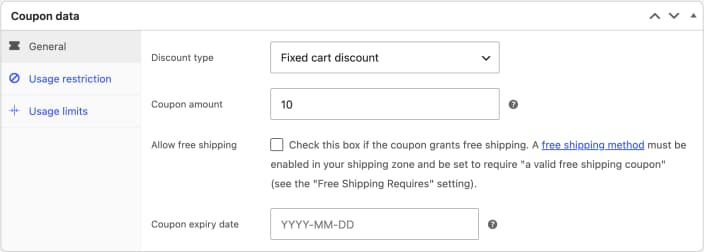
Here is every restriction and limit, what it tests, and the default message a shopper sees when it fails. The messages come from the discounts class and the coupon class:
| Setting | What it checks | Default error the shopper sees |
|---|---|---|
| Minimum spend | Cart item subtotal before coupons, no shipping or fees | "The minimum spend for coupon "%1$s" is %2$s." |
| Maximum spend | Same subtotal, upper bound | "The maximum spend for coupon "%1$s" is %2$s." |
| Individual use only | No other coupon in the cart | "Sorry, coupon "%s" has already been applied and cannot be used in conjunction with other coupons." |
| Exclude sale items | No sale items (fixed cart) or skip them (percent, fixed product) | "Sorry, coupon "%s" is not valid for sale items." |
| Products, categories, brands | Eligible items are in the cart | "Sorry, coupon "%s" is not applicable to selected products." |
| Exclude products, categories | Excluded items are not in the cart (fixed cart) | "Sorry, coupon "%1$s" is not applicable to the products: %2$s." |
| Allowed emails | Billing or account email matches the list | "Please enter a valid email to use coupon code "%s"." |
| Usage limit per coupon | Total uses across all customers | "Usage limit for coupon "%s" has been reached." |
| Usage limit per user | Uses by this user ID or billing email | Same message, or a version pointing to My account |
| Limit usage to X items | How many items get a percent or fixed product discount | No error, it just stops discounting |
| Expiry date | The date hasn't started yet | "Coupon "%s" has expired." |
Two notes before you paste those into an AI macro. %s is the coupon code and %2$s is the amount or product list. And stores can change these strings with a translation or a plugin, so check what your own checkout actually says.
In what order does WooCommerce check a coupon?
In a fixed order, and the shopper only ever sees the first failure. The validation sequence runs: the coupon exists, the overall usage limit, the per-user limit, expiry, minimum spend, maximum spend, included products and categories, excluded items, sale items, and finally allowed emails.
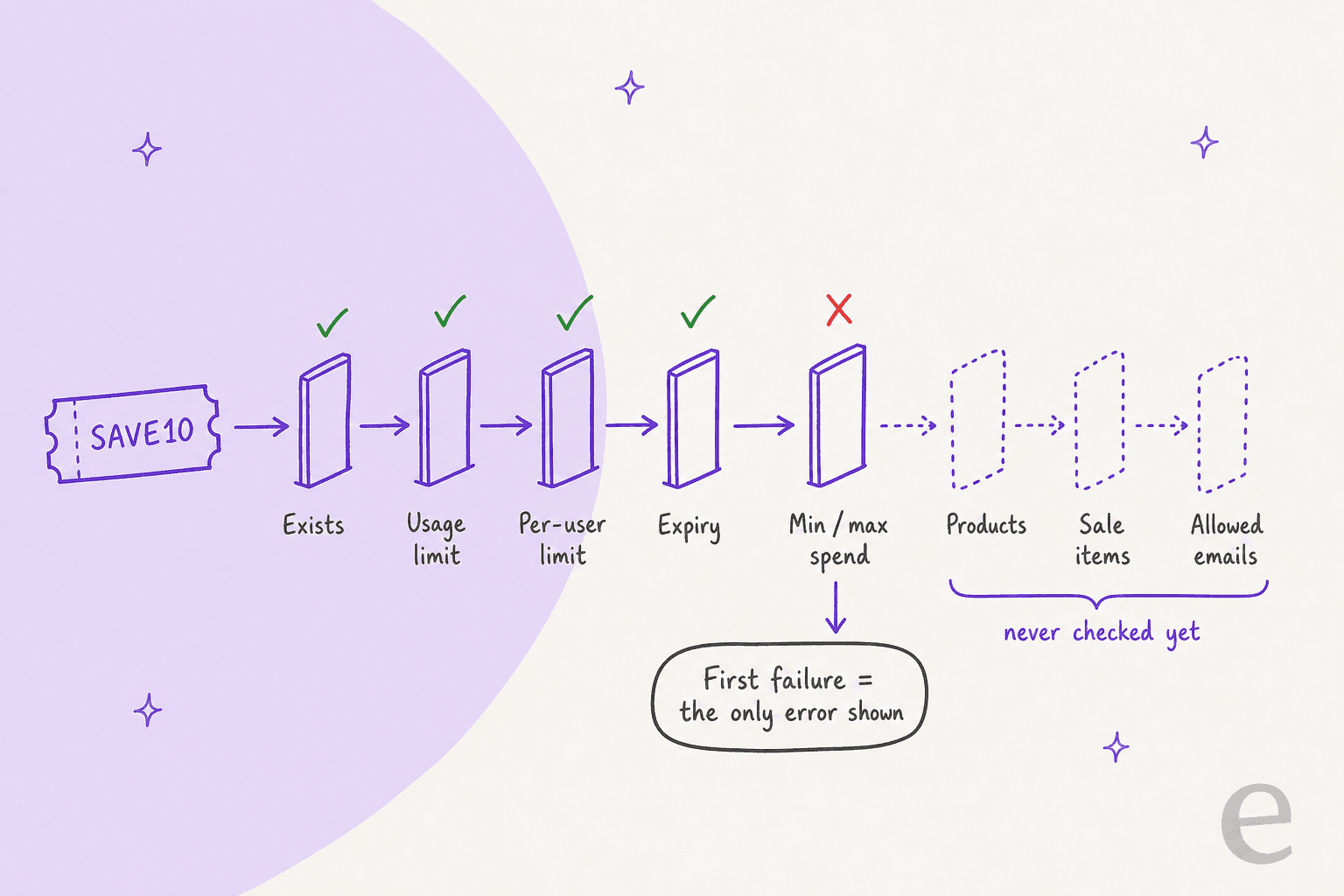
That ordering explains a ticket pattern I see a lot. A shopper is told the minimum spend is $50, adds a sale item to get there, and then gets a second, different error about sale items. Nothing changed on the coupon. They just got past the first gate and hit the next one. If you fix one restriction for a customer, test the whole cart, not just the error they reported.
WooCommerce also re-runs the checks on every cart and checkout load. A coupon that passed a minute ago can fail now (the cart changed, the date rolled over), and the shopper sees: "Sorry, it seems the coupon "%s" is invalid - it has now been removed from your order." That message names no rule at all, which is why it generates so many "your code is broken" emails, and each one adds to your contact rate.
Why does "Exclude sale items" block a fixed cart coupon?
Because for fixed cart coupons, the code checks for any sale item at all. In the discounts class, validate_coupon_sale_items loops over the cart and marks the coupon invalid the moment it finds one item on sale. It only runs that check for coupons that are not product-type coupons, which means fixed cart.
Percentage and fixed product coupons behave the way most people expect. They skip the sale items, discount everything else, and only fail when nothing eligible is left.
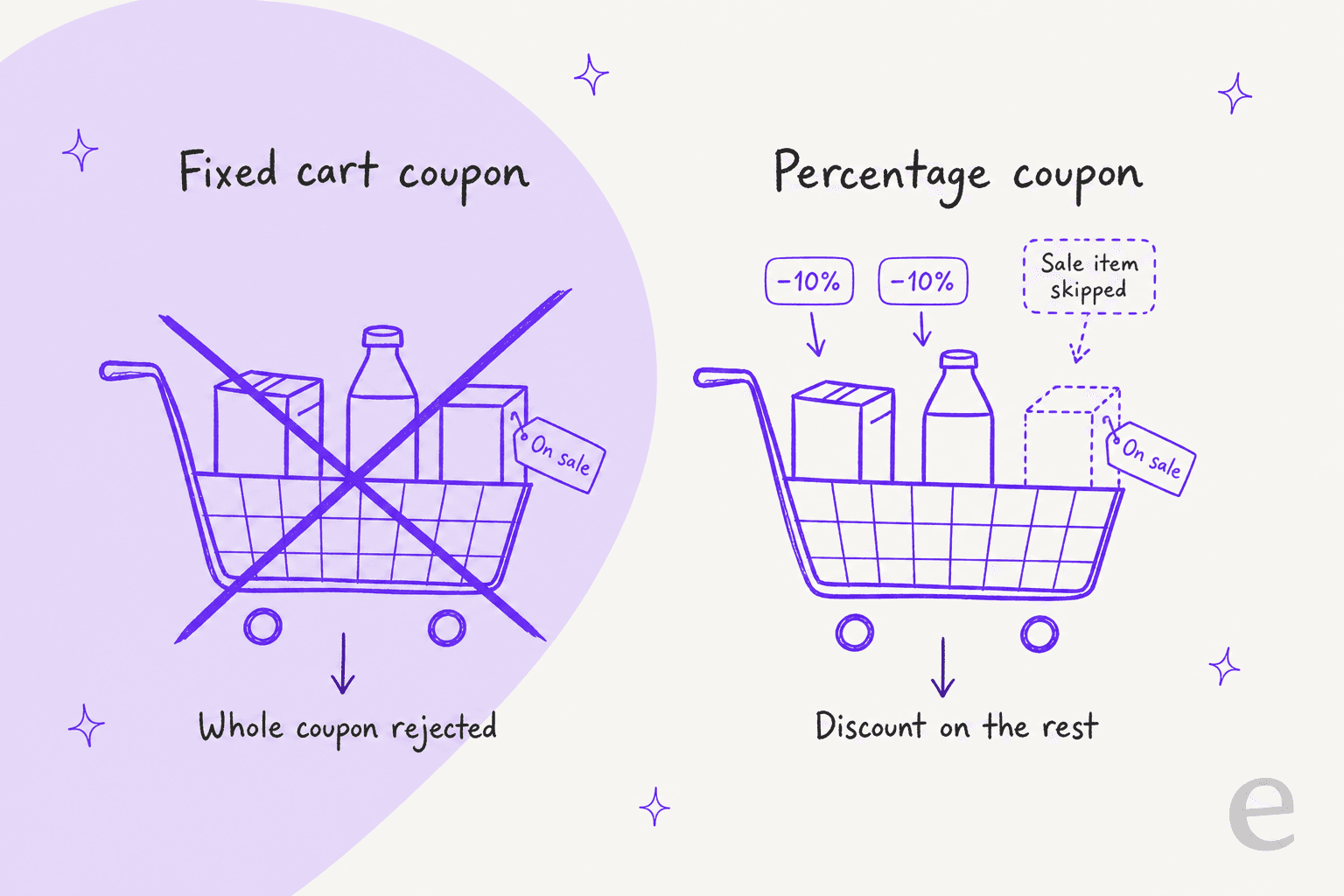
Here's the catch. WooCommerce's docs describe the setting differently: "A fixed cart discount can still apply when the cart contains eligible items that are not on sale." The admin field's help text says something similar. In the trunk code I read on 6 November 2026, that's not what happens. One sale item rejects the whole fixed cart coupon, with "Sorry, coupon "%s" is not valid for sale items."
Excluded products and categories work the same way on fixed cart coupons: one excluded item in the cart fails the coupon and names the products.
The fix depends on what you meant:
- You wanted "$10 off, but not on sale stuff": use a percentage or fixed product coupon, which skip sale items.
- You wanted "no coupon at all if they're buying sale stock": keep the fixed cart coupon and say so in the promotion terms.
- Either way, test a cart with one sale item before you email the code to your whole list.
A store owner on r/woocommerce ran into exactly this:
"I'm trying to set up a coupon that will give a $10 discount when $40 of full price products are in the cart. However when I set up the coupon code and select exclude sale items it invalidates the coupon if there is any sale item in the cart regardless of the total amount of full price items in the cart."

How does "Usage limit per user" work for guests?
It counts by user ID for logged-in shoppers and by billing email for guests. The admin help text in the coupon data meta box says it outright: "Uses billing email for guests, and user ID for logged in users." The docs page doesn't mention guests at all, so this is worth knowing.
What the code actually does happens in three moments:
- When a logged-in shopper applies the code, WooCommerce checks their user ID's past uses.
- When a guest applies the code, nothing is checked yet. The guest hasn't given an email.
- At checkout and when the order is created, WooCommerce checks again with the billing email, adding up uses by that billing email, the account email, and any account whose billing email matches. That last check catches a shopper who used the code as a guest and then logged in. They see: "You have used this coupon %s in another transaction during this checkout, and coupon usage limit is reached. Please remove the coupon and try again."
So a guest can apply a one-per-customer code, see the discount in the cart, and lose it only when they submit their email. Expect a ticket that starts "it worked a second ago". It's worth a line in your macro templates.
The other side: a new email address is a new customer as far as this limit goes. One-per-customer coupons stop casual repeats, not someone with five Gmail aliases. If coupon abuse shows up in your queue, my post on fraud-related support tickets covers how to triage it without accusing real customers.
Store owners know it, which is why the same question keeps coming up:
"This coupon code will be a huge discount, like get your first meal free, or your first month for 50% off. But we don't want people using different email addresses and claiming this discount over and over."
Why does a coupon say its usage limit is reached when nobody used it?
Because unpaid orders count. wc_update_coupon_usage_counts runs on these status changes, and it adds or removes a use depending on where the order lands:
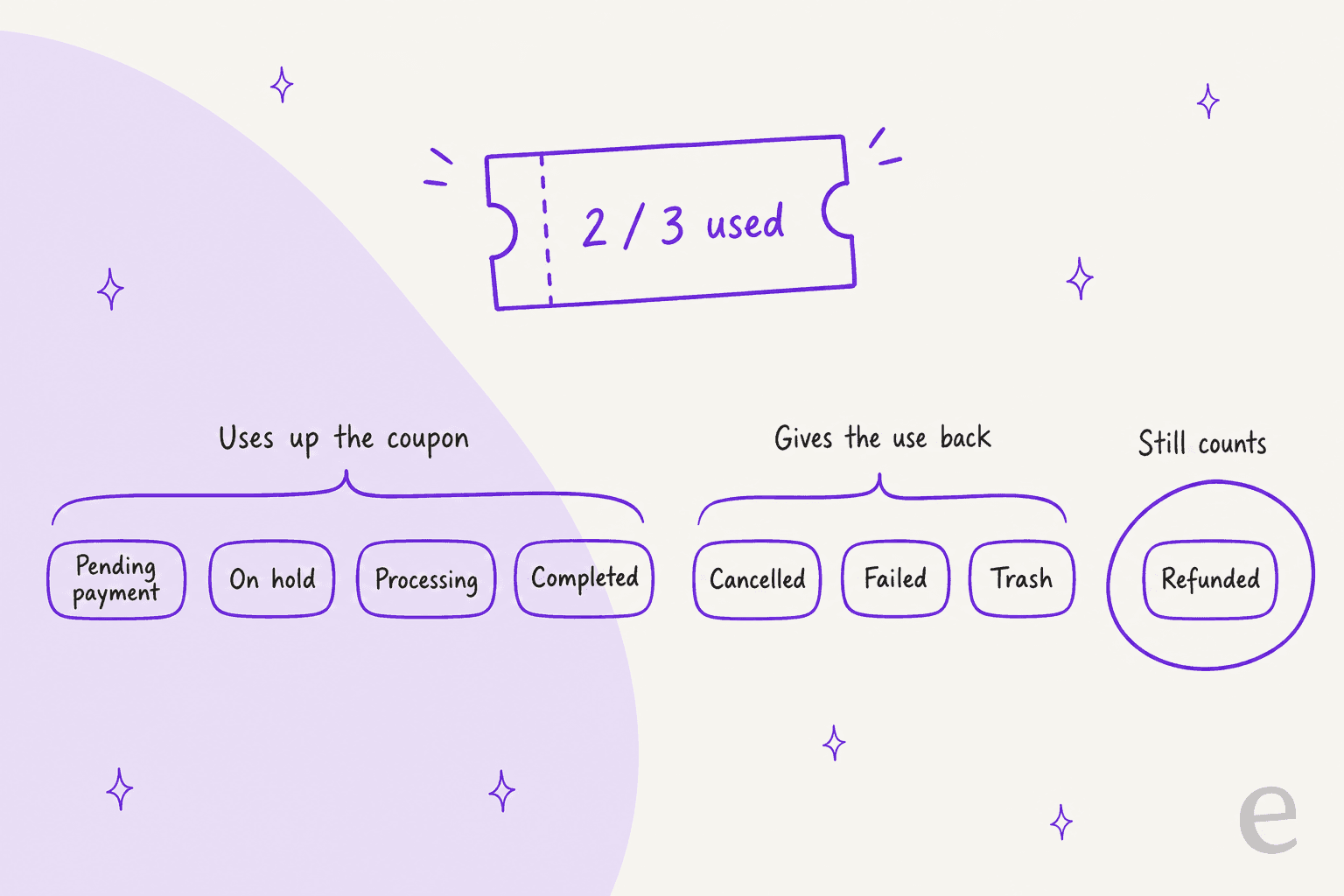
- Uses up the coupon: Pending payment, On hold, Processing, Completed.
- Gives the use back: Cancelled, Failed, Trash.
- Still counts: Refunded. A refund doesn't release the coupon, so a customer you refunded can't use a one-per-customer code again on their reorder. My manual refund guide covers what a refund does change.
On top of that, checkout places a short hold on the coupon while the order is being paid. The hold lasts as long as your Hold stock (minutes) setting, with a 1-minute minimum. During that window, a 100-use coupon at 99 uses plus one hold is full. A logged-in shopper who hits that sees a message suggesting they retry or cancel the order from their account page. A guest sees: "Usage limit for coupon "%s" has been reached. Please try again after some time, or contact us for help."
That hold is behind a ticket one store described like this:
"Recently we noticed that when we have single use coupons (per user) that if the checkout process fails, the customer would not be able to complete checkout with their coupon. This functionality appears to be linked to a _maybe_used_by_ coupon meta containing the user's email address."
The usual cause of a "limit reached" ticket is a pile of pending payment orders from abandoned card attempts. WooCommerce only auto-cancels those (and frees the coupon) when stock management is on and the hold time is set. Otherwise they sit there holding slots until someone cancels them. My order status guide covers what Pending and Hold stock do in more detail.
When does a WooCommerce coupon expire?
At 00:00:00 at the start of the expiry date, in your store's timezone. The admin tooltip says it: "The coupon will expire at 00:00:00 of this date." The docs put it as coupons "expire/cannot be used on the date that is set."
So a Black Friday code with an expiry of 1 December stops working as 1 December starts, not at the end of it. If the promo says "valid through 30 November", set the expiry to 1 December. And because WooCommerce re-checks the cart on every load, a shopper who applied the code at 11:58pm and pays at 12:01am loses it at checkout.
Shoppers in other timezones feel this most, the same way they do with guest order tracking emails sent on store time. A store on Sydney time expires coupons in the middle of a US afternoon, which makes a lot of "the email said it was valid today" messages.
How do allowed emails and "Individual use only" work?
Allowed emails limits a coupon to a list of addresses. The docs say it's "verified against customer's billing email" and supports wildcards, so *@university.edu covers a whole domain. The code checks twice: when the code is applied (against the account email or saved billing email) and again at checkout against the billing email the shopper typed. Fail at checkout and the coupon is removed with "Please enter a valid email to use coupon code "%s"." A student who logs in with their uni address but types a personal Gmail at checkout loses the discount at the last step.
Individual use only stops stacking, but it's lopsided. Per WC_Cart::apply_coupon:
- Apply an individual-use coupon second, and it silently removes every coupon already in the cart, then says "Coupon code applied successfully." No notice that the first one is gone.
- Apply any coupon after an individual-use one, and the new coupon is rejected. The error names the coupon already there.
So a shopper with a 10% welcome code and a free-shipping code can end up with only one of them and no idea why. If you run stacked promos, tell shoppers which code wins in the promo email. If you're still weighing platforms, my Shopify vs WooCommerce comparison covers the wider differences.
One more stacking detail: if Calculate coupon discounts sequentially is on, WooCommerce 11.2 and later breaks ties between coupons of the same priority by the order the shopper entered them, per the coupon docs. Coupons also never touch shipping unless the coupon grants free shipping.
What should support tell a customer whose coupon won't work?
Match the reply to the error they saw, and say what to change. A vague "codes can have restrictions" reply gets a second email every time. This is the table I'd give any agent, human or AI, on a WooCommerce queue:
| What the shopper saw | What it means | Reply |
|---|---|---|
| "The minimum spend for coupon X is $50" | Item subtotal under $50, before discounts and shipping | "Your items come to $42 before shipping. Add $8 more and the code will work." |
| "...is not valid for sale items" | Fixed cart coupon with a sale item in the cart | "This code doesn't work when a sale item is in the cart. Remove [item] and it will apply, or buy it separately." |
| "...is not applicable to selected products" | No eligible items, or excluded ones | Name the products or category the code covers |
| "Usage limit ... has been reached" | All uses gone, or held by unpaid orders | Check for the customer's own pending order first, then hand to a person |
| "...has expired" | Expiry date has started | Give the date it ended. Any make-good code is a person's call |
| "Please enter a valid email..." | Billing email not on the allowed list | "This code is tied to [domain] addresses. Use that email at checkout." |
| "...it has now been removed from your order" | Something changed since it was applied | Ask what's in the cart now and re-check |
The last column is where most of the effort goes. Every one of these answers is a lookup against a rule you already wrote down. What isn't a lookup is the make-good: an extra code, an extended expiry, a manual discount on the order. That's a decision about money, like store credit or a billing dispute, and it should go to a person through a proper handoff.
That split is how the stores I work with set it up. STIL Classics, a planner brand on Gorgias and Shopify, has eesel prepare 320 tickets a month as draft replies, after looking up about 230 orders. Its rule on discounts is blunt: goodwill is a human call, and the draft never offers credits or discount codes. The team adds those when they want to. SE Ranking set the same line on live chat across three products and 4,650 conversations a month: answer at once, but never promise a discount the team didn't approve. Neither runs WooCommerce, and the rule carries over unchanged: the agent explains the restriction, a person decides on the exception. My approval workflows guide covers where to draw that line.
How eesel handles WooCommerce coupon questions
eesel connects to WooCommerce through the free eesel AI plugin or a REST API key, and answers in your chat bubble, your helpdesk (for example Gorgias on WooCommerce) or Slack. For coupon tickets, here's what it can and can't see, per the WooCommerce integration docs:
- Look up orders reads an order "with its items, totals, status and notes". After purchase, that's how it checks whether a discount landed, or whether a customer has a pending order holding a coupon use.
- Look up products and categories reads your catalogue live, so when a shopper names the items in their cart, it can check which are on sale or outside the coupon's category. It can't see the cart itself.
- Your coupon rules come from your writing. The documented sources are products, orders and customers, not coupons. So I'd write each live promo's terms (minimum spend, excluded items, expiry, one per customer) on a promotions page or in a doc, and connect your website so the agent learns them. Without that, it can't know your rules, and it shouldn't guess. That's the same hallucination guardrail I'd set for any policy question.
- No coupon creation. The documented write actions are order notes, status changes, refunds, orders, customers, products and subscriptions, each behind the approvals you set. A goodwill code is a person's job.
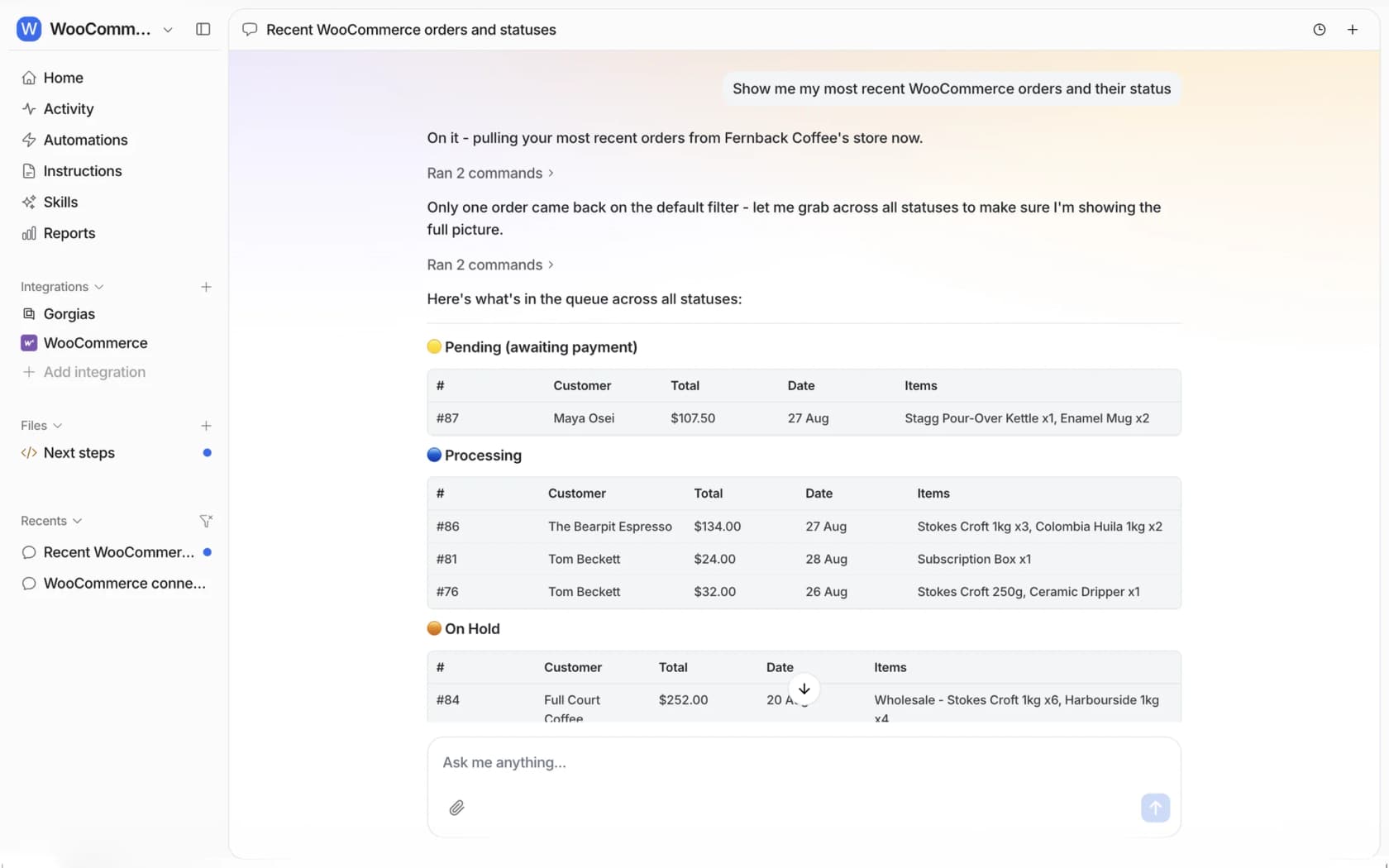
That pending-orders view is handy for coupon limits too. Ask the agent in the dashboard or Slack for your pending payment orders, and you'll see the abandoned ones that may be holding coupon uses before you cancel anything.
When a shopper needs a person, the agent can leave a private order note with what they asked and which rule fired, so whoever picks it up doesn't start over. With Slack connected, that note waits for approval in the thread with Approve and Deny buttons.
If you'd rather set this up from a terminal, the eesel CLI lets Claude Code or Cursor run eesel integrations connect woocommerce to print the connect link, upload your promo terms as knowledge, and ask test questions like "why won't SAVE10 work with a sale item in my cart?" to check the answers before anything goes live. A store admin still opens that link and approves the connection on WooCommerce's own screen.
Where eesel isn't the right fit: if your discounts come from a coupon plugin with its own rules (BOGO, auto-apply, URL coupons), the agent only knows what you write down about them. And a store with one promo a year probably doesn't need AI for this at all. For a wider view, see my WooCommerce chatbot guide and my roundup of WooCommerce AI options.
Try eesel on your WooCommerce coupon tickets
Want "why won't my code work?" answered with the actual rule instead of "codes can have restrictions"? eesel is an AI helpdesk teammate, one of the best ecommerce support AI, that plugs into WooCommerce in a few minutes, reads the order and your catalogue, learns your promo terms from your site, and tells the shopper exactly what to change in their cart. Make-good codes stay with your team. The free plan includes 100 credits, and paid plans start at $299 a month on the pricing page.
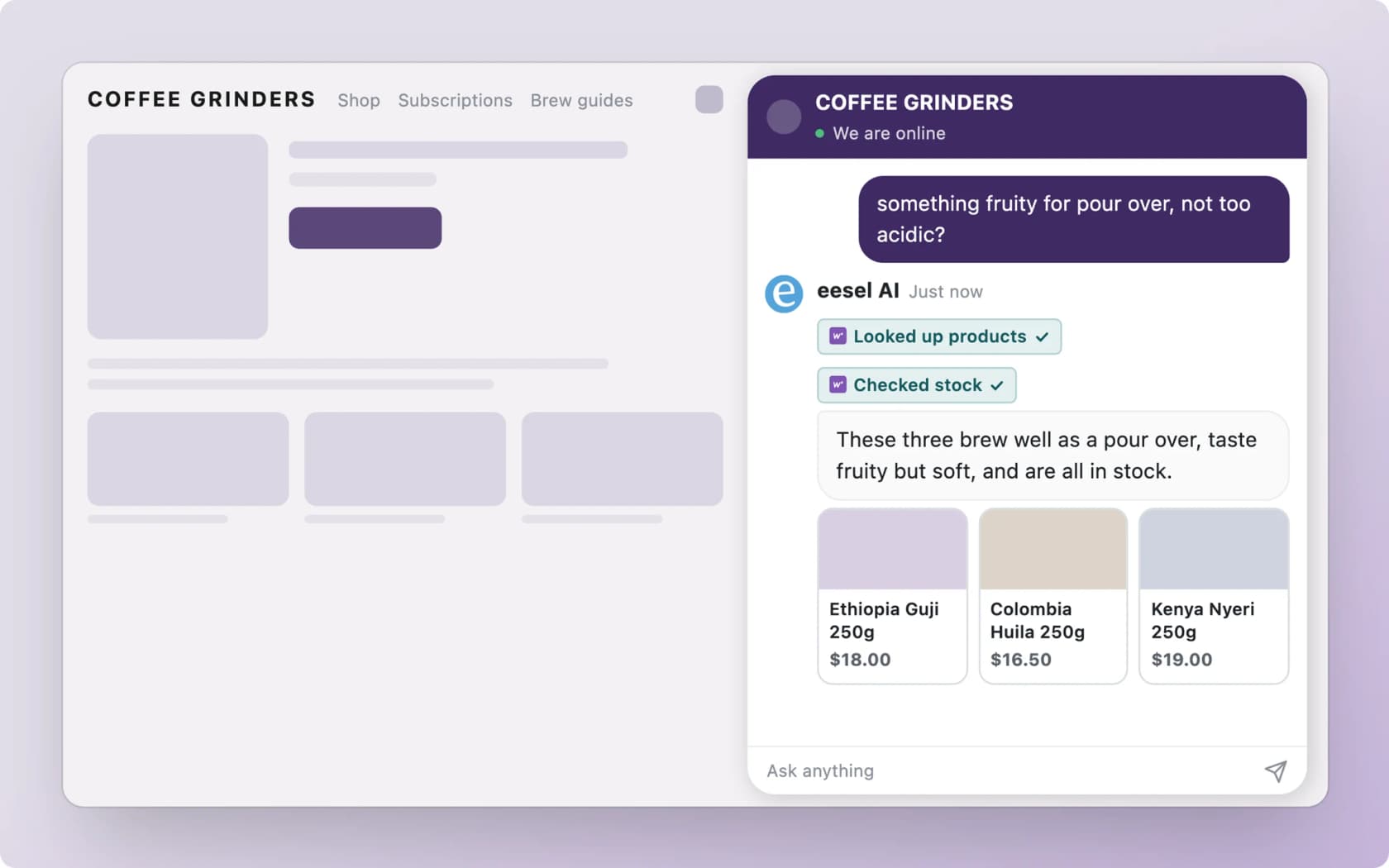
Try eesel on your store, then run it against last month's coupon tickets before it talks to a shopper.
Frequently Asked Questions
What are usage restrictions on a WooCommerce coupon?
How does the WooCommerce usage limit per user work for guests?
Why does my WooCommerce coupon say the usage limit has been reached?
Why is my WooCommerce coupon not valid for sale items?
What time does a WooCommerce coupon expire?
Coupon "%s" has expired.