WooCommerce order status explained: what each one means and what to tell the customer

Rama Adi

Katelin Teen
Last edited November 5, 2026

WooCommerce has seven statuses a customer can land on: Pending payment, Processing, On hold, Completed, Failed, Cancelled and Refunded, plus a temporary Draft. Only one forward step is a person's job, Processing to Completed. The payment gateway, a stock timer and the refund screen move everything else. Core emails the customer on five statuses and stays silent on Pending payment and Cancelled, which is where most "where is my order" tickets start. eesel reads the live status, notes and items, and changes a status only when your team approves. With the eesel CLI, a coding agent can upload your approved status macros and test its answers before anything goes live.
What are the WooCommerce order statuses?
Every order carries one status, and the status is the first thing a support agent should read, because it tells you whether the customer paid, whether stock is reserved, and whether anything has shipped. I checked the table below against WooCommerce's order status docs and the current core source on 2026-11-05, when WooCommerce 11.2.2 was the stable release.
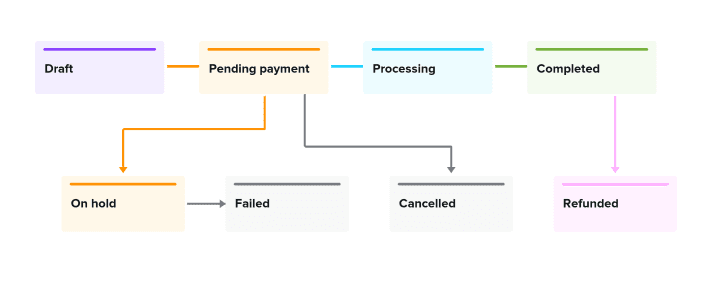
| Status | What it means | Stock | Who or what usually moves it there |
|---|---|---|---|
| Draft | Temporary checkout record from the block checkout, never shown to customers | Held while drafted | Placing an order in the block checkout; a daily cleanup deletes inactive drafts |
| Pending payment | Order received, no payment made yet | Held for the Hold stock window | Checkout, before the customer pays |
| Processing | Paid, waiting to be fulfilled | Reduced | Payment gateway confirmation, or a person |
| On hold | Waiting for payment confirmation | Reduced | Offline gateways like bank transfer, delayed methods, authorize-then-capture |
| Completed | Fulfilled, no further action | Reduced | A person marking it shipped; digital-only orders skip ahead |
| Failed | Payment failed or was declined | Returned | The gateway |
| Cancelled | Cancelled by an admin or the customer | Returned | A person, or the Hold stock timer on unpaid orders |
| Refunded | Fully refunded after payment | Not stated in the docs | A full refund on the order screen |
Three details in that table surprise people. Stock is reduced at Processing and On hold, not at checkout, which is why an unpaid order only holds stock for a short window. When Hold stock is on, WooCommerce cancels eligible Pending payment orders after the configured time and releases the stock, and the source defaults that window to 60 minutes. Draft orders, which the docs say only show on a "Draft" sub-tab, are invisible to customers and should never come up in a ticket. And a status can be added by a plugin, so a store with a Shipped status has more than seven.
If you have never opened the order screen from the support side, WooCommerce's guide to managing orders is the right starting point.
For the wider picture of what core does and does not do, my WooCommerce review and the WooCommerce pricing breakdown cover it. If you run support for an online shop, the ecommerce helpdesk guide shows where this fits.
What moves an order from one status to another?
Mostly not a person. When a payment gateway confirms payment, WooCommerce calls payment_complete(), and the order goes to Processing if it contains anything that needs shipping, or straight to Completed if every item is virtual and downloadable. That second case matters for support: a digital order never shows Processing, so the customer gets the Completed email and no Processing email.
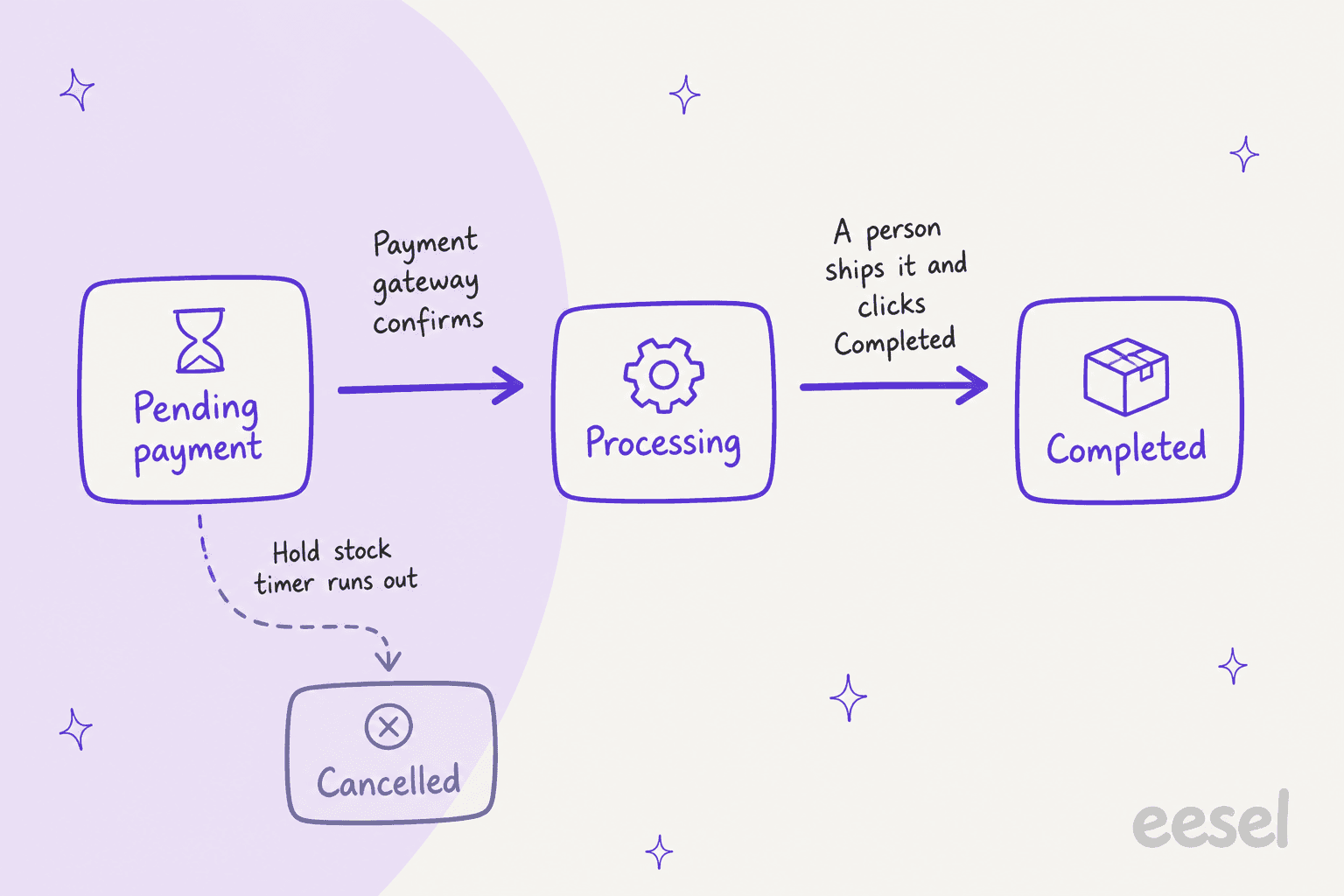
The other moves are smaller than they look:
- Processing to Completed is the one manual step. WooCommerce's docs describe Processing as the store owner's or warehouse's "cue to ship the order and manually change the status to Completed." Plugins like Advanced Shipment Tracking add their own statuses, so some stores skip this click.
- Pending payment to Cancelled happens on a timer when stock management and Hold stock are on. The customer never touches anything.
- On hold to Processing happens automatically on some gateways once the money clears, and by hand on others. The docs tell you to check the order notes and the gateway's own documentation.
- Anything to Refunded happens when a refund covers the full order total. A partial refund leaves the status where it was, and WooCommerce sends the refund email with partial-refund wording instead.
If your agent or macro says "your order is now processing" without checking which of these moves just happened, it is guessing. The status alone does not tell you whether payment cleared by card, bank transfer or a delayed method, so read the order notes too. My WooCommerce guest order tracking guide covers how guests see the same status line, and AI order tracking covers the lookup itself.
Which WooCommerce statuses email the customer?
Five do, and two stay quiet. I read the email classes in the core source to see exactly which transitions fire which email, because the email settings docs describe them in prose and leave out the edge cases.
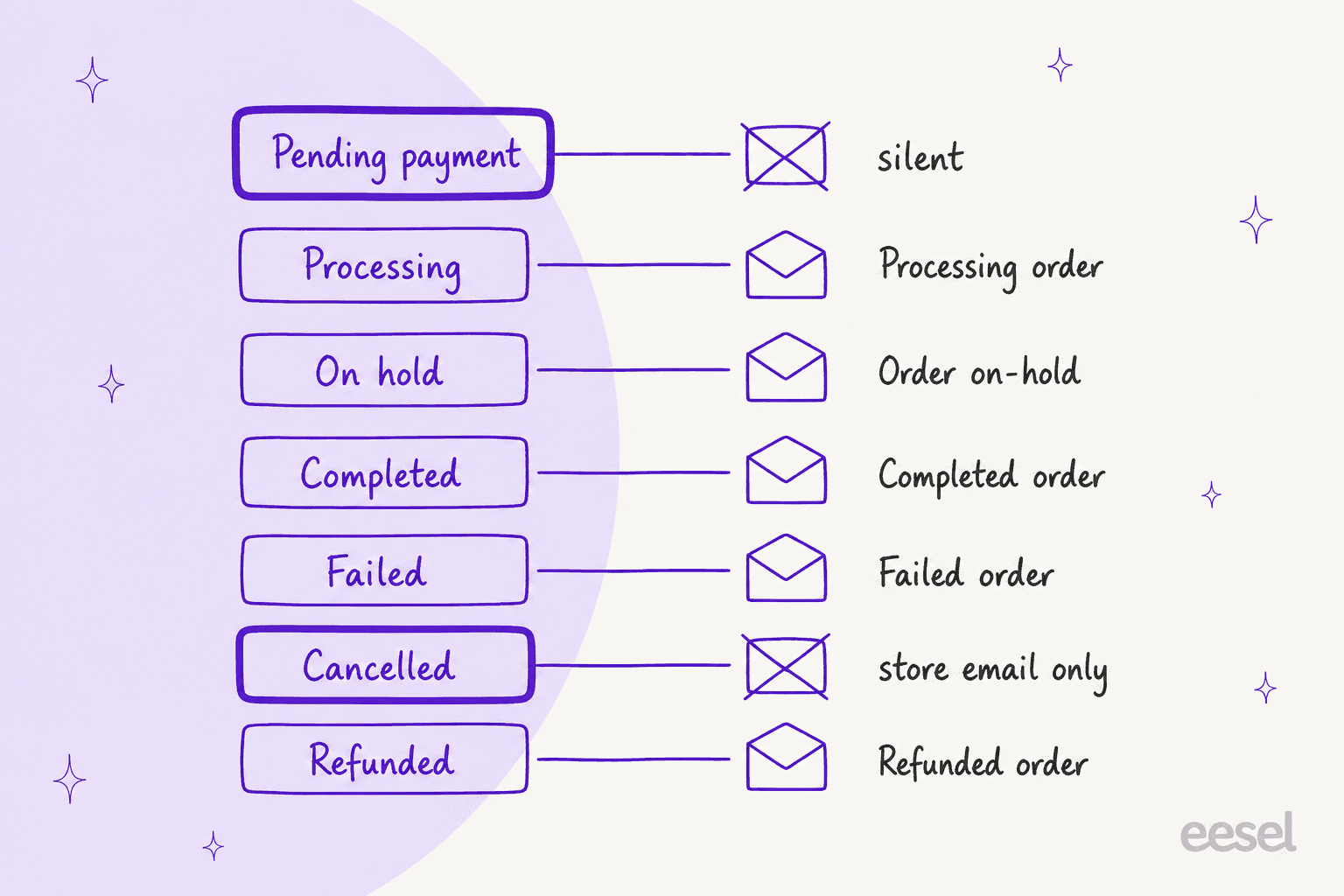
| Status | Customer email | Fires when |
|---|---|---|
| Pending payment | None | Never by core; you can send an Order Details email by hand with a pay link |
| Processing | Processing order | Pending, On hold, Failed or Cancelled moves to Processing |
| On hold | Order on-hold | Pending, Failed or Cancelled moves to On hold, but not Processing to On hold |
| Completed | Completed order | Any status moves to Completed |
| Failed | Failed order | Any status moves to Failed, and the store gets a copy |
| Cancelled | None to the customer | The store gets a Cancelled order email |
| Refunded | Refunded order | A full or partial refund is recorded |
Two gaps do the damage. Cancelled sends nothing to the customer, so someone whose card was never charged or whose order the store cancelled for stock reasons may only find out when they open their account. And the Processing email goes out once, at the moment of payment. If a customer tells you they never got it, check the spam folder and the billing email on the order before you assume WooCommerce failed.
There is a third gap the status can't fix. Core order emails have no tracking number field, so the Completed email says the order is fulfilled and nothing more. Here is how that plays out on a store, from r/woocommerce:
"Tracking info is getting pushed to the comment section of an order and it says "to customer", but I've been fielding calls all day of people who aren't getting their tracking info emails."

Another commenter in the same thread put the reason bluntly:
"Hey, just a heads up. WooCommerce doesn't send tracking info by default, ever. Pirate Ship was either injecting it into the Completed Order email or sending its own."
The wider reason stores over-communicate is the support load behind silence. One operator on Hacker News described it like this:
"if they don't overcommunicate and send you 10 transactional emails (eg. "your order is still on its way!") they'll have people filing credit card disputes and BBB complaints, blasting support screaming this-site-is-a-scam-where-is-my-order!?? over a two day shipping delay."

If you want tracking inside the Completed email, Shipment Tracking is the official extension, and WooCommerce's Order Fulfillments feature is an opt-in beta that adds carrier and tracking to the customer email. For the shipping side, see AI for shipping delay notifications.
What should a support agent say at each status?
The honest answer depends on what the customer is asking, but the status narrows it fast. Pick a status in the widget below to see what it really means, whether the customer was emailed, what to say, and what to avoid saying.
Customer asks "what does this status mean?"
Open the status your order screen shows.
Pending payment
Processing
On hold
Completed
Failed
Cancelled
Refunded
Two habits make the widget work in practice. First, read the order notes before you read the status, because the notes are where the gateway logs why an order is On hold or Failed. Second, never quote the status back as if it were the answer. A customer who asks "what does Processing mean?" is really asking when it ships, and the status can't tell you that.
For a fuller treatment of the status-then-reply pattern, my guides to AI order tracking for ecommerce and chatbots for order status show where the model should look things up instead of guessing.
Why is Cancelled not the same as Refunded?
Because the status records what the store did, not what the bank did. WooCommerce's own status docs say a Cancelled order may need to be refunded, and that a Manual Refund can reach Refunded without funds going back. Stores learn this the hard way. As one commenter explained on r/woocommerce:
"In Woo, cancelling an order does NOT automatically refund the payment. A refund only happens if you explicitly click Refund inside the order, enter the amount, and submit it."
The pattern for support is simple: when the status says Cancelled or Refunded, verify at the gateway before you confirm money movement to the customer.
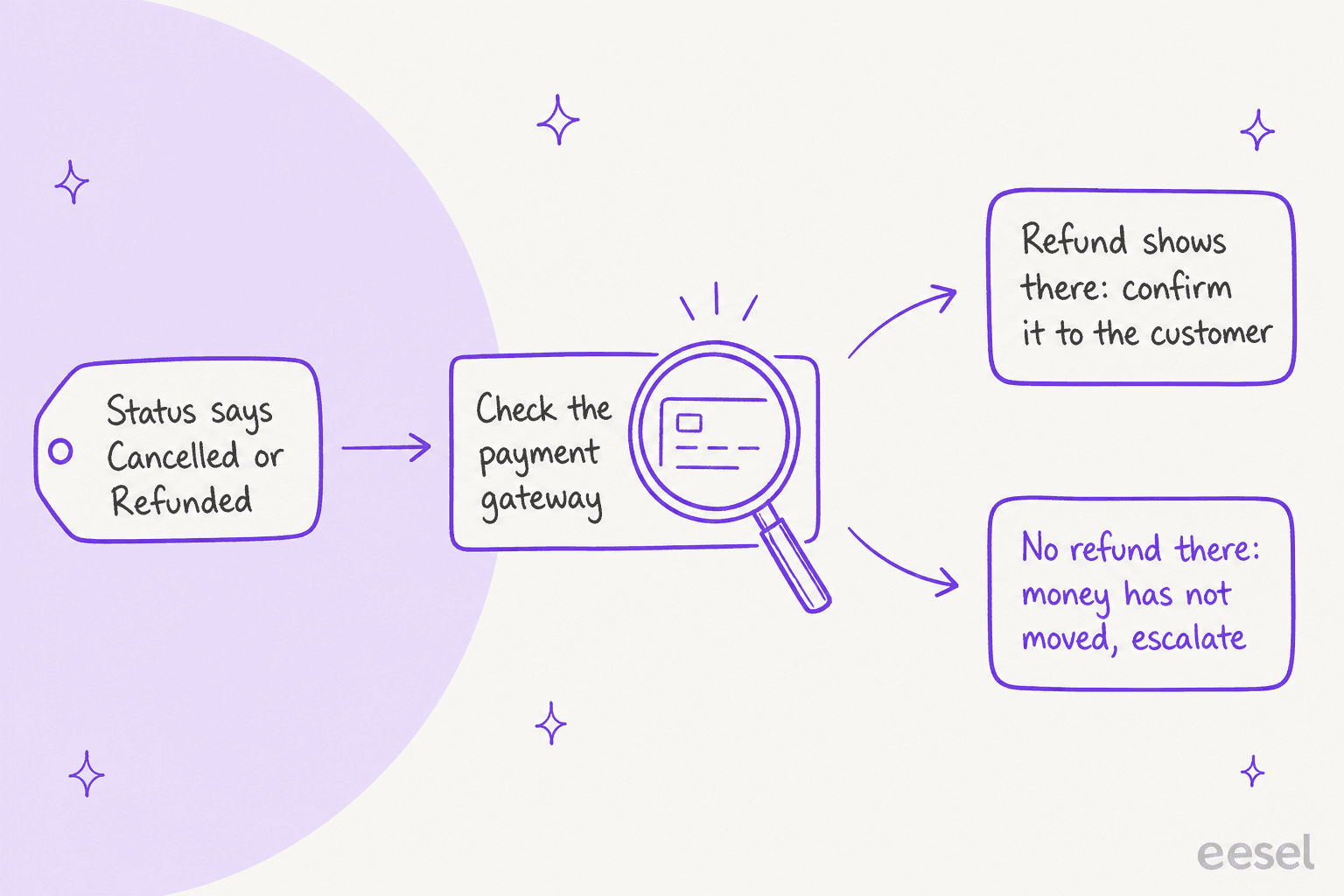
That check is exactly the type of step that a refund policy should decide ahead of time, not an agent in the moment. See AI for returns management and AI for billing disputes for where refunds should stay with a person, and the AI for fraud-related support post for the cases where an order was Cancelled for a reason you don't want to explain in a macro.
Can an AI agent read and change a WooCommerce order status?
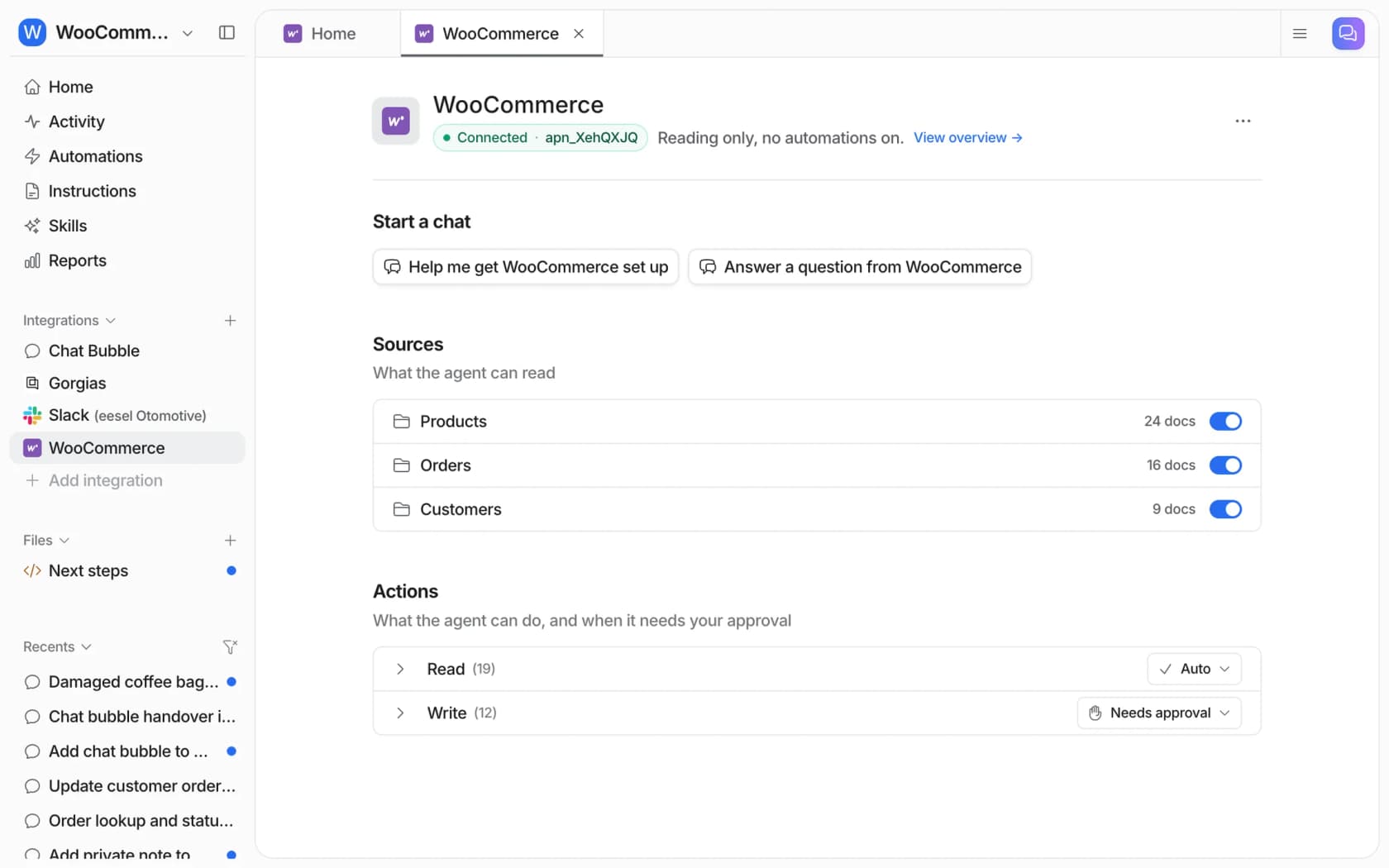
Yes, within the permissions you give it. The eesel WooCommerce integration connects through the free eesel AI plugin or a REST API key, and its read actions list orders or open one with its items, totals, status and notes. In the dashboard it can answer something like "show me my recent orders grouped by status", and in the example below it flagged an order on hold for a month.
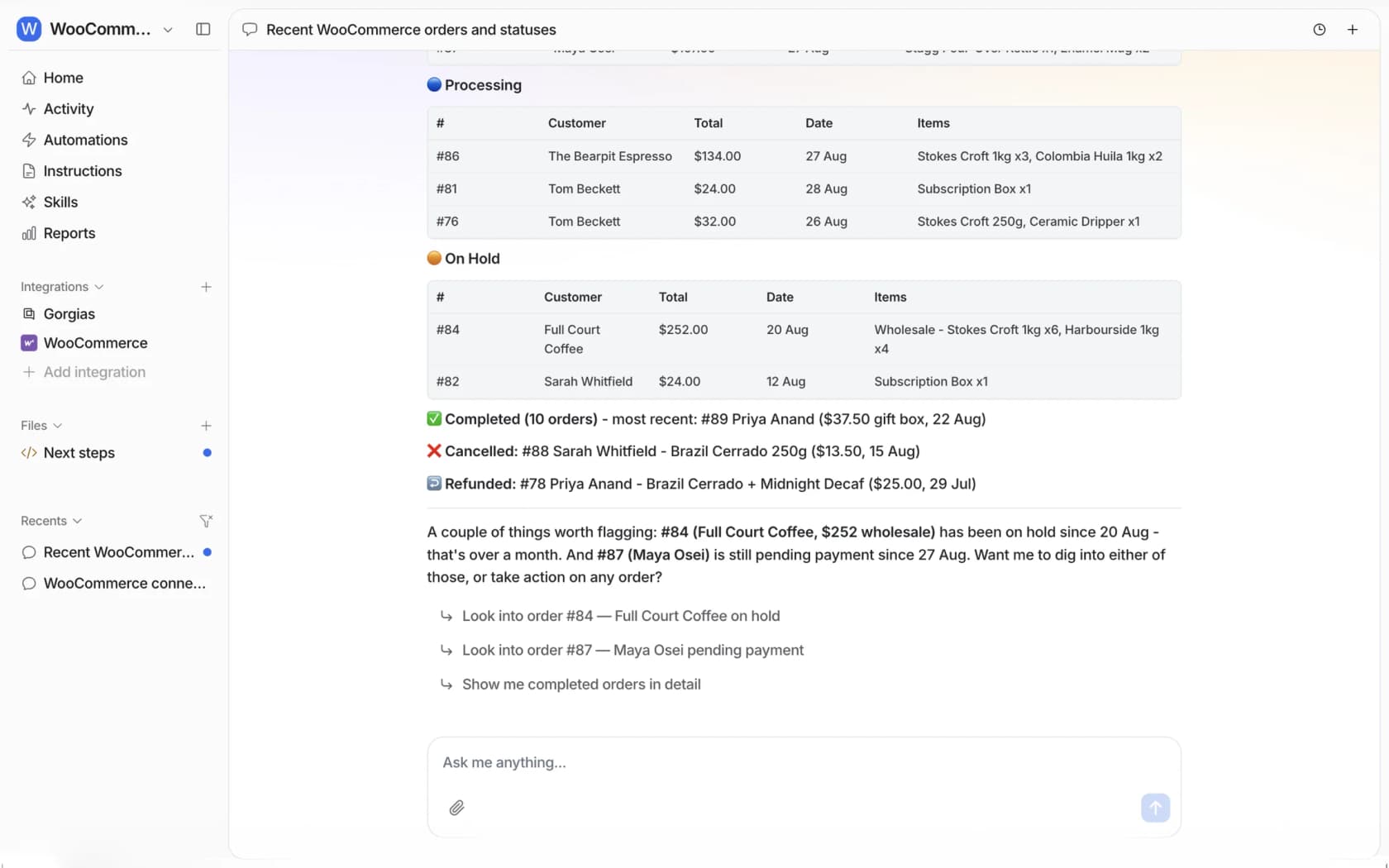
The write side includes Update order status, Add order note (private or customer-facing) and Create refund, each following the approval rule you set. eesel's docs give honest limits here, and they matter for everything above:
- A status change can email the customer. Whether WooCommerce sends one depends on your email settings, so ask for a private note when the message is only for your team.
- A refund is not always money returned. It records the refund on the order, and the gateway decides whether funds move.
- The key needs Read/Write. With Read-only permission lookups work but status changes, notes and refunds fail.
- Tracking numbers live in plugin data. eesel's docs list status, items, totals and notes for orders, so check whether your tracking plugin's data is reachable before promising an answer that depends on it.
How this looks in a live queue: STIL Classics runs eesel on Gorgias and Shopify. Between 8 August and 8 September 2026 it prepared about 320 Gorgias tickets, looked up about 230 orders before writing a single draft, and left a draft reply as an internal note for a person to check and send. The store runs on Shopify rather than WooCommerce, but the order-first pattern is the same one you want when a customer asks what their status means. Cape Coffee Beans uses the same lookup in Zendesk tickets, with the order linked in the answer.
Both are examples of customer service automation that keeps a person in the loop, and both cut down on WISMO tickets.
Connecting WooCommerce itself still needs someone with WordPress admin access to approve it, and the CLI does not replace that step.
Setup is covered in adding AI to WooCommerce and the AI chatbot for WooCommerce guide. If your helpdesk is Gorgias, read Gorgias with WooCommerce first.
What mistakes cause the most status tickets?
These are the ones I would fix first on a store, in rough order of how many tickets they create.
- Leaving orders in Processing. The customer was told it is being prepared, then hears nothing. Mark Completed when it ships, or add a tracking plugin so the email carries the number.
- Treating Cancelled as a closed case. The customer is silent and possibly still charged. Send a manual note and check the gateway.
- Changing status to send a message. Every transition can email the customer. Use a private order note for internal comments.
- Reading On hold as a problem. It is the normal state for bank transfers, so a macro that apologizes for it creates anxiety. Say what you are waiting for.
- Letting an AI agent state what it did not look up. Status, notes and items should come from the live order, not a model's memory of how WooCommerce usually behaves. See the order management system overview and the ecommerce support contact rate data for how large this queue gets.
If you are still choosing tools, the best AI for ecommerce support and best order tracking chatbot lists compare them.
If you are weighing the platform itself, see WooCommerce alternatives and Shopify vs WooCommerce.
Try eesel for WooCommerce order questions
Most order-status tickets are the same few questions asked at different statuses, and the answers sit in the order itself. eesel reads the live WooCommerce order before it replies, so "what does On hold mean?" gets an answer tied to that order's notes, and a status change or refund waits for your team's approval. It joins your helpdesk, a chat bubble or Slack, so you don't have to rebuild your support stack to get there.
Try eesel on your store.
Prefer to read first? See how the WooCommerce AI agent works. New to the term? Here is what an AI agent is, and how it differs from a macro.
On Zendesk or Freshdesk instead? See Zendesk AI and Freshdesk AI.