Magento credit memo questions: how to answer every refund ticket

Rama Adi

Katelin Teen
Last edited November 5, 2026

Most Magento credit memo questions are really one question: did money actually move, and where to? A credit memo is only a record: clicking Refund on the invoice sends money back through the card gateway, Refund Offline sends nothing and only logs that you paid the customer another way, and Refund to Store Credit (Adobe Commerce only) puts it on their account balance.
So read the memo before answering. Let AI handle the "what is this email?" and "was I refunded?" tickets, and keep card refunds and goodwill with a person. eesel reads Magento orders live and can issue offline refunds as credit memos behind an approval, and with the eesel CLI a coding agent can upload your refund policy and test the answers before go-live.
Why do Magento credit memos confuse customers and agents?
I'm Rama. I build integrations at eesel, including the code eesel's agent uses to issue refunds in Magento, and the credit memo is the part that trips people up most when they see it from the inside. The name sounds like accounting. The email the customer gets says "credit memo", not "refund". And the same document can mean "your card is getting the money back", "we sent you a check" or "nothing has happened yet", depending on which button an admin clicked.
Adobe's own definition is plain: a credit memo is "a document that shows the amount that is due the customer for a full or partial refund", per the credit memos guide. It's the paperwork. Whether money moved is a separate fact, and it's the one every customer ticket is really asking about.
This guide covers how credit memos work, the tickets they create, how to answer each one, what your helpdesk can see, and where AI fits. For the wider platform, the Magento review and Magento pricing breakdown cover the basics, and Magento AI covers what Adobe's own AI does (mostly merchandising, not support).
How does a credit memo work in Magento?
A credit memo can only be made against an invoiced order. Adobe's issue a credit memo page says it "must first be generated for an invoiced order", and that you can issue online and offline refunds, partial or full, "depending on the payment method". Before an invoice exists, you cancel the order instead. After it exists, a cancel has to go through a credit memo, per Adobe's order processing docs.
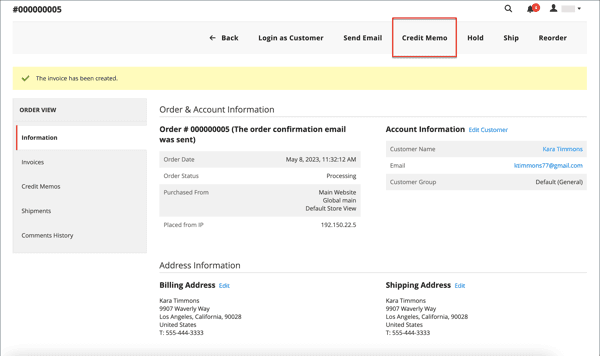
The part that matters most for support is where the admin starts. A card refund through the gateway has to start from the invoice: Sales > Orders > View > Invoices, open the invoice, then Credit Memo. The Credit Memo button on the order itself is fine for offline refunds, but it can't reach the card. Then the admin picks one of three ways to finish:
| Button | What happens to the money | Who can use it |
|---|---|---|
| Refund | Sent back through the payment gateway (PayPal, Braintree and others) and "managed by the payment processor" | Card and gateway orders, started from the invoice |
| Refund Offline | Nothing moves. "The credit memo serves as a record of the offline transaction" paid by check, gift card or cash | Any payment method |
| Refund to Store Credit | Added to the customer's store credit balance | Adobe Commerce only, not Magento Open Source |
All three descriptions come from Adobe's credit memo guide, and store credit being Adobe Commerce only is spelled out in the store credit docs. Check and money order purchases "must be refunded offline". Card purchases can go either way.
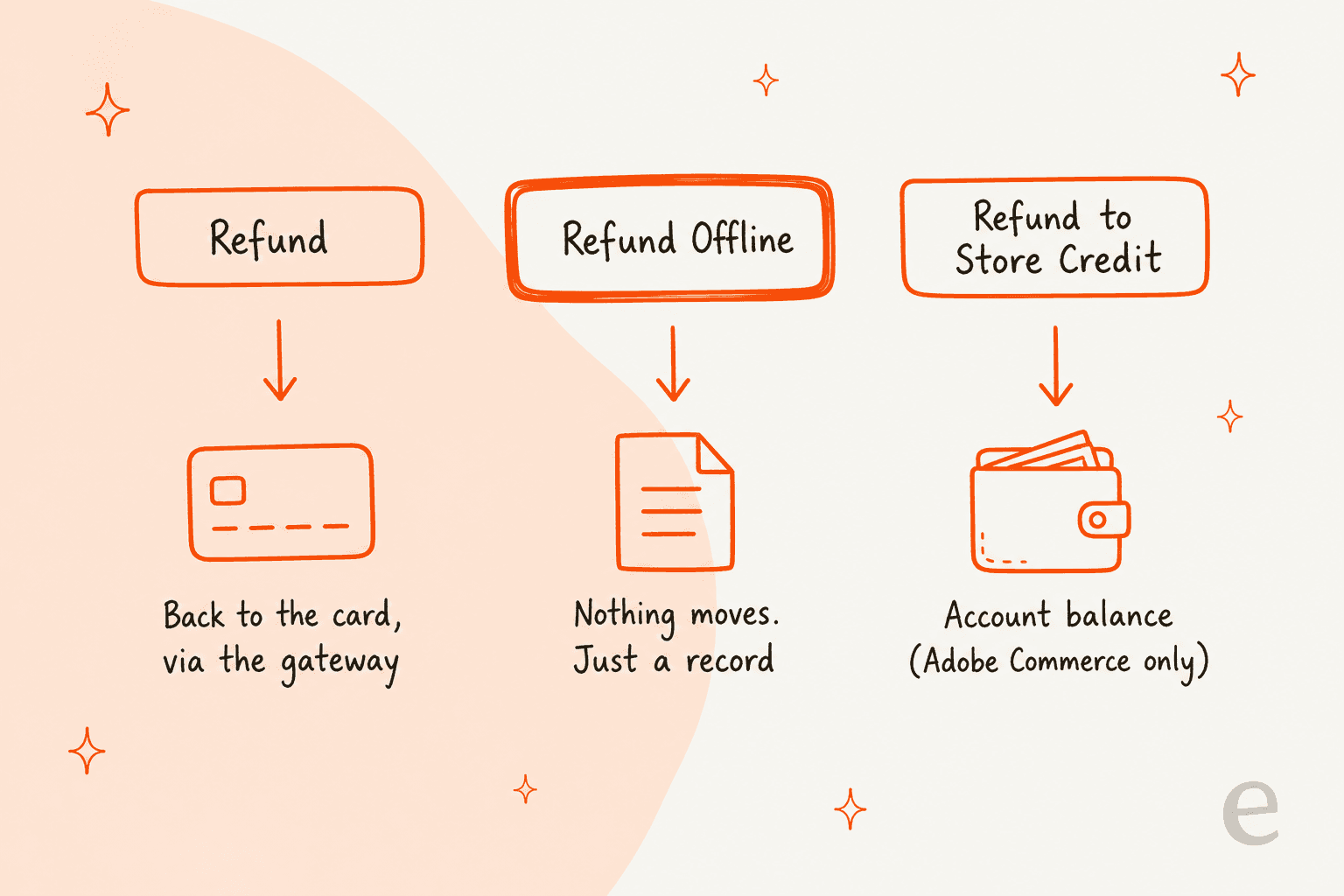
That middle row is where most of the confusing tickets come from. An agent sees a credit memo on a card order and tells the customer "your refund is on the way". If someone clicked Refund Offline on that card order, it isn't. The memo exists, the order may even show Closed, and no money has gone anywhere until somebody refunds it in the payment provider's own dashboard.
What the fields on the form mean
The Refund Totals block is where partial refunds and "why did I get less?" tickets are born. Here's what each field does, per Adobe's credit memo page:
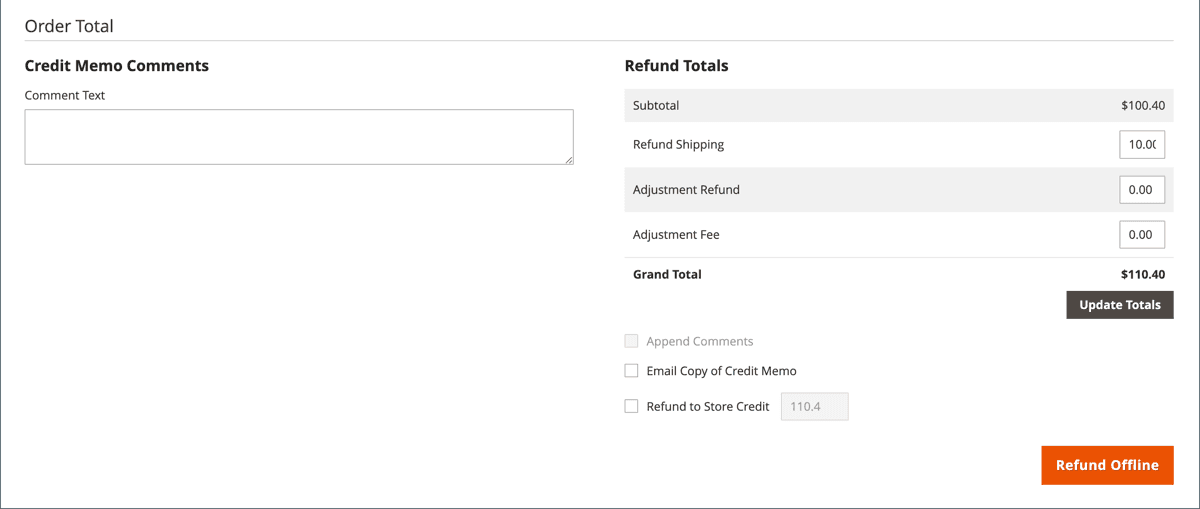
- Refund Shipping starts at the order's shipping cost, less anything already refunded. It "can be reduced, but not increased."
- Adjustment Refund adds money that isn't tied to an item, shipping or tax, like a goodwill amount. It "cannot raise the total refund higher than the paid amount."
- Adjustment Fee subtracts money, "such as a restocking fee".
- Return to Stock puts the item back in inventory. Stores can make this automatic with the
Automatically Return Credit Memo Item to Stocksetting. - Email Copy of Credit Memo sends the customer the document. If it's unticked and the store hasn't turned on automatic credit memo emails, the customer hears nothing.
- Append Comments adds the admin's comment to that email, which is the one place to explain a partial refund in plain words.
You can refund part of an invoice, several partial amounts, several invoices on one order, or "three of the five shirts in an order", all through separate credit memos. A fully refunded order moves to Closed. A partially refunded one stays in Processing until every item ships, per Adobe's order status table.
What credit memo questions do customers actually ask?
Credit memo tickets fall into a short list, and almost every one is answered by reading the order's Credit Memos tab. Here's how I'd answer each, with the field you need to look at.
"I got a credit memo email. What is it?"
This is the most common one, and it's a wording problem. Magento's default email template is literally called New Credit Memo, and it fires whenever the Email Copy of Credit Memo box is ticked or the store has credit memo emails on, under Stores > Configuration > Sales > Sales Emails > Credit Memo, per Adobe's sales emails reference.
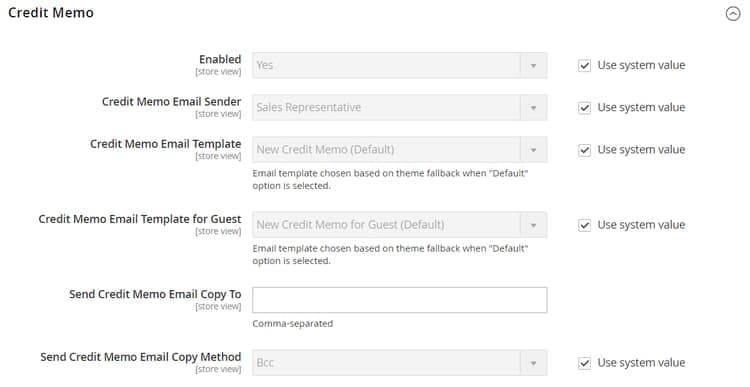
The answer is: "That's our refund receipt. It shows what we refunded and how." Then say how, because that's the next question. If you get this ticket a lot, the cheaper fix is editing the template's subject line to say "refund" instead of "credit memo". It's a one-time change that removes a whole ticket type.
"Was I refunded? I don't see it on my card."
Open the credit memo and check two things: which button made it, and when. If it was an online Refund, the money left your side and the timing now belongs to the card network. Adobe doesn't give a day count and points you to "the documentation provided by your payment provider". Say that honestly and give the processor's typical window from your own policy page, not a number you made up.
If it was Refund Offline on a card order, that's a real problem, not a timing one. No money has moved. Flag it to whoever handles payments so they can refund in the gateway dashboard, and don't tell the customer it's on the way until they have.
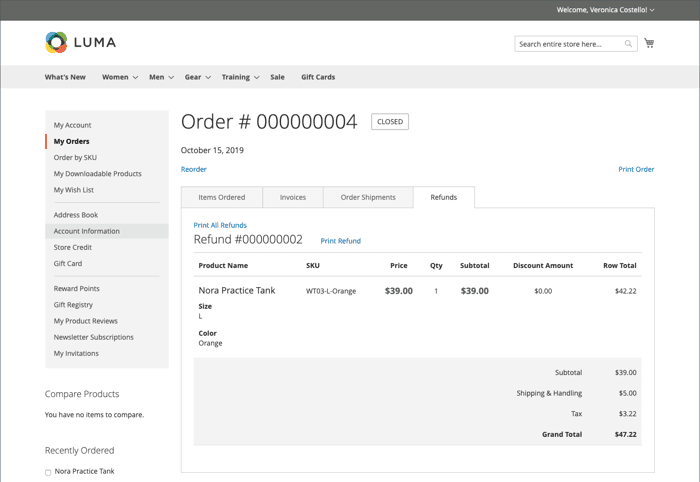
Logged-in customers can check for themselves under My Orders > View > Refunds, which shows the refunded items, shipping, tax and grand total, per Adobe's refunds in customer account page, which Adobe files under its Adobe Commerce store credit docs. Pointing them there with the refund number is a good answer in itself.
"Why did I only get part of my money back?"
Read the Refund Totals on the memo. The usual causes, in the order I'd check them:
- Shipping wasn't refunded. Refund Shipping was lowered or set to zero.
- A restocking fee was taken. That's the Adjustment Fee.
- Only some items were refunded. Qty to Refund was set below the order quantity.
- There's a second memo coming. Partial refunds can be split across several memos, and the order stays
Processingmeanwhile. - Part was paid with a gift card, store credit or reward points. Those come back separately, and reward points depend on two global settings,
Refund Reward Points AutomaticallyandDeduct Reward Points from Refund Amount Automatically, per the reward points config.
The answer is then specific: "We refunded the two items you returned, $84.00, but not the original $10 shipping, which our returns policy doesn't cover." If an admin left a comment on the memo, it usually tells you which one it was.
"Can I have store credit instead of a refund?" (or the other way round)
On Adobe Commerce, an admin ticks Refund to Store Credit on the memo and the customer sees it under Store Credit in their account, with the date and time. On Magento Open Source the feature doesn't exist, so "store credit" usually means a coupon code or a gift card your team issues by hand. Know which edition you run before you promise anything. (BigCommerce handles this very differently; see the BigCommerce store credit guide if you run both.)
One gotcha from the docs: if a gift card order is refunded, "you must manually cancel the associated gift card account", per Adobe's gift card workflow. Refunding the order doesn't kill the card on its own.
"Why can't you refund my order yet?"
This one comes from the agent side as often as the customer side. Run it through the same checks Magento does:
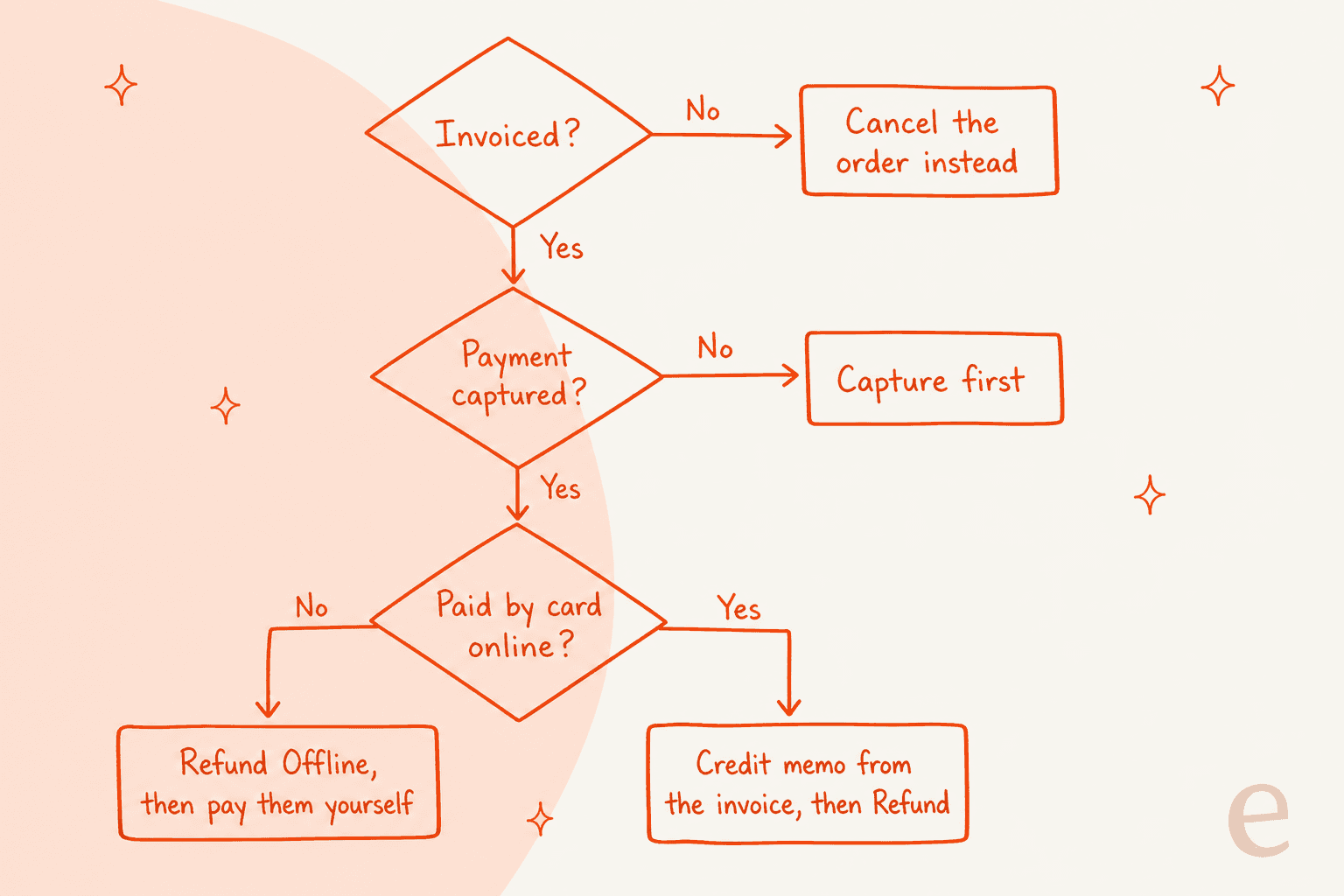
- No invoice yet: cancel instead. There's nothing to credit.
- Invoice set to Not Capture: "You cannot create a credit memo until the payment has been captured", per Adobe's store credit refunds page.
- Authorize and Capture, but not settled: "Refunds cannot be issued until the transaction is settled." That waiting period is usually short and handled by the processor.
Double charges and disputed refunds belong in a separate flow, covered in AI for billing disputes. For the rest, telling a customer "your payment is still settling, we'll refund it as soon as the bank lets us" is a much better reply than "we can't refund that".
"Where's my refund receipt?"
Admins can print a credit memo as a PDF from Sales > Operations > Credit Memos, one at a time with Print or in bulk with Actions > PDF Credit Memos. Customers can print it from the Refunds tab on their order with Print Refund. Either answer works; the second saves you a ticket next time.
What should your team check before replying?
A short checklist beats a long policy doc here, because every credit memo question comes back to the same four fields. Before anyone, human or AI, replies:
| Check | Where in Magento | Why it matters |
|---|---|---|
| Is there a credit memo at all? | Order > Credit Memos tab | No memo means no refund yet, whatever the customer was told |
| Online or offline? | The memo, and the order's payment method | Offline on a card order means money hasn't moved |
| What was refunded? | Refund Totals: shipping, adjustments, items | Explains every partial refund |
| When? | Memo date, plus the processor's timing | Sets an honest expectation |
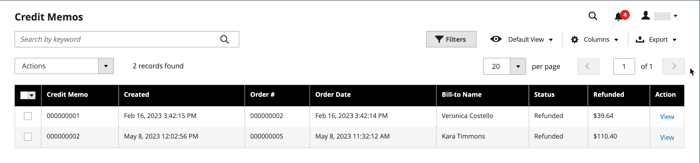
The Credit Memos grid under Sales shows every memo with its order number, status and refunded amount, which is handy for "I was charged twice, refund one" tickets where you need to see what's already gone back.
Get the memo right the first time, because the admin has no simple undo for it. A Reddit thread from 2020 asking how to reverse a credit memo entered with the wrong details got this answer:
"You could add another credit memo if the previously credit memo was a partial refund. Not if it was a full refund. You'll have to get your devs to edit it manually at the db level."

Split payments are the other classic trap. An older r/Magento post describes refunds on orders paid partly by card and partly by store credit, where Magento used the store credit first and left the card refund short. That's from the Magento 1 days, but it's why I'd always read the payment breakdown on the memo, not just the total, before telling a customer what went back to their card.
"every time we refund an order that was paid by credit card and store credit, the system would always use the store credit first thus making the CC refund not complete"
If you run Adobe Commerce with returns turned on, there's one more layer. A return (RMA) records that you've authorized the item coming back, with a resolution of Exchange, Refund or Store Credit, per Adobe's returns guide. The money still goes back through a credit memo, and the docs don't say approving a return creates one for you. So "my return was approved, where's my money?" means checking for a memo, not just the return status. Magento Open Source has no returns module at all, which is why refunds carry the whole job there. The guide on returns management covers the return side in more depth.
What can your helpdesk see about Magento refunds?
Less than you'd hope, in most cases. I checked each helpdesk's own Magento docs:
| Helpdesk | What its Magento docs show | Credit memos or refunds from the helpdesk |
|---|---|---|
| Gorgias | Customer profile and order details in the ticket sidebar, Magento 2, Pro plan or higher | Setup asks for Credit Memos and Cancel permissions, but no refund action is described |
| Zendesk | No first-party app; the marketplace listing is agnoStack's third-party Magento 2 app | agnoStack advertises full, item-level and partial refunds as a paid feature, "platform dependant" |
| Freshdesk | Invoices, purchase history, prices and shipping address | Read-only, and documents Magento 1.7 to 1.9.3 Community Edition, with no Magento 2 support stated |
| eDesk | Order and conversation history in its customer view | No refund or credit memo feature described |
None of them documents showing the credit memo itself, with its button and Refund Totals, inside the ticket. That's the gap. An agent can see an order is Closed and still not know whether the money went back to the card or nowhere. The Gorgias Magento guide goes deeper on that one integration, and best AI for Magento compares the wider options.
Where does AI fit in credit memo tickets?
Split the work by what can go wrong. Explaining what a credit memo is costs nothing if the AI gets a word slightly off. Refunding a card is real money that's hard to claw back. I'd sort the tickets into three lanes:
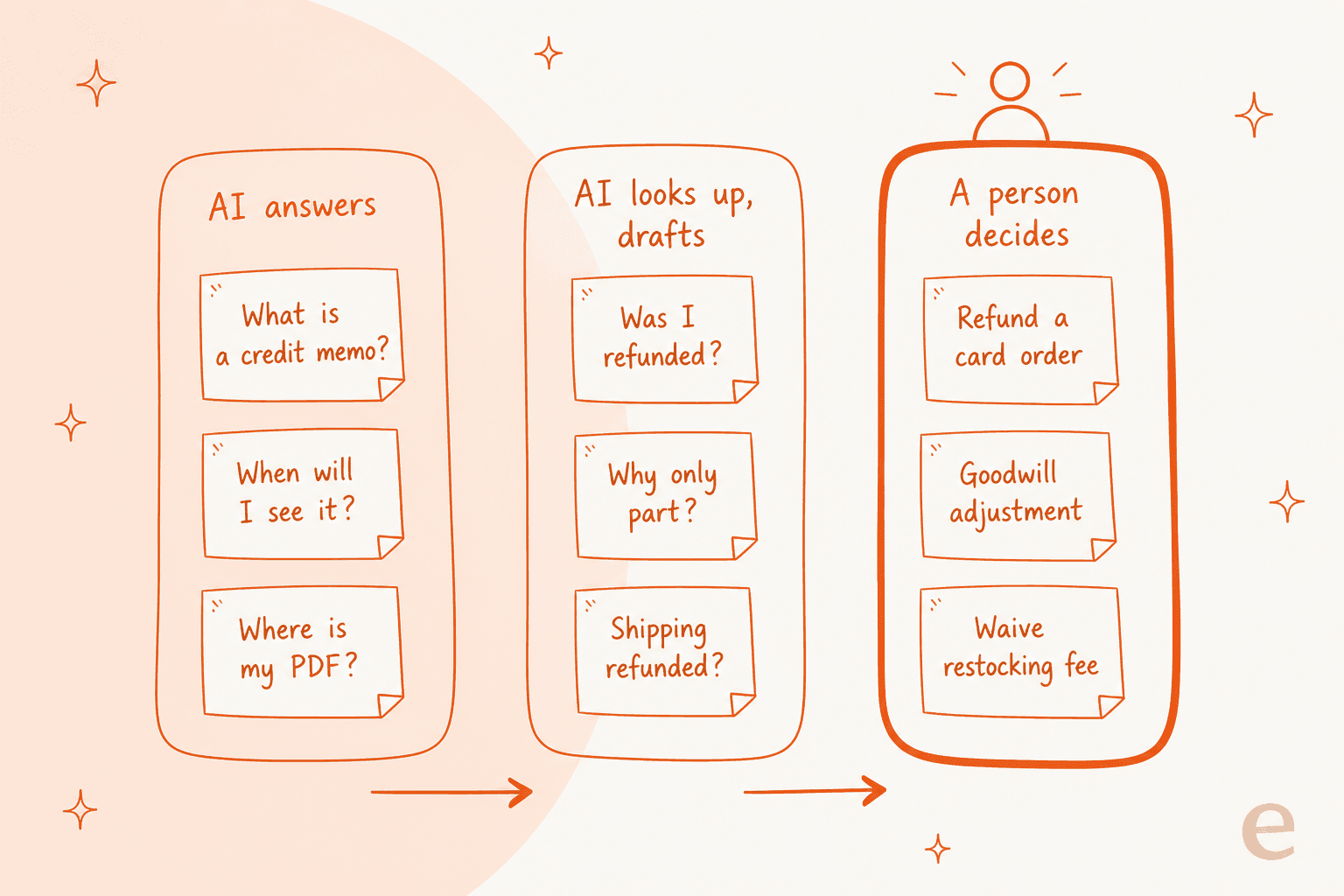
- AI answers on its own: what a credit memo is, how long card refunds take per your policy, where to find the receipt. These are policy answers. An AI chatbot for Magento trained on your refund page handles them well, on email or Magento live chat.
- AI looks up and drafts: "was I refunded?", "why only part?", "was shipping included?". These need the live order and its memos. The AI reads them and drafts the reply, and a person checks it on anything unusual. Prebuilt refund macros help here too.
- A person decides: refunding a card order, goodwill adjustments, waiving a restocking fee. These are judgment calls with money attached. A refund approval matrix has a template for drawing that line.
I've seen this on real inboxes, not demos. In a real-traffic trial eesel ran on an ecommerce brand's Zendesk and Shopify inbox, drafts for refund status questions were rated useful 100% of the time and returns and refunds drafts 93.8%, yet only 12% were sent without edits. Looking up the refund is easy for AI; deciding what to say about it still benefits from a person.
That split is how eesel customers already run refunds. STIL Classics, a planner brand on Gorgias and Shopify, has eesel look up the order and leave a draft as an internal note, "written as if the refund or replacement has already been processed, because the person sending it will have done that first". The team processes the refund, edits and sends; eesel prepared about 320 tickets and looked up about 230 orders in a month. Question Beauty goes further and lets eesel reply on its own to about 960 tickets a month, while refunds, returns and chargebacks are always handed to a person with a note. Neither runs on Magento, but the rule carries over: the AI does the reading, a person moves the money.
The same split shows up in the AI for refund requests guide and customer support approval workflows, if you want the general version.
How eesel handles Magento credit memos
eesel's Magento integration reads orders live by exact order number or email, plus tracking, payment status (method, whether it cleared, balance due), products and stock, per the eesel Magento docs. It works on Magento 2, both Open Source and Adobe Commerce.
On the write side, eesel's Refund Order action refunds an amount, specific items or everything outstanding, and Magento records it as a credit memo. I built this to be careful on purpose:
- Offline-paid orders only. Check, bank transfer and cash on delivery. Card and other gateway orders are refused, because that refund "has to be issued by a person in the Magento admin to reach the customer's account". That's the Refund Offline trap from earlier, closed off in code: eesel won't create a memo that says "refunded" while the card gets nothing.
- Approval first, if you want it. Write actions can wait for a person to approve them on the Activity page, and granting a Magento permission doesn't switch an action on by itself.
- It checks its own work. The setup asks for both credit memo permissions, one to issue and one to read the memo back. With only one, the money can move but the agent reports the refund as failed, per the Magento setup guide.
- It needs an invoice, the same as Magento does.
Other actions include cancelling an unshipped order, holding and releasing an order, sending an order notice and updating a saved address. On Adobe Commerce it can also create a return.
Two limits worth knowing. Magento itself doesn't trigger eesel, so runs start from a helpdesk ticket (Zendesk, Gorgias or Freshdesk), a Slack mention or the chat bubble on your store. And Magento holds no written policy, so your refund rules come from your website or uploaded docs. If you'd rather a script do the uploading, the eesel CLI lets a coding agent such as Claude Code start the Magento connection, upload your refund policy, then ask test questions like "was order 1042 refunded to the card?" and check the answers before anything goes live. Creating the Magento integration and pasting its keys still needs someone with Magento admin access.
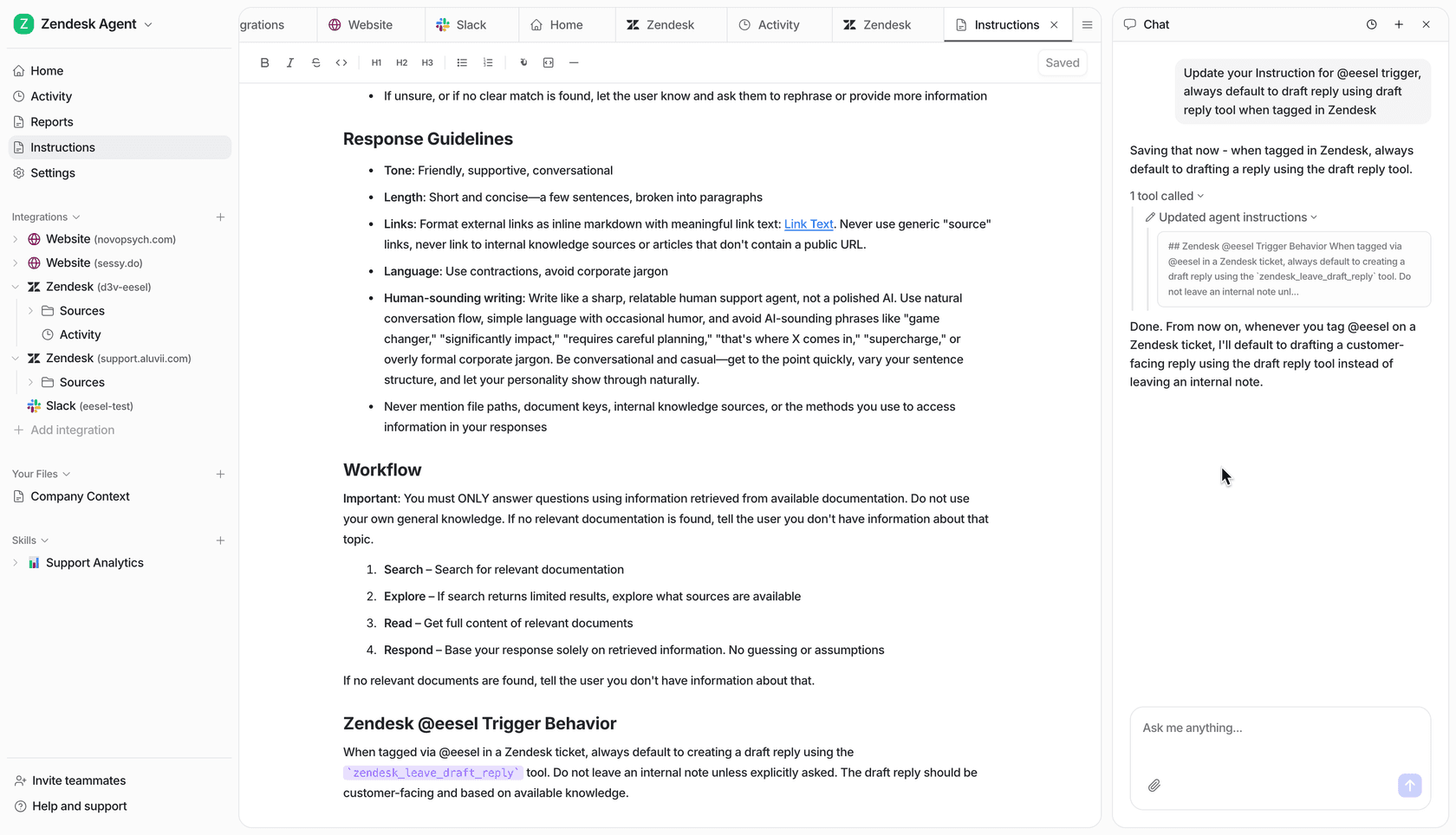
Pricing is by credit, not per seat: free with 100 credits, then from $299 a month for 500 credits, where one ticket or chat is one credit however many lookups it takes, per eesel pricing. For a walk-through of setup, see how to add AI to Magento, and the Magento chat widget guide for the storefront side.
Before go-live, I'd run it against past refund tickets, as the simulation testing guide describes. The limits of letting AI near money are covered in AI refunds and returns, and the ecommerce angle in AI refund automation.
Try eesel for Magento refund tickets
If your queue is full of "I got a credit memo, where's my money?", eesel can look up the order and its payment status before anyone opens the ticket, draft the answer from your own refund policy, and handle offline refunds behind an approval, while card refunds stay with your team. It works inside your Gorgias queue, or Zendesk or Freshdesk, alongside Magento, and the free plan's 100 credits are enough to try it on a batch of real refund tickets. Try eesel and see how it does on yours.