How to add AI to Magento (Adobe Commerce): a practical guide

Rama Adi

Katelin Teen
Last edited July 14, 2026

First, understand what Magento's AI does (and doesn't do)
This is the part most guides skip, and it's the part that decides everything else.
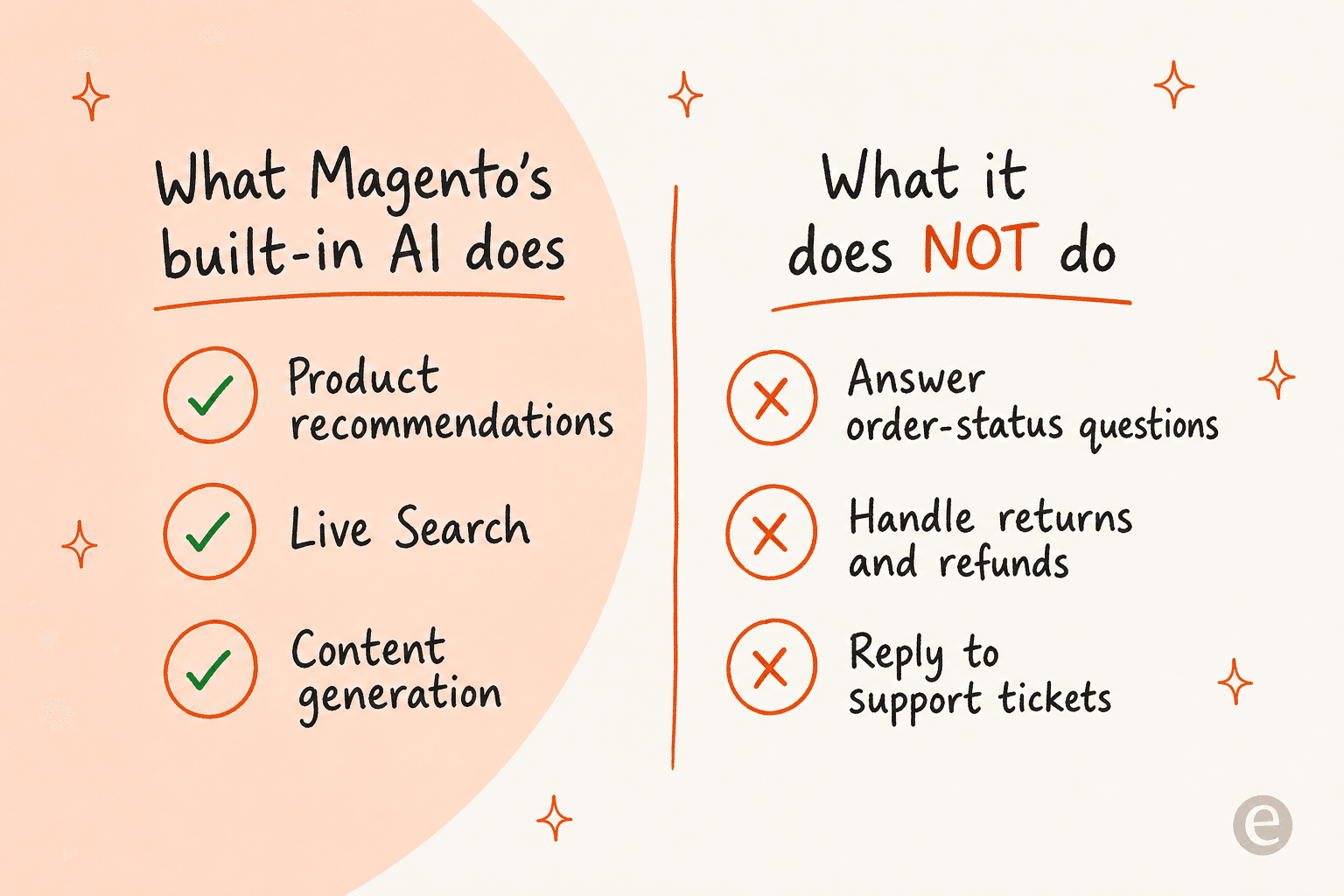
Adobe's current pitch is "commerce built for the age of AI", and they're not bluffing: Adobe Commerce has real, mature AI baked in. The catch is where it's aimed. Every native AI capability is about discovery and conversion, the job of turning a browser into a buyer:
- Product recommendations and intelligent merchandising that adapt to shopper behavior.
- Live Search, semantic search that translates intent into products across dozens of languages.
- Generated content via Adobe Firefly, plus the Brand Concierge conversational shopping assistant.
All useful. But notice what's missing: nothing here handles the ticket a customer opens after they buy. There is no native helpdesk, no returns flow, no ticket-reply AI in the box. That's the gap.
So when someone asks "how do I add AI to Magento?", the real question underneath is usually "how do I get an AI that resolves support?" The answer lives outside the core product, which is exactly why it's worth doing deliberately. If you want the wider category view, our roundup of the best AI helpdesk for ecommerce covers the tools that fill this gap.
Before you start: what you'll need
Adding an AI support agent to Magento is lighter than it sounds, but a few things make it go smoothly:
- API access to your store. Whether you're on Magento Open Source or Adobe Commerce, you'll create an integration in the admin (
System > Extensions > Integration) so the AI can read your catalog and orders. More on that below. - Somewhere for the AI to learn from. Your help center, FAQ pages, shipping and returns policies, and ideally your past support tickets. An AI is only as good as the content behind it.
- A clear scope. Decide which questions you're comfortable automating first (order status and product questions are the safest starting point) and which should always reach a human.
- A test plan. The single biggest mistake is going live blind. You want a way to check the AI's answers against real historical questions before a customer ever sees it.
That's it. You don't need to migrate anything or rebuild your storefront.
The three ways to add AI to a Magento store
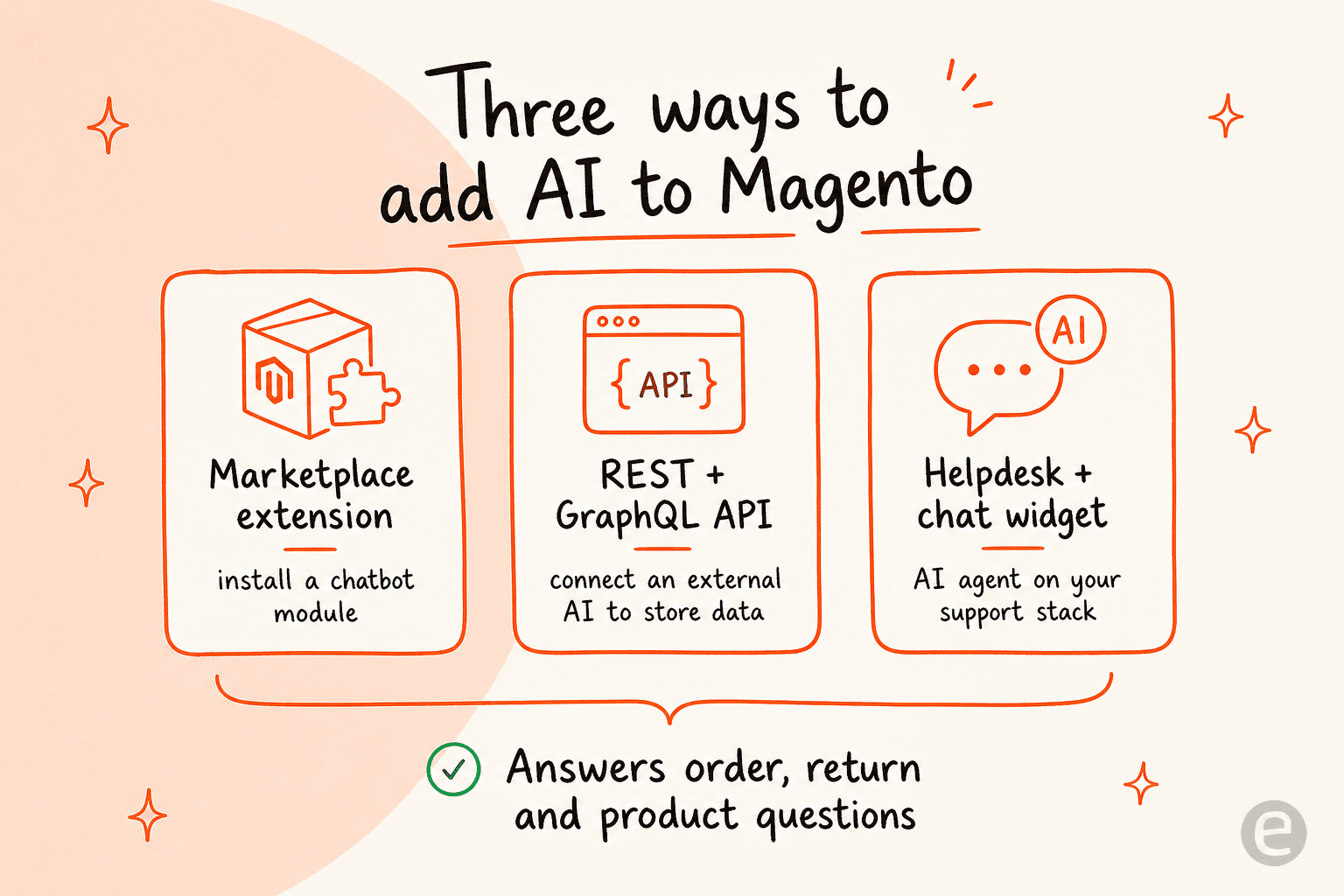
There's no single "AI button" in Magento. Instead, there are three surfaces you can build on, and they trade off effort against control.
Route 1: install a Marketplace extension
The Adobe Commerce Marketplace is the "install an app" path. A search for chatbot returns 26 extensions, spanning free tools to paid licenses, and each listing declares whether it supports Open Source, on-prem, or cloud.
You'll find conversational agents like the AI Chatbot by VDC Stores at $99, Webkul's WhatsApp AI Chatbot at $399, and free connectors for Crisp and Kommunicate. Most of these work the same way under the hood: the extension injects a JavaScript chat widget into your theme, and the actual AI runs on a third-party service.
Best for: teams who want a chat bubble live quickly and are fine configuring an account in the admin.
Watch out for: an extension gets the widget onto your storefront, but many still leave you to bring your own AI brain, and the free ones are often live-chat first, bot second. Check whether the extension actually resolves questions or just routes them to a human.
Route 2: build on the REST or GraphQL API
If you have developers, the Magento web API framework is excellent, and it's the foundation everything else is built on. It exposes your store over REST, GraphQL, and SOAP, with full create-read-update-delete plus search over products, orders, and customers.
An external AI authenticates as a third-party application via OAuth, gets scoped access to only the resources you grant, and can then read live order data or update records. GraphQL is the modern surface here: a single typed query returns exactly the fields the agent needs, backed by Catalog Service, Live Search, and Recommendations schemas.
One quirk worth knowing: the core web API framework doesn't support webhooks, so real-time triggers are handled out-of-process through Adobe Developer App Builder rather than the REST framework itself.
Best for: teams with engineering capacity who want a fully bespoke integration.
Watch out for: you're now building and maintaining an AI product, not just connecting one. That's a real, ongoing cost.
Route 3: connect a ready-made AI support agent
This is the middle path, and for most support teams it's the sweet spot: use an AI helpdesk agent that already knows how to talk to Magento's API and how to resolve a support conversation. You connect your store, point it at your knowledge, and it handles the rest across both the storefront and your existing helpdesk.
That's the route we'll walk through step by step next, using eesel AI as the example, since it's built to plug into Magento specifically. The same approach works if you also run Shopify or WooCommerce stores, which is handy for multi-platform merchants.
Here's how the three compare:
| Marketplace extension | Build on the API | Ready-made AI agent | |
|---|---|---|---|
| Setup effort | Low (install + configure) | High (custom build) | Low (connect + configure) |
| Developer needed | Sometimes | Always | No (API keys only) |
| Resolves tickets end to end | Depends on the extension | Whatever you build | Yes |
| Reads live orders/catalog | Varies | Yes | Yes, over REST API |
| Works on storefront + helpdesk | Storefront widget | Whatever you build | Both |
| Typical cost | Free to ~$399 license | Dev time + AI costs | From $299/mo for 500 credits |
| Ongoing maintenance | Vendor updates | You own it | Vendor-managed |
How to add an AI support agent to Magento, step by step
Let me make this concrete. Here's the flow for connecting an AI agent to a Magento store, the same shape whether you're on Open Source or Adobe Commerce Cloud.
Step 1: connect your store over the API
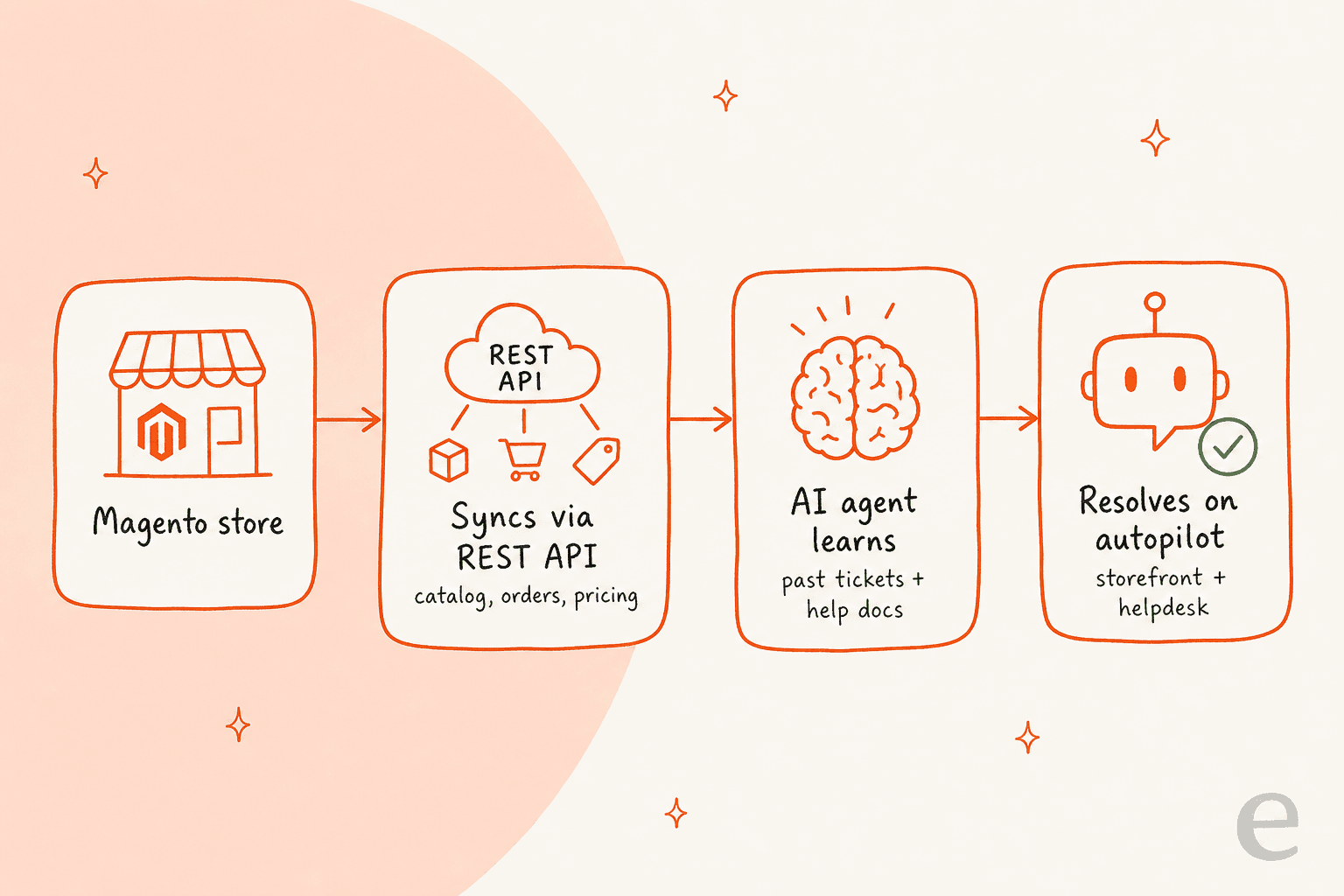
In the eesel dashboard you connect Magento by authorizing API access, no developer needed on the AI side beyond adding the credentials once. From there the agent automatically syncs your product catalog, configurable variants, customer-group pricing, and order data in real time. Update your catalog and it knows immediately, with no CSV uploads. It handles the complex Magento structures too: configurable, grouped, and bundle products, custom attributes, and tiered pricing.
Because eesel also connects to your existing support stack, it isn't only a storefront widget, it plugs into helpdesks like Zendesk, Freshdesk, and Gorgias alongside the store.

Step 2: give it your knowledge
Point the agent at your help center, FAQ pages, and past tickets. This is where the "no wrong answers" work happens: the AI learns from your real content and your team's actual resolutions, so it answers the way you would. For a Magento store that means product policies, shipping and returns rules, and the answers your agents already give every day. If your docs are thin, this is a good moment to fix that, and a strong AI knowledge base pays off across every channel.
Step 3: configure it in plain language
You don't write rules in code. You tell the agent, in plain English, when to jump in, how to sound, whether to draft replies or send them autonomously, and when to escalate. For a Magento store that's things like "handle order-status and tracking questions automatically, follow our 30-day returns policy, and escalate anything about a damaged high-value item to a human with full context."

Step 4: simulate before you go live
This is the step I'd never skip, and it's why I trust this setup at all. We've spent years putting AI agents on live support queues, and we've watched confident-sounding bots quietly give wrong answers, so eesel now runs a simulation on your past tickets before anything reaches a customer. You see how it would have handled each theme, where it's strong, and where the gaps are, for example "23 tickets last week asked about pro-rated refunds, but your docs only cover full cancellations." You fill the gaps, re-run, and only roll out when the numbers look right. It's the difference between hoping and knowing.
Step 5: go live, starting supervised
Drop the chat widget onto your storefront with a single snippet, and switch the helpdesk agent on. The smart move is to start supervised: let the AI draft replies while your team approves them, then hand it full autonomy on the easy, high-volume questions (order status, tracking, basic returns) once you've seen it perform. That gradual autonomy ladder is how you get the volume relief without the risk.
The payoff is real: eesel resolved 73% of tier-1 requests for one customer in the first month, and Magento teams report up to 80% time savings. Order-status and returns questions (the classic WISMO flood) are exactly the repetitive, well-defined work AI is best at taking off your plate, and it's worth tracking the metrics that matter so you can prove the impact.
What real Magento teams say
Magento's reputation is well earned on both sides. It's powerful and endlessly flexible, and it's also famously demanding to run. That context matters, because it's why a low-maintenance AI layer is appealing rather than yet another thing to babysit.
"Enterprise Flexibility with Steep Learning Curve."

"I find Adobe Commerce can be complex and costly to maintain. It needs simpler upgrades, less developer dependency, and lower maintenance costs."
"High cost, constant need for a developer, and long working hours make it demanding to maintain the platform."

The lesson: whatever AI you add, favor the option that reduces developer dependency rather than adding to it. A support agent you configure in plain language and that syncs itself over the API is a better fit for a Magento shop than another custom module to maintain.
Common mistakes when adding AI to Magento
A few traps I see repeatedly:
- Confusing merchandising AI with support AI. Turning on Live Search and Recommendations is great, but it does nothing for your ticket queue. They solve different problems.
- Shipping a bot that only deflects. A chatbot that answers FAQ text but can't look up a real order will frustrate customers faster than no bot at all. Make sure your agent reads live order data, not just static articles. Our take on why chatbots fail goes deeper here.
- Going live without testing. If you can't simulate against past tickets, you're guessing. Guessing on customer-facing AI is how you end up with a viral screenshot.
- Per-seat or flat pricing that punishes growth. Support volume spikes during sales and holidays. A plan sized to your volume (1 credit per chat or ticket the AI works on) beats one that charges per seat whether the AI worked or not.
- Ignoring escalation. The goal isn't 100% automation on day one, it's automating the repetitive work safely and routing the rest to humans with full context. Get the handoff right.
Try eesel for Magento
If you want the shortest path from "no AI" to "AI resolving tickets" on Magento, that's exactly what eesel AI is built for. It connects to your store over the Magento REST API, works with both Adobe Commerce and Magento Open Source (including B2B catalogs, shared pricing, and quotes), and reads your catalog, orders, and FAQs to handle order lookups, returns, and product questions on autopilot, across your storefront and your existing helpdesk.
The two things that make it a good fit for a Magento shop specifically: you can simulate it on your past tickets before going live, so you're never guessing, and pricing is a fixed monthly plan from $299/month for 500 credits (1 credit per chat or ticket) with no platform fee and no per-seat cost, so it scales with your busy season instead of your headcount. Setup runs about 30 minutes, and there is a free plan with 100 credits.
