WooCommerce order withdrawal emails: what they send and when

Riellvriany Indriawan

Katelin Teen
Last edited November 8, 2026

WooCommerce core has an opt-in order withdrawal form from version 11.1, and since 11.2.0 its two emails are editable under WooCommerce > Settings > Emails: "Order withdrawal request received" goes to the customer and "Order withdrawal request" goes to you. The feature is off by default, and a request changes no order status and refunds nothing, so the real work lands in your support queue. eesel's AI teammate reads the matched order and drafts the reply while your team keeps the refund call, and the eesel CLI lets a coding agent upload your withdrawal policy and test its answers before anything goes live.
What are WooCommerce's order withdrawal emails?
They are the two notifications that belong to Order withdrawal, a feature inside core WooCommerce itself, not a paid extension. A customer opens a public form at /my-account/withdraw-order/ without signing in, fills in their name, email and order number, confirms, and WooCommerce emails both sides. The customer gets an acknowledgement. You get a notification that tells you whether the request matched a real order.
I read the shipped 11.2.2 source and the official guide to write this, because the feature is new enough that most of what ranks is plugin marketing. A withdrawal email is not a refund email and not a cancellation email. It is a receipt for a request, and that distinction drives everything below. If you already know the order status list, this feature adds no new status to it.
| Customer email | Merchant email | |
|---|---|---|
| Name in settings | Order withdrawal request received | Order withdrawal request |
| Sent to | The address typed on the form | Recipient(s) field, defaults to your admin email |
| Default subject | We received your withdrawal request | [{site_title}]: Order withdrawal request for order {order_number} |
| Default heading | We received your withdrawal request | Order withdrawal request received |
| Default closing text | We will review your request and contact you about next steps, including any refund due. | Review the request details and contact the customer about next steps. |
| Details listed | Submitted, Name, Email address, Order number, Withdrawing, Additional details | The same, plus a match line, a View matched order link and the 14-day warning when it applies |
| Placeholders | {order_number}, {order_billing_name} | {order_number}, {order_billing_name} |
Both emails let you switch them on or off and edit the subject, heading and additional content, per the WooCommerce guide. Only the merchant email has a recipient field.
Which WooCommerce version added the emails?
The form arrived in WooCommerce 11.1.0 on September 3, 2026, and the two emails became editable settings entries in 11.2.0 on October 7, 2026. The official guide says Order withdrawal is "available in WooCommerce 11.1 and later", while one open bug report says the endpoint was "added in 11.2". Both are partly right, and I checked the release tags to see why.
| Release | Date | What changed |
|---|---|---|
| 11.1.0 | Sep 3, 2026 | Public form and review step, order note and inbox notification for matched requests. No registered email classes in the code yet |
| 11.2.0 | Oct 7, 2026 | Both emails appear in WooCommerce > Settings > Emails with editable subject, heading, content and a recipient field (PR 67799) |
| 11.2.2 | Nov 4, 2026 | Latest stable I checked. Same feature set |
If you are on 11.1.x, treat the emails as fixed defaults you cannot edit. If you want the settings screen, update to 11.2 or later. For the wider picture of how a WooCommerce store hangs together, my WooCommerce review covers the platform itself.
How do you turn the emails on?
Switch on Order withdrawal under WooCommerce > Settings > Advanced > Features, then check both emails under WooCommerce > Settings > Emails. The feature is disabled by default, and it is not flagged experimental.
- Go to WooCommerce > Settings > Advanced > Features, enable Order withdrawal, and save.
- Optional: under Advanced > Page setup, change the Order withdrawal endpoint (for example
cancel-order), which moves the form to/my-account/cancel-order. You do not need to re-save permalinks. - Open WooCommerce > Settings > Emails, select Manage next to each withdrawal email, and set the Recipient(s) on the merchant one.
- Test on a staging store with a fictional order and an inbox you control. A successful test sends real email.
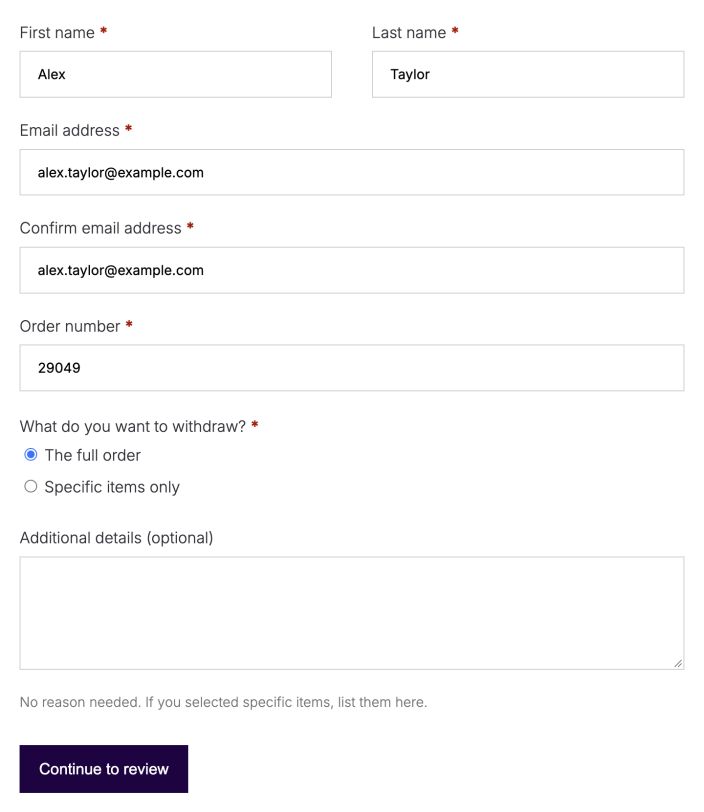
This is what your customer sees. The first screen collects the details, with a choice between the full order and specific items.
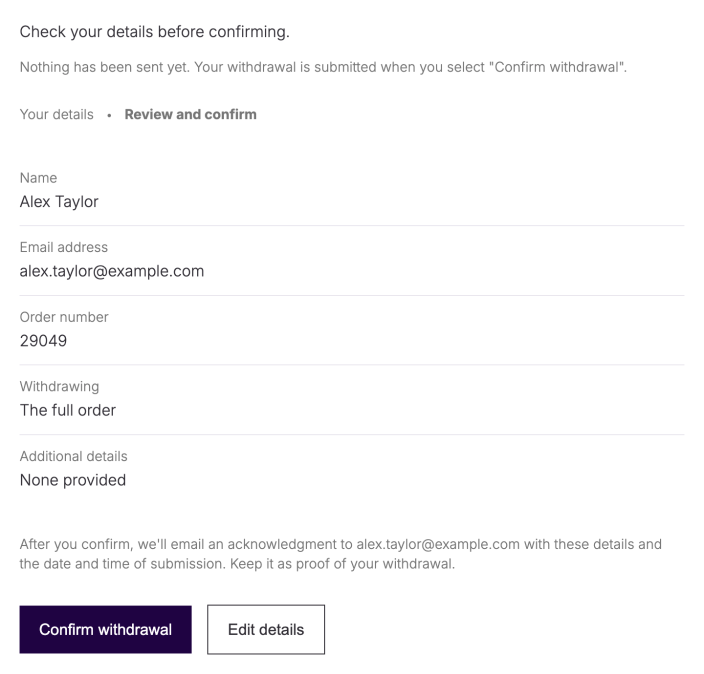
The second screen is a review step. Nothing is sent until the customer selects Confirm withdrawal, and the screen says an acknowledgement will go to their address "with these details and the date and time of submission".
What happens after a customer submits the form?
WooCommerce tries to match the order number and billing email to a real order, then sends the emails either way. A match adds an order note and a WooCommerce inbox notification. A miss still gets accepted, but the only trace is the merchant email.
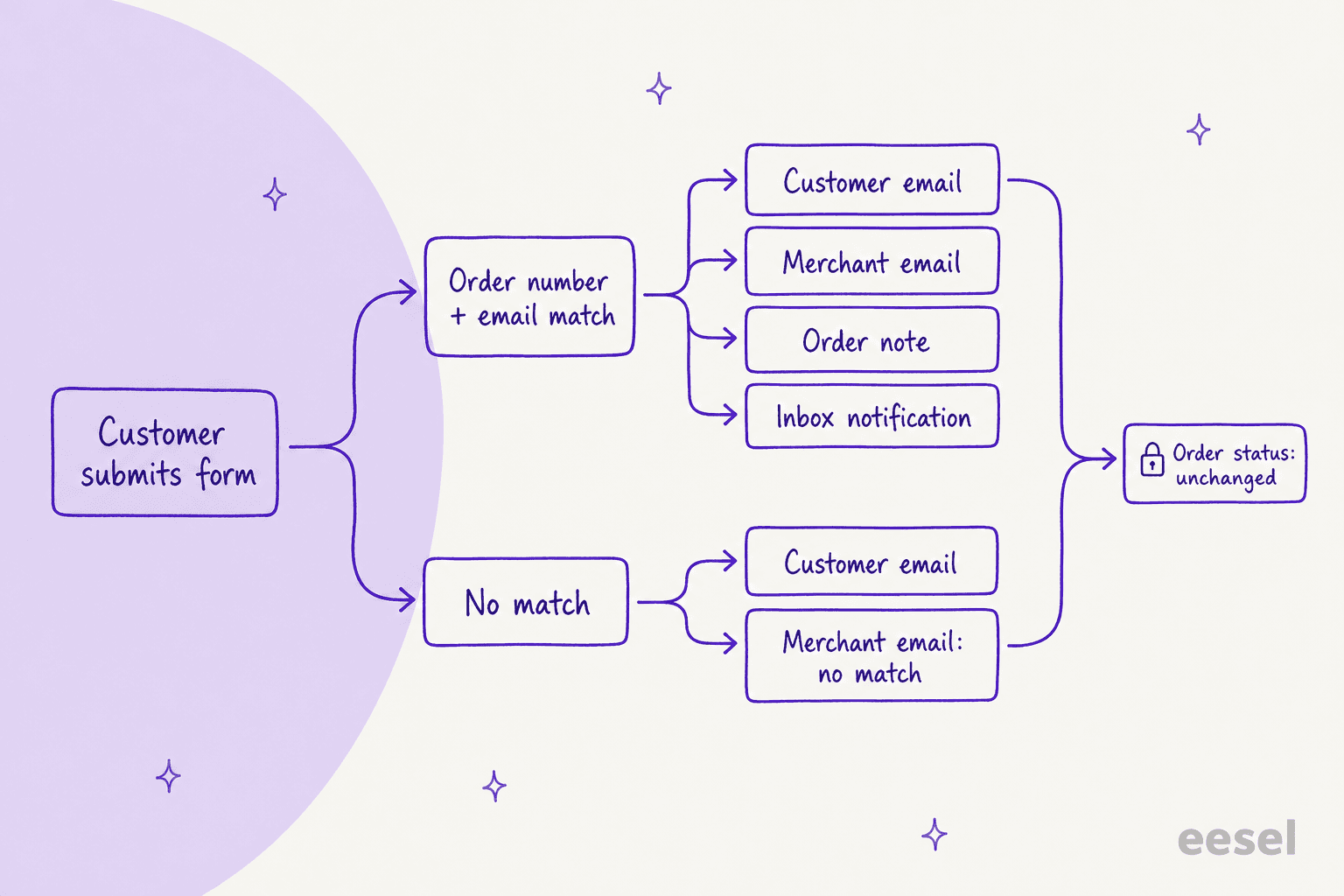
| Matched request | Unmatched request | |
|---|---|---|
| Customer email | Sent | Sent, identical |
| Merchant email | Sent, with a View matched order link | Sent, says WooCommerce could not match it and added no note |
| Order note | Added: "Order withdrawal requested. Withdrawal type: ..." | None |
| Inbox notification | Added on the WooCommerce home screen, even if the merchant email is off | None |
That last row is the trap. If you disable the merchant email, a matched request still leaves a note and an inbox item, but a typo'd or different-email request leaves nothing at all. I would keep the merchant email on.
Three smaller behaviours worth knowing, all from the official guide:
- One request per order. A repeat shows "A withdrawal request has already been submitted for this order", and you are not told about the attempt.
- One submission every 30 seconds per email address and per IP address.
- A failed send blocks completion. If an enabled email fails, the customer sees a "could not submit" error, and a retry can resend an email that already went out.
What does a withdrawal request not do?
It does not change the order status, cancel the order, or issue a refund. The guide is blunt about it: submitting a request leaves all three untouched, and what you do next is up to you.
- No status change. A completed order stays completed. The order note it adds sits alongside the customer and private notes you already use.
- No refund. Refunding is still a manual step, and a manual refund records the refund without sending money.
- No age check. The form accepts orders of any age, and it matches orders in any status, including cancelled, refunded and failed.
So the email is the start of a ticket, not the end of one.
Why does the 14-day warning show up early?
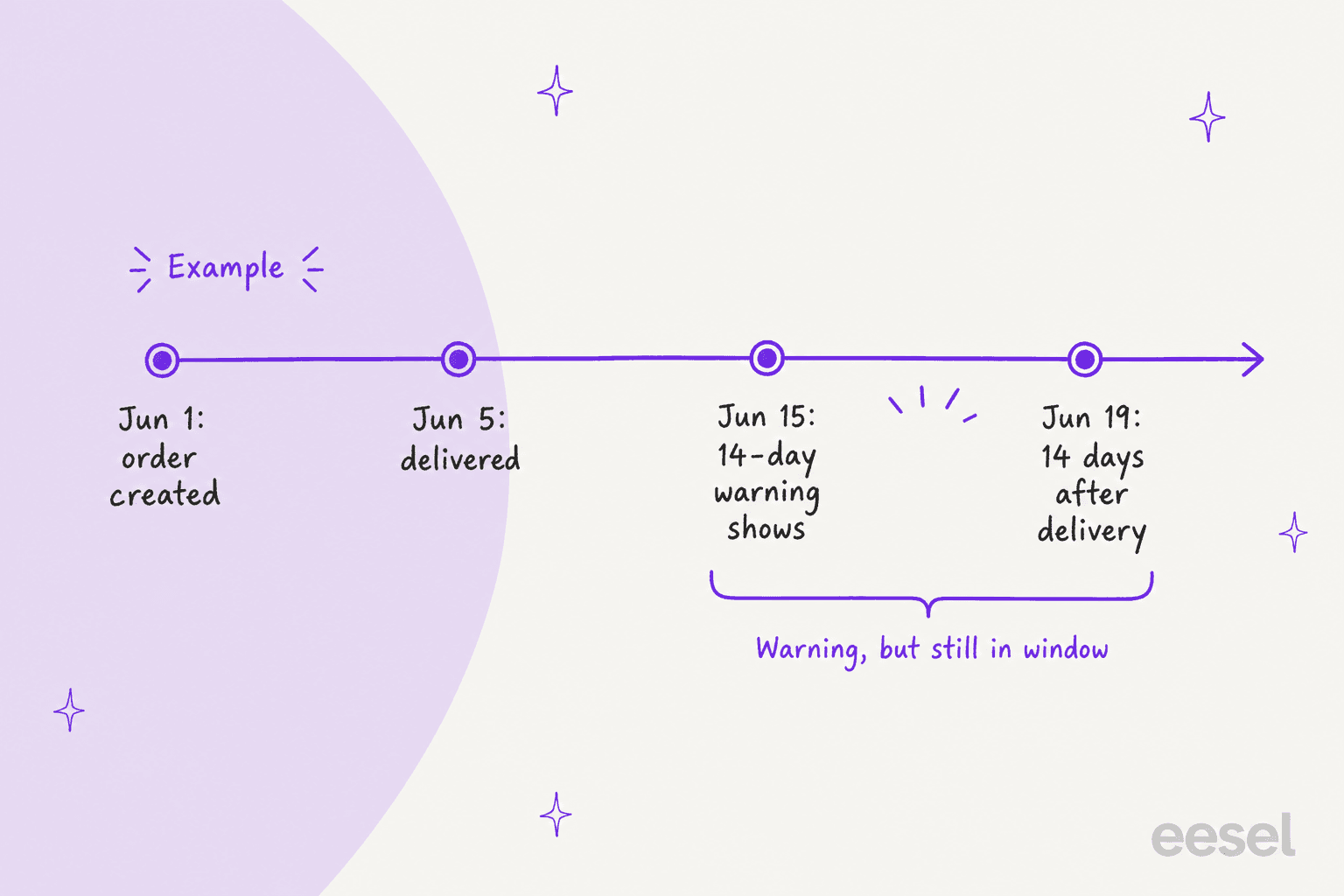
Because WooCommerce measures the 14 days from the order creation date, since it has no delivery date to look at. If a matched order is more than 14 days old, both the inbox notification and the merchant email add this line: "This order is older than 14 days. Only orders within 14 days of delivery are eligible for withdrawal."
The WooCommerce guide uses the same example: an order created June 1 and delivered June 5 can show the warning before 14 days have passed since delivery. The warning is informational only. WooCommerce does not decline, hold or cancel the request, and the customer's email is unchanged. So the warning is a prompt to check the delivery date, not a verdict.
Does this make a WooCommerce store EU compliant?
Not on its own, and WooCommerce says so. The guide states that the feature "does not guarantee compliance" and tells EU sellers to consult a qualified legal professional.
The rule behind all this is Article 11a of Directive (EU) 2023/2673, which Member States apply from 19 June 2026. It asks online sellers for a withdrawal function and a confirmation step, then an acknowledgement on a durable medium that includes the content and the date and time of submission. Here is how that lines up with what I could verify in the shipped feature.
| Article 11a asks for | What I could verify in WooCommerce |
|---|---|
| A withdrawal function, labelled "withdraw from contract here" or equivalent | A public form exists. The label and placement of the link on your own site is yours to set, and I could not confirm a default |
| A confirmation function labelled "confirm withdrawal" or equivalent | The review step's button reads Confirm withdrawal |
| Acknowledgement on a durable medium, with content and date and time | The customer email lists a Submitted line plus the request details |
| Available throughout the withdrawal period | The form accepts orders of any age and works without a login |
That table is my reading, not legal advice.
If you want a separate option, WooCommerce.com lists an EU withdrawal extension and WordPress.org carries a free plugin, but the core feature needs neither. And if you also let AI answer customers in the EU, my notes on the EU AI Act and GDPR requests cover the rest of the compliance picture.
What rough edges are still open?
A few, as of November 8, 2026, and all of them are public in WooCommerce's own repository:
- A crawler trap. The form rendered with HTTP 200 for any trailing path after the slug. Issue 70270 reports it, and PR 70692 proposes returning a 404 for those URLs. It was still open when I checked.
- Free-text items. Customers type which products they are withdrawing instead of ticking line items. Issue 68974 asks for a checkbox list with quantities.
- Email addresses on the page. PR 70193 is open to show addresses unchanged on withdrawal pages.
The free-text field matters most for support. Until that issue ships, a "specific items" request often arrives as a sentence like "the blue hoodie and the cap", and someone has to map it to line items by hand.
What should your support team do when one lands?
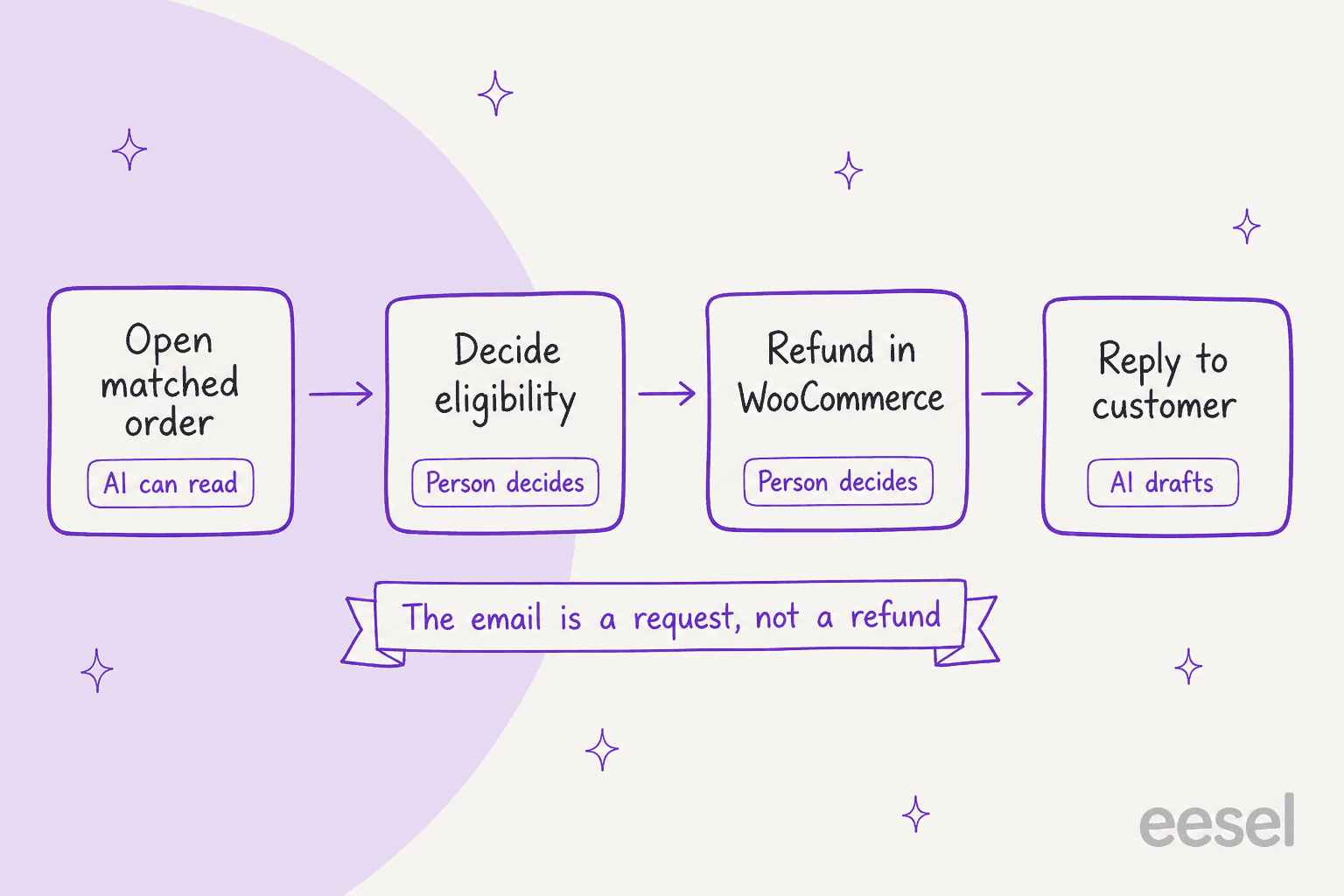
Open the matched order, check the delivery date, decide eligibility, refund in WooCommerce if it qualifies, then reply. That is four steps, and only the first and last are routine.
Here is the setup I would use, written from the support side of the queue:
- Point Recipient(s) at your helpdesk address. The merchant email carries the name, order number and a link to the order. If your helpdesk turns that mailbox into tickets, every request is tracked and assignable instead of buried in an admin inbox, and ticket routing can send it to whoever owns returns.
- Write the reply once. A macro for "we received your request, here is what happens next" saves a lot of retyping. Withdrawal requests also add to your support contact rate. My guides to email templates and refund and return macros have starting points.
- Keep the refund decision with a person. Eligibility depends on delivery dates and exceptions only your team knows, and the refund request workflow should reflect that. My refund approval matrix shows how to draw that line.
- Handle the unmatched ones by hand. Search by the name and email in the merchant email, because the order may sit under a different address.
eesel's team has spent years putting AI agents on live support queues, and the pattern holds in every rollout: the AI is excellent at the lookup and the first draft, and a person should own the money decision. Koffer.ch, a Swiss online luggage shop, shows the shape. Returns, missing invoices and delivery questions already had set answers as Freshdesk macros, so eesel drafted from those macros first, in German, French, English or Italian (the same idea as multilingual ecommerce support), and a person read and sent every reply. Between August 8 and September 8, 2026 it drafted about 100 replies across roughly 60 tickets. It runs on Freshdesk rather than WooCommerce, and the team calls it early days, but the split is the one a withdrawal queue needs. Nordbutiker runs a separate bot per brand and country for the same reason: the customer should get an answer in their own language about their own store.
How does eesel handle WooCommerce withdrawal requests?
eesel connects to WooCommerce through the free eesel AI plugin or a REST API key, and reads the order the way you would. The WooCommerce integration can look up an order "with its items, totals, status and notes", so it sees the withdrawal note the form added. It can also add a private order note, and it can create a refund behind the permissions and approvals you set.
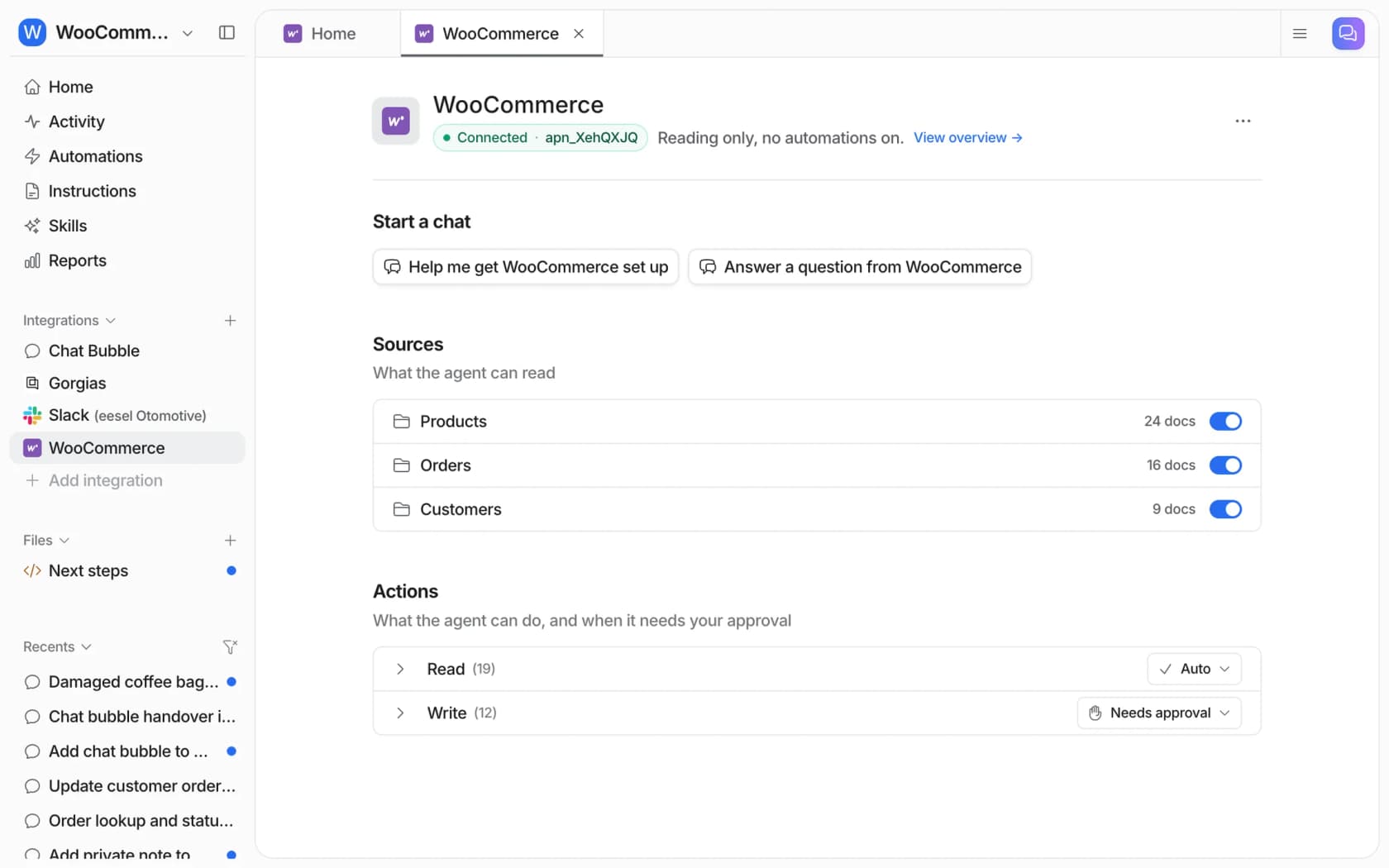
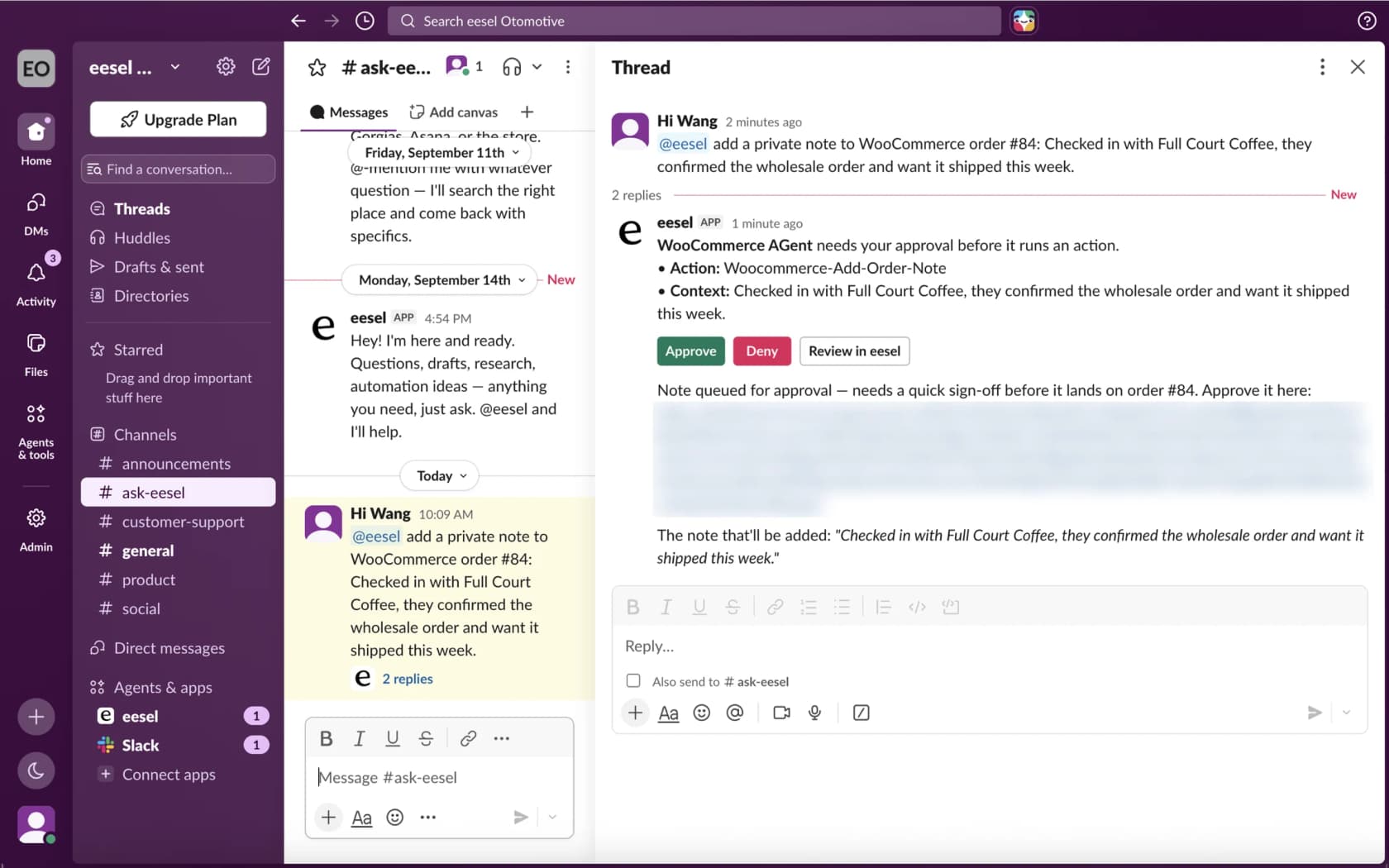
For a withdrawal ticket that means the agent opens the matched order, checks the delivery date against the 14-day line, and drafts a reply that says what the customer asked and what happens next. It does not decide eligibility for you. When an action needs a person, eesel posts an approval card in Slack with Approve, Deny and Review in eesel buttons, so the refund waits for a teammate. That is the same rule behind my guides to automating refunds and returns, and the handoff should carry the order context with it. The same order lookup powers order tracking replies.
Where eesel is not the right fit: it does not replace WooCommerce's own notification emails, which WooCommerce sends itself, and it only sees what the order shows. If your withdrawals are handled outside WooCommerce, fix that sync first, and test the agent on past tickets before go-live. For setup, my guides to adding AI to WooCommerce and the best AI for WooCommerce support are the places to start.
Try eesel on your WooCommerce withdrawal tickets
Want withdrawal requests answered from the real WooCommerce order instead of a copy-pasted template? eesel is an AI helpdesk teammate that plugs into your store in a few minutes (see my ecommerce helpdesk roundup for the wider field), reads each order's items, status and notes, and drafts the reply, the same one behind my WooCommerce chatbot guide. Refunds stay with your team, so you can speed up returns tickets without automating the payout. The free plan includes 100 credits, and paid plans start at $299 a month on the pricing page.
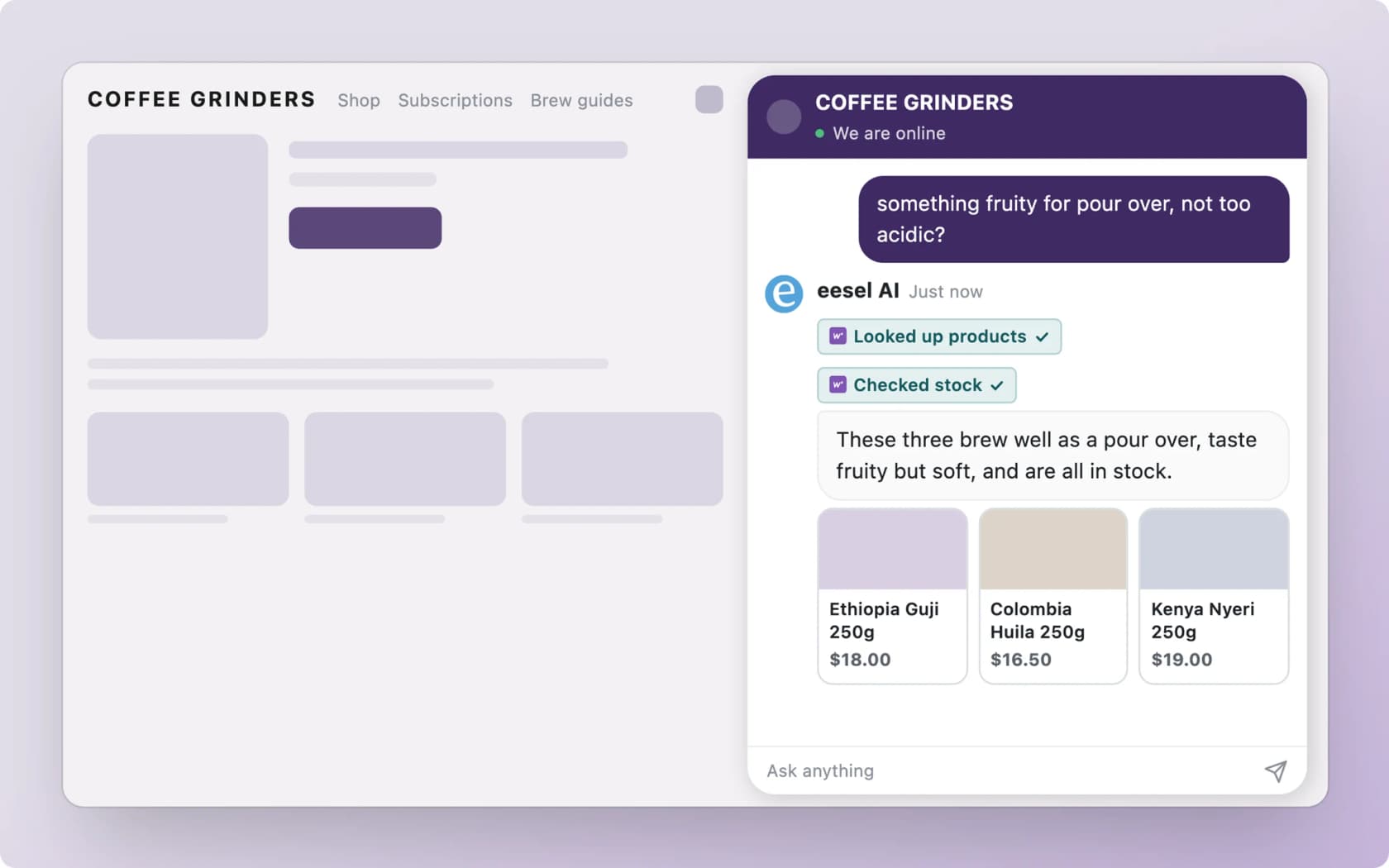
Try eesel on your store and run it against your last few return and cancellation tickets before you let it near a customer.