WooCommerce Checkout block local pickup: setup, traps and support answers

Kira

Katelin Teen
Last edited November 5, 2026
WooCommerce Checkout block local pickup is a separate feature from the old "Local pickup" shipping method. It only exists when your checkout page uses the Checkout block, ignores shipping zones and shows to every customer, anywhere, charges one price at every location, and taxes at the pickup address. So when it's missing, check the checkout page and cart before your zones. The tickets shift too, toward "I picked pickup by mistake" and "is it ready?", since core has no ready for pickup email. eesel answers where-and-when from your pickup page and the order, and hands switches and refunds to your team.
What is local pickup in the WooCommerce Checkout block?
It's a shipping method that lets the customer choose Pickup instead of Ship at checkout and then pick one of your locations. The WooCommerce docs list what it adds: no shipping address needed, directions or pickup instructions per location, and taxes based on the pickup location instead of the store address.
The confusing part is the name. WooCommerce has two features called "Local pickup", and they behave differently enough that half the "it's not showing" threads are about the wrong one:
- Checkout block pickup is the method with the id
pickup_locationin the source code. You set it up once, under its own Local pickup tab in the shipping settings. - Classic (legacy) local pickup is the method with the id
local_pickup. You add it inside a shipping zone, like flat rate or free shipping, and its code says it supports shipping zones.
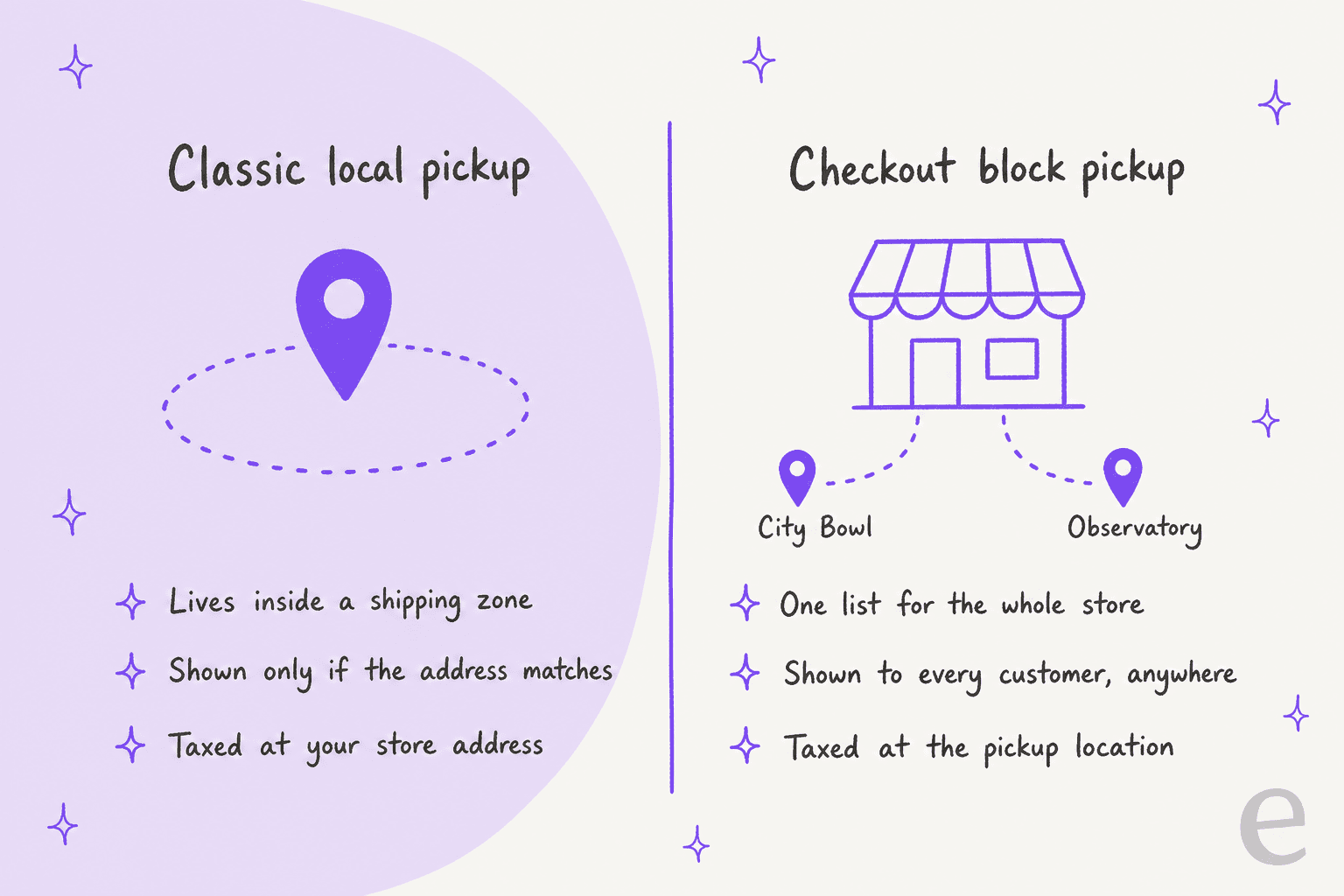
I build features and AI agents at eesel, and when a setting behaves strangely my habit is to read the code that runs it. The detail that explains most pickup confusion is one line in the ShippingController: the block pickup method is only registered when the checkout page (or the checkout template, on a block theme) contains the Checkout block. On a checkout still built with the [woocommerce_checkout] shortcode, the method doesn't exist, however you set it up.
Here's how the two compare side by side:
| Checkout block pickup | Classic local pickup | |
|---|---|---|
| Where you set it up | Shipping > Local pickup tab | Inside a shipping zone |
| Works on | Checkout block only | Classic checkout and Checkout block |
| Who sees it | Every customer, any address | Only addresses that match the zone |
| Locations | A list, each with name, address and details | None, the customer sees the method title |
| Price | One optional price for all locations | Per zone method, for the whole cart |
| Tax based on | The chosen pickup address | Your store's base address |
| Saved on the order | Location name, address and details | Method title only |
If you're newer to the platform, my WooCommerce review, Shopify vs WooCommerce comparison and WooCommerce pricing guide cover what core gives you before extensions.
If you'd rather point an AI coding agent at your support setup, the eesel CLI lets Claude Code or Cursor upload your pickup page and collection policy as knowledge, then ask test questions like "can my brother collect order 1042?" and check the answers before the agent talks to a shopper. Connecting the store itself still needs a WordPress admin to approve it on WooCommerce's own screen.
How do you set up pickup locations in the Checkout block?
Four steps, all from the Blocks local pickup docs:
- Use the Checkout block. Your checkout page has to be the block version. If it isn't, nothing below will show.
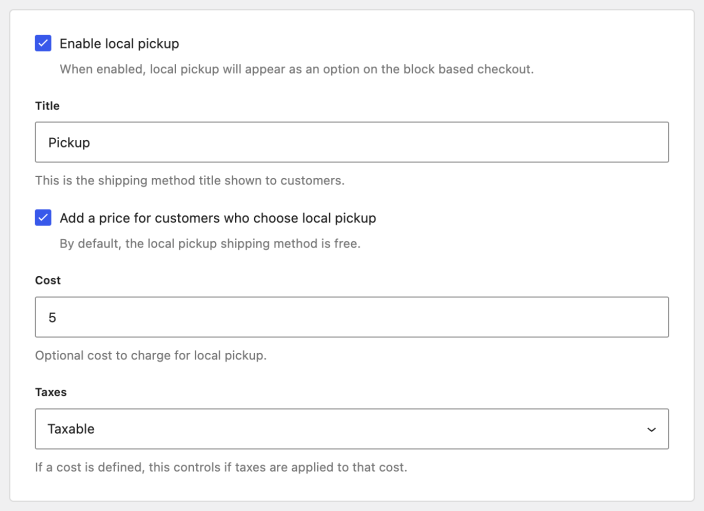
- Turn it on. Go to WooCommerce > Settings > Shipping > Local pickup and tick Enable local pickup. Rename the title if "Pickup" doesn't fit your store.
- Set a price, if any. Tick Add a price for customers who choose local pickup to get a cost field and a tax setting. By default pickup is free.
- Add at least one location. WooCommerce won't show pickup at checkout without one.
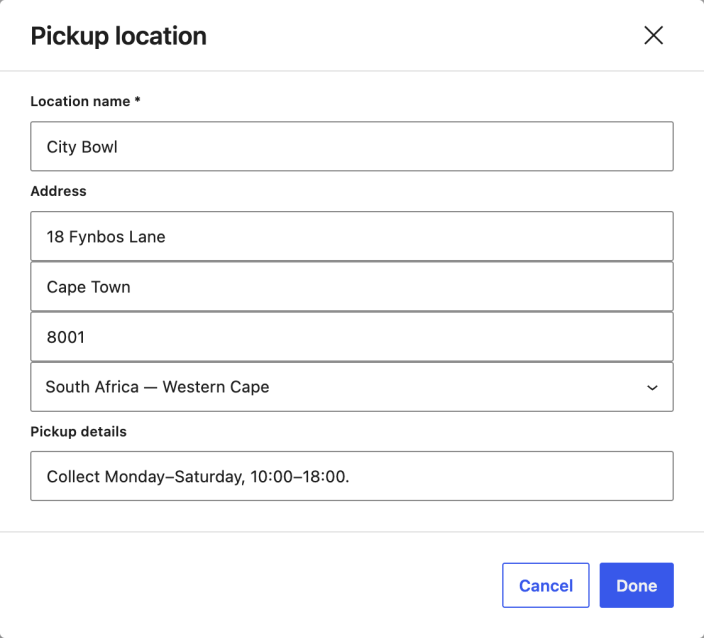
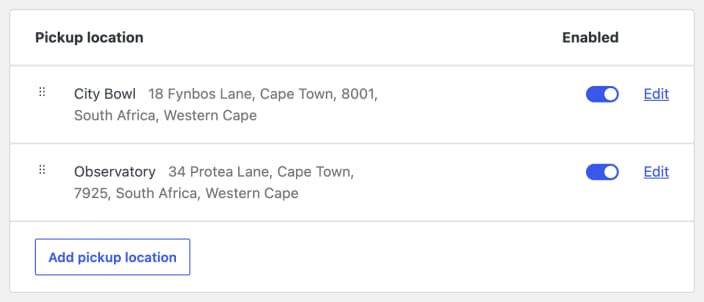
Each location gets a name, a full address and a Pickup details field, and the docs say plainly that all three are visible to the customer. The details field is the one that saves you tickets. It's where opening hours, "collect from the side door" and "bring your order number" go, and it travels with the order (more on that below).
Locations sit in a list with an Enabled toggle each. A disabled location is skipped when rates are built, which is handy for a shop that closes for a fortnight: switch it off instead of deleting it.
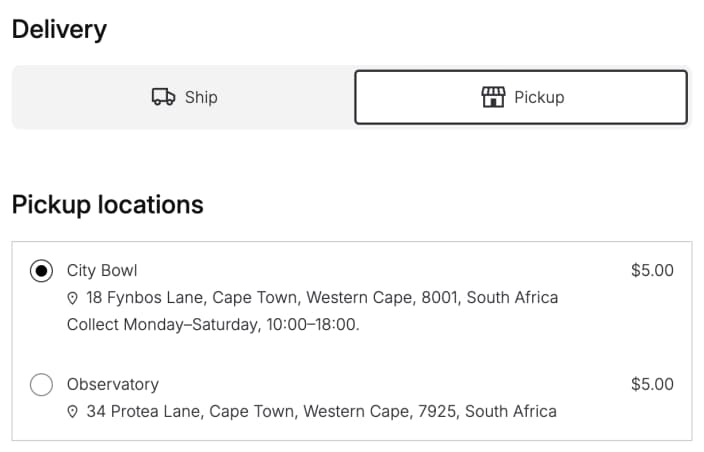
At checkout, the customer sees a Delivery step with Ship and Pickup buttons. Choosing Pickup reveals your locations with their address, details and price. In the editor these are three separate inner blocks (Delivery, Shipping Options and Pickup Method), and you can rename the "Ship" and "Pickup" labels by clicking them.
Why isn't local pickup showing at checkout?
Because one of a short list of conditions isn't met, and almost none of them involve shipping zones. The Ship / Pickup step in the Checkout block only renders when shipping is enabled, the cart needs shipping, every item can be collected, local pickup is enabled, and at least one regular shipping method exists. Walk it in this order:
Why isn't Pickup showing? Check these in order
Open each question. The first one that answers "no" is usually your fix.
1Does your checkout page use the Checkout block?
2Is "Enable local pickup" ticked, with at least one location switched on?
3Is shipping turned on in General settings?
4Does the cart hold at least one physical product?
5Can every item in the cart be picked up?
6Do you have at least one regular shipping method?
7Using the classic Local pickup method instead?
A few of those deserve a sentence more.
Mixed packages. The package filter is all or nothing. The docs say the same: if one package "isn't collectible", local pickup is disabled. Core puts the whole cart in one package, so this usually means a multi-vendor or split-shipping plugin is at work.
Pickup-only stores. If you have no shipping methods except pickup, the toggle is hidden by the shipping_methods_exist() check, and the default rate becomes the first pickup rate. Store owners expecting a big Pickup button read that as "pickup isn't showing". Test a full order before you change anything.
"Hide shipping costs until an address is entered". With that setting on, the Checkout block strips every rate except pickup until the address is complete. Pickup stays visible, but WooCommerce won't auto-select it. The docs list this as a known limitation: the customer has to choose Pickup and a location.
Both versions on at once. When block pickup is enabled, classic local_pickup rates are treated as collectable too, so they move to the Pickup list, next to your named locations. WooCommerce shows a notice on the Local pickup settings page in that case, and the docs warn that running both "can confuse customers". I'd pick one.
Does Checkout block local pickup follow shipping zones?
No, and this is the part that changes your support queue. The docs say block pickup "will be available at checkout regardless of customer location", and that to restrict it by zone you should use the legacy method. There's no setting in between.
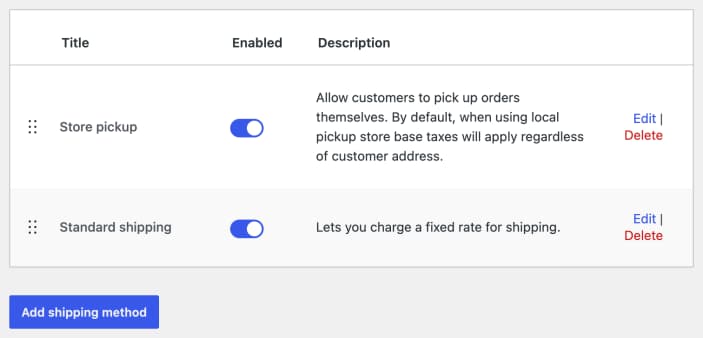
Two consequences follow, and both land in your inbox:
- Anyone can choose pickup. A customer three states away sees the same Pickup button as your neighbour. If pickup is free and shipping isn't, some will tap it by accident, or to see if it lowers the total, and then email to ask why there's no tracking number. Those mistakes become pre-purchase questions or, worse, after-the-fact switches.
- Pickup works where shipping doesn't. If the customer's country isn't allowed under Shipping location(s), WooCommerce still calculates local pickup rates, because "those are not shipped". Fair enough for a tourist collecting in person, but it also means a customer you can't ship to can place a perfectly valid pickup order.
The fix for both is wording, not code. Put the city in the location name ("Cape Town, City Bowl" reads better than "City Bowl" to someone in Durban), and say "in person, at this address" in the Pickup details. If you truly need pickup in one region only, the classic method is the documented way, and you give up the location list and the location-based tax to get it.
Free shipping has one interaction worth knowing. With Hide shipping rates when free shipping is available on, WooCommerce keeps free shipping and pickup and drops the rest, so pickup never disappears when a cart qualifies for free shipping. That's in the troubleshooting docs too: "Local pickup remains available".
How much does local pickup cost, and how is it taxed?
Pickup is free by default, and you can add one price that applies to every location. In the code, each enabled location gets its own rate, labelled "Pickup (City Bowl)", but every one of them uses the same cost setting. So a free counter at your main shop and a paid locker elsewhere isn't something core can do.
Tax is where the block version earns its keep. When the customer picks a location, WooCommerce swaps the taxable address for that location's country, state, postcode and city, and later reads the order's tax location from a copy of the address saved at purchase. The classic method uses your store's base address instead, which its own description spells out: "store base taxes will apply regardless of customer address".
| Checkout block pickup | Classic local pickup | |
|---|---|---|
| Default price | Free | Free |
| Price options | One price for every location | One price per zone method |
| Tax on the pickup fee | Taxable or none | Taxable or none |
| Tax on the order | The chosen location's address | Your store's base address |
The support version: a customer who sees a different tax line for the same basket at two of your shops isn't looking at a bug. If you sell across state or county lines with different rates, write that down on your pickup page before someone asks.
What does the customer see after ordering?
Block pickup saves three values on the order's shipping line: pickup_location, pickup_address and pickup_details, labelled "Pickup location", "Pickup address" and "Pickup details" in the admin. Then two things happen on every customer-facing view of the order:
- The shipping row becomes a collection note. WooCommerce rewrites it as "Collection from City Bowl:", then the address, then your pickup details, then "Pickup cost: $5.00" if you charge. That row is part of the order totals used on the thank-you page, in order emails and in My Account.
- The shipping address disappears. An order whose shipping methods are all pickup methods doesn't need a shipping address, so it isn't shown.
That's why I'd treat the Pickup details field as copy, not config. Whatever you type there, hours, parking, "bring photo ID", ends up in the processing email the customer re-reads on the way over. A blank details field is a "what time are you open?" ticket waiting to happen. The order itself, and where it sits in the WooCommerce order statuses, is what guests check through guest order tracking.
One gap: the classic method saves none of this. Its orders carry only the method title, so if you run several shops on classic pickup, the order alone won't tell support which counter to send the customer to.
Why is there no "ready for pickup" email?
Because core WooCommerce has no "ready for pickup" step at all. Look at the list of core emails and there's nothing about pickup. A pickup order goes from Processing to Completed like a shipped one, and "Completed" is a strange message to send while the parcel is still behind the counter.
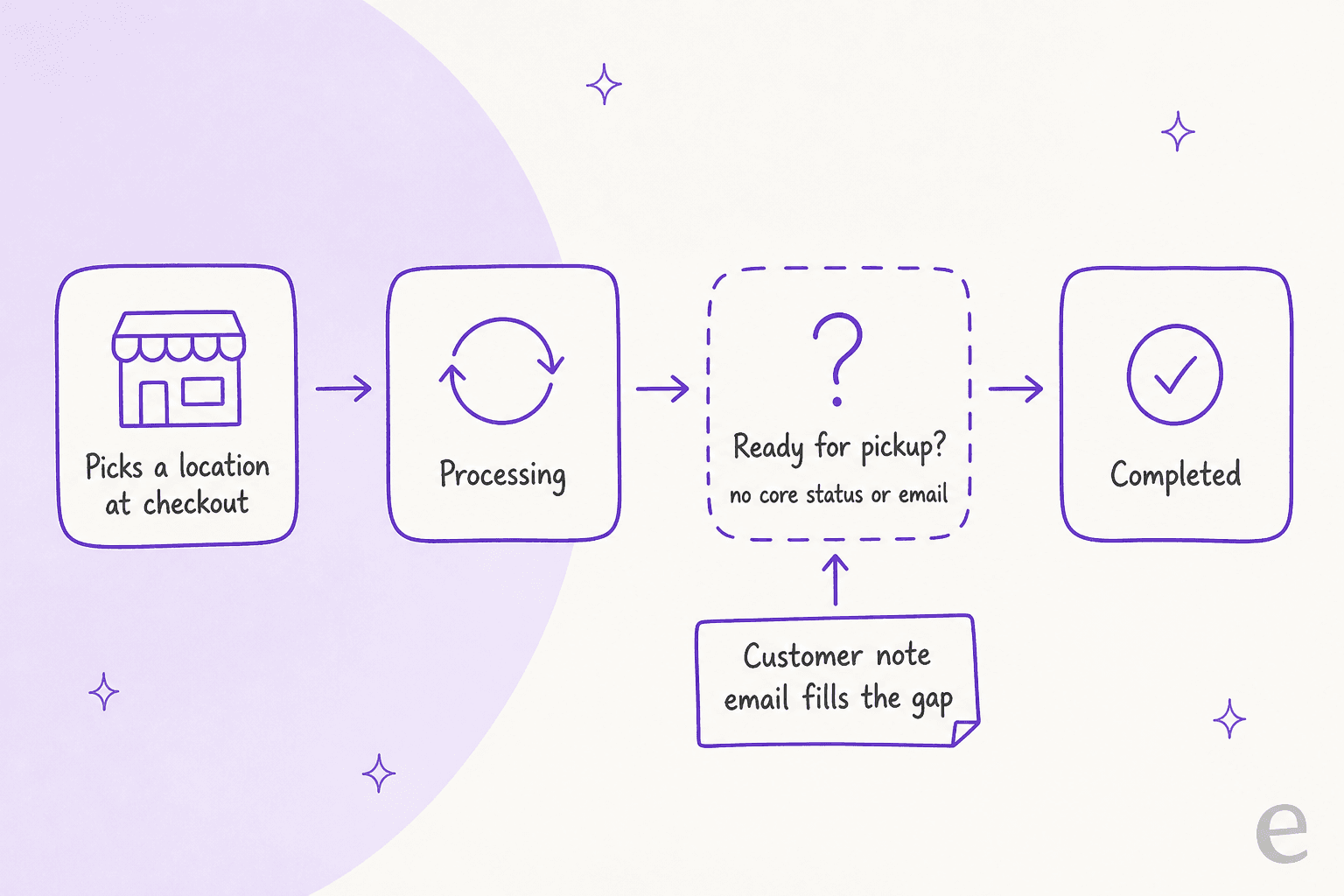
This came up on WooCommerce's own tracker a month ago. Issue #69458 asked for a Ready for pickup status and customer email, and was closed as not planned the next day. The maintainer's reply:
"I'd rather not add a dedicated order status in core. If pickup readiness is added, it would fit better as part of the Fulfillments work, so I'm closing this for now and we can look at it again when that work picks up."
A follow-up, issue #69574, proposes "Ready for pickup" and "Picked up" inside Order Fulfillments, and notes that today "every part of the feature assumes a carrier". It's still open as I write this. So for now, here's what works in core:
- A customer-facing order note. Adding a note with visibility set to the customer fires the Customer note email. "Your order is ready at City Bowl. Bring your order number." is a ready-for-pickup email in all but name.
- Completed when it's collected, not when it's packed. Then "Completed" means what the customer thinks it means.
- A plugin or custom status if you want a proper status in the orders list. That's outside core, so check how it treats paid statuses, stock and reports before you trust it.
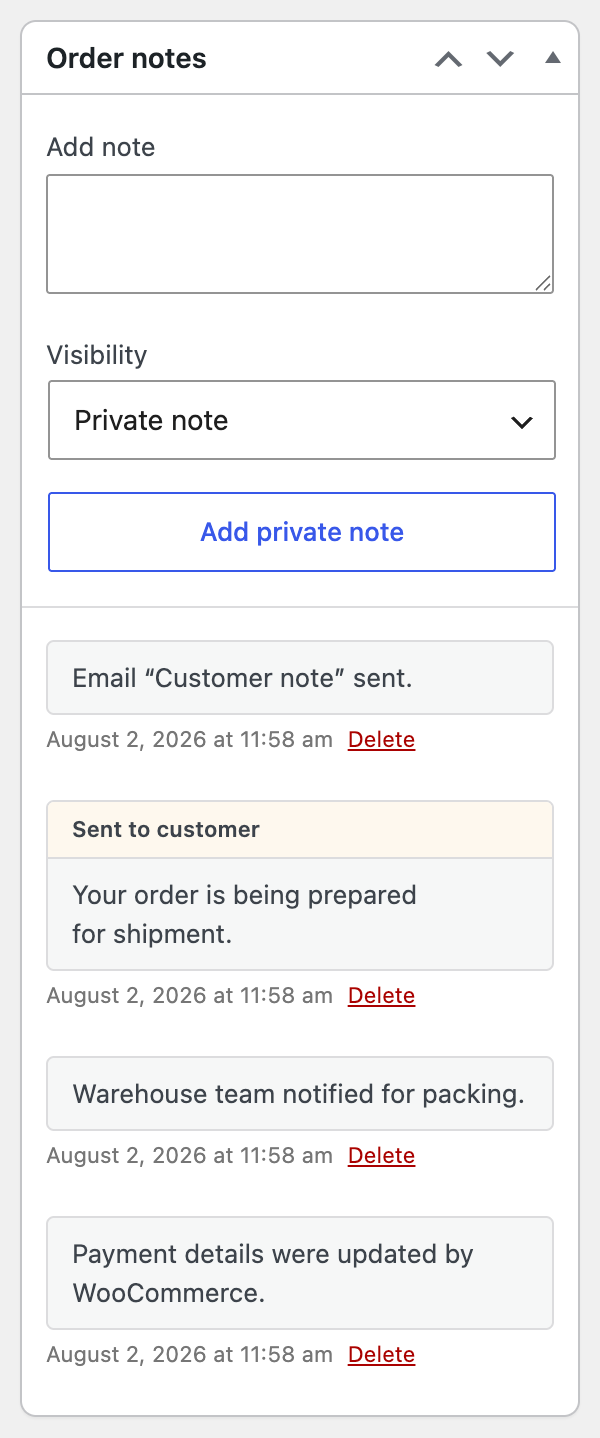
If you skip all three, expect the most common pickup ticket of all: "is my order ready yet?". It's the pickup cousin of where is my order, and it's just as repetitive.
What do customers ask support about local pickup?
Most of it is a lookup or a page you already wrote. Very little of it needs judgment, and the parts that do involve money or a person standing at your counter.
| What they ask | Where the answer lives | Who should answer |
|---|---|---|
| "Where do I collect, and when are you open?" | The location's address and Pickup details | AI, from your pickup page |
| "Which shop did I choose?" | pickup_location on the order | AI, from the order |
| "Is my order ready yet?" | Whatever your team records: a note, a status | AI if it's recorded, otherwise a person |
| "Can my partner collect for me?" | Your collection policy | AI explains, a person notes the order |
| "I chose pickup by mistake, please ship it" | Admin order edit plus a shipping charge | A person |
| "I paid for shipping, can I collect instead?" | Admin order edit plus a shipping refund | A person |
| "I'm at the shop and it isn't here" | Your staff, right now | A person, urgently |
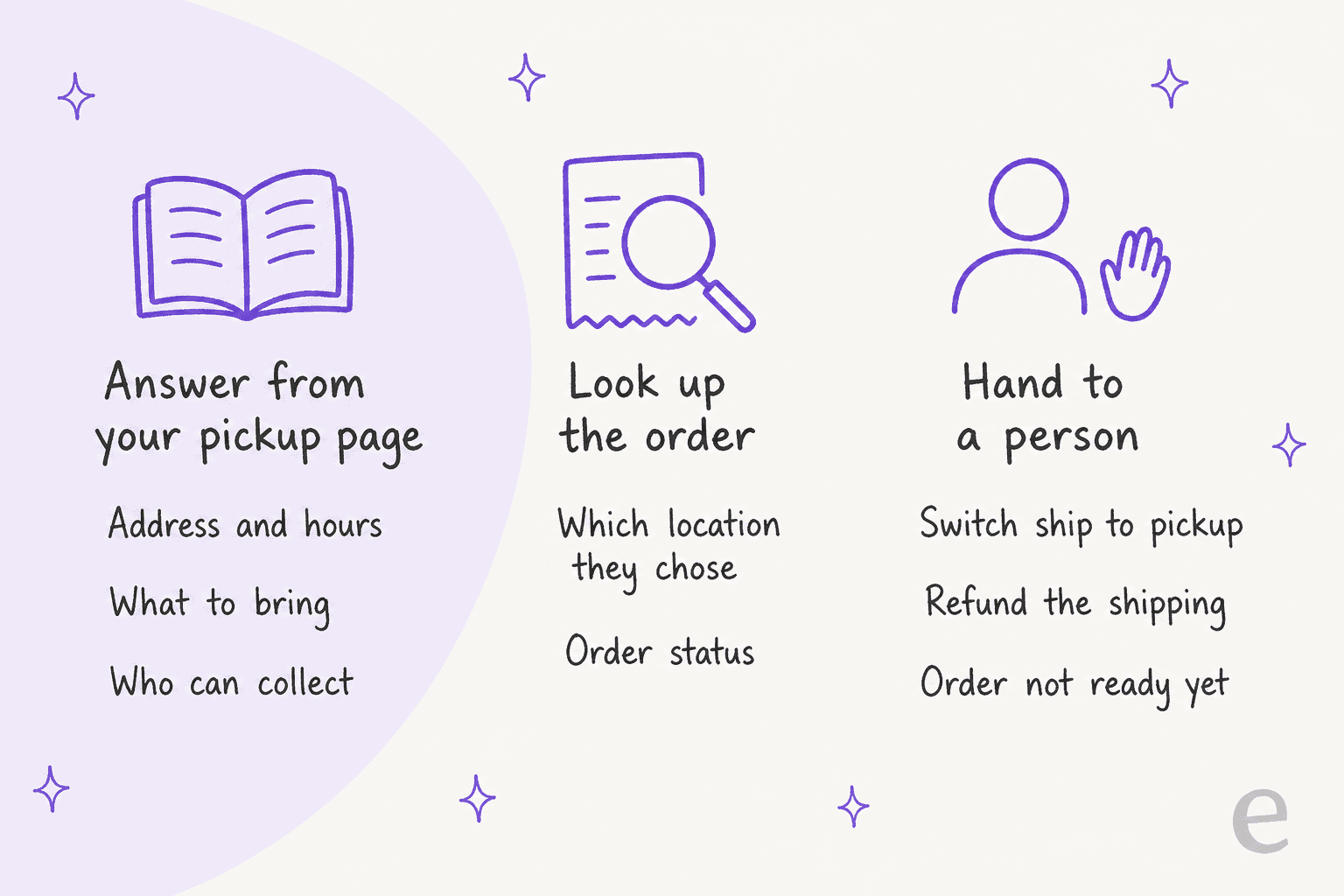
The switches deserve care. There's no customer-side way to change the method after paying. Staff can edit the order's shipping line in the admin, which has a method dropdown and editable meta, but the "Collection from" text comes from the meta that checkout saved, so a hand-edited line won't show a location unless someone adds it.
Then there's the money: shipping paid for a pickup order is a refund request, and recording a refund in WooCommerce doesn't always move money. Keep that with a person, behind a proper handoff.
The "I'm at the shop" ticket is the one I'd route differently from everything else. It's the only pickup question where a slow reply costs you a customer standing in the rain, so it belongs in whatever channel your shop staff actually watch. Restaurants deal with the same pattern on takeaway orders, and my post on AI for restaurant customer service covers how to split those lanes.
The rest is classic FAQ deflection, and a good fit for shipping issue macros if a human team answers them.
For a store with a shopfront, pickup questions sit on top of the usual ecommerce support contacts, and my roundup of retail customer service tools covers the ones built for stores with counters.
What can an AI support agent answer about pickup?
The where-and-when questions, from two sources: your written pickup page and the order. The decisions stay with people. That split is how the stores I work with already run it.
Cape Coffee Beans sells specialty coffee and equipment online across South Africa and runs a small shop in Claremont, Cape Town. Its team mentions eesel inside Zendesk tickets to pull up a product, a past ticket or an order, and every answer links the source it used. If nothing confirms an answer, eesel says so and asks the team to check, rather than filling the gap. In one month eesel was called into 23 tickets and ran about 120 knowledge searches. STIL Classics, a planner and stationery brand on Gorgias, has eesel check the order before it drafts anything: about 230 orders looked up across 320 tickets in a month, with every draft left for a person to send. Neither store runs WooCommerce, and the pattern carries straight over: look up the order, answer from what you published, leave the judgment calls with the team.
How eesel handles WooCommerce pickup questions
eesel connects to WooCommerce through the free eesel AI plugin or a REST API key, and answers in your chat bubble, your helpdesk (say, Gorgias on WooCommerce) or Slack. Here's what that means for pickup, per the WooCommerce integration docs:
- Look up orders reads an order "with its items, totals, status and notes". The pickup location, address and details sit on the order's shipping line in WooCommerce, so check one real pickup order with the agent before you rely on it naming the shop.
- Your pickup rules come from your writing. eesel's docs say written content like your shipping policy isn't in WooCommerce, so connect your website. Put each location's hours, what to bring and who can collect on a pickup page. Without it, the agent shouldn't guess, which is the same hallucination guardrail I'd set for any policy question.
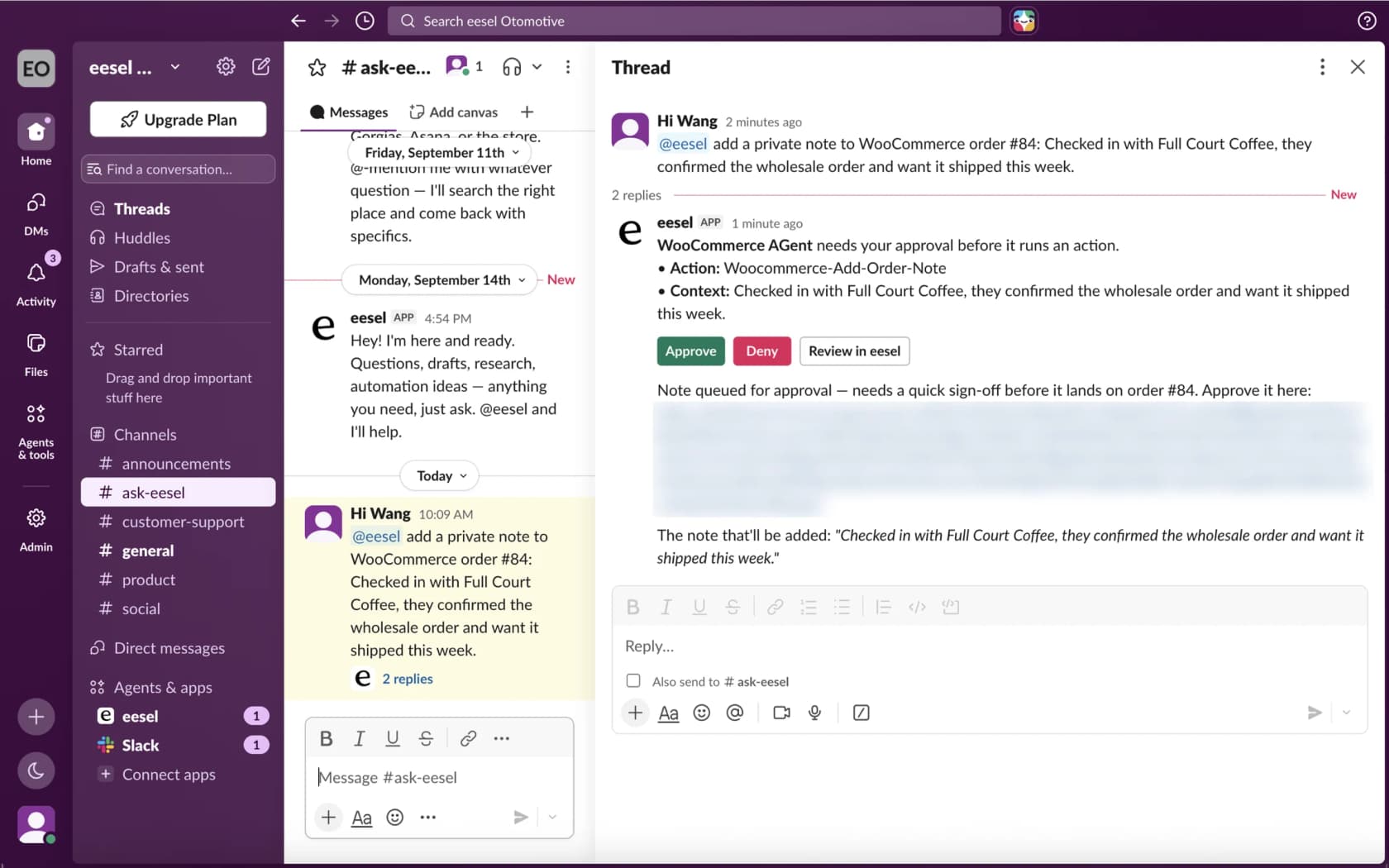
- Add order note writes a private or customer-facing note. That's the ready-for-pickup workaround from above, done from Slack: a teammate says "order 1042 is on the shelf at City Bowl" and eesel adds the customer-facing note that sends WooCommerce's Customer note email. With approvals on, it waits for an Approve click first.
- It can't see your checkout or settings. If a shopper says "I can't find pickup", the agent can explain what your page says about pickup and pass a likely store problem to the team, not diagnose your Checkout block.
The same agent answers the rest of the order questions a WooCommerce store gets, from order tracking to coupon restrictions and variation stock.
With Slack connected, your shop staff can ask it about an order without opening the WordPress admin.
Where eesel isn't the right fit: if pickup is a tiny share of your orders and your Pickup details field already answers the hours question, the processing email does most of the work. And if your pickup runs through a booking plugin with time slots, the agent only knows what you write down about slots, not which ones are free. For a wider view, see my WooCommerce chatbot guide, how to add AI to WooCommerce, and my roundup of WooCommerce AI tools.
Try eesel on your WooCommerce pickup tickets
Want "where do I collect?" and "is it ready?" answered with the actual shop and hours, not "please check your confirmation email"? eesel is an AI helpdesk teammate, one of the top WooCommerce support tools, that plugs into WooCommerce in a few minutes, reads the order, learns your pickup page, and sends the ready-for-pickup note when your team says so. Switches and shipping refunds stay with your team. The free plan includes 100 credits, and paid plans start at $299 a month on the pricing page.
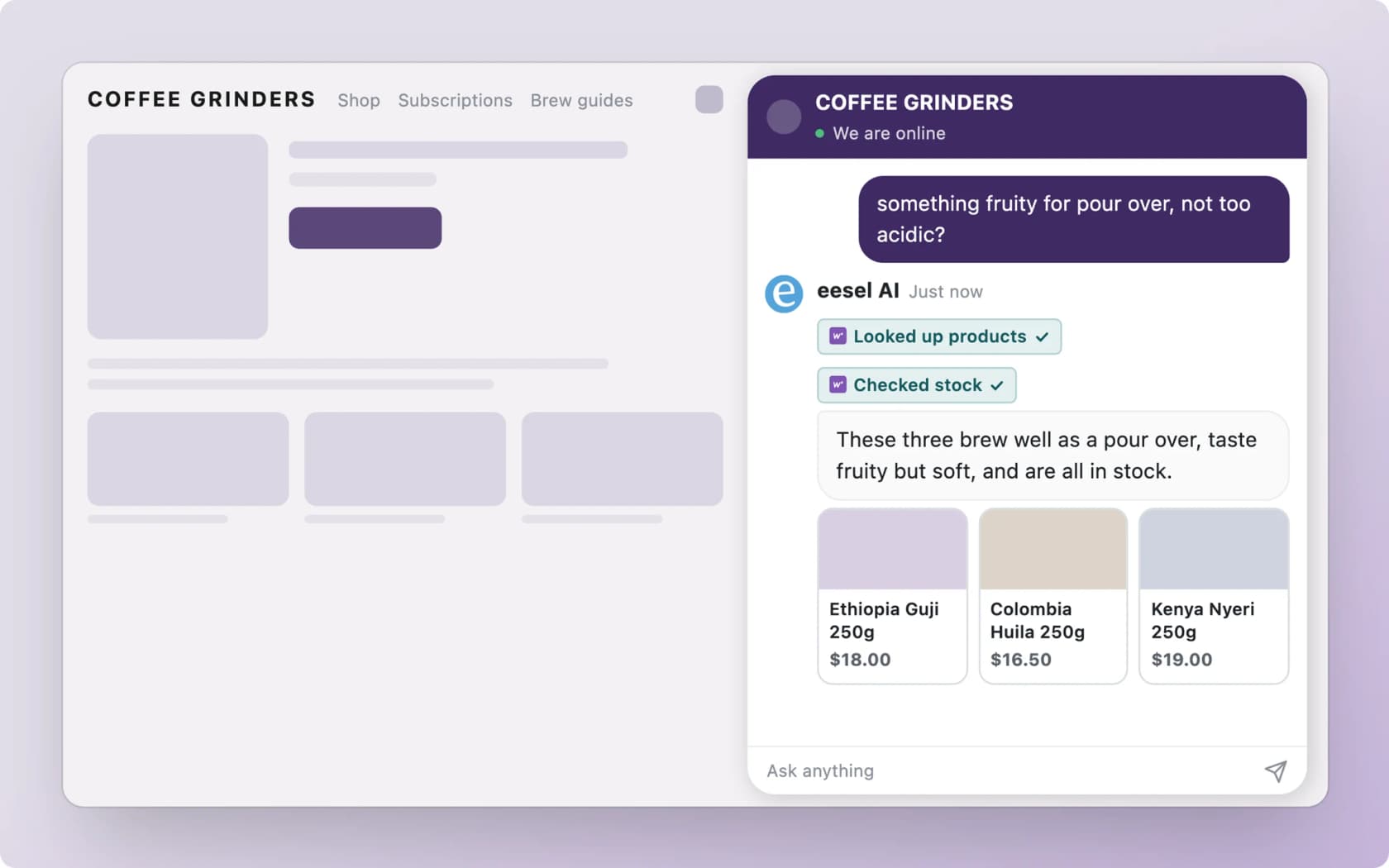
Try eesel on your store, then test it against last month's pickup tickets before it talks to a shopper.