6 best CWILL alternatives for Shopify support in 2026

Riellvriany Indriawan

Katelin Teen
Last edited October 22, 2026

Why do Shopify stores look past CWILL AI Chat?
Credit first. CWILL AI Chat is a free AI chatbot and live chat widget from the post-purchase company formerly called Channelwill. It holds 4.8 stars from 101 Shopify reviews, carries the Built for Shopify badge, tracks orders in the chat, and runs returns through CWILL's own Returns app. For a small store that wants a chat bubble answering shipping questions by tonight, it's a fair choice, and my CWILL review says so.
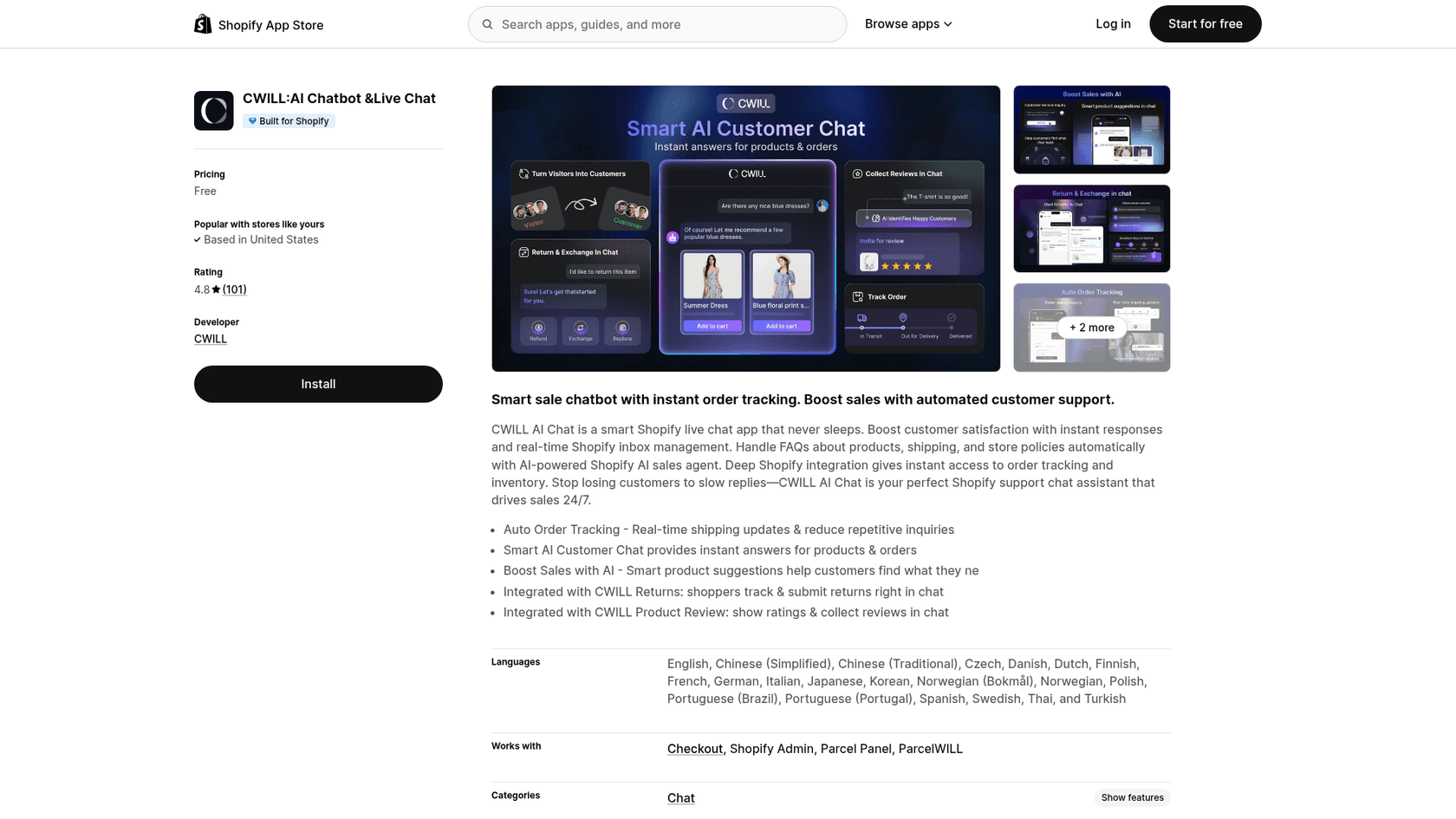
The reasons stores still compare it are specific, and they mostly come from CWILL being a storefront widget rather than a support desk.
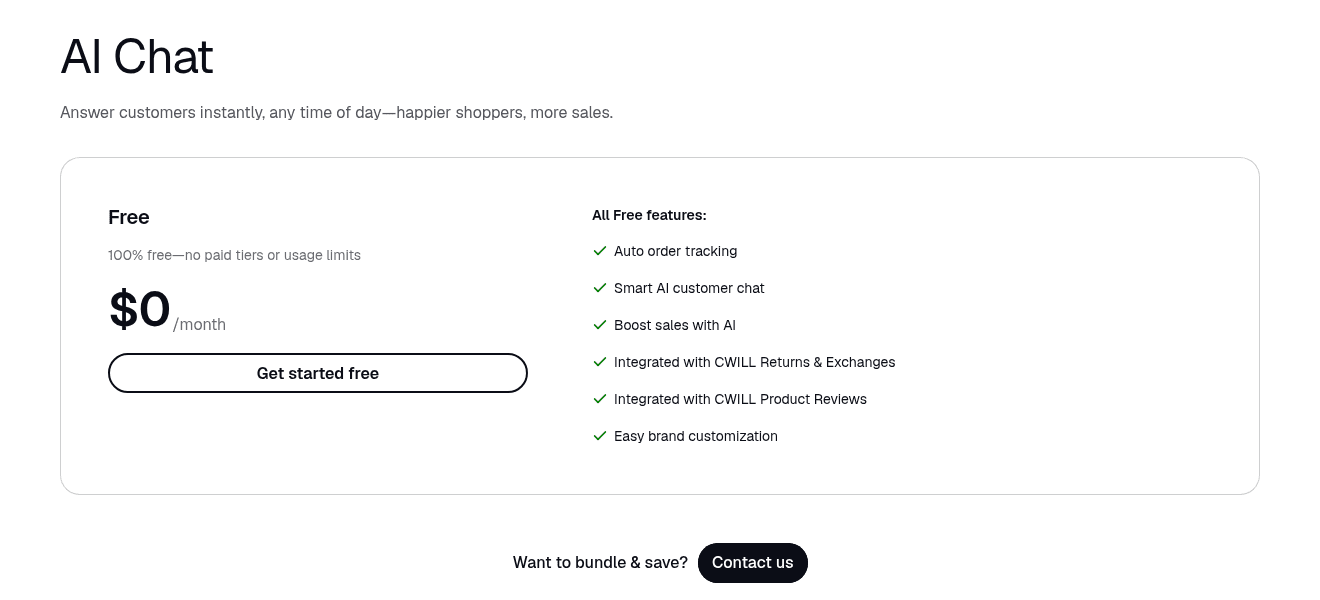
1. The price is free today, with a change announced. The pricing card reads "100% free", and the FAQ underneath answers "Is a paid tier coming as my chat volume grows?" with "Yes." It adds that pricing will "likely be priced by conversation volume, revenue driven, or some mix of the two." If you're building a support process on it, you're building on a price that isn't set yet.
2. The AI knows only its knowledge base. CWILL's AI docs say it answers from what you load: custom Q&A, URLs, files, synced products and Shopify policies. Your past support replies aren't one of the inputs. When a question falls outside, the chat moves to an Escalated list with a Human Request tag and a summary note, which is a clean handoff, but it lands in CWILL's own inbox.
3. "AI Resolved" counts replies, not solved problems. The analytics doc defines AI Resolved as the number of messages the AI successfully replied to. I work a support queue every day, and a reply is not the same as a customer who stopped writing in. Read that number with care before you compare it with another tool's resolution rate.
4. Email and a helpdesk sit outside it. The pricing FAQ mentions connections to Gmail, Outlook and helpdesks such as Zendesk and Freshdesk, but the help center has no setup guide for any of them, and the listing's "Works with" names only Checkout, Shopify Admin, Parcel Panel and ParcelWILL. There's also no standalone mobile app; the mobile doc points you to the Shopify mobile app. A French wine shop's one-star review complained about exactly that: no mobile notification unless someone sits at the PC.
"For the moment a good messenger app. AI functionality will come next month. I hope that the promises will be kept. Then it will definitely be a 5-star app. at least free of charge and a fast and helpful support-team."

CWILL replied that the AI had since launched, and it has. The review is still a fair picture of who CWILL suits: stores happy with a free, promising chat that grows with them.
How I picked these alternatives
I'm on eesel's customer support team and work our queue every day, so I read each tool by one question: what happens to the conversation the AI can't finish? Who sees it, in which inbox, with what context? I read each vendor's pricing page and Shopify listing on 22 October 2026, plus help docs and recent merchant reviews.
Before writing, I asked ChatGPT what a store owner would ask: "We use CWILL AI Chat on our Shopify store for customer support but we're thinking of switching. What are the best alternatives?" It named Tidio, Gorgias, Re:amaze, Richpanel and Shopify Inbox, a sensible list that I've kept as the spine. Its two best points: decide whether you need an AI chatbot, a shared inbox or a full customer service platform, and run each finalist on your 20 most common customer questions. I agree with both, so this post is built around them.
I added eesel for stores whose problem is the helpdesk queue rather than the widget. One rule I held: every price below comes from the vendor's own pricing page or Shopify listing.
Chat widget or helpdesk?
This is the decision that matters more than any feature list. CWILL sits near the widget end: a chat bubble on your store, an inbox inside Shopify admin, and AI that answers from what you've loaded.
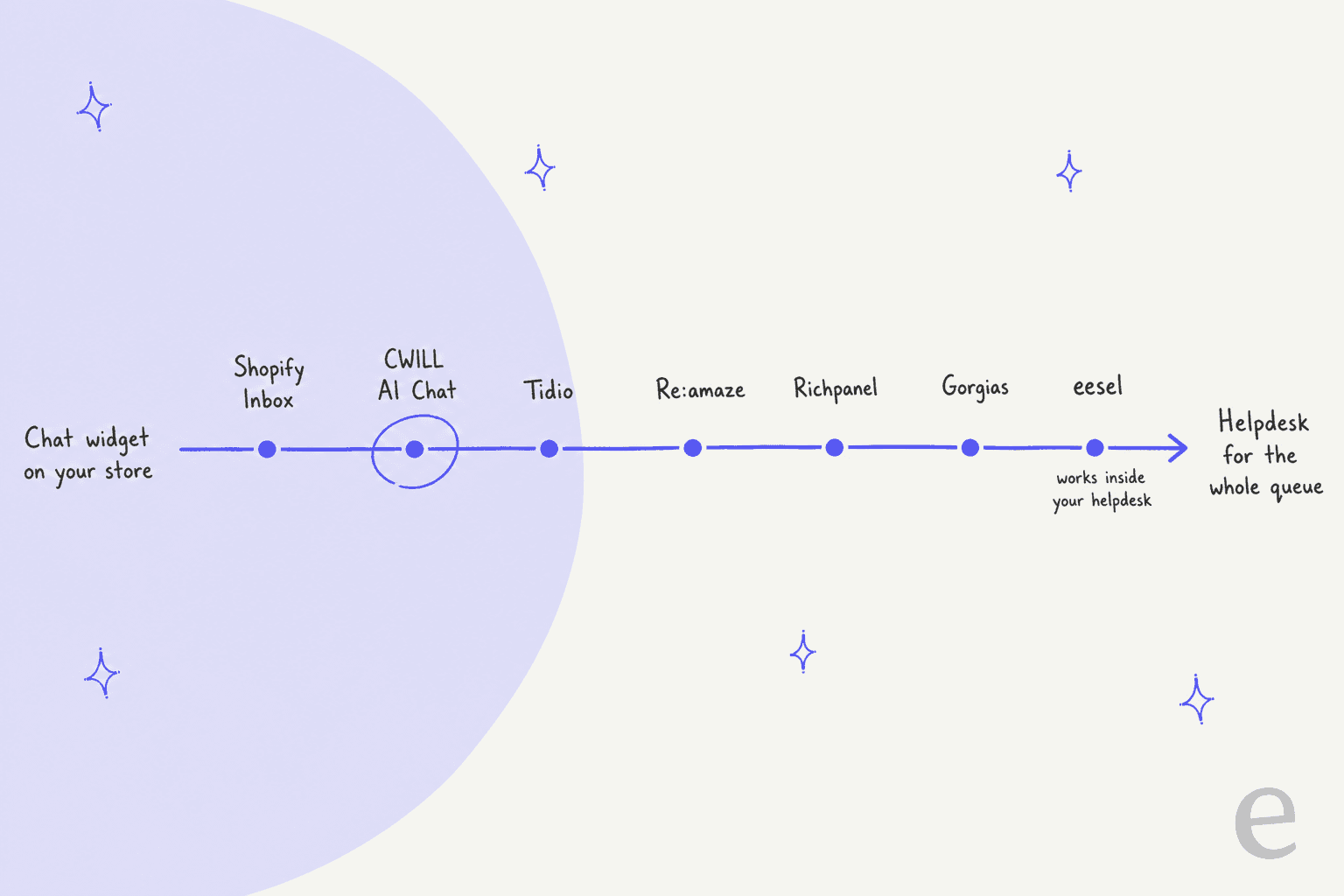
The placement is my read of each product's own pages, not a score. If most of your conversations are "is this in stock?" and "how long is shipping?", the left half is enough, and the switch is about AI quality. If most are "where is my order?", "can I return this?" and "please change my address", arriving by email as much as chat, you need the right half: a place where every channel and the Shopify order meet. My roundup of AI helpdesks for Shopify goes deeper on that side.
Here's what the right half looks like in practice. A German jewelry store I learned about from our sales calls handles about 1,000 tickets a month across 8 languages on Zendesk and Shopify, and about 22% of that inbox is spam. A storefront widget never sees most of that work. That's the gap ChatGPT pointed at when it separated a chatbot from a complete customer service platform.
CWILL alternatives compared
| Tool | Best for | Starting price (monthly) | Free plan | AI billing unit | Shopify order actions | Channels | Helpdesk | Shopify rating | Security listed |
|---|---|---|---|---|---|---|---|---|---|
| CWILL AI Chat (baseline) | Free storefront chat | $0 | Yes, no usage limits today | None today, paid tier announced | Order tracking, returns via CWILL Returns | Store chat | Own inbox in Shopify admin | 4.8 (101) | Not listed |
| Tidio | Small teams, chat plus AI | $29; Lyro from $39 | Yes, 50 conversations | Lyro AI conversations | Native Shopify actions on Lyro plan | Chat, email, Messenger, Instagram, WhatsApp | Built-in ticketing | 4.8 (1,357) | SOC 2 and HIPAA on custom tier |
| Gorgias | Full helpdesk plus AI | $40 with AI Agent | No, 7-day trial | $0.85 to $1.00 per automated interaction | Order tracking, returns, address changes | Email, chat, social, SMS, voice | Is the helpdesk | 4.3 (706) | GDPR/CCPA; SOC 2 Type II, HIPAA |
| Re:amaze | Many channels and brands | $29 per seat | No, 14-day trial | $0.85 per resolution over allowance | Manage, modify and create orders | Email, chat, social, SMS, voice | Is the helpdesk | 4.4 (181) | Not listed on pricing page |
| Richpanel | Order and returns automation | $89 per user | No, 14-day trial | AI conversations from $0.20 | Order status, returns, refunds, cancellations, subscriptions | Email, phone, chat, Facebook, Instagram; SMS on Pro Max | Is the helpdesk | 4.9 (137) | SSO on Enterprise |
| Shopify Inbox | Free native chat | $0 | Yes | None | Order lookup | Online store chat | None | 4.6 (5,806) | Shopify platform |
| eesel | AI inside your existing helpdesk | $299 for 500 credits | 100 credits to try | Tickets and chats, 1 credit each | Order and product lookups before replying | Website chat, email, helpdesk tickets | Works inside Gorgias, Zendesk, Freshdesk | 5.0 (4) | SOC 2 Type II underway; HIPAA with BAA on Enterprise |
Ratings are from each app's Shopify listing on 22 October 2026. The Richpanel prices are from its Shopify listing, because its website pricing page still shows several older grids side by side.
Which CWILL alternative fits your store?
Pick the line that sounds most like your week. The answer is my recommendation, not a ranking.
Pick the line that matches your store to see which CWILL alternative I'd test first.
What will each one cost as your store grows?
Entry prices tell you very little here, because these seven tools meter seven different things. CWILL meters nothing today. Everything else grows with seats, tickets or AI conversations.
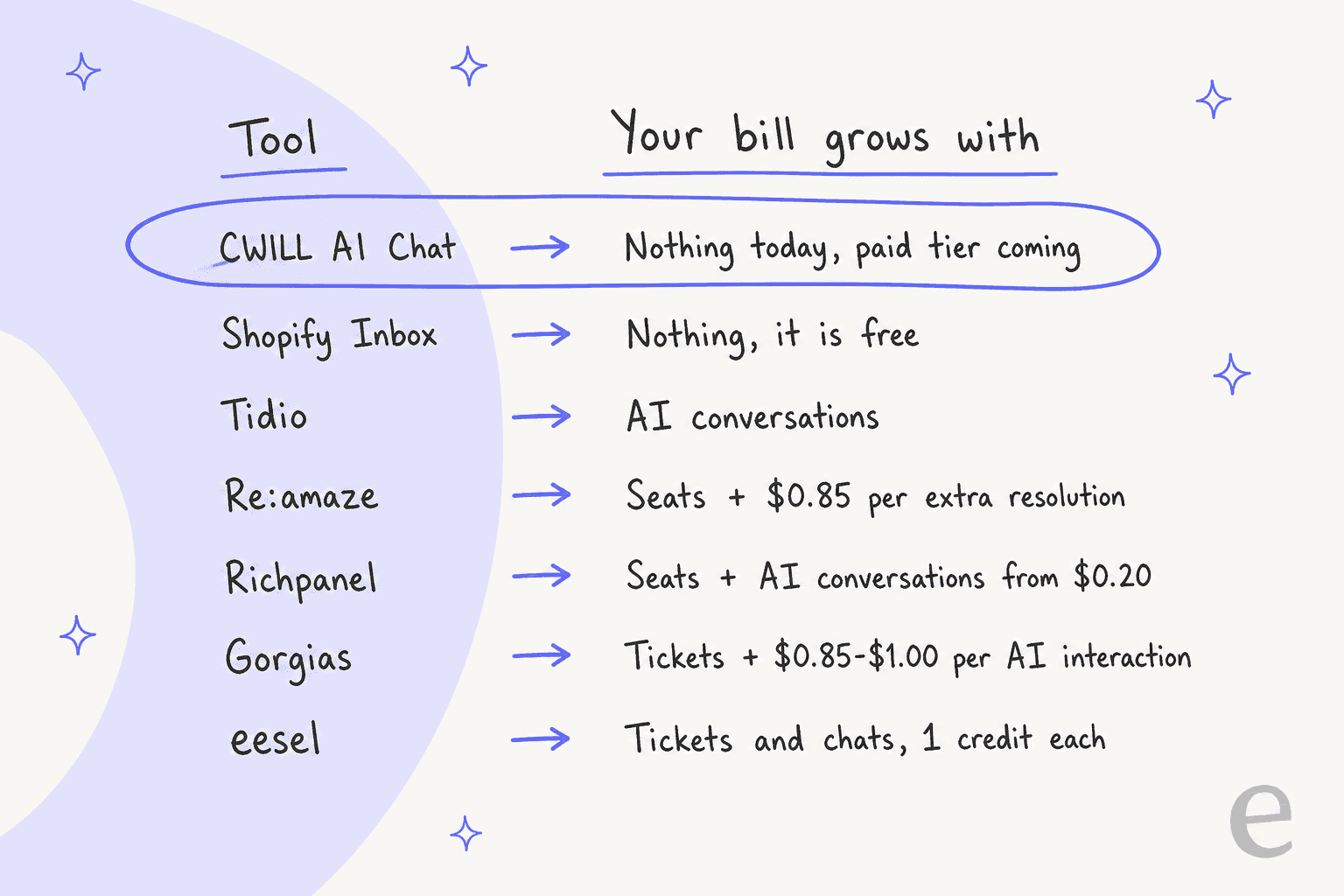
Here's a worked example at list prices: a store with 2 support people, 300 tickets a month, and AI handling 200 of them.
| Tool | How the bill adds up | Monthly total |
|---|---|---|
| CWILL AI Chat | Free plan, no limits today | $0 |
| Shopify Inbox | Free | $0 |
| Tidio | Customer Service plan ($29 for 100 conversations with a human reply) + a Lyro tier for 200 AI conversations | From $68 (Lyro from $39) |
| Richpanel Pro | 2 users x $89 + 200 AI conversations from $0.20 | From $218 |
| Re:amaze Basic | 2 seats x $29 + (200 - 10 included resolutions) x $0.85 | $219.50 |
| Gorgias Basic with AI Agent | $90 (300 tickets, 30 automated interactions) + 170 x $0.90 | $243 |
| eesel | Teammate plan, 500 credits, no seat fees | $299 |
Two cautions. Tidio sells Lyro on a slider and quotes the $39 plan as both "from 50 AI conversations" on its pricing page and "up to 200 Lyro conversations" on its Shopify listing, so check the slider at your volume. And the paid tools in this table replace more than a chat widget: Gorgias, Re:amaze and Richpanel include the email helpdesk that CWILL leaves to another tool. My guide to chatbot cost explains why per-resolution and per-conversation meters drift apart as volume grows.
1. Tidio
Best for: small teams that want live chat, an AI agent and a ticketing inbox in one app.
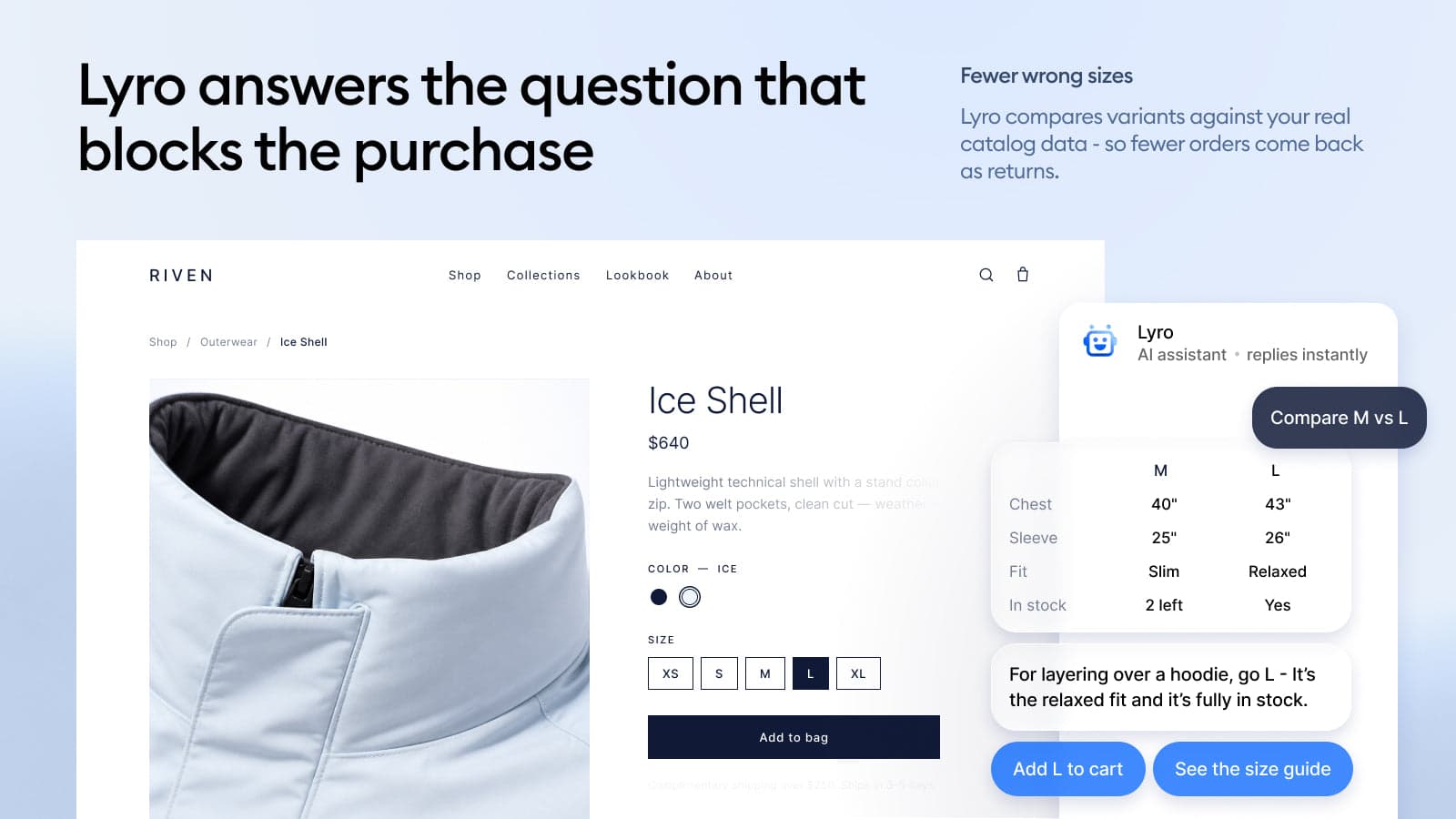
Tidio is the closest step up from CWILL: still a chat app first, but with a real ticketing inbox and a mature AI agent called Lyro. It holds 4.8 from 1,357 reviews on its Shopify listing, and ChatGPT put it first for smaller stores.
What it does better than CWILL
- A team inbox with more channels. Live chat, ticketing, email, Messenger, Instagram and WhatsApp sit in one tool, so a handed-off chat lands where your team already works.
- AI that acts on Shopify. The listing's $39 Lyro plan includes "Native Shopify actions" and "Lyro Actions & MCPs", and the image above shows Lyro comparing sizes and adding to cart. My guide to Tidio on Shopify walks through the setup.
- Flows for selling. No-code Flows trigger messages at set moments. Tidio's pricing page credits them with a 26% conversion lift, its own figure.
Where it falls short
- The AI is a second bill. Lyro is priced separately from the chat plans, starting at $39 a month for the smallest tier. Above 1,000 AI conversations a month you're into the Plus plan, from $300 plus usage.
- The free Lyro conversations are one-time. The Free plan's 50 Lyro conversations don't refresh each month.
- Three meters to watch. Human conversations, AI conversations and Flows visitors are counted separately, which takes some reading.
Pricing
| Plan | Monthly | Billed yearly | What's included |
|---|---|---|---|
| Free | $0 | $0 | 50 billable conversations, 50 Lyro conversations (one-time), 100 Flows visitors |
| Customer Service (Starter) | $29 | $24.17/mo | 100 billable conversations; 250 to 1,000 for $59 |
| Flows | $29 | $24.17/mo | Visitors reached by Flows |
| Lyro AI Agent | From $39 | From $32.50/mo | From 50 AI conversations, Shopify actions |
| Plus | From $300 + usage | n/a | Custom limits, discounted usage, premium support |
A billable conversation is one that includes a reply from a person on your team, per the Tidio listing, so chats Lyro closes alone don't count against the helpdesk plan. My Tidio pricing post goes tier by tier.
What merchants say
"We've been using Tidio's Lyro AI Agent along with their automated Flows and have been very happy with the results. Our AI resolution rate is around 90%, which has helped us significantly reduce the number of customer service inquiries our team needs to handle manually."
"There is still room for improvement, particularly in making AI responses more flexible and improving customization options for automation."
My take: Pick Tidio if CWILL's chat is the right shape but you want a proper inbox and AI that can act on Shopify, and your AI volume stays in the low hundreds a month. Skip it if email is most of your support, where a helpdesk below fits better. My Tidio review and Tidio alternatives cover the edges.
2. Gorgias
Best for: stores whose support has outgrown a chat widget and needs one helpdesk for email, chat, SMS, voice and social.
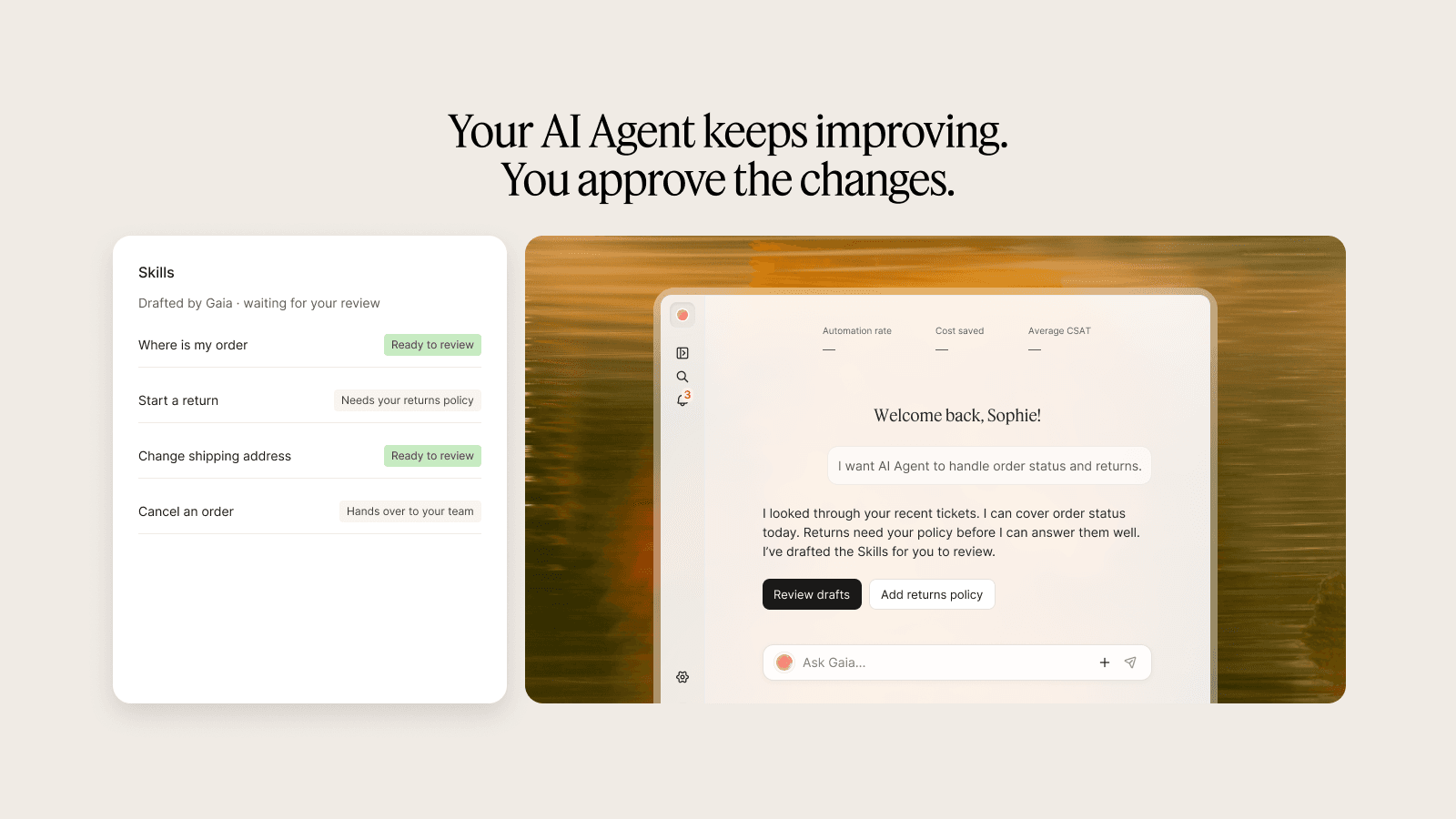
Gorgias was ChatGPT's "best overall for Shopify support", and it's the default answer when the problem is the queue rather than the widget. It holds 4.3 from 706 reviews on its Shopify listing, and its pricing page tags the Pro plan "Most popular" with 12,400+ brands.
What it does better than CWILL
- Every channel in one inbox. The listing describes email, live chat, social, SMS and voice in a unified inbox "with order and customer history".
- AI skills for orders. AI Agent automates returns, order tracking and more, per the pricing page, and the listing image above shows skills for where-is-my-order, starting a return and changing an address. My guide to Gorgias order tracking shows the setup.
- No per-seat pricing. The helpdesk scales from 50 to 5,000 tickets a month and is "never priced per agent".
Where it falls short
- AI is billed per automated interaction, on top of the ticket plan: $1.00 on Starter, $0.90 on Basic and Pro, $0.85 on Advanced. A busy month with a strong AI costs more, not less.
- Ticket overages. Past your plan's tickets you pay $0.40 per ticket on Starter or $36 to $40 per 100 on the bigger plans.
- It's a helpdesk, not a free widget. Moving from CWILL means paying from day one, even on Starter at $40 with AI Agent.
Pricing
| Plan | Monthly with AI Agent | Billed yearly | Tickets included | Automated interactions | Extra |
|---|---|---|---|---|---|
| Starter | $40 ($10 helpdesk + $30 AI) | Monthly only | 50 | 30 | $0.40 per ticket, $1.00 per interaction |
| Basic | $90 | $77/mo | 300 | 30 | $40 per 100 tickets, $0.90 per interaction |
| Pro | $550 | $471/mo | 2,000 | 190 | $36 per 100 tickets, $0.90 per interaction |
| Advanced | $1,430 | $1,227/mo | 5,000 | 530 | $36 per 100 tickets, $0.85 per interaction |
Helpdesk-only plans run $10, $60, $360 and $900 a month. My Gorgias pricing guide works through the overage math.
What merchants say
"The AI agent handles a solid chunk of routine inquiries on its own, which has freed up our team to focus on more complex issues."
"While the AI is not always fully accurate yet due to occasional hallucinations, we're hopeful ongoing improvements will help it provide accurate and helpful support the vast majority of the time."
My take: Pick Gorgias if CWILL's chat is fine but email, returns and address changes are drowning your team, and you'd rather pay per ticket than per seat. Skip it if your volume is small and mostly chat, where it costs more than the problem. My Gorgias review and Gorgias alternatives list help with the call.
3. Re:amaze
Best for: teams that want email, chat, social, SMS and voice for one or several brands in a per-seat helpdesk.
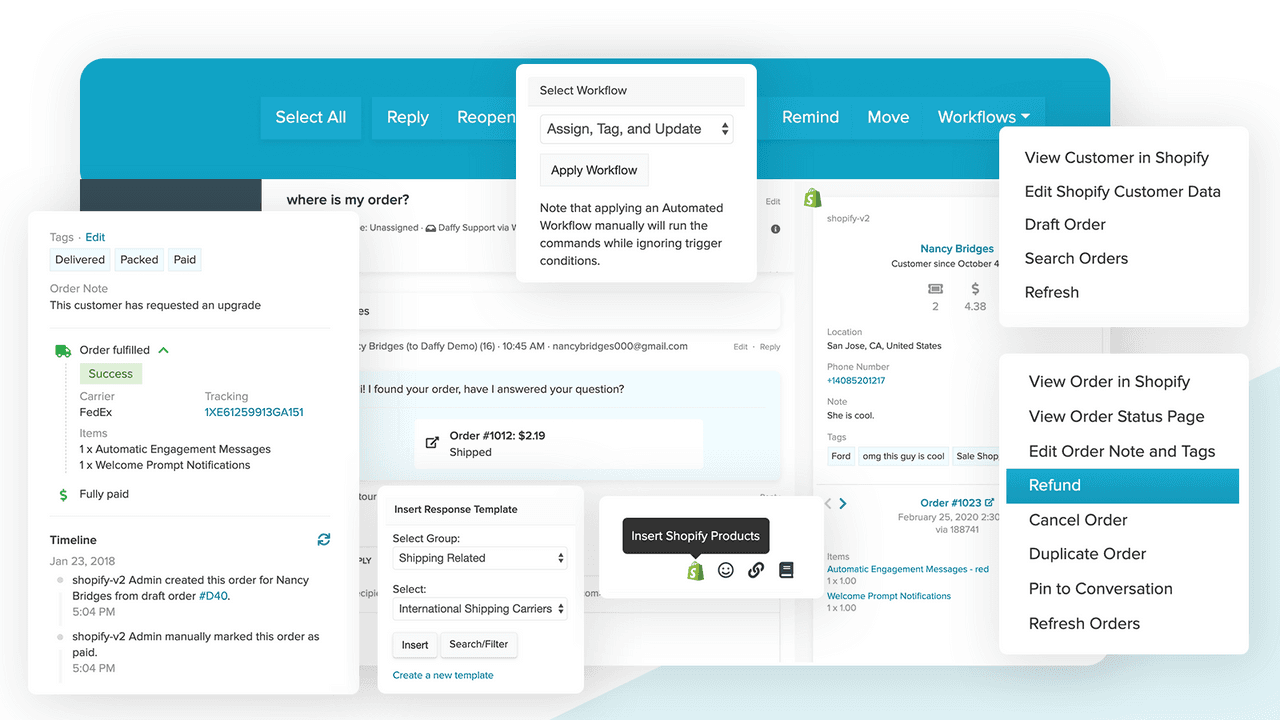
Re:amaze is a long-running helpdesk with a strong Shopify side, and ChatGPT picked it for stores that want a shared inbox across chat, email and social with order info inside. It holds 4.4 from 181 reviews on its Shopify listing.
What it does better than CWILL
- Orders inside the conversation. The listing says you can "manage, modify, and create Shopify orders directly in customer support and chats", and the image above shows refund and cancel actions next to a where-is-my-order chat.
- More channels and brands. Email, chat, social, SMS and calls in one inbox, with unlimited brands from the Pro plan, per the pricing page.
- Bots for order status. Basic already includes chatbots, and the plan grid lists an Order Bot alongside the Welcome Bot and custom bots.
Where it falls short
- Per-seat pricing. Every staff user is $29 to $69 a month, which adds up as the team grows. The Starter option at $59 flat for unlimited users caps you at 500 responded conversations a month.
- A small AI allowance. The AI Agent includes 5, 10 or 20 resolutions per user a month depending on plan, then $0.85 per extra resolution. Two seats on Basic get 10 a month.
- Its AI leans on assist features. The Re:amaze AI page is mostly suggested replies, translation and summaries, and one reviewer wished for WhatsApp (quoted below).
Pricing
| Plan | Per seat, monthly | Billed yearly | AI Agent resolutions included | Notable extras |
|---|---|---|---|---|
| Basic | $29 | $26.10 | 5 per user | Email, chat, social, FAQ, chatbots, AI Agent |
| Pro | $49 | $44.10 | 10 per user | Unlimited brands, SMS and voice, AI intents |
| Plus | $69 | $62.10 | 20 per user | Departments, staff reporting, CSAT, video calls |
| Starter | $59 flat | n/a | Not stated | Basic features, unlimited users, 500 responded conversations |
Extra AI resolutions are $0.85 each on every plan, and the trial runs 14 days with all Plus features. My Re:amaze pricing post covers the add-ons.
What merchants say
"An all encompassing app - minus compatibility with Whatsapp. It's been a great addition and has many useful features."
"We needed consolidation of email, voice, SMS, social and Shopify. Reamze does all this very well with several voice/phone integrations to choose from."
My take: Pick Re:amaze if you run several brands or need SMS and phone next to chat, and your team is small enough that per-seat pricing stays sane. Skip it if you want AI to carry most of the volume, because the included resolutions are small. My Re:amaze review and guide to an AI chatbot for Re:amaze go further.
4. Richpanel
Best for: ecommerce teams that want AI and self-service to resolve order, return, refund and subscription tickets end to end.
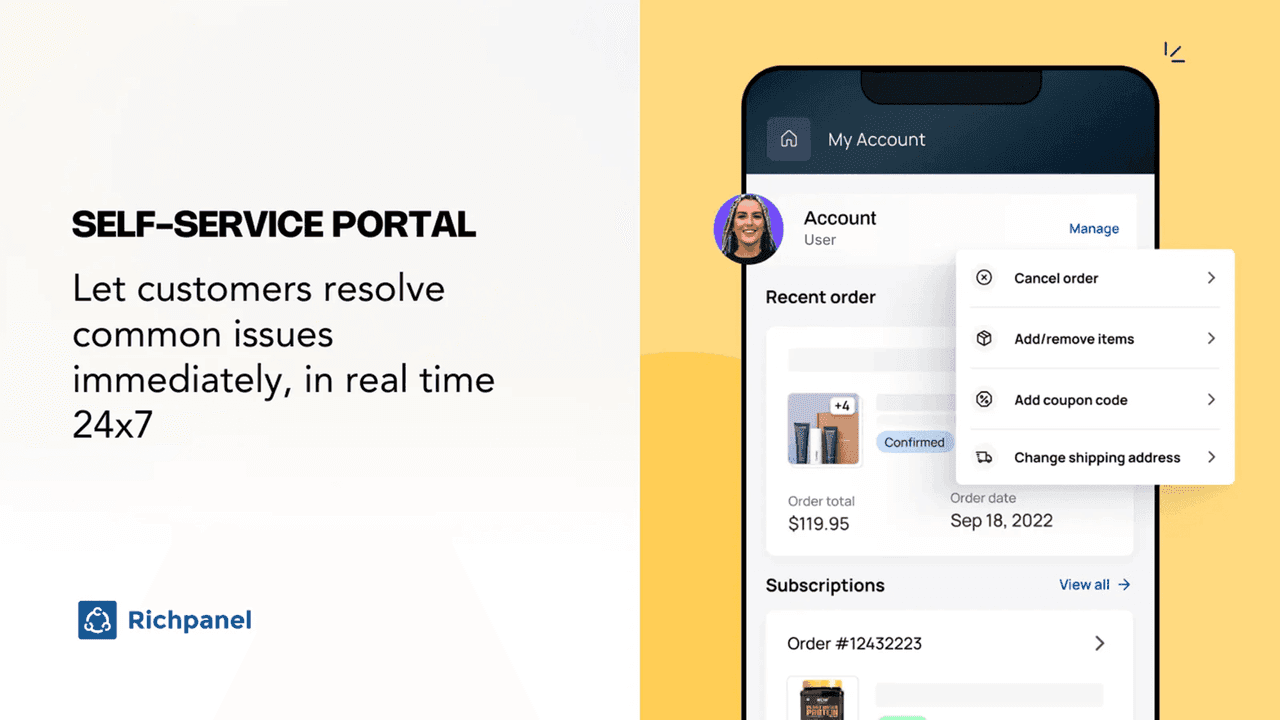
Richpanel calls itself an AI-native helpdesk, and ChatGPT picked it for higher-volume stores that want self-service and order automation. It holds 4.9 from 137 reviews on its Shopify listing, the highest rating in this list.
What it does better than CWILL
- AI that finishes order work. The listing says its AI agents resolve "order status, returns, refunds, cancellations and subscriptions end to end", with guardrails you set, such as refund limits and approval rules.
- Customers fix their own orders. The self-service portal above lets a customer cancel, edit items, add a coupon or change the address without opening a ticket.
- A manager AI and a QA AI. Per the listing, one AI writes and tunes the playbooks the agents follow, and another reviews closed conversations and flags gaps.
Where it falls short
- Self-service is a separate product. One one-star review says the Self Service add-on was needed to use the live chat and pop-up properly (quoted below). On the listing, Self Service is $119 a month on its own.
- Prices are hard to pin down. The listing shows Pro at $89 and Pro Max at $119 per user, but the website's pricing page still shows several older grids. Confirm your quote in writing.
- English-only app. The listing names English as the app's only language, which matters if your team works in another one.
Pricing
| Plan | Monthly | Billed yearly | What's included |
|---|---|---|---|
| Pro | $89, plus $89 per additional user | $828/year | Email, phone, chat, Facebook, Instagram; AI agents; up to 2 stores |
| Pro Max | $119, plus $119 per additional user | $1,188/year | Pro plus SMS, social media AI, CSAT surveys, multiple brands |
| Self Service | $119 | $1,188/year | Order tracking, returns and exchange flows, product recommendations; $299 per additional 20K orders |
AI conversations are "from $0.20 each" on every plan, on your choice of model, per the Richpanel listing. Each plan has a 14-day free trial. My Richpanel pricing guide has the history behind the older grids.
What merchants say
"After using Gorgias for a few years, we were very happy with moving over to RP, they have an amazing support staff. Not only is the price better suited but the amount of extra features that you get is amazing."
"First of all, it is way more expensive than you initially think it is. You need to pay for the Self-Service add-on. Because without it, you can't effectively use the live chat and pop-up."
My take: Pick Richpanel if most of your tickets are order changes and returns, and you want customers and AI to finish them without your team. Get the full quote, Self Service included, before you compare it with anything else. My list of Richpanel alternatives helps if the quote surprises you.
5. Shopify Inbox
Best for: stores that want free AI chat with no meter and a baseline to measure every paid tool against.
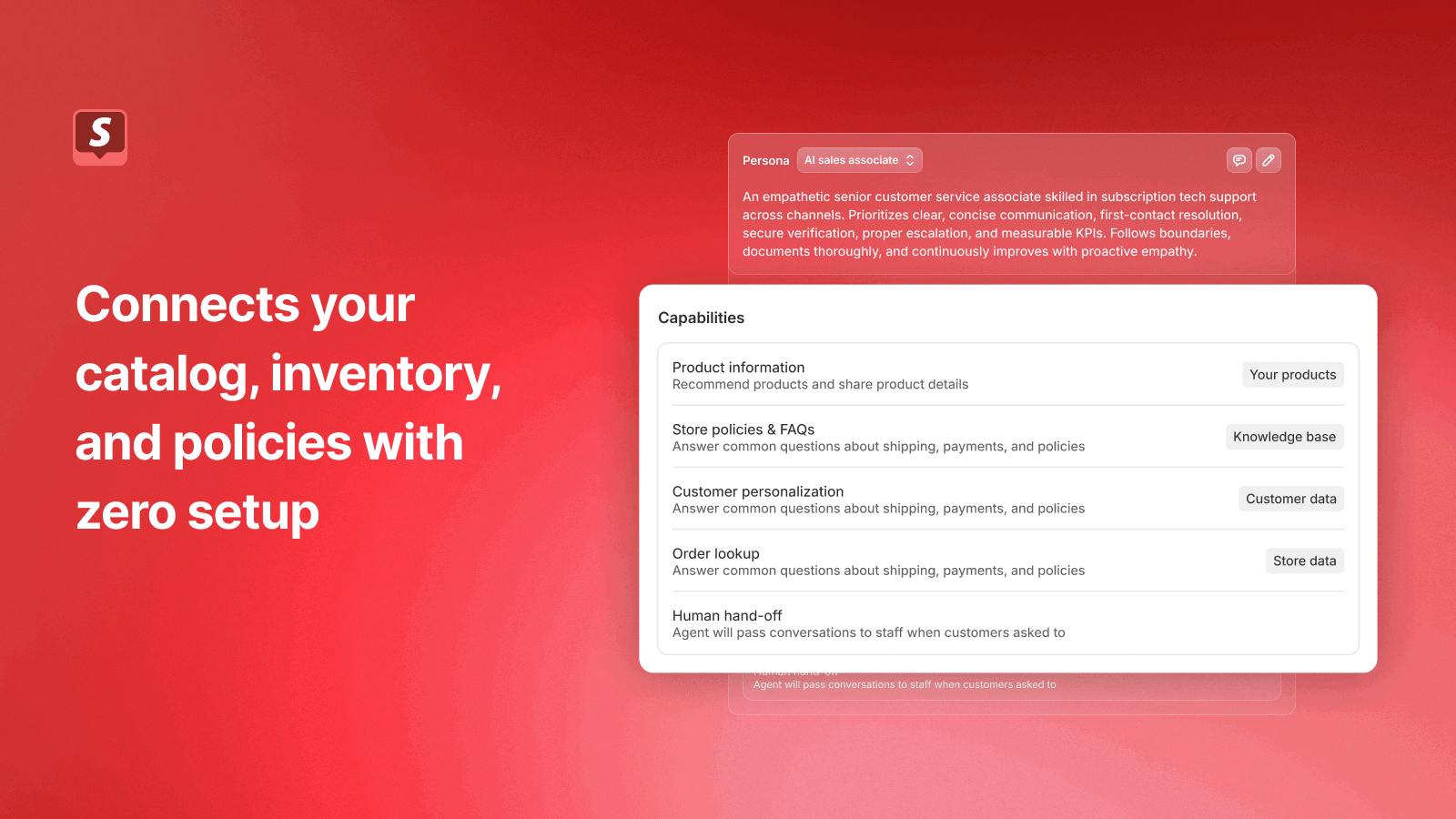
Shopify Inbox is Shopify's own chat app, with 4.6 from 5,806 reviews. It's the obvious comparison for CWILL, because both are free storefront chats. One German CWILL reviewer went as far as calling it a one-to-one copy of Shopify Inbox under another name.
What it does better than CWILL
- No price change to worry about. It's free, built by Shopify, with no usage meter.
- An AI sales associate. The listing says it connects to "your catalog, inventory, and policies automatically", lets you set tone and rules, and learns from chats you rate.
- Shop sign-in personalization. When buyers sign in with Shop, the agent can use their preferences and purchase history from across Shopify.
Where it falls short
- Store chat only. No email, social channels or helpdesk link, so it shares CWILL's biggest limit.
- Answers, not actions. The listing image shows order lookup and hand-off, but not refunds, returns or edits.
Pricing
| Plan | Monthly | What's included |
|---|---|---|
| Shopify Inbox | Free | Online store chat, AI sales associate, order lookup, human hand-off, 21 listed languages |
My guide to Shopify Inbox covers setup and settings.
What merchants say
"This is good, requires a little learning. Would be great if it could take other actions additional to answering, for example, making a note on the order if it refers to one."
My take: If you're leaving CWILL only because a paid tier is coming, run Shopify Inbox for two weeks first. If its answers hold up on your questions, you can stay at $0. If neither handles your email and returns, the problem isn't the widget. My list of Shopify customer service apps has the other free picks.
6. eesel
Best for: stores that already run a helpdesk, or are about to, and want AI that works the queue the way their team does.
Full disclosure: this is my team's product, so weigh my view with that in mind. eesel is an AI helpdesk teammate. It answers on your website chat and works tickets inside Gorgias, Zendesk or Freshdesk, and it connects to Shopify so it checks the order or product before it writes a word.
What it does better than CWILL
- Learns from your past tickets, not only your FAQ and policies, so it writes the way your team already answers. My guide to training AI on tickets explains why that matters.
- Works where email lands. Chat, email and helpdesk tickets in one agent, instead of a widget with its own inbox.
- Hands off with context. At Question Beauty, a cosmetics brand on Gorgias and Shopify, refunds, returns, complaints and chargebacks go to a person with an internal note of what the customer asked and what eesel found in Shopify.
Those Question Beauty numbers, between 8 August and 8 September 2026: about 990 Gorgias tickets handled, 960 replies sent, 290 Shopify orders looked up and 280 tickets closed without a person. STIL Classics, a planner brand, runs it more carefully: eesel looked up about 230 Shopify orders in a month and left about 430 draft replies as internal notes for a person to check and send. SaunaSpace uses it as a drafting assistant beside each Gorgias ticket, working from about 1,550 pages, articles and past tickets.
That range is the point. The trial data I've read from the support side backs it up: in one real-traffic trial, agents sent only 12% of AI drafts as written and rewrote the rest, mostly for length and tone. Training on the team's own sent replies fixes most of that, which is why eesel starts from your past tickets.
Where it falls short
- No proactive selling. There are no exit-intent pop-ups, quizzes or discount flows like Tidio's Flows.
- It costs money from the first month. Against CWILL's $0, eesel starts at $299. Pay for it when the tickets behind the chat are the real problem.
- Young on the App Store. The eesel listing has 4 reviews (5.0) and shows older prices; the plans below are from the pricing page. SOC 2 Type II is underway, not complete.
Pricing
| Plan | Monthly | Credits included |
|---|---|---|
| Free | $0 | 100 to try |
| Teammate 500 | $299 | 500 |
| Teammate 1,000 | $499 | 1,000 |
| Teammate 2,000 | $849 | 2,000 |
| Enterprise | Custom | Custom, with SSO and HIPAA with a signed BAA |
A ticket or chat is 1 credit "however long", per the pricing page. There are no seat fees, extra credits are $0.80 each if you turn overage on, and a year upfront gets two months free.
What merchants say
With 4 Shopify reviews, the customer stories are the better evidence: named stores, their helpdesk, and what the agent did in a real month.
My take: Pick eesel if CWILL handles your storefront questions but the email and order tickets behind it are swamping your team, or if you're moving to Gorgias or Zendesk anyway. Keep a free chat on product pages if that's all your shoppers need there. My eesel vs Gorgias AI comparison shows how the two fit together.
How to test a CWILL alternative on your 20 most common questions
ChatGPT's switching advice was the most useful thing it said: take your 20 most common customer questions and run each finalist on them. From working a queue, I'd score four things per question, not one.
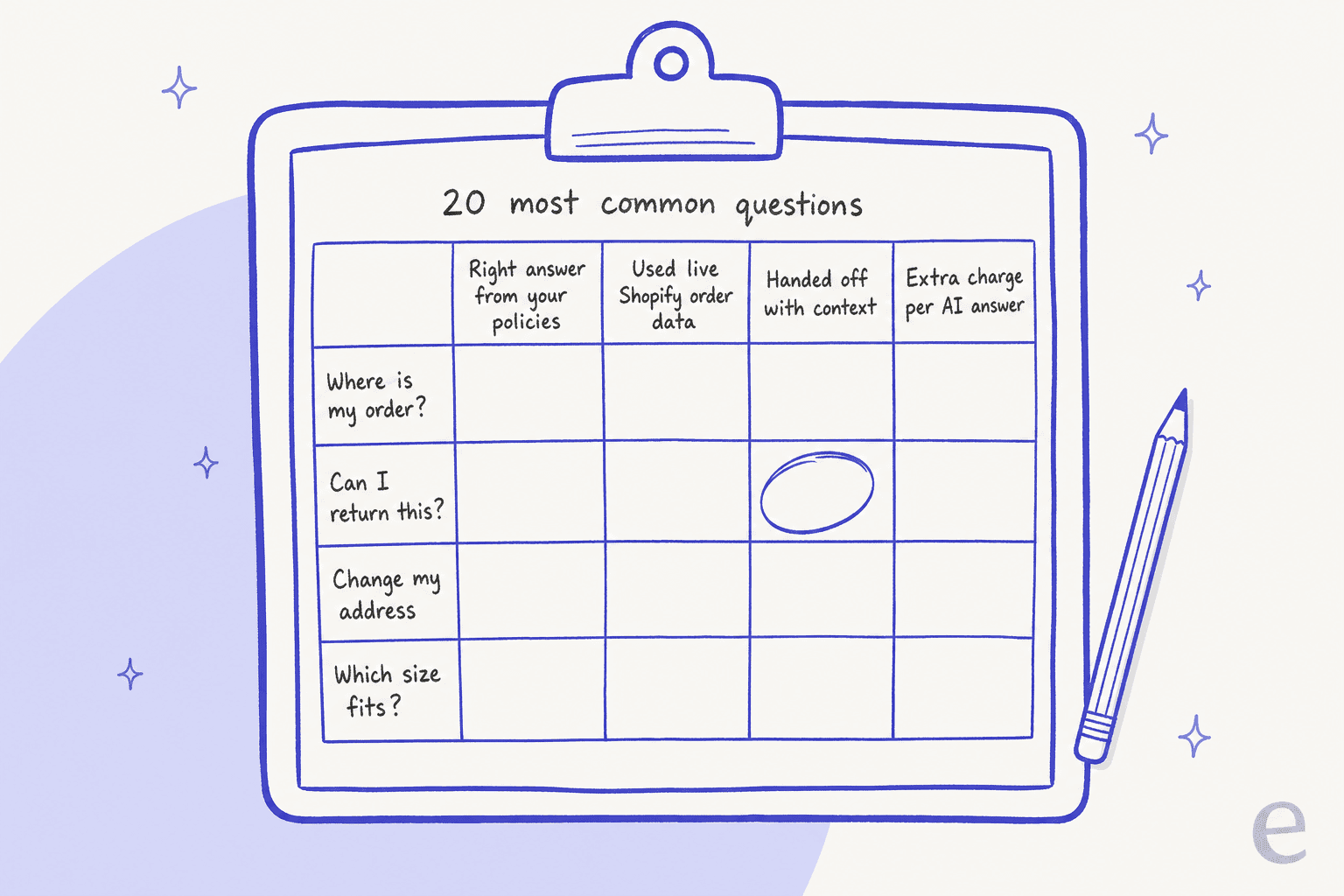
Here's how I'd run it, in about a week:
- Pull 20 real questions from CWILL's inbox and your email, not made-up ones. Mix order status, returns, address changes, sizing and one question nothing in your store answers.
- Check the answer came from your policies. If the AI invents a return window, that's a fail even if it sounds confident. My guide to AI hallucinations covers why this one matters most.
- Check it used live order data. For where-is-my-order, the answer should name the real order and its status. My guide to Shopify order data shows how each setup reads it.
- Run the full handoff. Ask for a refund, see where it lands and whether the person picking it up can see what the customer said and what the AI found. My guide to chatbot escalation shows what good looks like.
- Price the month. Count how many of the 20 would trigger a per-resolution or per-conversation charge, then multiply by your real volume.
Do this while CWILL is still live and free, so you're comparing against a working baseline rather than a gap. My guide to switching AI vendors covers running two tools side by side.
Which CWILL alternative should you pick?
- You want chat plus AI plus a team inbox, on a small budget: Tidio.
- Email, returns and address changes are the real workload: Gorgias, or Richpanel if you want customers to edit their own orders.
- You run several brands or need SMS and voice: Re:amaze.
- You want to stay free: stay on CWILL, with Shopify Inbox as your fallback.
- You already run Gorgias or Zendesk: eesel inside it, rather than another widget.
If I ran a Shopify store on CWILL today, I wouldn't leave because a paid tier is coming. I'd leave if my team spent the week answering "where is my order?" in email while the chat widget looked busy.
If you're still building a shortlist, my picks for Shopify chatbot apps and AI live chat apps cover the storefront side. For the helpdesk side, see AI for Shopify support and AI for ecommerce support.
Try eesel behind your Shopify chat
If CWILL is doing its job on product pages but the tickets behind it keep piling up, that's the gap eesel fills. It reads your past tickets, checks the Shopify order before it replies, and hands refunds and returns to a person with a note of what it found. Question Beauty runs it that way on Gorgias, and it closed about 280 tickets in a month without anyone touching them.
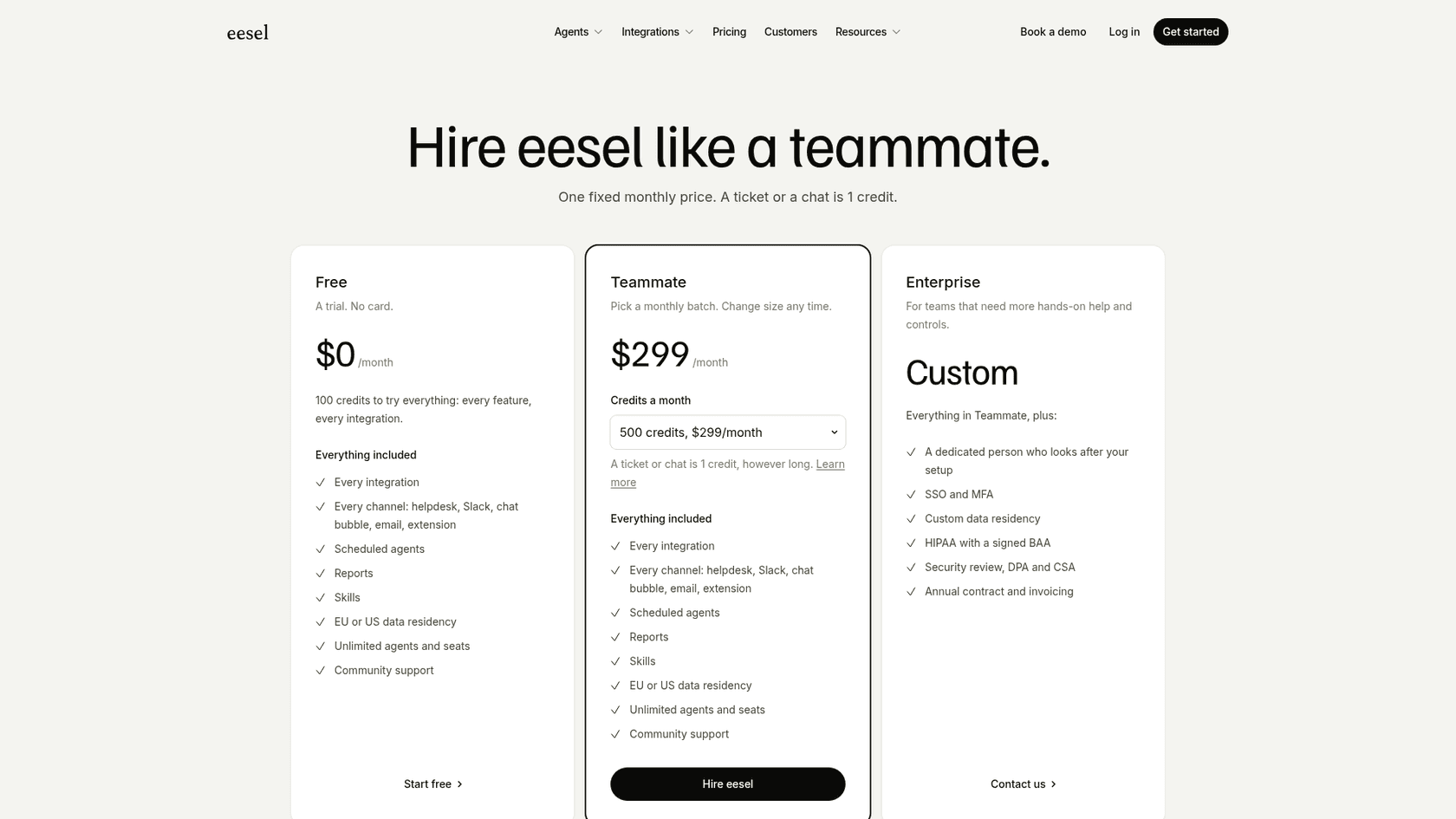
Try eesel free with 100 credits: connect Shopify and your helpdesk, and read its drafts on last month's real tickets before a single customer sees a reply.
Frequently Asked Questions
What are the best CWILL alternatives for a Shopify store?
For chat with AI and a team inbox, start with Tidio. If email, returns and order changes are the real workload, test Gorgias or Richpanel. Re:amaze suits teams that want SMS, voice and several brands in one inbox, Shopify Inbox is the free baseline, and eesel adds an AI teammate inside the helpdesk you already run. My CWILL review covers what you'd be replacing.
Is CWILL AI Chat free, and will it stay free?
Today, yes. CWILL's AI Chat pricing page lists one Free plan at $0 with "no paid tiers or usage limits", but the same page's FAQ says a paid tier is coming as usage grows, likely priced by conversation volume, revenue driven, or both. My guide to chatbot cost shows how those meters usually work.
Is there a free alternative to CWILL AI Chat?
Shopify Inbox is free, with no usage meter, and adds an AI sales associate that reads your catalog and policies. Tidio also has a Free plan with 50 billable conversations and 50 one-time Lyro AI conversations. My list of Shopify live chat apps has more free options.
Which CWILL alternative is best for order tracking and returns?
Gorgias, Richpanel and Re:amaze all show the Shopify order next to the conversation and let AI or agents act on it. Richpanel's self-service portal lets customers cancel, edit items and change addresses themselves. eesel looks the order up in Shopify before it replies and hands refunds to a person. My guide to WISMO automation covers the order-status side.
How much do CWILL alternatives cost?
For 2 support people, 300 tickets and 200 AI-handled conversations a month, list prices land around $219.50 on Re:amaze Basic, from $218 on Richpanel Pro, $243 on Gorgias Basic with AI Agent and $299 on eesel. Shopify Inbox and CWILL are $0 today. My Gorgias pricing guide shows how ticket overages add up.
Which CWILL alternative works with Gorgias or Zendesk?
Gorgias is a helpdesk itself. Richpanel's self-service product lists Gorgias, Help Scout and Salesforce. eesel works as an AI teammate inside Gorgias, Zendesk and Freshdesk and checks Shopify orders first. My guide to AI for Gorgias compares the options.
How do I test a CWILL alternative before switching?
Run your 20 most common customer questions through CWILL and two finalists. Score whether each answer came from your policies, whether it used live Shopify order data, whether the handoff carried context, and whether each AI answer adds a charge. My guide to testing an AI agent has the full checklist.