


What is CWILL AI Chat?
CWILL AI Chat is a chat widget plus a small inbox that runs inside your Shopify admin. Shoppers get a chat bubble on your storefront; the AI answers product, shipping and policy questions, and your team takes over in the inbox when it needs to. The app launched on the Shopify App Store on April 11, 2025 and carries the Built for Shopify badge.
I approach reviews like this from the search side first. People typing "CWILL review" are usually asking two things: is the free part real, and will the AI embarrass me in front of customers? I read CWILL's help center, pricing page, product page and all the critical App Store reviews to answer both, and I looked at the setup screens the help center shows. I didn't run it on a live store with real shoppers, so where I describe behavior, it's what CWILL documents.
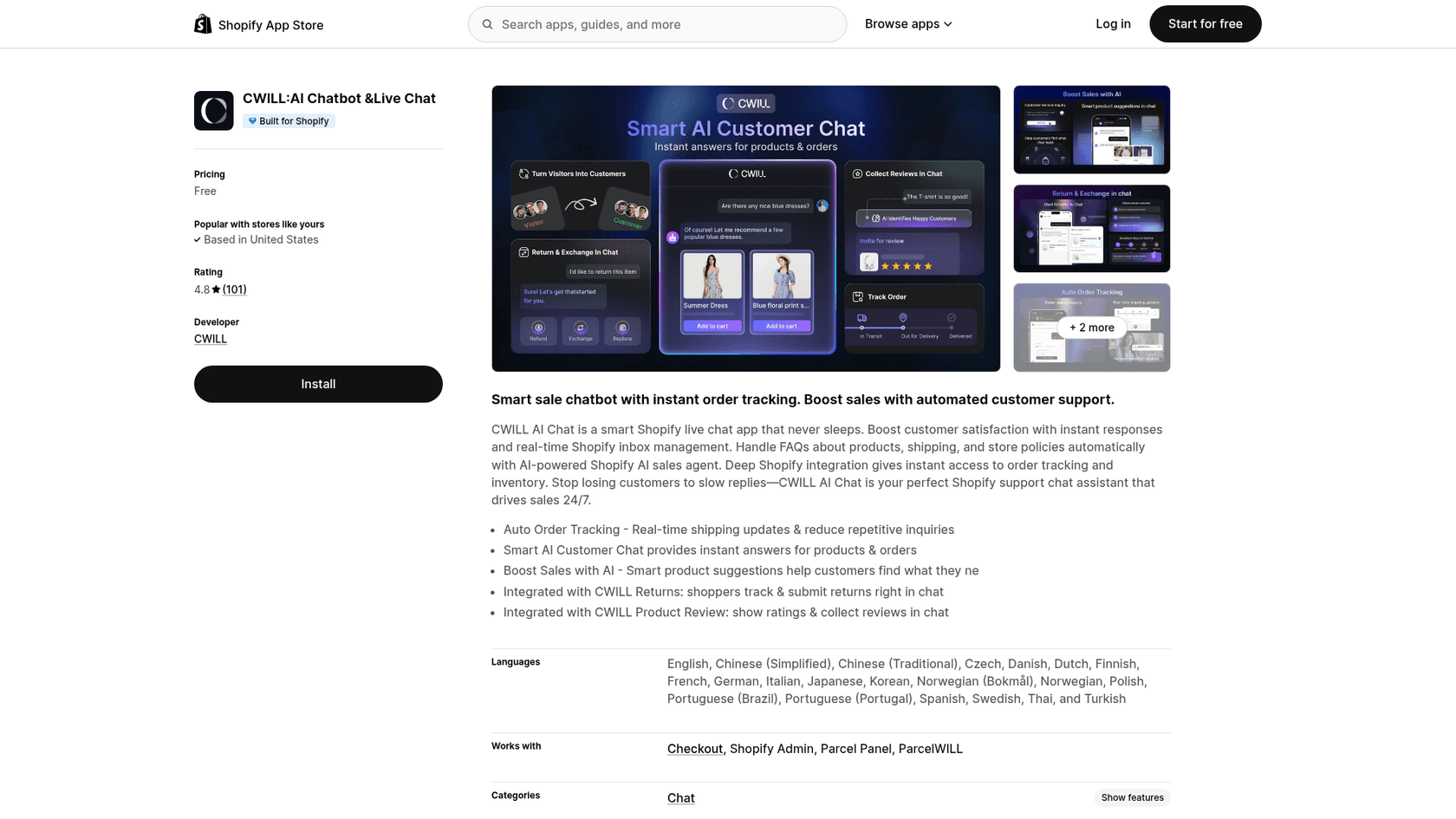
The name trips people up. CWILL is the company (it rebranded from Channelwill, and the chat app was called ChatWILL; one reviewer thanked support for removing a "Powered by ChatWILL" line). The same company also makes Willdesk, a separate, paid Shopify helpdesk with a shared inbox for email and social channels. They are different apps on different developer accounts, so a Willdesk price or limit doesn't apply here.
CWILL's main business is the rest of the post-purchase stack: order tracking, returns, reviews, loyalty and pop-ups, which it says power "30,000+ Shopify & DTC brands". AI Chat is the free piece that ties those apps together inside a conversation.
How does the CWILL AI decide what to say?
This is the part most reviews skip, and it matters more than the feature list. According to CWILL's How does AI work article, the AI can only respond based on the information in its knowledge base. That knowledge base has five sources:
- Questions: question-and-answer pairs you write, such as your warranty terms.
- Via URL: public pages it crawls, like your FAQ, collections and blog.
- Upload files: .doc, .docx, .txt or .pdf files up to 2MB each.
- Products: every published Shopify product, synced automatically.
- Terms & Policies: your Shopify policies, synced automatically.
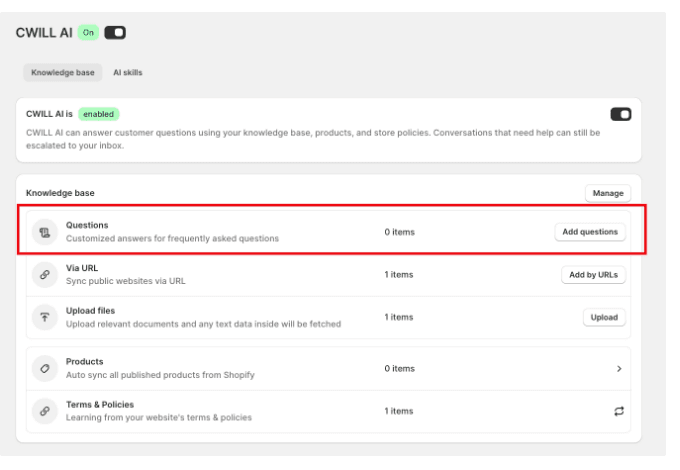
Two details here are useful. Each AI reply has a "Track Data Sources" button that shows which Question it drew from, and you can edit an answer straight from the conversation so the AI uses the new version next time (knowledge base doc). On the model side, CWILL's product page says it runs on "leading models (ChatGPT, Claude), plus CWILL's LLM trained on tens of millions of ecommerce conversations".
What's missing from that list is your own support history. Past chats and the replies your team has already written aren't one of the five sources, so the AI's tone and edge-case answers come from whatever you type into Questions. For a store with 30 common questions, that's an afternoon of work. For a store whose real knowledge lives in two years of replies, it's the main job of setting it up.
What the handoff looks like
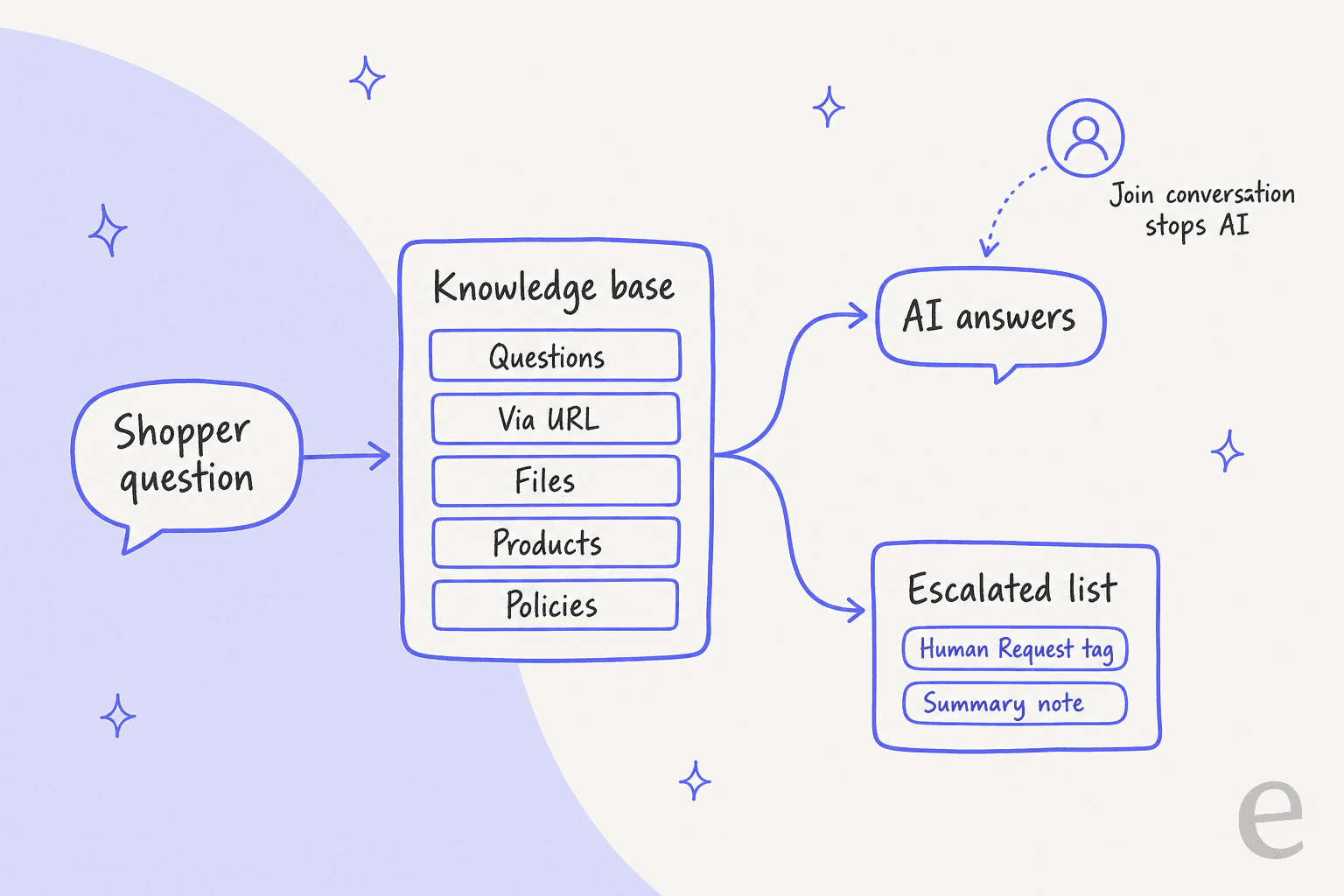
When a question falls outside the knowledge base, the help center describes four steps: the AI tells the shopper it's escalating, the chat moves to the Escalated list, a "Human Request" tag gets added, and the AI writes a summary note of the issue for whoever picks it up. Clicking "Join conversation" stops the AI for that chat, and "Assign" hands it back.
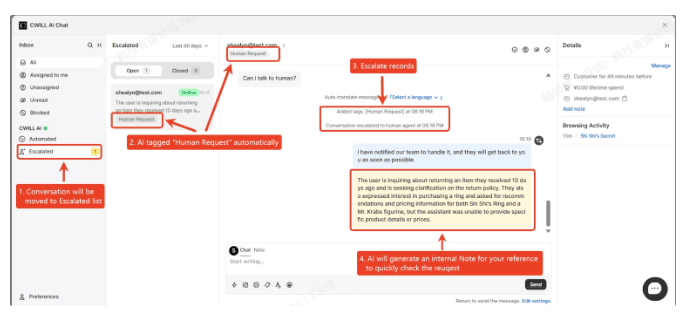
That's a sensible design, and the summary note is the part I'd value most, because it saves the agent from reading the whole chat. My question is what "Escalated" means at 2am. Notification emails go out when a chat is assigned to you and when a message sits unread for 15 minutes (notifications doc). If the shopper goes offline for 5 minutes, they get your last 3 messages by email. That's helpful, but it's still a chat that waits for a person, which is the normal tradeoff covered in my guide to AI escalation.
CWILL features I'd actually use
The feature list is short on purpose. Here's what each part does, in the order a Shopify store would care.
Order tracking in chat
Order tracking is the best reason to install it. In the app you go to Chat Widget, then Content, then Tools, and switch on "Track my order" (setup doc). Shoppers enter their order number plus the email or phone used at checkout, and the chat shows the order, its status and tracking. You choose where the tracking link goes: the carrier's page, a custom URL, or a CWILL Order Tracking page.
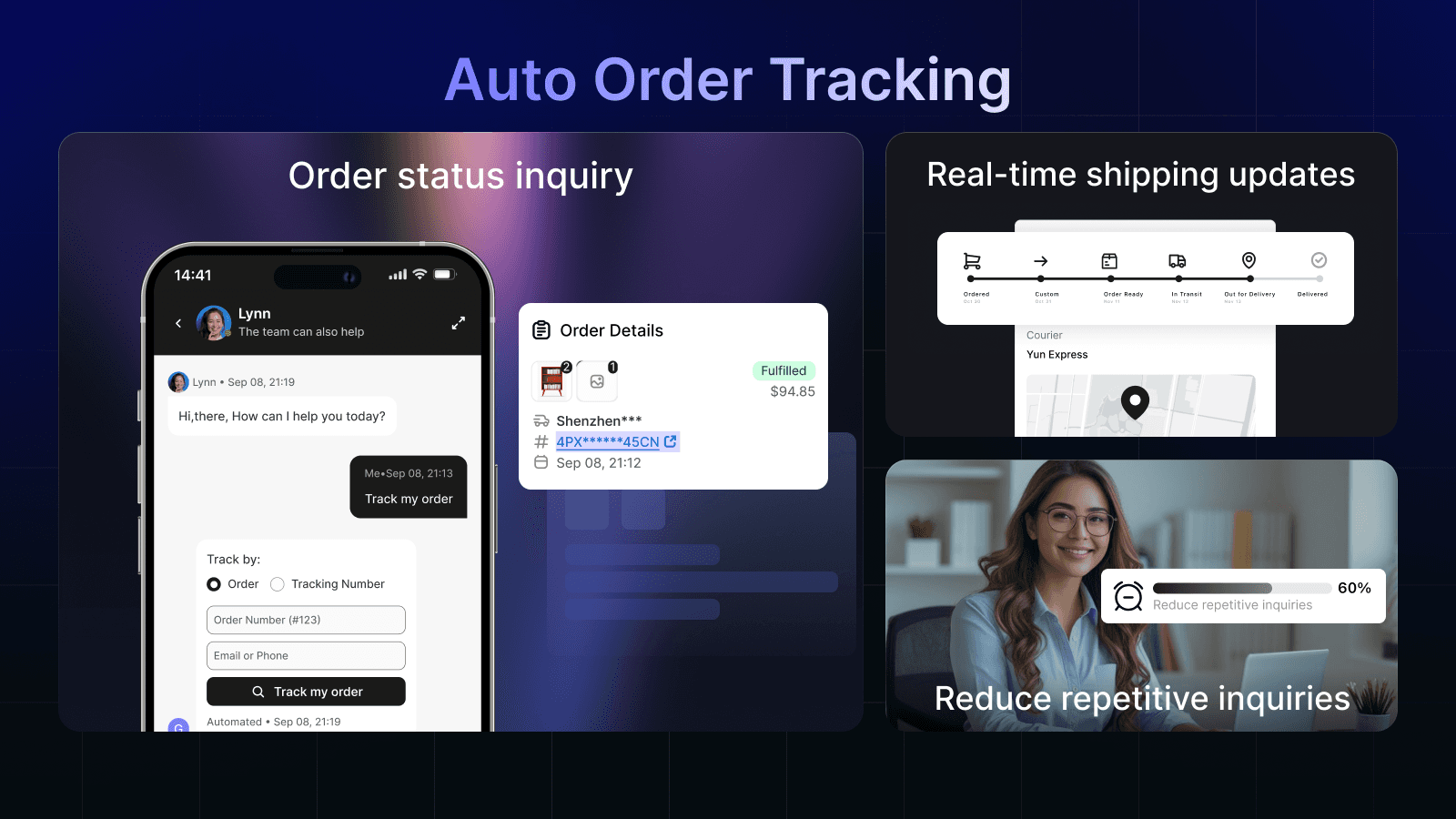
"Where is my order?" is usually the biggest single slice of ecommerce chat, so getting it answered for free is real value. If you want the bigger picture, my piece on WISMO automation covers what else a store can automate around shipping questions.
Returns and reviews, if you own the other CWILL apps
With CWILL Returns & Exchanges installed, you switch on a Returns skill under AI Chatbot, then AI skills (returns doc). The shopper verifies the order, picks items and a reason, uploads a photo if they want, and chooses a refund, an exchange or a replacement. The chat then creates a return with an RMA number that you approve in the Returns app. The doc is clear that this integration costs nothing extra.
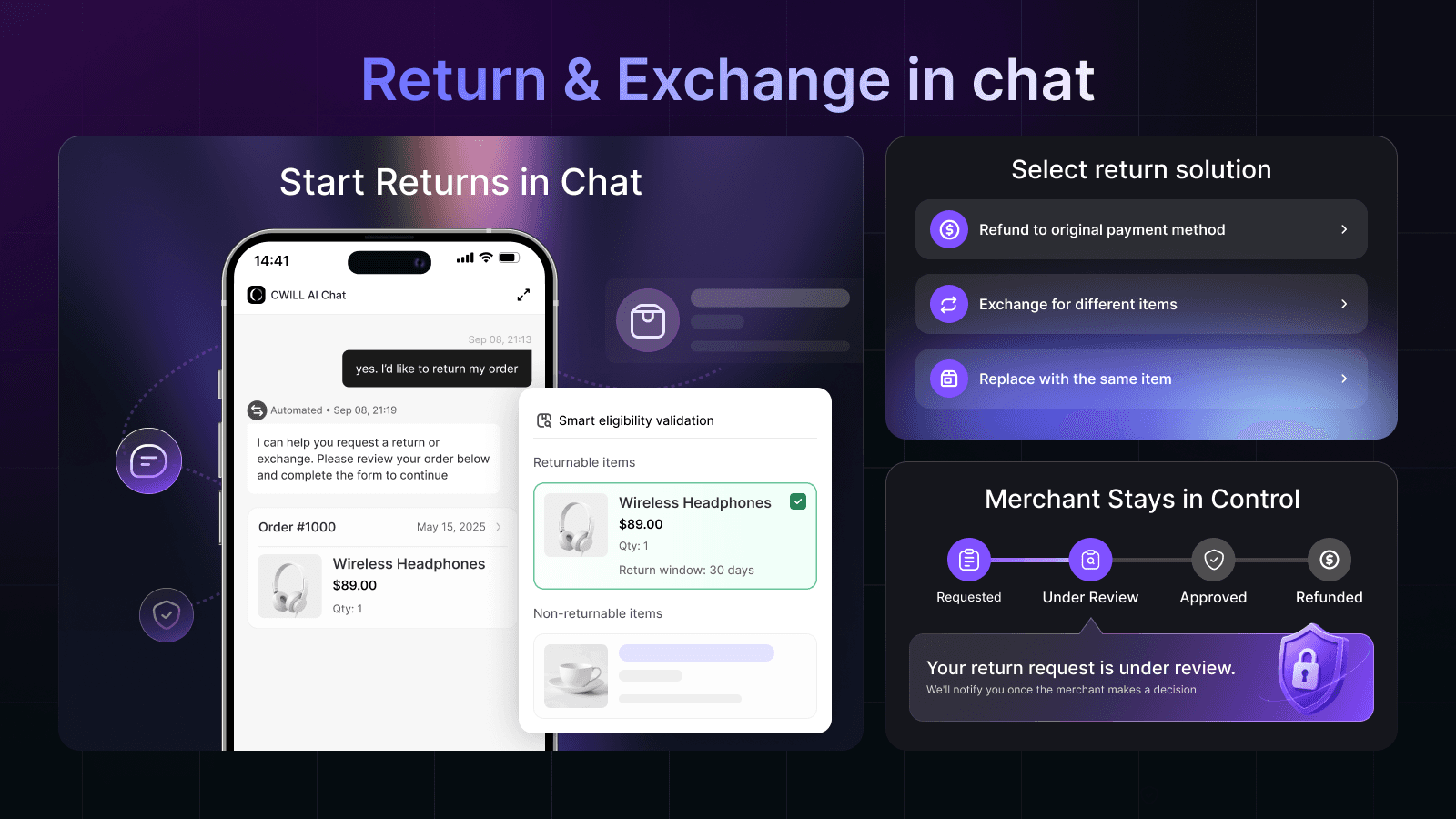
Note who makes the decision: the AI collects the request, and a person approves it. That's the right split for refunds and returns, and it's how I'd want any AI to handle money. Review collection works the same way through CWILL (Trustoo) Reviews. Both skills assume you use CWILL's apps; if your returns live in Loop or another tool, this part doesn't help you.
Product suggestions and multilingual replies
The AI reads your synced products and drops product cards into the chat when a shopper asks for something, which is the "AI sales assistant" pitch on the product page. It also detects the shopper's language and replies in it, even if your knowledge base is in one language. Inbox users can turn on automatic translation of incoming messages too (translation doc).
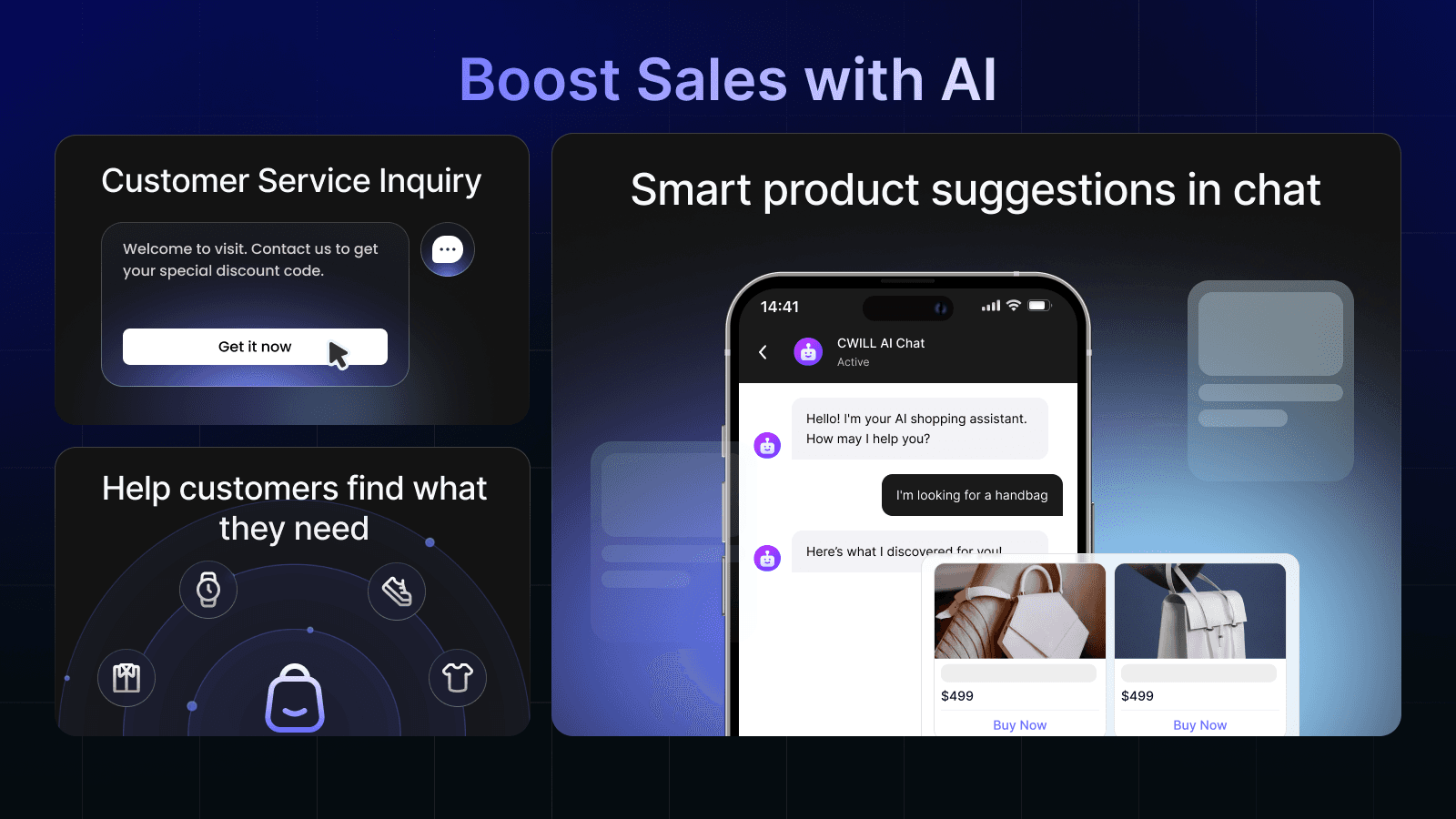
Translation and answering in the right language aren't the same job, as my multilingual support guide explains, but for a store selling into a few European countries, CWILL covers the basics at no cost.
Instant Answers, analytics and the small stuff
Instant Answers are preset question buttons that appear when a shopper opens a new chat. The help article has two notes worth knowing: the shopper has to give an email before seeing the answer, and Instant Answers don't elaborate on follow-up questions. That email gate is useful for lead capture and a small speed bump for someone who just wants the answer.
The analytics dashboard shows total conversations, "AI Resolved", "Transferred to Human" and "Time saved" (analytics doc). Read those numbers with care. CWILL defines AI Resolved as the "number of messages successfully replied to by AI", which is replies sent rather than problems solved. Time saved defaults to 0.5 minutes per ticket, which you can edit.
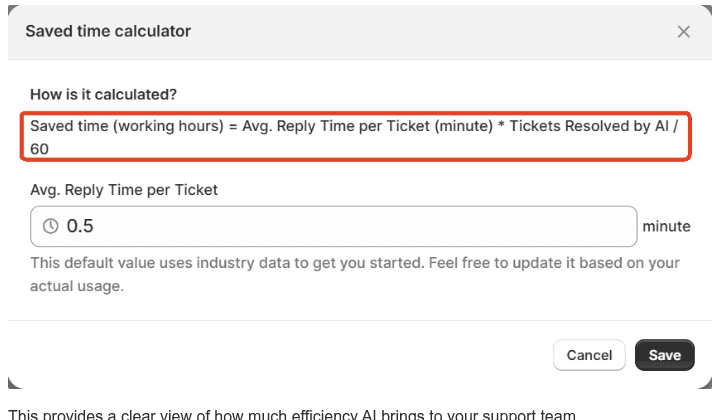
If you'll report these numbers to anyone, set your real handling time first and track resolution separately; my chatbot analytics guide covers the metrics that hold up. Smaller details: branding (logo, colors, welcome message) takes a few minutes, CWILL says the widget is under 50 KB and loads asynchronously, staff get access through Shopify's own Users and permissions, and there's no standalone mobile app, so you reply on mobile through the Shopify app (mobile doc).
How much does CWILL cost?
Right now, nothing. Here's every price CWILL publishes for AI Chat, all from its own pages on October 22, 2026:
| Where | What it says | Source |
|---|---|---|
| Shopify App Store | Pricing: Free | Listing |
| AI Chat pricing page | Free, $0/month, "no paid tiers or usage limits" | AI Chat pricing |
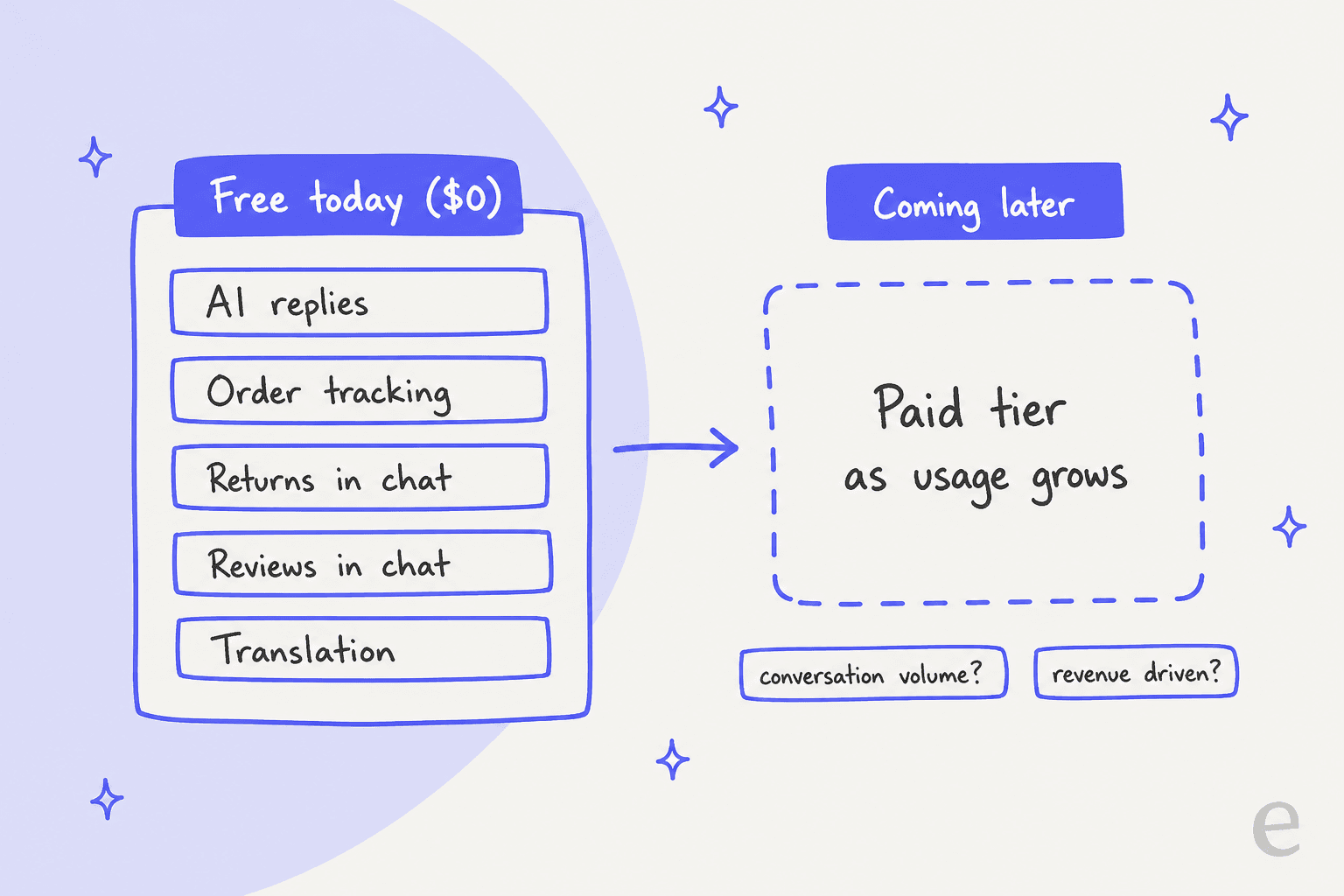
| Same page, FAQ | "a paid tier is coming as usage grows", likely by conversation volume or revenue | AI Chat pricing |
| Bundle pricing | AI Chat shown at $0 inside Starter (from $89/mo), Professional (from $145/mo) and Enterprise (from $567/mo) bundles of other CWILL apps | Bundle pricing |
| Returns integration doc | "no plan limits or extra charges for this integration" | Help center |
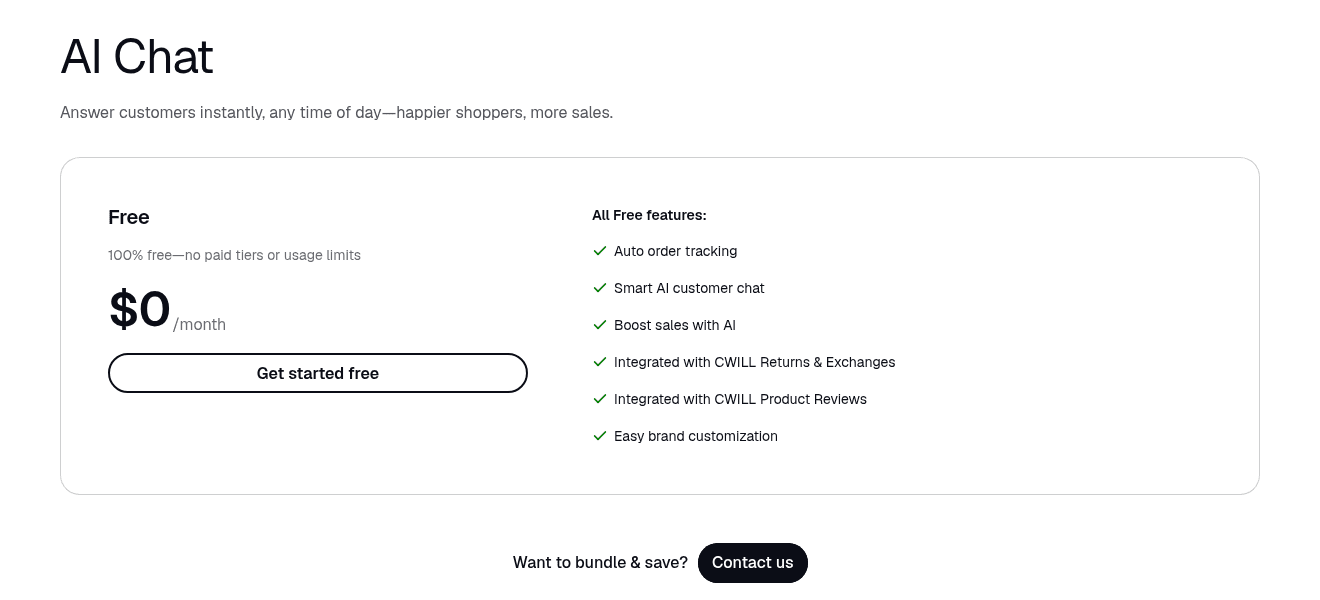
So the honest summary is "free today, with a paid tier announced but not priced". That's not a red flag on its own. It does mean I wouldn't build my support budget on $0 forever, especially since the stated pricing levers (conversation volume, revenue) are the same ones that grow with a successful store.
For context on what paid AI chat costs, CWILL's sister app Willdesk charges $16.90 a month for Basic and $20 per 100 AI conversations on top; my Willdesk pricing breakdown runs the numbers. My chatbot cost guide covers the wider market.
What do Shopify merchants say about CWILL?
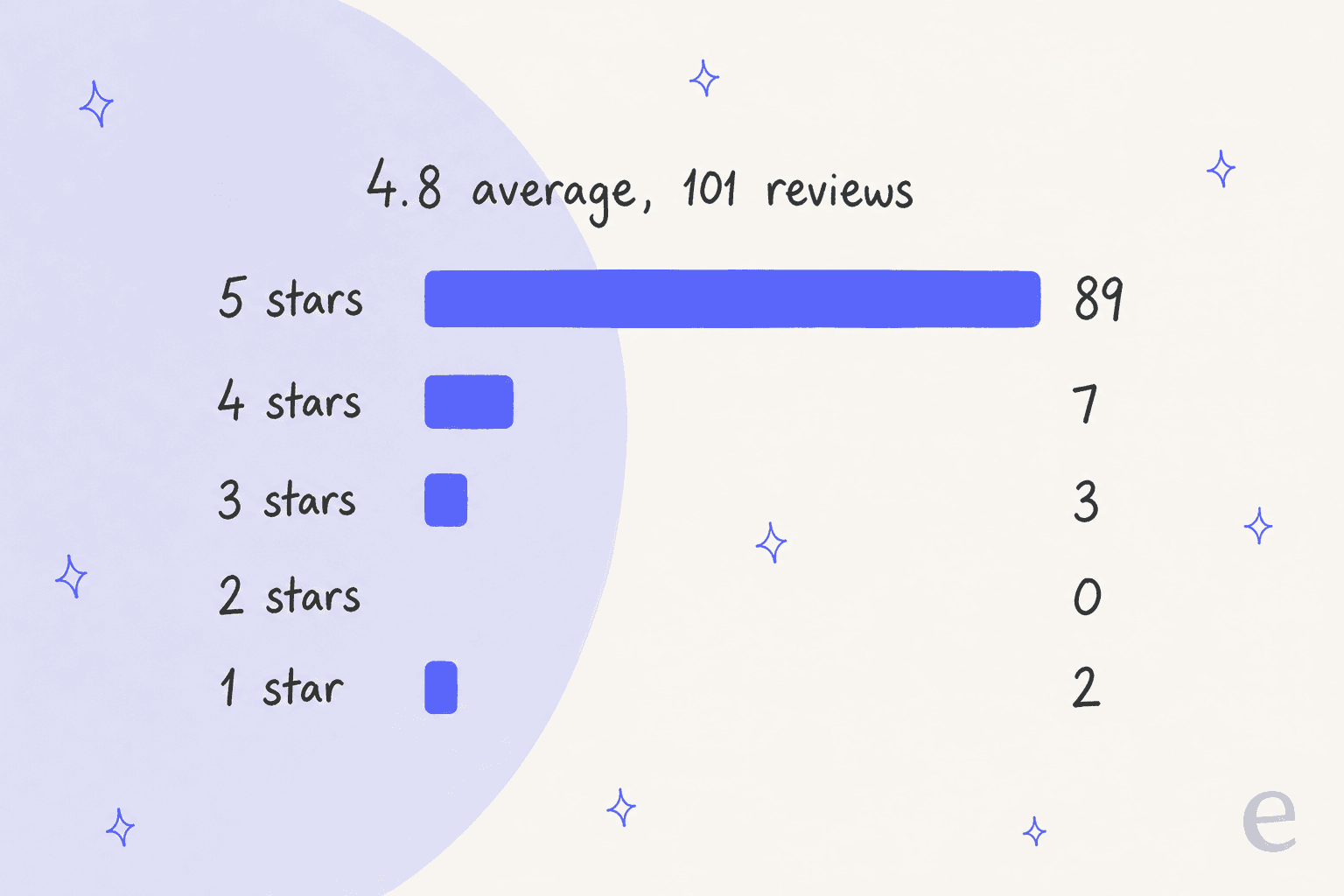
CWILL has no pages on G2, Capterra or Trustpilot that I could find, so the Shopify App Store reviews are where the user voice lives. On October 22, 2026 the listing showed 4.8 stars from 101 reviews.
The five-star reviews are short and often written within an hour of installing, so they say more about setup and support than about months of use. The support team gets named again and again:
"Many thanks to Nona for her assistance in removing the "Powered by ChatWILL" inscription from the chatbot. Very kind and responsive."

The longer positive reviews mention setup speed and limits being lifted quickly for big catalogs:
"Amazing app, Works instantly out the box, instant engagement from consumers. Can't fault this at all. Support also fast when i ran into limits because size of my store is so huge, They solved in seconds."
The critical reviews are few but specific. A French wine shop gave one star in June 2026, writing that the AI passes itself off as human, that there are hours between each question, and that without being at the computer you get no notification on your phone. A German store's one-star review called it a 1:1 copy of the Shopify Inbox app under another name. A three-star review from January 2026 is the one I'd read most closely:
"For the moment a good messenger app. AI functionality will come next month. I hope that the promises will be kept. Then it will definitely be a 5-star app. at least free of charge and a fast and helpful support-team."
CWILL's reply says the AI has since launched, and the help center articles on it are dated May 2026. So most of the 101 reviews cover a product that has changed a lot in a year, which is worth keeping in mind before treating 4.8 as a verdict on the AI itself.
Where CWILL stops
Every free tool has edges. These are the ones I'd check before installing, stated as CWILL documents them.
- It's a chat widget, not a helpdesk. The help center documents the storefront widget and its inbox. CWILL's pricing FAQ says AI Chat integrates with Instagram, Facebook, Gmail, Outlook, Klaviyo and helpdesks like Zendesk and Freshdesk, but the listing's "Works with" section names only Checkout, Shopify Admin, Parcel Panel and ParcelWILL, and I found no setup guide for any of those other connections. Ask support to show you one working before you count on it.
- The AI knows what you give it. Five knowledge sources, none of them your past conversations. Good answers depend on how complete your Questions list is.
- The best skills assume CWILL's other apps. Returns and reviews in chat run through CWILL Returns & Exchanges and CWILL (Trustoo) Reviews.
- Free has a stated end date, just not a published one. The paid tier is announced on the pricing page itself.
- Reporting counts replies. "AI Resolved" is messages replied to, so pair it with your own resolution checks.
None of these are hidden. They're the shape of a free chat widget, and for a lot of stores that shape is fine. Use the picker below to see where your store lands.
Who should use CWILL?
Pick CWILL if you run a small or mid-sized Shopify store, chat is a channel you want to offer without paying for it, and order-status questions eat your day. It's an even better fit if you already use CWILL's order tracking, returns or reviews apps, because the chat ties into all three. Before going live, run your 20 hardest questions through it, the way my AI agent testing checklist describes. It compares well with other free and low-cost options in my roundup of Shopify live chat apps, and against paid ones like Chatty and Zipchat on price alone it's hard to beat.
Skip it if your support already lives in a helpdesk, most of your tickets are emails, or your answers depend on context only your team's past replies hold. In that case a chat widget is the smaller half of the problem (my explainer on the ecommerce helpdesk shows the other half), and the guide to Shopify AI chatbots or my list of AI helpdesks for Shopify is a better next read.
My rating: 4 out of 5. It does what a free Shopify chat should, the handoff design is thoughtful, and support gets real praise. It loses a point for the gap between the integrations CWILL lists and the ones it documents, and for a free plan that comes with an announced, unpriced paid tier.
eesel for Shopify stores that outgrow a chat widget
When a store grows past chat, the work shifts to the ticket queue: email, social messages and order questions arriving in Gorgias, Zendesk or Freshdesk. I've spent two years on SEO at eesel, reading what Shopify merchants search for when their support queue gets busy, and the answer keeps pointing one way. The AI that saves the most time is the one that reads the order before it writes a word.
That's how eesel's AI helpdesk teammate works. It plugs into Shopify and your helpdesk, learns from your help center and past tickets, and looks up the order before answering. STIL Classics, a planner brand on Gorgias and Shopify, uses it to prepare tickets: in a month it looked up about 230 Shopify orders and left about 430 draft replies for a person to check and send. Question Beauty lets it reply directly, in the language the customer wrote in, while refunds and complaints go to a person with a note attached.
The lesson I'd pass on comes from a real-traffic trial with a German jewelry brand on Zendesk and Shopify. Its agents rarely sent the AI's drafts unchanged, because the drafts were longer and more formal than how the team writes. That's why eesel learns from the replies your team has already sent, and lets you simulate on past tickets before anything reaches a customer. If you want a chat bubble too, eesel's chat bubble goes on a Shopify store with one script tag.
You get 100 free credits to test it, and a ticket or a chat is 1 credit. Paid plans start at $299 a month for 500 credits on the pricing page. Try eesel on your own Shopify orders and see what it would have said.
Frequently Asked Questions
Is CWILL AI Chat really free?
Yes, today. CWILL's AI Chat pricing page lists one Free plan at $0 a month with "no paid tiers or usage limits", and the Shopify listing shows Free. The same page's FAQ says a paid tier is coming as usage grows, likely priced by conversation volume or revenue. My free AI chatbot guide covers what free usually trades away.
What does a CWILL review on the Shopify App Store look like?
On October 22, 2026, CWILL: AI Chatbot & Live Chat had 4.8 stars from 101 reviews: 89 five-star, 7 four-star, 3 three-star and 2 one-star. Most of the praise names a support rep. The critical ones mention missing mobile notifications and a widget that looks a lot like Shopify Inbox.
Is CWILL the same as Willdesk?
No. Both come from the company formerly called Channelwill, but they are separate Shopify apps. CWILL AI Chat is a free chat widget. Willdesk is a paid helpdesk with a shared inbox, from $16.90 a month plus AI conversations at $20 per 100 on Basic. My Willdesk review covers it in full.
Can CWILL handle returns and order tracking in chat?
Yes. Order tracking is built in: shoppers enter an order number and email, and the chat shows status and tracking. Returns run in chat if you also install CWILL Returns & Exchanges, which creates the return for your team to approve. For how other tools handle this, see my guide to AI order tracking.
What happens when the CWILL AI can't answer a question?
Its help center says the AI tells the shopper it is escalating, moves the chat to an Escalated list, adds a Human Request tag and writes a summary note. A person then joins the conversation, which switches the AI off for that chat. My chatbot escalation guide explains what a good handoff needs.
Does CWILL AI Chat work with Gorgias or Zendesk?
CWILL's pricing FAQ says AI Chat integrates with helpdesks such as Zendesk, Freshdesk and Help Scout, but the Shopify listing only names Checkout, Shopify Admin, Parcel Panel and ParcelWILL, and the help center has no setup guide for any helpdesk. If you already run Gorgias or Zendesk, ask CWILL support to show you the connection before you plan around it.
What is a good CWILL alternative for a busier Shopify store?
If you need AI on email and a helpdesk as well as chat, look at tools that work inside your ticket queue. eesel's Shopify integration looks up orders and learns from your past replies, and plans start at $299 a month for 500 credits after 100 free. My roundup of Shopify AI chatbots lists more options.