

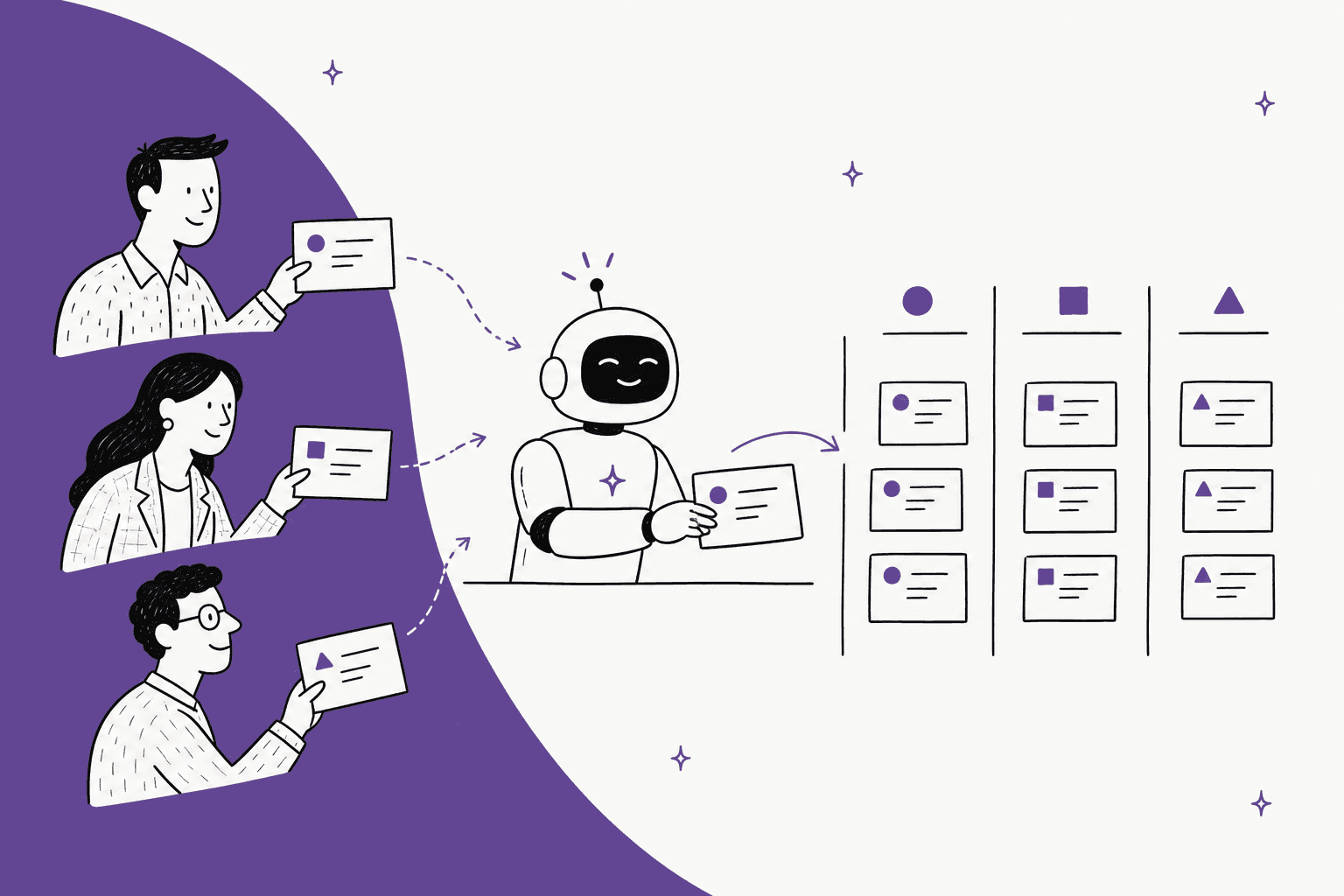
AI can take a big share of partner support: program and tier questions, onboarding steps, deal registration status, and the first pass on a partner's customer escalation. The rule that makes it safe is simple: the AI must know which partner is asking before it says anything partner-specific. Reseller A should never see Reseller B's price list or deals, and that line has to be enforced by the system the AI reads from, not by a sentence in its prompt.
Discounts, deal conflicts between partners, and fund claims stay with your channel team. The AI's job there is to get the request ready to approve, not to approve it. Zendesk already does the permission part well: its AI agents use a restricted article only for users whose segment matches its permissions. Freshdesk's Freddy AI Agent learns only from articles visible to all users, so partner-only folders are out of its reach.
If your partner questions land in Zendesk, Freshdesk or Salesforce, eesel works as an AI helpdesk teammate that answers them, looks records up live with the permissions of the account you connect, and holds anything commercial for approval. Adverscale runs it across several brands on one Zendesk queue: 2,400 tickets a month, each matched to the brand the customer bought from, with brands never mixed in one message.
Can AI help with partner support?
Yes, and it fits better than you'd expect. Partner support is two audiences in one queue. Your partners (resellers, agencies, MSPs) ask about the program: tiers, deal registration, margins, how to onboard a customer. And their customers' problems arrive through them, usually as "our customer can't log in, can you help?". Both are repetitive, both have a right answer written down somewhere, and both get slow when the one person who knows the partner program is on leave.
I build integrations and APIs at eesel, and I've been on the other side of this too. We get partner-style asks ourselves: one agency running our product across more than ten client companies asked us, on a call, for a reseller agreement. That's the kind of question that should go straight to a person. The fifty questions around it ("how do I add a client workspace?", "where's the setup guide?") shouldn't.
Here's how I'd sort what partners send:
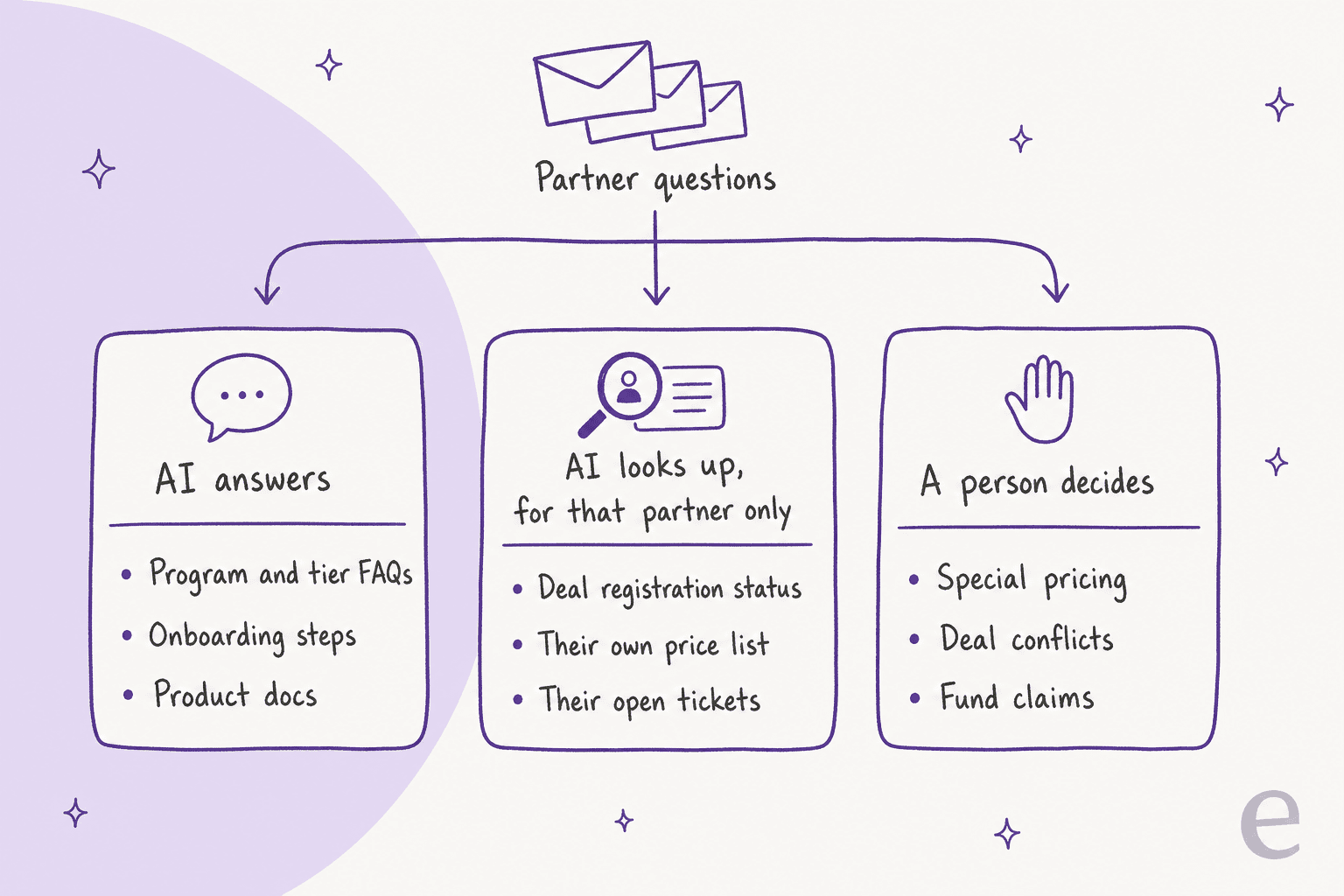
- AI answers. "How do I get to Gold tier?", "what's the onboarding checklist for a new customer?", "does the API support SSO?". One answer for every partner, written in your partner guide or product docs.
- AI looks up, for that partner only. "Where's my deal registration?", "what's my margin on this SKU?", "what's happening with our open ticket?". The answer depends on who's asking, so it comes from a record, filtered to that partner.
- A person decides. Special pricing, two partners claiming the same deal, marketing fund claims, contract terms. These cost money or pick a winner between partners, so the AI prepares the ticket and steps aside.
My rule of thumb: a wrong answer about pricing or deal registration costs more than the ticket it saved. The goal isn't the highest automation rate; it's never answering a commercial question wrong.
Which partner questions can AI handle?
Most of them, at least partly. Here's how I'd split the common ones. The third column matters most: it's what the AI has to read for its answer to be true.
| Partner question | What the AI does | What a person does | Record it reads |
|---|---|---|---|
| Program, tiers, certifications | Answers from the partner guide, links the page | Nothing | Partner program docs |
| Onboarding their customer | Walks through setup steps, sends the checklist | Joins only if setup is non-standard | Product docs, onboarding guide |
| Deal registration status | Looks up the registration for that partner, reports status | Approves or rejects registrations | CRM or partner portal |
| "What's my margin?" | Reads that partner's tier and price list, answers | Nothing, if the record is right | Price list per tier |
| Special discount request | Collects deal size, customer, competitor, reason; drafts approval | Approves or declines | Discount policy, deal record |
| Deal conflict between partners | Acknowledges, opens a conflict ticket | Decides who keeps the deal | Both registrations (channel team only) |
| Partner's customer technical issue | Answers known fixes, or collects details and escalates | Tier 2 works the hard ones | Docs, known issues, past tickets |
| Commission or fund claim | Explains the process, checks the claim is complete | Approves payment | Partner agreement, claim record |
If you sell B2B direct as well, most of the same thinking applies to B2B support in general, and there are separate guides on pre-sales questions and wholesale orders. The partner case adds one hard problem those don't have.
Try the sorting yourself on a few real questions:
Which lane does this partner question go in?
Pick a question a partner just sent. You'll see who should answer it, what the AI has to read first, and the one rule that keeps it safe.
Pick a question above.
Reads: the partner program guide (tiers, requirements, benefits).
Rule: same answer for every partner, so it can come from shared docs. Link the source page in the reply.
Reads: the deal registration record in your CRM or partner portal, matched to the sender's partner account.
Rule: confirm the sender belongs to the partner that owns the registration before saying anything about it.
Reads: that partner's tier and price list, never the full discount matrix.
Rule: the permission lives in the system it reads from, not in the prompt. If the sender can't be matched to a partner, no numbers.
Reads: the deal, the partner's tier and the discount policy, so the ticket arrives ready.
Rule: AI drafts the approval request for the channel manager. It never promises or hints at a number.
Reads: both registrations and their timestamps, if it's allowed to see both.
Rule: never tell one partner anything about the other partner's deal. Acknowledge, open a conflict ticket, hand to the channel team.
Reads: the docs and known issues, then asks for partner account, end customer, version, error text and steps already tried.
Rule: answer known fixes, escalate the rest to tier 2 with everything filled in, so nobody asks the partner twice.
How do you stop AI showing one partner another partner's pricing?
This is the problem that makes partner support different from ordinary customer support, and it's where I'd spend most of the setup time.
Every partner asks the same questions and needs a different answer. "What's my discount?" from a Gold reseller and from a new Registered partner are two different numbers. "Where's my deal?" must never return a deal another reseller registered. A support bot that answers from one shared knowledge base will, sooner or later, quote the wrong tier or confirm a deal to the wrong partner. In a channel business, that's not a support mistake; it's a partner relationship problem.
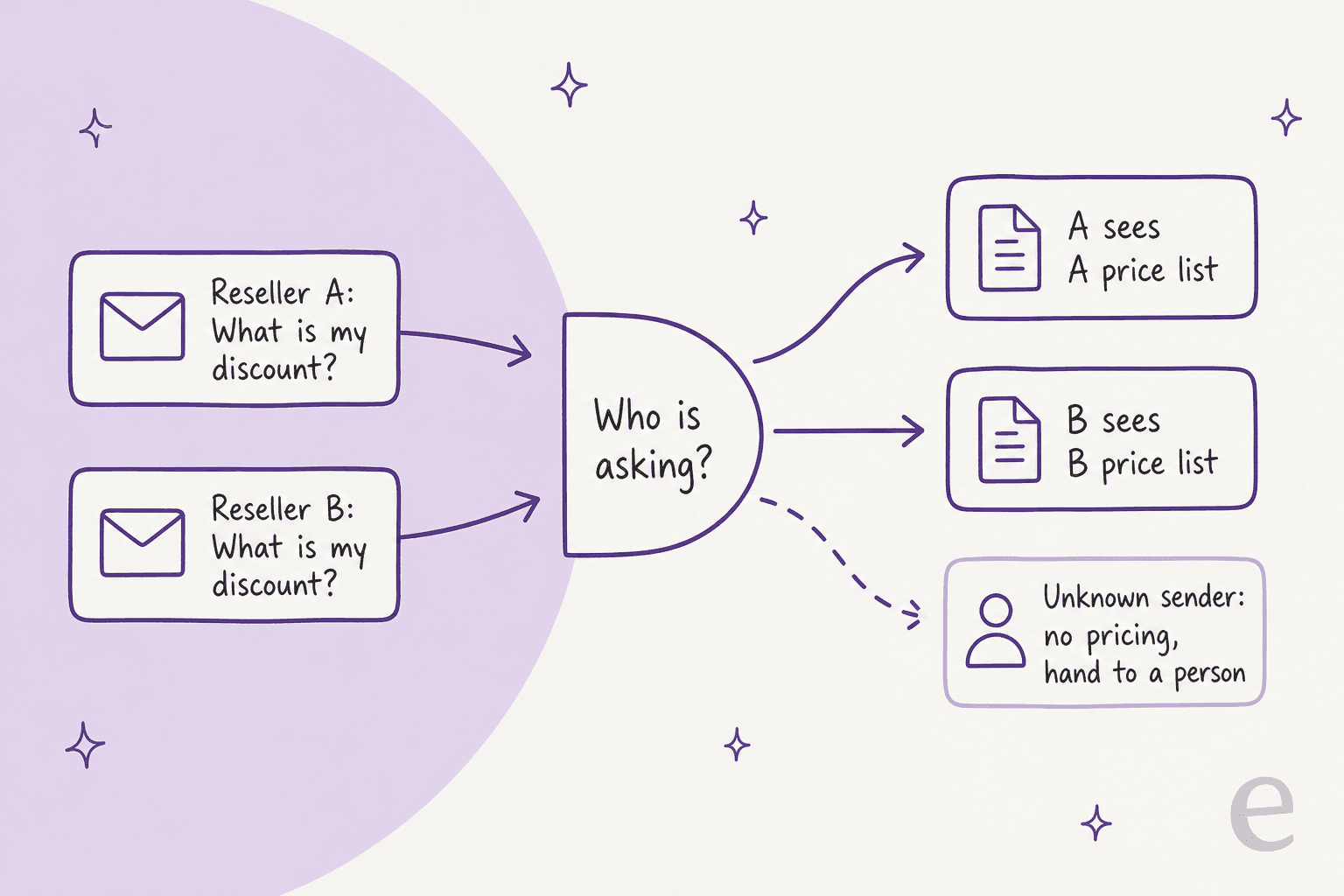
The fix is to put the permission in the system the AI reads from, not in the AI's instructions. An instruction like "only share pricing with the right partner" is a polite request. A data source that physically returns only that partner's records is a guarantee. Three ways to get there, depending on your stack:
- Restrict content in the help center. In Zendesk, you can limit articles to signed-in users "by tags, organizations, individual users, or a combination" through user segments. Put each tier's price sheet behind a segment, and Zendesk's AI agents follow it: restricted articles are used only for users whose segment matches. There's a walkthrough on restricting articles by segment. Two catches from Zendesk's own docs: it needs Suite Growth or higher (Suite Team can only choose everyone or signed-in users), and you can't test restricted answers in the test widget.
- Look it up live with scoped credentials. Deal registrations and price lists usually live in a CRM or PRM, not a help center. Connect the AI with an account that can only read what it should. eesel's Salesforce docs say it plainly: "Your agent only sees what the Salesforce user you authorized can see," and object and field permissions in Salesforce are the real limit.
- Match the sender to a partner account first. The lookup is only as good as the identity behind it. Partner contacts should belong to an organization (or company) in your helpdesk, with the tier as an organization field. If a message comes from an address that isn't on any partner account, the AI answers general questions only and hands anything commercial to a person.
Freshdesk is the outlier here. You can show help center folders to selected companies, but Freddy AI Agent leaves private or restricted articles out of its learning. That's a safe default, and it also means partner-only content can't be answered by Freddy directly. If your partner content lives in Freshdesk, a lookup through an API is the way in.
There's also the boring half of identity: organization ticket sharing. If an MSP has five technicians, decide whether all five see each other's tickets before the AI starts telling them "your open ticket is…".
How does AI handle escalations from a partner's customers?
This is where partners feel your support the most, and where they're least patient. An MSP has their own customer on the phone; every question you send back costs them billable time. The r/msp threads on vendor support read like a list of what not to do:
"It takes 30 days at least to actually test the software internally... it's day 40 that you really start running into roadblocks, find where the salesperson lied about features, and have to fight with the poor support."

And from the same community, a thread on vendor support that hasn't aged much:
"Support has been outsourced to sheet reading contractors pretty much everywhere, and eats into our billables by having to circumnavigate crappy support queues across the board."
The AI can't fix a product gap. What it can fix is the back-and-forth. An escalation that arrives at tier 2 with everything already collected saves the partner a round trip, which is the thing they're actually angry about.
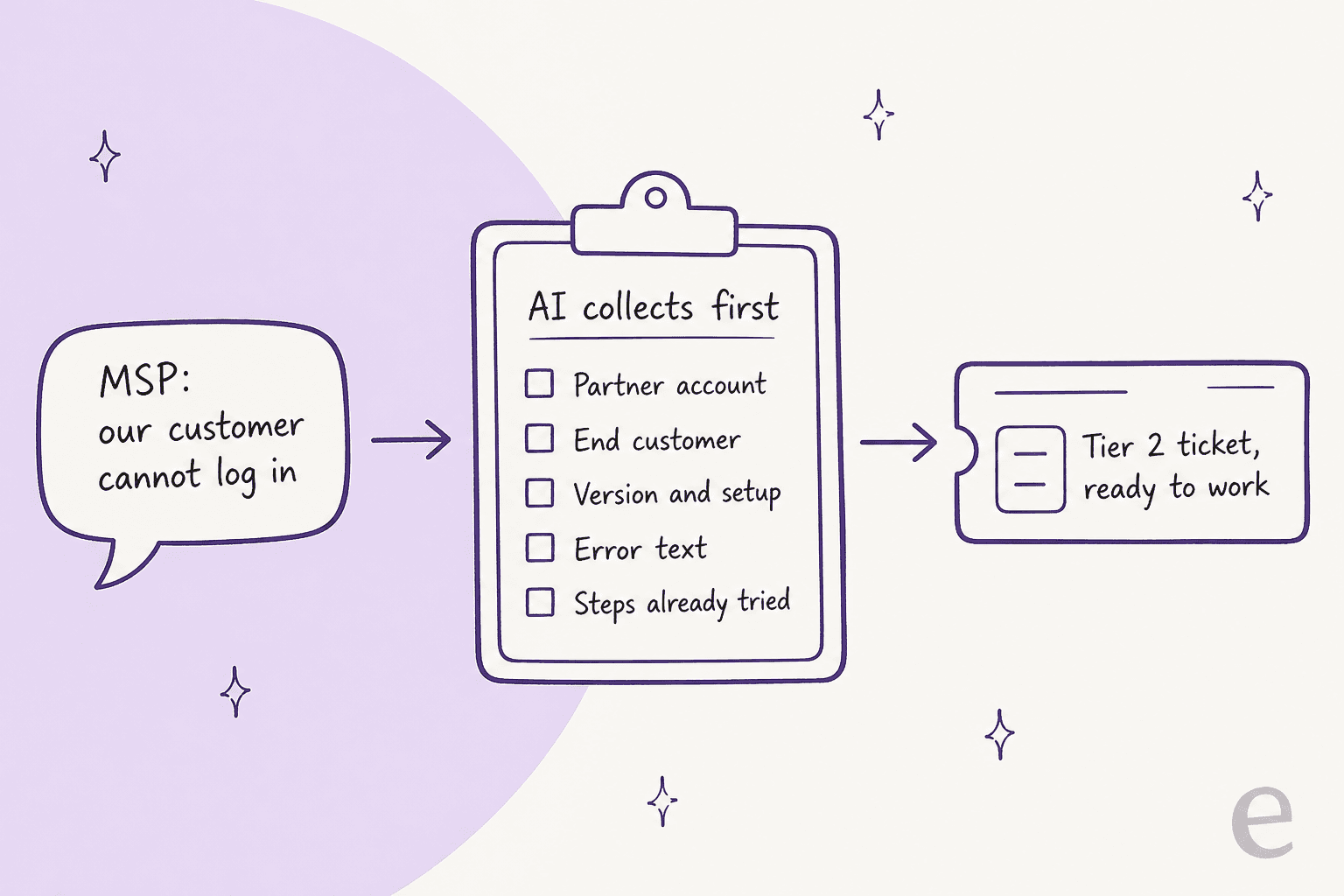
Here's the flow I'd set up:
- Identify the partner and the end customer. Which partner account, and which of their customers is affected. Both go on the ticket.
- Check known issues and docs first. If the error matches a known issue or a documented fix, answer it with the source. Many "our customer can't log in" tickets are an SSO setting.
- Collect what tier 2 will ask anyway. Version and setup, exact error text, when it started, how many users, what the partner already tried.
- Escalate with a summary, not a transcript. The tier 2 engineer reads three lines and starts working. There's more on writing these in AI escalation and on the receiving end in AI for tier 2 support.
- Keep the partner posted. One status update when tier 2 picks it up beats three "any news?" tickets, which the AI would otherwise have to merge later.
A good model for the "answer only from the docs" part is an industrial automation company running eesel. The people writing in are engineers building machines, not end users, and the documentation team set the chat to answer only from the technical library and say where each answer came from. Their reasoning applies to partners too: in that industry a wrong detail is worse than no answer, so "I couldn't find that" had to be an acceptable reply.
What should AI never do in partner support?
AI should never approve a discount, pick a winner in a deal conflict, or confirm anything about one partner's business to another. Everything else can be tuned.
The deal registration point deserves its own warning. Vendors protect registrations for a reason; a sales engineer on Reddit described how carefully they hand them out:
"Do they have reg on the deal? My rep and I won't give a partner reg if they are positioning competing products."
That's a judgment call with context an AI won't have. The short list I'd keep behind a person:
- Special pricing and extra discounts. Draft the request, never promise a number.
- Deal registration approvals and conflicts. Report status; never approve, reject or reassign.
- Marketing fund and commission payments. Check the claim is complete, then route it.
- Contract, tier and agreement changes. Including "can you move us up a tier early?".
- Anything about another partner. Not even "yes, someone else registered that".
In eesel, this is a setting rather than a hope. Each action can be set to Auto, Needs approval or Disabled, and when a held action comes up the agent "stops, saves what it wants to do, and notifies the people who can approve it". Approvals never run on their own after a timeout.
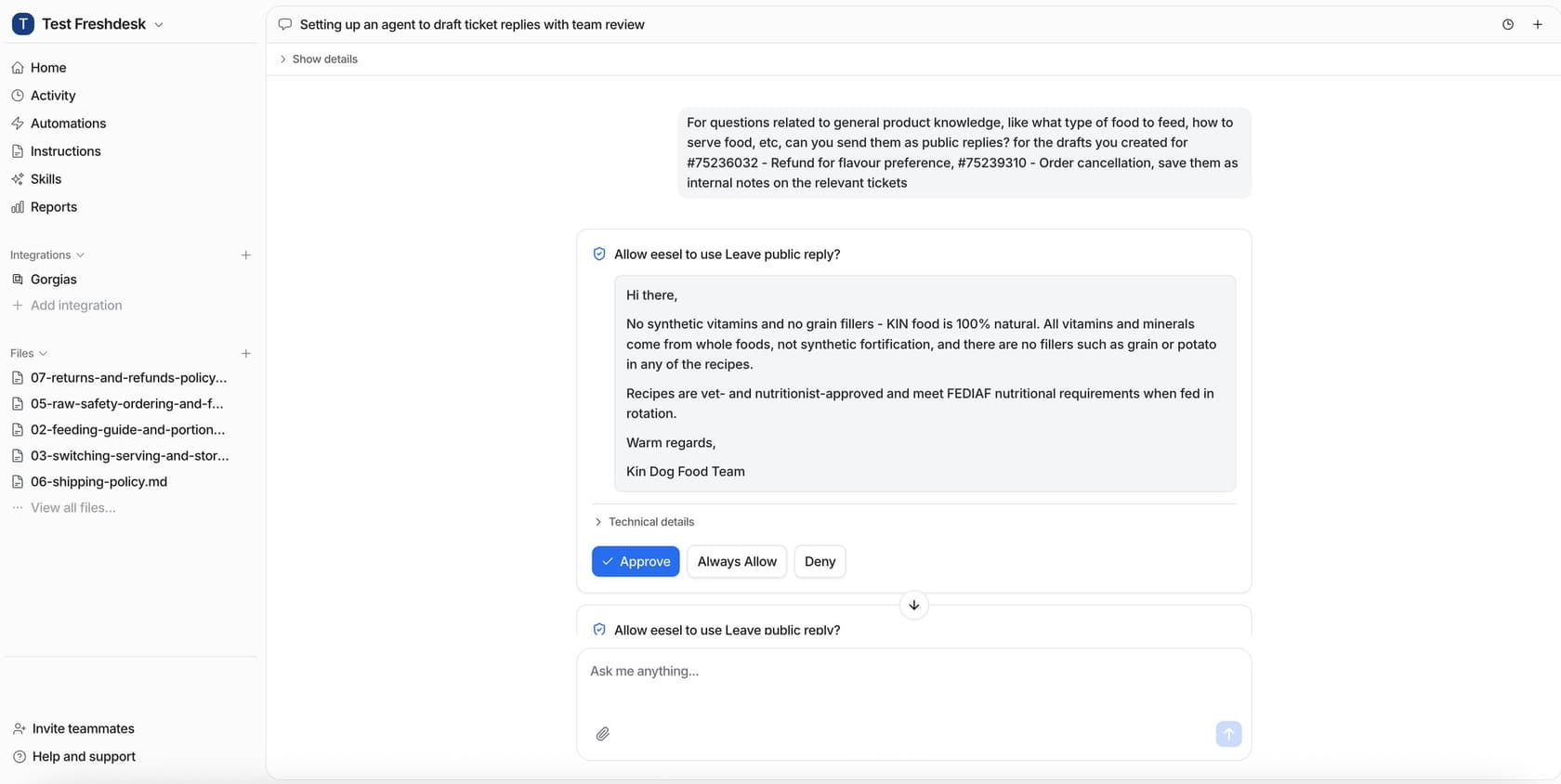
The actions and approvals docs also let you hold a specific case even when the action is on Auto, by saying so in the instructions, so a line like "ask before replying to anything about discounts" holds those cases for a person.
Which tools do you need for AI partner support?
Two layers: a place where partner records live (accounts, tiers, deal registrations), and an AI that works the tickets against them. Some tools try to be both. Here's how the main options compare, from each vendor's own pages on November 1, 2026:
| Tool | What it is | Price (vendor's page) | Partner-only content or records | Can its AI use partner-only data? |
|---|---|---|---|---|
| Zendesk | Helpdesk with help center and AI agents | Suite Team $55, Professional $115/agent/mo (annual); AI resolutions $1.50 committed, $2.00 pay-as-you-go | User segments by organization or tag (Suite Growth and up) | Yes, restricted articles only for matching segments |
| Freshdesk | Helpdesk with Freddy AI | Growth $19, Pro $55, Enterprise $89/agent/mo (annual); 500 AI sessions included, then $49 per 100 | Folders visible to selected companies | No, Freddy learns only from articles visible to all users |
| Salesforce PRM | Partner portal, deal registration, lead routing | $25/member/mo (annual); Partner Ecosystem Management $50 | Partner users see their own records | Agentforce for Partners, Flex Credits required |
| HubSpot | CRM with a customer portal | Customer portal on Service Hub Professional and Enterprise | No native partner portal found | Not a partner-specific feature |
| Impartner | Dedicated partner management platform | Quote only | Deal registration, lead distribution, funds | Check with vendor |
| PartnerStack | Partner program platform (co-sell, affiliate, referral) | Quote only, based on program size | Partner portal | Check with vendor |
| eesel | AI helpdesk teammate on top | From $299/mo for 500 tickets or chats, no seat fee | Uses your records | Yes, live, with the permissions of the account you connect |
Zendesk
Zendesk is the most complete answer if your partners already sign in to your help center. Restrict articles by organization or tag, and the AI agent respects it on email, web forms and messaging (messaging needs signed-in users). The trade-off is plan level: restricting by segment needs Suite Growth or higher, and picking more than one segment per article needs Enterprise. Check current numbers in Zendesk pricing and Zendesk AI pricing, and there's a wider guide to AI for Zendesk.
Freshdesk
Freshdesk is the cheaper helpdesk and has company-level folder visibility, but Freddy AI Agent only trains on public content. That's fine for program FAQs and product docs, which are the same for everyone anyway. For per-partner answers you need a lookup into wherever the partner data lives. Prices are in Freshdesk pricing and Freddy AI pricing, and the knowledge side is covered in Freddy AI knowledge sources.
Salesforce PRM
If deal registration is the center of your partner program, it probably already lives in Salesforce. PRM covers "deal registration and lead routing automation" and fund requests, needs Enterprise edition or higher, and needs a PRM licence for each partner user. Agentforce is available for partners but listed as needing Flex Credits; see Agentforce pricing and Salesforce Service Cloud pricing for how that adds up.
HubSpot, Impartner and PartnerStack
HubSpot doesn't sell a native partner portal that I could find; its customer portal (Service Hub Professional and up) is the closest thing, and HubSpot pricing covers the plans. Impartner and PartnerStack are dedicated partner platforms with their own portals, both quote-only. For most support teams, they're a data source the AI reads from rather than the place partner tickets get answered.
Where eesel fits
eesel isn't a PRM, and I wouldn't pretend it is. It's the AI teammate that works partner tickets inside the helpdesk you already run, Zendesk, Freshdesk, Salesforce or HubSpot among them, and reads partner records from wherever they live. For systems without a built-in integration, Network Access lets it call an API with credentials stored as headers that the AI itself never sees.
The part that matters most for partners is telling customers apart. Adverscale runs several brands through one Zendesk, and its eesel agent works out which brand each customer bought from before writing, so greetings, sign-offs and contact details always match and brands are never mixed in one message. Swap "brand" for "partner tier" and it's the same problem. Rúngne, on Gorgias, has eesel tag tickets from a fixed list that includes a B2B tag, so trade customers get spotted before anyone replies.
How do you set up AI for partner support?
The AI is the quick part. The partner records are the slow part.
- Pull three months of partner tickets. Sort them into the three lanes. Most teams find a few question types make up most of the volume, and that the commercial lane is smaller than it feels.
- Put every partner contact on a partner account. Organizations in Zendesk, companies in Freshdesk, accounts in Salesforce, with tier as a field. This is the identity the whole setup hangs on.
- Split your content into shared and per-partner. The program guide, onboarding steps and product docs are shared. Price lists, margins and anything tier-specific are per-partner and go behind segments or into a system the AI looks up.
- Connect lookups read-only, with the narrowest account you can. A dedicated integration user that sees partner accounts and registrations, nothing else. Test it by asking as two different partners and checking the answers differ.
- Set every commercial action to Needs approval. Replies on deal and pricing topics, any update to a registration, any reply that mentions a discount.
- Test on past tickets before going live. Run the agent against the tickets from step 1 and compare with what your team actually said. There's a guide on sizing that in AI support simulation testing, and a broader implementation timeline if you're planning the rollout.
- Pilot with a handful of friendly partners. Partners talk to each other. Let the ones you trust find the rough edges first.
If you'd rather script it, the eesel CLI runs the same setup from a terminal, and eesel approvals lists anything waiting for a channel manager's yes, and coding agents like Claude Code, Codex or Cursor can drive the CLI to test lookups for you.
Is AI partner support worth it?
For most channel businesses, yes, because the alternative is worse than it looks. Partners get support from you and from every other vendor they resell, and they remember who answered fast. One commenter on r/msp put the stakes plainly:
"The MSP world is small, there isn't a lot of new ones, so once you burn them all your business is dead."
The upside is concrete: program questions answered at 2am, deal status without a "let me check with the channel team", and escalations that reach tier 2 ready to work. The risk is also concrete, and it's almost entirely the identity problem above. Get the partner-to-account mapping right, put pricing behind real permissions, and keep commercial calls with people, and the rest is a normal AI helpdesk rollout. If you're still comparing options for B2B, best AI for B2B support and AI support for B2B SaaS go wider.
Try an AI teammate on your partner queue
Want AI that answers your resellers without mixing them up? eesel joins your Zendesk, Freshdesk or Salesforce queue as an AI helpdesk teammate, answers partner program and onboarding questions from your docs, looks up each partner's own deals and tickets with the permissions you give it, and holds every discount and deal conflict for your channel team. You can test it on your past partner tickets before it replies to anyone.

Plans start at $299 a month for 500 tickets or chats, with every integration included and no per-seat fee.