Zendesk Contact Center: pricing, add-on cost and what it includes

Riellvriany Indriawan

Katelin Teen
Last edited November 12, 2026
Zendesk Contact Center costs $83 per agent per month, billed yearly, on top of a Suite Team or Suite Professional seat. It is a separate system from Zendesk's built-in phone product: it runs on Amazon Connect, so you also pay for pooled minutes blocks and AWS phone usage. Zendesk says its traction is in the 250 to 750 agent range, and a smaller team can usually stay on Suite's native voice features. Where I'd add eesel's AI helpdesk teammate is the ticket side, after the call ends.
What is Zendesk Contact Center?
Zendesk Contact Center is a paid add-on that turns Zendesk into a full voice and omnichannel contact center, with Amazon Connect doing the telephony underneath. Zendesk's product page describes one platform for voice, digital channels and workforce management, with voice AI agents, voice copilots, real-time voice translation and AI-driven scheduling and quality scoring on top.
I work eesel's support queue, so I read Zendesk Contact Center from the ticket side: every call it handles ends up as a ticket that someone has to follow up on. With the eesel CLI, an AI coding agent can upload approved knowledge, like exported Zendesk macros and your call-handling policies, then ask test questions and check the answers before anything goes live. Connecting the Zendesk account itself still needs someone with admin access to approve it.
Three facts shape everything else in this post:
- It is built on Amazon Connect. Zendesk's AWS collaboration announcement of December 2, 2025 says Contact Center is built on Amazon Connect and powered by the Zendesk Resolution Platform.
- Zendesk bought its way in. Its June 2026 momentum release says the product launched one year after the Local Measure acquisition.
- It targets big floors. The same release reports a landmark 4,000-seat deployment, wins in the 600 to 1,000 agent tier, and strongest demand among customers with 250 to 750 agents.
That last point is the one most buyers miss: a 15-person team that needs a phone line and an IVR menu is not the customer this product was built around. I cover that smaller path in my guide to Zendesk voice support, and the wider platform in my Zendesk platform overview.
If you are new to Zendesk's AI layer, my Zendesk AI overview and agentic AI guide are the quickest primers, and my Zendesk review covers the core helpdesk.
How much does Zendesk Contact Center cost?
The seat price is $83 per agent per month on annual billing, and it comes on top of the Suite seat. Zendesk's pricing page lists Contact Center under Featured add-ons next to Copilot and the Workforce Engagement Bundle (both $50). The comparison table marks it as an add-on on Suite Team and Suite Professional, and not offered on Support Team. Suite Enterprise is quote-only.
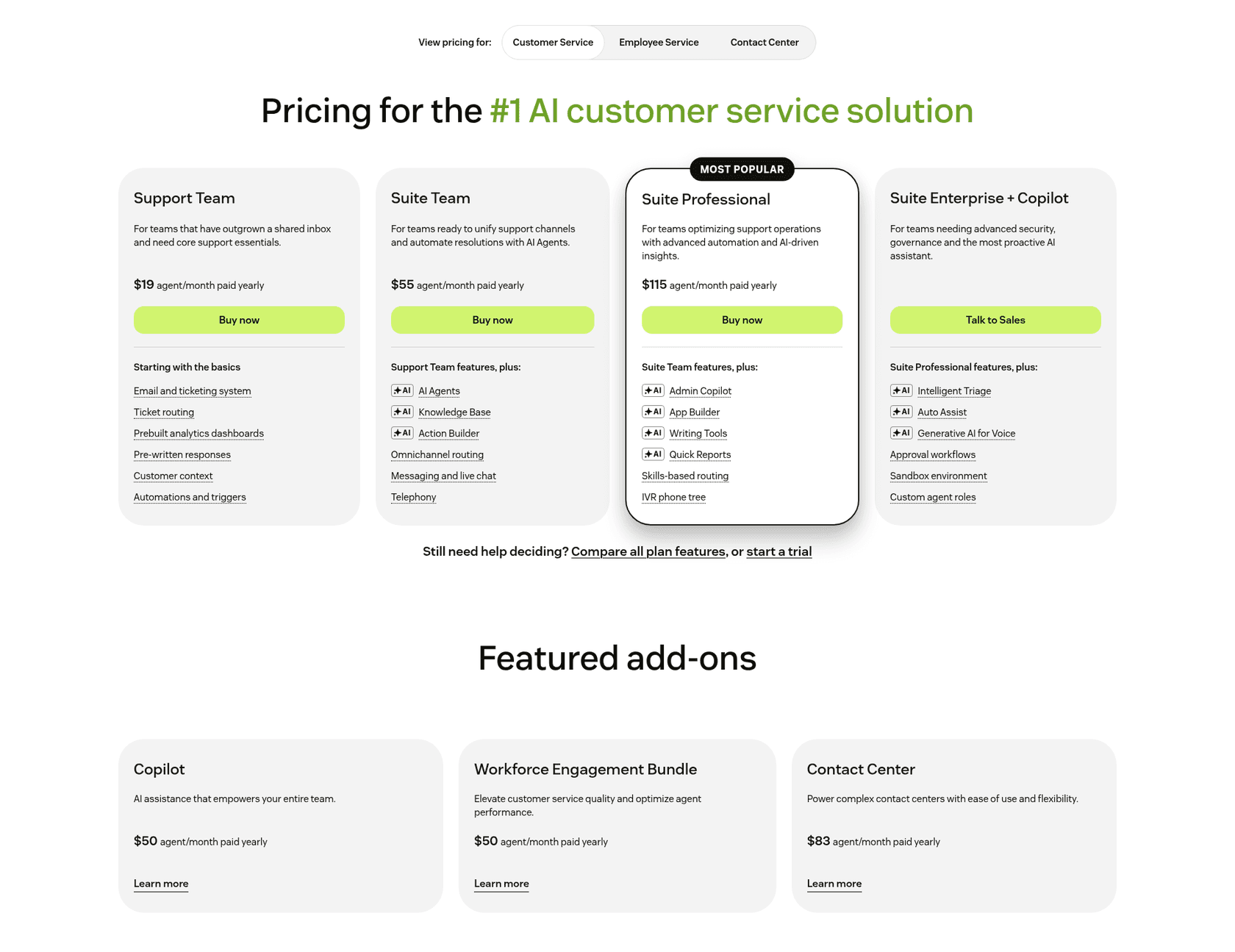
| Plan | Seat, paid yearly | Contact Center add-on | Seat plus add-on | Per agent, per year |
|---|---|---|---|---|
| Support Team | $19 | Not offered | n/a | n/a |
| Suite Team | $55 | $83 | $138 | $1,656 |
| Suite Professional | $115 | $83 | $198 | $2,376 |
| Suite Enterprise | Talk to Sales | Quote | Quote | Quote |
For a 50-agent phone team on Suite Professional, that is $118,800 a year before any minutes or phone usage: $69,000 for the Suite seats plus $49,800 for the add-on. The add-on alone costs about 72% of a Professional seat ($83 against $115). Copilot, if you want it, adds $50 per agent per month and attaches to Professional and above.
Why does Zendesk Contact Center come with three bills?
Because the telephony is AWS's, and Zendesk passes it through. Zendesk's billing article says your annual subscription is billed across up to three invoice types: one for Suite, Contact Center and other Zendesk add-ons, one for AWS pay-as-you-go usage, and an overage invoice when it applies.
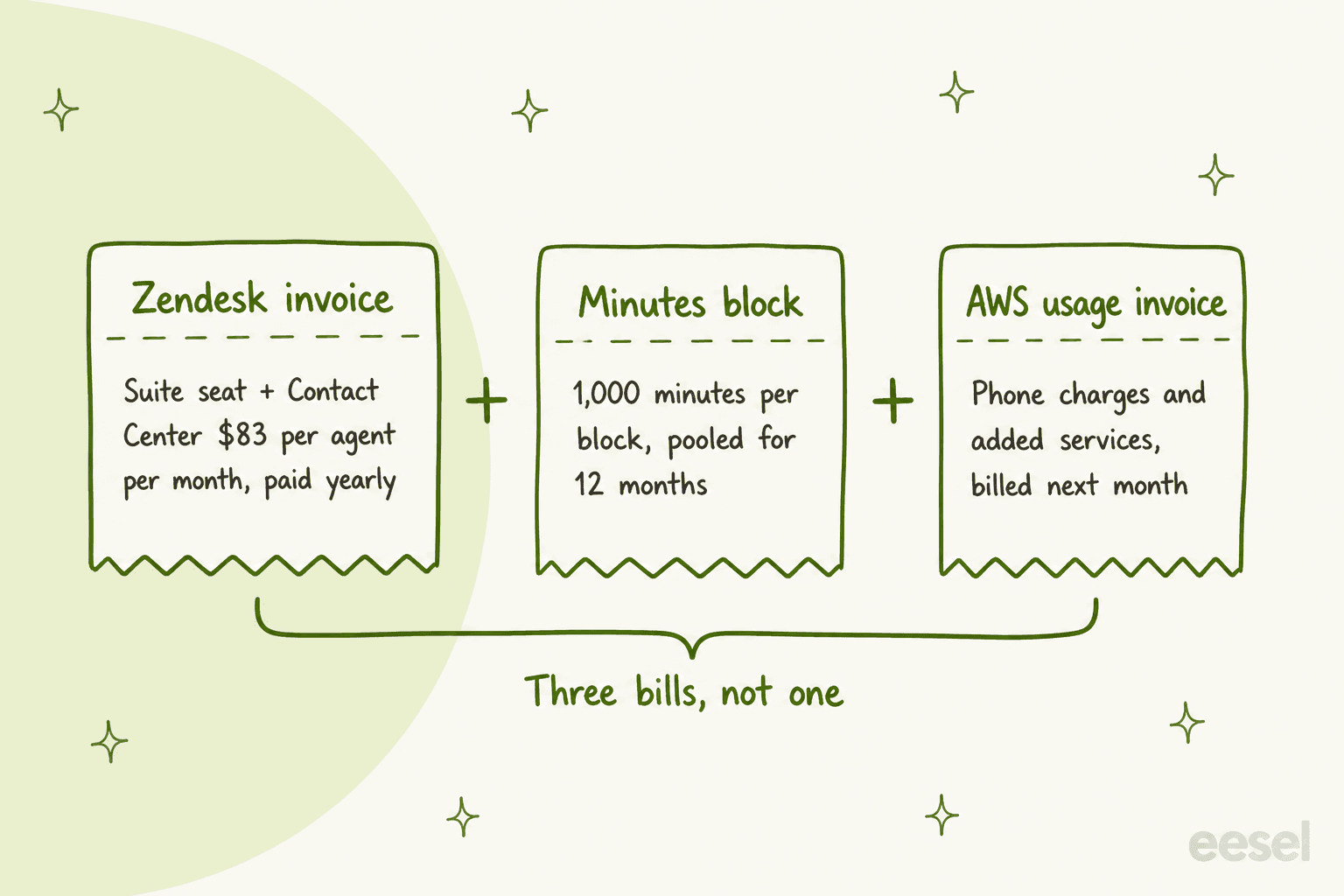
- Seat invoice. A fixed per-agent license for Contact Center, billed on your subscription cycle. Terms are 12-month or multi-year, with monthly, quarterly, semiannual, annual or upfront invoicing.
- Minutes block. Each block is 1,000 minutes, you buy one or more per agent, and the minutes are pooled across all agents for 12 months and reset annually.
- AWS usage. Amazon Connect telephony usage and any added AWS services are billed the following month.
One block is about 17 hours of talk time. If a phone agent spends two hours a day on calls for 250 working days, that is 30,000 minutes, so I'd expect a busy floor to need many blocks per agent rather than one. That is my arithmetic, not Zendesk guidance. The billing article shows a sample invoice with a $33 block price, but Zendesk labels the numbers illustrative and not a quote, and the pricing page publishes no block price. Ask for one in writing.
Two things on price that don't line up. Zendesk's own list of contact center software shows the add-on at $50 per agent per month and says it is available on all Suite plans, while the pricing page says $83 and marks it as an add-on on Suite Team and Professional. The sample invoice in the billing article also uses $50. I used $83 because the pricing page is the live price list, and I'd get the figure on your quote before you budget.
Zendesk also announced Zendesk Unlimited on November 10, outcome-based pricing with unlimited seats and an Outcome Budget. The release doesn't say whether Contact Center seats follow that model, so treat the numbers above as today's seat-based list. For how AI usage itself is metered, see my breakdown of Zendesk AI resolution pricing and the broader Zendesk pricing guide.
How does Zendesk Contact Center work with Amazon Connect?
Zendesk's agent workspace is the front end, and Amazon Connect is the telephony and routing engine behind it. Zendesk's getting started article calls Connect the foundation: it handles phone calls, queues and contact flows, and each Contact Center environment links one-to-one with a single Connect instance.
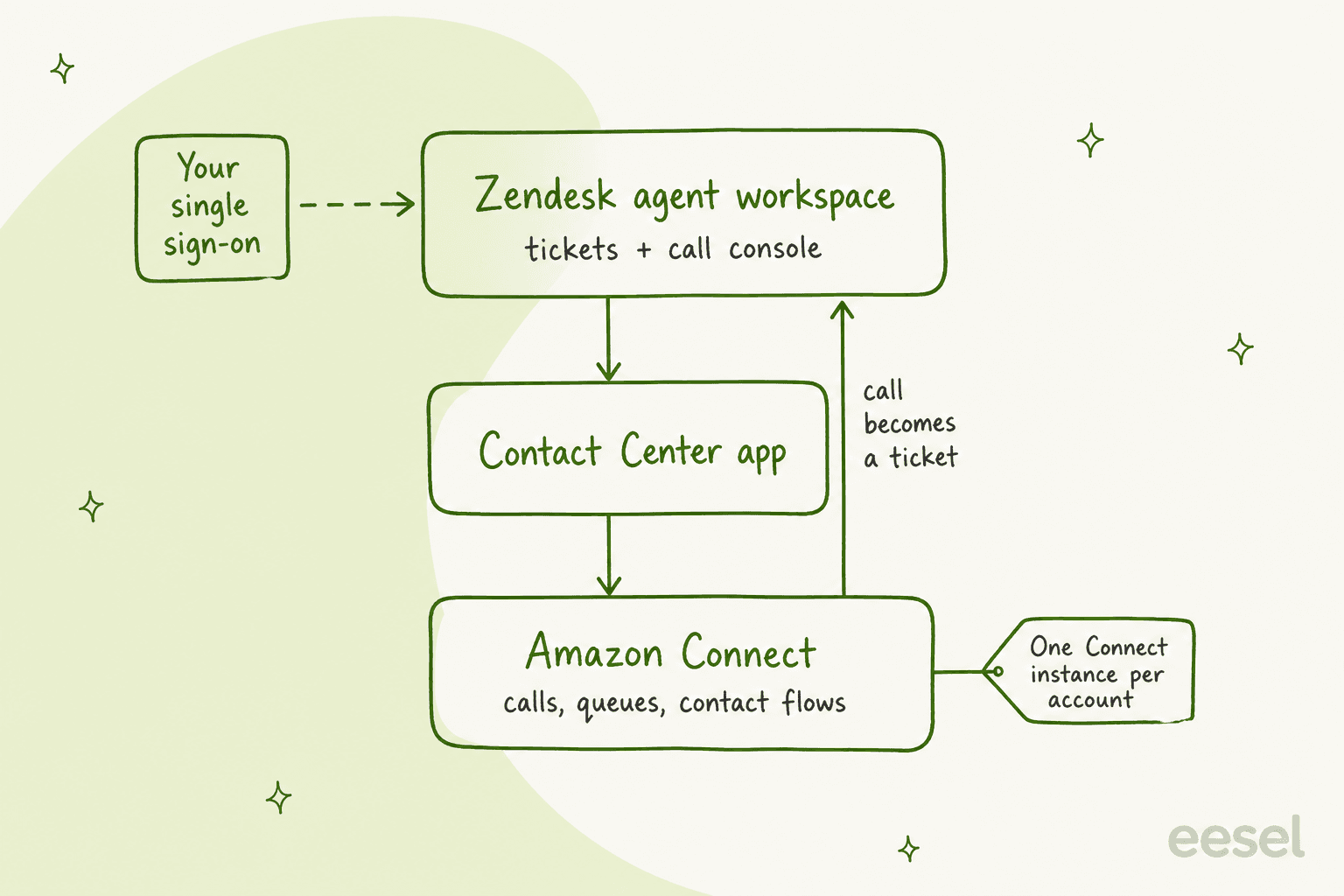
What that means in practice:
- Your IVR lives in Amazon Connect. Zendesk's concepts article explains that flows define the customer experience from start to finish, and that queues are either standard queues or agent queues. Admins who built IVR trees in Zendesk's own phone product are working in a different tool here, and the native skill routing issues I've written about don't carry over one to one.
- Sign-in stays with your identity provider. Zendesk acts as a SAML identity provider to the AWS services, so your Okta, Entra ID or Google Workspace login and MFA rules stay in place.
- Some features need extra AWS setup. Agent status, presence, smart resolution codes and alert banners rely on enabling Amazon Connect's conversational analytics first.
- Dashboards come in two flavors. A real-time snapshot, and a recent-performance view covering the last 24 hours.
- Older connectors are ending. The TTEC Amazon Connect integration reaches end of life on April 1, 2027, and new customers are pointed to the Contact Center app.
The AWS side is not small. The AWS services article lists about 20 base services, from Amazon Connect and Lambda to Kinesis, DynamoDB and Cognito, and says Zendesk Customer Support handles escalations to AWS. That is why HIPAA-enabled accounts come with their own rules.
Zendesk voice or Contact Center: which one do you need?
If you need a phone number, group routing and an IVR menu, Suite's built-in voice is probably enough, and Contact Center only earns its cost when you need what is below the Professional line. Zendesk's comparison table splits it cleanly.
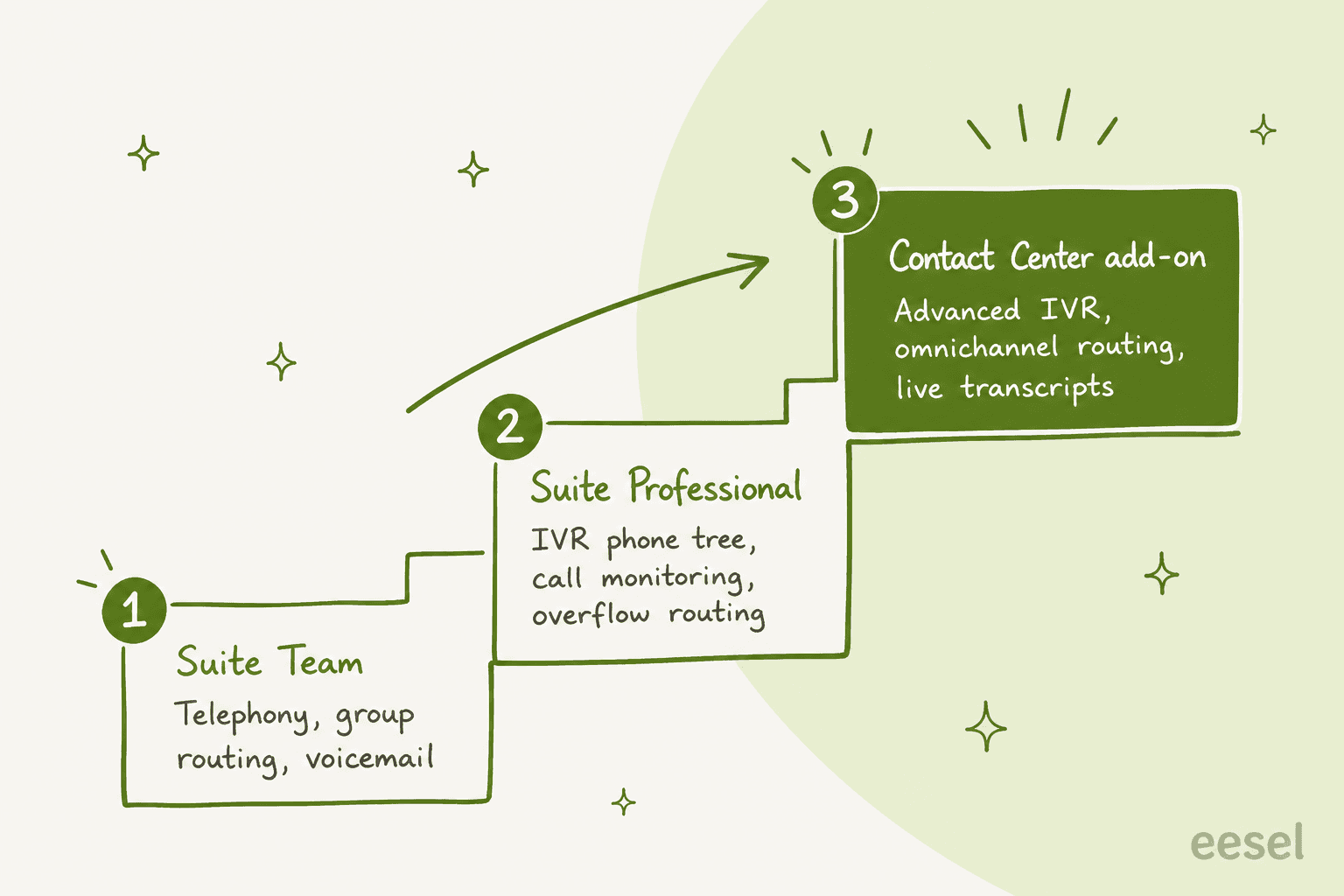
| Capability | Suite Team | Suite Professional | Contact Center add-on |
|---|---|---|---|
| Telephony, voicemail, embedded call button | Included | Included | Included |
| Call routing | Group routing | Group, overflow and after-hours | Omnichannel advanced routing |
| IVR phone tree | Not included | Included | Advanced IVR (conversational) |
| Call monitoring and barging | Not included | Included | Included |
| Callback request, priority numbers, conferencing | Not included | Included | Included |
| Call recording and AI summary in the ticket | Recording only | Recording only | Recording and summarization |
| Real-time transcription | Not included | Not included | Included in the add-on |
| Contact Center dashboards, screen recording | Not included | Not included | Included in the add-on |
Digital channels such as WhatsApp sit alongside the phone on both. Local and toll-free numbers and per-minute charges are add-ons on both Suite tiers. On the native path, Zendesk's number and pricing article lists live transcription at $0.027 per minute and pre-recorded transcription at $0.01.
If you stay on the native path, my guides to Zendesk Talk IVR issues, queue overflow and timeouts and voicemail transcription cover the settings that cause the most trouble.
Greetings and missed calls trip up new admins too, so see greeting recording tips and missed call notifications.
A Reddit commenter on r/Zendesk put the small-team case plainly, in a thread from before Contact Center existed:
"Regarding customer service by phone, Zendesk is a really good solution for small teams (<50 people). You can build easily a simple IVR and ..."

What AI does Zendesk Contact Center include?
Zendesk positions four AI pieces around the phone line, and each has its own status and cost wrinkle.
- Voice AI agents. Zendesk's documentation says every call creates or updates a ticket, a resolved call ends with the ticket updated, and an unresolved one goes to your phone queue with a transcript, summary and detected intent (the same human handoff logic as the text channels). Zendesk charges telephony, a connection charge while the AI agent is on the call, and a recording charge, and the call may also use an automated resolution. On the pricing calculator's default setup (a US local line answered in the browser) the connection charge shows as
$0.005per minute. Automated resolutions run$1.50committed or$2.00pay-as-you-go. Zendesk's docs list Talk plans as the requirement, while the Contact Center page promotes the same agents, so confirm coverage on your quote. My voice AI agents guide walks through setup. - Voice copilot. Live suggestions and form filling during a call. Copilot is priced at
$50per agent per month, and the pages I read don't say whether the voice copilot is a separate item. See my Zendesk Copilot guide and the Copilot add-on deep dive. - Real-time voice translation. Announced September 10, 2026, available in October to eligible customers on Zendesk Contact Center Native through a closed early access program. Two-way translation on live calls, with admin control over whether original audio, translated audio or both are kept. Not generally available yet. For the text-channel equivalent, see my Zendesk translation guide.
- AI-powered workforce tools. Scheduling and quality scoring on 100% of human and AI conversations, sold through the
$50Workforce Engagement Bundle. My notes on Zendesk QA scorecards show how the scoring side works.
Zendesk's own pages disagree on how much of the phone queue the AI absorbs. The Contact Center page says voice AI agents can automate up to 80% of interactions, while the voice page says 50%. I'd plan around the lower figure until a pilot gives you your own number.
What do customers and Reddit users say?
Zendesk publishes three Contact Center customer results on its product page, and they are the best evidence available. They are vendor-reported, so read them as claims, not audits.
| Customer | Result Zendesk reports |
|---|---|
| SupportZebra | 30-50% lower average handle time, under 5 minutes of after-call work |
| Petstock | 15-20% service level improvement, 67% less after-call work |
| The Smith Family | 97.7% voice CSAT, 33 second time to answer |
Community discussion is thin, and what exists is mostly about the Amazon Connect plumbing. One r/Zendesk poster asking about virtual desktops summed up the architecture:
"So the new Zendesk call center offering uses Amazon Connect underneath it. Amazon Connect and Amazon Workspaces work very well together ..."
Another poster looking for the older connector found the confusion that the end-of-life notice above addresses:
"Previously in the year 2022, Amazon Connect was a Marketplace App in Zendesk. But now it is not available."
Where does Zendesk Contact Center fall short?
It is a heavy product with real constraints, and most of them are about fit rather than quality. If you are still deciding between a call center versus service desk, that is the first fit question.
- It is built for large floors. Zendesk's own growth numbers center on 250 to 750 agents. Below roughly 50 agents, I'd test whether Professional's native phone features cover you before adding the add-on.
- You manage two vendors' worth of billing. Three invoice types, a pooled minutes block you have to size, and AWS usage that arrives a month late.
- One Connect instance per account. Zendesk says you can't link several Connect instances to one Contact Center account or the reverse, which matters for multi-region or multi-brand phone setups.
- The best new features start in early access. Real-time translation is a closed program on the Native version.
- Its docs disagree with each other. Besides the price, the getting started article says customers either have a Zendesk-provisioned AWS account or manage their own, while the components article says every customer must have their own Connect instance in their AWS account. The help center splits this between a Zendesk-managed account and the app version, so ask which one your quote assumes.
- It doesn't write the follow-up. A transcript and AI summary land in the ticket, much like custom summaries do on text tickets, but someone still has to answer the refund request that came out of the call.
That last gap is where I'd look first. Large contact centers already invest in call center quality assurance and agent productivity, and this product addresses both, but the written follow-up after a call sits outside it. For the wider frame, see my contact center strategy guide.
How does eesel fit next to Zendesk Contact Center?
eesel is not a phone system. It works the written side of the same Zendesk account: when a call ends and a ticket appears with a transcript and summary, eesel's AI helpdesk teammate can read the ticket, find the matching macro or help center article, and draft the follow-up for an agent to approve.
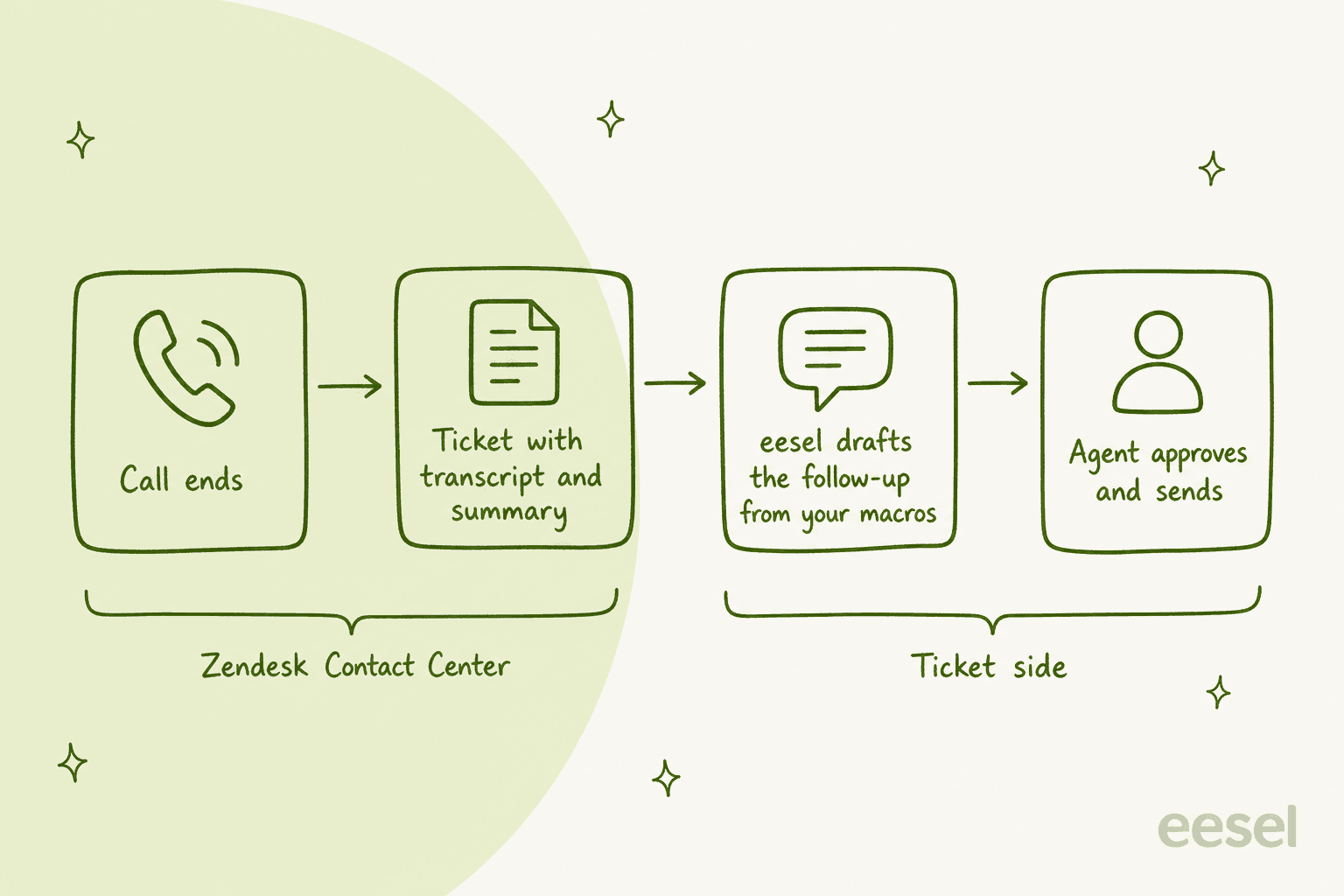
smava shows what that looks like at volume on Zendesk. The Berlin loan comparison platform runs smava and Finanzcheck out of one Zendesk, and in the month from 8 August to 8 September 2026 eesel handled about 27,000 tickets: it categorised about 14,600, and prepared about 15,300 draft replies from roughly 820 macros and help center articles, with people approving what goes out. Every rule lives in the agents' instructions, so changing what eesel may say is a text edit, not a project.
For a wider view of AI on phones, my AI voice agent roundup compares the alternatives. I'd also use a second story as a caution on scope. Lesson Pro runs eesel on two Zendesk accounts, about 1,900 tickets in the same month with about 560 drafts prepared for people to send, and it deliberately skips voicemail tickets, job applications and forms. That is the right instinct for phone: decide which call tickets the teammate reads, and keep the sensitive ones with people. I have not tested eesel on Contact Center call tickets specifically, so pilot it on a queue before you widen it.
If you are comparing Zendesk's own AI with an add-on teammate, my Zendesk AI versus eesel comparison covers the tradeoffs. For the follow-up workflow, AI ticket triage and the Zendesk AI agent review are where I'd start.
Try eesel on the tickets your calls create
If your phones run on Zendesk, the tickets that come out of them are where an AI teammate pays back first. eesel's Zendesk integration connects in minutes, reads your macros, help center and past tickets, and drafts replies on the ticket for an agent to approve, on the same account as Contact Center or Zendesk's native voice.
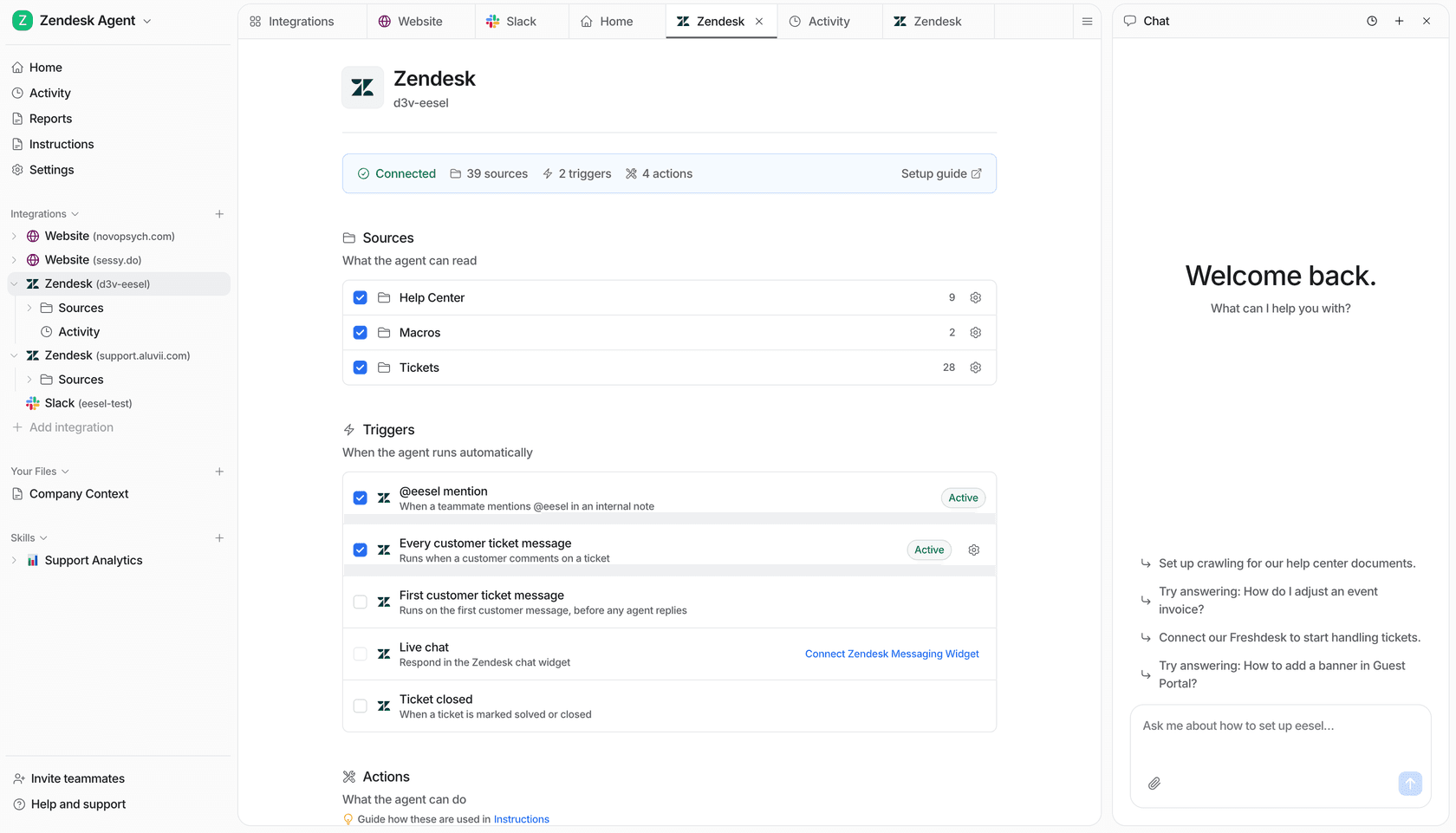
Try eesel on one queue first, and compare the drafts against what your agents would have written.
Frequently Asked Questions
How much does Zendesk Contact Center cost?
Zendesk's pricing page lists Contact Center at $83 per agent per month, billed yearly, as an add-on to a Suite seat. That seat is $55 on Suite Team or $115 on Suite Professional, and minutes blocks and AWS phone usage are billed separately. I break the rest down in my Zendesk pricing guide.
Is Zendesk Contact Center the same as Zendesk Talk?
No. Talk is the built-in voice feature in Suite, while Contact Center is a paid add-on that runs on Amazon Connect and adds advanced IVR, omnichannel routing, real-time transcription and dashboards. Most small teams can start with the native route in my Zendesk voice support overview.
Does Zendesk Contact Center run on Amazon Connect?
Yes. Zendesk's getting started article calls Amazon Connect the foundation of Contact Center, and each Contact Center environment links to exactly one Connect instance. That is why you get a separate AWS usage invoice, which I explain above and in my call center technology guide.
Which Zendesk plans can add Contact Center?
The pricing page marks it as an add-on on Suite Team and Suite Professional, not offered on Support Team, with Suite Enterprise sold through Zendesk's sales team. Copilot has a different rule and attaches only to Professional and above, as covered in my Zendesk Copilot guide.
Does Zendesk Contact Center include AI?
Zendesk markets voice AI agents, a voice copilot, real-time voice translation and AI workforce tools around it, but they carry their own prices and rollout status. Voice AI agents are the most mature piece, and I cover setup in my voice AI agents guide and the wider AI voice agent category.
How many agents is Zendesk Contact Center built for?
Zendesk's June 2026 release says demand is strongest among customers with 250 to 750 agents, and it reports a 4,000-seat deployment. For teams under about 50 agents I'd compare it against Suite Professional's native phone tools, using my call center ROI guide to pressure-test the spend.
Can eesel work with Zendesk Contact Center?
eesel's AI helpdesk teammate works on Zendesk tickets, so it can draft follow-ups on the tickets your calls create, from your macros and help center, with an agent approving each one. It isn't a phone system, and I haven't tested it on Contact Center call tickets specifically, so pilot it first. See the Zendesk AI versus eesel comparison and eesel's Zendesk integration.