
Every missed call is a potential lost customer. When someone picks up the phone to reach your business and gets sent to voicemail (or worse, a busy signal), the clock starts ticking. Studies show that 85% of customers whose calls go unanswered will never call back. They move on to the next option on their list.
If you're using Zendesk Talk for your call center, you need a reliable strategy for tracking and responding to missed calls. The problem? Many support teams struggle with the basics: understanding what counts as a "missed call" versus a "missed call leg," finding where to view this data, and setting up proactive notifications so no opportunity slips through the cracks.
This guide breaks down everything you need to know about Zendesk Talk missed call notifications in 2026. We'll clarify the terminology confusion, show you exactly how to track missed calls using native Zendesk tools, and explore a better approach for teams that need more than basic reporting.
Understanding missed calls in Zendesk Talk
Before we dive into dashboards and reports, let's clear up a common source of confusion. Zendesk Talk uses two related but distinct terms when talking about unanswered calls: "missed calls" and "missed call legs."
What are missed call notifications?
A missed call notification is an alert that tells you (or your team) that a customer tried to reach you by phone but couldn't get through. In an ideal world, these notifications would trigger immediately, giving you a chance to call back while the customer is still thinking about your business.
The challenge with Zendesk Talk is that it doesn't offer native proactive missed call notifications. Instead, you get passive tracking: the system records what happened, but you have to actively check dashboards or run reports to find out about missed calls. For teams with high call volumes, this creates a gap between when a call is missed and when someone actually notices.
The difference between missed calls and missed call legs
Here's where things get tricky. Zendesk tracks calls at two levels:
A call represents the entire phone conversation from start to finish. It includes everything that happens from the moment a customer dials until they hang up, even if they never speak to an agent. A "missed call" in Zendesk terminology means the entire interaction went unanswered: the customer hung up, left voicemail, or abandoned the queue without reaching anyone.
A call leg is a specific segment of that call. Each time the system routes a call to an agent, that creates a new call leg. If Agent A doesn't pick up and the call routes to Agent B, that's two separate call legs. A "missed call leg" means a specific agent didn't answer when the call was offered to them, even if another agent eventually picked up.
This distinction matters because one call can have multiple missed call legs. If a call rings to four different agents before someone answers, you'll see four missed call legs in your reports, but only one completed call. This is why agents sometimes see confusing numbers showing they "missed" calls they never actually heard ring.
As one Zendesk community member noted: "My team is experiencing this same issue as well. Agents have been marked with 20+ missed calls for 1 call leg that they also answered. We have to now manually verify our reports as agents are being marked as missing a call leg multiple times for calls they never missed."
Understanding this difference is essential for accurate reporting and fair performance evaluation.
How to track missed calls in Zendesk Talk
Since Zendesk doesn't send proactive notifications when calls are missed, you need to know where to look. There are two main ways to track this data: the real-time Talk dashboard and historical Explore reports.
Using the Talk dashboard
The Talk dashboard gives you a live view of what's happening in your call center right now. Admins and agents with permission can access it to see current queue activity, account-wide metrics for the day, and individual agent status.
To view the dashboard:
- In Admin Center, click Channels in the sidebar, then select Talk and email > Talk
- Click the Dashboard tab
- Select the phone number or numbers you want to view
The dashboard displays several metrics relevant to missed calls:
- Total missed calls: The number of calls that went unanswered during the current day
- Calls in queue: How many callers are currently waiting
- Agent availability: Who's online, offline, or away
- Abandoned calls: Calls where the customer hung up before reaching an agent
The limitation here's obvious: you have to be looking at the dashboard to see this data. There's no automatic alert when a call is missed. For teams that want to follow up quickly, this creates a dependency on someone constantly monitoring the screen.
Creating missed call reports in Explore
For historical analysis and detailed reporting, you'll need Zendesk Explore. This is where you can build custom reports showing exactly which calls were missed, by whom, and when.
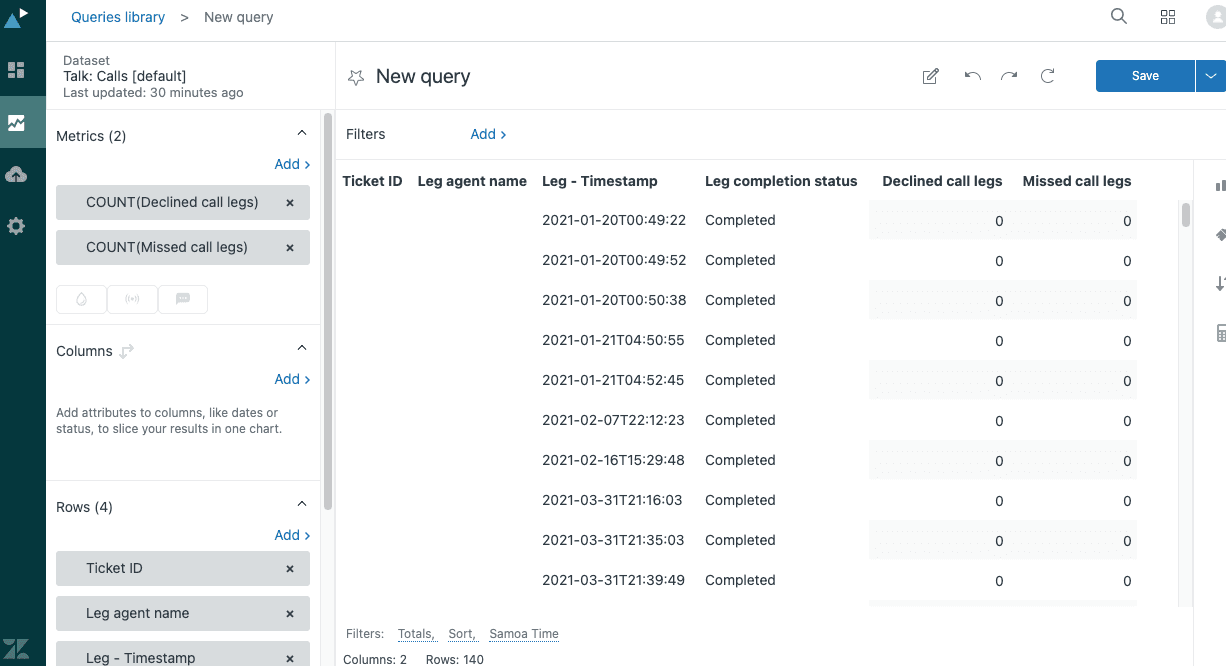
Zendesk provides a pre-built recipe for declined and missed calls. Here's how to create it:
- In Zendesk Explore, click the Reports icon
- Click New report
- Select Talk > Talk - Calls, then click Start report
- In the Metrics section, click Add
- Choose Call routing to agents > Declined call legs and Missed call legs, then click Apply
- In the Rows section, click Add
- Select these attributes: Ticket > Ticket ID, Call leg agent > Leg agent name, Time - Leg started > Leg - Timestamp, and Call leg > Leg completion status
- Filter the Leg completion status to show only "Agent missed" and "Agent declined"
- Save your report with a descriptive name
This report shows you which specific agents missed or declined calls, tied to ticket IDs so you can follow up on Zendesk Talk missed call notifications. You can schedule these reports to email you daily or weekly, which is the closest Zendesk gets to true "missed call notifications."
The key metrics to understand:
| Metric | What It Means |
|---|---|
| Declined call legs | The agent actively clicked "decline" when the call was offered |
| Missed call legs | The call rang but the agent didn't answer within the time limit (default is 30 seconds) |
| Leg completion status | Shows whether a call leg was completed, missed, declined, or abandoned |
Setting up proactive missed call alerts
The reality is that Zendesk Talk doesn't have built-in proactive notifications for missed calls. Unlike some competing platforms (like Talkdesk, which offers automated email notifications for missed calls), Zendesk requires you to work around this limitation.
Native Zendesk Talk limitations
Out of the box, Zendesk Talk will:
- Create tickets for calls that go to voicemail
- Record missed call data in the Talk dashboard
- Store detailed call leg information in Explore
What it won't do:
- Send an instant alert when a call is missed
- Notify a specific agent that they missed a call
- Trigger automated workflows based on missed call events
This is a significant gap for teams that want quick follow-up. When a hot lead calls and no one answers, waiting until someone checks a dashboard or runs a report might mean losing that opportunity entirely.
Workarounds for missed call notifications
If you're committed to staying within Zendesk's native ecosystem, here are your options:
Scheduled Explore reports: Set up your missed call report to email you at regular intervals (hourly, daily). This isn't real-time, but it's better than manual checking.
Third-party dashboard widgets: Tools like Cynapse Numerics offer dashboard widgets that can display missed call counts on external displays or devices.
Zendesk triggers for voicemail tickets: Since Zendesk creates tickets for voicemails, you can set up triggers to notify specific groups or agents when these tickets are created. This only covers calls that left voicemail, not true missed calls.
Custom API integrations: If you have developer resources, you can build custom solutions using the Zendesk API to monitor call events and send notifications via Slack, email, or SMS.
None of these solutions offer the immediacy that many teams need. If proactive missed call notifications are critical to your workflow, you may need to look beyond Zendesk's native capabilities.
Best practices for reducing missed calls
While notifications help you respond to missed calls, the real goal is to miss fewer calls in the first place. Here are proven strategies from Zendesk's own customer service team:
Agent availability management
The simplest way to reduce missed calls is to ensure agents are available when they're supposed to be. Zendesk Talk doesn't automatically set agents offline when they step away, which leads to calls routing to absent agents.
- Set yourself offline when not working: Agents should manually change their status when taking breaks, going to lunch, or ending their shift
- Use decline promptly: If an agent can't take a call, they should click "decline" immediately rather than letting it ring for the full 30 seconds. This gets the call to the next available agent faster
- Configure wrap-up time wisely: Give agents adequate time to finish post-call tasks, but ensure they exit wrap-up status when ready for the next call
Call routing optimization
How you configure your call routing has a major impact on missed call rates:
- Adjust call offering time: On Enterprise plans, you can change how long a call rings to each agent before routing to the next person. The default is 30 seconds, but you may want to shorten this during busy periods
- Set up overflow routing: Configure backup groups or numbers to receive calls when your primary team is overwhelmed
- Use IVR to filter calls: Interactive Voice Response (IVR) menus can help callers self-serve or route themselves to the right department, reducing the load on your main queue
Monitoring and coaching
What gets measured gets managed:
- Review missed call reports regularly: Look for patterns. Are missed calls concentrated at certain times of day? Do specific agents have higher miss rates?
- Set team goals: Establish targets for answer rates and track progress over time
- Coach based on data: Use missed call leg data to identify agents who may need additional training or support
A better approach: How eesel AI handles missed calls
If you've read this far, you've probably noticed a theme: Zendesk Talk gives you the raw data about missed calls, but it doesn't help you respond proactively. For teams that want to turn missed calls into opportunities rather than losses, there's a better way.
Introducing eesel AI for Zendesk
eesel's AI agent for Zendesk is an AI teammate that works alongside Zendesk to handle customer service more intelligently. Instead of just recording that a call was missed, we help you take immediate action.
The difference is in how we approach the problem. Zendesk treats missed calls as data points. We treat them as opportunities that need immediate attention. When a call is missed and a ticket is created, our AI springs into action: triaging the ticket, drafting a response, and notifying the right people.
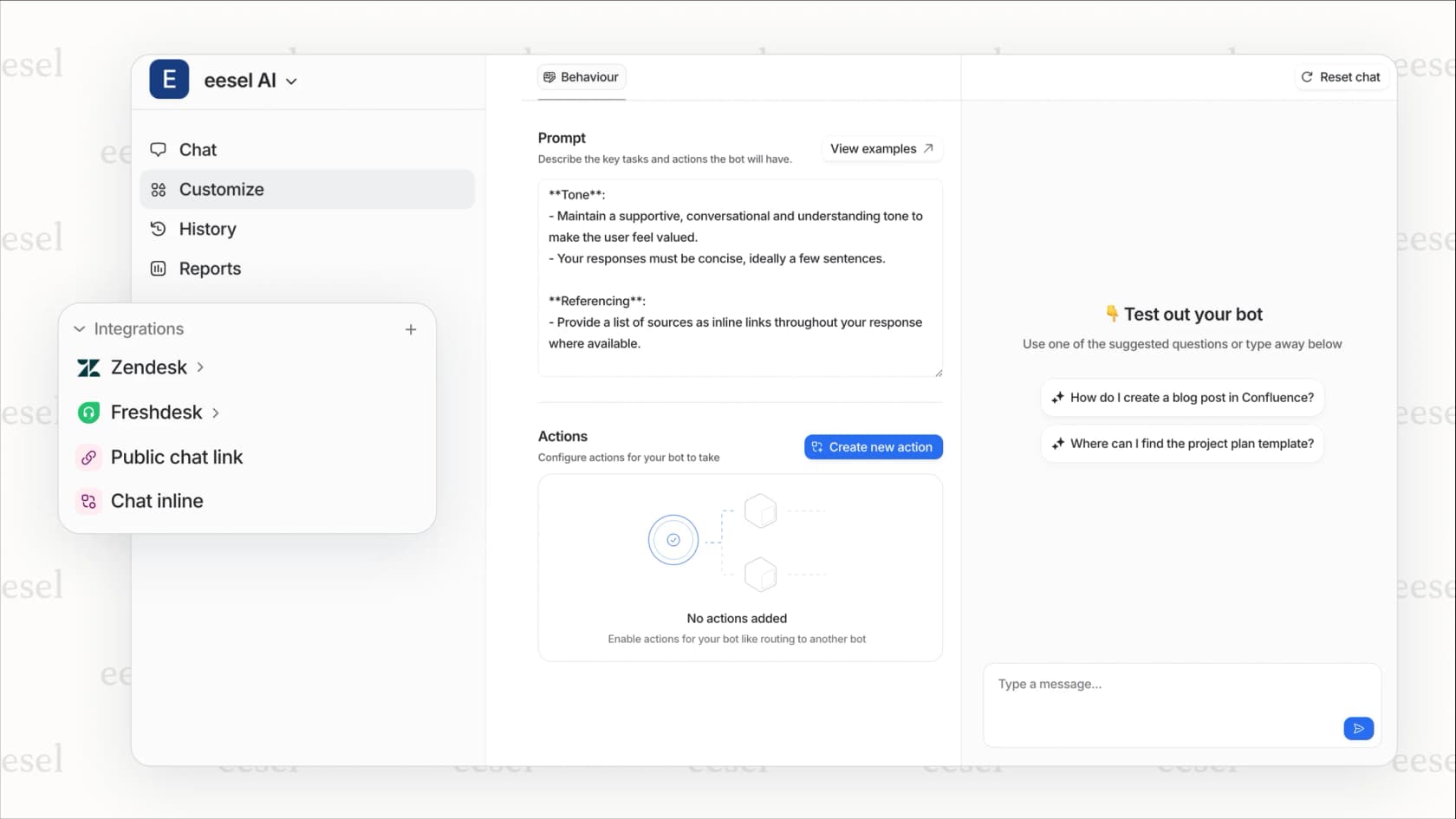
Key features for call management
Here's how we fill the gaps in Zendesk's native capabilities:
AI Triage: When a ticket is created from a missed call, we automatically analyze it based on your criteria. VIP customer? Escalate immediately. Urgent issue? Route to your priority queue. Sales inquiry? Send to your revenue team. You define the rules in plain English, and our AI follows them.
AI Copilot: Instead of agents starting from scratch on callback tickets, we draft the initial response using your past tickets, help center articles, and macros as training data. The agent reviews, edits if needed, and sends. This cuts response time dramatically.
Slack and Teams notifications: Get real-time alerts in your team chat when high-priority calls are missed. No more waiting for someone to check a dashboard.
Smart escalation: Define exactly when and how to escalate missed calls. "If the caller has an open high-priority ticket, notify the senior support team immediately." Our AI understands these instructions and acts on them.
How it works with Zendesk Talk
The integration is straightforward:
- Connect in minutes: Link eesel AI to your Zendesk account. No engineering resources required.
- We learn from your data: We analyze your past tickets, macros, and help center to understand your business context and tone.
- Missed call triggers ticket: When Zendesk Talk creates a ticket from a missed call, we receive it instantly.
- AI takes immediate action: Based on your rules, we triage the ticket, draft a response, and notify the right team members.
- Your team takes over: Agents get a head start with a drafted response and full context, rather than starting from zero.
The result? Callbacks happen faster, with better context, and your team spends less time on manual triage.
Results you can expect
Teams using eesel AI for support typically see:
- Up to 81% autonomous resolution for follow-up tickets (mature deployments)
- Under 2 months payback period based on time savings and improved response rates
- Dramatically reduced response times for missed call callbacks
Unlike Zendesk's native tools, which require you to actively monitor and manually respond, we handle the routine work automatically so your team can focus on the conversations that matter most.
Choosing the right solution for your team
Not every team needs AI-powered missed call management. Here's how to decide what's right for you.
When Zendesk Talk native features are enough
You can probably stick with native Zendesk capabilities if:
- You have a small team with low call volume (dozens of calls per day, not hundreds)
- Someone is actively monitoring the Talk dashboard during business hours
- Your call routing needs are straightforward
- Missed calls aren't a major source of lost revenue for your business
In these cases, the scheduled Explore reports and dashboard monitoring may be sufficient.
When you need an AI-powered solution like eesel
Consider adding eesel AI if:
- You handle high call volumes with frequent missed calls
- You need proactive notifications and can't afford to wait for manual checks
- Your routing requirements are complex (multiple teams, priority tiers, escalation rules)
- You want to reduce manual ticket triage and response drafting
- Missed calls represent significant lost revenue or customer satisfaction risk
Getting started with eesel AI
If you're ready to stop losing opportunities to missed calls, getting started is simple:
- Connect in minutes: Link to your existing Zendesk with one-click integration
- We learn your business: No manual training required. We absorb your past tickets, macros, and help center content automatically.
- Start with guidance: Like any new hire, we begin with oversight. Review our drafts before they go out.
- Level up to autonomous: As we prove ourselves, expand our role. Eventually, we can handle routine callbacks entirely.
Our pricing starts at $239/month (annual) for the Team plan, which includes up to 3 bots and 1,000 AI interactions per month. The Business plan at $639/month adds AI Agent capabilities for autonomous ticket handling, AI Actions for triage, and unlimited bots.