


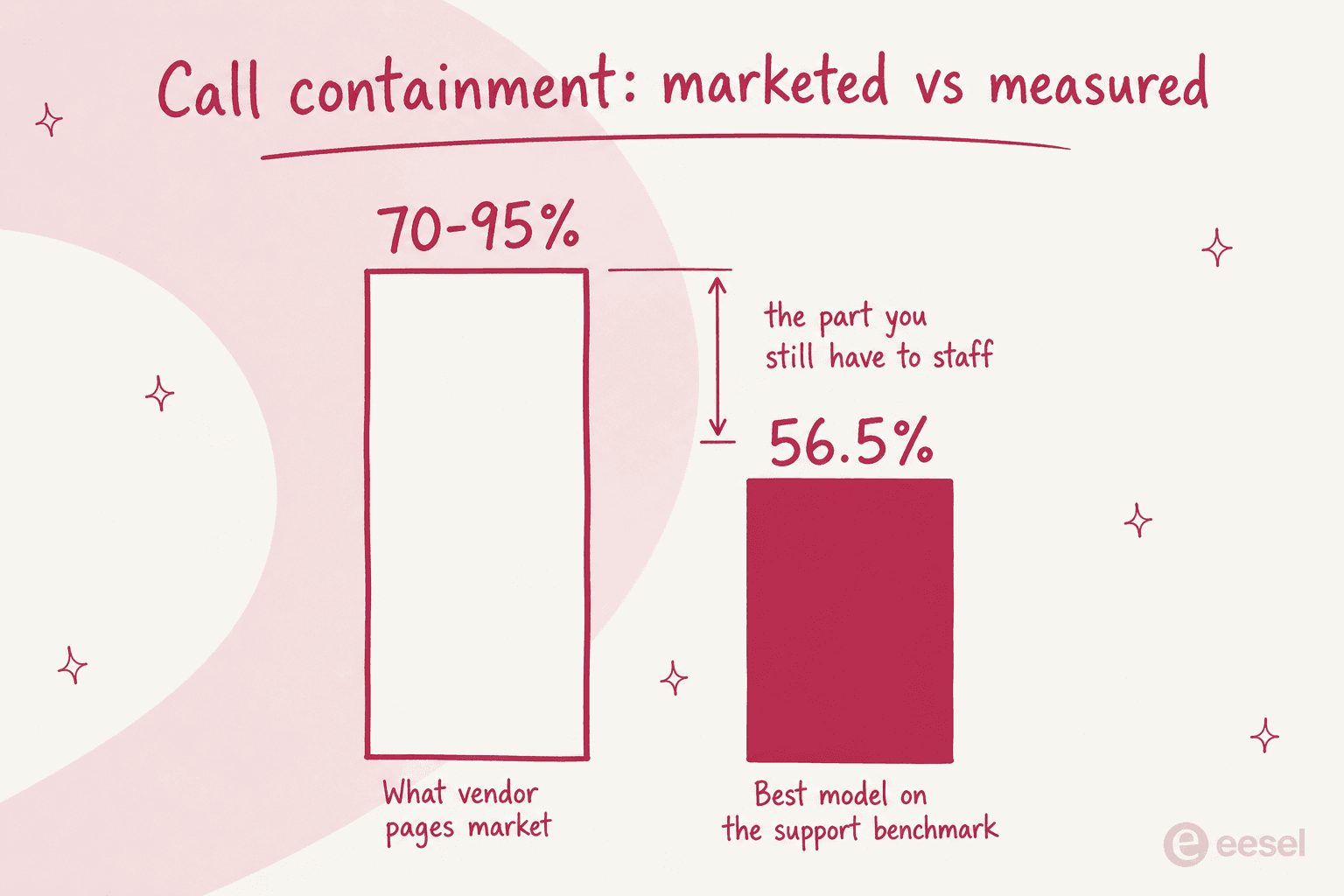
My job at eesel is integrations and APIs. Which means a lot of my week goes on other people's rate cards and docs, and last week that meant nine voice vendors back to back. One number stuck: the best speech-to-speech model in the world resolves 56.5% of replica customer service scenarios on the τ-Voice benchmark. Vendor pages market 70% to 95% call containment. Contact centre operators running real traffic put it at 15% to 30%.
I do not read that gap as a knock on voice AI. It is the buying question itself. Sierra publishes its own τ-voice research showing every provider loses 5 to 14 points when the same task moves from text to realistic phone audio, plus a finding that 79% of first critical errors are the agent's fault. Same model, measurably worse on the phone than on a ticket.
So, practically. ElevenLabs Agents is the only one here whose per-minute cost you can forecast to the cent. Want warm transfer and supervisor takeover without a build team? That is Retell AI. And PolyAI is the one for contact centres already sitting on Genesys or Avaya.
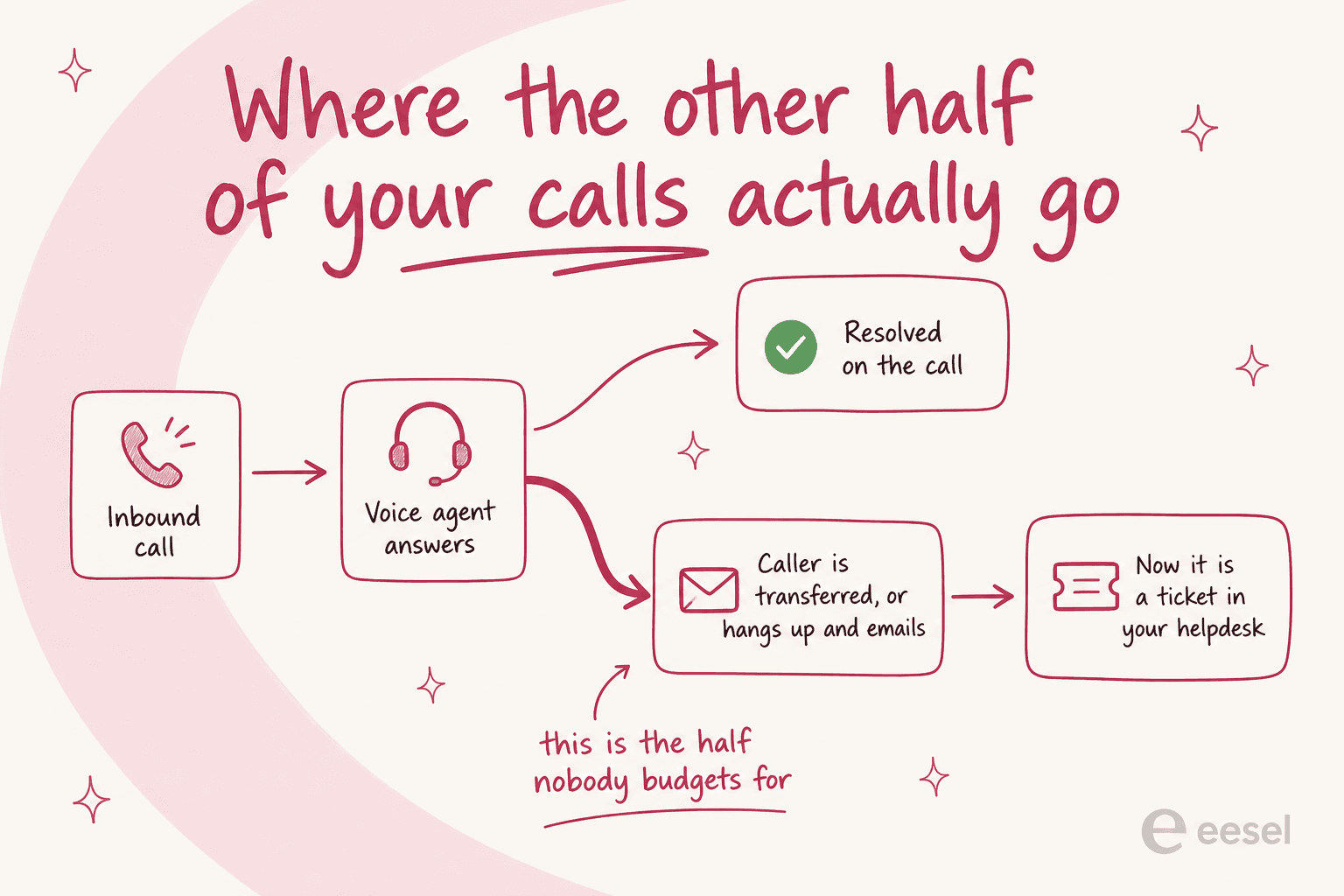
Whichever you buy, about half of those calls end up as emails and tickets regardless. An AI helpdesk agent like eesel picks up that unglamorous half, and it learns from the tickets you already resolved instead of from your help centre.
Why voice is back, and why that matters now
For about a decade the sensible advice was that phone support was dying. It isn't. Voice rebounded to 40% of contact centre volume and it is growing again. Chat, meanwhile, has a 32% failover rate straight back to voice. So the phone is where the hard contacts end up rather than the easy ones, which is a different problem from ordinary call center automation. It is also why the older generation of automated call systems never really dented it.
That selection effect is the whole problem. One Hacker News commenter put it better than any vendor deck I have sat through:
"I admire what you have done, but for a luxury experience, I do not want to talk to an AI that just tells me what is already on the website. If I have gotten to the point where I am calling you, its because I couldn't find an answer to my question on the website in the first place."

Everyone selling you a voice agent trains it on your help centre. And the people phoning you are, by definition, the ones your help centre already failed. Hold onto that, because it explains most of the disappointing rollouts I hear about.
How I picked these, and the benchmark nobody quotes
On 5 August 2026 I went through every vendor's own pricing page, docs and help centre. Then I worked out the real all-in per-minute cost rather than the headline one, and checked what each one does at the moment the agent cannot finish the job. Where a vendor publishes no rate card, I say so instead of guessing.
This list is deliberately narrower than my broader survey of AI voice companies. It also takes a different angle from the best AI for phone support roundup, which sorts by vendor type. Here the sort order is what the measurements say.
The measurement that changed how I read the whole category is τ-Voice, and it is not a generic audio benchmark. A simulated caller phones the model with an actual problem, a flight change or a disputed charge, sometimes a telecom fault. The score is whether the database ends up in the correct final state. Which is to say it scores the exact thing you are buying.
The top of that leaderboard is sobering:
| Model | τ-Voice (support scenarios resolved) | Speech reasoning | Time to first audio | Cost per hour of input audio |
|---|---|---|---|---|
| Grok Voice Think Fast 2.0 High | 56.5% | 97% | 0.70s | $4.80 |
| Qwen Audio 3.0 Realtime Plus | 54.6% | 99% | 4.02s | $4.42 |
| Grok Voice Think Fast 1.0 | 52.1% | 97% | 1.25s | $3.00 |
| GPT-Realtime-2.1 High | 45.7% | 96% | 1.21s | $10.75 |
| GPT-Realtime-2 High | 39.8% | 97% | 1.14s | $4.14 |
| Gemini 3.1 Flash High | 37.7% | 97% | 2.99s | $1.75 |
| Deepslate Opal | 17.5% | 85% | 0.44s | $6.48 |
| GPT Realtime Mini | 15.1% | 64% | 0.81s | $3.04 |
Read the second and third columns together. Speech reasoning is basically solved, since six of these eight score 96% or better at understanding a spoken question. Then the same models fall off a cliff the moment they have to complete the task. Understanding the caller is no longer the hard part. Finishing the job is.
Want to see what that looks like in a real workspace instead of a benchmark? Bland's own docs publish a tool analytics screen that is more honest than any marketing page:
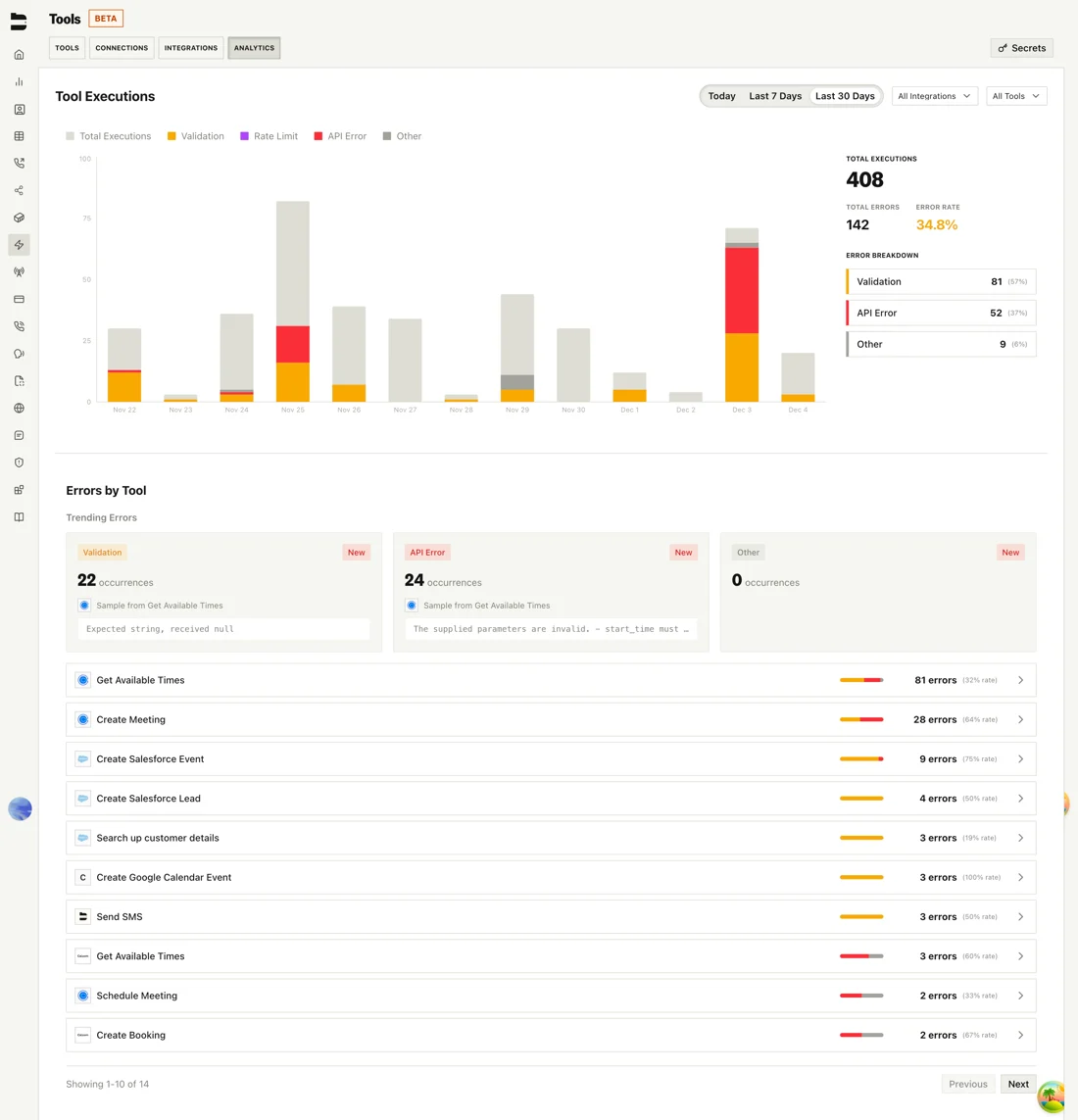
408 tool executions, 142 errors, a 34.8% error rate. The top offender is a calendar lookup failing 81 times with "start_time must be in the future". None of that is a speech problem. The agent heard the caller perfectly, and then the tool call fell over, and that is exactly where the τ-Voice score goes.
Latency stopped being the bottleneck
The category still sells on milliseconds. I understand why, since for years that really was the barrier. Not anymore, and the leaderboard shows it plainly enough.
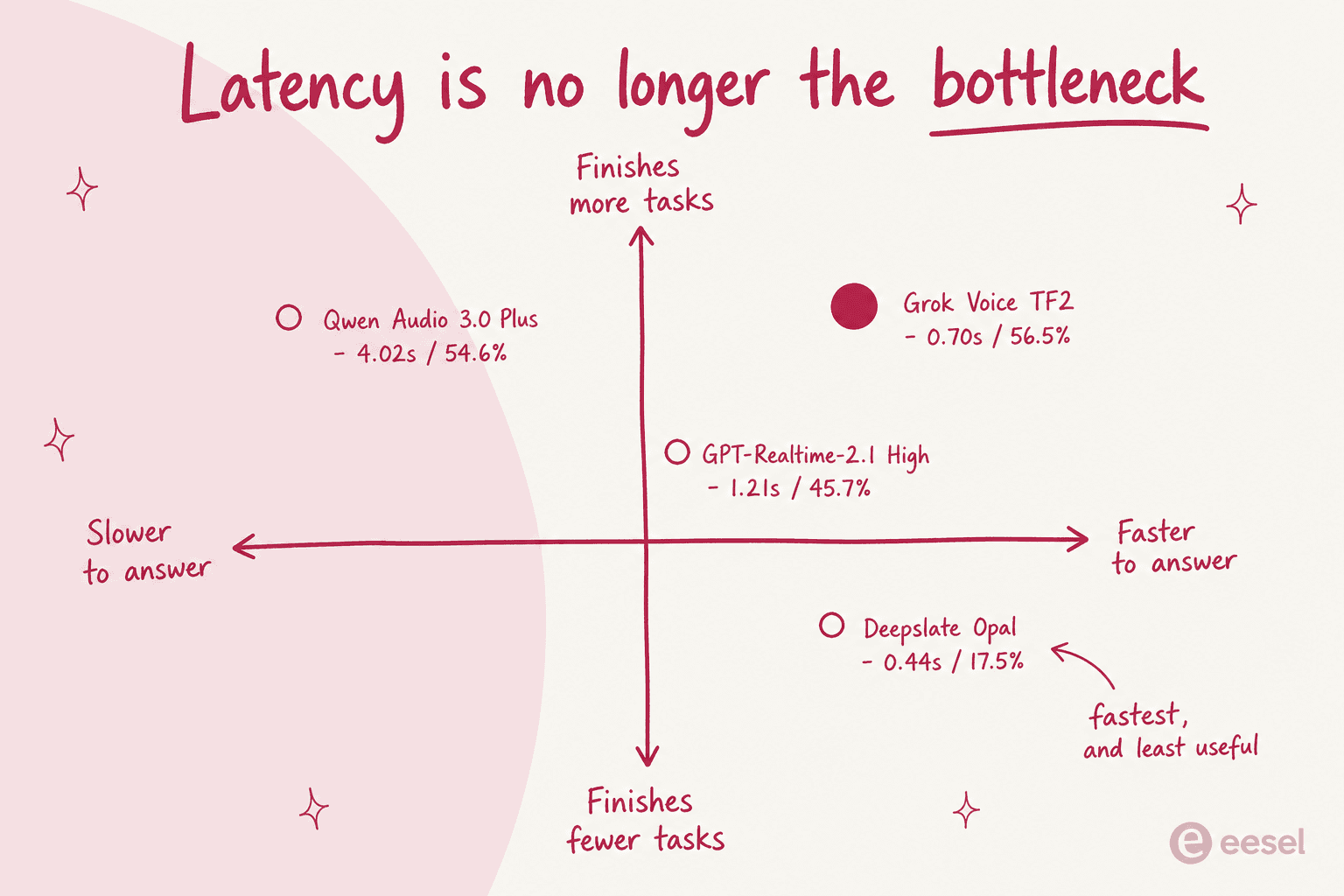
Deepslate Opal answers fastest in the whole table, 0.44 seconds, and resolves 17.5% of support scenarios. Grok Voice Think Fast 2.0 takes a quarter-second longer and resolves 56.5%. Nobody hangs up over 260 milliseconds. People hang up because the agent could not do the thing they called about.
And what operators report going wrong is not slowness at all. It is the agent talking over them:
"It's brutal. We're losing ~40% of callers in the first 30 seconds. Current setup: Vapi with GPT-4 Turn-end detection at 800ms (their default) Network latency averaging 120-150ms Processing adds another 200-300ms What I've tried: Increased silence threshold to 1.2s → Bot feels sluggish, people think it's broken Decreased to 500ms → Interruption city, worse than before Added "please wait for customer to finish" to prompt → Literally no effect"

That is barge-in handling. A tuning problem rather than a model problem, and the most under-budgeted line in a voice rollout by some distance. One operator who built their own stack put the tax at "200-400ms until you tune turn detection thresholds properly", then told people to "plan for two months of 'why is my agent talking over the caller'" before it is production grade, in this build-versus-buy thread.
The most complete account I found came from someone with 20 deployments behind them. It covers barge-in and transfer, and cost too, all in one go:
"deployed voice agents for about 20 small businesses now, mostly service companies like plumbers, dentists, med spas. here's what i've actually hit in production: biggest issue by far is barge-in handling. customer starts talking while the agent is still speaking and everything goes sideways. most platforms handle this okay in demos but in real calls with background noise, accents, or people who talk fast it breaks constantly. had to build custom silence detection thresholds per client. second is the handoff to human. when the ai can't handle something it needs to transfer cleanly. vapi and retell both struggle here depending on the telephony setup. the call drops, or there's a 3 second gap of silence that makes the caller hang up. we ended up building a warm transfer flow where the agent briefs the human before connecting. [...] cost wise the biggest surprise was how much it costs when calls go long. a 10 minute call can cost $1.50-2.00 when you add up stt + llm + tts + telephony. sounds small but if you're handling 200 calls a day for a client it adds up fast. we had to build hard cutoffs and summarization to keep calls under 4 minutes."
Three things in there are worth pulling out. A ten-minute call costs $1.50 to $2.00 all-in, and that lines up with the arithmetic below rather than with any homepage. Demos hide barge-in problems, because demo callers have no accents and no background noise. And the fix, for the transfer gap and for the cost both, was building something the platform did not provide.
The four things I actually scored on
- Transfer to a human. Not whether it exists. Whether it is warm, whether it hands over a summary rather than a raw transcript, and whether the whole thing sits behind an enterprise contract. Good escalation management is the difference between a deflection and an annoyed caller.
- Knowledge sources. Almost every tool here ingests a public website crawl plus uploaded files. Hardly any of them touch your past tickets or an authenticated wiki. That distinction is what decides how it handles the calls your help centre already failed.
- Testing before launch. A "simulation" that runs scenarios you wrote yourself is a different guarantee from one replaying your own call history. Exactly one vendor here does the second thing. For hallucination prevention that matters more than any guardrail setting.
- Real cost per minute, telephony included. Never the number on the homepage. It is also the number that decides your call center ROI.
The 9 best AI tools for voice customer support in 2026
| Tool | Best for | Real all-in rate | Billing unit | Transfer to human | Knowledge sources | Test against your own calls | Concurrency | Security | Helpdesk integrations |
|---|---|---|---|---|---|---|---|---|---|
| ElevenLabs Agents | A rate you can forecast | $0.08/min + carrier | Per minute, prepaid | Yes, transfer_to_number | Files, URLs, RAG on free tier | No | 4 to 40 by tier | SOC 2, ISO 42001, PCI DSS L1, BAA on Enterprise | Zendesk, Salesforce |
| Retell AI | Support ops without a build team | ~$0.135/min | Per minute, assembled | Warm, plus supervisor takeover | Website crawl, file upload | No | 20 free, then $8/line/mo | SOC 2 Type II, HIPAA, GDPR | HubSpot, Salesforce; Zendesk "coming soon" |
| Vapi | Controlling the model stack | ~$0.105/min | Per minute, assembled | Yes, via telephony provider | File upload only, Gemini retrieval | No | 10 free, then $10/line/mo | HIPAA $2,000/mo, ZDR $1,000/mo | None prebuilt |
| PolyAI | An existing CCaaS estate | Quote only | Per minute | Yes | Docs and integrations | No | Not published | SOC 2 Type 2, ISO 27001, PCI DSS, GDPR, HIPAA as standard | Zendesk Talk via CCaaS |
| Parloa | Testing on your call history | Quote only | Consumption, by task complexity | Yes | Enterprise connectors | Yes, replays real transcripts | Not published | ISO 27001, SOC 2 Type 1 and 2, PCI DSS | Zendesk, ServiceNow, Salesforce, Dynamics |
| Sierra | Paying only for resolutions | Quote only | Per resolved conversation | Yes, context-preserving | Enterprise connectors | Voice simulations | Not published | SOC 2, ISO 27001, ISO 42001, HIPAA, PCI DSS, FedRAMP | Not published |
| Bland AI | High concurrency and self-hosting | $0.11 to $0.14/min | Per minute + platform fee | Enterprise only | Files, text, public web | No | 10 to 100, Enterprise to 1M | 99.9% SLA all tiers, BAA on Enterprise | None |
| Synthflow | A Freshworks-native rollout | ~$2,500/mo floor | Per second, aggregated | Cold, warm, warm with summary | PDFs, URLs, crawl, Zendesk import | Test Center, billable | Scoped in contract | SOC 2, GDPR, ISO 27001 | Freshworks (Freshcaller) |
| Grok Voice Agent Builder | The fastest capable model | $0.08/min + $0.01 number | Per minute, pay as you go | Via tool calling | Collections, file and web search | No | 10 sessions per team | Not published for voice | None |
Nine tools and four different ways of charging. Only one lets you test against your own call archive, and that column is the one I would screenshot.
Before the individual write-ups, some arithmetic. The headline rates are not comparable to each other, and the gap is wide enough to change your shortlist.
1. ElevenLabs Agents
Best for: teams that have to forecast the bill to the cent before they commit.
ElevenLabs is best known for text to speech. The Agents platform is the conversational layer sitting on top of that, and it has now shipped 4M+ agents. The reason it leads this list is boring: it is the only vendor here whose pricing arithmetic closes.
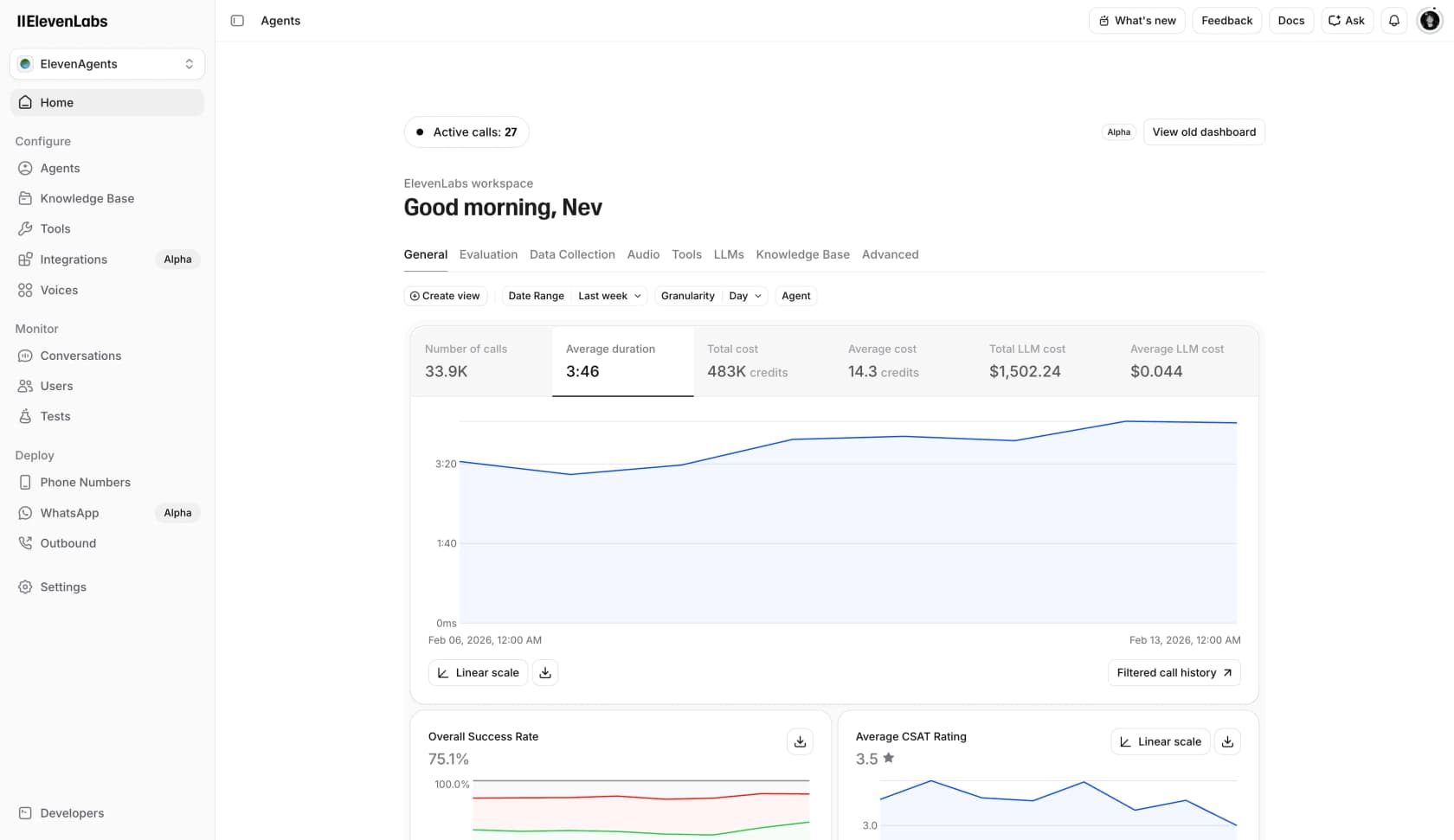
Worth pausing on that dashboard. It is the only place in this roundup where a vendor shows its own numbers unedited: 75.1% overall success rate, 3.5 stars average CSAT. A realistic-looking deployment, in other words, and not a 95% claim.
What it actually does
Telephony over SIP is included on every tier rather than gated, which is unusual. Knowledge bases and RAG work even on the free plan. Tool calling, batch calling, a hosted MCP server for agent management, a CLI: all there. Named integrations cover Genesys and Amazon Connect on the telephony side. For ticketing it is Zendesk and Salesforce, the only two ticketing systems with real pages.
Two things to know before you build. Its own pages disagree on languages, listing 70+ in the voice catalogue against 31 that an agent can actually be configured to speak. Second, no published round-trip latency figure exists for an agent, only component numbers for Flash v2.5 at roughly 75ms and Scribe v2 Realtime at roughly 150ms. Neither is the same thing as what your caller hears.
Pricing
| Plan | Monthly | Included minutes | Effective $/min | Overage | Burst | Concurrent calls |
|---|---|---|---|---|---|---|
| Free | $0 | 15 | n/a | $0.08 | $0.16 | 4 |
| Starter | $6 | 75 | $0.0800 | $0.08 | $0.16 | 6 |
| Creator | $22 (first month $11) | 275 | $0.0800 | $0.08 | $0.16 | 10 |
| Pro | $99 | 1,238 | $0.0800 | $0.08 | $0.16 | 20 |
| Scale | $299 | 3,738 | $0.0800 | $0.08 | $0.16 | 30 |
| Business | $990 | 12,375 | $0.0800 | $0.08 | $0.16 | 40 |
| Enterprise | Custom | Custom | Negotiable | Negotiable | n/a | Elevated |
Look at that effective column. Every paid tier divides to exactly $0.08. Business is $990 for 12,375 minutes, and 12,375 × $0.08 is $990.00 exactly. So the minute allowances were reverse-engineered from the price, which means there is no volume discount at any tier. Text messages cost $0.003 each, and carrier telephony is billed "at cost" on top of that.
Pros
- The only per-minute cost in this roundup you can actually forecast.
- SIP trunking is not enterprise-gated, so your own carrier works on a $6 plan.
- A serious compliance list: ISO 42001, AIUC-1, PCI DSS Level 1.
- Knowledge bases and RAG work on the free tier, so proper testing costs nothing.
Cons
- No volume discount, ever. At 50,000 minutes the rate is the same one you pay at 75.
- Minutes are prepaid rather than pay-as-you-go, so spiky volume means paying for headroom you waste.
- The BAA for HIPAA sits behind Enterprise, and so do SSO and the SLA terms.
- Operators report the
transfer_to_numbertool failing to complete the handoff, discussed at length in this r/ElevenLabs thread.
Our take: start here if your volume is predictable and you want a number your finance team will accept. The flat rate cuts both ways though. Heading past 20,000 minutes a month? Get an enterprise quote before you commit, because there is no discount curve here to grow into. I break the tiers down further in my ElevenLabs pricing guide, and cover the switching options in ElevenLabs alternatives.
2. Retell AI
Best for: support operations that want call analytics and clean escalation, minus the engineering hire.
Retell AI is the one I would put in front of a support manager rather than a developer. Its cost transparency runs to an almost uncomfortable degree. It is also the only vendor here whose own FAQ answers "can AI replace call center agents?" with a flat "No." That earns more of my respect than any containment claim on this page.
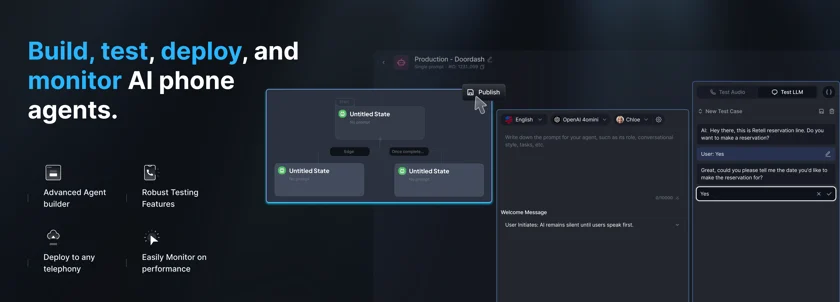
Note the third panel. The welcome message is set to "User Initiates: AI remains silent until users speak first". Small setting, large effect on how the first three seconds of a support call feel.
What it actually does
The escalation layer is the strong part. Warm transfer, IVR navigation and DTMF capture all sit under one call-transfer node, while live monitoring lets a supervisor listen in or take the call over outright. Better than that: the AI fee stops at the moment of transfer, so only telephony keeps running. Correct incentive, and almost nobody else does it.
Post-call analysis, transcripts, webhooks and the API are all available on the free pay-as-you-go tier, so you can test it for real. One reference customer, Medical Data Systems, publishes a 30% transfer rate. Roughly 70% containment on a real deployment, then.
The knowledge base is a website crawl plus file upload. No documented ingestion of your past ticket history, and the simulation runs graded test cases you author yourself rather than a replay of your own call archive.
Pricing
| Component | Rate | Notes |
|---|---|---|
| Retell voice infrastructure | $0.055/min | Unavoidable. Speech to text is absorbed here. |
| Text to speech | $0.015/min | $0.040/min if you pick ElevenLabs voices |
| LLM | $0.003 to $0.32/min | GPT 5 nano at the floor, GPT 5.5 Fast at the ceiling |
| Telephony | $0.015/min managed | $0 on your own SIP trunk |
| Knowledge base | +$0.005/min | Plus $8/mo per base after the first 10 |
| Guardrails | +$0.005/min | PII removal is a separate +$0.01/min |
| AI call QA | $0.10/min | First 100 minutes free |
| Concurrency | $8/call/mo | First 20 lines included |
The headline range is $0.07 to $0.31 a minute, with $10 of free credits and no platform fee. Retell's own calculator defaults to $0.115/min, except it zeroes out telephony and every add-on. Build something realistic for inbound support, GPT 4.1 with Retell's own voice, a managed US number, the knowledge base switched on, and you land at $0.135/min. That is $677 a month at 5,000 minutes. Turn AI call QA on across all your traffic and add about $490 a month, a 74% jump.
Pros
- The best transfer-to-human story in the roundup, and the meter stops the moment it fires.
- Supervisors can listen in on a live call, or take it over.
- Cost transparency right down to a per-component rate card.
- SOC 2 Type II, HIPAA and GDPR come platform-wide instead of plan-gated.
Cons
- Zendesk is marked "coming soon" rather than shipped. Live connectors stop at Cal.com, HubSpot and Salesforce, and nowhere in the docs is there a Freshdesk, Gorgias, Front or Help Scout integration.
- The ~600ms latency claim gets attributed to "independent benchmarks", which are never named or linked.
- Neither page publishes a language count or an uptime SLA percentage.
- The speech-to-speech option runs $0.345/min, which is above Retell's own stated $0.31 ceiling.
Our take: the strongest all-round pick for a support team, with one large caveat. Run Zendesk or Freshdesk and you should budget for building the ticket handoff yourself, over webhooks. Look at who Retell puts in its own integration marquee: CCaaS platforms, Genesys and Five9 and Avaya. That tells you who it was built for. My Retell AI pricing breakdown goes component by component if you want to model your own configuration.
3. Vapi
Best for: engineering teams that want to pick every component in the stack themselves.
Vapi is infrastructure, not a product. You assemble the transport and the speech to text, the model, the voice, all of it yourself, and Vapi charges $0.05 a minute to orchestrate the result. If swapping Deepgram for Assembly at 3am sounds appealing, this is the one.
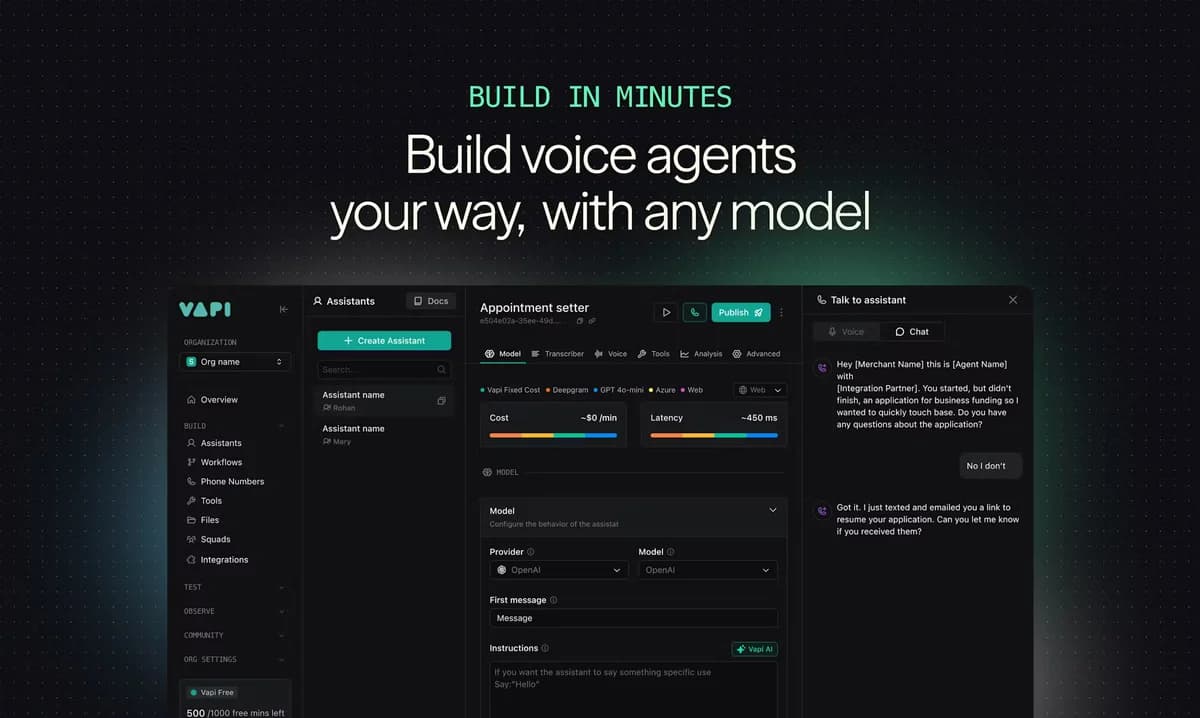
That row of provider chips is the whole product in one screenshot. Each chip is also a separate line on your bill.
What it actually does
Squads and workflows, tool calling, observability, a real evaluation suite. Bring-your-own SIP over Vapi's own trunk costs nothing, which is a real cost lever. Ten concurrent calls come included, and extra lines run $10 each a month.
One hard deadline you need to know about: the visual Workflows builder stops running on 19 August 2026, two weeks out. Vapi's stated reason is that current AI cannot reliably act as autonomous node-graph agents, and that Squads "consistently led to better results". So any Vapi support build from before mid-2026 needs migrating now. Vapi also warns that its AI-assisted migration is not guaranteed to be correct or complete.
Pricing
| Component | Rate | Notes |
|---|---|---|
| Vapi orchestration | $0.05/min | Plus $0.005 per SMS-chat message |
| Transport | Free to $0.014/min | Vapi SIP and WebRTC free; Twilio outbound $0.014 |
| Speech to text | $0.000631 to $0.01733/min | Google at the floor, Speechmatics at the ceiling |
| Text to speech | $0.002 to $0.24/min | Inworld at the floor, Tavus at the ceiling |
| LLM | $0.01 to $2.12 per 1M | 4.1-mini at the floor, 4.5 Preview at the ceiling |
| HIPAA | $2,000/mo | Zero data retention is a separate $1,000/mo |
Assemble something realistic, Vapi plus Twilio inbound plus Deepgram plus ElevenLabs plus a cheap model, and it works out at roughly $0.105/min. That is $0.63 for a six-minute call. Worth noticing too: Vapi's own fee is 48% of a realistic minute and 91% of the cheapest possible one. Enterprise terms start at 400,000 minutes a year.
Pros
- Total control over every component, and a published rate card for each one.
- Transport is free on Vapi SIP or WebRTC.
- The cheapest floor in the roundup, roughly $0.055/min, if you optimise hard for it.
- Observability and evaluation tooling that is actually good.
Cons
- Testing gets billed at production rates. Straight from Vapi's own FAQ: "Is testing free? No, test calls cost you the same as regular calls."
- The knowledge base is file upload only, retrieval is Gemini-only, there is no help centre crawl, and the recommended limit sits under 300KB per file.
- Zero ticketing integrations in the tool catalogue. Reading or writing a ticket is an
apiRequestyou build. - By Vapi's own methodology page the "under 500ms latency" headline excludes endpointing and transport, and that same page concedes endpointing can account for a meaningful share of the delay.
Our take: the right choice if you have engineers and want the cost floor. The wrong one if you want something answering calls next week. Either way, do the Workflows migration before the August deadline. There is more on the platform's shape in my Vapi review.
4. PolyAI
Best for: an established contact centre already running Genesys, Avaya or Amazon Connect.
PolyAI sells to contact centres, not to developers, and the integration list is the tell. Genesys, Avaya, Amazon Connect, Twilio, Five9, NICE, Talkdesk, Cisco, RingCentral, Zendesk Talk: all supported. So it drops into an estate you already own instead of asking you to replace it.
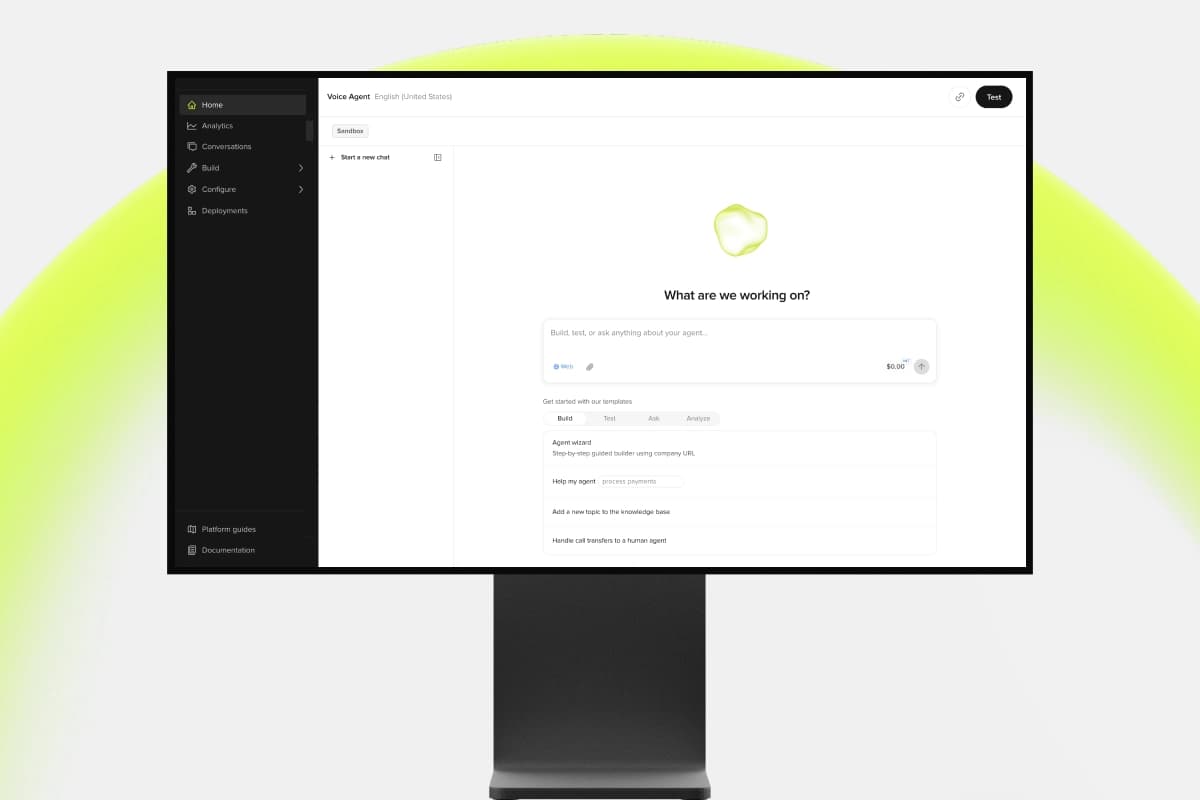
The template list says a lot about who this is for. "Handle call transfers to a human agent" shows up as a starting template rather than an advanced topic. Right instinct.
What it actually does
Agent Studio is the build surface, with a self-serve entry point at studio.poly.ai. Deployment timelines published across the site run from under ten minutes for self-serve up to about eight weeks for an Amazon Connect rollout, so take the fast number with salt. Language support is either 42 or 45, depending which PolyAI page you happen to read.
The security posture is the best-documented here, and unusually it is not tier-gated. SOC 2 Type 2, ISO 27001, PCI DSS, GDPR and HIPAA all get described as standard and "baked into the architecture", with AWS FTR certification on the Amazon Connect partner page too. Every paid deployment also includes a 99.9% uptime SLA on phone lines plus a 24/7/365 emergency support line. Not a footnote, that, when the thing answering your phone breaks at 2am.
Pricing
Not published. The pricing page is titled "Simple pricing that scales" and promises a transparent structure, then shows you a lead-capture form banded by annual call volume, from under 10,000 to over 1,000,000 calls. No dollar figure appears anywhere on any PolyAI property. No minimum commitment either.
At least the billing unit is clear, in PolyAI's own words: ongoing use "is priced on a per-minute basis, which includes proactive performance improvements, maintenance and 24/7 support."
Pros
- The deepest CCaaS integration list here, so it fits an estate you already run.
- Security certifications at every level instead of gated behind an enterprise tier.
- The per-minute rate includes a 99.9% phone-line SLA and a 24/7 emergency line.
- Published customer outcomes across a wide spread of deployments.
Cons
- No published price. The pricing page calls itself transparent while showing you a form.
- Containment figures spread very widely by use case: 70% of guest calls at a UK pub chain, then 34% at Golden Nugget reservations and 30% at an unnamed retail bank. Restaurant numbers are not a fair guide to a support queue.
- The site contradicts itself twice, on language count and on deployment timeline.
- Every headline stat on the site is a client-side animated counter, which makes the numbers hard to verify independently.
Our take: if you already own a CCaaS platform, PolyAI is probably your shortest path to a working voice agent, and the included SLA earns its keep. One thing to insist on: containment figures from a support deployment, not a reservations one. The published spread between those two is more than double. For background on the category it sits in, there is my primer on conversational AI for customer service.
5. Parloa
Best for: anyone who wants the agent tested against their own historical calls before it answers a real one.
Parloa is the European enterprise entry. It raised $350M at a $3B valuation in January 2026 and has passed $50M+ ARR on 150% net revenue retention, with total raised now past $560M in under four years. Customers include Allianz, Booking.com, IKEA and SAP.
Parloa publishes no product screenshots anywhere, so what follows is its own architecture slide rather than a capture of the interface. Normally I treat that as a strike against a vendor. In this case the slide happens to say the important thing out loud.
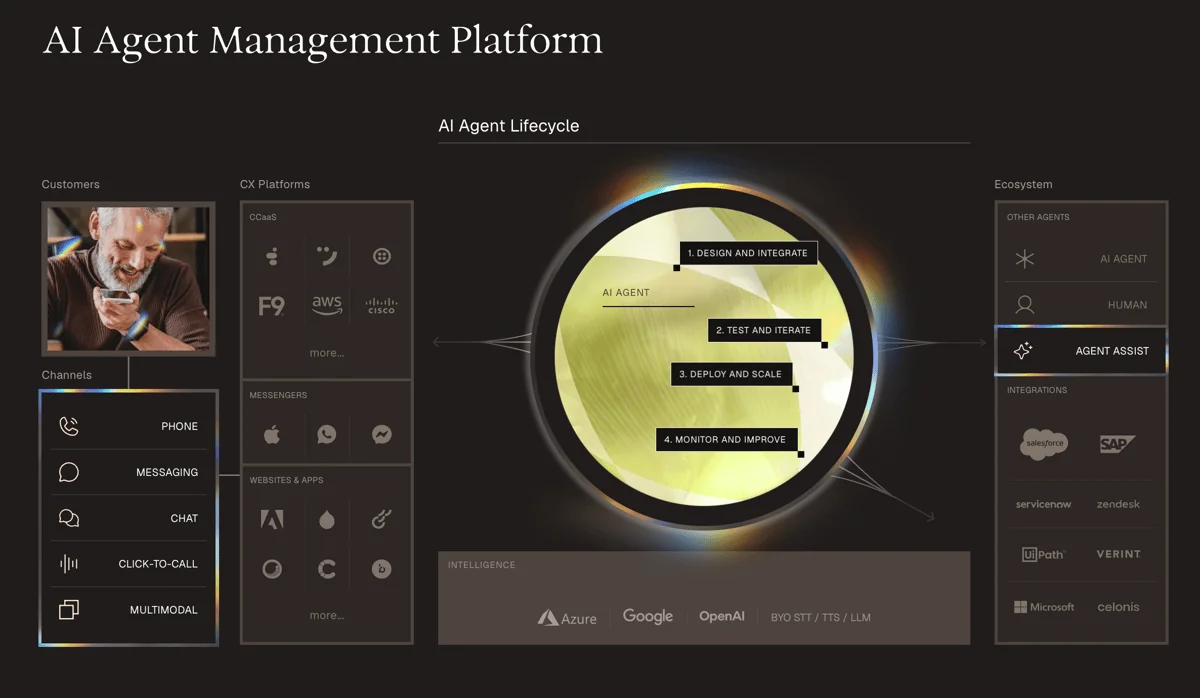
Stage two of that ring is "test and iterate", with equal billing to deploying and monitoring. Every other vendor here treats testing as a feature. Parloa built a company around it.
What it actually does
The simulation environment is why Parloa is on this list. It is also the one feature in this whole roundup I would call a real differentiator. It runs thousands of simulated conversations across scenarios, languages, channels and edge cases, and the critical part is that it blends your real historical transcripts with synthetic tests instead of only running scenarios someone wrote by hand. It tests ambiguity and tool calling, fallback, brand consistency. It isolates subtasks, and it switches between staging and production.
Evaluation scores with LLM-as-judge and rule-based criteria both, on task success and tone, accuracy, API behaviour. Then root-cause tracing, with line-level fix recommendations applied inside the platform. This is the mechanism I wish every vendor here had. It is also the same principle we apply to text: a bot that has only ever been tested on questions you invented teaches you nothing useful.
Integrations cover Avaya, Five9, Genesys, NICE, Twilio, Verint, Salesforce, Dynamics, ServiceNow, Zendesk and SAP, plus SIP. 130+ languages across 70+ countries, though no list is published anywhere. The data residency claim comes with stricter wording than usual, that runtime routing keeps processing in-jurisdiction during the interaction and not only at rest, but the detail sits behind a gated trust centre.
Pricing
Not published, and the pricing URL 404s. The one real signal is Parloa's own FAQ, which describes a "consumption-based pricing model that ties costs to task complexity and effort, not flat rates or token counts", quoted on volume, use cases and business value. No minimum is published, no free tier, no trial.
Pros
- The only tool here that replays your real call history in simulation.
- Root-cause tracing, with the fixes applied inside the platform.
- A real EU posture, built on Azure, with in-jurisdiction runtime routing.
- Certifications are ISO 27001:2022, SOC 2 Type 1 and Type 2, and PCI DSS.
Cons
- No published pricing of any kind. Consumption "by task complexity" is also the hardest unit here to forecast.
- HIPAA, GDPR and DORA get described as "aligns with" rather than certified. That is Parloa's own wording, and it is worth reading precisely.
- The homepage customer percentages are JS-animated counters, so the real figures sit on the case study pages instead.
- Amazon Connect appears on no published Parloa integration list, so do not assume it.
Our take: if you are an enterprise buyer with only one question to ask a vendor, ask whether their simulation replays your own calls. Parloa is the one here that says yes. That single capability is worth more than a percentage point of containment on someone else's benchmark. My Parloa review has more on the platform, and Parloa pricing covers what is known about the commercial side.
6. Sierra
Best for: high-value support where paying per resolution beats paying per minute.
Sierra raised $950M at a valuation over $15B in May 2026, and says it serves more than 40% of the Fortune 50. The voice product does 55+ languages with mid-conversation switching, per-turn model routing and context-preserving escalation. It also takes voice payments, card and ACH via DTMF tones, through Level 1 PCI compliant infrastructure.
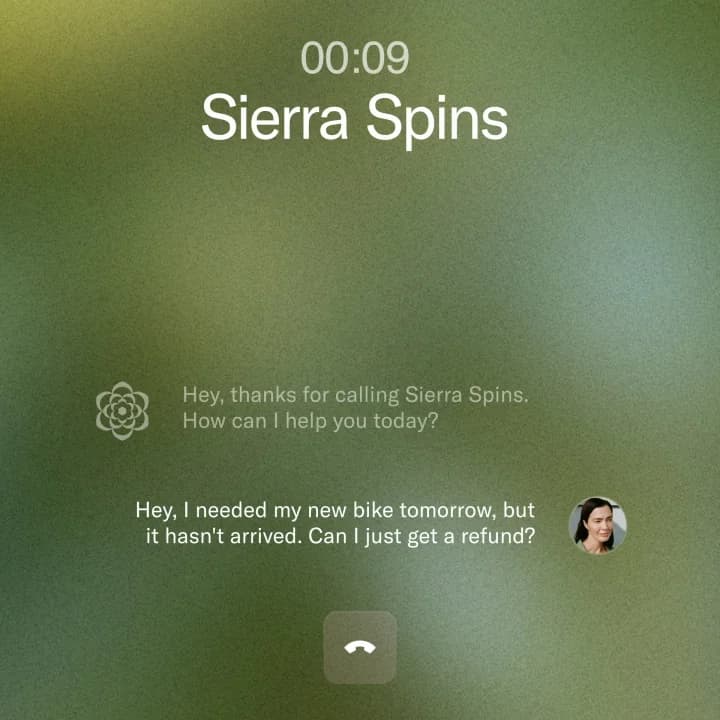
That is a demo call rather than a console shot, and it is the most I can show you. Every visual on Sierra's voice page is a video poster, with no full product capture published anywhere.
Sierra earns a mention for something other than its product, too. It publishes the τ-voice research that reframed this whole post. Its own findings: the frontier moved from 30.4% to 67.3% pass@1 between August 2025 and April 2026, against a text reasoning ceiling near 85%. Every provider drops 5 to 14 points on realistic phone audio. And 79% of first critical errors are the agent's own fault. A vendor publishing the numbers that make its own category look hard is a good sign.
What it actually does
Commercially the distinctive thing is outcome pricing. Sierra's own framing is "Pay for a job well done", with the unit tied to "a resolved support conversation, a saved cancellation, an upsell, a cross-sell", and "if the conversation is unresolved, in most cases, there's no charge." The shortest version they give: "Sierra gets paid only when we complete a task for you."
Read the hedges carefully though, since they are what matters at contract time. Escalations go unbilled "in most cases", and the exceptions are not published. The real bill is blended, because Sierra says "routing or greeter-style interactions may align better with consumption-based pricing, where payment is based on conversation count, regardless of the outcome." Then there is "resolved", which has no universal definition here. The criteria get agreed per contract.
Pricing
There is no pricing page at all. sierra.ai/pricing returns a hard 404, and no dollar figure appears anywhere: no per-outcome rate, no setup fee, no minimum, no trial. A platform fee is never mentioned. It is never denied either, so do not assume there isn't one.
Pros
- The billing model lines up with what you actually want, which is resolutions rather than airtime.
- The broadest certification list here: SOC 2, ISO 27001, ISO 42001, HIPAA, GDPR, EU AI Act, FedRAMP and PCI DSS.
- 55+ languages, and it switches mid-conversation.
- Publishes honest research about the limits of its own category.
Cons
- Zero published prices, so comparing it to anything means entering a sales cycle first.
- The certification badges carry no audit dates, no SOC 2 Type I/II distinction, no FedRAMP authorisation level.
- Named voice customers stop at Rocket Mortgage, Guild and Next, and no containment, resolution or handle-time figure is published for any of them.
- No published voice latency number. That 200ms figure in the τ-voice post is the benchmark's audio-chunk granularity rather than agent response time, so do not quote it as one.
Our take: outcome pricing gets more attractive the worse your containment rate is, and that is a clever alignment. Just walk into the negotiation knowing you are the one defining the billable unit. Pin down in writing which escalations count as the exceptions to "in most cases". I dig into the model in Sierra AI pricing, and the competitive set in Sierra alternatives.
7. Bland AI
Best for: high concurrency, or a deployment that has to sit inside your own cloud.
Bland AI publishes the clearest tier ladder here, plus the highest concurrency ceiling by a wide margin. Its docs index cites Enterprise support for "up to 1 million concurrent calls". Nobody else on this list goes near that number.
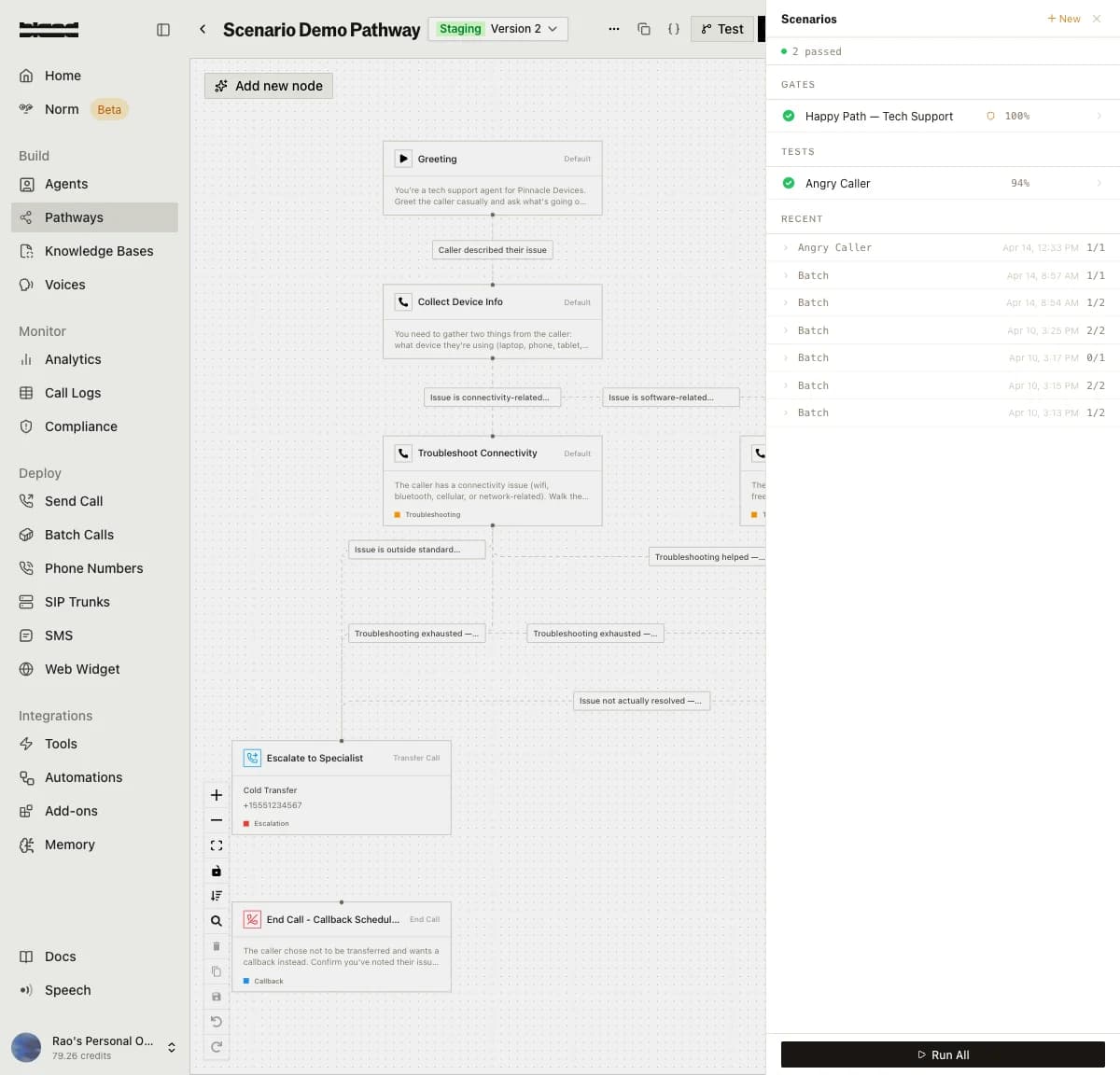
This is the clearest picture of what "testing" means across the whole category. The right-hand panel runs an "Angry Caller" test at 94% and a "Happy Path" gate at 100%. Both are personas someone wrote. Useful. Still not your call history.
What it actually does
Conversational pathways, tool and API calling, then three published hosting postures: Bland Cloud, your own VPC on AWS, GCP or Azure, or fully on-prem and air-gapped. No dollar figures attach to any of those. No uplift or minimum is published either, since they all sit inside the Enterprise contract.
New since I last looked: an actual latency figure. The homepage now prints 400ms against a claimed 1,240ms "industry average", the docs say sub-400ms, and the product page shows p50 figures of 380ms and 365ms. That 1,240ms comparison is unsourced. Treat it as marketing, not measurement.
One wording trap. The product page markets the ability to "back-test against historical calls", while the documented Scenarios mechanism is a simulated caller following a persona prompt you write. Different guarantee from replaying your own archive, and worth asking about directly.
Pricing
| Start | Build | Scale | Enterprise | |
|---|---|---|---|---|
| Talk time | $0.14/min | $0.12/min | $0.11/min | Custom |
| Platform fee | $0 | $299/mo | $499/mo | Contracted |
| Transfer time | $0.05/min | $0.04/min | $0.03/min | Custom |
| Concurrent calls | 10 | 50 | 100 | Sized to volume |
| Daily / hourly cap | 100 / 100 | 2,000 / 1,000 | 5,000 / 1,000 | Unlimited |
| Knowledge bases / voices | 10 / 1 | 50 / 5 | 100 / 15 | Unlimited |
| Uptime SLA | 99.9% | 99.9% | 99.9% | 99.9% |
The crossovers are counterintuitive enough to be worth knowing. Build only beats Start above 14,950 minutes a month, and Scale only beats Build above 20,000. Below roughly 15,000 minutes the free Start tier is arithmetically the cheapest. You upgrade for concurrency here, not for the rate.
Pros
- A 99.9% uptime SLA on every tier, the free one included, which nobody else here does.
- Self-hosting in your own VPC, or air-gapped on-prem, is a published option.
- The concurrency ceiling is the highest in the roundup.
- Bring your own trunk and the transfer-minute charge goes away entirely.
Cons
- The integrations directory has 19 connectors across 7 categories and zero helpdesk or ticketing systems, despite product copy that claims ticketing support. Getting a call into Zendesk or Front means a custom tool, or a post-call webhook you build.
- Warm transfer is Enterprise-only, and the docs state that gate outright. Self-serve deployments are cold-transfer-only, with no answer citations.
- Citations and knowledge-base gap reports, outcomes, guardrails, alerts, SMS, web chat, the BAA: all behind Enterprise too.
- The pricing page says telephony is billed separately at pass-through cost. The homepage FAQ and the docs say the per-minute rate covers it. Get that one in writing.
Our take: Bland is a voice platform rather than a support product, and its headline proof points are revenue-generating rather than cost-saving. Pick it for concurrency, or for a hosting requirement your security team will not budge on. Buying it to answer support calls? Price the Enterprise tier from the start, because the features you need all live up there. And if ticket handling is the actual goal, one of the support automation tools in my wider roundup is a closer fit.
8. Synthflow
Best for: a Freshworks shop that wants its voice AI inside Freshcaller.
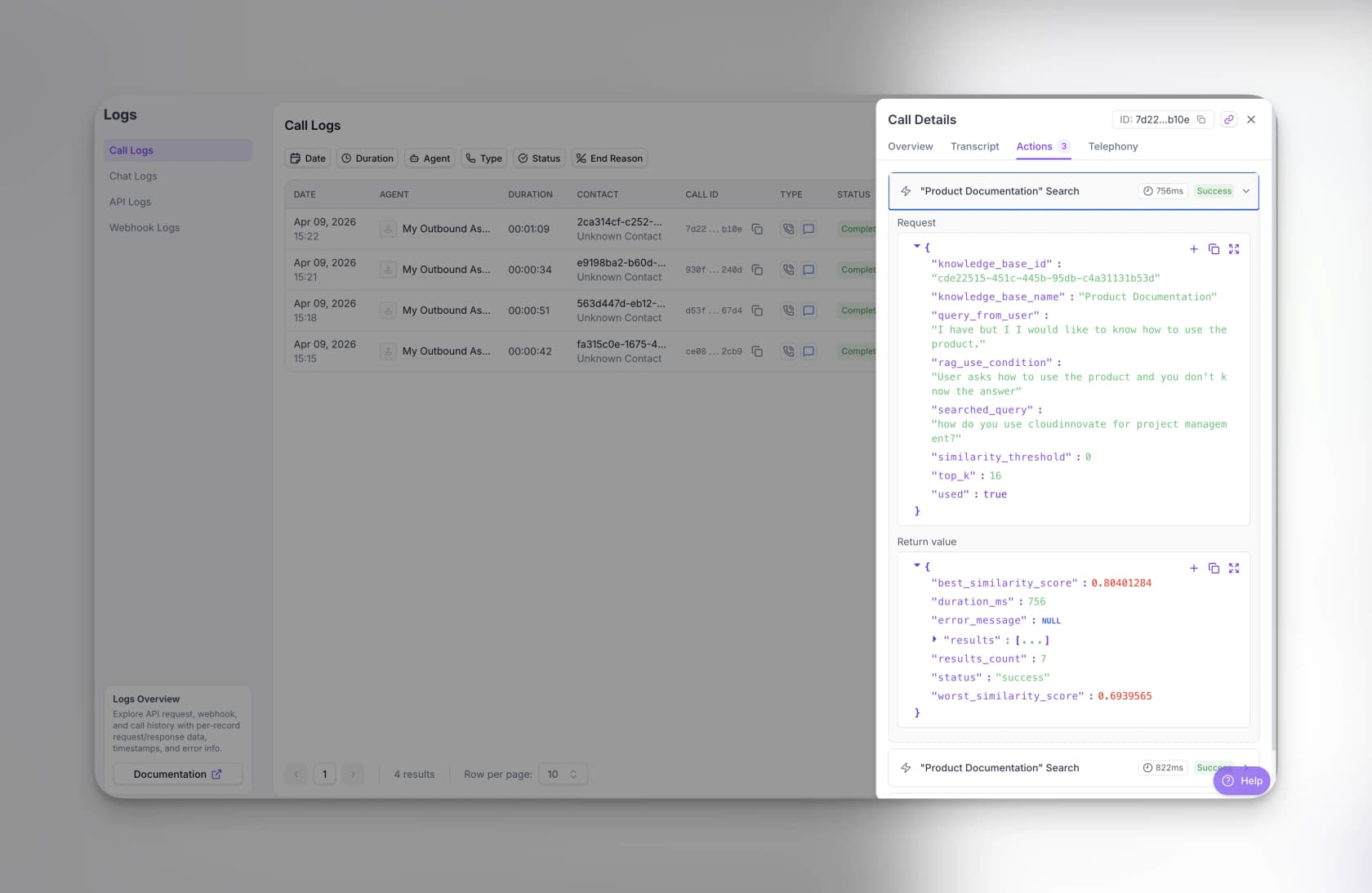
Before the write-up, look at that open drawer, because it is the most useful screenshot in this entire post. It shows a real knowledge base lookup mid-call. The caller said "I have but I I would like to know how to use the product", the agent rewrote that into a search, and back came 7 results in 756ms at a best similarity score of 0.80, against a similarity_threshold of 0. That threshold is the knob deciding whether your agent answers from a weak match or admits it does not know. Almost no vendor shows it to you.
Everyone still describes Synthflow as the easy no-code on-ramp. As of this month that is out of date. The self-serve ladder is gone, and the docs confirm it: the earlier Pro, Growth and Agency plans "are no longer available for new subscriptions and remain supported for existing customers." What is left is a single-tier, sales-led enterprise product.
What it actually does
Transfer-to-human is the strongest support feature here, in three modes: cold, warm with a message, warm with a summary. There is human detection on a 30-second to 30-minute timeout, call screening, a business-hours schedule. The docs are also blunt in a way I appreciate, that "cold transfers cannot recover from failures."
Knowledge sources are PDFs, typed documents, single URLs, public website crawls and a Zendesk help-centre import. No authenticated sources, no past-ticket ingestion, and no manual document ranking. On integrations, the "200+" claim resolves to roughly 15 documented connectors, and the one deep support-stack integration among them is Freshworks: voice AI running inside Freshcaller, with 65% of routine voice requests automated. That is the reason to buy it.
The metering detail gets published far more precisely than the rates, an odd combination but a useful one. Billing is per second and aggregated across calls, so 125 seconds of calls comes to 2 billable minutes rather than 4. A successful transfer stops the meter. A no-answer or a voicemail hangup bills a flat 5 seconds. Chat converts at 5 AI messages to 1 voice minute. And Test Center simulations can be billable.
Pricing
| Tier | Monthly | Included minutes | Overage | Concurrent calls |
|---|---|---|---|---|
| Enterprise (the only tier sold) | No list price; contracts start at $30,000/year, about $2,500/mo | Not published, agreement-scoped | Custom, based on your agreement | "Scoped with Synthflow" |
| Pro / Growth / Agency (legacy) | Closed to new customers | In-product only | In-product only | Shown in your account terms |
| Free trial | No self-serve checkout. Both CTAs are contact sales | n/a | n/a | n/a |
Effective cost per included minute is uncomputable at every tier, because Synthflow never publishes a price and a minute allowance in the same row. The only defensible public figure is that $2,500-a-month-equivalent floor, set against an allowance nobody outside the contract knows. Any per-minute number still circulating traces back to the delisted ladder.
Pros
- Three distinct transfer modes. Warm with a summary is the one that actually helps the human.
- Per-second billing, aggregated across calls, is the fairest metering here.
- A successful transfer stops the meter.
- A deep Freshworks integration, with a published 65% automation figure for routine voice requests.
Cons
- That $30,000/year floor makes it the most expensive option here at any volume under about 20,000 minutes a month.
- There is no published concurrency number at any tier anymore.
- A HIPAA conflict on its own site. The homepage claims certification across SOC 2, HIPAA, PCI DSS and GDPR, while the Enterprise doc's compliance row lists only SOC 2, GDPR and ISO 27001. Do not assume a BAA.
- Latency is a target and not a measurement, phrased as "we aim for" sub-100ms round trip. Reselling goes away on 15 September 2026, and EU telephony servers are "very soon".
Our take: the no-code reputation no longer matches the price list, so ignore any roundup still calling this the cheap starter option, including our own older ones. Run Freshworks and it is a strong, native fit. Otherwise, the Freshcaller integration is the main thing you would be paying that floor for, and a general customer service automation tool costs far less.
9. Grok Voice Agent Builder
Best for: the fastest properly capable model, if the session caps do not stop you.
xAI's Grok Voice Agent Builder runs on Grok Voice Think Fast 2.0, which tops the τ-Voice table at 56.5% and answers in 0.70 seconds. That combination is the whole pitch. On the benchmark it holds up.
There is no product screenshot in this section because xAI publishes none, and the Voice Agent Builder documentation URLs currently 404. What xAI does publish is a pricing change landing today. If you already run Grok voice in production, that is the single most consequential thing on this page.
What it actually does
It is wire-compatible with the OpenAI Realtime API at wss://api.x.ai/v1/realtime, so migrating an existing realtime build is mostly a URL change. Tools cover functions, file search, web search, X search and MCP. The compliance-shaped extensions are the useful part: force_message speaks a verbatim line for disclosures, replace maps pronunciations without changing the transcript, keyterms takes up to 100 terms at 50 characters each, resumption replays turns on reconnect. A provisioned phone number adds $0.01 a minute.
Worth flagging on the accuracy side: transcription is 1.4x better on word error rate than version 1.0, 1.5 to 2.0x better than Deepgram Nova 3 and ElevenLabs Scribe v2 across 24 languages, and roughly 10x better on noisy telephony audio. Background noise and accents are exactly what operators report breaking their agents, so that number is more relevant to you than the headline benchmark.
Pricing
| Item | Rate |
|---|---|
| Grok Voice Think Fast 2.0 | $0.08/min ($4.80/hr) |
| Grok Voice Think Fast 1.0 | $0.05/min ($3.00/hr) |
| Text input | $0.004 per conversation item |
| Provisioned phone number | +$0.01/min |
web_search / x_search | $5 per 1,000 invocations |
file_search (collections) | $2.50 per 1,000 |
attachment_search | $10 per 1,000 |
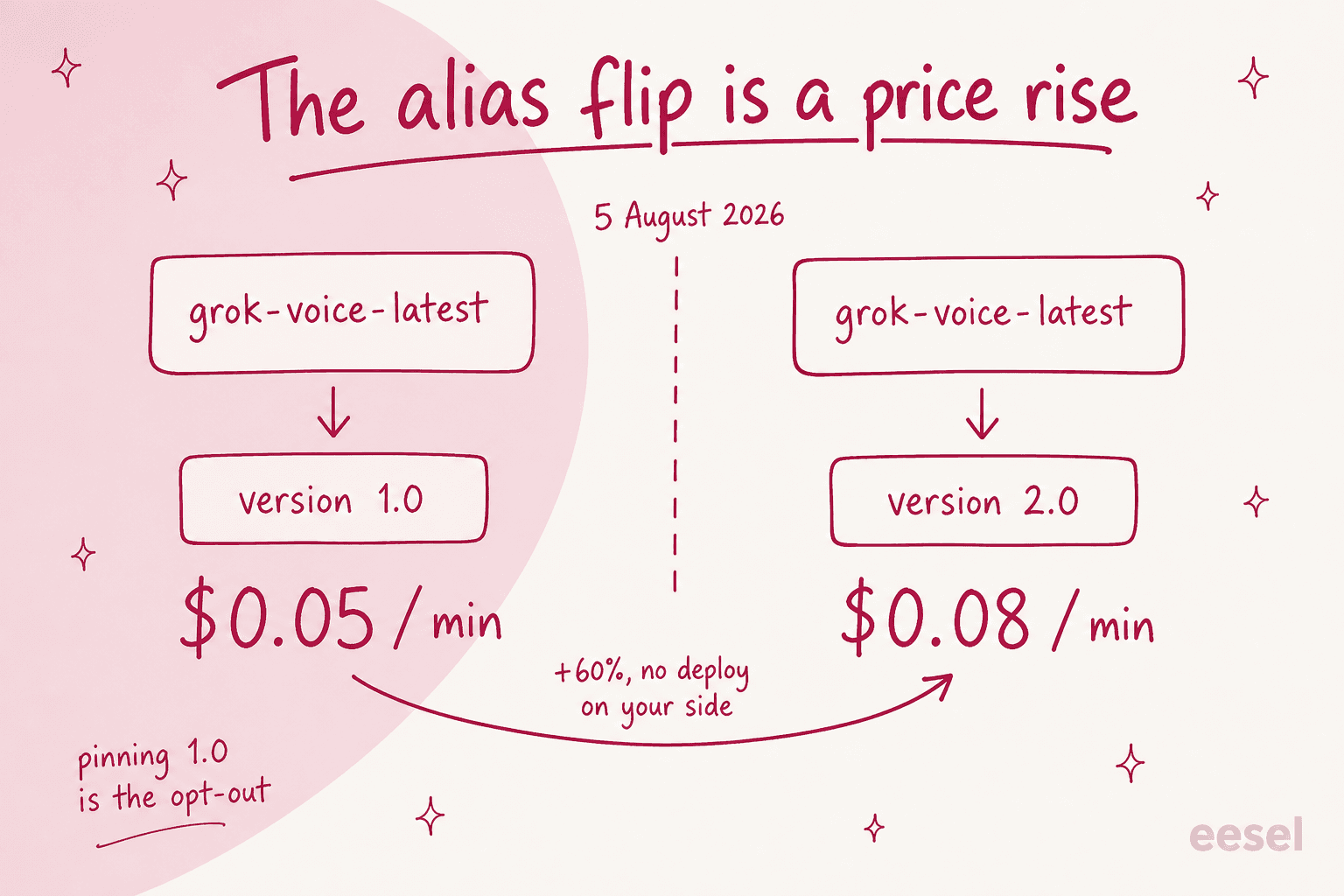
Today is the day this got more expensive. On 5 August 2026 the grok-voice-latest alias repoints from 1.0 to 2.0, so the default path costs 60% more per minute, with no deploy on your side. Pinning the old version is your opt-out. That flip also erased Grok's 37.5% undercut of ElevenLabs, because $0.08 is exactly ElevenLabs' effective per-included-minute rate. What is left is billing shape rather than price. Grok is pay-as-you-go, ElevenLabs minutes are prepaid, so Grok still wins on spiky or low volume.
Pros
- Top of the τ-Voice table on support task completion, at 56.5%.
- Third-fastest time to first audio at 0.70 seconds, which is the best speed-to-capability combination going.
- Metering is flat per minute, so measured cost per hour of input audio equals the list rate exactly.
- Strong telephony-audio transcription, roughly 10x better in noisy conditions.
Cons
- 10 concurrent sessions per team by default. For a support line that is a hard ceiling, and raising it takes a request.
- No batch discount and no priority tier on voice, so there is neither a discount nor a paid fast lane.
us-east-1only, and a 120-minute maximum session. - No helpdesk integrations. No published security certifications for the voice product either.
- Storage bills separately when the agent does retrieval, $0.10/GiB/day for collections.
Our take: the most capable model here, wrapped in the least support-shaped product. Ten concurrent sessions is the number that decides it. If your peak sits above that and nobody has raised the cap, this is a prototype rather than a production support line, however good the benchmark looks. I covered the model in depth in Grok Voice Think Fast 2, and the new rates in its pricing breakdown.
Where the other half of your calls actually go
Every tool above will hand off. Not a defect, just arithmetic. The best model resolves 56.5% of support scenarios in a benchmark and operators report 15% to 30% in production, while average net first-level resolution across help desks generally sits around 74.3%, with only 1.4% of desks above 95%. Something always reaches a person. Which is why first contact resolution is a better target than containment.
The failure mode I hear about most has nothing to do with the bot conversation. It happens at the seam:
"AHT question nobody wants to answer lol. shipped a billing/tracking bot, decent containment, but AHT on escalated calls went up. agents had to read the transcript, figure out what the bot already tried, re-ask half of it anyway. fixed by forcing a structured handoff summary instead of raw transcript dump (saved more time than the automation itself). CSAT fine on deflected stuff, tanked on anything that bounced back after a failed bot attempt"
Read that last clause twice. Containment looked fine, handle time on escalated calls went up, and satisfaction collapsed on the bounce-backs specifically. So a voice deployment can win on the dashboard and lose with the customers who needed you most. That is the argument for tracking CSAT segmented by whether the AI touched the contact first.
Here is the blunt version of the same point, from a contact centre operator asked how much of their centre is actually automated:
"15% roughly....people quoting any higher are lying or dont understand "fully handled". AI solutions are not mature or too fragmented at the moment to go any higher."
Other replies in that thread put the band at 10% to 30%, depending on journey design. So 15% is the pessimistic end of a real range rather than one lone cynic. Either way it is nowhere near 95%.
Then there is a cost the containment dashboard cannot see at all. What happens when the agent is confidently wrong out loud:
"If it's anything like talking to ChatGPT via voice they'd definitely notice. And if it has anything like the failure modes it does, the OP's brother is going to eat into a lot of the cost savings he'd get (vs using a human receptionist or even an outsourced receptionist) dealing with fires like the AI said my car would absolutely be done today."
That is the right way to think about AI hallucinations on a phone line. In text a wrong answer is a message you can correct. Said aloud, it is a commitment the customer heard you make, and the cleanup becomes a separate contact you also pay for.
What I would actually do
Three things, in this order. None of them is "buy the highest containment number".
First, cut the volume that never needed a call. Order status, password resets, opening hours. That is tier-1 deflection work, and in text it is cheaper per interaction and more accurate for the same model. Though if the caller already failed at your help centre, fixing the help centre comes first. That is a self-service problem, not a voice one.
Second, fix the seam before you tune the voice. In the quote above, a structured handoff summary beat the automation itself on time saved. Same principle we apply to chat escalation: the human receiving it needs a summary and a confidence signal, not a transcript.
Third, assume the transferred call becomes a ticket, because it usually does. The caller hangs up and emails you, or the agent writes notes afterwards. One detail from our own customer conversations stuck with me here, from a team running a mixed phone and email queue: nothing about their calls reached their AI at all, because voice recordings never entered the system and agents summarised every call by hand.
"For calls we just write a quick summary in the ticket after, so the AI never really sees any of that."
Support lead at a mid-size B2B SaaS company running a mixed phone and email queue on Zendesk, roughly 3,000 tickets a month
That is the gap nobody prices. You buy a voice agent to handle the phone, and then the half it cannot handle turns into text work, inside a system the voice agent cannot see at all.
Try eesel for the half your voice agent hands off
Let me be straightforward: eesel does not do voice. There is no eesel phone product. If you need something to answer a ringing line, buy one of the nine above.
What eesel does is the half that lands in your helpdesk afterwards, and it starts from a different place than any voice tool here. Look back at that comparison table. Eight of the nine train on a website crawl plus uploaded files, and exactly one can replay your own conversation history. eesel's AI helpdesk agent trains on your past tickets, then simulates against them before it answers anything live, so what you see is its accuracy on your own historical volume rather than on scenarios someone invented. Same discipline Parloa charges enterprise money for, applied to the text channel.

We built it that way because of a scar. I have watched a confident-sounding bot invent product claims and send them to real customers, and that is why nothing goes live here without a dry run over historical tickets first. It is also why a support lead evaluating us framed the requirement as wanting an agent that would "only handle tickets it's confident to handle" instead of one that answers everything.
Results rather than promises: Gridwise got 73% of tier-1 requests resolved in its first month. On cost, my colleague Riell put the shift plainly when we moved off flat pricing, that a team which would have paid $799 a month flat now pays around $200 on usage.
If you are shopping for voice, the honest sequencing goes like this. Cut the repetitive volume in text first. Buy the voice agent for whatever is left. Then make sure the tickets it creates land somewhere that already knows your history.
Setup takes minutes, not the two-to-eight weeks the enterprise voice vendors quote. It also covers more helpdesks than any voice platform on this page, including Zendesk and Freshdesk, Gorgias and Front. You can try eesel free.