


The call center ROI formula (and the cost line most people get wrong)
Every ROI calculator you'll find is a dressed-up version of one equation:
ROI % = (annual savings − annual investment) ÷ annual investment × 100
The investment side is whatever you spend in a year to run or improve the center: agent headcount for an in-house build, the vendor invoice for a tool, the retainer for a BPO. The savings side is where all the action is, and it breaks into three parts:
- Contacts handled without an agent. Every call deflected to self-service or resolved by an AI agent is a contact a human never touched. Multiply those by your fully-loaded cost per contact and that's bankable saving.
- Faster handling on the rest. Even when an agent takes the contact, AI that drafts the reply or surfaces the right answer shaves minutes off average handle time.
- Agent hours freed. The capacity you claw back either absorbs growth without new hires or moves your best agents onto the complex work that actually moves CSAT.
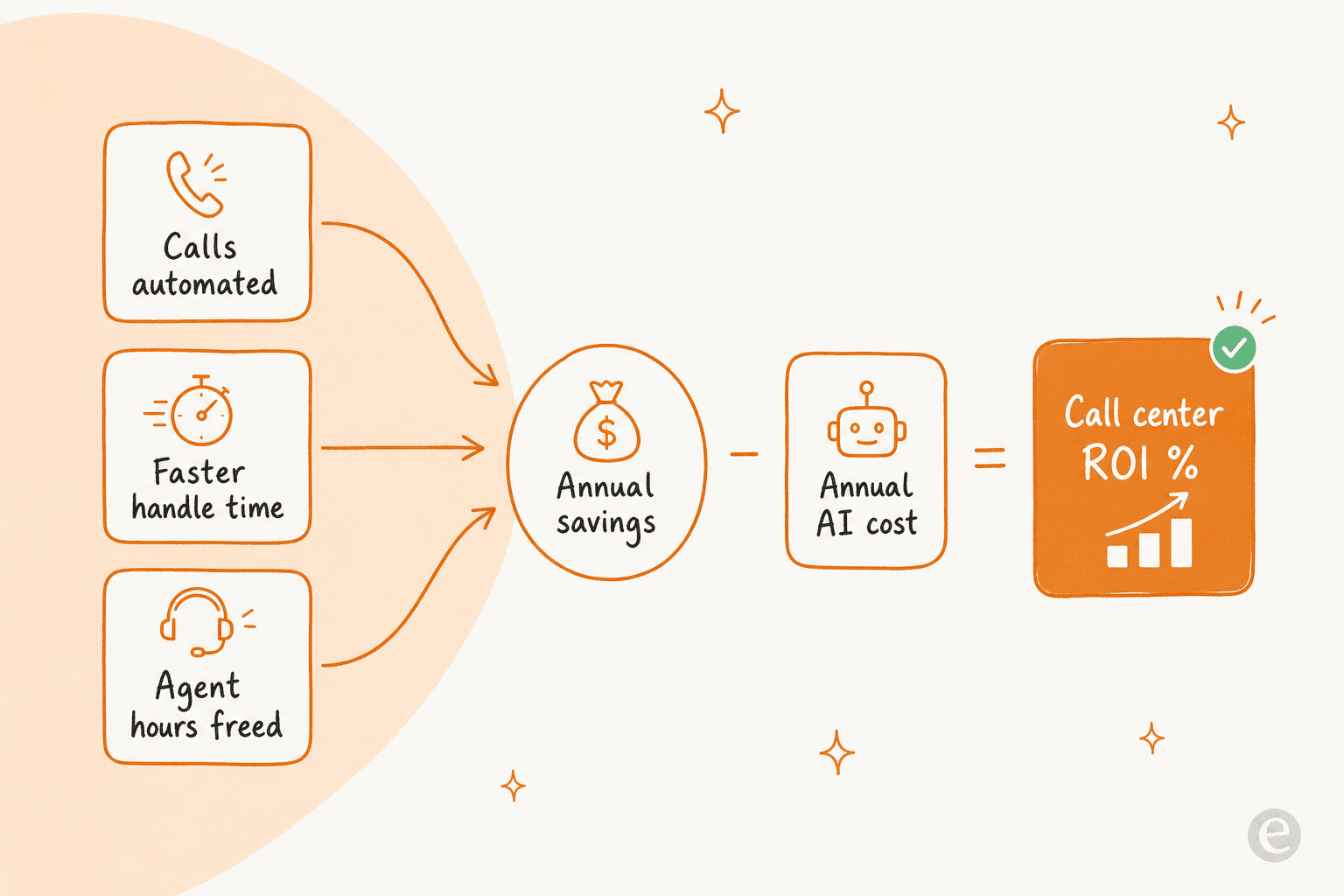
Notice what the formula doesn't care about: seat count, dashboard polish, or the vendor's slide about "transforming your CX." ROI lives and dies on how much you automate and your true cost per contact. Everything else is noise.
The true cost per contact (the number that makes the savings real)
Here's the line most ROI math gets wrong. When people price a contact, they reach for the agent's hourly wage and stop. But the wage is only one slice of what a contact actually costs you.
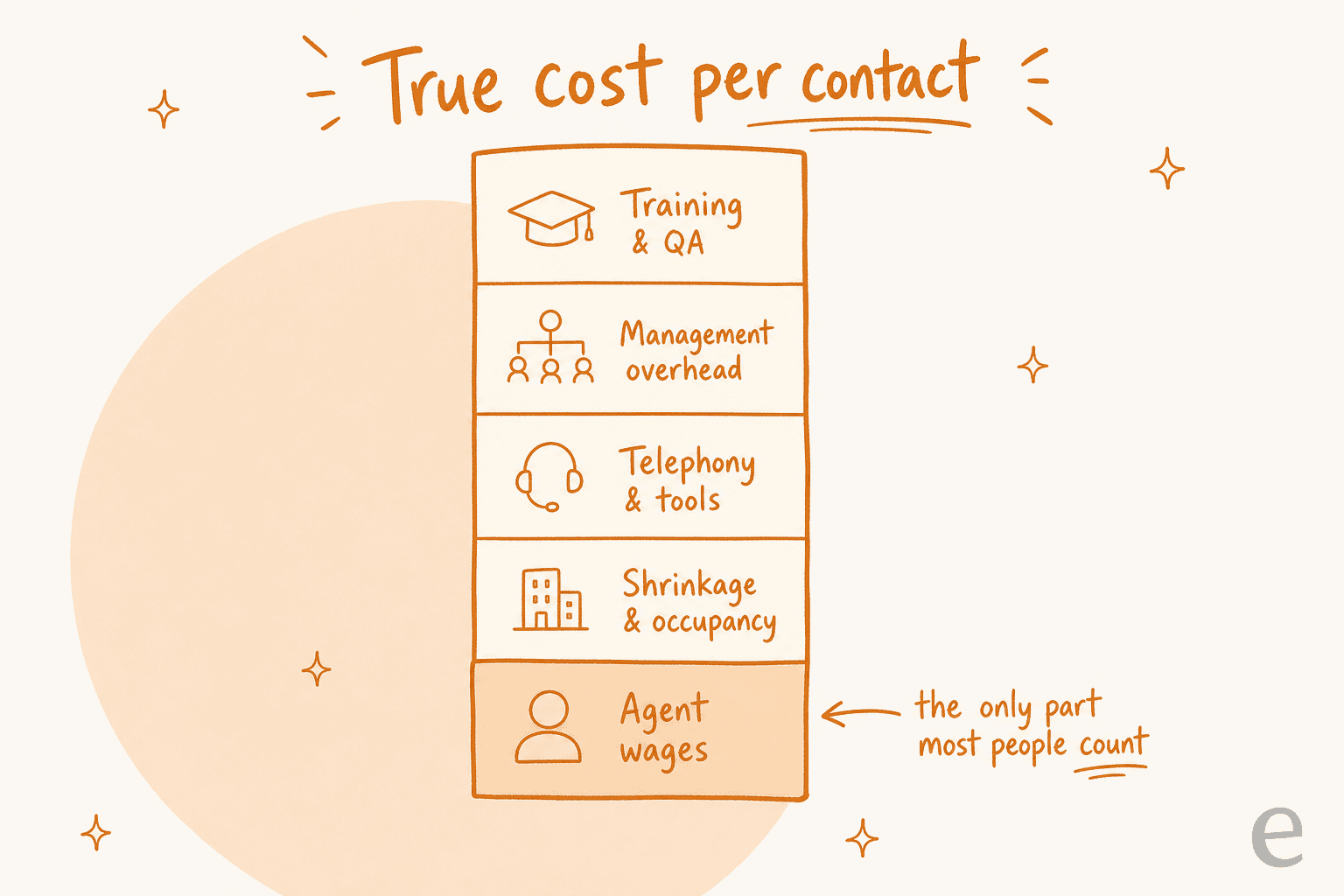
Your fully-loaded cost per contact carries all of this:
- Agent wages, adjusted for the fact that no agent is on live contacts 100% of the time.
- Shrinkage and occupancy. Breaks, training, meetings, and idle time between contacts mean you pay for far more agent-hours than you get talk-time from. A center running 70% occupancy is paying 30% overhead on every contact before anything else.
- Telephony and tooling. Your call center technology stack, phone minutes, licences.
- Management overhead. Team leads, QA analysts, WFM, the org structure around the agents.
- Training and quality assurance. Onboarding new hires and running QA on the contacts that go out.
Add it up and the fully-loaded number is usually several times the bare wage. This matters for ROI because automation removes the whole contact, overhead and all, not just the wage minute. That's why the savings from removing a contact are bigger than the sticker wage suggests, and why "we'll just save the agent's time" undercounts the return.
The levers that actually move ROI
Three numbers do almost all the work. If you want to move the return, move these.
- Automation / resolution rate. The share of contacts resolved without a human. ROI is close to linear in this number: double it and you roughly double the savings while the cost barely moves. It's also the number projections get most wrong, because teams guess it from a vendor's best-case slide instead of measuring it on their own contacts. Track your real AI resolution rate, not the demo's.
- Average handle time. On the contacts a human still takes, minutes saved per contact multiply across the whole queue. This is where agent productivity tooling and good knowledge surfacing pay off.
- Occupancy and deflection mix. Pushing repetitive volume to self-service raises the value of every remaining agent-hour. The pattern that works: start with tier-1 deflection, measure the real rate, and grow it deliberately.
Here's what realistic automation looks like, from numbers I'd actually stand behind:
- A gig-economy driver-analytics app on Zendesk resolved 73% of tier-1 requests in its first month, after a 7-day trial. Tier-1 is the sweet spot: high volume, repetitive, well-documented.
- An internal IT helpdesk started around 15% deflection and set a 55% target as it trained the AI on more of its docs. Coverage climbs as the knowledge base fills in.
- In one week-long trial cohort, AI chats hit 96% quality across 581 conversations. Quality and resolution aren't the same thing, but low quality caps how far you can safely push automation.
A bot pointed at your gnarliest edge cases on day one will post a bad resolution rate and a worse ROI. For the fuller picture on which numbers to watch, my guide to AI customer service metrics breaks them down.
Plug in your own numbers
Rather than hand you a fictional case study, here's a calculator. Enter your volume, your fully-loaded cost per contact, and an automation rate you can defend, and it runs the formula above. The defaults are deliberately conservative.
Play with the automation field and watch the ROI swing. That sensitivity is the whole point: the automation rate is the lever, and it's the one thing you should measure rather than assume.
Where the automation return really comes from
The calculator is deliberately a floor, because it only counts contacts you fully remove from the queue. The picture below is what actually happens when you point AI at the repetitive volume: the agent load shrinks, and the contacts that remain get handled faster.
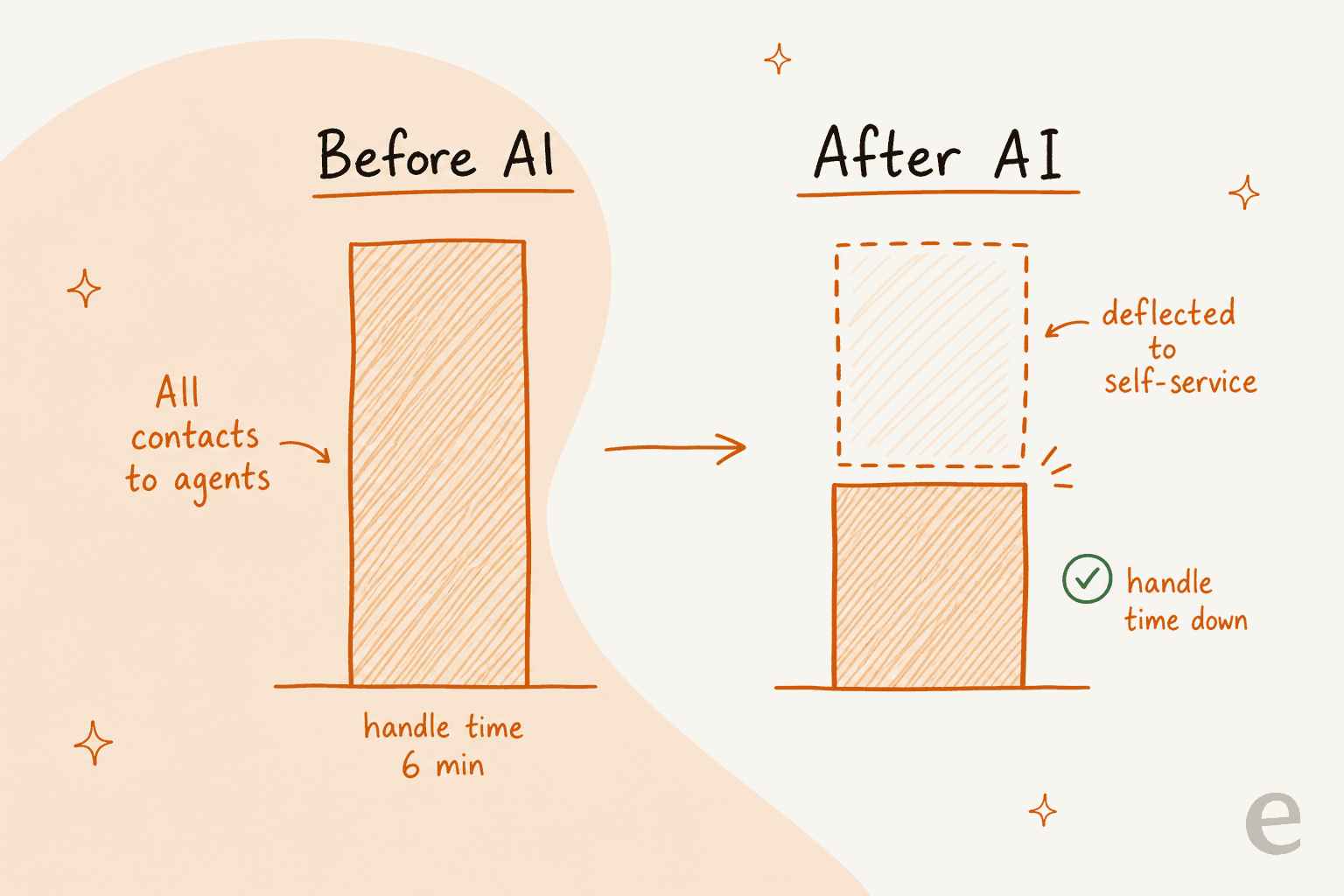
That shift is where the soft returns live, and they're real even though the formula understates them:
- Faster resolution on the contacts a human still handles. A payments company reported up to 80% time savings on finding answers and onboarding new agents once AI could surface the right doc instantly. That's handle-time saved on every contact, not just the deflected ones.
- 24/7 coverage without a night shift. The AI answers at 3am for the cost of an API call, not an overtime rate.
- Consistency and first-contact resolution. Fewer re-opens and escalations because the answer was right the first time.
- Better use of your people. When tier-1 volume clears, your agents spend their hours on the complex, high-value contacts, which is where they move CSAT.
If your deflection-only ROI already clears the bar, these are upside. If it doesn't, don't rescue the projection with hard-to-verify soft numbers, fix the automation rate instead.
The pricing-model trap that eats the savings
Two tools can quote the "same" price and land in wildly different places on your invoice, because of how they charge. This is the trap buyers notice too late.
| Pricing model | How it's billed | ROI risk |
|---|---|---|
| Per resolution | You pay each time the AI "resolves" a contact | Your bill rises as the AI gets better, and spikes on busy months |
| Per interaction / message | Every message or bot turn is metered | A single conversation racks up several charges; back-and-forth gets expensive |
| Per seat | Flat fee per human agent | Doesn't reflect automation at all; you pay for the humans you're trying to free up |
| Fixed monthly credit plan | One predictable monthly price sized to volume; 1 credit per ticket or chat | Predictable; you buy a volume batch, not clever definitions |
The nasty one is per interaction. It sounds granular and fair, but a single resolved contact can span several exchanges, and the meter runs on each one. I've watched this derail deals live. One very-high-volume operator scaling toward 150,000 tickets a month found the interaction-versus-ticket distinction so confusing mid-call that he projected a $30k monthly bill and nearly walked, at what worked out to roughly 20 cents a ticket, because the interaction math was impossible to pin down. Another buyer burned through 200 metered interactions in a single test day and immediately worried about what that meant at his expected ~9,000 a month.
The lesson for your ROI model: pin down the billable unit before you trust any projection. "Per resolution," "per interaction," and "per ticket" produce completely different annual costs on the same volume. For reference, eesel sells one fixed monthly price with no seat fees: 2,500 credits for $999/month, where 1 credit covers a ticket or chat. Used in full, that works out to about $0.40 per contact, which is the "AI cost per resolved contact" default in the calculator above. Whatever tool you pick, run its real pricing through the same formula, and see AI customer support cost savings and AI agent vs human agent cost for the fuller cost picture.
How to get an ROI number you can actually trust
Here's the part most guides skip. You don't have to guess your automation rate. The fastest way to a defensible ROI is to measure the one variable everything hinges on, before you commit budget.
- Pick the right first use case. Tier-1, high-volume, well-documented contact types. Not your hardest edge cases. This is where resolution rates are highest and ROI shows up fastest.
- Point the AI at your real knowledge. Help center, past contacts, macros, internal docs. The AI is only as good as what it's trained on; thin knowledge means low resolution means bad ROI.
- Simulate on historical contacts before go-live. This is the step that turns a guess into a number. Run the AI against thousands of your past contacts and see exactly what it would have resolved, and where it would have been wrong, without touching a live customer.
- Roll out gradually and watch the real rate. Start on a slice of volume, confirm the numbers hold, then expand.
That simulation step is the difference between a business case built on a vendor's slide and one built on your own data. I lean on it hard because I've watched confident-sounding bots quietly give wrong answers, and the only way to catch that before it costs you is to test on history first. It also answers the objection I hear most from serious buyers, that the AI should never bluff. As one CX lead running 7,000 tickets a month put it to us:
"The AI will never be able to answer 100% of the questions, but if it tries and just answers 'sorry I don't know this,' I cannot go and check all my 7,000 tickets to see if the AI actually made a good answer. I need an AI who is only handling the tickets that it's confident to handle and all the other ones, leave them alone."
That's exactly the behaviour a good simulation lets you verify up front: what the AI resolves, what it escalates, and how confident it is before a single customer sees it.

Try eesel for your ROI case
If you want the ROI number for your queue rather than a generic one, that's exactly what eesel is built to show you. You connect your helpdesk (Zendesk, Freshdesk, Gorgias, and more) plus your existing docs, and eesel simulates the AI against your historical contacts, so you see the real resolution rate and projected savings before going live. Pricing is a fixed monthly plan from $299 for 500 credits, with no seat fees (1 credit per ticket or chat), which keeps the ROI math predictable even when volume spikes, no per-interaction meter to reverse-engineer.
It works like a new support hire that plugs in during a 7-day trial and already knows your help center, and you get to check its homework on real contacts first. If you're weighing a bigger change, it also sits alongside the other call center automation and outsourcing alternatives worth pricing out. Free to try.
