Recharge pause subscription date: when does a paused order resume?

Rama Adi

Katelin Teen
Last edited November 6, 2026

In Recharge, a pause is a moved charge date, not a status. The pause ends on the date you set, and nothing flips it back on by itself. Recharge has no global pause setting, so your team reschedules every upcoming order (including ones in error or pending status), or the customer pauses in the Affinity portal. Most "paused but charged" tickets trace to four causes: a change made on charge day, an errored order that retried, an Order now click, or one charge left unmoved.
An AI agent like eesel can answer the "when does my pause end?" half of these tickets from the live subscription, and hand the pause itself to a person. With the eesel CLI, a coding agent can list the Recharge actions and test lookups on a real subscriber before anything goes live.
Why do pause tickets cause so many "I was still charged" replies?
A pause is the one subscription request where the customer is trusting your word about a date. "Pause it until March" sounds like a status. In Recharge it is a date edit, and a date edit is easy to do halfway.
I work on eesel's integrations, and when we wrote the Recharge actions for our agent, the first rule we taught it was "skip is not cancel". Our Recharge integration docs go a step further: the agent never cancels a subscription to approximate a skip, a pause or a date change. The same docs say it can't pause or change a charge date with its current actions, so for those it tells the customer what it can't do and hands the request to your team. I'd rather the agent say that than guess.
The reason the shortcut is tempting is that the real answer takes four checks, not one. Recharge's own pausing guide calls its date-edit steps "a workaround", because there is no global pause. And customers who manage their own pauses still write in. A G2 reviewer put the pattern plainly:
"I wish there were better features to make things easier for customers. We often receive complaints that they have a hard time navigating their accounts, and it can be frustrating for them to find what they need."

So the ticket shows up by email, chat or Instagram DM, and it's usually one of two shapes: "when does my pause end?" or "I paused and you charged me." Both are date questions. If you've read our post on skip tickets, this is its sibling, with a longer clock.
What does "pause" mean in Recharge?
It means moving the next charge date out, and that is all. Recharge's pause guide says that in the merchant portal you "update the charge date for the next order to pause the customer's subscription." The pausing guide adds that pausing keeps your Recharge account active, so your own plan keeps billing.
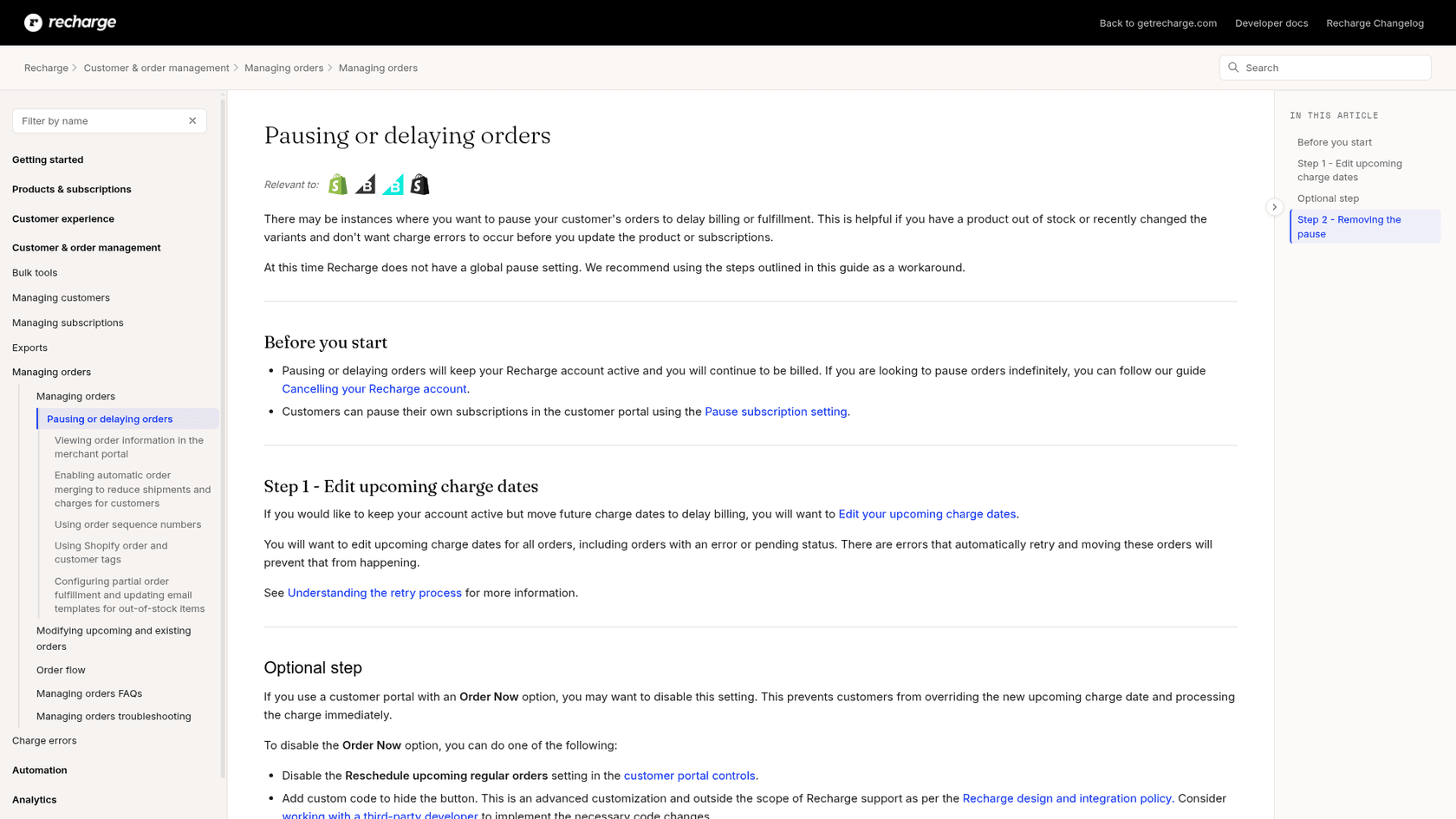
There are four routes people call a "pause", and each one resumes differently:
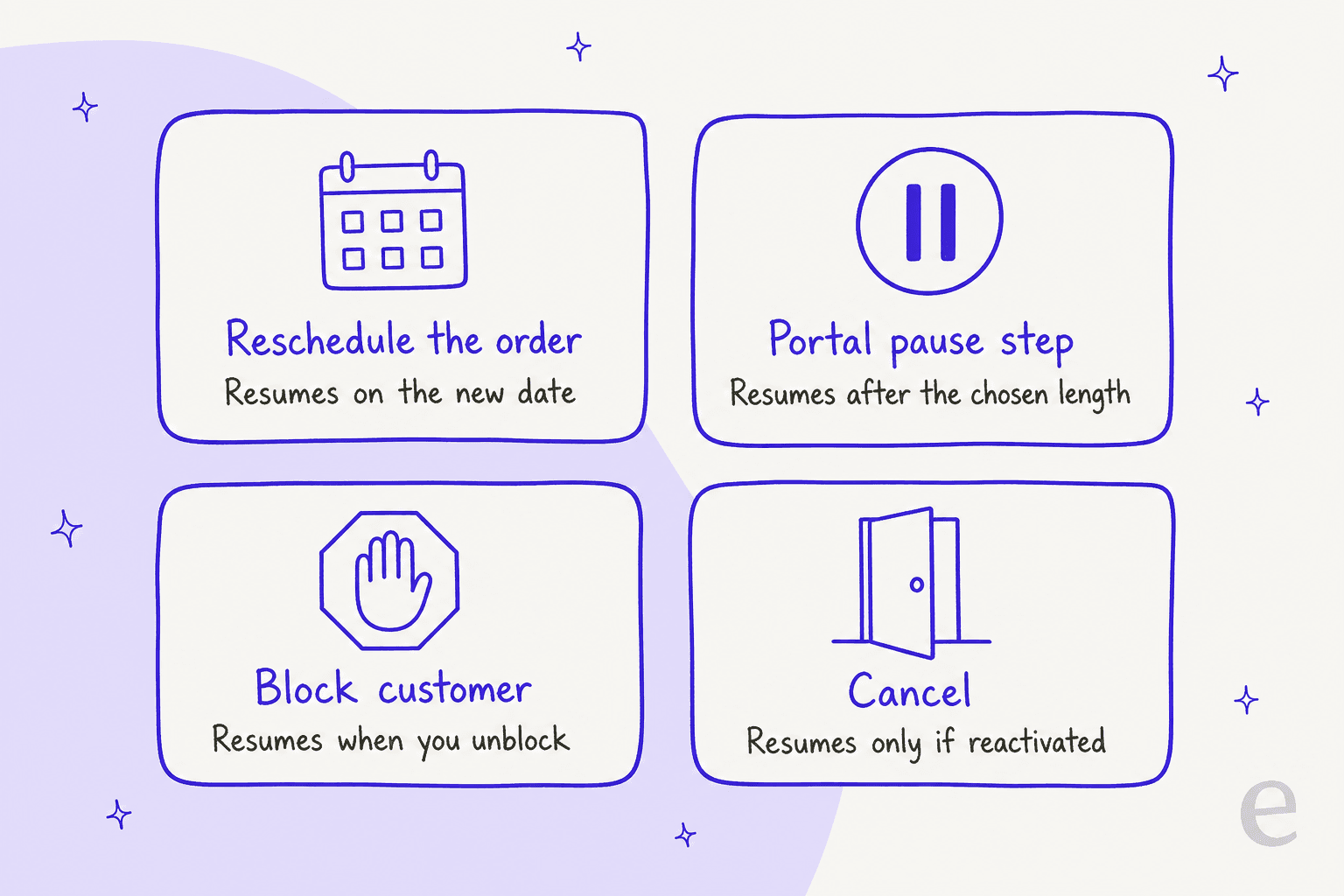
| Route | Who does it | What it does | What resumes it |
|---|---|---|---|
| Reschedule order | Your team, in the merchant portal | Moves the upcoming charge to a date you pick | The new date arriving |
| Portal pause step | The customer, on the Affinity portal | Offers Day, Week or Month lengths before cancelling | The shipment date the portal shows |
| Block customer | Your team | Stops recurring charges from processing, subscriptions stay active | Someone unblocking the customer |
| Cancel | Either | Ends the subscription | Reactivating it |
The block route deserves a flag. Recharge's guide says blocked customers still reach the customer portal, their subscriptions stay active, and charges "are not processed while the customer is blocked." There is no date attached. That is the one version where a paused customer can quietly stay paused for months, so I'd keep it for fraud or payment issues and use a date for everything else.
How do pause dates work?
A pause date is the date of the next charge, and everything after it follows the subscription's frequency. Recharge's charge date guide shows the merchant path: Customers, find the customer, hover the upcoming order, Reschedule order, choose the date, Confirm: reschedule.
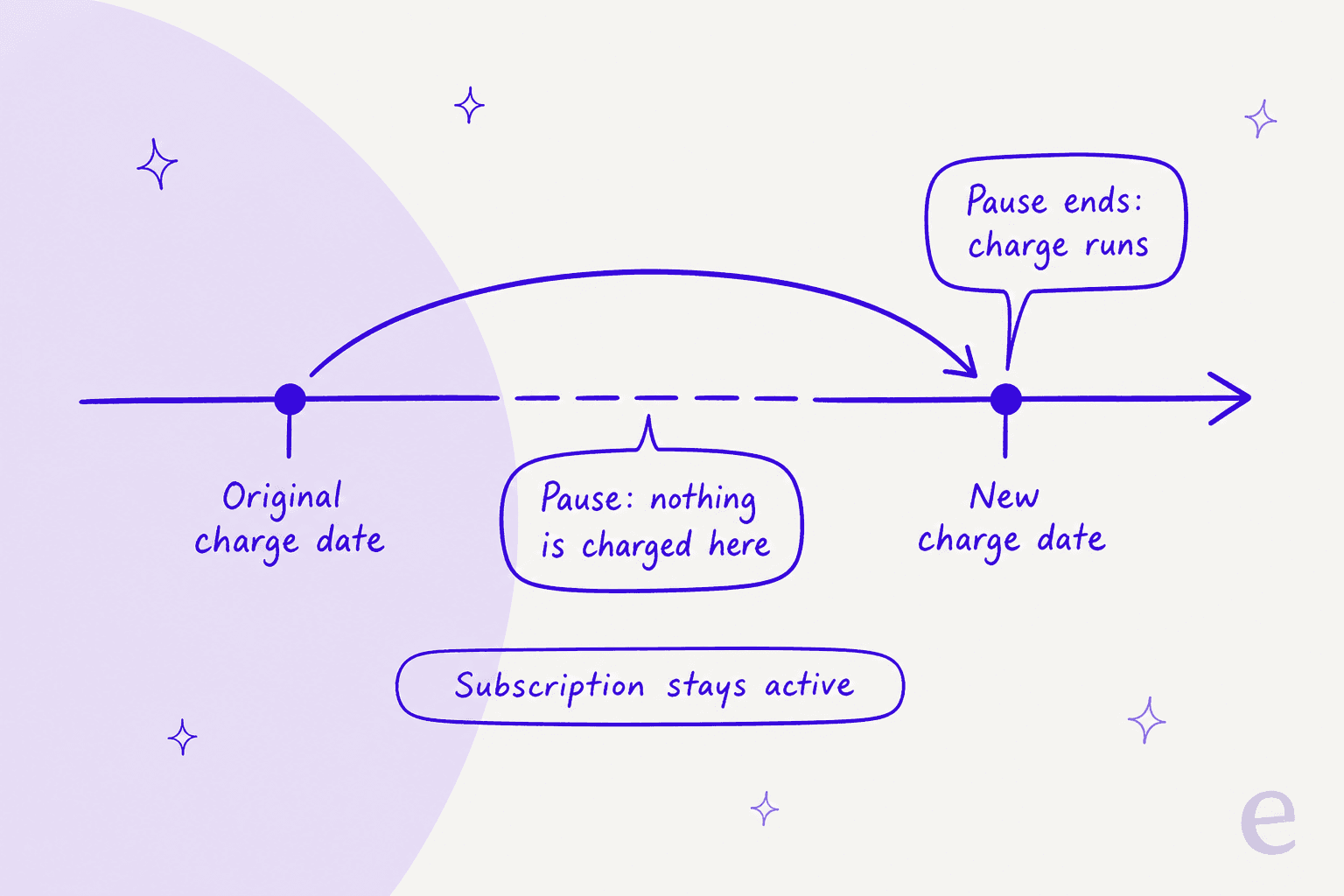
Three details decide whether the pause holds:
- Move every upcoming order. The pausing guide tells you to edit charge dates "for all orders, including orders with an error or pending status." Errored orders retry automatically, and moving them is what stops that. If a customer has several subscriptions on one address, the same guide set lets you bulk reschedule the subscriptions under that address in one go.
- The portal pause moves the date for the customer. On the Affinity portal, the pause feature appears when a customer clicks Cancel subscription. You choose the lengths in Day, Week or Month units. Recharge's own screenshot offers 1, 2 or 3 months and shows an upcoming January shipment being rescheduled to February.
- Unity portals don't get it. The same guide says the pause feature is not supported in the Unity theme. If a customer says "I can't find the pause option", check which portal you run first.
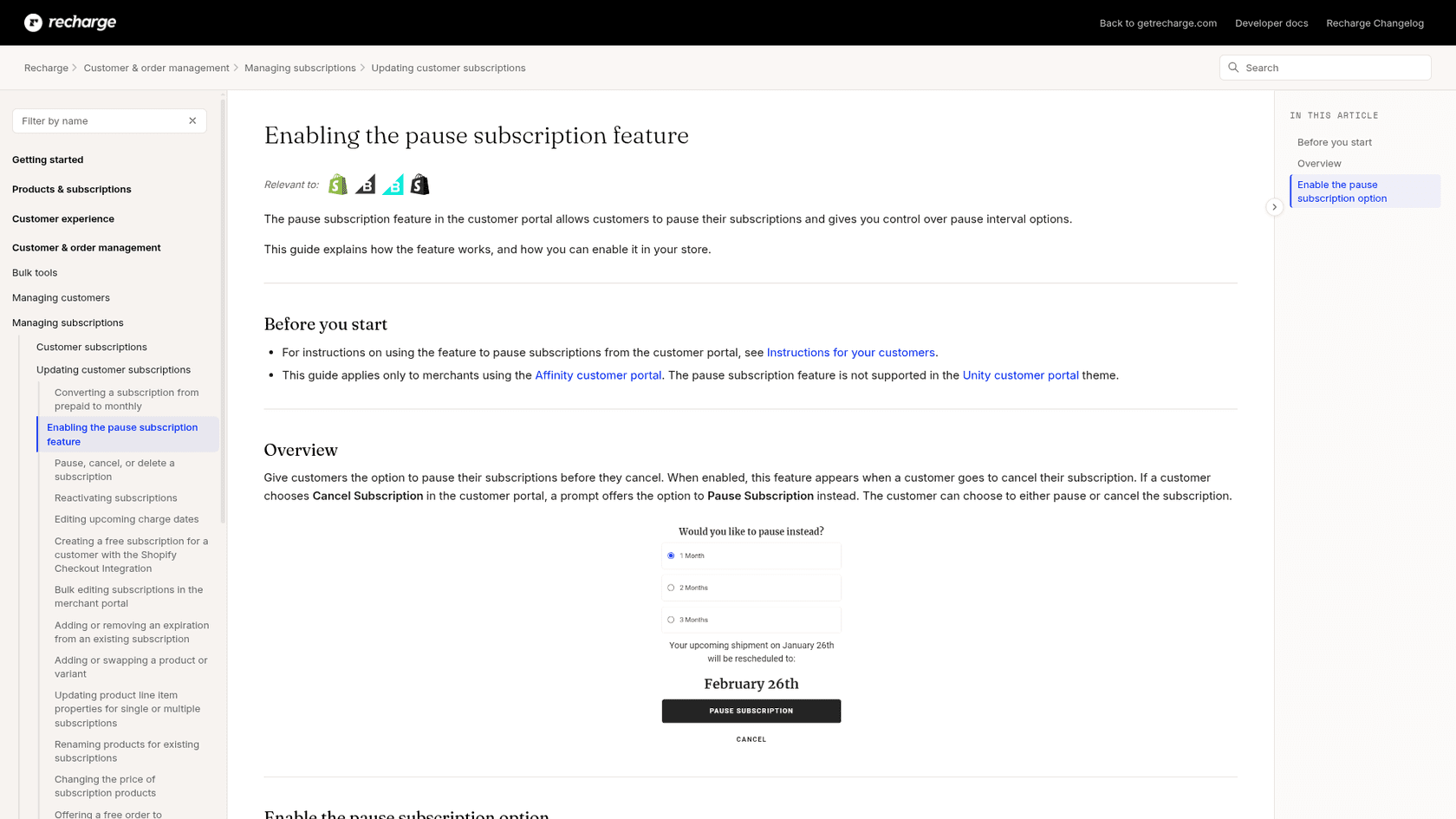
If you work with the API instead, the date is next_charge_scheduled_at, and Recharge's subscription reference has a set_next_charge_date call that takes a date. One line there saves a lot of grief: updating the frequency makes Recharge recalculate the next charge date, so the docs recommend changing frequency first and the date second. That's the same ordering rule as skips, in reverse.
When does a paused Recharge subscription resume?
It resumes on the rescheduled date, and not before. There's no resume button in the merchant portal and no separate resume field. The pausing guide says that once you're ready you can wait for the updated charge date, or edit the dates to an earlier one to process orders sooner.
A few things change that straightforward picture:
- Order now restarts the schedule. If the portal has an Order Now option, a customer can override the new date and process the charge immediately. Recharge's Affinity instructions add that after an order is processed, the next charge date is recalculated from the frequency: a monthly subscription ordered now on January 1 has its next order on February 1. To prevent it, turn off Reschedule upcoming regular orders in the portal controls.
- A reminder email goes out before the pause ends. Recharge's notifications guide says the upcoming charge email is sent daily between 6 PM and 11 PM UTC, and by default it goes 3 days before the charge date. That is useful: the customer who forgot their pause gets a warning with a link to manage the subscription. It also means "why did I get this email?" tickets arrive three days before the resume date.
- Prepaid plans use shipment dates. For prepaid subscriptions, the charge date guide points you to a separate guide for editing prepaid shipment dates. A pause there moves shipments, not charges.
- Cut-off windows can move things. If you use a cut-off window, a new order near the cut-off can skip the next upcoming order on its own, which looks like a pause nobody asked for.
The practical reply is a date, in words: "Your subscription restarts on March 14, and you'll get a reminder email on March 11." If you can't see the date, you can't promise it. That's the rule I'd teach any agent, human or AI.
Why was a paused customer still charged?
Because the pause is only as strong as the date edits behind it. Four causes cover almost every case I see.
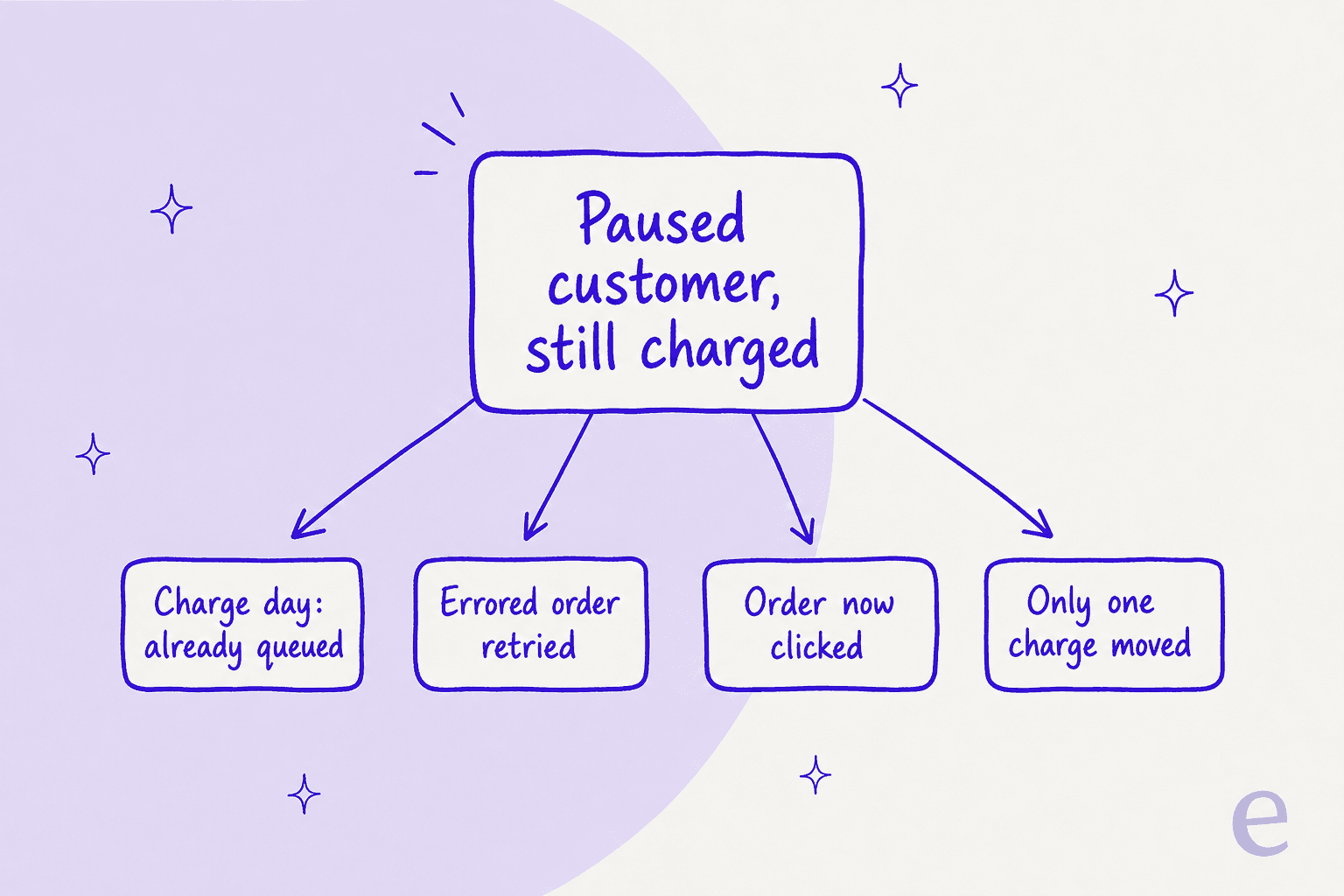
| Cause | What happened | What to check |
|---|---|---|
| Charge day | The change was made the day the charge was scheduled and it was already in the processing batch | Charge status and timestamp |
| Errored order | A failed order retried automatically because only the successful ones were moved | Orders in error or pending status |
| Order now | The customer used the portal to process the charge early | Order history for a manual order |
| One charge moved | A customer with several subscriptions or charges had only one rescheduled | Every upcoming charge on the address |
Charge day is the grey zone. Recharge's cancel guide says a change attempted on the day a charge is scheduled "may already have been queued in the processing batch and could go through." The honest reply on that day isn't "done." It's "I've asked for it, and if it processed first I'll refund it." Money questions like that belong in a refund approval matrix, not in an agent's judgment.
The errored-order cause is the one teams miss. Recharge tells you to move orders in error or pending status because they retry. A customer whose card failed last week looks paused to your team, and then retries and succeeds. It also explains why failed payment replies and pause replies need to share a lookup step.
If the customer is angry rather than confused, the right tone is the one in our guide to chargeback inquiries: confirm what the record shows, fix it, and say what happens next. A charge dispute opened over a pause is worth avoiding, and our payment disputes guide shows why.
Which pause answer fits this ticket?
When a ticket says "pause", this is the order I'd check things in. Click a type and read what to do and what to tell the customer.
Pause ticket checker
What did the customer ask for?
Do: reschedule every upcoming order for that customer, including any in error or pending status, to the date they named.
Check: is Order Now on in the portal? Do they have more than one subscription on the address?
Tell them: the exact restart date and that the reminder email arrives 3 days before.
Do: ask how long. Offer the portal pause step if you run Affinity, or pick a date together.
Check: prepaid plans move shipment dates, not charge dates.
Tell them: that "a while" becomes a specific date, so nothing restarts by surprise.
Do: open each charge. Look for charge day timing, a retried error, an Order now, or an unmoved charge.
Check: order status and timestamp before you reply.
Tell them: what happened in plain words, and refund through your approval flow if the pause was valid.
Do: read the next charge date on the subscription. Do not guess from the pause request.
Check: was the customer blocked instead? A block has no date.
Tell them: the date, and that clicking Order Now restarts the schedule from that day.
How do helpdesks and AI agents handle pause tickets?
Most teams work pauses from the helpdesk with Recharge open in a second tab. The cost of that setup is the lookup: someone has to find the subscriber, read the next charge date, and check the other charges.
Gorgias has a Recharge sidebar and AI Agent actions for subscriptions, covered in our Gorgias and Recharge post. I haven't verified whether any of those actions pause a subscription, so check the current Gorgias docs before you plan around it.
eesel is narrower on purpose. It looks the subscriber up by the email they wrote from, lists their subscriptions with each one's status and next charge date, and lists orders with their scheduled dates. It can skip one charge on a month-to-month plan, change quantity or frequency, cancel, and reactivate. It can't pause or change a charge date with these actions, so it replies with what it found and hands the pause to your team. It works from Zendesk, Gorgias (compared here) or a shared inbox, and sits beside Shopify for order data.
None of the customers below run Recharge, but they show what I mean by reading the record before answering a pause-shaped question.
Poseidon Animal Health, a supplement brand on Gorgias, names "can I pause my auto-ship" as a typical customer question. Its team drafts replies with eesel's browser extension inside Gorgias and checks auto-ship changes before anything is sent, across about 610 conversations in a month. MentorShow, a French online learning subscription on HubSpot, has its agent read subscription status and next renewal date from the member's record before drafting. And Question Beauty, a cosmetics brand on Gorgias, saw eesel look up 290 Shopify orders in one month before answering. The pattern is the same: read the date, then write.
What I'd look for before letting any agent touch pauses:
- It reads the next charge date first. An answer without the date is a future ticket.
- It doesn't confuse pause with cancel. Cancelling to approximate a pause costs you the subscriber.
- It tags pause tickets. A consistent ticket tag tells you later which reasons drive pauses.
- It hands money to a person. Charges that already ran go through your approval workflow.
- It's tested first. Run it on past pause tickets with simulation testing before go-live.
If pause requests tend to cluster before a cancel, our guides on cancellation and retention, churn prevention and detecting churn risk cover the signal.
How should you reply to a pause request?
Reply with the date, the reminder, and the one thing that could change it.
For a clean pause:
Hi Sam, done. I've paused your subscription until March 14, so you won't be charged or sent anything before then. You'll get a reminder email on March 11 with a link to change it. If you press Order Now in your account, it will restart from that day.
For "I was charged while paused":
Hi Sam, I'm sorry about that. I checked your account and one order that had retried after a card error wasn't moved with the rest. I've refunded it in full and moved everything to March 14. You'll see the refund in 3 to 5 business days.
For "when does my pause end?":
Hi Sam, your next charge is on March 14. You'll get a reminder email 3 days before. If you'd like it sooner, just reply and I'll set it.
Notice what all three do. They name a date, and they say what happened in order. Stored as macros, they're easy to reuse. If you're training an AI on past tickets, these are the replies to copy.
Some things that make pauses easier at the source:
- Turn on the Affinity pause step if you run that theme, so customers choose a length instead of writing in.
- Turn off Order Now during store-wide pauses, via the portal setting.
- Use the reminder email. The 3-day default is the best moment to offer a skip or change.
- Keep shipping edits separate. Address changes for an order that already exists are Shopify edits, covered in our address macro guide.
- Mention delays honestly. Delays after a resume are a shipping delay or order tracking question, not a pause one.
For stores deciding who handles all of this, our Shopify support roundup and subscription business tools are the next stops. Human handoff is worth reading before you give any agent write access.
Does the Recharge plan change what you can do?
I found no plan restriction in the pause guides, so these features aren't described as gated. Here is Recharge's current pricing:
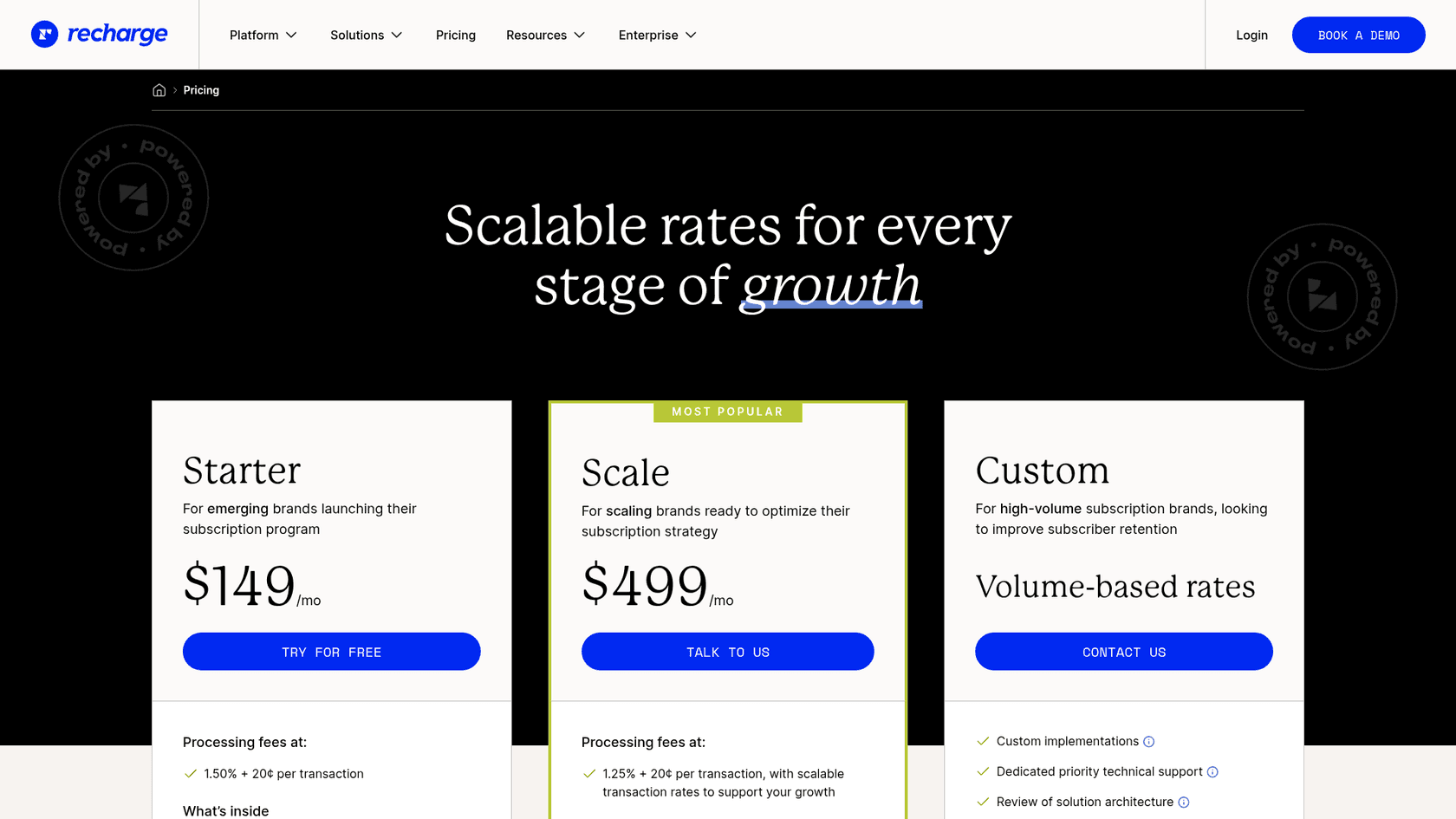
| Plan | Monthly fee | Processing fees |
|---|---|---|
| Starter | $149/mo | 1.50% + 20¢ per transaction |
| Scale | $499/mo | 1.25% + 20¢ per transaction, with scalable rates |
| Custom | Volume-based rates | Custom |
Pausing a customer doesn't pause that fee, since Recharge's guide says your account stays active and continues to bill. Check the pricing page for what each plan includes before you decide.
Try eesel for Recharge pause tickets
If "when does my pause end?" fills your queue, eesel can answer it from the live subscription inside the helpdesk you already use. It's built for Shopify support: it reads the subscriber's next charge date and queued orders in Recharge, replies with the real date, and hands pauses, date changes and anything with money attached to your team.
Connect Recharge and Shopify, point the agent at a real subscriber, and ask it for their next charge date before it touches a live ticket. Try eesel free.