Recharge skip order support: how to handle "skip my next order" tickets

Kira

Katelin Teen
Last edited November 5, 2026

Recharge skip order support is a timing problem dressed up as a button. A skip only works before the order is created: before that, skip the charge; after it, cancel the unshipped Shopify order; on charge day itself, the charge may already be queued. The trap most teams miss is that changing the next charge date, frequency or address quietly removes a future skip, so make every other edit first and skip last.
An AI agent like eesel can take these tickets end to end: it reads the live subscription first and hands pauses to a person. With the eesel CLI, a coding agent can list the Recharge actions and test a skip on a real subscriber before go-live.
Why do "skip my next order" tickets go wrong?
"Skip my next order" is the friendliest ticket a subscription brand gets. The customer isn't leaving. They have three bags of coffee in the cupboard, or they're travelling, or money is tight this month. Recharge's own skip guide names surplus product and budgeting as the two usual reasons.
The ticket still goes wrong a lot, for three reasons that have nothing to do with the customer:
- Timing. The skip lands after the order already exists, so the box ships anyway.
- Undo by accident. Someone changes the frequency or address after skipping, and the skip disappears.
- Wrong verb. "Skip" in the customer's words can mean skip one cycle, push it back a week, pause for two months, or stop a prepaid box. Each is a different action in Recharge.
I build AI agents for helpdesks at eesel, and when we wrote the Recharge actions for our agent, the first rule we taught it was "skip is not cancel". Our Recharge integration docs say it plainly: the agent never cancels a subscription to approximate a skip, a pause or a date change. That one rule exists because the shortcut is tempting, and it costs you a subscriber who only wanted a month off.
Self-serve doesn't make the ticket go away either. Recharge's customer portal lets subscribers skip on their own if you switch it on, and merchants on G2 credit it with cutting volume. They also say this:
"I wish there were better features to make things easier for customers. We often receive complaints that they have a hard time navigating their accounts, and it can be frustrating for them to find what they need."

So the skip still arrives by email, chat or Instagram DM, usually the day before the charge, when the upcoming charge email lands. Recharge sends that reminder 3 days before the charge date by default, between 6 PM and 11 PM UTC. That puts your skip tickets on a clock, which is the whole game.
What actually happens when an order is skipped in Recharge?
A skip in Recharge is a change to the charge, not to the subscription, which is why it behaves differently from the billing tickets around it. The subscription stays active, the skipped cycle isn't billed or shipped, and future charge dates move with it.
There are two ways in, and they behave slightly differently:
| Where the skip happens | What you click | What Recharge does |
|---|---|---|
| Merchant portal | Customer > subscription > three-dot menu > Reschedule next order | Moves the next order to the date you pick, and future charges follow |
| Customer portal | The Skip button | Creates the next order on the normal frequency: a 30-day plan skipping November 8 next ships December 8 |
| API | POST /charges/{id}/skip with the item ids | Marks the charge skipped for the chosen items |
| API, future date | POST /addresses/{id}/charges/skip with a date and subscription ids | Creates the charge with SKIPPED status if it doesn't exist yet |
The merchant-portal path is worth a second look. There is no button called "skip" for your team. The skip guide has agents reschedule the next order instead, so an agent who picks the wrong date has effectively written a pause or a delay. When you train new hires or write macros, spell out the date to pick: the current next charge date plus one interval.
The API is more literal. Recharge's charges reference has a skip endpoint, an unskip endpoint, and a skip-future-charge endpoint on the address that takes a date and a list of subscription ids. That address-level shape matters, and I'll come back to it, because several subscriptions on one address share a charge.
Recharge also lets you offer a gift instead of a skip in the portal, so the customer sends that cycle's box to a friend. The portal settings note that prepaid items and bundles can't be gifted. It's a nice retention move for a ticket that would otherwise be a skip, and it fits in the same reply.
When is it too late to skip a Recharge order?
It's too late once the order is created. Before that point, skipping the charge is clean. After it, the charge has already run and there's an order in Shopify, so the fix moves to the order.
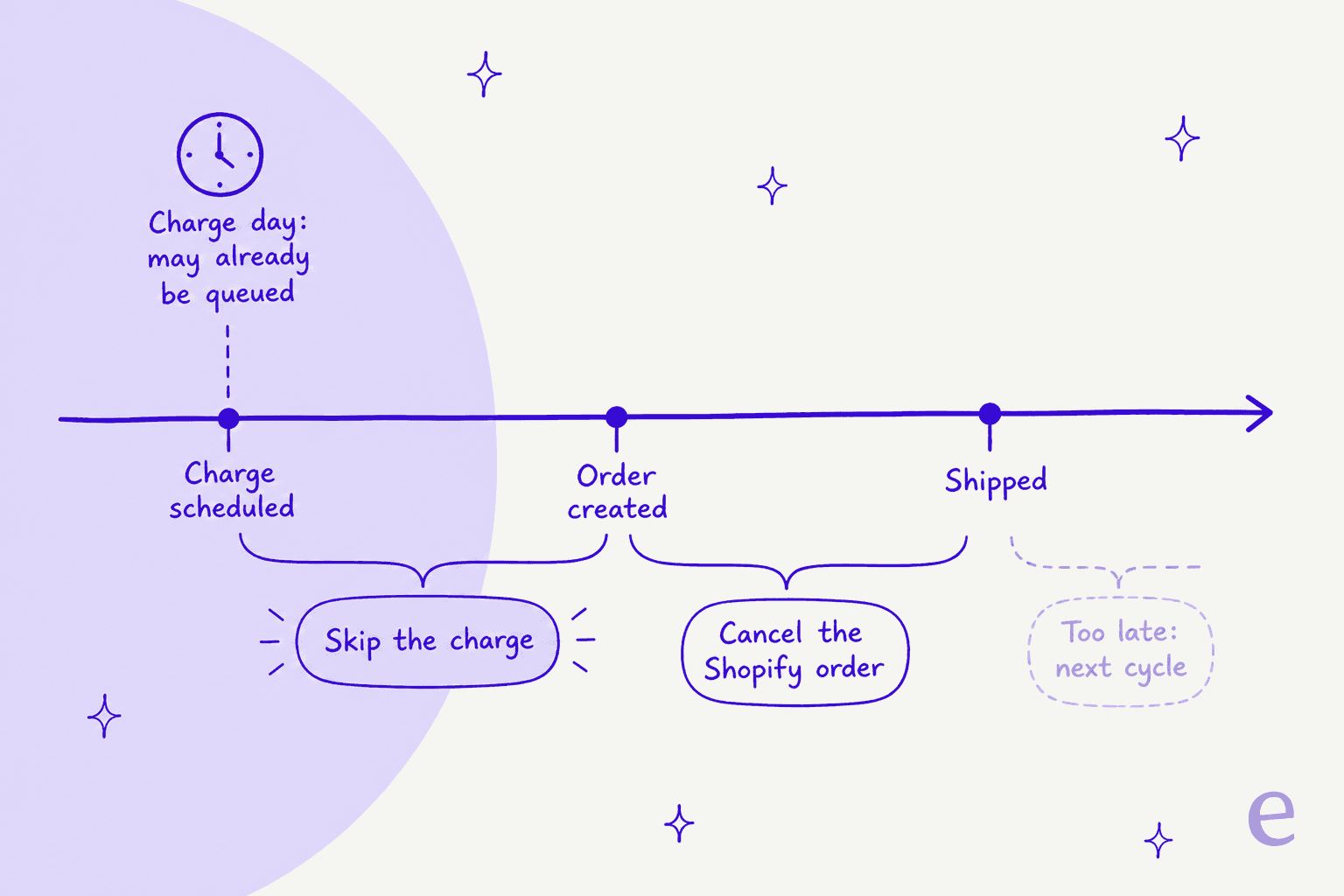
Gorgias's Recharge action docs put it in one line: a shipment can only be skipped before the order is created, and for an order that's created but not shipped, the right move is to cancel the order in Shopify. That's a helpdesk vendor's doc, not Recharge's, but it matches how Recharge charges work.
Charge day is the grey zone. Recharge's cancel guide warns that a change attempted on the day a charge is scheduled "may already have been queued in the processing batch and could go through." The same applies to a same-day skip. So the honest reply on charge day isn't "done, skipped". It's "I've asked Recharge to skip it; if it has already processed, I'll cancel the order and refund it," followed by a check of the charge status.
Cut-off windows add one more twist for monthly box brands. If you charge on a specific day with a cut-off window, any first order placed at or after 00:00 Eastern Time on the cut-off day skips the next upcoming order on its own. Recharge's example: charge day the 15th, cut-off the 20th, a sign-up on April 28 gets its next charge on June 15, not May 15. That produces the reverse ticket, "why wasn't I charged this month?", and the answer is the cut-off rule, not a bug.
| When the request arrives | What to do | What to tell the customer |
|---|---|---|
| Days before the charge | Skip the charge | The next box ships one interval later, with the new date |
| On charge day | Try the skip, then check the charge status | It may already be processing; if so, you'll cancel the order and refund |
| Charge ran, order not shipped | Cancel the Shopify order and refund | The next cycle is unchanged unless they also want that skipped |
| Order already shipped | No skip possible for this cycle | Offer a return under your policy, and skip the next one if they want |
That last row is where a refund approval matrix earns its keep: once money has moved, the decision is about policy, not the subscription.
Which edits remove a skip in Recharge?
Three edits quietly undo a future skip. Recharge's skip guide lists them: changing the subscription's next charge date, changing its order frequency, or moving it to a different address.
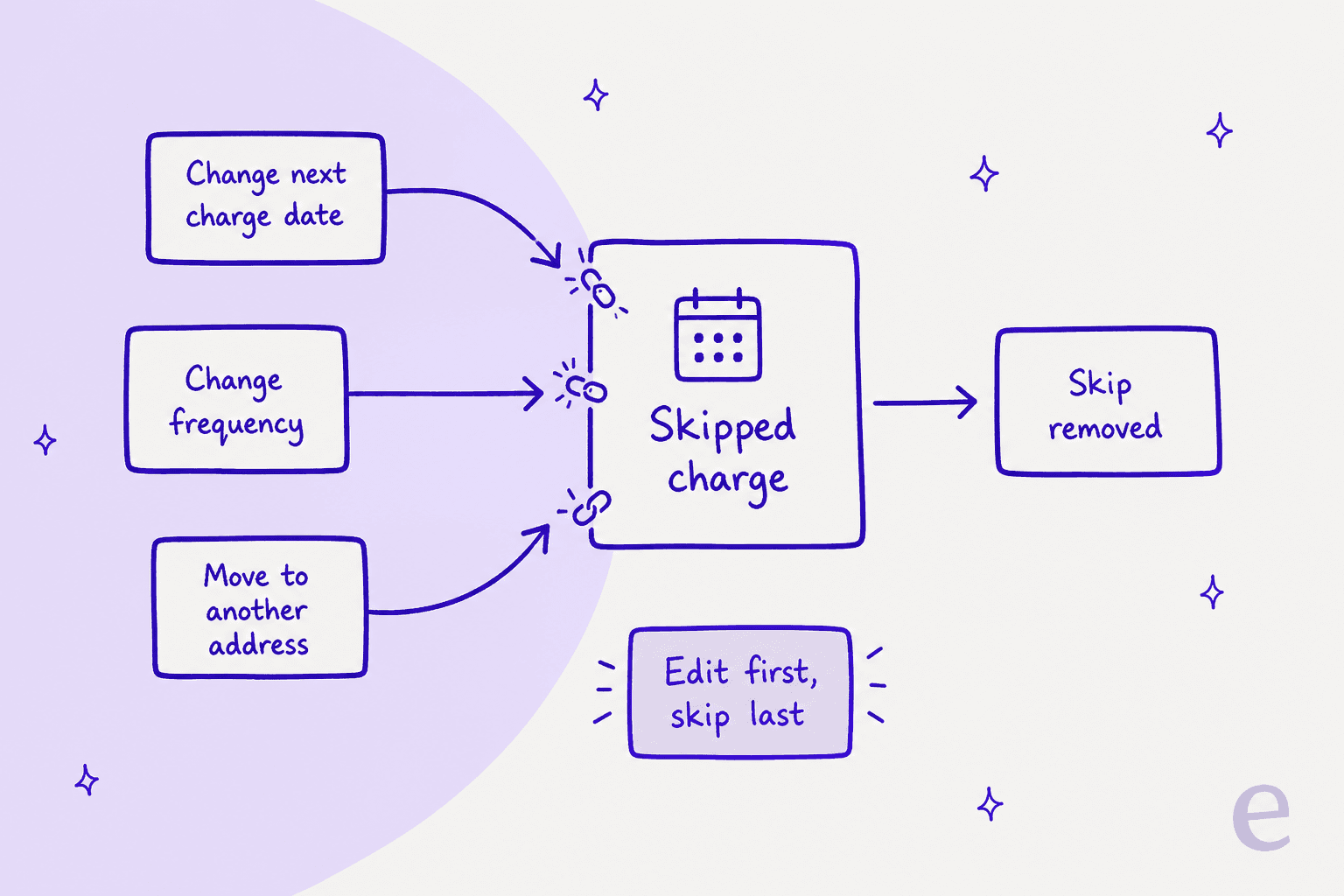
This is the gotcha that turns a friendly ticket into an angry one. Picture the common combined request: "Can you skip my next box, and switch me to every six weeks from now on?" If you skip first and change the frequency second, the frequency change regenerates the upcoming charges and the skip is gone. The customer gets charged for the box they asked to skip, and they reply with a screenshot of your "all done" email.
Recharge's API reference says the same thing on the subscription object: updating the interval or the charge day carries the warning that the update "will remove skips and manually changed charges." And bulk frequency updates remove skips across every affected subscription at once, per the skip guide. If your ops team runs a bulk schedule change, expect a wave of "I skipped this!" tickets a few days later.
The fix is a sequencing rule, and it's simple enough to put in a macro or an AI agent's instructions:
- Make the frequency, date or address change first.
- Skip the charge last.
- Re-read the subscription and confirm the next charge shows as skipped before you reply.
An address change for an order that already exists is a Shopify edit, not a Recharge one, and our address macro guide covers that side.
Recharge does leave a trail when a skip is removed. It emits a subscription/removed_from_skipped_charge webhook and adds a "skip removed" event to the customer's timeline with the original skip date. If you have a developer, that webhook is the cheapest insurance you can buy: catch it, and re-skip or flag the ticket.
How do you sort what "skip" really means?
Customers don't use Recharge's vocabulary. "Skip" in a ticket maps to at least four different actions, and the right reply depends on which one they meant.
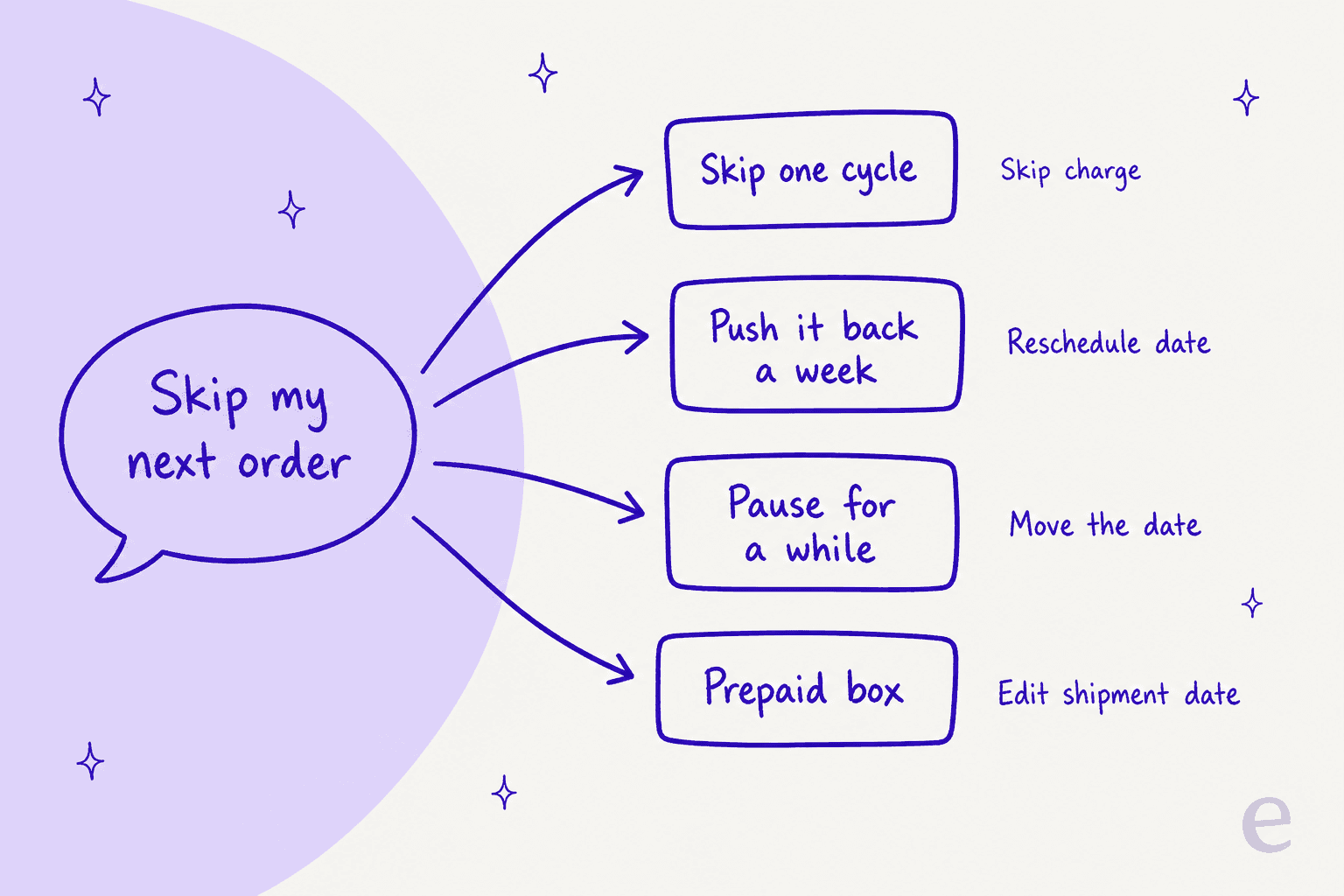
| What the customer says | What they mean | The Recharge action |
|---|---|---|
| "Skip next month" | One cycle off | Skip the charge |
| "Can it come a week later?" | Same plan, later date | Reschedule the next charge date |
| "Pause it until March" | Several cycles off | Move the charge date out; Recharge has no global pause |
| "Skip my next box" on a prepaid plan | Shift a paid-for shipment | Edit the prepaid shipment date |
Prepaid deserves its own line. Recharge's API marks prepaid items with is_skippable: false, and the skip guide has you edit the prepaid shipment date instead, sometimes alongside the next order date so two boxes don't land in the same month. The customer already paid for the shipment, so "skip" really means "move".
Pauses carry their own trap. If you pause by moving the date and the customer later hits Order Now in the portal, that button can override the moved date unless you switch off "Reschedule upcoming regular orders", per Recharge's pausing guide. Worth one sentence in your reply: "if you order early, your schedule restarts from that order."
Then there's the customer with two subscriptions. A coffee subscriber with a bean plan and a filter-paper plan on one address has one combined charge. "Skip my next order" might mean both, or only the beans. Recharge's charge skip takes specific item ids, and the address-level skip takes a list of subscription ids, so the tool can do either. The ticket just has to say which. When it doesn't, ask. A one-line question beats skipping the wrong item.
Which skip action fits this ticket?
When the request is ambiguous, this is the order I'd check things in. Click through it with a real ticket open.
Skip ticket checker
Answer each question for the ticket in front of you.
1. Is the item on a prepaid plan?
No: go to question 2.
2. Has the order for this cycle been created?
No: go to question 3.
3. Is today the charge day?
No: go to question 4.
4. Did they also ask to change the date, frequency or address?
No: go to question 5.
5. Do they have more than one subscription on the address?
How do helpdesks and AI agents handle Recharge skips?
Most support teams don't work skips inside Recharge, the same way they don't answer order lookups inside Shopify. They work them from the helpdesk, with Recharge in a sidebar or wired to an AI agent. The tools differ mainly in what they do when the ticket is ambiguous.
Gorgias has the most built out. Its sidebar has a Skip button on the charge, and Gorgias AI Agent's Recharge actions include "Skip next subscription shipment" and "Change charge date". The documented limit is that most of those actions run only when the shopper has a single active subscription; with more than one, AI Agent hands the ticket to your team through a normal handoff. That's a cautious default, and for the two-subscription coffee customer above, it's the right one. If you're comparing options there, our Gorgias AI Agent actions guide and Gorgias and Recharge post go deeper.

eesel takes a narrower set of actions on purpose. Our Recharge integration looks a subscriber up by the email they wrote from, lists their subscriptions and queued orders with the ids it would act on, and runs Skip charge on a month-to-month plan. It can change quantity or frequency, cancel, reactivate, and cancel a single queued prepaid order. It can't pause or change a charge date with these actions, so for those it says what it can't do and hands the ticket to your team. And a skip can wait for your approval in the chat and on the Activity page before it runs.
It works from whichever helpdesk you run, whether that's Gorgias (compared here), Zendesk or a shared inbox, because Recharge has no trigger of its own. The agent does its Recharge work inside the conversations it already handles. If you're still choosing a helpdesk for a subscription store, our ecommerce helpdesk roundup and subscription business picks cover that side.
What I'd look for in any of these, before letting it skip unattended:
- It tags the ticket. A consistent skip tag lets you count skips by reason later.
- It reads before it writes. The next charge date, the plan type and the number of subscriptions decide the action. An agent that skips without reading them will skip prepaid boxes and the wrong items.
- It knows the edit order. If the ticket bundles a frequency change and a skip, the skip goes last.
- It says what it did, with a date. "Your next box is now on December 8" is a reply. "Done!" is a future ticket.
- It hands money to a person. A charge-day skip that already processed turns into a refund, and refunds and chargeback questions belong in your approval workflow.
Question Beauty, a direct-to-consumer cosmetics brand on Gorgias, shows what "reads before it writes" looks like at volume: in one month eesel handled 990 tickets and looked up 290 Shopify orders before answering delivery or order questions. MentorShow, a French online learning subscription on HubSpot, has its agent check subscription status and next renewal date on the member's record before drafting each reply, across 1,200 conversations and tickets in a month. Neither runs Recharge, but the habit is the same one a skip ticket needs.
How should you reply to a skip request?
A good skip reply answers the question the customer will ask next. That's almost always "so when is my next one?"
For a clean skip, days before the charge:
Hi Sam, done. I've skipped your November box, so you won't be charged or sent anything this month. Your next box is on December 8, same as usual after that. If you'd like to skip December too, just reply here.
For charge day:
Hi Sam, I've asked our system to skip today's box. Charges run in a batch, so if yours had already gone through before I got to it, I'll cancel the order and refund you in full. I'll confirm either way within the hour.
For a combined request:
Hi Sam, I've moved you to every six weeks and skipped your next box. Your next charge is now January 19. I changed the schedule first and the skip second, because changing it the other way round can undo the skip.
The third reply is a little nerdy, and that's fine. It tells the customer you checked, and it tells your teammates reading the ticket later what order things happened in. If you're training an AI on past tickets and testing it first, replies like these are what you want it to copy.
A few things that make skips easier at the source:
- Turn on portal skip. It's in Customer portal settings under "Allow customers to". G2 reviewers tie it directly to fewer tickets.
- Put the skip link in the reminder. The upcoming charge email carries a magic link to the portal. Say "skip this one" right next to it.
- Watch the Actions Report. Recharge's Analytics Suite tracks skip metrics, so you can see whether a skip spike follows a price change or a product swap.
- Offer gifting as an alternative. For non-prepaid, non-bundle items, sending a box to a friend keeps the cycle and feels like a perk.
If skips spike in busy seasons or bunch up right before cancels, our cancellation and retention guide covers that pattern, and churn prevention for support covers what to do with the signal.
What does Recharge cost, and does skip support need a higher plan?
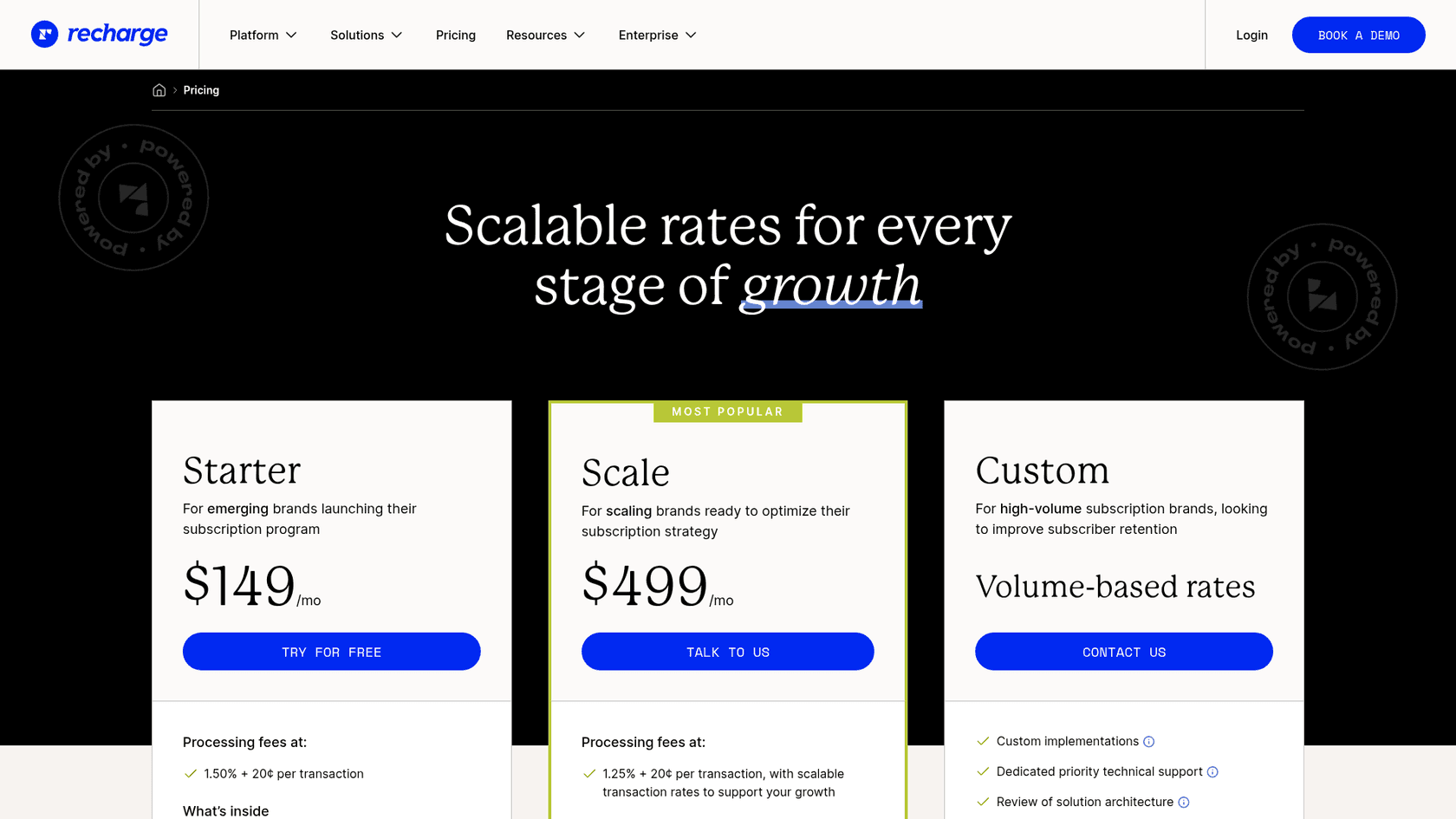
You don't need the top plan to handle skips well. The no-code customer portal, where customers skip on their own, is on Starter; the skip-specific add-on is SMS self-serve on Scale. Here's Recharge's current pricing:
| Plan | Monthly fee | Processing fees | What it adds for skip tickets |
|---|---|---|---|
| Starter | $149/mo | 1.50% + 20¢ per transaction | No-code customer portal, Smart Cancellation Prevention, Failed Payment Recovery |
| Scale | $499/mo | 1.25% + 20¢ per transaction, with scalable rates | ConciergeSMS: customers skip, delay or ship sooner by text, at +$0.03 per message segment in the US and Canada, +$0.06 international |
| Custom | Volume-based rates | Custom | Dedicated priority technical support |
ConciergeSMS is the only skip-specific line item. For a brand whose reminders already go out by text, letting customers reply "SKIP" can take a chunk of these tickets off the queue before they ever reach a person. The per-segment fee is small, but it's per message, so a back-and-forth conversation costs more than a one-word reply.
Try eesel for Recharge skip tickets
If your queue fills with "skip my next order" every month the day the reminder goes out, eesel can take those tickets inside the helpdesk you already use. It's built for Shopify support: it reads the subscriber's live Recharge subscription, skips the right cycle on a month-to-month plan, says the new date in the reply, and hands pauses, date changes and anything with money attached to your team. You can make skips wait for approval until you trust it.
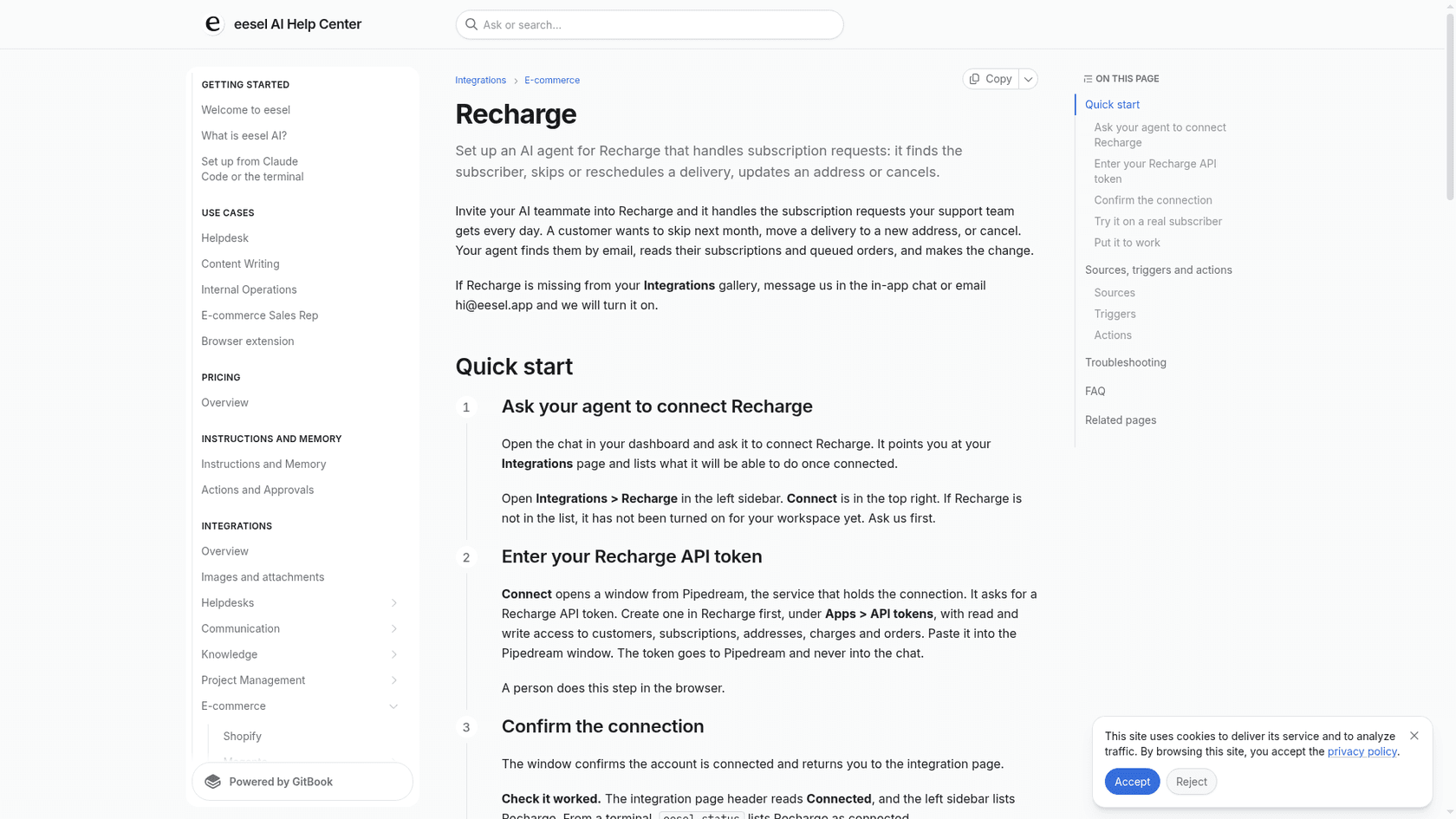
Connect Recharge and Shopify, point the agent at a real subscriber, and ask it to skip their next charge before it ever touches a live ticket. Try eesel free.