AI for Help Scout and Shopify: answer order tickets with live data

Rama Adi

Katelin Teen
Last edited September 30, 2026
The tickets a Shopify store gets in Help Scout
I work on eesel's integrations, including the Shopify actions, so I spend a lot of time looking at what ecommerce support queues are made of. The pattern barely changes from store to store. A multi-brand ecommerce operator handling 500+ tickets a day described its volume as mostly refund requests, unsubscribes and order tracking. A DTC supplements brand running about 7,000 tickets a month came to eesel wanting to auto-resolve at least half its email, mostly "where is my order" (WISMO), subscription changes and basic product questions.
Here is what each of those tickets needs before anyone, human or AI, can answer it:
| Ticket | What the reply needs | Needs a change in Shopify? |
|---|---|---|
| Where is my order? | Order status, fulfillment status, tracking number and carrier | No |
| I want to return this | Return policy, the order and its line items, return eligibility | Yes, to start the return |
| Please change my address | Whether the order has shipped, the new address | Yes, before fulfillment |
| Where is my refund? | Refund status on the order, payment status | Sometimes, to issue it |
| Cancel my order | Fulfillment status | Yes, before fulfillment |
| Is this in stock in size M? | Variant stock and price | No |
None of those rows can be answered from a help center article alone. Five depend on a specific order and the sixth on live stock, which is why a knowledge-only AI stalls on ecommerce queues. eesel saw this in a real-traffic trial with an ecommerce brand on Shopify: about 20% of the drafts agents rewrote needed data the AI hadn't been connected to yet, like order and logistics systems. Only about 5% were the AI being factually wrong.
The same trial also showed what happens when the data is there. Drafts for returns and refunds were useful 93.8% of the time, and refund-status drafts were useful every time.
"LLMs will be good replacements for a portion of customer service queries (eg where's my order, help me fix this common computer issue etc), and will probably be a bad replacement for other queries (eg complaint handling)"

What Help Scout's Shopify app does
Help Scout's Shopify integration is a solid piece of work, and it's free. (It's one of the stronger apps in the Help Scout integrations directory.) Help Scout's own Shopify apps roundup says the Free plan lets you "integrate with Shopify at no cost". You install the app, pick which inboxes should show it, and the sidebar fills in next to every conversation.
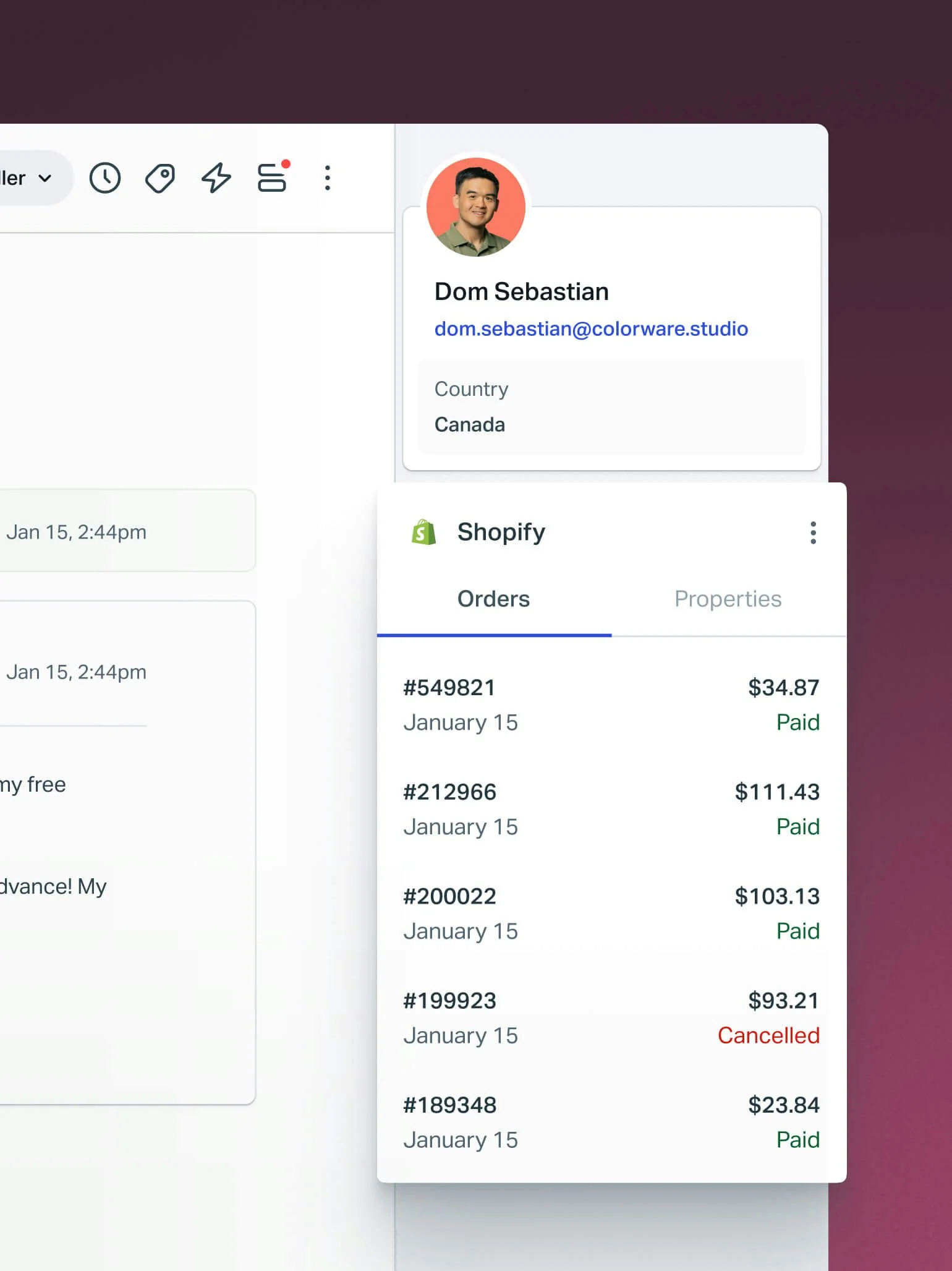
According to the Help Scout docs, the app imports the customer's email and physical address, shows lifetime value, annual value and average order value, and gives full order details including products and discounts. Clicking an order shows fulfillment status, the tracking number (which links straight to the carrier), and the receipt.
The actions are where it earns its keep. From the sidebar, your team can:
- Refund an order, partially or in full, "up to 100% of product value", per Help Scout's integration blog post
- Cancel an unfulfilled order, with options to void, refund, restock, add a note and notify the customer
- Edit or duplicate an order, added in an October 2024 update
- Edit customer details and restock cancelled orders
Merchants like it. One store that had been on Help Scout for years wrote this after the 2024 rebuild:
"The new Shopify integration has been a game-changer for us! We now have in-app views of customer orders, which includes a list of products, fulfillment info, and tracking links. It eliminates the need to head to Shopify, & saves us a lot of time!"

It has limits worth knowing before you plan around it. The app has a 3.7 rating from 19 reviews on the Shopify App Store, and the requests are specific rather than angry:
"Having the Shopify order accessible directly through Help Scout is great except we aren't able to leave comments/notes in the Shopify order via that side bar."
Another reviewer asked for customer and order tags in the sidebar, and for a way to link products in replies. Help Scout's docs also don't mention multi-store support for Shopify, and new features sometimes need you to re-authorize the app.
The bigger point is who the app is for. Every one of those buttons is clicked by a person. A teammate still opens the conversation, reads the order, copies the tracking link into a reply, and hits send. For a store with 40 WISMO emails a day, that's 40 small copy-paste jobs, which is the work AI for Help Scout is supposed to remove. If you want to see how Help Scout's app compares with the helpdesks built around Shopify, my Gorgias vs Help Scout breakdown goes through it.
What Help Scout AI does and doesn't do with orders
Help Scout has shipped four AI features in the last two years, which I cover in depth in my Help Scout AI overview. Here is what each feature is, from Help Scout's own pages:
| Feature | What it does | Learns from | Plan and price |
|---|---|---|---|
| AI Answers | Answers visitors in the Beacon widget | Docs sites, public URLs, files, typed improvements | $0.75 per resolution on paid plans |
| AI Drafts | Drafts email replies for an agent to review | Past replies and Docs, optionally AI Answers sources | Plus ($45/user) and Pro ($75/user) |
| AI Assist | Rewrites, shortens and translates your text | Your text | Standard and up |
| AI Summarize | Bullet summaries of a thread | The thread | Plus and Pro |
Prices come from Help Scout pricing. The knowledge sources are listed in the AI Answers docs. AI Drafts details are in its own docs.
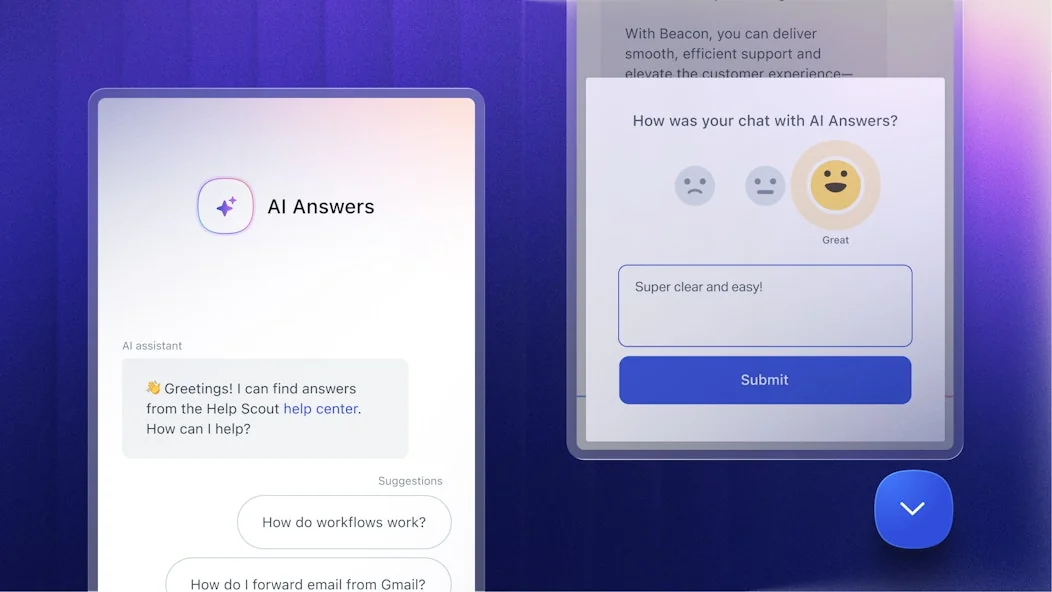
AI Answers is good at what it's built for. Help Scout says companies average a 73.19% resolution rate with it, and you only pay when the customer doesn't escalate or ask for more help. For "what is your returns policy?" or "do you ship to Canada?", it's a fine answer.
But look at the "learns from" column. The AI Agents docs list websites, PDFs, Word and Excel files, Google Docs and Help Scout Docs sites as knowledge. Shopify isn't on the list, and no Help Scout page describes AI Answers or AI Drafts calling an outside system. So:
- AI Answers can't look up an order. It can explain how tracking works. It can't tell Sarah that order #1042 left the warehouse yesterday with UPS.
- AI Drafts works from patterns, not records. The docs' own damaged-order example leans on the fact that "you'll have the same process for damaged orders in most cases". Useful, but the draft doesn't know what was in this order.
- Neither takes actions. Help Scout's own AI features post gives refund requests as an example of a topic to block with a guardrail and send to your team.
- AI Answers lives in Beacon. The setup docs only place it in the Beacon widget and mobile SDKs. On email, the AI is AI Drafts, which a person reviews and sends.
There's also Help Scout's MCP server, which lets tools like Claude or ChatGPT read Help Scout data. It's read-only, with write actions "on the roadmap". I covered that route in Claude for Help Scout. The ChatGPT version works the same way.
None of this is a knock on Help Scout. Its AI is designed as a knowledge layer, and for a SaaS support team that's most of the job. For a Shopify store, the order is the job, and today that data only reaches your human agents.
How an AI teammate connects Help Scout and Shopify
The setup that closes the gap is an AI that connects to both tools at once. Help Scout brings the conversation, Shopify brings the order, and the AI writes the reply with both in front of it.
This is how eesel works. eesel is an AI teammate you hire for a job; for this job it's the helpdesk teammate, and it works in your existing Help Scout mailbox instead of asking you to switch helpdesks. It learns from your past Help Scout conversations and your Docs site first, so it knows how your team answers before it touches anything. I wrote more about that model in AI for your existing helpdesk.

On the Help Scout side, per the eesel Help Scout docs, it runs when a customer opens a new conversation or replies to one. It can create a draft reply, send a reply, add an internal note, and update tags, status and assignment.
On the Shopify side, the eesel Shopify docs list these actions once the store is fully connected:
| Group | Actions |
|---|---|
| Orders (read) | Get Order by ID, Get Order History (by email), Search Orders, Get Order Fulfillment (tracking, carrier, status) |
| Customers (read) | Get Customer by Email |
| Products (read) | Search Products, Get Products, Get Product Variants (size, color, price, stock), product and variant metafields |
| Order changes (write) | Create Return, Refund Order, Cancel Order, Update Shipping Address, Update Customer Address, Create Draft Order |
Every action can be set to Auto, Needs approval or Disabled, per the actions and approvals docs. The docs' advice matches mine: start with replies and anything irreversible on Needs approval, and keep refunds, cancellations and anything that costs money behind an approval. When an approval comes up, you see the exact action, such as the refund amount, and approve or deny it.
Here's how the four big ticket types play out.
Where is my order
A customer emails "any update on my order?" The new conversation fires the automation. eesel reads the email, finds the order number if there is one, and calls Get Order by ID. If there's no number, it uses Get Order History with the customer's email. Then Get Order Fulfillment returns the tracking number, carrier and shipment status.
The reply goes into Help Scout as a draft (or sends, if you've allowed that), with the real status and tracking link, written in your team's tone because it learned from your past replies. This is the ticket I'd automate first. It's high volume, read-only, and easy to check. My guide to AI order tracking goes deeper on the WISMO side.
Returns and refunds
A return request needs the policy and the order. eesel checks the order date and line items against your returns policy, which it learns from the refund and shipping policies it syncs from Shopify and from your Docs site. If the item qualifies, it can call Create Return. If you've told it to, it can also call Refund Order.
I'd set both of those to Needs approval at first. The agent does the reading, prepares the action and drafts the reply; a teammate clicks approve. That turns a five-minute ticket into a ten-second review. For the policy design behind this, see AI refund automation. My post on whether AI can handle refunds covers where to draw the line.
Address changes and cancellations
Both depend on one fact: has the order shipped? eesel checks fulfillment first. If the order is unfulfilled, Update Shipping Address changes the delivery address and Cancel Order cancels it. If it has shipped, Shopify doesn't allow either change, and the docs say the agent will tell the customer so instead of pretending.
There's a useful detail here. Update Shipping Address changes this order; Update Customer Address changes the address saved on their account for next time. A customer who has moved usually needs both, and the agent can do both in one pass.
Product and stock questions
"Do you have the blue one in medium?" is the easiest win. Get Product Variants returns size, color, price and stock live, so the answer is right today, not right as of the last help center update. If you also want this on your storefront, my Shopify AI chatbot guide covers the chat side.
How to set it up
The whole setup is two connections and one automation. If you've read my guide on connecting Shopify order data to a chatbot, this is the helpdesk version. The Help Scout setup docs put the median time from connecting to a live conversation at about 30 minutes.
- Connect Help Scout. In eesel, open Integrations, pick Help Scout, and authorize it. The connection acts as the Help Scout user who authorized it, so use an account whose access matches what you want the AI to see.
- Point it at your Docs site. Enter your Help Scout Docs URL on the Help Center source. Past conversations sync on their own.
- Connect Shopify fully. Ask the agent to connect Shopify and choose the full connection, not Quick start. Quick start only reads your public storefront and can't see orders. A store owner or staff member with app permissions approves it in Shopify.
- Set the action permissions. Put the read actions on Auto. Put Send reply, Refund Order, Cancel Order and Create Return on Needs approval.
- Create the automation. Tell the agent in plain words, for example: "On every new Help Scout conversation about an order, look up the order in Shopify and create a draft reply. Skip anything that isn't about an order."

Start in draft mode for a week. Read what it writes, correct it in chat, and let it save those corrections as standing instructions. Once the WISMO drafts go out unchanged, move Send reply to Auto for that automation. My Help Scout auto-reply post covers how to make that switch safely. If you want the general version of this playbook, my guide to adding AI to Help Scout walks through it without the Shopify pieces.
What it costs
You keep your Help Scout plan either way. The question is what the AI layer costs on top.
| Help Scout AI Answers | Help Scout AI Drafts | eesel | |
|---|---|---|---|
| Price | $0.75 per resolution | Included in Plus ($45/user/mo) and Pro ($75/user/mo) | Teammate from $299/mo for 500 credits |
| What you pay for | A Beacon conversation the AI resolves with no escalation | Seats | One credit per ticket or chat, however long |
| Reads Shopify orders | No | No | Yes |
| Takes Shopify actions | No | No | Yes, with approvals |
| Channel | Beacon | Email drafts | Help Scout email conversations, plus a storefront chat bubble |
| Free trial | 3 months for new accounts | 15-day plan trial | 100 free credits |
Help Scout's figures come from its pricing page, and the resolution rules from its AI resolutions docs. eesel's figures come from the eesel pricing page.
A worked example: a store with 1,000 order tickets a month. On eesel that's the 1,000-credit Teammate plan at $499 a month, which works out to about 50 cents a ticket whether the AI resolves it or drafts it for review. eesel's larger batches go up to 5,000 credits for $1,899. Help Scout's AI Answers would be cheaper per resolution for simple policy questions in Beacon, but it can't take the order-specific tickets at any price, so those still land on your team. The two can also run side by side: AI Answers in Beacon for policy questions, eesel in the mailbox for orders. My Help Scout pricing post has the full plan breakdown.
Where this setup isn't the right fit
I'd rather you know the edges now than find them in week two.
- Live Beacon chat. eesel doesn't work on live Beacon chats. Beacon messages sent in email mode arrive as normal conversations and work fine. For storefront chat, eesel has its own chat bubble with the same Shopify lookups.
- Shopify withholds some customer details. For eesel's Shopify app, Shopify doesn't return a customer's name, email, phone or street address. The agent can still find orders from an email and change an address, but can't read the saved address back to you.
- Older connections cap order search at 60 days. Stores connected before eesel asked for Shopify's read-all-orders permission keep that cap until someone reconnects. Looking an order up by its number works either way.
- Drafts show as your user. Help Scout has no way to label a draft as AI-written, so it appears under the authorizing user with a Draft label.
- If most of your work is Shopify actions, look at the helpdesk too. If your team spends its day editing orders and you're outgrowing Help Scout, an ecommerce-first helpdesk might suit you better. My list of Help Scout alternatives for ecommerce and the Gorgias for Shopify review cover that path. Most Help Scout teams I talk to would rather keep the inbox they like and add the order data to the AI.
For the wider field, my best AI for Help Scout roundup compares the Help Scout options. The Shopify side is covered in best AI for Shopify support.
Try eesel for Help Scout and Shopify
If your team already clicks through the Shopify sidebar to answer the same order questions all day, eesel does that reading for them. It joins your Help Scout mailbox, learns from your past replies and Docs, looks up each order live in Shopify, and drafts the answer. Returns, refunds and address changes can run with your approval, so nothing irreversible happens without a person saying yes.

Connect Help Scout first. Then add your Shopify store, start on drafts, and see how it handles a week of your real WISMO tickets. The first 100 tickets are free. Try eesel.
Frequently Asked Questions
Does Help Scout integrate with Shopify?
Can Help Scout AI look up Shopify orders?
What is the best AI for Help Scout and Shopify?
Can AI answer "where is my order" emails in Help Scout?
Can AI process Shopify refunds from Help Scout?
How much does AI for Help Scout and Shopify cost?
Do I need to leave Help Scout to add AI for Shopify tickets?
Does eesel work with Help Scout live chat?


Article by
Rama Adi
Rama is a software engineer at eesel AI with two years of experience writing about B2B SaaS, AI tools, and customer support technology. Based in Bali, Indonesia, he brings a developer's perspective to product comparisons — cutting through marketing copy to what the integrations and APIs actually do.