Hermes Agent for Shopify customer support: what works in 2026

Rama Adi

Katelin Teen
Last edited October 10, 2026
Why I looked at Hermes on Shopify
I build integrations at eesel, and Shopify is the one that changed under my feet this year. eesel's Shopify connection used to ask merchants to create a custom app and paste a token. That path is gone, because Shopify stopped letting anyone create new admin-built custom apps, so I moved it to approval on Shopify's install screen. Anyone wiring Hermes to a store today hits the same wall, and that's most of what this post is about.
Hermes Agent is the open-source, self-hosted agent from Nous Research, at 251,791 GitHub stars under an MIT license, with the latest release v2026.9.24. I already covered the general support question in Hermes Agent for customer support and the helpdesk version in a Freshdesk post. Shopify deserves its own post because the hard part isn't the helpdesk. It's getting the order.

eesel has spent years putting AI on live support queues, and ecommerce queues all look alike: "where is my order?", "is this in stock?", "how do I return this?". The lesson that keeps repeating is that a confident answer without live order data is worse than no answer. One Shopify merchant on Reddit put it bluntly:
"One wrong price shown to a buyer kills the tool permanently, and it takes exactly one incident. I've watched it happen."

So the question for Hermes isn't "can it chat?". It's "can it see the order, and who stops it when it shouldn't act?"
What Hermes can actually see in a Shopify store
Shopify now has four official ways for an AI agent to reach a store, and they answer very different questions. I'd read this table before writing a line of config:
| Shopify surface | What it answers | Auth | Useful for support? |
|---|---|---|---|
Storefront MCP (/api/mcp) | Return policy, shipping, FAQs | None | Yes, for policy questions |
UCP catalog and cart (/api/ucp/mcp) | Products, stock, carts | Agent profile per request | Product questions only |
| Customer Accounts MCP | A signed-in shopper's own orders | OAuth with PKCE, shopper logs in | Only inside your own logged-in app |
| GraphQL Admin API | Any order, customer, refund | Your own app's access token | Yes, the one that matters |
The first row changed recently. Shopify's Storefront MCP page now opens with a red banner: "The catalog and cart tools on https://{shop}/api/mcp were removed." Those moved to the Universal Commerce Protocol, Shopify's newer agentic commerce standard. The policy tool, search_shop_policies_and_faqs, stayed put, and "No authentication is required" (Policy and FAQs tool).
The newer UCP order tool won't help either. Shopify's Order MCP says "You can only fetch orders that were placed through your agent." That's built for agent checkout, not for the order a shopper placed on your website last Tuesday.
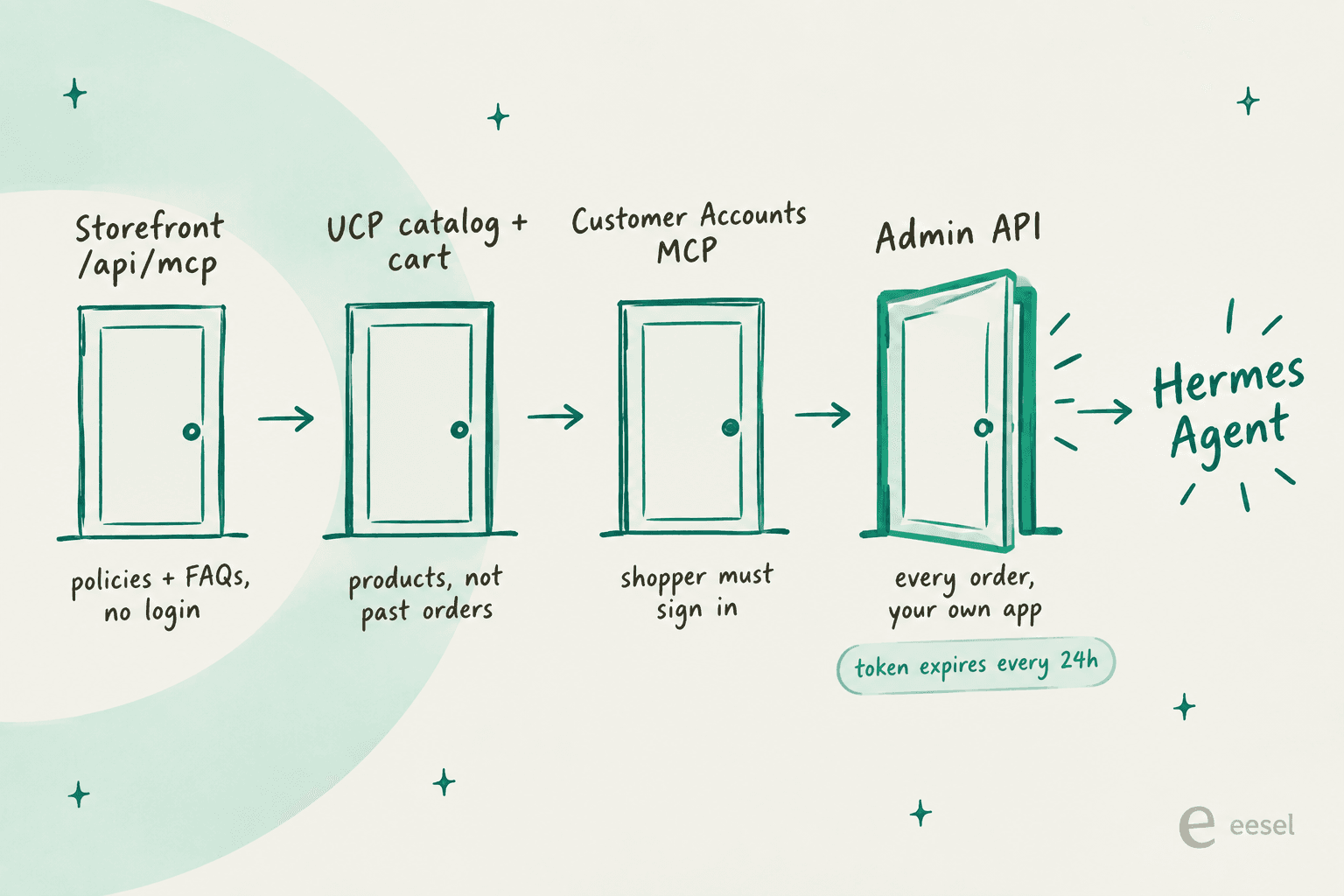
That leaves the Shopify Admin API as the door support work needs. Its orders query filters by email "to provide customer support" and by order number with name:1001 (orders query). Everything below assumes that route.
What Hermes ships for Shopify today
Hermes has three Shopify-shaped things, and none of them is a support integration:
- No catalog MCP entry. Hermes' curated catalog of 65 MCP servers has no Shopify entry. Stripe, PayPal and Klaviyo are there; Shopify isn't.
- An optional
shopifyskill. Nous lists a community skill that will "Query Shopify Admin/Storefront GraphQL APIs via curl" (skill page). It reads a staticSHOPIFY_ACCESS_TOKENfrom.env. - Shopify's AI Toolkit. Shopify's own AI Toolkit lists "Hermes (plugin only)" as a supported tool. It's for developers: docs, schema validation and store-management tasks you run yourself, the same toolkit behind my Claude for Shopify walkthrough.
On skills.sh, which Hermes can search, the top Shopify skills come from Shopify's own GitHub org, led by shopify-admin at 17,013 installs (skills.sh search). None of the top 100 results is a customer support skill. So you're assembling this yourself, which is roughly what people in the Hermes community describe doing. My MCP for customer support guide covers what a good support tool surface looks like.
How to set it up safely
This is the order I'd build it in. The goal is the shape that works: Hermes reads Shopify, writes a draft into your helpdesk, and a person sends it.
1. Create a Dev Dashboard app with read-only scopes
The old route, creating a custom app in your Shopify admin and copying a token, is closed. Shopify's docs say "You can no longer create new admin-created custom apps" and point new builds to the Dev Dashboard (admin-created custom apps). The Hermes skill notes the same change.
In the Dev Dashboard, pick only what a support lookup needs:
read_orders,read_customers,read_products,read_fulfillments.- Skip
write_orders. It's the scope refundCreate needs, and a bot that can't refund can't refund by mistake. Real refund automation needs approvals, not hope. - Know the 60-day edge.
read_orderscovers "orders created within the last 60 days", and older ones needread_all_orders, which "you must request access to" (access scopes). The shopper asking about a March order will get a confident "I can't find that" unless you plan for it.
Customer names, emails, phones and addresses are protected customer data, and fields your app isn't approved for come back as null (protected customer data). Test with a real order before you assume the email filter returns what you expect.
2. Plan for the 24-hour token
New apps on your own store get their token through the client credentials grant. Shopify is precise about it: expires_in is "Always 86399 (24 hours)", there's no refresh token, and it "only works when the app and the store belong to the same Shopify organization" (client credentials grant). An agency wiring Hermes to a client's store can't use it at all.
Hermes doesn't mint that token for you. Its MCP config takes static headers resolved from ${VAR} in .env, or auth: oauth, which is the interactive authorization-code flow with PKCE (MCP config reference). There's no client-credentials option, and the Shopify skill reads a static token too.
The fix I'd use is boring and works: a cron job that requests a fresh token every 20 hours and rewrites SHOPIFY_ACCESS_TOKEN in ~/.hermes/.env. Hermes' own scheduler can run it. Just treat it as production plumbing, because the morning it silently fails is the morning every order lookup returns 401.
3. Give Hermes a narrow tool, not raw GraphQL
The community skill hands Hermes curl and the whole GraphQL Admin API. Its own safety note says mutations "create products, charge refunds, cancel orders" and asks the agent to "confirm with the user" first (skill page). That's a prompt, not a lock.
I'd rather wrap two or three read-only queries in a small MCP server of your own, get_order_by_number, get_orders_by_email, get_fulfillment, and list only those:
mcp_servers:
  shop:
    url: "http://localhost:8787/mcp"
    headers:
      Authorization: "Bearer ${SHOP_MCP_KEY}"
    tools:
      include:
        - get_order_by_number
        - get_orders_by_email
        - get_fulfillment
That's my own assembly from the Hermes docs, not an official example. Once include is set, Hermes registers only those tools (Hermes MCP docs). A refund tool that doesn't exist can't be talked into running. Your wrapper holds the Shopify token, so Hermes never sees it.
4. Draft into your helpdesk, not to the shopper
Most Shopify stores answer support in a helpdesk like Gorgias, Zendesk or Freshdesk, each with its own Shopify sidebar (here's the Gorgias Shopify setup). Hermes has no helpdesk MCP entries either, so you'd connect one the way I showed in Hermes Agent for Freshdesk and give Hermes a single write tool: an internal note. On Zendesk, that's the same Shopify integration your agents already use, plus a private comment.
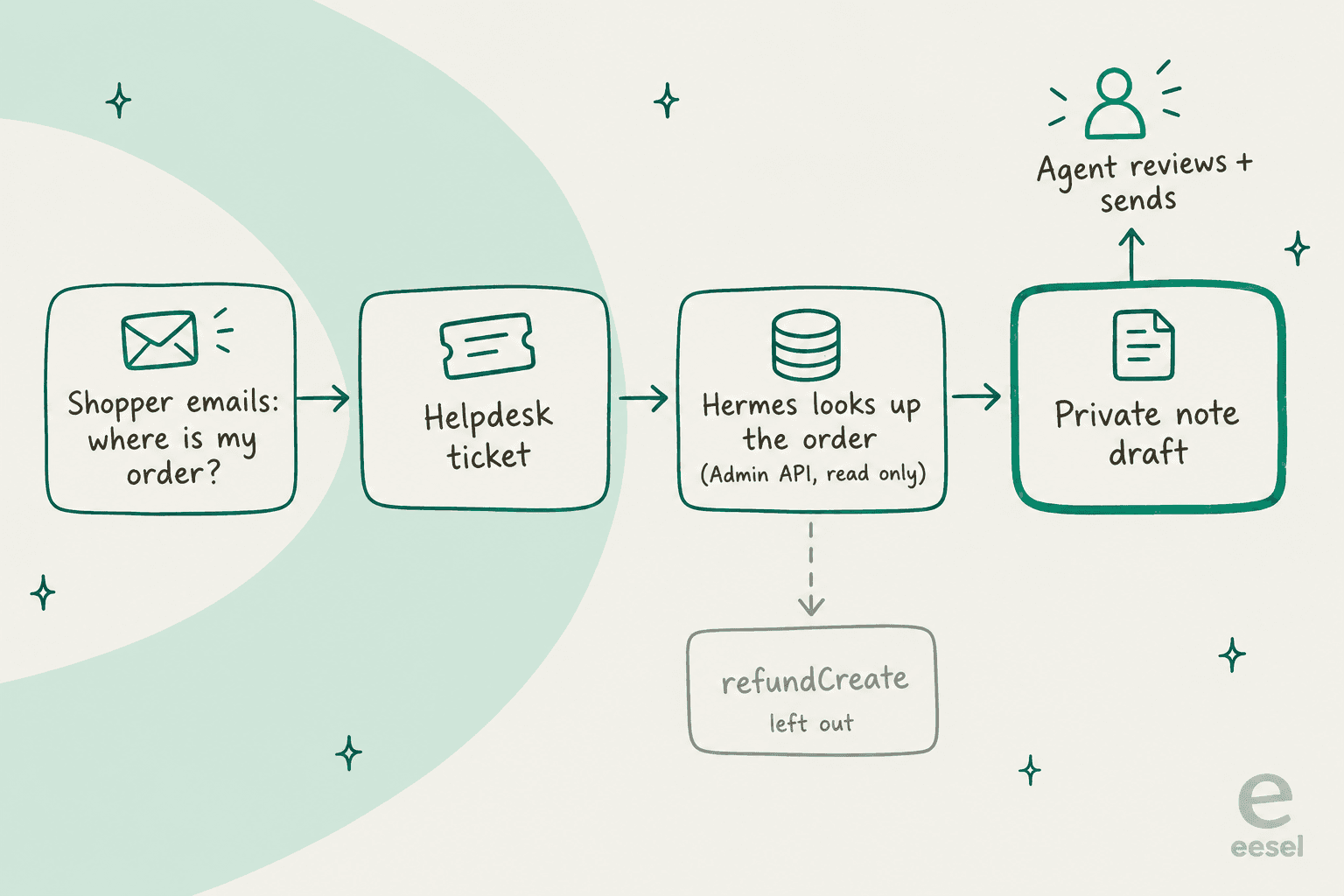
The Hermes community lands on the same shape. One user running Hermes against their inbox described the failure it guards against:
"Been training AI to write in my voice and draft replies to emails on my behalf, but my success rate (drafted emails worth using) is approx 50/50. It's learned my voice, it's learned about the business, but 50% of the time it just has to add something wrong enough into the email where I don't or can't use it."
eesel's own numbers say the same thing in a different accent. A German online jewelry retailer on Zendesk and Shopify ran eesel on real traffic for a trial: 93% triage accuracy and 88% of drafts pointing the right way, but agents sent only 12% of drafts as-is, and about 7% contained a factual error. That's why every eesel rollout now gets simulated against historical tickets before go-live, and why drafts come before sends. It's the agent assist pattern, and it's the right first step for Hermes too.
5. Pick a trigger, and mind the webhook header
Hermes needs to know when to look at something. You have three options:
- On request. An agent pastes an order number into Slack and asks Hermes. Simplest, and a human is in the loop the whole time.
- Cron poll. Hermes checks the helpdesk for new tickets every few minutes. No public endpoint needed.
- Shopify webhook. An
orders/fulfilledorrefunds/createevent pings Hermes directly.
The third one has a catch. Shopify signs webhooks with "a base64-encoded HMAC signature in the X-Shopify-Hmac-SHA256 header" (verify webhook deliveries). Hermes accepts GitHub, GitLab, Standard Webhooks and its own generic signatures, and "If a secret is configured but no recognized signature header is present, the request is rejected" (Hermes webhooks). Shopify's header isn't on the list.
You'd need a small relay, a worker or an n8n flow, that checks Shopify's signature and re-signs with X-Webhook-Signature-V2. Two timing details matter too. Shopify allows five seconds for the whole request and deletes an API-created subscription after 8 failed retries over 4 hours. Hermes rate-limits each route to 30 requests a minute, so a flash sale's orders/create burst needs the coalesce setting.
Shopify Flow's Send HTTP request action is another trigger source, with secrets and retries for up to 24 hours, and a decent entry point to Shopify automation in general. More on the Shopify side in my post on order webhook triggers.
6. Test on last month's tickets before you trust it
Hermes has no replay mode. To know whether it's ready, pull 100 resolved WISMO and returns tickets, run Hermes over them in a sandbox profile, and compare its drafts to what your team actually sent. Score on two things: did it find the right order, and did it say anything the order data doesn't support.
A Reddit thread on this exact setup had the best one-line warning I found. One user suggested a hard rule in Hermes' SOUL.md file not to guess. The reply:
"Telling it not to hallucinate seems...unlikely to succeed."
Fair. What prevents made-up answers, as every ecommerce support team learns eventually, is a lookup that fails loudly and a person reading the draft, not a sentence in the prompt. My guide to AI hallucinations in support goes deeper on the testing.
Which Shopify question needs which door?
This is the part people skip, so here it is as something you can click. Pick the question a shopper sends, and see which Shopify surface answers it and whether Hermes can reach it:
Shopper question to Shopify door
Click a question.
Each answer names the Shopify surface, the scope or auth it needs, and whether I'd let Hermes handle it.
search_shop_policies_and_faqs, no auth.Hermes: add it as a remote MCP server. Easy win.
Verdict: safe to automate.
read_products.Hermes: reachable, but stock changes by the minute, so read it live every time.
Verdict: draft, then a quick human glance.
orders query with name:1042, scope read_orders.Hermes: needs your own app, the 24-hour token refresh and a read-only wrapper tool.
Verdict: draft into the helpdesk.
read_orders only covers the last 60 days. Older orders need read_all_orders, which Shopify must approve.Hermes: without it, the lookup returns nothing and the draft says the order doesn't exist.
Verdict: route to a person.
refundCreate (needs write_orders) or returnRequest (needs write_returns, waits for merchant approval).Hermes: approvals cover shell commands, and in a chat the customer would be the one replying yes.
Verdict: keep with a human.
The pattern is clear once you see it laid out, and it's why most order tracking chatbots start with WISMO and stop short of refunds. Policy questions are free. Order questions cost you an app, a token job and a wrapper. Anything that moves money stays with a person.
Where shoppers talk, and where Hermes listens
Even with the data sorted, there's the question of where the conversation happens. Hermes' gateway covers a long list of chat apps, but the ones Shopify shoppers actually use only partly overlap:
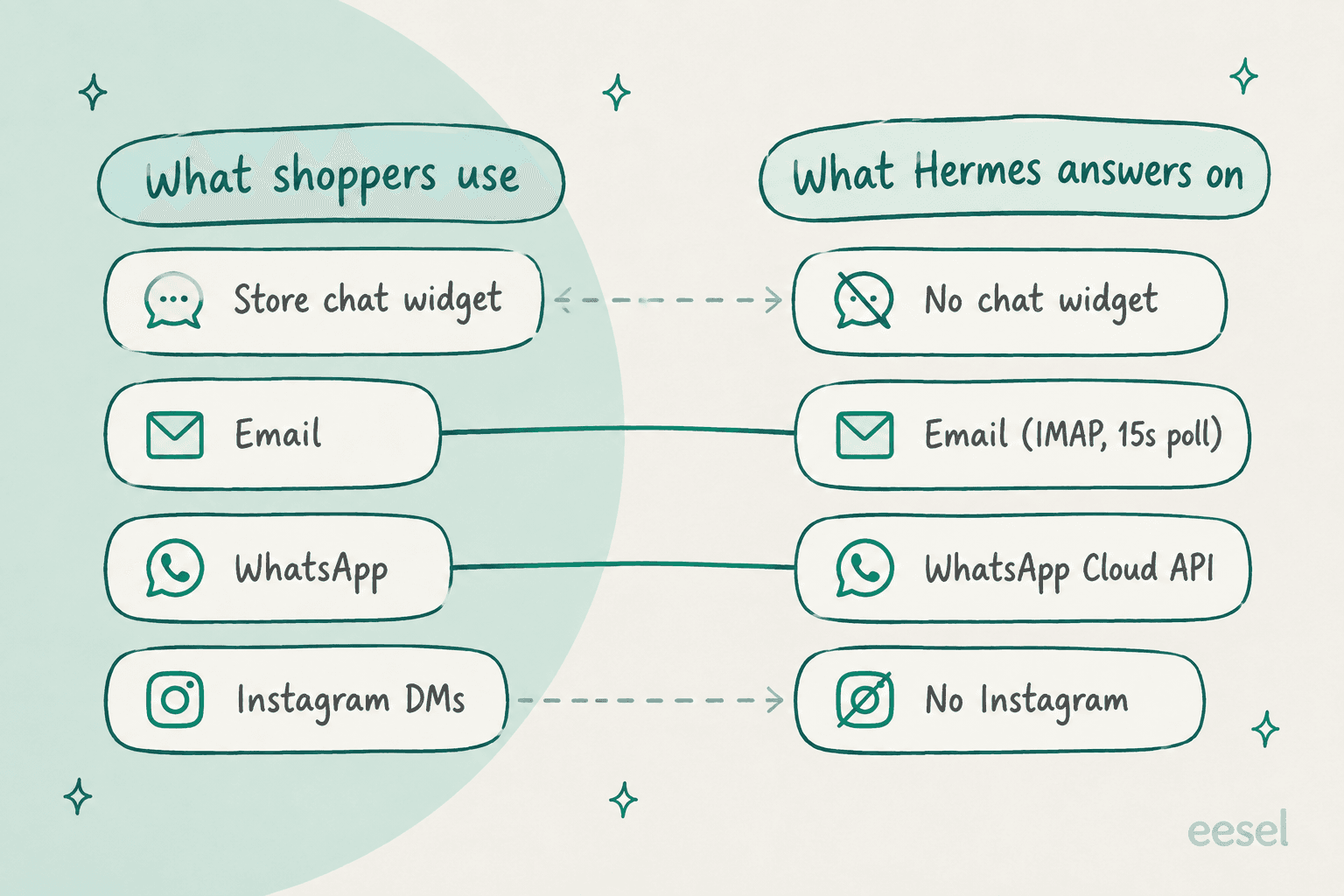
- Store chat: no. Hermes has no website widget, the thing most people mean by an ecommerce chatbot. The closest thing is its API server, which the docs warn "gives full access to hermes-agent's toolset, including terminal commands" (API server). Not something to put behind a public chat box.
- Email: yes. Hermes polls an IMAP inbox every 15 seconds by default and replies in plain text (email docs).
- WhatsApp: yes, with a gap. Hermes supports Meta's official Cloud API, but "Message-template support... is not yet implemented in Hermes" (WhatsApp Cloud docs). Without templates, it can't send a shipping update more than 24 hours after the shopper last wrote, which rules out proactive WhatsApp support.
- Instagram and Messenger: no. Neither appears in the gateway's channel list.
And there's the access default. "If no allowlists are configured... all users are denied" (security docs). Unknown senders get a pairing code you approve by hand. To answer strangers you'd set GATEWAY_ALLOW_ALL_USERS=true, which the same docs say never to do in production on a bot with terminal access. That's the clearest sign Hermes was built as your agent, not your customers'.
For comparison, Shopify's own answer for storefront chat is Shopify Inbox. Shopify's migration page tells merchants who want AI chat without code to "use the Inbox agent in Shopify Inbox."
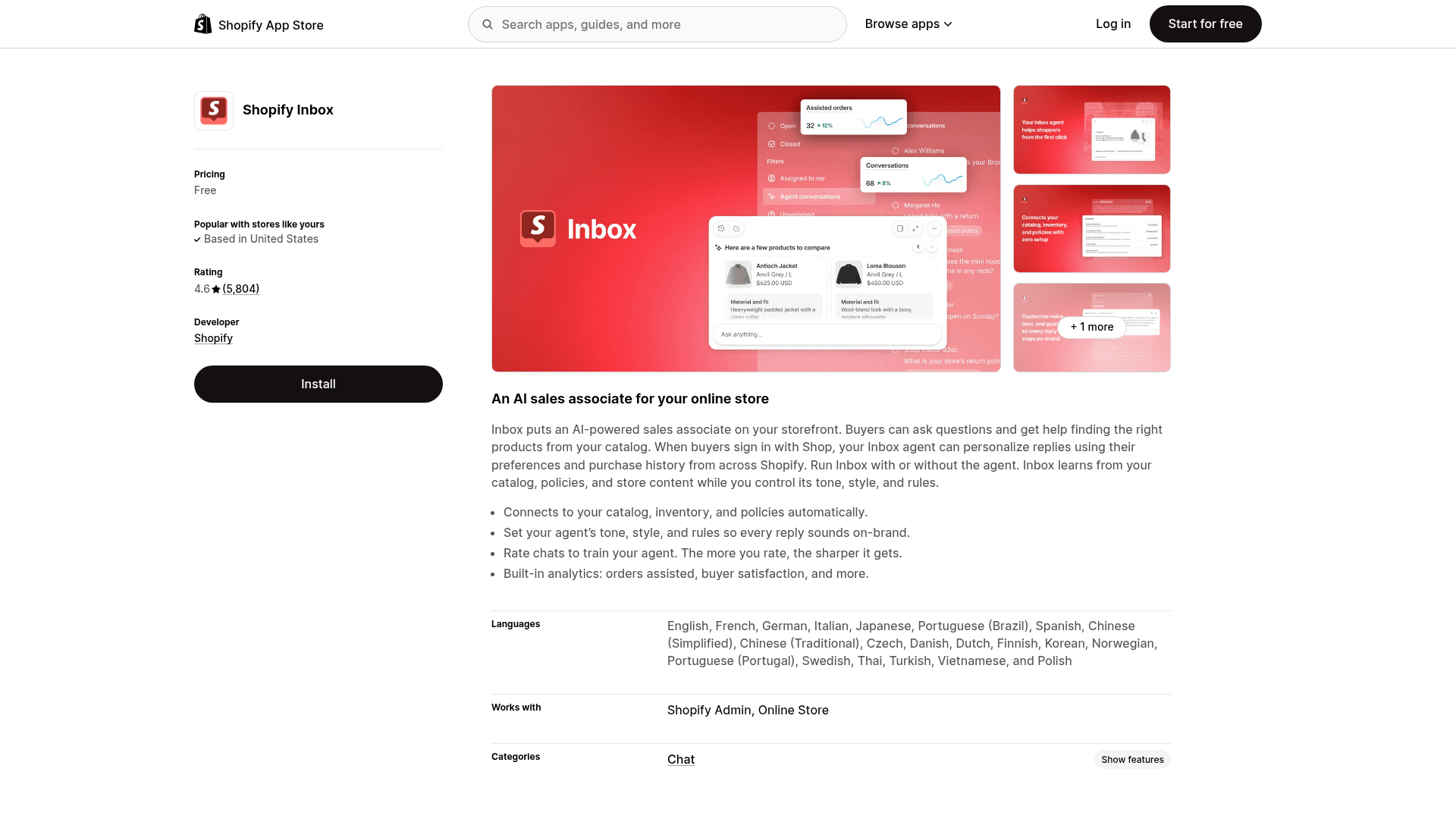
It's free and rated 4.6 from 5,804 reviews, but it's a sales associate first, and its order lookups need the shopper to sign in. Reviews also mention the gaps a support team feels:
"AI agent is great but without a way to handover the conversation to a human agent, I dont think there is a way I can use it 24x7. In fact, I have made the hard decision of turning it off completely."

Shopify replied that the agent "always shows buyers an option to connect to staff after every message", so that one may be a setup issue. And Shopify Sidekick is off the table for this job: "Sidekick can't talk to your customers or handle customer support conversations on your behalf" (Sidekick setup).
What Hermes on Shopify actually costs
The license is free and Shopify's Admin API has no per-call fee. The bill is everywhere else.
Model tokens. Nous Portal runs Free at $0, Plus at $20/month for $22 of credit, Super at $100 and Ultra at $200. You can also connect an eligible ChatGPT plan for inference.
Shopify rate limits. These don't cost money, but they cap how fast lookups run, and they're shared with every other app on the store (rate limits):
| Shopify plan | GraphQL Admin API limit | Notes |
|---|---|---|
| Standard plans | 100 points/second | Single query capped at 1,000 points |
| Advanced | 200 points/second | Mutations cost 10 points by default |
| Plus | 1,000 points/second | Shared across all installed apps |
| Shopify for enterprise | 2,000 points/second |
A support lookup is cheap in points, so this rarely bites for drafting. It bites when a nightly eval job and a reporting app hit the same store at once. Plan prices themselves are in my Shopify pricing breakdown.
The plumbing. A token refresh job, a webhook relay, a read-only MCP wrapper, a helpdesk connection and an eval harness. Each is a weekend. Together, they're a small product you now maintain. When one Hacker News user described connecting Hermes to their own business tools, it was an internal win, not a customer-facing one:
"I've added MCP servers to my internal business tools (Elixir apps) and can chat with the Nous Hermes agent over Telegram about pending orders, inventory level, historical product prices, etc., without having to click/dick around with a web UI."

That's the sweet spot, and it's worth noticing. My build vs buy breakdown puts numbers on the engineering side.
Where Hermes on Shopify stops working
All of the above assumes the drafting shape. Point Hermes at shoppers directly and you run into the walls from my support review:
- Approvals go to whoever is chatting. On messaging platforms, Hermes "waits for the user to reply" yes or approve (security docs). In a shopper's WhatsApp thread, that user is the shopper. And the gate covers shell commands, not API calls.
- Memory is per profile. Built-in memory is
MEMORY.md(2,200 characters) andUSER.md(1,375), shared across every chat the profile runs (memory docs). Don't let it save shopper details. - Webhook runs can't ask a human. On unattended surfaces like webhooks, dangerous commands are denied by default. Good for safety, but it means an order-event run can only draft or alert.
- The 60-day window. Covered above, and it's the one that produces wrong answers instead of errors.
The Hermes community's advice for anyone tempted to go live is the same as mine:
"Yes, but I would start with it as a draft-and-escalate helper before letting it answer everything live. For local customers, the dangerous cases are usually not the repeated FAQ questions. They are the almost-FAQ questions."
"Almost-FAQ" is exactly what an ecommerce queue is full of: a WISMO question with a "can you also change the address?" tacked on.
Hermes vs Shopify Inbox vs eesel for Shopify support
| Hermes Agent | Shopify Inbox agent | eesel | |
|---|---|---|---|
| What it is | General self-hosted agent | Shopify's storefront AI sales associate | AI helpdesk teammate |
| Connects to Shopify | Your own Dev Dashboard app + token job | Built in | Shopify install screen, no token |
| Order lookups | Yes, via Admin API you wire | Shopper must sign in with Shop | Yes: by number, email, tracking |
| Refunds and cancels | Possible, not recommended | Not documented | Yes, can wait for human approval |
| Works in your helpdesk | You connect it | No, storefront chat only | Gorgias, Zendesk, Freshdesk and more |
| Channels | Email, WhatsApp, Slack and more | Store chat widget | Chat widget plus helpdesk channels |
| Price | Free + tokens + your time | Free | 100 free credits, then from $299/month |
| Who maintains it | You | Shopify | eesel |
For the wider field, my best AI for Shopify support roundup and best AI helpdesk for Shopify list go deeper, and Hermes Agent alternatives covers the general-agent side.
If your helpdesk is Gorgias, factor in Gorgias pricing for Shopify stores, since its AI is billed per automated interaction.
Should you run Hermes on your Shopify support?
After reading both sets of docs, here's where I land.
Yes, if you have an engineer who enjoys this, and the job is an internal helper: your team asks Hermes about an order in Slack, or it drafts WISMO replies into the helpdesk for a person to send. A Dev Dashboard app with read-only scopes, a refresh job and a three-tool wrapper is a defensible setup, and Hermes' cron makes it useful.
No, if you want AI talking to shoppers in your store chat, issuing refunds, or covering orders older than 60 days without extra approval. Same answer if nobody can own a token job and a webhook relay. Those aren't Hermes flaws. It's a general agent built to work for its operator, and Shopify support is a job with a stranger on the other end.
The middle path most stores end up on is a ready-made Shopify AI chatbot or helpdesk agent for shoppers, with Hermes as the team's own back-office assistant if someone on the team loves tinkering. I made the same call for the ChatGPT version of this question, and the open-source chatbot crowd lands in the same place.
Try eesel for Shopify support
If what you want is AI answering "where's my order?" on your Shopify store this week, eesel works like a new support hire who already knows your catalog. You approve it on Shopify's install screen, no token to paste, and it looks up orders by number or email, checks tracking, and reads products live, inside Gorgias, Zendesk, Freshdesk or its own chat widget. Returns, address changes, refunds and cancels can each wait for a person to approve, which is the guardrail Hermes would make you build yourself.
It's also comfortable for the Hermes crowd. The eesel CLI runs the same teammate from a terminal: eesel integrations connect shopify hooks up the store, eesel approvals list shows the refunds waiting on you, and coding agents like Claude Code or Cursor can drive it too. Pricing is simple: 100 free credits, then plans from $299/month for 500, where one ticket or chat is one credit however many lookups it takes. Try eesel on your own store.
Frequently Asked Questions
Can Hermes Agent do Shopify customer support?
Does Hermes Agent have a Shopify integration?
shopify skill that calls the GraphQL Admin API with curl, and Shopify's own AI Toolkit lists Hermes as a supported host for developer tasks. For a ready-made Shopify integration built for support, eesel connects through Shopify's install screen.How do I connect Hermes Agent to my Shopify store's orders?
How much does it cost to run Hermes Agent for Shopify customer support?
Can Hermes Agent issue Shopify refunds automatically?
refundCreate mutation only needs the orders write scope. I wouldn't allow it. Hermes' approval prompts cover shell commands, and in a customer chat the person replying yes would be the customer. Keep refunds with a human, or use returnRequest, which waits for merchant approval. More in can AI handle refunds.Can Hermes Agent answer Shopify customers on WhatsApp?
Hermes Agent vs Shopify Inbox: which should a store use?
What is the best Hermes Agent alternative for Shopify support?



Article by
Rama Adi
Rama is a software engineer at eesel AI with two years of experience writing about B2B SaaS, AI tools, and customer support technology. Based in Bali, Indonesia, he brings a developer's perspective to product comparisons — cutting through marketing copy to what the integrations and APIs actually do.