Help Scout AI quality assurance: what it measures, and how to score the rest

Rama Adi

Katelin Teen
Last edited November 21, 2026

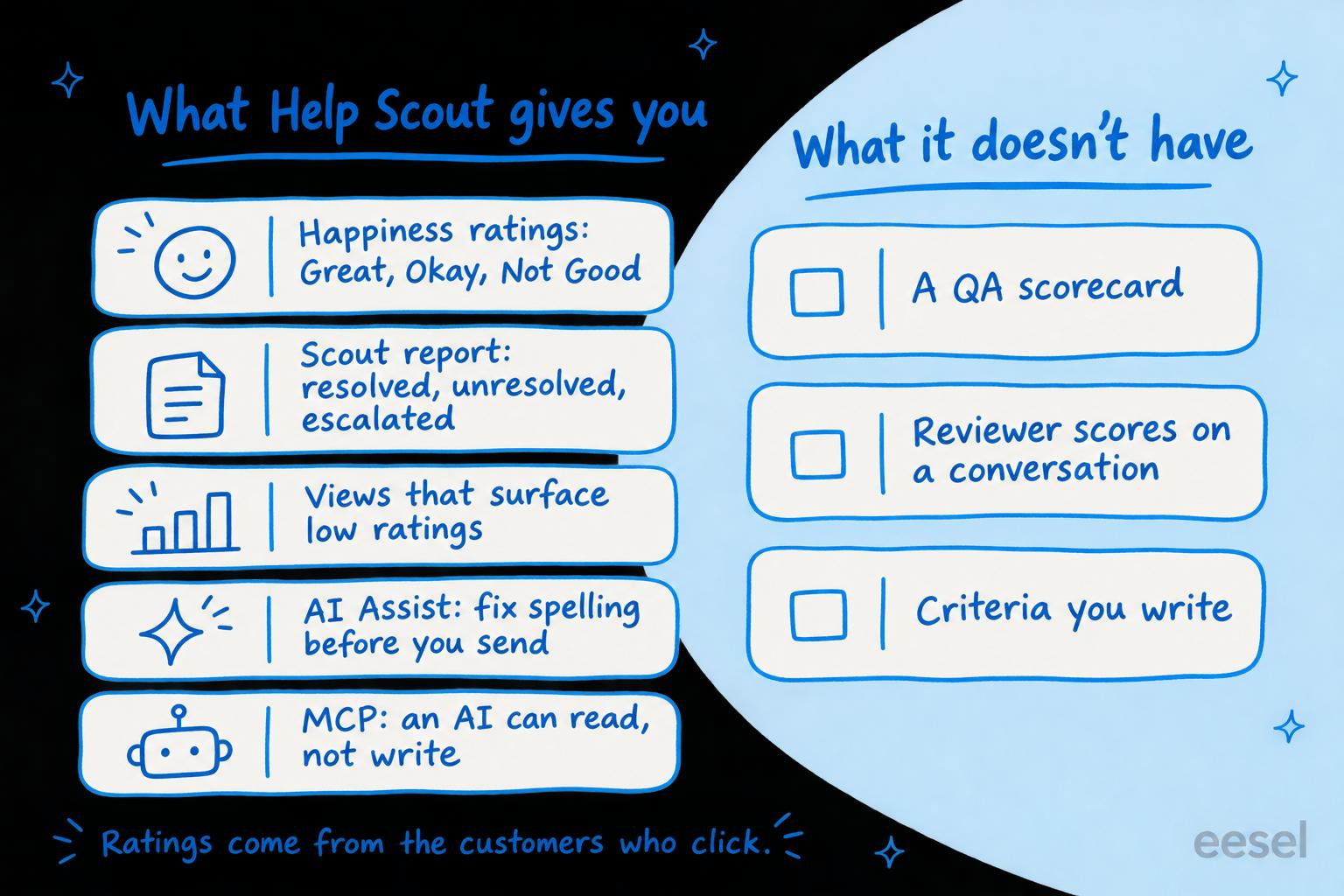
Help Scout has no AI QA scorecard: nothing in it scores your team's conversations for accuracy, tone or process; the quality signals it does have are customer ratings and a report on whether its AI agent resolved each chat. A QA lead gets the customer's own rating on each reply (Great, Okay or Not Good, rolled up into a Happiness Score), a Scout report that marks each AI conversation Resolved, Unresolved or escalated, and read-only access for Claude or ChatGPT through Help Scout's MCP server. So Help Scout tells you how the customers who click a rating felt, and leaves "was the answer right for our policy?" to you. You can cover that with a weekly hand-scored sample, an AI assistant reading conversations over MCP, or an AI teammate like eesel that scores every closed conversation against a rubric you write and leaves its reasons as an internal note. A coding agent such as Claude Code can write that rubric into eesel and set up the schedule through the eesel CLI, though a Help Scout admin still approves the connection.
Does Help Scout have AI quality assurance?
No, not as a scorecard. I build eesel's integrations, so I read helpdesk docs for what a feature actually does under the marketing copy. Help Scout's AI features page lists Scout (its AI agent), AI Drafts, AI Summarize, AI Assist, Topics and an MCP server. None of them scores a conversation your team handled against a set of quality assurance criteria.
That fits how Help Scout describes its AI: built around how it "can be used to improve support", not around deflecting tickets. It also means a support lead who wants to know whether replies were accurate has to put the pieces together. Here is what each piece measures:
| Help Scout feature | Plan | What it tells a QA lead | What it doesn't |
|---|---|---|---|
| Happiness ratings | Standard keeps 2 years of reports; Plus and Pro, the account's lifetime | How customers who clicked a rating felt about a reply | Anything about replies nobody rated |
| Scout report | Scout is on Standard, Plus and Pro, billed per resolution | Which AI conversations were resolved, unresolved or handed to a person | Whether a resolved answer was correct |
| AI Assist | Standard, Plus and Pro | Fixes spelling and grammar, and adjusts tone, before a reply is sent | Scores nothing after the fact |
| Topics | Plus and Pro | What customers write in about, by theme | How well the team answered |
| MCP server | Standard, Plus and Pro (report tools need Plus or Pro) | Lets your own AI assistant read conversations and reports | It can't write notes or tags back |
What do Help Scout's Happiness ratings tell you?
They tell you how the customer felt about a reply, in their own words. Turn on satisfaction ratings per inbox under Settings, Inboxes, then Satisfaction Ratings, and every email reply carries rating links. The customer picks Great, Okay or Not Good and can add a comment.
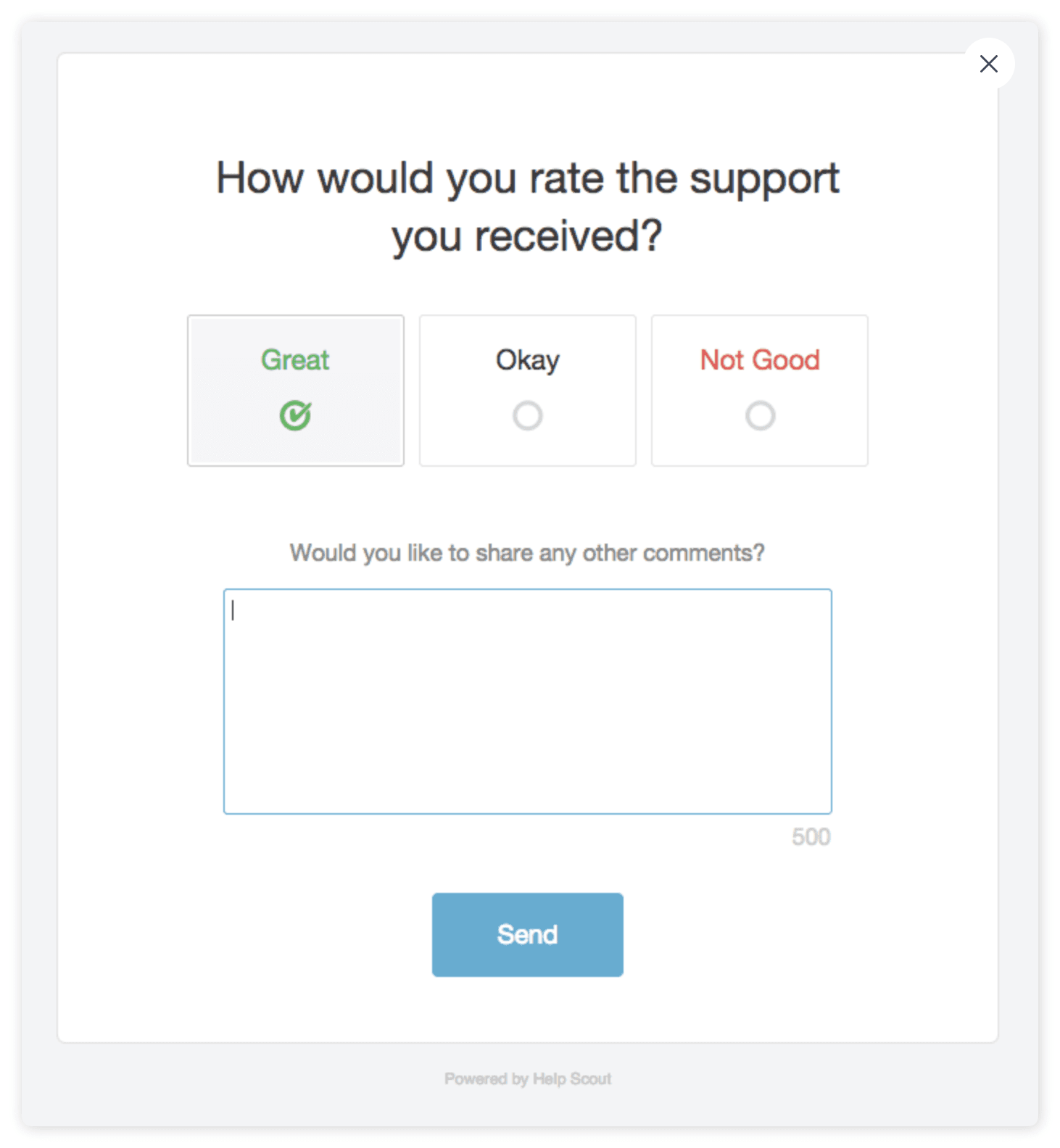
The rules matter if you plan to read it as a quality signal:
- Every reply can be rated. If an agent sends five replies, the customer can rate all five, one rating each.
- The window is 10 days. Customers can rate, or change a rating, for 10 days after the reply. Ratings can't be deleted.
- The score is a net number. The Happiness report shows the share of Great, Okay and Not Good, and a Happiness Score that is the share of Great minus the share of Not Good, calculated much like NPS.
- Ratings count on the reply's date, not the date the customer clicked, so last week's number can still move. My notes on Happiness report dates cover what that does to a weekly review.
- Each agent has their own tab. Open the Company report, then a User report, for one person's ratings.
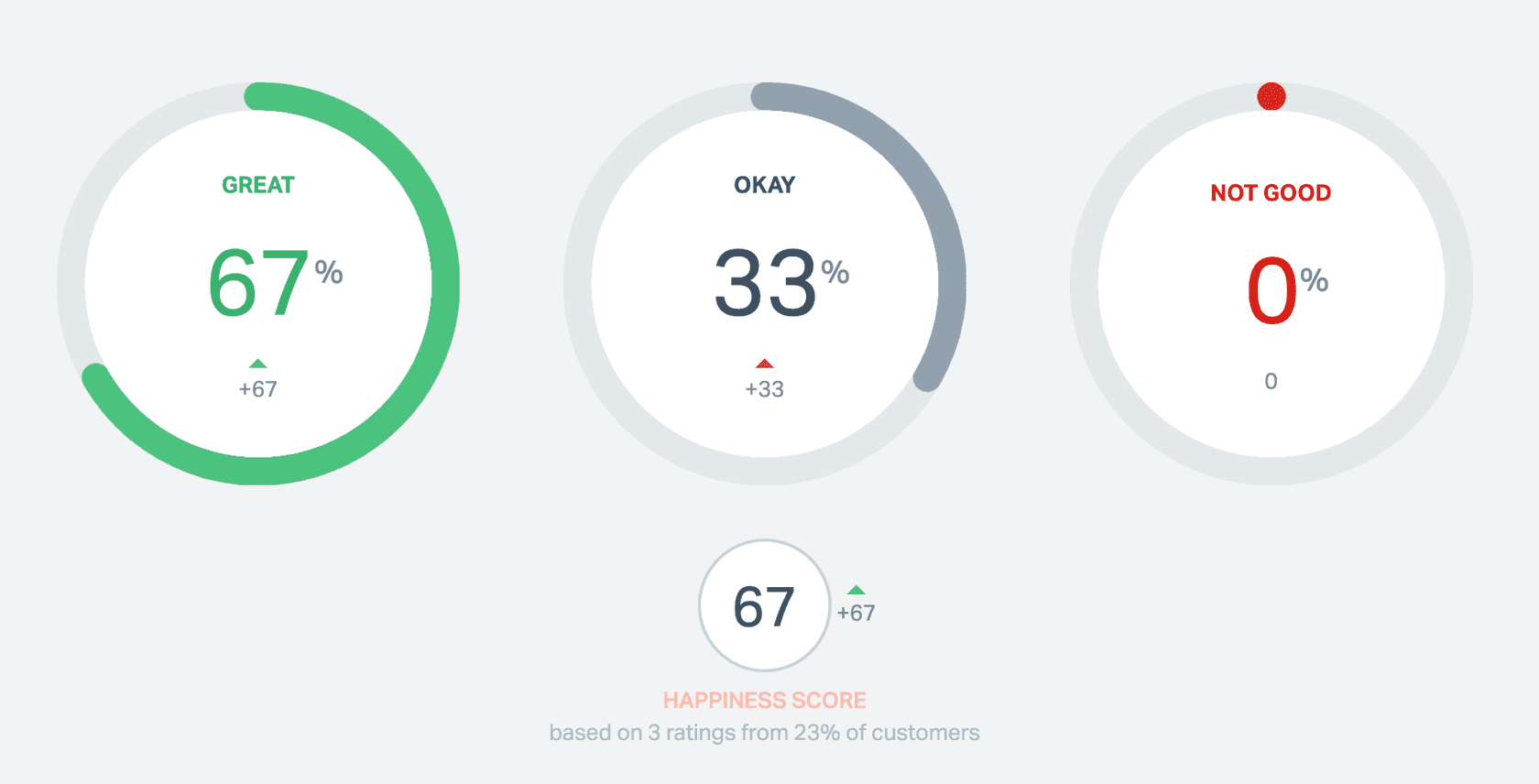
Look at the small print in that screenshot: three ratings from 23% of customers. That is the limit of ratings as QA. Like any CSAT survey, they hear from the customers who bother to click, and a customer who got a confidently wrong refund answer may rate it Great until the refund doesn't arrive. A rating says how the reply felt. It doesn't say whether the reply followed your policy, which is the gap AI CSAT tools try to close.
Ratings are still a good place to start a review. Since May 2026, Help Scout's views can filter on what happens inside a conversation, so you can "spot low-rated interactions that need follow-up", and a workflow can email a lead when a rating comes in. If you want to know more about how customers feel, my post on Help Scout sentiment analysis goes further.
How do you check Scout's AI answers in Help Scout?
Use the Scout report, under Reports, then Scout. Scout is Help Scout's AI agent (the product you pay for is called Envoy, at $0.75 per resolution), and the report sorts every conversation it took part in into three groups:
- Resolved: Scout gave an answer and the customer didn't say they needed more help.
- Unresolved: the customer said they needed more help, or Scout escalated because of an exclusion, but the customer didn't reach out.
- Human Escalation: the conversation went to your team.
Each Beacon (Help Scout's chat widget) has its own report, with a sessions table showing the customer's first question, the resolution, how the session ended, the rating and the Topic. Help Scout's Scout best practices say to sort by resolution, read the conversations where customers weren't helped, and add an Improvement where Scout should have answered better. Account Owners and Administrators can also see the sources Scout checked when it failed.
That is a sensible review loop for the AI's misses. Notice what "Resolved" means, though: the customer didn't ask for more help after the last answer. That is also when Help Scout bills a resolution. A wrong answer the customer believed counts as resolved, so it's worth reading a sample of resolved sessions too, not only the failures. Measuring AI containment and escalation covers that trap in more depth.
How much does QA in Help Scout cost?
Nothing on top of your plan: ratings, the Happiness report and the Scout report don't cost extra. What changes by plan is how far back reports go and which AI tools you get. From Help Scout's pricing page, checked 21 November 2026:
| Plan | Per user, billed annually | Monthly billing | What matters for QA |
|---|---|---|---|
| Free | $0 | $0 | Up to 5 users, "No AI tools included" |
| Standard | $25 | $30 | Happiness reports for the last 2 years, AI Assist, MCP access without report tools |
| Plus | $45 | $54 | Lifetime reports, Topics, AI Drafts, MCP report tools |
| Pro | $75 | $90 | Everything in Plus, minimum 10 users |
| Envoy (add-on) | $0.75 per resolution | Billed monthly in arrears | Scout and its report |
For a team of eight on Plus, that is $360 a month billed annually, with the Scout report included if you also pay for Envoy resolutions. My Help Scout pricing notes cover the rest of each plan.
What does a QA scorecard need that Help Scout leaves to you?
Most QA scorecards (here are some scorecard criteria for reference) check three things Help Scout never scores: whether the answer was right for your policy, whether the agent followed your process (tags, saved replies, escalation), and whether it sounded like you. Those need someone, or something, that has read your rules.
Pick what you want to check and see what covers it:
Pick a check to see what covers it in Help Scout, and what covers it if nothing does.
There are three ways to cover the gap.
Score a sample by hand
The cheapest route needs nothing new, and it's the one most guides to support QA with AI start from. Each week, a lead opens a view of the last week's closed conversations (low-rated ones first), reads ten or twenty, and scores each against a short rubric in a spreadsheet. Agree first on what each score means, so two reviewers give the same conversation the same number: support QA calibration helps with that, and so do these QA feedback examples.
The limit is the obvious one: a person reads a sample, not every conversation, and the scores live outside Help Scout.
Ask an AI assistant over MCP
Help Scout's MCP server lets Claude, ChatGPT and Cursor list, search and summarize conversations, including their threads, tags and custom fields, and pull Happiness and other reports on Plus and Pro. Each person connects with their own Help Scout login, so the assistant sees only what that person can.
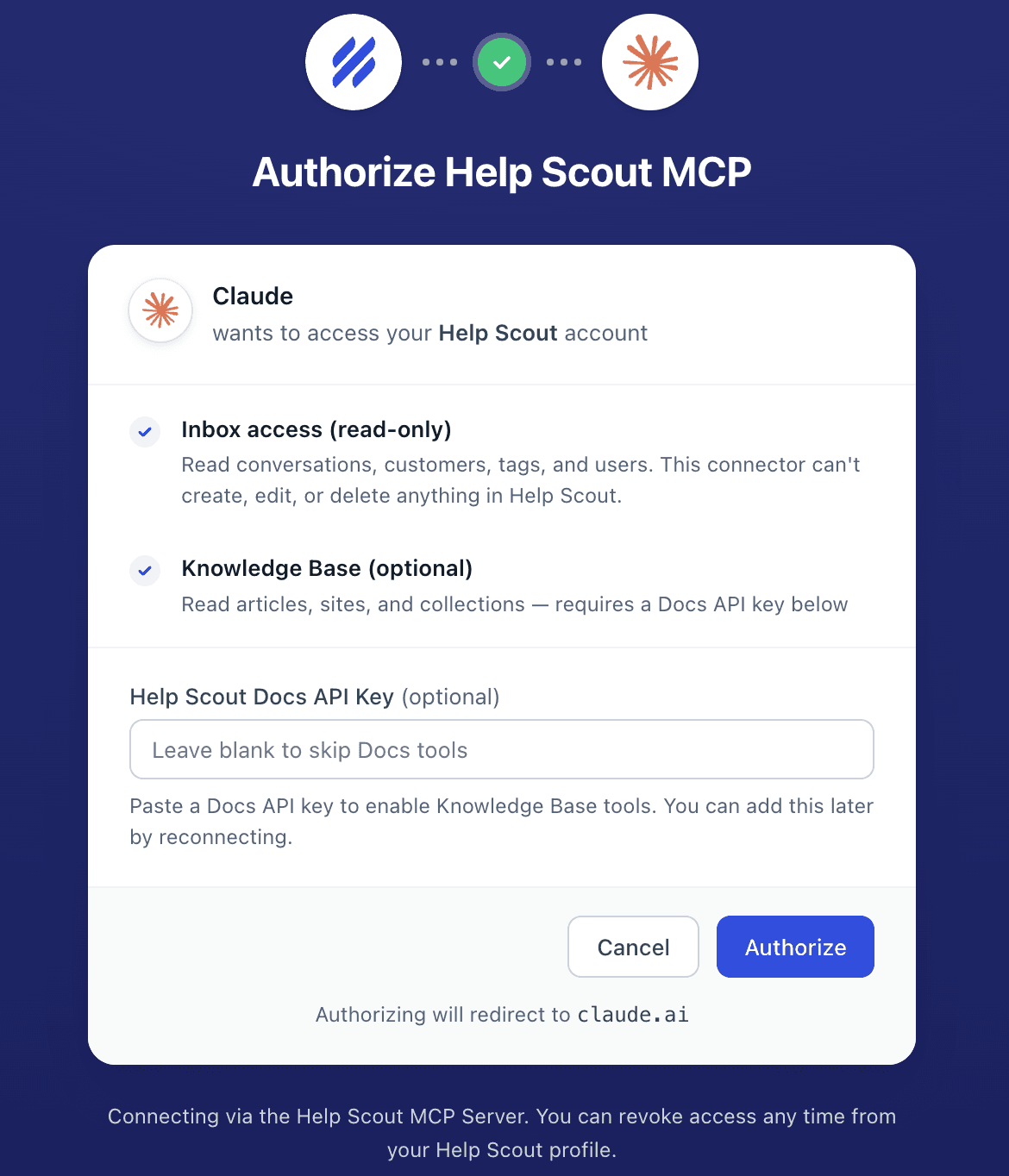
That makes a decent weekly QA session: paste your rubric, ask the assistant to read last week's closed conversations in the Support inbox, and have it score each one with a reason. Two limits to know. New connections are read-only, so the assistant can't add notes or change tags on what it scored, and the results stay in your chat. And it runs when someone remembers to ask, not every morning. On Claude Team and Enterprise plans, only a Claude Owner can add the connector. My notes on Claude for Help Scout cover the setup.
Have an AI teammate score against your rubric
The third route is an AI agent that runs the review on its own, with your rules, and writes the result back into Help Scout. This is what I'd do with eesel. eesel's Help Scout integration can list conversations by status, tag or the day they were last updated, read each one with every reply, note and tag, leave an internal note and add tags.
Put that on a schedule and every morning it:
- Lists the conversations closed since yesterday.
- Reads each one against the criteria you wrote in plain words ("a refund offer must match the 30-day policy in the returns doc", "shipping questions get the
shippingtag", "we sign off with the agent's first name"). - Leaves the score and the reasons as an internal note, and tags the misses
qa-reviewso a lead can build a Help Scout view of them. - Sends the lead a summary of the day, in Slack or by email if you connect them.
You write the rubric, so policy accuracy and voice are just more lines in it, and you change them whenever your policies change. It can grade Scout's conversations with the same rubric as your team's, and the same eesel agent can also draft replies or tag and route new conversations if you want it to. Two things to know before you start: eesel's notes show the name of the Help Scout user it connects as, so give it its own user, and it can't set custom fields, so scores live in notes, tags and the reports eesel writes, not in Help Scout's Happiness report.
Scheduled checks like this already run for eesel's customers. Cactus Club Cafe runs a second eesel agent on its Zendesk helpdesk that audits the daily finance extract every morning: it checks each store and either solves the ticket as balanced or leaves it open with the imbalance named. Between 8 August and 8 September 2026 it ran about 60 times. A QA review is the same shape: a job every morning, against written rules, with the result left on the ticket.
Is Help Scout's approach to quality enough?
Credit where it's due: Help Scout doesn't pretend. (Gorgias, by comparison, ships Auto QA, which scores three criteria by AI and leaves the rest to a person.) Ratings are honest customer feedback, the Happiness Score is easy to read, the Scout report tells you plainly where the AI fell short, and AI Assist catches typos before they reach anyone. For a small team, ratings plus a weekly read of the low-rated conversations is a fair QA program.
My take: treat Happiness ratings and the Scout report as your triage list, not your QA score. They show you where to look, but they only hear from customers who click, and "resolved" only means the customer stopped asking. Once you need to know whether answers followed your policies on every conversation, you need a reviewer that has read those policies: a person's time, an assistant over MCP once a week, or an AI teammate that does it every morning and writes back to Help Scout.
Try eesel next to Help Scout
Keep your Happiness ratings and the Scout report for what they do well. What eesel may do depends on who is asking: you choose which of its actions run on their own, which ask first and which stay off. Let it read your closed Help Scout conversations against the rest of your rubric: your refund rules, your tags and your voice, written in plain words and changed whenever your policies do. It leaves its reasons in an internal note on each conversation, tags the ones a lead should read, and answers to you in plain language when you want to change what it checks.

Try eesel on your Help Scout inbox, starting with yesterday's closed conversations.